instrument cluster MERCEDES-BENZ M-CLASS SUV 2011 User Guide
[x] Cancel search | Manufacturer: MERCEDES-BENZ, Model Year: 2011, Model line: M-CLASS SUV, Model: MERCEDES-BENZ M-CLASS SUV 2011Pages: 389, PDF Size: 9.22 MB
Page 69 of 389
G
WARNING
If EBD ha smalfunctioned, the braking system
remains available with full brake boosting
effect. However, the rear wheels can still lock,
e.g. under full braking. This coul dcaus eyou
to lose control of your vehicle and cause an
accident. You shoul dtherefore adapt your
drivin gstyle to the different handling charac-
teristics.
X Observe the notes on warning and indica tor
lamps (Y page 286) as well as display mes-
sages (Y page 256). ADAPTIV
EBRAKE
ADAPTI VEBRAKE enhances braking safety
and offers increased braking comfort. In addi-
tion to the braking function, ADAPTIV EBRAKE
als oh as the HOLD function (Y page187) and
hi ll st art assist (Y page141). For further
information, se eDriving tip s(Ypage 162). PRE-SAFE
®
Brake
PRE-SAFE ®
Brake is only available in vehic les
with DISTRONIC PLUS.
i Observe the "Important safety notes" sec-
tion (Y page61).
PRE-SAFE ®
Brake can help you to minimise
the ris kofaf rontal collision wit havehicle
ahead or reduce the effects of such acolli-
sion. If PRE-SAFE ®
Brake has detected arisk
of collision, you wil lbewarned visuall yand
acoustically as wel lasbyautomatic braking.
PRE-SAFE ®
Brake cannot prevent acollision
withou tyou rintervention.
Thi sfun ctio nwill issue awarnin gats peeds of
arou nd 30 km/h or moreif:
R for aperiod of several seconds ,the dis-
tance to the vehi cleinf ront is to oshor tfor
the speed at which you ar etravelling .The ·
distanc ewarning lamp then lights up
in the instrument cluster.
R you are rapidly approaching the vehicle in
front .Ani ntermittent warning tone will
then sound and the ·distance warning
lamp will light up in the instrument cluster.
X Brake immediately in order to increas ethe
distanc efrom th evehicle in front.
or
X Take evasiv eactio nprovide ditiss afe to do
so.
If the driver and passengers have fastened
their seat belts, PRE-SAFE ®
Brake can also
can also perform the following at speeds of
above approximately 30 km/h:
R brake the vehicle automatically from a
spee dofuptoa pproximately 20 0km/h
R trigge rpreventative passenger protection
measures (PRE-S AFE®
)( Ypage 45)
Due to the nature of the system, particularly
complicated driving conditions may cause
unnecessar ywarnings or the unnecessary
intervention of PRE-SAFE ®
Brake. To end this,
you can either depress the accelerator pedal
further, activate kickdown or release the
brake pedal.
The braking action of PRE-SAFE ®
Brake is
ended automatically if:
R you drive slowe rthan approximately
15 km /h.
R you manoeuvre to avoid the obstacle.
R there is no longe rany danger of arear-end
collision.
R there is no longer an obstacl edetected in
front of your vehicle.
If you have activated DSR (Y page 220), PRE-
SAFE ®
brak eisd eactivated.
With the help of the rada rsensor system,
PRE- SAFE ®
Brake can detect obstacles that
are in front of your vehicle for an exte nded
period of time.
At speeds up to approximately 70 km /h,
PRE- SAFE ®
Brake may als odetect stationary 66
Driving safet
ysystemsSafety
Page 110 of 389
If yo
uhear awarning tone when you leave the
vehicle ,the lights ma ystill be switched on.
X Turn the ligh tswitc htoà .
Dipped-beam headlamps X
To switch on th edipped-bea mhead-
lamps: turnthe ke yinthe ignition lock to
po sition 2or star tthe engine.
X Tur nthe li ght switch to L.
The L indicator lam pinthe instrument
clus terlight sup.
Day time driving lights You can activat
eordeactiva tethe daytime
driving ligh tsfunctio nusingthe on-board
compute r(Ypage 247).
X Day time drivin glights: activat ethe day-
ti me driving light sfunction using the on-
board computer.
X Turn the light switch to Ã.
When the engine is on: depe nding on the
ambien tlight conditions, the daytime driv-
ing lights or the parking and dipped-beam
headlamps are switched on.
When the dipped-beam headlamps are
switched on, the Lindicator lamp in the
instrumen tcluster lights up.
Automatic headlam pmode X
To switch on automatic headlamp
mode: turnthe light switc htoÃ.
Key in position 1in th eignition lock :the
side lamps ar eswitched on or off automat-
ically depending on the brightness of the
ambien tlight.
With the engin erunning: depe nding on the
brightness of the ambien tlight, the daytime
drivin glights 6
or the dipped-beam head-
lamps are switched on or off automatically.
When the dipped-beam headlamps are
switched on, the Lindicator lamp in the
instrumen tcluster lights up. G
WAR
NING
If the ligh tswitc hiss et to Ã,t he dipped-
beam headlamps will not com eonautomati-
cally if it is foggy. This could endanger you and
others. Therefore, tur nthe light switc hto
Lin fog.
The automatic headlamp featur eisonly an
aid. The driver is responsible for the vehicle's
lighting at all times.
Rear foglamp X
To switc honthe rear foglamp: turn the
key in th eignition lock to position 2or start
the engine.
X Tur nthe light switc htoLorÃ.
X Press the Rbutton.
The yellow Rindicator lam pint he
instrumen tcluster lights up.
X To switch off th erear foglamp: press the
R button.
The yellow Rindicator lamp in the
inst rument cluster goes out.
i If you switch the engine off (ke yinposi-
tion 1in the ignition lock )and then restart
it, the previous rear fogla mpsettings are
restored.
Rea rfoglamp X
To switch on th erearfoglamp: turnthe
key in the igni tion lock to position 2or start
the engine.
X Tur nthe light switc htoLorÃ.
X Press the Rbutton.
The yellow Rindicator lam pinthe
instrumen tcluster lights up.
X To switch off th erear foglamp: press the
R button.
The yellow Rindicator lamp in the
inst rument cluster goes out.
i If you switch the engine off (ke yinposi-
tion 1in the ignition lock )and then restart
6 Only if daytime driving ligh tshave been activa tedv ia the on-board computer. Exterior lighting
107Lightsand windscr een wipers Z
Page 112 of 389
The
K indicator lam pint he inst rument
cluster lights up when th emain-beam head-
lamps are switched on.
X To switch off the main-bea mhead-
lamps: move the combination switch back
to its normal position.
The K indicator lamp in the instrument
cluster goes out.
Headlam pflasher X
To switch on: turnthe key in the ignition
lock to position 1or 2or star tthe engine.
X Pull the combina tion switc hinthe direction
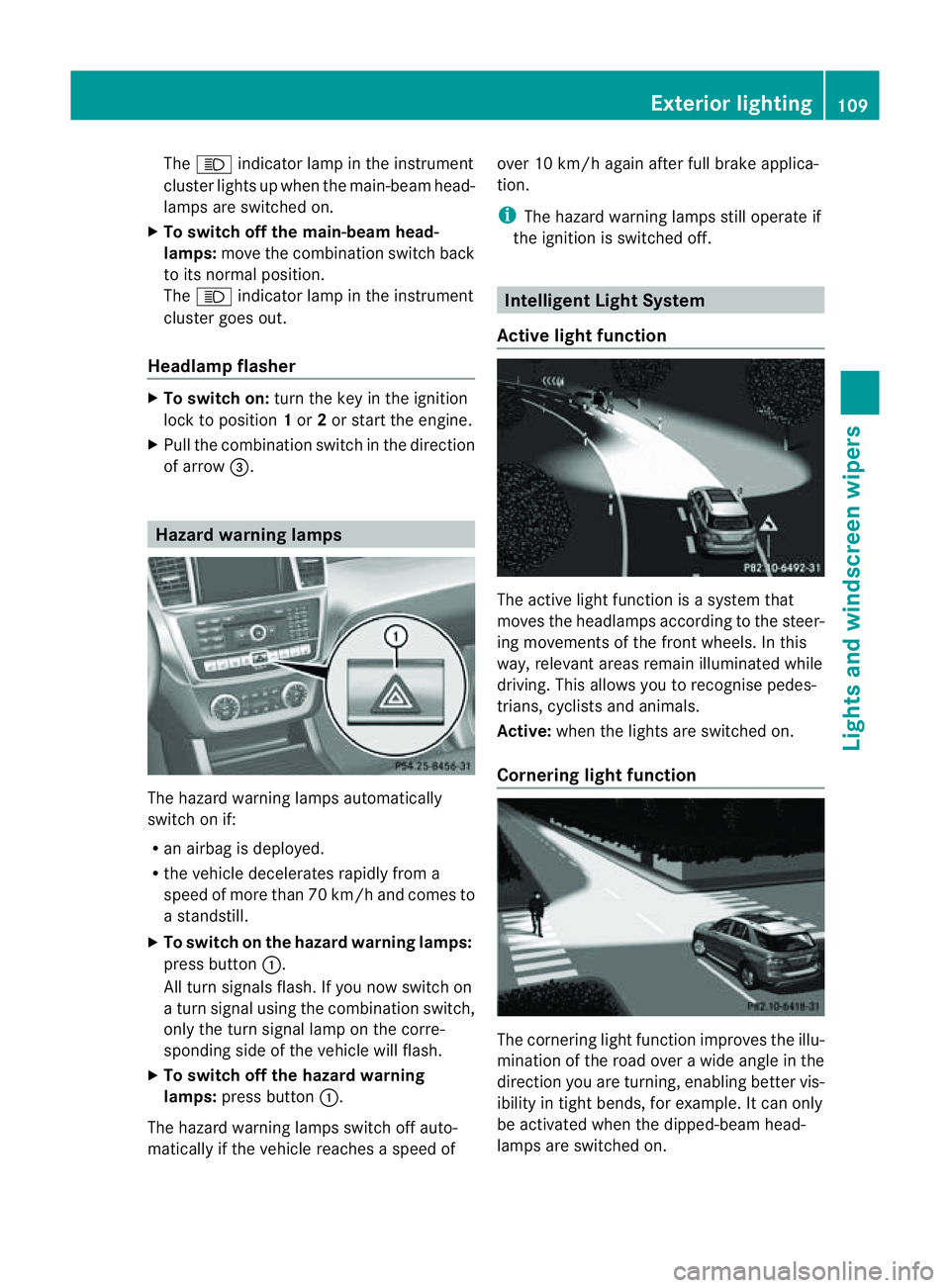
of arrow =. Hazard warning lam
psThe hazar
dwarning lamps automatically
switch on if:
R an airbag is deployed.
R the vehicle decelerates rapidly from a
spee dofm ore than 70 km /hand come sto
as tandstill.
X To switc honthe hazard warning lamp s:
press button :.
All turn signal sflash. If you now switc hon
at urns ignal using the combination switch,
only the tur nsignal lamp on the corre-
spondin gside of the vehicle will flash.
X To switch off th ehazard warning
lamps: press but ton:.
The hazar dwarnin glamps switc hoff auto-
matically if th evehicle reaches aspeed of over 10 km/h again after full brak
eapplica-
tion.
i The hazar dwarnin glamps still operat eif
the ignition is switched off. Intelligen
tLight System
Active light function The active light fun
ction is asystem that
moves the headlamps according to the steer-
ing movements of the front wheels. In this
way, relevan tarea sremai nilluminated while
driving. This allows you to recognise pedes-
trians, cyclists and animals.
Active: when the lights are switched on.
Cornering light function The cornering light func
tion improves the illu-
mination of the roa dover awide angle in the
direction you are turning, enabling better vis-
ibility in tight bends, for example. It can only
be activated when the dipped-beam head-
lamps are switched on. Exterior lighting
109Lightsand windsc reenwipers Z
Page 114 of 389
X
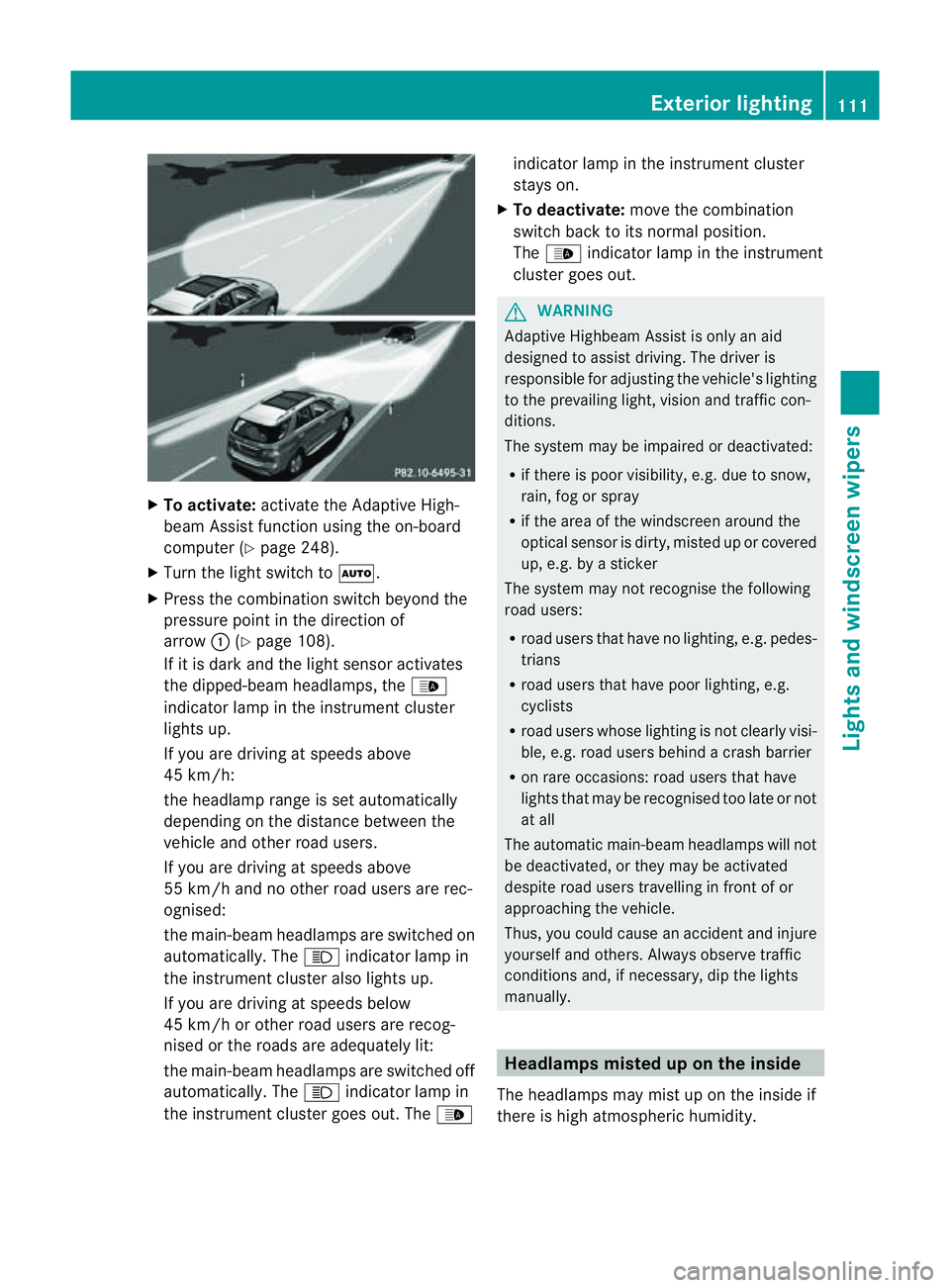
To activate: activatethe Adaptive High-
beam Assist function using the on-board
computer (Y page 248).
X Turn the ligh tswitch to Ã.
X Press the combination switch beyond the
pressure point in the direction of
arrow :(Ypage 108).
If it is dark and the light sensor activates
the dipped-beam headlamps, the _
indicator lamp in the instrument cluster
lights up.
If you are driving at speed sabove
45 km/h:
the headlamp range is set automatically
depending on the distanc ebetween the
vehicle and other road users.
If you are driving at speeds above
55 km/h and no other road users are rec-
ognised:
the main-bea mheadlamps are switched on
automatically. The Kindicator lam pin
the instrument cluster also lights up.
If you are driving at speeds below
45 km/h or othe rroad user sare recog-
nised or th eroads ar eadequately lit:
the main-beam headlamps are switched off
automatically. The Kindicator lamp in
the instrumen tcluster goes out. The _indicator lamp in the instrument cluster
stays on.
X To deactivate: move the combination
switch back to its normal position.
The _ indicator lamp in the instrument
cluster goes out. G
WARNING
Adaptiv eHighbeam Assist is only an aid
designed to assist driving. The driver is
responsible for adjusting the vehicle's lighting
to the prevailing light, vision and traffic con-
ditions.
The system may be impaired or deactivated:
R if there is poor visibility, e.g. due to snow,
rain, fog or spray
R if the area of the windscreen around the
optical sensor is dirty, misted up or covered
up, e.g. by asticker
The syste mmay not recognise the following
road users:
R road users that have no lighting, e.g. pedes-
trians
R road users that have poor lighting, e.g.
cyclists
R road users whos elighting is not clearly visi-
ble, e.g. road users behind acras hb arrier
R on rare occasions: road users that have
lights that may be recognised too late or not
at all
The automatic main-beam headlamps will not
be deactivated, or they may be activated
despite road users travelling in front of or
approaching the vehicle.
Thus, you could cause an accident and injure
yoursel fand others. Alway sobserv etraffic
conditions and ,ifnecessary, dip the lights
manually. Hea
dlamps misted up on the inside
The headlamps may mist up on the insid eif
there is hig hatmospheric humidity. Exterio
rlighting
111Lightsand windscreen wipers Z
Page 120 of 389
position
,the rain senso rismore sensitive
than in the Äposition ,causing the wind-
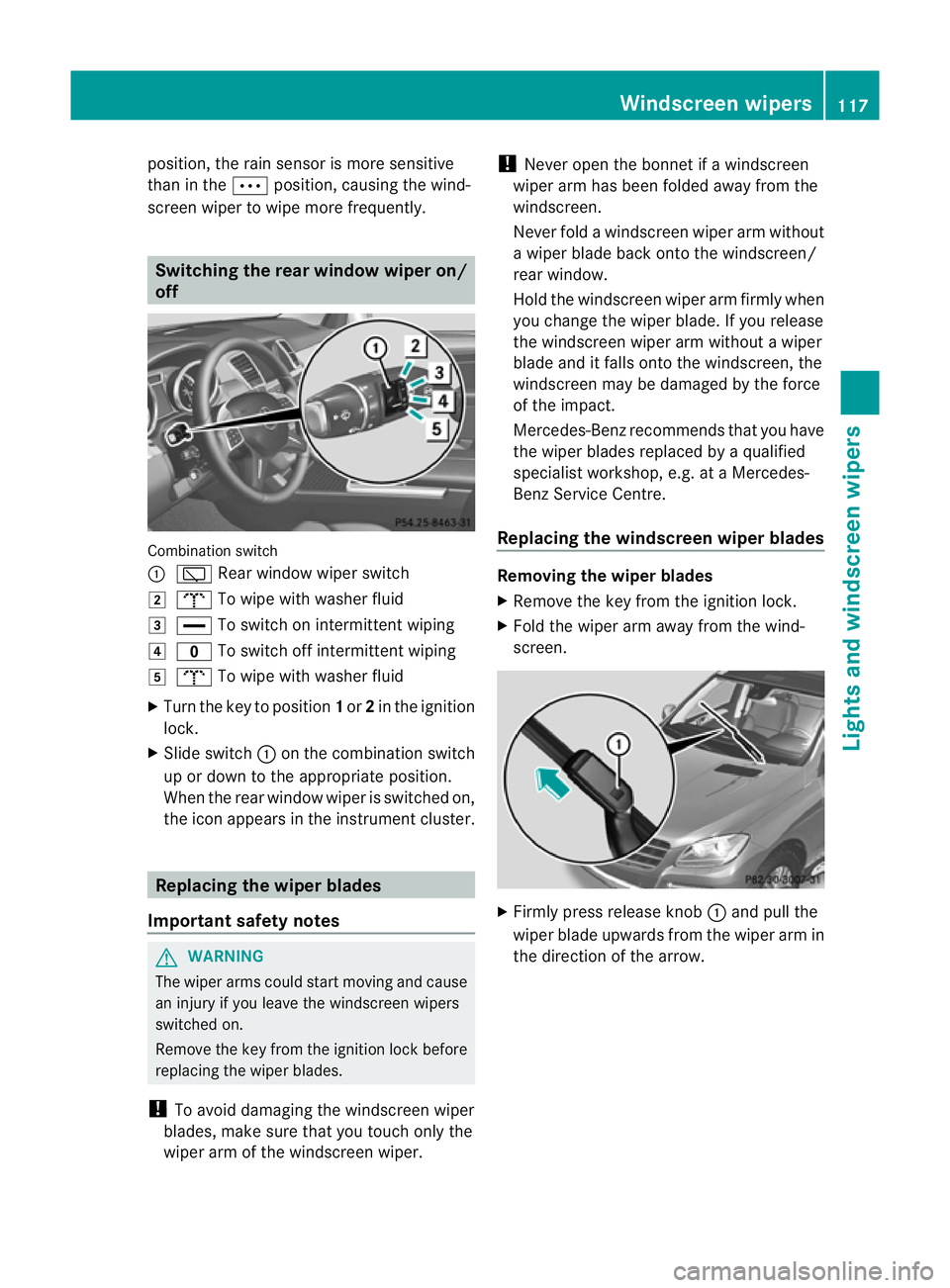
screen wiper to wipe more frequently. Switching the rear window wiper on/
off Combination switch
:
è Rear window wiper switch
2 b To wipe with washe rfluid
3 ° To switch on intermittent wiping
4 e To switch off intermittent wiping
5 b To wipe with washer fluid
X Turn the key to position 1or 2in the ignition
lock.
X Slide switch :on the combination switch
up or down to the appropriate position.
When the rear window wiper is switched on,
the icon appears in the instrument cluster. Replacing the wiper blades
Import ants afety notes G
WARNING
Th ew iper arm scould star tmovin gand cause
an injury if you leave the windscreen wipers
switched on.
Remove the key from the ignition lock before
replacing the wipe rblades.
! To avoid damaging the windscreen wiper
blades, make sure that you touch only the
wiper arm of the windscreen wiper. !
Never open the bonnet if awindscreen
wiper arm has been folded away from the
windscreen.
Never fold awindscreen wiper arm without
aw iper blade back onto the windscreen/
rear window.
Hold the windscreen wiper arm firmly when
you change the wiper blade .Ifyou release
the windscreen wiper ar mwithout awiper
blade and it falls ont othe windscreen ,the
windscreen ma ybedamaged by the force
of the impact.
Mercedes-Benz recommends that you have
the wiper blades replaced by aqualified
specialist workshop, e.g. at aMercedes-
Ben zServic eCentre.
Replacin gthe windscreen wiper blades Removin
gthe wiper blades
X Remov ethe key fro mtheignition lock.
X Fold th ewiper arm away from th ewind-
screen. X
Firmly press release knob :and pull the
wiper blade upward sfromt he wi per arm in
the direction of the arrow. Windscreen wipers
117Lightsand windscr een wipers Z
Page 157 of 389
R
paraffin
R kerosene
Do not mix these fuels with diesel fuels and
do not use any special additives. Other-
wise, this can lead to damage to the engine.
This excludes flow improver ;see "Low out-
side temperatures".
! Use afilter when adding fuel from afuel
can. Otherwise, the fuel lines and/or the
diesel injection system could be blocked by
particles from the fuel can.
For further information on "Fuel", see
(Y page 374).
Low outsid etemperatures Diesel fuel with improved cold flow qualities
is available during the winter months. In
Europe, various climate-dependent low-tem-
peratur eclasses are defined in EN 590 .Refu-
elling with diesel fuel which complies with the
climatic specification sofstandard EN 590
can hel ptoprevent operatin gproblems. At
exceptionall ylow tempera tures, it is possible
that the flow properties of the fuel ma ybe
inadequate. This also applies to fuel that has
not been adapted to suit the climatic condi-
tions, e.g. diesel fuel from warmer regions.
i Further information about country-spe-
cific fuel properties can be obtained from
oil companies, e.g. at filling stations.
Flow improver Flow improvers can be added to improv
ethe
cold resistan ceof diesel fuel. The effective-
ness of aflow improver is not guaranteed with
every diesel fuel.
Correc tdosage and thorough mixing ar edeci-
sive factor sinensuring improvement in low-
temperature resistance. Avoid excessive dos-
age .Exce ssiv edosage ma yactuall ydecrease
low-temperature resistanc eunder certain cir-
cumstances. Follo wthe manufacturer's dos-
ing inst ructions. Mix the additive with the diese
ling ood time,
befor ethe flo wproperties of th ediesel
become inadequate. Malfunction scan other-
wise only be rectified by heating the entire
fuel system, e.g. by parking the vehicle in a
heated garage.
Observe the information provided by the man-
ufacturer when using aflow improver. Only
use flow improvers that have been tested and
approved by Mercedes-Benz. You can obtain
further information from any Mercedes-Benz
Servic eCentre. Refuelling
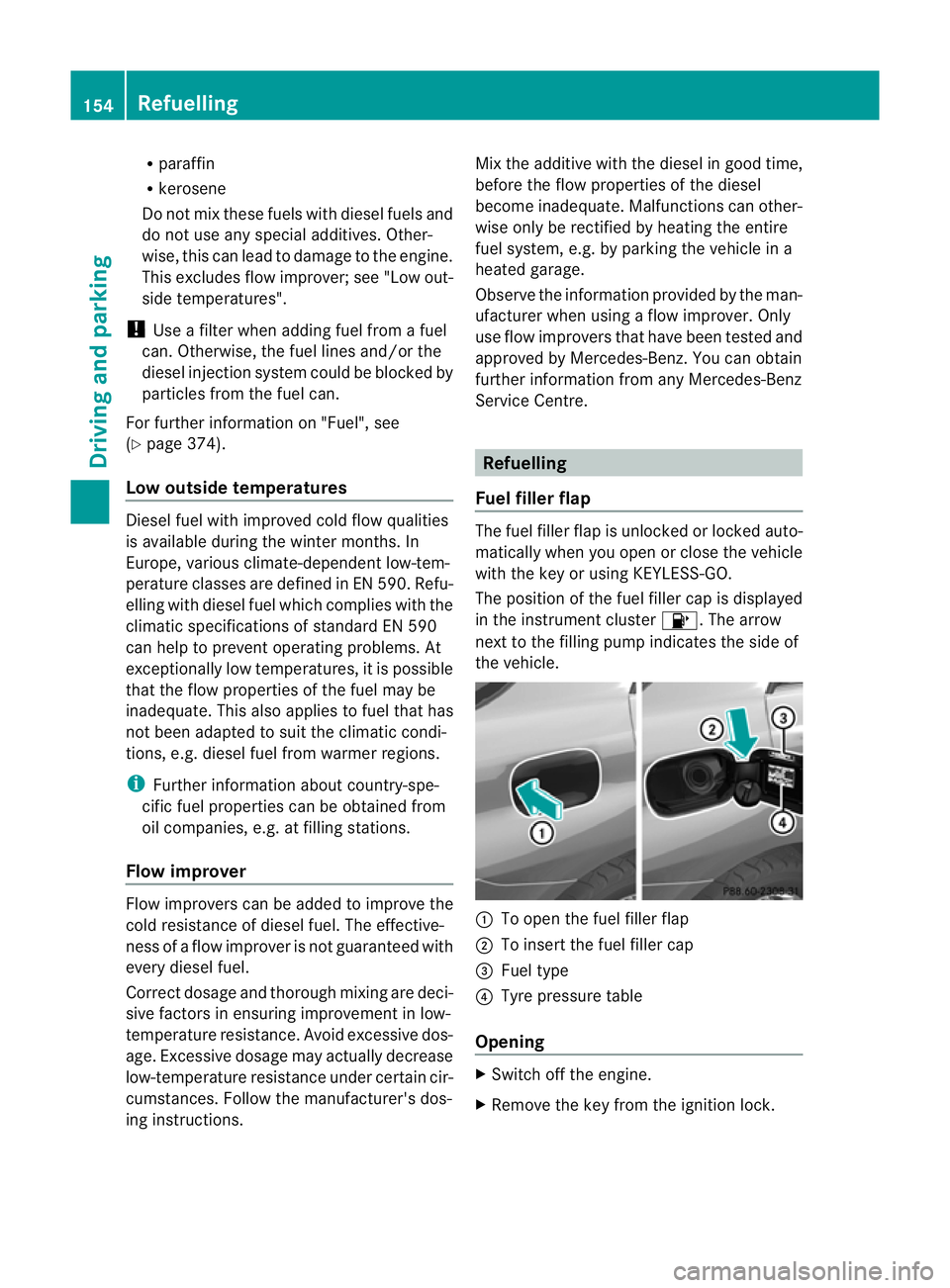
Fuel filler flap The fuel filler fla
pisunlocke dorlockedauto-
matically when you open or close the vehicle
with the key or using KEYLESS-GO.
The position of the fuel filler cap is displayed
in the instrument cluster 8.The arrow
nex ttot he filling pum pindicate sthe side of
the vehicle. :
To open the fuel filler flap
; To inser tthe fuel filler cap
= Fue ltype
? Tyre pressure table
Opening X
Switch off the engine.
X Remove the key from the ignitio nlock. 154
RefuellingDriving and parking
Page 164 of 389
If yo
uthen open one of the front doors or
remove the key from the ignition ,the auto-
matic transmission shift stoP.
If yo ushift the automatic transmission to
N before switching off the engine, the auto-
matic transmission remains in Neven when
ad oor is opened.
Using KEYLESS-GO X
Press the Start/Stop button (Y page 139).
The engin estops and all the indicator
lamp sint he instrumen tcluster go out.
i If you use the Start/Stop button to switch
off the engine, the automatic transmission
shifts to Nautomatically. If you then open
one of the front doors, the automatic trans-
missio nshift stoP .
i The engin ecan be turned off while the
vehicle is in motion by pressing and holding
the Start/Stop button for three seconds.
This function operates independently of the
ECO start/stop automatic engine switch-
off function. Electric parking brake
General notes i
The electric parking brake carries out a
function check at regular intervals when
the engine is switched off. Noises that
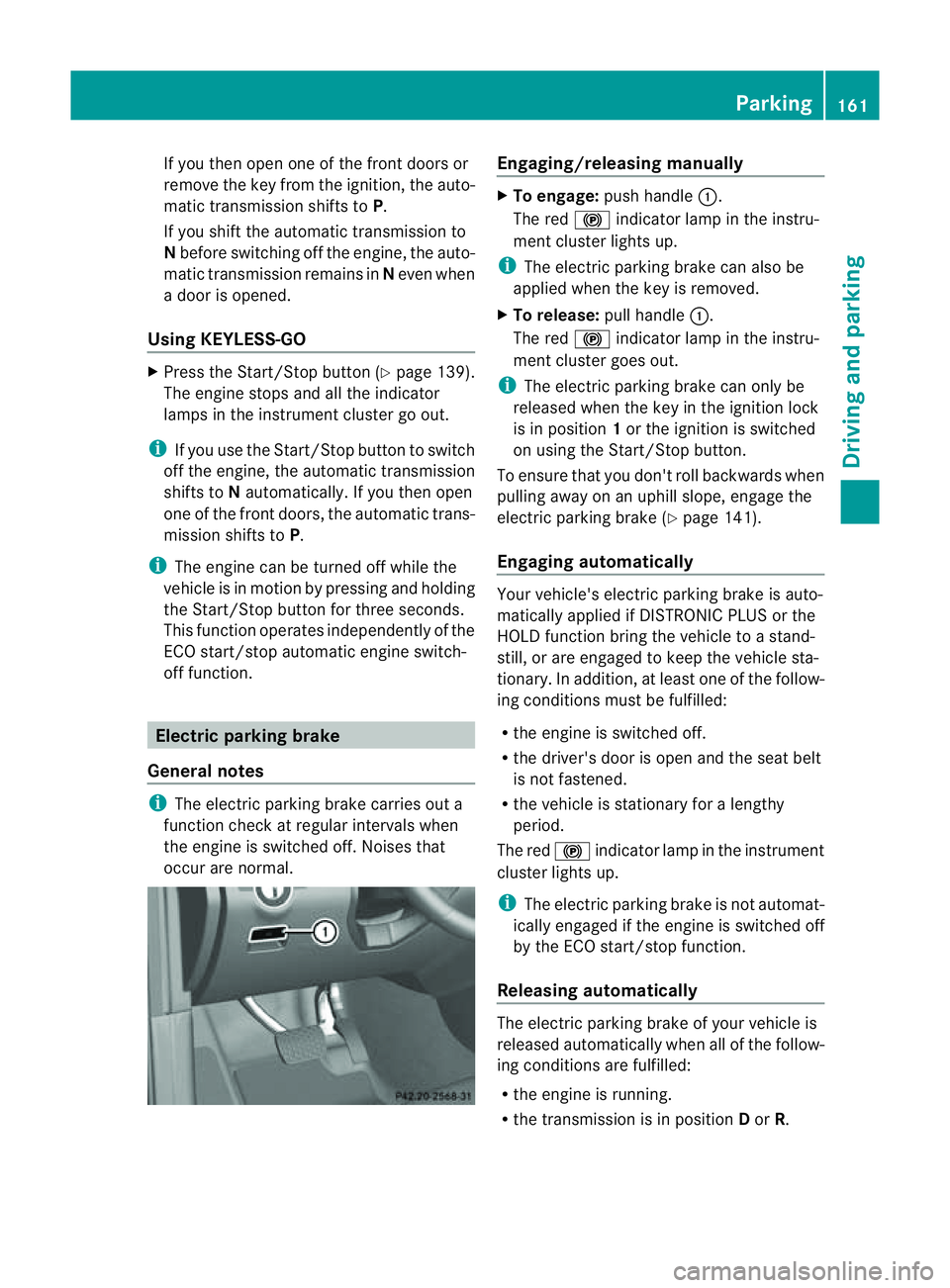
occur are normal. Engaging/releasing manually
X
To engage: push handle :.
The red !indicator lamp in the instru-
ment cluster lights up.
i The electric parking brake can also be
applied when the key is removed.
X To release: pull handle:.
The red !indicator lamp in the instru-
ment cluster goes out.
i The electric parking brake can only be
released when the key in the ignition lock
is in position 1or the ignition is switched
on using the Start/Stop button.
To ensure that you don't roll backwards when
pulling away on an uphill slope, engage the
electric parking brake (Y page 141).
Engaging automatically Your vehicle's electric parking brake is auto-
matically applied if DISTRONIC PLUS or the
HOLD function bring the vehicle to
astand-
still ,ora re engaged to kee pthe vehicle sta-
tionary. In addition, at least one of the follow-
ing condition smust be fulfilled:
R the engine is switched off.
R the driver' sdoor is open and the seat belt
is not fastened.
R the vehicle is stationar yfor alengthy
period.
The red !indicator lam pint he instrument
cluster lights up.
i The electric parkin gbrake is not automat-
icall yengaged if the engine is switched off
by the ECO start/stop function.
Releasing automatically The electric parking brake of your vehicl
eis
release dautomatically when all of the follow-
ing conditions are fulfilled:
R the engine is running.
R the transmission is in position Dor R. Parking
161Drivingand park ing Z
Page 200 of 389
X
Shift the transmissio ntoposition Dwhile
the vehicle is stationary.
Active Parkin gAssist immediately steer sin
the othe rdirection.
The Park Assist active Accelerate and brake Observe surroundings mes-
sage appears in the multifunction display.
i You will achieve the best parkin gresults
by waiting for the steerin gprocedure to
complete before moving forwards.
X Drive forward sand be ready to brake at all
times.
X Stop as soon as PARKTRONIC sounds the
continuou swarning tone, if not before.
The Park Assist active Select R Observe surroundings message appears in
the multifunc tion display.
X Further transmission shift smay be neces-
sary.
As soon as the parking procedure is com-
plete, the Park Assist switched off mes-
sage appears in the multifunc tion display.
PARKTRONIC con tinues to be available.
X Manoeuvre if necessary.
X Always observe the warning message sdis-
played by PARKTRONI C(Ypage 192).
Cancell ingA ctive Parking Assist You can cancel Active Parking Assist at any
time.
X Stop the movemen tofthe multifunc tion
steerin gwheel or steer yourself.
Ac tive Parkin gAssist will be cancelled at
once. The Park Assist cancelled mes-
sage appears in the multifunc tion display.
or
X Press the PARKTRONIC button on the
cen trec onsole (Y page 192).
PARKTRONIC is switched off and Active
Parkin gAssist is immediately cancelled.
The Park Assist cancelled message
appears in the multifunc tion display. Active Parkin
gAssist is cancelled automati-
cally if:
R parkin gusing Ac tive Parkin gAssist is no
longe rpossible.
R you ar edriving faster than 10 km/h.
R aw heel spins and ESP ®
intervenes or fails.
The ä warnin glamp lights up in the
instrument cluster.
Aw arning ton esounds. The par king spa ce
sym boldisappear sand the ParkA ssist cancelled messag
eappear sinthe multi-
functio ndisplay.
When Activ eParking Assist is cancelled, you
must steer again yourself.
Towing atrailer For vehicles with
atrailer to whitch, the min-
imum length for parking spaces is slightly
increased.
If yo uhavea ttache datrailer to your vehicle,
yo us houl dnot us eActiv eParking Assist.
Once the electrica lconnection is established
between your vehicl eand the trailer, Active
Parking Assist is no longer available .PARK-
TRONIC is deactivated for the rear area. Reversin
gcamera
Important safety notes Th
er eversing camera is an optica lparking
and manoeuvring aid. It shows the area
behind your vehicle with guide lines in the
COMAND displ ay. G
WARNING
Make sure tha tnopersons or animals are in
the manoeuvring range. Otherwise, they
could be injured.
The reversing camera is in the handle on the
tailgate. Driving systems
197Drivingand park ing Z
Page 237 of 389
Usefu
linfor mati on
i This Owner's Manual describes all models
and all standard and optional equipment
available to your vehicle at the time of pub-
lication of the Owner's Manual. Country-
specific deviation sare possible .Please
not ethat your vehicle ma ynot be equipped
with all featur es described. This also
applies to safety-releva ntsystems and
functions.
i Please read the information on qualified
specialist workshops (Y page 24).Important safet
ynotes
You will fin danillustration of th einstrument
cluste rinthe "A taglance "section
(Y page 30). G
WARNING
Only use th eon-bo ardc omputer wh en road
and traffic condition spermit .You would oth-
erwise be distracted and unable to concen-
trate properly on driving, and coul dcause an
accident. G
WARNING
No message swill be displayed if either the
instrument cluster or the multifunction dis-
play is inoperative.
As aresult, you will not be able to see infor-
mation about your driving conditions, such as
speed, outside temperature, warning and indi-
cator lamps, display messages or system fail-
ures. Drivin gcharacteristic smay be impaired.
Adjust your driving style and vehicle speed
accordingly.
Contact aqualified specialist workshop
immediately. G
WARNING
The on-board computer only records and dis-
plays malfunctions and warnings from certain
systems. For this reason, you should always make sure that your vehicle is safe to use. You
could otherwis
ecause an accident by driving
an unsafe vehicle. G
WARNING
The operating safety of your vehicle could be
impaired if maintenance work is carried out
incorrectly. This could cause you to lose con-
trol of your vehicle and cause an accident.
Moreover, the safety systems may no longer
be able to protect you or others as they are
designed to do.
Always have service work carried out at a
qualified specialis tworkshop. Displays and operation
Coolant tempera
tureg auge
Th ec oolant temperatur egauge is in the
instrument cluster on the right-hand side.
Under normal operating conditions and with
the specified coolant level, the coolant tem-
perature may rise to 120 †.
At high outside temperatures and when driv-
ing uphill, the coolant temperature may rise
to the end of the scale. Rev counter
The red band in the rev counter indicates the
engine's overrevvin grange.
! Do not drive in the overrevving range.
Doing so will damage the engine.
The fuel supply is interrupted to protect the
engine when the red band is reached. Outside temperature display
The outside temperature display is in the mul-
tifunction display (Y page 236). G
WARNING
At temperatures just above freezing point, the
street may be icy, especially in wooded areas 234
Displays and operationOn-board computer and displays
Page 249 of 389
X
Press :or9 to set Off ,
Standard or
Adaptive .
X Press the abutton to save the setting.
When Lane Keeping Assist or Active Lane
Keeping Assist is activa ted, the Ãsymbol
appear sint he multifunction displa ywhen the
ignition is on. Servic
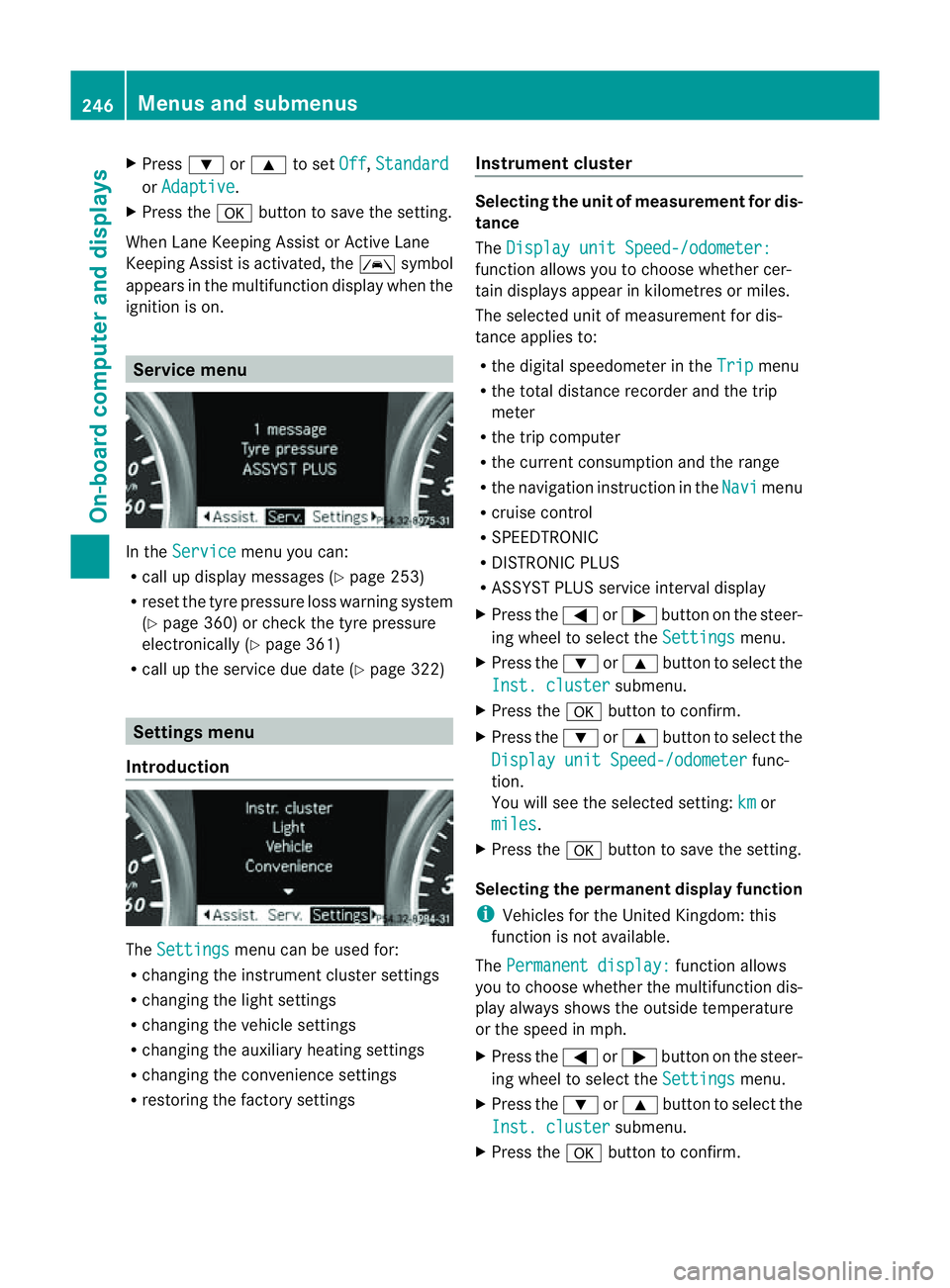
emenu In the
Service menu you can:
R call up display messages (Y page 253)
R reset the tyre pressure loss warnin gsystem
(Y page 360) or check the tyre pressure
electronically (Y page 361)
R call up the service due date (Y page 322)Settings menu
Introduction The
Settings menu can be used for:
R changing the instrument cluster settings
R changing the ligh tsettings
R changin gthe vehicle settings
R changin gthe auxiliary heating settings
R changin gthe con venience set tings
R resto ring the factory settings Instrument cluster Selectin
gthe uni tofmeasurement for dis-
tance
The Displa yunit Speed-/odometer: function allows yo
utochoose whether cer-
tai nd isplays appear in kilometres or miles.
The selected unit of measurement for dis-
tanc eapplies to:
R the digital speedometer in the Trip menu
R the total distanc erecorder and the trip
meter
R the trip computer
R the curren tconsumption and the range
R the navigation instruction in the Navi menu
R cruise con trol
R SPEEDTRONIC
R DIST RONIC PLUS
R ASSYST PLUS service interval display
X Press the =or; button on the steer-
ing whee ltoselect the Settings menu.
X Press the :or9 button to select the
Inst .cluster submenu.
X Press the abuttontoc onfirm.
X Press the :or9 button to select the
Displa yunit Speed-/odometer func-
tion.
Yo uw ill see the selected setting: km or
miles .
X Press the abutton to save the setting.
Selecting the permanent display function
i Vehicles for the United Kingdom: this
func tion is not available.
The Permanen tdisplay: function allows
yo utoc hoose whether the multifunction dis-
play always shows the outside temperature
or the speed in mph.
X Press the =or; button on the steer-
ing wheel to selec tthe Settings menu.
X Press the :or9 button to selec tthe
Inst .cluster submenu.
X Press the abuttontoc onfirm. 246
Menu
sand submenusOn-board computer and displays