towing MERCEDES-BENZ M-CLASS SUV 2011 User Guide
[x] Cancel search | Manufacturer: MERCEDES-BENZ, Model Year: 2011, Model line: M-CLASS SUV, Model: MERCEDES-BENZ M-CLASS SUV 2011Pages: 389, PDF Size: 9.22 MB
Page 178 of 389
G
WARNING
DISTRONIC PLUS canno ttake account of road
and traffic conditions. If DISTRONI Cdoes not
recognise or no longer recognises the vehicle
in front, do not activate DISTRONIC or, if it is
alr eady active, deactivate it. This is especially
the case:
R befor ecorners
R on filter lanes
R when changing to alane with faster moving
traffic
R in comple xdriving situations or where lanes
are diverte d,e.g. at roadworks on amotor-
way
DISTRONIC PLU Sotherwise maintains the
current spe ed setbyyou or accelerates up to
the set speed.
DISTRONIC PLU Scannot take account of
weather conditions. Deactivate, or do not
activate, DISTRONI CPLUS:
R if th eroads are slippery, snow-covered or
icy .The wheels coul dlose their grip when
brakin goraccelerating .The vehicle could
star ttos kid.
R if the sensors are dirty or there is poo rvis-
ibility, e.g. due to snow, rain or fog. Dis-
tance control may be impaired.
Always pay attention to traffic conditions
even when DISTRONIC PLU Sisactivate d.
Otherwise, you ma yfail to recognise dangers
in time, caus eanaccident and injure yourself
and others. G
WARNING
DISTRONIC PLUS brake syourvehicle up to a
maximu mof4m /s2
depending on its speed.
This corresponds to approximately 40% of
your vehicle's maximum braking power. You
must als oapply the brakes yourself if this
braking power is not sufficient.
If DISTRONI CPLUS detects arisk of collision
with avehicle in front, an intermit tent warning
tone sounds. In addition, the ·distance
warning lamp in the instrument cluste rlights
up. Brak etoavoidac ollision. G
WAR
NING
The vehicle can be braked when DISTRONIC
PLUS is activated. For this reason, deactivate
DISTRONIC PLUS if the vehicle is to be set in
motion by othe rmeans (e.g. in acar wash or
by towing).
The radar senso rsystem is automatically
deactivated near radio teles cope facilities
(Y page 38 0).
If you want DISTRONIC PLUS to assist you,
the radar sensor syste mmust be activated
(Y page 249 )and operational.
General notes DISTRONIC PLUS regulates the speed and
automati cally helps you maintain the dis-
tanc etot he vehicle detected in front. It
brakes automatically in orde rtoavoid
exceedi ngthe set speed.
On long and stee pdownhil lgradients, espe-
ciall yifthe vehicle is laden or towing atrailer,
yo um ust select shift range 1,2or 3in good
time. By doing so, you will make use of the
braking effec tofthe engine. This relieves the
load on the brake system and prevents the
brakes from overheating and wearing too
quickly.
If DI STRONIC PLUS detects aslower-moving
vehicle in front ,your vehicle is braked in order
to maintain the preset distance to the vehicle
in front.
If ther eisnov ehicle in front ,DISTRONIC
PLUS operate sinthe sam eway as cruise
control in the spee drange between
30 km/h and 200 km/h. If avehicle is driving
in fron tofyou, DI STRONIC operates in the
speed range betwee n0km/h and
200 km/h.
Do not us eDISTRONIC PLUS on roa dswith
steep gradients. Driving systems
175Drivingand parking Z
Page 190 of 389
HOL
Dfunction
Gen eral notes Th
eH OLD function ca nassist the driver in the
foll owing situations:
R when pulling away, especially on steep
slopes
R when manoeuvrin gonsteep slopes
R when waiting in traffic
The vehicle is kept stationary without the
driver having to depress the brake pedal.
The braking effect is cancelled and the HOLD
function is deactivated when you depress the
accelerator peda ltop ull away.
Activation conditions You can activate the HOLD function if:
R the vehicle is stationary.
R the engine is running or if it has been auto-
matically switched off by the ECO start/
stop function.
R the driver' sdoor is closed or if your seat
belt is fastened.
R the electric parkin gbrake is released.
R thet ransmission is in position D,Ror N.
R DISTRONIC PLUS is deactivated.
Activatin gthe HOL Dfunction X
Make sure that th eactivation conditions
are met.
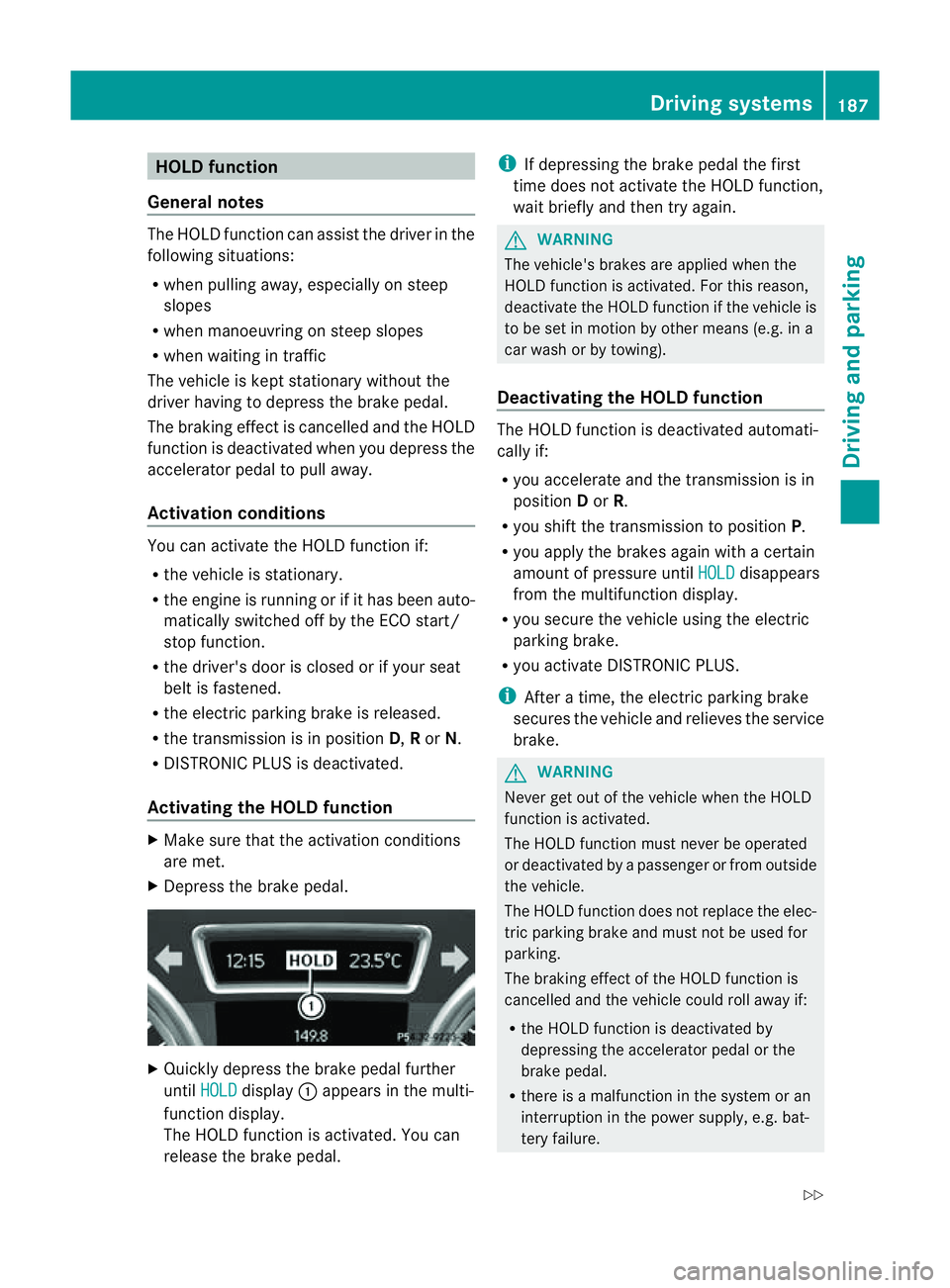
X Depress the brake pedal. X
Quickly depress the brake pedal further
until HOLD display
:appears in the multi-
function display.
Th eH OLD func tion is activated. You can
release the brake pedal. i
If depressing the brake pedal the first
tim edoes not activate the HOL Dfunction,
wait briefly and then try again. G
WARNING
The vehicle's brakes are applied when the
HOLD function is activated. For this reason,
deactivate the HOLD function if the vehicle is
to be set in motion by other means (e.g. in a
car wash or by towing).
Deactivating the HOLD function The HOLD function is deactivated automati-
cally if:
R you accelerate and the transmission is in
position Dor R.
R you shift the transmission to position P.
R you apply the brakes again with acertain
amount of pressur euntil HOLD disappears
from the multifunctio ndisplay.
R you secure the vehicle using the electric
parkin gbrake.
R yo ua ctivate DISTRONIC PLUS.
i After atime, the electric parkin gbrake
secure sthe vehicle and relieves the service
brake. G
WARNING
Never get out of the vehicle when the HOLD
func tion is activated.
The HOL Dfunction must never be operated
or deactivated by apassenger or from outside
the vehicle.
The HOLD function does not replace the elec-
tric parking brake and must not be used for
parking.
The braking effect of the HOLD function is
cancelled and the vehicle could roll away if:
R the HOLD function is deactivated by
depressing the accelerator pedal or the
brake pedal.
R there is amalfunction in the system or an
interruption in the power supply ,e.g. bat-
tery failure. Driving systems
187Drivingand parkin g
Z
Page 196 of 389
If indicato
rlamp :lights up, PARKTRONIC is
deactivated. Active Park Assis tisthen also
deactivated.
i PARKTRONIC is automatically activated
when you tur nthe key to positi on2in the
ignition lock.
Towing atrailer PARKTRONIC is deactivate
dfor the rear area
when you establish an electrical connection
between you rvehicle and atrailer.
! Foldint he ball couplin gifthe trailer tow
hitc hisn ot required .PARKTRONIC meas-
ures the minimum dete ction range to an
obstacle from the bumper, not the ball cou-
pling. Drivin
gsystems
193Drivingand park ing Z
Page 200 of 389
X
Shift the transmissio ntoposition Dwhile
the vehicle is stationary.
Active Parkin gAssist immediately steer sin
the othe rdirection.
The Park Assist active Accelerate and brake Observe surroundings mes-
sage appears in the multifunction display.
i You will achieve the best parkin gresults
by waiting for the steerin gprocedure to
complete before moving forwards.
X Drive forward sand be ready to brake at all
times.
X Stop as soon as PARKTRONIC sounds the
continuou swarning tone, if not before.
The Park Assist active Select R Observe surroundings message appears in
the multifunc tion display.
X Further transmission shift smay be neces-
sary.
As soon as the parking procedure is com-
plete, the Park Assist switched off mes-
sage appears in the multifunc tion display.
PARKTRONIC con tinues to be available.
X Manoeuvre if necessary.
X Always observe the warning message sdis-
played by PARKTRONI C(Ypage 192).
Cancell ingA ctive Parking Assist You can cancel Active Parking Assist at any
time.
X Stop the movemen tofthe multifunc tion
steerin gwheel or steer yourself.
Ac tive Parkin gAssist will be cancelled at
once. The Park Assist cancelled mes-
sage appears in the multifunc tion display.
or
X Press the PARKTRONIC button on the
cen trec onsole (Y page 192).
PARKTRONIC is switched off and Active
Parkin gAssist is immediately cancelled.
The Park Assist cancelled message
appears in the multifunc tion display. Active Parkin
gAssist is cancelled automati-
cally if:
R parkin gusing Ac tive Parkin gAssist is no
longe rpossible.
R you ar edriving faster than 10 km/h.
R aw heel spins and ESP ®
intervenes or fails.
The ä warnin glamp lights up in the
instrument cluster.
Aw arning ton esounds. The par king spa ce
sym boldisappear sand the ParkA ssist cancelled messag
eappear sinthe multi-
functio ndisplay.
When Activ eParking Assist is cancelled, you
must steer again yourself.
Towing atrailer For vehicles with
atrailer to whitch, the min-
imum length for parking spaces is slightly
increased.
If yo uhavea ttache datrailer to your vehicle,
yo us houl dnot us eActiv eParking Assist.
Once the electrica lconnection is established
between your vehicl eand the trailer, Active
Parking Assist is no longer available .PARK-
TRONIC is deactivated for the rear area. Reversin
gcamera
Important safety notes Th
er eversing camera is an optica lparking
and manoeuvring aid. It shows the area
behind your vehicle with guide lines in the
COMAND displ ay. G
WARNING
Make sure tha tnopersons or animals are in
the manoeuvring range. Otherwise, they
could be injured.
The reversing camera is in the handle on the
tailgate. Driving systems
197Drivingand park ing Z
Page 213 of 389
the warning onl
yoccurs if the differenc ein
spee dislesst han 12 km/h.
The yellow indicator lamp goes out if reverse
gea rise ngaged. Blind Spot Assist is then
deactivated.
The brightness of the indicator/warning
lamps is adjusted automaticall yaccording to
the ambient light. G
WARNING
Blind Spot Assist is not active at speeds below
30 km/h, and the indicator lamps in the exte-
rior mirrors are yellow. Vehicles in the moni-
toring range are the nnot indicated.
Always pay attention to traffic condition sand
your surroundings .Otherwise, you may fail to
recognis edangers in time, cause an accident
and injure yoursel fand others.
Collisio nwarning
If av ehicle is detected in the mon itoring range
of Blind Spot Assis tand you switch on the turn
signal, adouble warnin gtone sounds. Red
warnin glamp :flashes .Ifthe tur nsignal
remains on, detected vehicles are indicated
by the flashing of red warnin glamp :.T here
ar enof urther warning tones.
Switching on Blind Spot Assist
X On vehicles without anavigation system,
make sure that the Becker ®
MAP PILOT is
connected; see the separate operating
instructions for Audio 20.
X Make sure that the radar senso rsystem
(Y page 249) and Blind Spot Assist
(Y page 245) are activated in the on-board
computer.
X Turn the key to position 2in the ignition
lock.
Warning lamps :ligh tupr ed in the exte-
rior mirror sfor approximately 1. 5seconds
and then tur nyellow.
Trailer towing
If you attach atrailer, make sure that yo uhave
correctly established the electrical connec-
tion. This can be accomplished by checking the trailer lighting
.Blind Spot Assist is then
deactivated. The indicator lamp in the exte-
rior mirrors lights up yellow, and the Blind Spot Assist currentl
yunavailable See Owner's Manual message appe
arsin
the multifunction display.
i You can deactivate the indicato rlamps in
the exterior mirrors.
To do so, switch off Blind Spot Assis tif:
R thek ey is in position 2in the ignition
lock.
R the engine is not running.
R the electrical connection to the trailer
has been established.
Lane Keeping Assist Important safety notes
Lan
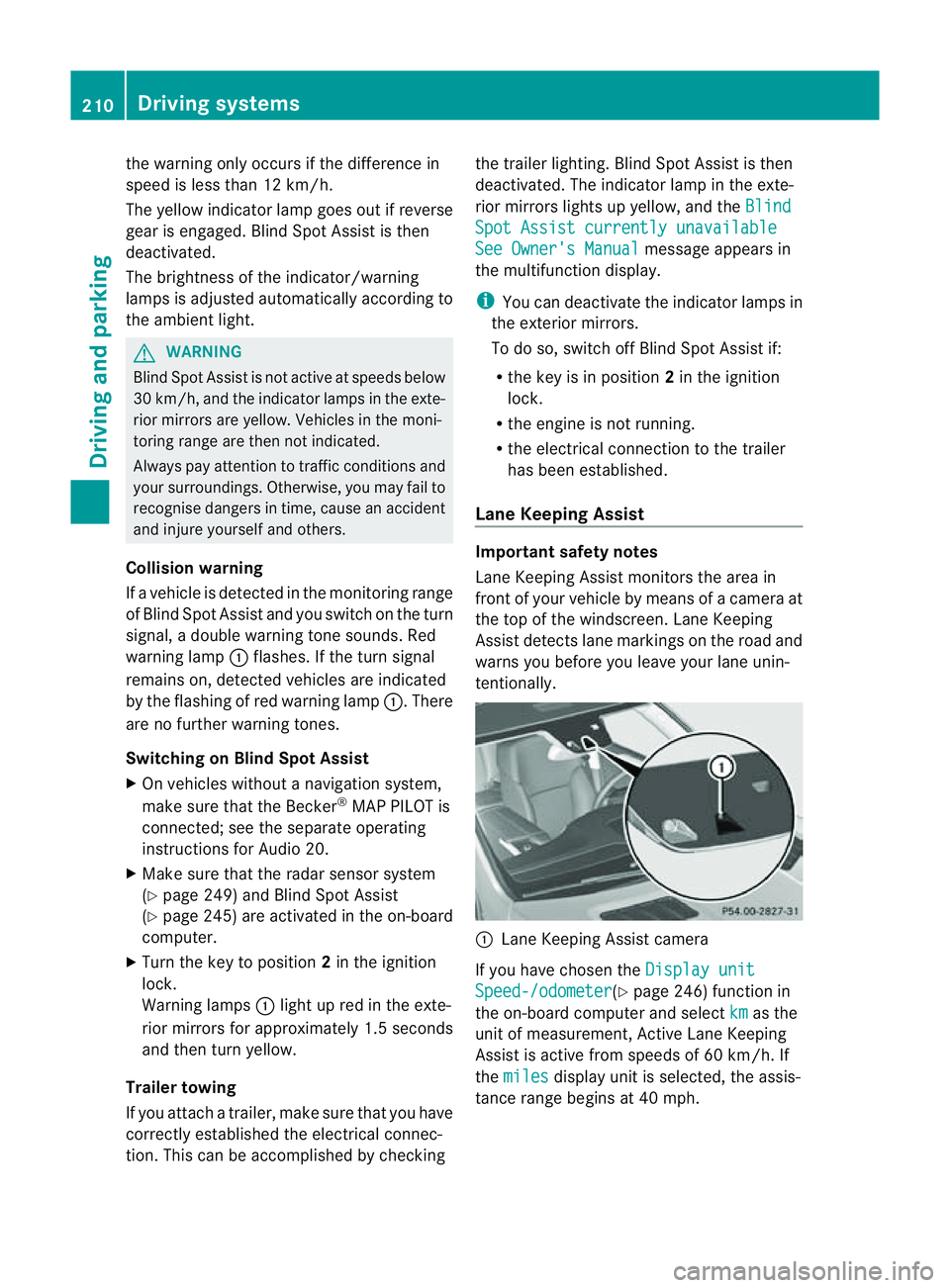
eKeeping Assist monitor sthe area in
front of your vehicle by means of acamera at
the top of the windscreen. Lane Keeping
Assis tdetect slane markings on the road and
warns you before you leave your lane unin-
tentionally. :
Lane Keeping Assis tcamera
If you have chose nthe Displa yunit Speed-/odometer (Y
page 246) functio nin
the on-board computer and select km as the
unit of measurement, Active Lane Keeping
Assist is active from speeds of 60 km/h. If
the miles displa
yunit is selected ,the assis-
tance range begin sat40mph. 210
Driving systemsDriving and parking
Page 218 of 389
R
the Off-roa dprogra misa ctivate d(vehicles
without th eON&OFFROAD package).
R Off-road progra m1or2isactivated(vehi-
cle sw ith the ON&OFFROAD package).
R the LOW RANGE off-road gear is activated
(vehicles with the ON&OFFROAD package).
R al oss of tyr epressure or adefectiv etyre is
detected.
Activating Active Blind Spot Assist
X On vehicles without anavigation system,
make sure that the Becker ®
MAP PILOT is
connected; see the separate operating
instructions for Audio 20.
X Make sure that the radar senso rsystem
(Y page 249) and Active Blind Spot Assist
(Y page 245) are activated in the on-board
computer.
X Turn the key to position 2in the ignition
lock.
Warning lamps :ligh tupr ed in the exte-
rior mirror sfor approximately 1. 5seconds
and then tur nyellow.
Trailer towing
If you attach atrailer, make sure that yo uhave
correctly established the electrical connec-
tion. This can be accomplished by checking
the trailer lighting .Active Blind Spo tAssist is
then deactivated. The indicator lam plights up
yellow in the exterior mirrors and the ActiveBlind Spot Assist currently unavail‐
able Se
eOwner's Manual message
appe arsint he multifunction display.
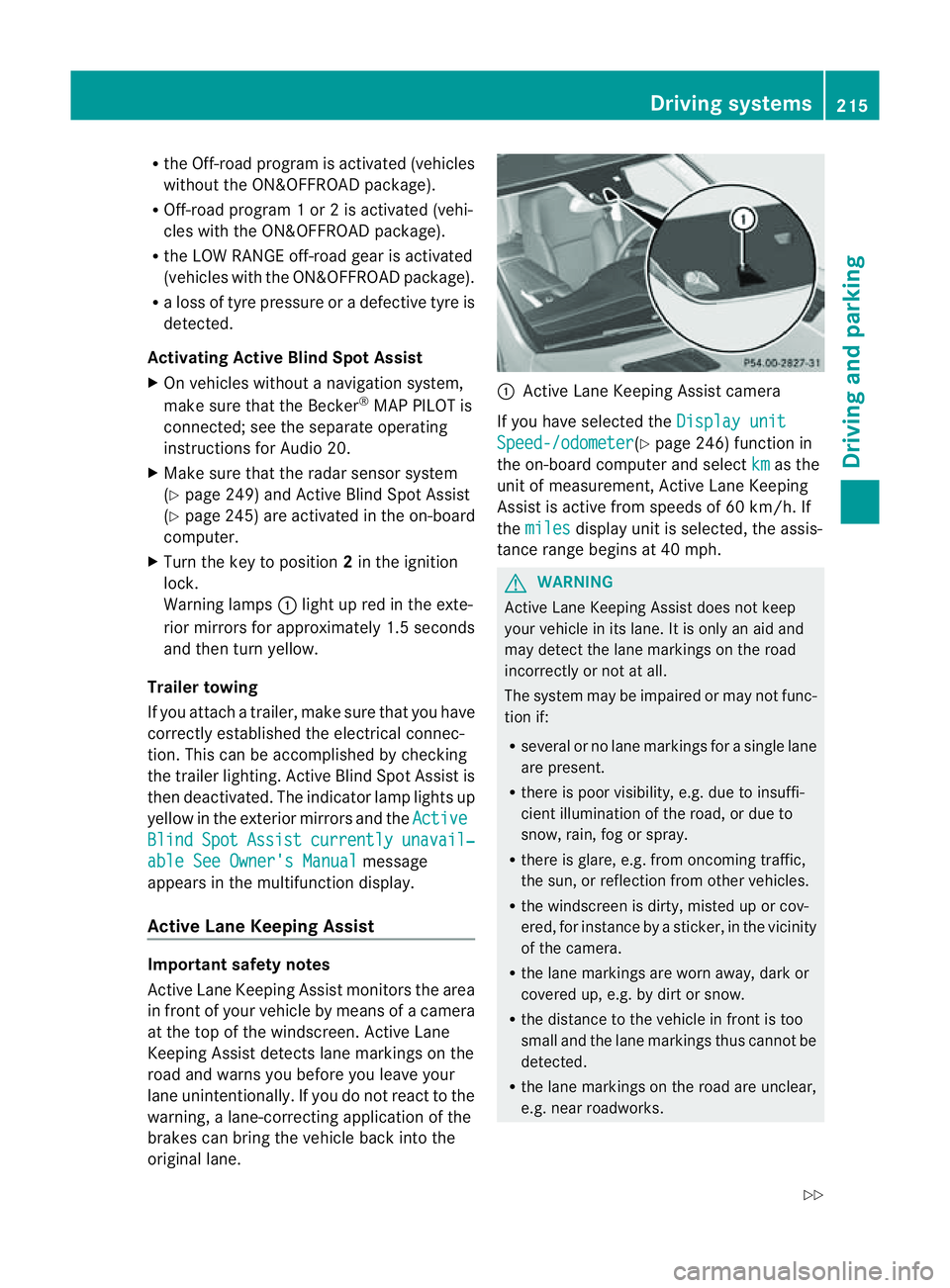
Active Lan eKeeping Assist Import
ants afety notes
Active Lane Keeping Assis tmonitors the area
in front of your vehicle by means of acamera
at the top of the windscreen. Active Lane
Keeping Assis tdetect slane markings on the
road and warns you before you leave your
lane unintentionally .Ifyou do not react to the
warning, alane-correcting application of the
brakes can bring the vehicle back into the
original lane. :
Active Lane Keeping Assis tcamera
If you have selected the Displayunit Speed-/odometer (Y
page 246) function in
th eo n-board compute rand select km as the
unit of measurement, Active Lane Keeping
Assist is active from speeds of 60 km/h. If
the miles display unit is selected
,the assis-
tan ce ra nge begins at 40 mph. G
WARNING
Active Lane Keeping Assist doe snot keep
your vehicle in its lane. It is only an aid and
may detec tthe lan emarkings on the road
incorrectly or not at all.
The system may be impaired or may not func-
tion if:
R several or no lane markings for asingle lane
are present.
R there is poor visibility, e.g. due to insuffi-
cient illumination of the road, or due to
snow, rain, fog or spray.
R there is glare, e.g. from oncoming traffic,
the sun, or reflec tion from other vehicles.
R the windscreen is dirty, misted up or cov-
ered, for insta ncebyasticker, in the vicinity
of the camera.
R the lane markings are worn away ,dark or
covered up, e.g. by dirt or snow.
R the distance to the vehicle in front is too
small and the lane markings thus cannot be
detected.
R the lane markings on the road are unclear,
e.g. near roadworks. Driving systems
215Drivingand park ing
Z
Page 220 of 389
your surroundings. Otherwise, you may fail to
recognise danger
sintime,cause an accident
and injur eyourself and others.
No lane-correcting brak eapplication occurs
if:
R you clearly and acti vely steer ,brake ,or
accelerate.
R you cut the corner on ashar pbend.
R you have switched on the tur nsignals.
R ad riving safet ysystem intervenes, such as
ESP ®
,P RE-SAFE ®
Brak eorA ctive Blind
Spot Assist.
R you have adopted asport ydriving style with
high cornerin gspeeds or high rates of
acceleration.
R on vehicles with atrailer to whitch, the
electrical connection to the trailer has been
correctly established.
R ESP ®
is deactivated.
R the transmission is not in position D.
R the Off-road program is activated (vehicles
without the ON&OFFROA Dpackage).
R Off-road program 1or2isactivated (vehi-
cles with the ON&OFFROAD package).
R the LOW RANGE off-road gear is activated
(vehicles with the ON&OFFROAD package).
R al oss of tyr epressure or adefective tyre
has been detected and displayed.
Activ eLaneK eeping Assist does no tdetect
road and traffic conditions .Aninappropriate
brake applicatio nmay be interrupted at any
time if:
R you steer slightly in the opposite direction.
R you use aturn signal.
R you clearly brake or accelerate.
Al ane- correcting bra keapplication is inter-
rupted automatically if:
R ad riving safet ysystem intervenes, such as
ESP ®
,P RE-SAFE ®
Brake or Active Blind
Spot Assist.
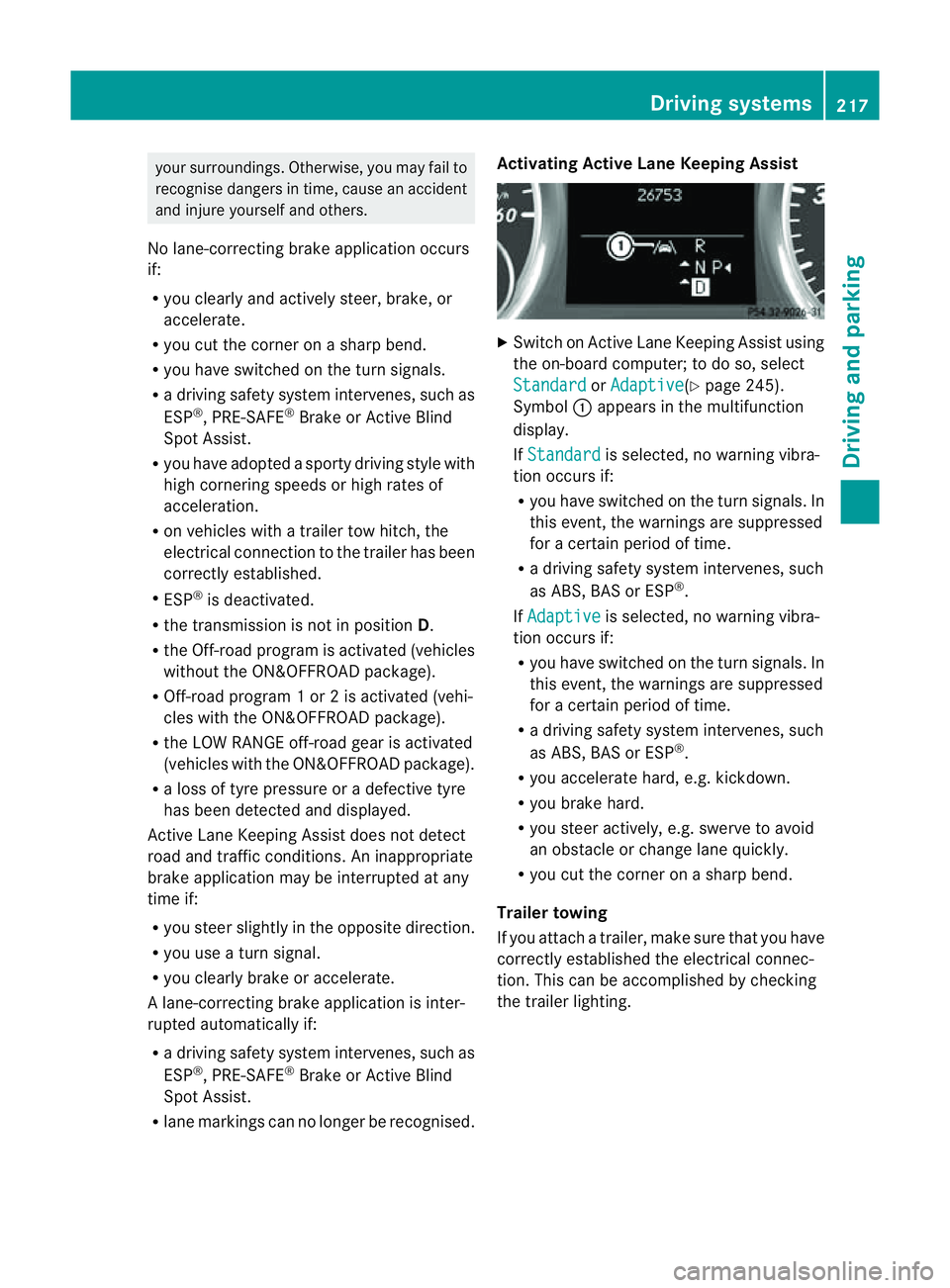
R lane markings can no longe rberecognised. Activating Active Lane Keeping Assist
X
Switch on Active Lan eKeeping Assist using
the on-boar dcomputer ;todoso, select
Standard or
Adaptive (Y
page 245).
Symbol :appears in the multifunction
display.
If Standard is selected, no warnin
gvibra-
tion occur sif:
R you have switched on th eturn signals .In
this event, the warnings are suppressed
for acertain period of time.
R ad riving safety system intervenes, such
as ABS, BAS or ESP ®
.
If Adaptive is selected, no warning vibra-
tio no ccurs if:
R you have switche donthe tur nsignals. In
this event, the warnings are suppressed
for acertain period of time.
R ad riving safety system intervenes, such
as ABS, BAS or ESP ®
.
R yo ua ccelerate hard ,e.g. kickdown.
R you brake hard.
R you steer actively, e.g. swerve to avoid
an obstacle or chang elane quickly.
R you cut the corner on ashar pbend.
Trailer towing
If you attach atrailer, make sure that yo uhave
correctly established the electrical connec-
tion. This can be accomplished by checking
the trailer lighting. Driving systems
217Drivingand parking Z
Page 222 of 389
R
The automatic transmission select sthe
automatic drive program for asporty
driving style.
R The sporty accelerator pedal curve is
selected. This mean sthat the accelera-
tor pedal does not need to be depressed
as fa rwhen accelerati ng.
R The sport ysteering curve is selected.
Thi sm eans that mor eeffort is required
when steering.
i Youc annot select the SPORT program if
LOW RANGE has been selected .The
Driv eprogram SPORT Not in LOW RANGE message appears in th
emultifunc-
tion display.
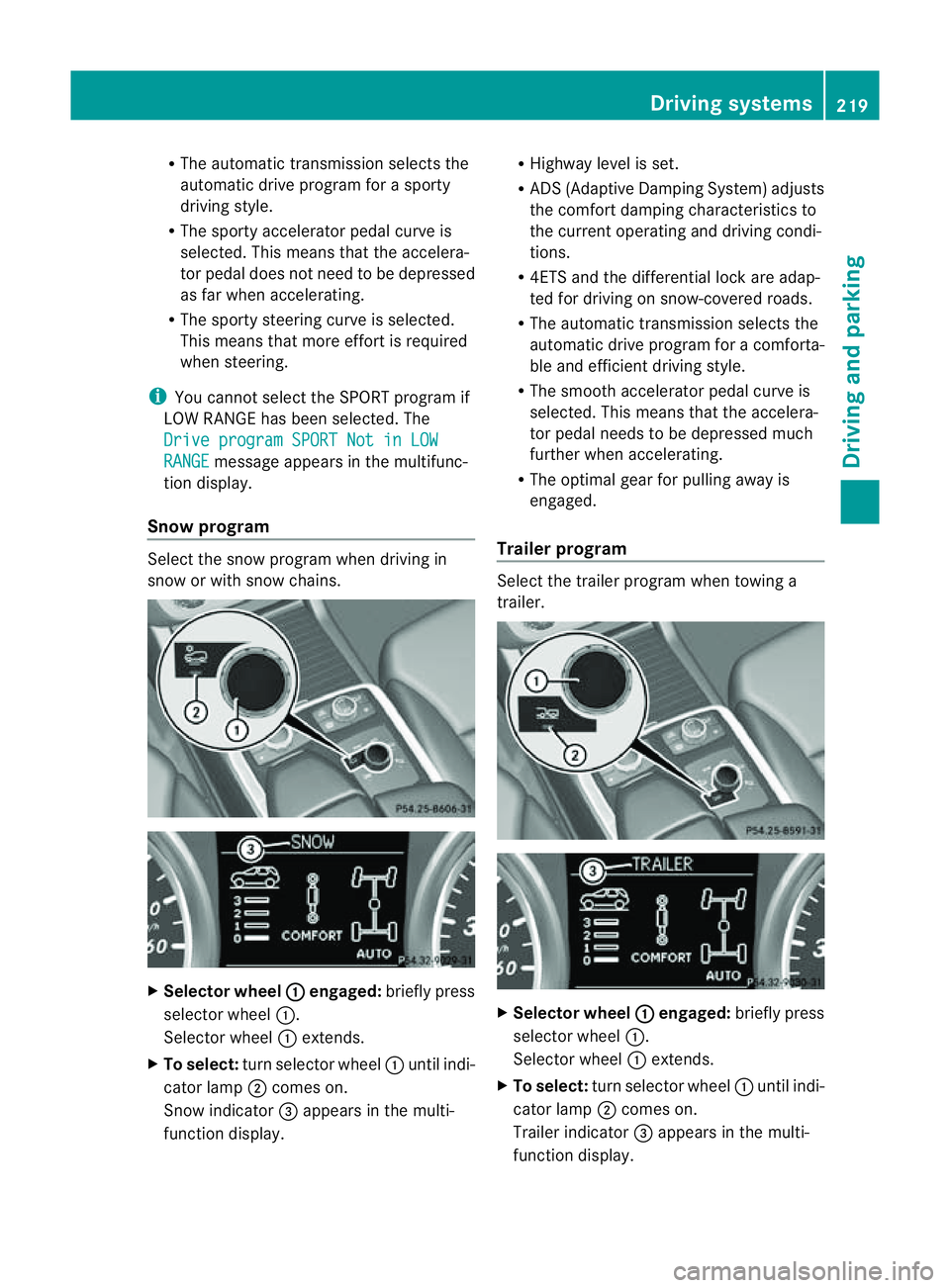
Snow program Select the snow program when driving in
snow or with snow chains. X
Selector wheel : engaged:
briefly press
selector wheel :.
Selector wheel :extends.
X To select: turn selector wheel :until indi-
cator lamp ;comes on.
Snow indicator =appears in the multi-
function display. R
Highway level is set.
R AD S(Adaptive Damp ingS ystem) adjusts
the comfort damping characteristics to
the current operating and driving condi-
tions.
R 4ETS and the differential lock are adap-
ted for driving on snow-covered roads.
R The automatic transmission selects the
automatic drive progra mforac omforta-
ble and efficien tdriving style.
R Th es mooth accelerato rpedal curve is
selected. This mean sthat the accelera-
tor pedal needs to be depressed much
further when accelerating.
R The optimal gear for pulling away is
engaged.
Trailer program Select the trailer program when towing a
trailer. X
Selector wheel : engaged:
brieflypress
selecto rwheel :.
Selector wheel :extends.
X To select: turnselector wheel :until indi-
cator lamp ;comes on.
Trailer indicator =appear sint he multi-
func tion display. Driving systems
219Drivingand parking Z
Page 223 of 389
R
Hig hway level is set.
R ADS (Adaptive Damping System) adjusts
the comfort damping characteristics to
the current operating and driving condi-
tions.
R The automatic transmission selects the
automatic drive progra mforac omforta-
ble and efficien tdriving style ,and the
shift points are optimally adjusted.
R The differential lock is engaged when
pulling away. Off-road driving systems
4MATIC (permanent all-wheel drive)
4MATIC ensures that all four wheels are per-
manently driven. Togethe rwith ESP ®
and
4ETS, it improves the trac tion of your vehicle
whenever adrive whee lspins due to insuffi-
cient grip. G
WARNING
4MATI Ccannot reduce the risk of an accident
if you drive too fast.
If ad rive whee lspins due to insufficien tgrip:
R onl ydepress the accelerator peda lasfar as
necessary when pulling away.
R accelerate less when driving.
R adapt you rdriving style to su itroa dand
traffic conditions.
! Never tow the vehicle with one axle
raised. Thi smay damage the transfer case.
Damage of this sort is not covered by the
Mercedes-Benz implied warranty. All
wheels must remain either on the ground
or be fully raised. Observe the instructions
for towing the vehicle with all wheels in full
contact with the ground.
i In wintry driving conditions, the maximum
effect of 4MATIC can only be achieved if
you use winter tyres (M+S tyres), with snow
chains if necessary. !
Functio norperformanc etests ma yonly
be performed on a2-axle dynamometer. If
you wis htooperatethe vehicle on such a
dynamometer, pleas econsult aMercedes-
Benz Service Centr ebeforehand. You could
otherwise damage th edrive train or the
bra kesystem.
Fo rinformation abou tdriving off-roa d, see
( Y page 166). DSR (Downhill Speed Regulation)
Important safety notes DSR assists you when driv
ingd ownhill .It
keeps the spee doftravel at th espeed set on
the on-board comp uter. Th esteeper the
downhil lgradient ,the greate rthe DS Rbrak-
ing effect on th evehicle. When driving on flat
stretches of road or on an uphill gradient, the
DSR braking effect is minima lornon-existent. G
WARNING
DSR is only an aid designe dtoassist you when
driving downhill. You ar eresponsible for keep-
ing control of the vehicle and for assessing
whether the downhill gradien tcan be man-
aged.
When activating DSR the vehicle may brake
suddenly due to DSR intervening. This is
dependent on the downhill gradient and the
difference between the current spee dand the
speed set. DSR may not always be able to
keep to the set speed, depending on road sur-
face and tyre conditions .You coul dlose con-
trol of the vehicle and cause an accident.
Selec taset speed suitable for the prevailing
conditions and when necessary, apply the
brakes manually.
DSR con trols the set speed when it is active
and the automatic transmission is in the D,
R or Nposition. By accelerating or braking,
you can always drive at ahigher or alower
speed than that set on the on-boar dcom-
puter. 220
Off-road driving systemsDriving and parking
Page 229 of 389
R
cond ition of the LOW RAN GEoff-r oad
gear
R the on-roa dtraile rprogram is selected Tow
inga trailer Note
sont owingatrailer
Important safety notes G
WARNING
When reversing the vehicl etowards the
trailer, make sure there is nobod ybetween
the trailer and the vehicle.
Couple and uncoupl ethe trailer carefully .If
you do not couple the trailer to the towing
vehicle correctly, the trailer coul dbecome
detached.
Make sure that the following values are not
exceeded:
R the permissible trailer drawbar noseweight
R the permissible trailer load
R the permissible rear axle load of the towing
vehicle
R the maximu mpermissible gross vehicle
weight of both the towing vehicle and the
trailer
You will fin dthe applicable permissible val-
ues, whic hmust not be exceeded ,inthe vehi-
cle documen ts.
You will find the values approved by the man-
ufacturer on the vehicle identification plates
and those for the towing vehicle in the "Tech-
nical data" section. G
WARNING
If the Checktrailer hitch locking mechanism message appears in th
emulti-
function display while the vehicle is in motion,
pull over immediately and check whethe rthe
ball coupling is correctly engaged. G
WARNING
When towin gatrailer, you rvehicle' shandling
characteristics will be different in comparison
to when driving without atrailer.
Th ev ehicle/ trailer combination:
R is heavier
R is restricted in its acceleration and gradi-
ent-climbin gcapability
R has an increased braking distance
R is affected more by stron gcrosswinds
R demand smore sensitive steering
R has alarger turnin gcircle
As aresult, the handlin gcharacteristic smay
be impaired and you may lose control of the
vehicle. This could lead to an accident with
serious or even fatal injuries.
When towing atrailer, alway sadjust your
speed to the current road and weather con-
ditions. Do not exceed the maximum permis-
sible speed for your vehicle/trailer combina-
tion. G
WARNING
Never depress the brak epedal continuously
while the vehicle is in motion ,e.g. never cause
the brakes to rub by applying cons tant slight
pedal pressure. Thi scauses the brake system
to overheat, increases the braking distance
and can lead to the brakes failing completely. G
WARNING
On no account shoul dyou attempt to dra wthe
vehicle/ trailer combination out by increasing
speed. G
WARNING
If you exceed the maximum noseweight when
using acarrier system on the ball coupling:
R the carrier system may be thrown around.
R the ball coupling and the carrier system
may become detached from the vehicle.
As aresult, you may injure others or cause an
accident. 226
Towing
atrailerDriving and parking