warning light MERCEDES-BENZ M-CLASS SUV 2011 User Guide
[x] Cancel search | Manufacturer: MERCEDES-BENZ, Model Year: 2011, Model line: M-CLASS SUV, Model: MERCEDES-BENZ M-CLASS SUV 2011Pages: 389, PDF Size: 9.22 MB
Page 55 of 389
the dashboard and on both side
softhe sun
visor on the fr ont-passenge rside.
Information about recommended child
restraint system sisavailabl eatany
Mercedes-Ben zServic eCentre.
Automatic child seat recognition on the
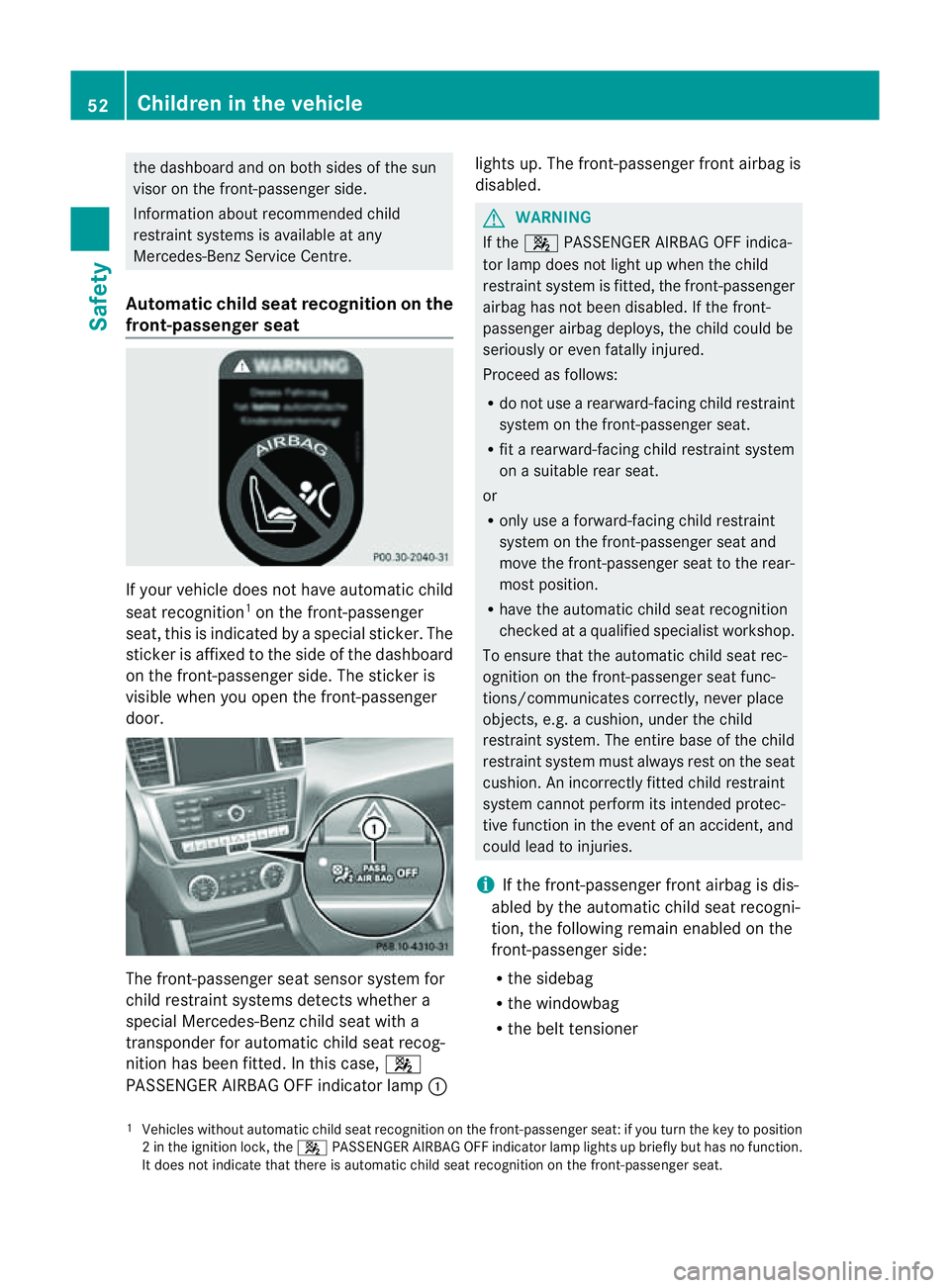
front-passenger seat If your vehicle does not have automatic child
seat recognition 1
on the fron t-passenger
seat, this is indicated by aspecial sticker .The
stic kerisa ffixe dtot he side of the dashboard
on the front-passenger side. The stic keris
visible when yo uopen the front-passenger
door. The front-passenger seat sensor system for
child restraint systems detect swhether a
special Mercedes-Ben zchild seat with a
transpo nder for automatic child seat recog-
nition has been fitted. In this case, 4
PASSENGER AIRBA GOFF indicato rlamp : lights up. The front-passenger front airbag is
disabled. G
WARNING
If the 4 PASSENGER AIRBAG OFF indica-
tor lamp does not light up when the child
restraint system is fitted, the front-passenger
airbag has not been disabled. If the front-
passenger airbag deploys, the child could be
seriously or even fatally injured.
Proceed as follows:
R do not use arearward-facing child restraint
system on the front-passenger seat.
R fit arearward-facing child restraint system
on asuitable rear seat.
or
R only use aforward-facing child restraint
system on the front-passenger seat and
mov ethe front-passenger seat to the rear-
most position.
R hav ethe automatic chil dseat recognition
checked at aqualified specialist workshop.
To ensure that the automatic child seat rec-
ognitio nonthe front-passenger seat func-
tions/communicates correc tly, never place
objects, e.g. acushion, under the child
restraint system. The entire base of the child
restraint system must always rest on the seat
cushion. An incorrectly fitted child restraint
system cannot perform its intended protec-
tive function in the event of an accident, and
could lead to injuries.
i If the front-passenger front airbag is dis-
abled by the automatic child seat recogni-
tion, the following remain enabled on the
front-passenger side:
R the sidebag
R the windowb ag
R the belt tensio ner
1 Vehicles withou tautomatic child seat recognition on the front-passenger seat: if you turn the key to position
2int he ignition lock ,the 4 PASSENGER AIRBAG OFF indicator lamp lights up briefly but has no function.
It does not indicate that there is automatic child seat recognition on the front-passenger seat. 52
Childre
ninthe vehic leSafety
Page 56 of 389
G
WARNING
Do not pl acee lectronic devices on the front-
passenger seat, e.g.:
R laptops, when switched on
R mobil ephones
R cards with transponders, e.g. ski passes or
access cards
Signals from electronic equipment can cau se
interference in the automatic child seat rec-
ognitio nsensor system. This can lead to a
system malfunc tion. This may cause the
4 PASSENGER AIRBA GOFF indicator
lamp to light up without there being achild
seat with transponder sfor automatic child
seat recognition fit ted. The front-passenger
airba gwill not then deploy during an accident.
It is also possible that the 6SRS warning
lamp lights up and/or the 4PASSENGER
AIRB AGOFF indicator lam pdoes not light up
briefly when you tur nthe key in the ignition
lock to position 2.
ISOFIX child seat securing system for
th er ear seats ISOFIX is
astandardised securing syste mfor
specially designed child restraint system son
the rear seats .Securin grings for two ISOFIX
child restraint systems are fitted on the left
and right of the rear seats. G
WAR
NING
Ac hild restraint system secured by the ISOFIX
chil dseat securing system does not provide
sufficien tprotection for children weighing
more than 22 kg. For this reason, do not
secure children weighing more than 22 kg in
ac hild restraint system secured by the ISOFIX
chil dseat securing system. If the child weighs
mor ethan 22 kg, secur ethe chil drestraint
system using athree-point seat belt. G
WARNING
The chil drestraint system cannot perform its
protec tive function if it is not correctly fitted
to as uitable vehicle seat. The child cannot be restrained in the event of an accident, heavy
braking or sudde
nchanges of direction. The
chil dcould be seriously or even fatally injured.
For this reason, when fittin gachild restraint
system ,observ ethe manufacturer' sinstalla-
tion instructions and the correct use of the
child restraint system.
For reasons of safety, only use child restraint
systems with the ISOFIX child sea tsecuring
system on the rear seats.
We recommen dthat you use the ISOFI Xchild
restraint system sthat hav ebeen recommen-
ded for Mercedes-Benz.
An incorrectly fitted child restraint system
could com eloose and seriously or even fatally
injure the child or other vehicle occupants.
When fittin gthe chil drestraint system, always
mak esure that it is engage dcorrectly in the
securing rings on both sides. G
WARNING
Please note that if child restraint systems, or
their retaining systems, are damaged or sub-
jected to aload in an accident ,they ma ynot
be able to provide their protective function.
This coul dresult in serious or even fatal inju-
ries to the secured child in the event of an
accident, heavy braking or asudden change
in direction.
For this reason, have child restraint systems
and their anchorages which have been dam-
aged or subjected to aload in an accident
chec kedi mmediatel yataq ualified specialist
workshop.
! Whe nfittin gthe chil drestraint system,
mak esure that the seat belt for the centre
seat does not get trapped. Otherwise, the
seat belt could be damaged. Children in the vehic
le
53Safet y Z
Page 63 of 389
Child-proof locks
Important safety notes G
WARNING
Activate th echild-proo flocks for th erear
door sand the override switch for the rear
windows whe nchildren are travelling in the
vehicle. Otherwise, the chil dren could open
doors or side windows while the vehicle is in
motion and injure themselv esor others. G
WARNING
Do not leave children unsupervised in the
vehicle, even if they are secur edinac hild
restraint system .They coul dinjure them-
selve sonp arts of the vehicle. They could also
be seriousl yoreven fata llyi njured by pro-
longed exposure to extreme hea torcold.
Do not expose the child restraint system to
direct sunlight. Part softhe chil drestraint sys-
tem could heat up and the child could burn
herself/himself on them.
If ac hild opens adoor, the child or other per-
sons coul dbeinjured as aresult. They could
get out and injure themselves or be injured by
ap assing vehicle.
Also observe the notes on HOLD. Relevant
information can be found in the index.
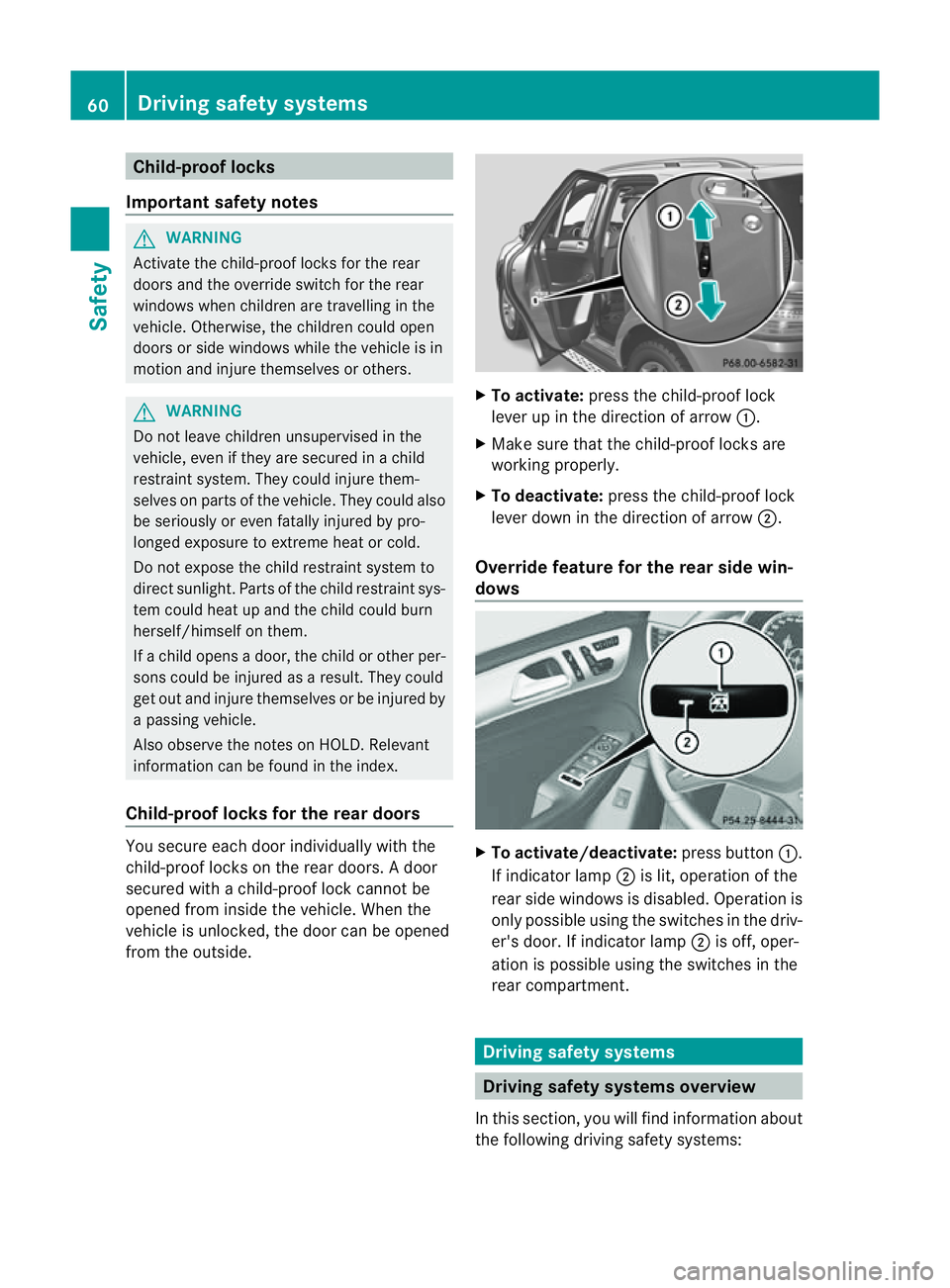
Child-proof locks for the rear doors You secure each door individually with the
child-proo flocks on the rea rdoors. Adoor
secured with achild-proof lock can notbe
opened from inside the vehicle. When the
vehicle is unlocked, the door can be opened
from the outside. X
To activate: press the child-proof lock
leve rupint he direction of arrow :.
X Make sur ethat the child-proof lock sare
workin gproperly.
X To deactivate: press thechild-proof lock
lever down in the direction of arrow ;.
Overrid efeature for the rear side win-
dows X
To activate/deactivate: press button:.
If indicator lamp ;is lit, operation of the
rear side windows is disabled. Operation is
only possible using the switches in the driv-
er' sd oor. If indicator lamp ;is off ,oper-
ation is possible using the switches in the
rear compart ment. Driving safety systems
Driving safety systems overview
In this section, you will find information about
the following driving safety systems: 60
Drivin
gsafety systemsSafety
Page 66 of 389
The radar sensor system must be switched off
using the on-boar
dcomputer in the vicinit yof
radio telescop efacilities in the following vehi-
cles:
R vehicles without COMAND Online and nav-
igation
R vehicles without Audio 20 and Becker ®
MAP PILOT
R vehicles for Australia
Information about switching off the rad ar sen-
so rs ystem using the on-board computer can
be found in the "On-board computer and dis-
plays “section (Y page 249).
For BAS PLUS to assist you when driving, the
rada rsensor system must be switched on and
operational; see "Radar sensor system "inthe
index. G
WARNING
BA SP LUS cannot alway sclearly identify
objects and complex traf fics ituations. BAS
PLU Scannot interven einthese cases.
There is arisk of an accident. Always pay
careful attention to the traf fics ituation and be
ready to brake.
In particular, the detection of obstacles can
be impaired if ther eis:
R dir tont he sensor soranything els ecover-
ing the sensors
R snow or heav yrain
R interference by other radar sources
R the possibility of strong radar reflections,
for example in multi-storey car parks
R an arrow vehicle travellin ginfront, e.g .a
motorbike
R av ehicle travellin ginfront on adifferent
line G
WAR
NING
BAS PLUS doe snot react:
R to people or animals
R to oncomin gvehicles
R to crossin gtraffic
R when cornering As
aresult, BAS PLU Smay not interven ein
critical situatio ns.T here is arisk of an acci-
dent .Always pay careful attention to the traf-
fic situation and be ready to brake.
Followin gdamage to the front end of the vehi-
cle, have the configuration and operation of
the radar sensors checked at aqualified spe-
cialist workshop. This also applie stocolli-
sion sats low speeds where ther eisnovisible
damage to the fron tofthe vehi cle.
If BA SPLUS is no tavailable du etoam alfunc-
tion in the rada rsensor system ,the brake
system remain savailable wit hfull brake
boostin geffect and BAS. Adaptiv
ebrak elamps
i Adapti vebrak elamps are only available in
certain countries.
If you brake sharply from aspeed of more
than 50 km/ horifb raking is assisted by BAS
or BAS PLUS, th ebrake lamp sflas hrapidly.
In this way, traffic travelling behind you is
warned in an even more noticeable manner.
If you brake sharply from aspee dofm ore
than 70 km/h to astandsti ll,t he hazard warn-
ing lam psare activated automatically .Ifthe
brakes ar eapplied again, the brak elamps
light up continuously .The hazard warning
lamps switc hoff automatically if you travel
faster than 10 km/h .You can also switc hoff
th eh azard warning lamps using the hazard
warning switch button (Y page 109). ESP
®
(Electronic Stability Program)
Important safety notes i
See the "Importan tsafety notes" section
(Y page 61).
If ESP ®
detect sthat the vehicle is deviating
from the direction desired by the driver ,one
or more wheels are braked to stabilis ethe
vehicle. If necessary, the engin eoutput is also
modified to keep the vehicle on the desired Driving safety systems
63Safety Z
Page 68 of 389
if the vehicle starts to skid or
awheel starts
to spin.
When you deactivate ESP ®
:
R ESP ®
no longer improves drivin gstabili ty.
R the engine's torque is no longer limited and
the drive wheels can spin. The spinning of
the wheels results in acuttin gaction, which
provides bet terg rip.
R tractio ncontrol is still activated.
R ESP ®
still provides suppor twhen you
bra ke.
If ESP ®
is deactivate dand one or more wheels
start to spin, the ÷ESP®
warning lamp in
the instrument cluster flashes. In such situa-
tions, ESP ®
will not stabilis ethe vehicle. X
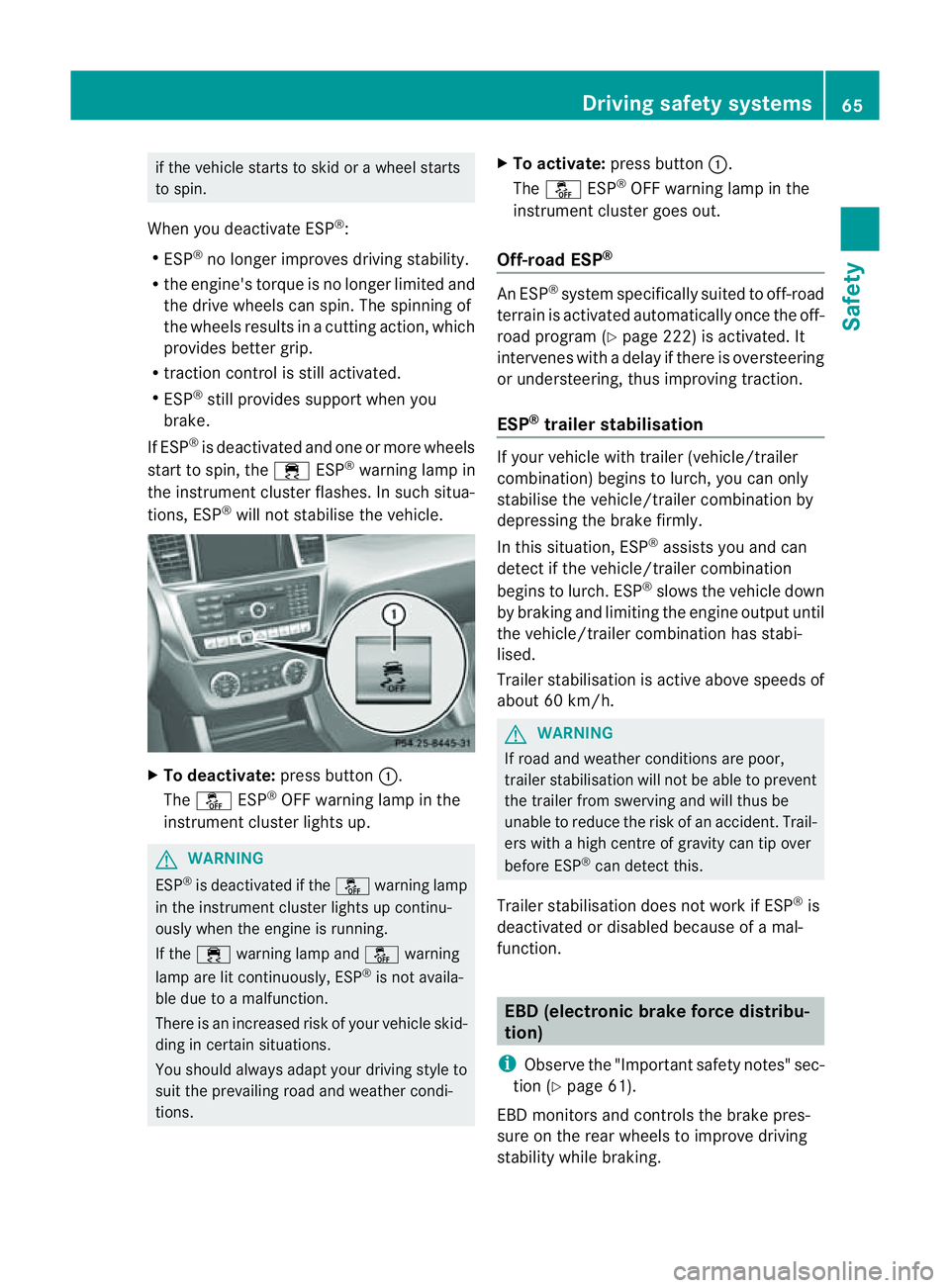
To deactivate: press button:.
The å ESP®
OFF warnin glamp in the
instrument cluster lights up. G
WARNING
ESP ®
is deactivated if the åwarning lamp
in the instrument cluster lights up continu-
ously when the engine is running.
If the ÷ warning lamp and åwarning
lamp are lit continuously, ESP ®
is not availa-
ble due to amalfunction.
There is an increased risk of your vehicle skid-
ding in certain situations.
You shoul dalway sadapt your driving style to
suit the prevailing road and weather condi-
tions. X
To activate: press button :.
The å ESP®
OFF warning lamp in the
instrumen tcluster goes out.
Off- road ESP® An ESP
®
system specifically suited to off-road
terrain is activated automatically once the off-
road program (Y page 222)isa ctivated. It
intervene swithadelay if there is oversteering
or understeering, thus improvin gtraction.
ESP ®
traile rstabilisation If your vehicle with trailer (vehicle/trailer
combination) begins to lurch, you can only
stabilis ethe vehicle/ trailer combination by
depressing the brake firmly.
In this situation, ESP ®
assists you and can
detect if the vehicle/trailer combination
begins to lurch. ESP ®
slows the vehicle down
by brakin gand limiting the engine output until
the vehicle/traile rcombination has stabi-
lised.
Trailer stabilisation is active abov espeeds of
about 60 km/h. G
WARNING
If road and weather condi tions are poor,
trailer stabilisation will not be able to prevent
the trailer from swerving and will thus be
unable to reduce the risk of an accident .Trail-
ers wit hahigh centr eofgravity can tip over
before ESP ®
can detec tthis.
Trailer stabilisation does not work if ESP ®
is
deactivated or disable dbecause of amal-
function. EBD (electronic brake force distribu-
tion)
i Observe the "Important safety notes" sec-
tion (Y page61).
EBD monitors and control sthe brake pres-
sur eonthe rea rwheels to improv edriving
stab ility while braking. Driving safety systems
65Safety Z
Page 69 of 389
G
WARNING
If EBD ha smalfunctioned, the braking system
remains available with full brake boosting
effect. However, the rear wheels can still lock,
e.g. under full braking. This coul dcaus eyou
to lose control of your vehicle and cause an
accident. You shoul dtherefore adapt your
drivin gstyle to the different handling charac-
teristics.
X Observe the notes on warning and indica tor
lamps (Y page 286) as well as display mes-
sages (Y page 256). ADAPTIV
EBRAKE
ADAPTI VEBRAKE enhances braking safety
and offers increased braking comfort. In addi-
tion to the braking function, ADAPTIV EBRAKE
als oh as the HOLD function (Y page187) and
hi ll st art assist (Y page141). For further
information, se eDriving tip s(Ypage 162). PRE-SAFE
®
Brake
PRE-SAFE ®
Brake is only available in vehic les
with DISTRONIC PLUS.
i Observe the "Important safety notes" sec-
tion (Y page61).
PRE-SAFE ®
Brake can help you to minimise
the ris kofaf rontal collision wit havehicle
ahead or reduce the effects of such acolli-
sion. If PRE-SAFE ®
Brake has detected arisk
of collision, you wil lbewarned visuall yand
acoustically as wel lasbyautomatic braking.
PRE-SAFE ®
Brake cannot prevent acollision
withou tyou rintervention.
Thi sfun ctio nwill issue awarnin gats peeds of
arou nd 30 km/h or moreif:
R for aperiod of several seconds ,the dis-
tance to the vehi cleinf ront is to oshor tfor
the speed at which you ar etravelling .The ·
distanc ewarning lamp then lights up
in the instrument cluster.
R you are rapidly approaching the vehicle in
front .Ani ntermittent warning tone will
then sound and the ·distance warning
lamp will light up in the instrument cluster.
X Brake immediately in order to increas ethe
distanc efrom th evehicle in front.
or
X Take evasiv eactio nprovide ditiss afe to do
so.
If the driver and passengers have fastened
their seat belts, PRE-SAFE ®
Brake can also
can also perform the following at speeds of
above approximately 30 km/h:
R brake the vehicle automatically from a
spee dofuptoa pproximately 20 0km/h
R trigge rpreventative passenger protection
measures (PRE-S AFE®
)( Ypage 45)
Due to the nature of the system, particularly
complicated driving conditions may cause
unnecessar ywarnings or the unnecessary
intervention of PRE-SAFE ®
Brake. To end this,
you can either depress the accelerator pedal
further, activate kickdown or release the
brake pedal.
The braking action of PRE-SAFE ®
Brake is
ended automatically if:
R you drive slowe rthan approximately
15 km /h.
R you manoeuvre to avoid the obstacle.
R there is no longe rany danger of arear-end
collision.
R there is no longer an obstacl edetected in
front of your vehicle.
If you have activated DSR (Y page 220), PRE-
SAFE ®
brak eisd eactivated.
With the help of the rada rsensor system,
PRE- SAFE ®
Brake can detect obstacles that
are in front of your vehicle for an exte nded
period of time.
At speeds up to approximately 70 km /h,
PRE- SAFE ®
Brake may als odetect stationary 66
Driving safet
ysystemsSafety
Page 75 of 389
Usefu
linfor mati on
i This Owner's Manual describes all models
and all standard and optional equipment
available to your vehicle at the time of pub-
lication of the Owner's Manual. Country-
specific deviation sare possible .Please
not ethat your vehicle ma ynot be equipped
with all featur es described. This also
applies to safety-releva ntsystems and
functions.
i Please read the information on qualified
specialist workshops (Y page 24).Key
Key functions
Locking and unlocking centr ally The key centrally locks/unlocks:
R the doors
R the tailgate
R the fuel filler flap G
WAR
NING
Only for the Unite dKingdom: if the vehicle
has been locked with the key or with KEY-
LESS-GO, the double lock function is activa-
ted as standard. It is then not possible to open
the doors from inside the vehicle.
Therefore, do not leave any people behind in
the vehicle, particularly children ,elderly peo-
ple or people requirin gspecial assistance. As
ar esult, they may not be able to free them-
selves in the event of an emergency. They
could be seriously or even fatally inju redby
prolonged exposure to extremely high or low
temperatures, for example. In this case, res-
cuin gpeople from outside the vehicle is diffi-
cult.
Deac tivate th einterior motion sensor before
you lock the vehicle. The doors can then be
opened from the inside after the vehicl ehas
been locked from the outside. G
WARNING
If children are left unsupervised in the vehicle,
they could:
R open adoor from inside the vehicle at any
time, even if it has been locked
R star tthe vehicle usin gakey which has been
left in the vehicle
R release the electric parking brake
They could thereby endanger themselves and
others. Never leave children unsupervised in
the vehicle. Alway stake the key with you
when leaving the vehicle, even if you are only
leaving it for ashort time. G
WARNING
If ak ey rin gistoo heavy or too large, the
weight actin gonthe key coul dcause it to turn
in the ignition lock or catc honthe steering
wheel. This coul dcause the engine to be
switched off suddenly. You may lose control
of the vehicle and cause an accident. Do not
attac hany heavy or large key rings to the key
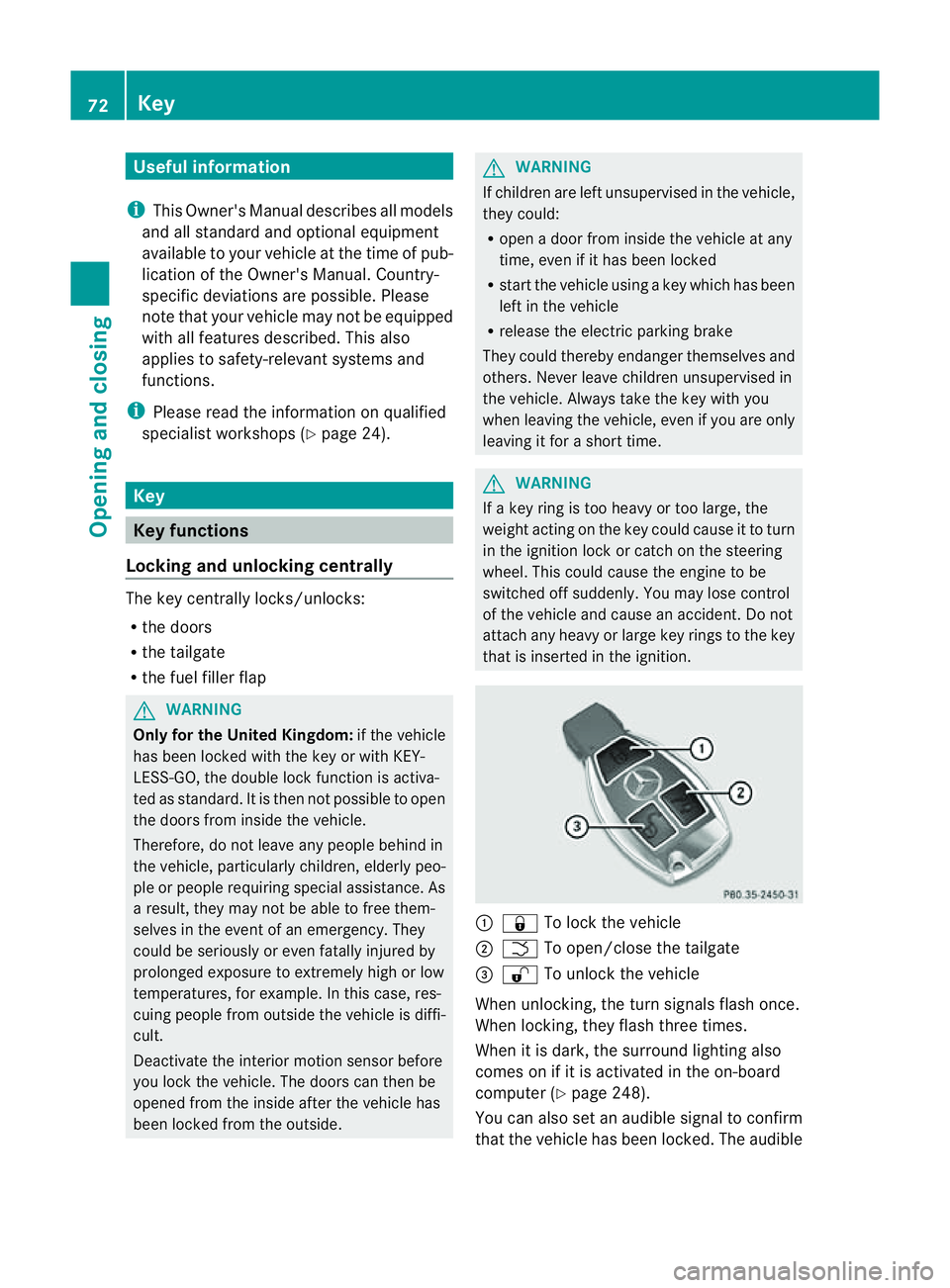
that is inserted in the ignition. :
& To lock the vehicle
; F To open/clos ethe tailgate
= % To unlock the vehicle
When unlocking, the tur nsignals flash once.
When locking, they flash three times.
When it is dark, the surroun dlighting also
comes on if it is activated in the on-board
computer (Y page 248).
You can also set an audible signal to confirm
that the vehicle has been locked. The audible 72
KeyOpening and clos
ing
Page 77 of 389
Emergency key element
General notes If th
evehicle can no longer be unlocked with
th ek ey, us ethe emergency ke yelement.
If you use th eemergency key element to
unlock and open the dri ver'sd oor ,the anti-
theft alar msystem will be triggered
(Y page 68).
The reare several ways to tur noff th ealarm:
X To turn the alarm off with the key: press
the % or& buttonont he key.
or
X Insert the key int othe ignition lock.
or
X To deactivat ethe alarm with KEYLESS-
GO: press th eStart/Stop button in the igni-
tion lock. The key must be in the vehicle.
or
X Lock or unlock the vehicle using KEYLESS-
GO. The key must be outside the vehicle.
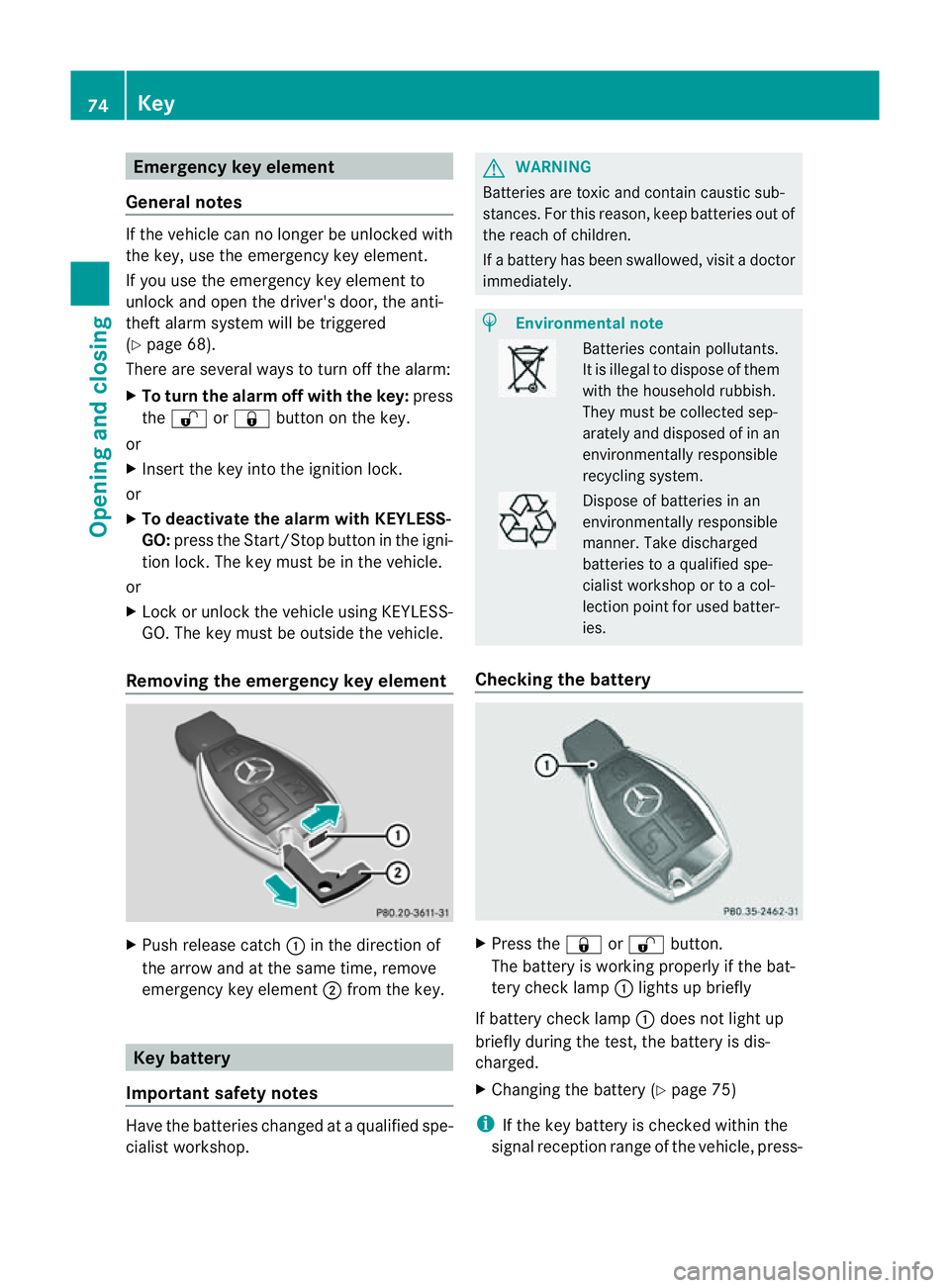
Removing the emergency key element X
Pus hrelease catch :in the direction of
the arrow and at the same time, remove
emergency key element ;from the key. Key battery
Important safety notes Hav
ethe batteries changed at aqualified spe-
cialist workshop. G
WARNING
Batteries are toxic and contain caustic sub-
stances. For this reason, keep batteries out of
the reach of children.
If ab attery has been swallowed ,visi tad octor
immediately. H
Environmental note Bat
terie sc ontain pollutants.
It is illegal to dispose of them
with the household rubbish.
They must be collec teds ep-
arately and disposed of in an
environmentally responsible
recycli ngsystem. Dispose of batt
eries in an
envi ronmentally responsible
manner. Take discharged
batteries to aqualified spe-
cialist workshop or to acol-
lection point for used batt er-
ie s.
Checking th ebattery X
Press the &or% button.
Th eb attery is workin gproperl yifthe bat-
ter yc hec klamp :lights up briefly
If battery chec klamp :does not light up
briefly during the test, the batter yisdis-
charged.
X Changing the battery (Y page 75)
i If the key battery is checked within the
signal reception range of the vehicle, press- 74
KeyOpening and closing
Page 80 of 389
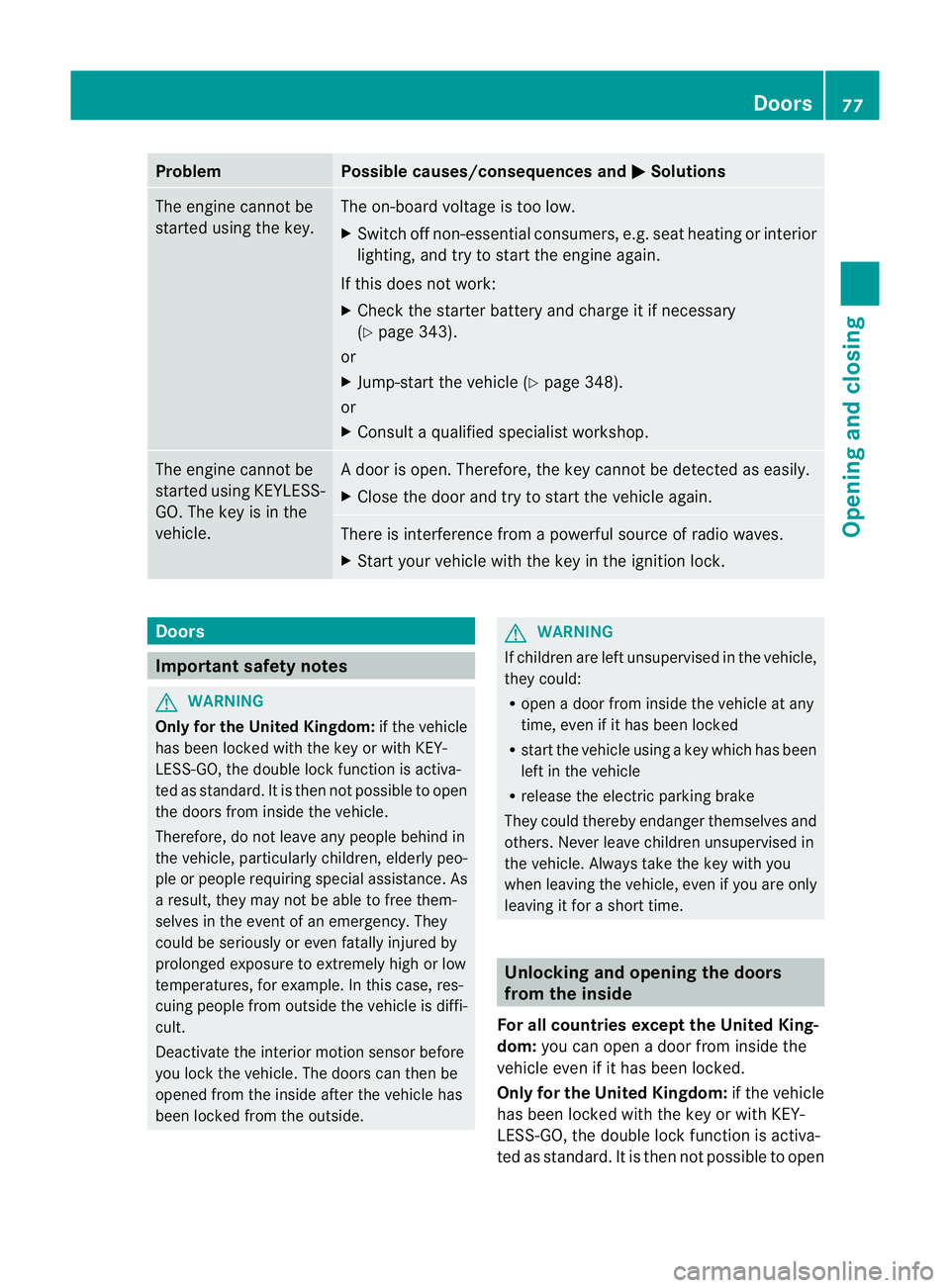
Problem Possible causes/consequences and
M Solutions
The engin
ecannot be
started using the key. The on-board voltage is too low.
X Switch off non-essential consumers, e.g. seat heating or interior
lighting ,and try to start the engine again.
If this doe snot work:
X Check the starter battery and charge it if necessary
(Y page 343).
or
X Jump-start the vehicle (Y page 348).
or
X Consult aqualified specialist workshop. The engine cannot be
started using KEYLESS-
GO. The key is in the
vehicle. Ad
oor is open. Therefore, the key can notb ed etected as easily.
X Close the door and tr ytostart the vehicle again. There is interferenc
efrom apowerfu lsource of radio waves.
X Start your vehicle with the key in the ignition lock. Doors
Important safety notes
G
WARNING
Only fo rthe Unite dKingdom: if the vehicle
has been locked with the key or with KEY-
LESS-GO, the double lock func tion is activa-
ted as standard. It is then not possible to open
the doors from inside the vehicle.
Therefore, do not leav eany people behind in
the vehicle, particularly children, elderly peo-
ple or people requiring special assistance .As
ar esult, they may not be able to free them-
selves in the event of an emergency. They
could be seriously or even fatally injured by
prolonged exposur etoextremely hig horlow
tempera tures, for example. In this case ,res-
cuin gpeople from outside the vehicle is diffi-
cult.
Deac tivate the interior motion sensor before
you lock the vehicle .The doors can then be
opened from the insid eafter the vehicl ehas
been locked from the outside. G
WARNING
If children are left unsupervised in the vehicle,
they could:
R open adoor from inside the vehicle at any
time, even if it has been locked
R star tthe vehicle usin gakey which has been
left in the vehicle
R release the electric parking brake
They could thereby endanger themselves and
others. Never leave children unsupervised in
the vehicle. Alway stake the key with you
when leaving the vehicle, even if you are only
leaving it for ashort time. Unlocking and opening th
edoors
from the inside
For all countries except the United King-
dom: you can open adoor from inside the
vehicle even if it has been locked.
Only for th eUnited Kingdom: if the vehicle
has been locked with the key or with KEY-
LE SS-G O, the doubl elock function is activa-
ted as standard. It is then not possible to open Doors
77Opening and closing Z
Page 88 of 389
Using th
ekey i
The key must be close to the driver 'sdoor
handle.
X Point the tip of the key at the driver' sdoor
handle.
X Press and hold the &button until the
side window sand the sliding sunroof or the
panorama sliding sunroof are fully closed.
X Make sure that all the side windows and the
sliding sunroof or panorama sliding sunroof
are closed.
On vehicles with apanorama sliding sunroof:
X Press and hold the &button again until
the roller sunblinds of the panorama sliding
sunroof close.
X To interrupt convenienc eclosing:
release the &button.
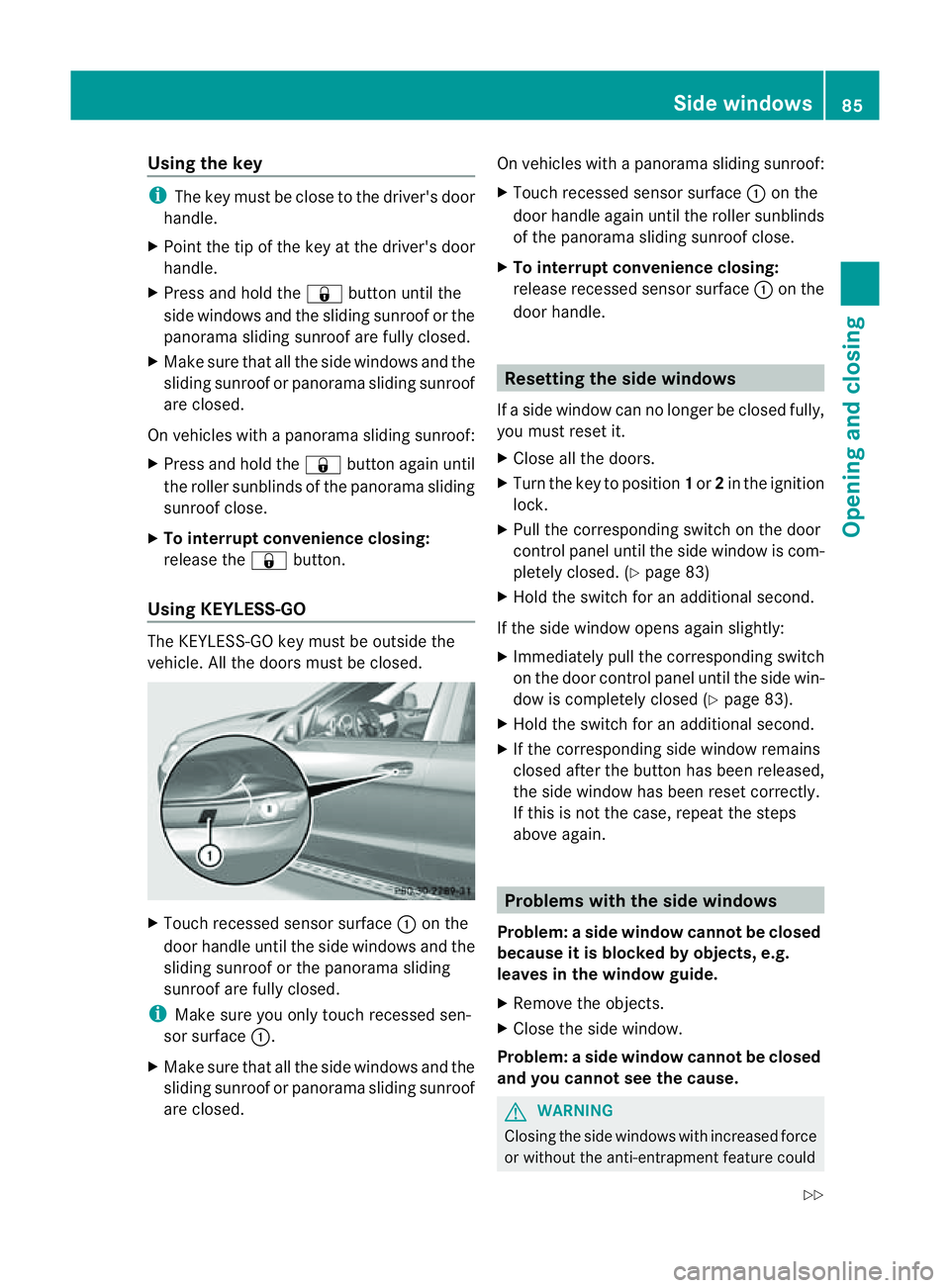
Using KEYLESS-GO The KEYL
ESS-GOkey must be outside the
vehicle .All the doors must be closed. X
Touch recessed sensor surface :on the
door handle until the side windows and the
sliding sunroof or the panoram asliding
sunroof are fully closed.
i Make sure you only touch recessed sen-
sor surface :.
X Make sure that all the side windows and the
sliding sunroof or panoram asliding sunroof
are closed. On vehicles with
apanorama sliding sunroof:
X Touch recessed senso rsurface :on the
door handle again until the roller sunblinds
of the panorama sliding sunroof close.
X To interrupt convenienc eclosing:
release recessed sensor surface :on the
door handle. Resetting the side windows
If as ide window can no longer be closed fully,
you must reset it.
X Close all the doors.
X Turn the key to position 1or 2in the ignition
lock.
X Pull the corresponding switch on the door
control panel until the side window is com-
pletely closed. (Y page 83)
X Hold the switch for an additional second.
If the side window opens again slightly:
X Immediately pull the corresponding switch
on the door control panel until the side win-
dow is completely closed (Y page 83).
X Hold the switch for an additional second.
X If the corresponding side window remains
closed after the button has been released,
the side window has been reset correctly.
If this is not the case, repeat the steps
above again. Problems with the side windows
Problem: aside window cannot be closed
because it is blocked by objects, e.g.
leaves in th ewindow guide.
X Remov ethe objects.
X Close the side window.
Problem :aside window cannot be closed
and you cannot see th ecause. G
WARNING
Closing the side windows wit hincrease dforce
or withou tthe anti-entrapmen tfeature could Side windows
85Openingand closing
Z