warning light MERCEDES-BENZ M-CLASS SUV 2011 Owner's Manual
[x] Cancel search | Manufacturer: MERCEDES-BENZ, Model Year: 2011, Model line: M-CLASS SUV, Model: MERCEDES-BENZ M-CLASS SUV 2011Pages: 389, PDF Size: 9.22 MB
Page 89 of 389
lead to serious or even fatal injury. Make sure
that nobody can becom etrapped when clos-
ing the side windows.
If as ide window is obstructed during closing
and reopen sagain slightly:
X Im me diately after the window blocks, pull
the correspondin gswitc hagain until the
side window has closed.
The side window is close dwith increased
force.
If as ide window is obstructed again during
closing and reopen sagain slightly:
X Im me diately after the window blocks, pull
the correspondin gswitc hagain until the
side window has closed.
The side window is close dwithout the anti-
entrapmen tfeature. Sliding sunroof
Important safet
ynotes
Your vehicle may be fitted with asliding sun-
roof or apanorama sliding sunroof. In the fol-
lowing section, the ter m"slidin gsunroof"
refers to both types of sliding sunroof. G
WARNING
Make sure that nobody can become trapped
when opening and closing the sliding sunroof.
If there is arisk of entrapment ,release the
switch immediately. Durin gautomatic opera-
tion ,push the switc hbriefly in any direction
to stop the sliding sunroof. G
WARNING
Th eg lass in th epanoram asunroof could
brea kinana ccident. If yo uare not wearin ga
seat belt ,there is arisk that you could be
thrown through the opening in the event of the
vehicle overturning. Therefore, always wear a
seat belt to reduce the risk of injuries. G
WARNING
Children could injur ethemselves if they oper-
ate the slidin gsunroof.
Never leave children unsupervised in the vehi-
cle. Always take the key with you when leaving
the vehicle, even if you are only leaving it for
as hort time.
! Only open the panoram asliding sunroof
if it is free of snow and ice. Otherwise, mal-
func tions ma yoccur.
Do not allo wanything to protrude from the
sliding sunroof. Otherwise, the seals could
be damaged.
i Resonance noises can occur in addition
to the usual airflow noises whe nthe sliding
sunroof is open. They ar ecaused by minor
pressure fluctuations in the vehicle interior.
Change the position of the sliding sunroof
or open aside window slightly to reduce or
eliminat ethese noises. Operating th
esliding sunroof
Opening and closing i
You can continue to operate the sliding
sunroof after switching off the engine or
removing the key. This function remains
activ efor fiv eminutes or until the driver's
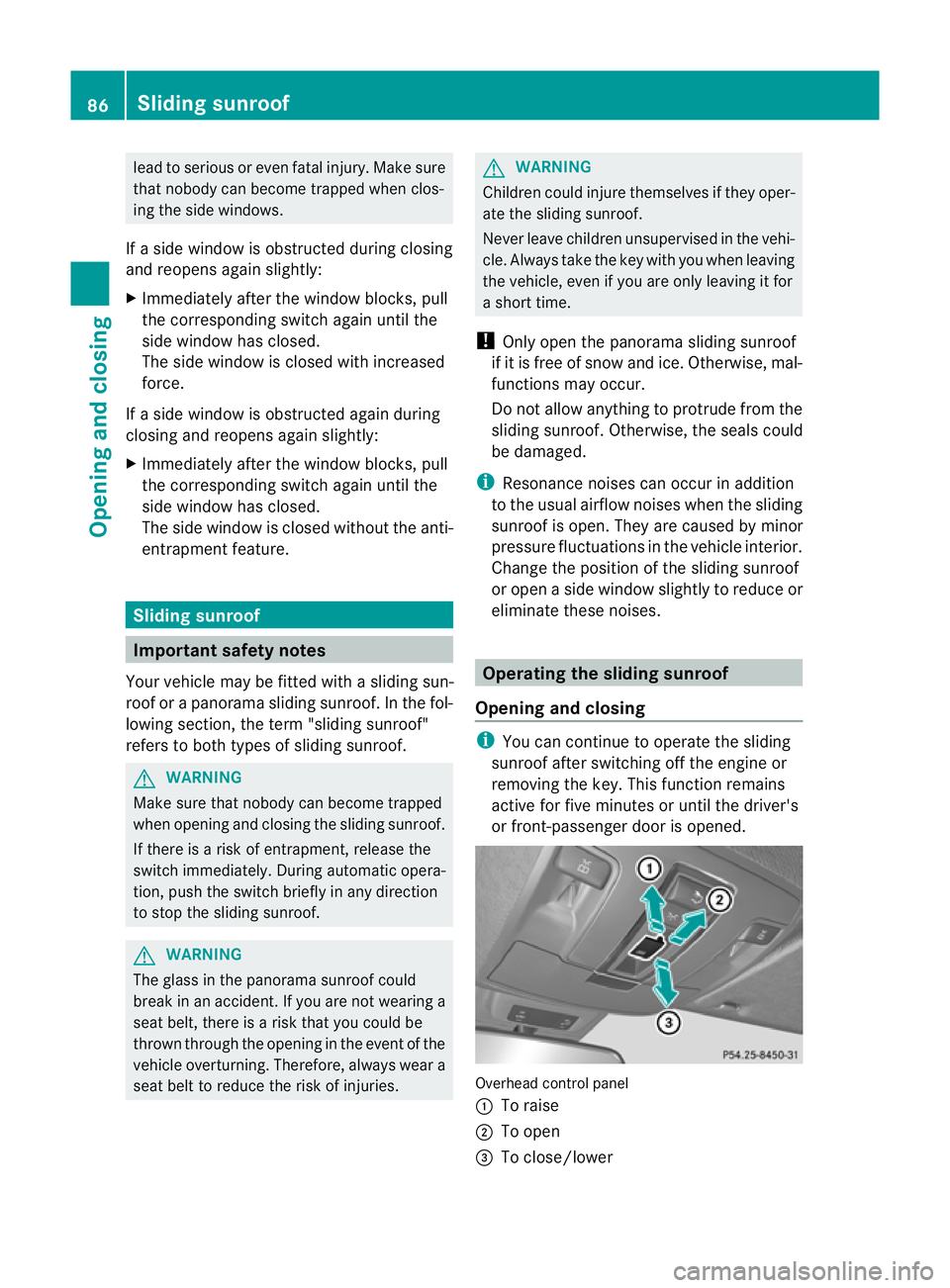
or front-passenger door is opened. Overhead control panel
:
To raise
; To open
= To close/lower 86
Slidin
gsunroofOpenin gand closing
Page 91 of 389
Rain closin
gfeature Whe
nthe key is in position 0in the ignition
lock or is removed ,the panorama slidin gsun-
roof closes automatically:
R if it starts to rain
R at extreme outsid etemperatures
R after six hours
R if there is amalfunction in the power supply
The panorama sliding sunroof remains raised
at the rear in order to allow ventilation of the
vehicle interior.
i If the panorama sliding sunroof is obstruc-
ted when being closed by the rain closing
feature, it opens again slightly. The rain
closing feature is then deactivated.
The panorama sliding sunroof does not close
if:
R it is raised at the rear.
R it is blocked.
R no rain is falling on the area of the wind-
screen being monitored by the rain sensor
(e.g. because the vehicle is under abridge
or in acarport). Operating the panoram
asliding sun-
roof roller sunblinds
Genera lnotes The roller sunblinds shield the vehicle interior
from sunlight. The two roller sunblinds can
only be opened and closed together when the
panoram asliding sunroof is closed. G
WARNING
Make sure that nobody can become trapped
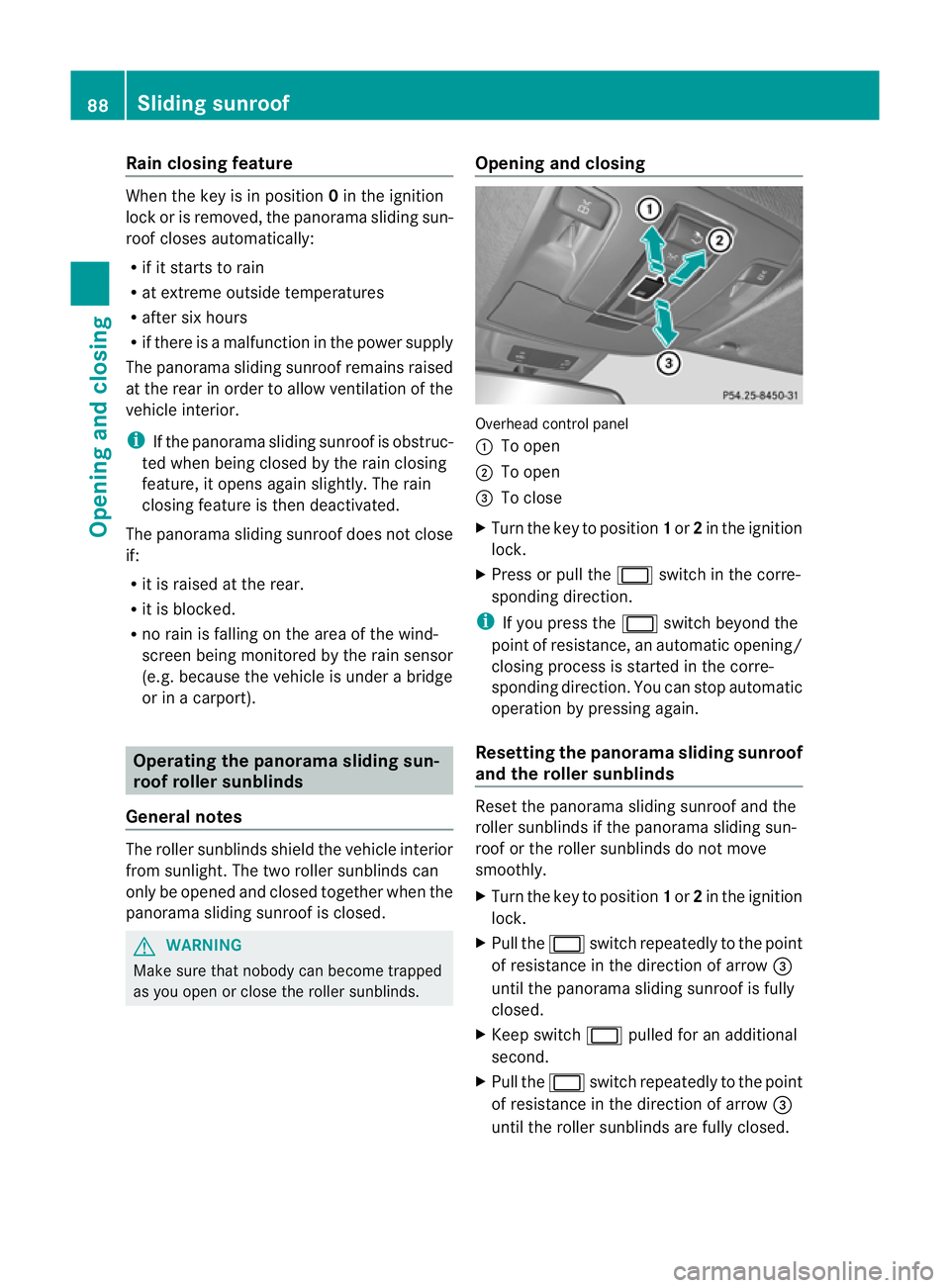
as you open or close the roller sunblinds. Opening and closing Overhead control panel
:
To open
; To open
= To close
X Turn the key to position 1or 2in the ignition
lock.
X Press or pull the 2switch in the corre-
sponding direction.
i If you press the 2switch beyond the
point of resistance, an automatic opening/
closing process is started in the corre-
sponding direction. You can stop automatic
operation by pressing again.
Resetting the panora masliding sunroof
and th eroller sunblinds Reset the panorama sliding sunroof and the
roller sunblinds if the panorama sliding sun-
roof or the roller sunblinds do not move
smoothly.
X Turn the key to position 1or 2in the ignition
lock.
X Pull the 2switchrepeatedly to the point
of resistanc einthe direction of arrow =
until the pano rama sliding sunroof is fully
closed.
X Kee pswitch 2pulled for an additional
second.
X Pull the 2switchrepeatedly to the point
of resistanc einthe direction of arrow =
until the roller sunblinds ar efully closed. 88
Sliding sunroofOpenin
gand closing
Page 92 of 389
X
Kee pswitch 2pulled for an additional
second.
X Make sure that the panorama sliding sun-
roof (Y page 87) and the rolle rsunblinds
(Y page 88 )can be fully opened again.
X If this is no tthe case ,repeat the steps
above again.
! If the panorama sliding sunroof and the
roller sunblin dcannot be fully opened or
closed after resetting, contact aqualified
specialist workshop. Problems with the slidin
gsunroof
Your vehicl emay be fitted with asliding sun-
roof or apanorama sliding sunroof. In the fol-
lowing section, the term "sliding sunroof"
refers to both types of sliding sunroof.
Problem: the sunroof cannot be closed
and you cannot see the cause. G
WARNING
You could be severely or even fatally injured
when closing the sliding sunroof with
increased closing force or if the anti-entrap-
ment feature is deactivated. Make sure that
nobody can become trapped when closing the
sliding sunroof.
If the sliding sunroof is obstructed during
closing and reopens again slightly:
X Immediately after the sliding sunroof
blocks, pull the 2switch in the over-
head control panel down to the point of
resistance and hold it until the sliding sun-
roof is closed.
The sliding sunroof is closed with increased
force.
If the sliding sunroof is obstructed again dur-
ing closing and reopens again slightly:
X Immediately after the sliding sunroof
blocks, pull the 2switch in the over-
head control panel down to the point of resistance and hold it until the sliding sun-
roof is closed.
The sliding sunroof is closed without the
anti-entrapment feature. Sliding sunroof
89Openingand closing Z
Page 101 of 389
Problems wit
hthe seat ventilation Th
es eat ven tilation has switched off prema-
turely or cannot be switched on. The vehicle's
electrical system voltage is too low because
too many electrical consumer sare switched
on.
X Switch off electrica lconsumers which you
do not need, such as the rea rwindow heat-
ing or interior lighting. Steering wheel
Important safet
ynotes G
WARNING
The electrically adjustable steering wheel can
still be adjusted when there is no key in the
ignition lock. Therefore, do not leave children
unsupervised in the vehicle, as they could
become trapped if the steering wheel is adjus-
ted. G
WARNING
Only adjust the steering wheel when the vehi-
cle is stationar yand do not pull away until the
steering wheel adjustment mechanis mis
locked in position. You might otherwise drive
without the steering wheel adjustment mech-
anism being locked in position. As aresult,
you could be distracted from road and traffic
condition sbyanunintentional movement of
the steering wheel and thereby cause an acci-
dent.
However, the steerability of the vehicl eisnot
affected. Adjusting th
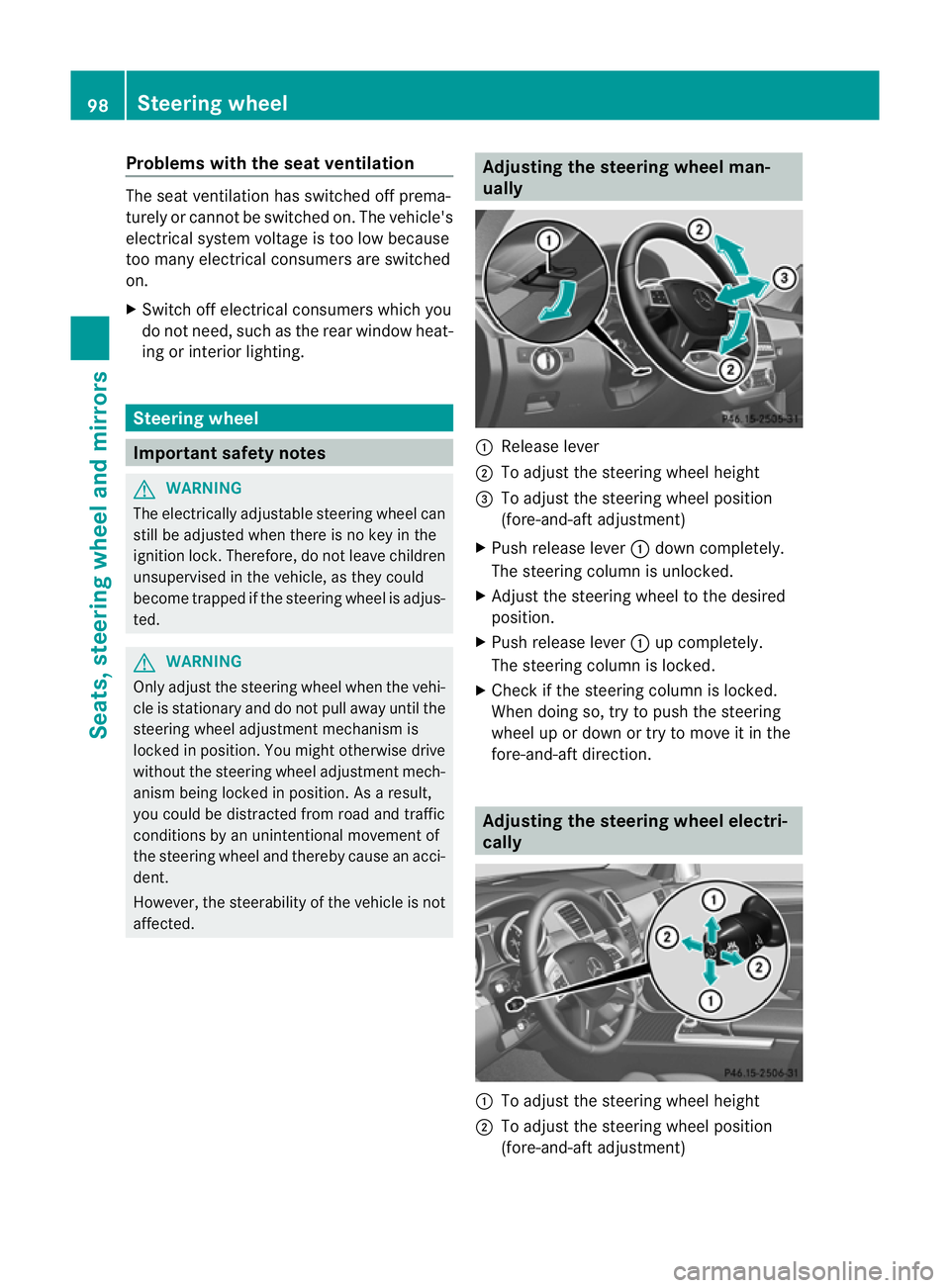
esteerin gwheel man-
ually :
Release lever
; To adjus tthe steering wheel height
= To adjust the steering wheel position
(fore-and-af tadjustment)
X Push release lever :down completely.
The steerin gcolum nisu nlocked.
X Adjus tthe steering wheel to the desired
position.
X Push release lever :up completely.
The steering column is locked.
X Chec kifthe steering column is locked.
When doing so, tr ytopush the steering
wheel up or down or try to move it in the
fore-and-aft direction. Adjusting the steering wheel electri-
cally
:
To adjust the steering wheel height
; To adjust the steering wheel position
(fore-and-aft adjustment) 98
Steering wheelSeats, steerin
gwhee land mirrors
Page 102 of 389
i
Related topics:
R EASY-ENTRY/EXI Tfeature
(Y page 99)
R Storing setting s(Ypage 103) Steering whee
lheating
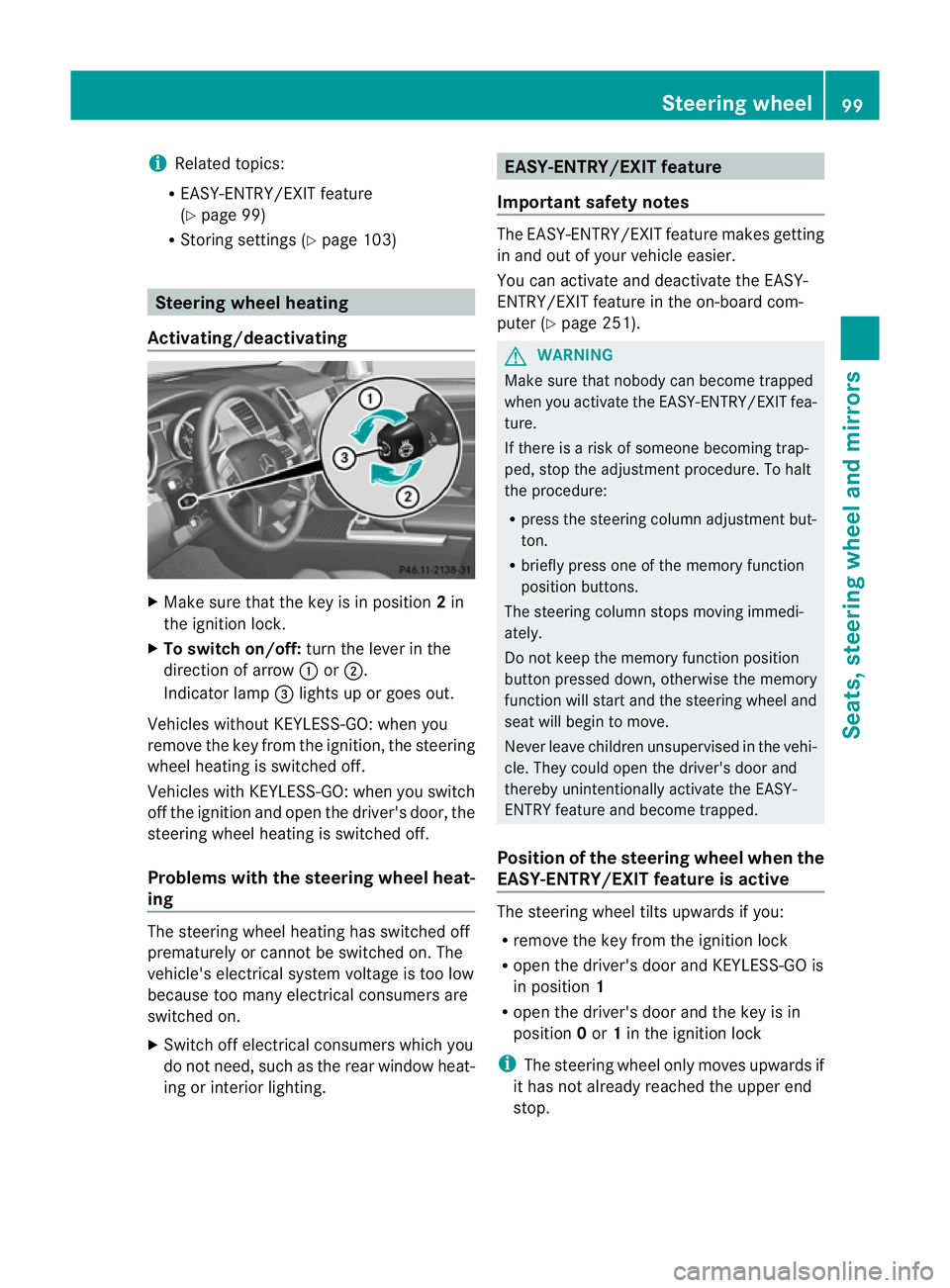
Activating/deactivating X
Mak esuret hat the key is in position 2in
th ei gnition lock.
X To switch on/off: turnthe lever in the
direction of arrow :or;.
Indicato rlamp =lights up or goes out.
Vehicles without KEYLESS-GO: when you
remove the key from the ignition ,the steering
wheel heating is switched off.
Vehicles with KEYL ESS-GO:when you switch
off the ignition and open the driver's door, the
steering wheel heating is switched off.
Problems wit hthe steering whee lheat-
ing The steering wheel heating has switched off
prematurely or cannot be switched on. The
vehicle's electrical system voltage is too low
because too many electrical consumer sare
switche don.
X Switch off electrical consumers which you
do not need ,such as the rear window heat-
ing or interior lighting. EASY-ENTRY/EXIT featu
re
Important safety notes The EASY-ENTRY/EXI
Tfeatur emakes getting
in and out of your vehicle easier.
You can activate and deactivate the EASY-
ENTRY/EXIT feature in the on-board com-
puter (Y page 251). G
WARNING
Make sure that nobody can become trapped
when you activate the EASY-ENTRY/EXI Tfea-
ture.
If there is arisk of someone becoming trap-
ped, stop the adjustment procedure. To halt
the procedure:
R press the steering column adjustment but-
ton.
R briefly press one of the memor yfunction
position buttons.
The steering column stops moving immedi-
ately.
Do not keep the memory function position
button presse ddown, otherwise the memory
function will star tand the steering wheel and
sea twill begin to move.
Never leave children unsupervised in the vehi-
cle. They could open the driver's door and
thereby unintentionally activate the EASY-
ENTRY featur eand become trapped.
Positio nofthe steering whee lwhen the
EAS Y-ENTRY/EXIT featur eisactive The steerin
gwheel tilt supwards if you:
R remove the key from the ignition lock
R open the driver' sdoor and KEYLESS -GOis
in position 1
R open the driver's door and the key is in
position 0or 1in the ignition lock
i The steerin gwheel only moves upwards if
it has not already reached the upper end
stop. Steering wheel
99Seats,steering wheeland mirror s Z
Page 110 of 389
If yo
uhear awarning tone when you leave the
vehicle ,the lights ma ystill be switched on.
X Turn the ligh tswitc htoà .
Dipped-beam headlamps X
To switch on th edipped-bea mhead-
lamps: turnthe ke yinthe ignition lock to
po sition 2or star tthe engine.
X Tur nthe li ght switch to L.
The L indicator lam pinthe instrument
clus terlight sup.
Day time driving lights You can activat
eordeactiva tethe daytime
driving ligh tsfunctio nusingthe on-board
compute r(Ypage 247).
X Day time drivin glights: activat ethe day-
ti me driving light sfunction using the on-
board computer.
X Turn the light switch to Ã.
When the engine is on: depe nding on the
ambien tlight conditions, the daytime driv-
ing lights or the parking and dipped-beam
headlamps are switched on.
When the dipped-beam headlamps are
switched on, the Lindicator lamp in the
instrumen tcluster lights up.
Automatic headlam pmode X
To switch on automatic headlamp
mode: turnthe light switc htoÃ.
Key in position 1in th eignition lock :the
side lamps ar eswitched on or off automat-
ically depending on the brightness of the
ambien tlight.
With the engin erunning: depe nding on the
brightness of the ambien tlight, the daytime
drivin glights 6
or the dipped-beam head-
lamps are switched on or off automatically.
When the dipped-beam headlamps are
switched on, the Lindicator lamp in the
instrumen tcluster lights up. G
WAR
NING
If the ligh tswitc hiss et to Ã,t he dipped-
beam headlamps will not com eonautomati-
cally if it is foggy. This could endanger you and
others. Therefore, tur nthe light switc hto
Lin fog.
The automatic headlamp featur eisonly an
aid. The driver is responsible for the vehicle's
lighting at all times.
Rear foglamp X
To switc honthe rear foglamp: turn the
key in th eignition lock to position 2or start
the engine.
X Tur nthe light switc htoLorÃ.
X Press the Rbutton.
The yellow Rindicator lam pint he
instrumen tcluster lights up.
X To switch off th erear foglamp: press the
R button.
The yellow Rindicator lamp in the
inst rument cluster goes out.
i If you switch the engine off (ke yinposi-
tion 1in the ignition lock )and then restart
it, the previous rear fogla mpsettings are
restored.
Rea rfoglamp X
To switch on th erearfoglamp: turnthe
key in the igni tion lock to position 2or start
the engine.
X Tur nthe light switc htoLorÃ.
X Press the Rbutton.
The yellow Rindicator lam pinthe
instrumen tcluster lights up.
X To switch off th erear foglamp: press the
R button.
The yellow Rindicator lamp in the
inst rument cluster goes out.
i If you switch the engine off (ke yinposi-
tion 1in the ignition lock )and then restart
6 Only if daytime driving ligh tshave been activa tedv ia the on-board computer. Exterior lighting
107Lightsand windscr een wipers Z
Page 112 of 389
The
K indicator lam pint he inst rument
cluster lights up when th emain-beam head-
lamps are switched on.
X To switch off the main-bea mhead-
lamps: move the combination switch back
to its normal position.
The K indicator lamp in the instrument
cluster goes out.
Headlam pflasher X
To switch on: turnthe key in the ignition
lock to position 1or 2or star tthe engine.
X Pull the combina tion switc hinthe direction
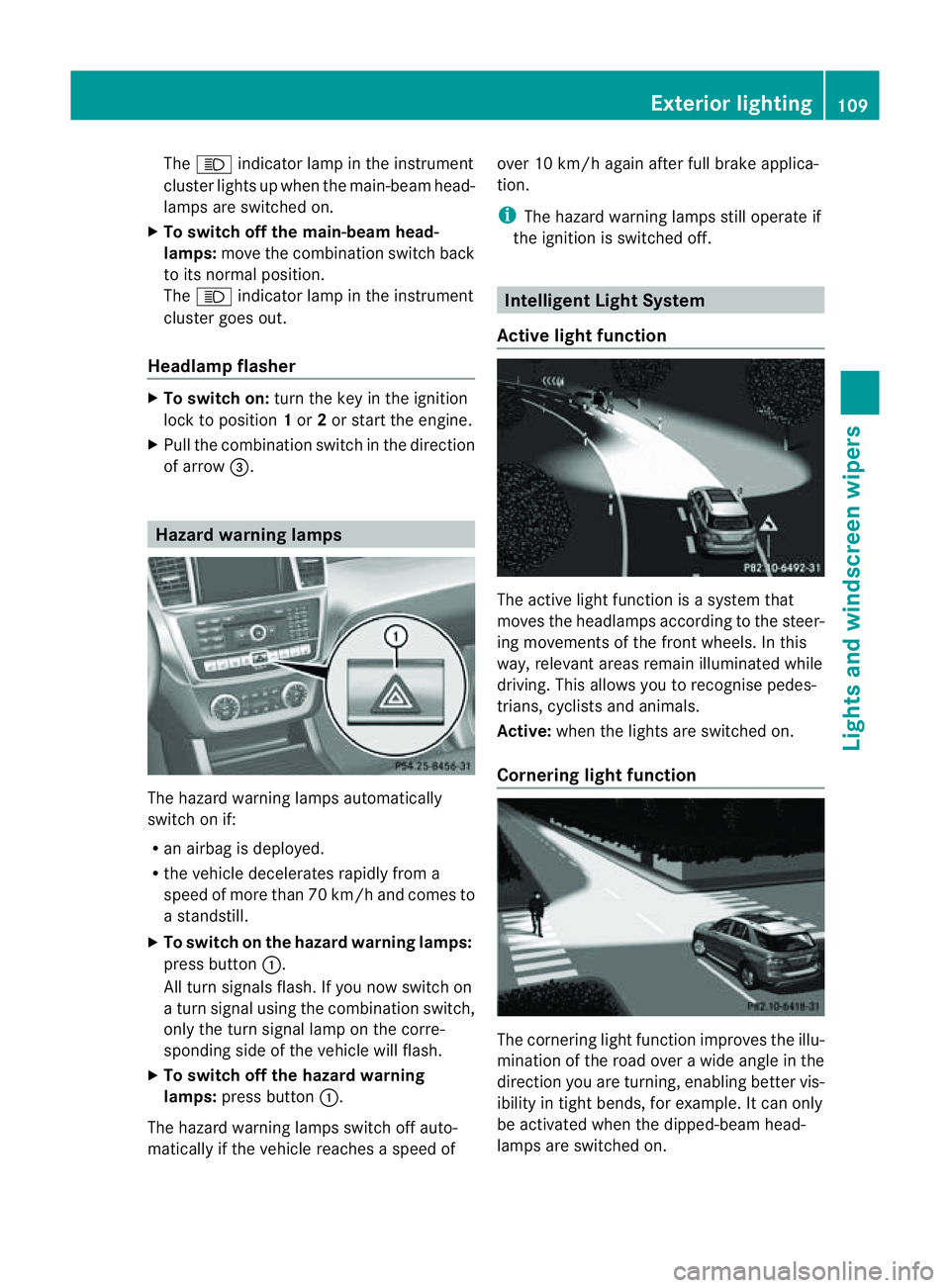
of arrow =. Hazard warning lam
psThe hazar
dwarning lamps automatically
switch on if:
R an airbag is deployed.
R the vehicle decelerates rapidly from a
spee dofm ore than 70 km /hand come sto
as tandstill.
X To switc honthe hazard warning lamp s:
press button :.
All turn signal sflash. If you now switc hon
at urns ignal using the combination switch,
only the tur nsignal lamp on the corre-
spondin gside of the vehicle will flash.
X To switch off th ehazard warning
lamps: press but ton:.
The hazar dwarnin glamps switc hoff auto-
matically if th evehicle reaches aspeed of over 10 km/h again after full brak
eapplica-
tion.
i The hazar dwarnin glamps still operat eif
the ignition is switched off. Intelligen
tLight System
Active light function The active light fun
ction is asystem that
moves the headlamps according to the steer-
ing movements of the front wheels. In this
way, relevan tarea sremai nilluminated while
driving. This allows you to recognise pedes-
trians, cyclists and animals.
Active: when the lights are switched on.
Cornering light function The cornering light func
tion improves the illu-
mination of the roa dover awide angle in the
direction you are turning, enabling better vis-
ibility in tight bends, for example. It can only
be activated when the dipped-beam head-
lamps are switched on. Exterior lighting
109Lightsand windsc reenwipers Z
Page 114 of 389
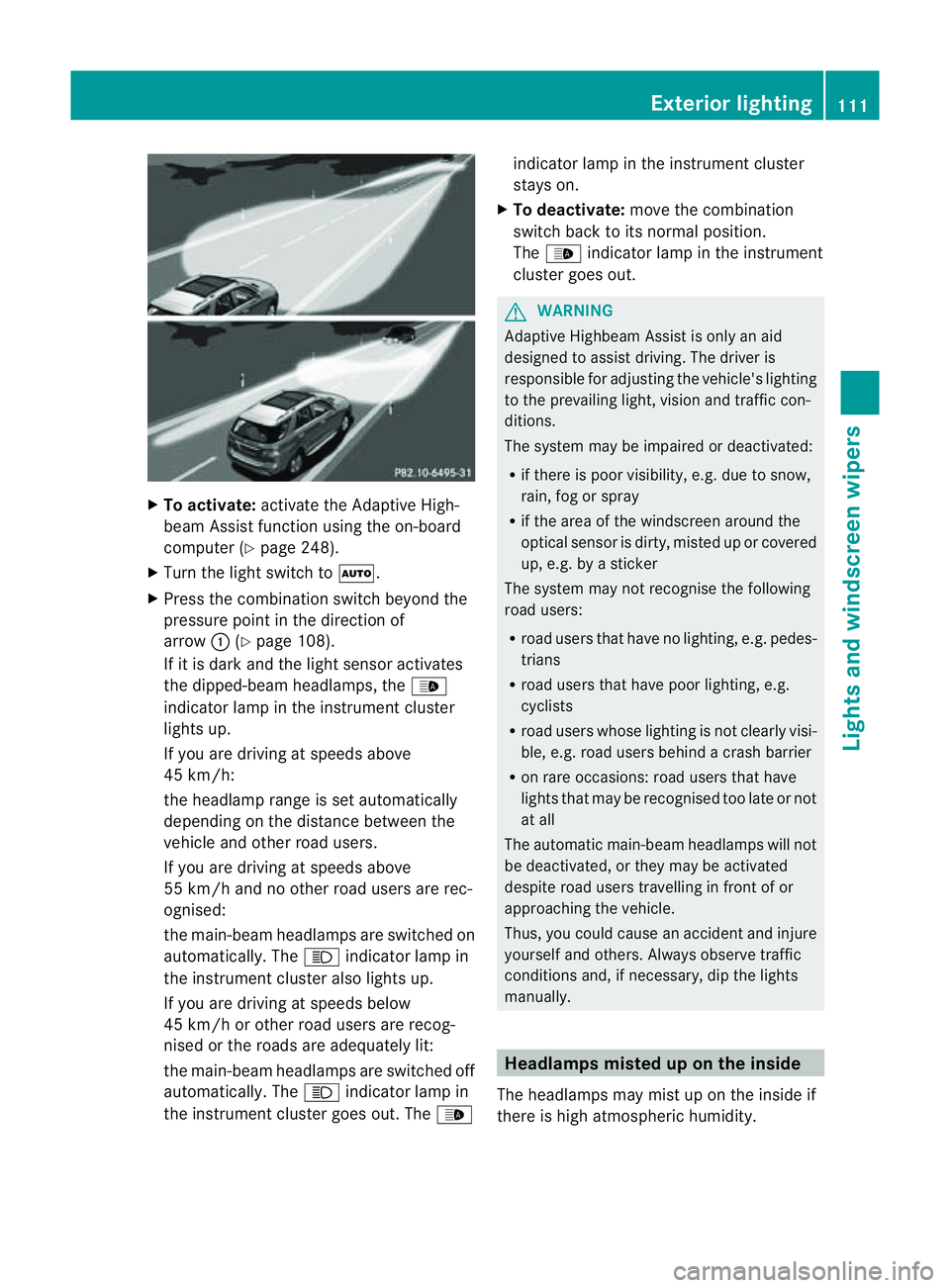
X
To activate: activatethe Adaptive High-
beam Assist function using the on-board
computer (Y page 248).
X Turn the ligh tswitch to Ã.
X Press the combination switch beyond the
pressure point in the direction of
arrow :(Ypage 108).
If it is dark and the light sensor activates
the dipped-beam headlamps, the _
indicator lamp in the instrument cluster
lights up.
If you are driving at speed sabove
45 km/h:
the headlamp range is set automatically
depending on the distanc ebetween the
vehicle and other road users.
If you are driving at speeds above
55 km/h and no other road users are rec-
ognised:
the main-bea mheadlamps are switched on
automatically. The Kindicator lam pin
the instrument cluster also lights up.
If you are driving at speeds below
45 km/h or othe rroad user sare recog-
nised or th eroads ar eadequately lit:
the main-beam headlamps are switched off
automatically. The Kindicator lamp in
the instrumen tcluster goes out. The _indicator lamp in the instrument cluster
stays on.
X To deactivate: move the combination
switch back to its normal position.
The _ indicator lamp in the instrument
cluster goes out. G
WARNING
Adaptiv eHighbeam Assist is only an aid
designed to assist driving. The driver is
responsible for adjusting the vehicle's lighting
to the prevailing light, vision and traffic con-
ditions.
The system may be impaired or deactivated:
R if there is poor visibility, e.g. due to snow,
rain, fog or spray
R if the area of the windscreen around the
optical sensor is dirty, misted up or covered
up, e.g. by asticker
The syste mmay not recognise the following
road users:
R road users that have no lighting, e.g. pedes-
trians
R road users that have poor lighting, e.g.
cyclists
R road users whos elighting is not clearly visi-
ble, e.g. road users behind acras hb arrier
R on rare occasions: road users that have
lights that may be recognised too late or not
at all
The automatic main-beam headlamps will not
be deactivated, or they may be activated
despite road users travelling in front of or
approaching the vehicle.
Thus, you could cause an accident and injure
yoursel fand others. Alway sobserv etraffic
conditions and ,ifnecessary, dip the lights
manually. Hea
dlamps misted up on the inside
The headlamps may mist up on the insid eif
there is hig hatmospheric humidity. Exterio
rlighting
111Lightsand windscreen wipers Z
Page 115 of 389
X
Drive with the headlamps switched on.
Th elevel of moisture diminishes, depend-
ing on the length of the journey and the
weather conditions (humidity and tem per-
ature).
If th elevel of moisture does not diminish:
X Have the headlamps checked at aquali fied
specialis tworkshop. Interior lighting
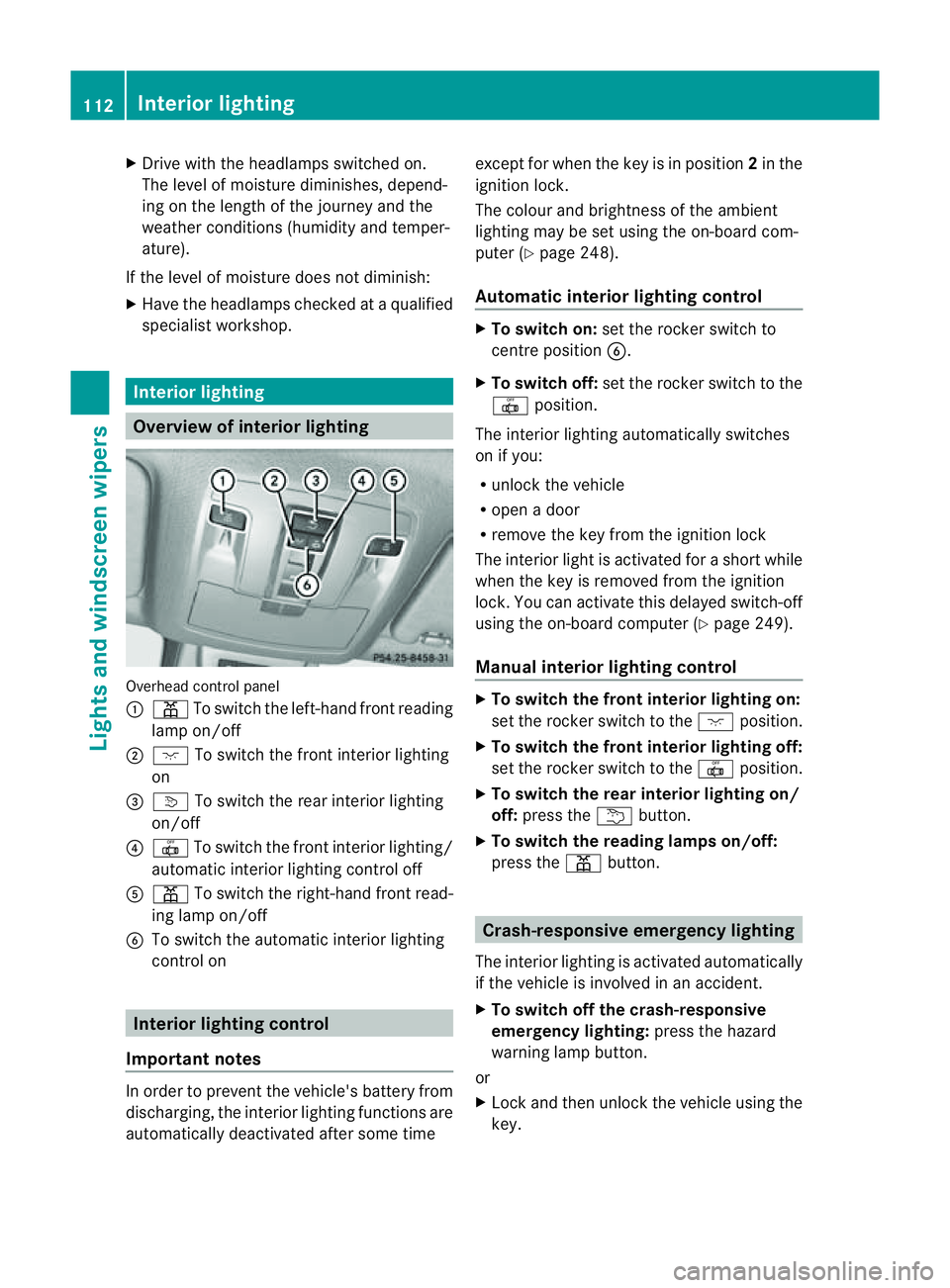
Overview of interior lighting
Overhead con
trol panel
: p To switch the left-hand front reading
lamp on/off
; c To switch the front interior lighting
on
= v To switch the rear interior lighting
on/off
? | To switch the front interior lighting/
automatic interior lighting control off
A p To switch the right-hand front read-
ing lamp on/off
B To switch the automatic interior lighting
control on Interio
rlighting control
Impor tant notes In order to prevent the vehicle'
sbattery from
discharging, the interior lighting functions are
automatically deactivated after some time except for when the key is in position
2in the
ignition lock.
The colour and brightness of the ambient
lighting may be set using the on-board com-
puter (Y page 248).
Automatic interior lighting control X
To switch on: set the rocker switch to
centre position B.
X To switch off: set the rocker switch to the
| position.
The interior lighting automatically switches
on if you:
R unlock the vehicle
R open adoor
R remove the key from the ignition lock
The interior light is activated for ashort while
when the key is removed from the ignition
lock .You can activate this delayed switch-off
using the on-boar dcomputer (Y page 249).
Manua linterior lighting control X
To switc hthe fron tinterior lighting on:
set the roc kers witch to the cposition.
X To switch the front interior lighting off:
set the rocker switch to the |position.
X To switch the rear interior lighting on/
off: press the ubutton.
X To switch the reading lamp son/off:
press the pbutton. Crash-responsive emergency lighting
The interior lightin gisactivate dautomatically
if the vehicle is involved in an accident.
X To switch off the crash-responsive
emergency lighting: press the hazard
warning lamp button.
or
X Lock and then unlock the vehicle using the
key. 112
Interior lightingLights and windscreen wipers
Page 116 of 389
Changing bulbs
Important safety notes
Xenon bulbs If your vehicle is equipped wit
hxenon bulb s,
you ca nrecognise this by th efollowing: the
cone of light from th exenon bulbs moves
from th etop to the bottomand back again
whe nyou star tthe engine. Fo rthis to be
observed ,the lights must be switched on
before startin gthe engine. G
DANGER
Xenon bulb scarry ahigh voltage. You could
get an electric shock and be seriously or even
fatally injured if you touch the electric con-
tacts on xenon bulbs. Therefore, never
remov ethe cover from xenon bulbs.
Do not change xenon bulbs yourself, but have
them replaced at aqualified specialist work-
sho pwhich has the necessar yspecialist
knowledge and tools to carry out the work
required.
Mercedes-Ben zrecom mends that you use a
Mercedes-Benz Service Centre for this pur-
pose. In particular, work relevant to safety or
on safety-related systems must be carried out
at aq ualified specialist workshop.
Bulbs and lamps are an important aspect of
vehicle safety. You must therefore make sure
that thes efunction correctly at all times.
Have the headlamp setting checked regularly.
Other bulbs There are bulbs other than the xenon bulbs
that you cannot replace. Replace only the
bulbs listed (Y page 113). Have the bulbs that
you cannot replace yourself changed at a
qualified specialist workshop.
Mercedes -Benz recommends that you use a
Mercedes-Benz Ser vice Centre for thi spur-
pose .Inp articular, work relevant to safety or
on safety-related systems must be carried out
at aq ualified specialist workshop. If you require assistanc
echangi ngbulbs, con-
sult aqualified specialist workshop.
Do not touch the glass tube of new bulbs with
your bare hands. Even minor contamination
can burn into the glass surface and reduce
the servic elife of the bulbs. Always use alint-
free cloth or only touch the base of the bulb
when fitting.
Only use bulbs of the correct type.
If the new bulb still does not light up, consult
aq ualified specialist workshop.
Bulbs and lamps are an important aspect of
vehicle safety. You must therefore make sure
that these function correctly at all times.
Have the headlamp setting checked regularly. G
WARNING
Bulbs and lights can become very hot. For this
reason, allow them to cool down before
changin gthem. Otherwise, you coul dburn
yourself when you touch them.
Keep bulbs out of the reach of children. Oth-
er wise ,they could damage them, for example,
and inj uret hemselves.
Never use abulbw hich ha sbeend ropped.
Suc hab ulbm ay explod eand injure you.
Halogen bulb sare pressu rised and could
explode when yo uchange them, especiall yif
the yarever yhot. Yo ushould therefor ewear
eye protec tion and gloves when you are
changing them. Overview of bulb replacement
–bulbs
Yo uc an replace the following bulbs. The
details for the bul btype can be found in the
legend. Changing bulbs
113Lightsand windsc reenwipers Z