ECU MERCEDES-BENZ M-CLASS SUV 2011 Owner's Manual
[x] Cancel search | Manufacturer: MERCEDES-BENZ, Model Year: 2011, Model line: M-CLASS SUV, Model: MERCEDES-BENZ M-CLASS SUV 2011Pages: 389, PDF Size: 9.22 MB
Page 162 of 389
X
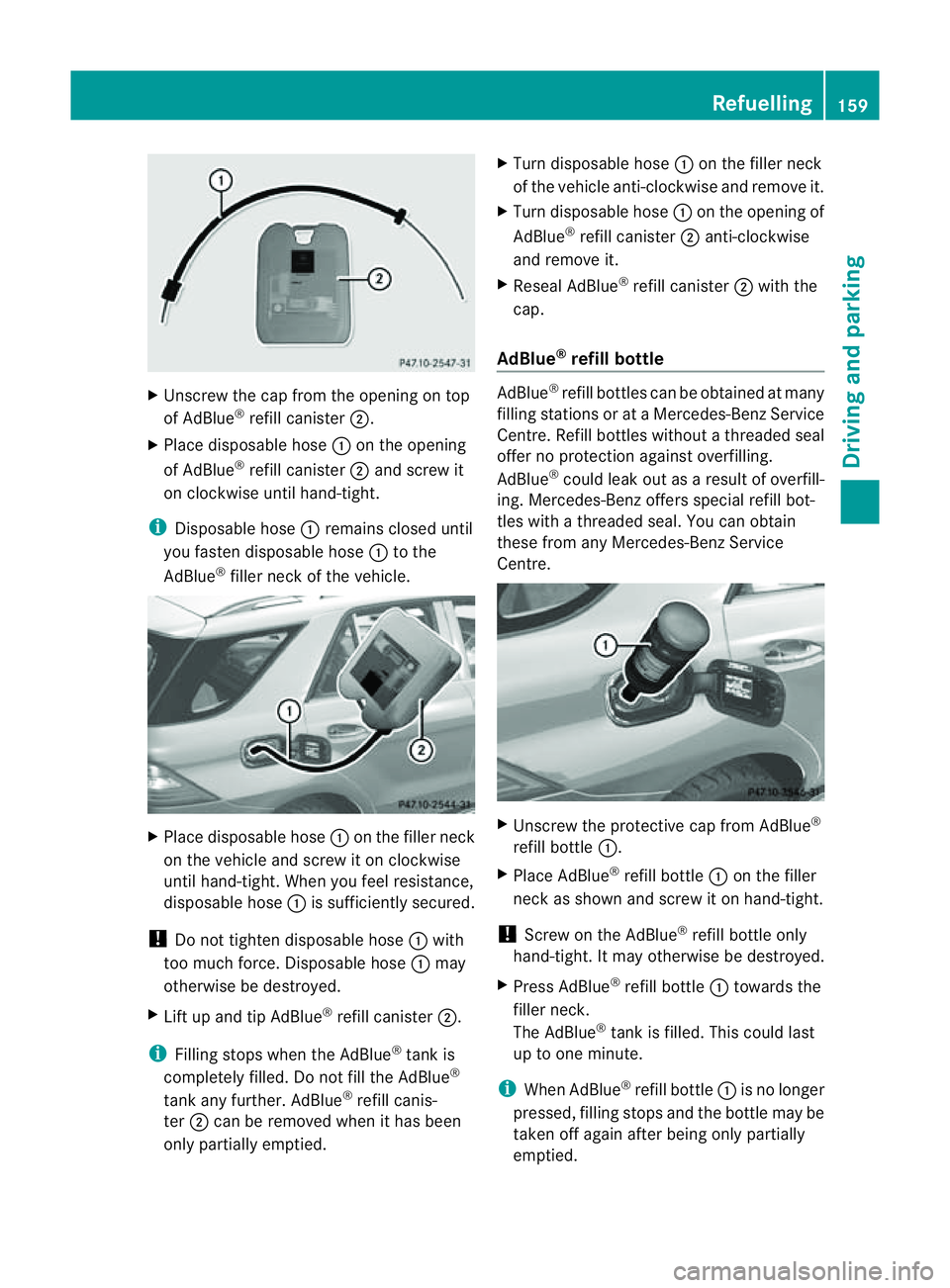
Unscre wthe cap from the opening on top
of AdBlue ®
refill canister ;.
X Plac edisposable hose :on the opening
of AdBlue ®
refill canister ;and screw it
on clockwise until hand-tight.
i Disposable hose :remains closed until
you fasten disposable hose :to the
AdBlue ®
filler neck of the vehicle. X
Place disposable hose :on the filler neck
on the vehicle and screw it on clockwise
until hand-tight. When you feel resistance,
disposable hose :is sufficiently secured.
! Do not tighten disposable hose :with
too muc hforce. Disposabl ehose :may
otherwise be destroyed.
X Lif tu pa nd tip AdBlue ®
refill canister ;.
i Filling stops whe nthe AdBlue ®
tan kis
completely fille d.Do no tfill the AdBlue ®
tank any further. AdBlue ®
refill canis-
ter ;can be removed when it has been
only partially emptied. X
Turn disposable hose :on the filler neck
of the vehicle anti-clockwise and remov eit.
X Turn disposable hose :on the opening of
AdBlue ®
refill canister ;anti-clockwise
and remove it.
X Reseal AdBlue ®
refill canister ;with the
cap.
AdBlue ®
refill bottle AdBlue
®
refill bottle scan be obtained at many
filling stations or at aMercedes-Benz Service
Cent re.R efill bottles without athreaded seal
offer no protection against overfilling.
AdBlue ®
could leak out as aresult of overfill-
ing. Mercedes-Ben zoffers special refi llbot-
tles with athrea deds eal. You can obtain
these from any Mercedes-Ben zService
Centre. X
Unscrew the protectiv ecap from AdBlue ®
refill bottle :.
X Place AdBlue ®
refill bottle :on the filler
neck as sho wn andscre witonh and-tight.
! Screw on the AdBlue ®
refill bottle only
hand-t ight.Itm ay other wise be destroyed.
X Press AdBlue ®
refil lbottle : toward sthe
fille rneck.
The AdBlue ®
tank is filled. Thi scould last
up to one min ute.
i Whe nAdBlue ®
refill bottle :is no longer
pressed, filling stops and the bottle may be
taken off again after being only partially
emptied. Refuelling
159Drivingand parking Z
Page 163 of 389
X
Release AdBlue ®
refill bottle :.
X Turn AdBlue ®
refill bottle :anti-clockwise
and remove it.
X Screw the protective cap onto AdBlue ®
refill bottle :again.
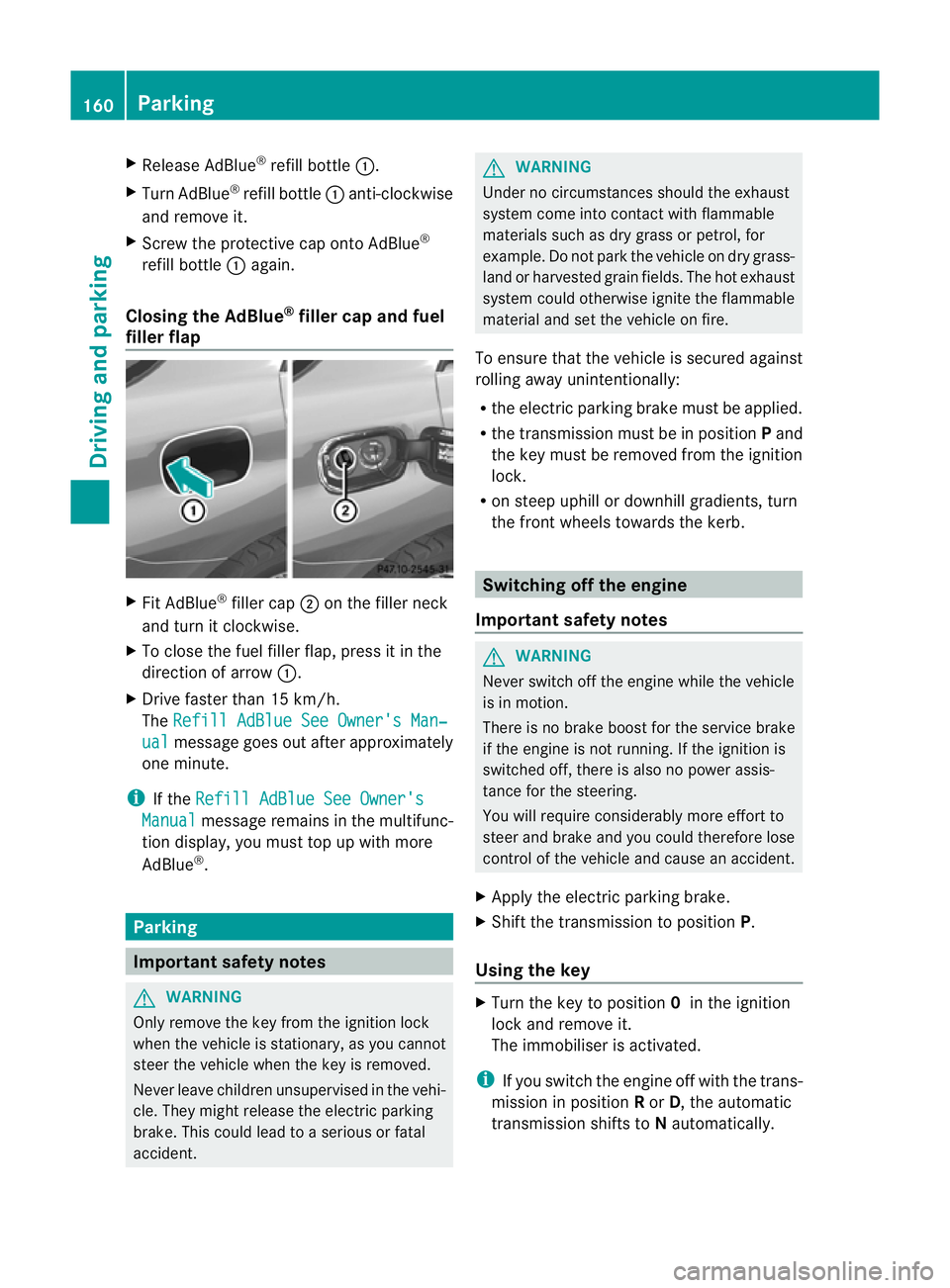
Closing th eAdBlue ®
filler cap and fuel
filler flap X
Fit AdBlue ®
filler cap ;on the filler neck
and tur nitclockwise.
X To close th efuel filler flap ,press it in the
di rectio nofarrow:.
X Drive faster than 15 km/h.
The Refill AdBlue See Owner' sMan‐ ual messag
egoeso ut after approximately
on em inute.
i If the Refill AdBlue See Owner's Manual messag
eremain sinthe mu ltifunc-
tion display, you mus ttop up with more
AdBlue ®
. Parking
Important safety notes
G
WARNING
Only remove the key from the ignition lock
when the vehicle is stationary, as you can not
steer the vehicle when the key is removed.
Never leav echildren unsupervised in the vehi-
cle. They might release the electric parking
brake. This coul dlead to aserious or fatal
accident. G
WAR
NING
Under no circumstances should the exhaust
system come into contact with flammable
materials such as dry grass or petrol ,for
example. Do not par kthe vehicle on dry grass-
lan dorh arvested grain fields. The hot exhaust
system could otherwise ignite the flammable
material and set the vehicle on fire.
To ensure that the vehicle is secured against
rolling away unintentionally:
R the electric parking brake must be applied.
R the transmission must be in position Pand
the key must be removed from the ignition
lock.
R on steep uphill or downhill gradients, turn
the fron twheels towards the kerb. Switching of
fthe engine
Important safety notes G
WARNING
Neve rswitch off the engine while the vehicle
is in motion.
There is no brake boost for the service brake
if the engine is not running. If the ignition is
switched off, there is also no power assis-
tance for the steering.
You will require considerably more effort to
steer and brake and you could therefore lose
control of the vehicle and cause an accident.
X Apply the electric parking brake.
X Shift the transmission to position P.
Using the key X
Turn the key to position 0in the ignition
lock and remove it.
The immobiliser is activated.
i If you switch the engine off with the trans-
mission in position Ror D,t he automatic
transmission shift stoNautomatically. 160
ParkingDriving and parking
Page 169 of 389
Off-road driving
Important safet ynotes G
WARNING
Driv eslowly in rough terrain with which you
are unfamiliar. This will allow you to detect
unexpected obstacles more easily and, there-
fore, to reduce the risk of an accident.
Do not make U-turns on mountain roads. Oth-
erwise, the vehicle could tip over. If aslope is
too steep for the vehicle, drive back in reverse
gear.
Do not drive at an angle up steep inclines.
Otherwise, the vehicle could tip over. If you
drive up asteep incline at an angle and the
vehicle threatens to overturn, stee rinto the
line of fall immediately.
Never allo wthe vehicle to roll backwards. The
brakin geffect of the engine canno tbeu tilised
in neutral. If you only use the service brake,
you could los econtrol of the vehicle. G
WARNING
Grains of sand, particles of dirt and other
abrasiv ematerials can enter the brake sys-
tem. This can lead to excessive wear and
unpredictable braking efficiency.
After the brakes have been expose dtodirty
conditions ,have them checked and cleaned
at aq ualified specialist workshop ,e.g. a
Mercedes-Benz Service Cent re.O therwise,
there is arisk that braking power may be
insufficient in the event of an emergency, or
that the braking effec tmay be unpredictable. G
WARNING
Damage to the vehicle creates the risk of an
accident for yourself and other road users. If
in doubt, have your vehicle chec kedataq uali-
fied specialist workshop which has the nec-
essary specialist knowledg eand tool stocarry
out the work required. Mercedes-Benz rec-
ommends that you use aMercedes-Benz
Servic eCentr efor this purpose. General notes Read this section befor
edriving your vehicle
off- road. Practise by travelling over more gen-
tle off-road terrain first.
The following driving systems are specially
adapted to off-road driving:
R Off-road program (vehicles without the
ON&OFFROAD package) (Y page 222)
R Off-road program 1and 2(vehicles wit hthe
ON&OFFROAD package) (Y page 222)
R LOW RANGE off-road gear (vehicles with
the ON&OFFROAD package)
(Y page 223)
R Differential lock (vehicles wit hthe
ON&OFFROAD package) (Y page 223)
R Off-road AB S(Ypage 61)
R Off-road 4ETS (Y page 64)
R Off-road ESP ®
(Y page 65)
R AIRMATI Cpackag e(veh icle level)
(Y pag e188)
R DSR (Downh illS peed Regulation)
(Y page 220)
Observe the following notes:
R stop your vehicle and, if necessary, select
the off-road program (Y page 222)orthe
LOW RANGE off -road gear (Y page 223)
befor edriving off-road.
R select avehicle level suitable for the off-
road ter rain. Make sure ther eisalways suf-
ficien tground clearance to prevent dam-
ag etot he vehicle.
R chec kthat item sofluggage and loads are
stowe dsafely and are well secured
(Y page 300).
R always keep the engine running and in gear
when driving on adownhil lgradient. Acti-
vate DSR (Y page 220).
R drive slowly and evenly ,ifnecessar yata
walking pace.
R ensure that the wheels are in contact with
the ground at all times.
R drive with extreme care on unknown off-
road routes where visibility is poor. For 166
Driving tipsDriving and parking
Page 174 of 389
You can operat
ecruise control and variable
SPEEDTRONIC with th ecruise control lever.
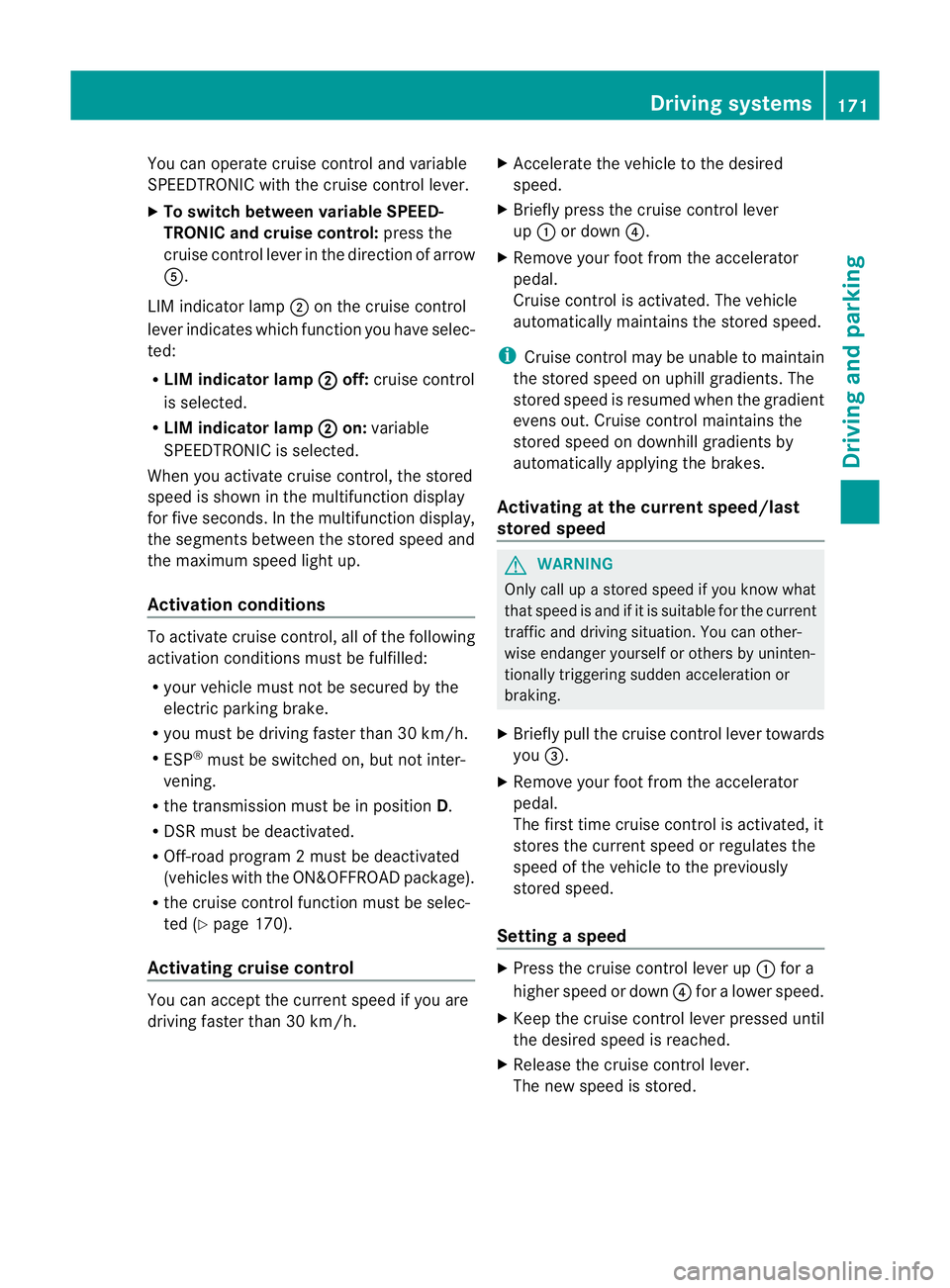
X To switc hbetween variable SPEED-
TRONIC and cruise control: press the
cruis econtrol leve rinthe direction of arrow
A.
LI Mi ndicator lamp ;on the cruise control
lever indicates which function you have selec-
ted:
R LIM indic ator lamp ; off:
cruis econtrol
is selected.
R LIM indic ator lamp ; on:
variable
SPEEDTRONIC is selected.
When you activate cruis econtrol, the stored
speed is shown in the multifunction display
for fiv eseconds .Inthe multifunction display,
the segments between the stored speed and
the maximum speed light up.
Activation conditions To activate cruise con
trol, all of the following
activation condition smust be fulfilled:
R your vehicle must not be secured by the
electric parking brake.
R you must be driving faster than 30 km/h.
R ESP ®
must be switched on, but not inter-
vening.
R the transmission must be in position D.
R DSR must be deactivated.
R Off-road program 2must be deactivated
(vehicles with the ON&OFFROAD package).
R the cruise control function must be selec-
ted (Y page 170).
Activating cruise control You can accept the current spee
difyou are
drivin gfaster than 30 km/h. X
Accelerate the vehicle to the desired
speed.
X Briefly press the cruise control lever
up : or down ?.
X Remove your foot from the accelerator
pedal.
Cruise control is activated. The vehicle
automatically maintains the stored speed.
i Cruise control may be unable to maintain
the stored spee donuphill gradients. The
stored speed is resumed when the gradient
evens out. Cruise control maintain sthe
stored speed on downhill gradient sby
automatically applying the brakes.
Activating at the current speed/last
stored speed G
WARNING
Only call up astored speed if you know what
that speed is and if it is suitable for the current
traffic and driving situation. You can other-
wise endanger yoursel forothers by uninten-
tionall ytriggering sudden acceleration or
braking.
X Briefly pull th ecruis econtrol leve rtowards
you =.
X Remove your foot from the accelerator
pedal.
The first tim ecruis econtrol is activated, it
stores the curren tspeed or regulates the
speed of the vehicle to the previously
stored speed.
Setting aspeed X
Press the cruise control lever up :for a
high er spee dordown?for alower speed.
X Keep the cruise contr ol leverpresse duntil
the desired speed is reached.
X Release the cruise contro llever.
The new speed is stored. Driving systems
171Drivingand parking Z
Page 176 of 389
vehicl
eisladen or towing atrailer, yo umust
select shift range 1,2or 3in good time. By
doing so, you wil lmake use of the braking
effect of the engine. This relieves the loa don
the brake syste mand prevents the brakes
from overheating and wearing too quickly. If
you need additiona lbraking, depress the
brake peda lrepeatedly rather than continu-
ously.
You can set avariable or permanent limit
speed:
R variable for speedlimits, e.g. in built-up
areas
R permanent for long-term spee drestric-
tions, e.g. when driv ingw ith winter tyres
fitted (Y page174)
i Thes pee dindicated in the spe edometer
ma ydiffer slightly from the limit speed
sto red.
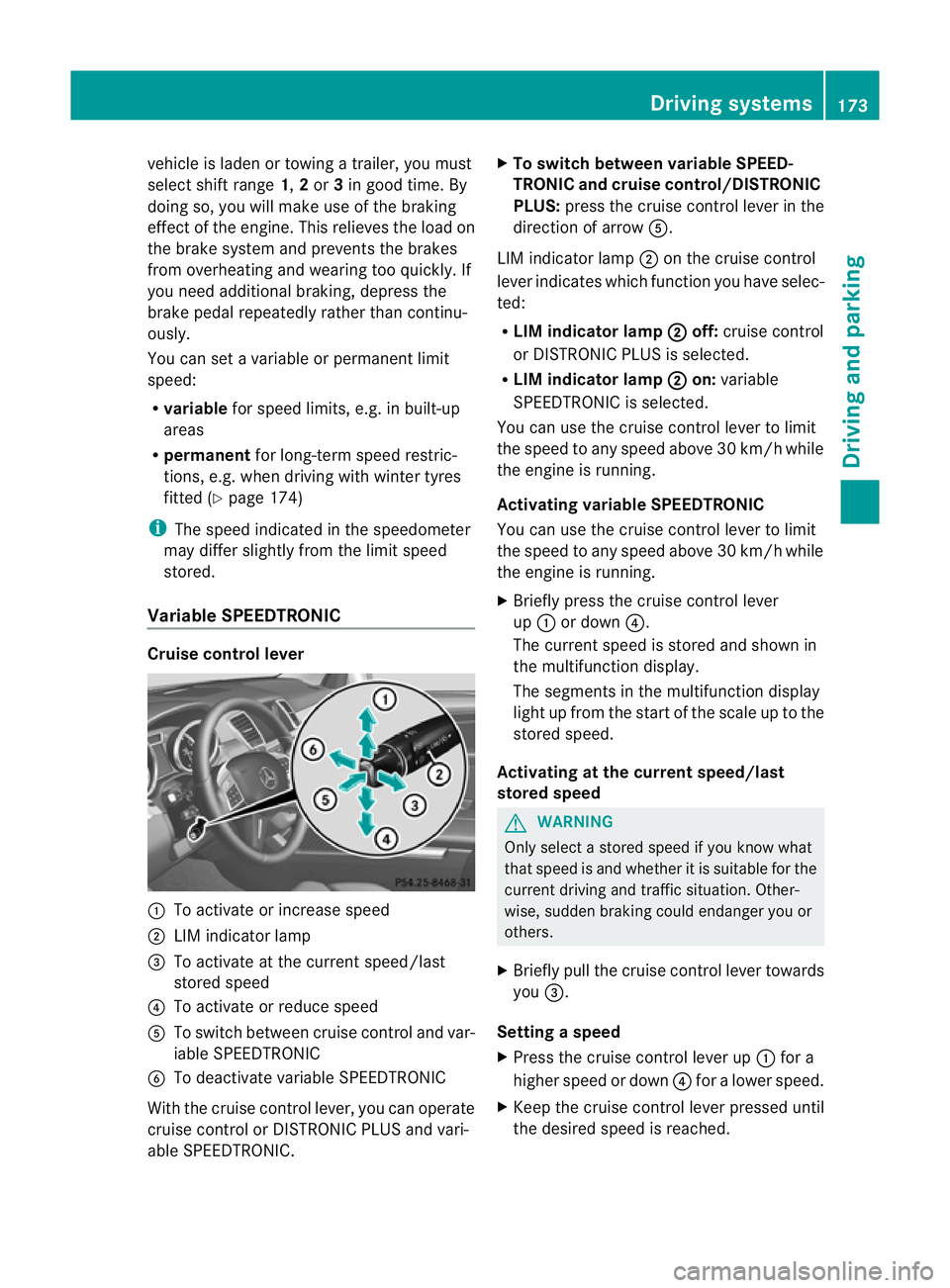
Variable SPEEDTRONIC Cruise control lever
:
To acti vate or increase speed
; LIM indicator lamp
= To activate at the curren tspeed/last
stored speed
? To acti vate or reduce speed
A To switch between cruise control and var-
iable SPEEDTRONIC
B To deactivate variable SPEEDTRONIC
With the cruise control lever, you can operate
cruise control or DISTRONIC PLUS and vari-
able SPEEDTRONIC. X
To switch between variable SPEED-
TRONIC and cruise control/DISTRONIC
PLUS: press the cruise control lever in the
direction of arrow A.
LIM indicator lamp ;on the cruise control
lever indicates which function you have selec-
ted:
R LIM indicator lamp ; off:
cruise control
or DISTRONIC PLUS is selected.
R LIM indicator lamp ; on:
variable
SPEEDTRONIC is selected.
You can use the cruise control lever to limit
the speed to any speed above 30 km/ hwhile
the engin eisrunning.
Activating variable SPEEDTRONIC
You can use the cruise control lever to limit
the spee dtoany speed above 30 km/h while
the engine is running.
X Briefly pres sthe cruise con trollever
up : or down ?.
The curren tspeed is stored and shown in
the multifunction display.
The segment sinthe multifunction display
light up from the star tofthe scal euptot he
stored speed.
Activating at th ecurren tspeed/last
store dspeed G
WARNING
Only select astored speed if you know what
that speed is and whether it is suitable for the
current driving and traffic situation. Other-
wise ,sudden braking could endanger you or
others.
X Briefly pull the cruise control lever towards
you =.
Setting aspeed
X Press the cruise contro llev er up :for a
higher speed or down ?for alower speed.
X Keep th ecruis econtr ol leve rpresse duntil
the desired speed is reached. Drivin
gsystems
173Drivingand park ing Z
Page 182 of 389
not accelerate. Thi
sisbasedonthe current
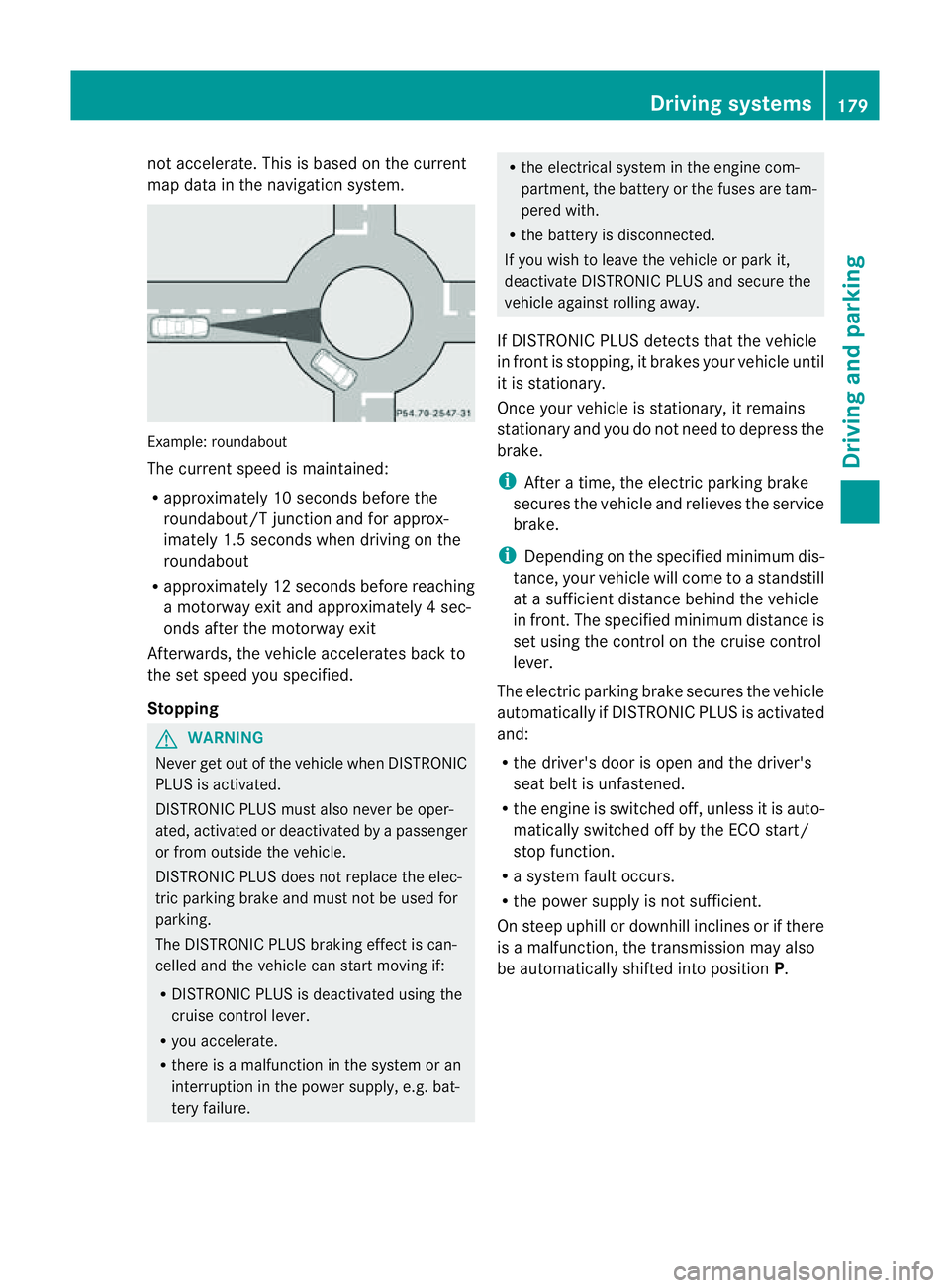
map data in the navigation system. Example: roundabout
The current speed is maint
ained:
R approximatel y10second sbefore the
roundabout/T junction and for approx-
imatel y1.5 second swhend riving on the
roundabout
R approximatel y12second sbefore reaching
am otorwa yexita nd approximatel y4sec-
onds after the motorwa yexit
Afterwards ,the vehicle accelerates bac kto
the set speed you specified.
Stopping G
WARNING
Never get out of the vehicle when DISTRONIC
PLUS is activated.
DISTRONIC PLUS must also never be oper-
ated, activated or deactivated by apassenger
or from outside the vehicle.
DISTRONIC PLUS does not replace the elec-
tric parkin gbrake and mus tnot be used for
parking.
The DI STRONIC PLUS brakin geffect is can-
celle dand the vehicl ecan start movin gif:
R DISTRONIC PLUS is deactivated using the
cruis econtrol lever.
R you accelera te.
R there is amalfunction in the system or an
interruption in the power supply, e.g. bat-
tery failure. R
the electrical system in the engine com-
partment, the batter yorthe fuses ar etam-
pered with.
R the batter yisdisconnected.
If you wish to leave the vehicle or park it,
deactiva teDISTRONIC PLUS and secure the
vehicle agains trolling away.
If DI STRONIC PLUS detects that the vehicle
in fron tisstopping, it brakes your vehicle until
it is stationary.
Once your vehicle is stationary, it remains
stationary and you do not need to depress the
brake.
i After atime, the electric parkin gbrake
secure sthe vehicle and relieves the service
brake.
i Depending on the specifie dminimum dis-
tance, your vehicle will come to astandstill
at as ufficient distance behind the vehicle
in front .The specifie dminimum distance is
set using the control on the cruise control
lever.
The electric parkin gbrake secure sthe vehicle
automatically if DI STRONIC PLUS is activated
and:
R the driver's doo risopen and the driver's
seat belt is unfastened.
R the engine is switched off ,unles sitisa uto-
matically switched off by the ECO start/
stop function.
R as ystem fault occurs.
R the powe rsupply is not sufficient.
On steep uphill or downhill inclines or if there
is am alfunction, the transmission may also
be automatically shifted into position P. Driving systems
179Drivingand parking Z
Page 184 of 389
or
X
Briefl ypres sthe cruise con trol leve rinthe
direction of arrow =.
Variable SPE EDTRONIC is selected. LIM
indicator lamp ;in the cruise control lever
lights up.
When you deactivate DI STRONIC PLUS, the
DISTRONIC PLU Soff message is show
nin
the multifunction display for approximately
five seconds.
i The last speed stored remains stored until
you switch off the engine.
i DISTRONIC PLUS is not deactivated if you
depress the accelerator pedal. If you accel-
erate to overtake, DISTRONIC PLUS
adjusts the vehicle's speed to the last
speed stored after you have finished over-
taking.
DISTRONIC PLUS is automatically deactiva-
ted if:
R you engag ethe electric parkin gbrake or if
th ev ehicle is automatically secured with
the electric parking brake.
R you are driving slower than 25 km /hand
there is no vehicle in front ,orifthe vehicle
in front is no longer detec ted.
R ESP ®
intervenes or if you deactivat eESP®
.
R the transmission is in the P,Ror Nposition.
R the vehicle is near aradio telescop efacility
(Y page 380).
R you switch off the radar senso rsystem
(Y page 249).
R you pull the cruise control lever towards
you in order to pull away and the front-
passenger doo rorone of the rear doors is
open.
R you activate DSR.
R you activate off-road program 2onvehicles
with the ON&OFFROA Dpackage.
R the vehicle has skidded.
If DISTRONIC PLUS is deactivated, you will
hear awarning tone. The DISTRONICP LUS off message is show
ninthe multifunction
displa yfor approximately fiv eseconds.
In the Assistanc emenu (Y page 24 4)of the
on-boar dcompu ter,you can select the dis-
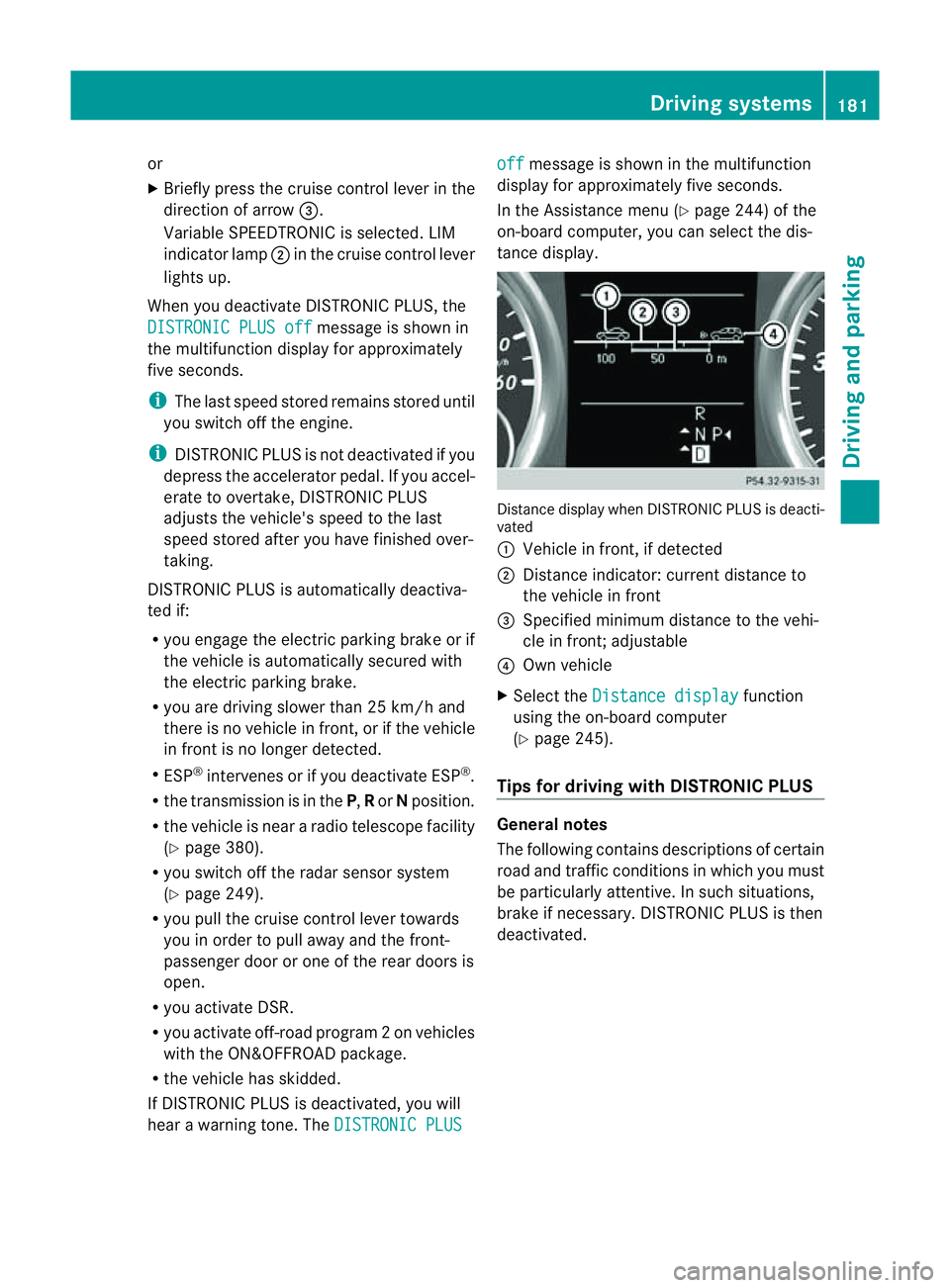
tanc edisplay. Distance display when DISTRONI
CPLUS is deacti-
vated
: Vehicl einfront, if detected
; Distance indicator: curre ntdistanc eto
the vehicle in front
= Specified minimum distanc etothe vehi-
cle in front; adjustable
? Own vehicle
X Select the Distancedisplay function
usin gthe on-boar dcompu ter
( Y page 24 5).
Tips for driving with DISTRO NICP LUS Genera
lnotes
The following contains descriptions of certain
road and traf ficc ondition sinwhich you must
be particularly attentive. In such situations,
brake if necessary. DI STRONIC PLUS is then
deactivated. Driving systems
181Drivingand park ing Z
Page 190 of 389
HOL
Dfunction
Gen eral notes Th
eH OLD function ca nassist the driver in the
foll owing situations:
R when pulling away, especially on steep
slopes
R when manoeuvrin gonsteep slopes
R when waiting in traffic
The vehicle is kept stationary without the
driver having to depress the brake pedal.
The braking effect is cancelled and the HOLD
function is deactivated when you depress the
accelerator peda ltop ull away.
Activation conditions You can activate the HOLD function if:
R the vehicle is stationary.
R the engine is running or if it has been auto-
matically switched off by the ECO start/
stop function.
R the driver' sdoor is closed or if your seat
belt is fastened.
R the electric parkin gbrake is released.
R thet ransmission is in position D,Ror N.
R DISTRONIC PLUS is deactivated.
Activatin gthe HOL Dfunction X
Make sure that th eactivation conditions
are met.
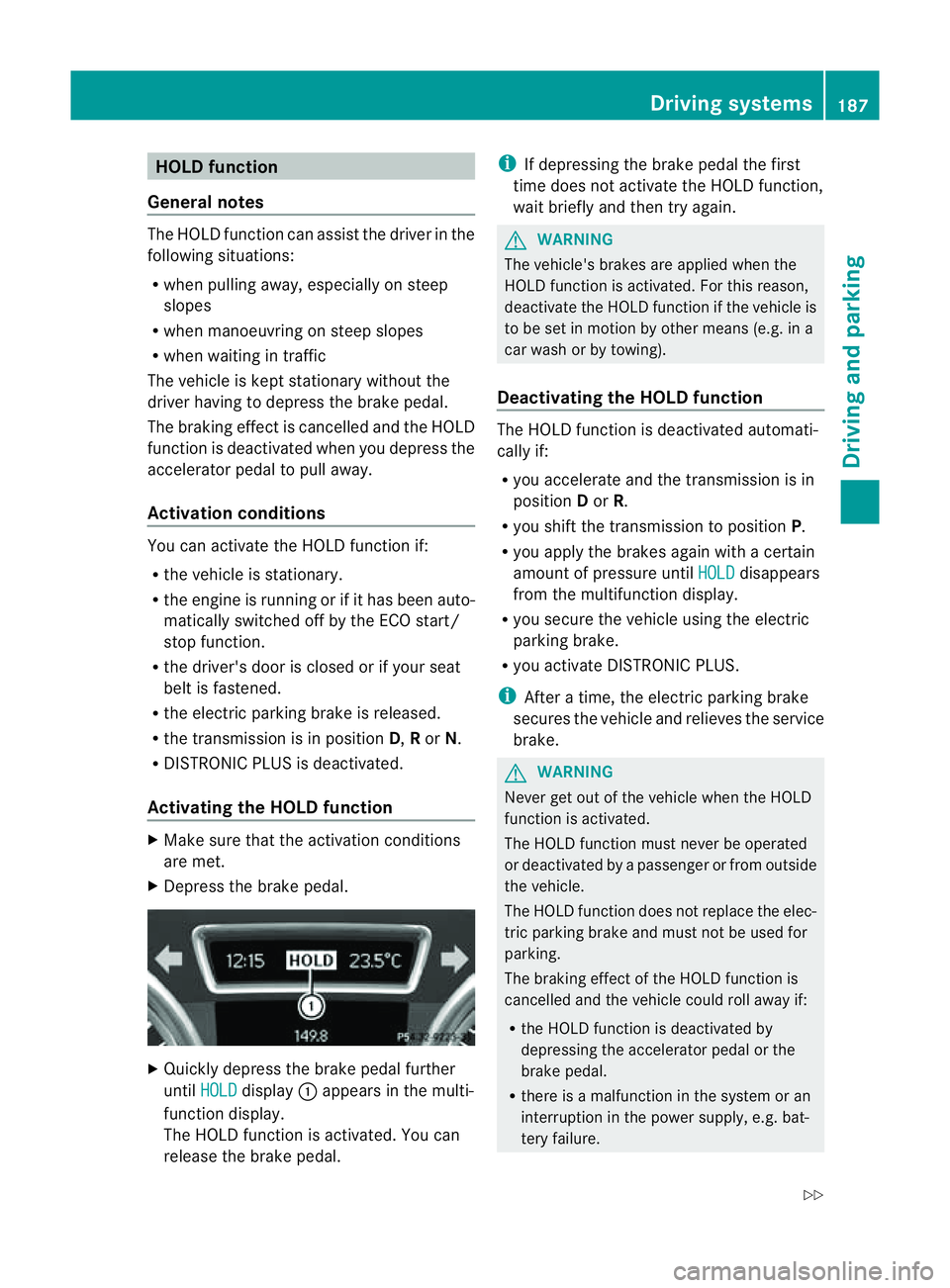
X Depress the brake pedal. X
Quickly depress the brake pedal further
until HOLD display
:appears in the multi-
function display.
Th eH OLD func tion is activated. You can
release the brake pedal. i
If depressing the brake pedal the first
tim edoes not activate the HOL Dfunction,
wait briefly and then try again. G
WARNING
The vehicle's brakes are applied when the
HOLD function is activated. For this reason,
deactivate the HOLD function if the vehicle is
to be set in motion by other means (e.g. in a
car wash or by towing).
Deactivating the HOLD function The HOLD function is deactivated automati-
cally if:
R you accelerate and the transmission is in
position Dor R.
R you shift the transmission to position P.
R you apply the brakes again with acertain
amount of pressur euntil HOLD disappears
from the multifunctio ndisplay.
R you secure the vehicle using the electric
parkin gbrake.
R yo ua ctivate DISTRONIC PLUS.
i After atime, the electric parkin gbrake
secure sthe vehicle and relieves the service
brake. G
WARNING
Never get out of the vehicle when the HOLD
func tion is activated.
The HOL Dfunction must never be operated
or deactivated by apassenger or from outside
the vehicle.
The HOLD function does not replace the elec-
tric parking brake and must not be used for
parking.
The braking effect of the HOLD function is
cancelled and the vehicle could roll away if:
R the HOLD function is deactivated by
depressing the accelerator pedal or the
brake pedal.
R there is amalfunction in the system or an
interruption in the power supply ,e.g. bat-
tery failure. Driving systems
187Drivingand parkin g
Z
Page 191 of 389
R
the electrica lsystem in thee ngine com-
partment, the battery or the fuses are tam-
pered with.
R the battery is disconnected.
If you leave the vehicl eorpark it, deactivate
the HOLD function and secure the vehicle
against rolling away.
The electric parking brake secures the vehicle
automatically if the HOLD function is activa-
ted and:
R the driver' sdoor is open and the driver's
seat belt is unfastened.
R the engin eisswitched off, unless it is auto-
matically switched off by the ECO start/
stop func tion.
R as ystem fault occurs.
R the powe rsupply is not sufficient.
On steep uphill or downhill inclines or if there
is am alfunction, the transmission may also
automatically be shifted into position P.AIRMATIC package
General notes AIRMATIC enables
asuspension tuning set-
ting to be selected and regulates the damping
behaviou rand level of your vehicle. The sys-
tem comprises aminimum of two compo-
nents. These are ADS (Adaptive Damping Sys-
tem) (Y page 188 )and level control
(Y page 189) .Your vehicle ma yalso be equip-
ped with the Active Curv eSystem
(Y page 188).
Observe the notes on driving with atrailer
(Y page 226).
ADS (Adaptive Damping System) General notes
ADS adapts th
edamping characteristic sto
the curren toperatin gand driving situation. Thi
sd epends on:
R your drivin gstyle
R the road surface conditions
R the AD Ssetting
R the vehicle level setting
Your selection remains stored even if you
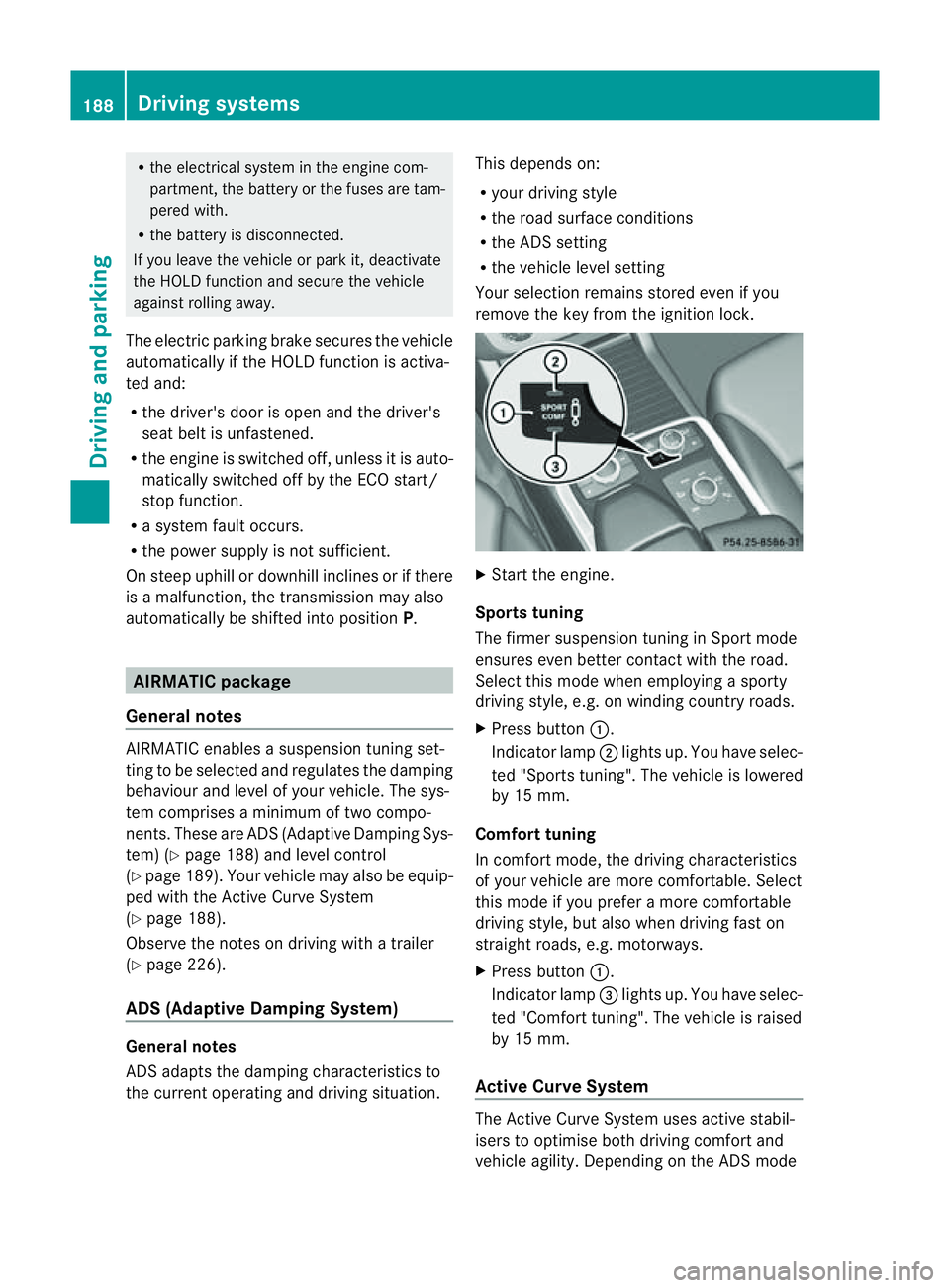
remov ethe key from the igni tion lock. X
Star tthe engine.
Sports tuning
The firmer suspension tunin ginSport mode
ensures even better contact with the road.
Select this mode when employing asporty
drivin gstyle, e.g. on winding country roads.
X Press button :.
Indicator lamp ;lights up. You have selec-
ted "Sports tuning". The vehicle is lowered
by 15 mm.
Comfort tuning
In comfort mode, the driving characteristics
of your vehicle are more comfortable. Select
this mode if you prefer amore com fortable
driving style ,but also when drivin gfast on
straight roads, e.g. motorways.
X Press button :.
Indicator lamp =lights up. You have selec-
ted "Comfort tuning". The vehicle is raised
by 15 mm.
Active Curve System The Active Curve System uses activ
estabil-
isers to optimis eboth drivin gcomfort and
vehicle agility. Depending on the AD Smode 188
Driving systemsDriving and parking
Page 192 of 389
selected (Y
page 188), the Ac tiveCurve Sys-
tem also changes the setting.
If you select ADS comfort mode:
R rolling movement is reduced in the event of
changing surface undulations.
R the roll angle when cornering is reduced.
R the driving style is agile.
If you select ADS sport mode:
R the roll angle is reduced significantly.
R the driving style is even more agile.
Leve lcontrol Import
ants afety notes
Leve lcontrol adapts the vehicle leve lauto-
matically to the current operating and driving
situation. This results in reduced fuel con-
sumption and improved handling.
If you select ADS comfort mode
(Y page 188), the vehicle is lowered to high-
spee dlevel as the speed increases. As the
vehicle decelerates, the vehicle is raised back
up to highway level.
If you select ADS sport mode (Y page 188),
the vehicle skips highway level and lowers
directly to high-speed level dependin gonthe
basic setting (Y page 189).
Make changes to the vehicle level while the
vehicle is in motion. This enables the vehicle
to adjust to the new level as quickly as pos-
sible.
The vehicle level ma ychange visibly if you
par kthe vehicle and the outside temperature
changes. If the temperature drops, the vehi-
cle level lowers; with an increase in temper-
ature, the vehicle level rises.
If you unlock the vehicle or open adoor, the
vehicle begins to compensat efor load dis-
crepancies while still parked. However, for
significant leve lchanges, e.g. after the vehi-
cle has been stationary for along period, the
engin emust be on. For safety reasons, the
vehicle is only lowered when the doors are
closed .Lowering is interrupted if adoor is opened; it con
tinues once the doo rhas been
closed. G
WARNING
Make sure that nobody is near the wheel arch
or vehicle underside when you make achange
to the vehicle level. Otherwise, you or others
ma ybet rapped. G
WARNING
Always select as lo wavehicle level as possi-
ble. If the vehicle level is high, the vehicle
centre of gravity shifts upwards. This increa-
ses the risk of the vehicle tipping over.
Adapt your driving style to suit the vehicle
level. ESP ®
cannot reduc ethe risk of an acci-
dent if you drive too fast. ESP ®
cannot over-
rid ethe laws of physics.
! When driving on extremel yrough terrain,
select ahigh vehicle level in good time.
Make sure there is always sufficient ground
clearance to prevent damage to the vehi-
cle.
For information abou tdriving off-roa d, see
( Y page 166).
Basic settings
The exten ttowhich the vehicle is rai sedor
lowered depends on the basic setting selec-
ted. Select raised level for off-road driving or
highway/high-spee dlevel for normal roads.
The indiv idua lvehicle levels differ from high-
way level as follows:
R Highway level: +/ –0mm
R High-speed level: –15 mm
R Raised level: +60 mm
Raise dlevel
Only select raise dlevel if this is appropriate
for the road conditions. Otherwise, fuel con-
sumption may increase and handling may be
affected. Driving systems
189Drivingand parking Z