display MERCEDES-BENZ M-CLASS SUV 2011 Owner's Manual
[x] Cancel search | Manufacturer: MERCEDES-BENZ, Model Year: 2011, Model line: M-CLASS SUV, Model: MERCEDES-BENZ M-CLASS SUV 2011Pages: 389, PDF Size: 9.22 MB
Page 34 of 389
i
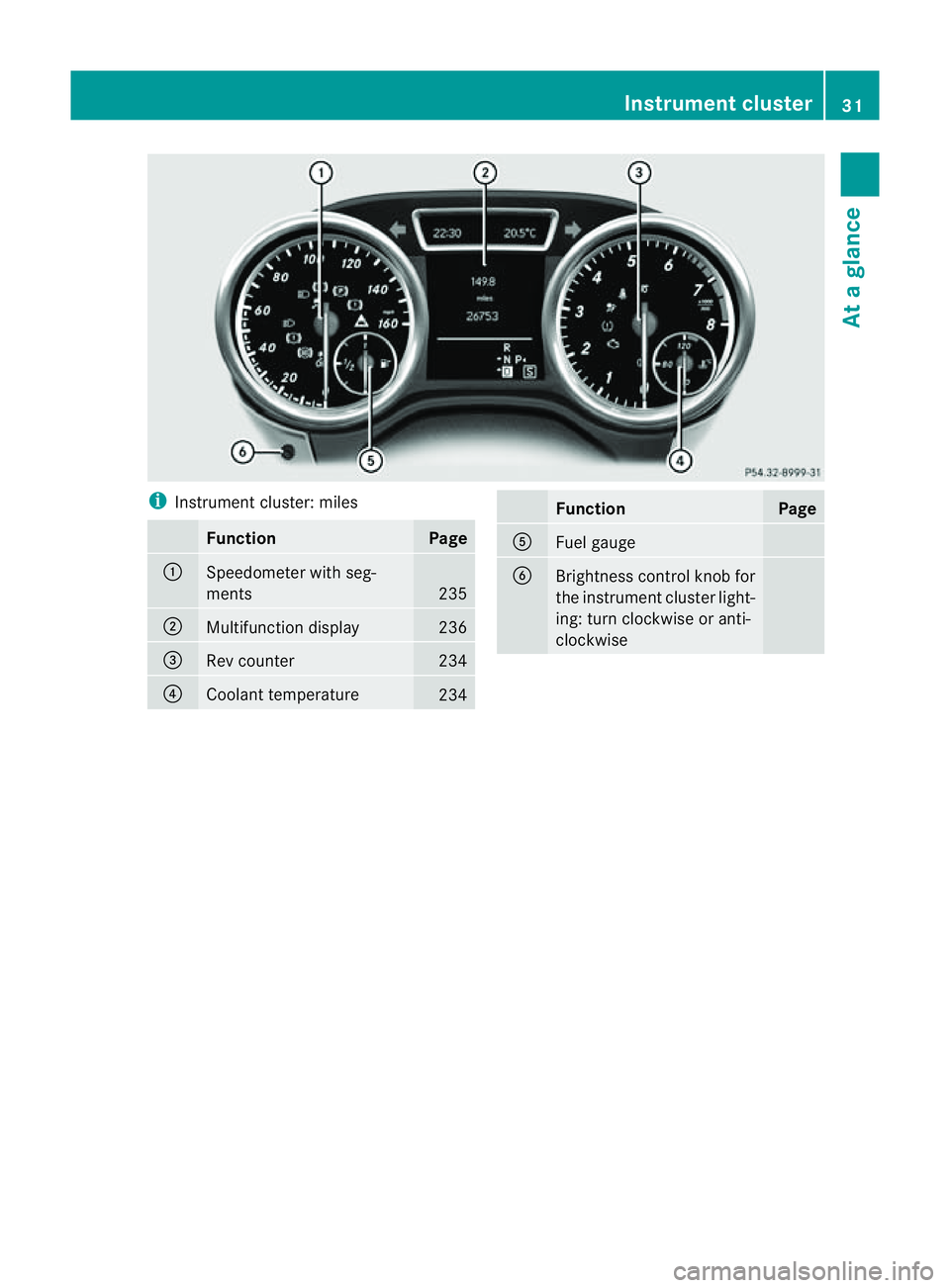
Instrument cluster: miles Fun
ction Page
:
Speedometer with seg-
ments
235
;
Multifunctio
ndisplay 236
=
Rev counter 234
?
Coolant temperature
234 Function Page
A
Fuel gauge
B
Brightness control knob for
the instrument cluster light-
ing: turn clockwise or anti-
clockwise Instrument cluster
31Atag lance
Page 36 of 389
Multifunctio
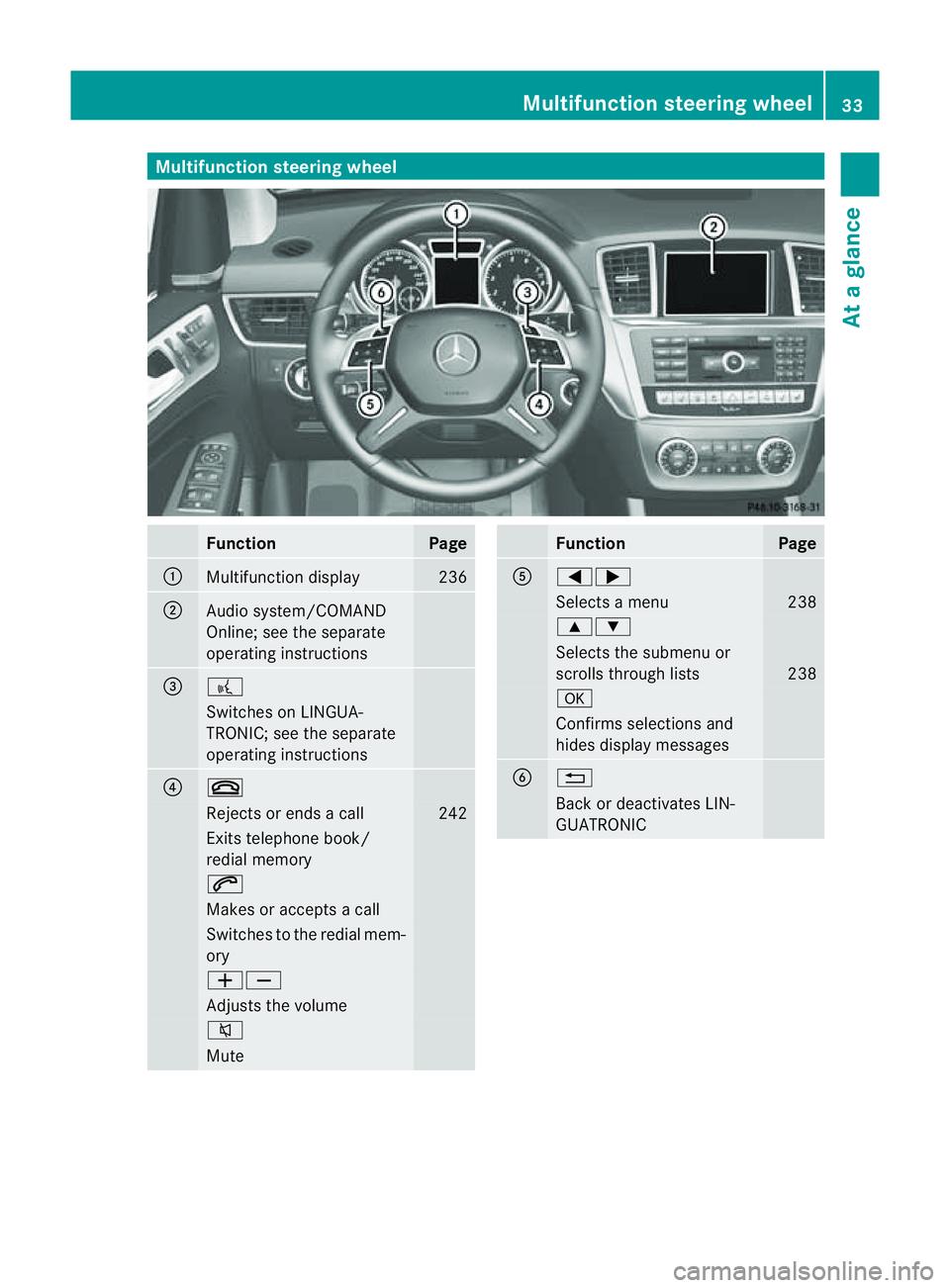
nsteering wheel Function Page
:
Multifunction dis
play 236
;
Audi
osystem/COMAND
Online ;see the separate
operating instructions =
?
Switches on LINGUA-
TRONIC; see the separate
operating instructions ?
~
Rejects or ends
acall 242
Exits telephone book/
redial memory 6
Makes or accepts
acall Switches to the redial mem-
ory WX
Adjusts the volume
8
Mute Function Page
A
=;
Selects
amenu 238
9:
Selects the submenu or
scrolls through lists 238
a
Confirm
sselection sand
hid esdisplay messages B
%
Bac
kord eactivates LIN-
GUATRONIC Multifunction steering wheel
33Atag lance
Page 52 of 389
cator lamps in the instrument cluster, se
at
belt" (Y page284).
Rear seat belt status indicator Th
er ear-com partment se at belt status indi-
cator tells you if the rear passengers have
their seat belts fastened.
The rear-compartment seat belt status indi-
cator indicates the rear seat on which the belt
is fastened. The üsymbol in the display
indicates afastened seat belt. If aseat belt is
not fastened or if aseat is not occupied, the
ý symbol is displayed.
The rear-compartment seat belt status indi-
cator appear sint he multifunction displa yfor
around 30 seconds if:
R you drive off and reach aspeed of approx-
imately 10 km/h.
R the rear passengers fasten or unfasten
their seat belts while the vehicle is in
motion.
R someon egets in or out of the vehicle and
the vehicle drives off again.
You can also can celthe rea rseat belt status
indicator immediately (Y page 253).
i The status indicator for the rear- compart-
ment seat belts is onl yavailable for certain
countries.
Bel ttensioners, belt force limiters The fron
tseat belts and the outer seat belts
in the rear are equipped with belt tensioners.
The belt tensioners tighten the seat belts in
an accident, pullin gthem close against the
body.
Belt tensioner sdonot correct incorrect seat
positions or incorrectly faste neds eat belts.
Belt tensioners do not pull vehicle occupants
back towards the back rest.
If the seat belt is also fitted wit habelt for ce
limiter and this is triggered, the forc eexerted
by the sea tbelt on the vehicle occupan tis
red uced. Th
eb elt force limiters on the front seats are
synchroni sedw ith the front airbags .They
tak eonap art of the deceleratio nforce,
resultin ginthe force exerted on the occupant
being distributed over agreater are a.
The belt tensioners can only be activated
when:
R the ignition is switched on.
R the restraint systems are operational; see
"SRS warning lamp" (Y page 41).
R the front-passenger seat is occupied and
the belt tongue is engaged in the buckle on
the front-passenger side.
The belt tensioners on the outside seats in the
rear compartment are triggered independ-
ently of the lock status of the seat belts.
The belt tensioners are triggered depending
on the type and severit yofanaccident:
R if, in the event of ahead-on or rear-en dcol-
lision, the vehicle decelerates or acceler-
ates rapidly in alongitudinal direction dur-
ing the initial stages of the impact
R if, in the even tofaside impact, on the side
opposit ethe impac tthe vehicle deceler-
ates or accelerates rapidly in alateral direc-
tion
R if in certain situations where the vehicle
overturns and the system determines that
it can provide additional protection
If the airbags are deployed, you will hear a
bang, and asmall amount of powder may also
be released. Only in rare cases will th ebang
affect your hearing. The powde rthat is
released generally does not constitute a
healt hhazard. The 6SRS warning lamp
lights up. G
WARNING
If the seat belt tensioners have been trig-
gered, they provide no additional protection
in the event of another accident. Therefore,
have belt tensioners which have been trig-
gered replaced at aqualified specialist work-
shop. Occupant safety
49Safety
Z
Page 69 of 389
G
WARNING
If EBD ha smalfunctioned, the braking system
remains available with full brake boosting
effect. However, the rear wheels can still lock,
e.g. under full braking. This coul dcaus eyou
to lose control of your vehicle and cause an
accident. You shoul dtherefore adapt your
drivin gstyle to the different handling charac-
teristics.
X Observe the notes on warning and indica tor
lamps (Y page 286) as well as display mes-
sages (Y page 256). ADAPTIV
EBRAKE
ADAPTI VEBRAKE enhances braking safety
and offers increased braking comfort. In addi-
tion to the braking function, ADAPTIV EBRAKE
als oh as the HOLD function (Y page187) and
hi ll st art assist (Y page141). For further
information, se eDriving tip s(Ypage 162). PRE-SAFE
®
Brake
PRE-SAFE ®
Brake is only available in vehic les
with DISTRONIC PLUS.
i Observe the "Important safety notes" sec-
tion (Y page61).
PRE-SAFE ®
Brake can help you to minimise
the ris kofaf rontal collision wit havehicle
ahead or reduce the effects of such acolli-
sion. If PRE-SAFE ®
Brake has detected arisk
of collision, you wil lbewarned visuall yand
acoustically as wel lasbyautomatic braking.
PRE-SAFE ®
Brake cannot prevent acollision
withou tyou rintervention.
Thi sfun ctio nwill issue awarnin gats peeds of
arou nd 30 km/h or moreif:
R for aperiod of several seconds ,the dis-
tance to the vehi cleinf ront is to oshor tfor
the speed at which you ar etravelling .The ·
distanc ewarning lamp then lights up
in the instrument cluster.
R you are rapidly approaching the vehicle in
front .Ani ntermittent warning tone will
then sound and the ·distance warning
lamp will light up in the instrument cluster.
X Brake immediately in order to increas ethe
distanc efrom th evehicle in front.
or
X Take evasiv eactio nprovide ditiss afe to do
so.
If the driver and passengers have fastened
their seat belts, PRE-SAFE ®
Brake can also
can also perform the following at speeds of
above approximately 30 km/h:
R brake the vehicle automatically from a
spee dofuptoa pproximately 20 0km/h
R trigge rpreventative passenger protection
measures (PRE-S AFE®
)( Ypage 45)
Due to the nature of the system, particularly
complicated driving conditions may cause
unnecessar ywarnings or the unnecessary
intervention of PRE-SAFE ®
Brake. To end this,
you can either depress the accelerator pedal
further, activate kickdown or release the
brake pedal.
The braking action of PRE-SAFE ®
Brake is
ended automatically if:
R you drive slowe rthan approximately
15 km /h.
R you manoeuvre to avoid the obstacle.
R there is no longe rany danger of arear-end
collision.
R there is no longer an obstacl edetected in
front of your vehicle.
If you have activated DSR (Y page 220), PRE-
SAFE ®
brak eisd eactivated.
With the help of the rada rsensor system,
PRE- SAFE ®
Brake can detect obstacles that
are in front of your vehicle for an exte nded
period of time.
At speeds up to approximately 70 km /h,
PRE- SAFE ®
Brake may als odetect stationary 66
Driving safet
ysystemsSafety
Page 95 of 389
Usefu
linfor mati on
i This Owner's Manual describes all models
and all standard and optional equipment
available to your vehicle at the time of pub-
lication of the Owner's Manual. Country-
specific deviation sare possible .Please
not ethat your vehicle ma ynot be equipped
with all featur es described. This also
applies to safety-releva ntsystems and
functions.
i Please read the information on qualified
specialist workshops (Y page 24).Correct driver'
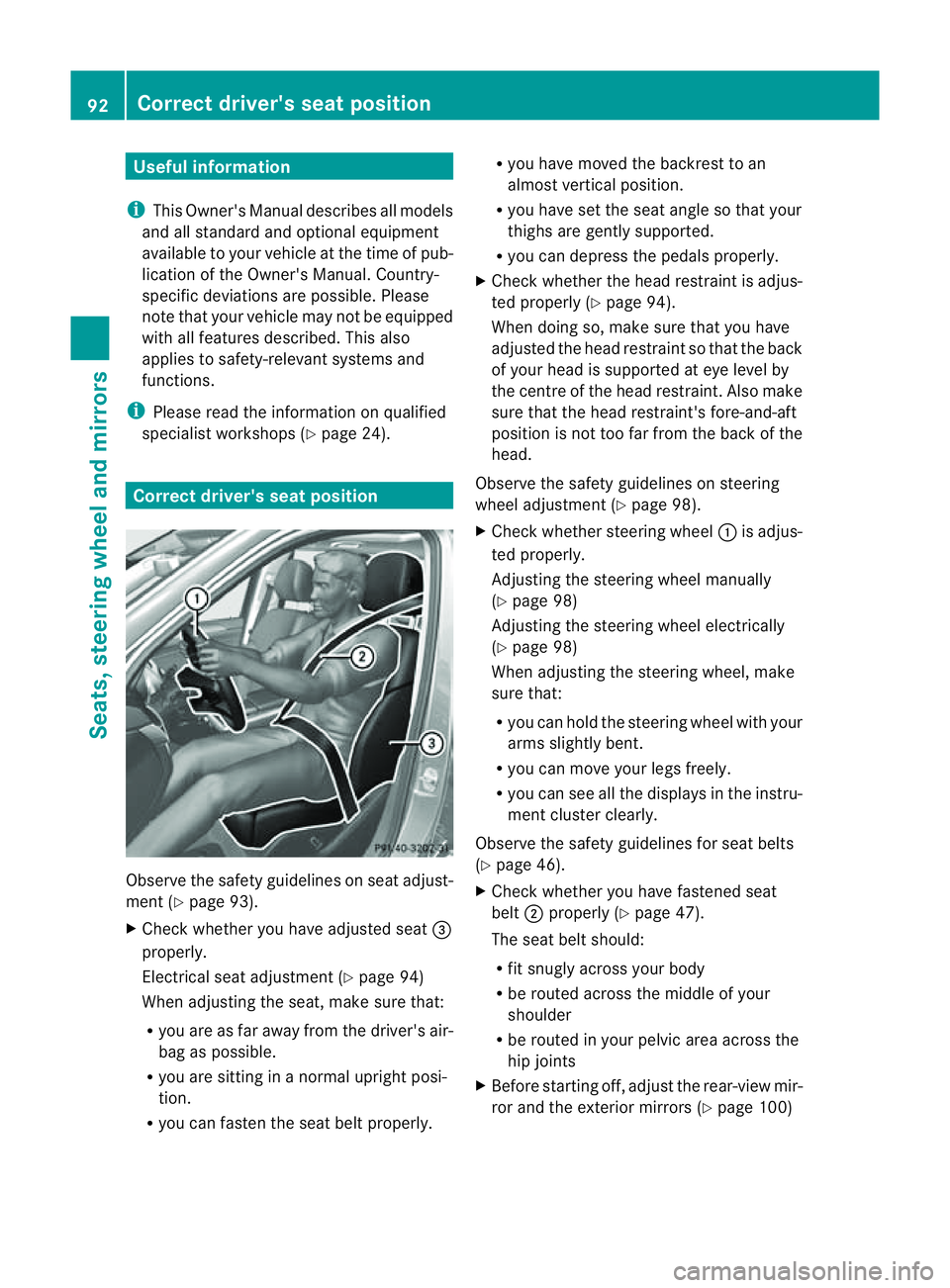
sseatp osition Observ
ethe safety guideli neso nseat adjust-
men t(Ypage 93).
X Chec kwhether you hav eadjusted seat =
properly.
Electrical seat adjustment (Y page 94)
When adjusting the seat, mak esure that:
R you are as far away from the driver' sair-
bag as possible.
R you are sitting in anormal upright posi-
tion.
R you can fasten the seat belt properly. R
you have moved the backrest to an
almost vertical position.
R you have set the seat angle so that your
thighs ar egently supported.
R you can depress the pedals properly.
X Check whether the head restraint is adjus-
ted properly (Y page 94).
When doing so, mak esure that you have
adjusted the head restraint so that the back
of your head is supported at eye level by
the centre of the head restraint .Also make
sure that the head restraint's fore-and-aft
position is not too far from the bac kofthe
head.
Observ ethe safety guidelines on steering
wheel adjustment (Y page 98).
X Chec kwhether steering wheel :is adjus-
ted properly.
Adjusti ngthe steering whee lmanually
(Y page 98)
Adjustin gthe steering wheel electrically
(Y page 98)
When adjustin gthe steering wheel, make
sur ethat:
R you can hold the steering wheel with your
arms slightl ybent.
R you can mov eyour legs freely.
R you can see all the displays in the instru-
men tcluster clearly.
Observe the safety guidelines for seat belts
(Y page 46).
X Check whether you have fastened seat
belt ;properly (Y page 47).
The seat belt should:
R fit snugly across your body
R be routed across the middle of your
shoulder
R be routed in your pelvic area across the
hip joints
X Befor estartin goff, adjus tthe rear-vie wmir-
ror and the exterior mirrors (Y page 100)92
Correct driver's seat positionSeats, steerin
gwhee land mirrors
Page 126 of 389
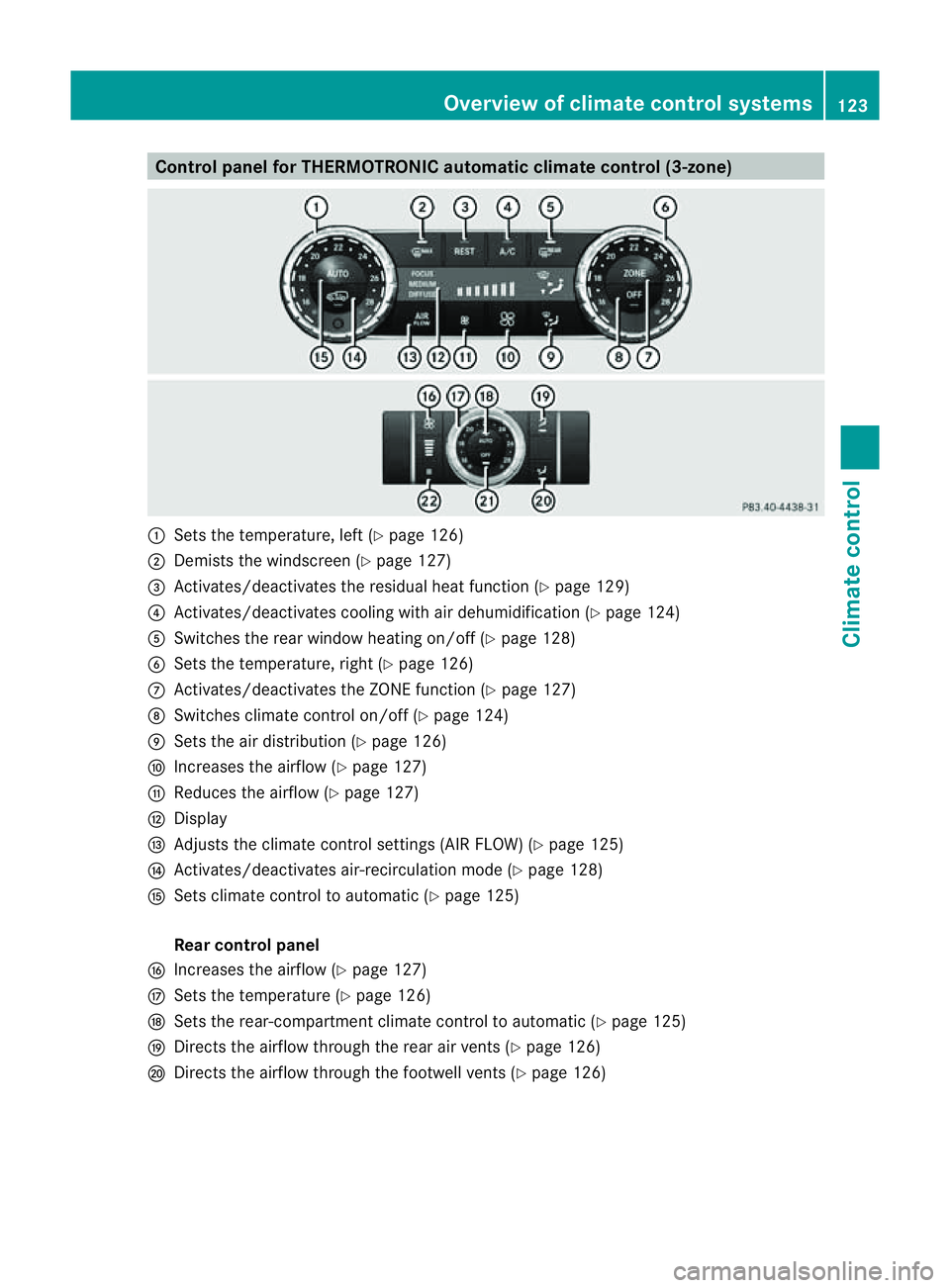
Control panel for THERMOTRONIC automatic clima
tecontrol (3-zone) :
Setsthe tem perature, left (Y page 126)
; Demists th ewindscree n(Ypage 127)
= Activates/deactivate sthe resi dual heat function (Y page 129)
? Activates/deactivate scooling with ai rdehumidi fication (Y page124)
A Switches the rea rwindow heatin gon/off (Y page128)
B Sets the tempera ture,right (Y page 126)
C Activates/deactivates the ZONE function (Y page 127)
D Switches climate control on/off (Y page 124)
E Setsthe air distribution (Y page 126)
F Increase sthe airflo w(Ypage 12 7)
G Reduces the airflow (Y page 127)
H Display
I Adjusts the climate control settings (AI RFLOW) (Y page 125)
J Activates/dea ctivates air-recirculation mode (Y page 128)
K Setsclimate control to automatic (Y page 125)
Rea rcontrol panel
L Increases the airflow (Y page 127)
M Setsthe temperatur e(Ypage 12 6)
N Sets the rear-compartment climate control to auto matic (Y page 125)
O Direct sthe airflo wthrough the rea rair vents (Y page 126)
P Direct sthe airflo wthrough the footwell vents (Y page 126) Overview of clim
atec ontrol systems
123Climate control Z
Page 130 of 389
air vents. The side air ven
ts canonly be
closed whe nthe con trols on the side air
vent sare turne ddownwards.
X Tur nthe key to position 2in the ignition
lock.
X Front control panel: press the_but-
ton repeatedly until the desired symbol
appears in the display.
X Rea rcontrol panel: press theMand/
or O button. Setting the airflow
X Turn the key to position 2in the ignition
lock.
X To increase: press theKbutton.
X To reduce: press theIbutton.
i You can use THERMOTRONIC automatic
climate control to set the airflow in the rear
compartmen tseparately. Switching the ZONE function on/off
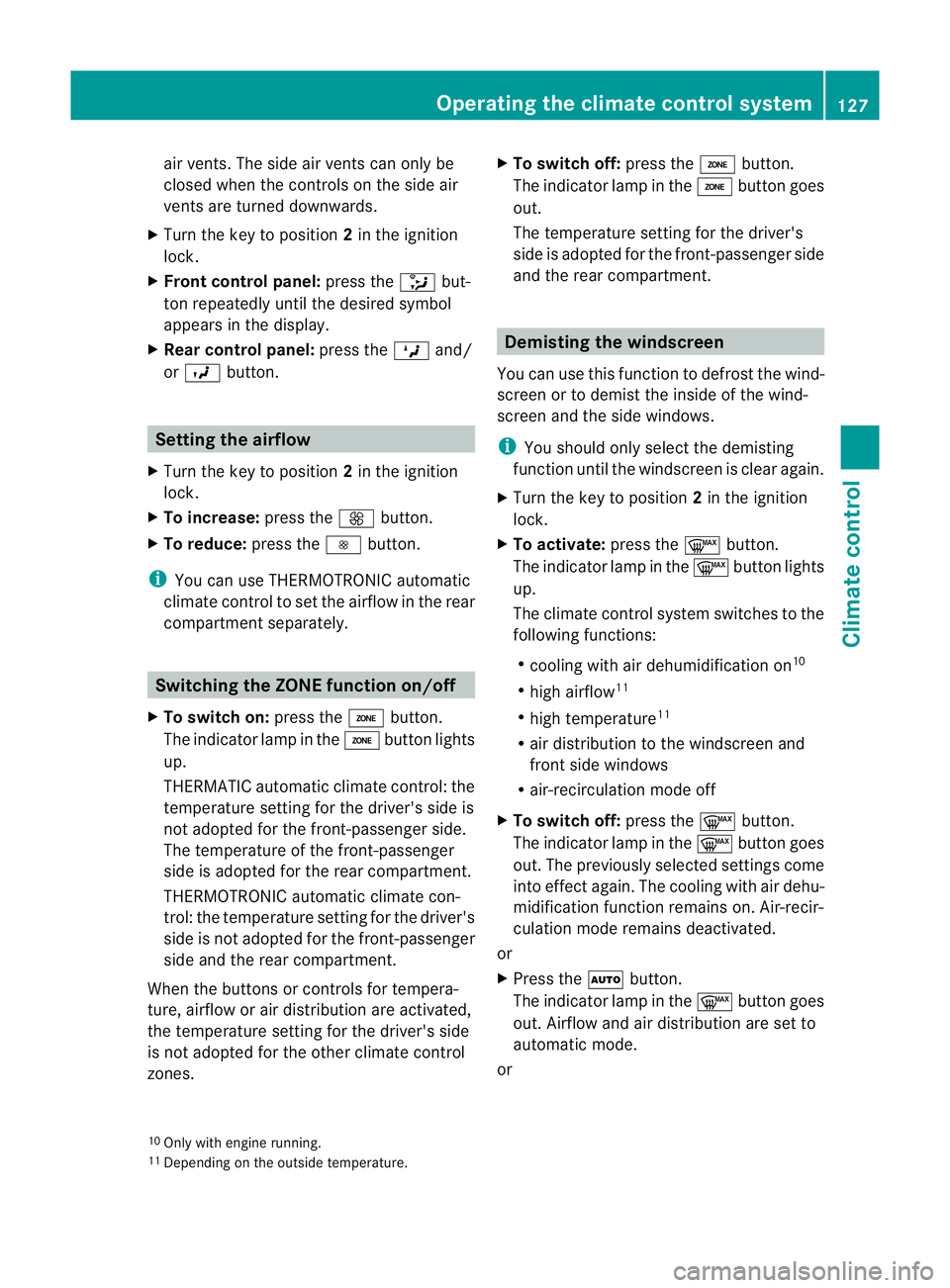
X To switc hon:press the ábutton.
The indicator lam pintheá button lights
up.
THERMATI Cautomatic climate control: the
temperature setting for the driver' sside is
not adopted for the front-passenger side.
The temperature of the front-passenger
side is adopted for the rear compar tment.
THERMOTRONI Cautomatic climate con-
trol: the temperature setting for the driver's
side is not adopte dfor the front-passenger
side and the rea rcompartmen t.
When the button sorcontrols for tempera-
ture, airflow or air distribution ar eactivated,
the tempe rature setting for the driver's side
is not adopted for the othe rclimate control
zones. X
To switch off: press theábutton.
The indicator lamp in the ábutton goes
out.
The temperature setting for the driver's
side is adopted for the front-passenger side
and the rear compar tment. Demisting the windscreen
You can use this fun ction to defrost the wind-
screen or to demist the inside of the wind-
screen and the side windows.
i You should only select the demisting
function until the windscreen is clear again.
X Turn the key to position 2in the ignition
lock.
X To activate: press the¬button.
The indicator lamp in the ¬button lights
up.
The climat econtrol system switche stothe
followin gfunctions:
R cooling with air dehumidification on 10
R high airflow 11
R high temperature 11
R air distribution to the windscreen and
fron tside windows
R air-recirculation mode off
X To switch off: press the¬button.
The indicator lamp in the ¬button goes
out. The previously selected settings come
int oe ffect again .The cooli ngwith air dehu-
midification function remain son. Air-recir-
culation mode remain sdeactiva ted.
or
X Press the Ãbutton.
The indicator lamp in the ¬button goes
out. Airflow and air distribution are set to
automatic mode.
or
10 Only with engine run ning.
11 Depending on the outside temperature. Ope
rating th eclimate control system
127Climate control Z
Page 134 of 389
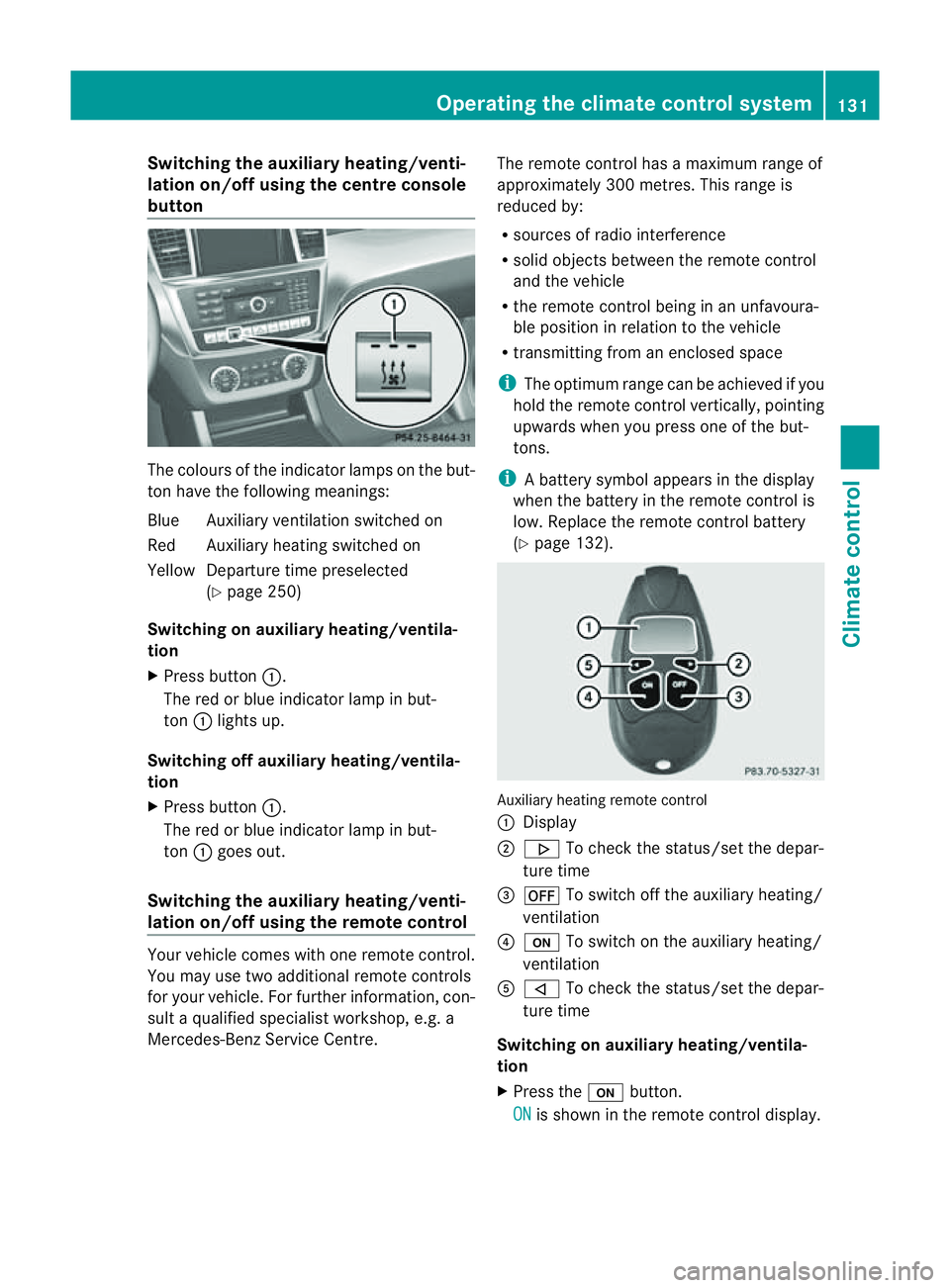
Switching th
eauxiliary heating/venti-
lation on/off using the centre console
button Th
ec olour softhe indicator lamps on the but-
ton hav ethe followin gmeanings:
Blue Auxiliar yventilation switched on
Red Auxiliar yheatin gswitched on
Yellow Departur etime preselected
(Y page 250)
Switching on auxiliary heating/ventila-
tion
X Press button :.
The red or blue indicator lamp in but-
ton :lights up.
Switching off auxiliary heating/ventila-
tion
X Press button :.
The red or blue indicator lamp in but-
ton :goes out.
Switching the auxiliar yheating/venti-
lation on/off using the remote control Your vehicle comes with one remote control.
You may use two additional remote controls
for your vehicle. For further information, con-
sult aqualified specialist workshop, e.g. a
Mercedes-Benz Service Centre. The remote control has
amaximum range of
approximately 300 metres. This range is
reduced by:
R sources of radio interference
R solid objects between the remote control
and the vehicle
R the remote control being in an unfavoura-
ble position in relation to the vehicle
R transmittin gfrom an enclose dspace
i The optimu mrange can be achieved if you
hold the remote control vertically, pointing
upwards when you press one of the but-
tons.
i Abattery symbol appears in th edisplay
when th ebatter yint he remote control is
low. Re placethe remote control battery
(Y page 132). Auxiliar
yheating remot econtrol
: Display
; . To check th estatus/set the depa r-
tur etime
= ^ To switch off th eauxiliar yheating/
ventilation
? u To switch on th eauxiliar yheating/
ventilation
A , To check th estatus/set the depa r-
tur etime
Switching on auxiliary heating/ventila-
tion
X Press the ubutton.
ON is shown in th
eremot econtrol di splay. Operatin
gthe clima tecontrol system
131Climatecontr ol Z
Page 135 of 389
Switching of
fauxiliary heating/ventila-
tion
X Press the ^button.
OFF is show
ninthe remote con troldisplay.
Checking the status of the auxiliary heat-
ing/ventilation
X Press the ,or. button.
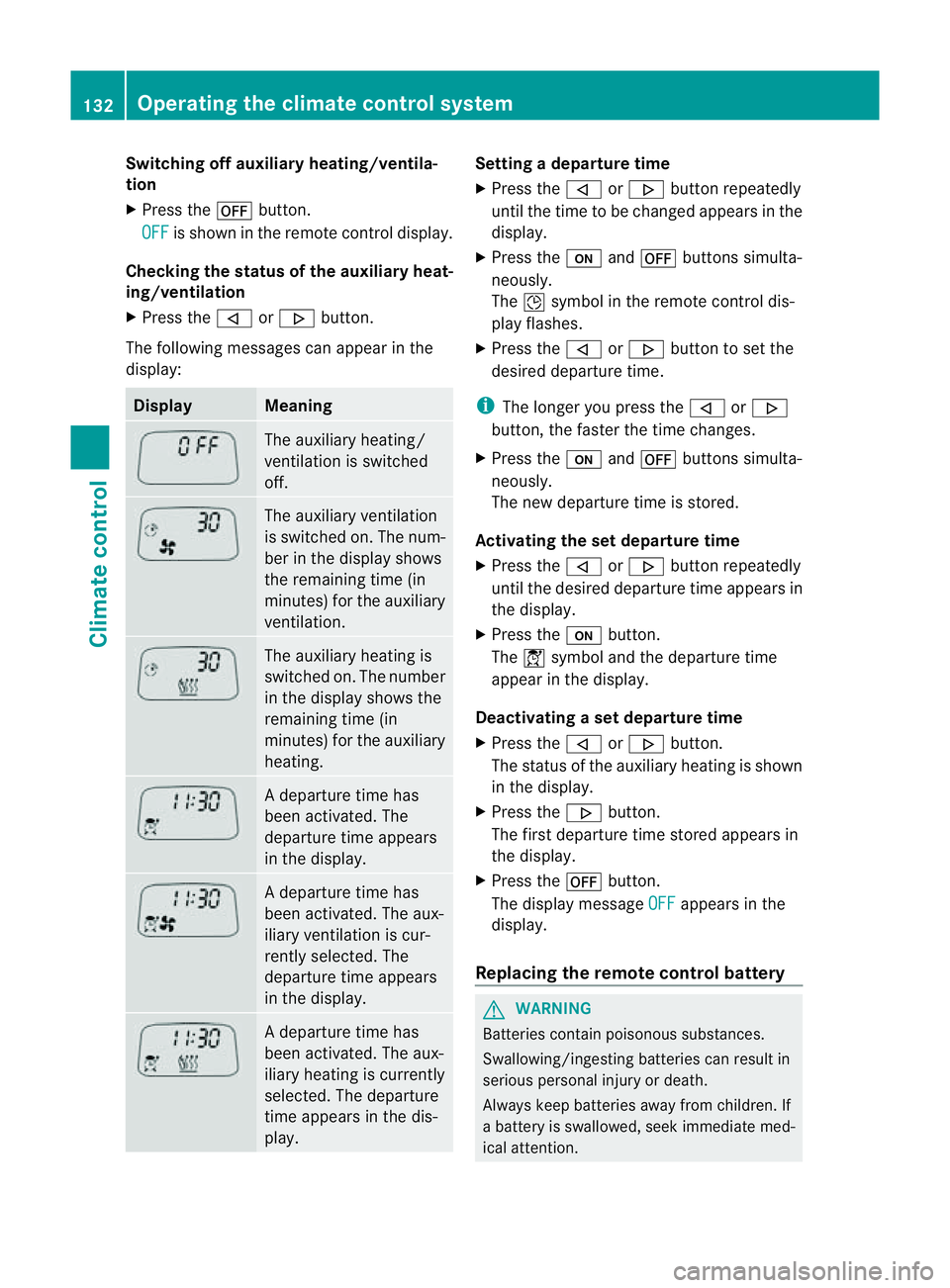
The following messages can appea rinthe
display: Display Meaning
The auxiliary heating/
ven tilation is switched
off. The auxiliary ventilation
is switched on. The num-
ber in the displa yshows
the remaining tim e(in
minutes) for the auxiliary
ventilation. The auxiliary heating is
switched on. The number
in the displa yshows the
remaining tim e(in
minutes) for the auxiliary
heating. Ad
eparture tim ehas
been activated. The
departure time appears
in the display. Ad
eparture tim ehas
been activated. The aux-
iliary ventilation is cur-
rently selected. The
departure time appears
in the display. Ad
eparture tim ehas
been activated. The aux-
iliary heating is currently
selected. The departure
time appears in the dis-
play. Setting
adeparture time
X Press the ,or. button repeatedly
until the time to be changed appears in the
display.
X Press the uand^ button ssimulta-
neously.
The Îsymbol in the remot econtrol dis-
play flashes.
X Press the ,or. button to set the
desire ddeparture time.
i The longer you press the ,or.
button ,the faster the tim echange s.
X Pres sthe u and^ button ssimulta-
neously.
The new departur etime is stored.
Activating the set departure time
X Press the ,or. button repeatedly
until the desired departur etime appears in
the display.
X Press the ubutton.
The Ísymbol and the departur etime
appear in the display.
Deactivating aset departure time
X Press the ,or. button.
The status of the auxiliary heating is shown
in the display.
X Press the .button.
The first departure time stored appears in
the display.
X Press the ^button.
The display message OFF appears in the
display.
Replacing the remote control battery G
WARNING
Batteries contain poisonous substances.
Swallowing/ingestin gbatteries can result in
serious personal injur yordeath.
Alway skeep batteries away from children .If
ab atter yiss wallowed, seek immediat emed-
ical attention. 132
Operating th
eclimate control systemClimate control
Page 137 of 389
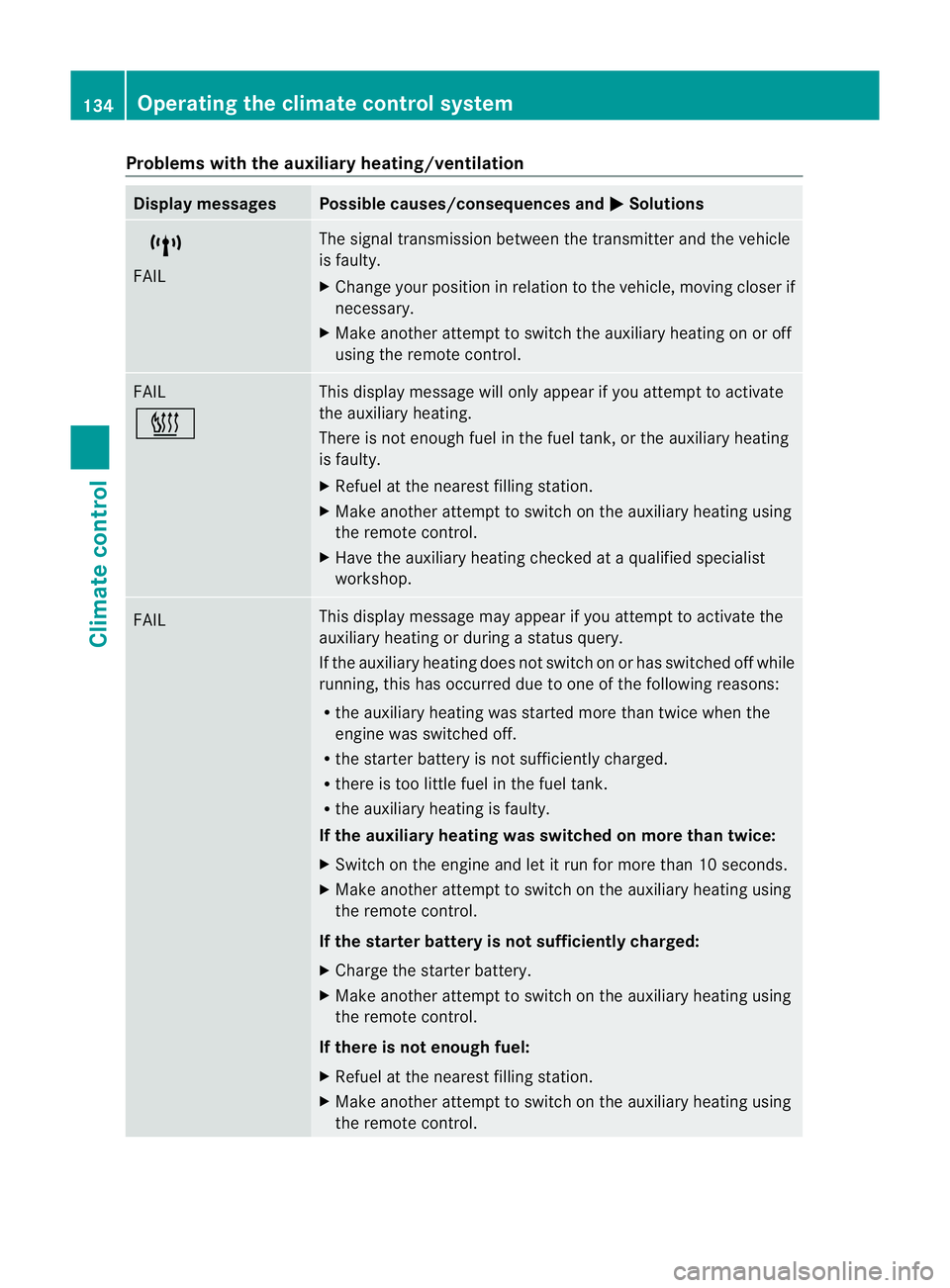
Problems wit
hthe auxiliary heating/ventilation Display messages Possible causes/consequences and
M Solutions
$
FAIL Th
es ignal transmission between the transmitter and the vehicle
is faulty.
X Change your position in relation to the vehicle, movin gcloser if
necessary.
X Make another attempt to switch the auxiliary heating on or off
using the remote control. FAIL
© This display message will only appear if you attempt to activate
the auxiliary heating.
There is not enough fuel in the fuel tank ,orthe auxiliary heating
is faulty.
X Refuel at the nearest filling station.
X Make another attemp ttos witch on the auxiliary heating using
the remote control.
X Have the auxiliary heating checked at aqualified specialist
workshop. FAIL This display messag
emay appear if you attempt to activate the
auxiliary heating or during astatus query.
If the auxiliary heating doe snot switc honorh as switched off while
running, this has occurred due to one of the following reasons:
R the auxiliary heating was started more than twice when the
engine was switched off.
R the starter battery is not sufficiently charged.
R there is too little fuel in the fuel tank.
R the auxiliary heating is faulty.
If the auxiliary heating was switched on more than twice:
X Switch on the engine and let it run for more than 10 seconds.
X Make another attempt to switch on the auxiliary heating using
the remote control.
If the starter battery is not sufficiently charged:
X Charge the starter battery.
X Make another attempt to switch on the auxiliary heating using
the remote control.
If there is not enough fuel:
X Refuel at the nearest filling station.
X Make another attempt to switch on the auxiliary heating using
the remote control. 134
Operating the climate control systemClimate control