lights MERCEDES-BENZ M-CLASS SUV 2011 Workshop Manual
[x] Cancel search | Manufacturer: MERCEDES-BENZ, Model Year: 2011, Model line: M-CLASS SUV, Model: MERCEDES-BENZ M-CLASS SUV 2011Pages: 389, PDF Size: 9.22 MB
Page 212 of 389
Mon
itoring range of the sensors
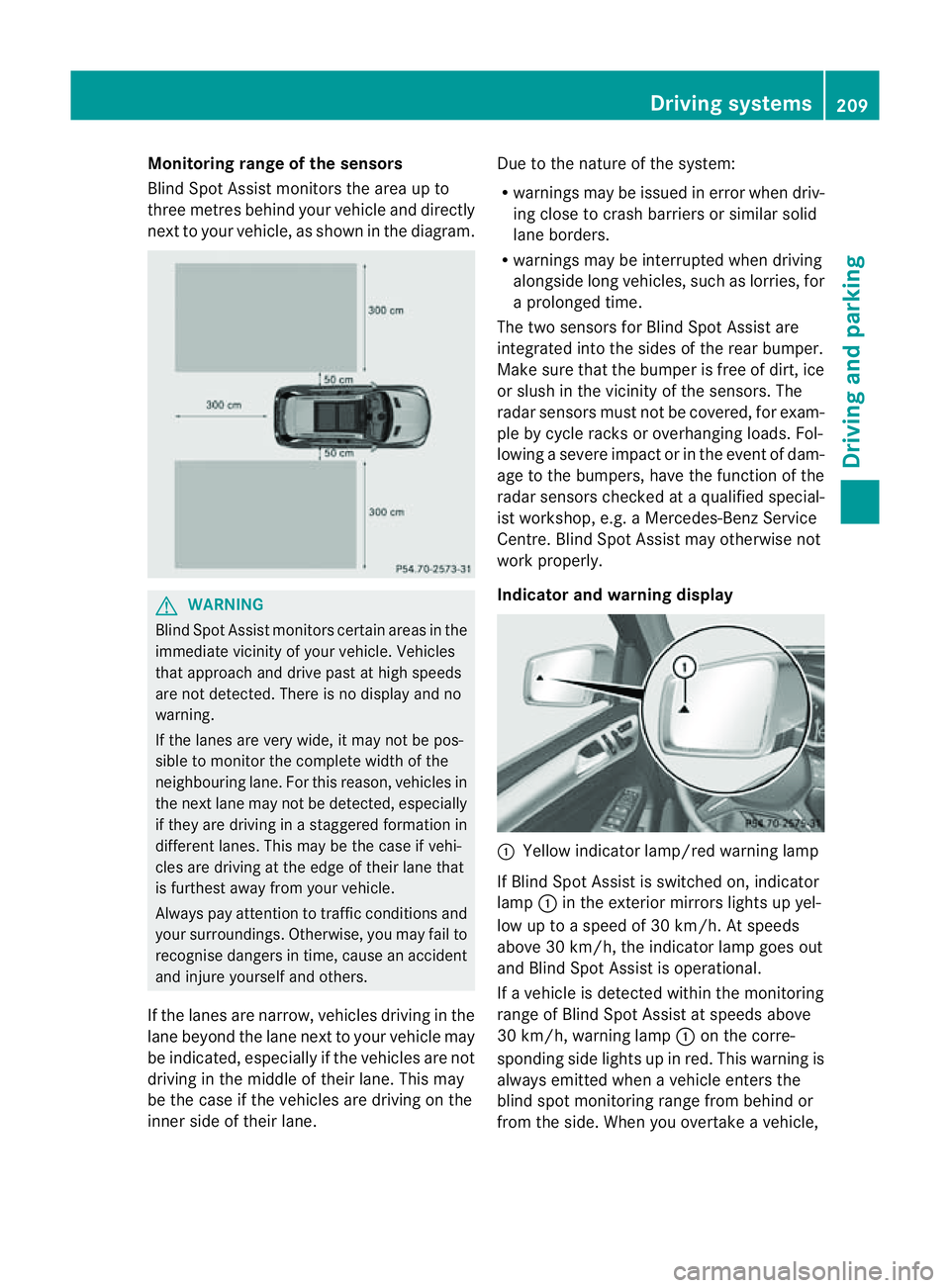
Blind Spot Assist monitors the area up to
three metres behind you rvehicle and direc tly
next to you rvehicle, as shown in the diagram. G
WARNING
Blin dSpot Assist monitors cer tain areas in the
immediate vicinit yofyour vehicle. Vehicles
that approach and driv epast at high speeds
are not detected. There is no display and no
warning.
If the lanes are very wide, it may not be pos-
sible to monitor the complete width of the
neighbouring lane. For this reason, vehicles in
the next lane may not be detected, especially
if they are driving in astaggered formation in
different lanes .This ma ybethe case if vehi-
cles ar edriving at th eedge of their lane that
is furthest away from your vehicle.
Alway spay attention to traffic conditions and
your surroundings. Otherwise ,you may fai lto
recognis edangers in time, cause an accident
and injure yourself and others.
If the lanes are narrow, vehicles driving in the
lane beyond the lane next to your vehicle may
be indicated, especially if the vehicles are not
driving in the middle of their lane. This may
be the case if the vehicles are driving on the
inner side of their lane. Due to the nature of the system:
R
warnings may be issue dine rror when driv-
ing close to cras hbarriers or similar solid
lane borders.
R warnings may be interrupted when driving
alongside long vehicles, such as lorries, for
ap rolonged time.
Th et wo sensors for Blind Spot Assist are
integrated into the sides of the rear bumper.
Make sure that the bumper is free of dirt, ice
or slush in the vicinit yofthe sensors. The
radar sensor smust not be covered, for exam-
ple by cycle racks or overhanging loads .Fol-
lowin gasevereimpact or in th eevent of dam-
ag etot he bumpers, hav ethe func tion of the
radar sensor schecked at aqualified special-
ist workshop, e.g. aMercedes-Ben zService
Cent re.B lind Spot Assist may otherwise not
work properly.
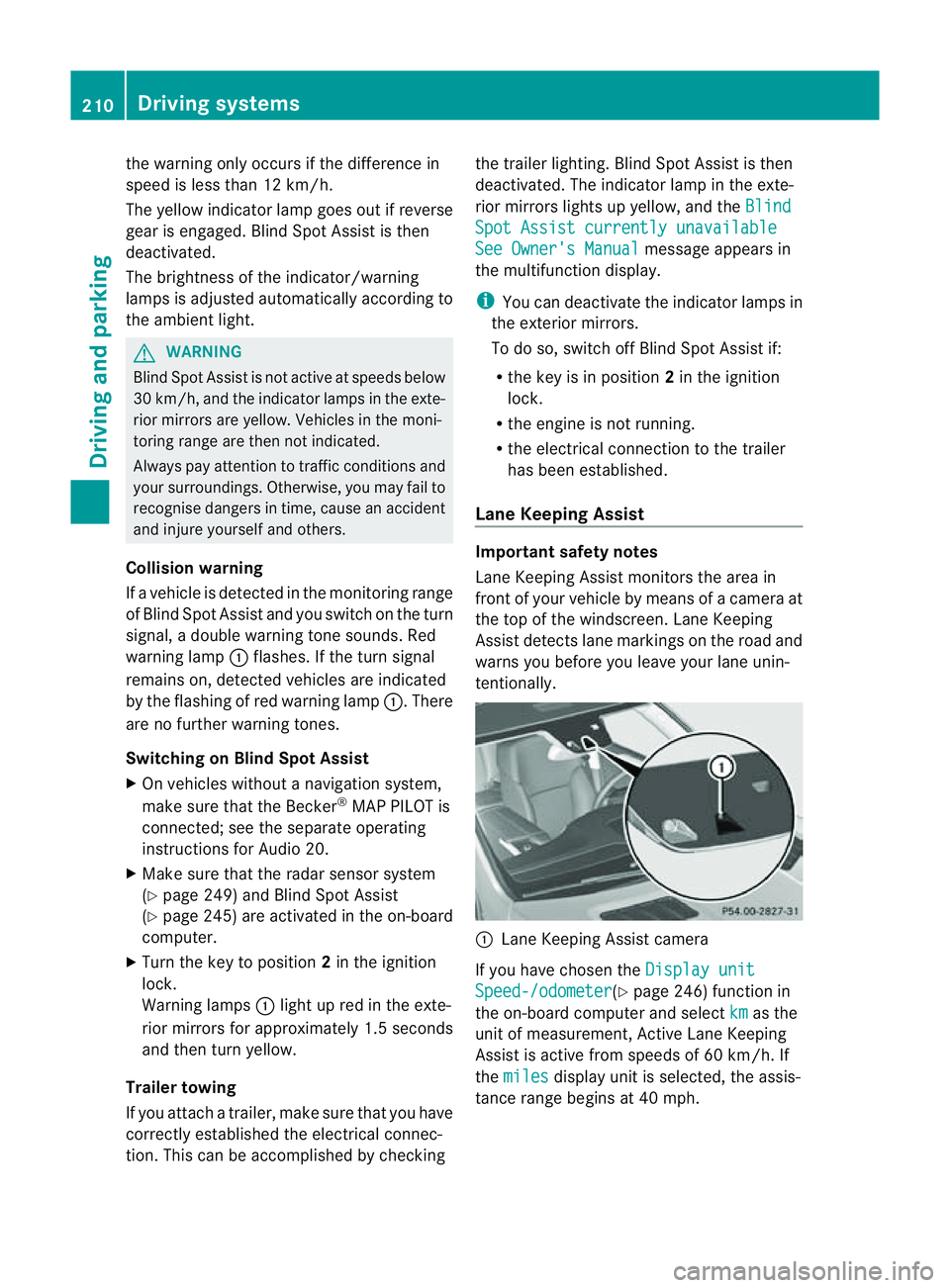
Indicator and warning display :
Yellow indicator lamp/red warnin glamp
If Blind Spot Assis tiss witched on, indicator
lamp :in the exterior mirror slights up yel-
low up to aspeed of 30 km/h. At speeds
above 30 km/h, the indicator lamp goes out
and Blin dSpot Assist is operational.
If av ehicle is detected within the monitoring
range of Blin dSpot Assist at speeds above
30 km/h, warning lamp :on the cor re-
spondi ngside light supinred. This warning is
always emit tedw hen avehicle enters the
blind spot monitorin grange from behind or
from the side. When you overtake avehicle, Driving systems
209Drivingand parking Z
Page 213 of 389
the warning onl
yoccurs if the differenc ein
spee dislesst han 12 km/h.
The yellow indicator lamp goes out if reverse
gea rise ngaged. Blind Spot Assist is then
deactivated.
The brightness of the indicator/warning
lamps is adjusted automaticall yaccording to
the ambient light. G
WARNING
Blind Spot Assist is not active at speeds below
30 km/h, and the indicator lamps in the exte-
rior mirrors are yellow. Vehicles in the moni-
toring range are the nnot indicated.
Always pay attention to traffic condition sand
your surroundings .Otherwise, you may fail to
recognis edangers in time, cause an accident
and injure yoursel fand others.
Collisio nwarning
If av ehicle is detected in the mon itoring range
of Blind Spot Assis tand you switch on the turn
signal, adouble warnin gtone sounds. Red
warnin glamp :flashes .Ifthe tur nsignal
remains on, detected vehicles are indicated
by the flashing of red warnin glamp :.T here
ar enof urther warning tones.
Switching on Blind Spot Assist
X On vehicles without anavigation system,
make sure that the Becker ®
MAP PILOT is
connected; see the separate operating
instructions for Audio 20.
X Make sure that the radar senso rsystem
(Y page 249) and Blind Spot Assist
(Y page 245) are activated in the on-board
computer.
X Turn the key to position 2in the ignition
lock.
Warning lamps :ligh tupr ed in the exte-
rior mirror sfor approximately 1. 5seconds
and then tur nyellow.
Trailer towing
If you attach atrailer, make sure that yo uhave
correctly established the electrical connec-
tion. This can be accomplished by checking the trailer lighting
.Blind Spot Assist is then
deactivated. The indicator lamp in the exte-
rior mirrors lights up yellow, and the Blind Spot Assist currentl
yunavailable See Owner's Manual message appe
arsin
the multifunction display.
i You can deactivate the indicato rlamps in
the exterior mirrors.
To do so, switch off Blind Spot Assis tif:
R thek ey is in position 2in the ignition
lock.
R the engine is not running.
R the electrical connection to the trailer
has been established.
Lane Keeping Assist Important safety notes
Lan
eKeeping Assist monitor sthe area in
front of your vehicle by means of acamera at
the top of the windscreen. Lane Keeping
Assis tdetect slane markings on the road and
warns you before you leave your lane unin-
tentionally. :
Lane Keeping Assis tcamera
If you have chose nthe Displa yunit Speed-/odometer (Y
page 246) functio nin
the on-board computer and select km as the
unit of measurement, Active Lane Keeping
Assist is active from speeds of 60 km/h. If
the miles displa
yunit is selected ,the assis-
tance range begin sat40mph. 210
Driving systemsDriving and parking
Page 216 of 389
G
WARNING
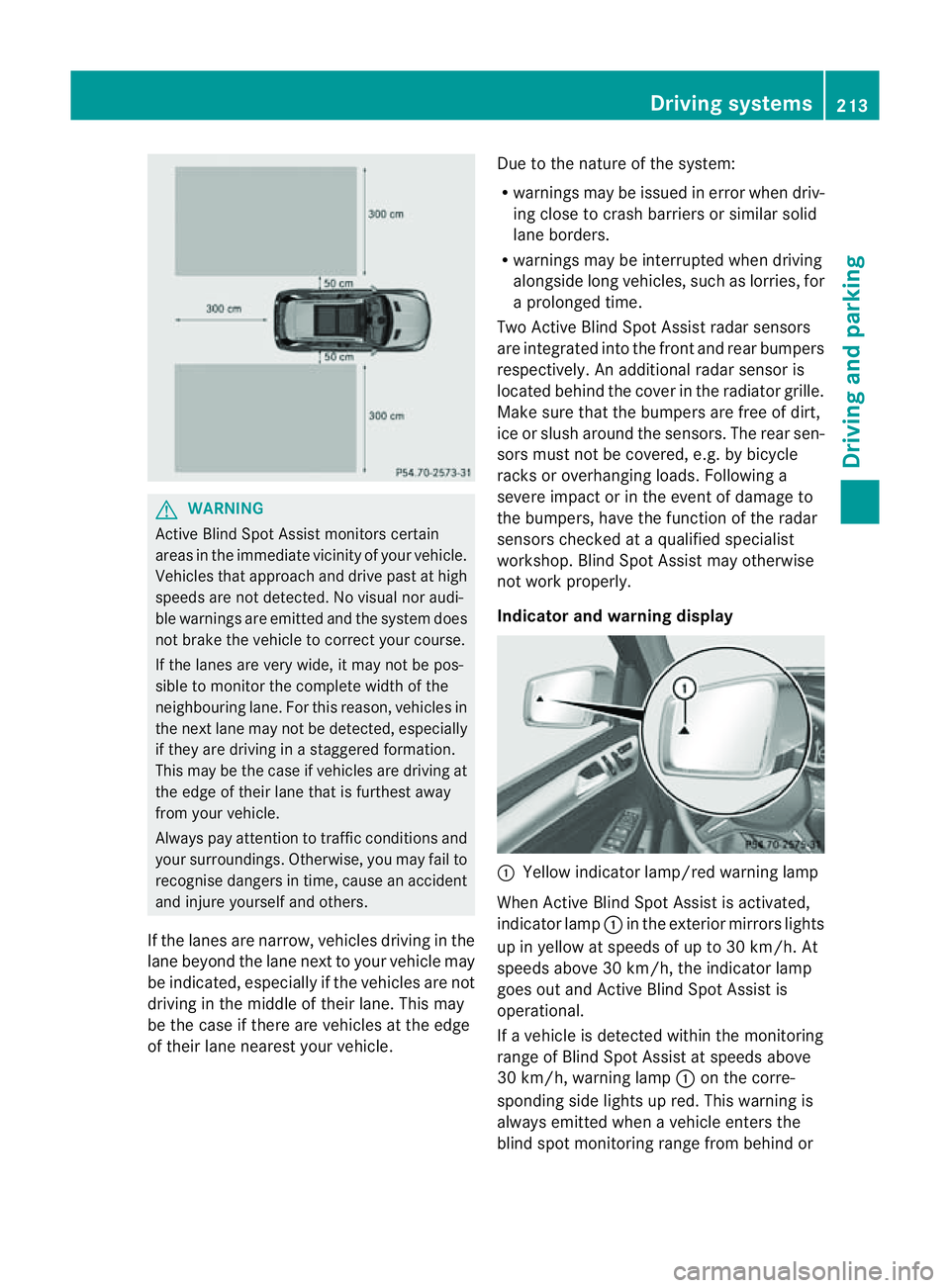
Active Blind Spo tAssist monitor scertain
areas in the immediate vicinity of your vehicle.
Vehicles that approach and drive past at high
speeds are not detected. No visual nor audi-
ble warnings are emitted and the syste mdoes
not brake the vehicle to cor rect your course.
If the lane sare very wide, it may not be pos-
sibl etom onitor the complet ewidth of the
neighbourin glane. For this reason, vehicles in
the nex tlane may not be detected, especially
if they are driving in astaggered formation.
Thi sm ay be the case if vehicles are driving at
the edge of their lane that is furthest away
from your vehicle.
Always pay attention to traffic conditions and
your surroundings. Otherwise, you may fail to
recognise dangers in time, cause an accident
and injure yourself and others.
If the lanes are narrow, vehicles driving in the
lane beyond the lane nex ttoyour vehicle may
be indicated, especially if the vehicles ar enot
drivin ginthe middle of their lane. This may
be the case if ther eare vehicles at th eedge
of their lane nearest your vehicle. Due to the nature of the system:
R
warnings may be issued in error when driv-
ing close to crash barriers or simila rsolid
lane borders.
R warnings ma ybeinterrupted whe ndriving
alongsid elong vehicles, such as lorries, for
ap rolonged time.
Tw oA ctive Blind Spo tAssist radar sensors
ar ei ntegrated into the front and rear bumpers
respectively. An additional radar sensor is
locate dbehind the cover in the radiator grille.
Make sure that the bumper sare free of dirt,
ice or slus haround th esensors. The rear sen-
sors must not be covered, e.g. by bicycle
racks or overhanging loads. Followin ga
severe impac torinthe even tofdamage to
the bumpers, have the function of the radar
sensors checked at aqualified specialist
workshop. Blind Spot Assis tmay otherwise
not work properly.
Indicator and warning display :
Yellow indicator lamp/red warning lamp
When Active Blind Spot Assis tisa ctivated,
indicator lamp :in the exte rior mirror slights
up in yellow at speeds of up to 30 km/h. At
speeds above 30 km/h, the indicator lamp
goes out and Active Blind Spot Assist is
operational.
If av ehicle is detected within the monitoring
range of Blin dSpot Assist at speeds above
30 km/h, warning lamp :on the corre-
sponding side lights up red. This warning is
always emit tedw hen avehicle enter sthe
blin dspot moni toring range from behind or Drivin
gsystems
213Drivingand park ing Z
Page 218 of 389
R
the Off-roa dprogra misa ctivate d(vehicles
without th eON&OFFROAD package).
R Off-road progra m1or2isactivated(vehi-
cle sw ith the ON&OFFROAD package).
R the LOW RANGE off-road gear is activated
(vehicles with the ON&OFFROAD package).
R al oss of tyr epressure or adefectiv etyre is
detected.
Activating Active Blind Spot Assist
X On vehicles without anavigation system,
make sure that the Becker ®
MAP PILOT is
connected; see the separate operating
instructions for Audio 20.
X Make sure that the radar senso rsystem
(Y page 249) and Active Blind Spot Assist
(Y page 245) are activated in the on-board
computer.
X Turn the key to position 2in the ignition
lock.
Warning lamps :ligh tupr ed in the exte-
rior mirror sfor approximately 1. 5seconds
and then tur nyellow.
Trailer towing
If you attach atrailer, make sure that yo uhave
correctly established the electrical connec-
tion. This can be accomplished by checking
the trailer lighting .Active Blind Spo tAssist is
then deactivated. The indicator lam plights up
yellow in the exterior mirrors and the ActiveBlind Spot Assist currently unavail‐
able Se
eOwner's Manual message
appe arsint he multifunction display.
Active Lan eKeeping Assist Import
ants afety notes
Active Lane Keeping Assis tmonitors the area
in front of your vehicle by means of acamera
at the top of the windscreen. Active Lane
Keeping Assis tdetect slane markings on the
road and warns you before you leave your
lane unintentionally .Ifyou do not react to the
warning, alane-correcting application of the
brakes can bring the vehicle back into the
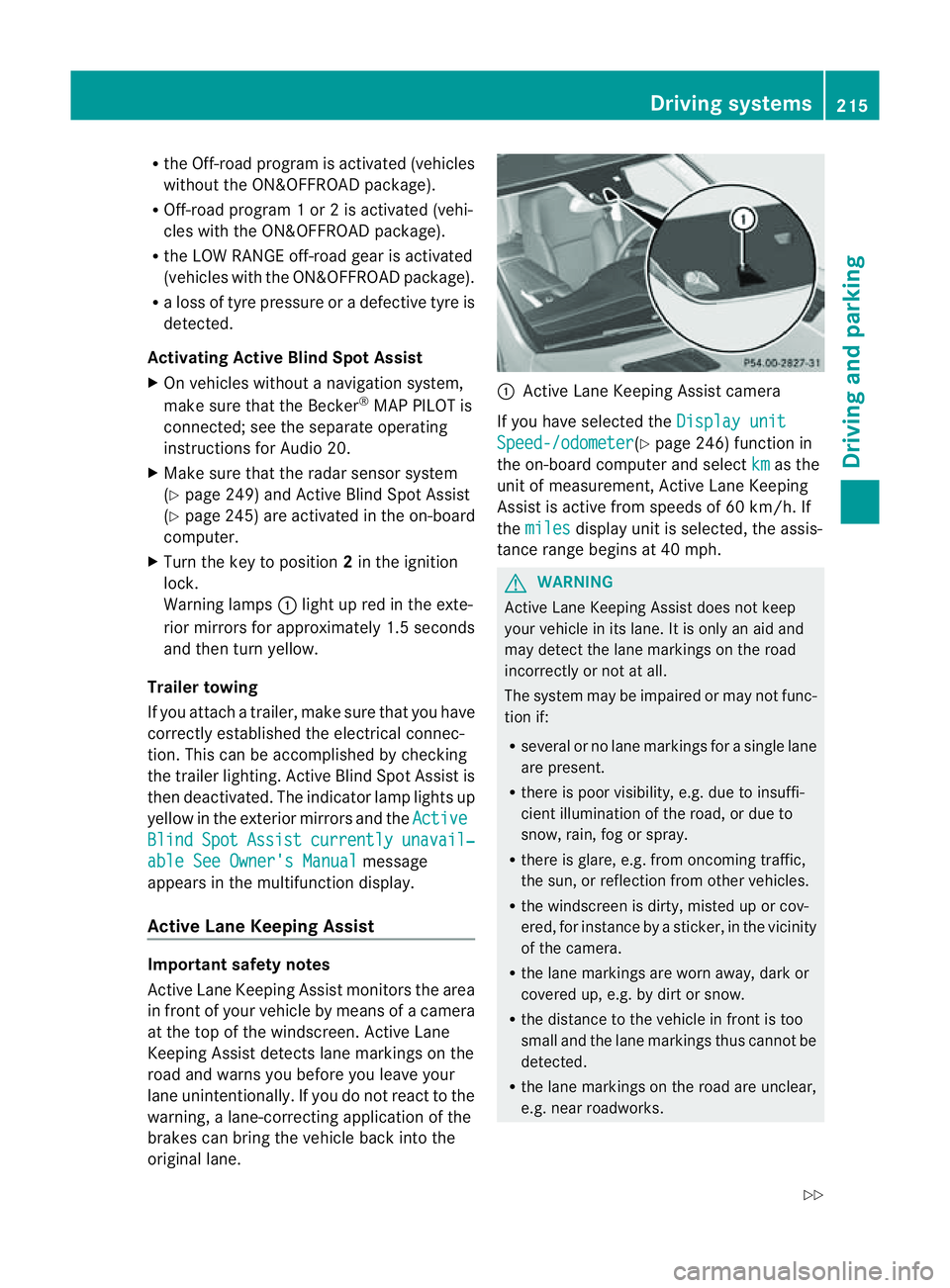
original lane. :
Active Lane Keeping Assis tcamera
If you have selected the Displayunit Speed-/odometer (Y
page 246) function in
th eo n-board compute rand select km as the
unit of measurement, Active Lane Keeping
Assist is active from speeds of 60 km/h. If
the miles display unit is selected
,the assis-
tan ce ra nge begins at 40 mph. G
WARNING
Active Lane Keeping Assist doe snot keep
your vehicle in its lane. It is only an aid and
may detec tthe lan emarkings on the road
incorrectly or not at all.
The system may be impaired or may not func-
tion if:
R several or no lane markings for asingle lane
are present.
R there is poor visibility, e.g. due to insuffi-
cient illumination of the road, or due to
snow, rain, fog or spray.
R there is glare, e.g. from oncoming traffic,
the sun, or reflec tion from other vehicles.
R the windscreen is dirty, misted up or cov-
ered, for insta ncebyasticker, in the vicinity
of the camera.
R the lane markings are worn away ,dark or
covered up, e.g. by dirt or snow.
R the distance to the vehicle in front is too
small and the lane markings thus cannot be
detected.
R the lane markings on the road are unclear,
e.g. near roadworks. Driving systems
215Drivingand park ing
Z
Page 224 of 389
G
WARNING
If you depress the accelerato rpeda lwith DSR
activated, then the set spee dcan be excee-
ded. Drive downhill with special care and
alway skeep in min dthat DSR brakes the vehi-
cle as soon as you remove your foot from the
accelerator pedal. The vehicle may brake sud-
denly due to DSR intervening, depending on
the downhill gradient and the difference
between the current speed and the set speed.
You could lose control of the vehicle and
cause an accident.
For information about driving off-road, see
(Y page 166).
Activating/deactivating DSR Activating
You can only activate DSR when driving at
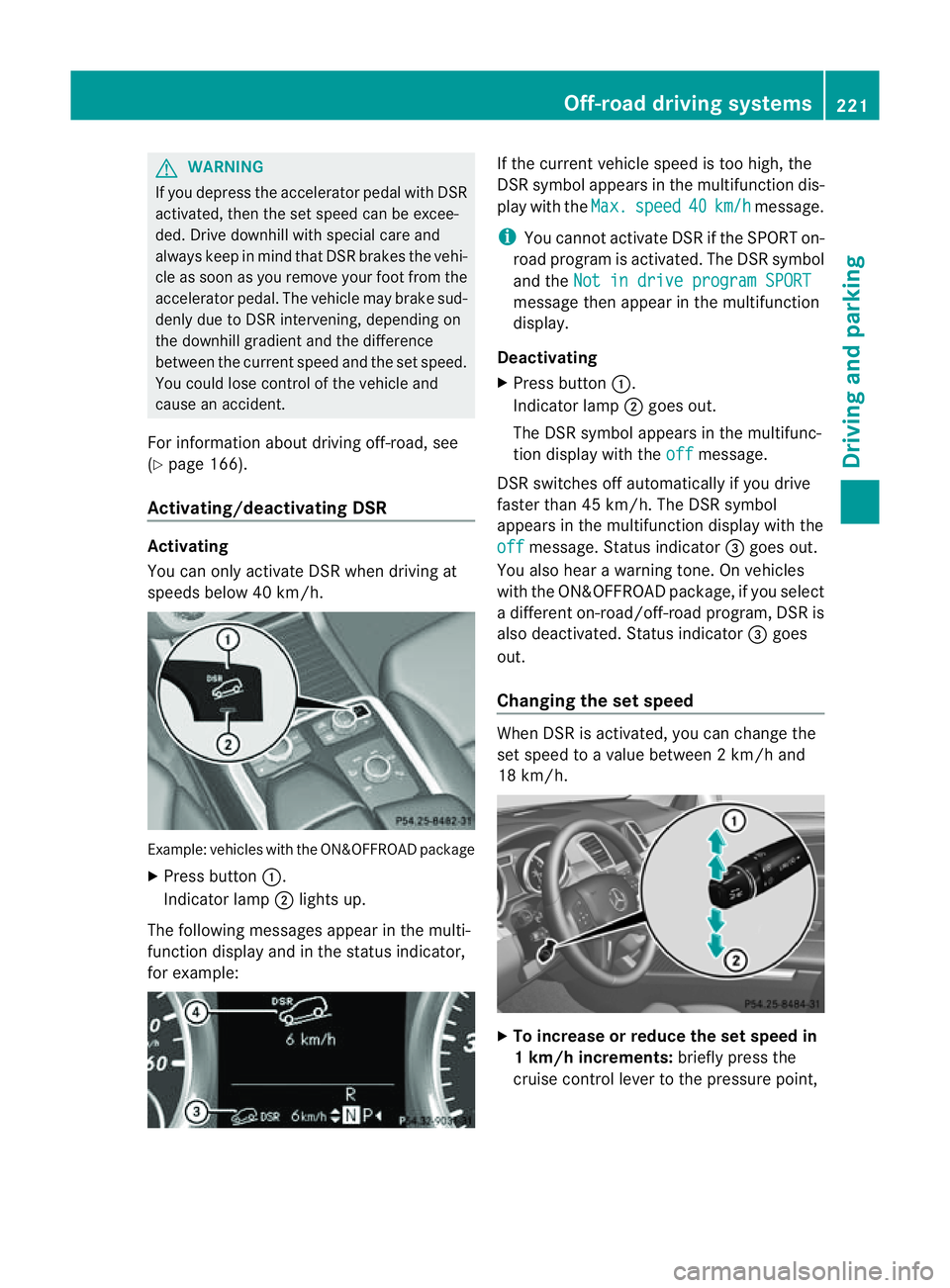
speeds below 40 km/h. Example: vehicles with the ON&OFFROAD package
X Press button :.
Indicator lamp ;lights up.
The following messages appear in the multi-
func tion display and in the status indicator,
for example: If the curren
tvehicle speed is too high, the
DSR symbol appear sint he multifunc tion dis-
play with the Max. speed 40 km/h message.
i You can notactivate DSR if the SPORT on-
road program is activated. Th eDSR symbol
and the Not in drive progra mSPORT message then appear in th
emultifunction
display.
Deactivating
X Press button :.
Indicator lamp ;goes out.
The DSR symbol appears in the multifunc-
tion display with the off message.
DSR switches off automatically if you drive
faster than 45 km/h. The DSR symbol
appears in the multifunction display with the
off message. Status indicator
=goes out.
You also hear awarning tone. On vehicles
with the ON&OFFROAD package, if you select
ad ifferent on-road/off- road program, DSR is
also deactivated. Status indicator =goes
out.
Changing the set speed When DSR is activated, you can change the
set spee dtoavalue between 2km/h and
18 km/h. X
To in crease or reduce the set speed in
1k m/h increments: briefly press the
cruise control lever to the pressure point, Off-road drivin
gsystems
221Drivingand park ing Z
Page 225 of 389
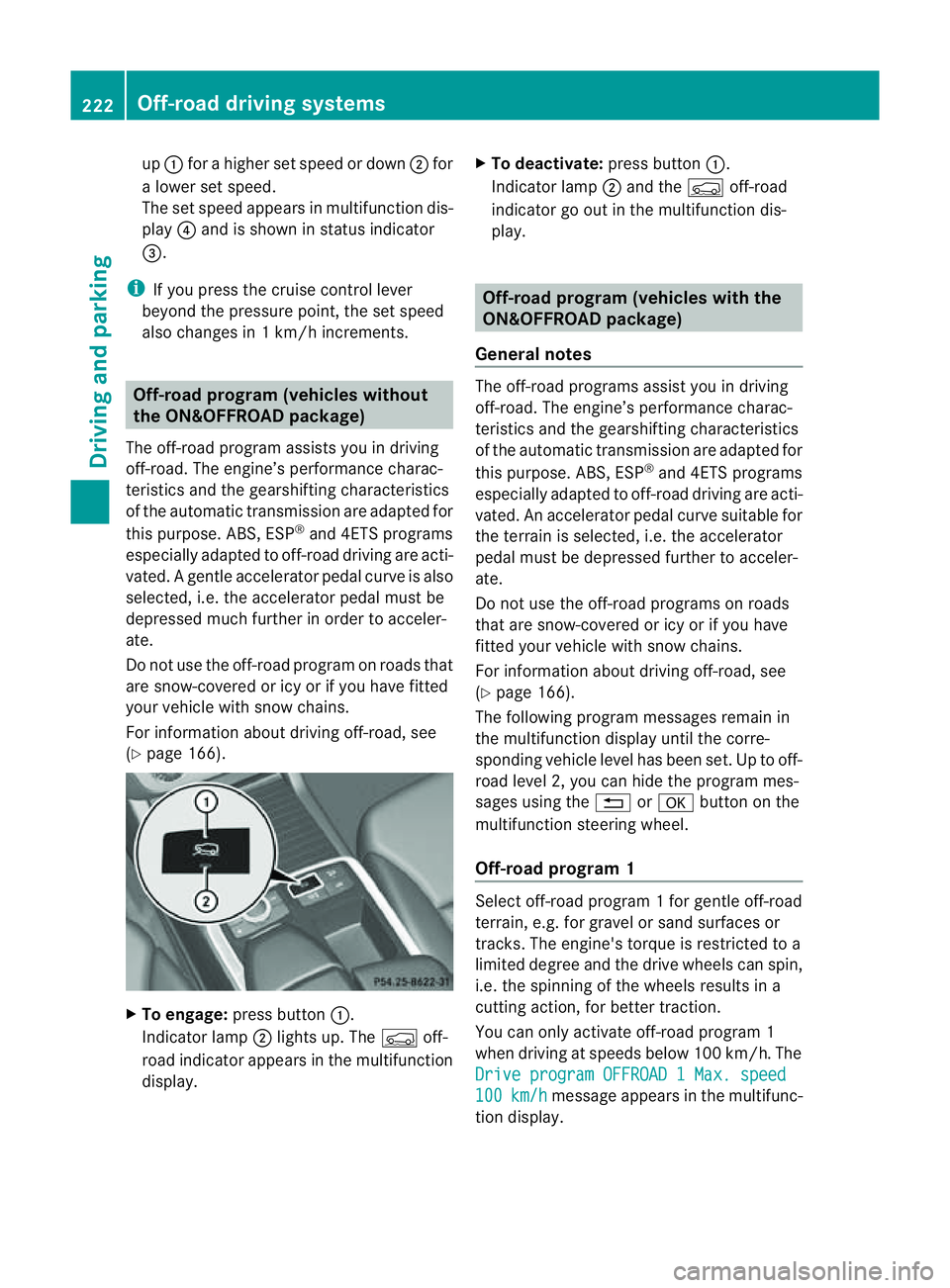
up
: for ahigher set speed or down ;for
al ower set speed.
The set spee dappear sinm ultifunction dis-
play ?and is shown in status indicator
=.
i If you press the cruise con trol lever
beyon dthe pressur epoint, th eset speed
also changes in 1km/ hincrements. Off-road program (ve
hicles without
th eO N&O FFROAD package)
The off-road program assists you in driving
off-road. The engine’s performance charac-
teristics and th egearshifting chara cteristics
of th eautomatic transmission are adapted for
this purpose. ABS, ESP ®
and 4ETS programs
especially adapted to off-road driving are acti-
vated. Agentle accelera torp edal curve is also
selected, i.e. the accelera torp edal must be
depressed muc hfurther in order to acceler-
ate.
Do not use the off-road program on roads that
are snow-covered or icy or if you have fitted
your vehicle with snow chains.
For information about driving off-road, see
(Y page 166). X
To engage: press button :.
Indicator lamp ;lights up. The Çoff-
road indicator appears in the multifunction
display. X
To deactivate: press button:.
Indicator lamp ;and the Çoff-road
indicator go out in the multifunction dis-
play. Off-road program (vehicles with the
ON&OFFROAD package)
General notes The off-road programs assis
tyou in driving
off -road. The engine’s performanc echarac-
teristics and the gearshifting characteristics
of the automatic transmission ar eadapted for
this purpose. ABS, ESP ®
and 4ETS programs
especially adapted to off -road drivin gare acti-
vated. An accelerator peda lcurve suitable for
the terrain is selected, i.e. the accelerator
pedal must be depressed further to acceler-
ate.
Do not use the off-road programs on roads
that are snow-covered or icy or if you have
fitted your vehicle with snow chains.
For information about driving off-road, see
(Y page 166).
The following program messages remain in
the multifunction display until the corre-
spondin gvehicle level has been set. Up to off-
road level 2, you can hide the program mes-
sages using the %ora button on the
multifunction steering wheel.
Off-road progra m1 Select off-road program
1for gentle off -road
ter rain, e.g. for gravel or sand surfaces or
tracks. The engine's torque is restricted to a
limited degree and the drive wheels can spin,
i.e. the spinning of the wheels results in a
cutting action ,for better traction.
You can only activate off -road program 1
when driving at speeds below 100 km/ h.The
Driv eprogram OFFROAD 1Max. speed 100 km/h message appears in th
emultifunc-
tion display. 222
Off-road driving systemsDrivin
gand parking
Page 226 of 389
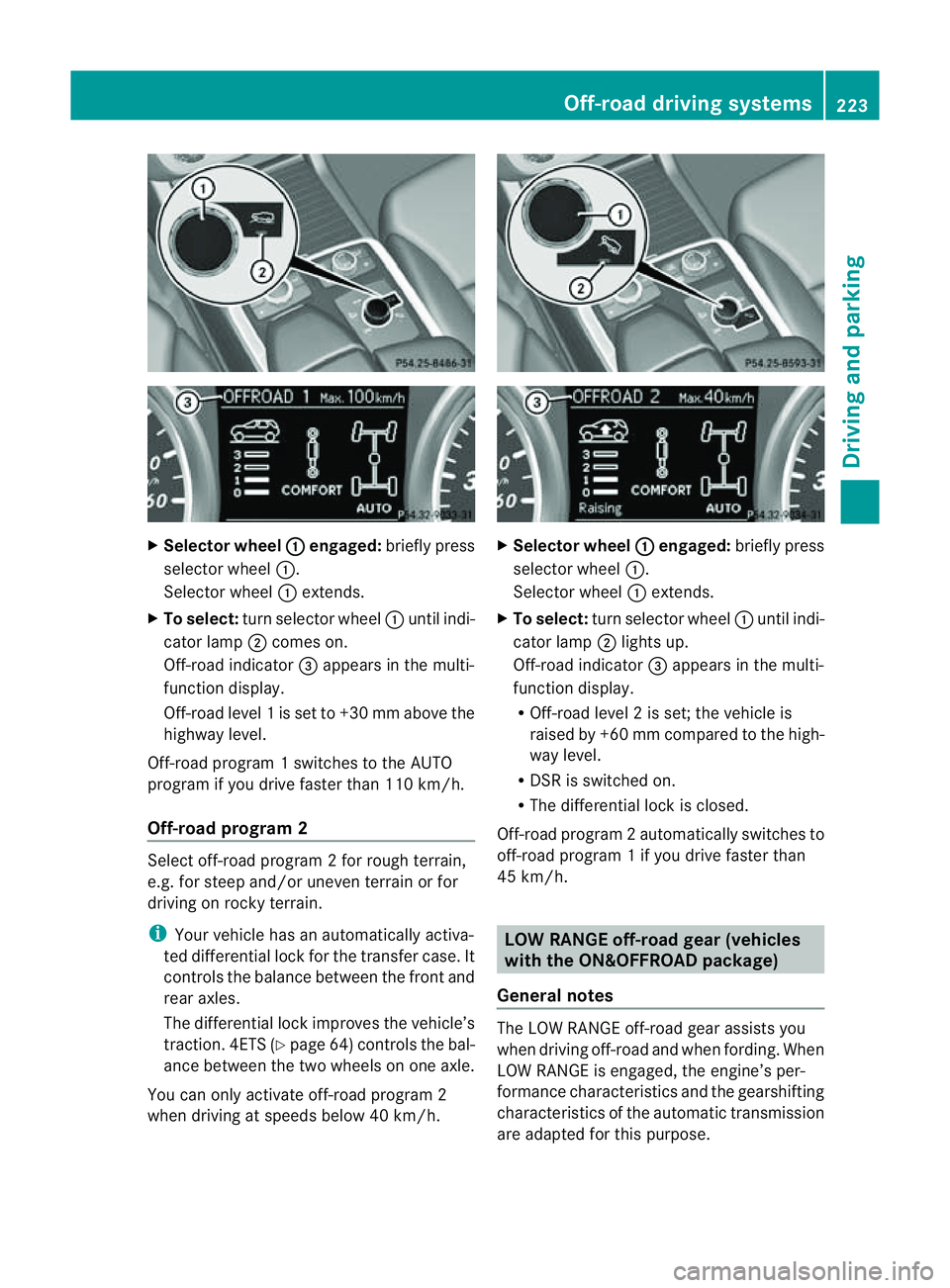
X
Selector wheel : engaged:
brieflypress
selecto rwheel :.
Selector wheel :extends.
X To select: turnselector wheel :until indi-
cator lamp ;comes on.
Off-road indicator =appears in the multi-
function display.
Off-road level 1isset to +3 0mmabove the
highwa ylevel.
Off-road program 1switches to the AUTO
program if you drive faster than 110 km/h.
Off-road program 2 Select off-road program
2for rough terrain,
e.g. for steep and/or uneven terrain or for
drivin gonr ocky terrain.
i Your vehicle has an automatically activa-
ted differential lock for the transfer case. It
con trols the balance between the front and
rear axles.
The differential lock improves the vehicle’s
trac tion. 4ETS (Y page 64)controls the bal-
anc ebetween the two wheels on one axle.
You can only activate off-road program 2
when driving at speeds below 40 km/h. X
Selector wheel : engaged:
briefly press
selector wheel :.
Selector wheel :extends.
X To select: turnselector wheel :until indi-
cator lamp ;lights up.
Off-road indicator =appears in the multi-
function display.
R Off-road level 2isset; the vehicle is
raised by +6 0mmcompared to the high-
way level.
R DSR is switched on.
R The differential lock is closed.
Off-road program 2automatically switches to
off-road program 1ifyou dri vefaster than
45 km/h. LO
WR ANGE off-road gear (vehicles
with th eON&O FFROAD package)
General notes The LOW RANGE off-road gear assists you
when driving off-road and when fording. When
LOW RANGE is engaged, th
eengin e’sp er-
formance characterist icsa nd the gearshifting
characteristics of the automatic transmiss ion
are adapted for thi spurpose. Off-roa
ddriving systems
223Drivingandparki ng Z
Page 227 of 389
For information abou
tdriving off-road, see
(Y page 166). Yo uwillf ind information about
driving safety systems in conjunction with
LOW RANGE in the "Saf ety" section
(Y pag e60).
Shift ranges HIGH RANGE
Roa
dposition for all nor-
ma ldriving situations LO
WR ANGE Off-road position for driv-
ing off-road and fording
The transmission ratio
between the engine and
wheels is only approx-
imatel yone third of that in
the HIGH RANGE road
pos ition. The drive torque
is correspondingly higher
as aresult.
Do not use LOW RANGE:
R on slippery road surfa-
ces, e.g. in the case of
slush
R on snow or ice-covered
roads
R if you have snow chains
on your vehicle G
WARNING
Always wait for the gear change process from
HIGH RANGE to LOW RANGE –and from LOW
RANGE to HIGH RANGE –tocomple te.Don ot
tur no ff the engine while changi nggear and
do not switc hthe automatic transmission to
anot hergear.
If you do not wait for the gear change process
to complete, it may not be cor rectly imple-
mented. Th etransfer cas emay then be in
neutral and the connection between the
engine and the drive axles may be disen-
gaged .The vehicle coul dthen mov efreely,
eve nifa gear is engaged, and coul dinadver-
tently start moving, particularly if it is on a
slope. Observe the following description in "Mes-
sages in the multifunction display". From HIGH RANG
EtoLOW RAN GE
! Only carr yout the gear change process if:
R the engine is running
R the transmission is in position N
R you are not driving above 40 km/h
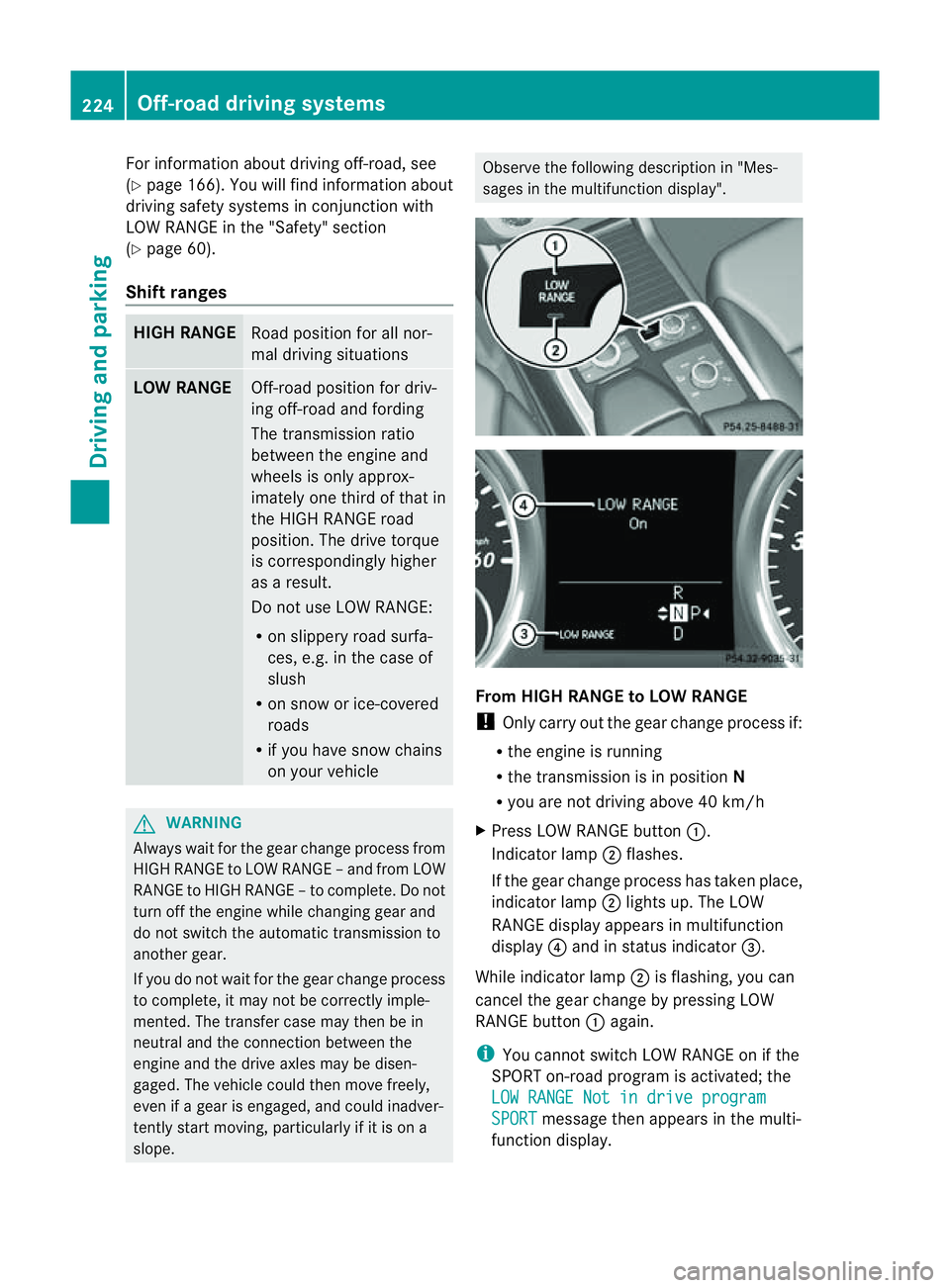
X Press LOW RANGE button :.
Indicator lamp ;flashes.
If the gear change process has taken place,
indicator lamp ;lights up. The LOW
RANGE display appears in multifunction
display ?and in status indicator =.
While indicator lamp ;is flashing, you can
cancel the gear change by pressing LOW
RANGE button :again.
i You cannot switch LOW RANGE on if the
SPORT on-road program is activated; the
LO WR ANGE Not in drive program SPORT message then appears in th
emulti-
function display. 224
Off-road driving systemsDrivin
gand parking
Page 250 of 389
![MERCEDES-BENZ M-CLASS SUV 2011 Workshop Manual X
Press :or9 to select the Perma‐ nent display function.
You will see the selected setting: outsidetemperat
ure or
Dig. speedo m[mph] .
X Press the abuttontos ave the setting.
Lights Switching the d](/img/4/55578/w960_55578-249.png "MERCEDES-BENZ M-CLASS SUV 2011 Workshop Manual X
Press :or9 to select the Perma‐ nent display function.
You will see the selected setting: outsidetemperat
ure or
Dig. speedo m[mph] .
X Press the abuttontos ave the setting.
Lights Switching the d")
X
Press :or9 to select the Perma‐ nent display function.
You will see the selected setting: outsidetemperat
ure or
Dig. speedo m[mph] .
X Press the abuttontos ave the setting.
Lights Switching the day
time drivin glights on/
off
If you have activated the Daytime driving
lights function and the light switch is set to
Ã,t he daytim edriving lights are automat-
icall yswitched on during daylight hours when
the engine is running. When it is dark, the side
lamps and the dipped-beam headlamps are
also switched on automatically.
X Switc hoff th eengine.
X Pres sthe = or; button on the steer-
ing wheel to selec tthe Settings menu.
X Press the :or9 button to selec tthe
Light submenu.
X Press the abutton to con firm.
X Press the :or9 buttontos elect the
Daytim edriving lights function.
Yo uw ill see the selected setting: on or
off .
X Press the abutton to save the setting.
Switching the Intelligent Light System
on/off
If you activat ethe Intell .Light Sys‐ tem: function
,you activa te thefollowing
func tions:
R motorwa ymode
R active light func tion
R cornering light func tion
R exte nded range foglamps
X Press the =or; button on the steer-
ing wheel to select the Settings menu.
X Press the :or9 button to select the
Light submenu.
X Press the abutton to confirm. X
Press :or9 to select the Intell. Ligh
tSys. function.
Yo uw ill see the selected setting: on or
off .
X Press the abutton to save the setting.
If you set the dipped-bea mheadlamps for
driving on the right/left (Y page 247),the
multifunction displa yshows the Intell. Ligh
tSystem: System inoperative Inactiv
efor left-side traffic or
Intell. Light System: System inoper‐
ative Inactiv
efor right-side traf‐ fic displa
ymessage instead of the Intell. Ligh
tSystem: functio
nintheLight sub-
menu.
Setting th edipped-bea mheadlamp sfor
driving on the left/right
This function is only available on vehicles with
the Intelligent Light System.
You can use this function to switch between
symmetrical beam and asymmetrical dipped
beam (Y page 106).
If you set the dipped-beam headlamps for
driving on the right/left, then motorway
mode and the extended range foglamps are
not available.
X Press the =or; button on the steer-
ing wheel to select the Settings menu.
X Press the :or9 buttontos elect the
Light submenu.
X Press the abutton to confirm.
X Press :or9 to select the Dipped beam
sSetting for function.
Yo uw ill see the selected setting: Right- side traffic or
Left-s idet raffic .
X Press the abuttontos ave the setting.
When you change the setting, conversion
does not take place until the nex ttime the
vehicle is stationary.
You can also have the dipped-beam head-
lamps set for drivin gonthe right or lef tata
qualified specialist workshop. Menus and submenus
247On-board comp uter and displays Z
Page 251 of 389
Switching Adaptive Highbeam Assist on/
off
X Press the =or; button on the steer-
ing wheel to select the Settings menu.
X Press the :or9 button to select the
Light submenu.
X Press the abutton to con firm.
X Press the :or9 button to select the
Adaptive Main-bea mAssist: function.
Yo uw ill see the selected setting: Activa‐ted or
Deactivated .
X Press the abutton to save the setting.
Setting the brightness of the ambient
lighting
X Press the =or; button on the steer-
ing wheel to select the Settings menu.
X Press the :or9 button to select the
Light submenu.
X Press the :or9 button to select
Ambien tlight .
Yo uw ill see the selected setting.
X Press the abutton to confirm.
X Press the :or9 button to adjust the
brightness to any level from Off to
Level 5 (bright).
X Press the aor% button to save the
setting.
Setting the ambient lighting colour
X Press the =or; button on the steer-
ing wheel to select the Settings menu.
X Press the :or9 button to select the
Light submenu.
X Press the abutton to confirm.
X Press the :or9 button to select the
Ambien tlight colour function.
X Press the abuttontoc onfirm.
X Press the :or9 button to set the
colou rtoSOLAR ,
NEUTRAL or
POLAR .
X Press the aor% buttontos ave the
setting. Activating/deactivating the surround
lighting and exterior lighting delayed
switch-off
If you have activated the
Surround light‐ ing function and the light switch is set to
Ã,t he followin gfunctions are activated
when it is dark:
R Surround lighting: the exterior lighting
remains lit for 40 seconds after unlocking
with the key. If you start the engine, the
surround lighting is switched off and the
automatic headl ampm ode is activated
(Y page 107).
R Exterior lighting delaye dswitch-off: the
exterior lighting remains lit for 60 seconds
after the engine has been switche doff. If
you close all th edoors, the exterior lighting
goes off after 15 seconds.
If you activate the Surround lighting func-
tion ,the followin glight up depending on the
vehicle' sequipment:
R the side lamps
R the daytim edriving lights
R thes urround lighting in the exterior mirrors
X Press the =or; button on the steer-
ing wheel to select the Settings menu.
X Press the :or9 button to select the
Light submenu.
X Press the abutton to confirm.
X Press the :or9 button to select the
Surround lighting function.
You will see the selected setting: on or
off .
X Press the abutton to save the setting.
Deactivating delayed switch-off of the exte-
rior lighting temporarily:
X Before leaving the vehicle, turn the key to
position 0in the ignition lock.
X Turn the key to position 2in the ignition
lock and back to position 0.
The exterior lighting delayed switch-off is
deactivated. 248
Menus and submenusOn-board computer and displays