steering MERCEDES-BENZ M-CLASS SUV 2011 Workshop Manual
[x] Cancel search | Manufacturer: MERCEDES-BENZ, Model Year: 2011, Model line: M-CLASS SUV, Model: MERCEDES-BENZ M-CLASS SUV 2011Pages: 389, PDF Size: 9.22 MB
Page 238 of 389
or on bridges. If you do not adapt your driving
style to the conditions, the vehicle coul dskid.
For this reason, adapt your driving style and
speed to the weather conditions.
Changes in the outside temperature are dis-
playe dafter ashort delay. Speedometer wit
hsegments
The segment sinthe speedometer indicate
whic hspeed range is available.
Cruise control (Y page 170) activated:
The segment slight up from the stored speed
to the maximum speed.
Variable SPEEDTRONI C(Ypage 172) activa-
ted:
The segment slight up from the start of the
scale to the selected limit speed.
DISTRONIC PLU S(Ypage 174) activated:
One or two segment sinthe set speed range
light up.
DI ST RONIC PLUS detects avehicle in front:
The segment sbetween the speed of the vehi-
cle in front and the stored speed light up. Opera
ting th eon-board computer
Overview The on-board computer is activated as soon
as you tur nthe key to position 1in the ignition
lock.
You can con trol the multifunc tion display and
the settings in the on-boar dcomputer using
the button sonthe multifunc tion steering
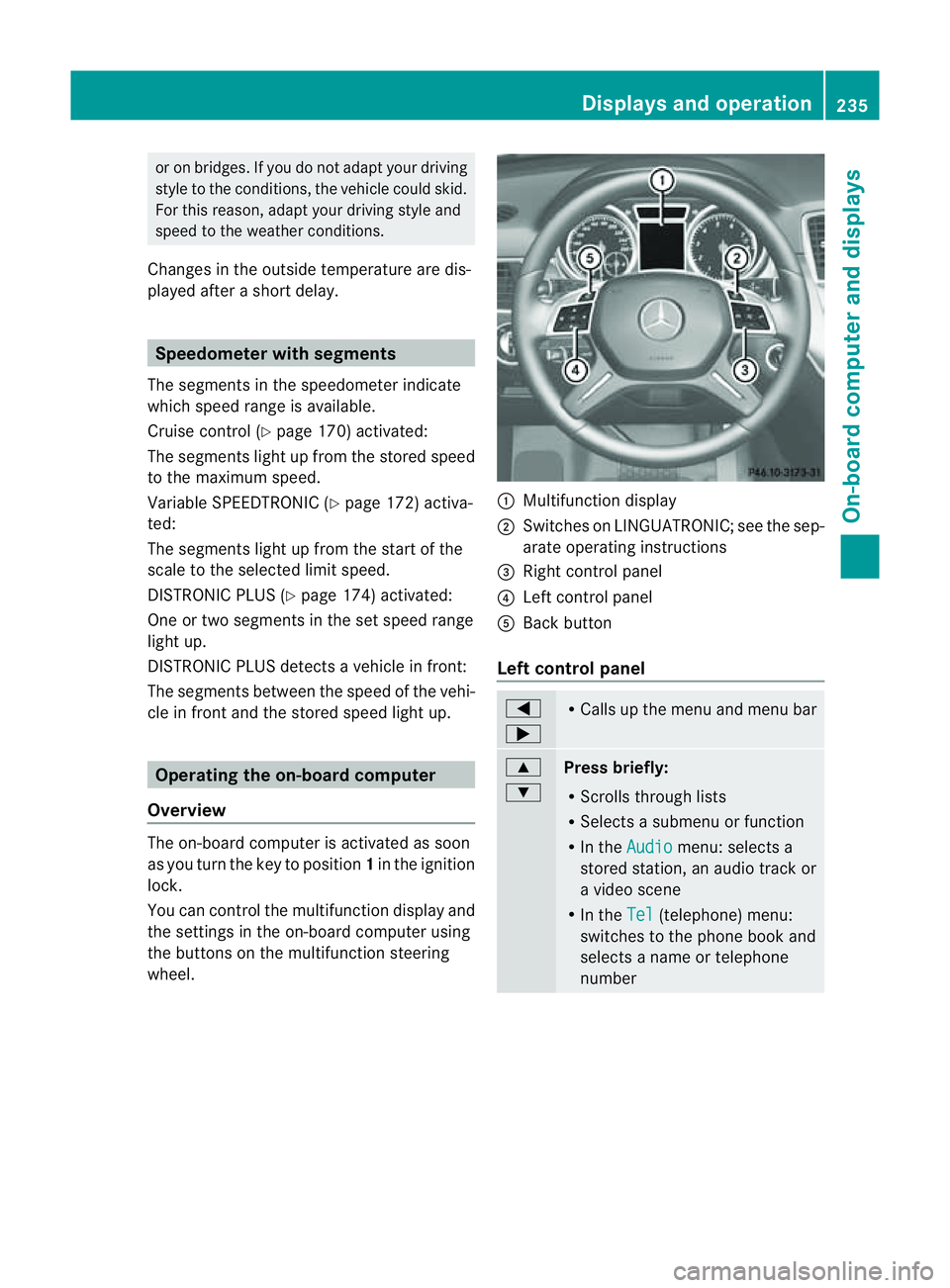
wheel. :
Multifunc tion display
; Switches on LINGUATRONIC ;see the sep-
arate operating instructions
= Right control panel
? Leftcontrol panel
A Bac kbutton
Left control panel =
; R
Call supt he men uand menu bar 9
:
Pres
sbriefly:
R Scrolls throug hlists
R Select sasubmenu or function
R In the Audio menu: selects a
stored station, an audio track or
av ideo scene
R In the Tel (telephone) menu:
switches to the phone book and
selects aname or telephone
number Displays and operation
235On-boardcomputer and displays Z
Page 239 of 389
9
:
Press and hold:
R
In the Audio menu: select
sthe
previous/next station or selects
an audio track or avideo scene
using rapid scrolling
R In the Tel (telephone) menu:
starts rapid scrolling through the
phone book a R
Confirms selection/display mes-
sage
R In the Tel (telephone) menu:
switches to the telephone book
and starts dialling the selected
number
R In the Audio menu: stops the
station search func tion at the
desire dstation Right control panel
~ R
Rejects or ends acall
R Exit stelephone book/redial
memory 6 R
Makes or accepts acall
R Switches to the redial memory W
X R
Adjusts the volume 8 R
Mute Back button
%
Press briefly:
R
Back
R Switches off LINGUATRONIC
R Hides display message sorcalls
up the last Trip menu function
used
R Exit sthe telephone book/redial
memory %
Press and hold:
R
Calls up the standar ddisplay in
the Trip menu
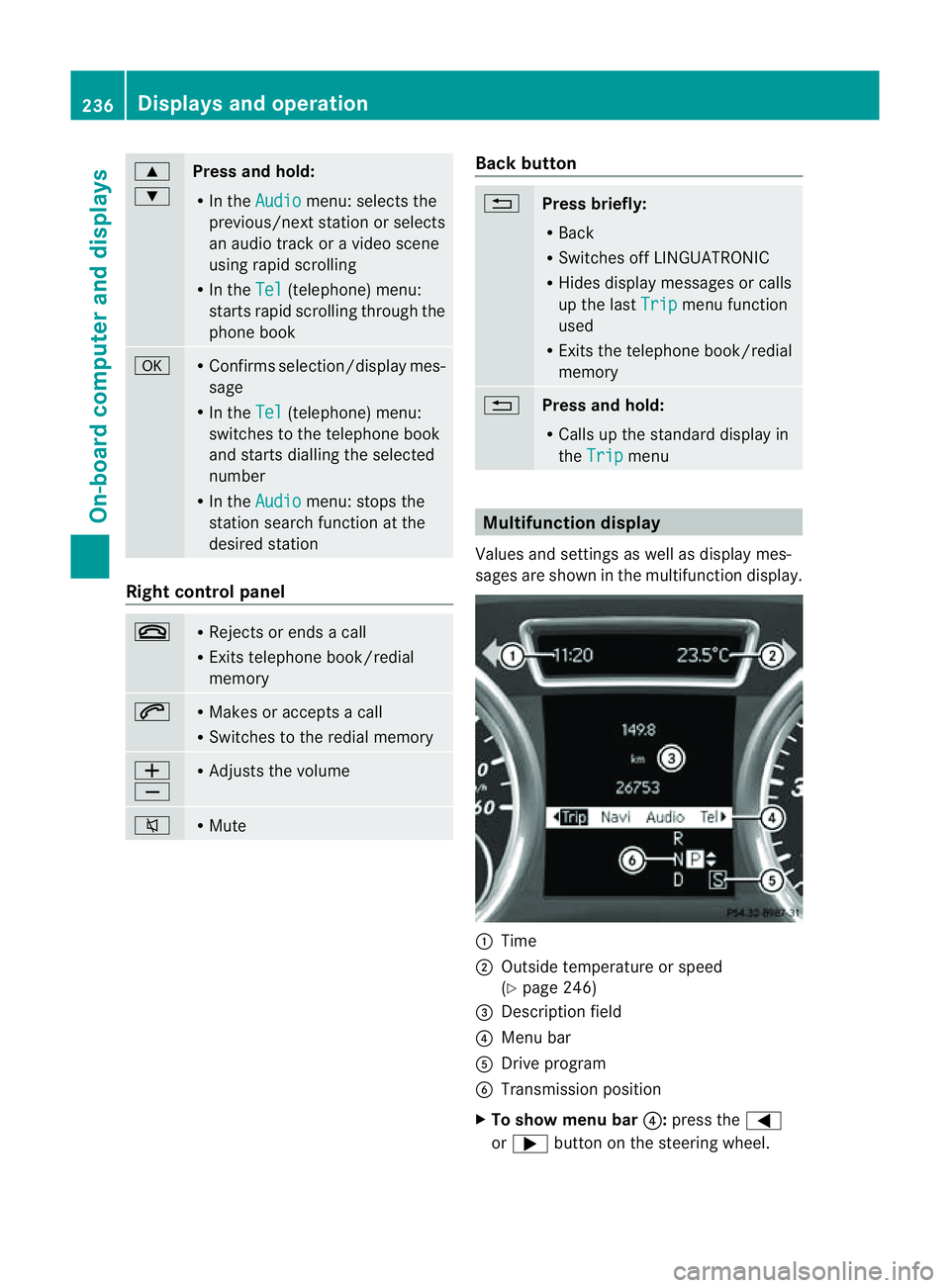
Multifunction display
Values and settings as well as display mes-
sages are shown in the multifunction display. :
Time
; Outside temperature or speed
(Ypage 246)
= Description field
? Menu bar
A Driv eprogram
B Transmission position
X To sho wmenu bar ?:press the =
or ; button on the steering wheel. 236
Displays and operationOn-board computer and displays
Page 242 of 389
The
Audio ,
Navi and
Tel menus differ slightly in vehicles with an audio system and vehicles
with COMAN DOnline. The example sgiven in this Owner' sManual apply to vehicles equipped
with COMAND Online. Trip menu
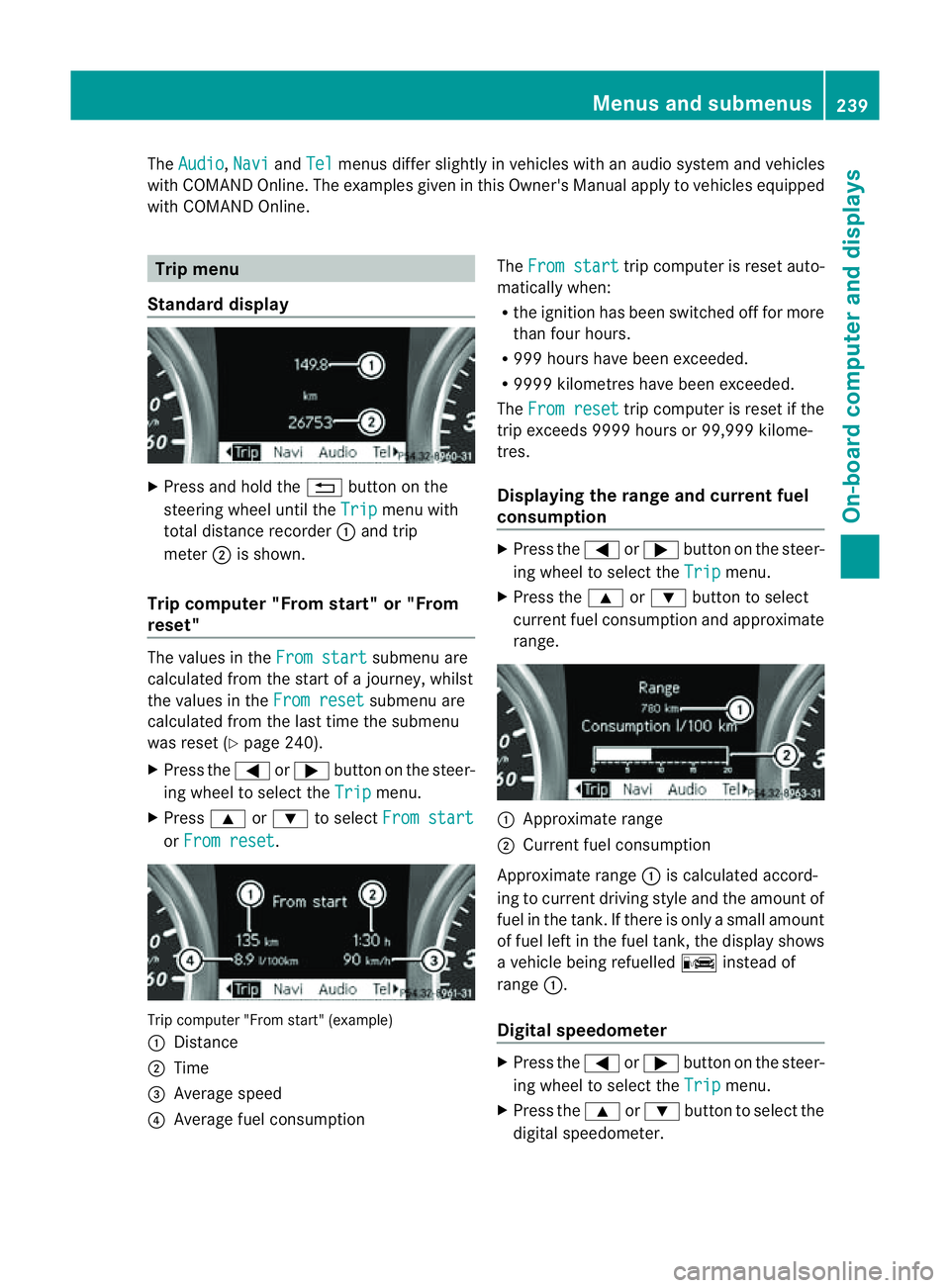
Standard display X
Press and hold the %button on the
steering wheel until the Trip menu with
total distance recorder :and trip
meter ;is shown.
Trip computer "From start" or "From
reset" The values in the
From start submenu are
calculated from the start of ajourney, whilst
the values in the From reset submenu are
calculated from the last tim ethe submenu
was reset (Y page 240).
X Press the =or; button on the steer-
ing wheel to selec tthe Trip menu.
X Press 9or: to select From start or
From reset .
Tri
pc omputer "From star t"(example)
: Distance
; Time
= Average speed
? Average fuel consumption The
From start trip computer is reset auto-
matically when:
R the ignition has been switched off for more
than four hours.
R 999 hours have been exceeded.
R 999 9kilometres have been exceeded.
The From reset trip computer is reset if the
trip exceeds 999 9hour sor9 9,999 kilome-
tres.
Displaying the rang eand cur rent fuel
consumption X
Press the =or; button on the steer-
ing wheel to select the Trip menu.
X Press the 9or: button to select
curren tfuel consumption and approximate
range. :
Approximate range
; Current fuel consumption
Approximate range :is calculated accord-
ing to curren tdriving style and th eamount of
fue lint he tank. If ther eisonlyasmal lamount
of fue lleft in the fuel tank ,the display shows
av ehicle being refuelled Cinstead of
range :.
Digital speedometer X
Press the =or; button on the steer-
ing whee ltoselect the Trip menu.
X Press the 9or: button to select the
digital speedometer. Menus and submenus
239On-boardcomputer and displays Z
Page 246 of 389
You can place your mobile phone in the
mobile phone bracket (Y
page 310), or set
up aB luetooth ®
connection to the audio sys-
tem or COMAN DOnline(see the separate
operating instructions).
i You ca nobtain fur ther information about
suitabl emobile phones and connecting
mobile phones via Bluetooth ®
:
R in any Mercedes Ben zServic eCentre
R on the Internet at http://
www.mercedes-benz.com/connect G
WAR
NING
Observe the lega lrequir ements of the country
in which you are cur rently drivin gregarding
the use of mobile phones in the vehicle.
If it is permitted to use mobile phones while
the vehicle is in motion, you should only use
the mw hen the roa dand traffic conditio ns
allow. Otherwise, you may be distrac tedf rom
th et raffic conditions, caus eanaccident and
injure yourself and others.
X Switch on the mobile phone and audi osys-
tem or COMAND Online (see the separate
operating instructions).
X Press the =or; button on the steer-
ing whee ltoselect the Tel men
u.
Yo uw ills ee one of the following display mes-
sage sint he multifunction display:
R Please enter PIN :t
he mobile phone has
been placed in the mobile phone bracket
and the PIN has not been entered.
X Enter the PIN usin gthe mobile phone, LIN-
GUATRONIC ,the audio system or
COMAN DOnline.
The mobil ephone will search for anetwor k.
R Telephon eready or th
ename of the net-
work provider: the mobile phone has found
an etwor kand is ready to receive.
R Telephone No Service :non
etwor kis
available, or the mobile phone is searching
for anetwor k. Accepting
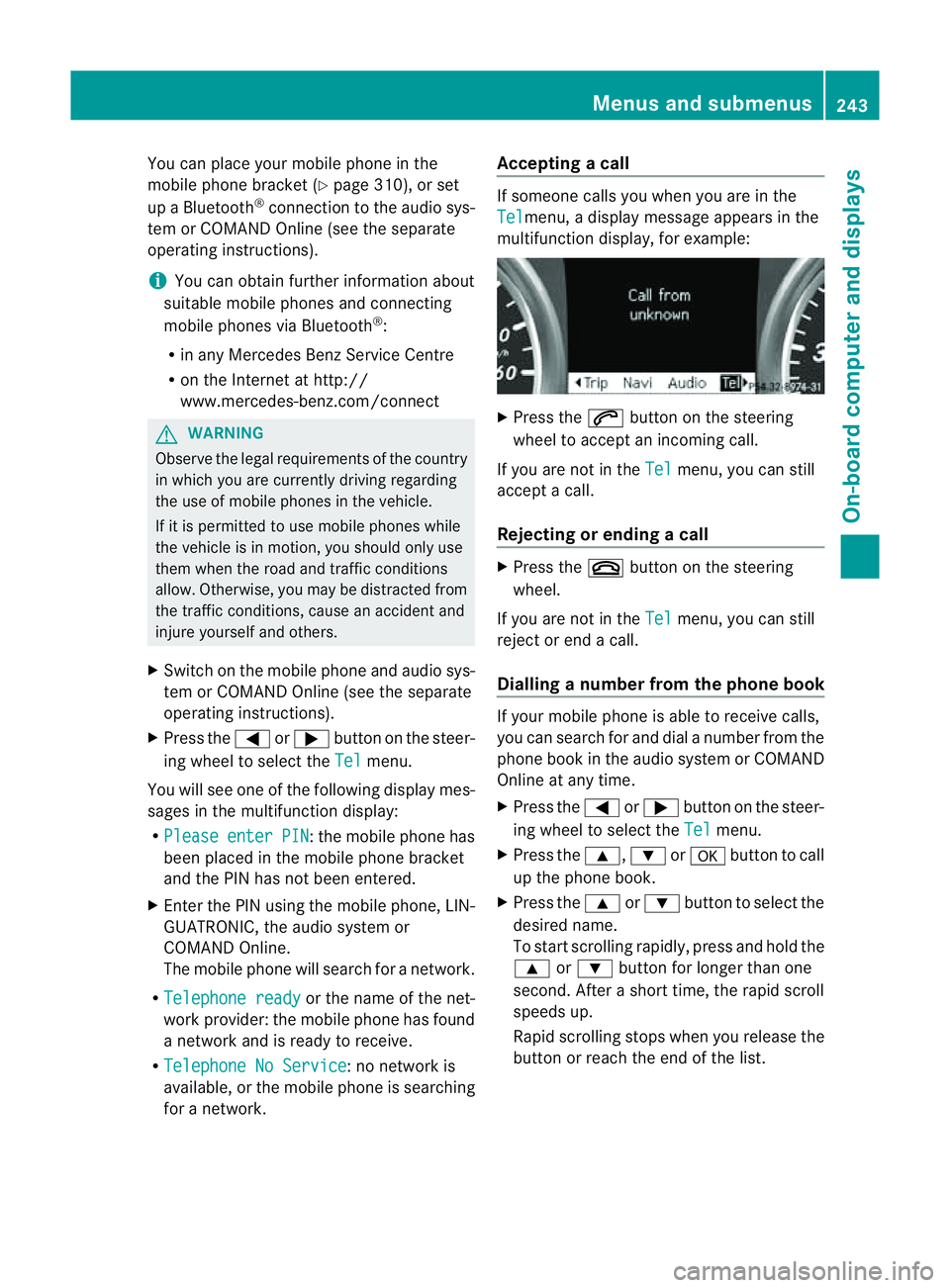
acall If someone call
syou when you are in the
Tel menu,
adisplay message appears in the
multifunction display ,for example: X
Press the 6button on the steering
wheel to accept an incomin gcall.
If you are not in the Tel menu, you can still
accept acall.
Rejecting or ending acall X
Press the ~buttonont he steer ing
wheel.
If you are not in the Tel menu, you can still
reject or end acall.
Dialling anumbe rfrom the phone book If you
rmobile phone is able to receive calls,
you can search for and dial anumber from the
phone book in the audio system or COMAND
Online at any time.
X Press the =or; button on the steer-
ing wheel to select the Tel menu.
X Press the 9,:ora button to call
up the phone book.
X Press the 9or: button to select the
desired name.
To start scrolling rapidly ,pres sand hol dthe
9 or: button for longer than one
second. After ashort time, the rapid scroll
speeds up.
Rapid scrolling stops when you release the
button or reach the end of the list. Menu
sand submenus
243On-boardcomput er anddisplays Z
Page 247 of 389
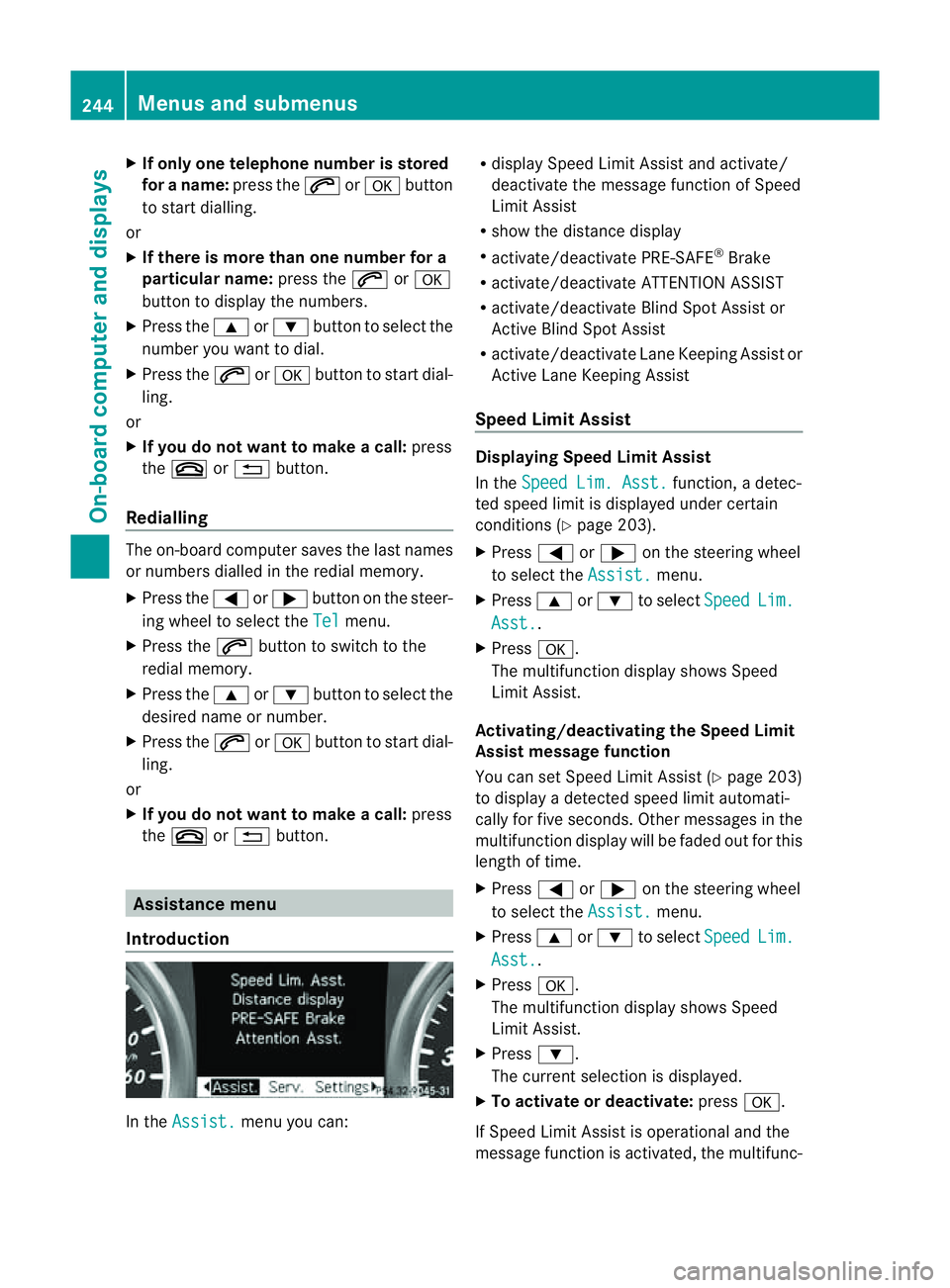
X
If only one telep hone number is stored
for aname: press the 6ora button
to start dialling.
or
X If there is more than on enumbe rfor a
particula rname: press the 6ora
button to display the numbers.
X Press the 9or: button to select the
number you want to dial.
X Press the 6ora button to start dial-
ling.
or
X If you do not want to mak eacall:press
the ~ or% button.
Redialling Th
eo n-board compute rsaves the last names
or numbers dialle dinthe redial memory.
X Press the =or; button on the steer-
ing wheel to selec tthe Tel menu.
X Press the 6button to switc htothe
redial memory.
X Press the 9or: button to selec tthe
desired nam eornumber.
X Press the 6ora button to start dial-
ling.
or
X If you do not want to mak eacall:press
the ~ or% button. Assistance menu
Introd uction In the
Assist. menu you can:R
display Spee dLimit Assist and activate/
deactivate the message func tion of Speed
Limit Assist
R show the distance display
R activate/deactivate PRE- SAFE®
Brake
R activate/deactivate ATTENTION ASSIST
R activate/deactivate Blind Spo tAssist or
Ac tive Blind Spo tAssist
R activate /deactivate Lan eKeeping Assist or
Active Lan eKeeping Assist
Speed Limit Assist Displaying Speed Limit Assist
In the
SpeedLim. Asst. function
,adetec-
ted speed limi tisdisplayed under certain
conditions (Y page 203).
X Press =or; on the steerin gwheel
to selec tthe Assist. menu.
X Press 9or: to select Speed Lim.
Asst. .
X Press a.
The multifunc tion display shows Speed
Limit Assist.
Activating/deactiva ting th eSpeed Limit
Assist message function
You can se tSpeed Limit Assist (Y page 203)
to display adetected speed limi tautomati-
cally for five seconds .Other messages in the
multifunction display will be faded out for this
length of time.
X Press =or; on the steering wheel
to select the Assist. menu.
X Press 9or: to select Speed Lim.
Asst. .
X Press a.
The multifunction display shows Speed
Limit Assist.
X Press :.
The current selection is displayed.
X To activate or deactivate: pressa.
If Speed Limit Assist is operational and the
message function is activated, the multifunc- 244
Menus and submenusOn-board computer and displays
Page 248 of 389
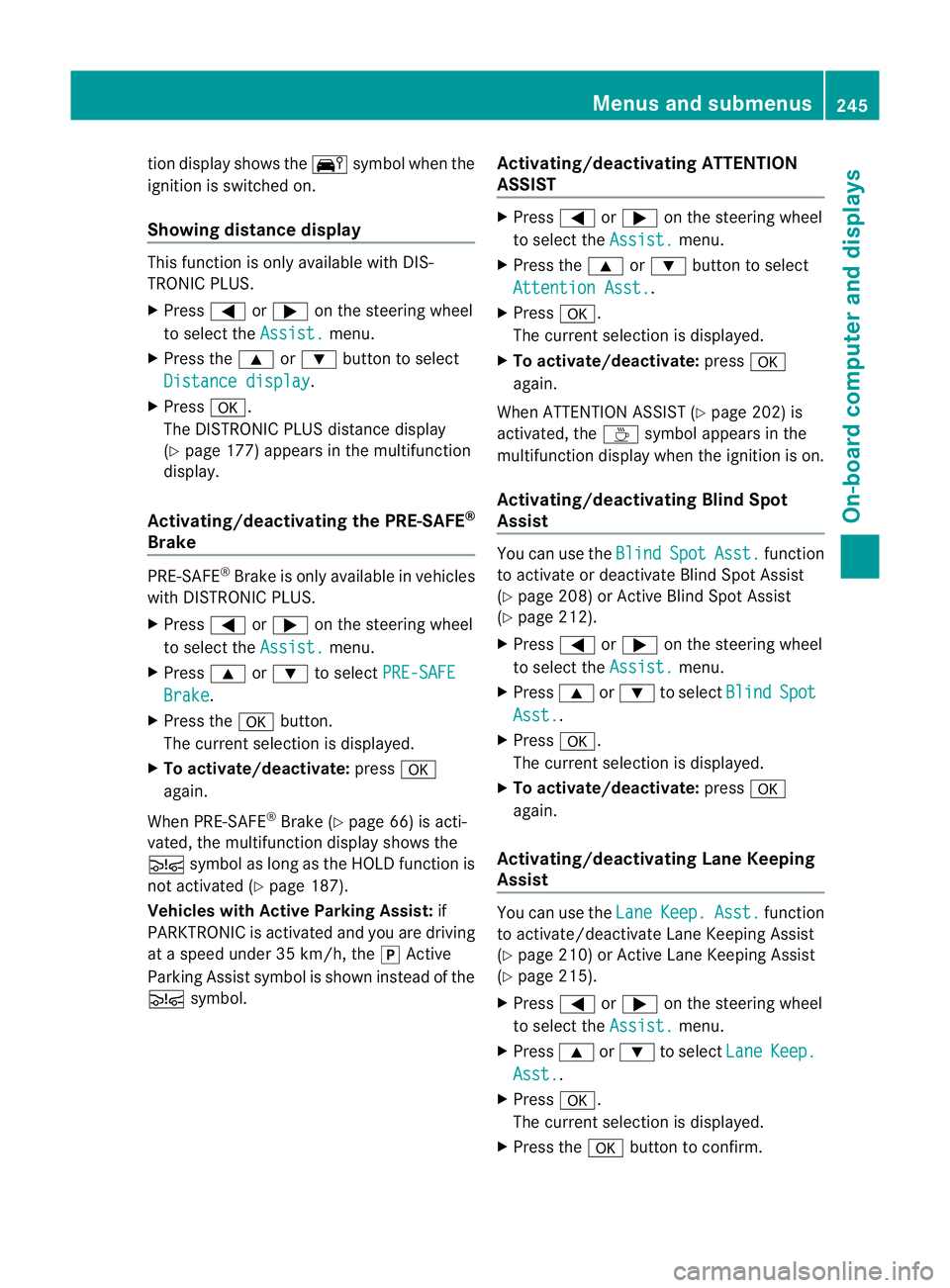
tio
nd isplay shows the Äsymbol when the
ignition is switched on.
Showing distance display This function is only available with DIS-
TRONI CPLUS.
X Press =or; on thesteerin gwheel
to selec tthe Assist. menu.
X Press the 9or: button to select
Distance display .
X Press a.
The DI STRONIC PLUS distance display
(Y page 177) appears in the multifunction
display.
Activating/deactivatin gthe PRE-SAFE ®
Brake PRE-SAFE
®
Brake is onl yavail able in vehicles
with DISTRONIC PLUS.
X Press =or; on the steering wheel
to select the Assist. menu.
X Press 9or: to select PRE-SAFE Brake .
X Press the abutton.
The current selection is displayed.
X To activate/deactivate: pressa
again.
When PRE-SAFE ®
Brake (Y page 66) is acti-
vated, the multifunction displa yshows the
Ä symbol as long as the HOL Dfunction is
not activated (Y page 187).
Vehicles with Active Parking Assist: if
PARKTRONIC is activated and you are driving
at as peed under 35 km/h, the jActive
Parking Assist symbol is shown instead of the
Ä symbol. Activating/deactivating ATTENTION
ASSIST X
Press =or; on the steerin gwheel
to selec tthe Assist. menu.
X Press the 9or: button to select
Attentio nAsst. .
X Press a.
Th ec urrent selection is displayed.
X To activate/deactivate: pressa
again.
When ATTENTION ASSIST (Y page 202)is
activated, the Àsymbol appears in the
multifunction displ aywhen the ignition is on.
Activating/deactivating Blind Spot
Assist You can use the
Blind Spot Asst. func
tion
to activate or deactivate Blin dSpot Assist
(Y page 208) or Active Blin dSpot Assist
(Y page 212).
X Press =or; on the steerin gwheel
to selec tthe Assist. menu.
X Press 9or: to select Blind Spot
Asst. .
X Press a.
The curren tselection is displayed.
X To activate/deactiva te:press a
again.
Activating/deactivating Lane Keeping
Assist You can use the
Lane Keep. Asst. function
to activate/deac tivate Lane Keeping Assist
(Y page 210) or Active Lane Keeping Assist
(Y page 215).
X Press =or; on the steering wheel
to select the Assist. menu.
X Press 9or: to select Lane Keep.
Asst. .
X Press a.
The current selection is displayed.
X Press the abutton to confirm. Menus and submenus
245On-boardcomputerand disp lays Z
Page 256 of 389
Displa
ymessages General notes
Display message sappear in th emultifunction display.
Display messages with graphic displays may be shown in simplified for minthe Owner's Manual
and ma ydiffer from the messages shown in the multifunction display.
Please respond in accordance with the displa ymessages and follow the additional notes in
this Owner's Manual.
Certain display messages are accompanied by an audible warning tone or acontinuou stone.
When you stop and par kthe vehicle, please observe the notes on the HOL Dfunction
(Y page 187 )and parking (Y page 160). Hiding display messages
You can hid esome display messages with alow priority.
X Press the aor% button on the steering wheel to hide the display message.
The display message is cleared.
Displa ymessages with ahigh priority are shown in red.
You cannot hide displa ymessages of the highest priority. The multifunction display shows
these messages continuously until the causes for the messages have been remedied. Message memory
The on-boar dcomputer save scertain display messages. You can call up the display messages
in the message memory .
X Press the =or; button on the steering wheel to select the Serv. menu.
If there are display messages, the multifunction display shows, for example, 2messages .
X Press the 9or: buttontos elect the entry, e.g. 2messages .
X Confirm with a.
X Press the 9or: buttontos croll through the displa ymessages.
When the ignition is switched off ,all displa ymessages are deleted apar tfrom some high-
priority displa ymessages. Once the causes of the high-priorit ydispla ymessages have been
rectified, the corresponding display messages are also deleted. Display messages
253On-boardcomputer and displays Z
Page 273 of 389
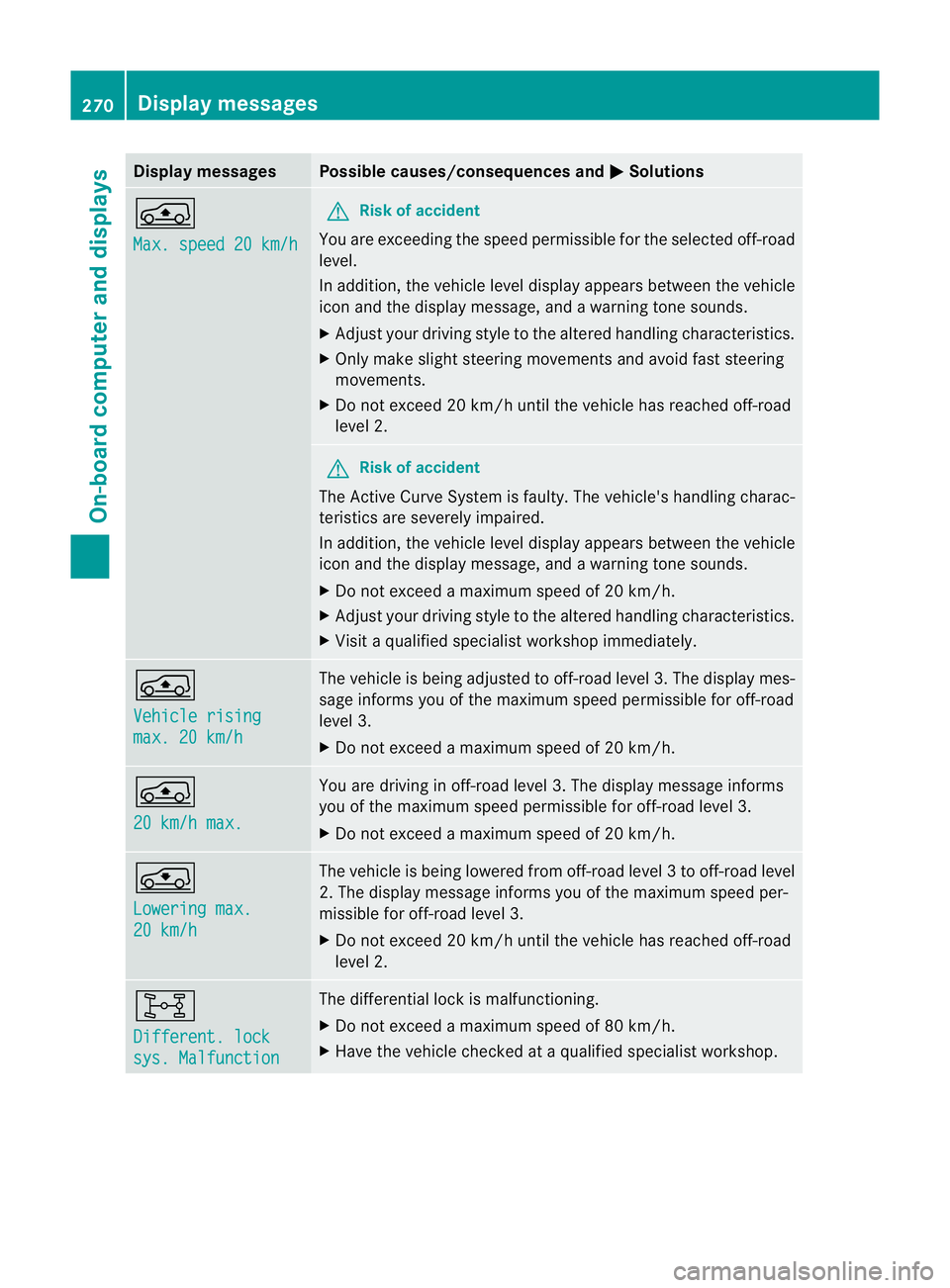
Displa
ymessages Possible causes/consequences and
M Solutions
Á
Ma
x. speed 20 km/h G
Risk of accident
Yo ua re exceedi ngthe speed permissible for the selected off-road
level.
In addition ,the vehicle level display appears between the vehicle
icon and the display message, and awarning tone sounds.
X Adjust your driving style to the altered handling characteristics.
X Only make sligh tsteering movement sand avoid fast steering
movements.
X Do not excee d20km/h unti lthe vehicle has reached off-road
level 2. G
Risk of accident
The Ac tiveCurve System is faulty. The vehicle's handling charac-
teristics are severely impaired.
In addition, the vehicle level displa yappears between the vehicle
icon and the display message, and awarning tone sounds.
X Do not exceed amaximum spee dof20k m/h.
X Adjus tyour drivin gstyle to the altered handling characteristics.
X Visit aqualified specialist worksho pimmediately. Á
Vehicle rising
max. 20 km/h Th
ev ehicle is being adjusted to off-road level 3. The display mes-
sage inform syou of the maximum speed permissible for off-road
leve l3.
X Do not exceed amaximum spee dof20k m/h. Á
20 km/h max. Yo
ua re driving in off- road level 3. The displ aymessage informs
yo uo fthe maximum speed permissible for off-road level 3.
X Do not exceed amaximum spee dof20k m/h. g
Lowering
max.
20 km/h Th
ev ehicle is being lowered from off-road level 3tooff-road level
2. Th edisplay message informs you of the maximum speed per-
missible for off- road level 3.
X Do not exceed 20 km/ huntil the vehicl ehas reached off-road
level 2. 8
Different. lock
sys. Malfunction The differential lock is malfunc
tioning.
X Do not exceed amaximum spee dof80k m/h.
X Have th evehicle checked at aqualified specialist workshop. 270
Display messagesOn-board computer and displays
Page 281 of 389
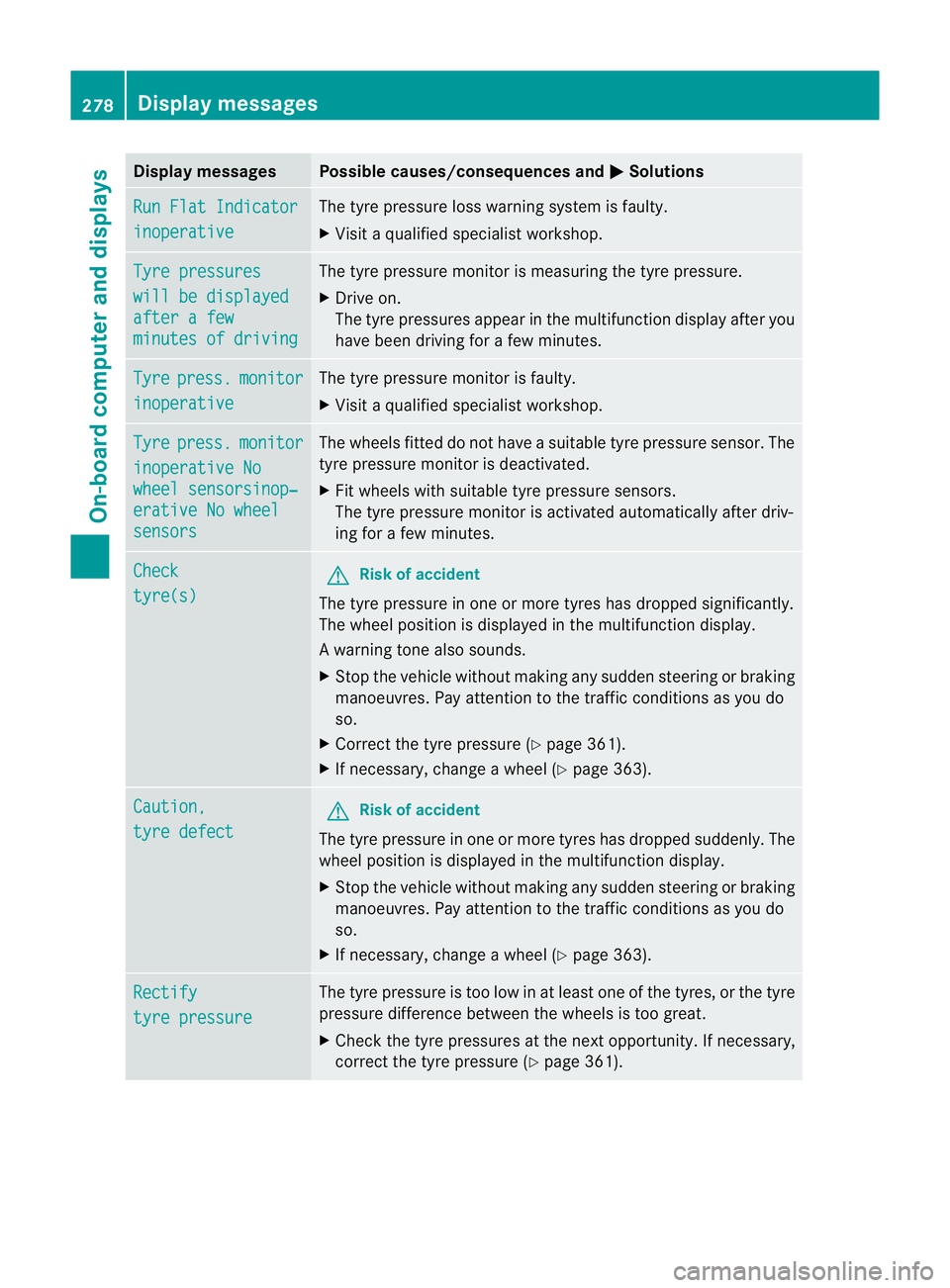
Displa
ymessages Possible causes/consequences and
M Solutions
Ru
nF latI ndicator inoperative Th
et yrep ressur eloss war ningsystem is faulty.
X Visit aq ualified specialist workshop. Ty
re pressures wil
lbed isplayed after
afew minute
sofd riving Th
et yrep ressur emonitor is mea suring thetyrep ressure.
X Drive on.
Th et yrep ressures appear in the multifunction displa yafter you
have been driving for afew minutes. Tyre press. monitor
inoperative The tyr
epres sure monito risfaulty.
X Visi taq ualifieds pecialist workshop. Tyre press. monitor
inoperativ
eNo wheel sensorsinop‐
erativ
eNow heel sensors Th
ew heels fit teddon ot have asuitable tyre pressure sensor. The
tyre pressure monitor is deactivated.
X Fit wheel swith suitable tyre pressure sensors.
The tyre pressure monitor is activated automatically after driv-
ing for afew minutes. Check
tyre(s) G
Risk of accident
The tyr epressure in one or more tyre shas dropped significantly.
The wheel position is displayed in the multifunction display.
Aw arning ton ealso sounds.
X Stop th evehicle without making any sudde nsteering or braking
mano euvres.P ay attention to the traffic conditions as you do
so.
X Correc tthe tyr epressure (Y page 361).
X If necessary, change awheel (Y page 363). Caution,
tyre defect G
Risk of accident
The tyr epressure in one or more tyre shas dropped suddenly. The
wheel position is displayed in the multifunc tion display.
X Stop the vehicle withou tmaking any sudde nsteering or braking
manoeuvres. Pay attention to the traffic conditions as you do
so.
X If necessary, change awheel (Y page 363). Rectify
tyre pressure The tyr
epressure is to olow in at least one of the tyres, or the tyre
pressure differen cebetween the wheels is too great.
X Check the tyr epressures at th enext opportunity. If necessary,
correc tthe tyr epressure (Y page 361). 278
Display messagesOn-boar
dcompu tera nd displays
Page 282 of 389
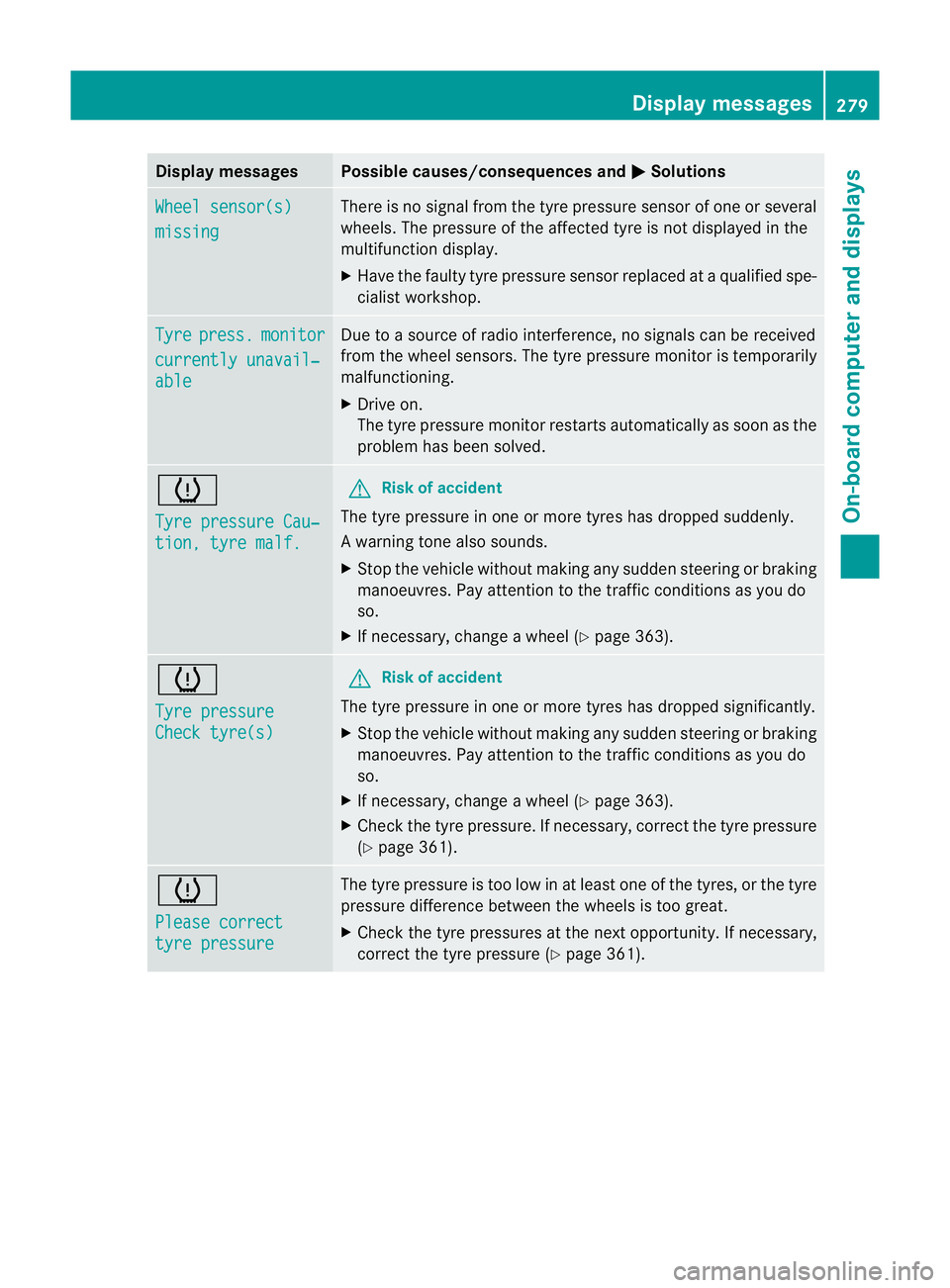
Displa
ymessages Possible causes/consequences and
M Solutions
Wh
eels ensor(s) missing There is no signal from the tyre pressu
resensor of on eorseveral
wheels. The pressur eofthe affected tyre is notdispla yed in the
multifunction display.
X Have the faulty tyre pressure sensor replaced at aqualified spe-
cialist workshop. Tyre press. monitor
currentl
yunavail‐ able Due to
asour ceofrad io interference, no signals can be received
from the wheel sensors. The tyr epressure monito rist emporarily
malfunctioning.
X Drive on.
The tyr epressure monito rrestarts automatically as soon as the
problem has been solved. h
Tyre pressure Cau‐
tion
,tyre malf. G
Ris
kofa ccident
The tyre pressure in one or more tyres has dropped suddenly.
Aw arning ton ealso sounds.
X Stop th evehicle without making any sudde nsteering or braking
mano euvres.P ay attention to the traffic conditions as you do
so.
X If necessary ,change awheel (Y page 363). h
Tyre pressure
Chec
ktyre(s) G
Ris
kofa ccident
The tyre pressure in one or more tyres has dropped significantly.
X Stop the vehicle without making any sudde nsteering or braking
manoeuvres. Pay attention to the traffic conditions as you do
so.
X If necessary, change awheel (Y page 363).
X Chec kthe tyr epressure. If necessary, corre ct thetyre pressure
(Y page 361). h
Please correct
tyr
epressure Th
et yre pressure is too low in at leas tone of the tyres, or the tyre
pressure difference between the wheels is too great.
X Check the tyre pressures at the next opportunity. If necessary,
correct the tyre pressure (Y page361). Display messages
279On-boardcomputer anddisplays Z