wheel MERCEDES-BENZ M-CLASS SUV 2011 Repair Manual
[x] Cancel search | Manufacturer: MERCEDES-BENZ, Model Year: 2011, Model line: M-CLASS SUV, Model: MERCEDES-BENZ M-CLASS SUV 2011Pages: 389, PDF Size: 9.22 MB
Page 178 of 389
G
WARNING
DISTRONIC PLUS canno ttake account of road
and traffic conditions. If DISTRONI Cdoes not
recognise or no longer recognises the vehicle
in front, do not activate DISTRONIC or, if it is
alr eady active, deactivate it. This is especially
the case:
R befor ecorners
R on filter lanes
R when changing to alane with faster moving
traffic
R in comple xdriving situations or where lanes
are diverte d,e.g. at roadworks on amotor-
way
DISTRONIC PLU Sotherwise maintains the
current spe ed setbyyou or accelerates up to
the set speed.
DISTRONIC PLU Scannot take account of
weather conditions. Deactivate, or do not
activate, DISTRONI CPLUS:
R if th eroads are slippery, snow-covered or
icy .The wheels coul dlose their grip when
brakin goraccelerating .The vehicle could
star ttos kid.
R if the sensors are dirty or there is poo rvis-
ibility, e.g. due to snow, rain or fog. Dis-
tance control may be impaired.
Always pay attention to traffic conditions
even when DISTRONIC PLU Sisactivate d.
Otherwise, you ma yfail to recognise dangers
in time, caus eanaccident and injure yourself
and others. G
WARNING
DISTRONIC PLUS brake syourvehicle up to a
maximu mof4m /s2
depending on its speed.
This corresponds to approximately 40% of
your vehicle's maximum braking power. You
must als oapply the brakes yourself if this
braking power is not sufficient.
If DISTRONI CPLUS detects arisk of collision
with avehicle in front, an intermit tent warning
tone sounds. In addition, the ·distance
warning lamp in the instrument cluste rlights
up. Brak etoavoidac ollision. G
WAR
NING
The vehicle can be braked when DISTRONIC
PLUS is activated. For this reason, deactivate
DISTRONIC PLUS if the vehicle is to be set in
motion by othe rmeans (e.g. in acar wash or
by towing).
The radar senso rsystem is automatically
deactivated near radio teles cope facilities
(Y page 38 0).
If you want DISTRONIC PLUS to assist you,
the radar sensor syste mmust be activated
(Y page 249 )and operational.
General notes DISTRONIC PLUS regulates the speed and
automati cally helps you maintain the dis-
tanc etot he vehicle detected in front. It
brakes automatically in orde rtoavoid
exceedi ngthe set speed.
On long and stee pdownhil lgradients, espe-
ciall yifthe vehicle is laden or towing atrailer,
yo um ust select shift range 1,2or 3in good
time. By doing so, you will make use of the
braking effec tofthe engine. This relieves the
load on the brake system and prevents the
brakes from overheating and wearing too
quickly.
If DI STRONIC PLUS detects aslower-moving
vehicle in front ,your vehicle is braked in order
to maintain the preset distance to the vehicle
in front.
If ther eisnov ehicle in front ,DISTRONIC
PLUS operate sinthe sam eway as cruise
control in the spee drange between
30 km/h and 200 km/h. If avehicle is driving
in fron tofyou, DI STRONIC operates in the
speed range betwee n0km/h and
200 km/h.
Do not us eDISTRONIC PLUS on roa dswith
steep gradients. Driving systems
175Drivingand parking Z
Page 186 of 389
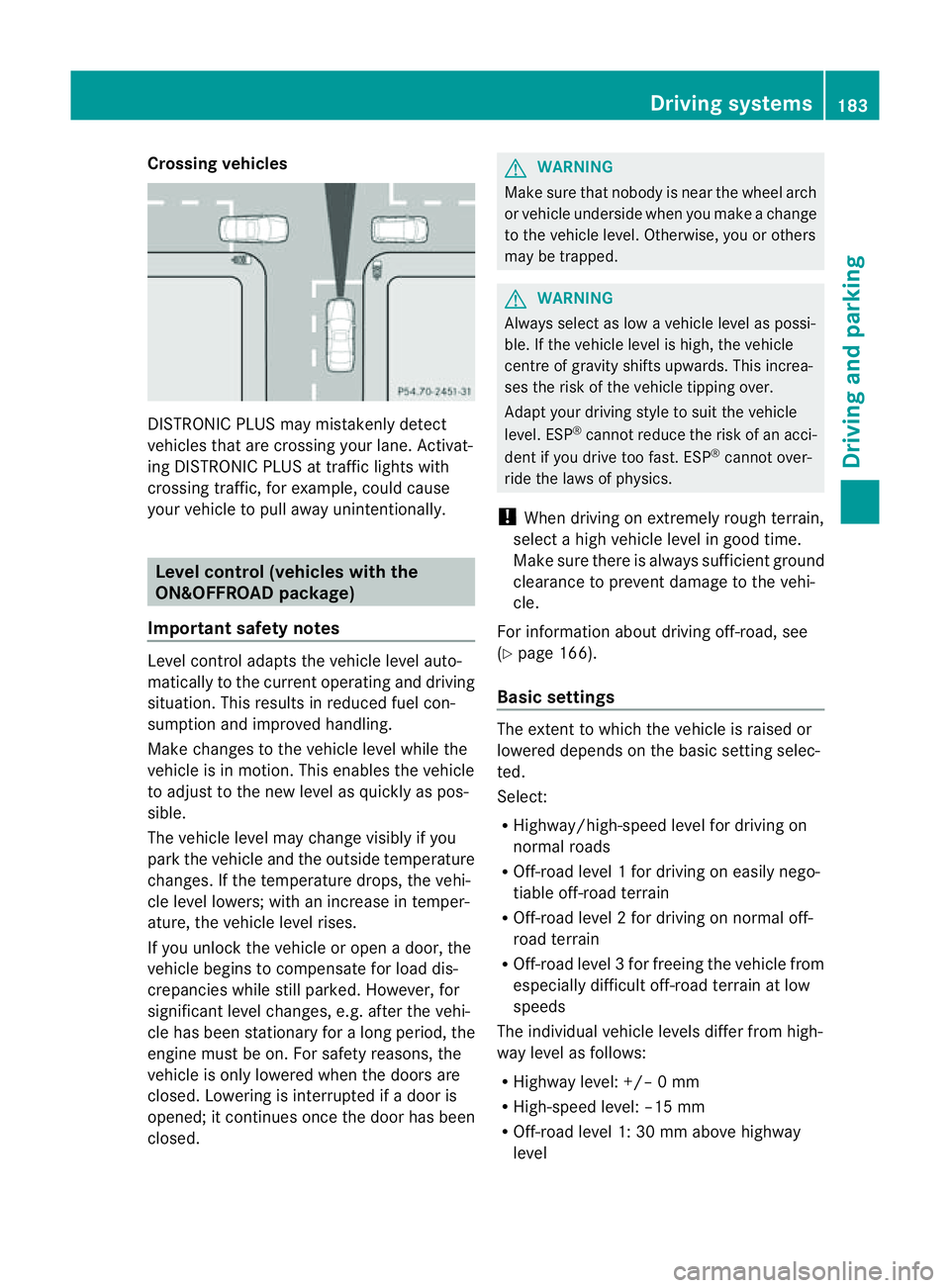
Crossing vehicles
DISTRONIC PLU
Smay mistakenly detect
vehicles that are crossin gyour lane .Activat-
ing DISTRONIC PLUS at traffi cligh ts with
crossing traffic, for example, could cause
your vehicle to pull away unintentionally. Leve
lcon trol (vehicle switht he
ON&OFFROA Dpackage)
Importan tsafety notes Leve
lcontrol adapts the vehicle level auto-
matically to the current operating and driving
situation. Thi sresults in reduced fuel con-
sumption and improved handling.
Make changes to the vehicle level whil ethe
vehicle is in motion. Thi senable sthe vehicle
to adjus ttothe new level as quickly as pos-
sible.
The vehicle level ma ychange visibly if you
par kthe vehicle and the outside temperature
changes. If the temperatur edrops, th evehi-
cle level lowers; with an increase in temper-
ature, the vehicle level rises.
If you unloc kthe vehicle or open adoor, the
vehicle begins to compensate for load dis-
crepancies while still parked. However, for
significant leve lchanges, e.g. after the vehi-
cle has been stationar yfor along period, the
engin emust be on. For safety reasons, the
vehicle is only lowered when the doors are
closed .Lowering is interrupted if adoor is
opened; it con tinues once the doo rhas been
closed. G
WARNING
Make sure that nobody is near the wheel arch
or vehicle underside when you make achange
to the vehicle level. Otherwise, you or others
ma ybet rapped. G
WARNING
Always select as lo wavehicle level as possi-
ble. If the vehicle level is high, the vehicle
centre of gravity shifts upwards. This increa-
ses the risk of the vehicle tipping over.
Adapt your driving style to suit the vehicle
level. ESP ®
can notreduce the risk of an acci-
dent if you driv etoo fast .ESP ®
cannot over-
ride the laws of physics.
! When driving on extremely roug hterrain,
select ahigh vehicle level in good time.
Make sure there is always sufficient ground
clearance to prevent damage to the vehi-
cle.
For information about drivin goff-road, see
(Y pag e166).
Basi csettings The exten
ttowhich the vehicle is raised or
lowered depend sonthe basic setting selec-
ted.
Select:
R Highway/high-spee dlevel for driving on
normal roads
R Off -road level 1for drivin goneasily nego-
tiable off-road terrain
R Off-road level 2for drivin gonnormal off-
roa dterrain
R Off -road level 3for freeing the vehicle from
especially difficult off -road terrain at low
speeds
The individual vehicle levels differ from high-
way level as follows:
R Highway level: +/– 0mm
R High-speed level: –15 mm
R Off-road leve l1:30mma bove highway
level Driving systems
183Drivingand parking Z
Page 187 of 389
R
Off-road level 2: 60 mm abov ehighway
level
R Off-road level 3: 90 mm above highway
level
Highway/high-speed level !
Make sure there is enough ground clear-
ance when the vehicle is being lowered .It
could oth erwise hit the ground, damaging
the underbody. :
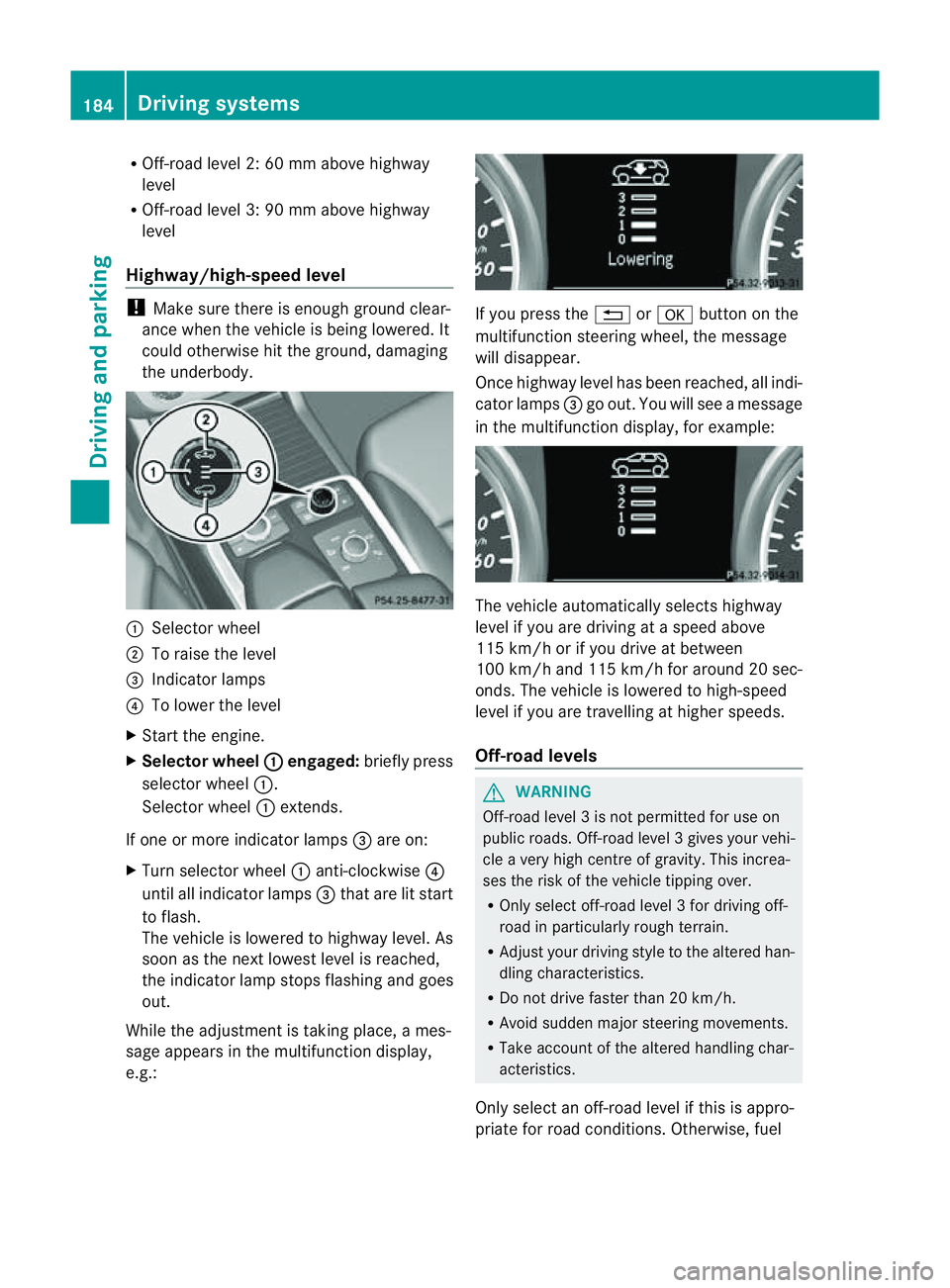
Selector wheel
; To raise the level
= Indicator lamps
? To lowe rthe level
X Star tthe engine.
X Selector wheel : engaged:
brieflypress
selecto rwheel :.
Selector wheel :extends.
If one or mor eindicato rlamps =are on:
X Turn selector wheel :anti-clockwise ?
until all indicator lamps =that are lit start
to flash.
The vehicle is lowered to highway level. As
soon as the next lowes tlevel is reached,
the indicator lam pstops flashing and goes
out.
While the adjustment is taking place, ames-
sage appears in the multifunction display,
e.g.: If you press the
%ora button on the
multifunction steerin gwheel, the message
will disappear.
Onc ehighway level has been reached, all indi-
cator lamps =go out. You will see amessage
in the multifunction display, for example: The vehicle automatically select
shighway
level if you are drivin gataspeed above
11 5k m/ horify ou drive at between
10 0k m/ hand 11 5km/ hfor aroun d20sec-
onds. The vehicle is lowered to high-speed
level if you are travelling at higher speeds.
Off-road levels G
WARNING
Off-road level 3isnot perm itted for use on
public roads. Off-road leve l3gives your vehi-
cle avery high centr eofgravity. This increa-
se st he risk of the vehi clet ippin gover.
R Onl yselec toff-road level 3for drivin goff-
road in particularl yrough terrain.
R Adjust your drivin gstyle to the altered han-
dling charac teristics.
R Do not drive faster than 20 km/h.
R Avoid sudden majo rsteering movements.
R Take account of th ealtered handling char-
acteristics.
Only select an off-road level if this is appro-
priate for road conditions. Otherwise, fuel 184
Drivin
gsystemsDrivin gand parking
Page 188 of 389
cons
umption may incr easeand handling per-
formance may be affected. X
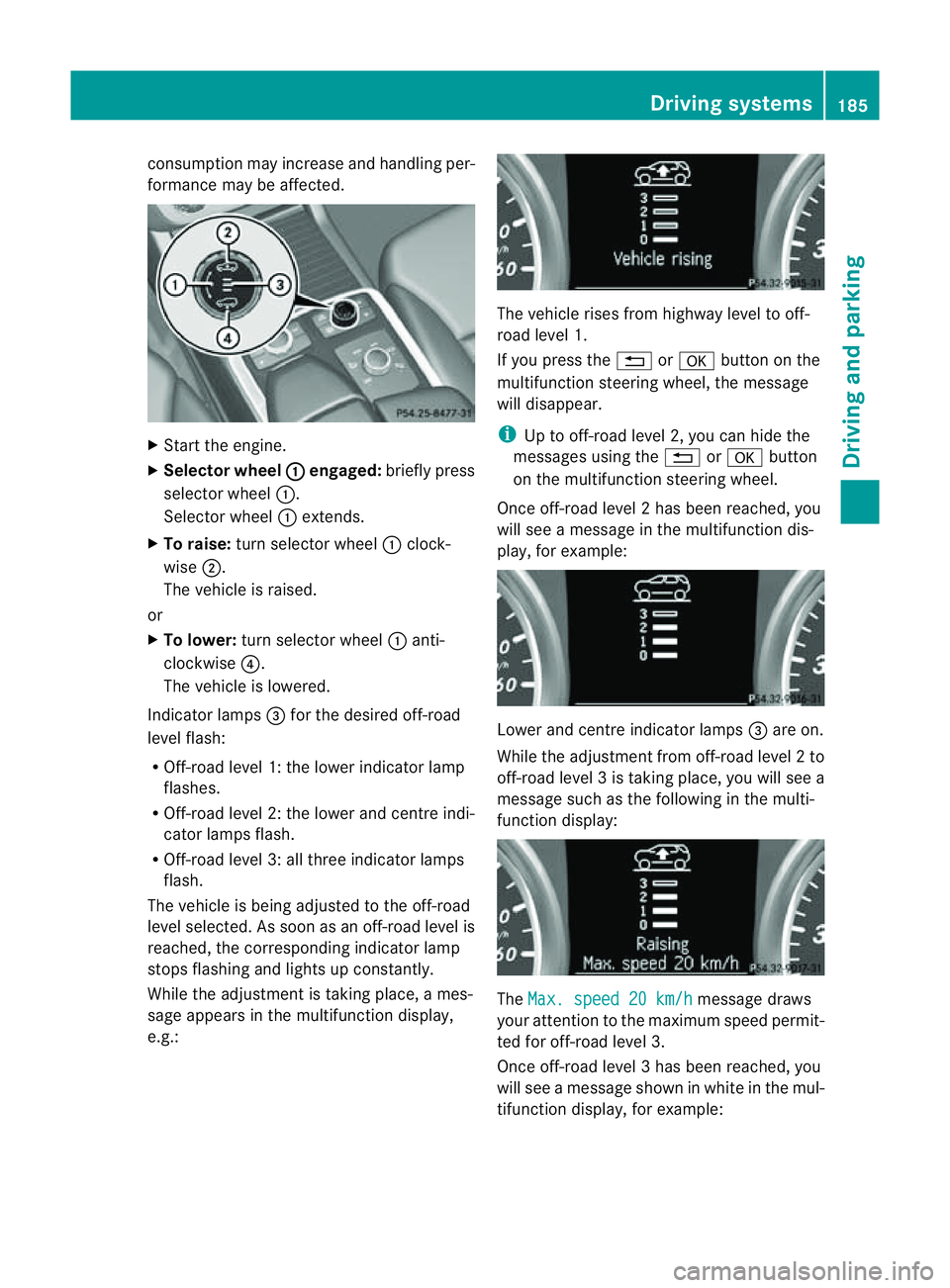
Start the engine.
X Selecto rwheel : en
gaged: briefly press
selector wheel :.
Selector wheel :extends.
X To raise: turns elector wheel :clock-
wise ;.
The vehicle is raised.
or
X To lower: turns elector wheel :anti-
clockwise ?.
The vehicle is lowered.
Indicator lamps =for the desired off-road
level flash:
R Off-road level 1: thel ower indicator lamp
flashes.
R Off-road level 2: thel ower and centr eindi-
cator lamps flash.
R Off-road leve l3:allthree indicator lamps
flash.
The vehicle is being adjusted to the off-road
leve lselected. As soon as an off-road level is
reached, the corresponding indicator lamp
stops flashing and lights up constantly.
Whil ethe adjustment is taking place, ames-
sage appears in the multifunction display,
e.g.: The vehicle rises from highway level to off-
road level 1.
If you press the %ora button on the
multifunction stee ring wheel, the message
will disappear.
i Up to off-road level 2, you can hid ethe
messages usin gthe % ora button
on the multifunction steering wheel.
Onc eoff-roa dlevel 2has been reached, you
will see amessage in th emultifunction dis-
play, for example: Lower and
centre indicator lamps =areo n.
While the adjustment from off-ro adlevel 2to
off -ro ad level 3istaking place, you will see a
message such as the following in the multi-
function displ ay: The
Max. speed 20 km/h message draws
your attentio ntothe maximum speed permit-
ted for off-road level 3.
Onc eoff-roa dlevel 3has been reached, you
will see amessage shown in whit einthe mul-
ti fu nction display, for example: Driving systems
185Drivingand pa rking Z
Page 192 of 389
selected (Y
page 188), the Ac tiveCurve Sys-
tem also changes the setting.
If you select ADS comfort mode:
R rolling movement is reduced in the event of
changing surface undulations.
R the roll angle when cornering is reduced.
R the driving style is agile.
If you select ADS sport mode:
R the roll angle is reduced significantly.
R the driving style is even more agile.
Leve lcontrol Import
ants afety notes
Leve lcontrol adapts the vehicle leve lauto-
matically to the current operating and driving
situation. This results in reduced fuel con-
sumption and improved handling.
If you select ADS comfort mode
(Y page 188), the vehicle is lowered to high-
spee dlevel as the speed increases. As the
vehicle decelerates, the vehicle is raised back
up to highway level.
If you select ADS sport mode (Y page 188),
the vehicle skips highway level and lowers
directly to high-speed level dependin gonthe
basic setting (Y page 189).
Make changes to the vehicle level while the
vehicle is in motion. This enables the vehicle
to adjust to the new level as quickly as pos-
sible.
The vehicle level ma ychange visibly if you
par kthe vehicle and the outside temperature
changes. If the temperature drops, the vehi-
cle level lowers; with an increase in temper-
ature, the vehicle level rises.
If you unlock the vehicle or open adoor, the
vehicle begins to compensat efor load dis-
crepancies while still parked. However, for
significant leve lchanges, e.g. after the vehi-
cle has been stationary for along period, the
engin emust be on. For safety reasons, the
vehicle is only lowered when the doors are
closed .Lowering is interrupted if adoor is opened; it con
tinues once the doo rhas been
closed. G
WARNING
Make sure that nobody is near the wheel arch
or vehicle underside when you make achange
to the vehicle level. Otherwise, you or others
ma ybet rapped. G
WARNING
Always select as lo wavehicle level as possi-
ble. If the vehicle level is high, the vehicle
centre of gravity shifts upwards. This increa-
ses the risk of the vehicle tipping over.
Adapt your driving style to suit the vehicle
level. ESP ®
cannot reduc ethe risk of an acci-
dent if you drive too fast. ESP ®
cannot over-
rid ethe laws of physics.
! When driving on extremel yrough terrain,
select ahigh vehicle level in good time.
Make sure there is always sufficient ground
clearance to prevent damage to the vehi-
cle.
For information abou tdriving off-roa d, see
( Y page 166).
Basic settings
The exten ttowhich the vehicle is rai sedor
lowered depends on the basic setting selec-
ted. Select raised level for off-road driving or
highway/high-spee dlevel for normal roads.
The indiv idua lvehicle levels differ from high-
way level as follows:
R Highway level: +/ –0mm
R High-speed level: –15 mm
R Raised level: +60 mm
Raise dlevel
Only select raise dlevel if this is appropriate
for the road conditions. Otherwise, fuel con-
sumption may increase and handling may be
affected. Driving systems
189Drivingand parking Z
Page 193 of 389
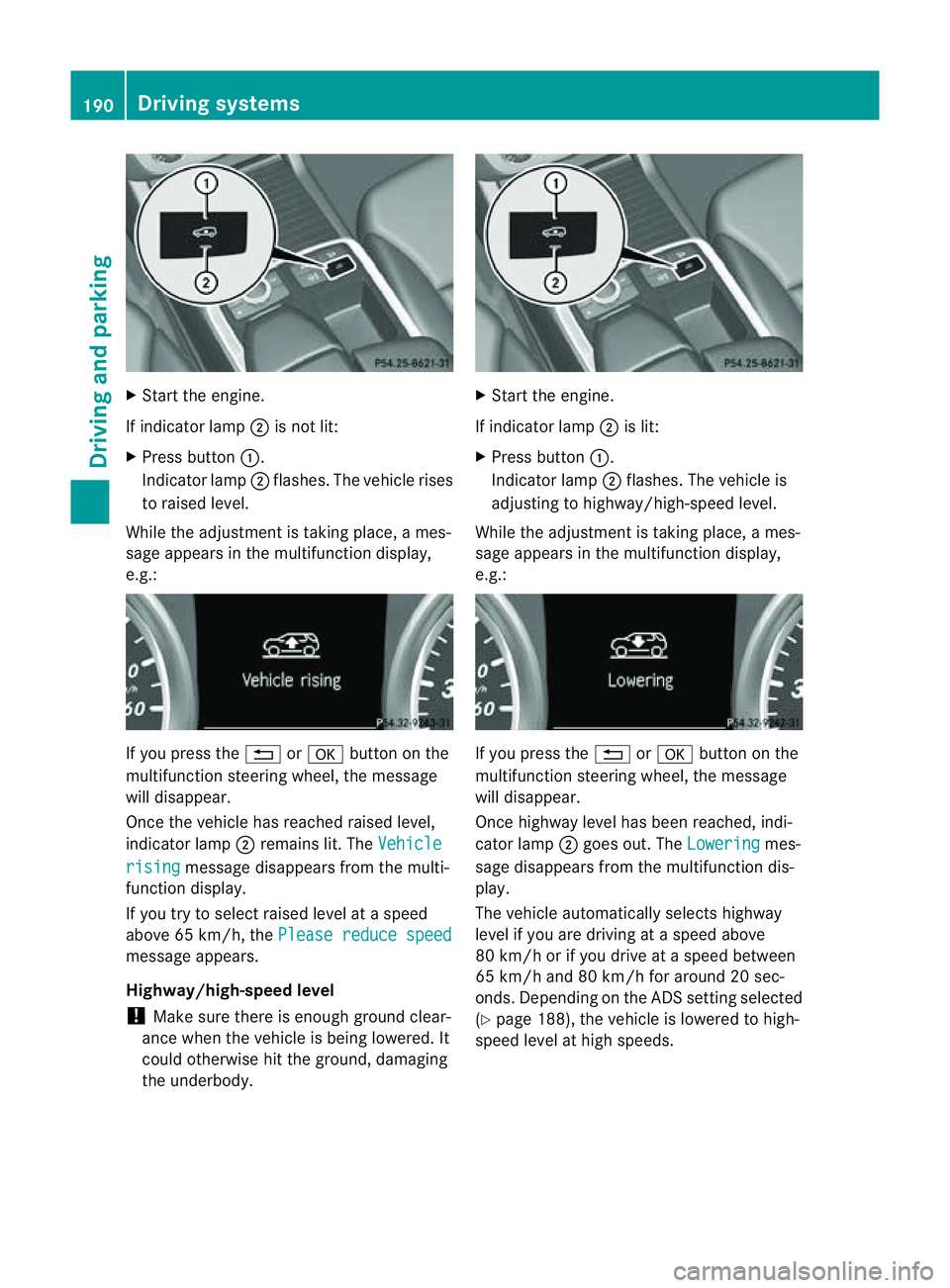
X
Start the eng ine.
If indicator lamp ;is not lit:
X Press button :.
Indicat or lamp;flashes. Th evehicle rises
to raised level.
While th eadjustmen tistaking place, ames-
sage appears in the multifunction display,
e.g.: If you press the
%ora button on the
multifunction steerin gwheel, the message
will disappear.
Onc ethe vehicle has reached raised level,
indicator lamp ;remain slit. The Vehicle rising message disappears from the multi-
function display.
If you try to select raised level at aspeed
above 65 km/h, the Please reduce speedmessage appears.
Highway/high-speed level
! Make sure there is enough groun dclear-
ance when the vehicle is being lowered. It
could otherwise hit the ground, damaging
the underbody. X
Star tthe engine.
If indicator lamp ;is lit:
X Press button :.
Indicator lamp ;flashes. The vehicle is
adjustin gtohighway/high-speed level.
While the adjustment is taking place, ames-
sage appears in the multifunction display,
e.g.: If you press the
%ora button on the
multifunction steerin gwheel, the message
will disappear.
Onc ehighwa ylevel has been reached, indi-
cator lamp ;goes out. The Lowering mes-
sage disappears from the multifunction dis-
play.
The vehicle automatically selects highway
level if you are driving at aspeed above
80 km/ horifyou drive at aspeed between
65 km/ hand 80 km/h for around 20 sec-
onds .Depending on the ADS settin gselected
(Y page 188), the vehicle is lowered to high-
speed level at high speeds. 190
Driving systemsDriving and parking
Page 198 of 389
procedure is calculated, e. g. overhanging
loads, tail sections or loading ramps of goods
vehicles. In some cir
cumstances, Active Park-
ing Assist may therefore guide you into the
parking space too early. Thi smay lead to a
collision. For this reason, you shoul davoid
using Active Parking Assist in such situatio ns.G
WARNING
Th ef ront of th evehicle will veer out in the
direc tion of the oncomin gtraffic during the
parking operatio n. Insome cases the vehicle
will also take you onto section softhe oncom-
ing lan eduring the parking procedure.
You are responsible for safety at all times and
must pay attention to any road users
approaching or passing. Stop the vehicle if
necessary or cancel the Active Parking Assist
parking procedure. G
WARNING
Make sure that no persons or animals are in
the manoeuvring range. Otherwise, they
could be injured.
Use Active Parking Assis tfor parkin gspaces:
R that are parallel to the direction of travel
R that are on straight roads, not bends
R that are on the same level as the road, e.g.
not on the pavement
Parking tips:
R on narrow roads, driv easclosely as possi-
ble past the parkin gspace.
R parking spaces that are littered, overgrown
or partially occupied by trailer drawbars
might be identified incor rectly or not at all.
R snowfall or heavy rain may lea dtoap arking
space being measured inaccurately.
R pay attention to the PARKTRONIC
(Y page 192 )warning message sduring the
parking procedure.
R you can intervene in the steering procedure
to correc titatany time. Active Parking
Assist will then be cancelled. R
whe ntransporting aload which protrudes
from your vehicle, you should not use
Active Parkin gAssist.
R never use Ac tive Parkin gAssist when snow
chains or an emergenc yspare wheel are
fit ted.
R mak esure that the tyre pressures are
always correct. This has adirec tinfluence
on the parking characteristics of the vehi-
cle.
R the wa yyourv ehicle is positioned in the
parking space after parking is dependent
on various factor s. Theseinclude the posi-
tion and shape of the vehicles parked in
front and behind it and the conditions of the
location. In some cases, Active Parking
Assist may guid eyou too far int oaparking
space, or not far enough into it. In some
cases, it may also lead you across or onto
the kerb. If necessary, you should abort the
parking procedure with Active Parking
Assist.
R you can also engage forward gear prema-
turely. The vehicle redirects and does not
drive as far into the parking space. Should
ag ear be changed too earl ytoa chieve a
sensible parkin gposition ,the parkin gpro-
cedure wil lbeaborted.
! If unavoidable, you should driv eover
obstacles such as kerb sslowly and not at
as har pangle .Otherwise, you may damage
the wheels or tyres.
Detectin gparking spaces Active Parking Assis
tiss witched on automat-
ically when driving forwards. The system is
operational at speed sofuptoa pproximately
35 km/h. While in operation, the system inde-
pendently locates and measures parking
spaces on both sides of the vehicle. When
driving at speeds below 30 km/ h,you will see
the parking symbol as astatus indicato rinthe
instrumen tcluster. Activ eParking Assist only
displays parking spaces on the front-
passe nger side as standar d.Parking spaces
on the driver' sside are displayed as soon as Driving systems
195Drivingand parking Z
Page 199 of 389
the turn si
gnal on the driver' sside is activa-
ted. If you wish to park in aspace on the driv-
er' ss ide, the indicator on the driver' sside
must remain on. This must remain switched
on until you acknowledge the use of Active
Parking Assist by pressin gthe a button
on the multifunction steeri ngwheel.
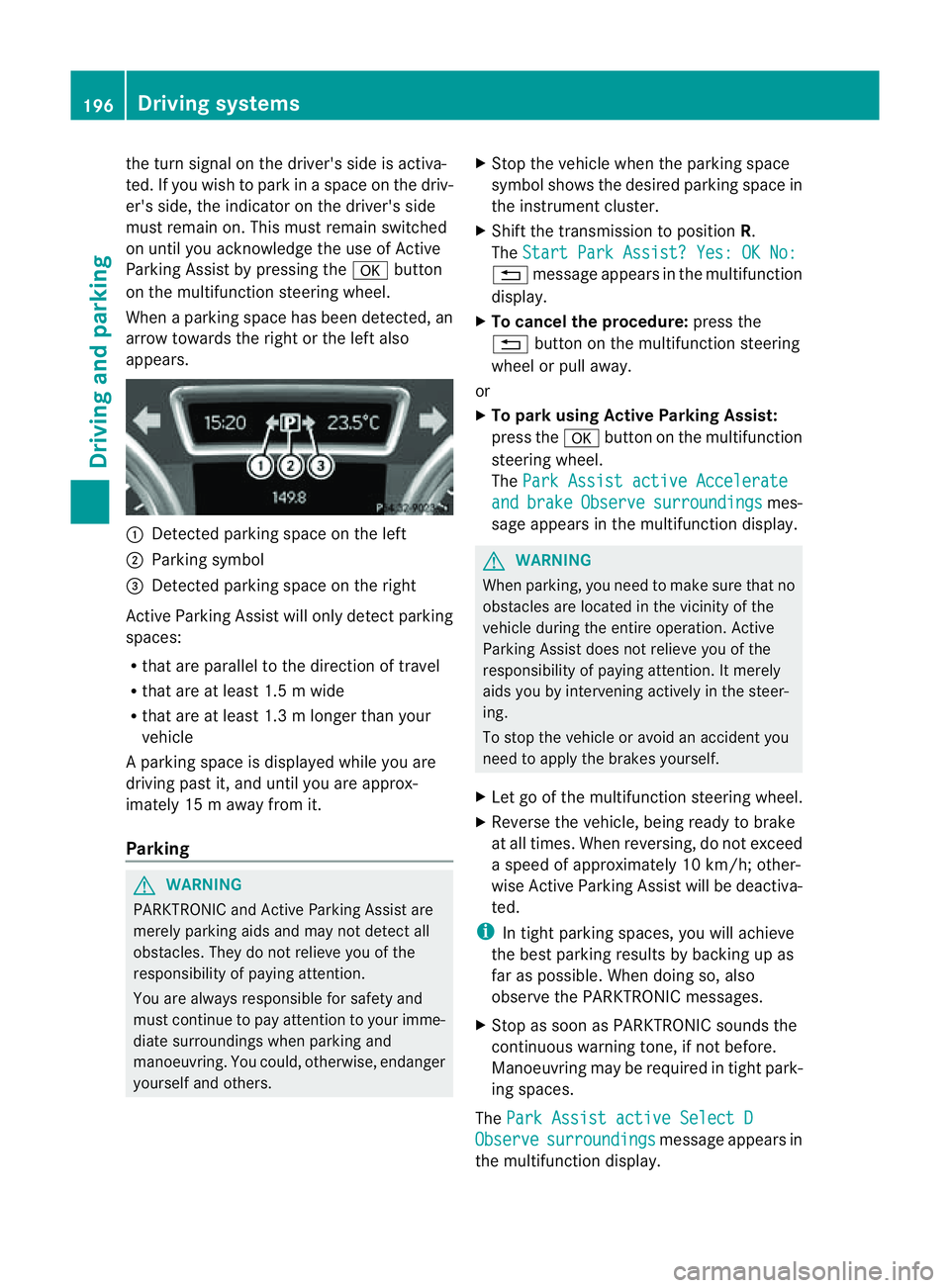
When aparking space has been detected, an
arrow towards the right or the left also
appears. :
Detected parking space on the left
; Parking symbol
= Detected parking space on the right
Activ eParking Assist will only detect parking
spaces:
R that are parallel to the direction of travel
R that are at least 1. 5mwide
R that are at least 1. 3mlonger than your
vehicle
Ap arking space is displayed while you are
driving past it, and until you are approx-
imately 15 maway from it.
Parking G
WARNING
PARKTRONI Cand Activ eParking Assist are
merely parking aids and may not detec tall
obstacles. They do not reliev eyou of the
responsibili tyof paying attention.
You are alway sresponsible for safet yand
must continue to pay attention to your imme-
diate surroundings whe nparking and
manoeuvring. You could, otherwise, endanger
yourself and others. X
Stop the vehicle when the parking space
symbol shows the desired parking space in
the instrumen tcluster.
X Shif tthe transmission to position R.
The Star tPark Assist? Yes: OK No: %
message appe arsint he multifunction
display.
X To cancel th eprocedure: press the
% button on the multifunction steering
whee lorp ull away.
or
X To par kusing Active Parking Assist:
press the abutton on the multifunction
steeri ngwheel.
The Park Assist active Accelerate and brake Observe surroundings mes-
sage appears in the multifunction display. G
WARNING
When parking, you need to make sure that no
obstacles are located in the vicinit yofthe
vehicle during the entire operation .Active
Parkin gAssist does not reliev eyou of the
responsibilit yofpaying attention. It merely
aids you by intervenin gactivel yinthe steer-
ing.
To stop the vehicle or avoid an accident you
need to apply the brakes yourself.
X Let go of the multifunction steerin gwheel.
X Reverse the vehicle, being ready to brake
at all times. When reversi ng,don ot exceed
as peed of approximately 10 km/h; other-
wise Active Parking Assist will be deactiva-
ted.
i In tight parking spaces, you will achieve
the best parking result sbybackingupas
far as possible .When doing so, also
observe the PARKTRONIC messages.
X Stop as soon as PARKTRONIC sound sthe
continuous warnin gtone, if not before.
Manoeuvring ma yberequired in tight park-
ing spaces.
The Park Assist active Select D Observe surroundings message appear
sin
the multifunction display. 196
Drivin
gsystemsDrivin gand parking
Page 200 of 389
X
Shift the transmissio ntoposition Dwhile
the vehicle is stationary.
Active Parkin gAssist immediately steer sin
the othe rdirection.
The Park Assist active Accelerate and brake Observe surroundings mes-
sage appears in the multifunction display.
i You will achieve the best parkin gresults
by waiting for the steerin gprocedure to
complete before moving forwards.
X Drive forward sand be ready to brake at all
times.
X Stop as soon as PARKTRONIC sounds the
continuou swarning tone, if not before.
The Park Assist active Select R Observe surroundings message appears in
the multifunc tion display.
X Further transmission shift smay be neces-
sary.
As soon as the parking procedure is com-
plete, the Park Assist switched off mes-
sage appears in the multifunc tion display.
PARKTRONIC con tinues to be available.
X Manoeuvre if necessary.
X Always observe the warning message sdis-
played by PARKTRONI C(Ypage 192).
Cancell ingA ctive Parking Assist You can cancel Active Parking Assist at any
time.
X Stop the movemen tofthe multifunc tion
steerin gwheel or steer yourself.
Ac tive Parkin gAssist will be cancelled at
once. The Park Assist cancelled mes-
sage appears in the multifunc tion display.
or
X Press the PARKTRONIC button on the
cen trec onsole (Y page 192).
PARKTRONIC is switched off and Active
Parkin gAssist is immediately cancelled.
The Park Assist cancelled message
appears in the multifunc tion display. Active Parkin
gAssist is cancelled automati-
cally if:
R parkin gusing Ac tive Parkin gAssist is no
longe rpossible.
R you ar edriving faster than 10 km/h.
R aw heel spins and ESP ®
intervenes or fails.
The ä warnin glamp lights up in the
instrument cluster.
Aw arning ton esounds. The par king spa ce
sym boldisappear sand the ParkA ssist cancelled messag
eappear sinthe multi-
functio ndisplay.
When Activ eParking Assist is cancelled, you
must steer again yourself.
Towing atrailer For vehicles with
atrailer to whitch, the min-
imum length for parking spaces is slightly
increased.
If yo uhavea ttache datrailer to your vehicle,
yo us houl dnot us eActiv eParking Assist.
Once the electrica lconnection is established
between your vehicl eand the trailer, Active
Parking Assist is no longer available .PARK-
TRONIC is deactivated for the rear area. Reversin
gcamera
Important safety notes Th
er eversing camera is an optica lparking
and manoeuvring aid. It shows the area
behind your vehicle with guide lines in the
COMAND displ ay. G
WARNING
Make sure tha tnopersons or animals are in
the manoeuvring range. Otherwise, they
could be injured.
The reversing camera is in the handle on the
tailgate. Driving systems
197Drivingand park ing Z
Page 202 of 389
tion. See the separate COMAND operating
instructi
ons.
The symbo lofthe selected function is high-
lighted.
To deactivate: the reversing camera is deac-
tivated if you:
R shift the transmission to position P
R drive forward ten metres
R shift the transmission from position Rto
anothe rposition (after 15 seconds)
R drive forwards at aspeed of over
10 km/h
Displays in the COMAN Ddisplay G
WARNING
Usin gthe reversing camera can be dangerous
if you ar ecolour-blin dorify our ability to dis-
tinguish colours is impaired.
Only use the reversin gcamera if you can see
and distinguis hbetween all the coloured
guide lines that are displayed by the reversing
camera in the COMAN Ddisplay. G
WARNING
Please note that objects not at ground level
may appea rtobefurther away than they
actually are. Thes einclude:
R the bumper of avehicle that is parked
behind your vehicle
R at railer drawbar
R theb all coupling of atrailer tow hitch
R thet ail-end of alorry
R slanted posts
The lines are only guides, not accurate meas-
urements of the distance to an obstacle.
Therefore, you should never pass the red line
when approachin ganobstacle. You could oth-
erwise cause an accident and injur eyourself
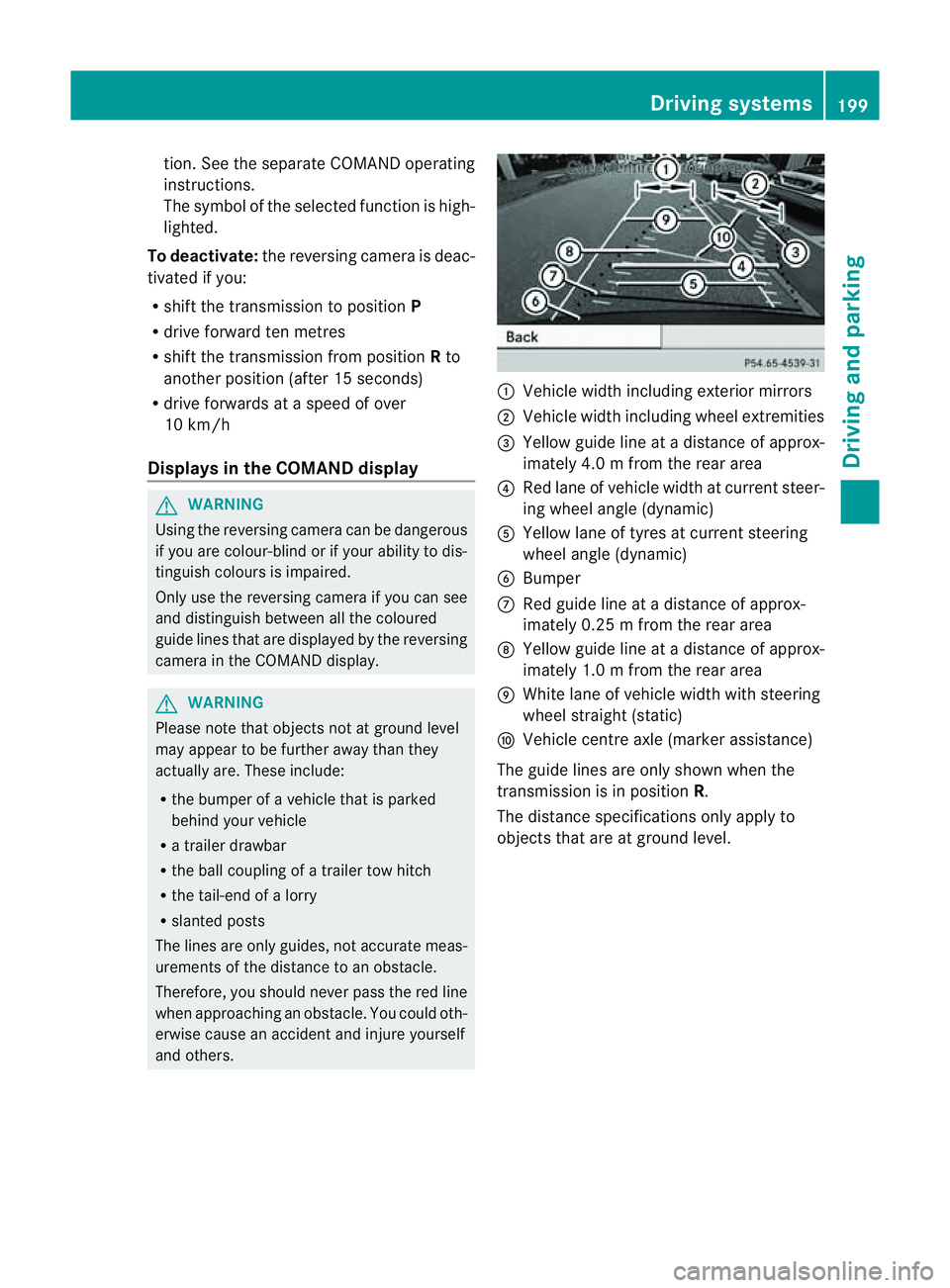
and others. :
Vehicle width includin gexterior mirrors
; Vehicl ewidth including wheel extremities
= Yellow guide line at adistance of approx-
imately 4.0 mfrom th erear area
? Red lane of vehicle width at curren tsteer-
ing whee langle (dynamic)
A Yellow lane of tyres at current steering
wheel angle (dynamic)
B Bumper
C Red guid eline at adistance of approx-
imately 0.2 5mfrom th erear area
D Yellow guide line at adistance of approx-
imately 1.0 mfrom th erear area
E White lane of vehicle width with steering
wheel straight (static)
F Vehicle centre axle (marker assistance)
The guide lines are only shown when the
transmission is in position R.
The distance specification sonly appl yto
objec tsthat are at ground level. Driving systems
199Drivingand park ing Z