wheel MERCEDES-BENZ M-CLASS SUV 2011 Owner's Manual
[x] Cancel search | Manufacturer: MERCEDES-BENZ, Model Year: 2011, Model line: M-CLASS SUV, Model: MERCEDES-BENZ M-CLASS SUV 2011Pages: 389, PDF Size: 9.22 MB
Page 66 of 389
The radar sensor system must be switched off
using the on-boar
dcomputer in the vicinit yof
radio telescop efacilities in the following vehi-
cles:
R vehicles without COMAND Online and nav-
igation
R vehicles without Audio 20 and Becker ®
MAP PILOT
R vehicles for Australia
Information about switching off the rad ar sen-
so rs ystem using the on-board computer can
be found in the "On-board computer and dis-
plays “section (Y page 249).
For BAS PLUS to assist you when driving, the
rada rsensor system must be switched on and
operational; see "Radar sensor system "inthe
index. G
WARNING
BA SP LUS cannot alway sclearly identify
objects and complex traf fics ituations. BAS
PLU Scannot interven einthese cases.
There is arisk of an accident. Always pay
careful attention to the traf fics ituation and be
ready to brake.
In particular, the detection of obstacles can
be impaired if ther eis:
R dir tont he sensor soranything els ecover-
ing the sensors
R snow or heav yrain
R interference by other radar sources
R the possibility of strong radar reflections,
for example in multi-storey car parks
R an arrow vehicle travellin ginfront, e.g .a
motorbike
R av ehicle travellin ginfront on adifferent
line G
WAR
NING
BAS PLUS doe snot react:
R to people or animals
R to oncomin gvehicles
R to crossin gtraffic
R when cornering As
aresult, BAS PLU Smay not interven ein
critical situatio ns.T here is arisk of an acci-
dent .Always pay careful attention to the traf-
fic situation and be ready to brake.
Followin gdamage to the front end of the vehi-
cle, have the configuration and operation of
the radar sensors checked at aqualified spe-
cialist workshop. This also applie stocolli-
sion sats low speeds where ther eisnovisible
damage to the fron tofthe vehi cle.
If BA SPLUS is no tavailable du etoam alfunc-
tion in the rada rsensor system ,the brake
system remain savailable wit hfull brake
boostin geffect and BAS. Adaptiv
ebrak elamps
i Adapti vebrak elamps are only available in
certain countries.
If you brake sharply from aspeed of more
than 50 km/ horifb raking is assisted by BAS
or BAS PLUS, th ebrake lamp sflas hrapidly.
In this way, traffic travelling behind you is
warned in an even more noticeable manner.
If you brake sharply from aspee dofm ore
than 70 km/h to astandsti ll,t he hazard warn-
ing lam psare activated automatically .Ifthe
brakes ar eapplied again, the brak elamps
light up continuously .The hazard warning
lamps switc hoff automatically if you travel
faster than 10 km/h .You can also switc hoff
th eh azard warning lamps using the hazard
warning switch button (Y page 109). ESP
®
(Electronic Stability Program)
Important safety notes i
See the "Importan tsafety notes" section
(Y page 61).
If ESP ®
detect sthat the vehicle is deviating
from the direction desired by the driver ,one
or more wheels are braked to stabilis ethe
vehicle. If necessary, the engin eoutput is also
modified to keep the vehicle on the desired Driving safety systems
63Safety Z
Page 67 of 389
course withi
nphysical limits. ESP ®
assists
the driver when pulling away on wet or slip-
pery roads. ESP ®
can als ostabilise the vehi-
cle durin gbraking.
If ESP ®
intervenes, the ÷ESP®
warning
lamp flashe sinthe instrumen tcluster. G
WAR
NING
If the ÷ warnin glamp in the instrument
cluster flashes, proceed as follows:
R do not deactivat eESP®
under any circum-
stances.
R only depress the accelerator pedal as far as
necessar ywhen pulling away.
R adapt your drivin gstyle to suit the prevail-
ing road and weather conditions.
Otherwise, the vehicle could go into askid.
ESP ®
cannot reduce the risk of an accident if
you drive too fast. ESP ®
cannot override the
laws of physics.
! Only operate the vehicl efor am aximum
of ten seconds on abrake dynamometer.
Switch off th eignition.
Application of the brakes by ESP ®
ma yoth-
erwise destroy the brake system.
! Function or performanc etest sm ay only
be performed on a2-axle dynamometer. If
you wis htooperatethe vehicle on such a
dynamometer, please consult aMercedes-
Benz Servic eCentr ebeforehand. You could
otherwise damage the driv etrain or the
brake system.
i Only us ewheels with the recommended
tyr es izes. Only then will ESP ®
func tion
properly.
4ETS (Electronic Traction System) i
Observ ethe "Importan tsafety notes" sec-
tion (Y page 61).
Traction control is part of ESP ®
.
Traction control brakes the drive wheels indi-
viduall yifthey spin. This enables you to pull
away and accelerate on slipper ysurfaces, for example if the road surface is slippery on one
side .Ina ddition, mor edrive torqu eistrans-
ferre dtot he wheel or wheels with traction.
Traction con trol remains active if you deacti-
vate ESP ®
.
X In appropriate drivin gsituations, activate
the off- road program (Y page 222). G
WARNING
Traction control cannot reduce the risk of an
accident if you drive too fast. Traction control
cannot override the laws of physics.
Off-road 4ETS (Electronic Traction Sys-
tem)
A4 ETS syste mspecifically suited to off -road
ter rain is activated automatically onc ethe off-
roa ddrive progra m(Ypage 22 2)is activated.
Deactivating/activating ESP ® i
Observe the "Important safety notes" sec-
tion (Y page 61).
ESP ®
is activate dautomaticall ywhen the
engin eisstarted.
i Vehicle swith ECO start/stop func tion:
the ECO start/stop func tion switches the
engin eoff automatically when th evehicle
comes to astop. The engine starts auto-
matically when the driver wants to pull
away again. ESP ®
remains in its previously
selected status .Example: if ESP ®
was
deactivated before the engine was
switched off, ESP ®
remains deactivated
whe nthe engin eisswitched on again.
It may be best to deactivate ESP ®
in the fol-
lowing situations:
R when using snow chains
R in deep snow
R on sand or gravel G
WARNING
Activate ESP ®
as soon as the situations
described above no longer apply .ESP ®
will
oth erwise not be able to stabilise the vehicle 64
Drivin
gsafety systemsSafety
Page 68 of 389
if the vehicle starts to skid or
awheel starts
to spin.
When you deactivate ESP ®
:
R ESP ®
no longer improves drivin gstabili ty.
R the engine's torque is no longer limited and
the drive wheels can spin. The spinning of
the wheels results in acuttin gaction, which
provides bet terg rip.
R tractio ncontrol is still activated.
R ESP ®
still provides suppor twhen you
bra ke.
If ESP ®
is deactivate dand one or more wheels
start to spin, the ÷ESP®
warning lamp in
the instrument cluster flashes. In such situa-
tions, ESP ®
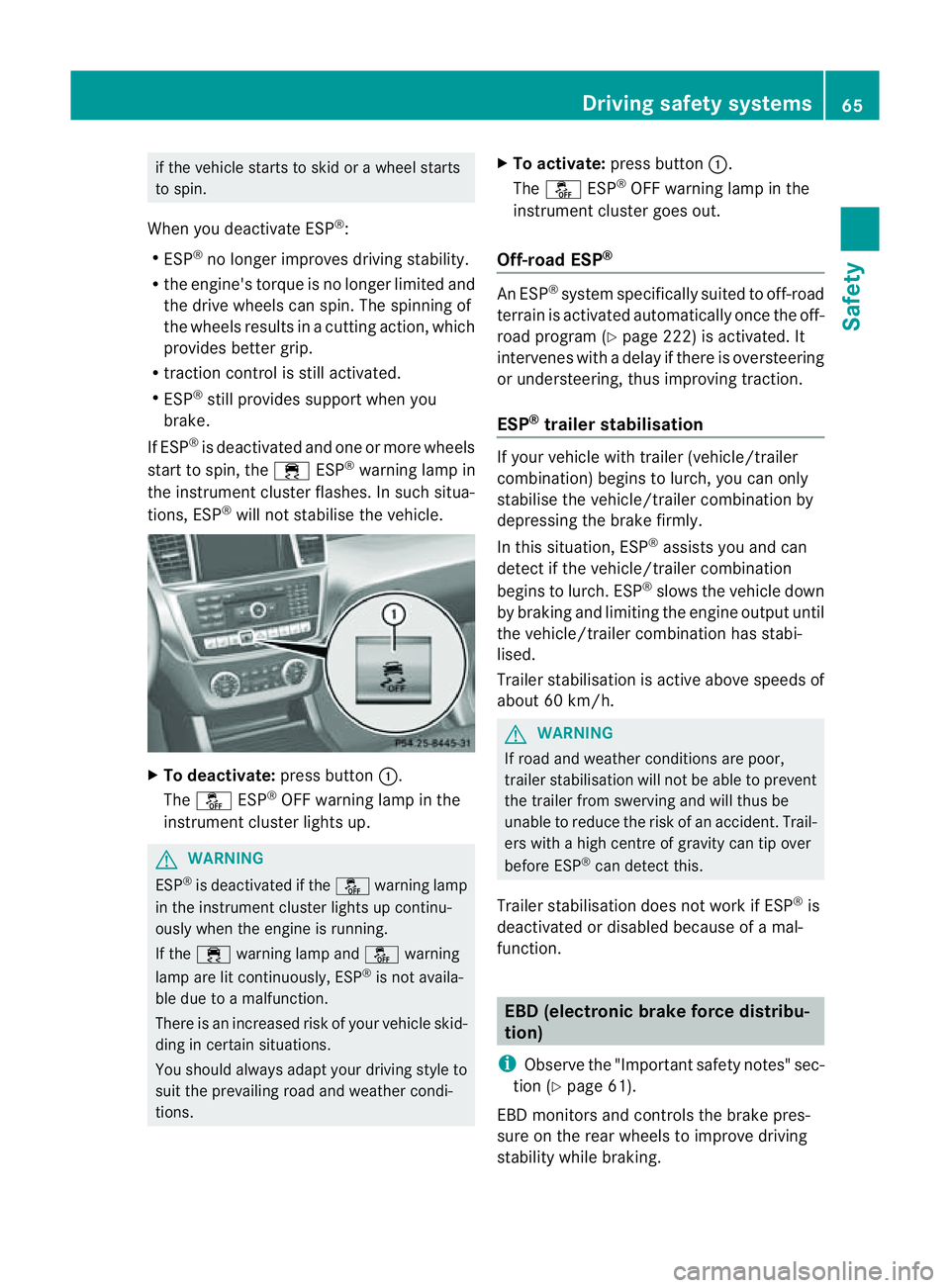
will not stabilis ethe vehicle. X
To deactivate: press button:.
The å ESP®
OFF warnin glamp in the
instrument cluster lights up. G
WARNING
ESP ®
is deactivated if the åwarning lamp
in the instrument cluster lights up continu-
ously when the engine is running.
If the ÷ warning lamp and åwarning
lamp are lit continuously, ESP ®
is not availa-
ble due to amalfunction.
There is an increased risk of your vehicle skid-
ding in certain situations.
You shoul dalway sadapt your driving style to
suit the prevailing road and weather condi-
tions. X
To activate: press button :.
The å ESP®
OFF warning lamp in the
instrumen tcluster goes out.
Off- road ESP® An ESP
®
system specifically suited to off-road
terrain is activated automatically once the off-
road program (Y page 222)isa ctivated. It
intervene swithadelay if there is oversteering
or understeering, thus improvin gtraction.
ESP ®
traile rstabilisation If your vehicle with trailer (vehicle/trailer
combination) begins to lurch, you can only
stabilis ethe vehicle/ trailer combination by
depressing the brake firmly.
In this situation, ESP ®
assists you and can
detect if the vehicle/trailer combination
begins to lurch. ESP ®
slows the vehicle down
by brakin gand limiting the engine output until
the vehicle/traile rcombination has stabi-
lised.
Trailer stabilisation is active abov espeeds of
about 60 km/h. G
WARNING
If road and weather condi tions are poor,
trailer stabilisation will not be able to prevent
the trailer from swerving and will thus be
unable to reduce the risk of an accident .Trail-
ers wit hahigh centr eofgravity can tip over
before ESP ®
can detec tthis.
Trailer stabilisation does not work if ESP ®
is
deactivated or disable dbecause of amal-
function. EBD (electronic brake force distribu-
tion)
i Observe the "Important safety notes" sec-
tion (Y page61).
EBD monitors and control sthe brake pres-
sur eonthe rea rwheels to improv edriving
stab ility while braking. Driving safety systems
65Safety Z
Page 69 of 389
G
WARNING
If EBD ha smalfunctioned, the braking system
remains available with full brake boosting
effect. However, the rear wheels can still lock,
e.g. under full braking. This coul dcaus eyou
to lose control of your vehicle and cause an
accident. You shoul dtherefore adapt your
drivin gstyle to the different handling charac-
teristics.
X Observe the notes on warning and indica tor
lamps (Y page 286) as well as display mes-
sages (Y page 256). ADAPTIV
EBRAKE
ADAPTI VEBRAKE enhances braking safety
and offers increased braking comfort. In addi-
tion to the braking function, ADAPTIV EBRAKE
als oh as the HOLD function (Y page187) and
hi ll st art assist (Y page141). For further
information, se eDriving tip s(Ypage 162). PRE-SAFE
®
Brake
PRE-SAFE ®
Brake is only available in vehic les
with DISTRONIC PLUS.
i Observe the "Important safety notes" sec-
tion (Y page61).
PRE-SAFE ®
Brake can help you to minimise
the ris kofaf rontal collision wit havehicle
ahead or reduce the effects of such acolli-
sion. If PRE-SAFE ®
Brake has detected arisk
of collision, you wil lbewarned visuall yand
acoustically as wel lasbyautomatic braking.
PRE-SAFE ®
Brake cannot prevent acollision
withou tyou rintervention.
Thi sfun ctio nwill issue awarnin gats peeds of
arou nd 30 km/h or moreif:
R for aperiod of several seconds ,the dis-
tance to the vehi cleinf ront is to oshor tfor
the speed at which you ar etravelling .The ·
distanc ewarning lamp then lights up
in the instrument cluster.
R you are rapidly approaching the vehicle in
front .Ani ntermittent warning tone will
then sound and the ·distance warning
lamp will light up in the instrument cluster.
X Brake immediately in order to increas ethe
distanc efrom th evehicle in front.
or
X Take evasiv eactio nprovide ditiss afe to do
so.
If the driver and passengers have fastened
their seat belts, PRE-SAFE ®
Brake can also
can also perform the following at speeds of
above approximately 30 km/h:
R brake the vehicle automatically from a
spee dofuptoa pproximately 20 0km/h
R trigge rpreventative passenger protection
measures (PRE-S AFE®
)( Ypage 45)
Due to the nature of the system, particularly
complicated driving conditions may cause
unnecessar ywarnings or the unnecessary
intervention of PRE-SAFE ®
Brake. To end this,
you can either depress the accelerator pedal
further, activate kickdown or release the
brake pedal.
The braking action of PRE-SAFE ®
Brake is
ended automatically if:
R you drive slowe rthan approximately
15 km /h.
R you manoeuvre to avoid the obstacle.
R there is no longe rany danger of arear-end
collision.
R there is no longer an obstacl edetected in
front of your vehicle.
If you have activated DSR (Y page 220), PRE-
SAFE ®
brak eisd eactivated.
With the help of the rada rsensor system,
PRE- SAFE ®
Brake can detect obstacles that
are in front of your vehicle for an exte nded
period of time.
At speeds up to approximately 70 km /h,
PRE- SAFE ®
Brake may als odetect stationary 66
Driving safet
ysystemsSafety
Page 71 of 389
The radar sensor system must be switched off
using the on-boar dcomputer in the vicinit yof
radio telescop efacilities in the following vehi-
cles:
R vehicles without COMAND Online and nav-
igation
R vehicles without Audio 20 and Becker ®
MAP PILOT
R vehicles for Australia
Information about switching off the rad ar sen-
so rs ystem using the on-board computer can
be found in the "On-board computer and dis-
plays “section (Y page 249).
For PRE- SAFE®
Brake to assist you whe ndriv-
ing ,the radar sensor system must be
switc hed on (Y page 249) an dbeopera-
tional.
Followin gdamage to the fron tend of the vehi-
cle ,havet he configuration and operation of
the radar sensors checked at aqualified spe-
cialist workshop. This also applie stoc olli-
sions at slow speeds where ther eisnovisible
damage to the fron tofthe vehicle. STEE
RCONTROL
The steering assistan tSTEE RCONTROL helps
you by transmittin ganoticeable steering
force to the steering wheel in the direction
required for vehicle stabilisation.
This steering assistance is provided in partic-
ular if:
R both right wheels or both left wheels ar eon
aw et or slippery road surface when you
brake
R the vehicle starts to skid
You have control over the steerin gatall
times. G
WARNING
If there is an ESP ®
malfunction, you will not
receiv eany steering assistance from the
STEER CONTROL. The steering continues to
function with steering assistance. Anti-theft systems
Immobiliser
The immobilise rprevents your vehicl efrom
being starte dwithout the correct key.
X To activate with the key: removethe key
from the ignition lock.
X To activate wit hKEYLESS-GO: switch the
ignition off and open the driver' sdoor.
X To deactivate: switchont he ignition.
i The immobiliser is always deactivated
when you star tthe engine. ATA (Anti-Thef
tAlarm system)
Av isual and audible alarm is triggered if the
alarm system is prime dand you ope n:
R ad oor
R the vehicle with the emergency key ele-
ment
R the tailgate
R the bonnet
The alar misnot switched off ,even if you
close th eopen door that has triggere dit, for
example. X
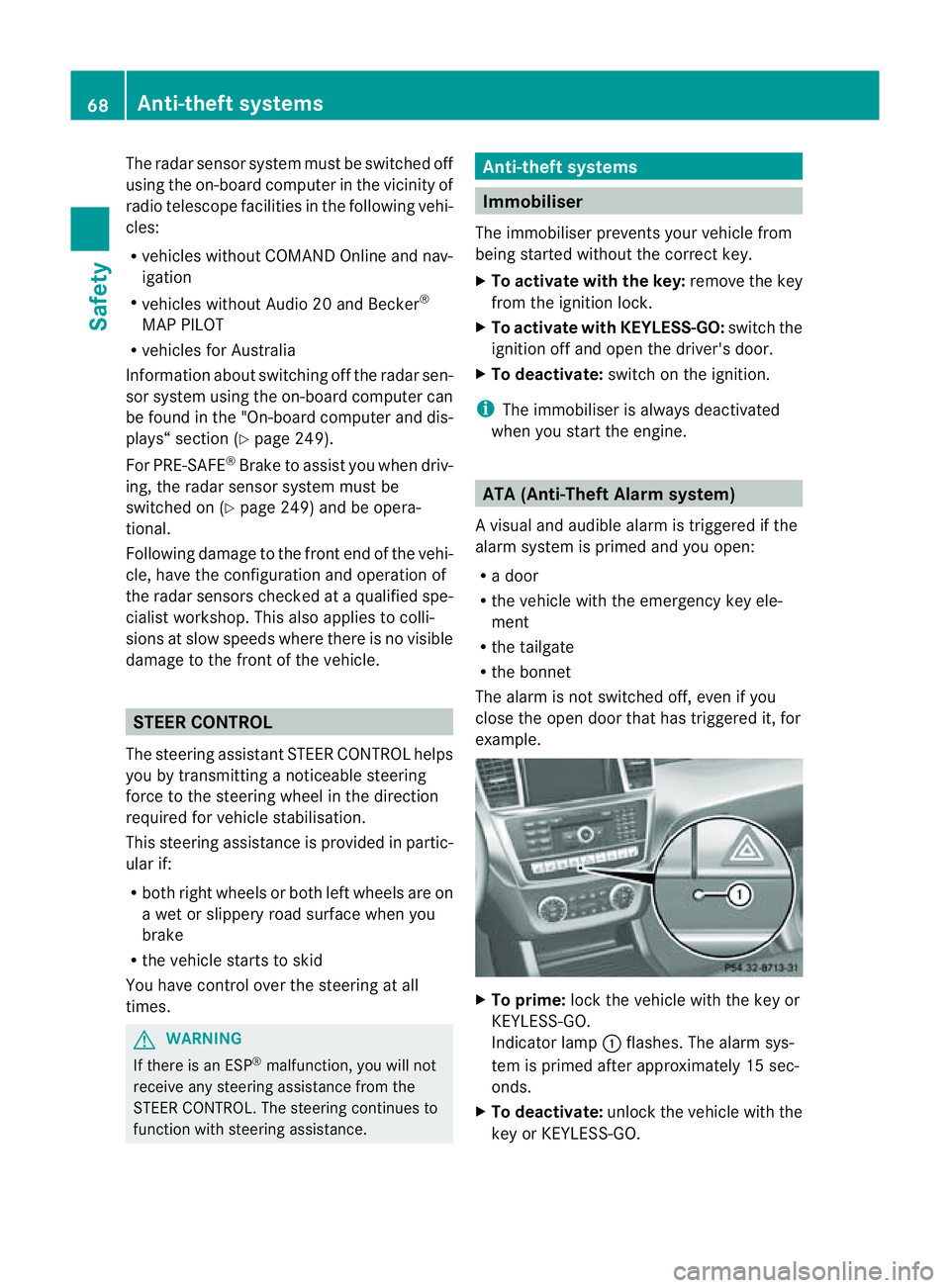
To prime: lock the vehicle with the key or
KEYLESS-GO.
Indicator lamp :flashes. The alarm sys-
tem is primed after approximately 15 sec-
onds.
X To deactivate: unlock the vehicle with the
key or KEYL ESS-GO.68
Anti-thef
tsystemsSafety
Page 75 of 389
Usefu
linfor mati on
i This Owner's Manual describes all models
and all standard and optional equipment
available to your vehicle at the time of pub-
lication of the Owner's Manual. Country-
specific deviation sare possible .Please
not ethat your vehicle ma ynot be equipped
with all featur es described. This also
applies to safety-releva ntsystems and
functions.
i Please read the information on qualified
specialist workshops (Y page 24).Key
Key functions
Locking and unlocking centr ally The key centrally locks/unlocks:
R the doors
R the tailgate
R the fuel filler flap G
WAR
NING
Only for the Unite dKingdom: if the vehicle
has been locked with the key or with KEY-
LESS-GO, the double lock function is activa-
ted as standard. It is then not possible to open
the doors from inside the vehicle.
Therefore, do not leave any people behind in
the vehicle, particularly children ,elderly peo-
ple or people requirin gspecial assistance. As
ar esult, they may not be able to free them-
selves in the event of an emergency. They
could be seriously or even fatally inju redby
prolonged exposure to extremely high or low
temperatures, for example. In this case, res-
cuin gpeople from outside the vehicle is diffi-
cult.
Deac tivate th einterior motion sensor before
you lock the vehicle. The doors can then be
opened from the inside after the vehicl ehas
been locked from the outside. G
WARNING
If children are left unsupervised in the vehicle,
they could:
R open adoor from inside the vehicle at any
time, even if it has been locked
R star tthe vehicle usin gakey which has been
left in the vehicle
R release the electric parking brake
They could thereby endanger themselves and
others. Never leave children unsupervised in
the vehicle. Alway stake the key with you
when leaving the vehicle, even if you are only
leaving it for ashort time. G
WARNING
If ak ey rin gistoo heavy or too large, the
weight actin gonthe key coul dcause it to turn
in the ignition lock or catc honthe steering
wheel. This coul dcause the engine to be
switched off suddenly. You may lose control
of the vehicle and cause an accident. Do not
attac hany heavy or large key rings to the key
that is inserted in the ignition. :
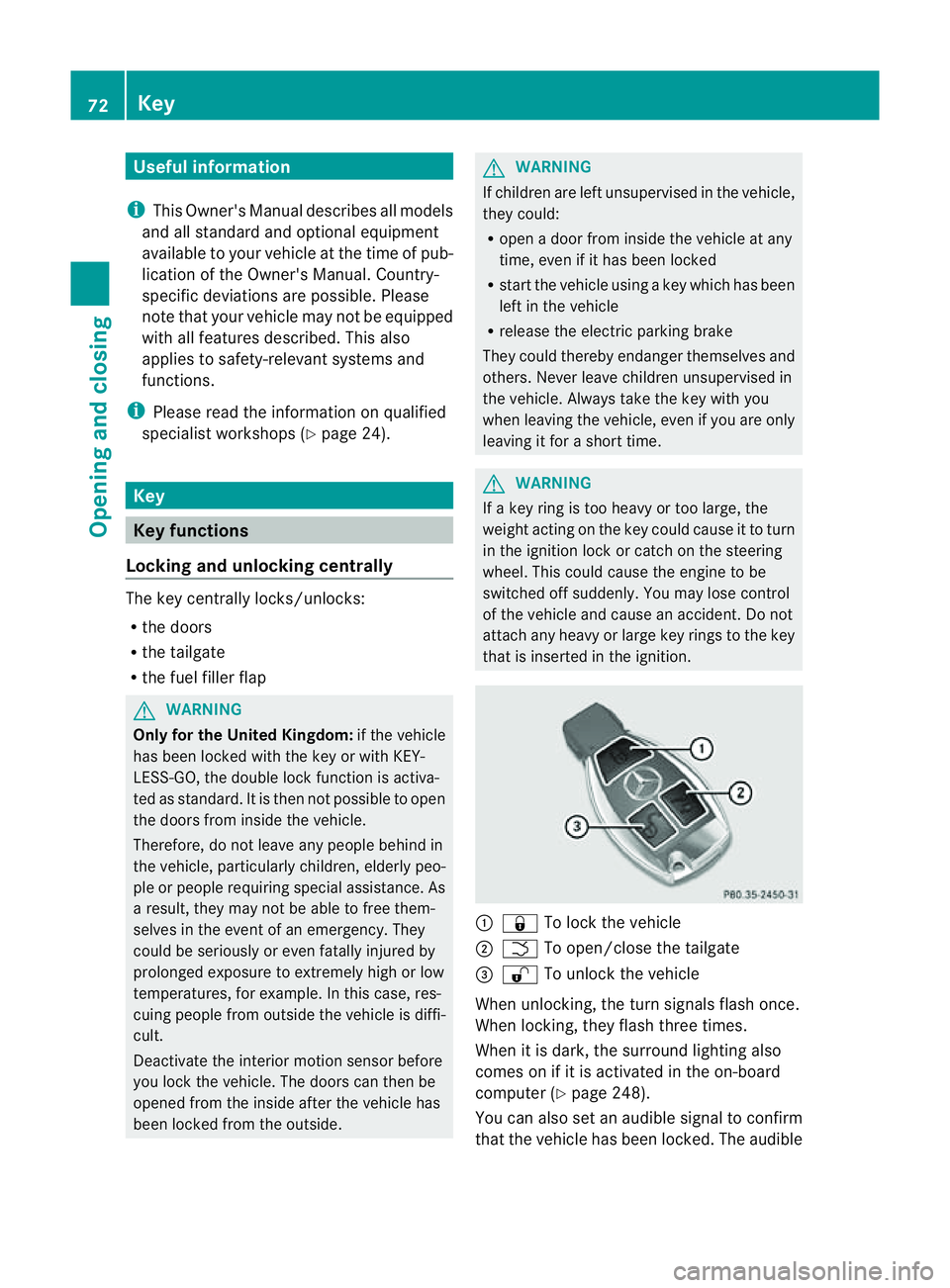
& To lock the vehicle
; F To open/clos ethe tailgate
= % To unlock the vehicle
When unlocking, the tur nsignals flash once.
When locking, they flash three times.
When it is dark, the surroun dlighting also
comes on if it is activated in the on-board
computer (Y page 248).
You can also set an audible signal to confirm
that the vehicle has been locked. The audible 72
KeyOpening and clos
ing
Page 81 of 389
the doors from ins
idethe vehicle. Deactivate
the interio rmotion sensor (Y page 69)before
you lock the vehicle. The doors can then be
opened from the inside after the vehicle has
been locked from the outside.
You can only open the rear doors from inside
the vehicle if they are not secured by the
child-proof locks (Y page 60).X
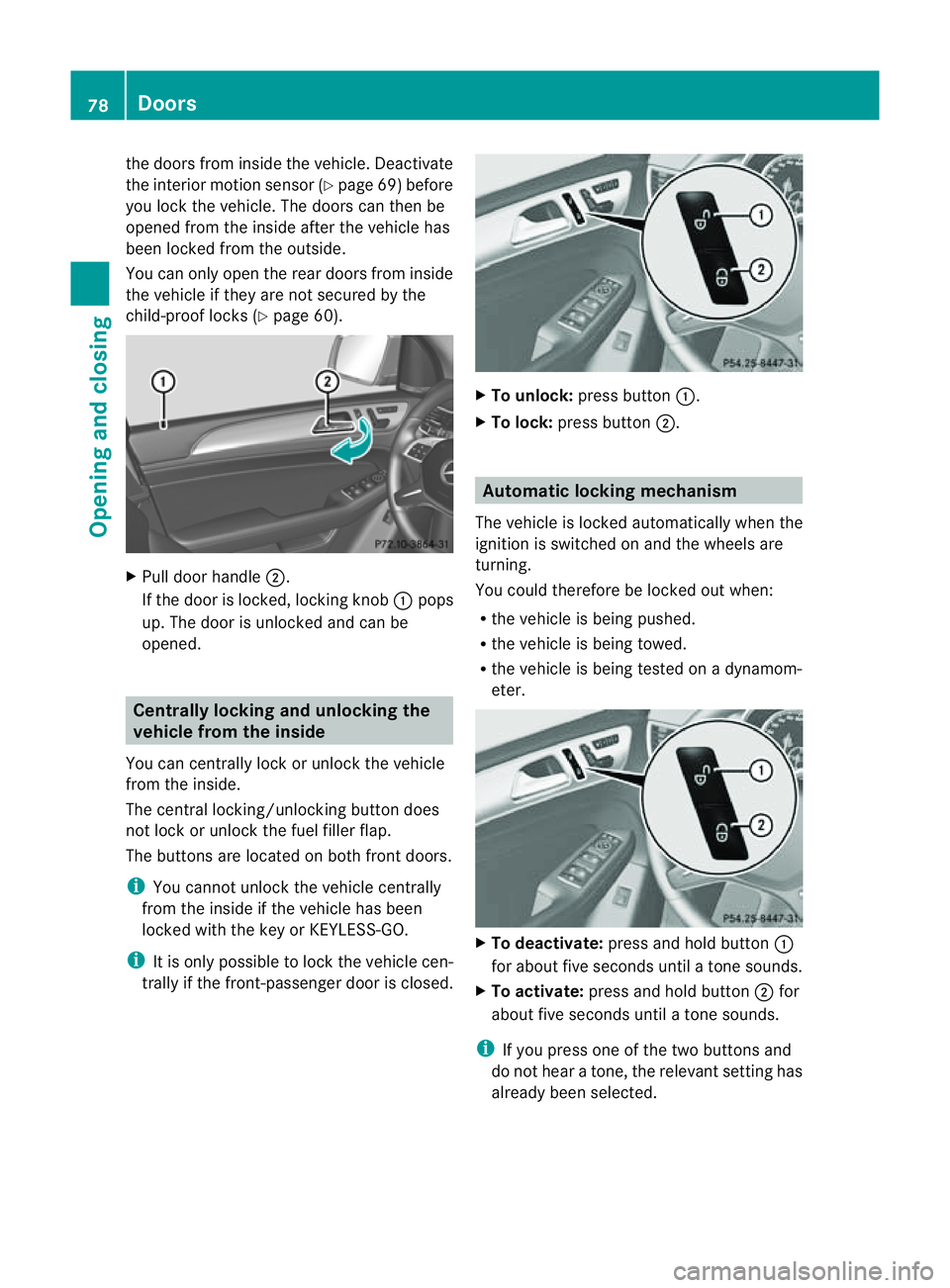
Pull door handle ;.
If the door is locked, locki ngknob :pops
up. The doo risu nlocke dand can be
opened. Centrally lockin
gand unlocking the
vehicle from th einside
You can cen trally lock or unlock the vehicle
from the inside.
The central locking/unlocking button does
not lock or unlock the fuel filler flap.
The button sare locate donboth front doors.
i You can notu nlock the vehicl ecentrally
from the inside if the vehicle has been
locked with the key or KEYLESS-GO.
i It is only possible to lock the vehicle cen-
trally if the front-passenger door is closed. X
To unlock: press button :.
X To lock: press button ;. Automatic locking mechanism
The vehicle is locked automatically when the
ignition is switched on and the wheels are
turning.
You could therefor ebelockedout when:
R the vehicle is being pushed.
R the vehicle is being towed.
R the vehicle is being tested on adynamom-
eter. X
To deactivate: press and holdbutton :
for about five seconds until atones ounds.
X To activate: press and hold button ;for
about fiv eseconds until atones ounds.
i If you press one of the two button sand
do not hea ratone, the relevant setting has
already been selected. 78
DoorsOpening and closing
Page 94 of 389
Usefu
linfor mation .............................. 92
Correct driver' sseat position ............92
Seats .................................................... 93
Steering wheel .................................... 98
Mir rors ............................................... 100
Memor yfunction .............................. 103 91Seats,
steering wheeland mirrors
Page 95 of 389
Usefu
linfor mati on
i This Owner's Manual describes all models
and all standard and optional equipment
available to your vehicle at the time of pub-
lication of the Owner's Manual. Country-
specific deviation sare possible .Please
not ethat your vehicle ma ynot be equipped
with all featur es described. This also
applies to safety-releva ntsystems and
functions.
i Please read the information on qualified
specialist workshops (Y page 24).Correct driver'
sseatp osition Observ
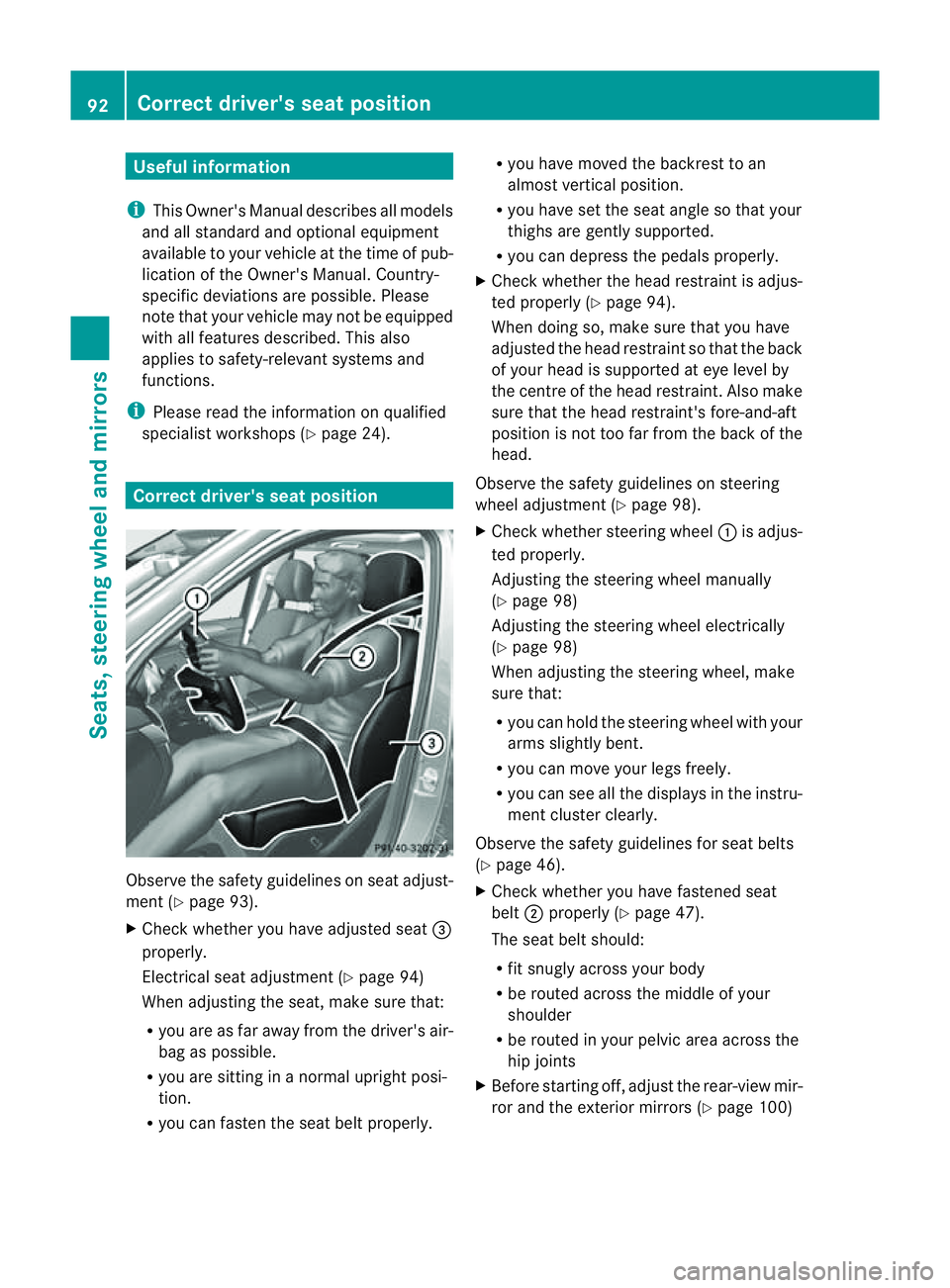
ethe safety guideli neso nseat adjust-
men t(Ypage 93).
X Chec kwhether you hav eadjusted seat =
properly.
Electrical seat adjustment (Y page 94)
When adjusting the seat, mak esure that:
R you are as far away from the driver' sair-
bag as possible.
R you are sitting in anormal upright posi-
tion.
R you can fasten the seat belt properly. R
you have moved the backrest to an
almost vertical position.
R you have set the seat angle so that your
thighs ar egently supported.
R you can depress the pedals properly.
X Check whether the head restraint is adjus-
ted properly (Y page 94).
When doing so, mak esure that you have
adjusted the head restraint so that the back
of your head is supported at eye level by
the centre of the head restraint .Also make
sure that the head restraint's fore-and-aft
position is not too far from the bac kofthe
head.
Observ ethe safety guidelines on steering
wheel adjustment (Y page 98).
X Chec kwhether steering wheel :is adjus-
ted properly.
Adjusti ngthe steering whee lmanually
(Y page 98)
Adjustin gthe steering wheel electrically
(Y page 98)
When adjustin gthe steering wheel, make
sur ethat:
R you can hold the steering wheel with your
arms slightl ybent.
R you can mov eyour legs freely.
R you can see all the displays in the instru-
men tcluster clearly.
Observe the safety guidelines for seat belts
(Y page 46).
X Check whether you have fastened seat
belt ;properly (Y page 47).
The seat belt should:
R fit snugly across your body
R be routed across the middle of your
shoulder
R be routed in your pelvic area across the
hip joints
X Befor estartin goff, adjus tthe rear-vie wmir-
ror and the exterior mirrors (Y page 100)92
Correct driver's seat positionSeats, steerin
gwhee land mirrors
Page 96 of 389
in such
away that you have agood view of
roa dand traffic conditions.
X Vehicles with amemory function: save
the seat, steerin gwheel and exterior mirror
settings (Y page 103). Sea
ts Important safety notes
G
WARNING
The seats can still be adjusted when ther eis
no key in the ignition lock. For this reaso n,
children shoul dnever be left unsupervised in
the vehicle. They could adjust the seat sand
become trapped. G
WARNING
Only adjus tthe driver' sseat when the vehicle
is stationary. You will otherwise be distrac ted
from the road and traffic conditions and you
could lose control of the vehicle as aresult of
the seat moving. This could cause an acci-
dent. G
WAR
NING
If you adjus tthe seat height car elessly, you or
others could be trapped and thereb yinjured.
Children in particular could unintentionally
pres sthe buttons to electrically adjust the
seat sand become trapped.
Take care that:
R whil emoving the seats, your hands do not
get under the lever assembly of the seat
adjustmen tsystem.
R children in the vehicl edonot slidetheir
hands unde rthe levers. G
WARNING
Make sur ethat nobody can becom etrapped
when adjusting the seats.
Observe the notes on airbags.
Secure children as recomm ended; see the
"Children in the vehicle" section. G
WAR
NING
Make sure that the back of your head is sup-
ported at eye level by the central area of the
head restraint .Ifyour head is not supported
correctly by the head restraint ,you coul dsuf-
fer asever eneck injury in the event of an
accident .Never driv eifthe head rest raints are
not engaged and set correctly. G
WARNING
As eat belt can only offer its intended degree
of protection when the back rest is almost ver-
tical and the occupan tiss itting upright. Avoid
seat positions that do not allow the seat belt
to be routed correctly. Adjust the backrest so
that it is as upright as possible .Never travel
with the back rest reclined too fa rbackwards.
You could otherwise be seriousl yoreven
fatally injured in th eevent of an accident or
sudden braking.
! To avoid damag etothe seats and the seat
heating, observe the followin ginformation:
R do not spill any liquids on the seats. If
liquid is spilled on the seats, dry them as
soon as possible.
R if the sea tcover sare damp or wet, do not
switc hont he seat heating. The seat
heating should also not to be used to dry
the seats.
R clea nthe seat cover sasrecommended;
see the "In terior care" section.
R do not transport heav yloads on the
seats. Do not plac eshar pobjects on the
seat cushions ,e.g. knives, nails or tools.
Th es eats should only be occupied by
passengers, if possible.
R when the seat heatin gisinoperation ,do
not cover the seats with insulating mate-
rials, e.g. blanke ts,c oats, bags, seat cov-
ers, child seats or booster seats.
! When you mov ethe seats, make sur ethat
ther eare no objects in th efootwell or
behind the seats. Otherwise, you could
damage the seats and the objects. Seats
93Seats,steering wheeland mirrors Z