brake light MERCEDES-BENZ METRIS 2016 MY16 Operator’s Manual
[x] Cancel search | Manufacturer: MERCEDES-BENZ, Model Year: 2016, Model line: METRIS, Model: MERCEDES-BENZ METRIS 2016Pages: 310, PDF Size: 7.28 MB
Page 64 of 310
the electricslidin gdoorusing the corresponding
Å orÆ sliding door button in the center
consol e(
Ypage 75).
Pets in the vehicle
GWARNING
If yo uleave animals unattended or unsecured
in the vehicle, theyc ould press buttons or
switches ,for example.
As aresult, theyc ould:
Ractivate vehicl eequipment and become
trapped ,for example
Ractivate or deactivate systems, thereby
endangering othe rroa du sers
Unsecured animals could also be flung around
the vehicl einthe event of an accident or sud-
de ns teering or braking ,thereb yinjurin gvehi-
cle occupants. There is ariskofana ccident
and injury.
Never leav eanimals unattended in the vehi-
cle .Alway ssecurea nimals properly during
the journey ,e.g.u se asuitabl eanimalt rans-
port box.
Driving safety systems
Overview
In thiss ection, yo uwillf indi nformation about
the following drivin gsafety systems:
REBD ( Ele ctronic Brake Force Distribution)
RABS ( Anti-lock Braking Sys tem)
RBAS ( Brake Assist System)
RESP®(E le ctronic Stability Program)
Important safety notes
If yo ufailtoa dapt your drivin gstyle or if yo uare
inattentive, the drivin gsafety systems can nei-
therr educe the ris kofaccident nor override the
laws of physics .Drivin gsafety systems are
merel yaidsd esig nedtoa ssistdriving. Yo uare
responsibl efor the distance to the vehicl ein
front, for vehicl espeed, braking in good time
and for staying in your lane. Alway sadapt your drivin
gstyle to the prevailing roa dand weather
conditions and maintain asufficient, safe dis-
tance fromo therroa du sers.D rive carefully.
Please note thatt he drivingsafety systems
describe donlyw orko ptimally when:
Rthere is adequate contact between the tires
and the roa dsurface
Ryo uu sewinter tire s(M+ Stires),w iths now
chains if necessary,w hent he roa dconditions
ar ew intry
Rthe spee dinformation determine dbythe
vehicl eiswithint he legall yprescribe ddisplay
accuracy
Pa yp articular attentio ntothe information
regarding tires, coding of the whee lsizeg roups,
tire trea dand winter operatio nunder "Wheels
and tires" (
Ypage 267).
ABS (Anti-lock Braking System)
General notes
ABS regulate sbrake pressure in such awaythat
the wheels do not lock when yo ubrake. This
allows yo utocontinue steering the vehicl ewhen
braking.
The ò warning lamp in the instrument cluster
lights up when the ignition is switched on. The
lamp goes ou twhent he engine starts running.
Important safety notes
Observe the important safety guideline sfor the
drivin gsafety system(Ypage 62).
ABS works fromas peedof abou t5mph
(8 km/h), regardles sofroad-surface conditions.
ABS works on slippery surfaces ,evenw heny ou
onl ybrake gently.
GWARNING
If ABS is faulty, the wheels could lock when
braking .The steerability an dbraking charac-
teristics maybes everel yimpaired. Addition-
ally ,fur the rdrivin gsafety systems ar edeac-
tivated .Ther eisani ncreasedd angerofs kid-
ding and accidents.
Drive on carefully. Hav eABS checked imme-
diately at aquali fied specialis tworkshop.
62Driving safet ysystems
Safety
Page 65 of 310
If ABS is malfunctioning, theòwarning lamp
(Ypage 221) lights up whil ethe engine is run-
ning and the display shows amessage:
Ron vehiclesw ithoutsteering wheel buttons
(Ypage 189)
Ron vehiclesw ith steering wheel buttons
(Ypage 203)
BAS, Hill Start Assist and ESP®and its driving
safety systems and other driving systems also
fail .Observe the notes on the òwarning
lamp and the display messages.
Braking
If ABS intervenes when braking, you wil lfeel a
pulsating in the brake pedal.
The pulsating brake pedalc an be an indication
of hazardous road conditions and functions as a
reminder to take extra care whiled riving.
XIf ABS intervenes:continue to depresst he
brake pedalw ith force until the braking sit-
uatio niso ver.
XTo make afull brake application: depress
the brake pedalw ith full force.
BAS (Brake Assist System)
General notes
BAS operates in emergency braking situations.
If you depresst he brake pedalq uickly, BAS
automatically boosts the braking force, thus
shortening the stopping distance.
Important safety notes
Observe the important safety guidelines for the
driving safety system (Ypage 62).
GWARNING
If BAS is malfunctioning, the braking distance
in an emergency braking situation is
increased .There is arisk of an accident.
In an emergency braking situation, depress
the brake pedalw ith full force. ABS prevents
the wheel sfrom locking.
If BAS is malfunctioning, the ÷warning lamp
lights up whil ethe engine is running
(
Ypage 221) and the display shows amessage:
Ron vehiclesw ithoutsteering wheel buttons
(Ypage 193)
Ron vehiclesw ith steering wheel buttons
(Ypage 207)
Braking
XKeep the brake pedalf irmly depressed until
the emergency braking situation is over.
ABS prevents the wheel sfrom locking.
The brakes willf unction as usual once you
release the brake pedal. BAS is deactivated.
EBD (electroni cbrake force distribu-
tion)
General notes
EBD monitors and controls the brake pressure
to the rear wheels. This enables EBD to improve handling during braking.
Important safety notes
Observe the important safety guidelines for the
driving safety system (Ypage 62).
GWARNING
If EBD is malfunctioning, the rear wheelsc an
lock, e.g. under full braking. This increases the
risk of skidding and an accident.
You shoul dtherefore adapt you rdriving style
to the different handling characteristics. Have
the brake system checked at aqualifieds pe-
cialist workshop.
If EBD is malfunctioning, the $warning lamp
(
Ypage 220) lights up whil ethe engine is run-
ning and the display shows amessage.
Ron vehiclesw ithoutsteering wheel buttons
(Ypage 192)
Ron vehiclesw ith steering wheel buttons
(Ypage 206)
Other driving systems and driving safety sys-
tems then also fail.
Driving safety systems63
Safety
Z
Page 66 of 310
ESP®(Electronic Stability Program)
General notes
ESP®monitors driving stabilitya nd detectsa
tendenc yofthevehicle to understeer or over-
steer (skidding) in good time. If ESP
®detects
that th evehicle is deviatin gfromt hedirection
desired by th edriver, oneorm orew heels are
braked to stabilizet hevehicle .The engine out-
put is also modified to keep th evehicle on the
desired course within physical limits. ESP
®can
also stabilizet hevehicle durin gbraking.
ESP
®also monitors traction,i .e.p ower trans-
mission between th etires and th eroad surface.
The integrate dtraction control support syou
when pullinga way or acceleratin gonwet,slip-
pery or slickr oads. Should th edrivew heels spin,
traction control brakes them individually. In
addition,g reaterdrivet orque is transmitte dto
th ew heel or wheels with traction.Ift raction on
th er oad surface is no tsufficient ,even ESP
®will
no tallow you to pull away without difficulty. The
type of tires and total weightoft hevehicle as
well as th egradientoft heroad also play acru-
cial role .Tractio ncontrol remains active if you
deactivate ESP
®.
If the h warning lamp in th einstrumen tclus-
te rg oes out before beginnin gthe journey, ESP
®
is automaticall yactive.
The h warning lamp in th einstrumen tcluster
flashes when ESP
®intervenes:
XDo no tdeactivate ESP®unde rany circum-
stances.
Xwhen driving off ,apply as little throttle as
possible.
Xadapt your speeda nd driving style to th epre-
vailin groad conditions.
Important safety notes
Observ ethe important safety guidelines for the
driving safety system (Ypage 62).
GWARNING
If ESP
®is malfunctionin gitwill notprovide
any vehicle stabilization. Thereisani ncreased
risk of skiddingorofana ccident.
Exercise caution when continuing to drive.
Hav eESP
®checked at aqualified specialist
workshop.
!Do no trun th evehicle on aroller dynamom-
eter (e.g. for performanc etests) .Ifyou must
operate th evehicle on aroller dynamometer,
please consult aqualified specialist workshop
in advance. You coul dotherwise damag ethe
driv etrain or th ebrak esystem.
If ESP
®is malfunctioning, the hwarning
lamp (Ypage 221) lightsupc ontinuously while
th ee ngine is runnin gand th edisplay showsa
message.
Ron vehicle swithout steering wheel buttons
(Ypage 193)
Ron vehicle swith steering wheel buttons
(Ypage 207)
ESP®is deactivate diftheå warning lamp in
th ei nstrumentc lusterislit when th eengine is
running.
Only use wheels with th erecommended tire
sizes. Only then will ESP
®function properly.
Deactivating/activatin gESP®
GWARNING
If you deactivate ESP
®,E SP®no longer sta-
bilizes th evehicle .Thereisani ncreased risk
of skiddinga nd an accident.
Only deactivate ESP
®in th esituations descri-
bed in th efollowing.
It may be best to deactivate ESP
®in th efollow-
ing situations:
Rwhen usings nowc hains
Rin deep snow
Ron sandorg ravel
Activate ESP®as soon as th esituations descri-
bed abovenol onger apply. Otherwise, ESP®
assistance for stabilizing th evehicle will remain
significantly reduced, even if th evehicle starts
to skid.
If you deactivate ESP
®:
Rthe å warning lamp in th einstrumen tclus-
te rlightsu p.
Rthe÷ warning lamp in th einstrumen tclus-
te rf lashes if th ewheels are spinning.
RESP®assistance for stabilizing th evehicle in
th el ower speedr ange up to approximately
37 mph (60 km/h) is significantly reduced.
Rengine torque is no longer limited and the
driv ewheels are able to spin
64Driving safety systems
Safety
Page 67 of 310
The spinningofthe wheels results in acutting
action for better traction on loose surfaces.
RTraction control is still activated
RESP®still provides support when you brake.
Dependin gonthe equipment in the vehicle, you
can activate or deactivate ESP
®when the
engine is runnin gbyusing the åbutton or by
using the on-board computer:
Ron vehicles without steerin gwheel buttons
(Ypage 173)
Ron vehicles with steerin gwheel buttons
(Ypage 183)
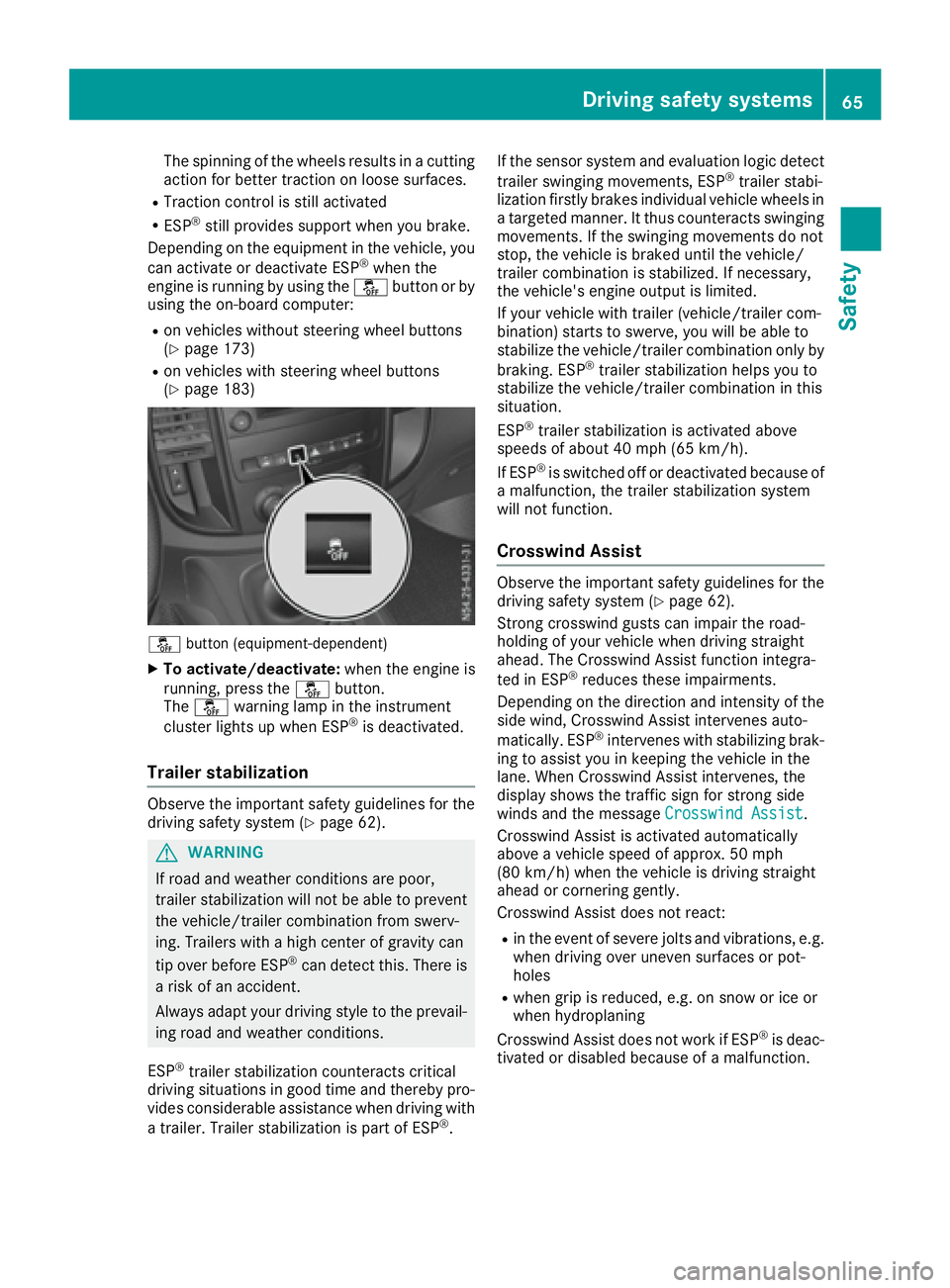
å button (equipment-dependent)
XTo activate/deactivate: when the engine is
running, press the åbutton.
The å warning lamp in the instrument
cluster lights up when ESP
®is deactivated.
Trailer stabilization
Observe the important safety guidelines for the
driving safety system (Ypage 62).
GWARNING
If road and weather conditions are poor,
trailer stabilization will not be able to prevent
the vehicle/trailer combination from swerv-
ing. Trailers with ahigh center of gravity can
tip over before ESP
®can detect this. There is
ar isk of an accident.
Always adapt your driving style to the prevail-
ing road and weather conditions.
ESP
®trailer stabilization counteracts critical
driving situations in good time and thereby pro- vides considerable assistance when driving with
at railer. Trailer stabilization is part of ESP
®. If the sensor system and evaluation logic detect
trailer swinging movements, ESP
®trailer stabi-
lization firstly brakes individual vehicle wheels in
at argeted manner .Itthus counteracts swinging
movements. If the swinging movements do not
stop, the vehicle is braked until the vehicle/
trailer combination is stabilized. If necessary,
the vehicle's engine output is limited.
If your vehicle with trailer (vehicle/trailer com-
bination) start stoswerve, you will be able to
stabilize the vehicle/trailer combination only by
braking. ESP
®trailer stabilization helps you to
stabilize the vehicle/trailer combination in this
situation.
ESP
®trailer stabilization is activated above
speeds of about 40 mph (65 km/h).
If ESP
®is switched off or deactivated because of
am alfunction, the trailer stabilization system
will not function.
Crosswind Assist
Observe the important safety guidelines for the
driving safety system (Ypage 62).
Strong crosswind gusts can impair the road-
holding of your vehicle when driving straight
ahead. The Crosswind Assist function integra-
ted in ESP
®reduces these impairments.
Dependin gonthe direction and intensity of the
side wind, Crosswind Assist intervenes auto-
matically. ESP
®intervenes with stabilizing brak-
ing to assist you in keeping the vehicle in the
lane. When Crosswind Assist intervenes, the
display shows the traffic sign for stron gside
winds and the message Crosswind Assist
.
Crosswind Assist is activated automatically
above avehicle speed of approx. 50 mph
(80 km/h) when the vehicle is driving straight
ahead or cornering gently.
Crosswind Assist does not react:
Rin the event of severe jolts and vibrations, e.g.
when driving over uneven surfaces or pot-
holes
Rwhen grip is reduced, e.g. on snow or ice or
when hydroplaning
Crosswind Assist does not work if ESP
®is deac-
tivated or disabled because of amalfunction.
Driving safety systems65
Safety
Z
Page 69 of 310
Useful information
This Operator's Manual describes all models as
well as standard and optional equipment of your
vehicle that were available at the time of going
to print.Country-specific variation sare possi-
ble. Note that your vehicle may not be equipped
with all of the described functions. This also
applies to system sand function srelevantt o
safety.
Read the information on qualified specialist
workshops (
Ypage 29).
Key
Important safetyn otes
GWARNING
If children are left unsupervised in the vehicle,
they could:
Ropen the doors, thus endangering other
people or road users.
Rget out and disrupt traffic.
Roperate the vehicle' sequipment.
Additionally, children could set the vehicle in
motion if, for example, they:
Rrelease the parkin gbrake.
Rshifting the automatic transmission out of
park position P
RStart the engine.
There is arisk of an acciden tand injury.
When leaving the vehicle, always tak ethe
SmartKey with you and lock the vehicle. Never
leave children or animals unattended in the
vehicle. Always keep the SmartKey out of
reach of children.
GWARNING
If you attach heavy or large objects to the
SmartKey, the SmartKey could be uninten-
tionally turned in the ignition lock .This could
cause the engin etobeswitched off. There is a
risk of an accident.
Do not attach any heavy or large objects to the
SmartKey. Remove any bulky key rings before
insertin gthe SmartKey int othe ignition lock.
!Keep the SmartKey away from strong mag-
netic fields. Otherwise, the remotec ontrol
function could be affected.
Strongm agnetic fields can occur in the vicin-
ity of powerful electrical installations.
Do not keep the key:
Rwith electronic devices,e .g.am obile phone
or another key
Rwith metallic objects, e.g. coinsorm etal foil
Rin metallic objects, e.g. metal cases
This can affectt he key's functionality.
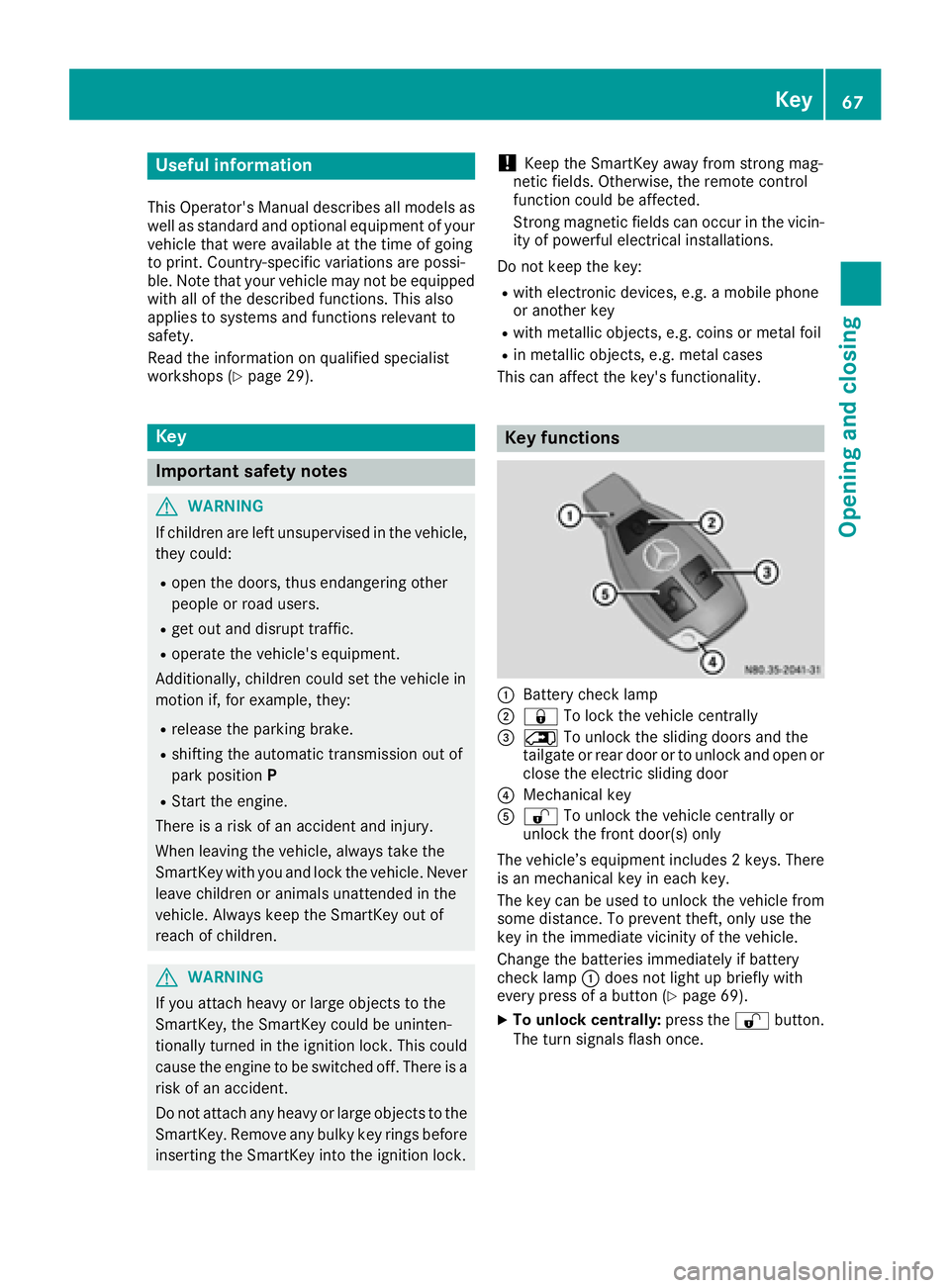
Key functions
:Battery checklamp
;&To lock the vehicle centrally
=5To unlock the sliding doors and the
tailgate or rear door or to unlock and open or
close the electric sliding door
?Mechanical key
A% To unlock the vehicle centrally or
unlock the frontd oor(s) only
The vehicle’s equipment includes 2keys. There
is an mechanical key in each key.
The key can be used to unlock the vehicle from
some distance. To preventt heft, only use the
key in the immediatev icinity of the vehicle.
Change the batteries immediately if battery
checkl amp:does not light up briefly with
every press of abutton (
Ypage 69).
XTo unlock centrally: press the%button.
The turn signals flash once.
Key67
Opening and closing
Z
Page 100 of 310
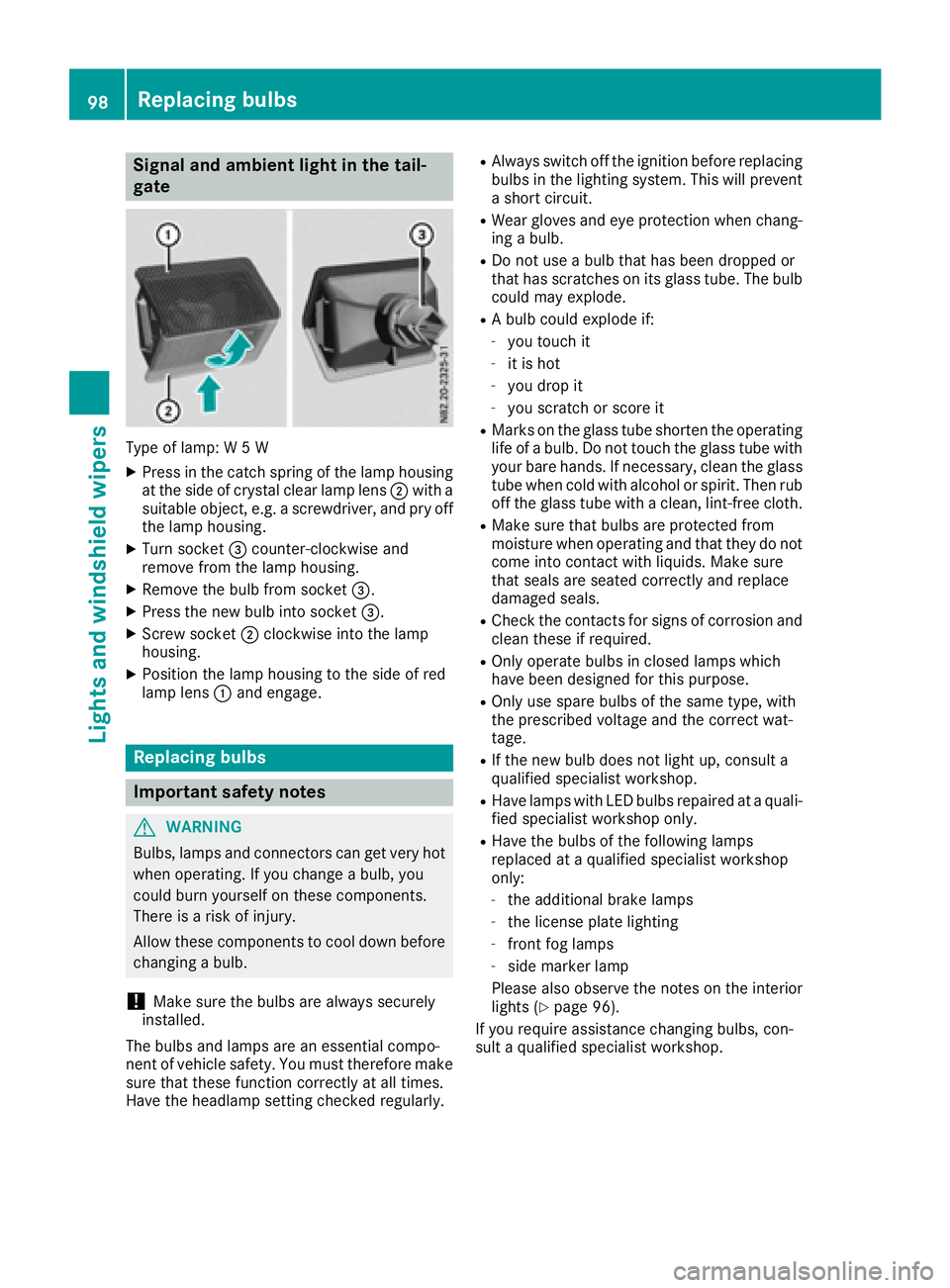
Signal and ambient light in the tail-
gate
Type of lamp:W5W
XPress in the catch spring of the lamp housing
at the side of crystal clear lamp lens ;with a
suitable object ,e.g. ascrewdriver, and pry off
the lamp housing.
XTurn socket =counter-clockwise and
remove from the lamp housing.
XRemove the bulb from socket =.
XPress the new bulb into socket =.
XScrew socket;clockwise into the lamp
housing.
XPosition the lamp housing to the side of red
lamp lens :and engage.
Replacing bulbs
Important safety notes
GWARNING
Bulbs, lamps and connectors can get very hot
when operating. If you change abulb, you
could burn yourself on these components.
There is arisk of injury.
Allow these components to cool down before
changing abulb.
!Make sure the bulbs are always securely
installed.
The bulbs and lamps are an essential compo-
nent of vehicle safety. You must therefore make
sure that these function correctly at all times.
Have the headlamp settingc hecked regularly.
RAlways switch off the ignition before replacing
bulbs in the lighting system. This will prevent
as hort circuit.
RWear gloves and eye protection when chang-
ing abulb.
RDo not use abulb that has been dropped or
that has scratches on its glass tube. The bulb
could may explode.
RAb ulb could explode if:
-you touch it
-it is hot
-you drop it
-you scratchors core it
RMarks on the glass tube shorten the operating
life ofabulb. Do not touch the glass tube with
your bare hands. If necessary, clean the glass
tube when cold with alcohol or spirit. Then rub
off the glass tube with aclean, lint-free cloth.
RMake sure that bulbs are protected from
moisture when operating and that they do not
come into contact with liquids. Make sure
that seals are seated correctly and replace
damaged seals.
RCheck the contacts for signs of corrosion and
clean these if required.
ROnly operate bulbs in closed lamps which
have been designed for this purpose.
ROnly use spare bulbs of the same type, with
the prescribed voltage and the correct wat-
tage.
RIf the new bulb does not light up, consult a
qualified specialist workshop.
RHave lamps with LED bulbs repaired at aquali-
fied specialist workshop only.
RHave the bulbs of the following lamps
replaced at aqualified specialist workshop
only:
-the additional brake lamps
-the license plate lighting
-front fog lamps
-side marker lamp
Please also observe the notes on the interior
lights (
Ypage 96).
If you require assistance changing bulbs, con-
sult aqualified specialist workshop.
98Replacing bulbs
Lights and windshieldw ipers
Page 102 of 310
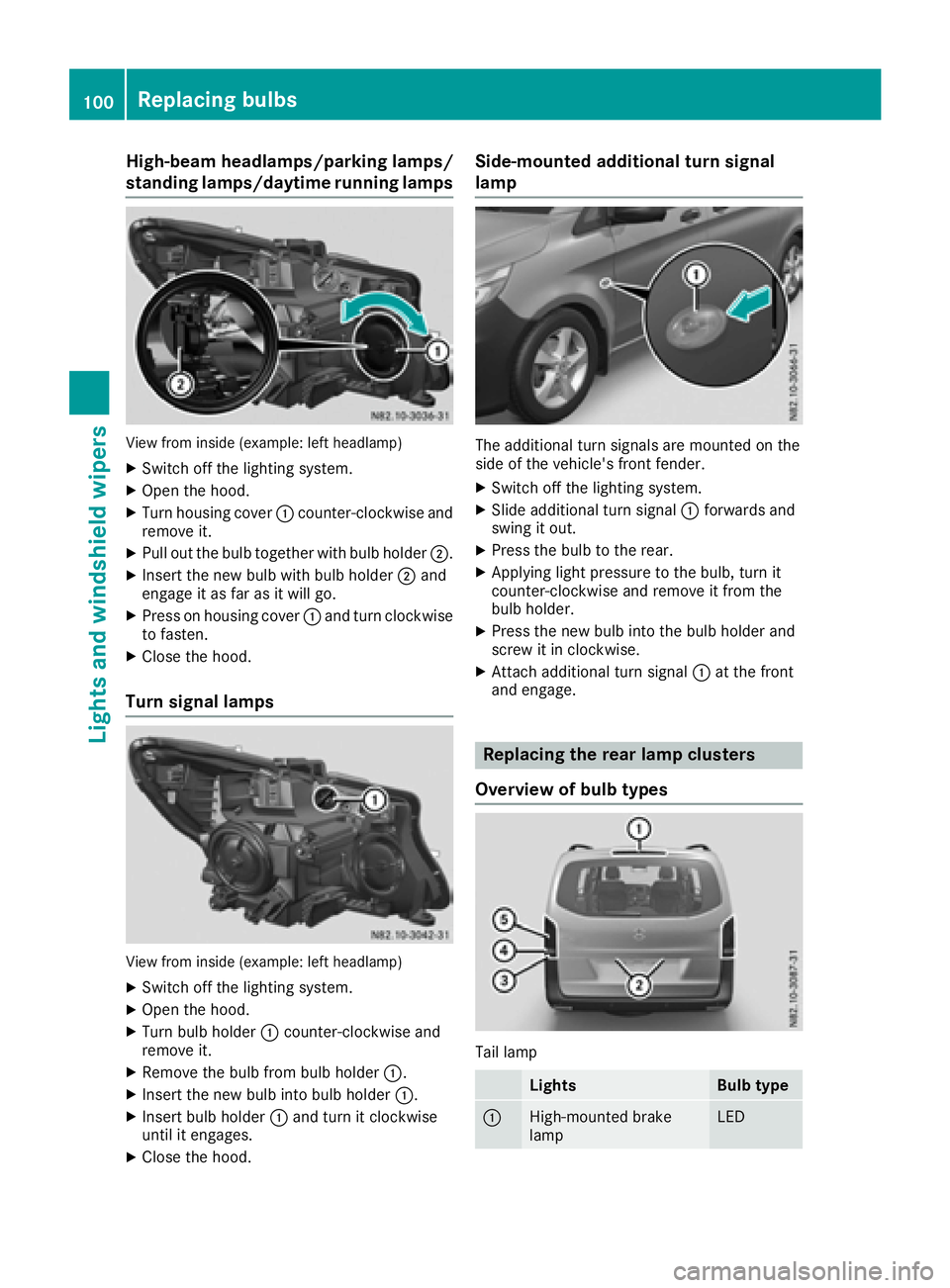
High-beam headlamps/parkinglamps/
standing lamps/daytime running lamps
View from insid e(example: left headlamp)
XSwitch off the lighting system.
XOpen the hood.
XTurn housing cover :counter-clockwise and
remove it.
XPul lout the bul btogether with bul bholder ;.
XInsert the new bul bwith bul bholder ;and
engag eitasf ar as it wil lgo.
XPress on housing cover :and turn clockwise
to fasten.
XClose the hood.
Turn signal lamps
View from insid e(example: left headlamp)
XSwitch off the lighting system.
XOpen the hood.
XTurn bul bholder :counter-clockwise and
remove it.
XRemove the bul bfrom bul bholder :.
XInsert the new bul binto bul bholder :.
XInsert bul bholder :and turn it clockwise
until it engages.
XClose the hood.
Side-mounted additional turn signal
lamp
The additiona lturn signals are mounted on the
side of the vehicle's front fender.
XSwitch off the lighting system.
XSlide additiona lturn signal :forwards and
swing it out.
XPress the bul btothe rear.
XApplying light pressure to the bulb, turn it
counter-clockwise and remove it from the
bulbh older.
XPress the new bul binto the bul bholder and
screw it in clockwise.
XAttach additiona lturn signal :at the front
and engage.
Replacing the rear lamp clusters
Overview of bulb types
Tai llamp
LightsBulb type
:High-mounted brake
lampLED
100Replacing bulbs
Lights and windshield wipers
Page 103 of 310
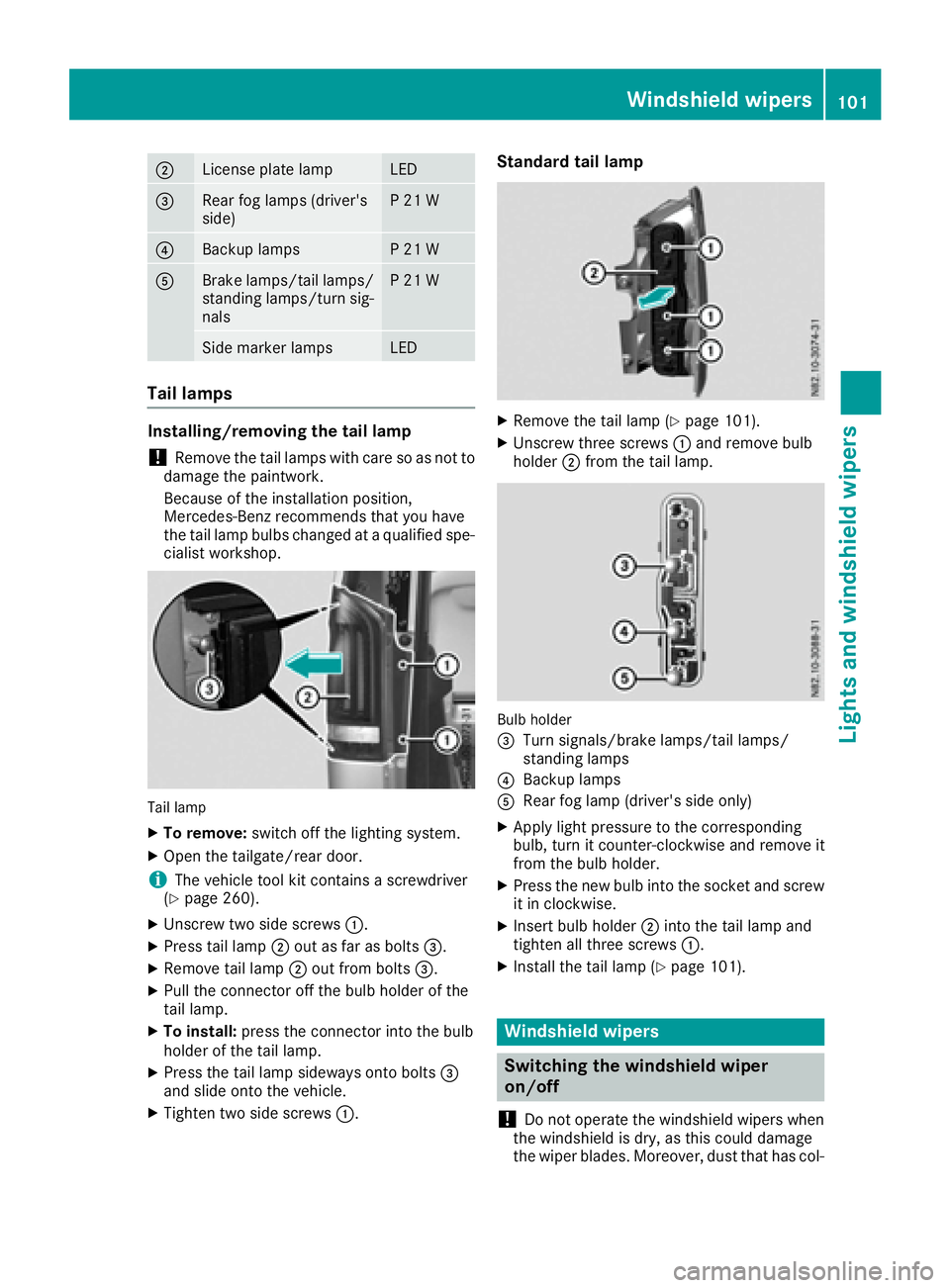
;License plate lampLED
=Rearfog lamp s(driver's
side)P21W
?Backup lampsP21W
ABrake lamps/tail lamps/
standing lamps/turn sig-
nalsP21W
Side marker lampsLED
Tail lamps
Installing/removing the tail lamp
!Remove the tail lamp swith care so as not to
damage the paintwork.
Because of the installation position,
Mercedes-Benz recommends that you have
the tail lamp bulbs changed at aqualifieds pe-
cialist workshop.
Tail lamp
XTo remove: switch off the lighting system.
XOpen the tailgate/rear door.
iThe vehicle tool kit contains ascrewdriver
(Ypage 260).
XUnscrew two side screws :.
XPress tail lamp;out as far as bolts =.
XRemove tail lamp;out from bolts =.
XPullthe connector off the bul bholderoft he
tail lamp.
XTo install: press the connector into the bulb
holderoft he tail lamp.
XPress the tail lamp sideways onto bolts =
and slideo nto the vehicle.
XTighten two side screws :.
Standard tail lamp
XRemove the tail lamp (Ypage 101).
XUnscrew three screws:and remove bulb
holder ;from the tail lamp.
Bulb holder
=
Turn signals/brake lamps/tail lamps/
standing lamps
?Backup lamps
ARea rfog lamp (driver's side only)
XApply lightp ressure to the corresponding
bulb, turn it counter-clockwise and remove it
from the bul bholder.
XPress the new bul binto the socket and screw
it in clockwise.
XInsert bul bholder ;into the tail lamp and
tighten all three screws :.
XInstall the tail lamp (Ypage 101).
Windshield wipers
Switching the windshieldw iper
on/off
!
Do not operate the windshield wipers when
the windshield is dry, as this could damage
the wiper blades. Moreover, dust that has col-
Windshield wipers101
Lights and windshield wipers
Z
Page 127 of 310
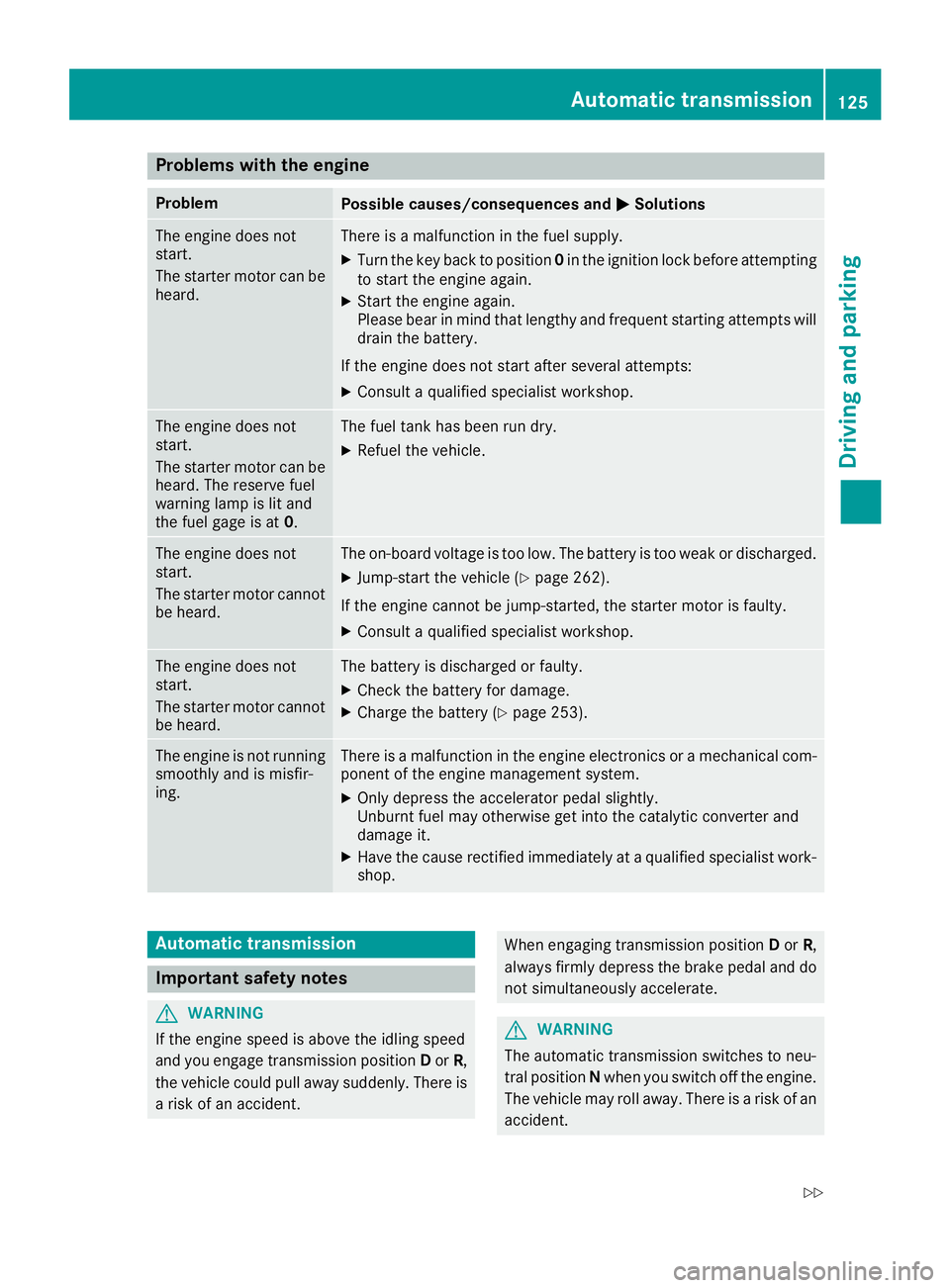
Problems with the engine
ProblemPossible causes/consequences andMSolutions
The engine does not
start.
The starter motor can be
heard.There isamalfunction in the fuel supply.
XTurn the key back to position 0in the ignition lock before attempting
to start the engine again.
XStart the engine again.
Please bear in mind that lengthy and frequent startin gattempt swill
drain the battery.
If the engine does not start after several attempts:
XConsult aqualified specialist workshop.
The engine does not
start.
The starter motor can be
heard. The reserve fuel
warning lamp is lit and
the fuel gage is at 0.The fuel tank has been run dry.
XRefuel the vehicle.
The engine does not
start.
The starter motor cannot
be heard.The on-board voltage is too low. The battery is too weak or discharged.
XJump-start the vehicle (Ypage 262).
If the engine cannot be jump-started, the starter motor is faulty.
XConsult aqualified specialist workshop.
The engine does not
start.
The starter motor cannot
be heard.The battery is discharged or faulty.
XCheck the battery for damage.
XCharge the battery (Ypage 253).
The engine is not running
smoothly and is misfir-
ing.There is amalfunction in the engine electronics or amechanical com-
ponent of the engine management system.
XOnly depress the accelerator pedal slightly.
Unburnt fuel may otherwise get into the catalytic converter and
damage it.
XHave the cause rectified immediately at aqualified specialist work-
shop.
Automatic transmission
Important safety notes
GWARNING
If the engine speed is above the idling speed
and you engage transmission position Dor R,
the vehicle could pull away suddenly. There is
ar isk of an accident.
When engaging transmission position Dor R,
always firmly depress the brake pedal and do
not simultaneously accelerate.
GWARNING
The automatic transmission switches to neu-
tral position Nwhen you switch off the engine.
The vehicle may roll away.T here isarisk of an
accident.
Automatic transmission125
Driving and parking
Z
Page 129 of 310
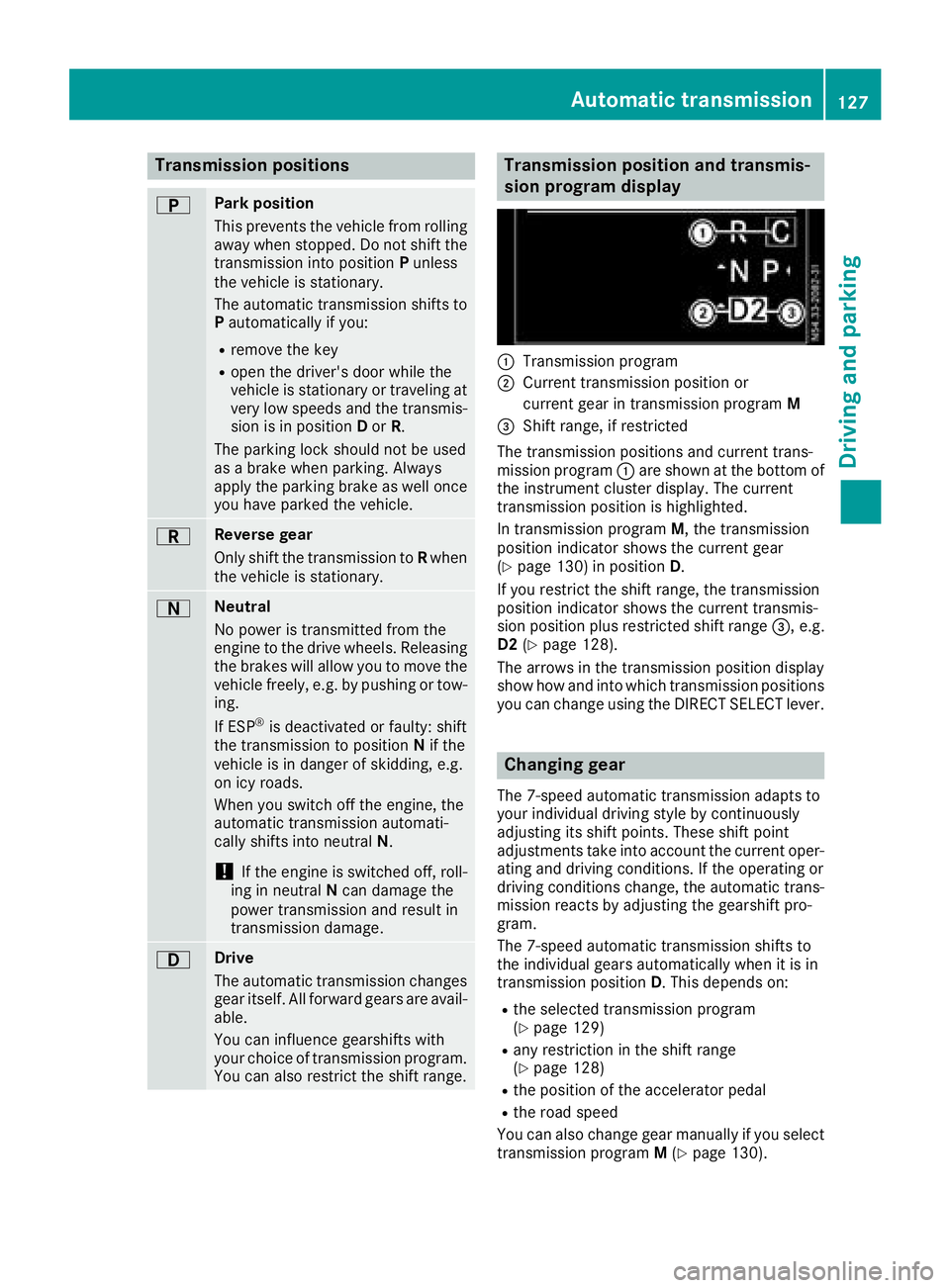
Transmission positions
BPark position
Thisprevents the vehicl efromr olling
away when stopped. Do not shift the
transmission into position Punless
the vehicl eisstationary.
The automatic transmission shifts to P automaticall yifyou:
Rremove the key
Ropen the driver's door whil ethe
vehicl eisstationar yortraveling at
ver ylow speeds and the transmis-
sion is in position Dor R.
The parkin gloc ks houl dnot be used
as ab rake when parking. Always
appl ythe parkin gbrake as well once
yo uh avep arked the vehicle.
CRevers egear
Onlys hift the transmission to Rwhen
the vehicl eisstationary.
ANeutral
No powe ristransmitted fromt he
engine to the drive wheels .Releasi ng
the brakes will allo wyouto mov ethe
vehicl efreely, e.g .byp ushing or tow-
ing.
If ESP
®is deactivated or faulty: shift
the transmission to position Nif the
vehicl eisind angerofs kidding,e.g.
on icy roads.
When yo uswitch off the engine ,the
automatic transmission automati-
cally shifts into neutral N.
!If the engine is switched off ,roll-
ing in neutral Ncan damage the
powe rtransmission and resul tin
transmission damage.
7Drive
The automatic transmission changes
gear itself. All forward gear sareavail-
able.
Yo uc an influence gearshifts with
your choice of transmission program.
Yo uc an also restric tthe shift range.
Transmission position and transmis-
sion program display
:Transmission program
;Current transmission positio nor
current gear in transmission program M
=Shift range,ifrestricted
The transmission positions and current trans-
mission program :ares hown at the bottom of
the instrument cluster display. The current
transmission positio nish ighlighted.
In transmission program M,the transmission
positio nindicator shows the current gear
(
Ypage 130 )inposition D.
If yo urestric tthe shift range ,the transmission
positio nindicator shows the current transmis-
sion positio nplusr estricted shift range =,e.g.
D2 (
Ypage 128).
The arrow sinthe transmission positio ndisplay
sho whow and into which transmission positions
yo uc an change using the DIRECT SELECTl ever.
Changin ggear
The 7-spee dautomatic transmission adapts to
your individual drivin gstyle by continuously
adjusting its shift points .These shift point
adjustments take into account the current oper-
ating and drivin gconditions. If the operating or
drivin gconditions change ,the automatic trans-
mission reacts by adjusting the gearshift pro-
gram.
The 7-spee dautomatic transmission shifts to
the individual gear sautomaticall ywhenitisi n
transmission position D.T hisd epen ds on:
Rthe selecte dtransmission program
(Ypage 129)
Rany restrictio ninthe shift range
(Ypage 128)
Rthe positio nofthe accelerator pedal
Rthe roa dspeed
Yo uc an also change gear manuall yifyouselect
transmission program M(
Ypage 130).
Automati ctransmission127
Driving an dparking
Z