sensor MERCEDES-BENZ METRIS 2016 MY16 Operator’s Manual
[x] Cancel search | Manufacturer: MERCEDES-BENZ, Model Year: 2016, Model line: METRIS, Model: MERCEDES-BENZ METRIS 2016Pages: 310, PDF Size: 7.28 MB
Page 67 of 310
The spinningofthe wheels results in acutting
action for better traction on loose surfaces.
RTraction control is still activated
RESP®still provides support when you brake.
Dependin gonthe equipment in the vehicle, you
can activate or deactivate ESP
®when the
engine is runnin gbyusing the åbutton or by
using the on-board computer:
Ron vehicles without steerin gwheel buttons
(Ypage 173)
Ron vehicles with steerin gwheel buttons
(Ypage 183)
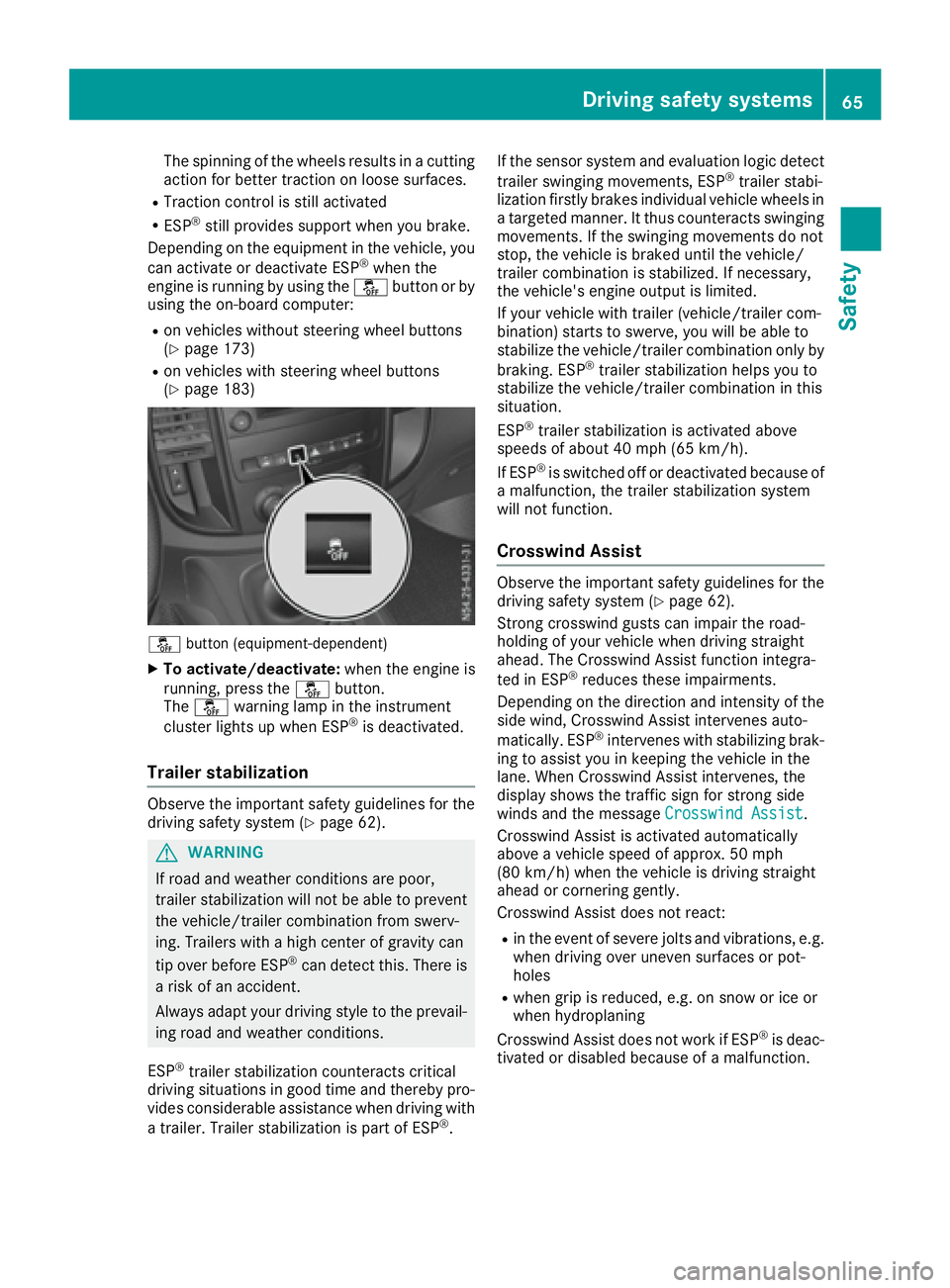
å button (equipment-dependent)
XTo activate/deactivate: when the engine is
running, press the åbutton.
The å warning lamp in the instrument
cluster lights up when ESP
®is deactivated.
Trailer stabilization
Observe the important safety guidelines for the
driving safety system (Ypage 62).
GWARNING
If road and weather conditions are poor,
trailer stabilization will not be able to prevent
the vehicle/trailer combination from swerv-
ing. Trailers with ahigh center of gravity can
tip over before ESP
®can detect this. There is
ar isk of an accident.
Always adapt your driving style to the prevail-
ing road and weather conditions.
ESP
®trailer stabilization counteracts critical
driving situations in good time and thereby pro- vides considerable assistance when driving with
at railer. Trailer stabilization is part of ESP
®. If the sensor system and evaluation logic detect
trailer swinging movements, ESP
®trailer stabi-
lization firstly brakes individual vehicle wheels in
at argeted manner .Itthus counteracts swinging
movements. If the swinging movements do not
stop, the vehicle is braked until the vehicle/
trailer combination is stabilized. If necessary,
the vehicle's engine output is limited.
If your vehicle with trailer (vehicle/trailer com-
bination) start stoswerve, you will be able to
stabilize the vehicle/trailer combination only by
braking. ESP
®trailer stabilization helps you to
stabilize the vehicle/trailer combination in this
situation.
ESP
®trailer stabilization is activated above
speeds of about 40 mph (65 km/h).
If ESP
®is switched off or deactivated because of
am alfunction, the trailer stabilization system
will not function.
Crosswind Assist
Observe the important safety guidelines for the
driving safety system (Ypage 62).
Strong crosswind gusts can impair the road-
holding of your vehicle when driving straight
ahead. The Crosswind Assist function integra-
ted in ESP
®reduces these impairments.
Dependin gonthe direction and intensity of the
side wind, Crosswind Assist intervenes auto-
matically. ESP
®intervenes with stabilizing brak-
ing to assist you in keeping the vehicle in the
lane. When Crosswind Assist intervenes, the
display shows the traffic sign for stron gside
winds and the message Crosswind Assist
.
Crosswind Assist is activated automatically
above avehicle speed of approx. 50 mph
(80 km/h) when the vehicle is driving straight
ahead or cornering gently.
Crosswind Assist does not react:
Rin the event of severe jolts and vibrations, e.g.
when driving over uneven surfaces or pot-
holes
Rwhen grip is reduced, e.g. on snow or ice or
when hydroplaning
Crosswind Assist does not work if ESP
®is deac-
tivated or disabled because of amalfunction.
Driving safety systems65
Safety
Z
Page 94 of 310
Useful information
This Operator's Manual describes all models as
well as standard and optional equipment of your
vehicle that were available at the time of going
to print.Country-specific variation sare possi-
ble. Note that your vehicle may not be equipped
with all of the described functions. This also
applies to system sand function srelevantt o
safety.
Read the information on qualified specialist
workshops (
Ypage 29).
Exterior lighting
Important safetyn otes
For reasonsofsafety, Mercedes-Benz recom-
mends that you drive with the lights switched on
even during the daytime. There may be differ-
ences in operatio ndue to legal requirements
and voluntary recommendations in some coun-
tries.
Light switch
Operation
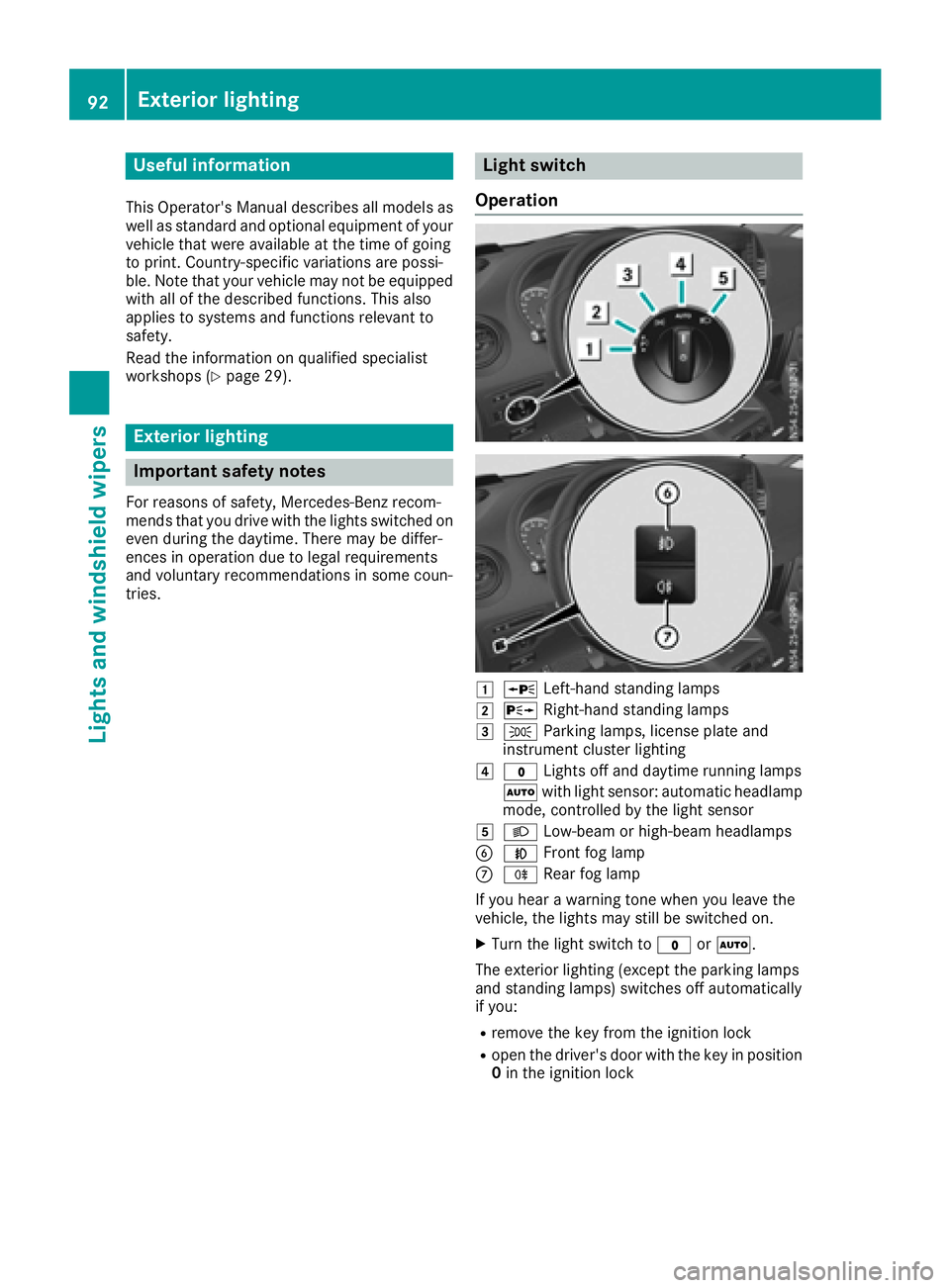
1W Left-han dstanding lamps
2X Right-hand standing lamps
3TParkin glamps, licens eplate and
instrumentc luster lighting
4$Lightso ff and daytime running lamps
à with light sensor: automatic headlamp
mode, controlled by the light sensor
5L Low-beam or high-beam headlamps
BNFrontf og lamp
CRRear fog lamp
If you hear awarnin gtonew hen you leave the
vehicle, the lights may still be switched on.
XTurn the light switc hto$ orÃ.
The exterior lightin g(except the parkin glamps
and standing lamps) switches off automatically
if you:
Rremovet he key from the ignition lock
Ropen the driver'sd oor with the key in position
0 in the ignition lock
92Exterior lighting
Lights and windshield wipers
Page 95 of 310
Low-beamheadlamps
When theignitio nisswitche donand thelight
switch is in the Lposition,t heparking lamps
and low-beam headlamps are switche doneven
if th elight sensor does not sense dark ambient
light.T his is particularly useful when there is fog
or rain.
XTo switch on: turnthe key to position 2in the
ignitio nlockors tart th eengine.
XTurn th elight switch to position L.
The L indicator lamp in th einstrument
cluster lightsu p.
Daytime running lamps
XTo switch on: turnthe light switch to the
$ orà position.
Automatic headlamp mode
GWARNING
When th elight switch is set to Ã,thelow-
beam headlamps may not be switche don
automatically if there is fog ,sno woro ther
cause sofpoor visibilityd ue to theweather
conditionss uch as spray. Thereisar isk of an
accident.
In such situations ,tur nt he light switch to
L.
Automatic headlampm ode is onlyadriving aid.
You are responsible for th evehicle lighting at all
times.
When th eparking lamps and low-beam head-
lamps are switche don, th egreen T (parking
lamps)a ndL (low-beam headlamps) indica-
to rlamps in th einstrumentc luster light up.
à is thepreferred light switch setting. The
light settin gisautomatically selected according
to th ebrightnes softheambientl ight (excep-
tion: poor visibilityd ue to weather conditions,
such as fog ,sno wors pray):
RKey in position 1in th eignitio nlock: th epark-
ing lamps are switche don/off automatically
depending on th ebrightnes softheambient
light.
RWhen th eengine is on: depending on the
ambientl ight,thedaytim erunnin glamps or
th ep arking lamps and low-beam headlamps
are switche don/off automatically.
XTo switch on automatic headlamp mode:
turnthe light switch to Ã.
Fog lamps/rear fog lamp
You can onlyswitch th efog lamps on or off
manually in vehicle swhichh ave fog lamps
installed.
Front fog lamps help you to see and be seen in
conditionsofp oor visibilitydue to fog or pre-
cipitation. They can onl ybeoperated together
with th eparking lamps or with th elow-beam
headlamps.
The rear fog lamp improves visibilityofy our
vehicle for th etraffic behindint heeven tof
heavy fog .Observe th elegal requirements of the
countr yyou are currently in when usingt herear
fog lamp.
XTurn th elight switch to LorÃ.
XTurn th ekey to position 2in th eignitio nlock
or start th eengine.
XTo switch th efront fog lamps on/off: press
the N button.
When th egreen N indicator lamp in the
instrumentc luster goes on, th efog lamps are
switche don.
XTo switch th erearfog lamps on/off: press
the R button.
When th eyellow Rindicator lamp in the
instrumentc luster goes on, th erear fog lamp
is switche don.
Standing lamp
!If th ebattery charge is veryl ow, thestand-
ing lamps will switch off automatically to ena-
ble th enexte ngine start.A lways park your
vehicle in accordance with legal regulations,
in as ecure and adequately lit location.A void
leavin gthe T parking lamps on for several
hours. If possible, switch on th eright X or
left W standin glamp.
Switching on th estandin glamps ensures that
th ec orresponding side of th evehicle is illumi-
nated.
Exterior lighting93
Lightsa nd windshield wipers
Z
Page 104 of 310
lected on the windshield can scratchthe glass
if wiping takes place when the windshield is
dry.
If it is necessary to switc honthe windshield
wipers in dry weathe rconditions, always use
washer fluid when operating the windshield
wipers.
!If the windshield wipers leave smearsont he
windshield after the vehicle has been washed
in an automatic car wash, wax or other resi-
dues may be the reason for this .Clean the
windshield using washer fluid after washing
the vehicle in an automatic car wash.
!Intermitten twiping with rain sensor: due to
optical influences and the windshield becom-
ing dirtyind ry weatherconditions, the wind-
shield wipers may be activate dinadvertently.
This could the ndamage the windshield wiper
blades or scratc hthe windshield.
For this reason,y ou should always switc hoff
the windshield wipers in dry weather.
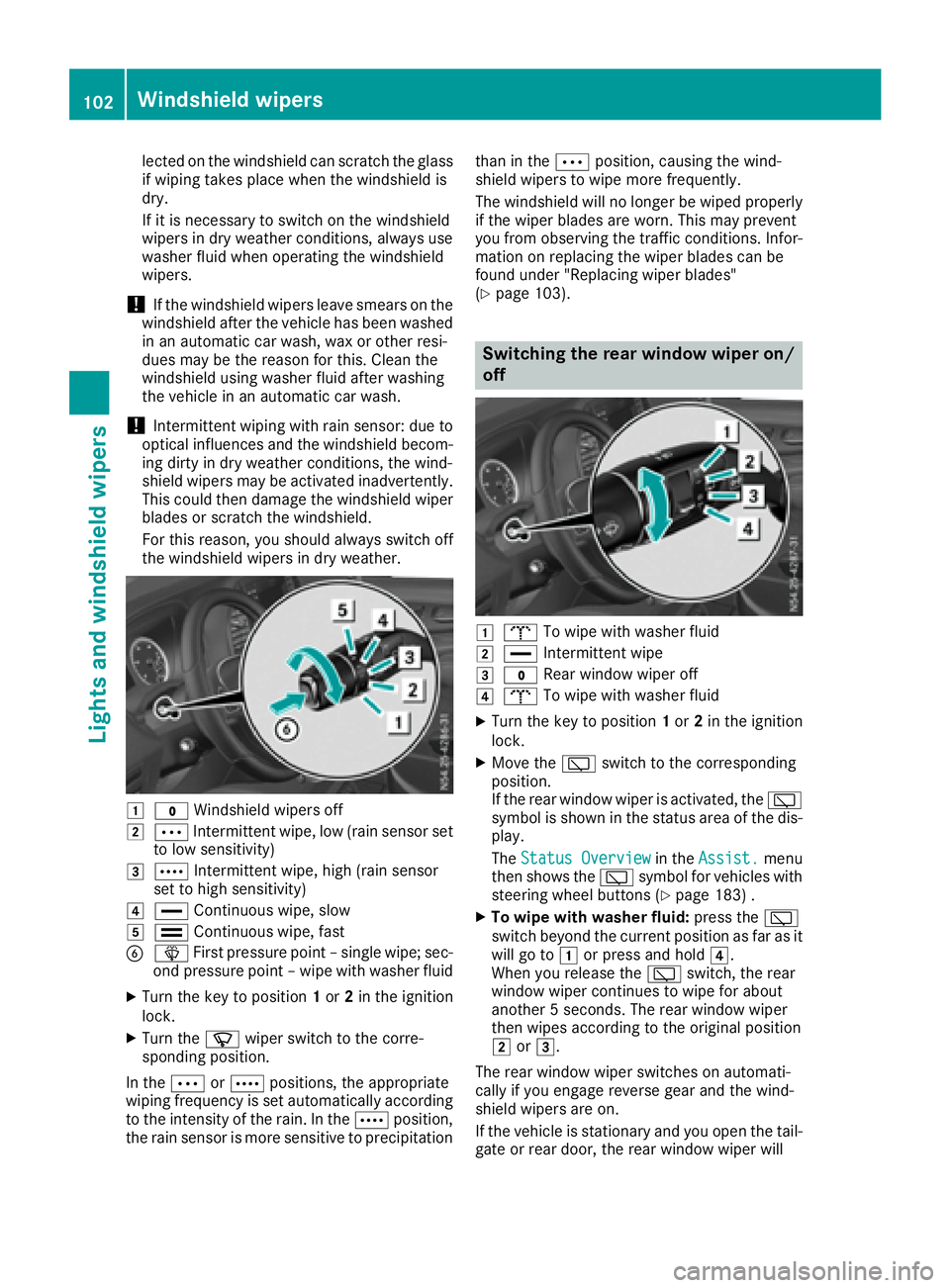
1$ Windshield wipers off
2ÄIntermitten twipe, low (rain sensor set
to low sensitivity)
3Å Intermitten twipe, high (rain sensor
set to high sensitivity)
4° Continuous wipe, slow
5¯Continuous wipe, fast
BîFirstpressure point –single wipe; sec-
ond pressure point –wipe with washer fluid
XTurn the key to position 1or 2in the ignition
lock.
XTurn the íwiper switc htothe corre-
sponding position.
In the ÄorÅ positions ,the appropriate
wiping frequenc yisset automatically according
to the intensity of the rain. In the Åposition,
the rain sensor is more sensitiv etoprecipitation than in the
Äposition, causin gthe wind-
shield wipers to wipe more frequently.
The windshield will no longer be wiped properly
if the wiper blades are worn.T his may prevent
you fromo bservingthe traffic conditions. Infor-
matio nonr eplacing the wiper blades can be
foundu nder "Replacingw iper blades"
(
Ypage 103).
Switchin gthe rea rwindow wiper on/
off
1b To wipe with washer fluid
2°Intermitten twipe
3$ Rear window wiper off
4bTo wipe with washer fluid
XTurn the key to position 1or 2in the ignition
lock.
XMove the èswitchtot he corresponding
position.
If the rear window wiper is activated, the è
symbol is shown in the status area of the dis-
play.
The Status Overview
in the Assist.menu
the nshows the èsymbol for vehicles with
steeringw heel buttons (
Ypage 183) .
XTo wipe with washer fluid: press theè
switc hbeyond the current position as far as it
will go to 1or press and hold 4.
When you release the èswitch, the rear
window wiper continues to wipe for about
another 5seconds. The rear window wiper
the nw ipes accordingtot he original position
2 or3.
The rear window wiper switches on automati-
cally if you engag ereverse gear and the wind-
shield wipers are on.
If the vehicle is stationar yand you open the tail-
gate or rear door, the rear window wiper will
102Windshield wipers
Lightsa nd windshield wipers
Page 121 of 310
Useful information
This Operator's Manual describes all models as
well as standard and optional equipment of your
vehicle that were available at the time of going
to print.Country-specific variation sare possi-
ble. Note that your vehicle may not be equipped
with all of the described functions. This also
applies to system sand function srelevantt o
safety.
Read the information on qualified specialist
workshops (
Ypage 29).
Breaking-in notes
Important safetyn otes
In certain drivingand drivingsafetysystems, the
sensors adjust automatically while acertain dis-
tance is being driven after the vehicle has been
delivered or after repairs. Full system effective- ness is not reached until the end of this teach-in
procedure.
New or replaced brake pads and brake discs
only reach their optimal brakin geffecta fter a
few hundred kilometers of driving. Until then,
compensat efor this by applying greater forcet o
the brake pedal.
The first 1000 miles (1500 km)
For the servicel ife and economy of your vehicle
it is crucial that you break in the engin ewith due
care.
RTherefore, protect the engin efor the first
1000m iles (1500k m) by drivingatv arying
vehicle and engin espeeds.
RAvoid overstraining the vehicle and high
engin espeeds during this period, e.g. driving
at full throttle. Do not exceed Øof the max-
imum speed for each gear.
RDo not change down agear manually in order
to brake.
RTry to avoid depressingt he accelerator pedal
beyond the point of resistance (kickdown).
After 1000m iles (1500km), you can increase
the engin espeed gradually and accelerate the
vehicle to full speed.
iYou should also observet hesenotes on
breaking-in if the engin eorparts of the drive
train on your vehicle have been replaced.
Driving
Important safetyn otes
GWARNING
Flammable materials introduced through
environmental influence or by animals can
ignit eifinc ontact with the exhaust system or
parts of the engin ethat heat up. There is arisk
of fire.
Carry out regular checks to make sure that
ther eare no flammable foreign materials in
the engin ecompartmen torinthe exhaust
system.
GWARNING
If you switc hoff the ignition while driving,
safety-relevant function sare only available
with limitations, or not at all. This could affect, for example, the power steering and the brake
boosting effect. You will require considerably
more efforttos teer and brake. There is arisk
of an accident.
Do not switc hoff the ignition while driving.
GWARNING
If the parkin gbrake has not been fully
released when driving, the parkin gbrake can:
Roverheat and cause afire
Rlose its hold function.
There is arisk of fire and an accident. Release
the parkin gbrake fully before drivingo ff.
!Warm up the enginequickly. Do not use the
engine's full performanc euntil it has reached
operatin gtemperature.
Only shift the automatic transmission to the
desired drive position when the vehicle is sta-
tionary.
Where possible, avoid spinning the drive
wheels when pulling away on slippery roads.
You could otherwise damage the drive train.
Driving119
Driving and parking
Z
Page 145 of 310
RESP®intervenes or youdeactivate ESP®
Rthere is amalfunctio ninthe ESP®or ABS sys-
tem
If cruis econtro lautomaticall ydeactivates, a
warning tone sounds and the Cruise
ControlOffmessage appearsbriefl yint he display.
The V symbo land the displa yofthe stored
spee dint he header or in the status area of the
displa yarethenn ot shown.
Problems with cruis econtrol
The spee dcanno tbes et when cruis econtro lis
activated.
The displa yisshowing amessage of high priority
and canno ttherefore sho wachange in speed.
XProcee dasinstructed by the message in the
display.
COLLISIO NPREVENTION ASSIST
General notes
COLLISION PREVENTION ASSIST help syou:
Rto minimize the ris kofafront-end collision
with adetecte dobstacle in the path of your
vehicle
Rto reduce the consequences of afront-end
collision
The system uses rada rsensor stod etect vehi-
cle sinf ront.
COLLISION PREVENTION ASSIST consists of the
distance warning functio nand Adaptive Brake
Assist.
If COLLISION PREVENTION ASSIST is malfunc-
tioning ,the displa yshows acorresponding mes-
sage (
Ypage 213).
Distance warning function
Important safety notes
GWARNING
The distance warning functio ndoesn ot react:
Rto people or animals
Rto oncomin gvehicles
Rto crossing traffic
Rwhen cornering
Thus, the distance warning functio ncannot
provid eawarning in al lcritica lsituations.
There is ariskofana ccident.
Alway spaycarefu lattentio ntothe traffics it-
uatio nand be ready to brake.
GWARNING
The distance warning functio ncanno talway s
clearly identify objects and comple xtraffic
situations.
In such cases, the distance warning function
may:
Rgive an unnecessary warning
Rnot give awarning
There is ariskofana ccident.
Alway spaycarefu lattentio ntothe traffics it-
uatio nand do not rel ysolel yont he distance
warning function.
In particular ,the detection of obstacle scan be
impaired in the cas eof:
Rdirt on the sensor soranything else covering
the sensors
Rit is snowing or raining heavily
Rthere is interferenc efromo therradar sources
Rthe possibility of strong rada rreflections, for
example, in parkin ggarages .
Ranarrow vehicl etraveling in front, e.g .a
motorbike
Rav ehicl etraveling in front on adifferent line
Due to the nature of the system ,particularly
complicate dbutnon-critical drivin gconditions
maya lsoc ause the system to displa yawarning.
If yo ufailtoa dapt your drivin gstyle ,the dis-
tance warning functio ncan neitherr educe the
ris kofana ccident nor override the laws of phys-
ics .The distance warning functio ncanno ttake
into account road, weather or trafficc onditions.
The distance warning functio ni
so nlyana id.
You
ar er esponsibl efor the distance to the vehicl ein
front, for vehicl espeed, braking in good time
and for staying in your lane.
Following damage to the front end of the vehicle,
have the configuratio nand operatio nofthe
rada rsensor checked at aquali fied specialist
workshop .Thisa lsoa pplies to collisions at slow
speeds where there is no visible damage to the
front of the vehicle.
Driving system s143
Driving an dparking
Z
Page 146 of 310
If you change wheel size, make sure they corre-
spond to the correct wheel size category
(
Ypage 267). If the category is changed without
recoding the control units in the vehicle,t he
functioning of the distance warning feature may
be impaired. COLLISION PREVENTION ASSIST
may then detect amalfunction and switch itself
off.
Operation
XTo activate/deactivate: activate or deacti-
vate the distance warning function in the on-
board computer (
Ypage 184).
If the distance warning function of the COL-
LISION PREVENTION ASSISTisa ctivated, the
display shows the Äsymbol:
Rin the header
Rin the Status Overviewof the Assist.menu (Ypage 183)
At speedsuptoa pprox20m ph (30 km/h) the
display in vehiclesw ith Active Parking Assist
first shows the ístatus indicator. Only from
as peed of abou t20m ph (30 km/h )does the
display show the Äsymbolinstead of the
í status indicator.
The distance warning function can help you to
minimize the risk of afront-end collision with a
vehicle ahea dorreduce the effects of such a
collision. With the help of the rada rsensor sys-
tem, the distance warning function can detect
obstacles that are in the path of you rvehicle for
an extended period of time. If the distance warn-
ing function detects that there is arisk of acol-
lision, you wil lbewarned visually and, where
necessary ,acoustically.W ithout yourinterven-
tion, the distance warning function cannot pre-
vent acollision.
The distance warning function issues awarning
at speeds:
Rfrom abou t4mph (7 km/h) if you approach a
vehicle traveling in front or astationary vehi-
cle very quickly. The ·warning lamp in the
instrument cluster flashe sand an intermittent
warning tone also sounds.
At speedsuptoa bout45mph (70 km/h), the
system also detects stationary obstacles ,for
example stationary or parked vehicles.
XBrake immediately until the distance to the
obstacle increases and the risk of acollision
has passed.
or
XTake evasive action, provideditiss afe to do
so.
Adaptive Brake Assist
General notes
Adaptive Brake Assist evaluates the traffic sit-
uatio nwith the help of the rada rsensor system
and can detect obstacle swhich have been in
you rvehicle's path for an extended period of
time. From speedsa bove4mph (7 km/h), Adap-
tive Brake Assist aid syou in braking during haz-
ardou ssituations.
Up to aspeed of approximately 125 mph
(200 km/h), Adaptive Brake Assist is capable of
reacting to moving obstacle sthat have already
been detected as such at least once over the
period of observation.
Important safety notes
GWARNING
Adaptive Brake Assist does not react:
Rto peopleora nimals
Rto oncoming vehicles
Rto crossing traffic
Rto stationary obstacles
Rwhen cornering
As aresult, the Adaptive Brake Assist may not
intervene in all critical conditions. There is a
risk of an accident.
Alway spay careful attention to the traffic sit-
uatio nand be ready to brake.
GWARNING
Adaptive Brake Assist cannot always clearly
identify objects and complex traffic situa-
tions.
In such cases, Adaptive Brake Assist can:
Rintervene unnecessarily
Rnot intervene
There is arisk of an accident.
144Driving systems
Driving and parking
Page 147 of 310
Alwayspaycarefu lattentio ntothe traffic sit-
uatio nand be ready to brake. Terminate the
interventio ninanon-critica ldriving situation.
In particular, the detection of obstacle scan be
impaired in the cas eof:
Rdirt on the sensors or anything else covering
the sensors
Rsnow or heavy rain
Rinterference from othe rradar sources
Rstrong rada rreflections, for example, in park-
ing garages
Ran arrow vehicl etraveling in front, e.g .a
motorbike
Rav ehicl etraveling in front on adifferent line
Due to the nature of the system ,particularly
complicate dbutnon-critica ldriving conditions
maya lsoc ause Adaptive Brake Assist to inter-
vene.
If yo ufailtoa dapt your driving style ,Adaptive
Brake Assist can neither reduce the ris kofacci-
dent nor override the laws of physics. Adaptive
Brake Assist canno ttake into account road,
weather or traffic conditions. Adaptive Brake
Assist is onlyana id.Y ou arer esponsibl efor the
distance to the vehicl einfront, for vehicle
speed ,braking in goo dtime and for staying in
your lane.
Following damage to the front end of the vehicle,
have the configuratio nand operatio nofthe
rada rsensor checked at aquali fied specialist
workshop.T hisa lsoa pplies to collisions at slow
speed swhe
re the rei
snov isible damage to the
front of the vehicle.
If yo uchange whee lsize, make sure they corre-
spond to the correct whee lsizec ategory
(
Ypage 267). If the categor yischangedw ithout
recoding the contro lunits in the vehicle, the
functioning of Adaptive Brake Assist mayb e
impaired .COL LISION PREVENTION ASSIST may
then detect amalfunctio nand switch itsel foff.
If Adaptive Brake Assist is not availabl edueto a
malfunctio ninthe rada rsensor system ,the
brake system remains availabl ewithf ullb rake
boosting effect and BAS.
Operation
With the hel pofthe rada rsensor system ,Adap-
tive Brake Assist can detect obstacle sthath ave
been in the path of your vehicl efor an extended
perio doft ime.Adaptive Brake Assist does not
react to stationar yobstacles. If Adaptive Brake Assist detects
ariskofc ollision with avehicle
traveling in front or with astationar yobstacle,
the system calculate sthe braking forc eneces-
sary to avoidt hiscollision. If yo uapply the
brakes forcefully, Adaptive Brake Assist will
automaticall yincrease the braking forc etoa
level suitabl efor the traffic conditions.
XBrake unti lthe distance to the obstacle
increases and the ris kofacollision passes.
ABS
prevents the wheels from locking.
The brakes functio nasusual againif:
Ryour elease the brake pedal
Rther eisnol ongera ny dangerofac ollision
Rno obstacle is detecte dinfront of your vehicle
Braking assistance is then ended.
Blind SpotA ssist
General notes
Blind Spo tAssist monitors the area soneither
side of the vehicl ethata renot visible to the
driver with two lateral, rear-facing rada rsensors
in the bumper. It supports yo ufrom speed sof
approximately20m ph (30 km/h).Awarning
display in the exterio rmirrors draws your atten-
tio ntov ehicles detecte dinthe monitore darea.
If yo uthen switch on the corresponding turn
signaltoc hange lane, yo uwilla lsor eceive an
optica land audibl ecollision warning.
Important safety notes
GWARNING
Blind Spo tAssist does not react to:
Rvehicles overtake ntoo closel yonthe side,
placing them in the blind spo tarea
Rvehicles which approach with alarge speed
differential and overtake your vehicle
As aresult, Blind Spo tAssist mayn ot give
warning sinsuchs ituations. There is arisko f
an accident.
Alway sobserve the traffic conditions care-
fully, and maintain asafel atera ldistance.
Blind Spo tAssist is onlyana id.Itm ayfailto
detect som evehicles and is no substitute for
attentive driving .Alway sensure thatt hereis
Driving systems145
Driving an dparking
Z
Page 148 of 310
sufficient distance to the side for other road
users and obstacles.
In particular, the detection of obstacles can be
impaired in the case of:
Rdirt on the sensors or anything else covering
the sensors
Rfog, heavy rain or snow
Rnarrow vehicles, e.g. motorcycles or bicycles
Rvery wide lanes
Rnarrow lanes
Rvehicles not driving in the middle of their lane
Rbarriers or other road boundaries
Vehicles in the monitoring range are then not
indicated.
iUSA only:
This device has been approved by the FCC as
a" Vehicular Rada rSystem". The radar sensor
is intended for use in an automotive radar
system only. Removal, tampering, or altering
of the device will void any warranties, and is
not permitted by the FCC. Do not tamper with,
alter, or use in any non-approved way.
Any unauthorized modification to this device
could void the user’s authority to operate the
equipment.
Monitoring range of the sensors
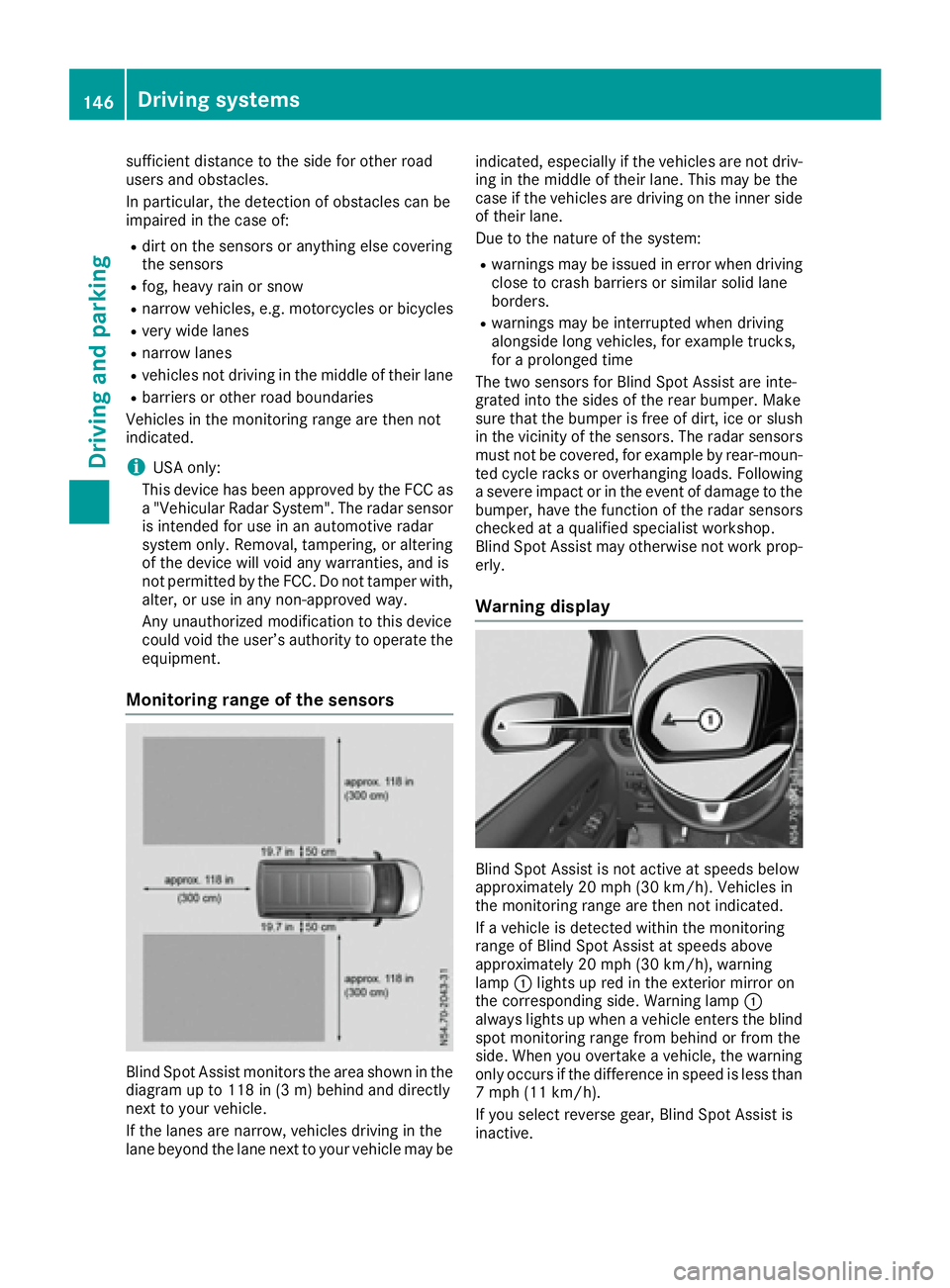
Blind Spot Assist monitors the area shown in the
diagramupt o118 in (3 m) behind and directly
next to your vehicle.
If the lanes are narrow, vehicles driving in the
lane beyond the lane next to your vehicle may be indicated, especially if the vehicles are not driv-
ing in the middle of their lane. This may be the
case if the vehicles are driving on the inner side
of their lane.
Due to the nature of the system:
Rwarnings may be issued in error when driving
close to crash barriers or similars olid lane
borders.
Rwarnings may be interrupted when driving
alongside long vehicles, for example trucks,
for aprolonged time
The two sensors for Blind Spot Assist are inte-
grated into the sides of the rear bumper. Make
sure that the bumper is free of dirt, ice or slush
in the vicinity of the sensors. The radar sensors
must not be covered, for example by rear-moun-
ted cycle racks or overhanging loads. Following
as evere impact or in the event of damage to the
bumper, have the function of the radar sensors
checked at aqualified specialist workshop.
Blind Spot Assist may otherwise not work prop-
erly.
Warning display
Blind Spot Assist is not active at speeds below
approximately 20 mph (30 km/h). Vehicles in
the monitoring range are then not indicated.
If av ehicle is detected within the monitoring
range of Blind Spot Assist at speeds above
approximately 20 mph (30 km/h), warning
lamp :lights up red in the exterior mirror on
the corresponding side. Warning lamp :
always lights up when avehicle enters the blind
spot monitoring range from behind or from the
side. When you overtake avehicle, the warning
only occurs if the difference in speed is less than
7m ph (11 km/h).
If you select reverse gear, Blind Spot Assist is
inactive.
146Driving systems
Driving and parking
Page 152 of 310
Standard:the sensitivity with which the sys-
tem determines the attention level is set to
normal.
Sensitive: the sensitivity is set higher. The
driver is warned earlier.
When ATTENTION ASSIST is switched on and
the vehicle engine is running:
Ron vehicles without steering wheel buttons,
the À indicator lamp in the instrument
cluster lights up
Ron vehicles with steering-wheel buttons, the
display shows the Àsymbol:
-in the status area
-in the Status Overviewof the Assist.menu (Ypage 183)
For vehicles with steering wheel buttons, if you
deactivate ATTENTION ASSIST, the system is
automatically re-activated when you start the
engine. The system sensitivity then corresponds to the last selection activated –standard or sen-
sitive.
If you switch off ATTENTION ASSIST in avehicle
without steering wheel buttons, the system
remains switched off even after you start the
engine. The status of the system after switching
on the engine always corresponds to the status
last selected.
Warning in the display
If the system detectst iredness or increasing
lapses in concentration, the warning Atten‐
tion Assist: TakeaBreak!orAttent.Asst: Take Break!is shown in the display.
An additional warning tone sounds.
XIf necessary, take abreak.
XConfirm the message by pressing the a
button on the steering wheel.
On long journeys, take regular breaks in good
time to allow yourself to rest. If you do not take
ab reak and ATTENTION ASSIST continues to
detect increasing lapses in concentration, you
will be warned again after 15 minutes at the
earliest. This will only happen if ATTEN-
TION ASSIST still detectst ypical indicators of
fatigue or increasing lapses in concentration.
PARKTRONIC
General notes
PARKTRONIC is an electronic parking aid. The
system is equipped with ultrasonic sensors in
the front and rear bumpers to monitor the area
around your vehicle. PARKTRONIC indicates vis-
uallya nd audibly the distance between your
vehicle and an object.
Your vehicle features two separate sound emit-
ters with different frequencies for the warning
tones. The warning ranges in front of and behind the vehicle are indicated by different warning
tones.
PARKTRONIC is activated automatically when
you:
Rturn the key to position 2in the ignition lock
Rrelease the parking brake and
Rmove the selector lever to D,Nor R
PARKTRONIC is deactivated at speeds above
11 mph (18 km/h). PARKTRONIC is reactivated
at speeds below 10 mph (16 km/h).
Important safety notes
PARKTRONIC is only an aid. It cannot replace
your own awareness of the immediate surround-
ings. You are responsible for safe maneuvering,
parking and pulling away.W hen maneuvering,
parking and pulling away,m ake sure that there
are no persons, animals or object sinthe maneu-
vering area.
!Pay particular attention to obstacles above
or below the sensors when parking, such as
flower pots or trailer towbars. PARKTRONIC
does not recognizes uch objectswhen they
are in the immediate vicinity of the vehicle.
You could damage the vehicle or objects.
PARKTRONIC can suffer interference from:
Rultrasonic sources such as atruck's
compressed-air brakes, an automatic car
wash or apneumatic drill
Rattachments to the vehicle, e.g. rear moun-
ted racks
Rnumber plates (vehicle license plates) that
are not affixed flat against the bumper
Rdirty or icy sensors
Remove adetachable trailer coupling if it is no
longer required. PARKTRONIC measures the
minimum detection range to an obstacle from
the bumper, not the ball coupling.
150Driving systems
Driving and parking