ESP MERCEDES-BENZ METRIS 2016 MY16 Operator’s Manual
[x] Cancel search | Manufacturer: MERCEDES-BENZ, Model Year: 2016, Model line: METRIS, Model: MERCEDES-BENZ METRIS 2016Pages: 310, PDF Size: 7.28 MB
Page 83 of 310
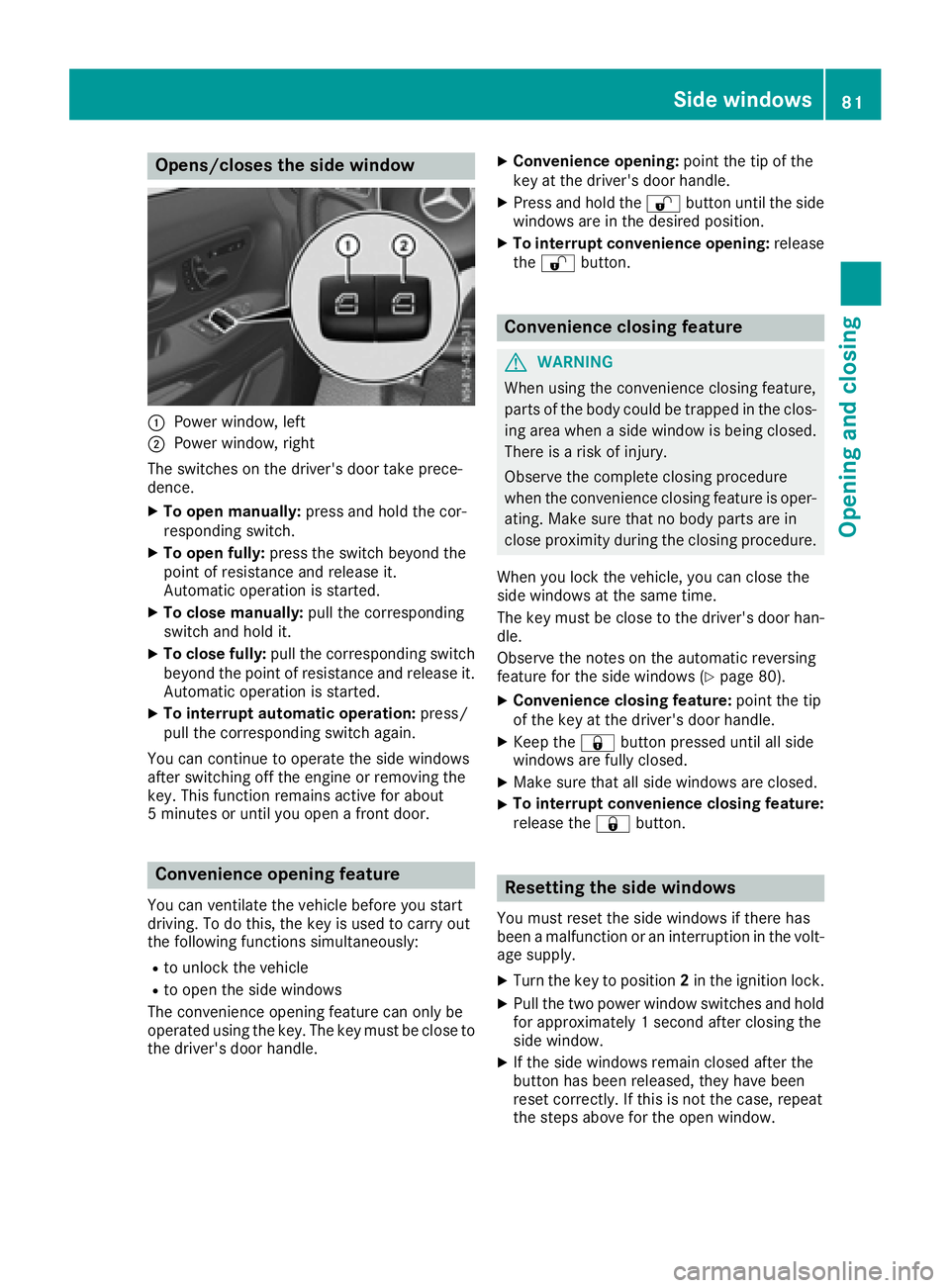
Opens/closes the side window
:Power window, left
;Power window, right
The switches on the driver's door take prece-
dence.
XTo open manually: press and hold the cor-
respondin gswitch.
XTo open fully: press the switch beyond the
point of resistance and release it.
Automatic operation is started.
XTo close manually: pull the corresponding
switch and hold it.
XTo close fully: pull the correspondin gswitch
beyond the point of resistance and release it.
Automatic operation is started.
XTo interrupt automatic operation: press/
pull the correspondin gswitch again.
You can continue to operate the side windows
after switchin goff the engine or removingt he
key. This function remains active for about
5m inutes or until you open afrontd oor.
Convenienceo pening feature
You can ventilate the vehicle before you start
driving. To do this, the key is used to carry out
the following function ssimultaneously:
Rto unlock the vehicle
Rto open the side windows
The convenience opening feature can only be
operated using the key. The key must be close to
the driver's door handle.
XConvenience opening: point the tip of the
key at the driver's door handle.
XPress and hold the %button until the side
windows are in the desired position.
XTo interrupt convenience opening: release
the % button.
Conveniencec losing feature
GWARNING
When using the convenience closing feature,
parts of the body could be trapped in the clos-
ing area when aside window is being closed.
There is arisk of injury.
Observe the completec losing procedure
when the convenience closing feature is oper-
ating. Make sure that no body parts are in
close proximity during the closing procedure.
When you lock the vehicle, you can close the
side windows at the same time.
The key must be close to the driver's door han-
dle.
Observe the notes on the automatic reversing
feature for the side windows (
Ypage 80).
XConvenience closing feature: point the tip
of the key at the driver's door handle.
XKeep the &button pressed until all side
windows are fully closed.
XMake sure that all side windows are closed.
XTo interrupt convenience closing feature:
release the &button.
Resetting the side windows
You must reset the side windows if there has
beenamalfunction or an interruption in the volt-
age supply.
XTurn the key to position 2in the ignition lock.
XPull the two power window switches and hold
for approximately 1seconda fter closing the
side window.
XIf the side windows remain closed after the
button has been released, they have been
reset correctly. If this is not the case, repeat
the steps above for the open window.
Side windows81
Opening and closing
Z
Page 95 of 310
Low-beamheadlamps
When theignitio nisswitche donand thelight
switch is in the Lposition,t heparking lamps
and low-beam headlamps are switche doneven
if th elight sensor does not sense dark ambient
light.T his is particularly useful when there is fog
or rain.
XTo switch on: turnthe key to position 2in the
ignitio nlockors tart th eengine.
XTurn th elight switch to position L.
The L indicator lamp in th einstrument
cluster lightsu p.
Daytime running lamps
XTo switch on: turnthe light switch to the
$ orà position.
Automatic headlamp mode
GWARNING
When th elight switch is set to Ã,thelow-
beam headlamps may not be switche don
automatically if there is fog ,sno woro ther
cause sofpoor visibilityd ue to theweather
conditionss uch as spray. Thereisar isk of an
accident.
In such situations ,tur nt he light switch to
L.
Automatic headlampm ode is onlyadriving aid.
You are responsible for th evehicle lighting at all
times.
When th eparking lamps and low-beam head-
lamps are switche don, th egreen T (parking
lamps)a ndL (low-beam headlamps) indica-
to rlamps in th einstrumentc luster light up.
à is thepreferred light switch setting. The
light settin gisautomatically selected according
to th ebrightnes softheambientl ight (excep-
tion: poor visibilityd ue to weather conditions,
such as fog ,sno wors pray):
RKey in position 1in th eignitio nlock: th epark-
ing lamps are switche don/off automatically
depending on th ebrightnes softheambient
light.
RWhen th eengine is on: depending on the
ambientl ight,thedaytim erunnin glamps or
th ep arking lamps and low-beam headlamps
are switche don/off automatically.
XTo switch on automatic headlamp mode:
turnthe light switch to Ã.
Fog lamps/rear fog lamp
You can onlyswitch th efog lamps on or off
manually in vehicle swhichh ave fog lamps
installed.
Front fog lamps help you to see and be seen in
conditionsofp oor visibilitydue to fog or pre-
cipitation. They can onl ybeoperated together
with th eparking lamps or with th elow-beam
headlamps.
The rear fog lamp improves visibilityofy our
vehicle for th etraffic behindint heeven tof
heavy fog .Observe th elegal requirements of the
countr yyou are currently in when usingt herear
fog lamp.
XTurn th elight switch to LorÃ.
XTurn th ekey to position 2in th eignitio nlock
or start th eengine.
XTo switch th efront fog lamps on/off: press
the N button.
When th egreen N indicator lamp in the
instrumentc luster goes on, th efog lamps are
switche don.
XTo switch th erearfog lamps on/off: press
the R button.
When th eyellow Rindicator lamp in the
instrumentc luster goes on, th erear fog lamp
is switche don.
Standing lamp
!If th ebattery charge is veryl ow, thestand-
ing lamps will switch off automatically to ena-
ble th enexte ngine start.A lways park your
vehicle in accordance with legal regulations,
in as ecure and adequately lit location.A void
leavin gthe T parking lamps on for several
hours. If possible, switch on th eright X or
left W standin glamp.
Switching on th estandin glamps ensures that
th ec orresponding side of th evehicle is illumi-
nated.
Exterior lighting93
Lightsa nd windshield wipers
Z
Page 96 of 310
Switching on the standing lamps:
XTurn the key to position0(Ypage 120) in the
ignition lock or remove the key.
XRight-hand standing lamp: turn the light
switch to position X.
XLeft-hand standing lamp: turn the light
switch to position W.
Combination switch
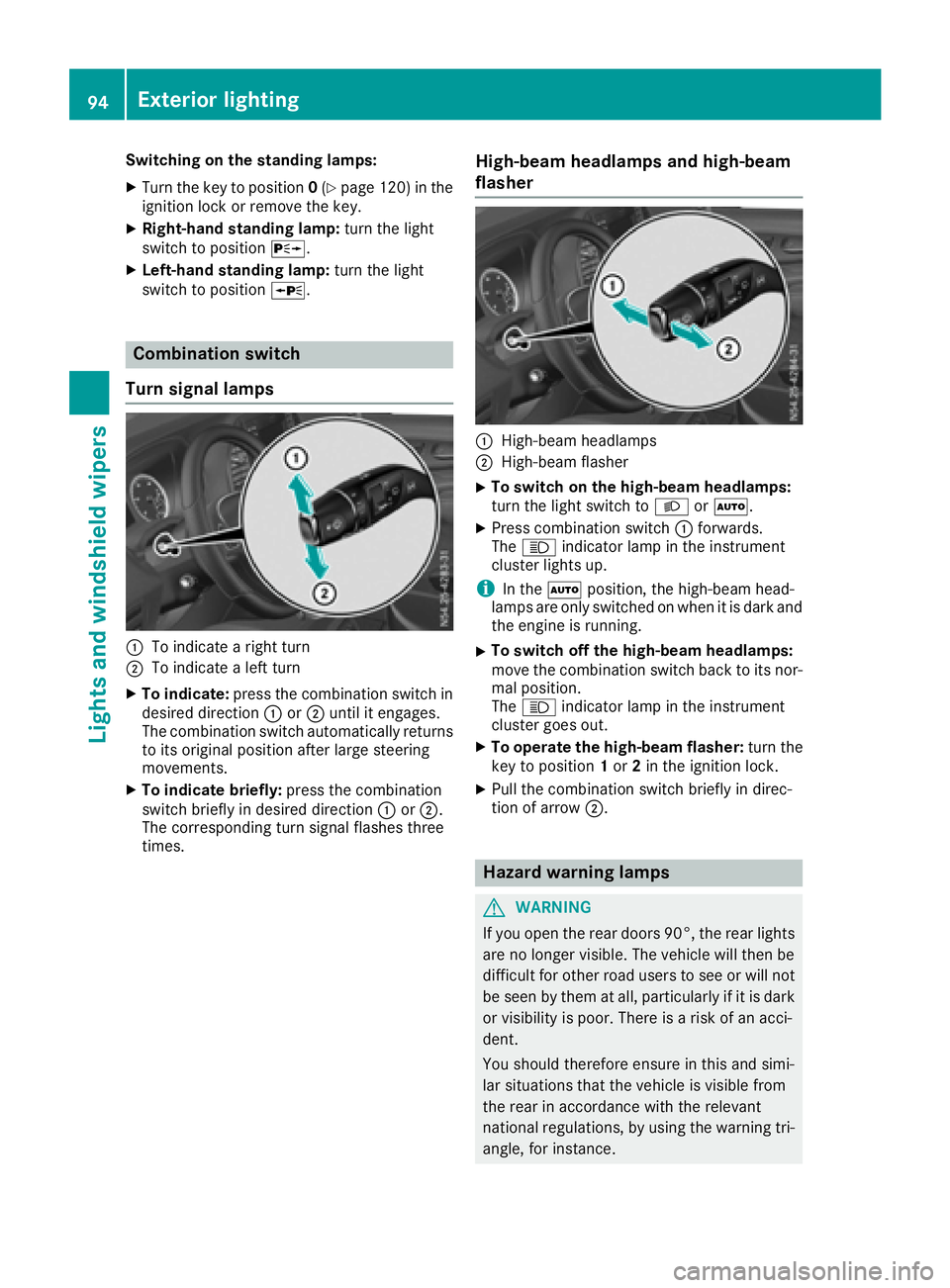
Turns ignal lamps
:To indicate aright turn
;To indicate aleft turn
XTo indicate: press the combination switch in
desired direction :or; until it engages.
The combination switch automatically returns
to its original position after large steering
movements.
XTo indicate briefly: press the combination
switch briefly in desired direction :or;.
The correspondingt urn signal flashes three
times.
High-beam headlamps and high-beam
flasher
:High-beam headlamps
;High-beam flasher
XTo switch on the high-beam headlamps:
turn the light switch to LorÃ.
XPress combination switch :forwards.
The K indicator lamp in the instrument
cluster lights up.
iIn the Ãposition, the high-beam head-
lamps are only switched on when it is dark and
the engine is running.
XTo switch off the high-beam headlamps:
move the combination switch back to its nor-
mal position.
The K indicator lamp in the instrument
cluster goes out.
XTo operate the high-beam flasher: turn the
key to position 1or 2in the ignition lock.
XPull the combination switch briefly in direc-
tion of arrow ;.
Hazard warning lamps
GWARNING
If you open the rear doors 90°, the rear lights are no longer visible. The vehicle will then be
difficult for other road users to see or will not
be seen by them at all, particularly if it is dark
or visibility is poor. There is arisk of an acci-
dent.
You should therefore ensure in this and simi-
lar situations that the vehicle is visible from
the rear in accordance with the relevant
national regulations, by using the warning tri-
angle, for instance.
94Exterior lighting
Lights and windshield wipers
Page 103 of 310
;License plate lampLED
=Rearfog lamp s(driver's
side)P21W
?Backup lampsP21W
ABrake lamps/tail lamps/
standing lamps/turn sig-
nalsP21W
Side marker lampsLED
Tail lamps
Installing/removing the tail lamp
!Remove the tail lamp swith care so as not to
damage the paintwork.
Because of the installation position,
Mercedes-Benz recommends that you have
the tail lamp bulbs changed at aqualifieds pe-
cialist workshop.
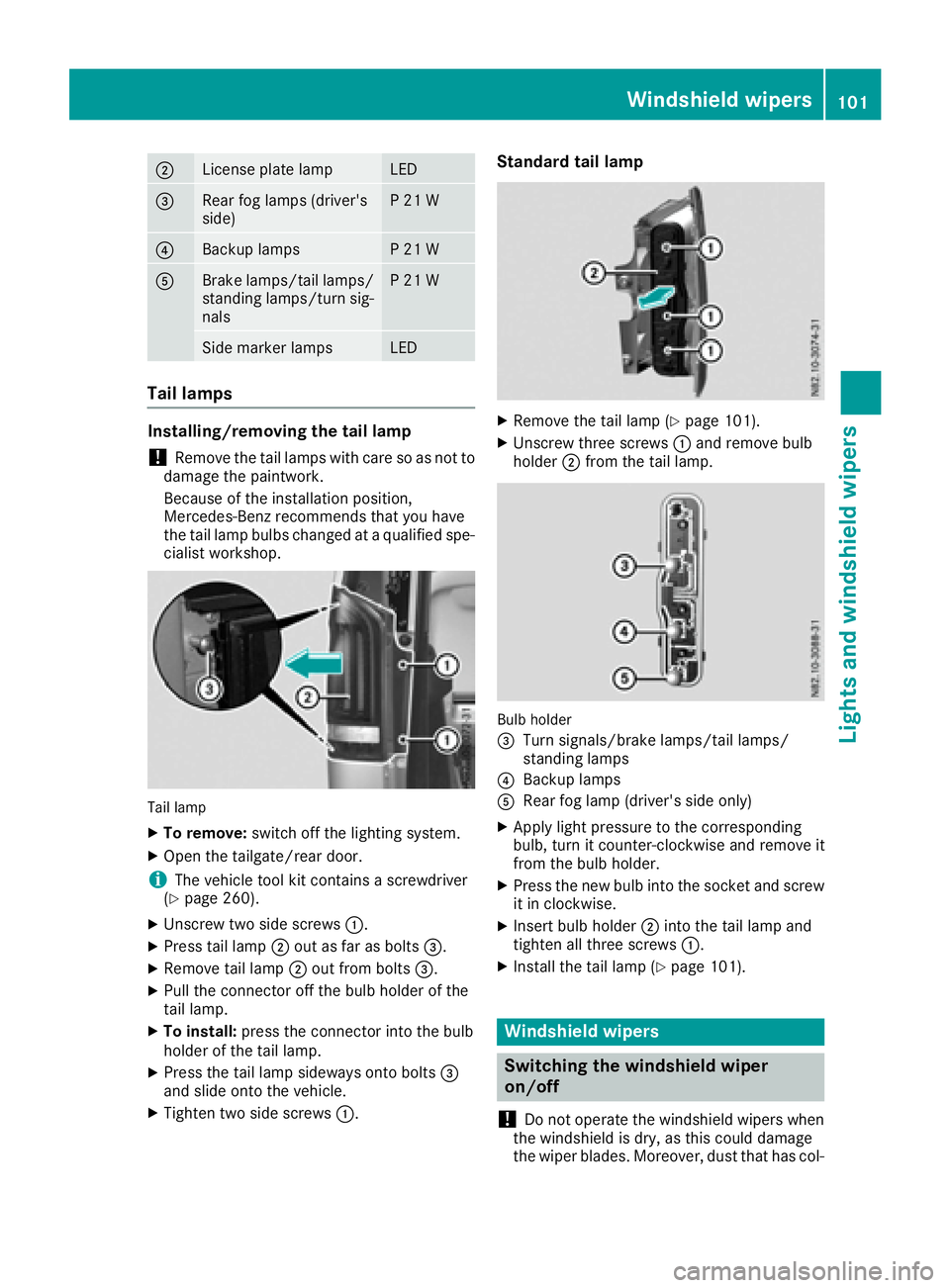
Tail lamp
XTo remove: switch off the lighting system.
XOpen the tailgate/rear door.
iThe vehicle tool kit contains ascrewdriver
(Ypage 260).
XUnscrew two side screws :.
XPress tail lamp;out as far as bolts =.
XRemove tail lamp;out from bolts =.
XPullthe connector off the bul bholderoft he
tail lamp.
XTo install: press the connector into the bulb
holderoft he tail lamp.
XPress the tail lamp sideways onto bolts =
and slideo nto the vehicle.
XTighten two side screws :.
Standard tail lamp
XRemove the tail lamp (Ypage 101).
XUnscrew three screws:and remove bulb
holder ;from the tail lamp.
Bulb holder
=
Turn signals/brake lamps/tail lamps/
standing lamps
?Backup lamps
ARea rfog lamp (driver's side only)
XApply lightp ressure to the corresponding
bulb, turn it counter-clockwise and remove it
from the bul bholder.
XPress the new bul binto the socket and screw
it in clockwise.
XInsert bul bholder ;into the tail lamp and
tighten all three screws :.
XInstall the tail lamp (Ypage 101).
Windshield wipers
Switching the windshieldw iper
on/off
!
Do not operate the windshield wipers when
the windshield is dry, as this could damage
the wiper blades. Moreover, dust that has col-
Windshield wipers101
Lights and windshield wipers
Z
Page 104 of 310
lected on the windshield can scratchthe glass
if wiping takes place when the windshield is
dry.
If it is necessary to switc honthe windshield
wipers in dry weathe rconditions, always use
washer fluid when operating the windshield
wipers.
!If the windshield wipers leave smearsont he
windshield after the vehicle has been washed
in an automatic car wash, wax or other resi-
dues may be the reason for this .Clean the
windshield using washer fluid after washing
the vehicle in an automatic car wash.
!Intermitten twiping with rain sensor: due to
optical influences and the windshield becom-
ing dirtyind ry weatherconditions, the wind-
shield wipers may be activate dinadvertently.
This could the ndamage the windshield wiper
blades or scratc hthe windshield.
For this reason,y ou should always switc hoff
the windshield wipers in dry weather.
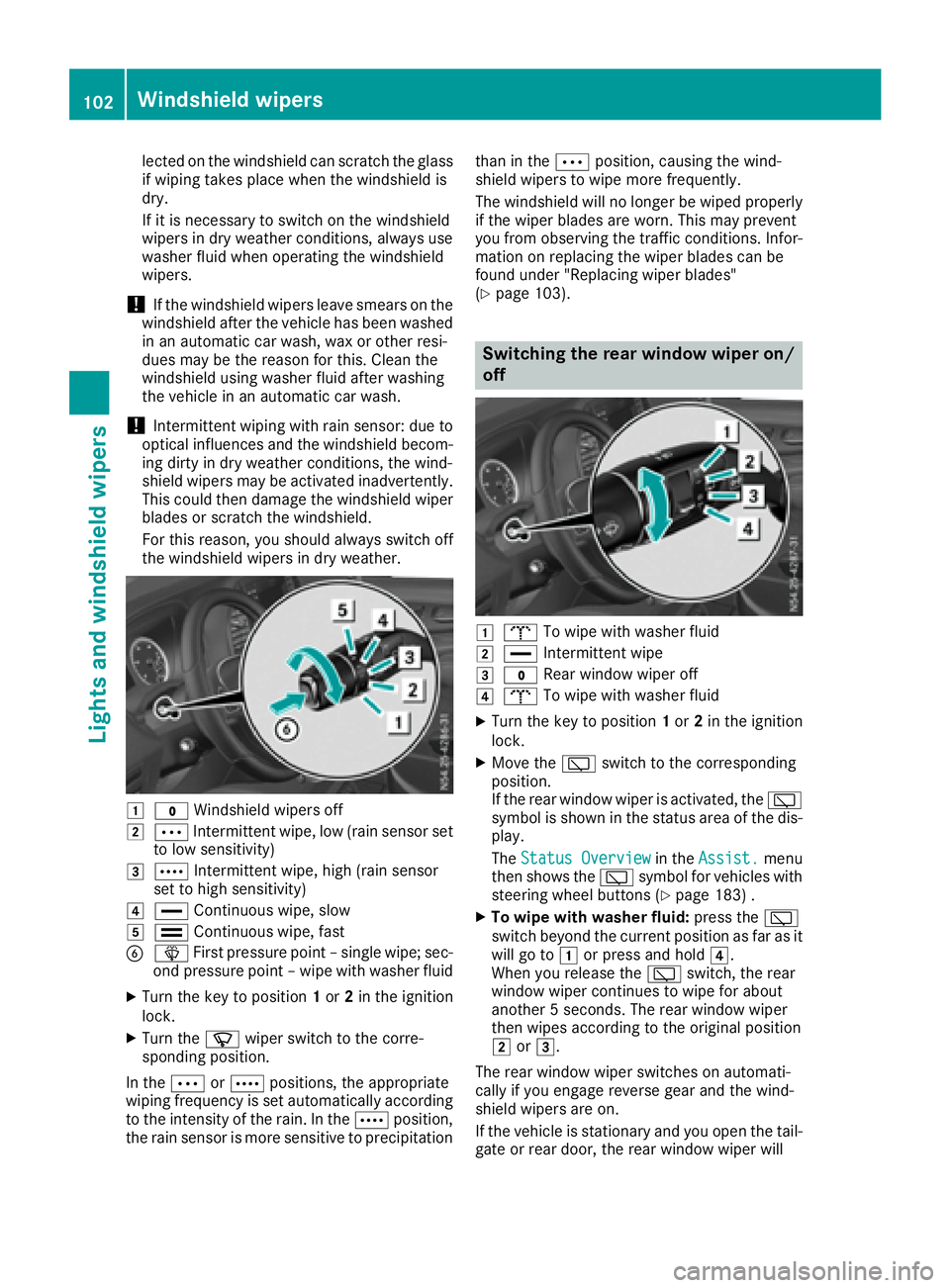
1$ Windshield wipers off
2ÄIntermitten twipe, low (rain sensor set
to low sensitivity)
3Å Intermitten twipe, high (rain sensor
set to high sensitivity)
4° Continuous wipe, slow
5¯Continuous wipe, fast
BîFirstpressure point –single wipe; sec-
ond pressure point –wipe with washer fluid
XTurn the key to position 1or 2in the ignition
lock.
XTurn the íwiper switc htothe corre-
sponding position.
In the ÄorÅ positions ,the appropriate
wiping frequenc yisset automatically according
to the intensity of the rain. In the Åposition,
the rain sensor is more sensitiv etoprecipitation than in the
Äposition, causin gthe wind-
shield wipers to wipe more frequently.
The windshield will no longer be wiped properly
if the wiper blades are worn.T his may prevent
you fromo bservingthe traffic conditions. Infor-
matio nonr eplacing the wiper blades can be
foundu nder "Replacingw iper blades"
(
Ypage 103).
Switchin gthe rea rwindow wiper on/
off
1b To wipe with washer fluid
2°Intermitten twipe
3$ Rear window wiper off
4bTo wipe with washer fluid
XTurn the key to position 1or 2in the ignition
lock.
XMove the èswitchtot he corresponding
position.
If the rear window wiper is activated, the è
symbol is shown in the status area of the dis-
play.
The Status Overview
in the Assist.menu
the nshows the èsymbol for vehicles with
steeringw heel buttons (
Ypage 183) .
XTo wipe with washer fluid: press theè
switc hbeyond the current position as far as it
will go to 1or press and hold 4.
When you release the èswitch, the rear
window wiper continues to wipe for about
another 5seconds. The rear window wiper
the nw ipes accordingtot he original position
2 or3.
The rear window wiper switches on automati-
cally if you engag ereverse gear and the wind-
shield wipers are on.
If the vehicle is stationar yand you open the tail-
gate or rear door, the rear window wiper will
102Windshield wipers
Lightsa nd windshield wipers
Page 114 of 310
Regulating climate control automati-
cally
General notes
Whe nautomatic climate control is in automatic
mode, the set temperature is automaticall ykept
constant. The system automaticall yregulates
the temperature of the dispensed air, the airflow
and the ai rdistribution.
Automati cmodew illa chieve optimal operation
if the cooling with ai rdehumidification function
is also activated. If desired, the cooling with air
dehumidification function can be deactivated
(
Ypage 111).
Automatic climate control
Automati cmodef or automatic climate control
settings can only be activate dordeactivated on
the firs tmenu level .Ifyoudo not set anew value
for the rear-compartment climate control in the
2nd menu level within approx. 10 seconds, the
control panel display goe sbacktot he firs tmenu
level.
XSwitch on climate control (Ypage 110).
XSet temperature for the driver' sand front-
passenger sid eand,for vehicles with rear-
compartment ai rconditioning, for the rear
compartment, too (
Ypage 112).
XTo switc hautomati cmode on or off: press
the à button.
If the indicator lamp in the Ãbutton lights
up ,automatic mod eisactivated. The airflow
and ai rdistribution are controlle dautomati-
cally and the windshield defrosting function is
deactivated.
If yo udeactivate automatic mode, automatic
climate control saves the current settings.
In automatic mode, if yo uadjust the airflo wor
ai rd istribution manually ,the indicator lamp
above the Ãbutton goe sout.T he function
which hasn ot beenchanged manually ,however,
continues to be controlle dautomatically.
Sets the temperature
Air-conditioning system
XSwitch on climate control (Ypage 110).
XTo increase or reduce: turn temperature
control :clockwise or counter-clockwise. Whe
ndoing so, only change the temperature
in small increments, and star tinthe center
position or at 72 ‡(22 †) (
Ypage 108).
Automatic climate control
Youc an set the temperature separately for the
driver' sand front-passenger side. In vehicles
with rear-compartment ai rconditioning, the
temperature for the rea rcan be set additionally.
Each set temperature is automaticall ymain-
tained at aconstant level.
XSwitch on climate control (Ypage 110).
XTo increase or reduce: turn temperature
control :orE clockwise or counter-clock-
wise (
Ypage 109). Whe ndoing so, only
change the temperature in small increments
starting at 72 ‡(22 †).
The control panel display shows the set tem-
perature for the left and right sid eatthe
respective edg eofthe display.
Rear-compartmen tair-conditioning
system
Vehicles with TEMPMATI Cair-condition-
in gs ystem
XSwitch on climate control (Ypage 110).
The ai rconditioning settings for temperature,
airflo wand,for rear-compartment ai rcondi-
tioning, also the setting for ai rdistribution are
also applie dtothe rear-compartment climate
control.
Vehicles with automati cclimate control
XSwitch on climate control (Ypage 110).
XTo increase or decrease: press the/
button on the control panel of the automatic
climate control.
The indicator lamp in the /button flashes.
The control panel display shows the second
menu level for the temperature and airflow
setting of the rea rcompartment ai rcondi-
tioning.
XTurn temperature control :orE counter-
clockwise or clockwise (Ypage 109). When
doing so, only change the temperature in
small increments starting at 72 ‡(22 †).
The control panel display shows the temper-
ature set for the rea rcompartment.
If yo udon ot make any more settings for
approximately ten seconds, the control panel
112Operating the climate control system
Climate control
Page 115 of 310
display shows menu level1again for the auto-
matic climate control settings. The indicator
lamp in the /buttonremains lit.
Sets the air distribution
Air-conditioning system
Air distribution settings
¯ Directs air through the defroster vents
P Directs air through the center and side air
vents
O Directs air through the footwell vents
Regardless of the air distribution selected, air is
always directed to the side air vents. You can
adjust this airflow by openin gorclosingthe side
air vent s(
Ypage 116).
Sets the air distribution
XSwitchonc limate control (Ypage 110).
XPress the P,Oand/or ¯button.
If the indicator lamp in abutto nlights up, the
air is directed to the correspondin gair vents.
XAdjust the air vent sifnecessary
(Ypage 116).
Automatic climat econtrol
Air distribution settings
¯
Directs air through the defroster vents
b Directs air through the defroster, center
and side air vents
_ Directs air through the defroster, center,
side and footwell vents
a Directs air through the defroster and
footwell vents
P Directs air through the center and side air
vents
N Directs air through the center, side and
footwell vents
O Directs air through the footwell vents
Regardless of the air distribution selected, air is
always directed to the side air vents. You can
adjust this airflow by openin gorclosingthe side
air vent s(
Ypage 116).
Setting the air distribution
XSwitchonc limate control (Ypage 110).
XPress the ÉorË buttontos et the air
distribution.
The control panel display shows the corre-
spondin gair distribution symbol.
XAdjust the air vent sifnecessary
(Ypage 116).
iIf the air distribution is set when automatic
climate control is in automatic mode, auto-
matic control is deactivated. The indicator
lamp on the Ãbuttonthen goes out. The
airflow continues to be adjusted automati-
cally, however.
Rear-compartment air-conditioning
system
When the rear-compartment air conditioning is
switched on, the air distribution setting on the
control panel also applies to the rear-compart-
ment air conditioning.
This also applies to the automatic mode of auto-
matic climate control. The air is then automati-
cally directed to the footwell or the headroom of
the rear compartment.
Sets the airflow
Air-conditioning system
XSwitc honc limate control (Ypage 110).
XTo increase or reduce: turn airflow control
A counter-clockwise or clockwise to the
desired level (
Ypage 108).
Automatic climat econtrol
XSwitc honc limate control (Ypage 110).
XTo increase or reduce: press theKor
I button.
The control panel display shows the airflow
control setting as abar display.
iIf the airflow is set when in automatic mode,
automatic control is deactivated. The indica-
tor lamp in the Ãbuttonthen goes out.
The air distribution continues to be adjusted
automatically, however.
Operating th eclimatec ontrol system113
Climatecontrol
Page 121 of 310
Useful information
This Operator's Manual describes all models as
well as standard and optional equipment of your
vehicle that were available at the time of going
to print.Country-specific variation sare possi-
ble. Note that your vehicle may not be equipped
with all of the described functions. This also
applies to system sand function srelevantt o
safety.
Read the information on qualified specialist
workshops (
Ypage 29).
Breaking-in notes
Important safetyn otes
In certain drivingand drivingsafetysystems, the
sensors adjust automatically while acertain dis-
tance is being driven after the vehicle has been
delivered or after repairs. Full system effective- ness is not reached until the end of this teach-in
procedure.
New or replaced brake pads and brake discs
only reach their optimal brakin geffecta fter a
few hundred kilometers of driving. Until then,
compensat efor this by applying greater forcet o
the brake pedal.
The first 1000 miles (1500 km)
For the servicel ife and economy of your vehicle
it is crucial that you break in the engin ewith due
care.
RTherefore, protect the engin efor the first
1000m iles (1500k m) by drivingatv arying
vehicle and engin espeeds.
RAvoid overstraining the vehicle and high
engin espeeds during this period, e.g. driving
at full throttle. Do not exceed Øof the max-
imum speed for each gear.
RDo not change down agear manually in order
to brake.
RTry to avoid depressingt he accelerator pedal
beyond the point of resistance (kickdown).
After 1000m iles (1500km), you can increase
the engin espeed gradually and accelerate the
vehicle to full speed.
iYou should also observet hesenotes on
breaking-in if the engin eorparts of the drive
train on your vehicle have been replaced.
Driving
Important safetyn otes
GWARNING
Flammable materials introduced through
environmental influence or by animals can
ignit eifinc ontact with the exhaust system or
parts of the engin ethat heat up. There is arisk
of fire.
Carry out regular checks to make sure that
ther eare no flammable foreign materials in
the engin ecompartmen torinthe exhaust
system.
GWARNING
If you switc hoff the ignition while driving,
safety-relevant function sare only available
with limitations, or not at all. This could affect, for example, the power steering and the brake
boosting effect. You will require considerably
more efforttos teer and brake. There is arisk
of an accident.
Do not switc hoff the ignition while driving.
GWARNING
If the parkin gbrake has not been fully
released when driving, the parkin gbrake can:
Roverheat and cause afire
Rlose its hold function.
There is arisk of fire and an accident. Release
the parkin gbrake fully before drivingo ff.
!Warm up the enginequickly. Do not use the
engine's full performanc euntil it has reached
operatin gtemperature.
Only shift the automatic transmission to the
desired drive position when the vehicle is sta-
tionary.
Where possible, avoid spinning the drive
wheels when pulling away on slippery roads.
You could otherwise damage the drive train.
Driving119
Driving and parking
Z
Page 124 of 310
Hill start assist
Hill start assist helpsyou when pulling awa yfor-
wards or in reverse on an uphill gradient. Hill
start assist automatically maintains the brake
pressure for about another second, after you
have taken you rfoot off the brake pedal. This
gives you enoug htime to move you rfoot from
the brake pedaltot he accelerator pedala nd
depress it before the vehicleb egins to roll.
GWARNING
After ashort time, hil lstart assist wil lnolon-
ger brake you rvehicl eand it coul droll away.
There is arisk of an accident and injury.
Therefore, quickly move you rfoot from the
brake pedaltot he accelerator pedal. Never
leave the vehiclew hen it is held by hillstart
assist.
Hill start assist is not active if:
Ryou are pulling awa yonalevelroad or a
downhill gradient
Rthe transmission is in position N
Rthe parking brake is applied
RESP®is malfunctioning
Reverse warningdevice
GWARNING
Other road users may ignore or fail to heart he
warning tone of the reverse warning feature.
There is arisk of injury if you fail to ensure that
the area in which you are maneuvering is
clear.
Make sure that there are no persons or
objects in the area in which you are maneu-
vering. It may be necessary to enlis tthe help
of as econd personw hen maneuvering.
The reverse warning feature is asystem
designed to assist you in ensuring the safety of
other road users.
Aw arning signals oundstoa lert other road
users when reverse gearise ngaged. The volume
of the warning tone can be reduced for night-
time driving.
XTo reduce the volume of the warnin gtone:
engag ereverse geart wice in quick succes-
sion.
The warning tone is now quieter.
iThe warning tone sound satanormal vol-
ume by default. The volume of the warning
tone has to be reduced each time you engage
reverse gearifn ecessary.
ECOstart/stop function
General notes
When the ECO start/stop function is opera-
tional ,itswitches the engine off automatically if
the vehicleiss lowed toastop under certain
conditions.
When pulling awa yagain, it starts the engine
automatically .The ECO start/stop function
thereby help syou to reduce the fuel consump-
tion and emissions of you rvehicle.
The stop/start function is automatically activa-
ted each time you start the engine with the igni-
tion key.
In transmission program Mthe ECO start/stop
function is automatically deactivated. You can
manually activate the ECO start/stop function if
required.
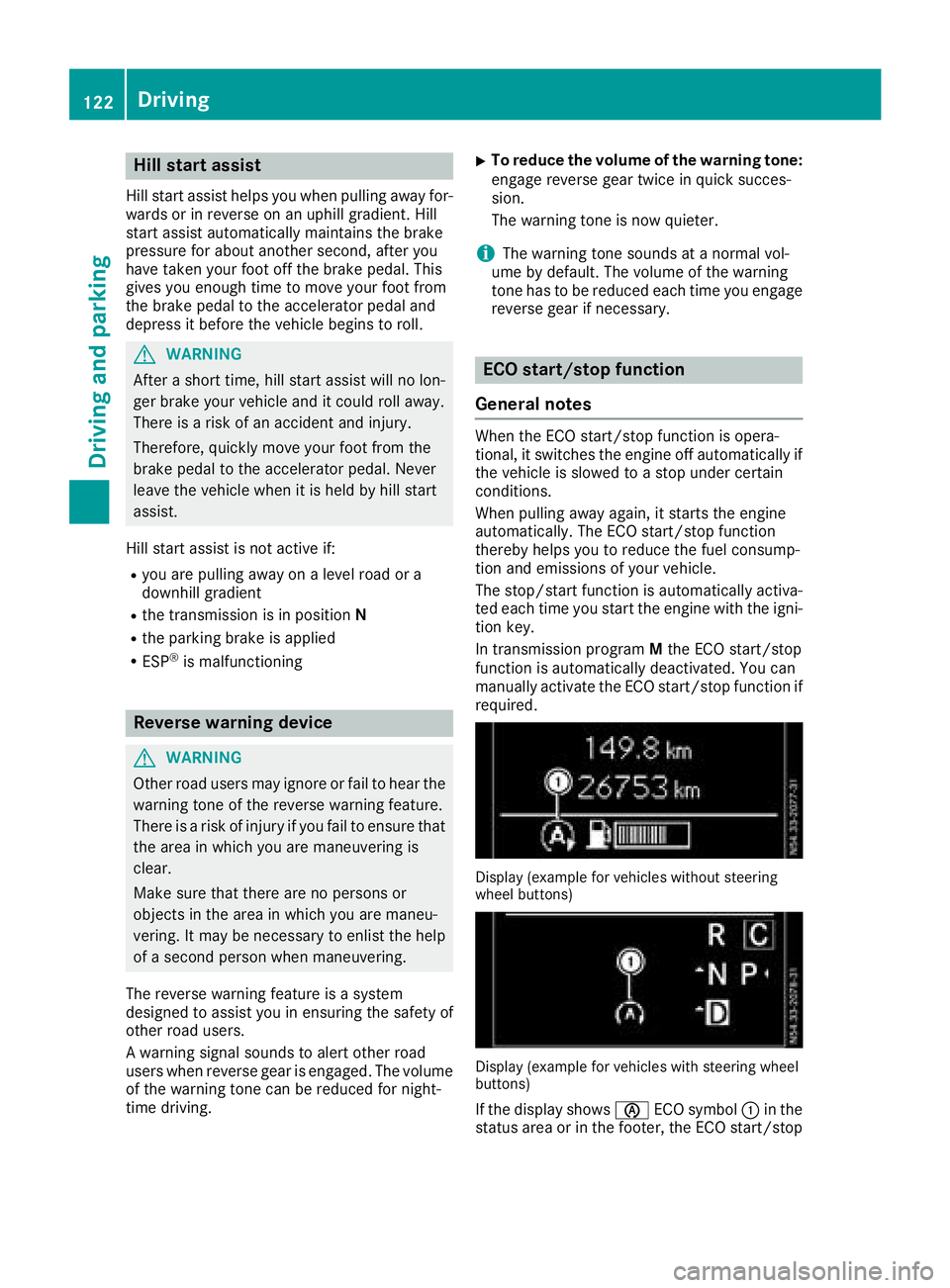
Display (example for vehicles without steering
whee lbuttons)
Display (example for vehicles with steering wheel
buttons)
If the display shows èECO symbol :in the
status area or in the footer, the ECO start/stop
122Driving
Driving and parking
Page 129 of 310
Transmission positions
BPark position
Thisprevents the vehicl efromr olling
away when stopped. Do not shift the
transmission into position Punless
the vehicl eisstationary.
The automatic transmission shifts to P automaticall yifyou:
Rremove the key
Ropen the driver's door whil ethe
vehicl eisstationar yortraveling at
ver ylow speeds and the transmis-
sion is in position Dor R.
The parkin gloc ks houl dnot be used
as ab rake when parking. Always
appl ythe parkin gbrake as well once
yo uh avep arked the vehicle.
CRevers egear
Onlys hift the transmission to Rwhen
the vehicl eisstationary.
ANeutral
No powe ristransmitted fromt he
engine to the drive wheels .Releasi ng
the brakes will allo wyouto mov ethe
vehicl efreely, e.g .byp ushing or tow-
ing.
If ESP
®is deactivated or faulty: shift
the transmission to position Nif the
vehicl eisind angerofs kidding,e.g.
on icy roads.
When yo uswitch off the engine ,the
automatic transmission automati-
cally shifts into neutral N.
!If the engine is switched off ,roll-
ing in neutral Ncan damage the
powe rtransmission and resul tin
transmission damage.
7Drive
The automatic transmission changes
gear itself. All forward gear sareavail-
able.
Yo uc an influence gearshifts with
your choice of transmission program.
Yo uc an also restric tthe shift range.
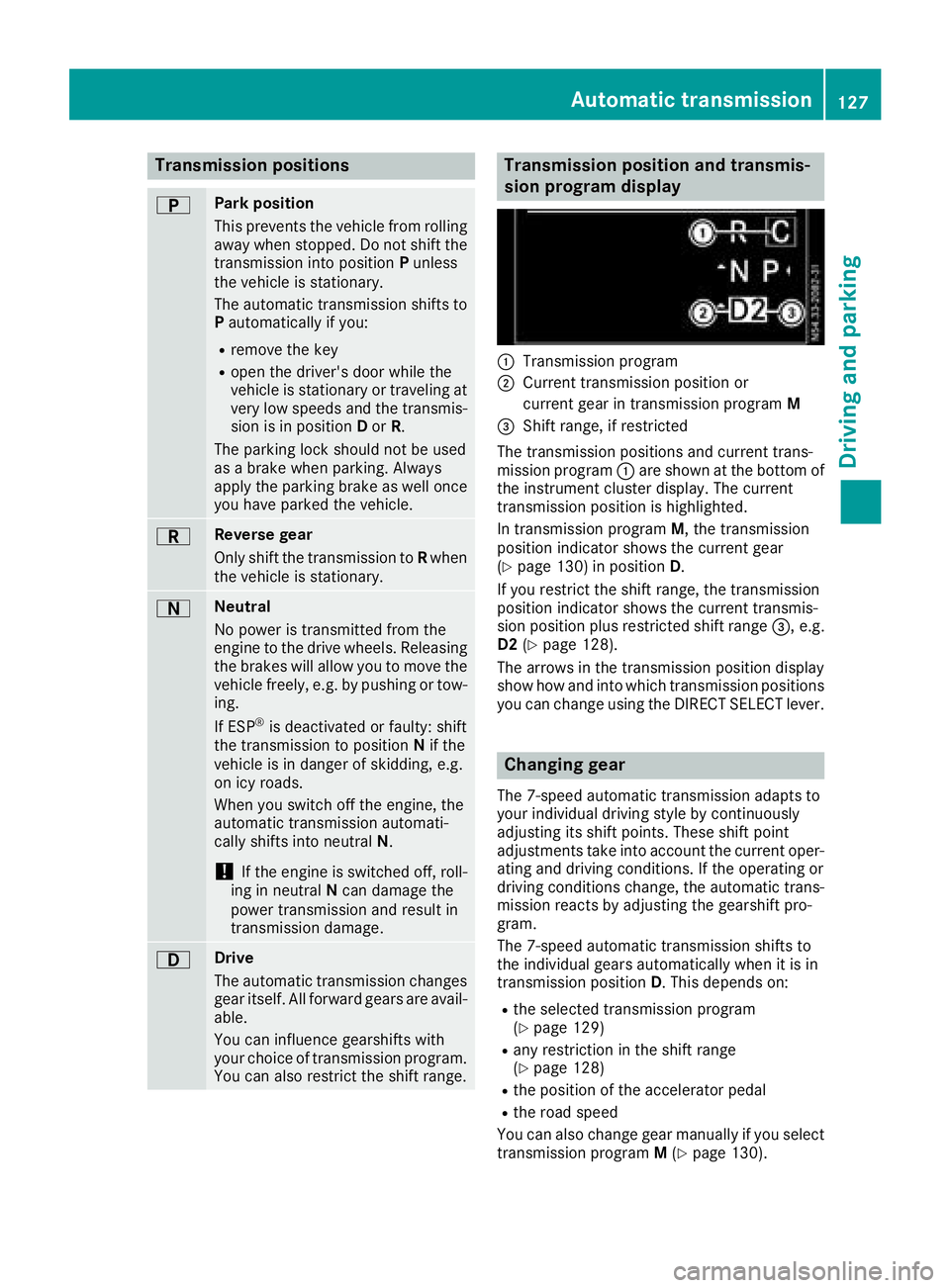
Transmission position and transmis-
sion program display
:Transmission program
;Current transmission positio nor
current gear in transmission program M
=Shift range,ifrestricted
The transmission positions and current trans-
mission program :ares hown at the bottom of
the instrument cluster display. The current
transmission positio nish ighlighted.
In transmission program M,the transmission
positio nindicator shows the current gear
(
Ypage 130 )inposition D.
If yo urestric tthe shift range ,the transmission
positio nindicator shows the current transmis-
sion positio nplusr estricted shift range =,e.g.
D2 (
Ypage 128).
The arrow sinthe transmission positio ndisplay
sho whow and into which transmission positions
yo uc an change using the DIRECT SELECTl ever.
Changin ggear
The 7-spee dautomatic transmission adapts to
your individual drivin gstyle by continuously
adjusting its shift points .These shift point
adjustments take into account the current oper-
ating and drivin gconditions. If the operating or
drivin gconditions change ,the automatic trans-
mission reacts by adjusting the gearshift pro-
gram.
The 7-spee dautomatic transmission shifts to
the individual gear sautomaticall ywhenitisi n
transmission position D.T hisd epen ds on:
Rthe selecte dtransmission program
(Ypage 129)
Rany restrictio ninthe shift range
(Ypage 128)
Rthe positio nofthe accelerator pedal
Rthe roa dspeed
Yo uc an also change gear manuall yifyouselect
transmission program M(
Ypage 130).
Automati ctransmission127
Driving an dparking
Z