transmission MERCEDES-BENZ METRIS 2016 MY16 Operator’s Manual
[x] Cancel search | Manufacturer: MERCEDES-BENZ, Model Year: 2016, Model line: METRIS, Model: MERCEDES-BENZ METRIS 2016Pages: 310, PDF Size: 7.28 MB
Page 162 of 310
or
XShift the automatic transmission toP.
In vehicles with Active Parking Assist,t he rear
view camera remains switched on after the ini-
tial shift to reverse gear for the whole duration of
active parking assistance. You can find informa-
tion on active parking assistance under "Active
Parking Assist“(
Ypage 154).
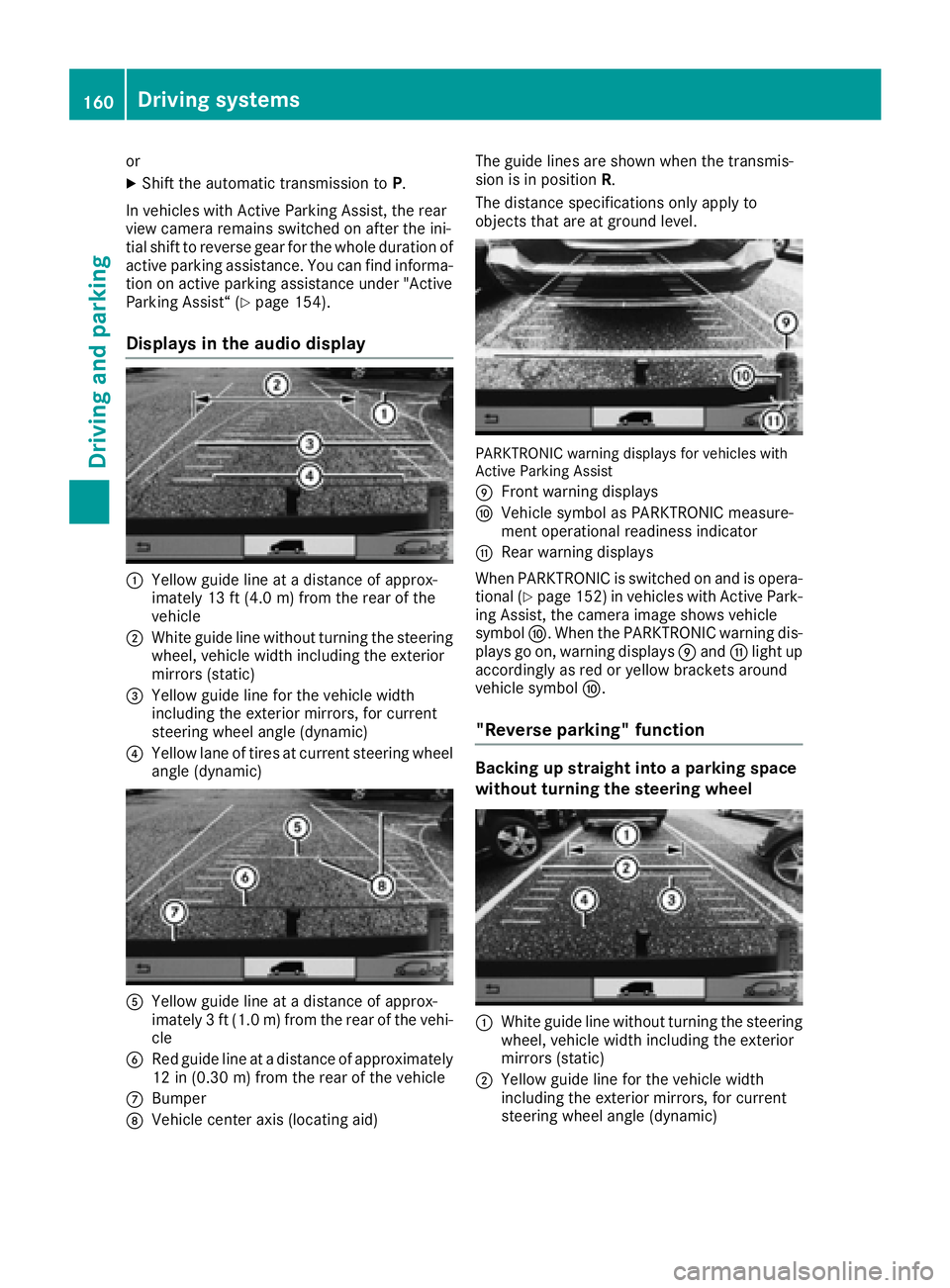
Displays in the audio display
:Yellow guide line at adistance of approx-
imately 13 ft (4.0 m) from the rear of the
vehicle
;White guide line without turnin gthe steering
wheel, vehicle width including the exterior
mirrors (static)
=Yellow guide line for the vehicle width
including the exterior mirrors, for current
steering wheel angle (dynamic)
?Yellow lane of tires at current steering wheel
angle (dynamic)
AYellow guide line at adistance of approx-
imately 3ft(1.0 m) from the rear of the vehi-
cle
BRed guide line at adistance of approximately
12 in (0.30 m) from the rear of the vehicle
CBumper
DVehicle center axis (locating aid) The guide lines are shown when the transmis-
sion is in position
R.
The distance specification sonly apply to
object sthat are at ground level.
PARKTRONIC warning displaysf or vehicles with
Active Parking Assist
E
Frontw arning displays
FVehicle symbol as PARKTRONIC measure-
ment operational readiness indicator
GRear warning displays
When PARKTRONIC is switched on and is opera- tional (
Ypage 152) in vehicles with Active Park-
ing Assist,t he camera image shows vehicle
symbol F.When the PARKTRONIC warning dis-
plays go on, warning displays Eand Glight up
accordingly as red or yellow bracket saround
vehicle symbol F.
"Reverse parking" function
Backing up straight into aparking space
without turning the steering wheel
:White guide line without turnin gthe steering
wheel, vehicle width including the exterior
mirrors (static)
;Yellow guide line for the vehicle width
including the exterior mirrors, for current
steering wheel angle (dynamic)
160Driving systems
Driving and parking
Page 167 of 310
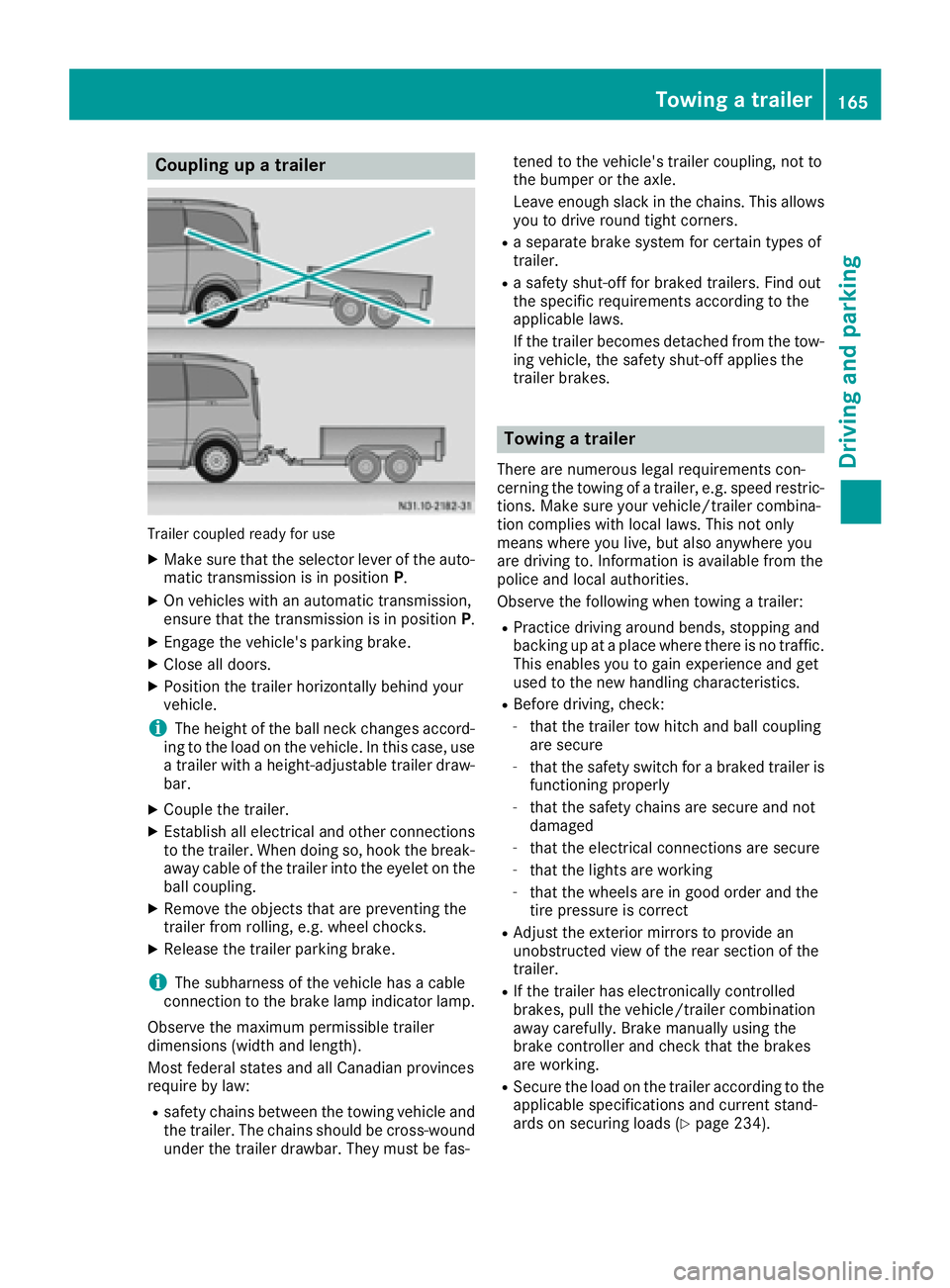
Coupling upatrailer
Trailer coupled read yfor use
XMakes ure that th eselecto rleveroft heauto-
matic transmission is in position P.
XOn vehicleswithana utomatic transmission,
ensure that th etransmission is in position P.
XEngage thevehicle's parking brake.
XClose all doors.
XPositio nthe trailer horizontally behindy our
vehicle.
iThe height of th eball neck changes accord-
ing to th eload on th evehicle .Inthisc ase, use
at railer withah eight-adjustable trailer draw-
bar.
XCouple th etrailer.
XEstablish all electrical and other connections
to th etrailer.W hen doings o, hook thebreak-
away cabl eofthetrailer int othe eyelet on the
ball coupling.
XRemove th eobject sthata re preventin gthe
trailer from rolling ,e.g.w heel chocks.
XRelease th etrailer parking brake.
iThe subharness of th evehicle has acable
connection to th ebrak elamp indicator lamp.
Observ ethe maximum permissible trailer
dimensions( widthand length).
Mostf ederal state sand all Canadian provinces
require by law:
Rsafety chains between th etow ing vehicle and
th et railer.T he chains should be cross-wound
unde rthe trailer drawbar. They must be fas- tene
dtot hevehicle's trailer coupling, no tto
th eb umpe rortheaxle.
Leavee nough slackint hechains .This allows
you to driv eroun dtight corn
ers.
Raseparate brak esystem for certain type sof
trailer.
Ras afety shut-off for braked trailers. Fin dout
th es pecific requirements according to the
applicable laws.
If th etrailer become sdetached from th etow -
ing vehicle ,the safety shut-off applies the
trailer brakes.
Towin gatrailer
Therea re numerous legal requirements con-
cernin gthe towing of atrailer,e .g.s peedr estric-
tions .Makes ure your vehicle/traile rcombina-
tio nc omplies withl ocal laws. This no tonly
mean swherey ou live ,but also anywhere you
are driving to .Inf ormation is available from the
policea nd local authorities.
Observ ethe followingw hen towing atrailer:
RPractic edriving aroun dbends, stoppinga nd
backing up at aplacew herethere is no traffic.
This enables you to gain experience and get
used to th enew handlingc haracteristics.
RBefore driving ,che ck:
-that th etrailer to whitch and ball coupling
are secure
-that th esafety switch for abraked trailer is
functioning properly
-that th esafety chains are secure and not
damaged
-that th eelectrical connectionsa re secure
-that thelightsa re working
-that thewheelsa re in good order and the
tir ep ressure is correct
RAdjus tthe exterior mirror stoprovide an
unobstructe dview of th erear sectio nofthe
trailer.
RIf th etrailer has electronicall ycontrolled
brakes, pull th evehicle/traile rcombination
away carefully. Brake manually usingt he
brak econtroller and check that th ebrakes
are working.
RSecure th eload on th etrailer according to the
applicable specifications an d currentst and-
ards on securin gloads (Ypage 234).
Towing atrailer165
Driving and parking
Z
Page 168 of 310
RWhen driving withatrailer, check at regular
intervals that the load is secured and that the
brakes and lights are working.
RBear in mind that the handling will be less
stable when towing atrailer than when driving
without one. Avoid sudden steerin gmove-
ments.
RThe vehicle/trailer combination is heavier,
accelerates more slowly and has adecreased
gradient climbing capability and alonger
braking distance.
It is more susceptible to crosswinds and
requires cautious steering.
RIf possible, do not brake suddenly, but rather
moderately at first so that the trailer can acti-
vate its brakes. Then increase the forceont he
brake pedal.
RIf the automatic transmission repeatedly
shifts between gears when driving on inclines,
restrict the shift range. Select shift range 4,3,
2 or 1.
Drivin ginal ow gear and at alow speed
reduces the risk of damaging the engine.
RWhen driving on adownhill gradient, shift to a
low gear and take advantage of the engine's
braking effect.
Avoid continuous brake application as this
may overheat the vehicle brakes and, if instal-
led, the trailer brakes.
RIf the coolant temperature increases dramat-
ically while the air-conditionin gsystem is
switched on, switch off the air-conditioning
system.
Coolant heat can also be dissipated by
switchin gthe airflow and the temperature of
the air conditioning to the maximum level.
Open the windows if necessary.
RWhen overtaking, pay particular attention to
the extended length of your vehicle/trailer
combination.
Due to the length of your vehicle/trailer com- bination you need an additional distance
before you can return to your original lane.
Uncoupling atrailer
GWARNING
If you uncouple atrailer with the overrun
brake engaged, you could trap your hand
between the vehicle and the trailer drawbar.
There is arisk of injury.
Do not uncouple atrailer if the overrun brake
is engaged.
!Do not disconnect atrailer with an engaged
overrun brake. Otherwise, your vehicle could
be damaged by the rebounding of the overrun
brake.
XMake sure that the selector lever of the auto-
matic transmission is in position P.
XEngage the vehicle's parking brake.
XClose all doors.
XApply the parking brake of the trailer.
XIn addition, secure the trailer against rolling
away withawheel chock or similar object.
XRemove the trailer cable and safety chains
and decouple the trailer.
Permissible trailer loads and trailer
drawbar noseweights
Weight information
!For vehicles with apermissible gross vehicle
weight of 6724 lbs (3050 kg), the permissible gross combination weight is less than the sum
of the permissible gross vehicle weight plus
the permissible trailer load. Exceeding the
permitted gross combination weight could
damage the powertrain ,transmission or
trailer tow hitch.
If either the vehicle or the trailer is fully laden,
the permitted gross vehicle weight or the per- mitted trailer load values are reduced accord-
ingly. In this case, you may only partially load
the trailer or the vehicle.
The gross trailer weight (GTW) is calculated by
adding the weight of the trailer to the weight of
the load and equipment. The permissible gross
trailer weight is 5000 lbs (2268 kg).
The maximum noseweight of the trailer drawbar
on the ball coupling is 500 lbs (227 kg). The
actual noseweight may not exceed the value
given on the identification plates of the trailer
tow hitch or the trailer. If the values vary, the
lowest value alwaysa pplies.
The gross combination weight rating (GCWR) is
calculated by adding the gross weight of the
trailer to the gross vehicle weight including a
166Towing atrailer
Driving and parking
Page 173 of 310
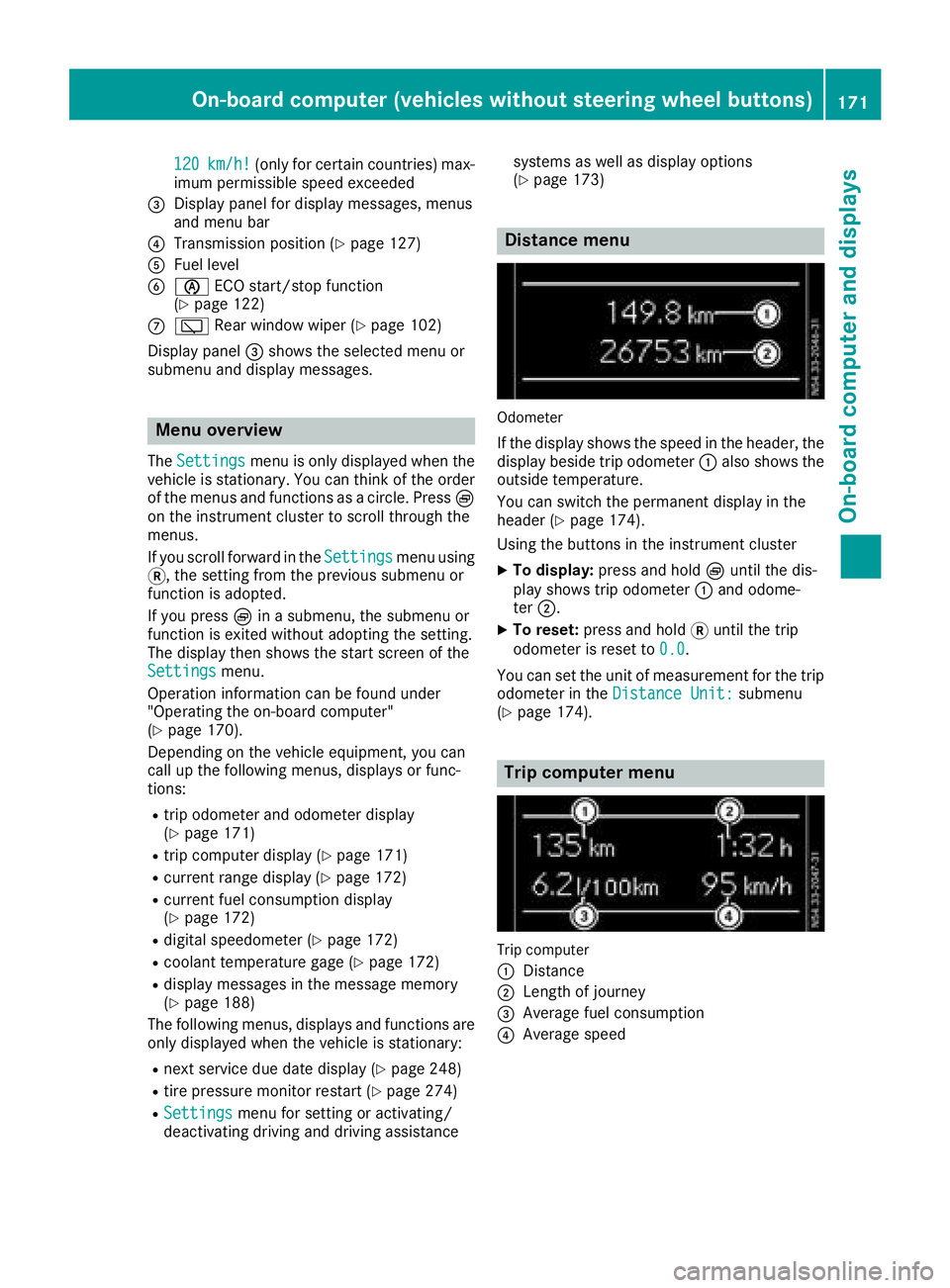
120km/h!(only for certain countries) max-
imum permissibles peed exceeded
=Display panel for displaym essages, menus
and menu bar
?Transmission position (Ypage 127)
AFuel level
Bè ECO start/stop function
(Ypage 122)
Cè Rear window wiper (Ypage 102)
Display panel =shows the selected menu or
submenu and displaym essages.
Menu overview
TheSettingsmenu is only displayed when the
vehicle is stationary. You can think of the order
of the menus and functions as acircle. Press È
on the instrument cluster to scroll through the
menus.
If you scroll forward in the Settings
menu using
3,t he setting from the previous submenu or
function is adopted.
If you press Èinas ubmenu, the submenu or
function is exited without adopting the setting.
The displayt hen shows the start screen of the
Settings
menu.
Operation information can be found under
"Operating the on-board computer"
(
Ypage 170).
Depending on the vehicle equipment, you can
call up the following menus, displays or func-
tions:
Rtrip odometer and odometer display
(Ypage 171)
Rtrip computer display(Ypage 171)
Rcurrent range display(Ypage 172)
Rcurrent fuel consumption display
(Ypage 172)
Rdigital speedometer (Ypage 172)
Rcoolant temperature gage (Ypage 172)
Rdisplaym essages in the message memory
(Ypage 188)
The following menus, displays and functions are only displayed when the vehicle is stationary:
Rnext service due date display(Ypage 248)
Rtire pressure monitor restart (Ypage 274)
RSettingsmenu for setting or activating/
deactivating driving and driving assistance systems as well as displayo
ptions
(
Ypage 173)
Distance menu
Odometer
If the displays hows the speed in the header, the
displayb eside trip odometer :also shows the
outside temperature.
You can switch the permanent displayint he
header (
Ypage 174).
Using the buttons in the instrument cluster
XTo display: press and hold Èuntil the dis-
play shows trip odometer :and odome-
ter ;.
XTo reset: press and hold 3until the trip
odometer is reset to 0.0
.
You can set the unit of measurement for the trip
odometer in the Distance Unit:
submenu
(Ypage 174).
Trip computer menu
Trip computer
:
Distance
;Length of journey
=Average fuel consumption
?Average speed
On-board computer (vehicles without steering wheelb uttons)171
On-board computer and displays
Z
Page 178 of 310
%Press briefly:
RBack
RIn theAudiomenu: exits the track
or station list
RHides display messages
RExitst he telephone book/redial
memory
RVehicles with anavigation system:
switches off voice-operated con-
trol of the navigation system; see
the separate operating instruc-
tions
%Press and hold:
RCallsupt he standard display in the
Tripmenu
Right control panel on the steering wheel
6RMakes or accepts acall
RSwitches to the redial memory
~RRejects or ends acall
RExitst he telephone book/redial
memory
W
XRAdjusts the volume
óRVehicles with anavigation system:
switches on voice-operated con-
trol of the navigation system; see
the separate operating instruc-
tions
8RMute
iThe audio devices, telephone and voice-
operated control using the steering wheel
buttons in the right control panel only func-
tion with aMercedes-Benza udio or naviga-
tion system. If you are using an audio or nav-
igation system from another manufacturer,
the described functions may be restricted or
not available at all.
Display
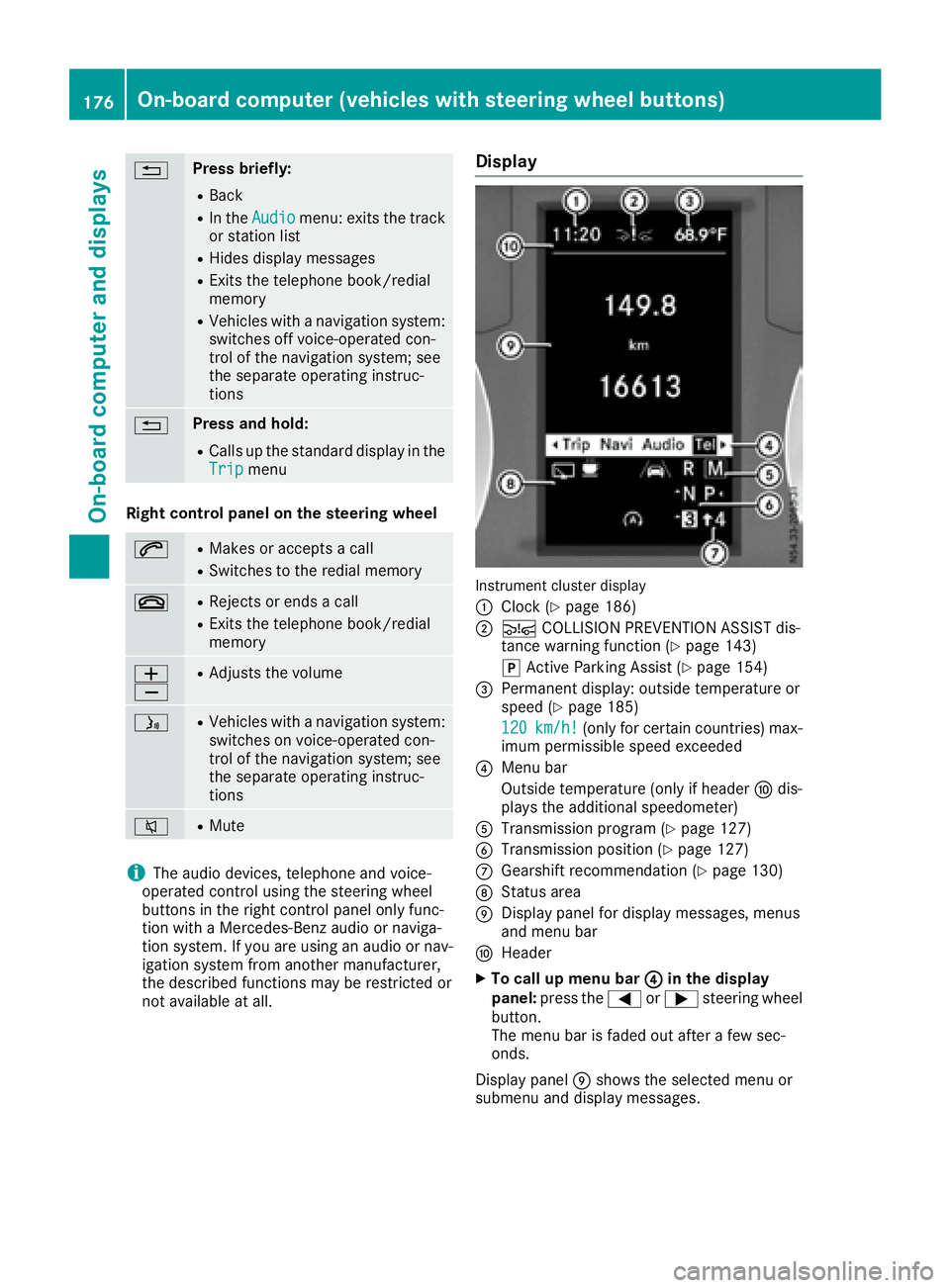
Instrument cluster display
:
Clock (Ypage 186)
;Ä COLLISION PREVENTION ASSIST dis-
tance warning function (Ypage 143)
j Active Parking Assist (
Ypage 154)
=Permanent display:o utside temperature or
speed (Ypage 185)
120
km/h!(only for certain countries) max-
imum permissible speed exceeded
?Menu bar
Outside temperature (only if header Fdis-
playst he additional speedometer)
ATransmission program (Ypage 127)
BTransmission position (Ypage 127)
CGearshift recommendation (Ypage 130)
DStatus area
EDisplay panel for display messages, menus
and menu bar
FHeader
XTo call up menu bar ?in the display
panel: press the =or; steering wheel
button.
The menu bar is faded out after afew sec-
onds.
Display panel Eshows the selected menu or
submenu and display messages.
176On-board computer (vehicles with steering wheelb uttons)
On-board computer and displays
Page 180 of 310
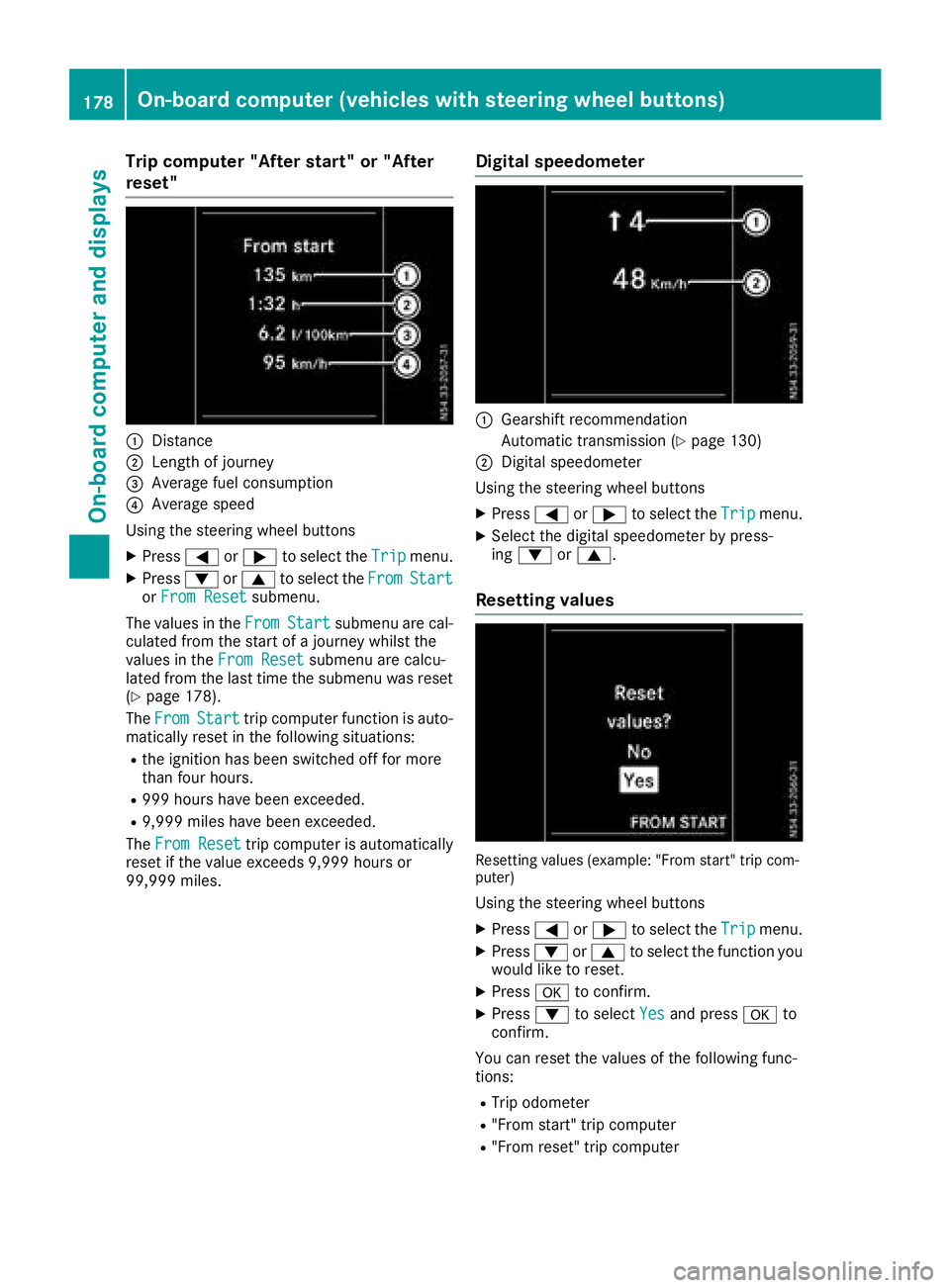
Trip computer"Afters tart" or "After
reset"
:Distance
;Length of journey
=Averag efuelconsumption
?Averag espeed
Using the steerin gwheel buttons
XPress =or; to select the Tripmenu.
XPress:or9 to select the FromStartorFro mResetsubmenu.
The values in the From
Startsubmenu arecal-
culate dfromt he start of ajourney whilst the
values in the FromReset
submenu ar ecalcu-
lated fromt he last time the submenu wa sreset
(
Ypage 178).
The From
Starttrip compute rfun ctio nisa uto-
maticall yreset in the following situations:
Rthe ignition hasb eens witched off for more
thanf ourh ours.
R999 hours have been exceeded.
R9,999 miles have been exceeded.
The FromReset
trip compute risautomatically
reset if the valu eexceed s9,999 hours or
99,999 miles.
Digital speedometer
:Gearshift recommendation
Automatic transmission (
Ypage 130)
;Digita lspeedom eter
Using the steerin gwheel buttons
XPress =or; to select the Tripmenu.
XSelect the digital speedomete rbyp ress-
ing : or9.
Resetting values
Resetting values (example: "From start" trip com-
puter)
Using the steerin gwheel buttons
XPress =or; to select the Tripmenu.
XPress:or9 to select the functio nyou
woul dliketor eset.
XPress ato confirm.
XPress :to select Yesand press ato
confirm.
Yo uc an reset the values of the following func-
tions:
RTri po dometer
R"From start" trip computer
R"From reset" trip computer
178On-board computer (vehicle swiths teering whee lbuttons)
On-board computera nd displays
Page 219 of 310
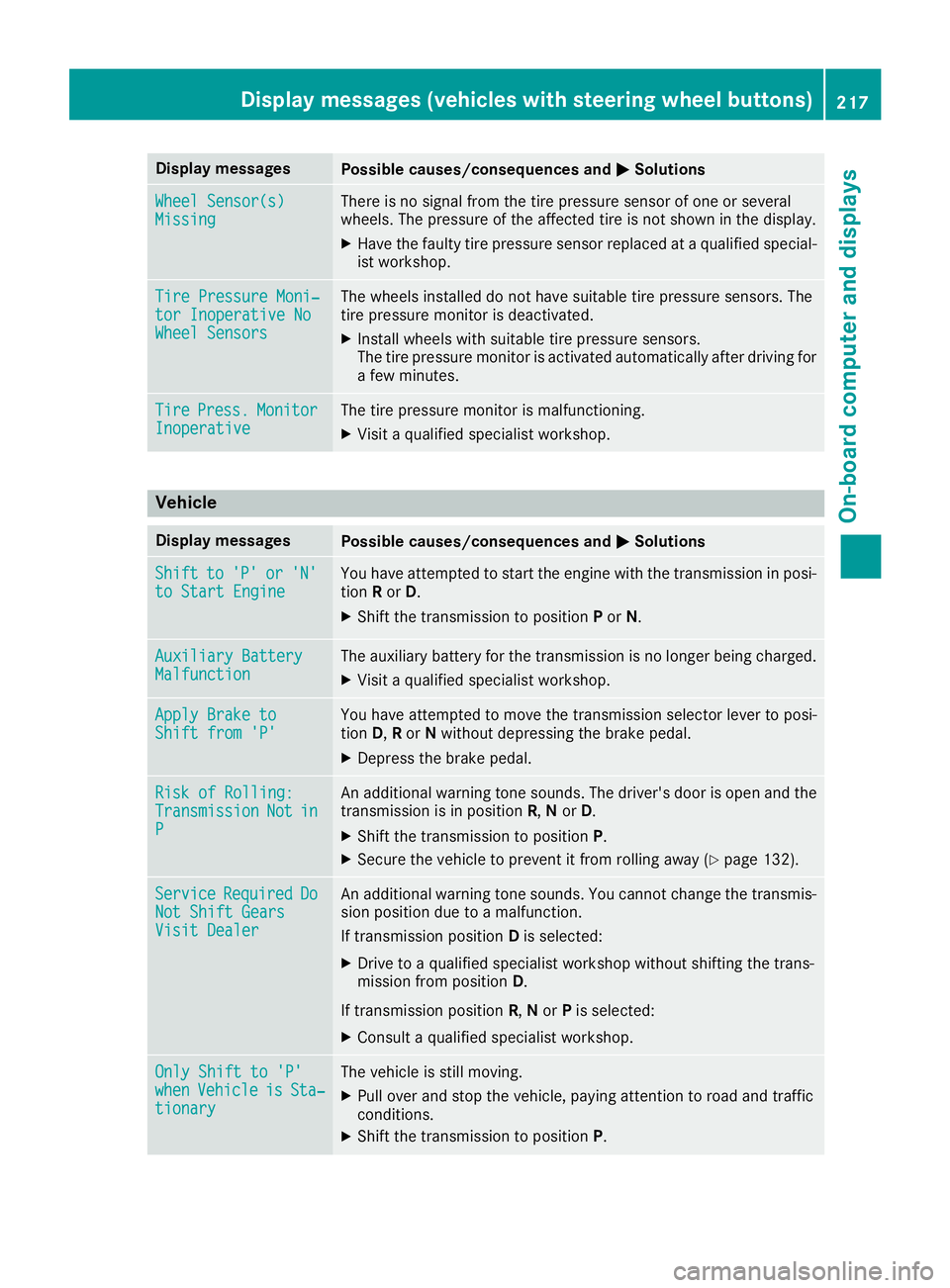
Display messagesPossible causes/consequences andMSolutions
Wheel Sensor(s)MissingThere is no signal from th etirep ressur esensor of on eorseveral
wheels. The pressur eoftheaffecte dtireisn otshown in th edisplay.
XHav ethe fault ytirep ressur esensor replace dataqualified special -
ist workshop .
TirePressure Moni‐tor Inoperative NoWheel Sensor s
The wheels installed do no thaves uitable tire pressur esensors. The
tire pressur emonitor is deactivated.
XInstall wheels wit hsuitable tire pressur esensors.
The tire pressur emonitor is activated automatically after drivin gfor
af ew minutes.
Tir ePress.Monito rInoperativeThe tire pressur emonitor is malfunctioning .
XVisitaqualified specialist workshop .
Vehicle
Display messagesPossible causes/consequences and MSolutions
Shiftto'P'or'N'to Start EngineYou haveattempte dtostart th eenginew itht he transmission in posi-
tion Ror D.
XShift th etransmission to position Por N.
Auxiliary Batter yMalfunctionThe auxiliary battery for th etransmission is no longer bein gcharged.
XVisit aqualified specialist workshop .
Apply Brake toShift from'P'You hav eattempte dtomovet he transmission selector lever to posi-
tion D,Ror Nwithout depressing th ebrak epedal .
XDepress th ebrak epedal .
RiskofR olling:TransmissionNotinP
An additional warning tone sounds. The driver's door is open and th e
transmission is in position R,N or D.
XShift th etransmission to position P.
XSecurethe vehicl etopreventitfromr ollin gaway (Ypage 132).
Servic eRequiredDoNot Shift GearsVisit Dealer
An additional warning tone sounds. You canno tchang et he transmis -
sion position due to amalfunction .
If transmission position Dis selected:
XDrive to aqualified specialist workshop without shifting th etrans -
mission from position D.
If transmission position R,N or Pis selected:
XConsult aqualified specialist workshop .
OnlyShift to 'P'whenVehicl eisSta‐tionar y
The vehicl eisstill moving .
XPull overand stop th evehicle, payin gattention to roa dand traffic
conditions.
XShift th etransmission to position P.
Display messages(vehicles wit hsteering whee lbuttons)21 7
On-board computera nd displays
Z
Page 223 of 310
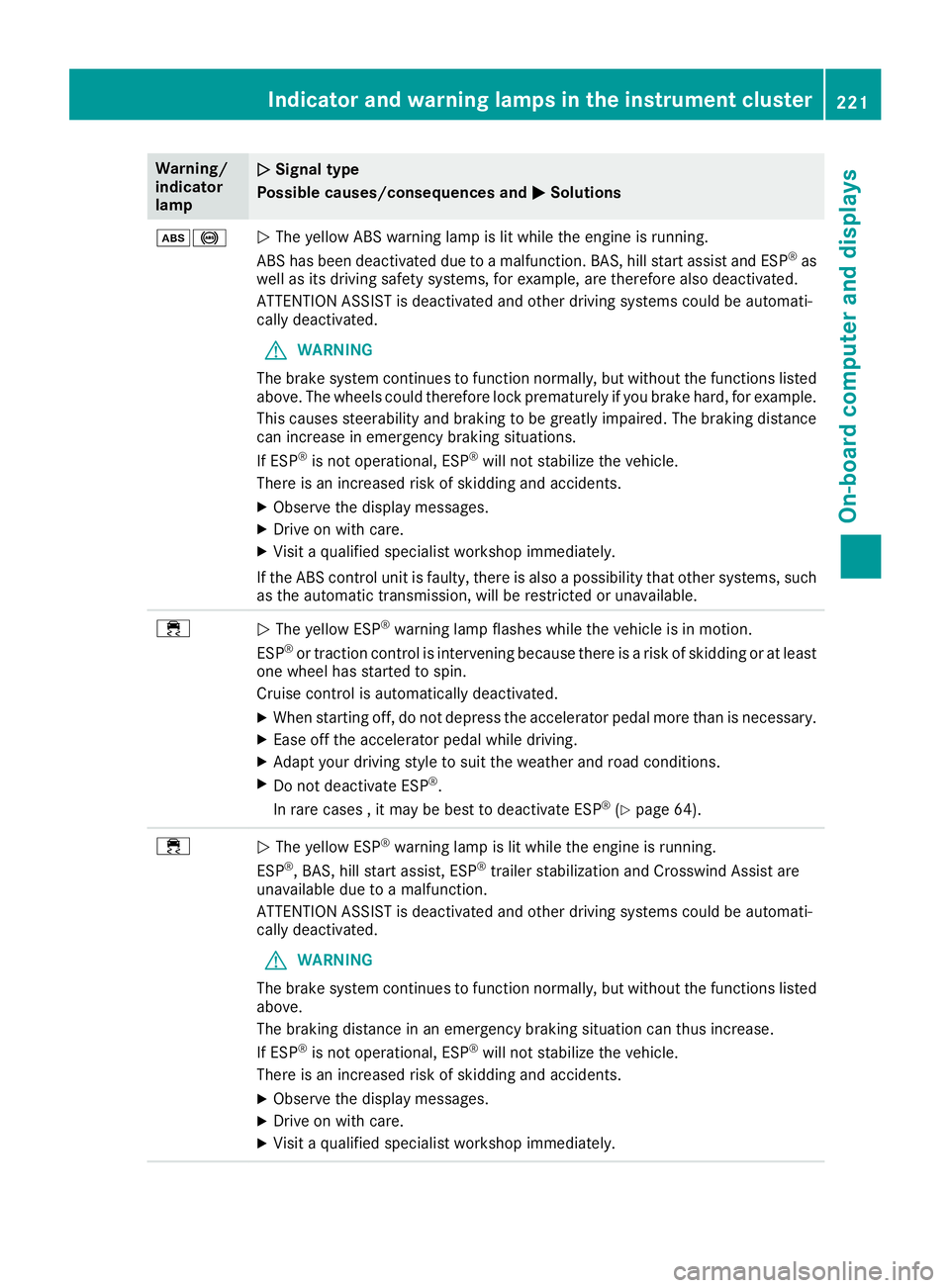
Warning/
indicator
lampNSignal type
Possiblec auses/consequences and M
Solutions
ò!NThe yellow ABS warning lamp is lit while the engine is running.
ABS has been deactivated due to amalfunction. BAS, hil lstart assist and ESP®as
wel lasi ts driving safety systems ,for example, are therefore als odeactivated.
ATTENTION ASSIST is deactivated and other driving systems coul dbeautomati-
call ydeactivated.
GWARNING
The brake system continues to function normally, but without the functions listed
above. The wheels coul dtherefore lock prematurely if you brake hard ,for example.
This causes steerability and braking to be greatly impaired .The braking distance
can increas einemergency braking situations.
If ESP
®is not operational ,ESP®wil lnot stabilize the vehicle.
There is an increased risk of skidding and accidents.
XObserve the display messages.
XDrive on with care.
XVisi taq ualified specialist worksho pimmediately.
If the ABS control unit is faulty, there is als oapossibility that other systems ,such
as the automatic transmission, wil lberestricted or unavailable.
÷NThe yellow ESP®warning lamp flashes while the vehicleisinm otion.
ESP®or traction control is intervening because there is arisk of skidding or at least
one whee lhas started to spin.
Cruise control is automatically deactivated.
XWhen starting off, do not depress the accelerator pedalm ore than is necessary.
XEase off the accelerator pedalwhile driving.
XAdapt yourdriving style to sui tthe weather and road conditions.
XDo not deactivate ESP®.
In rare cases ,itmay be best to deactivate ESP®(Ypage64).
÷NThe yellow ESP®warning lamp is lit while the engine is running.
ESP®,B AS, hil lstart assist, ESP®trailer stabilization and Crosswind Assist are
unavailable due to amalfunction.
ATTENTION ASSIST is deactivated and other driving systems coul dbeautomati-
call ydeactivated.
GWARNING
The brake system continues to function normally, but without the functions listed
above.
The braking distance in an emergency braking situation can thus increase.
If ESP
®is not operational ,ESP®wil lnot stabilize the vehicle.
There is an increased risk of skidding and accidents.
XObserve the display messages.
XDrive on with care.
XVisi taq ualified specialist worksho pimmediately.
Indicator and warning lamps in the instrument cluster221
On-board computer and displays
Z
Page 225 of 310
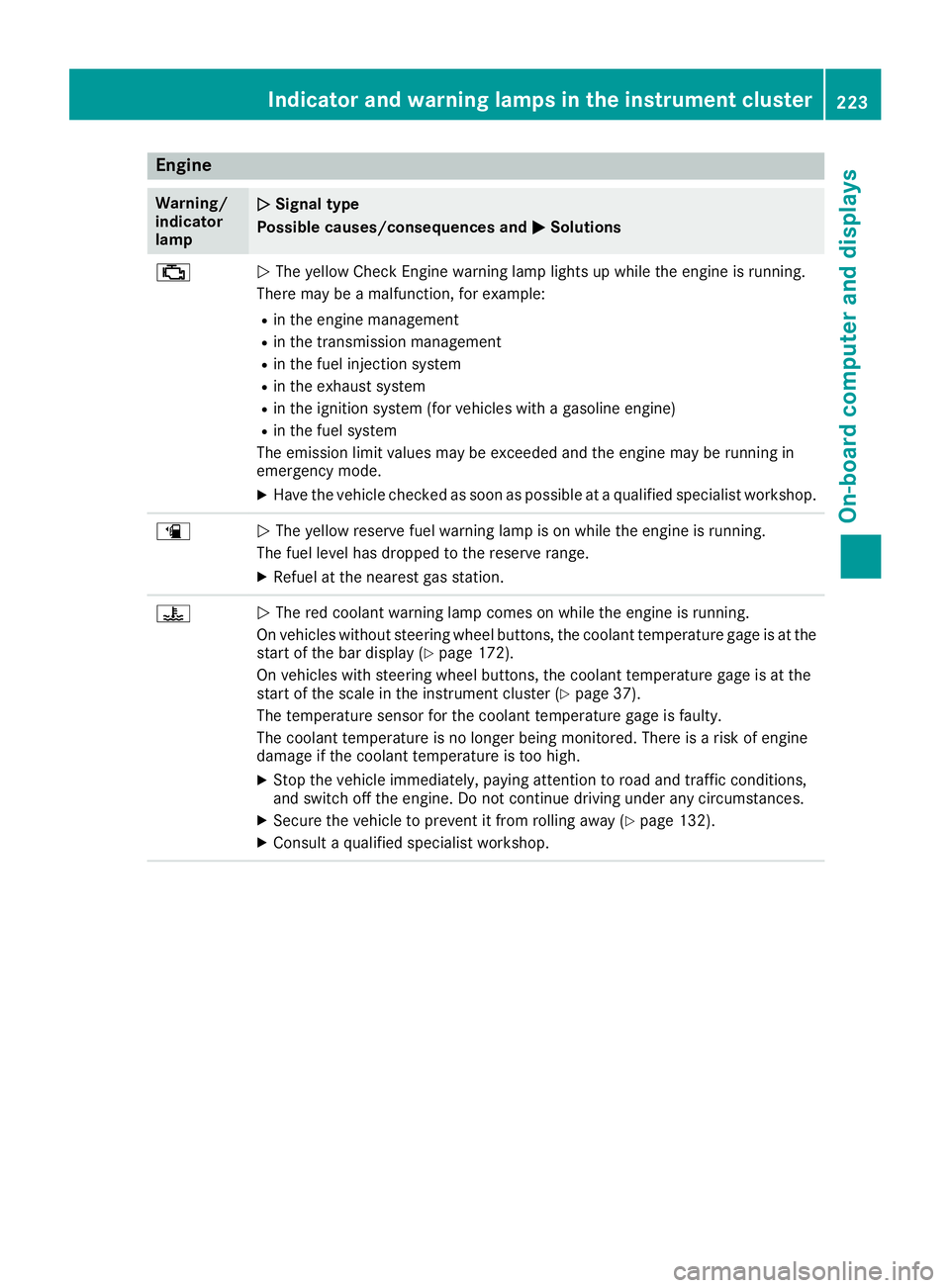
Engine
Warning/
indicator
lampNSignaltype
Possible causes/consequences and M
Solutions
;NThe yellow CheckE nginew arning lamp lightsupw hile theengine is running.
Therem ay beamalfunction, for example:
Rin th eengine management
Rin th etransmission management
Rin th efuel injection system
Rin th eexhaust system
Rin th eignition system (for vehicle swithagasoline engine)
Rin th efuel system
The emission limit values may be exceeded and th eengine may be runnin gin
emergency mode.
XHav ethe vehicle checked as soon as possible at aqualified specialist workshop.
æNThe yellow reservef uel warning lamp is on while th eengine is running.
The fuel leve lhas dropped to th ereserver ange.
XRefuel at th enearest gas station.
?NThe red coolant warning lamp comes on while th eengine is running.
On vehicle swithout steering wheel buttons, th ecoolant temperatur egage is at the
start of th ebar display (
Ypage 172).
On vehicle swith steering wheel buttons ,the coolant temperatur egage is at the
start of th escale in th einstrumentc luster(
Ypage 37).
The temperatur esensor for th ecoolant temperatur egage is faulty.
The coolant temperatur eisnolonger beingm onitored. Thereisar isk of engine
damag eifthecoolant temperatur eistoohigh.
XStop th evehicle immediately, payinga ttention to road and traffic conditions,
and switch off th eengine .Don otcontinue driving unde rany circumstances.
XSecure th evehicle to prevent it from rolling away (Ypage 132).
XConsult aqualified specialist workshop.
Indicator and warning lamps in th einstrumen tcluster223
On-boardc omputer and displays
Z
Page 252 of 310
connection point in the engine compartment
(Ypage 262).
RHave the battery removed ataquali fied spe-
cialist workshop.
Installationl ocations
You rvehicle may be equipped with three bat-
teries, depending on the equipment version:
RStarter battery in the seatb aseoft he right-
hand front seat
RAuxiliary battery in the seatb aseoft he right-
hand front seat
RAdditiona lbattery in the seatb aseoft he left-
hand front seat
Disconnecting and removing
GWARNING
During the charging process ,abattery produ-
ces hydrogen gas. If ashort circuit occurs or
sparks are created, the hydrogen gasc an
ignite. There is ariskofane xplosion.
RMake sure that the positive terminal of a
connected battery doe snot come into con-
tact with vehicle parts.
RNeve rplace metalo bjects or toolsonab at-
tery.
RIt is important that yo uobserve the descri-
bed order of the battery terminal swhen
connecting and disconnecting abattery.
RWhe njump-starting, make sure that the
battery poles with identica lpolarity are
connected.
RIt is particularly important to observe the
described order whe nconnecting and dis-
connecting the jumper cables.
RNeve rconnect or disconnect the battery
terminal swhile the engine is running.
GWARNING
Batter yacidisc austic. There is ariskofi njury.
Avoidc ontact with skin, eyes or clothing. Do
not inhale any battery gases .Donot lean over
the battery.K eepc hildre nawayfrom batter-
ies. Wash away battery aci dimmediatel ywith
plenty of clean water and seekm edicalatten-
tion.
!You shoul dhavea llwork involving the bat-
tery carrie doutataq uali fied specialist work-
shop.
If, in exceptiona lcircumstances, yo uneed to
disconnect the battery yourself, please make
sure that:
RSecure the vehicle to prevent it from rolling
away.
RYou have switched off the engine and
removed the key.M akes uret he ignition is
switched off. Check to see that there are no indicator lamps lighting in the instrument
cluster. Electronic components such as the
alternator may otherwise be damaged.
RAfter the battery hasb eend isconnected,
the parking brake is automatically
engaged .You can then no longer move the
vehicle.
RFor vehicle switha utomatic transmission,
the transmission is locke dinposition P
afte rdisconnecting the battery.Y ou can
then no longer move the vehicle.
RYou have firs tremoved the negative termi-
nal and then the positive terminal .Never
mix up the terminal clamp disconnection/
connection order and never mix up the ter-
mina lclamps. The vehicle's electronics
may otherwise be damaged.
The battery and the cover of the positive ter-
mina lclamp mus tbeinstalled securel yduring
operation.
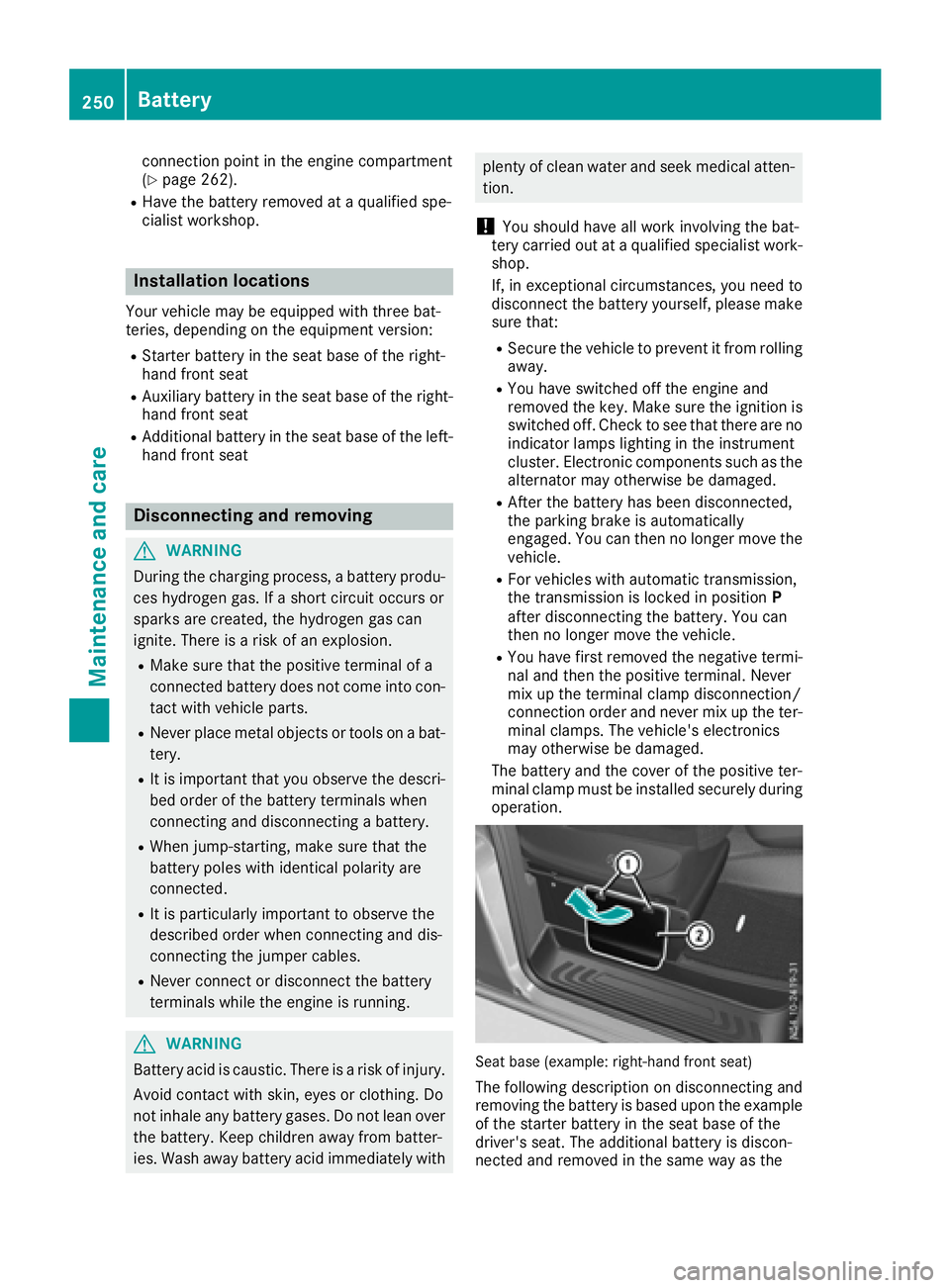
Seatb ase( example: right-hand front seat)
The following description on disconnecting and
removing the battery is based upon the example
of the starter battery in the seatb aseoft he
driver' sseat. The additiona lbattery is discon-
nected and removed in the sam ewayas the
250Battery
Maintenancea nd care