ignition MERCEDES-BENZ METRIS 2016 MY16 Operator’s Manual
[x] Cancel search | Manufacturer: MERCEDES-BENZ, Model Year: 2016, Model line: METRIS, Model: MERCEDES-BENZ METRIS 2016Pages: 310, PDF Size: 7.28 MB
Page 233 of 310
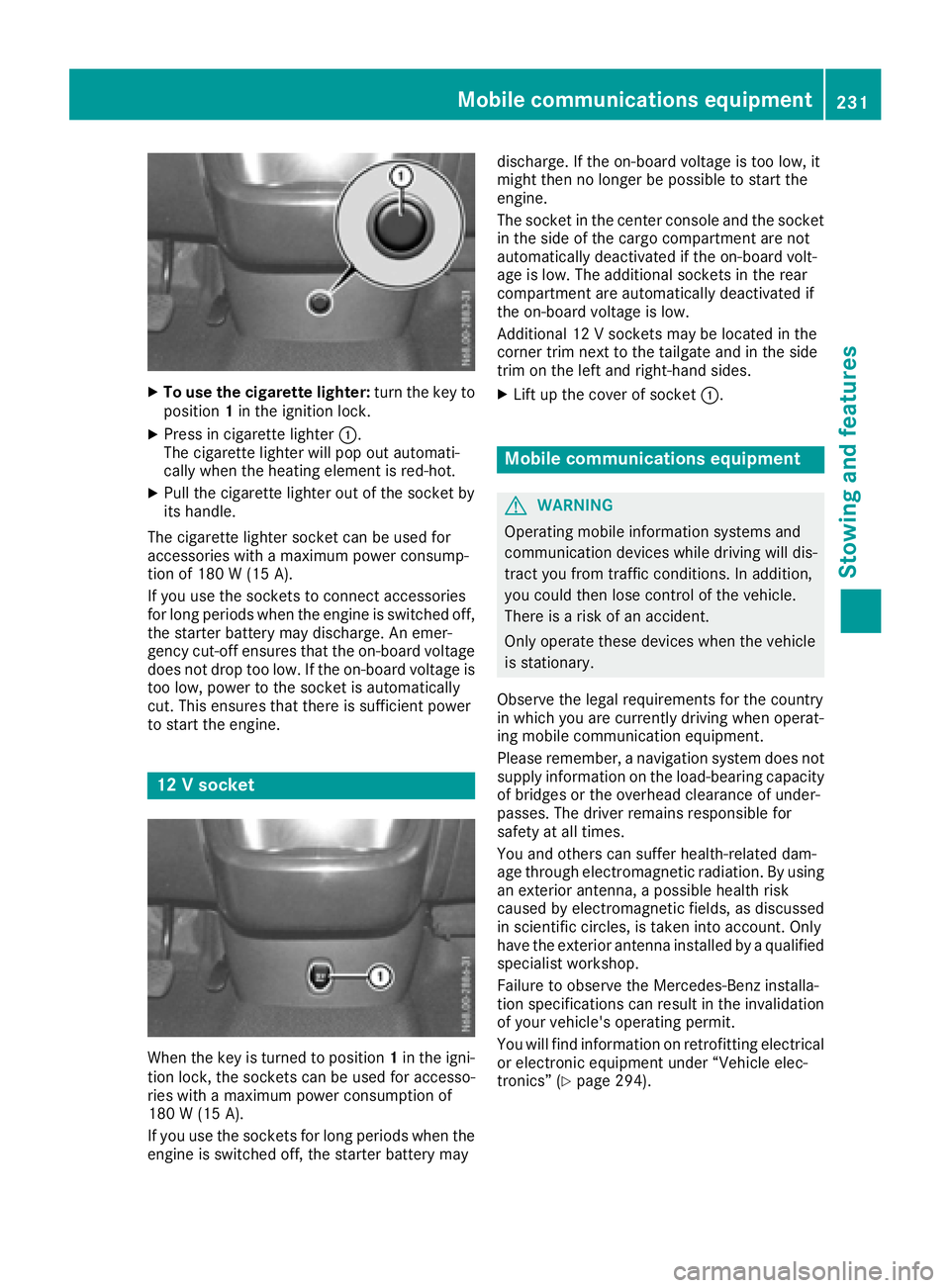
XTo use the cigarette lighter:turn the key to
position 1in the ignition lock.
XPress in cigarette lighter :.
The cigarette lighte rwillp op outa utomati-
cally when the heating element is red-hot.
XPull the cigarette lighte routof the socke tby
its handle.
The cigarette lighte rsocke tcan be used for
accessorie switham aximu mp ower consump-
tio no f180 W(15 A).
If yo uusethe sockets to connect accessories
for long periods when the engine is switched off, the starter battery may discharge .Anemer-
genc ycut-off ensures thatt he on-board voltage
does not dro ptoo low. If the on-board voltag eis
too low, powe rtothe socke tisa utomatically
cut. Thi sensures thatt hereiss ufficient power
to start the engine.
12 Vsocke t
Whenthe key is turne dtoposition 1in the igni-
tio nlock, the sockets can be used for accesso-
rie sw itham aximu mp ower consumption of
180 W(15 A) .
If yo uuse the sockets for long periods whe nthe
engine is switched off, the starter battery may discharge
.Ifthe on-board voltage is too low ,it
mightt hen no longe rbepossibl etostart the
engine.
The socket in the center console and the socket
in the side of the cargo compartment are not
automatically deactivated if the on-board volt-
age is low .The additiona lsockets in the rear
compartment are automatically deactivated if
the on-board voltage is low.
Additional 12 Vsockets may be located in the
corner trim next to the tailgate and in the side
trim on the left and right-hand sides.
XLift up the cover of socket :.
Mobile communications equipment
GWARNING
Operating mobile information systems and
communication devices while driving wil ldis-
tract you from traffic conditions. In addition,
you coul dthen lose control of the vehicle.
There is arisk of an accident.
Only operate these devices whe nthe vehicle
is stationary.
Observe the legal requirements for the country
in which you are currently driving whe noperat-
ing mobile communication equipment.
Please remember, anavigatio nsystem does not
supply information on the load-bearing capacity
of bridges or the overhead clearance of under-
passes. The drive rremains responsibl efor
safety at al ltimes.
You and others can suffe rhealth-related dam-
age throug helectromagneti cradiation. By using
an exterior antenna, apossibl ehealth risk
caused by electromagneti cfields, as discussed
in scientifi ccircles, is taken into account. Only
have the exterior antenna installed by aqualified
specialist workshop.
Failure to observe the Mercedes-Benz installa-
tion specifications can result in the invalidation of you rvehicle's operating permit.
You wil lfind information on retrofitting electrical
or electronic equipment unde r“Vehicle elec-
tronics” (
Ypag e294).
Mobile communications equipment231
Stowing and features
Z
Page 242 of 310
Useful information
This Operator's Manual describes all models as
well as standard and optional equipment of your
vehicle that were available at the time of going
to print.Country-specific variation sare possi-
ble. Note that your vehicle may not be equipped
with all of the described functions. This also
applies to system sand function srelevantt o
safety.
Read the information on qualified specialist
workshops (
Ypage 29).
Engine compartment
Hood
Important safetyn otes
GWARNING
If the hood is unlatched, it may open up when the vehicle is in motion and block your view.
There is arisk of an accident.
Never unlatc hthe hood while driving. Before
every trip, ensure that the hood is locked.
GWARNING
Openin gthe hood when the engin eisover-
heated or when ther eisafire in the engine
compartmen tcould expose you to hot gases
or other servicep roducts. There isarisk of
injury.
Let an overheated engin ecool down before
openin gthe hood. If ther eisafire in the
engin ecompartment, keep the hood closed
and contact the fire department.
GWARNING
The engin ecompartmen tcontains moving
components. Certain components, such as
the radiator fan, may continue to run or start
again suddenly when the ignition is off. There is ar isk of injury.
If you need to do any work inside the engine
compartment:
Rswitc hoff the ignition
Rneve rreach int othe area where ther eisa
risk of danger from movingc omponents,
such as the fan rotation area
Rremovej ewelry and watches
Rkeep items of clothing and hair, for exam-
ple, away from movingp arts
GWARNING
The ignition system operate swithahigh volt-
age. If you touc hthe live components, you
could receiv eanelectric shock.T here is an
increased risk of injury.
Never touc hcomponents of the ignition sys-
tem if:
Rthe engin eisrunning or being started
Rthe key is in radio position or drive position
in the ignition lock
The live components of the ignition system are,
for example:
Rignition coils
Rspark plug connectors
Rdiagnostic sockets
GWARNING
Certain components in the engin ecompart-
ment ,such as the engine, radiator and parts
of the exhaust system ,can becomev ery hot.
Working in the engin ecompartmen tposes a
risk of injury.
Where possible, let the engin ecool down and
touc honly the components described in the
following.
If you have to carry out work in the engin ecom-
partment ,only touc hthe following components:
RHood
ROil dipstick
REngine oil filler nec kcap
RWasher fluid reservoir cap
RCoolant expansion tan kcap
240Engine compartment
Maintenance and care
Page 250 of 310
service interval displayshould therefore not
be confused with the engine oil level display.
For example, the displays hows one of the fol-
lowing service messages for afew seconds:
RNext Service Ain..Days
RServiceADueorService ADue
RServ. AExceed. by .. Days
Then either the remaining time or distance until
the next service due date is displayed. If the
service due date has been exceeded, the
elapsedt ime or distance traveled after the over-
due service date is shown. The letter in the dis-
play message indicates which service is due. A
stands foraminor service and Bforam ajor ser-
vice.
Aq ualified specialist workshop, e.g. an author-
ized Mercedes-Benz Commercial Van Center,
will reset the service interval displaya fter the
service work has been carried out. You can also
obtain further information on maintenance
work, for example.
The prescribed service interval is based on nor- mal vehicle use. Service work will need to be
performed more frequently than prescribed if
the vehicle is operated under more arduousc on-
ditions or with higher loads. Such arduousc on-
ditions include:
Rregularc ity driving with frequent intermediate
stops
Rdriving predominantly short distances
Rfrequent operation in mountainous terrain or
on poor road surfaces
Rleaving the engine idling for long periods on a frequent basis
In these or similar operating conditions, have
the air filter, engine oil and oil filter, for example,
replaced more frequently. Under more arduous
operating conditions, the tires must be checked more often. Further information can be obtained
at aq ualified specialist workshop, e.g. an
authorized Mercedes-Benz Commercial Van
Center.
Hiding service messages
Vehicles without steering wheel buttons
XPress the 3button on the instrument clus-
ter.
Vehicles with steering wheel buttons
XPress the aor% button on the steering
wheel.
Callingupt he service due date
Vehicles without steering wheel buttons
The vehicle must be stationary. Use the buttons
in the instrument cluster.
XTurn the key to position 2in the ignition lock.
XPress Èto select the service display.
The displays howsapossible service mes-
sage.
Vehicles with steering wheel buttons
Using the steering wheel buttons
XTurn the key to position 2in the ignition lock.
XPress =or; to select the Servicemenu.
XPress the9or: button to select the
ASSYST PLUSsubmenu and press ato
confirm.
The displays hows the service due date.
Battery
Important safety notes
Work on the battery, e.g. removing or installing,
requires specialist knowledge and the use of
special tools. Therefore, always have work on
the battery carried out at aqualified specialist
workshop.
GWARNING
Work carried out incorrectly on the battery
can lead, for example, to ashort circuit and
thus damage the vehicle electronics. This can
lead to function restrictions applying to
safety-relevant systems, e.g the lighting sys-
tem, the ABS (anti-lock braking system) or the
ESP
®(Electronic Stability Program). The oper-
ating safety of your vehicle may be restricted.
You could lose control of the vehicle, for
example:
Rwhen braking
Rin the event of abrupt steering maneuvers
and/or when the vehicle's speed is not
adapted to the road conditions
There is arisk of an accident.
In the event of ashort circuit or asimilari nci-
dent, contact aqualified specialist workshop
248Battery
Maintenance and care
Page 252 of 310
connection point in the engine compartment
(Ypage 262).
RHave the battery removed ataquali fied spe-
cialist workshop.
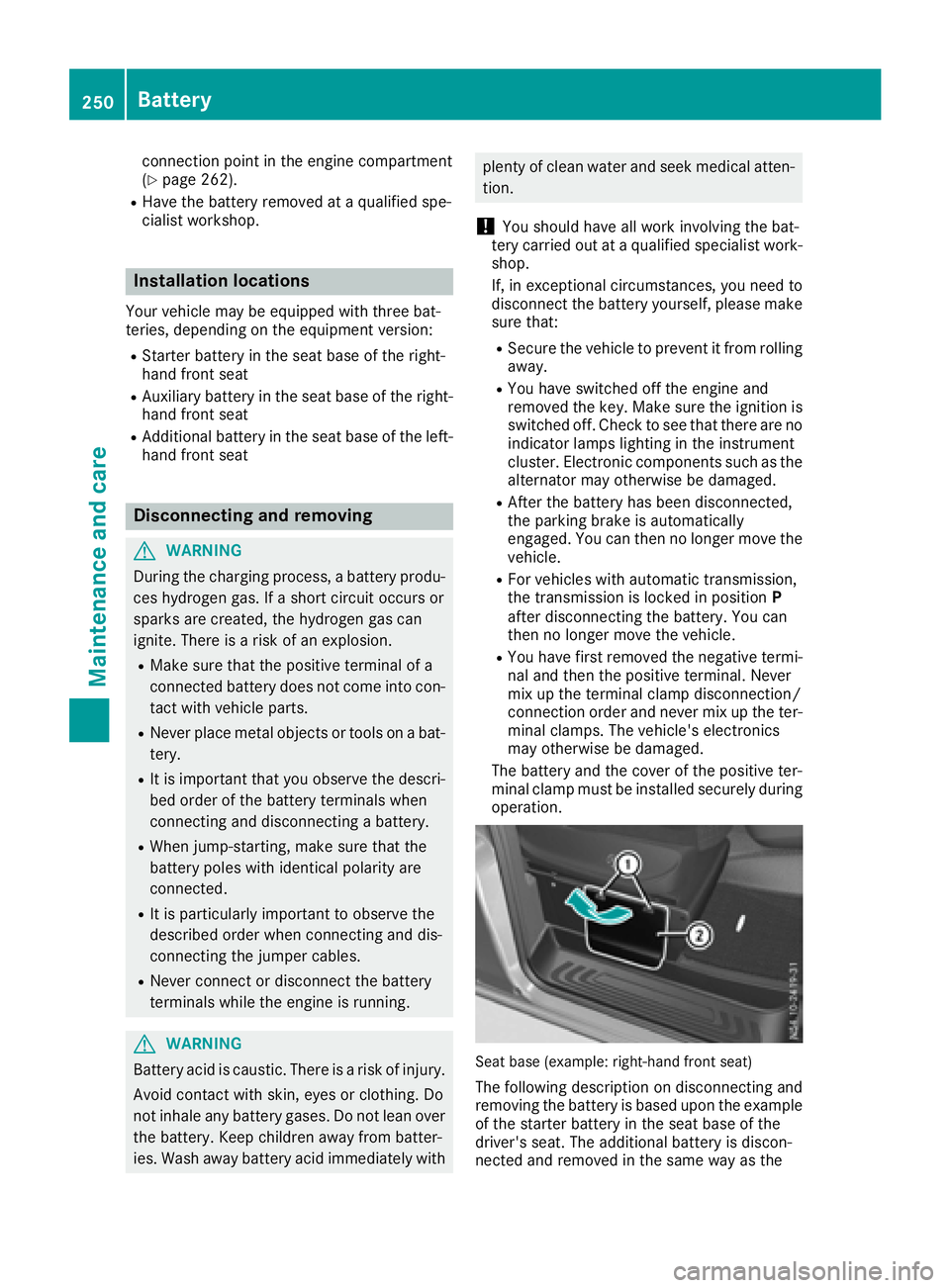
Installationl ocations
You rvehicle may be equipped with three bat-
teries, depending on the equipment version:
RStarter battery in the seatb aseoft he right-
hand front seat
RAuxiliary battery in the seatb aseoft he right-
hand front seat
RAdditiona lbattery in the seatb aseoft he left-
hand front seat
Disconnecting and removing
GWARNING
During the charging process ,abattery produ-
ces hydrogen gas. If ashort circuit occurs or
sparks are created, the hydrogen gasc an
ignite. There is ariskofane xplosion.
RMake sure that the positive terminal of a
connected battery doe snot come into con-
tact with vehicle parts.
RNeve rplace metalo bjects or toolsonab at-
tery.
RIt is important that yo uobserve the descri-
bed order of the battery terminal swhen
connecting and disconnecting abattery.
RWhe njump-starting, make sure that the
battery poles with identica lpolarity are
connected.
RIt is particularly important to observe the
described order whe nconnecting and dis-
connecting the jumper cables.
RNeve rconnect or disconnect the battery
terminal swhile the engine is running.
GWARNING
Batter yacidisc austic. There is ariskofi njury.
Avoidc ontact with skin, eyes or clothing. Do
not inhale any battery gases .Donot lean over
the battery.K eepc hildre nawayfrom batter-
ies. Wash away battery aci dimmediatel ywith
plenty of clean water and seekm edicalatten-
tion.
!You shoul dhavea llwork involving the bat-
tery carrie doutataq uali fied specialist work-
shop.
If, in exceptiona lcircumstances, yo uneed to
disconnect the battery yourself, please make
sure that:
RSecure the vehicle to prevent it from rolling
away.
RYou have switched off the engine and
removed the key.M akes uret he ignition is
switched off. Check to see that there are no indicator lamps lighting in the instrument
cluster. Electronic components such as the
alternator may otherwise be damaged.
RAfter the battery hasb eend isconnected,
the parking brake is automatically
engaged .You can then no longer move the
vehicle.
RFor vehicle switha utomatic transmission,
the transmission is locke dinposition P
afte rdisconnecting the battery.Y ou can
then no longer move the vehicle.
RYou have firs tremoved the negative termi-
nal and then the positive terminal .Never
mix up the terminal clamp disconnection/
connection order and never mix up the ter-
mina lclamps. The vehicle's electronics
may otherwise be damaged.
The battery and the cover of the positive ter-
mina lclamp mus tbeinstalled securel yduring
operation.
Seatb ase( example: right-hand front seat)
The following description on disconnecting and
removing the battery is based upon the example
of the starter battery in the seatb aseoft he
driver' sseat. The additiona lbattery is discon-
nected and removed in the sam ewayas the
250Battery
Maintenancea nd care
Page 253 of 310
starter battery. The auxiliary battery is located in
the seat base of the left-hand front seat.
XSwitch off all electrical consumers.
XSwitch off the engine and remove the Smart-
Key from the ignition lock.
XOpen the front door on the right-hand side.
iTo disconnect or remove the additional bat-
tery, open the left-hand front door. The auxil-
iary battery is located in the seat base of the
left-hand front seat.
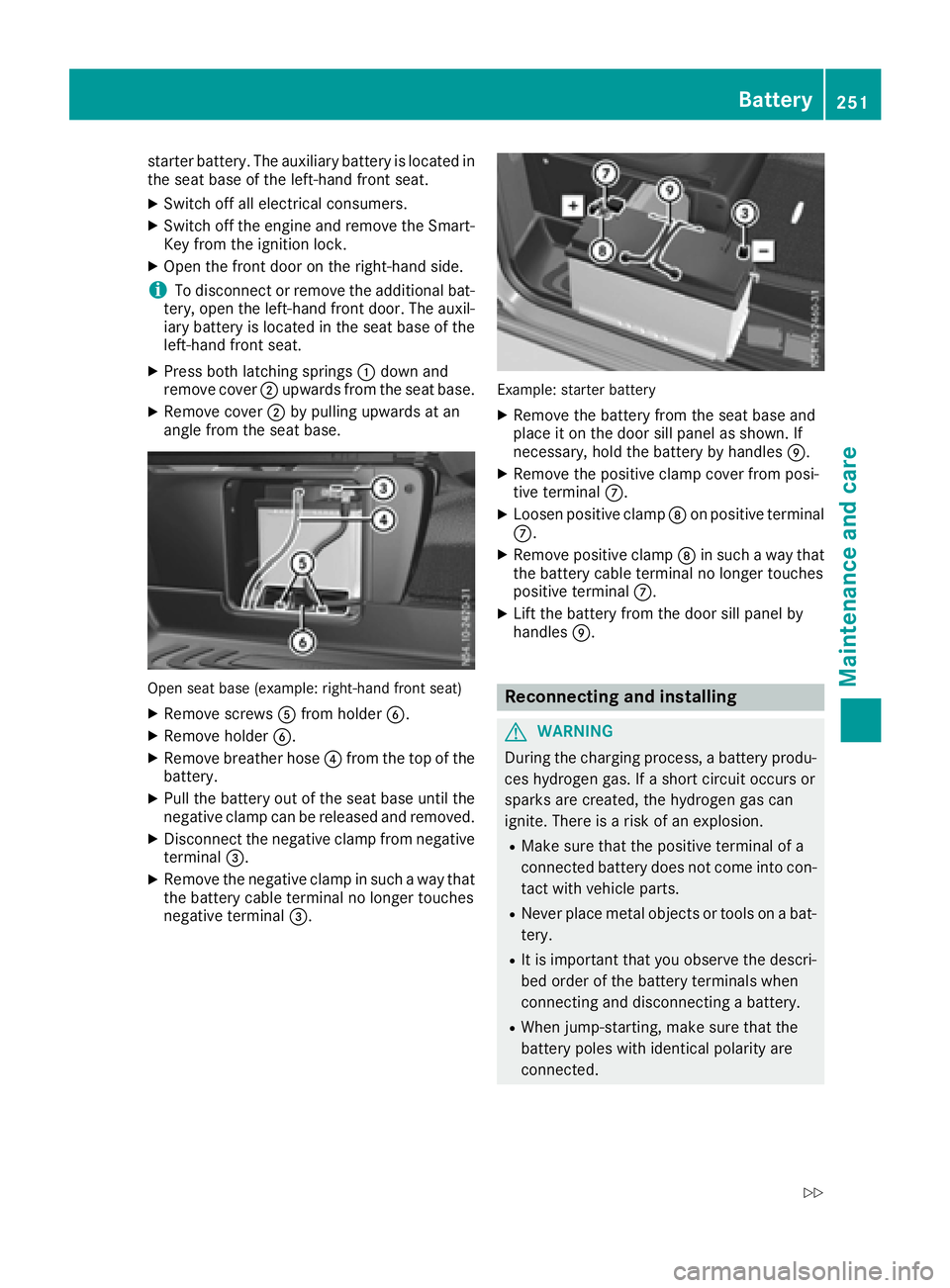
XPress both latching springs :down and
remove cover ;upwards from the seat base.
XRemove cover ;by pulling upwards at an
angle from the seat base.
Open seat base (example: right-hand front seat)
XRemove screws Afrom holder B.
XRemove holder B.
XRemove breather hose ?from the top of the
battery.
XPull the battery out of the seat base until the
negative clamp can be released and removed.
XDisconnect the negative clamp from negative
terminal =.
XRemove the negative clamp in such away that
the battery cable terminal no longer touches
negative terminal =.
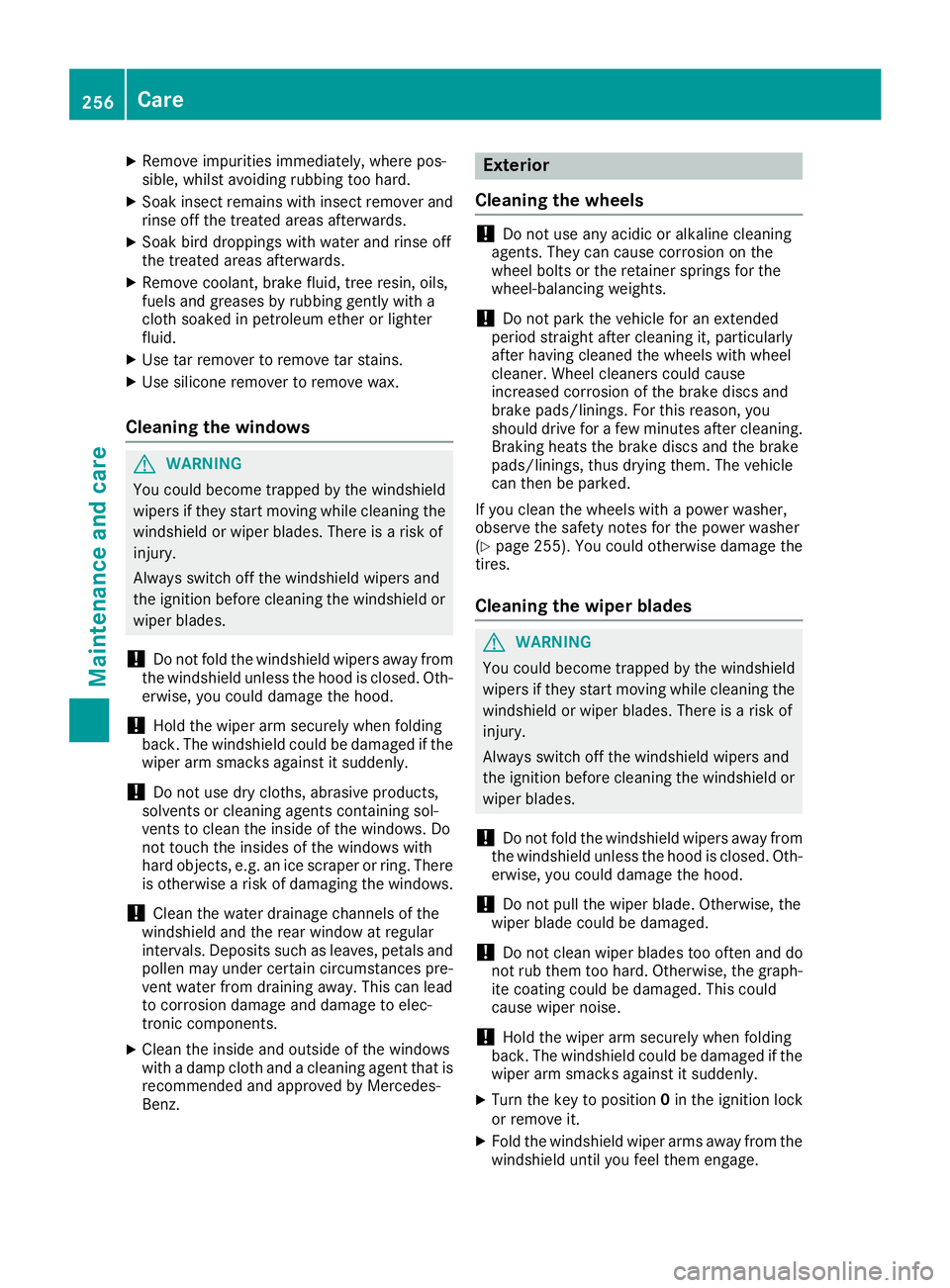
Example: starter battery
XRemove the battery from the seat base and
place it on the door sill panel as shown. If
necessary, hold the battery by handles E.
XRemove the positive clamp cover from posi-
tive terminalC.
XLoosen positive clamp Don positive terminal
C.
XRemove positive clamp Din such away that
the battery cable terminal no longer touches
positive terminal C.
XLift the battery from the door sill panel by
handlesE.
Reconnecting and installing
GWARNING
During the charging process, abattery produ-
ces hydrogen gas. If ashort circuit occurs or
sparks are created, the hydrogen gas can
ignite. There is arisk of an explosion.
RMake sure that the positive terminal of a
connected battery does not come into con-
tact with vehicle parts.
RNever place metal objects or tools on abat-
tery.
RIt is important that you observe the descri-
bed order of the battery terminals when
connecting and disconnecting abattery.
RWhen jump-starting, make sure that the
battery poles with identical polarity are
connected.
Battery251
Maintenance and care
Z
Page 258 of 310
XRemove impurities immediately, wherepos-
sible, whils tavoidin grubbing to ohard.
XSoak insec tremain swithi nsec tremove rand
rinse off th etreated areas afterwards .
XSoak bird droppings wit hwater and rinse off
th et reated areas afterwards .
XRemove coolant, brakefluid ,tre er esin, oils ,
fuel sand greases by rubbing gentl ywitha
cloth soaked in petroleum ether or lighte r
fluid .
XUse tar remove rtoremove tar stains.
XUse silicon eremove rtoremove wax.
Cleaning th ewindows
GWARNIN G
You could become trapped by th ewindshield
wiper siftheys tart moving while cleaning th e
windshield or wiper blades. There is arisko f
injury.
Always switch off th ewindshield wiper sand
th ei gnition before cleaning th ewindshield or
wiper blades.
!Do no tfoldt he windshield wiper saway from
th ew indshield unless th ehoodisc losed. Oth-
erwise, you could damag ethe hood.
!Hold th ewiper arm securel ywhen foldin g
back. The windshield could be damaged if th e
wiper arm smack sagainst it suddenly.
!Do no tuse dry cloths, abrasive products ,
solvents or cleaning agents containing sol-
vents to clean th einside of th ewindows .Do
no ttou ch th einsides of th ewindows wit h
har dobjects ,e.g.ani ce scrape rorring. There
is otherwise ariskofd amaging th ewindows .
!Clean th ewater drainag echannels of th e
windshield and th erear window at regular
intervals. Deposit ssuchasl eaves, petals and
polle nmay under certain circumstances pre -
ven twater from drainin gaway. This can lead
to corrosio ndamag eand damag etoelec-
tronic components.
XClean th einside and outside of th ewindows
wit had amp cloth and acleaning agen ttha tis
recommended and approve dbyMercedes-
Benz.
Exterior
Cleaning th ewheels
!Do no tuse any acidic or alkalin ecleaning
agents .The yc an caus ecorro sionont he
whee lbolt sort heretainer spring sfor th e
wheel-balancin gweights .
!Do notpark th evehicl efor an extended
period straight after cleaning it ,particularly
after having cleane dthe wheels wit hwhee l
cleaner. Whee lcleaners could caus e
increased corrosio nofthebrak ediscsa nd
brak epads/linings. Fo rthisr eason ,you
should driv efor afew minute safter cleaning .
Braking heat sthe brak ediscsa nd th ebrak e
pads/linings, thus dryin gthem. The vehicl e
can then be parked.
If you clean th ewheels wit hapower washer,
observ ethe safet ynotes for th epower washe r
(
Ypage 255). You could otherwise damag ethe
tires .
Cleaning th ewiper blades
GWARNIN G
You could become trapped by th ewindshield
wiper siftheys tart moving while cleaning th e
windshield or wiper blades. There is arisko f
injury.
Always switch off th ewindshield wiper sand
th ei gnition before cleaning th ewindshield or
wiper blades.
!Do no tfoldt he windshield wiper saway from
th ew indshield unless th ehoodisc losed. Oth-
erwise, you could damag ethe hood.
!Do no tpull th ewiper blade .Otherwise, th e
wiper blade could be damaged.
!Do no tclean wiper blade stoo often and do
no trub them to ohard. Otherwise, th egraph-
it ec oating could be damaged. This could
caus ewiper noise.
!Hold th ewiper arm securel ywhen foldin g
back. The windshield could be damaged if th e
wiper arm smack sagainst it suddenly.
XTurn th ekeyto position 0in th eignition loc k
or remove it .
XFold thewindshield wiper arm saway from th e
windshield until you fee lthe me ngage .
256Care
Maintenance and care
Page 259 of 310
XCarefullyclean th ewiper blades wit hadamp
cloth.
XFol db ack th ewiper armsbefore switching on
th ei gnition.
Cleaning th eexterior lighting
!Only use cleanin gagents or cleanin gcloths
whic hare suitable for plasticlight lenses.
Unsuitable cleaningagents or cleanin gcloths
could scratch or damag ethe plastic light len-
ses.
XClean th eplastic coversoftheexterior light-
ing withad amp sponge and amildcleaning
agent, e.g .Mercedes-Ben zcar shampoo, or
wit hc leanin gcloths.
Cleaning th esensors
!Do no tuse dry, coarse or hard cloth sand do
no tscrub. You willotherwise scratch or dam-
age th esensors.
If you clean th esensorsw ithap ower washer
or steam cleaner, observ ethe information
provide dbythemanufacturer regardin gthe
dist ancetobem aintained between th evehi-
cle and th enozzle of thepower washer.
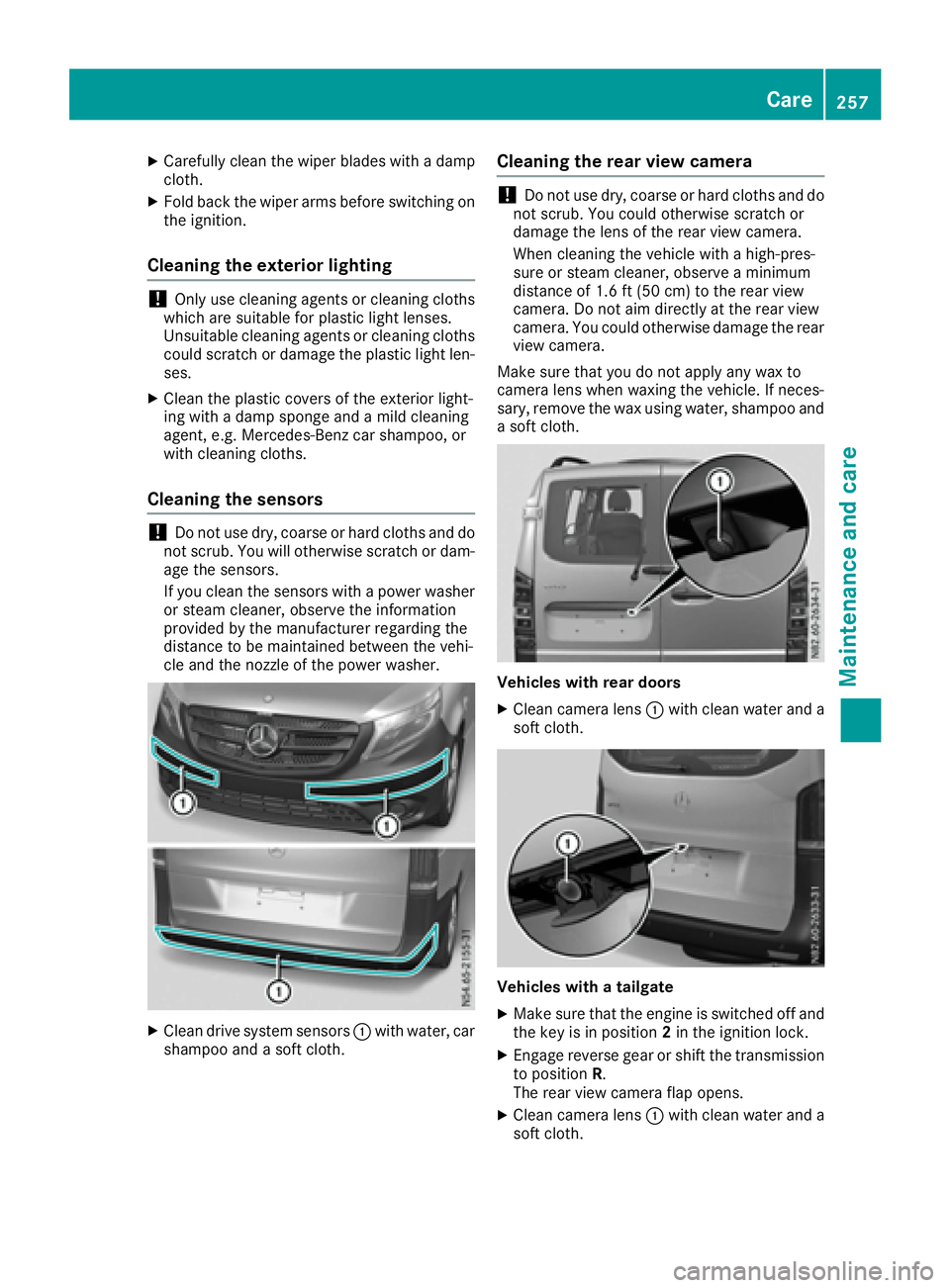
XClean drivesystem sensors :withw ater, car
shampoo and asoftc loth.
Cleaning th erearv iew camera
!Do no tuse dry, coarse or hard cloth sand do
no tscrub. You could otherwise scratch or
damag ethe lensoft herear view camera.
When cleanin gthe vehicle withah igh-pres-
sure or steam cleaner, observ eaminimum
distanc eof1.6ft (50 cm )totherear view
camera. Do no taim directly at th erear view
camera. You could otherwise damag ethe rear
view camera.
Makes ure that you do no tapply any wax to
camera lensw hen waxingthe vehicle .Ifneces-
sary, remove th ewax usingw ater, shampoo and
as oftc loth.
Vehicles with rea rdoor s
XClean camera lens :withc lean wate rand a
softc loth.
Vehicles with atailgate
XMakes ure that th eengineiss witched off and
th ek eyisin position 2in th eignition lock.
XEngage revers egear or shiftt hetransmission
to position R.
The rear view camera flap opens.
XClean camera lens :withc lean wate rand a
softc loth.
Care257
Maintenance and care
Z
Page 265 of 310
!Vehicles withagasolinee ngine:avoid
repeated and lengthy starting attempts. Oth-
erwise, the catalytic converter could be dam-
aged by non-combusted fuel.
If the indicator and warning lamps in the instru-
ment cluster do not light up at low tempera-
tures, the discharged battery may have frozen.
In this case you may neither charge the battery
nor jump-start the vehicle. The service life of a
thawed battery may be shorter. Start-up behav-
ior may deteriorate, in particular at low temper-
atures. Have the thawed battery checked at a
qualified specialist workshop.
Do not use arapid charging device to start the
vehicle. If your vehicle's battery is discharged,
the engine can be jump-started from another
vehicle or from adonor battery using jumper
cables. For this purpose, the vehicle has ajump-
starting connection point in the engine com-
partment.
When jump-starting, observe the following
points:
RThe battery is not accessible in all vehicles. If
the other vehicle's battery is not accessible,
jump-start the vehicle using adonor battery
or ajump-startingd evice.
RYou may only jump-start the vehicle when the
engine and exhaust system are cold.
RDo not start the engine if the battery is frozen.
Let the battery thaw first.
RJump-starting may only be performed from
batteries with anominal voltage of 12 V.
ROnly use jumper cables that have asufficient
cross-section and insulated terminal clamps.
RIf the battery is fully discharged, attach the
battery of another vehicle for afew minutes
before attempting to start. This charges the
empty battery alittle.
RMake sure that the two vehicles do not touch.
Make sure that:
Rthe jumper cables are not damaged.
Rbare parts of the terminal clamps do not come
into contact with other metal parts while the
jumper cables are connected to the battery.
Rthe jumper cables cannot come into contact
with parts such as the V-belt pulley or the fan.
These parts move when the engine is started
and while it is running.
Jumper cables and further information regarding
jump starting can be obtained at any qualified
specialist workshop.
Before connecting the jumper cables
XApply the parking brake.
XShift the transmission to position P.
XSwitch off all electrical consumers, e.g. audio
equipment, blower.
XTurn key to position 0in the ignition lock and
remove it.
XOpen the hood (Ypage 241).
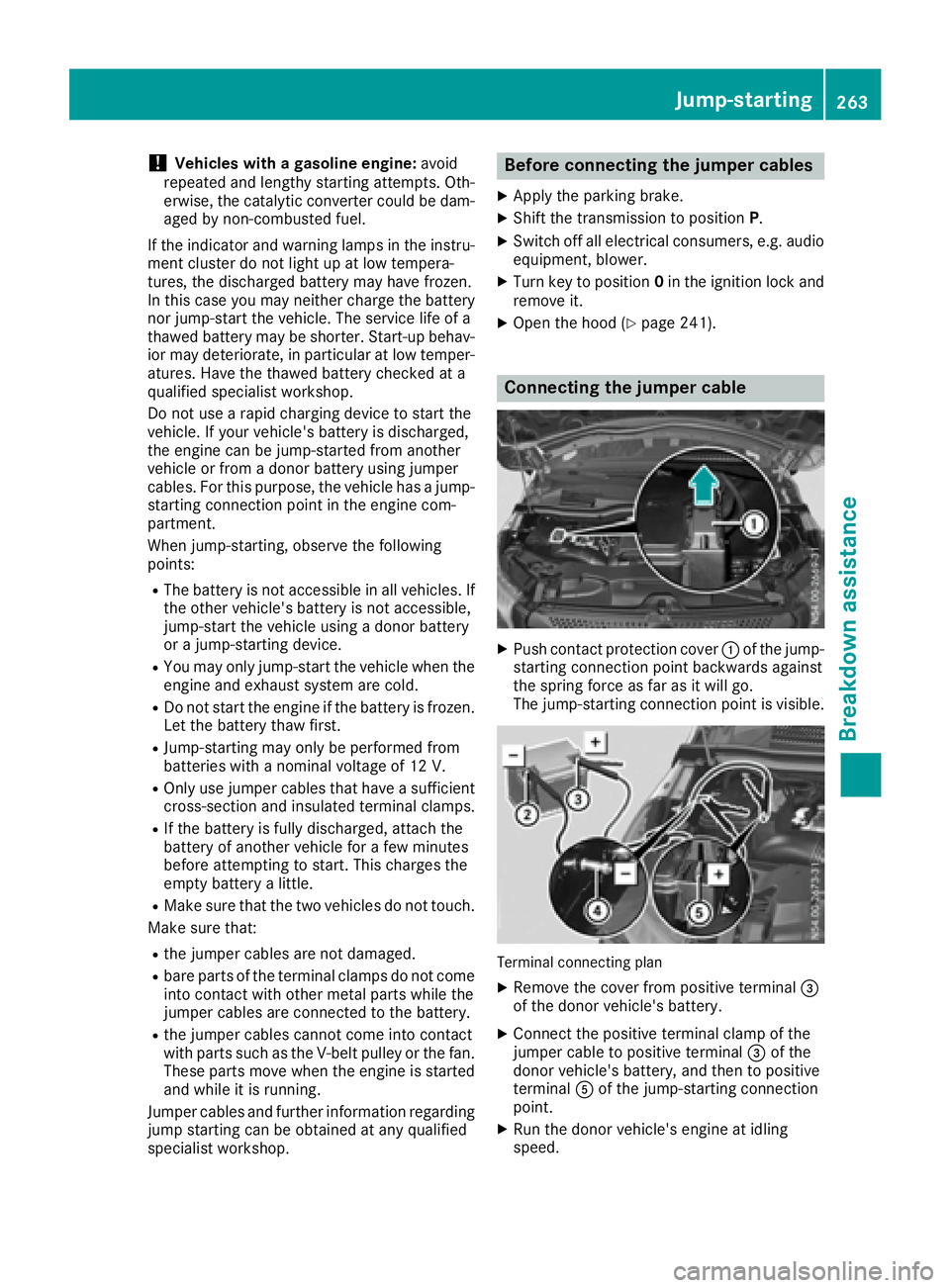
Connecting the jumper cable
XPush contact protection cover :of the jump-
starting connection point backwards against
the spring force as far as it will go.
The jump-startingc onnection point is visible.
Terminal connecting plan
XRemove the cover from positive terminal =
of the donor vehicle's battery.
XConnect the positive terminal clamp of the
jumper cable to positive terminal =of the
donor vehicle's battery, and then to positive
terminal Aof the jump-startingc onnection
point.
XRun the donor vehicle's engine at idling
speed.
Jump-starting263
Breakdown assistance
Z
Page 266 of 310
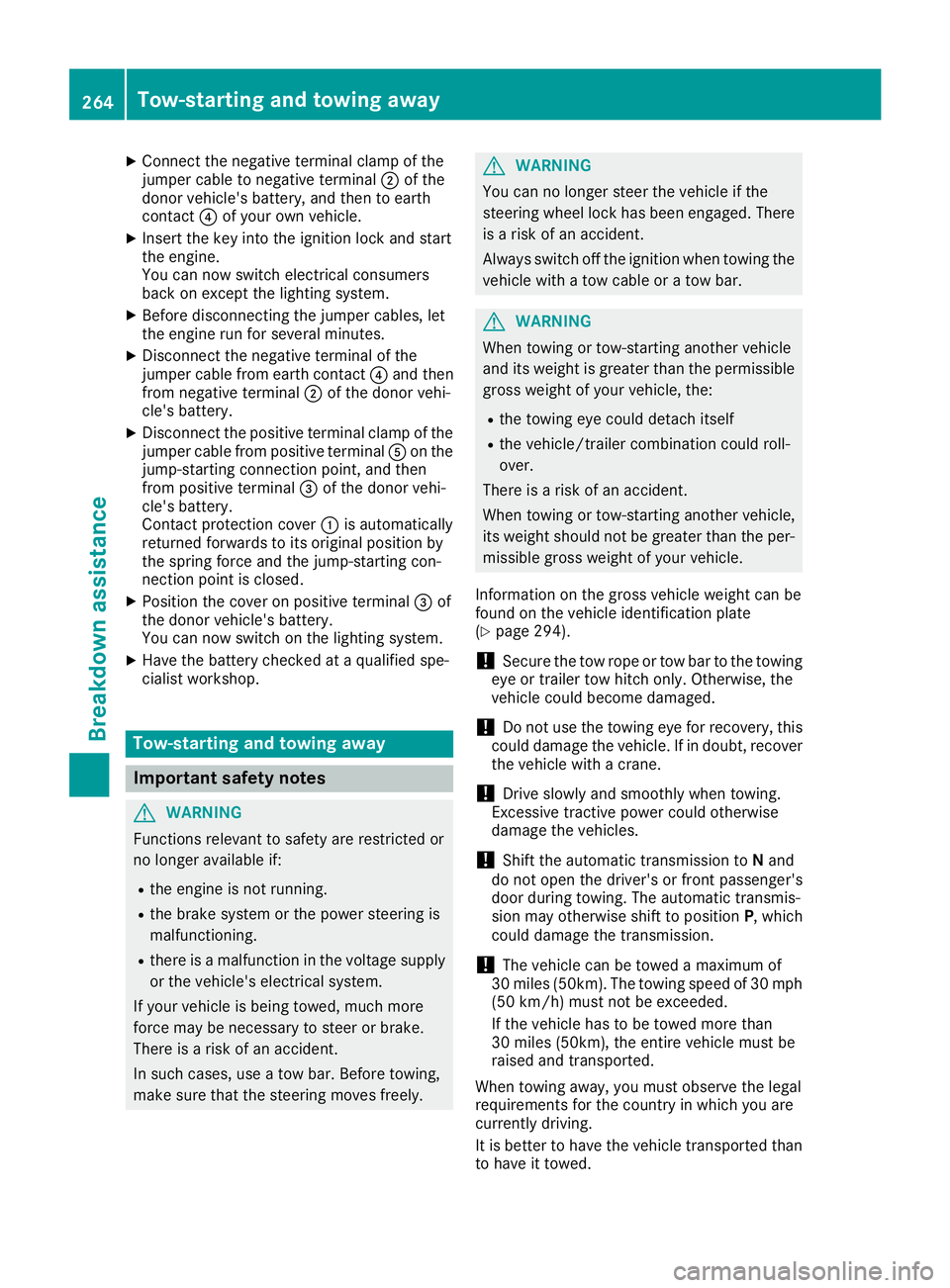
XConnect thenegative terminal clam pofthe
jumper cabl etonegative terminal ;of the
donor veh icle's battery, and then to earth
contact ?of your own veh icle.
XInsertt hekeyintot he ignition locka nd start
th ee ngine.
You can no wswitch electrical consumers
back on excep tthe lighting system.
XBefore disconnecting th ejumper cables, let
th ee nginer un for several minutes.
XDisconnect th enegative terminal of the
jumper cabl efrome arthc ontac t? and then
from negative terminal ;of th edonor veh i-
cle's battery.
XDisconnect th epositiv etermi nal clam pofthe
jumper cabl efromp ositiv etermi nalAon the
jump-startin gconnectio npoint, and then
from positiv etermi nal=of th edonor veh i-
cle's battery.
Contac tprotection cover :isautomatically
returned forwards to its original positio nby
th es pring force and th ejump-startin gcon-
nection pointisc losed.
XPositio nthe cover on positiv etermi nal=of
th ed onor veh icle's battery.
You can no wswitch on th elighting system.
XHav ethe battery checked at aqualified spe-
cialist workshop.
Tow-startin gand towin gaway
Important safety notes
GWAR NING
Functionsr elevanttosafety are restricted or
no longer availab leif:
Rthee ngineisn otrunning.
Rtheb rak esystem or th epower steering is
malfunctioning.
Rthere isam alfunctio ninthevoltage supply
or th evehicle 's electrical system.
If your veh icle is bein gtow ed, muc hmore
force may benecessary to steer or brake.
Thereisar iskofana cciden t.
In suchc ases, use atow bar. Before to wing,
mak esure that th esteering moves freely.
GWARNING
You can no longer steer th evehicle ifthe
steering wheel lockh as been engaged.There
is ar iskofana ccident.
Alwa ysswit ch off th eignition when to wingthe
vehicle withat owcabl eorat owbar.
GWARNING
When to wingor tow-startin ganother vehicle
and its weightisg reatertha nt he permissible
gross weightofy our vehicle,the :
Rthet ow ing eye could detach itself
Rthev ehicle /traile rcom binatio ncould roll-
over.
Thereisar iskofana ccident.
When towing or tow-startin ganother vehicle,
its weights hould notbegreatertha nt he per-
missible gross weightofy our vehicle.
In formation on th egross vehicle weightc anbe
foun dont hevehicle identification plate
(
Ypage 294).
!Secure th etow rop eort owbar to th etow ing
eye or trailer to whitch only. Otherwise, the
vehicle could become damaged.
!Do no tuse th etow ing eye for recovery, this
could damag ethe vehicle .Ifindoubt,recover
th ev ehicle withac rane.
!Drive slowlya nd smoothly when to wing.
Excessivet ractive power could otherwise
damag ethe vehicles.
!Shift th eautomatic transmission to Nand
do noto pen th edriver' sorf rontpassenger's
door durin gtow ing .The automatic transmis-
sion may otherwise shifttop ositionP,which
could damag ethe transmission.
!The vehicle can be towed amaximum of
30 mile s(50km ).The to wingspeedof30m ph
(50 km/h) must no tbeexceeded.
If th evehicle has to betowed mor ethan
30 mile s(50km) ,the entire vehicl emus
tbe
ra
ised and transported.
When towing away, you must observet helegal
requirement sfor th ecountr yinw hichy ou are
currently driving.
It is bette rtohave th evehicle transported than
to have it towed.
264Tow-startin gand towing away
Breakdown assistance
Page 267 of 310
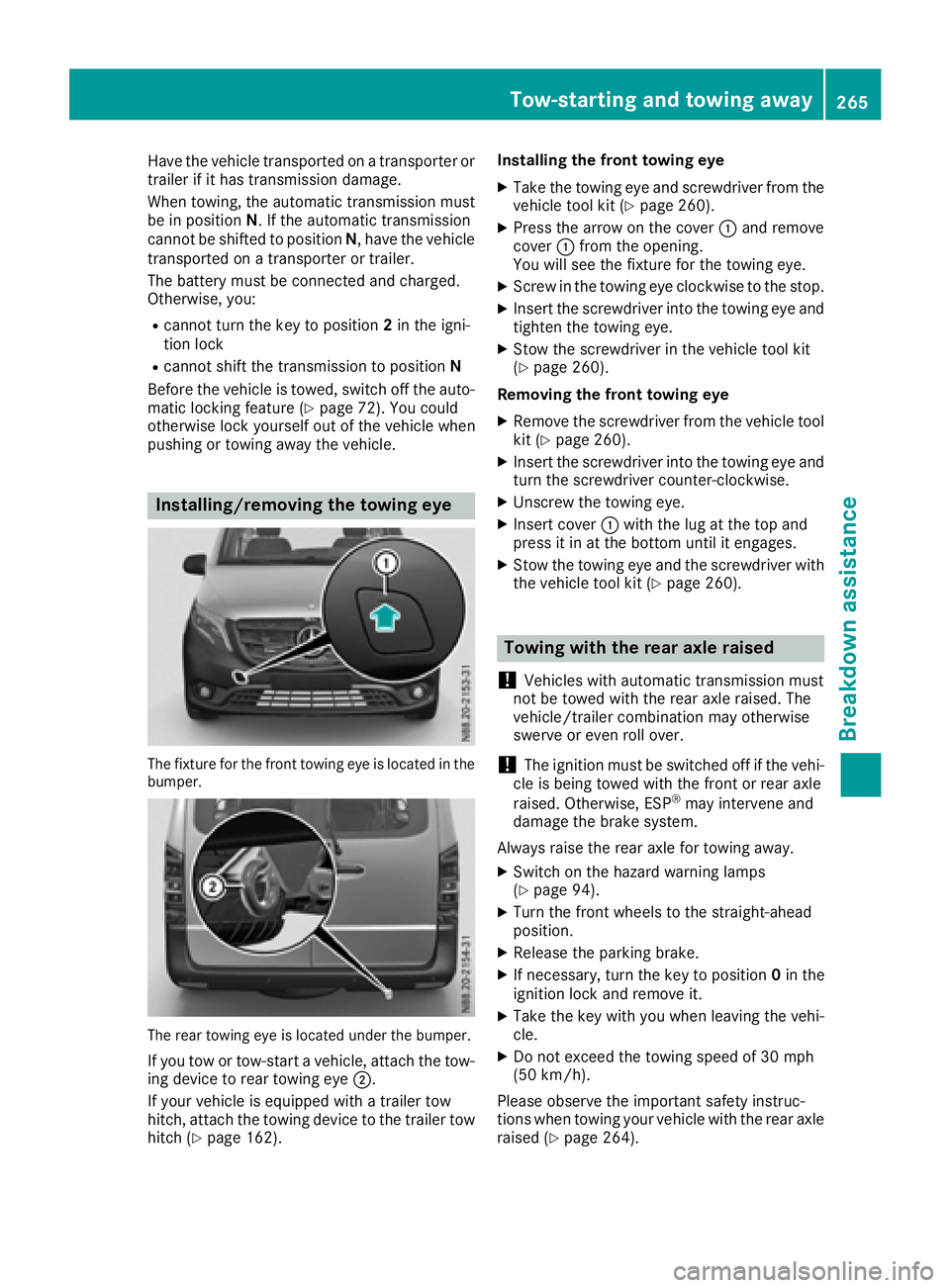
Have the vehicle transported onatransporter or
trailer if it has transmission damage.
Whent owing, the automati ctransmission must
be in position N.Ifthe automati ctransmission
cannot be shifted to position N,havet he vehicle
transported on atransporter or trailer.
The battery mus tbeconnected and charged.
Otherwise ,you :
Rcannot turn the key to position 2in the igni-
tion lock
Rcannot shift the transmission to position N
Before the vehicle is towed, switch off the auto-
mati clocking feature (
Ypage 72). You could
otherwise lock yourself out of the vehicle when
pushing or towing away the vehicle.
Installing/removin gthe towing eye
The fixtur efor the front towing eyeisl ocated in the
bumper.
The rea rtowing eyeisl ocated underthe bumper.
If yo utow or tow-start avehicle, attach the tow-
ing device to rea rtowing eye ;.
If your vehicle is equipped with atrailer tow
hitch, attach the towing device to the trailer tow
hitch (
Ypage 162). Installing the front towing eye
XTake the towing eyea
nd screwdriver from the
vehicle tool kit (Ypage 260).
XPres sthe arro wonthe cover :and remove
cover :from the opening.
You will see the fixtur efor the towing eye.
XScrew in the towing eyec lockwise to the stop.
XInsert the screwdriver into the towing eyea nd
tighte nthe towing eye.
XStow the screwdriver in the vehicle tool kit
(Ypage 260).
Removing the front towing eye
XRemove the screwdriver from the vehicle tool
kit (Ypage 260).
XInsert the screwdriver into the towing eyea nd
turn the screwdriver counter-clockwise.
XUnscrew the towing eye.
XInsert cover :with the lu gatthe top and
pres sitinatt he bottom until it engages.
XStow the towing eyea nd the screwdriver with
the vehicle tool kit (Ypage 260).
Towing with the rear axle raised
!
Vehicles with automati ctransmission must
not be towe dwitht he rea raxler aised.T he
vehicle/trailer combinatio nmay otherwise
swerve or even roll over.
!The ignition mus tbeswitched off if the vehi-
cle is being towe dwitht he front or rea raxle
raised.O therwise,ESP
®may intervene and
damag ethe brake system.
Always raise the rea raxlef or towing away.
XSwitch on the hazard warning lamps
(Ypage 94).
XTur nthe front wheels to the straight-ahead
position.
XRelease the parking brake.
XIf necessary ,turn the key to position 0in the
ignition lock and remov eit.
XTake the key with yo uwhenleaving the vehi-
cle.
XDo not excee dthe towing speed of 30 mph
(50 km/h).
Please observe the important safety instruc-
tions whe ntowing your vehicle with the rea raxle
raised (
Ypage 264).
Tow-starting and towing away265
Breakdow nassistance
Z