bulb MERCEDES-BENZ METRIS 2017 MY17 Operator’s Manual
[x] Cancel search | Manufacturer: MERCEDES-BENZ, Model Year: 2017, Model line: METRIS, Model: MERCEDES-BENZ METRIS 2017Pages: 318, PDF Size: 5.01 MB
Page 17 of 318
Load protection net...........................247
Loading guidelines ............................ 242
Loading rails
Maximum tensile strength ............. 313
Loads
Securing ........................................ 244
Transporting .................................. 242
Locking
see Central locking
Locking (doors)
Emergency locking ........................... 71
Locking centrally
see Central locking
Low-beam headlamps
Display messages (vehicle with
steering wheel buttons) ................. 209
Display messages (vehicle with-
out steering wheel buttons) ........... 196
Driving abroad ............................... 137
Replacing bulbs .............................1 01
Switching on/off .............................. 95
Lumbar support ................................... 85
M
M+S tires............................................ 279
Maintenance ...................................... 257
Maintenance points under the
hood .................................................... 252
Maximum speed
Speed limitation .............................1 36
Mechanical key
Function/notes ................................ 70
Inserting .......................................... 71
Locking vehicle ................................ 71
Removing ......................................... 71
Media Interface
Connections ..................................... 42
Memory card (audio) ......................... 182
Mercedes-Benz Commercial Van
Center
see Qualified specialist workshop
Mercedes-Benz Service24h .............. 272
Message memory
On-board computer (vehicle with
steering wheel buttons) ................. 203
On-board computer (vehicle with-
out steering wheel buttons) ........... 189 Messages
see Warning and indicator lamps
Mirrors
Exterior mirrors ................................ 92
Important safety notes .................... 91
Rear-view mirror .............................. 92
see Vanity mirror
Mobile phone
Type approval/frequency .............. 303
Mobile phone
see Telephone
Model designation
see Vehicle identification plate
Modifying the programming
(SmartKey) ...........................................7 0
Motor oil additives
see Additives
Mounting wheels
Lowering the vehicle ...................... 299
Mounting a new wheel ................... 298
Preparing the vehicle ..................... 297
Raising the vehicle ......................... 297
Removing a wheel .......................... 298
Removing and mounting the spare
wheel ............................................. 301
Securing the vehicle against roll-
ing away ........................................ 297
MP3
Operation ....................................... 182
Multimedia system
Important safety notes .................. 230
N
NavigationMenu (on-board computer) ............ 180
Notes on breaking-in a new vehi-
cle ....................................................... 120
O
Occupant Classification System
(OCS)
Conditions ....................................... 52
Faults ............................................... 56
Operation ......................................... 53
System self-test ............................... 55
Occupant safety
Air bags ........................................... 49
Index15
Page 19 of 318
Limited Warranty .............................27
Operating safety
Limited Warranty ............................. 27
Operating safety and vehicle
approval
Attachments and bodies .................. 32
Changing the engine power out-
put ................................................... 31
Correct use ...................................... 29
Declaration of conformity ................ 31
Equipment and conversions ............. 32
Important safety notes .................... 30
Information about body/equip-
ment mounting directives ................ 32
Notes on operating the vehicle ........ 30
Qualified specialist workshop .......... 31
Registering your vehicle ................... 32
Operating system
On-board computer (vehicle with
steering wheel buttons) ................. 176
On-board computer (vehicle with-
out steering wheel buttons) ........... 171
Operator's Manual
General notes .................................. 27
Vehicle equipment ........................... 27
Outside temperature display ........... 170
Overhead control panel ...................... 43
Overrevving range ............................. 170
Overrun cutoff ................................... 136
P
Paint code number ............................ 303
Paintwork (cleaning instructions) ... 265
Parking ............................................... 133
Important safety notes .................. 133
Parking brake ................................ 134
Rear view camera .......................... 158
see Active Parking Assist
see PARKTRONIC
Parking aid
Active Parking Assist ..................... 154
see PARKTRONIC
see Rear view camera
Parking assistance
see PARKTRONIC Parking brake
Display message (vehicle with
steering wheel buttons) ................. 208
Display message (vehicle without
steering wheel buttons) ................. 195
Notes/function .............................. 134
Warning lamp ................................. 134
Parking brake
see Parking brake
Parking lamps
Changing bulbs .............................. 102
PARKTRONIC
Deactivating/activating ................. 153
Display messages .......................... 214
Driving system ............................... 151
Function/notes ............................. 151
Important safety notes .................. 151
Problem (malfunction) ................... 154
Range of the sensors ..................... 152
Roll-back warning .......................... 153
Trailer towing ................................. 154
Warning display ............................. 153
PASSENGER AIR BAG OFF
Indicator lamp .................................. 46
Passenger compartment air-condi-
tioning system
see Climate control
Passenger compartment heating
see Climate control
Pedestrian protection
see Hood
Pets in the vehicle ............................... 64
Plastic trim (cleaning instruc-
tions) .................................................. 268
Power washers .................................. 264
Power windows
see Side windows
Preparing for a journey
Checks in the vehicle ..................... 121
Visual check of the vehicle exte-
rior ................................................. 121
Program selector button .................. 129
Protection against theft
see ATA (Anti-Theft Alarm system)
Protectio n o
f the environment
General notes .................................. 29
Pulling away
Automatic transmission ................. 122
Index17
Page 20 of 318
Hill start assist ............................... 123
Q
QR codeRescue card .....................................3 4
Qualified specialist workshop ........... 31
R
Radiator cover.....................................3 3
Radio
Important safety notes .................. 230
Selecting a station ......................... 181
see separate operating instructions
Radio-wave reception/transmis-
sion in the vehicle
Declaration of conformity ................ 31
Radio/navigation
Important safety notes .................. 230
Rail transport
see Transport by rail
Rain sensor
Setting the sensitivity .................... 104
Setting the sensitivity (vehicle
with steering wheel buttons) ......... 188
Setting the sensitivity (vehicle
without steering wheel buttons) .... 175
Reading lamp ....................................... 97
Rear bench seat
EASY-ENTRY/EXIT feature ............... 87
General notes .................................. 86
Installation options .......................... 86
Removing/installing (standard
rear bench seat) ............................... 88
Seat anchorage ................................ 86
Seat rails .......................................... 86
Seating variants ............................... 86
Rear compartment
Activating/deactivating climate
control ........................................... 111
Seating variants ............................... 86
Setting the air vents ...................... 118
Setting the temperature ................ 113
Switching the interior lighting on/off .................................................... 98 Rear door
Display messages (vehicle with
steering wheel buttons) ................. 219
Display messages (vehicle with-
out steering wheel buttons) ........... 202
Important safety notes .................... 79
Indicator lamp ................................ 229
Opening at an angle of 180° or
270° ................................................ 81
Opening dimensions ...................... 311
Opening/closing from inside ........... 80
Opening/closing from the out-
side .................................................. 80
Rear doors ............................................ 79
Rear fog lamp
Display messages (vehicle with
steering wheel buttons) ................. 211
Display messages (vehicle with-
out steeri
ng wheel buttons) ........... 197
Replacing bulbs ............................. 103
Switching on/off .............................. 95
Rear view camera
Cleaning instructions ..................... 267
Coupling up a trailer function ........ 162
Function/notes ............................. 158
General notes ................................ 158
Important safety notes .................. 159
Messages in the display ................. 160
Reverse parking ............................. 161
Switching on/off ........................... 159
Rear window defroster
Problem (malfunction) ................... 116
Switching on/off ........................... 116
Rear window wiper
Replacing the wiper blade .............. 106
Switching on/off ........................... 104
Rear-compartment air-condition-
ing system
see Climate control
Rear-compartment heating
see Climate control
Rear-view mirror
Anti-glare (manual) .......................... 92
Recuperation display ........................ 173
Recycling
see Protection of the environment
18Index
Page 21 of 318
Refrigerant (air-conditioning sys-
tem)Important safety notes .................. 310
Refueling
Fuel filler flap ................................. 133
Fuel gauge (vehicle with steering
wheel buttons) ................................. 39
Fuel gauge (vehicle without steer-
ing wheel buttons) ......................... 171
Refueling procedure (fuel) ............. 133
see Fuel
Remote control
see Key
Replacing bulbs
Important safety notes .................. 100
Reporting safety defects .................... 32
Rescue card ......................................... 34
Reserve (fuel tank)
see Fuel
Reserve fuel
Display messages (vehicle with
steering wheel buttons) ................. 213
Display messages (vehicle with-
out steering wheel buttons) ........... 199
Warning lamp ................................. 225
Residual heat (climate control) ........ 117
Restraint system
Display message (vehicle with
steering wheel buttons) ................. 209
Display message (vehicle without
steering wheel buttons) ................. 195
Introduction ..................................... 45
Warning lamp ................................. 224
Warning lamp (function) ................... 45
Reverse warning feature .................. 123
Reversing feature
Electric sliding door ......................... 76
Side windows ................................... 82
Roadside Assistance (breakdown) .... 28
Roof carrier
Maximum payload .......................... 313
Notes ............................................. 248
Roof lining and carpets (cleaning
guidelines) ......................................... 269
Roof load (roof carrier) ..................... 313S
Safety
Children in the vehicle ..................... 58
Operating safety .............................. 30
see Occupant safety
Safety system
see Driving safety systems
Seat belts
Adjusting the height ......................... 48
Cleaning ......................................... 269
Correct usage .................................. 48
Fastening ......................................... 48
Important safety guidelines ............. 47
Introduction ..................................... 46
Releasing ......................................... 49
Warning lamp ................................. 220
Warning lamp (function) ................... 49
Seats
Adjusting (manually) ........................ 85
Adjusting lumbar support ................ 85
Adjusting the head restraint ............ 89
Armrest ............................................ 90
Cleaning the cover ......................... 268
Correct driver's seat position ........... 84
Important safety notes .................... 84
Seat heating .................................... 90
Selecting gear
see Automatic transmission
Selector lever
Cleaning ......................................... 268
see Automatic transmission
Sensors (cleaning instructions) ....... 266
Service interval display
Calling up the service due date ...... 258
Hiding service messages ............... 258
Notes ............................................. 257
Service menu (on-board com-
puter) .................................................. 185
Service phone number ...................... 272
Service products
Brake fluid ..................................... 309
Coolant (engine) ............................ 309
Engine oil ....................................... 307
Fuel ................................................ 305
Important safety notes .................. 304
Refrigerant (air-conditioning sys-
tem) ............................................... 310
Index19
Page 22 of 318
Transmission oil ..................... 308, 309
Washer fluid ................................... 311
Setting the air distribution ............... 114
Setting the airflow ............................1 14
Setting the speed
see Cruise control
Settings
Factory (vehicle with steering
wheel buttons) ............................... 188
Factory (vehicle without steering
wheel buttons) ............................... 174
On-board computer (vehicle with
steering wheel buttons) ................. 186
On-board computer (vehicle with-
out steering wheel buttons) ........... 174
Side impact air bag .............................5 1
Side windows
Cleaning ......................................... 265
Convenience closing feature ............ 83
Convenience opening feature ..........8 2
Hinged side windows ....................... 81
Important safety information ........... 81
Opening/closing .............................. 82
Overview .......................................... 81
Problem (malfunction) ..................... 83
Resetting ......................................... 83
Signal and ambient light
Changing a bulb ............................. 100
Sliding door
Child-proof locks .............................. 63
Cleaning ......................................... 267
Important safety notes .................... 74
Indicator lamp ................................ 229
Opening/closing from the inside ..... 75
Opening/closing from the out-
side .................................................. 75
see Electric sliding door
SmartKey
Changing the battery ....................... 72
Changing the programming ............. 70
Checking the battery ....................... 71
Convenience closing feature ... 83, 117
Convenience opening feature .......... 82
Door central locking/unlocking ....... 69
Important safety notes .................... 69
Loss ................................................. 72
Mechanical key ................................ 70
Problem (malfunction) ..................... 72 SmartKey positions (ignition lock)
.. 121
Snow cha ins
...................................... 280
So
ckets .............................................. 241
Spare wheel
General notes ................................ 301
Important safety notes .................. 301
Removing/mounting ...................... 301
Special seat belt retractor .................. 59
Specialist workshop ............................ 31
Speed, controlling
see Cruise control
Speedometer
Activating/deactivating the addi-
tional speedometer (vehicle with
steering wheel buttons) ................. 186
Activating/deactivating the addi-
tional speedometer (vehicle with-
out steering wheel buttons) ........... 175
Digital (vehicle with steering
wheel buttons) ............................... 179
Digital (vehicle without steering
wheel buttons) ............................... 173
General notes ................................ 170
In the instrument cluster (vehicle
with steering wheel buttons) ............ 39
In the instrument cluster (vehicle
without steering wheel buttons) ...... 37
Setting the display unit (vehicle
with steering wheel buttons) ......... 186
Setting the display unit (vehicle
without steering wheel buttons) .... 175
SRS (Supplemental Restraint Sys-
tem)
see Restraint system
Standing lamp
Display messages (vehicle with
steering wheel buttons) ................. 211
Standing lamps
Display messages (vehicle with-
out steering wheel buttons) ........... 197
Replacing bulbs (front) ................... 102
Replacing bulbs (rear) .................... 103
Switching on/off .............................. 94
Start/stop function
see ECO start/stop function
Starting
see Starting (engine)
20Index
Page 23 of 318
Starting (engine)................................ 122
Status overview (on-board com-
puter) .................................................. 184
Steering
Display messages (vehicle with
steering wheel buttons) ................. 219
Display messages (vehicle with-
out steering wheel buttons) ........... 202
Warning lamps ...............................2 29
Steering wheel
Adjusting ......................................... 91
Button overview ............................... 41
Buttons (on-board computer) ......... 176
Cleaning ......................................... 268
Paddle shifters ............................... 130
Steering wheel paddle shifters ........130
Stickers
General safety notes ........................ 29
Stowage net ....................................... 239
Stowage spaces
see Stowage spaces and stowage
compartments
Stowage spaces and stowage com-
partments
Eyeglasses compartment ...............2 38
Glove box ....................................... 238
Important safety notes .................. 238
Stowage net ................................... 239
Summer opening
see Convenience opening feature
Summer tires ..................................... 279
Sun visor
Changing a bulb (mirror lamp) ......... 99
Overview ........................................ 239
Surround lighting (on-board com-
puter) ..................................................1 87
Switching air-recirculation mode
on/off ................................................. 116
Switching off the alarm (ATA) ............ 68
T
Tachometer........................................ 170
Tail lamps
Display messages (vehicle with-
out steering wheel buttons) ........... 196
Replacing bulbs .............................1 03Trailer display messages (vehicle
with steering wheel buttons) ......... 210
Trailer display messages (vehicle
without steering wheel buttons) .... 196
Tailgate
Changing bulbs (ambient lamp) ....... 99
Changing bulbs (signal and ambi-
ent light) ........................................ 100
Display messages (vehicle with
steering wheel buttons) ................. 219
Display messages (vehicle with-
out steering wheel buttons) ........... 202
Important safety notes .................... 78
Opening dimensions ......................3 11
Opening/closing from the out-
side ..................................................7 9
Tank contents
Displaying the range (vehicle with
steering wheel buttons) ................. 178
Displaying the range (vehicle with-
out steering wheel buttons) ........... 173
Technical data
Capacities ...................................... 304
Cargo tie-down points .................... 312
Guide rail ....................................... 313
Loading rails .................................. 313
Roof carrier .................................... 313
Tires/wheels ................................. 300
Trailer tow hitch ............................. 313
Vehicle data ................................... 311
Vehicle dimensions ........................ 311
Telephone
Accepting a call ............................. 183
Display message ............................ 219
Introduction ................................... 182
Number from the phone book ........ 183
Redialing ........................................ 183
Rejecting/ending a call ................. 183
Temperature
Coolant (display in the instrument
cluster) .......................................... 170
Coolant (display in the on-board
computer) ...................................... 173
Outsi de te
mperature ...................... 170
Setting (climate control) ................ 113
Theft deterrent systems
ATA (Anti-Theft Alarm system) ......... 68
Immobilizer ...................................... 67
Index21
Page 26 of 318
Resetting(vehicle wit hsteerin g
whee lbuttons ).............................. .179
Resetting (vehicle without steer-
ing wheel buttons) ......................... 172
Setting the display unit (vehicle
with steering wheel buttons) ......... 186
Setting the display unit (vehicle
without steering wheel buttons) .... 175
Trip odometer
see Trip odometer
Turn signal
Changing bulbs (additional turn
signals) .......................................... 102
Turn signals
Display messages (vehicle with
steering wheel buttons) ................. 210
Display messages (vehicle with-
out steering wheel buttons) ........... 196
Replacing bulbs (front) ................... 102
Replacing bulbs (rear) .................... 103
Switching on/off .............................. 96
Trailer display messages (vehicle
with steering wheel buttons) ......... 209
Trailer display messages (vehicle
without steering wheel buttons) .... 196
Two-way radios
Type approval/frequency .............. 303
TWR (Tongue Weight Rating) (defi-
nition) ................................................. 296
Type identification plate
see Vehicle identification plate
U
UnlockingEmergency unlocking ....................... 71
From inside the vehicle (central
unlocking button) .............................7 3
With emergency key element ........... 70
USB (audio)
Playing ...........................................1 82
V
Vanity mirror
Changing a bulb (mirror lamp) ......... 99
Sun visor ........................................ 239
Vehicle
Data acquisition ............................... 34 Display messages (vehicle with
steering wheel buttons) ................. 218
Display messages (vehicle with-
out steering wheel buttons) ........... 202
Electronics ..................................... 303
Emergency unlocking ....................... 70
Equipment ....................................... 27
Limited Warranty .............................2
7
Loading .......................................... 288
Locking (in an emergency) ............... 71
Locking (SmartKey) .......................... 69
Lowering ........................................ 299
Maintenance .................................... 28
Operating safety .............................. 30
Parking for a long period ................ 135
Pulling away ................................... 122
Raising ........................................... 297
Registration ..................................... 32
Reporting problems ......................... 32
Securing from rolling away ............ 133
Towing away .................................. 274
Transporting .................................. 276
Unlocking (in an emergency) ........... 71
Unlocking (SmartKey) ...................... 69
Vehicle battery
see Battery (vehicle)
Vehicle bodies ..................................... 32
Body/equipment mounting direc-
tives for trucks ................................. 32
Vehicle check
see Preparing for a journey
Vehicle data ....................................... 311
Vehicle dimensions ........................... 311
Vehicle emergency locking ................ 71
Vehicle identification number
see VIN
Vehicle identification plate .............. 303
Vehicle key
see SmartKey
Vehicle tool kit
in the seat base ............................. 270
Scope ............................................ 270
Storage location ............................ 270
Stowage compartment in the rear. .270
Stowage space in the cargo com-
par tment ........................................ 271
24Index
Page 100 of 318
XTo switch on or off:press the|button.
When the automatic interior lighting control is
activated, the button is flush with the over-
head control panel.
The interior lighting switches on automatically if
you:
Runlock the vehicle
Ropen a door
Rremove the key from the ignition lock
The cargo compartment lamp switches on auto-
matically if you:
Runlock the vehicle
Ropen the tailgate or rear door
Ropen a sliding door
The trunk lamp always switches on automati-
cally when the tailgate is opened.
Manual interior lighting control
XTo switch the front interior lighting on/
off: press the cbutton.
XTo switch the rear or cargo compartment
lighting on/off: press thewbutton.
XTo switch the front reading lamps on/off:
press the pbutton.
Rear interior light with reading lamp
in the handles
:Rear interior light and reading lamp
;Switches the reading light on and off
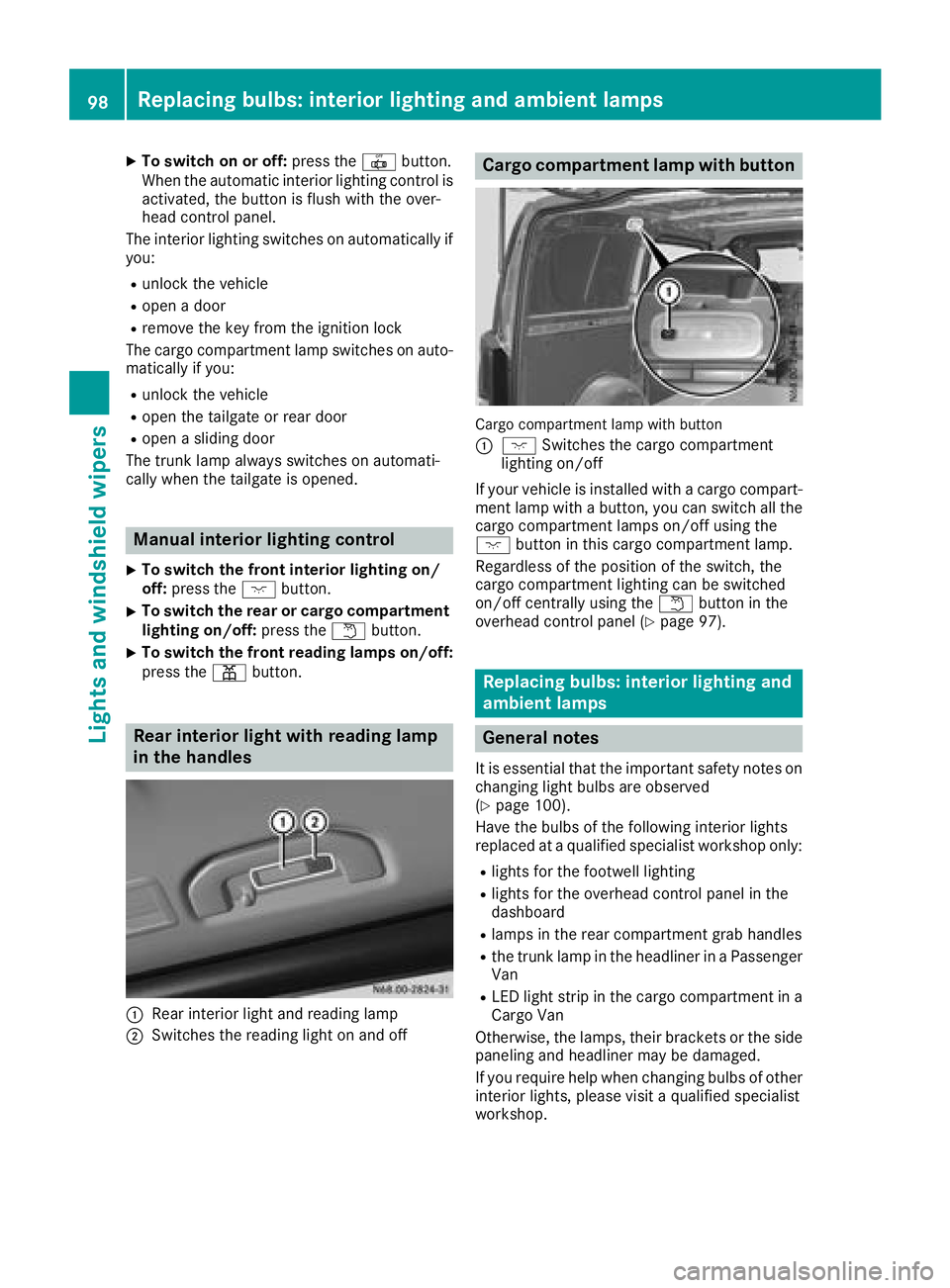
Cargo compartment lamp with button
Cargo compartment lamp with button
:
c Switches the cargo compartment
lighting on/off
If your vehicle is installed with a cargo compart-
ment lamp with a button, you can switch all the
cargo compartment lamps on/off using the
c button in this cargo compartment lamp.
Regardless of the position of the switch, the
cargo compartment lighting can be switched
on/off centrally using the wbutton in the
overhead control panel (
Ypage 97).
Replacing bulbs: interior lighting and
ambient lamps
General notes
It is essential that the important safety notes on
changing light bulbs are observed
(
Ypage 100).
Have the bulbs of the following interior lights
replaced at a qualified specialist workshop only:
Rlights for the footwell lighting
Rlights for the overhead control panel in the
dashboard
Rlamps in the rear compartment grab handles
Rthe trunk lamp in the headliner in a Passenger Van
RLED light strip in the cargo compartment in a
Cargo Van
Otherwise, the lamps, their brackets or the side
paneling and headliner may be damaged.
If you require help when changing bulbs of other
interior lights, please visit a qualified specialist
workshop.
98Replacing bulbs: interior lighting and ambient lamps
Lights and windshield wiper s
Page 101 of 318
Rear compartment and cargo com-
partment lamps
You cannot change the following bulbs yourself:
Rin a Passenger Van, the bulbs in the trunk
lamp and those of the rear interior lights in the
grab handles
Rin a Cargo Van with an LED light strip in the
cargo compartment, the LED light strip
Have these bulbs or the LED light strip changed in a qualified specialist workshop only.
Information on changing the bulb of the trunk
lamp in the side trim panel of vehicles with a
cargo compartment stowage tray can be found
under "Additional interior and ambient lighting"
(
Ypage 99)
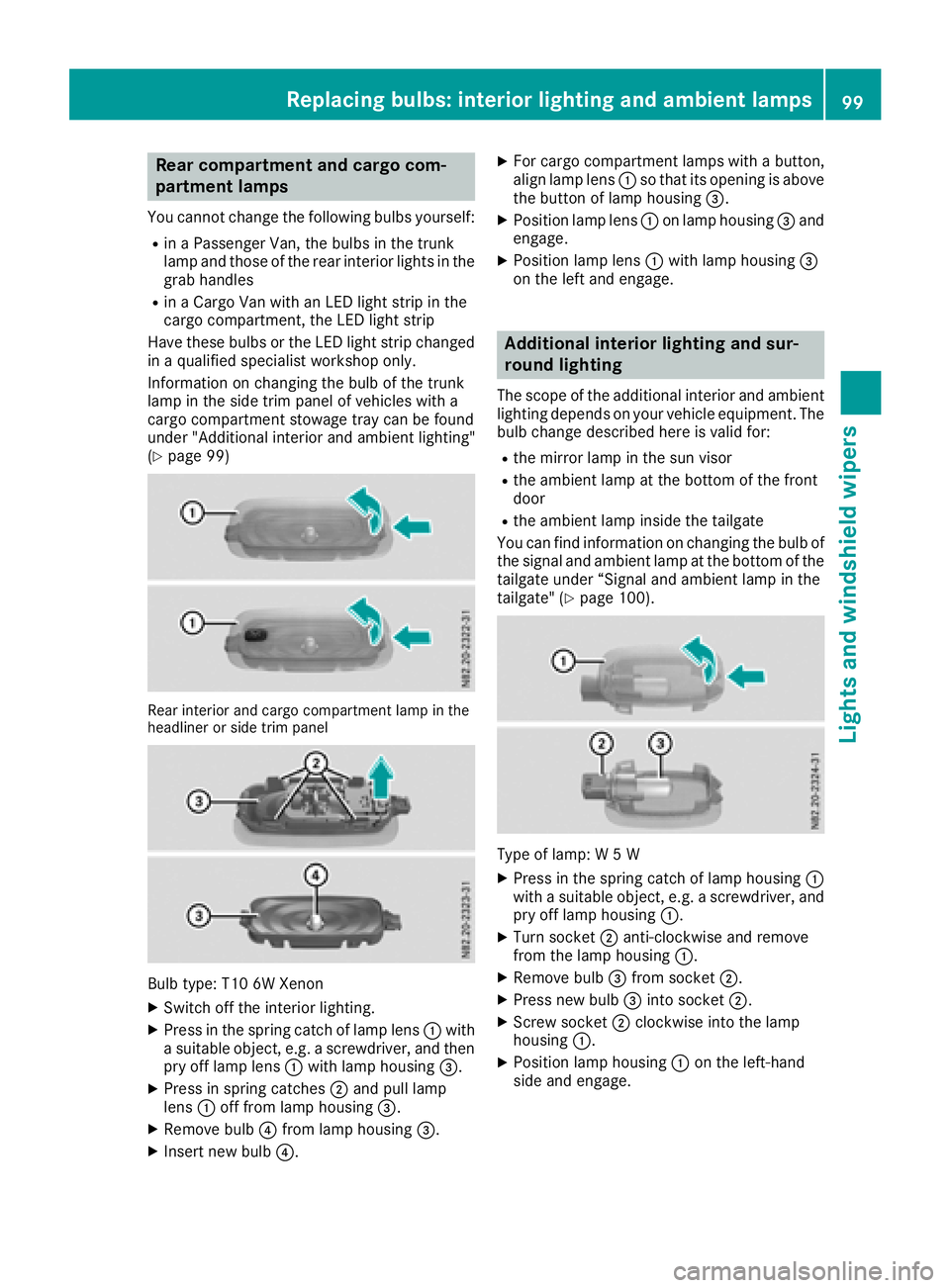
Rear interior and cargo compartment lamp in the
headliner or side trim panel
Bulb type: T10 6W Xenon
XSwitch off the interior lighting.
XPress in the spring catch of lamp lens :with
a suitable object, e.g. a screwdriver, and then pry off lamp lens :with lamp housing =.
XPress in spring catches ;and pull lamp
lens :off from lamp housing =.
XRemove bulb?from lamp housing =.
XInsert new bulb?.
XFor cargo compartment lamps with a button,
align lamp lens:so that its opening is above
the button of lamp housing =.
XPosition lamp lens:on lamp housing =and
engage.
XPosition lamp lens :with lamp housing =
on the left and engage.
Additional interior lighting and sur-
round lighting
The scope of the additional interior and ambient
lighting depends on your vehicle equipment. The
bulb change described here is valid for:
Rthe mirror lamp in the sun visor
Rthe ambient lamp at the bottom of the front
door
Rthe ambient lamp inside the tailgate
You can find information on changing the bulb of the signal and ambient lamp at the bottom of the
tailgate under “Signal and ambient lamp in the
tailgate" (
Ypage 100).
Type of lamp: W 5 W
XPress in the spring catch of lamp housing :
with a suitable object, e.g. a screwdriver, and
pry off lamp housing :.
XTurn socket;anti-clockwise and remove
from the lamp housing :.
XRemove bulb=from socket ;.
XPress new bulb =into socket ;.
XScrew socket ;clockwise into the lamp
housing :.
XPosition lamp housing :on the left-hand
side and engage.
Replacing bulbs: interior lighting and ambient lamps99
Lights and windshield wipers
Z
Page 102 of 318
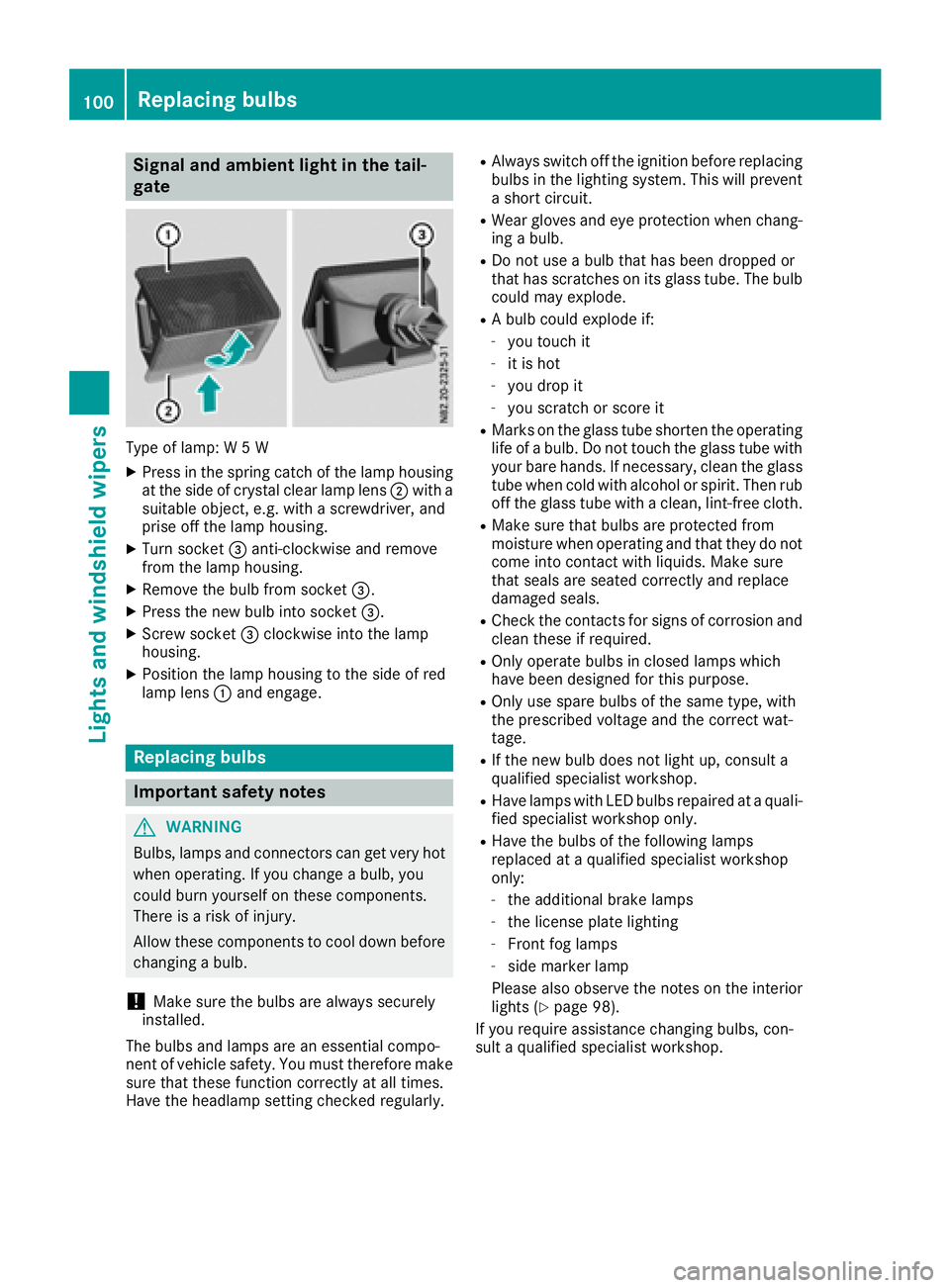
Signal and ambient light in the tail-
gate
Type of lamp: W 5 W
XPress in the spring catch of the lamp housing
at the side of crystal clear lamp lens;with a
suitable object, e.g. with a screwdriver, and
prise off the lamp housing.
XTurn socket =anti-clockwise and remove
from the lamp housing.
XRemove the bulb from socket =.
XPress the new bulb into socket =.
XScrew socket=clockwise into the lamp
housing.
XPosition the lamp housing to the side of red
lamp lens :and engage.
Replacing bulbs
Important safety notes
GWARNING
Bulbs, lamps and connectors can get very hot
when operating. If you change a bulb, you
could burn yourself on these components.
There is a risk of injury.
Allow these components to cool down before
changing a bulb.
!Make sure the bulbs are always securely
installed.
The bulbs and lamps are an essential compo-
nent of vehicle safety. You must therefore make
sure that these function correctly at all times.
Have the headlamp setting checked regularly.
RAlways switch off the ignition before replacing bulbs in the lighting system. This will prevent
a short circuit.
RWear gloves and eye protection when chang-
ing a bulb.
RDo not use a bulb that has been dropped or
that has scratches on its glass tube. The bulb
could may explode.
RA bulb could explode if:
-you touch it
-it is hot
-you drop it
-you scratch or score it
RMarks on the glass tube shorten the operating
life of a bulb. Do not touch the glass tube with
your bare hands. If necessary, clean the glass
tube when cold with alcohol or spirit. Then rub
off the glass tube with a clean, lint-free cloth.
RMake sure that bulbs are protected from
moisture when operating and that they do not
come into contact with liquids. Make sure
that seals are seated correctly and replace
damaged seals.
RCheck the contacts for signs of corrosion and
clean these if required.
ROnly operate bulbs in closed lamps which
have been designed for this purpose.
ROnly use spare bulbs of the same type, with
the prescribed voltage and the correct wat-
tage.
RIf the new bulb does not light up, consult a
qualified specialist workshop.
RHave lamps with LED bulbs repaired at a quali- fied specialist workshop only.
RHave the bulbs of the following lamps
replaced at a qualified specialist workshop
only:
-the additional brake lamps
-the license plate lighting
-Front fog lamps
-side marker lamp
Please also observe the notes on the interior
lights (
Ypage 98).
If you require assistance changing bulbs, con-
sult a qualified specialist workshop.
100Replacing bulbs
Lights and windshield wipers