child lock MERCEDES-BENZ METRIS 2017 MY17 Operator’s Manual
[x] Cancel search | Manufacturer: MERCEDES-BENZ, Model Year: 2017, Model line: METRIS, Model: MERCEDES-BENZ METRIS 2017Pages: 318, PDF Size: 5.01 MB
Page 73 of 318
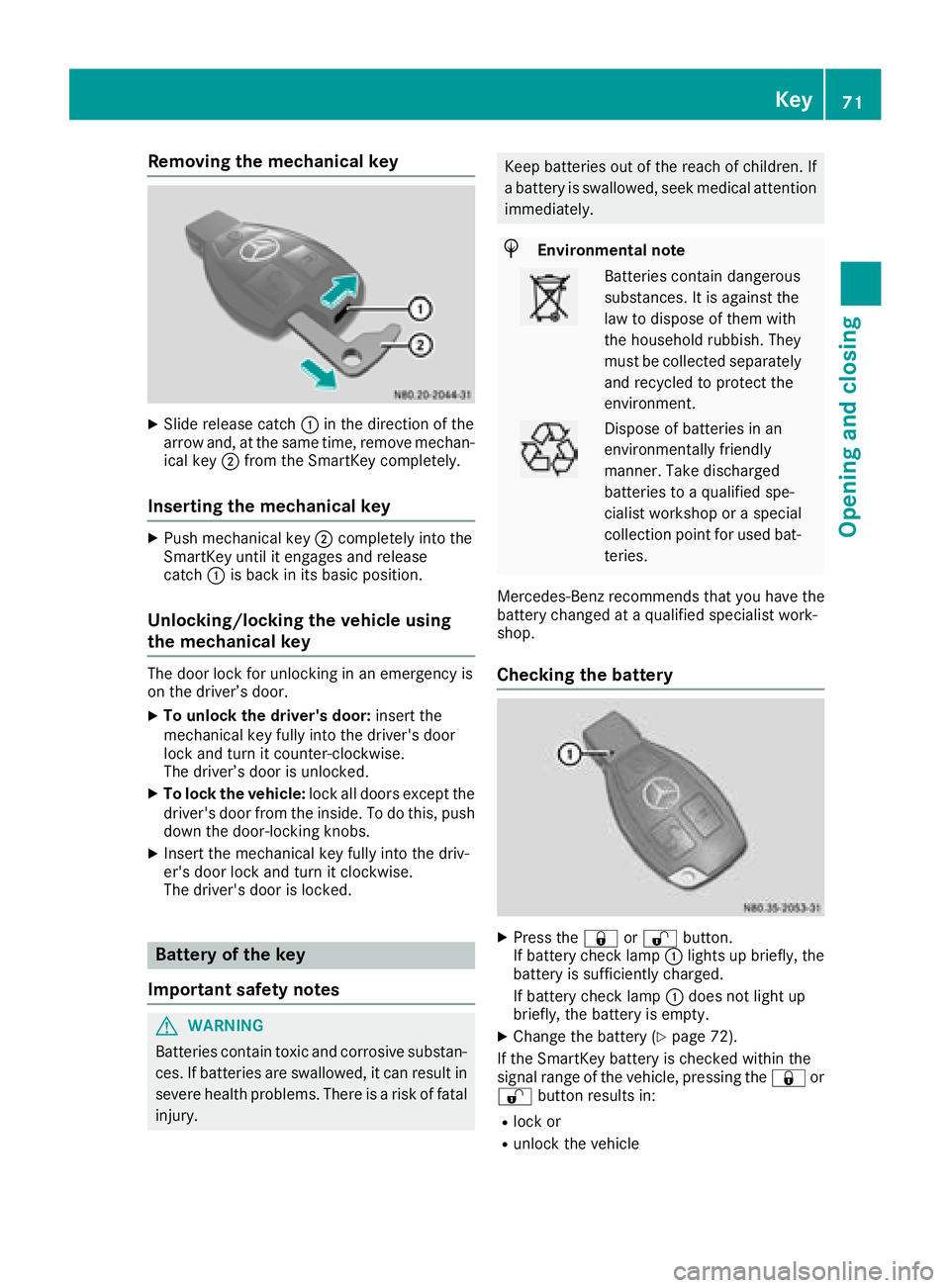
Removing the mechanical key
XSlide release catch:in the direction of the
arrow and, at the same time, remove mechan-
ical key ;from the SmartKey completely.
Inserting the mechanical key
XPush mechanical key ;completely into the
SmartKey until it engages and release
catch :is back in its basic position.
Unlocking/locking the vehicle using
the mechanical key
The door lock for unlocking in an emergency is
on the driver’s door.
XTo unlock the driver's door: insert the
mechanical key fully into the driver's door
lock and turn it counter-clockwise.
The driver’s door is unlocked.
XTo lock the vehicle: lock all doors except the
driver's door from the inside. To do this, push
down the door-locking knobs.
XInsert the mechanical key fully into the driv-
er's door lock and turn it clockwise.
The driver's door is locked.
Battery of the key
Important safety notes
GWARNING
Batteries contain toxic and corrosive substan- ces. If batteries are swallowed, it can result in
severe health problems. There is a risk of fatalinjury.
Keep batteries out of the reach of children. If
a battery is swallowed, seek medical attention
immediately.
HEnvironmental note
Batteries contain dangerous
substances. It is against the
law to dispose of them with
the household rubbish. They
must be collected separately and recycled to protect the
environment.
Dispose of batteries in an
environmentally friendly
manner. Take discharged
batteries to a qualified spe-
cialist workshop or a special
collection point for used bat-
teries.
Mercedes-Benz recommends that you have the
battery changed at a qualified specialist work-
shop.
Checking the battery
XPress the &or% button.
If battery check lamp :lights up briefly, the
battery is sufficiently charged.
If battery check lamp :does not light up
briefly, the battery is empty.
XChange the battery (Ypage 72).
If the SmartKey battery is checked within the
signal range of the vehicle, pressing the &or
% button results in:
Rlock or
Runlock the vehicle
Key71
Opening and closing
Z
Page 75 of 318
ProblemPossible causes/consequences andMSolutions
The SmartKey is faulty.
XLock the vehicle with the mechanical key (Ypage 71).
XHave the SmartKey checked at a qualified specialist workshop.
The engine cannot be
started using the Smart-
Key.The on-board voltage is too low.
XSwitch off all non-essential consumers, such as interior lighting, and
try to start the engine again.
If this does not work:
XCheck the starter battery and charge it if necessary (Ypage 262).
or
XJump-start the vehicle (Ypage 272).
or
XConsult a qualified specialist workshop.
You have lost a Smart-
Key.XHave the SmartKey deactivated at a qualified specialist workshop.
XReport the loss immediately to the vehicle insurers.
XIf necessary, have the mechanical locks replaced.
You have lost the
mechanical key.XReport the loss immediately to the vehicle insurers.
XIf necessary, have the mechanical locks replaced.
Central locking
Important safety notes
GWARNING
If children are left unsupervised in the vehicle,
they could:
Ropen the doors, thus endangering other
people or road users.
Rget out and disrupt traffic.
Roperate the vehicle's equipment.
Additionally, children could set the vehicle in
motion if, for example, they:
Rrelease the parking brake.
Rshifting the automatic transmission out of
park position P
RStart the engine.
There is a risk of an accident and injury.
When leaving the vehicle, always take the
SmartKey with you and lock the vehicle. Never
leave children or animals unattended in the
vehicle. Always keep the SmartKey out of
reach of children.
GWARNING
If persons, particularly children are subjected to prolonged exposure to extreme heat or
cold, there is a risk of injury, possibly even
fatal. Never leave children unattended in the
vehicle.
You can open a locked door from the inside at
any time. For the sliding doors, the child-proof
locks must be deactivated.
Centrally locking and unlocking the
vehicle from the inside
You can centrally lock and unlock the whole
vehicle from the inside using the central locking
buttons on the driver's door.
Central locking73
Opening and closing
Z
Page 78 of 318
You must reset the electric sliding door if there
has been a malfunction or an interruption in the
voltage supply (
Ypage 78).
iPlease note, if the child-proof locks have
been activated, you cannot open the sliding
door from the inside. You can only open a
sliding door from the inside if the child-proof
locks have not been activated. Further infor-
mation can be found under "Child-proof locks
for the sliding door" (
Ypage 63) and "Open-
ing/closing from the inside" (Ypage 77).
Obstacle detection with reversing
feature
The sliding door is equipped with automatic
obstacle detection with reversing feature. If a
solid object blocks or restricts the sliding door
during the automatic closing process, the slid-
ing door opens again automatically. If the sliding
door is obstructed during the opening proce-
dure, it moves back a few centimeters in the
opposite direction and stops.
Automatic obstacle detection with reversing
feature is only an aid. It is not a substitute for
your attentiveness when closing the electrical
sliding door.
If an obstacle is detected, the display shows the
Left-hand Electric Sliding Door
ObstructionDetectedmessage for example,
and five warning tones sound.
GWARNING
The reversing feature does not react:
Rto soft, light and thin objects, e.g. small fin-
gers
Rover the last 8 mm of the closing movement
This means that the reversing feature cannot
prevent someone being trapped in these sit-
uations. There is a risk of injury.
When closing, make sure that no-one has any
parts of the body within the closing area.
If someone is trapped:
Rpress the 5button on the SmartKey, or
Rpull the exterior door handle, or
Rpress the corresponding sliding door but-
ton in the center console, or
Rpress the button on the door frame, or
Rpull the rocker switch on door handle
Opening/closing from the outside
The sliding door is equipped with an active
retainer, which engages the door at the end stop
when opened.
If the vehicle is equipped with two electric slid-
ing doors; the 5button on the SmartKey can
only be used to open or close one of the two
sliding doors (
Ypage 78).
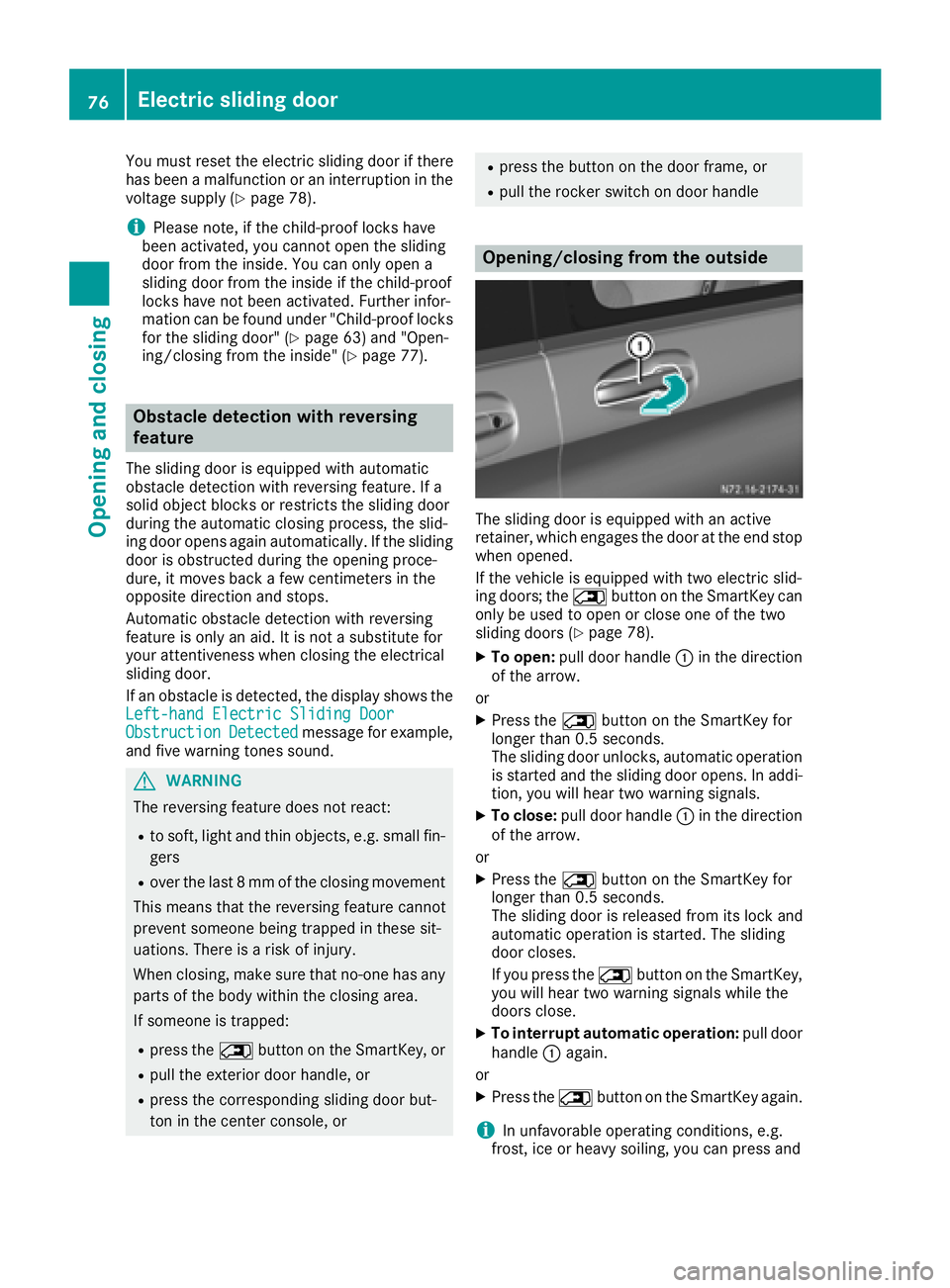
XTo open: pull door handle :in the direction
of the arrow.
or
XPress the 5button on the SmartKey for
longer than 0.5 seconds.
The sliding door unlocks, automatic operation
is started and the sliding door opens. In addi-
tion, you will hear two warning signals.
XTo close: pull door handle :in the direction
of the arrow.
or
XPress the 5button on the SmartKey for
longer than 0.5 seconds.
The sliding door is released from its lock and
automatic operation is started. The sliding
door closes.
If you press the 5button on the SmartKey,
you will hear two warning signals while the
doors close.
XTo interrupt automatic operation: pull door
handle :again.
or
XPress the 5button on the SmartKey again.
iIn unfavorable operating conditions, e.g.
frost, ice or heavy soiling, you can press and
76Electric sliding door
Opening and closing
Page 79 of 318
hold the relevant sliding door button. The
electric sliding door moves with increased
force. Observe that, in such circumstances,
the obstacle detection is less sensitive. To
stop the movement, release the sliding door
button.
Opening/closing from the inside
If the sliding door is unlocked, you can open andclose the sliding door from the inside with these
controls:
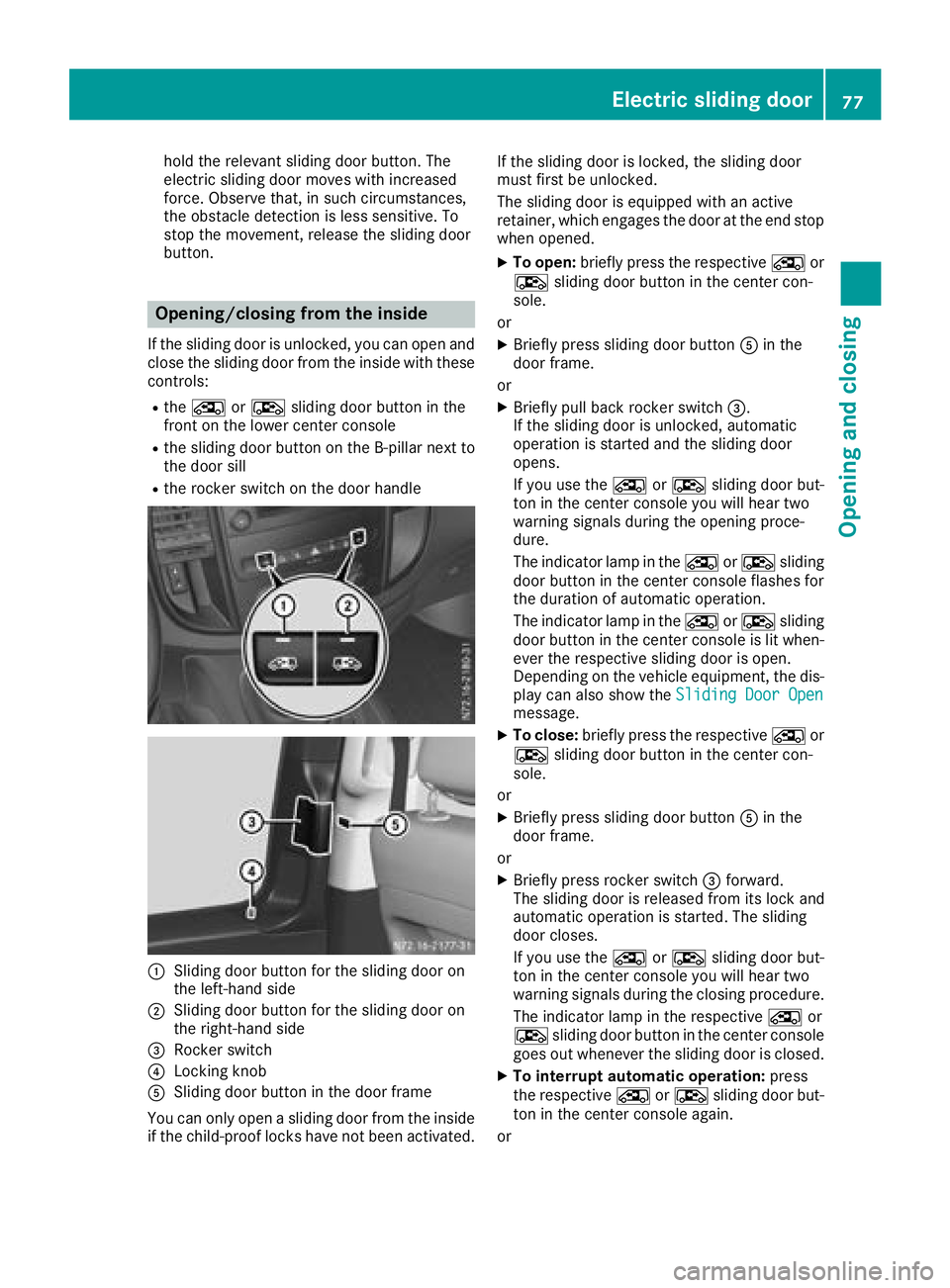
Rthe Å orÆ sliding door button in the
front on the lower center console
Rthe sliding door button on the B-pillar next to
the door sill
Rthe rocker switch on the door handle
:Sliding door button for the sliding door on
the left-hand side
;Sliding door button for the sliding door on
the right-hand side
=Rocker switch
?Locking knob
ASliding door button in the door frame
You can only open a sliding door from the inside if the child-proof locks have not been activated. If the sliding door is locked, the sliding door
must first be unlocked.
The sliding door is equipped with an active
retainer, which engages the door at the end stop
when opened.
XTo open:
briefly press the respective Åor
Æ sliding door button in the center con-
sole.
or
XBriefly press sliding door button Ain the
door frame.
or
XBriefly pull back rocker switch =.
If the sliding door is unlocked, automatic
operation is started and the sliding door
opens.
If you use the ÅorÆ sliding door but-
ton in the center console you will hear two
warning signals during the opening proce-
dure.
The indicator lamp in the ÅorÆ sliding
door button in the center console flashes for
the duration of automatic operation.
The indicator lamp in the ÅorÆ sliding
door button in the center console is lit when-
ever the respective sliding door is open.
Depending on the vehicle equipment, the dis-
play can also show the Sliding Door Open
message.
XTo close:briefly press the respective Åor
Æ sliding door button in the center con-
sole.
or
XBriefly press sliding door button Ain the
door frame.
or
XBriefly press rocker switch =forward.
The sliding door is released from its lock and
automatic operation is started. The sliding
door closes.
If you use the ÅorÆ sliding door but-
ton in the center console you will hear two
warning signals during the closing procedure.
The indicator lamp in the respective Åor
Æ sliding door button in the center console
goes out whenever the sliding door is closed.
XTo interrupt automatic operation: press
the respective ÅorÆ sliding door but-
ton in the center console again.
or
Electric sliding door77
Opening and closing
Z
Page 82 of 318
national regulations, by using the warning tri-
angle, for instance.
!Make sure that there is sufficient clearance
when opening the rear doors. You could oth-
erwise damage the vehicle and objects in
close range of the rear doors.
You can lock the rear doors at an angle of
approx. 90° and, if necessary, 180° or 270°.
Always make sure that the open rear door is
correctly engaged in the detent.
Opening and closing from the outside
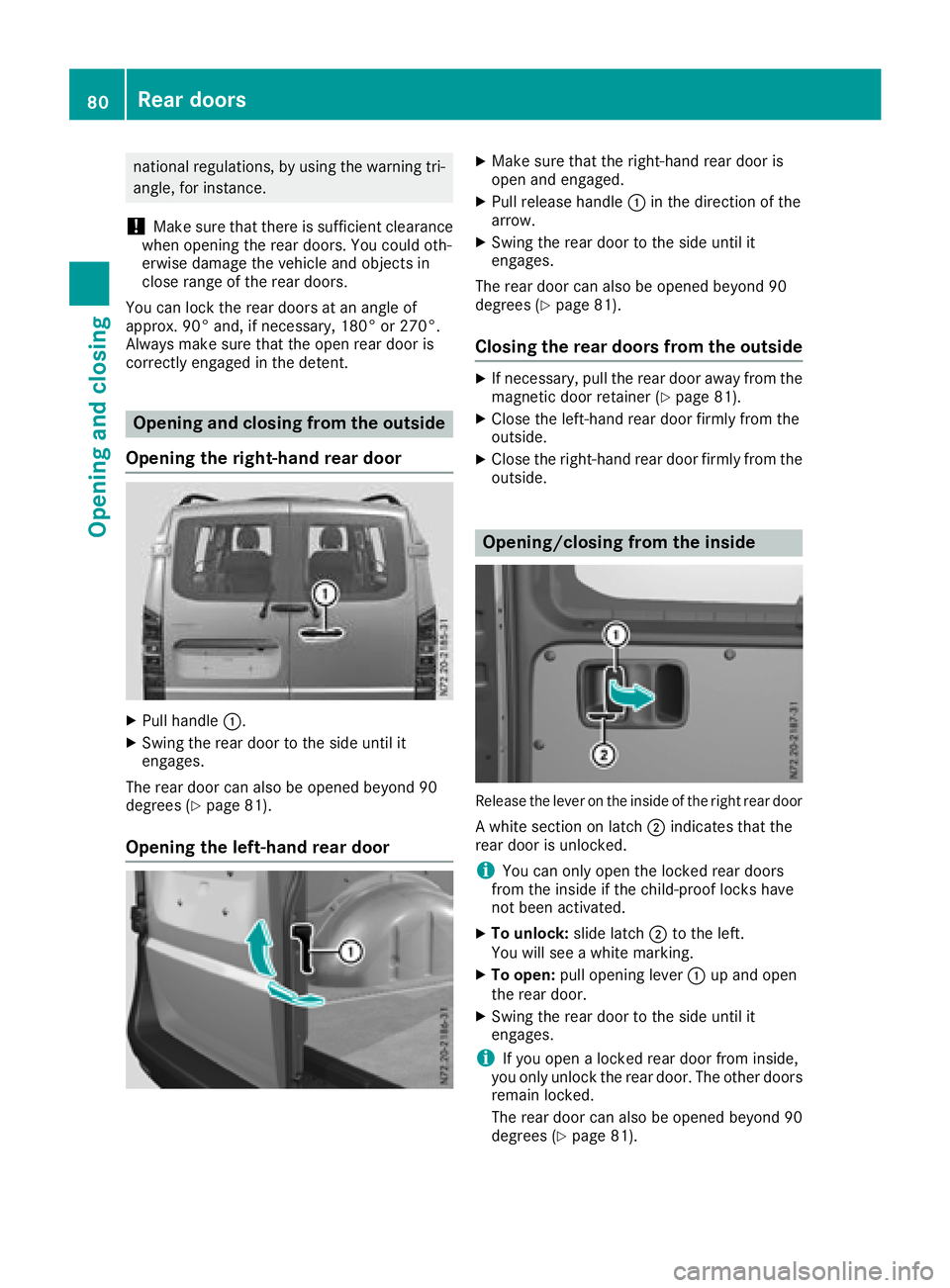
Opening the right-hand rear door
XPull handle :.
XSwing the rear door to the side until it
engages.
The rear door can also be opened beyond 90
degrees (
Ypage 81).
Opening the left-hand rear door
XMake sure that the right-hand rear door is
open and engaged.
XPull release handle :in the direction of the
arrow.
XSwing the rear door to the side until it
engages.
The rear door can also be opened beyond 90
degrees (
Ypage 81).
Closing the rear doors from the outside
XIf necessary, pull the rear door away from the
magnetic door retainer (Ypage 81).
XClose the left-hand rear door firmly from the
outside.
XClose the right-hand rear door firmly from the outside.
Opening/closing from the inside
Release the lever on the inside of the right rear door
A white section on latch ;indicates that the
rear door is unlocked.
iYou can only open the locked rear doors
from the inside if the child-proof locks have
not been activated.
XTo unlock: slide latch;to the left.
You will see a white marking.
XTo open: pull opening lever :up and open
the rear door.
XSwing the rear door to the side until it
engages.
iIf you open a locked rear door from inside,
you only unlock the rear door. The other doors
remain locked.
The rear door can also be opened beyond 90
degrees (
Ypage 81).
80Rear doors
Opening and closing
Page 83 of 318
XTo close:make sure that the left-hand rear
door is closed.
XPull the rear door firmly by the door handle to
close it.
XTo lock: slide latch ;to the right.
The white section is no longer visible.
Opening at an angle of 180° or 270°
Depending on the vehicle equipment, you can
open the rear doors up to an angle of 180° or
270° (side wall).
!When you open the sliding door, first make
sure that:
Rthe rear door is not opened to an angle of
270°.
Rthe rear door is not clipped into the door
retainer.
The sliding door could otherwise collide with
the opened rear door and the doors could be
damaged.
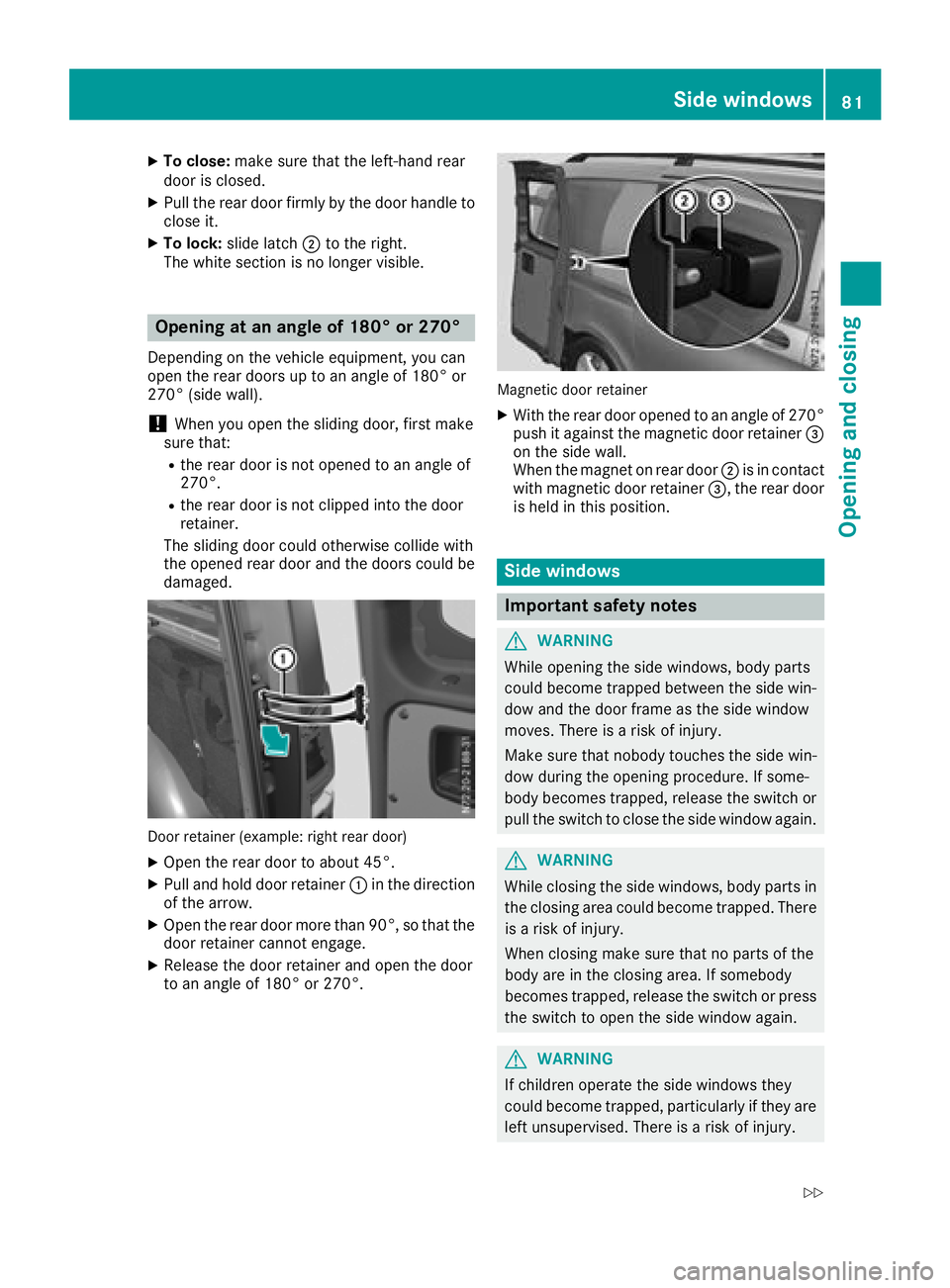
Door retainer (example: right rear door)
XOpen the rear door to about 45°.
XPull and hold door retainer :in the direction
of the arrow.
XOpen the rear door more than 90°, so that the
door retainer cannot engage.
XRelease the door retainer and open the door
to an angle of 180° or 270°.
Magnetic door retainer
XWith the rear door opened to an angle of 270° push it against the magnetic door retainer =
on the side wall.
When the magnet on rear door ;is in contact
with magnetic door retainer =, the rear door
is held in this position.
Side windows
Important safety notes
GWARNING
While opening the side windows, body parts
could become trapped between the side win-
dow and the door frame as the side window
moves. There is a risk of injury.
Make sure that nobody touches the side win-
dow during the opening procedure. If some-
body becomes trapped, release the switch or
pull the switch to close the side window again.
GWARNING
While closing the side windows, body parts in
the closing area could become trapped. There is a risk of injury.
When closing make sure that no parts of the
body are in the closing area. If somebody
becomes trapped, release the switch or press
the switch to open the side window again.
GWARNING
If children operate the side windows they
could become trapped, particularly if they are left unsupervised. There is a risk of injury.
Side windows81
Opening and closing
Z
Page 84 of 318
Activate the override feature for the rear sidewindows. When leaving the vehicle, always
take the SmartKey with you and lock the vehi-
cle. Never leave children unsupervised in the
vehicle.
GWARNING
If persons, particularly children are subjected to prolonged exposure to extreme heat or
cold, there is a risk of injury, possibly even
fatal. Never leave children unattended in the
vehicle.
Side window reversing feature
The front side windows are equipped with an
automatic reversing feature. If a solid object
blocks or restricts a side window from moving
upwards during the automatic closing process,
the side window opens again automatically. Dur-
ing the manual closing process, the side window
only opens again automatically after the corre-
sponding switch is released. The automatic
reversing feature is only an aid and is no substi-
tute for your attention when closing a side win-
dow.
GWARNING
The reversing feature does not react:
Rto soft, light and thin objects, e.g. small fin-
gers
Rwhile resetting
This means that the reversing feature cannot
prevent someone being trapped in these sit-
uations. There is a risk of injury.
Make sure that no body parts are in close
proximity during the closing procedure. If
someone becomes trapped, press the switch
to open the side window again.
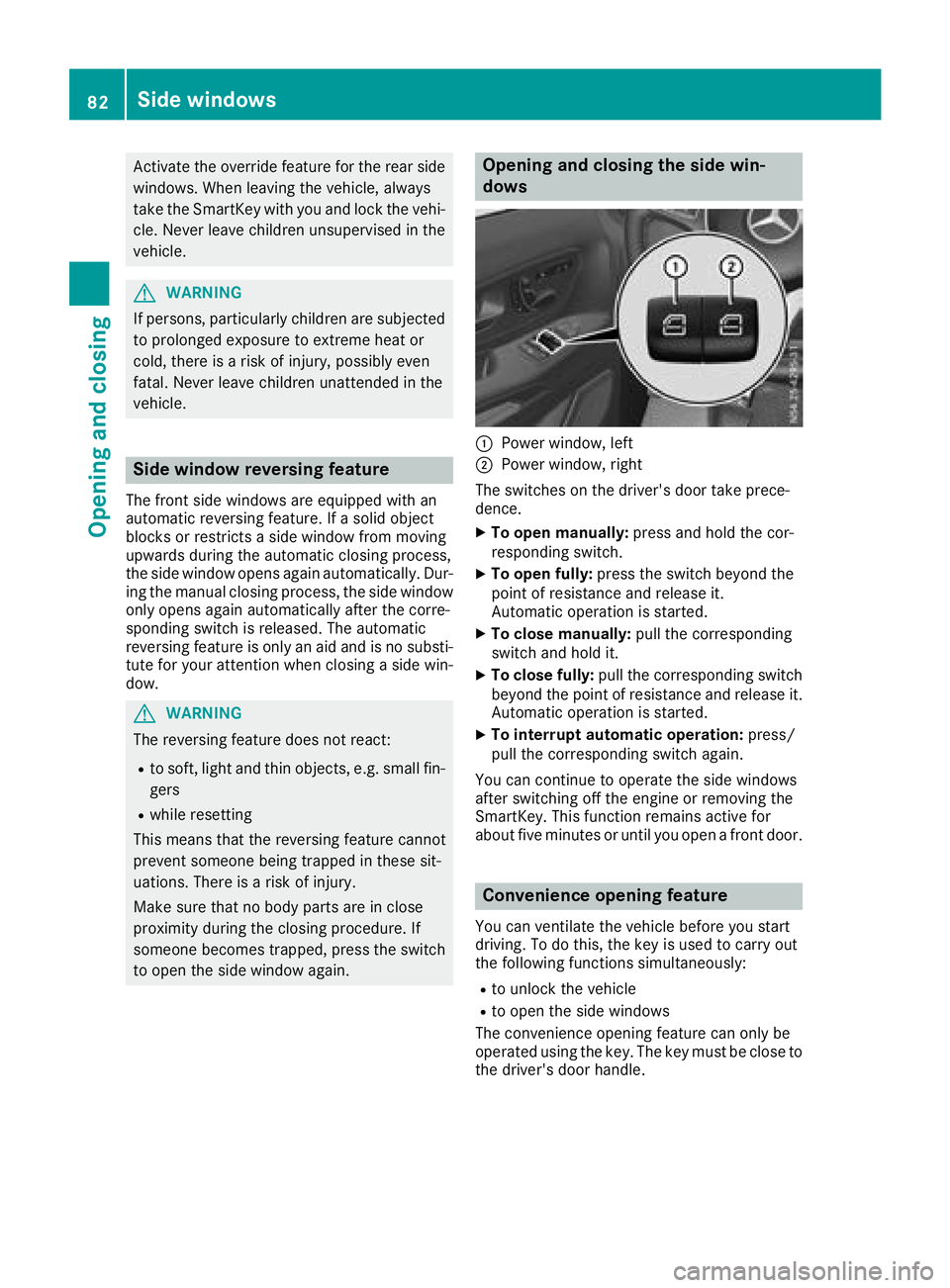
Opening and closing the side win-
dows
:Power window, left
;Power window, right
The switches on the driver's door take prece-
dence.
XTo open manually: press and hold the cor-
responding switch.
XTo open fully: press the switch beyond the
point of resistance and release it.
Automatic operation is started.
XTo close manually: pull the corresponding
switch and hold it.
XTo close fully: pull the corresponding switch
beyond the point of resistance and release it.
Automatic operation is started.
XTo interrupt automatic operation: press/
pull the corresponding switch again.
You can continue to operate the side windows
after switching off the engine or removing the
SmartKey. This function remains active for
about five minutes or until you open a front door.
Convenience opening feature
You can ventilate the vehicle before you start
driving. To do this, the key is used to carry out
the following functions simultaneously:
Rto unlock the vehicle
Rto open the side windows
The convenience opening feature can only be
operated using the key. The key must be close to
the driver's door handle.
82Side windows
Opening and closing
Page 86 of 318
Useful information
This Operator's Manual describes all models as
well as standard and optional equipment of your
vehicle that were available at the time of going
to print. Country-specific variations are possi-
ble. Note that your vehicle may not be equipped
with all of the described functions. This also
applies to systems and functions relevant to
safety.
Read the information on qualified specialist
workshops (
Ypage 31).
Seats
Driver's and front-passenger seat
Important safety notes
GWARNING
Children could become trapped if they adjust
the seats, particularly when unattended.
There is a risk of injury.
When leaving the vehicle, always take the
SmartKey with you and lock the vehicle. Never
leave children unsupervised in the vehicle.
GWARNING
You could lose control of your vehicle if you do the following while driving:
Radjust the driver's seat, head restraint,
steering wheel or mirrors
Rfasten the seat belt
There is a risk of an accident.
Adjust the driver's seat, head restraint, steer-
ing wheel and mirror and fasten your seat belt before starting the engine.
GWARNING
When you adjust a seat, you or other vehicle
occupants could become trapped, e.g. on the seat guide rail. There is a risk of injury.
Make sure when adjusting a seat that no one
has any body parts in the sweep of the seat.
GWARNING
If the driver's seat is not engaged, it could
move unexpectedly while the vehicle is in
motion. This could cause you to lose control of the vehicle. There is a risk of an accident.
Always make sure that the driver's seat is
engaged before starting the vehicle.
GWARNING
The front-air bags for could also injure the
vehicle occupants in the front If the front
seats are positioned too close to the dash-
board or steering wheel. This poses an
increased risk of injury or even fatal injury.
Always adjust the front seats so that they are
as far from the front air bags as possible. Also
observe the notes on the correct adjustment
of the seats.
GWARNING
The seat belt does not offer the intended level of protection if you have not moved the back-
rest to an almost vertical position. When brak-
ing or in the event of an accident, you could
slide underneath the seat belt and sustain
abdomen or neck injuries, for example. This
poses an increased risk of injury or even fatal injury.
Adjust the seat properly before beginning
your journey. Always ensure that the backrest
is in an almost vertical position and that the
shoulder section of your seat belt is routed
across the center of your shoulder.
GWARNING
If the head restraints are not installed or not
adjusted correctly, they cannot provide pro-
tection as intended. There is an increased risk
of injury in the head and neck area, e.g. in the event of an accident or when braking.
Always drive with the head restraints instal-
led. Before driving off, make sure for every
vehicle occupant that the center of the head
restraint supports the back of the head at
about eye level.
84Seats
Seats, steering wheel and mirrors
Page 93 of 318
Steering wheel
GWARNING
You could lose control of your vehicle if you do the following while driving:
Radjust the driver's seat, head restraint,
steering wheel or mirrors
Rfasten the seat belt
There is a risk of an accident.
Adjust the driver's seat, head restraint, steer-
ing wheel and mirror and fasten your seat belt before starting the engine.
GWARNING
If the steering wheel is unlocked while the
vehicle is in motion, it could change position
unexpectedly. This could cause you to lose
control of the vehicle. There is a risk of an
accident.
Before starting off, make sure the steering
wheel is locked. Never unlock the steering
wheel while the vehicle is in motion.
GWARNING
Children could injure themselves if they
adjust the steering wheel. There is a risk of
injury.
When leaving the vehicle, always take the
SmartKey with you and lock the vehicle. Never
leave children unsupervised in the vehicle.
The steering wheel can still be adjusted if the
key has been removed.
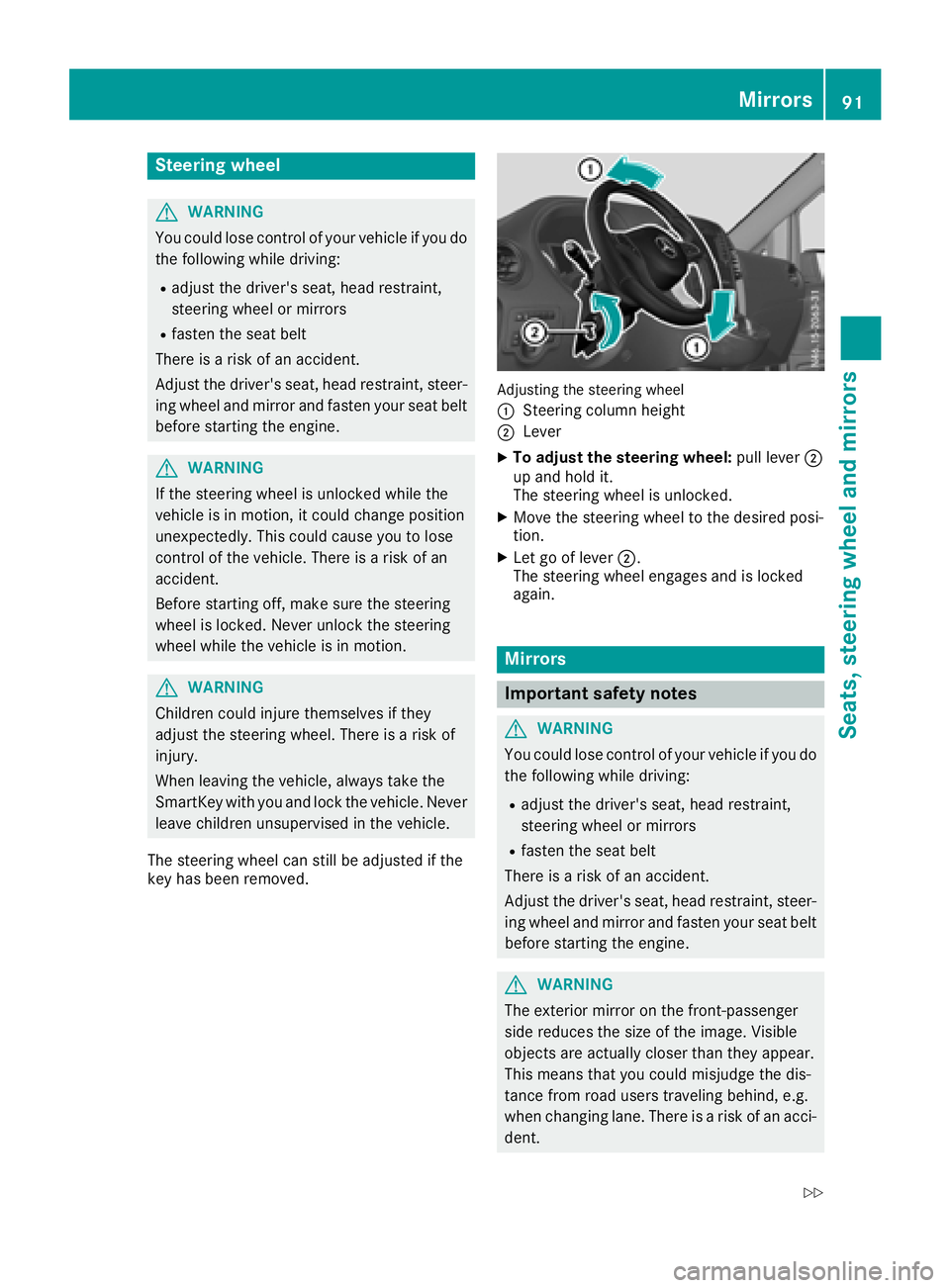
Adjusting the steering wheel
:
Steering column height
;Lever
XTo adjust the steering wheel: pull lever;
up and hold it.
The steering wheel is unlocked.
XMove the steering wheel to the desired posi-
tion.
XLet go of lever ;.
The steering wheel engages and is locked
again.
Mirrors
Important safety notes
GWARNING
You could lose control of your vehicle if you do the following while driving:
Radjust the driver's seat, head restraint,
steering wheel or mirrors
Rfasten the seat belt
There is a risk of an accident.
Adjust the driver's seat, head restraint, steer-
ing wheel and mirror and fasten your seat belt before starting the engine.
GWARNING
The exterior mirror on the front-passenger
side reduces the size of the image. Visible
objects are actually closer than they appear.
This means that you could misjudge the dis-
tance from road users traveling behind, e.g.
when changing lane. There is a risk of an acci-
dent.
Mirrors91
Seats, steering wheel and mirrors
Z
Page 134 of 318
Problems with the transmission
ProblemPossible causes/consequences andMSolutions
The transmission is
locked in positionP.The vehicle electronics are malfunctioning.
XHave the vehicle electronics checked immediately at a qualified
specialist workshop.
The acceleration charac-
teristics have deteriora-
ted noticeably.
The transmission does
not shift.The transmission is in emergency mode.
It is only possible to shift into second gear or reverse gear R.
XStop the vehicle.
XDepress the brake pedal.
XMove the selector lever to positionP.
XSwitch off the engine.
XWait at least ten seconds before restarting the engine.
XDepress the brake pedal.
XMove the selector lever to positionDor R.
In position D, the transmission shifts into second gear; in position R,
the transmission shifts into reverse gear.
XHave the transmission checked immediately at a qualified specialist
workshop.
Refueling
Important safety notes
GWARNING
Fuel is highly flammable. Improper handling of
fuel creates a risk of fire and explosion.
Avoid fire, open flames, smoking and creating
sparks under all circumstances. Switch off the
engine and, if applicable, the auxiliary heating
before refueling.
GWARNING
Fuel is poisonous and hazardous to health.
There is a risk of injury.
You must make sure that fuel does not come into contact with your skin, eyes or clothing
and that it is not swallowed. Do not inhale fuel
vapors. Keep fuel away from children.
If you or others come into contact with fuel,
observe the following:
RWash away fuel from skin immediately
using soap and water.
RIf fuel comes into contact with your eyes,
immediately rinse them thoroughly with
clean water. Seek medical assistance with-
out delay.
RIf fuel is swallowed, seek medical assis-
tance without delay. Do not induce vomit-
ing.
RImmediately change out of clothing which
has come into contact with fuel.
GWARNING
Electrostatic buildup can create sparks and
ignite fuel vapors. There is a risk of fire and
explosion.
Always touch the vehicle body before opening
the fuel filler flap or touching the fuel pump
nozzle. Any existing electrostatic buildup is
thereby discharged.
132Refueling
Driving and parking