climate control MERCEDES-BENZ METRIS 2017 MY17 Operator’s Manual
[x] Cancel search | Manufacturer: MERCEDES-BENZ, Model Year: 2017, Model line: METRIS, Model: MERCEDES-BENZ METRIS 2017Pages: 318, PDF Size: 5.01 MB
Page 27 of 318
Ventilationsee Climate control
VIN
Engine compartment ..................... 304
Type plate ...................................... 303
W
WarningStickers ........................................... 29
Warning and indicator lamps
ABS ................................................ 222
Brakes ........................................... 221
Check Engine ................................. 225
COLLISION PREVENTION ASSIST .. 227
Coolant .......................................... 225
Distance warning ........................... 227
Door ............................................... 229
ESP
®.............................................. 222
ESP®OFF ....................................... 224
Fuel tank ........................................ 225
General notes ................................ 219
Overview (vehicle with steering
wheel buttons) ................................. 40
Overview (vehicle without steer-
ing wheel buttons) ........................... 38
Parking brake ................................ 134
PASSENGER AIR BAG OFF ............... 46
Rear door ....................................... 229
Reserve fuel ................................... 225
Restraint system ............................ 224
Seat belt ........................................ 220
Sliding door ................................... 229
Steering ......................................... 229
Tire pressure monitor .................... 228
Warranty .............................................. 27
Washer fluid
Adding ........................................... 256
Capacities ...................................... 311
Display messages (vehicle with
steering wheel buttons) ................. 219
Display messages (vehicle with-
out steering wheel buttons) ........... 203
Notes ............................................. 311
Wheel and tire combination
see Tires
Wheel bolt tightening torque ........... 299Wheels
Changing a wheel .......................... 296
Checking ........................................ 278
Cleaning ......................................... 266
Important safety notes .................. 277
Interchanging/changing ................ 296
Mounting a new wheel ................... 298
Mounting a wheel .......................... 297
Removing a wheel .......................... 298
Removing and mounting the spare
wheel ............................................. 301
Snow chains .................................. 280
Storing ........................................... 296
Tightening torque ........................... 299
Wheel/tire combinations ............... 300
Window curtain air bag
Display message (vehicle with
steering wheel buttons) ................. 209
Display message (vehicle without
steering wheel buttons) ................. 195
Operati on ......................................... 52
Wi
ndows
see Side windows
Windshield
Cleaning ......................................... 265
Defrosting ...................................... 115
Windshield washer fluid
Adding ........................................... 256
Windshield wiper
Setting the sensitivity of the rain
sensor (vehicle with steering
wheel buttons) ............................... 188
Setting the sensitivity of the rain
sensor (vehicle without steering
wheel buttons) ............................... 175
Windshield wiper
see Windshield
Windshield wipers
Problem (malfunction) ................... 107
Rear window wiper ........................ 104
Replacing the wiper blades ............ 105
Switching on/off ........................... 104
Winter driving
Slippery road surfaces ................... 139
Snow chains .................................. 280
Winter operation
General notes ................................ 279
Radiator cover ................................. 33
Index25
Page 60 of 318
sive role in the deployment of an air bag. Nor do
they provide an indication of air bag deploy-
ment.
The vehicle can be deformed considerably, with-
out an air bag being deployed. This is the case if only parts which are relatively easily deformed
are affected and the rate of deceleration is not
high. Conversely, air bags may be deployed even
though the vehicle suffers only minor deforma-
tion. This is the case if, for example, very rigid
vehicle parts such as longitudinal body mem-
bers are hit, and sufficient deceleration occurs
as a result.
If the restraint system control unit detects a side
impact or if the vehicle rolls over, the applicable
components of the restraint system are activa-
ted independently of each other depending on
the apparent type of accident.
RSide impact air bag and pelvis air bag on the
side on which an impact occurs, independent
from the Emergency Tensioning Device and
seat belt usage
The side impact air bag on the front-
passenger side deploys under the following
conditions:
-the OCS system detects that the front-
passenger seat is occupied or
-the seat belt buckle tongue is engaged in
the belt buckle of the front-passenger seat
RWindow curtain air bag on the side of impact,independently of the use of the seat belt and
independently of whether the front-
passenger seat is occupied
REmergency Tensioning Devices, if the system
determines that deployment can offer addi-
tional protection in this situation
RWindow curtain air bags on the driver's and
front-passenger side in certain situations
when the vehicle rolls over, if the system
determines that deployment can offer addi-
tional protection to that provided by the seat
belt
iNot all air bags are deployed in an accident.
The different air bag systems work independ- ently of each other.
How the air bag system works is determined
by the severity of the accident detected,
especially the vehicle deceleration or accel-
eration and the apparent type of accident:
RFrontal collision
RSide impact
RRollover
Automatic measures after an acci-
dent
Immediately after an accident, the following
measures are implemented, depending on the
type and severity of the impact:
Rthe hazard warning lamps are activated
Rthe emergency lighting in the interior is acti-
vated
Rthe vehicle doors are unlocked
Rthe front side windows are lowered
Rair-recirculation mode is activated
Rclimate control is switched off
Rthe engine is switched off and the fuel supply
is cut off
Children in the vehicle
Important safety notes
Accident statistics show that children secured
in the rear seats are safer than children secured
in the front-passenger seat. For this reason,
Mercedes-Benz strongly advises that you install
a child restraint system on a rear seat. Children
are generally better protected there.
If a child younger than twelve years old and
under 5 ft (1.50 m) in height is traveling in the
vehicle:
Ralways secure the child in a child restraint
system suitable for Mercedes-Benz vehicles.
The child restraint system must be appropri-
ate to the age, weight and size of the child
Rbe sure to observe the instructions and safety
notes in this section in addition to the child
restraint system manufacturer's installation
instructions
Rbe sure to observe the instructions and safety
notes on the "Occupant classification system
(OCS)" (
Ypage 52)
GWARNING
If you leave children unsupervised in the vehi-
cle, they could set it in motion by, for example:
Rrelease the parking brake.
Rshift the automatic transmission out of the
parking position P.
Rstart the engine.
58Children in the vehicle
Safety
Page 110 of 318
Useful information
This Operator's Manual describes all models as
well as standard and optional equipment of your
vehicle that were available at the time of going
to print. Country-specific variations are possi-
ble. Note that your vehicle may not be equipped
with all of the described functions. This also
applies to systems and functions relevant to
safety.
Read the information on qualified specialist
workshops (
Ypage 31).
Overview of climate control systems
Important safety notes
Observe the recommended settings on the fol-
lowing pages. Otherwise, the windows could fog
up.
To prevent the windows from fogging up:
Ronly switch off climate control briefly
Ronly switch on air-recirculation mode briefly
Rfor vehicles with air-conditioning system or
dual-zone automatic climate control, switch
on the "Cooling with air dehumidification"
function
Rfor vehicles with dual-zone automatic climate
control, switch on the windshield defrosting
function briefly, if requiredClimate control regulates the temperature and
the humidity in the vehicle interior and filters
undesirable substances from the air.
Climate control is only operational when the
engine is running. The system only functions
optimally when the side windows are closed.
Ventilate the vehicle for a brief period during
warm weather. In order to cool the vehicle more
rapidly, switch climate control to air-recircula-
tion mode briefly. This will speed up the cooling
process and the desired interior temperature
will be reached more quickly.
The integrated filter can filter out most particles
of dust and completely filters out pollen. In vehi-
cles with dual-zone automatic climate control,
gaseous pollutants and odors will also be
reduced. A clogged filter reduces the airflow into
the vehicle interior. For this reason, you should
always observe the interval for replacing the fil- ter, which is specified in the Maintenance Book-
let. As the interval between changes depends on
environmental conditions, e.g. heavy air pollu-
tion, the interval may be shorter than stated in
the Maintenance Booklet.
108Overview of climate control systems
Climate control
Page 111 of 318
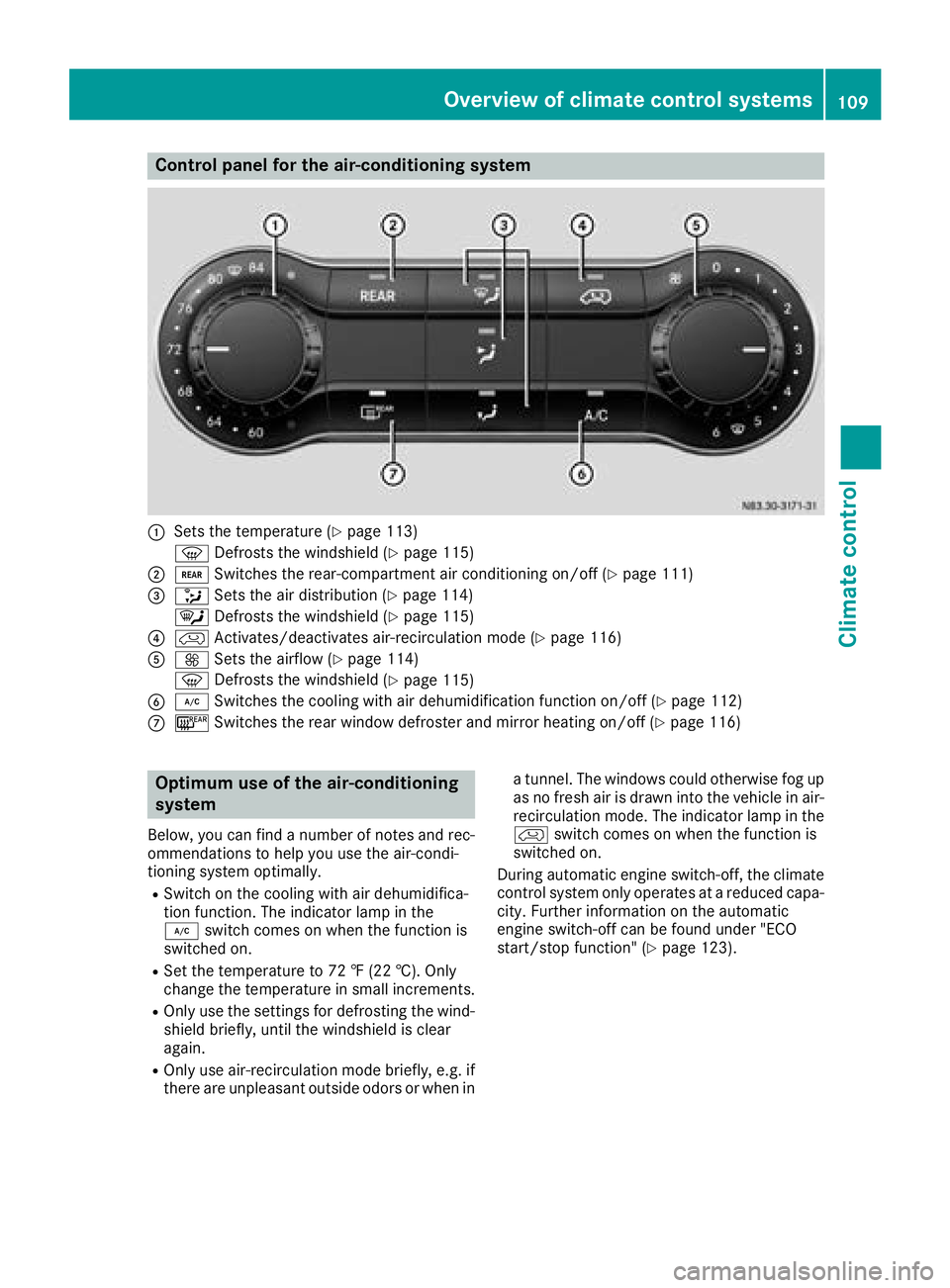
Control panel for the air-conditioning system
:Sets the temperature (Ypage 113)
z Defrosts the windshield (
Ypage 115)
;/Switches the rear-compartment air conditioning on/off (Ypage 111)
=_Sets the air distribution (Ypage 114)
¯ Defrosts the windshield (
Ypage 115)
?hActivates/deactivates air-recirculation mode (Ypage 116)
AKSets the airflow (Ypage 114)
z Defrosts the windshield (
Ypage 115)
B¿Switches the cooling with air dehumidification function on/off (Ypage 112)
C¤Switches the rear window defroster and mirror heating on/off (Ypage 116)
Optimum use of the air-conditioning
system
Below, you can find a number of notes and rec-
ommendations to help you use the air-condi-
tioning system optimally.
RSwitch on the cooling with air dehumidifica-
tion function. The indicator lamp in the
¿ switch comes on when the function is
switched on.
RSet the temperature to 72 ‡ (22 †).Only
ch ange the temperature in small increments.
ROnly use the settings for defrosting the wind-
shield briefly, until the windshield is clear
again.
ROnly use air-recirculation mode briefly, e.g. if
there are unpleasant outside odors or when in a tunnel. The windows could otherwise fog up
as no fresh air is drawn into the vehicle in air-
recirculation mode. The indicator lamp in the
h
switch comes on when the function is
switched on.
During automatic engine switch-off, the climate
control system only operates at a reduced capa-
city. Further information on the automatic
engine switch-off can be found under "ECO
start/stop function" (
Ypage 123).
Overview of climate control systems109
Climate control
Page 112 of 318
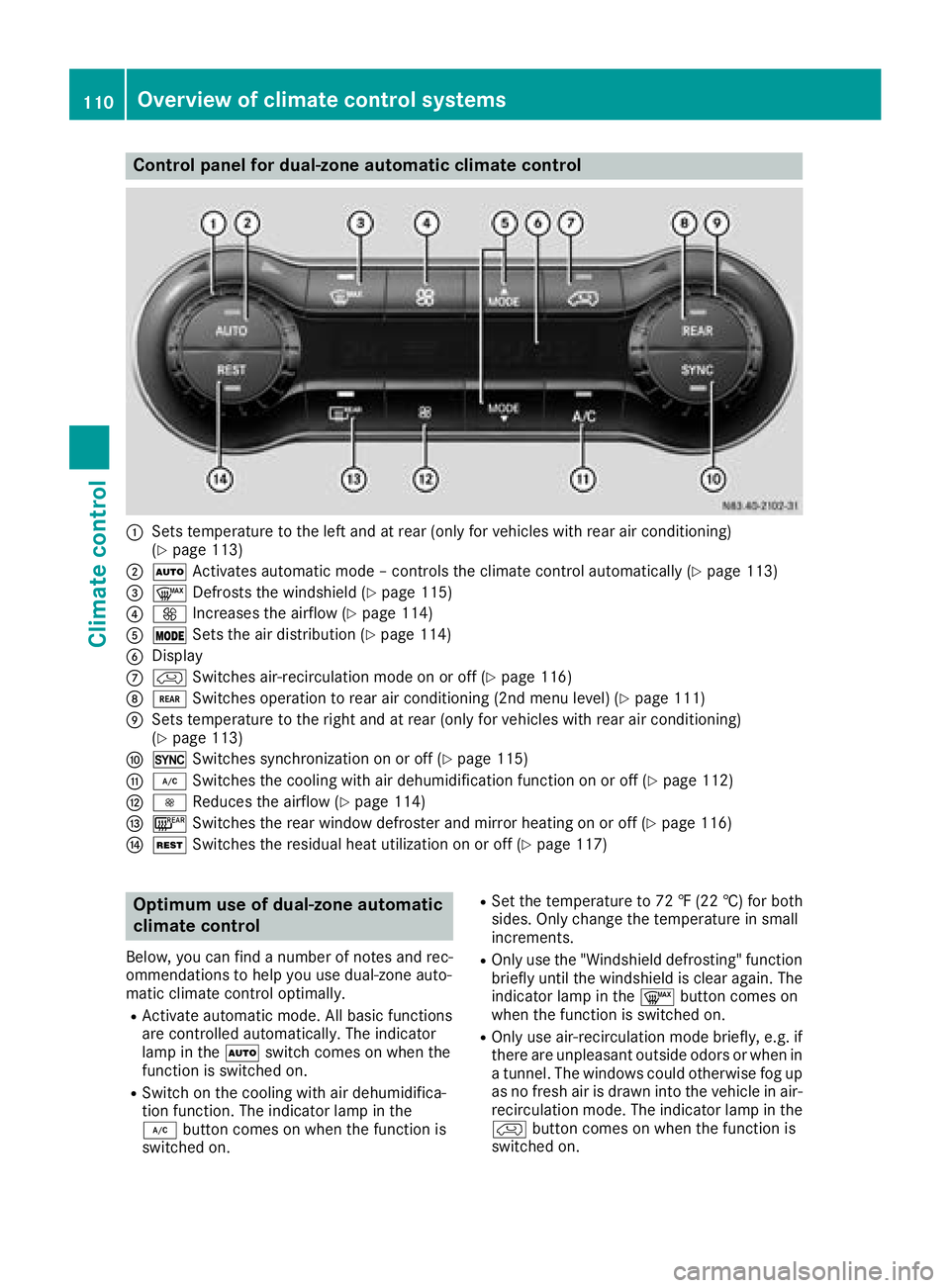
Control panel for dual-zone automatic climate control
:Sets temperature to the left and at rear (only for vehicles with rear air conditioning)
(Ypage 113)
;ÃActivates automatic mode – controls the climate control automatically (Ypage 113)
=¬Defrosts the windshield (Ypage 115)
?KIncreases the airflow (Ypage 114)
AÄSets the air distribution (Ypage 114)
BDisplay
ChSwitches air-recirculation mode on or off (Ypage 116)
D/Switches operation to rear air conditioning (2nd menu level) (Ypage 111)
ESets temperature to the right and at rear (only for vehicles with rear air conditioning)
(Ypage 113)
F0Switches synchronization on or off (Ypage 115)
G¿Switches the cooling with air dehumidification function on or off (Ypage 112)
HIReduces the airflow (Ypage 114)
I¤Switches the rear window defroster and mirror heating on or off (Ypage 116)
JÌSwitches the residual heat utilization on or off (Ypage 117)
Optimum use of dual-zone automatic
climate control
Below, you can find a number of notes and rec-
ommendations to help you use dual-zone auto-
matic climate control optimally.
RActivate automatic mode. All basic functions
are controlled automatically. The indicator
lamp in the Ãswitch comes on when the
function is switched on.
RSwitch on the cooling with air dehumidifica-
tion function. The indicator lamp in the
¿ button comes on when the function is
switched on.
RSet the temperature to 72 ‡ (22 †) for both
sides. Only change the temperature in small
increments.
ROnly use the "Windshield defrosting" function
briefly until the windshield is clear again. The
indicator lamp in the ¬button comes on
when the function is switched on.
ROnly use air-recirculation mode briefly, e.g. if
there are unpleasant outside odors or when in
a tunnel. The windows could otherwise fog up
as no fresh air is drawn into the vehicle in air-
recirculation mode. The indicator lamp in the
h button comes on when the function is
switched on.
110Overview of climate control systems
Climate control
Page 113 of 318
RIf you wish to use the driver's side settings on
the front-passenger side and, for vehicles
with rear-compartment air conditioning, for
the rear compartment as well, use the "Syn-
chronization" function. The indicator lamp in
the0 button comes on when the function
is switched on.
RAfter long journeys, you can use the residual
heat of the engine to heat the stationary vehi-
cle. The residual heat utilization can only be
switched on or off while the ignition is
switched off. The indicator lamp in the Ì
button comes on when the function is
switched on.
Approximately 60 minutes after parking the
vehicle, dual-zone automatic climate control
can switch on automatically, depending on the
outside temperature. The vehicle is then venti-
lated for about 30 minutes at low fan setting and
dual-zone automatic climate control is dried out.
During automatic engine switch-off, the climate
control system only operates at a reduced capa-
city. Further information on the automatic
engine switch-off can be found under "ECO
start/stop function" (
Ypage 123).
Optimum use of rear-compartment air
conditioning
Vehicles with air-conditioning system
Switch the rear-compartment air-conditioning
system on and off using the air-conditioning sys-
tem control panel. When you switch on the rear-
compartment air conditioning, your settings for
temperature, airflow and air distribution are
automatically adopted on the control panel for
the rear-compartment air conditioning.
The indicator lamp in the /button comes on
when the rear-compartment air-conditioning is
switched on (
Ypage 109).
Vehicles with dual-zone automatic climate
control
To operate the rear-compartment air condition-
ing, use the control panel of the dual-zone auto-
matic climate control system. When you switch
on the rear-compartment air conditioning, you
can set the temperature and airflow separately
on the control panel. The airflow setting is auto-
matically adopted for the rear-compartment air
conditioning. When dual-zone automatic cli-
mate control is in Ãautomatic mode, the air
distribution of the rear-compartment air condi-
tioning is also automatically adjusted. When you set the temperature and airflow of the
rear-compartment air conditioning, the indica-
tor lamp of the
/button (
Ypage 110)
flashes. When the rear-compartment air condi-
tioning is switched on, the indicator lamp on
the / button lights up.
For optimum climate control, set the tempera-
ture to 72 ‡ (22 †) and switch on Ãauto-
matic mode. Only change the temperature in
small increments.
Operating the climate control system
Switching the climate control on/off
Important safety notes
When the climate control is switched off, air
intake and air circulation also stop. Only use this
setting for a brief period. Otherwise, the win-
dows could fog up.
Air-conditioning system
XTurn the key to position 2in the ignition lock.
XTo switch on: turn airflow control Aclock-
wise to at least level 1– (Ypage 109).
XTo switch off: turn airflow control Acoun-
ter-clockwise to position 0.
Dual-zone automatic climate control
XTurn the key to position2in the ignition lock.
XTo switch on: press theÃbutton.
The indicator lamp in the Ãbutton and the
display are switched on. The climate control is
automatically adjusted depending on the set
temperature (
Ypage 113).
or
XPress the Kbutton and set blower setting
1 or above.
The blower settings are shown in the display
as a bar graph.
XTo switch off: press theIbutton and,
after reaching the lowest blower speed, press
it again.
The control panel display goes off.
Preferably switch on climate control using the
à button.
Operating the climate control system111
Climate control
Page 114 of 318
Rear-compartment air-conditioning
system
Vehicles with air-conditioning system
XSwitch on air-conditioning system.
XTo activate/deactivate:press the/but-
ton on the air-conditioning system control
panel.
The indicator lamp in the /button comes
on when the rear compartment air condition-
ing is switched on. The settings for tempera-
ture, airflow and, in the case of rear-compart-
ment air conditioning, air distribution are
adopted for the rear-compartment air condi-
tioning.
Vehicles with dual-zone automatic cli-
mate control
XSwitch on dual-zone automatic climate con-
trol.
XTo switch on: press the/button on the
control panel.
The indicator lamp in the /button flashes.
The control panel display shows the second
menu level for the temperature and airflow
setting of the rear compartment air condi-
tioning.
XPress the Kbutton and set blower setting
1 or above for the rear-compartment air con-
ditioning.
The blower settings are shown in the display
as a bar graph. The rear-compartment air con- ditioning is switched on.
XIf necessary set the temperature for the rear-compartment air conditioning using temper-
ature control :orE (
Ypage 110).
The display shows the selected rear-compart-
ment temperature.
If you do not make any more settings for
approximately ten seconds, the control panel display shows menu level 1 again for the auto-
matic climate control settings. The ind icato
r
lamp in the /button remains lit.
iThe air distribution setting applies both to
automatic climate control and to the rear-
compartment air conditioning and cannot be
set separately for the two.
XTo switch off: press the/button on the
control panel.
The indicator lamp in the /button flashes.
The control panel display shows the second
menu level for the temperature and airflow setting of the rear compartment air condi-
tioning.
XPress the
Ibutton and, after reaching the
lowest blower speed, press it again.
The control panel display goes off and the
rear-compartment air conditioning is
switched off.
If you do not make any more settings for
approximately ten seconds, the control panel
display shows menu level 1 again for the auto-
matic climate control settings. The indicator
lamp in the /button goes out.
Switching the cooling with air dehu-
midification function on/off
Important safety notes
The cooling with air dehumidification function of
the air conditioning or automatic climate control
is only available when the engine is running. The
air inside the vehicle is cooled and dehumidified
according to the temperature selected.
Condensation may appear on the underside of
the vehicle when in cooling mode. This is normal
and not a sign that there is a malfunction.
If you switch off the "Cooling with air dehumid-
ification" function, the air inside the vehicle will
not be cooled (in warm weather) or dehumidi-
fied. Therefore, only switch off the "Cooling with air dehumidification" function briefly. Other-
wise, the windows will fog up more quickly.
Switching on and off
For dual-zone automatic climate control, the
function for automatic climate control settings
can only be activated or deactivated on the first
menu level. If you do not set a new value for the
rear-compartment climate control in the second
menu level within approx. ten seconds, the con-
trol panel display goes back to the first menu
level.
XPress the ¿button.
The indicator lamp in the ¿switch comes
on when the function is switched on.
iThe cooling with air dehumidification func-
tion has a delayed switch-off feature.
112Operating the climate control system
Climate control
Page 115 of 318
Regulating climate control automati-
cally
General notes
When dual-zone automatic climate control is in
automatic mode, the set temperature is auto-
matically kept constant. The system automati-
cally regulates the temperature of the dis-
pensed air, the airflow and the air distribution.
Automatic mode will achieve optimal operation
if the cooling with air dehumidification function
is also activated. If desired, the cooling with air
dehumidification function can be deactivated
(
Ypage 112).
Dual-zone automatic climate control
Automatic mode for automatic climate control
settings can only be activated or deactivated on
the first menu level. If you do not set a new value
for the rear-compartment climate control in the second menu level within approx. ten seconds,
the control panel display goes back to the first
menu level.
XSwitch on climate control (Ypage 111).
XSet temperature for the driver's and front-
passenger side and, for vehicles with rear-
compartment air conditioning, for the rear
compartment, too (
Ypage 113).
XTo switch automatic mode on or off: press
the à button.
If the indicator lamp in the Ãbutton lights
up, automatic mode is activated. The airflow
and air distribution are controlled automati-
cally and the windshield defrosting function is
deactivated.
If you deactivate automatic mode, the auto-
matic climate control system saves the current
settings.
In automatic mode, if you adjust the airflow or
air distribution manually, the indicator lamp
above the Ãbutton goes out. The function
which has not been changed manually, however,
continues to be controlled automatically.
Setting the temperature
Air-conditioning system
XSwitch on climate control (Ypage 111).
XTo increase or reduce: turn temperature
control :clockwise or counter-clockwise.
When doing so, only change the temperature
in small increments, and start in the center
position or at 72 ‡ (22 †) (
Ypage 109).
Dual-zone automatic climate control
You can set the temperature separately for the
driver's and front-passenger side. In vehicles
with rear-compartment air conditioning, the
temperature for the rear can be set additionally.
Each set temperature is automatically main-
tained at a constant level.
XSwitch on climate control (Ypage 111).
XTo increase or reduce: turn temperature
control :orE clockwise or counter-clock-
wise (
Ypage 110). When doing so, only
change the temperature in small increments
starting at 72 ‡ (22 †).
The control panel display shows the set tem-
perature for the left and right side at the
respective edge of the display.
Rear-compartment air-conditioning
system
Vehicles with air-conditioning system
XSwitch on climate control (Ypage 111).
The air conditioning settings for temperature,
airflow and, for rear-compartment air condi-
tioning, also the setting for air distribution are
also applied to the rear-compartment climate
control.
Vehicles with dual-zone automatic cli-
mate control
XSwitch on climate control (Ypage 111).
XTo increase or decrease: press the/
button on the control panel of the automatic
climate control.
The indicator lamp in the /button flashes.
The control panel display shows the second
menu level for the temperature and airflow
Operating the climate control system113
Climate control
Page 116 of 318
setting of the rear compartment air condi-
tioning.
XTurn temperature control:orE counter-
clockwise or clockwise (Ypage 110). When
doing so, only change the temperature in
small increments starting at 72 ‡ (22 †).
The control panel display shows the temper-
ature set for the rear compartment.
If you do not make any more settings for
approximately ten seconds, the control panel
display shows menu level 1 again for the auto-
matic climate control settings. The indicator
lamp in the /button remains lit.
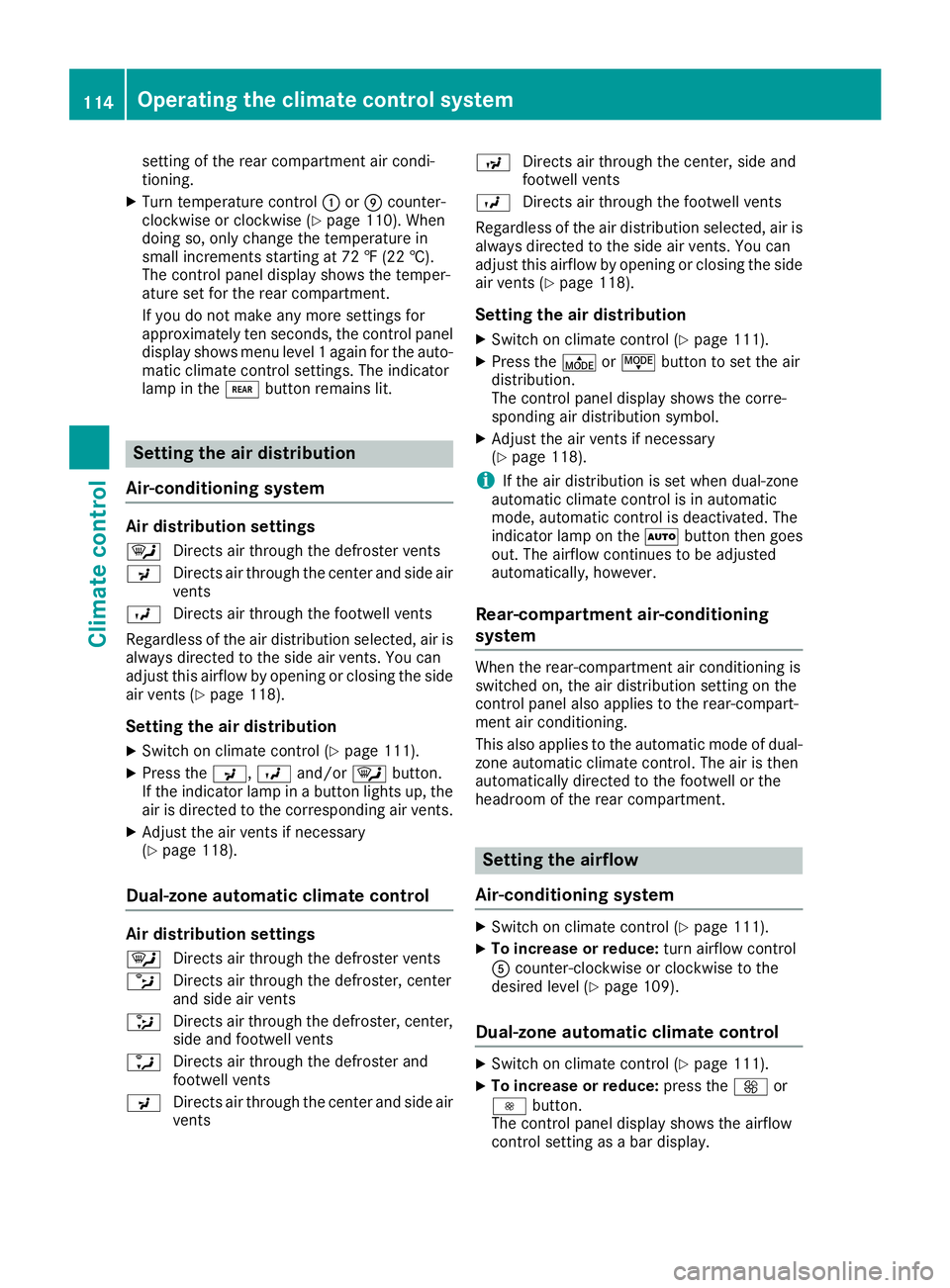
Setting the air distribution
Air-conditioning system
Air distribution settings
¯ Directs air through the defroster vents
P Directs air through the center and side air
vents
O Directs air through the footwell vents
Regardless of the air distribution selected, air is
always directed to the side air vents. You can
adjust this airflow by opening or closing the side
air vents (
Ypage 118).
Setting the air distribution
XSwitch on climate control (Ypage 111).
XPress the P,Oand/or ¯button.
If the indicator lamp in a button lights up, the
air is directed to the corresponding air vents.
XAdjust the air vents if necessary
(Ypage 118).
Dual-zone automatic climate control
Air distribution settings
¯ Directs air through the defroster vents
b Directs air through the defroster, center
and side air vents
_ Directs air through the defroster, center,
side and footwell vents
a Directs air through the defroster and
footwell vents
P Directs air through the center and side air
vents N
Directs air through the center, side and
footwell vents
O Directs air through the footwell vents
Regardless of the air distribution selected, air is
always directed to the side air vents. You can
adjust this airflow by opening or closing the side
air vents (
Ypage 118).
Setting the air distribution
XSwitch on climate control (Ypage 111).
XPress the ÉorË button to set the air
distribution.
The control panel display shows the corre-
sponding air distribution symbol.
XAdjust the air vents if necessary
(Ypage 118).
iIf the air distribution is set when dual-zone
automatic climate control is in automatic
mode, automatic control is deactivated. The
indicator lamp on the Ãbutton then goes
out. The airflow continues to be adjusted
automatically, however.
Rear-compartment air-conditioning
system
When the rear-compartment air conditioning is
switched on, the air distribution setting on the
control panel also applies to the rear-compart-
ment air conditioning.
This also applies to the automatic mode of dual-
zone automatic climate control. The air is then
automatically directed to the footwell or the
headroom of the rear compartment.
Setting the airflow
Air-conditioning system
XSwitch on climate control (Ypage 111).
XTo increase or reduce: turn airflow control
A counter-clockwise or clockwise to the
desired level (
Ypage 109).
Dual-zone automatic climate control
XSwitch on climate control (Ypage 111).
XTo increase or reduce: press theKor
I button.
The control panel display shows the airflow
control setting as a bar display.
114Operating the climate control system
Climate control
Page 117 of 318
iIf the airflow is set when in automatic mode,
automatic control is deactivated. The indica-
tor lamp in the Ãbutton then goes out.
The air distribution continues to be adjusted
automatically, however.
Rear-compartment air-conditioning
system
Vehicles with air-conditioning system
XSwitch on climate control (Ypage 111).
The air conditioning settings for temperature,
airflow and, for rear-compartment air condi-
tioning, also the setting for air distribution are
also applied to the rear-compartment climate
control.
Vehicles with dual-zone automatic cli-
mate control
XSwitch on climate control (Ypage 111).
XTo increase or decrease: press the/
button on the control panel of the automatic
climate control.
The indicator lamp in the /button flashes.
The control panel display shows the second
menu level for the temperature and airflow
setting of the rear compartment air condi-
tioning.
XPress the KorI button.
The control panel display shows the rear-
compartment airflow control setting as a bar
display.
If you do not make any more settings for
approximately ten seconds, the control panel
display shows menu level 1 again for the auto-
matic climate control settings. The indicator
lamp in the /button remains lit.
Activating/deactivating the synchro-
nization function
General notes
Dual-zone automatic climate control can be set
centrally using the synchronization function.
The temperature setting for the driver's side is
then adopted for the front-passenger side and,
on vehicles with rear-compartment air condi-
tioning, the rear compartment too.
Dual-zone automatic climate control
XSwitch on climate control (Ypage 111).
XPress the 0button.
If the indicator lamp in the 0button lights
up, the function is switched on. The display
then shows the temperature set on the driv-
er's side for the front-passenger side.
The synchronization function switches off if
the temperature setting for the front-
passenger side or for the rear compartment is
altered. The indicator lamp on the 0but-
ton then goes out.
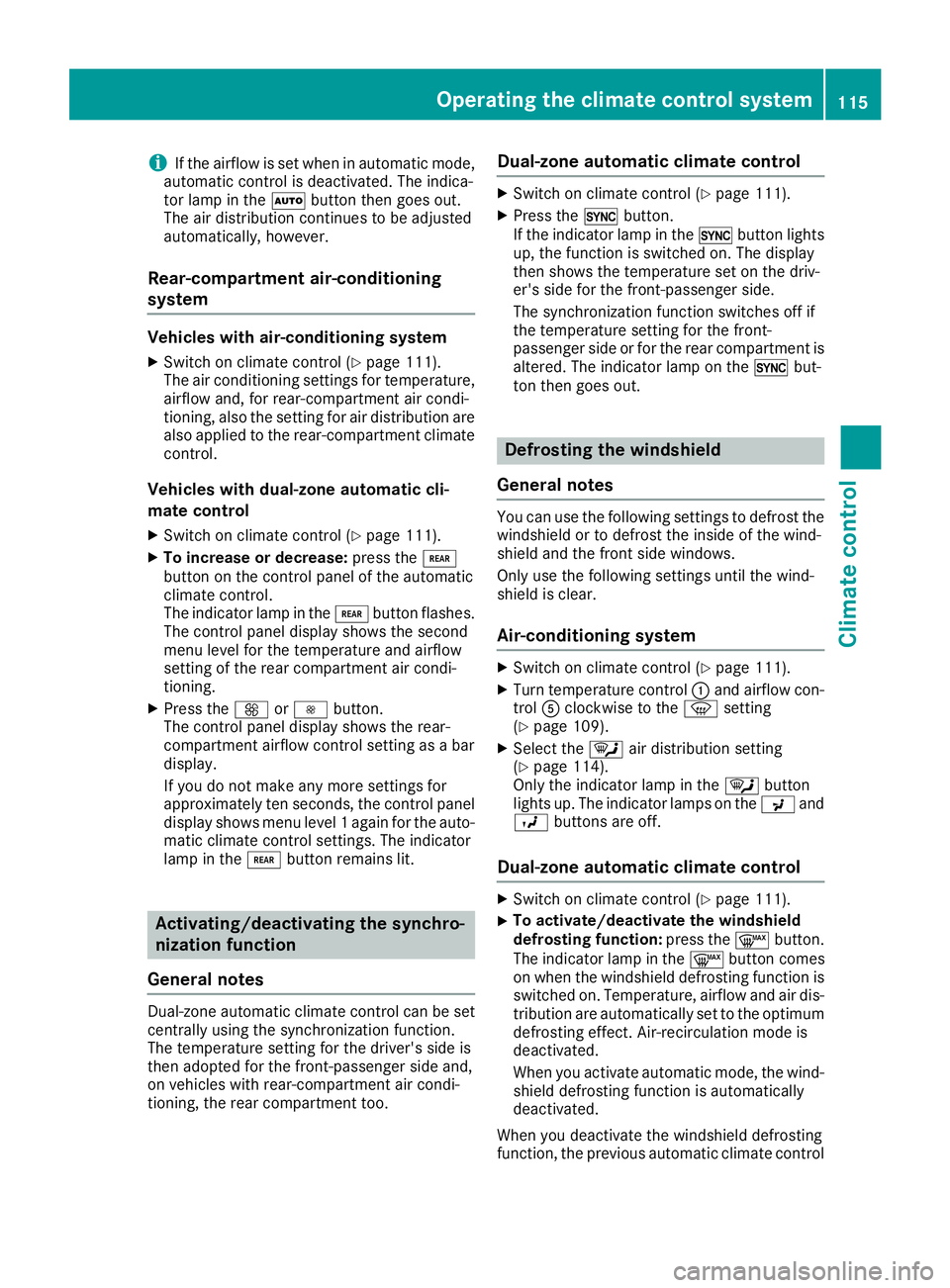
Defrosting the windshield
General notes
You can use the following settings to defrost the
windshield or to defrost the inside of the wind-
shield and the front side windows.
Only use the following settings until the wind-
shield is clear.
Air-conditioning system
XSwitch on climate control (Ypage 111).
XTurn temperature control :and airflow con-
trol Aclockwise to the zsetting
(
Ypage 109).
XSelect the ¯air distribution setting
(Ypage 114).
Only the indicator lamp in the ¯button
lights up. The indicator lamps on the Pand
O buttons are off.
Dual-zone automatic climate control
XSwitch on climate control (Ypage 111).
XTo activate/deactivate the windshield
defrosting function: press the¬button.
The indicator lamp in the ¬button comes
on when the windshield defrosting function is switched on. Temperature, airflow and air dis-
tribution are automatically set to the optimum
defrosting effect. Air-recirculation mode is
deactivated.
When you activate automatic mode, the wind-
shield defrosting function is automatically
deactivated.
When you deactivate the windshield defrosting
function, the previous automatic climate control
Operating the climate control system115
Climate control