clock MERCEDES-BENZ METRIS 2017 MY17 Operator’s Manual
[x] Cancel search | Manufacturer: MERCEDES-BENZ, Model Year: 2017, Model line: METRIS, Model: MERCEDES-BENZ METRIS 2017Pages: 318, PDF Size: 5.01 MB
Page 116 of 318
setting of the rear compartment air condi-
tioning.
XTurn temperature control:orE counter-
clockwise or clockwise (Ypage 110). When
doing so, only change the temperature in
small increments starting at 72 ‡ (22 †).
The control panel display shows the temper-
ature set for the rear compartment.
If you do not make any more settings for
approximately ten seconds, the control panel
display shows menu level 1 again for the auto-
matic climate control settings. The indicator
lamp in the /button remains lit.
Setting the air distribution
Air-conditioning system
Air distribution settings
¯ Directs air through the defroster vents
P Directs air through the center and side air
vents
O Directs air through the footwell vents
Regardless of the air distribution selected, air is
always directed to the side air vents. You can
adjust this airflow by opening or closing the side
air vents (
Ypage 118).
Setting the air distribution
XSwitch on climate control (Ypage 111).
XPress the P,Oand/or ¯button.
If the indicator lamp in a button lights up, the
air is directed to the corresponding air vents.
XAdjust the air vents if necessary
(Ypage 118).
Dual-zone automatic climate control
Air distribution settings
¯ Directs air through the defroster vents
b Directs air through the defroster, center
and side air vents
_ Directs air through the defroster, center,
side and footwell vents
a Directs air through the defroster and
footwell vents
P Directs air through the center and side air
vents N
Directs air through the center, side and
footwell vents
O Directs air through the footwell vents
Regardless of the air distribution selected, air is
always directed to the side air vents. You can
adjust this airflow by opening or closing the side
air vents (
Ypage 118).
Setting the air distribution
XSwitch on climate control (Ypage 111).
XPress the ÉorË button to set the air
distribution.
The control panel display shows the corre-
sponding air distribution symbol.
XAdjust the air vents if necessary
(Ypage 118).
iIf the air distribution is set when dual-zone
automatic climate control is in automatic
mode, automatic control is deactivated. The
indicator lamp on the Ãbutton then goes
out. The airflow continues to be adjusted
automatically, however.
Rear-compartment air-conditioning
system
When the rear-compartment air conditioning is
switched on, the air distribution setting on the
control panel also applies to the rear-compart-
ment air conditioning.
This also applies to the automatic mode of dual-
zone automatic climate control. The air is then
automatically directed to the footwell or the
headroom of the rear compartment.
Setting the airflow
Air-conditioning system
XSwitch on climate control (Ypage 111).
XTo increase or reduce: turn airflow control
A counter-clockwise or clockwise to the
desired level (
Ypage 109).
Dual-zone automatic climate control
XSwitch on climate control (Ypage 111).
XTo increase or reduce: press theKor
I button.
The control panel display shows the airflow
control setting as a bar display.
114Operating the climate control system
Climate control
Page 117 of 318
iIf the airflow is set when in automatic mode,
automatic control is deactivated. The indica-
tor lamp in the Ãbutton then goes out.
The air distribution continues to be adjusted
automatically, however.
Rear-compartment air-conditioning
system
Vehicles with air-conditioning system
XSwitch on climate control (Ypage 111).
The air conditioning settings for temperature,
airflow and, for rear-compartment air condi-
tioning, also the setting for air distribution are
also applied to the rear-compartment climate
control.
Vehicles with dual-zone automatic cli-
mate control
XSwitch on climate control (Ypage 111).
XTo increase or decrease: press the/
button on the control panel of the automatic
climate control.
The indicator lamp in the /button flashes.
The control panel display shows the second
menu level for the temperature and airflow
setting of the rear compartment air condi-
tioning.
XPress the KorI button.
The control panel display shows the rear-
compartment airflow control setting as a bar
display.
If you do not make any more settings for
approximately ten seconds, the control panel
display shows menu level 1 again for the auto-
matic climate control settings. The indicator
lamp in the /button remains lit.
Activating/deactivating the synchro-
nization function
General notes
Dual-zone automatic climate control can be set
centrally using the synchronization function.
The temperature setting for the driver's side is
then adopted for the front-passenger side and,
on vehicles with rear-compartment air condi-
tioning, the rear compartment too.
Dual-zone automatic climate control
XSwitch on climate control (Ypage 111).
XPress the 0button.
If the indicator lamp in the 0button lights
up, the function is switched on. The display
then shows the temperature set on the driv-
er's side for the front-passenger side.
The synchronization function switches off if
the temperature setting for the front-
passenger side or for the rear compartment is
altered. The indicator lamp on the 0but-
ton then goes out.
Defrosting the windshield
General notes
You can use the following settings to defrost the
windshield or to defrost the inside of the wind-
shield and the front side windows.
Only use the following settings until the wind-
shield is clear.
Air-conditioning system
XSwitch on climate control (Ypage 111).
XTurn temperature control :and airflow con-
trol Aclockwise to the zsetting
(
Ypage 109).
XSelect the ¯air distribution setting
(Ypage 114).
Only the indicator lamp in the ¯button
lights up. The indicator lamps on the Pand
O buttons are off.
Dual-zone automatic climate control
XSwitch on climate control (Ypage 111).
XTo activate/deactivate the windshield
defrosting function: press the¬button.
The indicator lamp in the ¬button comes
on when the windshield defrosting function is switched on. Temperature, airflow and air dis-
tribution are automatically set to the optimum
defrosting effect. Air-recirculation mode is
deactivated.
When you activate automatic mode, the wind-
shield defrosting function is automatically
deactivated.
When you deactivate the windshield defrosting
function, the previous automatic climate control
Operating the climate control system115
Climate control
Page 118 of 318
settings are reactivated with the exception of
air-recirculation mode. Air-recirculation mode
remains deactivated.
Clearing condensation from the win-
dows
Windows fogged up on the inside
Air-conditioning system
You should only select this setting until the win-
dows are clear again.
XSwitch on the rear window defroster if nec-
essary (Ypage 116).
XSwitch on climate control (Ypage 111).
XSwitch off air-recirculation mode
(Ypage 116).
XTurn temperature control :clockwise to a
higher temperature and air flow control Ato
a blower speed between 3and 6
(
Ypage 109).
XIf possible, only select the ¯setting of the
air distribution (Ypage 114).
Only the indicator lamp in the ¯button
lights up.
XSwitch on the cooling with air dehumidifica-
tion function (Ypage 112).
XIf the windows still fog up, set the climate
control functions as described for defrosting
of the windshield (
Ypage 115).
Dual-zone automatic climate control
You should only select this setting until the win- dows are clear again.
XSwitch on the rear window defroster if nec-
essary (Ypage 116).
XSwitch on climate control (Ypage 111).
XSwitch off air-recirculation mode
(Ypage 116).
XSwitch on the cooling with air dehumidifica-
tion function (Ypage 112).
XSwitch on automatic mode (Ypage 113).
XIf the windows continue to fog up, switch on
the windshield defrosting function
(
Ypage 115).
Windows fogged up on the outside
You should only select this setting until the
windshield is clear again.
XSwitch on the windshield wipers
(Ypage 104).
XSwitch on climate control (Ypage 111).
XIn warm and damp weather, do not allow cold
air to flow onto the windows. Close the side
air vents if required (
Ypage 118).
Switching the rear window defroster
on/off
General notes
The rear window defroster consumes a lot of
power. You should therefore switch off the rear
window defroster as soon as the rear window is
clear.
XTurn the key to position 2in the ignition lock.
XPress the ¤button on the control panel.
If the indicator lamp in the ¤button lights
up, the rear window defroster is switched on.
The rear window defroster switches off auto-
matically after a few minutes.
Problems with the rear window
defroster
The rear window defroster has switched off pre-
maturely or cannot be activated.
The vehicle starter battery is not sufficiently
charged.
XSwitch off any consumers that are not
required, e.g. reading lamps, interior lighting
or seat heating.
When the battery is sufficiently charged, the
rear window defroster can be activated again.
Switching air-recirculation mode
on/off
Important safety notes
You can deactivate the intake of fresh air if
unpleasant odors enter the vehicle from out-
side. The air inside the vehicle is then circulated.
When you switch on air-recirculation mode, the side windows and windows could fog up more
116Operating the climate control system
Climate control
Page 120 of 318
Adjusting the air vents
Important safety notes
GWARNIN G
Ver yhot or ver ycold air can flo wfrom th eair
vents .This could result in burn sor frostbit ein
th eimmediat evicinity of th eair vents .There
is aris kof injury.
Mak esur ethat all vehicl eoccupant salways
maintai n asufficien tdistanc eto th eair out -
lets. If necessary, redirect th eairflow to
another area of th evehicl einterior.
The center and side air vents are adjustable.
The air vents can also be adjusted on vehicles
wit hrear-compartmen tair conditioning .
In order to ensur eth edirec tflo wof fresh air
throug hth eair vents int oth evehicl einterior,
pleas eobserv eth efollowin gnotes:
Rkeep th eair inlet between th ewindshield and
th ehoo dfree of blockages, suc has ice ,snow
or leaves.
Rnever cover th events or th eventilation grilles
in th evehicl einterior.
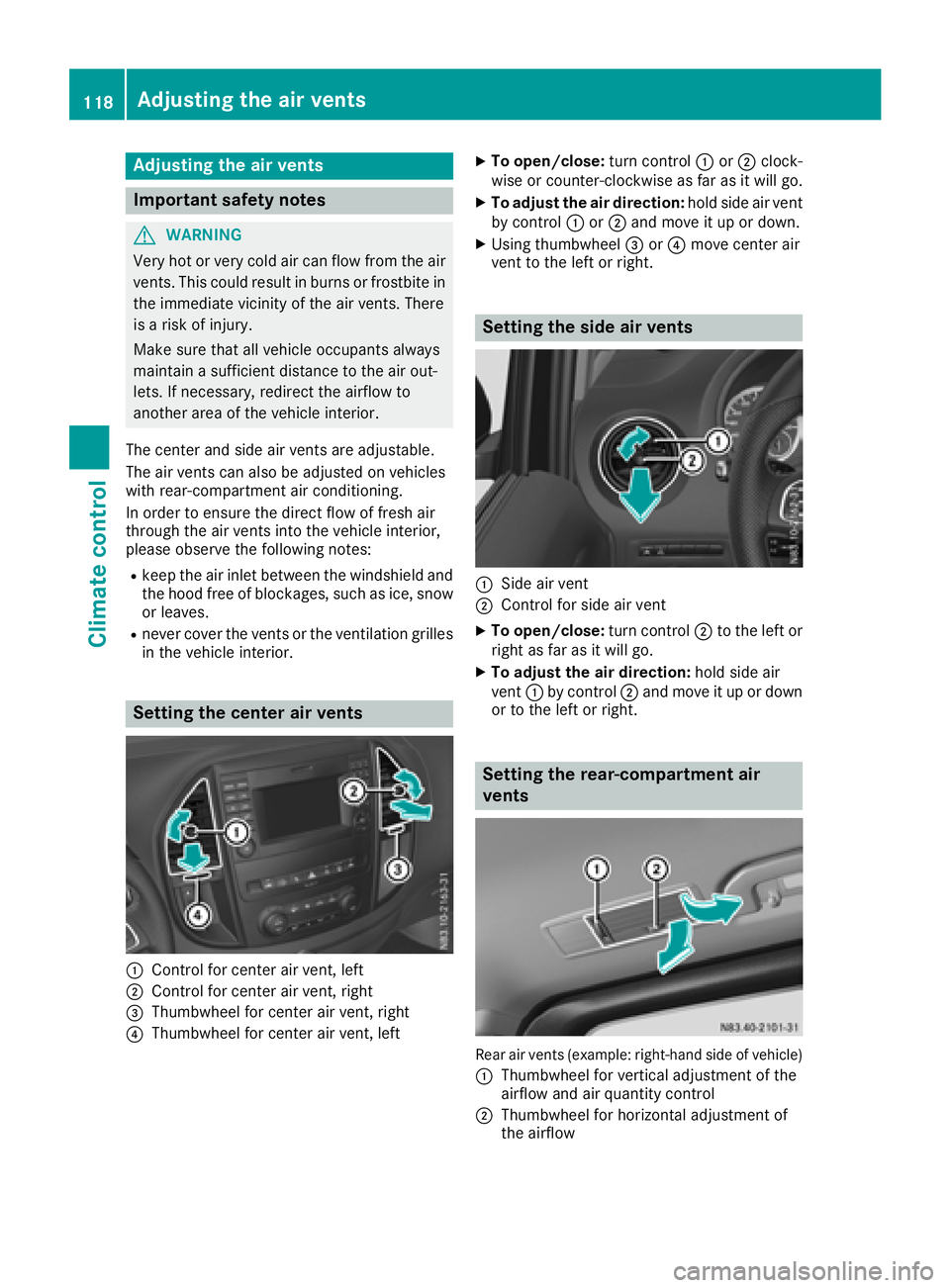
Setting the center air vents
:Control for center air vent, lef t
;Control for center air vent, right
=Thumbwheel for center air vent, right
?Thumbwheel for center air vent, lef t
XTo open/close:turncontrol :or; clock -
wise or counter-clockwise as far as it will go.
XTo adjust th eair direction: hold side air ven t
by control :or; and mov eit up or down .
XUsing thumbwheel =or? mov ecenter air
ven tto th elef tor right .
Setting the side air vents
:Sideair ven t
;Control for side air ven t
XTo open/close:turncontrol ;to th elef tor
right as far as it will go.
XTo adjust th eair direction: hold side air
ven t: by control ;and mov eit up or down
or to th elef tor right .
Setting the rea r-compa rtment air
vents
Rear air vents (example: right-hand side of vehicle)
:
Thumbwheel for vertical adjustmen tof th e
airflow and air quantity control
;Thumbwheel for horizontal adjustmen tof
th eairflow
118Adjusting the air vents
Climate control
Page 135 of 318
Do not get into the vehicle again during the refu-
eling process. Otherwise, electrostatic charge
could build up again.
HEnvironmental note
If fuels are handled improperly, they pose a
danger to persons and the environment. Do
not allow fuels to run into the sewage system,
the surface waters, the ground water or into
the ground.
!Do not switch on the ignition if you acciden-
tally refuel with the wrong fuel. Otherwise, the
fuel will enter the fuel lines. Notify a qualified
specialist workshop and have the fuel tank
and fuel lines drained completely.
!Overfilling the fuel tank could damage the
fuel system.
!Take care not to spill any fuel on painted
surfaces. You could otherwise damage the
paintwork.
!Use a filter when adding fuel from a fuel can.
The fuel lines and/or the fuel injection system
could otherwise be blocked by particles from
the fuel can.
You will find further information about fuel and
fuel grades under "Service products and capaci-
ties" (
Ypage 305).
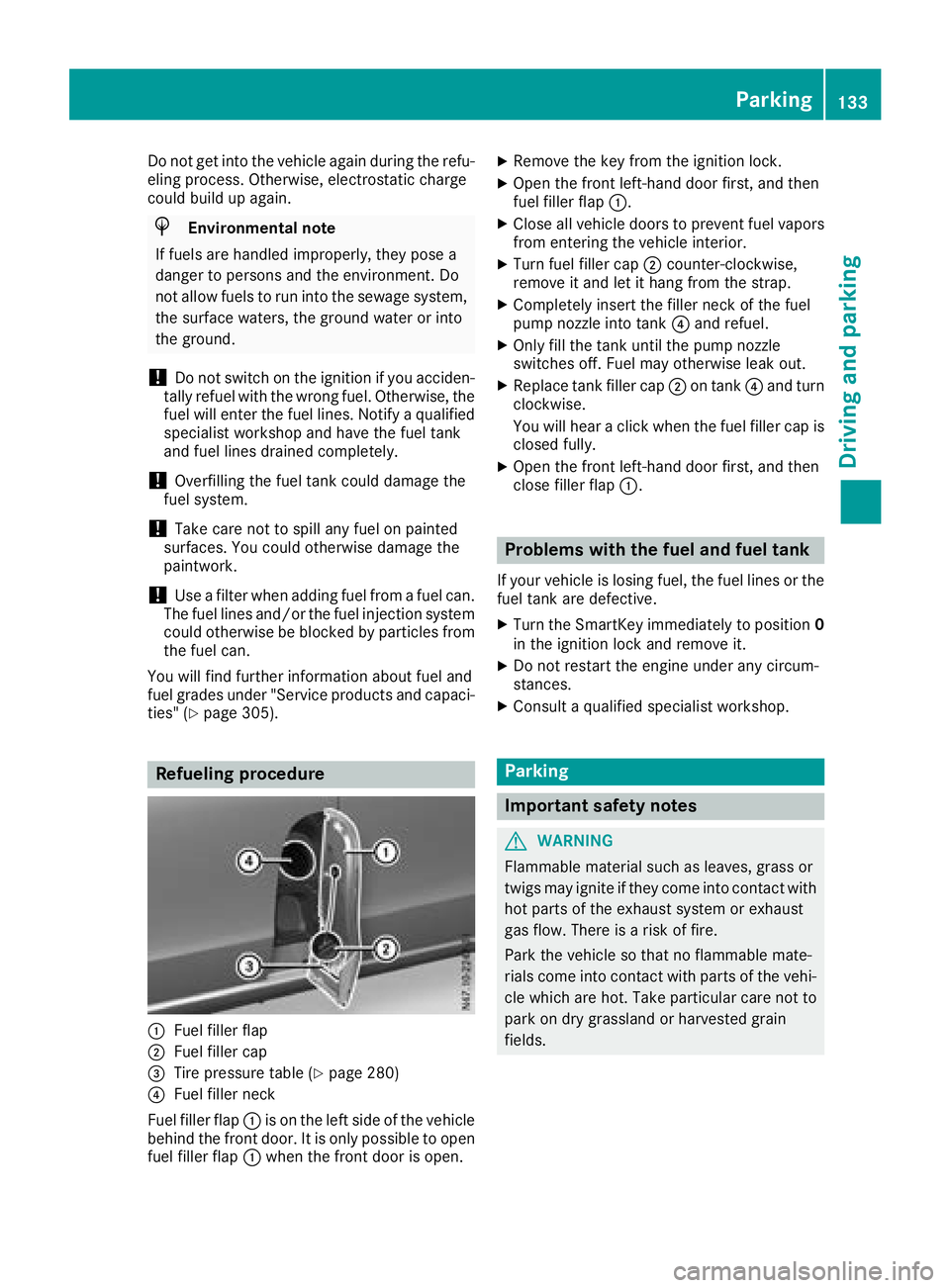
Refueling procedure
:Fuel filler flap
;Fuel filler cap
=Tire pressure table (Ypage 280)
?Fuel filler neck
Fuel filler flap :is on the left side of the vehicle
behind the front door. It is only possible to open fuel filler flap :when the front door is open.
XRemove the key from the ignition lock.
XOpen the front left-hand door first, and then
fuel filler flap :.
XClose all vehicle doors to prevent fuel vapors
from entering the vehicle interior.
XTurn fuel filler cap ;counter-clockwise,
remove it and let it hang from the strap.
XCompletely insert the filler neck of the fuel
pump nozzle into tank ?and refuel.
XOnly fill the tank until the pump nozzle
switches off. Fuel may otherwise leak out.
XReplace tank filler cap ;on tank ?and turn
clockwise.
You will hear a click when the fuel filler cap is
closed fully.
XOpen the front left-hand door first, and then
close filler flap :.
Problems with the fuel and fuel tank
If your vehicle is losing fuel, the fuel lines or the
fuel tank are defective.
XTurn the SmartKey immediately to position 0
in the ignition lock and remove it.
XDo not restart the engine under any circum-
stances.
XConsult a qualified specialist workshop.
Parking
Important safety notes
GWARNING
Flammable material such as leaves, grass or
twigs may ignite if they come into contact with
hot parts of the exhaust system or exhaust
gas flow. There is a risk of fire.
Park the vehicle so that no flammable mate-
rials come into contact with parts of the vehi-
cle which are hot. Take particular care not to
park on dry grassland or harvested grain
fields.
Parking133
Driving an d parking
Z
Page 173 of 318
On-board computer (vehicles without
steering wheel buttons)
Operating the on-board computer
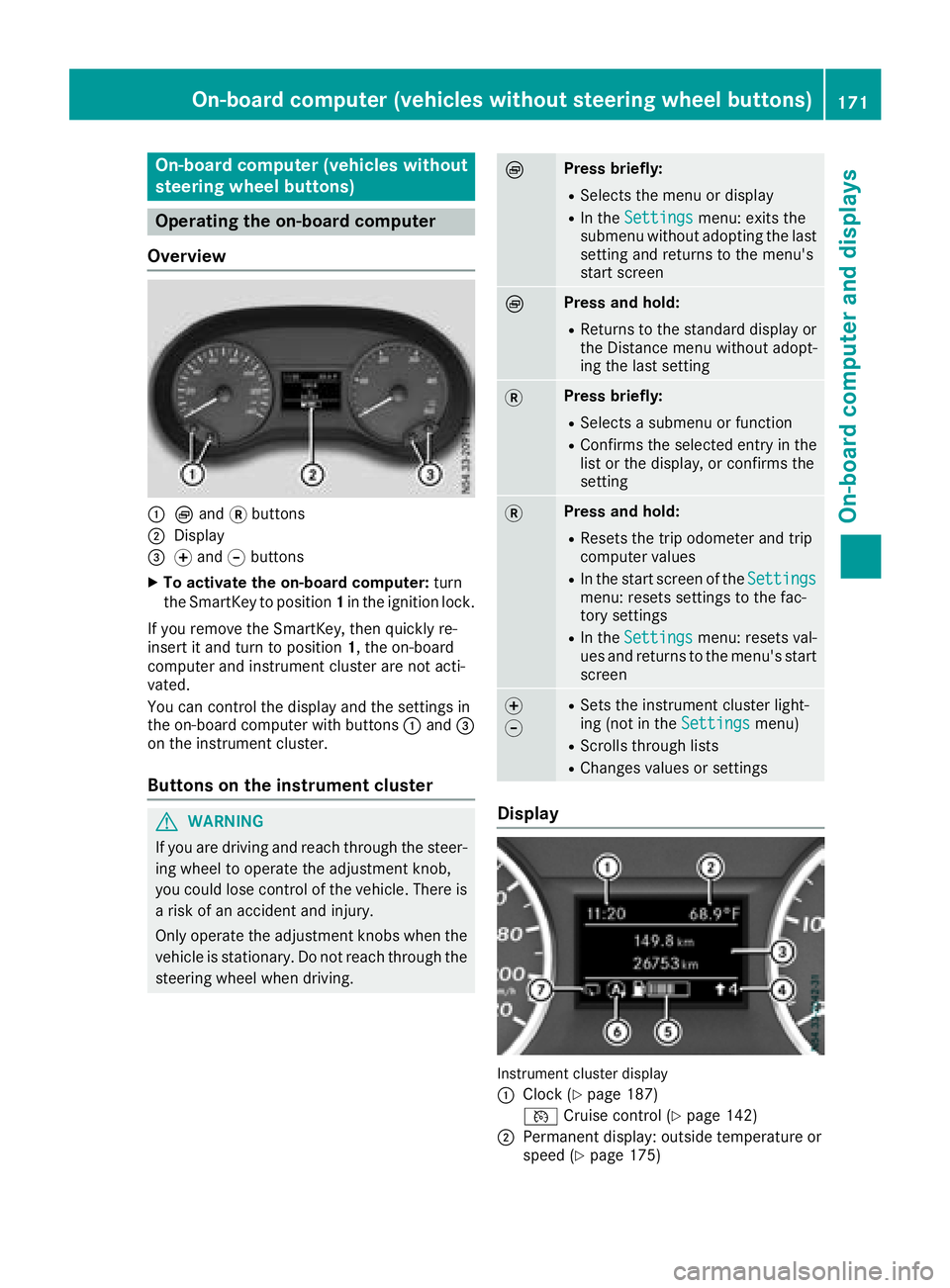
Overview
:È and 3buttons
;Display
=f and gbuttons
XTo activate the on-board computer: turn
the SmartKey to position 1in the ignition lock.
If you remove the SmartKey, then quickly re-
insert it and turn to position 1, the on-board
computer and instrument cluster are not acti-
vated.
You can control the display and the settings in
the on-board computer with buttons :and =
on the instrument cluster.
Buttons on the instrument cluster
GWARNING
If you are driving and reach through the steer- ing wheel to operate the adjustment knob,
you could lose control of the vehicle. There is
a risk of an accident and injury.
Only operate the adjustment knobs when thevehicle is stationary. Do not reach through the
steering wheel when driving.
ÈPress briefly:
RSelects the menu or display
RIn the Settingsmenu: exits the
submenu without adopting the last
setting and returns to the menu's
start screen
ÈPress and hold:
RReturns to the standard display or the Distance menu without adopt-
ing the last setting
3Press briefly:
RSelects a submenu or function
RConfirms the selected entry in the
list or the display, or confirms the
setting
3Press and hold:
RResets the trip odometer and trip
computer values
RIn the start screen of the Settingsmenu: resets settings to the fac-
tory settings
RIn theSettingsmenu: resets val-
ues and returns to the menu's start
screen
f
gRSets the instrument cluster light-
ing (not in the Settingsmenu)
RScrolls through lists
RChanges values or settings
Display
Instrument cluster display
:
Clock (Ypage 187)
V Cruise control (
Ypage 142)
;Permanent display: outside temperature or
speed (Ypage 175)
On-board computer (vehicles without steering wheel buttons)171
On-board computer and displays
Z
Page 179 of 318
%Press briefly:
RBack
RIn theAudiomenu: exits the track
or station list
RHides display messages
RExits the telephone book/redial
memory
RVehicles with a navigation system:
switches off voice-operated con-
trol of the navigation system (see
the manufacturer's operating
instructions)
%Press and hold:
RCalls up the standard display in the
Tripmenu
Right control panel on the steering wheel
6RMakes or accepts a call
RSwitches to the redial memory
~RRejects or ends a call
RExits the telephone book/redial
memory
W
XRAdjusts the volume
óRVehicles with a navigation system:
switches on voice-operated con-
trol of the navigation system (see
the manufacturer's operating
instructions)
8RMute
iThe audio devices, telephone and voice-
operated control using the steering wheel
buttons in the right control panel only func-
tion with a Mercedes-Benz audio or naviga-
tion system. If you are using an audio or nav-
igation system from another manufacturer,
the described functions may be restricted or
not available at all.
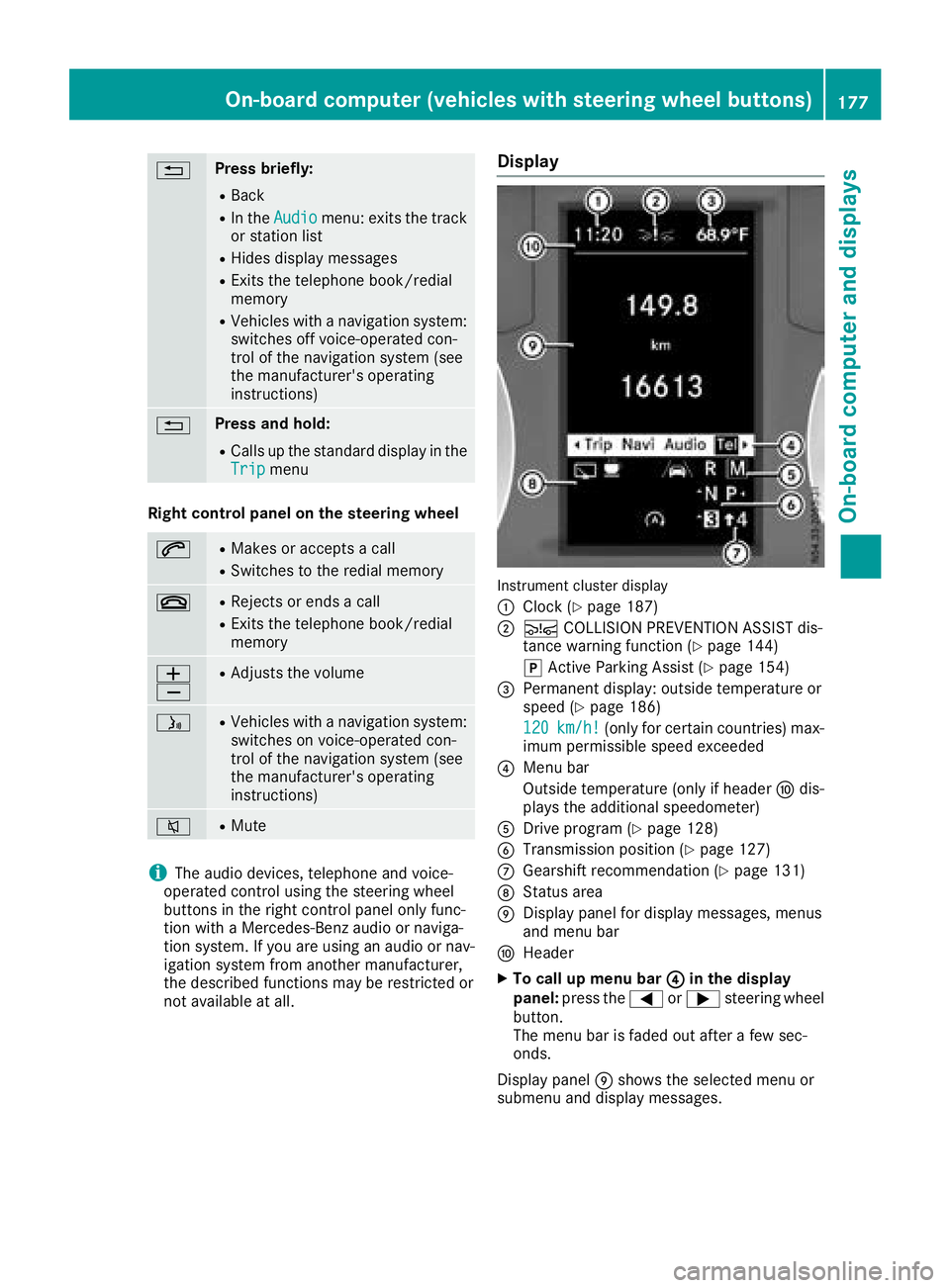
Display
Instrument cluster display
:
Clock (Ypage 187)
;Ä COLLISION PREVENTION ASSIST dis-
tance warning function (Ypage 144)
j Active Parking Assist (
Ypage 154)
=Permanent display: outside temperature or
speed (Ypage 186)
120
km/h!(only for certain countries) max-
imum permissible speed exceeded
?Menu bar
Outside temperature (only if header Fdis-
plays the additional speedometer)
ADrive program (Ypage 128)
BTransmission position (Ypage 127)
CGearshift recommendation (Ypage 131)
DStatus area
EDisplay panel for display messages, menus
and menu bar
FHeader
XTo call up menu bar ?in the display
panel: press the =or; steering wheel
button.
The menu bar is faded out after a few sec-
onds.
Display panel Eshows the selected menu or
submenu and display messages.
On-board computer (vehicles with steering wheel buttons)177
On-board computer and displays
Z
Page 189 of 318
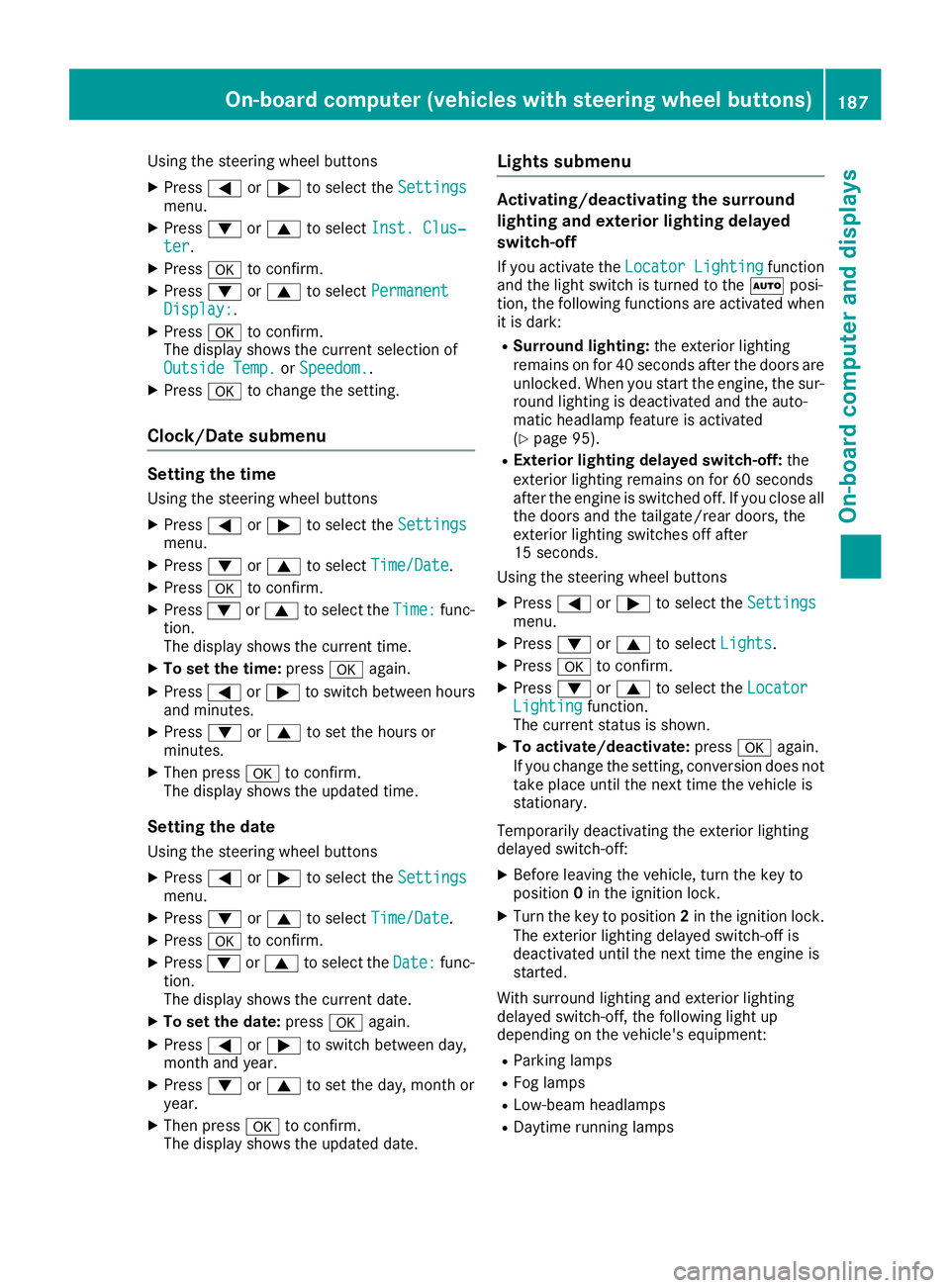
Using the steering wheel buttons
XPress=or; to select the Settingsmenu.
XPress:or9 to select Inst. Clus‐ter.
XPressato confirm.
XPress :or9 to select PermanentDisplay:.
XPressato confirm.
The display shows the current selection of
Outside Temp.
or Speedom..
XPress ato change the setting.
Clock/Date submenu
Setting the time
Using the steering wheel buttons
XPress =or; to select the Settingsmenu.
XPress:or9 to select Time/Date.
XPressato confirm.
XPress :or9 to select the Time:func-
tion.
The display shows the current time.
XTo set the time: pressaagain.
XPress =or; to switch between hours
and minutes.
XPress :or9 to set the hours or
minutes.
XThen press ato confirm.
The display shows the updated time.
Setting the date
Using the steering wheel buttons
XPress =or; to select the Settingsmenu.
XPress:or9 to select Time/Date.
XPressato confirm.
XPress :or9 to select the Date:func-
tion.
The display shows the current date.
XTo set the date: pressaagain.
XPress =or; to switch between day,
month and year.
XPress :or9 to set the day, month or
year.
XThen press ato confirm.
The display shows the updated date.
Lights submenu
Activating/deactivating the surround
lighting and exterior lighting delayed
switch-off
If you activate the Locator Lightingfunction
and the light switch is turned to the Ãposi-
tion, the following functions are activated when
it is dark:
RSurround lighting: the exterior lighting
remains on for 40 seconds after the doors are
unlocked. When you start the engine, the sur-
round lighting is deactivated and the auto-
matic headlamp feature is activated
(
Ypage 95).
RExterior lighting delayed switch-off: the
exterior lighting remains on for 60 seconds
after the engine is switched off. If you close all
the doors and the tailgate/rear doors, the
exterior lighting switches off after
15 seconds.
Using the steering wheel buttons
XPress =or; to select the Settingsmenu.
XPress:or9 to select Lights.
XPressato confirm.
XPress :or9 to select the LocatorLightingfunction.
The current status is shown.
XTo activate/deactivate: pressaagain.
If you change the setting, conversion does not
take place until the next time the vehicle is
stationary.
Temporarily deactivating the exterior lighting
delayed switch-off:
XBefore leaving the vehicle, turn the key to
position 0in the ignition lock.
XTurn the key to position 2in the ignition lock.
The exterior lighting delayed switch-off is
deactivated until the next time the engine is
started.
With surround lighting and exterior lighting
delayed switch-off, the following light up
depending on the vehicle's equipment:
RParking lamps
RFog lamps
RLow-beam headlamps
RDaytime running lamps
On-board computer (vehicles with steering wheel buttons)187
On-board computer and displays
Z
Page 190 of 318
Activating/deactivating interiorlighting
delayed switch-off
If you activat eth eInterior Lighting Delayfunction ,th einterio rlightin gremains lit for a
further 20 seconds after th eke yis removed.
Usin gth esteering whee lbuttons
XPress =or; to select th eSettingsmenu.
XPress :or9 to select Lights.
XPressato confirm .
XPress:or9 to select th eInteriorLighting Delayfunction .
The curren tstatus is shown.
XTo act ivate/deact ivate:pressaagain.
Vehicle submenu
Setting the sensitivity of thera in sensor
Usin gth esteering whee lbuttons
XPress =or; to select th eSettingsmenu.
XPress :or9 to select Vehicle.
XPressato confirm .
XPress:or9 to select th eRai nSen ‐sor Sensitivityfunction .
The display shows th ecurren tsetting.
XPress ato chang eth esetting.
XPress :or9 to select th eHig h,
Standardor Lowsetting. This settin gcontrol s
th erain sensor's sensitivit yto precipitation.
The windshield wiper then wipes mor eor less
frequently at th esame precipitatio nintensity.
XPress th ea buttonto store th eentry.
You can fin dfurther information under "Wind-
shield wiper " (
Ypage 104).
Switching the automatic locking featu re
on/off
Usin gth esteering whee lbuttons
XPress =or; to select th eSettingsmenu.
XPress :or9 to select Vehicle.
XPressato confirm .
XPress:or9 to select th eAutomaticDoo rLoc kfunction .
The curren tstatus is shown.
XTo act ivate/deact ivate:pressaagain.
If you activat eth eAutomatic
Doo rLockfunc-
tion, your vehicl ewill loc kautomatically from a
spee dof approximately 15 km/h.
You can fin dfurther information under "Auto-
matic door lock" (
Ypage 74).
Activating/deactivating the acoustic
locking confi rmation
Usin gth esteering whee lbuttons
XPress =or; to select th eSettingsmenu.
XPress :or9 to select Vehicle.
XPressato confirm .
XPress:or9 to select AcousticLockFeedback.
The curren tstatus is shown.
XTo act ivate/deact ivate:pressaagain.
If you activat eth eAcoustic Loc kFeedback
function ,an acoustic tone sounds when th e
vehicl eis locked.
Restoring the factory settings
Usin gth esteering whee lbuttons
XPress =or; to select th eSettingsmenu.
XPress :or9 to select FactorySet ‐ting.
XPress ato confirm .
The Reset All Settings?function is dis-
played.
XPress :or9 to select NoorYes.
XPress ato confirm th echoice.
If you select Yes,th edisplay shows aconfir-
mation message .
188On-board computer (vehicles with steering wheel buttons)
On-board computer and displays
Page 256 of 318
containers. Always keep service products outof the reach of children.
GWARNING
Opening the hood when the engine is over-
heated or when there is a fire in the engine
compartment could expose you to hot gases
or other service products. There is a risk of
injury.
Let an overheated engine cool down before
opening the hood. If there is a fire in the
engine compartment, keep the hood closed
and contact the fire department.
GWARNING
Certain components in the engine compart-
ment, such as the engine, radiator and parts
of the exhaust system, can become very hot.
Working in the engine compartment poses a
risk of injury.
Where possible, let the engine cool down and touch only the components described in the
following.
Coolant contains glycol and is therefore poison-
ous. Also observe the safety notes under "Ser-
vice products and capacities" (
Ypage 304).
GWARNING
The cooling system is pressurized, particularly
when the motor is warm. If you open the cap,
you could be scalded if hot coolant sprays out.
There is a risk of injury.
Let the engine cool down before you open the
cap. Wear gloves and eye protection. Slowly
open the cap to relieve pressure.
Only check the coolant level and/or fill the cool-
ant if the vehicle is on a level surface and the
engine has cooled down. The coolant tempera-
ture must be below 122 ‡ (50 †).
!Check the engine cooling and heating sys-
tem regularly for leaks.
If a large quantity of coolant is lost, have the
cause traced and rectified at a qualified spe-
cialist workshop.
GWARNING
If antifreeze comes into contact with hot com- ponents in the engine compartment, it may
ignite. There is a risk of fire and injury.
Let the engine cool down before you add anti-
freeze. Make sure that antifreeze is not spilled
next to the filler neck. Thoroughly clean the
antifreeze from components before starting
the engine.
!Take care not to spill any coolant on painted
surfaces. You could otherwise damage the
paintwork.
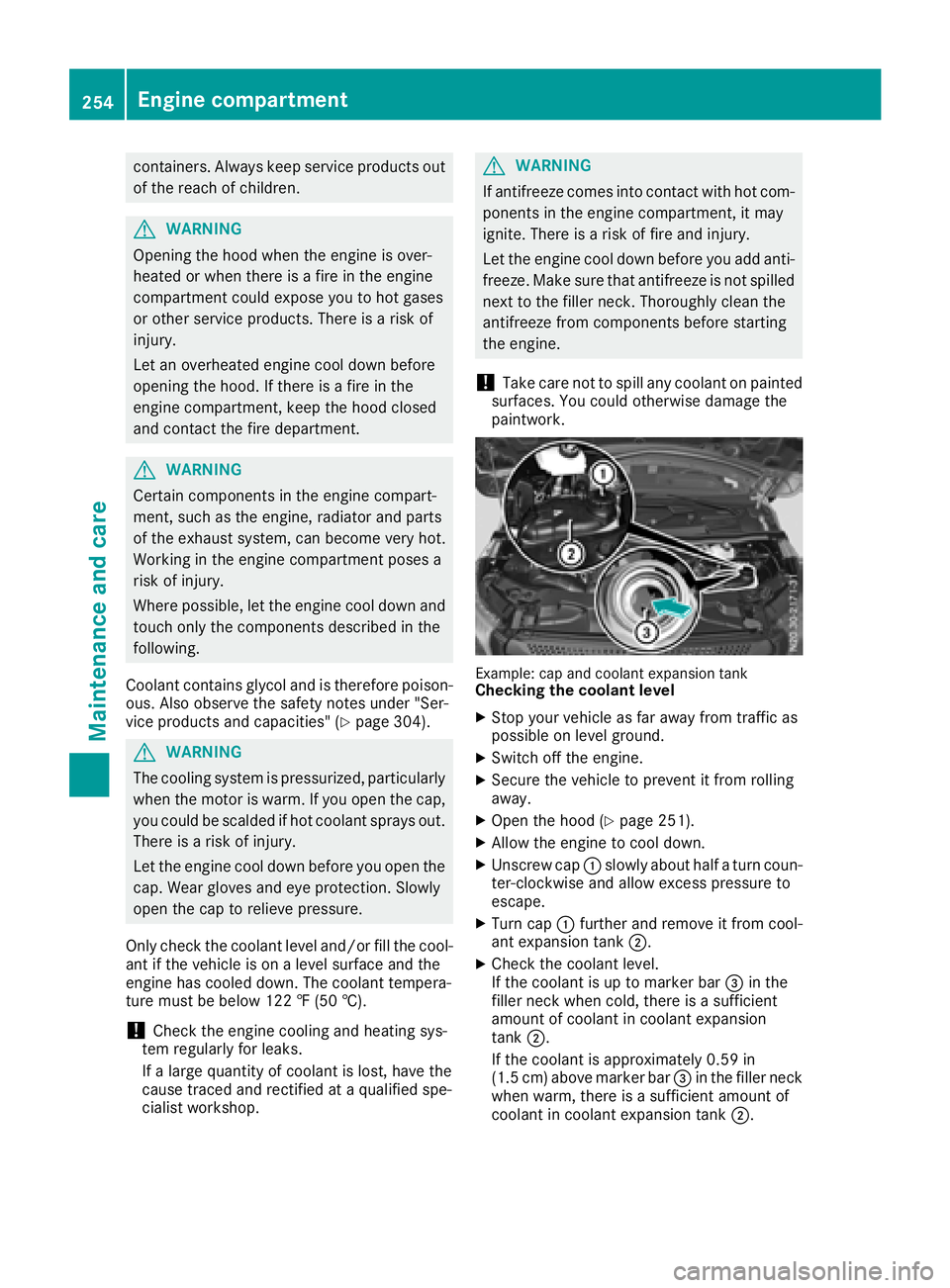
Example: cap and coolant expansion tankChecking the coolant level
XStop your vehicle as far away from traffic as
possible on level ground.
XSwitch off the engine.
XSecure the vehicle to prevent it from rolling
away.
XOpen the hood (Ypage 251).
XAllow the engine to cool down.
XUnscrew cap :slowly about half a turn coun-
ter-clockwise and allow excess pressure to
escape.
XTurn cap :further and remove it from cool-
ant expansion tank ;.
XCheck the coolant level.
If the coolant is up to marker bar =in the
filler neck when cold, there is a sufficient
amount of coolant in coolant expansion
tank ;.
If the coolant is approximately 0.59 in
(1.5 cm) above marker bar =in the filler neck
when warm, there is a sufficient amount of
coolant in coolant expansion tank ;.
254Engine compartment
Maintenance and care