battery MERCEDES-BENZ METRIS 2017 MY17 Operator’s Manual
[x] Cancel search | Manufacturer: MERCEDES-BENZ, Model Year: 2017, Model line: METRIS, Model: MERCEDES-BENZ METRIS 2017Pages: 318, PDF Size: 5.01 MB
Page 137 of 318
Switching off the engine
Important safety notes
GWARNING
The automatic transmission switches to neu-
tral position Nwhen you switch off the engine.
The vehicle may roll away. There is a risk of an
accident.
After switching off the engine, always switch
to parking position P. Prevent the parked vehi-
cle from rolling away by applying the parking
brake.
!If the coolant temperature is very high, e.g.
after driving on hilly roads, leave the engine
running at idle speed for about two minutes
before turning it off.
This allows the coolant temperature to return
to normal.
Vehicles with automatic transmission
XStop the vehicle.
XShift the transmission to position P.
XApply the parking brake.
XTurn the key to position0in the ignition lock
and remove it.
The immobilizer is activated.
If you switch the engine off with the trans-
mission in position Ror D, the automatic
transmission shifts to Nautomatically.
If you then open one of the front doors or
remove the key from the ignition, the auto-
matic transmission automatically shifts to P.
If you shift the automatic transmission to N
before switching off the engine, the automatic
transmission remains in Neven if a front door
is opened.
XSecure the vehicle to prevent it from rolling
away (Ypage 133).
Parking the vehicle for a long period
If you leave the vehicle parked for longer than
four weeks, the battery may be damaged by
exhaustive discharging.
XDisconnect the battery (Ypage 259).
or
XConnect the battery to a trickle charger.
Be sure to observe the notes on charging the batteries (
Ypage 262).
You can obtain information about trickle
chargers from a qualified specialist work-
shop.
If you leave the vehicle parked for longer than 6
weeks, the vehicle may suffer damage as a
result of lack of use.
XVisit a qualified specialist workshop and seek
advice.
Driving tips
General notes
Important safety notes
GWARNING
If you switch off the ignition while driving,
safety-relevant functions are only available
with limitations, or not at all. This could affect, for example, the power steering and the brake
boosting effect. You will require considerably
more effort to steer and brake. There is a risk
of an accident.
Do not switch off the ignition while driving.
GWARNING
If you operate mobile communication equip-
ment while driving, you will be distracted from traffic conditions. You could also lose control
of the vehicle. There is a risk of an accident.
Only operate this equipment when the vehicle
is stationary.
Observe the legal requirements of the country in
which you are driving. Some jurisdictions pro-
hibit the driver from using a mobile phone while driving a vehicle.
Driving tips135
Driving and parking
Z
Page 158 of 318
Active Parking Assist does not assist you park-
ing in spaces at right angles to the direction of
travel if:
Rtwo parking spaces are located directly next
to one another
Rthe parking space is directly next to a low
obstacle such as a low curb
Ryou forward park
Active Parking Assist does not assist you park-
ing in spaces that are parallel or at right angles
to the direction of travel if:
Rthe parking space is on a curb
Rthe system reads the parking space as being
blocked, for example by foliage or grass pav-
ing blocks
Rthe area is too small for the vehicle to maneu-
ver into
Rthe parking space is bordered by an obstacle,
e.g. a tree, a post or a trailer
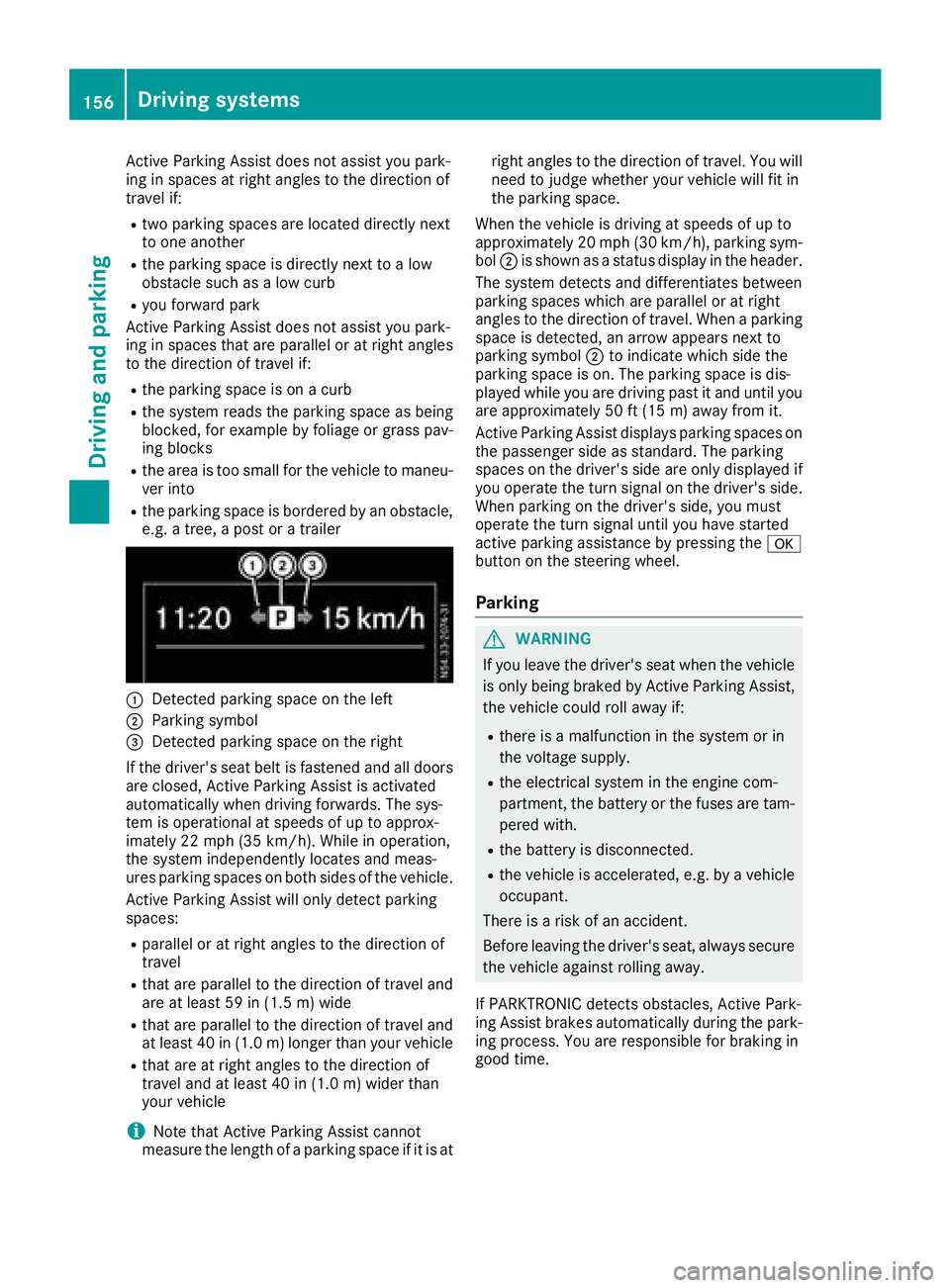
:Detected parking space on the left
;Parking symbol
=Detected parking space on the right
If the driver's seat belt is fastened and all doors
are closed, Active Parking Assist is activated
automatically when driving forwards. The sys-
tem is operational at speeds of up to approx-
imately 22 mph (35 km/h). While in operation,
the system independently locates and meas-
ures parking spaces on both sides of the vehicle.
Active Parking Assist will only detect parking
spaces:
Rparallel or at right angles to the direction of
travel
Rthat are parallel to the direction of travel and are at least 59 in (1.5 m) wide
Rthat are parallel to the direction of travel and
at least 40 in (1.0 m) longer than your vehicle
Rthat are at right angles to the direction of
travel and at least 40 in (1.0 m) widerthan
your vehicle
iNote that Active Parking Assist cannot
measure the length of a parking space if it is at right angles to the direction of travel. You will
need to judge whether your vehicle will fit in
the parking space.
When the vehicle is driving at speeds of up to
approximately 20 mph (30 km/h), parking sym-
bol ;is shown as a status display in the header.
The syste m d
etects and differentiates between
parking spaces which are parallel or at right
angles to the direction of travel. When a parking
space is detected, an arrow appears next to
parking symbol ;to indicate which side the
parking space is on. The parking space is dis-
played while you are driving past it and until you
are approximately 50 ft (15 m) away from it.
Active Parking Assist displays parking spaces on
the passenger side as standard. The parking
spaces on the driver's side are only displayed if
you operate the turn signal on the driver's side.
When parking on the driver's side, you must
operate the turn signal until you have started
active parking assistance by pressing the a
button on the steering wheel.
Parking
GWARNING
If you leave the driver's seat when the vehicle is only being braked by Active Parking Assist,
the vehicle could roll away if:
Rthere is a malfunction in the system or in
the voltage supply.
Rthe electrical system in the engine com-
partment, the battery or the fuses are tam-
pered with.
Rthe battery is disconnected.
Rthe vehicle is accelerated, e.g. by a vehicle
occupant.
There is a risk of an accident.
Before leaving the driver's seat, always secure the vehicle against rolling away.
If PARKTRONIC detects obstacles, Active Park-
ing Assist brakes automatically during the park- ing process. You are responsible for braking in
good time.
156Driving system s
Driving an d parking
Page 170 of 318
rating (GCWR), nor the maximum permissible
gross axle weight rating (GAWR) and trailer
drawbar noseweight rating of your vehicle.
RAdd the drawbar noseweight on the ball cou-
pling (TWR) to the rear axle load. This will pre-vent you from exceeding the permissible
gross axle weight (GAWR).
RAdd the drawbar noseweight on the ball cou-
pling (TWR) to the vehicle payload. This will
ensure that you do not exceed the permissi-
ble gross vehicle weight rating (GVWR).
Checking the vehicle and trailer weight
RMake sure the weights of the towing vehicle
and the trailer comply with the maximum per-missible values. Have the vehicle/trailer com-
bination weighed on a calibrated weigh-
bridge. The vehicle/trailer combination con-
sists of the towing vehicle including the driver,
passengers and load, as well as the loaded
trailer.
RCheck the maximum permissible gross axle
weight rating of the front and rear axles
(GAWR), the gross trailer weight (GTW), the
gross combination weight rating (GCWR) and
the noseweight of the trailer drawbar (TWR).
Trailer power supply
!
Incorrect wiring of the connector plug could,
under certain circumstances, cause malfunc-
tions in the vehicle's other electronic sys-
tems. We therefore recommend having the
connector plug wired at a qualified specialist
workshop.
!You can connect accessories with a maxi-
mum power consumption of 240 W to the
permanent power supply.
You must not charge a trailer battery using the
power supply.
Your vehicle may be equipped with various elec-
trical installations for trailer towing. Depending
on your trailer, you may need an adapter to con-
nect the electrical system of the trailer with that
of the vehicle.
The trailer socket of your vehicle is equipped at
the factory with a permanent power supply.
The permanent power supply is on the trailer
socket pin assignment 4.
Note that the permanent power supply of the
trailer is not switched off when the on-board voltage is low. This can completely discharge
the starter battery of your vehicle.
Further information on the electrical equipment
currently installed on your vehicle and on instal-
ling trailer electrics can be obtained at any quali-
fied specialist workshop.
168Towing a trailer
Driving and parking
Page 175 of 318
Use the buttons in the instrument cluster.
XTo display:pressÈto select the trip com-
puter display.
The values displayed relate to those meas-
ured since the trip computer was last reset.
XTo reset values: press and hold3until all
values are reset.
The trip computer is automatically reset if the
value exceeds 9,999 hours or 99,999 miles.
You can set the unit of measurement for con-
sumption and distance in the Distance Unit:
submenu (Ypage 175).
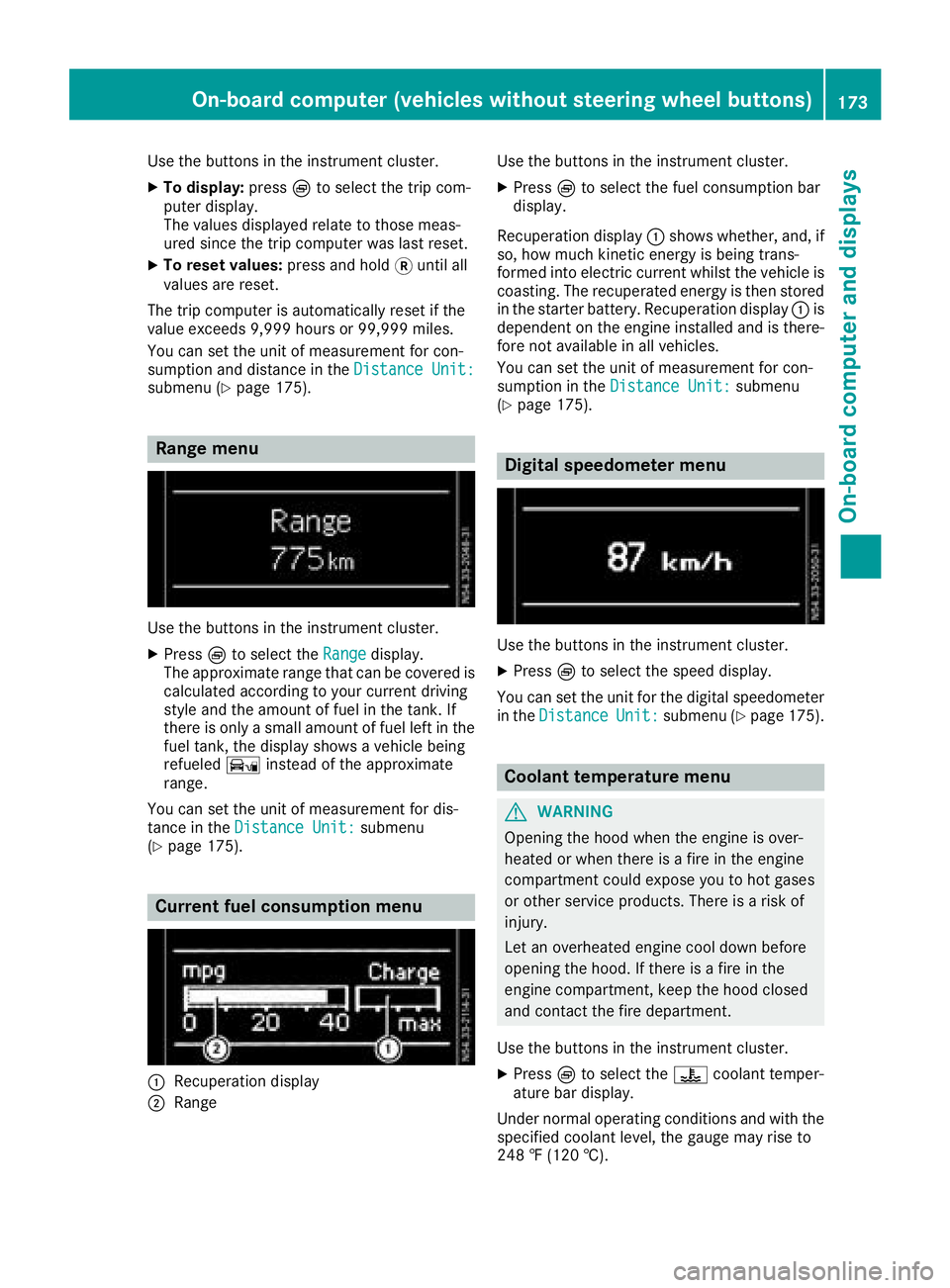
Range menu
Use the buttons in the instrument cluster.
XPressÈto select the Rangedisplay.
The approximate range that can be covered is calculated according to your current driving
style and the amount of fuel in the tank. If
there is only a small amount of fuel left in the
fuel tank, the display shows a vehicle being
refueled Ïinstead of the approximate
range.
You can set the unit of measurement for dis-
tance in the Distance Unit:
submenu
(Ypage 175).
Current fuel consumption menu
:Recuperation display
;Range Use the buttons in the instrument cluster.
XPress
Èto select the fuel consumption bar
display.
Recuperation display :shows whether, and, if
so, how much kinetic energy is being trans-
formed into electric current whilst the vehicle is
coasting. The recuperated energy is then stored in the starter battery. Recuperation display :is
dependent on the engine installed and is there-
fore not available in all vehicles.
You can set the unit of measurement for con-
sumption in the Distance Unit:
submenu
(Ypage 175).
Digital speedometer menu
Use the buttons in the instrument cluster.
XPress Èto select the speed display.
You can set the unit for the digital speedometer
in the Distance
Unit:submenu (Ypage 175).
Coolant temperature menu
GWARNING
Opening the hood when the engine is over-
heated or when there is a fire in the engine
compartment could expose you to hot gases
or other service products. There is a risk of
injury.
Let an overheated engine cool down before
opening the hood. If there is a fire in the
engine compartment, keep the hood closed
and contact the fire department.
Use the buttons in the instrument cluster.
XPress Èto select the ?coolant temper-
ature bar display.
Under normal operating conditions and with the
specified coolant level, the gauge may rise to
248 ‡ (120 †).
On-board computer (vehicles without steering wheel buttons)173
On-board computer and displays
Z
Page 180 of 318
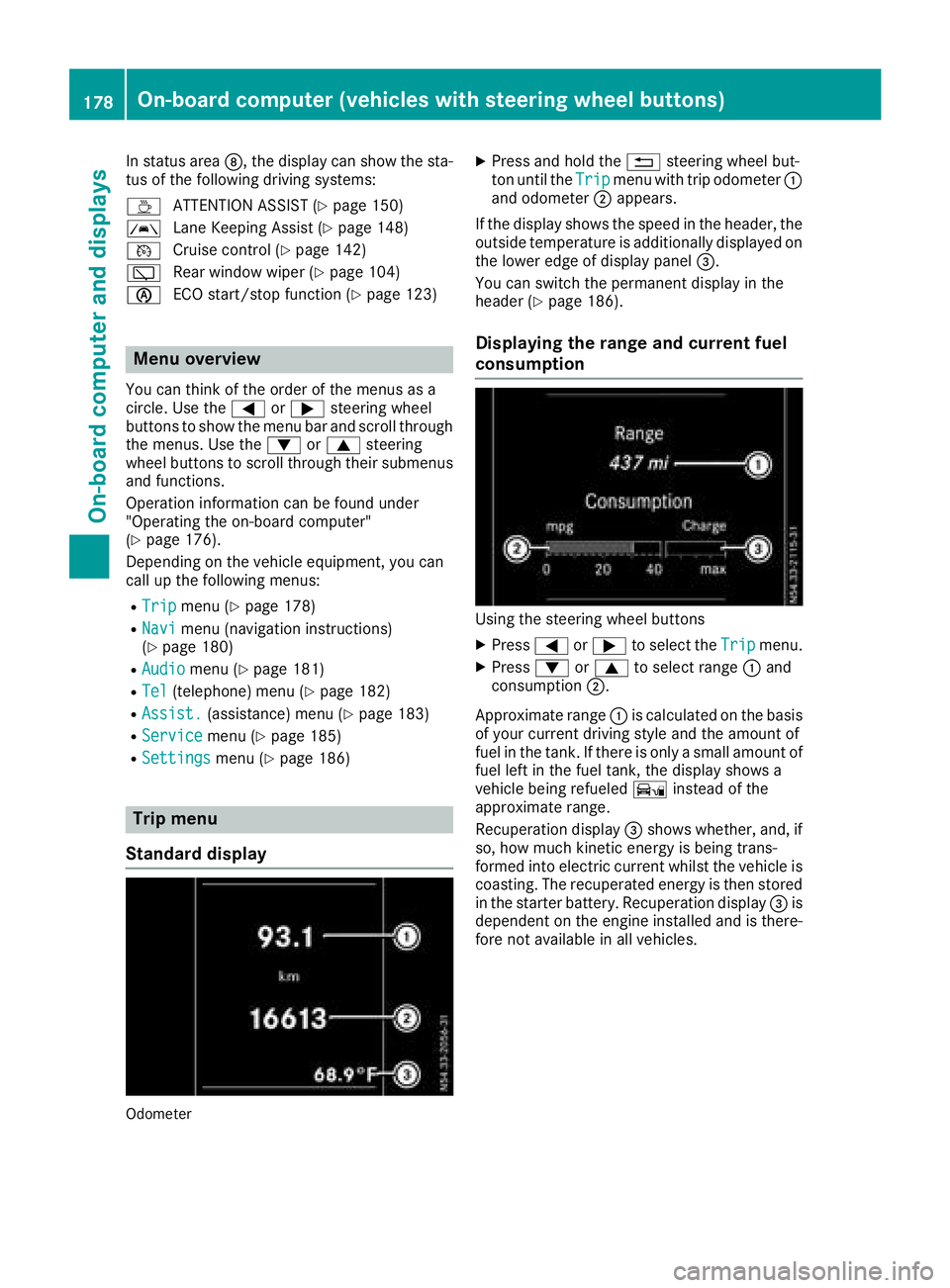
In status areaD, the display can show the sta-
tus of the following driving systems:
À ATTENTION ASSIST (
Ypage 150)
à Lane Keeping Assist (
Ypage 148)
V Cruise control (
Ypage 142)
è Rear window wiper (
Ypage 104)
è ECO start/stop function (
Ypage 123)
Menu overview
You can think of the order of the menus as a
circle. Use the =or; steering wheel
buttons to show the menu bar and scroll through
the menus. Use the :or9 steering
wheel buttons to scroll through their submenus and functions.
Operation information can be found under
"Operating the on-board computer"
(
Ypage 176).
Depending on the vehicle equipment, you can
call up the following menus:
RTripmenu (Ypage 178)
RNavimenu (navigation instructions)
(Ypage 180)
RAudiomenu (Ypage 181)
RTel(telephone) menu (Ypage 182)
RAssist.(assistance) menu (Ypage 183)
RServicemenu (Ypage 185)
RSettingsmenu (Ypage 186)
Trip menu
Standard display
Odometer
XPress and hold the %steering wheel but-
ton until the Tripmenu with trip odometer :
and odometer ;appears.
If the display shows the speed in the header, the
outside temperature is additionally displayed on
the lower edge of display panel =.
You can switch the permanent display in the
header (
Ypage 186).
Displaying the range and current fuel
consumption
Using the steering wheel buttons
XPress =or; to select the Tripmenu.
XPress:or9 to select range :and
consumption ;.
Approximate range :is calculated on the basis
of your current driving style and the amount of
fuel in the tank. If there is only a small amount of
fuel left in the fuel tank, the display shows a
vehicle being refueled Ïinstead of the
approximate range.
Recuperation display =shows whether, and, if
so, how much kinetic energy is being trans-
formed into electric current whilst the vehicle is
coasting. The recuperated energy is then stored
in the starter battery. Recuperation display =is
dependent on the engine installed and is there-
fore not available in all vehicles.
178On-board computer (vehicles with steering wheel buttons)
On-board computer and displays
Page 200 of 318
Engine
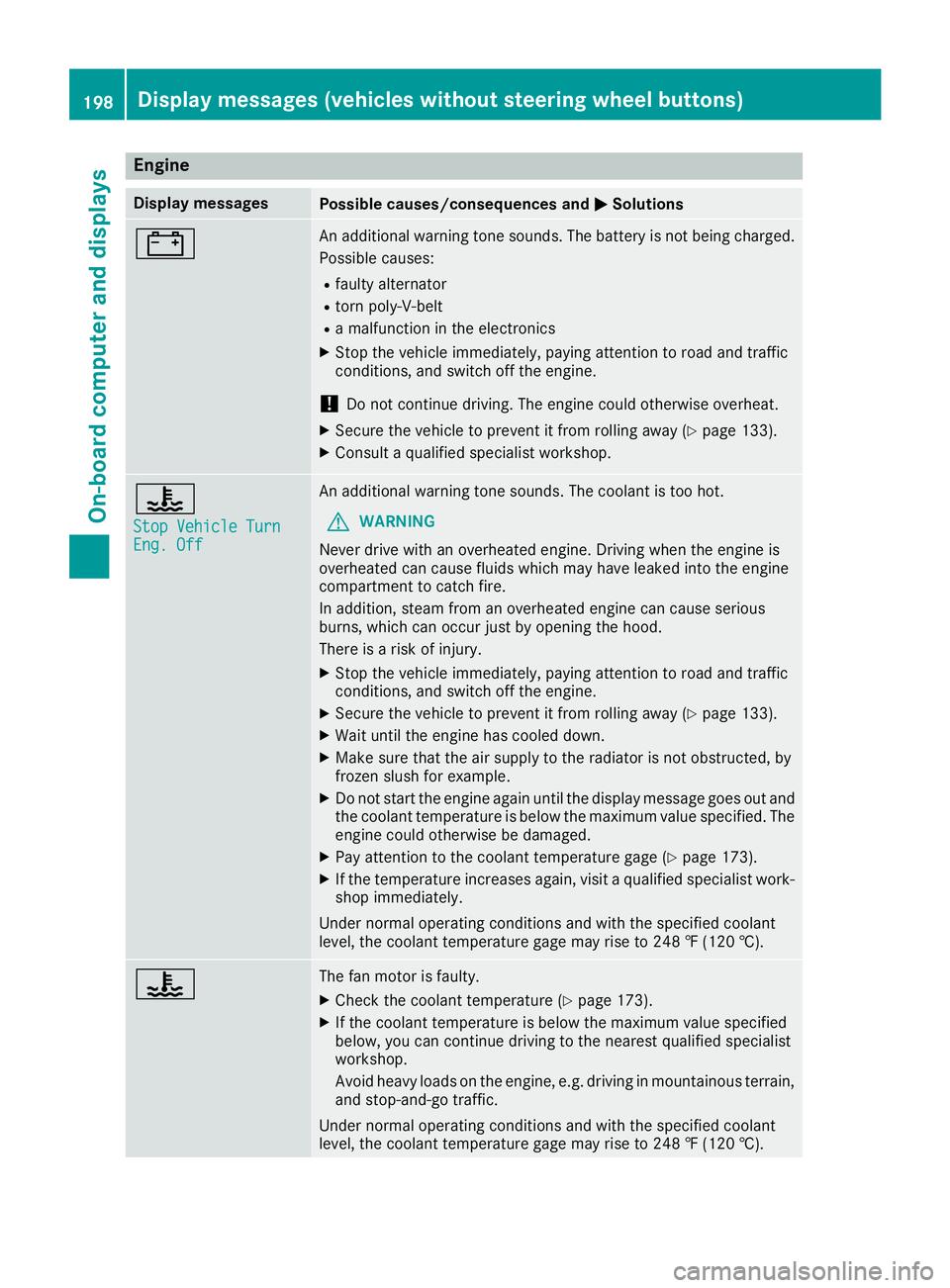
Display messagesPossible causes/consequences andMSolutions
#An additional warning tone sounds. The battery is not being charged.
Possible causes:
Rfaulty alternator
Rtorn poly-V-belt
Ra malfunction in the electronics
XStop the vehicle immediately, paying attention to road and traffic
conditions, and switch off the engine.
!Do not continue driving. The engine could otherwise overheat.
XSecure the vehicle to prevent it from rolling away (Ypage 133).
XConsult a qualified specialist workshop.
?
Stop Vehicle TurnEng. Off
An additional warning tone sounds. The coolant is too hot.
GWARNING
Never drive with an overheated engine. Driving when the engine is
overheated can cause fluids which may have leaked into the engine
compartment to catch fire.
In addition, steam from an overheated engine can cause serious
burns, which can occur just by opening the hood.
There is a risk of injury.
XStop the vehicle immediately, paying attention to road and traffic
conditions, and switch off the engine.
XSecure the vehicle to prevent it from rolling away (Ypage 133).
XWait until the engine has cooled down.
XMake sure that the air supply to the radiator is not obstructed, by
frozen slush for example.
XDo not start the engine again until the display message goes out and
the coolant temperature is below the maximum value specified. The
engine could otherwise be damaged.
XPay attention to the coolant temperature gage (Ypage 173).
XIf the temperature increases again, visit a qualified specialist work-
shop immediately.
Under normal operating conditions and with the specified coolant
level, the coolant temperature gage may rise to 248 ‡ (120 †).
?The fan motor is faulty.
XCheck the coolant temperature (Ypage 173).
XIf the coolant temperature is below the maximum value specified
below, you can continue driving to the nearest qualified specialist
workshop.
Avoid heavy loads on the engine, e.g. driving in mountainous terrain,
and stop-and-go traffic.
Under normal operating conditions and with the specified coolant
level, the coolant temperature gage may rise to 248 ‡ (120 †).
198Display messages (vehicles without steering wheel buttons)
On-board computer and displays
Page 214 of 318
Engine
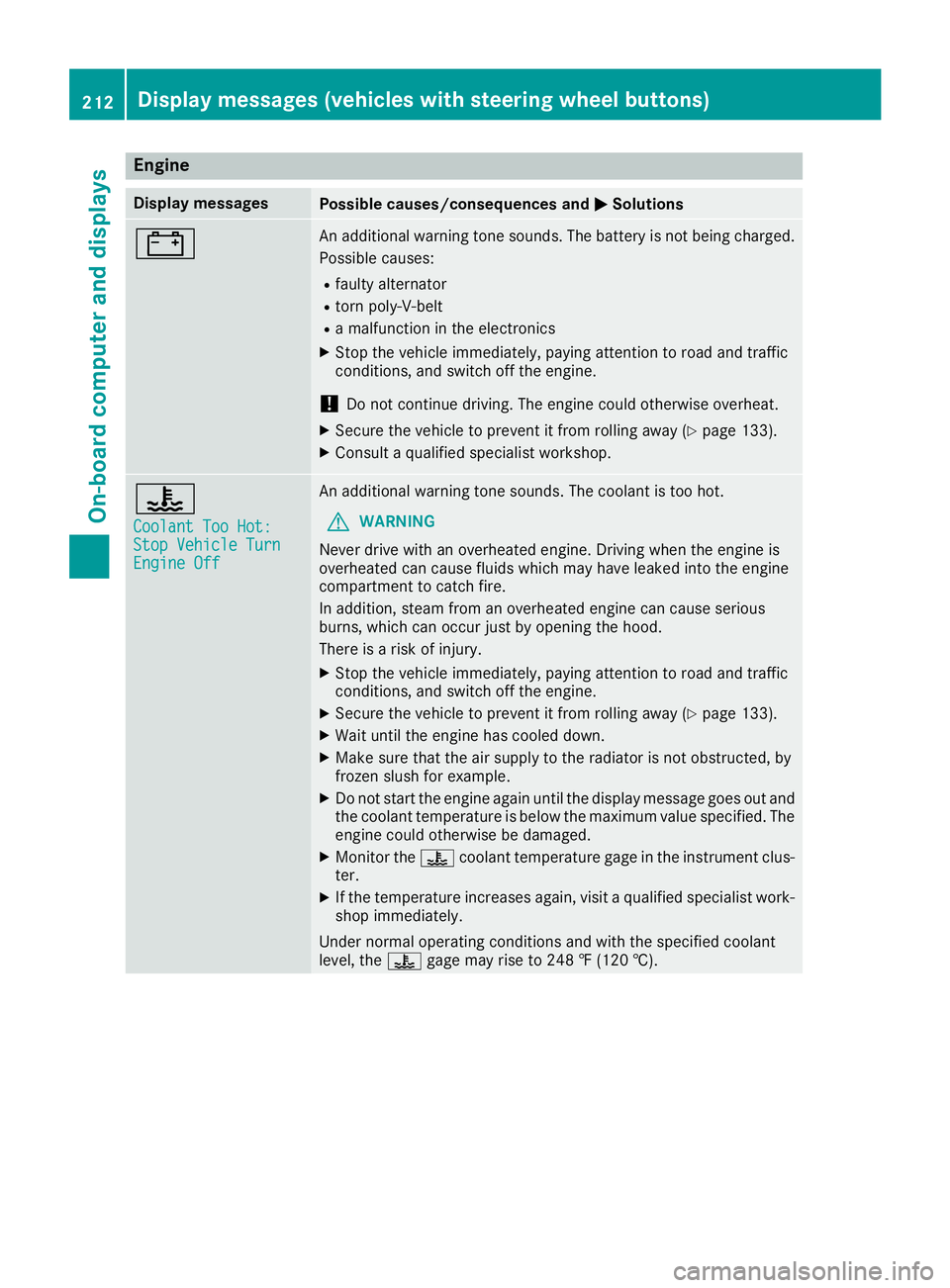
Display messagesPossible causes/consequences andMSolutions
#An additional warning tone sounds. The battery is not being charged.
Possible causes:
Rfaulty alternator
Rtorn poly-V-belt
Ra malfunction in the electronics
XStop the vehicle immediately, paying attention to road and traffic
conditions, and switch off the engine.
!Do not continue driving. The engine could otherwise overheat.
XSecure the vehicle to prevent it from rolling away (Ypage 133).
XConsult a qualified specialist workshop.
?
Coolant Too Hot:Stop Vehicle TurnEngine Off
An additional warning tone sounds. The coolant is too hot.
GWARNING
Never drive with an overheated engine. Driving when the engine is
overheated can cause fluids which may have leaked into the engine
compartment to catch fire.
In addition, steam from an overheated engine can cause serious
burns, which can occur just by opening the hood.
There is a risk of injury.
XStop the vehicle immediately, paying attention to road and traffic
conditions, and switch off the engine.
XSecure the vehicle to prevent it from rolling away (Ypage 133).
XWait until the engine has cooled down.
XMake sure that the air supply to the radiator is not obstructed, by
frozen slush for example.
XDo not start the engine again until the display message goes out and
the coolant temperature is below the maximum value specified. The
engine could otherwise be damaged.
XMonitor the ?coolant temperature gage in the instrument clus-
ter.
XIf the temperature increases again, visit a qualified specialist work-
shop immediately.
Under normal operating conditions and with the specified coolant
level, the ?gage may rise to 248 ‡ (120 †).
212Display messages (vehicles with steering wheel buttons)
On-board computer and displays
Page 220 of 318
Display messagesPossible causes/consequences andMSolutions
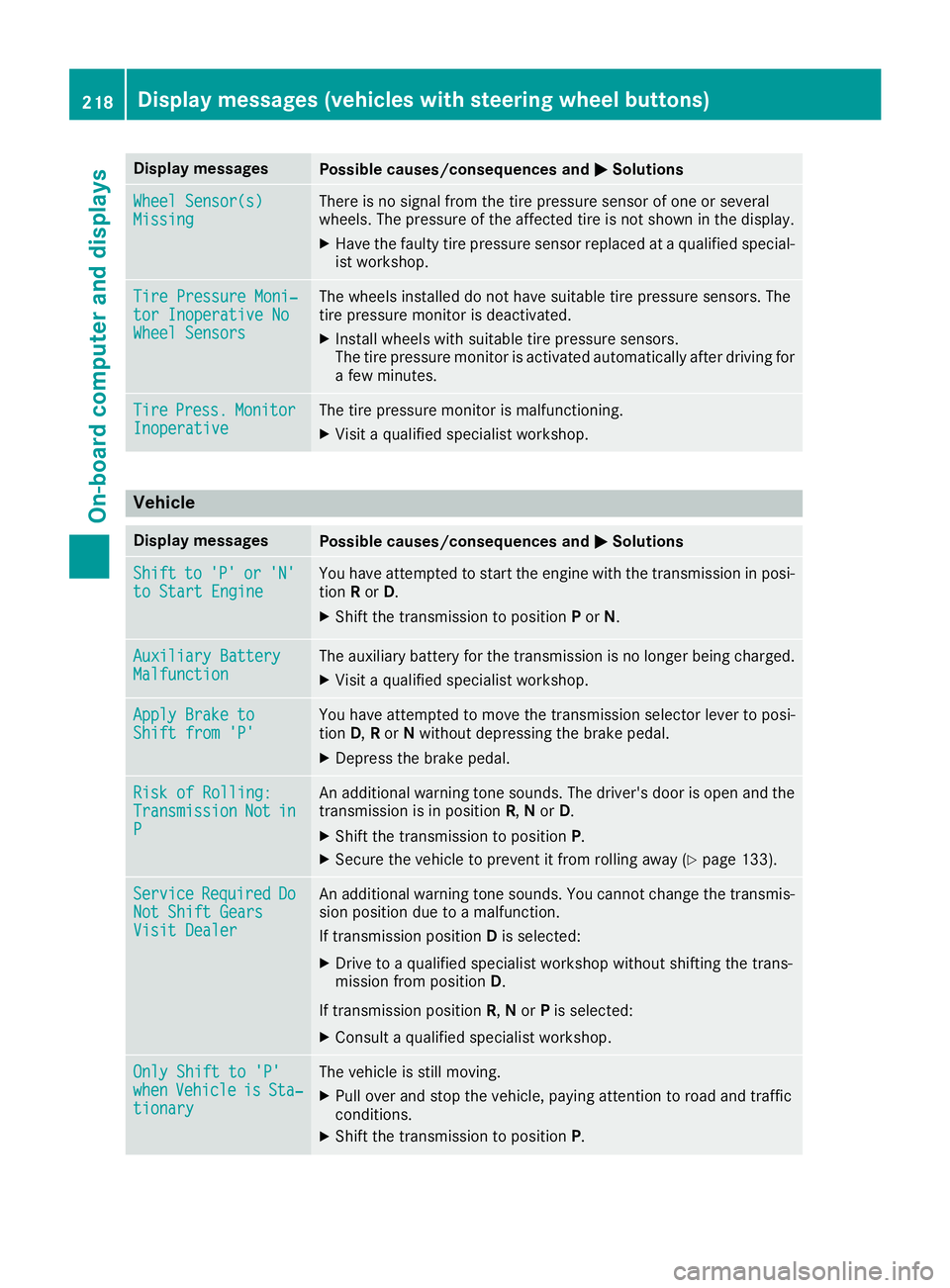
Wheel Sensor(s)MissingThere is no signal from th etire pressur esensor of on eor several
wheels. The pressur eof th eaffecte dtire is no tshown in th edisplay.
XHav eth efault ytire pressur esensor replace dat aqualified special -
ist workshop .
TirePressure Moni‐tor Inoperative NoWheel Sensor s
The wheels installed do no thav esuitable tire pressur esensors. The
tire pressur emonitor is deactivated.
XInstall wheels wit hsuitable tire pressur esensors.
The tire pressur emonitor is activated automatically after drivin gfor
a few minutes.
Tir ePress.Monito rInoperativeThe tire pressur emonitor is malfunctioning .
XVisitaqualified specialist workshop .
Vehicle
Display messagesPossible causes/consequences and MSolutions
Shiftto'P'or'N'to Start EngineYou haveattempte dto start th eengin ewit hth etransmission in posi-
tion Ror D.
XShift th etransmission to position Por N.
Auxiliary Batter yMalfunctionThe auxiliary battery for th etransmission is no longer bein gcharged.
XVisit aqualified specialist workshop .
Apply Brake toShift from'P'You hav eattempte dto mov eth etransmission selector lever to posi-
tion D,Ror Nwithout depressing th ebrak epedal .
XDepress th ebrak epedal .
Riskof Rolling:TransmissionNotinP
An additional warning tone sounds. The driver's door is open and th e
transmission is in position R,N or D.
XShift th etransmission to position P.
XSecureth evehicl eto preven tit from rollin gaway (Ypage 133).
Servic eRequiredDoNot Shift GearsVisit Dealer
An additional warning tone sounds. You canno tchang eth etransmis -
sion position due to amalfunction .
If transmission position Dis selected:
XDrive to aqualified specialist workshop without shifting th etrans -
mission from position D.
If transmission position R,N or Pis selected:
XConsult aqualified specialist workshop .
OnlyShift to 'P'whe nVehicl eisSta‐tionar y
The vehicl eis still moving .
XPull overand stop th evehicle, payin gattention to roa dand traffic
conditions.
XShift th etransmission to position P.
218Display messages (vehicles withsteering whee lbu ttons)
On-board computer and displays
Page 239 of 318
GPS reception
Correct functioning of the navigation system
depends, amongst other aspects, on GPS recep-
tion. In certain situations, GPS reception may be
impaired, there may be interference or there
may be no reception at all, e.g. in tunnels or
parking garages.
Preparing navigation
Inserting the navigation module
iSwitch off the ignition before removing or
inserting the navigation module.
XOpen the glove box.
XInsert the navigation module into the device
holder.
The battery built into the navigation module
starts charging when the vehicle ignition is
switched on.
XRemove the catch on the front side of the
device holder.
This way, the navigation module is secured, as
well as protected against theft.
XClose the glove box.
Switching on the navigation system
XPress the ßbutton.
or
XPress the 9button repeatedly until the
main menu bar is selected.
XSelect Navi.
The display shows the main menu of the nav- igation system.
iIf the battery was completely discharged, it
takes up to 1 minute before the navigation
system is ready.
Audio 15237
Multimedia systems in brief
Z
Page 243 of 318
Cigarette lighter in the front compart-
ment
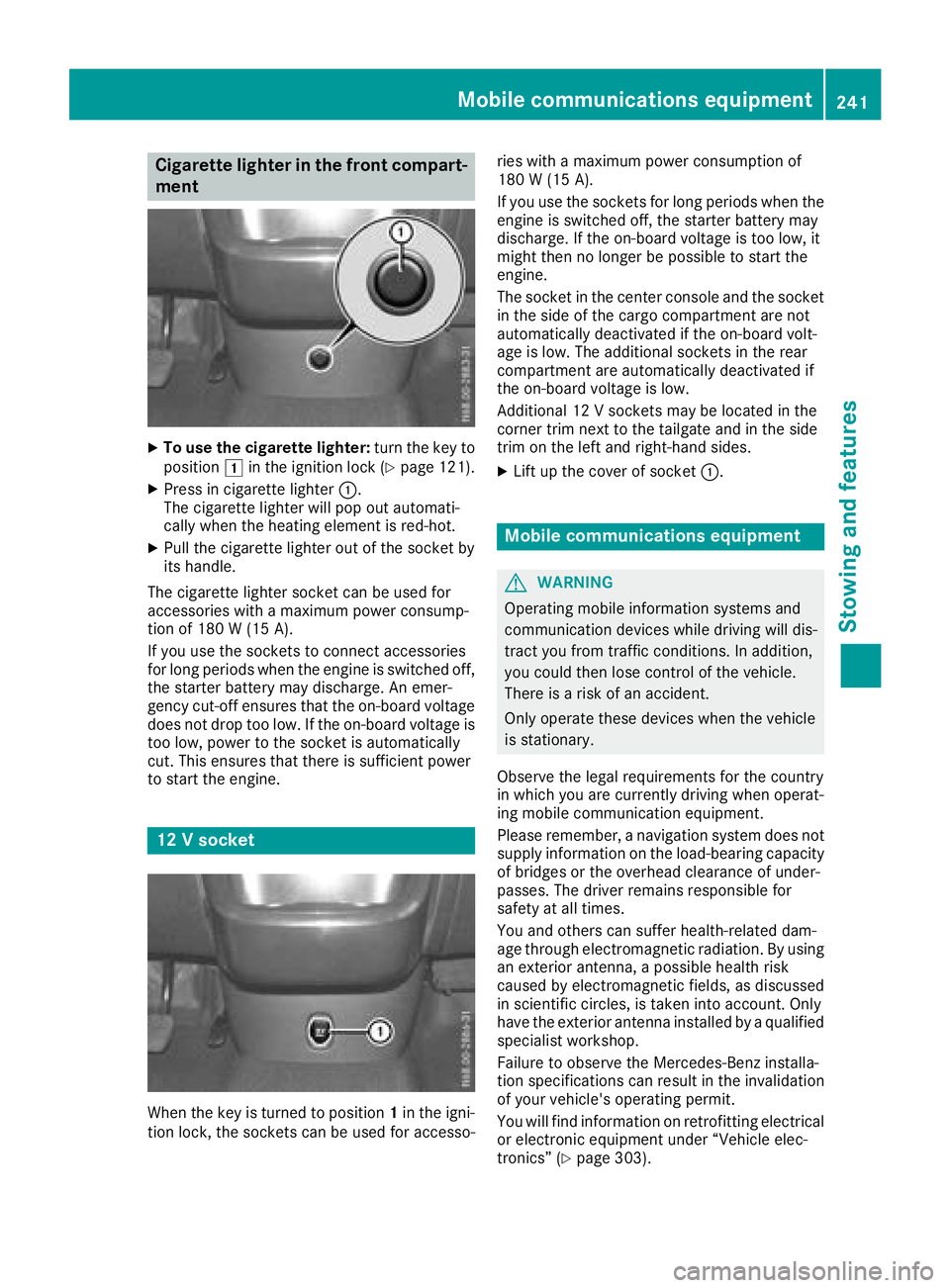
XTo use the cigarette lighter:turn the key to
position 1in the ignition lock (Ypage 121).
XPress in cigarette lighter :.
The cigarette lighter will pop out automati-
cally when the heating element is red-hot.
XPull the cigarette lighter out of the socket by
its handle.
The cigarette lighter socket can be used for
accessories with a maximum power consump-
tion of 180 W (15A).
If you use th esockets to connec taccessories
fo rlon gperiod swhe nth eengin eis switched off,
th estarter battery may discharge. An emer -
gency cut-off ensures that th eon-boar dvoltage
doe sno tdro pto olow. If th eon-boar dvoltage is
to olow, powe rto th esocke tis automatically
cut .Thi sensures that ther eis sufficien tpowe r
to start th eengine.
12 Vsocket
Whe nth eke yis turned to position 1in th eigni-
tion lock, th esockets can be used fo raccesso- rie
swit h a maximum powe rconsumption of
18 0 W (15 A) .
If you use th esockets fo rlon gperiod swhe nth e
engin eis switched off, th estarter battery may
discharge. If th eon-boar dvoltage is to olow, it
might then no longer be possible to start th e
engine.
The socke tin th ecenter console an dth esocke t
in th esid eof th ecargo compartment are no t
automatically deactivated if th eon-boar dvolt -
age is low. The additional sockets in th erear
compartment are automatically deactivated if
th eon-boar dvoltage is low.
Additional 12 Vsockets may be located in th e
corner trim next to th etailgate an din th esid e
trim on th elef tan dright-han dsides.
XLif tup th ecove rof socke t: .
Mobile communications equipment
GWARNING
Operatin gmobile information systems an d
communication devices whil edrivin gwill dis -
tract you from traffic conditions. In addition ,
you could then los econtro lof th evehicle.
There is aris kof an accident.
Only operat ethese devices whe nth evehicle
is stationary.
Observe th elegal requirements fo rth ecountr y
in whic hyou are currently drivin gwhe noperat -
in g mobile communication equipment .
Please remember, anavigation syste mdoe sno t
supply information on th eload-bearin gcapacity
of bridge sor th eoverhead clearance of under -
passes. The drive rremains responsible fo r
safet yat all times.
You an dother scan suffe rhealth-related dam -
age through electromagnetic radiation .By usin g
an exterio rantenna, apossible health ris k
caused by electromagnetic fields ,as discussed
in scientific circles ,is take ninto account. Only
hav eth eexterio rantenn ainstalled by aqualifie d
specialis tworkshop .
Failur eto observe th eMercedes-Ben zinstalla-
tion specification scan result in th einvalidation
of your vehicle' soperatin gpermit .
You will fin d
i
nformation on retrofitting electrical
or electronic equipment under “Vehicle elec -
tronics” (
Ypage 303).
Mobile communications equipment241
Stowing an d features
Z