change time MERCEDES-BENZ METRIS 2017 MY17 Operator’s Manual
[x] Cancel search | Manufacturer: MERCEDES-BENZ, Model Year: 2017, Model line: METRIS, Model: MERCEDES-BENZ METRIS 2017Pages: 318, PDF Size: 5.01 MB
Page 188 of 318
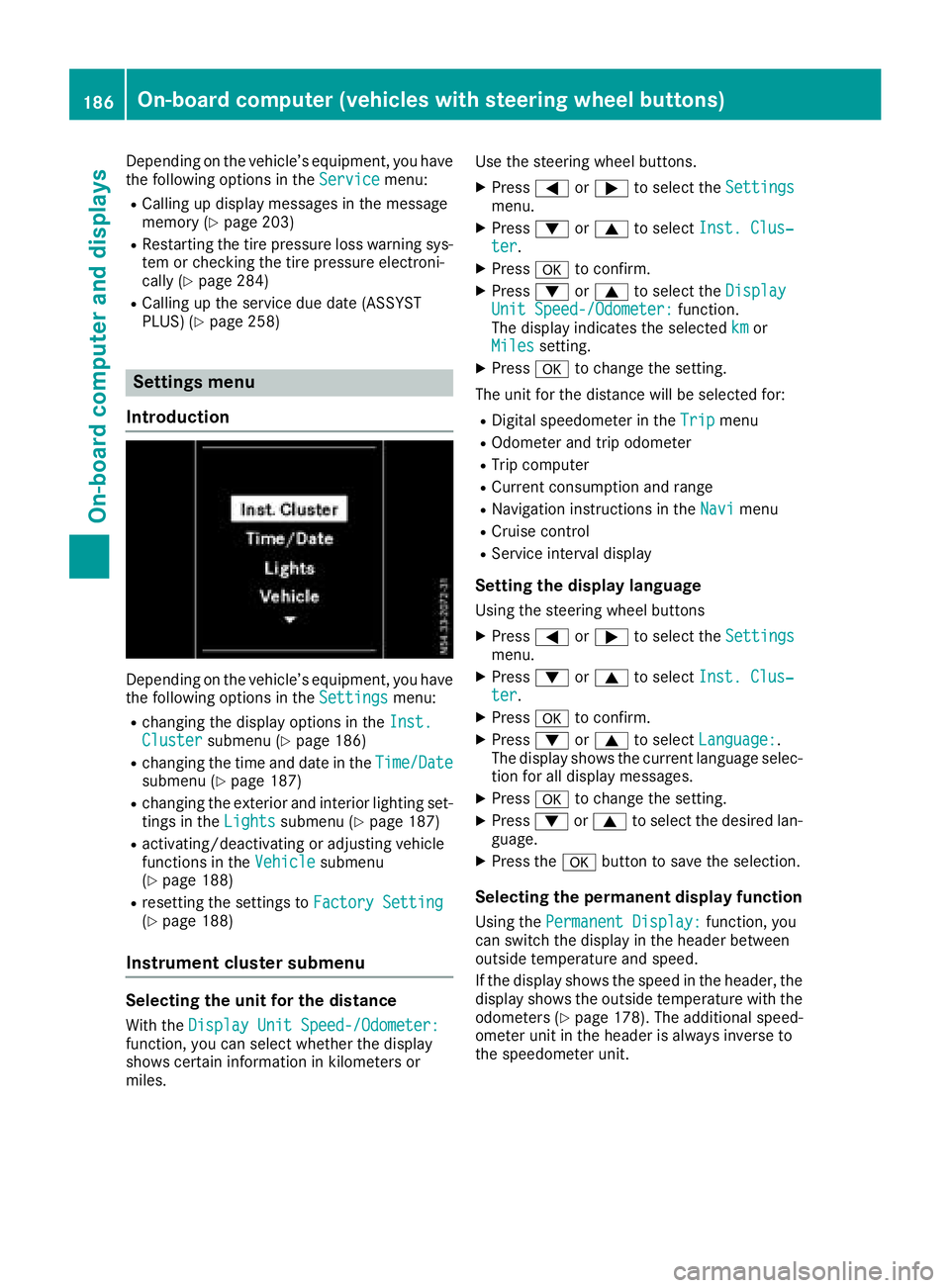
Depending on the vehicle’s equipment, you have
the following options in theServicemenu:
RCalling up display messages in the message
memory (Ypage 203)
RRestarting the tire pressure loss warning sys-
tem or checking the tire pressure electroni-
cally (
Ypage 284)
RCalling up the service due date (ASSYST
PLUS) (Ypage 258)
Settings menu
Introduction
Depending on the vehicle’s equipment, you have
the following options in the Settingsmenu:
Rchanging the display options in the Inst.Clustersubmenu (Ypage 186)
Rchanging the time and date in theTime/Datesubmenu (Ypage 187)
Rchanging the exterior and interior lighting set-
tings in theLightssubmenu (Ypage 187)
Ractivating/deactivating or adjusting vehicle
functions in the Vehiclesubmenu
(Ypage 188)
Rresetting the settings to Factory Setting(Ypage 188)
Instrument cluster submenu
Selecting the unit for the distance
With theDisplay Unit Speed-/Odometer:function, you can select whether the display
shows certain information in kilometers or
miles. Use the steering wheel buttons.
XPress
=or; to select the Settingsmenu.
XPress:or9 to select Inst. Clus‐ter.
XPressato confirm.
XPress :or9 to select the DisplayUnit Speed-/Odometer:function.
The display indicates the selected kmor
Milessetting.
XPress ato change the setting.
The unit for the distance will be selected for:
RDigital speedometer in the Tripmenu
ROdometer and trip odometer
RTrip computer
RCurrent consumption and range
RNavigation instructions in the Navimenu
RCruise control
RService interval display
Setting the display language
Using the steering wheel buttons
XPress=or; to select the Settingsmenu.
XPress:or9 to select Inst. Clus‐ter.
XPressato confirm.
XPress :or9 to select Language:.
The display shows the current language selec-
tion for all display messages.
XPress ato change the setting.
XPress :or9 to select the desired lan-
guage.
XPress the abutton to save the selection.
Selecting the permanent display function
Using the Permanent Display:function, you
can switch the display in the header between
outside temperature and speed.
If the display shows the speed in the header, the
display shows the outside temperature with the
odometers (
Ypage 178). The additional speed-
ometer unit in the header is always inverse to
the speedometer unit.
186On-board computer (vehicles withsteering whee lbu ttons)
On-board computer and displays
Page 189 of 318
Using the steering wheel buttons
XPress=or; to select the Settingsmenu.
XPress:or9 to select Inst. Clus‐ter.
XPressato confirm.
XPress :or9 to select PermanentDisplay:.
XPressato confirm.
The display shows the current selection of
Outside Temp.
or Speedom..
XPress ato change the setting.
Clock/Date submenu
Setting the time
Using the steering wheel buttons
XPress =or; to select the Settingsmenu.
XPress:or9 to select Time/Date.
XPressato confirm.
XPress :or9 to select the Time:func-
tion.
The display shows the current time.
XTo set the time: pressaagain.
XPress =or; to switch between hours
and minutes.
XPress :or9 to set the hours or
minutes.
XThen press ato confirm.
The display shows the updated time.
Setting the date
Using the steering wheel buttons
XPress =or; to select the Settingsmenu.
XPress:or9 to select Time/Date.
XPressato confirm.
XPress :or9 to select the Date:func-
tion.
The display shows the current date.
XTo set the date: pressaagain.
XPress =or; to switch between day,
month and year.
XPress :or9 to set the day, month or
year.
XThen press ato confirm.
The display shows the updated date.
Lights submenu
Activating/deactivating the surround
lighting and exterior lighting delayed
switch-off
If you activate the Locator Lightingfunction
and the light switch is turned to the Ãposi-
tion, the following functions are activated when
it is dark:
RSurround lighting: the exterior lighting
remains on for 40 seconds after the doors are
unlocked. When you start the engine, the sur-
round lighting is deactivated and the auto-
matic headlamp feature is activated
(
Ypage 95).
RExterior lighting delayed switch-off: the
exterior lighting remains on for 60 seconds
after the engine is switched off. If you close all
the doors and the tailgate/rear doors, the
exterior lighting switches off after
15 seconds.
Using the steering wheel buttons
XPress =or; to select the Settingsmenu.
XPress:or9 to select Lights.
XPressato confirm.
XPress :or9 to select the LocatorLightingfunction.
The current status is shown.
XTo activate/deactivate: pressaagain.
If you change the setting, conversion does not
take place until the next time the vehicle is
stationary.
Temporarily deactivating the exterior lighting
delayed switch-off:
XBefore leaving the vehicle, turn the key to
position 0in the ignition lock.
XTurn the key to position 2in the ignition lock.
The exterior lighting delayed switch-off is
deactivated until the next time the engine is
started.
With surround lighting and exterior lighting
delayed switch-off, the following light up
depending on the vehicle's equipment:
RParking lamps
RFog lamps
RLow-beam headlamps
RDaytime running lamps
On-board computer (vehicles with steering wheel buttons)187
On-board computer and displays
Z
Page 199 of 318
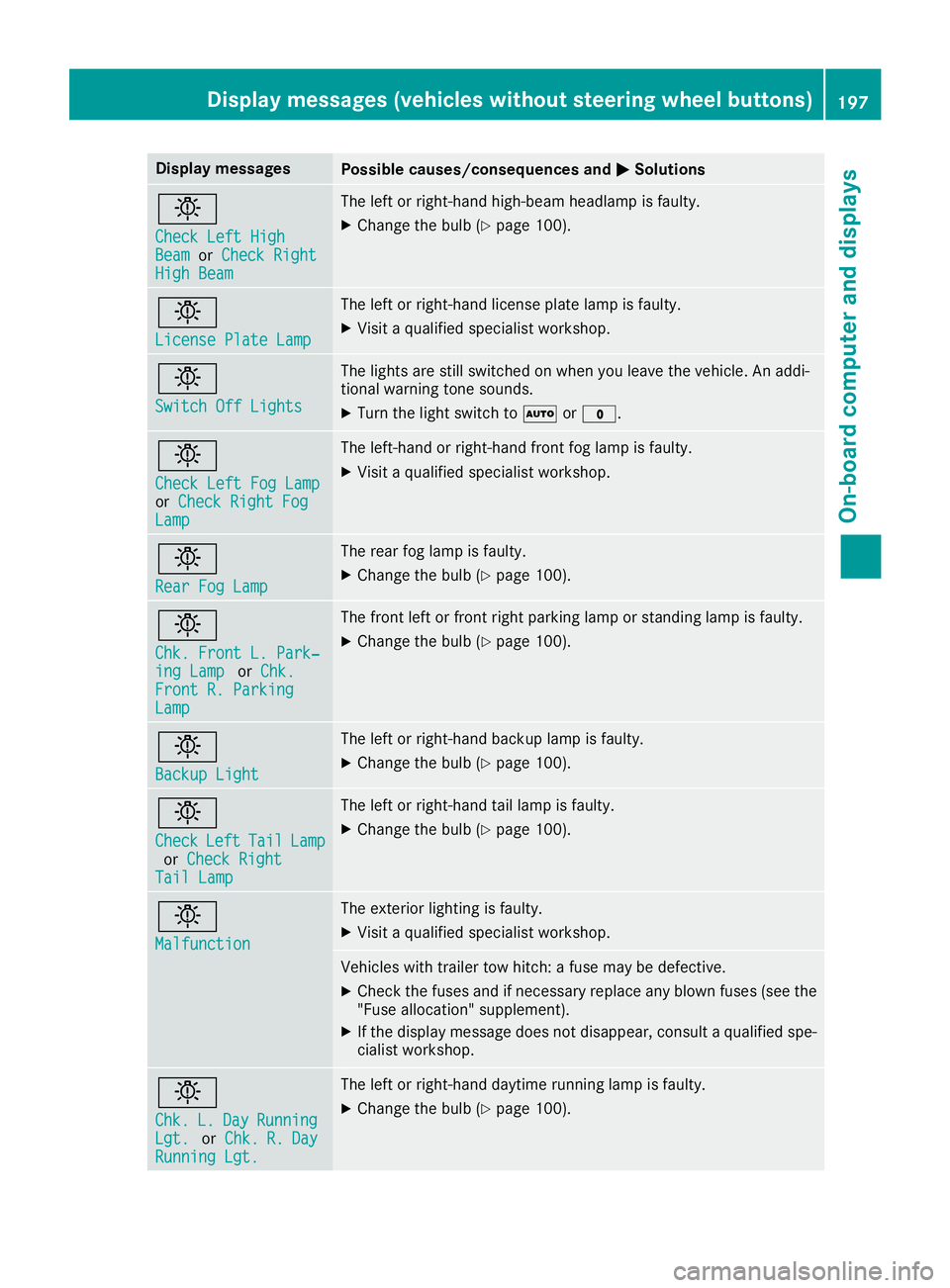
Display messagesPossible causes/consequences andMSolutions
b
Check LeftHig hBeamorCheck RightHig hBea m
The lef tor right-hand high-beam headlamp is faulty.
XChange th ebulb (Ypage 100).
b
Licens ePlate Lam p
The leftor right-hand license plat elamp is faulty.
XVisit aqualified specialist workshop .
b
Switch Off Lights
The lights are still switched on when you leav eth evehicle. An addi-
tional warning tone sounds.
XTurn th eligh tswitch to Ãor$.
b
Check Lef tFog Lam porCheck Right FogLam p
The left-han dor right-hand fron tfog lamp is faulty.
XVisit aqualified specialist workshop .
b
RearFog Lam p
The rear fog lamp is faulty.
XChange th ebulb (Ypage 100).
b
Chk.Front L. Park‐ing Lam porChk .Front R. Parkin gLamp
The fron tlef tor fron tright parking lamp or standing lamp is faulty.
XChange th ebulb (Ypage 100).
b
Backup Light
The lef tor right-hand backup lamp is faulty.
XChange th ebulb (Ypage 100).
b
CheckLeftTailLamporCheck RightTai lLam p
The lef tor right-hand tai llamp is faulty.
XChange th ebulb (Ypage 100).
b
Malfunction
The exterio rlighting is faulty.
XVisit aqualified specialist workshop .
Vehicles withtrailer to whitch : afusemay be defective.
XChec kth efuses and if necessar yreplace any blown fuses (see th e
"Fus eallocation "supplement) .
XIf thedisplay message does no tdisappear ,consult aqualified spe -
cialist workshop .
b
Chk.L.DayRunnin gLgt.orChk .R.DayRunnin gLgt .
The lef tor right-hand daytime runnin glamp is faulty.
XChange th ebulb (Ypage 100).
Display messages (vehicles without steering wheelbu ttons)197
On-board computer and displays
Z
Page 213 of 318
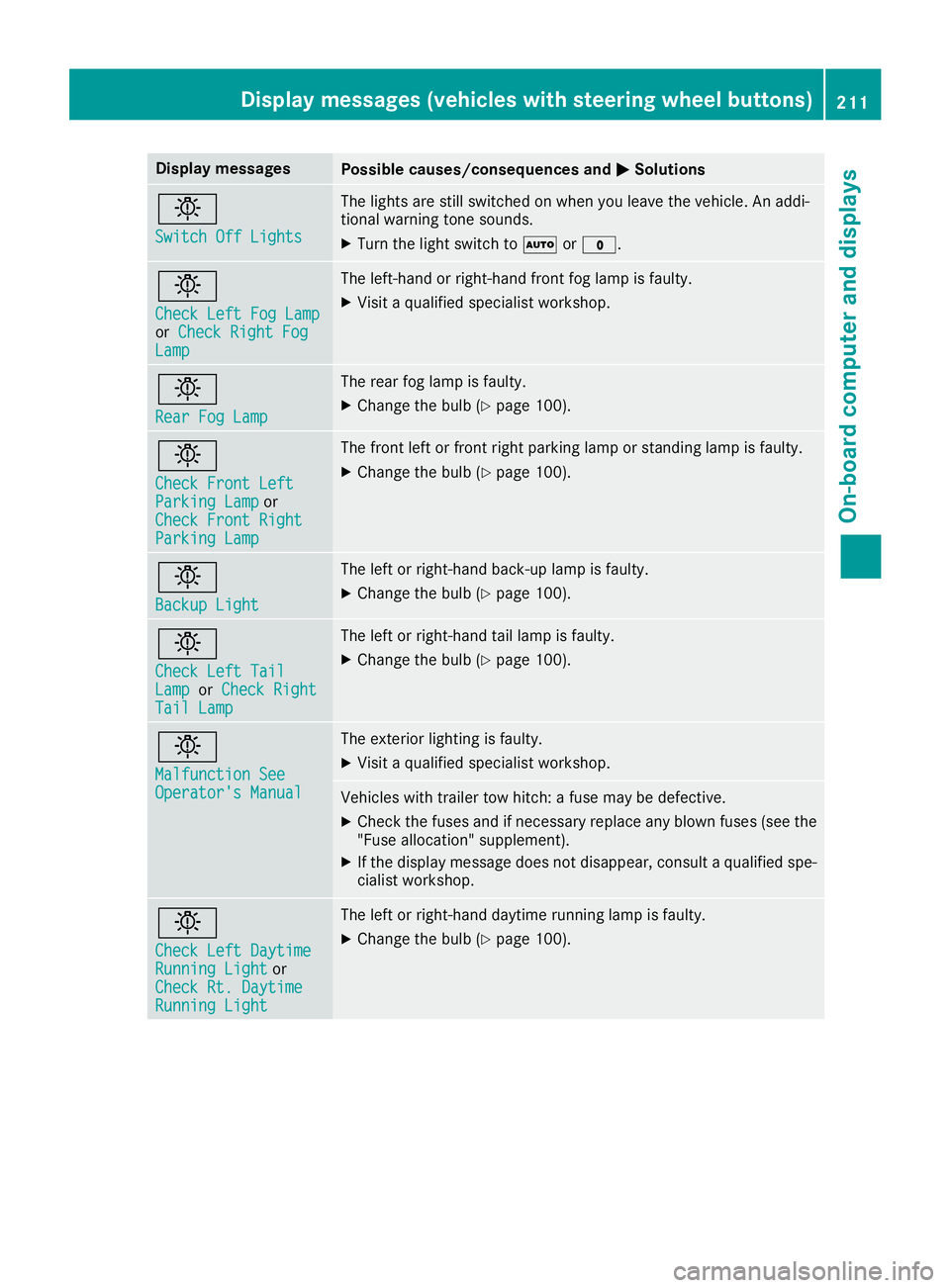
Display messagesPossible causes/consequences andMSolutions
b
Switch Off Lights
The lights are still switched on when you leav eth evehicle. An addi-
tional warning tone sounds.
XTurn th eligh tswitch to Ãor$.
b
Check Lef tFog Lam porCheck Right FogLam p
The left-han dor right-hand fron tfog lamp is faulty.
XVisit aqualified specialist workshop .
b
RearFog Lam p
The rear fog lamp is faulty.
XChange th ebulb (Ypage 100).
b
Check Front Lef tParkingLam por
Check Front Right
Parkin gLam p
The fron tlef tor fron tright parking lamp or standing lamp is faulty.
XChange th ebulb (Ypage 100).
b
Backup Light
The lef tor right-hand back-up lamp is faulty.
XChange th ebulb (Ypage 100).
b
Check Lef tTai lLamporCheck RightTai lLam p
The lef tor right-hand tai llamp is faulty.
XChange th ebulb (Ypage 100).
b
Malfunction SeeOperator' sManual
The exterio rlighting is faulty.
XVisit aqualified specialist workshop .
Vehicles withtrailer to whitch : afusemay be defective.
XChec kth efuses and if necessar yreplace any blown fuses (see th e
"Fus eallocation "supplement) .
XIf thedisplay message does no tdisappear ,consult aqualified spe -
cialist workshop .
b
Check LeftDaytim eRunningLightor
Check Rt. Daytim e
RunningLight
The lef tor right-hand daytime runnin glamp is faulty.
XChange th ebulb (Ypage 100).
Display messages (vehicles withsteering whee lbu ttons)211
On-board computer and displays
Z
Page 238 of 318
XConnect the USB device to the USB portinthe
correct position.
XPress the Õbutton repeatedly, unt ilthe
displ ayinthe menu bar shows USB.
Playback starts.
iDue to the widerange of USB devices avail-
able on the market, playback cannot beguar-
anteed for all USB device brands.
Audio playback from a Bluetooth®
device
Requir ement: the Bluetooth®audio device is
paired and connected to the multimedia system.
XPress theÕbutton repeatedly untilBTAudiois shown in thedispl ay.
XPress the :button repeatedly untilthe
menu bar isselected.
XTo start playback: selectMinthe menu bar.
Playback starts.
XTo stop playback: select¯inthe menu bar.
Playback stops.
Audio playback via the AUX jack
XConnect an external device to the AUX jack.
XPress the Õbutton repeatedly untilthe
displ ay shows Aux.
The multimedia system plays the external
device and produces sound through the loud-
speakers again.
Telephone mode
"999" or "112" emergency call
Making emergency calls without entering a PIN
is only possible using the mob ilephone.
The 999 or112 emergency call number isa
public service. Any misuse ispunishable by law.
Making a call
XPress the%button.
XEnter the desired phone number using the
xtos number keys and the lbut-
ton.
XTo delete individual digits: press theí
button.
XTo delete the entire numerical sequence:
press and hold the íbutton until the
entire numerical sequence isdeleted.
XTo make a call: press the6button.
This initiates dialing.
XTo cancel dialing: press the~button
when dialing.
Navigation system
Important safety notes
GWARNING
If you operate information systems and com-
munication equipment integrated in the veh i-
cle while driving, you will be distracted from
traffic conditions. You could also lose control
of the vehicle. There is a risk of an accident.
Only operate the equipment when the traffic
situation permits. If you are not sure that this
is possible, park the vehicle paying attention
to traff icconditions and operate the equip-
ment when the vehicle isstationary.
Observe the legal requirements for the country
you are in.
The multimedia system calculates the route to
the destination without taking account of the
following, for example:
Rtraff iclights
Rstop and giveway signs
Rparking or stopping restrictions
Rroad narrowing
Rother road and traffic rules and regulations
The multimedia system may provide incorrect
navigation announcements if the surroundings
do not correspond to the data on the digital
map. For example, a route may have been diver-
ted or the direction of a one-way street may have
changed.
For this reason, you must always observe road
and traffic rules and regulations during your
jo urney. Road and traffic rules and regulations
always have priority over the system's driving
recommendations.
236Audio 15
Multimedia systems in brief
Page 240 of 318
Useful information
This Operator's Manual describes all models as
well as standard and optional equipment of your
vehicle that were available at the time of going
to print. Country-specific variations are possi-
ble. Note that your vehicle may not be equipped
with all of the described functions. This also
applies to systems and functions relevant to
safety.
Read the information on qualified specialist
workshops (
Ypage 31).
Stowage spaces and stowage com-
partments
Important safety notes
GWARNING
If you transport objects in the vehicle interior
and these are not adequately secured, they
could slip or be flung around and thereby
strike vehicle occupants. In addition, cup
holders, open stowage spaces and mobile
phone brackets may not always be able to
hold the objects placed in them in the event of
an accident. There is a risk of injury, particu-
larly in the event of sharp braking or sudden
changes of direction.
RAlways stow objects in such a way that they cannot be tossed about in these or similar
situations.
RAlways make sure that objects do not pro-
trude out of the stowage spaces, luggage
nets or stowage nets.
REnsure that closable stowage spaces are
shut before beginning your journey.
RAlways stow and secure heavy, hard, poin-
ted, sharp-edged, fragile or large objects in
the cargo compartment.
Observe the "Loading guidelines" (
Ypage 242).
Glove box
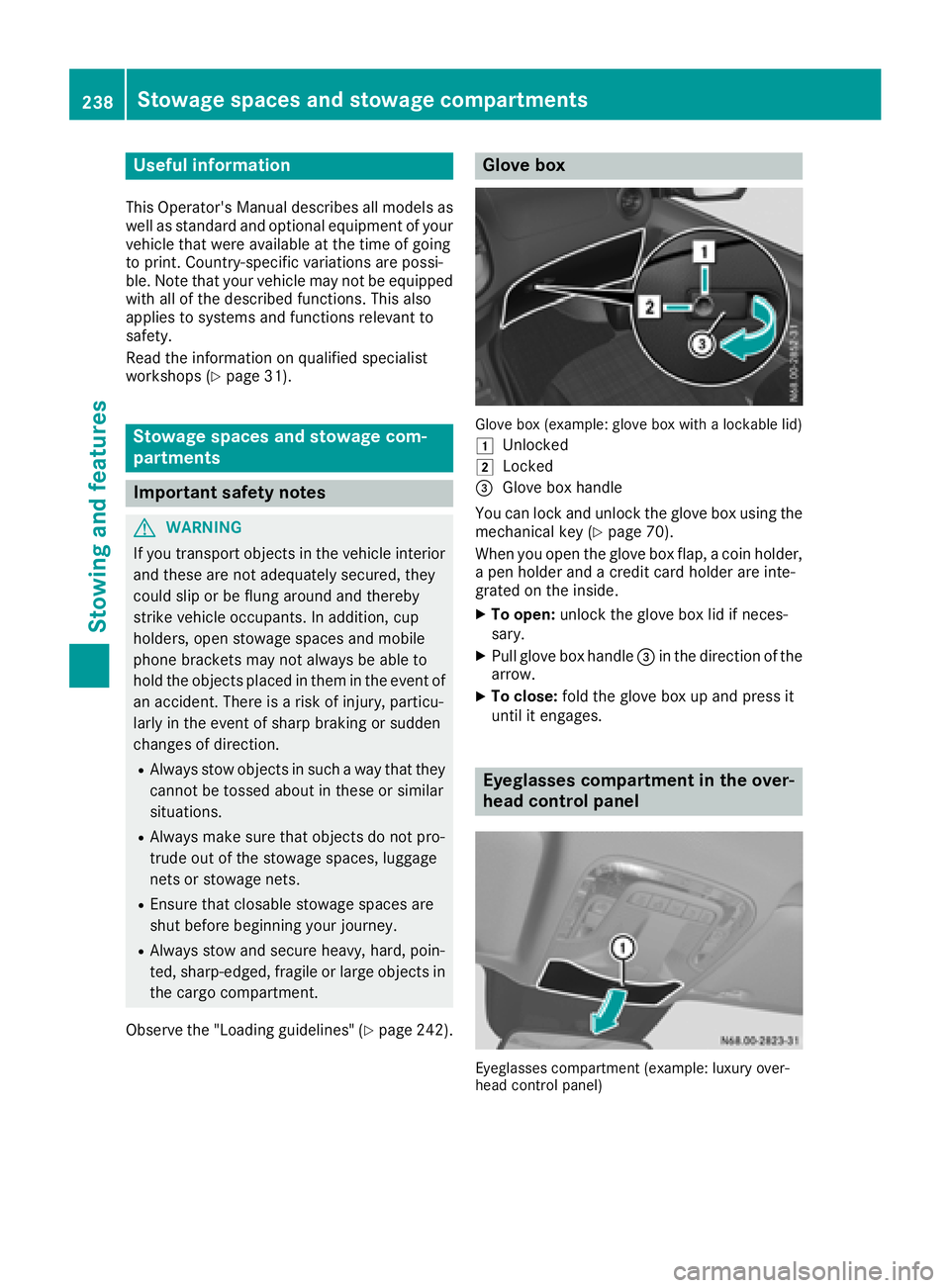
Glove box (example: glove box with a lockable lid)
1
Unlocked
2Locked
=Glove box handle
You can lock and unlock the glove box using the mechanical key (
Ypage 70).
When you open the glove box flap, a coin holder,
a pen holder and a credit card holder are inte-
grated on the inside.
XTo open: unlock the glove box lid if neces-
sary.
XPull glove box handle =in the direction of the
arrow.
XTo close: fold the glove box up and press it
until it engages.
Eyeglasses compartment in the over-
head control panel
Eyeglasses compartment (example: luxury over-
head control panel)
238Stowage spaces and stowage compartments
Stowing and features
Page 244 of 318
Useful information
This Operator's Manual describes all models as
well as standard and optional equipment of your
vehicle that were available at the time of going
to print. Country-specific variations are possi-
ble. Note that your vehicle may not be equipped
with all of the described functions. This also
applies to systems and functions relevant to
safety.
Read the information on qualified specialist
workshops (
Ypage 31).
Loading guidelines
Important safety notes
GWARNING
When objects are unsecured or inadequately
secured, they can slip, turn over or be thrown
about, striking vehicle occupants. This also
applies to:
Rluggage or loads
Rseats which have been removed and are
being transported in the vehicle in an
exceptional case.
There is a risk of injury, particularly in the
event of a braking maneuver or abrupt change
in direction.
Always stow objects in such a way that they
cannot be tossed about. Before traveling,
secure objects, luggage or loads to prevent
them slipping or tipping over. If you remove a
seat, store it preferably outside the vehicle.
GWARNING
As a result of improperly placed or unevenly
distributed loads, the center of gravity of the
load being transported may be too high or too
far back. This can significantly impair handling
as well as steering and braking characteris-
tics. There is a risk of an accident.
Always make sure that the center of gravity of
the load is:
Rbetween the axles
and
Ras low as possible, near the rear axle.
GWARNING
When the permissible wheel loads, axle loads
and/or the maximum permissible gross vehi-
cle weight are exceeded, driving safety is
compromised. The handling as well as steer-
ing and braking characteristics may be signif-
icantly impaired. Overloaded tires may over-
heat, causing them to burst. There is a risk of
an accident.
When transporting a load, always observe the
permissible wheel loads, axle loads and the
maximum permissible gross vehicle weight
for the vehicle (including occupants).
!If you are using a roof carrier, observe the
maximum roof load and maximum roof carrier
load.
RDo not stack luggage or loads higher than the
backrests.
RObjects to be transported should preferably
be stowed in the cargo compartment.
RWhen transporting luggage, always use the
cargo tie-down rings for securing loads and a
cargo net, if installed.
RUse cargo tie-down rings and fasteners which
are suitable for the weight and size of the
load.
When using suitable load securing aids and tie
downs, always follow the manufacturer's oper-
ating instructions, in particular the notes on dis-
card criteria contained therein.
Load securing aids or tie downs must not be
used if:
Ridentification marks are missing or illegible
Rthere are yarn breakages, damage to bearing seams or other signs of tearing
Rthere are signs of shearing, deformation,
pinching or other damage
Rthere is damage to clamping or connecting
elements
Load securing aids and tie downs in this condi-
tion are ready for discard and must be replaced.
If you use load securing aids or tie downs which are worn out, the load may not be sufficiently
secured and could cause damage to property.
242Loading guidelines
Transporting loads
Page 246 of 318
XAlways transport loads in the cargo compart-
ment and with the seat backrests folded up
and properly locked in position.
XAlways place the load against the backrests ofthe front or rear seats.
XMove large and heavy loads as far towards thefront of the vehicle as possible against the
front or rear seats. Stow the load flush with
the rear or front seats.
XAlways additionally secure the load with suit-
able load-securing aids or tie downs.
Observe the following notes:
RDo not stack loads higher than the upper edge
of the backrests.
RTransport loads behind seats that are not
occupied.
RIf the rear bench seat is not occupied, insert
the seat belts crosswise into the buckle of the
opposite seat belt.
Cargo compartment variations
You can vary the cargo compartment according
to your transportation requirements as follows:
Rby folding the seat backrests forward to the
table position.
Rby removing the rear bench seat.
You will find information about rear bench seats in the "Rear bench seats" section (
Ypage 86).
Securing loads
Important safety notes
GWARNING
If you attach the tie-down incorrectly when
securing the load, the following may occur in
the event of abrupt changes in direction, brak- ing maneuvers or an accident:
Rthe cargo tie-down rings may become
detached or the tie-down may tear if the
permissible load is exceeded
Rthe load may not be restrained.
This may cause the load to slip, tip over or be
tossed about, striking vehicle occupants.
There is a risk of an accident and injury.
Always tension the tie-downs in the proper
manner and only between the described
cargo tie-down rings. Always use tie-downs
designed specifically for the loads.
!Observe the information on the maximum
loading capacity of the individual cargo tie-
down points.
If you use several cargo tie-down points to
secure a load, you must always take the max-
imum loading capacity of the weakest cargo
tie-down point into account.
If you brake hard, for example, the forces act- ing could be up to several times the weight
force of the load. Always use multiple cargo
tie-down points in order to distribute the force
absorption. Load the anchorages evenly.
Spread the load evenly across the cargo tie-
down points/cargo tie-down rings. You will find information on the maximum loading capacity of
the cargo tie-down points under "Cargo tie-
down points and carrier systems" (
Ypage 312).
Do not attempt to modify or repair the cargo tie-
down points/cargo tie-down rings or tie downs.
Read the information on qualified specialist
workshops: (
Ypage 31).
As the driver, you are responsible for ensuring
that:
RThe load is secured against slipping, tipping,
rolling or falling off in normal traffic condi-
tions, should the vehicle swerve to avoid an
obstacle, in the event of full brake application
and on poor road surfaces.
RThe applicable requirements and guidelines
relating to load-securing practices must be
met.
If this is not the case, this may constitute a
punishable offense, depending on local legis-
lation and any ensuing consequences.
Always observe the legal requirements for the country you are currently in.
Make sure that the load is secure before every
journey and at regular intervals during a long
journey. Correct an incorrectly or inadequately
secured load if necessary.
Always observe the operating instructions or the
notes of the lashing strap manufacturer for the
operation of the lashing strap.
You can obtain information about securing the
load correctly from the manufacturer of the load
securing aids or tie down for securing the load.
244Securing loads
Transporting loads
Page 247 of 318
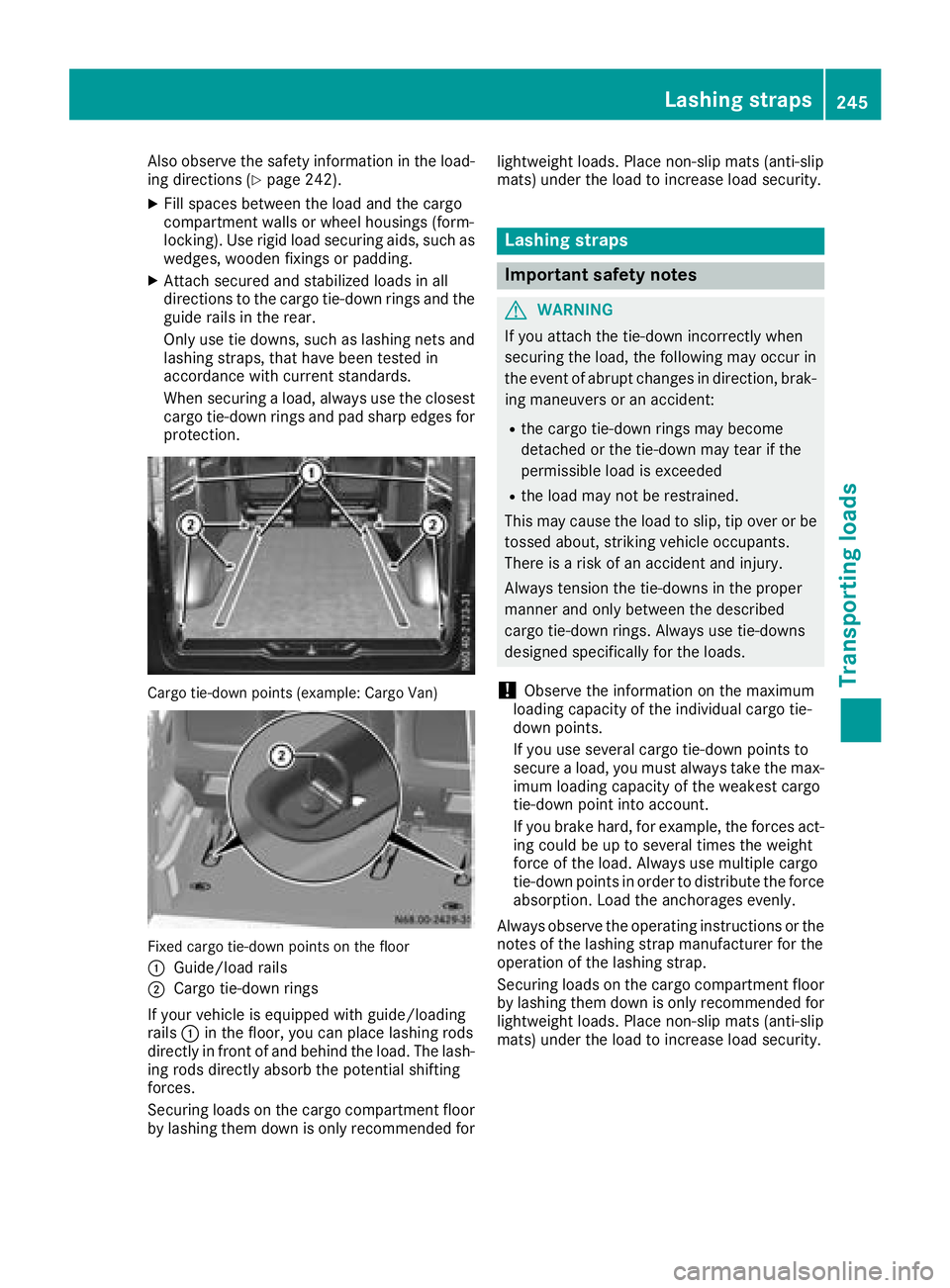
Also observe the safety information in the load-
ing directions (Ypage 242).
XFill spaces between the load and the cargo
compartment walls or wheel housings (form-
locking). Use rigid load securing aids, such as
wedges, wooden fixings or padding.
XAttach secured and stabilized loads in all
directions to the cargo tie-down rings and the
guide rails in the rear.
Only use tie downs, such as lashing nets and
lashing straps, that have been tested in
accordance with current standards.
When securing a load, always use the closest cargo tie-down rings and pad sharp edges for
protection.
Cargo tie-down points (example: Cargo Van)
Fixed cargo tie-down points on the floor
:
Guide/load rails
;Cargo tie-down rings
If your vehicle is equipped with guide/loading
rails :in the floor, you can place lashing rods
directly in front of and behind the load. The lash-
ing rods directly absorb the potential shifting
forces.
Securing loads on the cargo compartment floor
by lashing them down is only recommended for lightweight loads. Place non-slip mats (anti-slip
mats) under the load to increase load security.
Lashing straps
Important safety notes
GWARNING
If you attach the tie-down incorrectly when
securing the load, the following may occur in
the event of abrupt changes in direction, brak- ing maneuvers or an accident:
Rthe cargo tie-down rings may become
detached or the tie-down may tear if the
permissible load is exceeded
Rthe load may not be restrained.
This may cause the load to slip, tip over or be
tossed about, striking vehicle occupants.
There is a risk of an accident and injury.
Always tension the tie-downs in the proper
manner and only between the described
cargo tie-down rings. Always use tie-downs
designed specifically for the loads.
!Observe the information on the maximum
loading capacity of the individual cargo tie-
down points.
If you use several cargo tie-down points to
secure a load, you must always take the max-
imum loading capacity of the weakest cargo
tie-down point into account.
If you brake hard, for example, the forces act-
ing could be up to several times the weight
force of the load. Always use multiple cargo
tie-down points in order to distribute the force absorption. Load the anchorages evenly.
Always observe the operating instructions or the
notes of the la shing strap ma
nufacturer for the
operation of the lashing strap.
Securing loads on the cargo compartment floor
by lashing them down is only recommended for
lightweight loads. Place non-slip mats (anti-slip
mats) under the load to increase load security.
Lashing straps245
Transporting loads
Z
Page 249 of 318
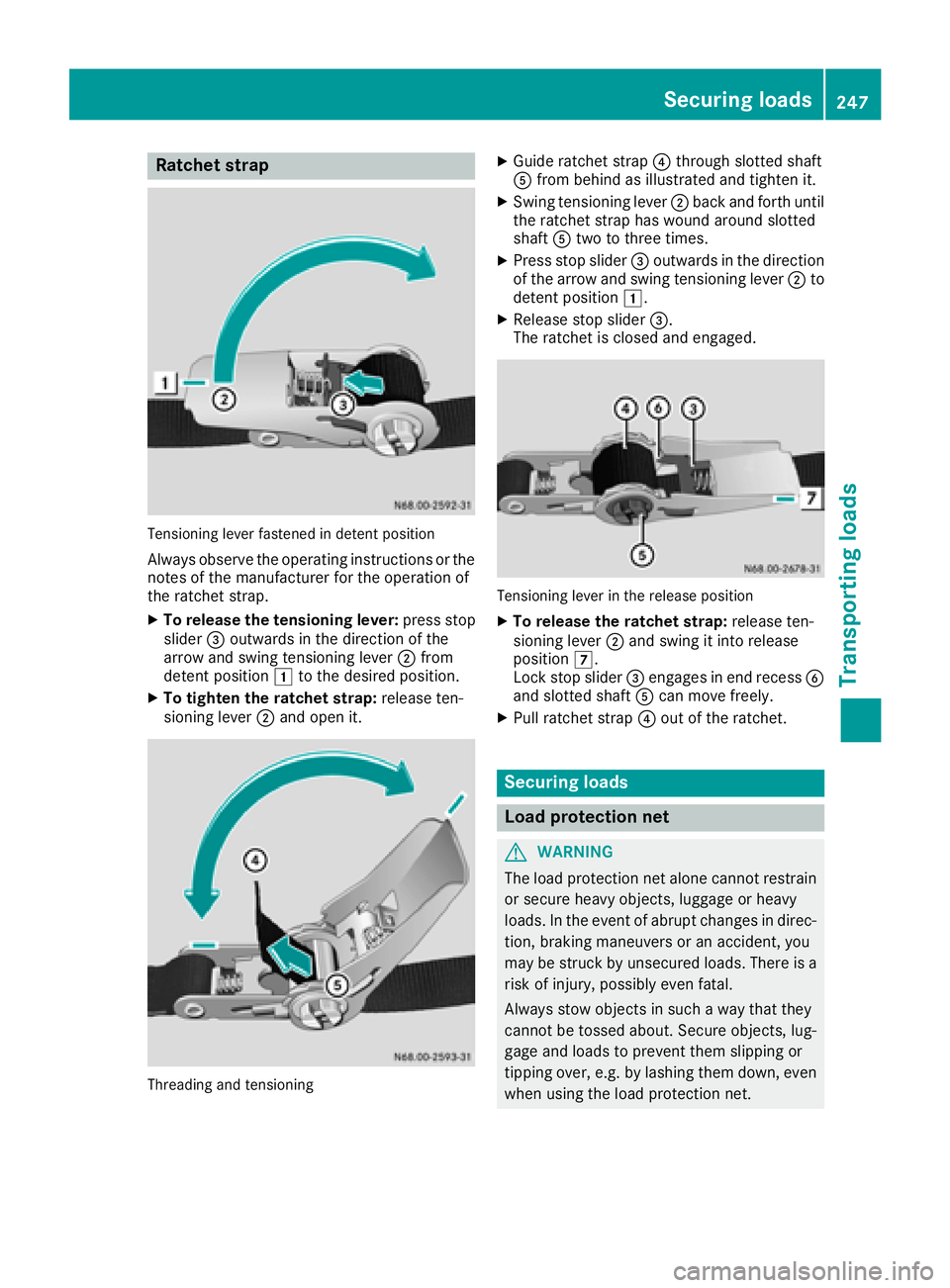
Ratchet strap
Tensioning lever fastened in detent position
Always observe the operating instructions or the
notes of the manufacturer for the operation of
the ratchet strap.
XTo release the tensioning lever:press stop
slider =outwards in the direction of the
arrow and swing tensioning lever ;from
detent position 1to the desired position.
XTo tighten the ratchet strap: release ten-
sioning lever ;and open it.
Threading and tensioning
XGuide ratchet strap ?through slotted shaft
A from behind as illustrated and tighten it.
XSwing tensioning lever ;back and forth until
the ratchet strap has wound around slotted
shaft Atwo to three times.
XPress stop slider =outwards in the direction
of the arrow and swing tensioning lever ;to
detent position 1.
XRelease stop slider =.
The ratchet is closed and engaged.
Tensioning lever in the release position
XTo release the ratchet strap: release ten-
sioning lever ;and swing it into release
position 7.
Lock stop slider =engages in end recess B
and slotted shaft Acan move freely.
XPull ratchet strap ?out of the ratchet.
Securing loads
Load protection net
GWARNING
The load protection net alone cannot restrain
or secure heavy objects, luggage or heavy
loads. In the event of abrupt changes in direc-
tion, braking maneuvers or an accident, you
may be struck by unsecured loads. There is a
risk of injury, possibly even fatal.
Always stow objects in such a way that they
cannot be tossed about. Secure objects, lug-
gage and loads to prevent them slipping or
tipping over, e.g. by lashing them down, even
when using the load protection net.
Securing loads247
Transporting loads
Z