phone MERCEDES-BENZ METRIS 2017 MY17 Operator’s Manual
[x] Cancel search | Manufacturer: MERCEDES-BENZ, Model Year: 2017, Model line: METRIS, Model: MERCEDES-BENZ METRIS 2017Pages: 318, PDF Size: 5.01 MB
Page 238 of 318
XConnect the USB device to the USB portinthe
correct position.
XPress the Õbutton repeatedly, unt ilthe
displ ayinthe menu bar shows USB.
Playback starts.
iDue to the widerange of USB devices avail-
able on the market, playback cannot beguar-
anteed for all USB device brands.
Audio playback from a Bluetooth®
device
Requir ement: the Bluetooth®audio device is
paired and connected to the multimedia system.
XPress theÕbutton repeatedly untilBTAudiois shown in thedispl ay.
XPress the :button repeatedly untilthe
menu bar isselected.
XTo start playback: selectMinthe menu bar.
Playback starts.
XTo stop playback: select¯inthe menu bar.
Playback stops.
Audio playback via the AUX jack
XConnect an external device to the AUX jack.
XPress the Õbutton repeatedly untilthe
displ ay shows Aux.
The multimedia system plays the external
device and produces sound through the loud-
speakers again.
Telephone mode
"999" or "112" emergency call
Making emergency calls without entering a PIN
is only possible using the mob ilephone.
The 999 or112 emergency call number isa
public service. Any misuse ispunishable by law.
Making a call
XPress the%button.
XEnter the desired phone number using the
xtos number keys and the lbut-
ton.
XTo delete individual digits: press theí
button.
XTo delete the entire numerical sequence:
press and hold the íbutton until the
entire numerical sequence isdeleted.
XTo make a call: press the6button.
This initiates dialing.
XTo cancel dialing: press the~button
when dialing.
Navigation system
Important safety notes
GWARNING
If you operate information systems and com-
munication equipment integrated in the veh i-
cle while driving, you will be distracted from
traffic conditions. You could also lose control
of the vehicle. There is a risk of an accident.
Only operate the equipment when the traffic
situation permits. If you are not sure that this
is possible, park the vehicle paying attention
to traff icconditions and operate the equip-
ment when the vehicle isstationary.
Observe the legal requirements for the country
you are in.
The multimedia system calculates the route to
the destination without taking account of the
following, for example:
Rtraff iclights
Rstop and giveway signs
Rparking or stopping restrictions
Rroad narrowing
Rother road and traffic rules and regulations
The multimedia system may provide incorrect
navigation announcements if the surroundings
do not correspond to the data on the digital
map. For example, a route may have been diver-
ted or the direction of a one-way street may have
changed.
For this reason, you must always observe road
and traffic rules and regulations during your
jo urney. Road and traffic rules and regulations
always have priority over the system's driving
recommendations.
236Audio 15
Multimedia systems in brief
Page 240 of 318
Useful information
This Operator's Manual describes all models as
well as standard and optional equipment of your
vehicle that were available at the time of going
to print. Country-specific variations are possi-
ble. Note that your vehicle may not be equipped
with all of the described functions. This also
applies to systems and functions relevant to
safety.
Read the information on qualified specialist
workshops (
Ypage 31).
Stowage spaces and stowage com-
partments
Important safety notes
GWARNING
If you transport objects in the vehicle interior
and these are not adequately secured, they
could slip or be flung around and thereby
strike vehicle occupants. In addition, cup
holders, open stowage spaces and mobile
phone brackets may not always be able to
hold the objects placed in them in the event of
an accident. There is a risk of injury, particu-
larly in the event of sharp braking or sudden
changes of direction.
RAlways stow objects in such a way that they cannot be tossed about in these or similar
situations.
RAlways make sure that objects do not pro-
trude out of the stowage spaces, luggage
nets or stowage nets.
REnsure that closable stowage spaces are
shut before beginning your journey.
RAlways stow and secure heavy, hard, poin-
ted, sharp-edged, fragile or large objects in
the cargo compartment.
Observe the "Loading guidelines" (
Ypage 242).
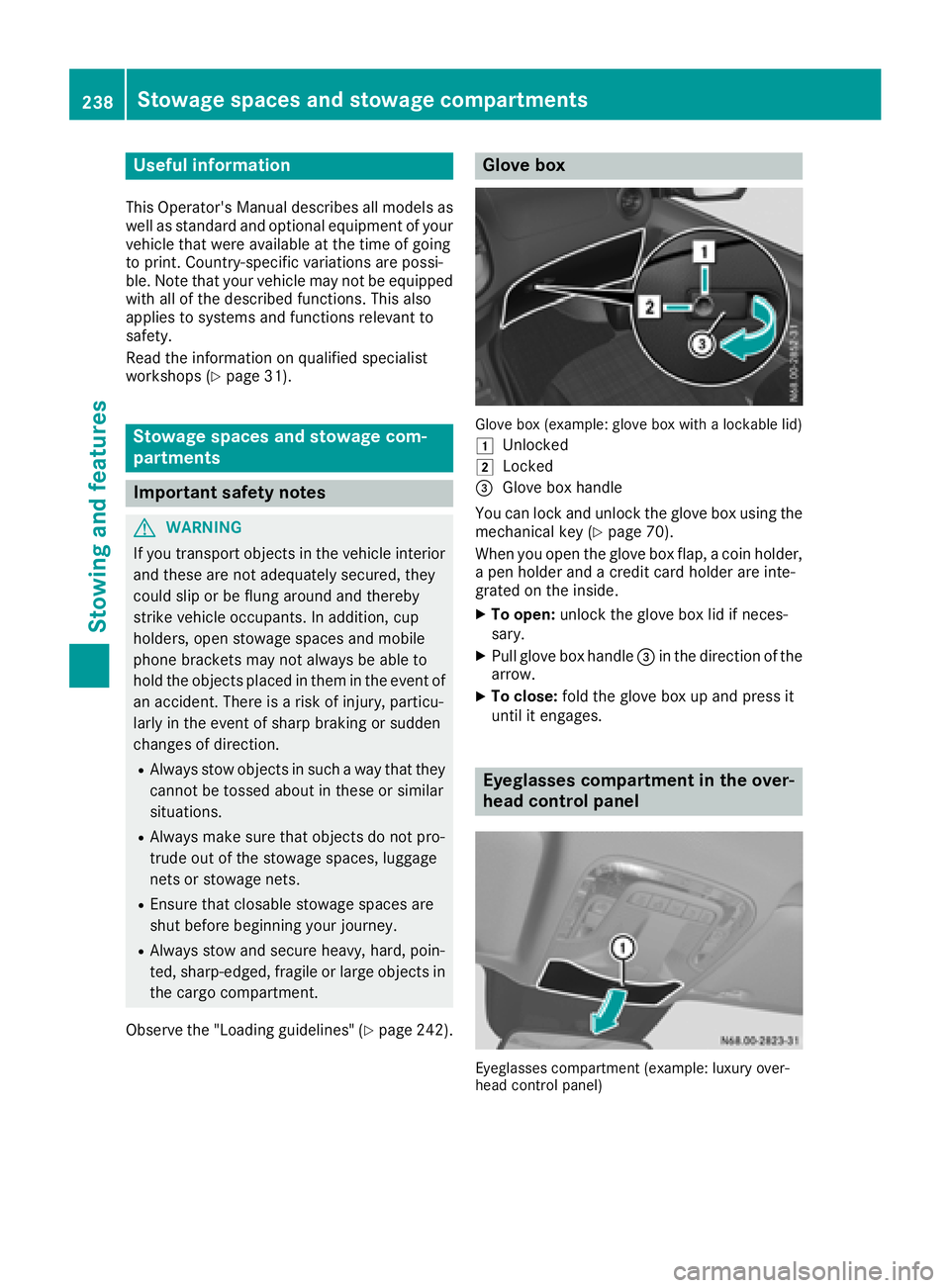
Glove box
Glove box (example: glove box with a lockable lid)
1
Unlocked
2Locked
=Glove box handle
You can lock and unlock the glove box using the mechanical key (
Ypage 70).
When you open the glove box flap, a coin holder,
a pen holder and a credit card holder are inte-
grated on the inside.
XTo open: unlock the glove box lid if neces-
sary.
XPull glove box handle =in the direction of the
arrow.
XTo close: fold the glove box up and press it
until it engages.
Eyeglasses compartment in the over-
head control panel
Eyeglasses compartment (example: luxury over-
head control panel)
238Stowage spaces and stowage compartments
Stowing and features
Page 255 of 318
XOpen the hood (Ypage 251).
XPull out oil dipstick:.
XWipe oil dipstick:using a lint-free cloth.
XInsert oil dipstick :back into the guide tube
as far as it will go and remove it again.
If the level is between MIN mark =and MAX
mark ;, the oil level is adequate.
XIf the oil level has dropped to or below mini-
mum mark =, open cap ?and add engine oil
(
Ypage 253).
The difference in quantity between marks ;
and =is approximately 2 US quarts (2 liters).
XClose the hood.
Adding engine oil
GWARNING
Opening the hood when the engine is over-
heated or when there is a fire in the engine
compartment could expose you to hot gases
or other service products. There is a risk of
injury.
Let an overheated engine cool down before
opening the hood. If there is a fire in the
engine compartment, keep the hood closed
and contact the fire department.
GWARNING
Certain components in the engine compart-
ment, such as the engine, radiator and parts
of the exhaust system, can become very hot.
Working in the engine compartment poses a
risk of injury.
Where possible, let the engine cool down and touch only the components described in the
following.
GWARNING
If engine oil comes into contact with hot com- ponents in the engine compartment, it may
ignite. There is a risk of fire and injury.
Make sure that engine oil is not spilled next to
the filler neck. Let the engine cool down and
thoroughly clean the engine oil off the com-
ponents before starting the engine.
HEnvironmental note
When adding oil, take care not to spill any. If
oil enters the soil or waterways, it is harmful to
the environment.
!Do not add too much oil. adding too much
engine oil can result in damage to the engine
or to the catalytic converter. Have excess
engine oil siphoned off.
!Do not use any additives in the engine oil.
This could damage the engine.
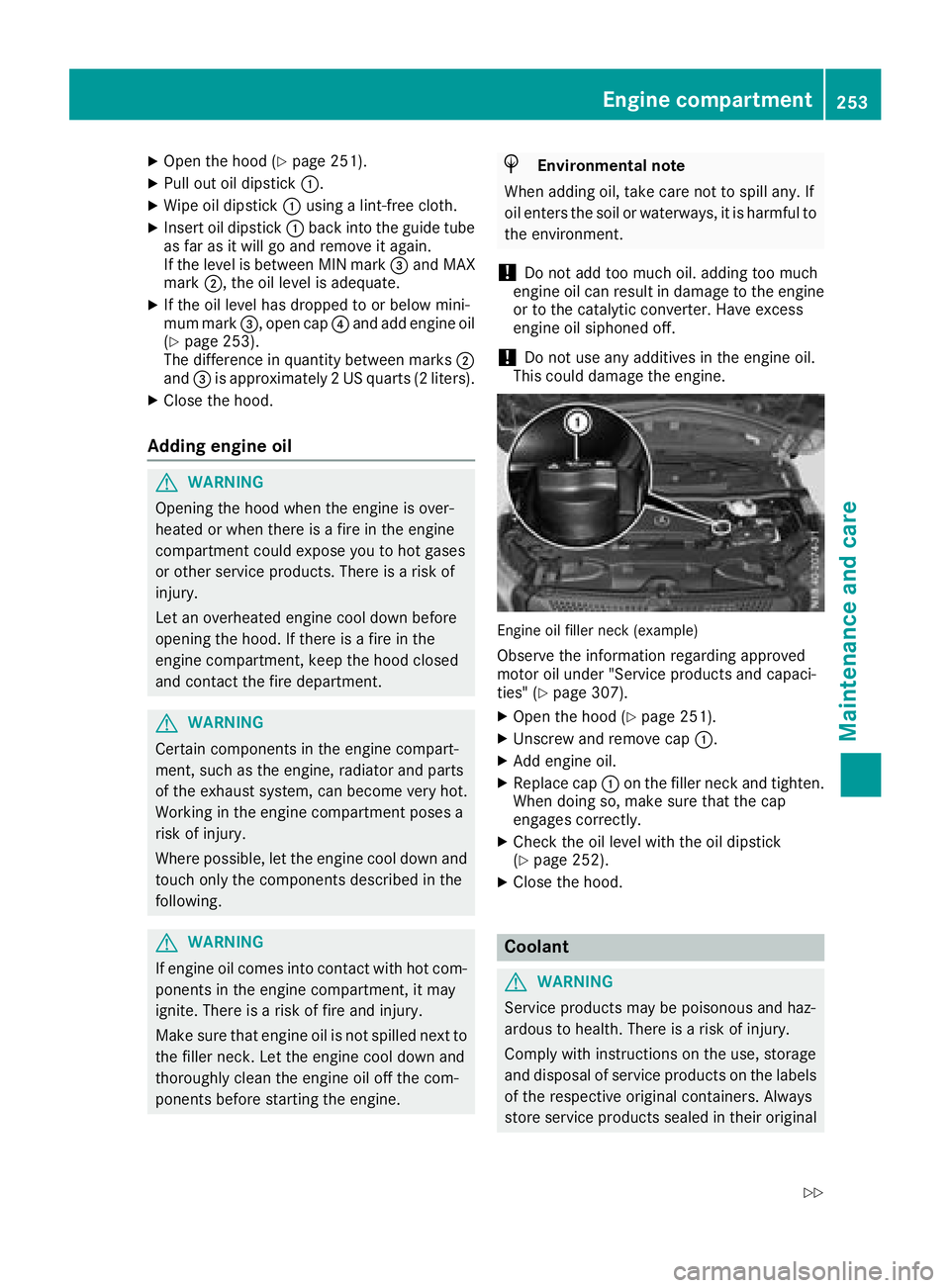
Engine oil filler neck (example)
Observe the information regarding approved
motor oil under "Service products and capaci-
ties" (
Ypage 307).
XOpen the hood (Ypage 251).
XUnscrew and remove cap :.
XAdd engine oil.
XReplace cap:on the filler neck and tighten.
When doing so, make sure that the cap
engages correctly.
XCheck the oil level with the oil dipstick
(Ypage 252).
XClose the hood.
Coolant
GWARNING
Service products may be poisonous and haz-
ardous to health. There is a risk of injury.
Comply with instructions on the use, storage
and disposal of service products on the labels
of the respective original containers. Always
store service products sealed in their original
Engine compartment253
Maintenance and care
Z
Page 274 of 318
XTo remove tools:release clamping strap ;.
XRemove tool holder cover :
XCarefully pull the tool kit and jack out of the
tool holder.
XTo stow tools:before stowing, wind the jack
to the fully closed position and place it so that
the hand wheel is facing forwards and the
plate is facing inwards.
XPlace the jack and vehicle tool kit into the tool
holder.
XReplace tool holder cover :.
XTighten clamping strap;.
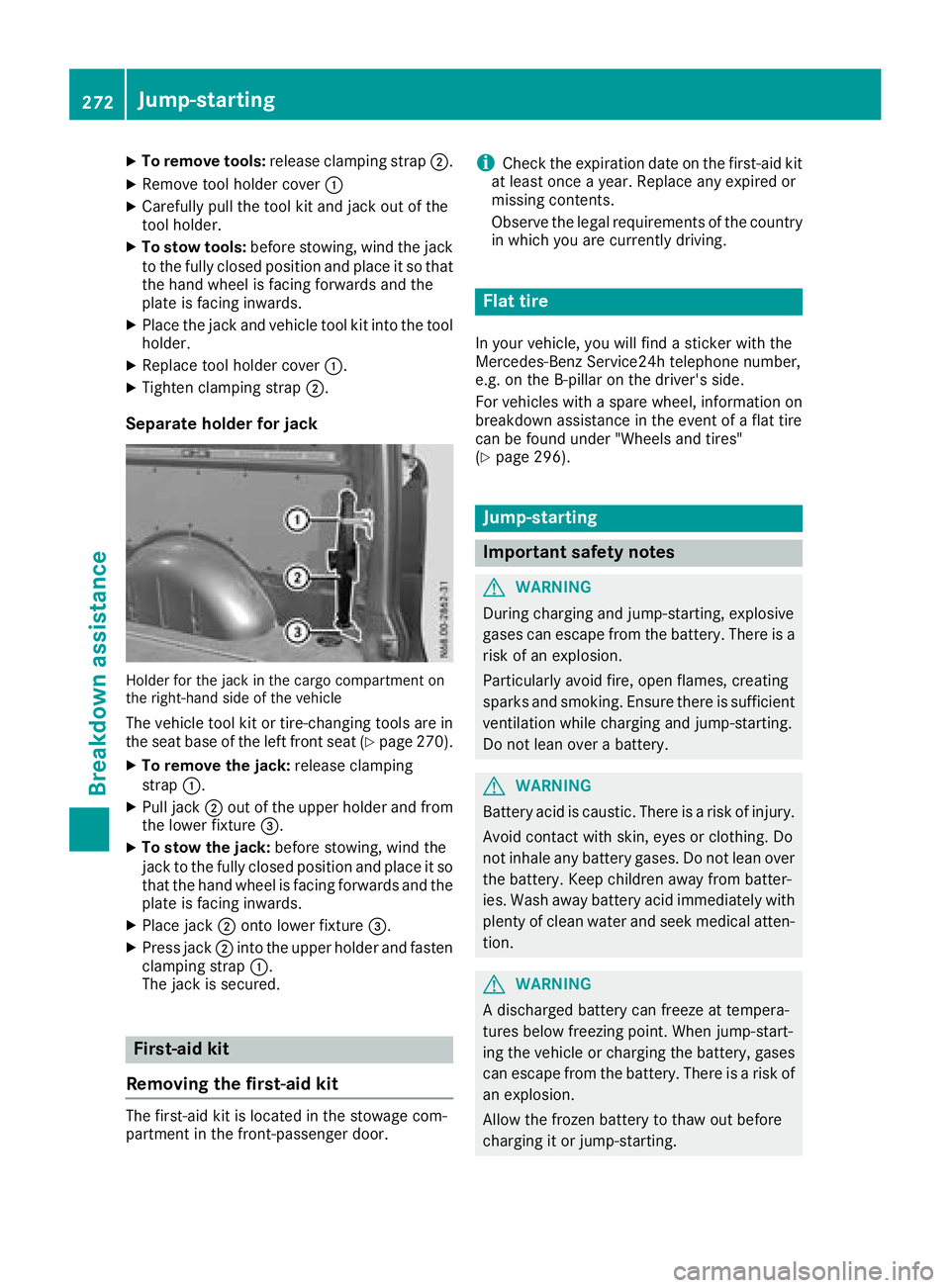
Separate holder for jack
Holder for the jack in the cargo compartment on
the right-hand side of the vehicle
The vehicle tool kit or tire-changing tools are in
the seat base of the left front seat (Ypage 270).
XTo remove the jack:release clamping
strap :.
XPull jack ;out of the upper holder and from
the lower fixture =.
XTo stow the jack: before stowing, wind the
jack to the fully closed position and place it so
that the hand wheel is facing forwards and the plate is facing inwards.
XPlace jack ;onto lower fixture =.
XPress jack;into the upper holder and fasten
clamping strap :.
The jack is secured.
First-aid kit
Removing the first-aid kit
The first-aid kit is located in the stowage com-
partment in the front-passenger door.
iCheck the expiration date on the first-aid kit
at least once a year. Replace any expired or
missing contents.
Observe the legal requirements of the country
in which you are currently driving.
Flat tire
In your vehicle, you will find a sticker with the
Mercedes-Benz Service24h telephone number,
e.g. on the B-pillar on the driver's side.
For vehicles with a spare wheel, information on
breakdown assistance in the event of a flat tire
can be found under "Wheels and tires"
(
Ypage 296).
Jump-starting
Important safety notes
GWARNING
During charging and jump-starting, explosive
gases can escape from the battery. There is a risk of an explosion.
Particularly avoid fire, open flames, creating
sparks and smoking. Ensure there is sufficient
ventilation while charging and jump-starting.
Do not lean over a battery.
GWARNING
Battery acid is caustic. There is a risk of injury.
Avoid contact with skin, eyes or clothing. Do
not inhale any battery gases. Do not lean over
the battery. Keep children away from batter-
ies. Wash away battery acid immediately with
plenty of clean water and seek medical atten-
tion.
GWARNING
A discharged battery can freeze at tempera-
tures below freezing point. When jump-start-
ing the vehicle or charging the battery, gases can escape from the battery. There is a risk of
an explosion.
Allow the frozen battery to thaw out before
charging it or jump-starting.
272Jump-starting
Breakdo wn assis tance
Page 288 of 318
nificantly too low. The tire pressure monitor is
not malfunctioning.
RUSA only: if thehwarning lamp flashes for
60 seconds and then remains lit constantly,
the tire pressure monitor is malfunctioning.
The display also shows a message:
Ron vehicles without steering wheel buttons
(Ypage 201)
Ron vehicles with steering wheel buttons
(Ypage 217)
USA only: if the tire pressure monitor is mal-
functioning, it may be more than ten minutes
before the malfunction is shown. The htire
pressure warning lamp flashes for 60 seconds
and then remains lit. When the malfunction has
been rectified, the htire pressure warning
lamp goes out after a few minutes of driving.
The tire pressure values indicated by the on-
board computer may differ from those meas-
ured at a gas station with a pressure gage. The
tire pressures shown by the on-board computer
refer to those measured at sea level. At high
altitudes, the tire pressure values indicated by a pressure gage are higher than those shown by
the on-board computer. In this case, do not
reduce the tire pressures.
If radio transmitting equipment (e.g. wireless
headphones, two-way radios) is operated inside
the vehicle or in the vicinity of the vehicle, this
can interfere with the operati
on of the tire pres-
sure monitor.
Checking the tire pressure electroni-
cally on vehicles with steering wheel
buttons
You can only check the tire pressure electroni-
cally on vehicles with steering wheel buttons.
Using the steering wheel buttons
XTurn the key to position 2in the ignition lock.
XPress the =or; button to select the
Servicemenu.
XUse the 9or: button to select TirePressure.
XPressato confirm.
The current tire pressure of each wheel is
shown in the display.
If the vehicle has been parked for over
20 minutes, the Tire pressure will be
displayed after driving a few minutesmessage appears. After a teach-in period, the tire pressure monitor
automatically detects new wheels or new sen-
sors. As long as a clear allocation of the tire
pressure value to the individual wheels is not
possible, the
Tire
PressureMonitorActivemessage is shown instead of the tire pressure
display. The tire pressures are already being
monitored.
Tire pressure monitor warning mes-
sages
If the tire pressure monitor detects a loss in
pressure in one or more tires, a warning mes-
sage is shown in the display. The hwarning
lamp lights up.
Vehicles without steering wheel buttons
RIf the Correct Tire Pressuremessage is
shown in the display, the tire pressure in at
least one tire is too low. The tire pressure
must be corrected at the next opportunity.
RIf the CheckTirePressureSoonmessage
is shown in the display, the tire pressure in
one or more tires has dropped significantly.
The tires must be checked.
RIf the Warning Tire Malfunc.message is
shown in the display, the tire pressure in one
or more tires has dropped suddenly. The tires
must be checked.
Vehicles with steering wheel buttons
RIf the Adjust Tire Pressuremessage is
shown in the display, the tire pressure in at
least one tire is too low. The tire pressure
must be corrected at the next opportunity.
RIf the Check Tiresmessage is shown in the
display, the tire pressure in one or more tires has dropped significantly. The tires must be
checked.
RIf the WarningTireMalfunctionmessage
is shown in the display, the tire pressure in
one or more tires has dropped suddenly. The
tires must be checked.
Always read and follow the instructions and
safety notes related to the display messages,
which can be found in the "Tires" section.
Rfor vehicles without steering wheel buttons
(Ypage 201)
Rfor vehicles with steering wheel buttons
(Ypage 217)
Vehicles with steering wheel buttons: if the
wheel positions on the vehicle are rotated, the
tire pressures may be displayed for the wrong
286Tire pressure
Wheels and tires
Page 305 of 318
Useful information
This Operator's Manual describes all models as
well as standard and optional equipment of your
vehicle that were available at the time of going
to print. Country-specific variations are possi-
ble. Note that your vehicle may not be equipped
with all of the described functions. This also
applies to systems and functions relevant to
safety.
Read the information on qualified specialist
workshops (
Ypage 31).
Vehicle electronics
Tampering with the engine electron-
ics
!
Only have engine electronics and the corre-
sponding parts, such as control units, actua-
tors, sensors or connector leads, serviced at a
qualified specialist workshop. Otherwise, the
vehicle parts may wear more quickly. This can
lead to loss of the New Vehicle Limited War-
ranty.
Installing electrical or electronic
equipment
You and others can suffer health-related dam-
age through electromagnetic radiation. By using
an exterior antenna, a possible health risk
caused by electromagnetic fields, as discussed
in scientific circles, is taken into account. Only
have the exterior antenna installed by a qualified specialist workshop.
Electrical and electronic devices may have a
detrimental effect on both the comfort and the
operating safety of the vehicle. If equipment of
this kind is installed, its electromagnetic com-
patibility must be checked and verified.
If these devices are linked to functions associ-
ated with resistance to interference, they must
have type approval. This applies to the device or
its interfaces to the vehicle electronics, e.g.
charging brackets.
A telephone or two-way radio to be installed in
the vehicle must be approved. You can obtain
further information from any Mercedes-Benz
Commercial Van Center. For operation of mobile phones and two-way
radios, Mercedes-Benz recommends connec-
tion to an approved exterior antenna. This is the
only way to ensure optimum reception quality
inside the vehicle and to minimize mutual inter-
ference between the vehicle electronics, mobile
phones and two-way radios.
The transmission output of the mobile phone or
two-way radio may not exceed the following
maximum transmission output (PEAK):
Frequency rangeMaximum trans-
mission output
(PEAK)
Shortwave
(f < 50 MHz)100 W
4 m waveband30 W
2 m waveband50 W
Trunked radio/Tetra35 W
70 cm waveband35 W
GSM/UMTS/LTE10 W
Identification plates
Vehicle identification plate with vehi-
cle identification number (VIN)
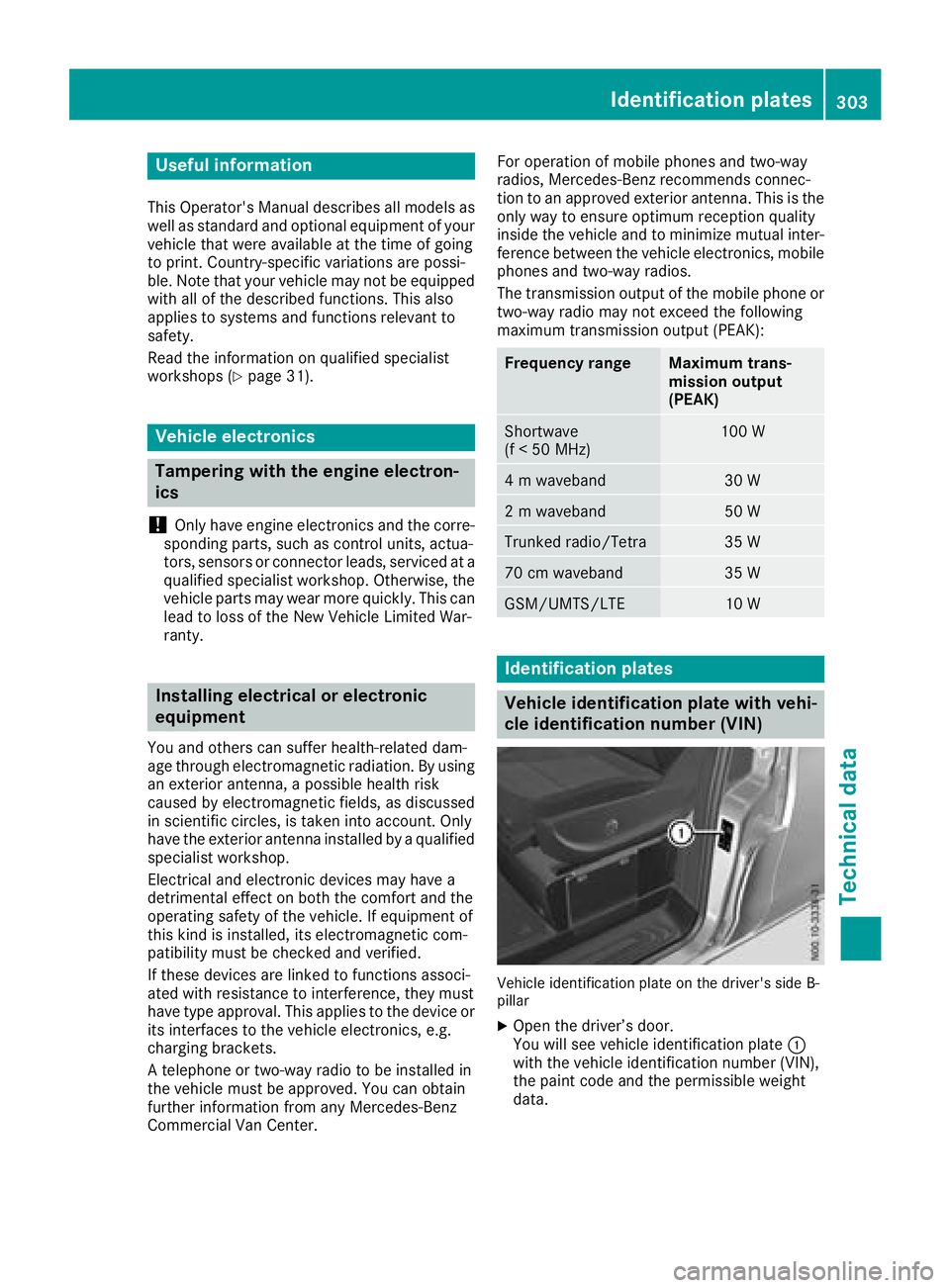
Vehicle identification plate on the driver's side B-
pillar
XOpen the driver’s door.
You will see vehicle identification plate
:
with the vehicle identification number (VIN),
the paint code and the permissible weight
data.
Identification plates303
Technical data
Page 309 of 318
The following components of the different vehi-
cle versions influence fuel consumption:
Rtire sizes, tire tread, tire pressure, tire condi-
tion
Rtransmission ratios for the drive assemblies
Radditional equipment (e.g. air-conditioning
system, auxiliary heating system)
For these reasons, the actual consumption fig-
ures for your vehicle may deviate from the con-
sumption figures determined according to EU
Directive 80/1268/EE C.
Details on fuel consumption can be called up in
the on-board computer:
Ron vehicles without steering wheel buttons
(Ypage 172)
Ron vehicles with steering wheel buttons
(Ypage 179)
Engine oil
General notes
When handling engine oil, observe the important
safety notes on operating fluids (Ypage 304).
The quality of the engine oil used is of decisive
importance for the engine's functionality and
operating life. Mercedes-Benz continually
approves engine oils based on complex experi-
ments according to the current state of the art. Therefore, only Mercedes-Benz approved
engine oils may be used in Mercedes-Benz
engines. Mercedes-Benz recommends having
the oil changed at a qualified specialist work-
shop. Information about engine oils approved by
Mercedes-Benz can be obtained:
Rfrom any Mercedes-Benz Commercial Van
Center
Ron the Internet at
http://bevo.mercedes-benz.co
mbyenterin g
th edesignation ,e.g. 229.5.
Mercedes-Ben zapprova lis indicate don th eoil
container by th einscription „MB-Freigabe “or
„MB Approval“ and th ecorrespondin gdesigna-
tion ,e.g. MB-Freigabe or MB Approval 229.5.
Designation sof th eapprove dengin eoils for
your vehicl e
MB-Freigabe or MB
Approval229.5
Mercedes-Ben zrecommends that you only use
approve dmultigrade engin eoils of th eSA E
classe sSA E0W-30 and SA E0W-40 or
SA E5W-30 and SA E5W-40. These engin eoils
ensur eoptimum lubrication eve nat ver ylow
outside temperatures (
Ypage 308).
Whe ntoppin gup, we recommen dthat you only
use engin eoil of th esam egrade (MB-Freigabe
or MB Approvaldesignation )and SA Eclass as
th eoil filled at th elast oil change.
iIf th eengin eoils listed in th etable are no t
available, you may add th efollowin gengin e
oils until th enext oil change:
RMB-Freigabe or MB Approval 229.1, or
ACE AA3
This mus tonly be added once and th eamount
mus tno tbe greate rthan 1qt (1. 0l).
Subsequentl yhav eth eengin eoil changed at
th eearliest possibl eopportunity.
!Using engin eoils of another grade qualit yis
no tpermitted.
Capacities
!Do no tadd to omuc hoil. addin gto omuc h
engin eoil can result in damage to th eengin e
or to th ecatalytic converter. Hav eexcess
engin eoil siphoned off .
Oil change includin goil filter
Engin eoilApprox. 2US gal
(7.75 l)
Service products and capacities307
Technical data
Z