warning light MERCEDES-BENZ METRIS 2017 MY17 Operator’s Manual
[x] Cancel search | Manufacturer: MERCEDES-BENZ, Model Year: 2017, Model line: METRIS, Model: MERCEDES-BENZ METRIS 2017Pages: 318, PDF Size: 5.01 MB
Page 66 of 318
the electric sliding door using the corresponding
ÅorÆ sliding door button in the center
console (
Ypage 77).
Pets in the vehicle
GWARNING
If you leave animals unattended or unsecured
in the vehicle, they could press buttons or
switches, for example.
As a result, they could:
Ractivate vehicle equipment and become
trapped, for example
Ractivate or deactivate systems, thereby
endangering other road users
Unsecured animals could also be flung around
the vehicle in the event of an accident or sud-
den steering or braking, thereby injuring vehi-
cle occupants. There is a risk of an accident
and injury.
Never leave animals unattended in the vehi-
cle. Always secure animals properly during
the journey, e.g. use a suitable animal trans-
port box.
Driving safety systems
Overview
In this section, you will find information about
the following driving safety systems:
REBD ( Electronic Brake Force Distribution)
RABS ( Anti-lock Braking System)
RBAS ( Brake Assist System)
RESP®(E lectronic Stability Program)
Important safety notes
If you fail to adapt your driving style or if you are
inattentive, the driving safety systems can nei-
ther reduce the risk of accident nor override the
laws of physics. Driving safety systems are
merely aids designed to assist driving. You are
responsible for the distance to the vehicle in
front, for vehicle speed, braking in good time
and for staying in your lane. Always adapt your driving style to the prevailing road and weather
conditions and maintain a sufficient, safe dis-
tance from other road users. Drive carefully.
Please note that the driving safety systems
described only work optimally when:
Rthere is adequate contact between the tires
and the road surface
Ryou use winter tires (M+S tires), with snow
chains if necessary, when the road conditions
are wintry
Rthe speed information determined by the
vehicle is within the legally prescribed display
accuracy
Pay particular attention to the information
regarding tires, tire tread and winter operation
under "Wheels and tires" (
Ypage 277).
ABS (Anti-lock Braking System)
General notes
ABS regulates brake pressure in such a way that the wheels do not lock when you brake. This
allows you to continue steering the vehicle when
braking.
The ò warning lamp in the instrument cluster
lights up when the ignition is switched on. The
lamp goes out when the engine starts running.
Important safety notes
Observe the important safety guidelines for the
driving safety system (Ypage 64).
ABS works from a speed of about 5 mph
(8 km/h), regardless of road-surface conditions. ABS works on slippery surfaces, even when you
only brake gently.
GWARNING
If ABS is faulty, the wheels could lock when
braking. The steerability and braking charac-
teristics may be severely impaired. Addition-
ally, further driving safety systems are deac-
tivated. There is an increased danger of skid-
ding and accidents.
Drive on carefully. Have ABS checked imme-
diately at a qualified specialist workshop.
If ABS is malfunctioning, the òwarning lamp
(
Ypage 222) lights up while the engine is run-
ning and the display shows a message:
64Driving safet ysystem s
Safety
Page 67 of 318
Ron vehicles without steering wheel buttons
(Ypage 190)
Ron vehicles with steering wheel buttons
(Ypage 204)
BAS, Hill Start Assist and ESP®and its driving
safety systems and other driving systems also
fail. Observe the notes on the òwarning
lamp and the display messages.
Braking
If ABS intervenes when braking, you will feel a
pulsating in the brake pedal.
The pulsating brake pedal can be an indication
of hazardous road conditions and functions as a
reminder to take extra care while driving.
XIf ABS intervenes: continue to depress the
brake pedal with force until the braking sit-
uation is over.
XTo make a full brake application: depress
the brake pedal with full force.
BAS (Brake Assist System)
General notes
BAS operates in emergency braking situations.
If you depress the brake pedal quickly, BAS
automatically boosts the braking force, thus
shortening the stopping distance.
Important safety notes
Observe the important safety guidelines for the
driving safety system (Ypage 64).
GWARNING
If BAS is malfunctioning, the braking distance
in an emergency braking situation is
increased. There is a risk of an accident.
In an emergency braking situation, depress
the brake pedal with full force. ABS prevents
the wheels from locking.
If BAS is malfunctioning, the ÷warning lamp
lights up while the engine is running
(
Ypage 222) and the display shows a message:
Ron vehicles without steering wheel buttons
(Ypage 194)
Ron vehicles with steering wheel buttons
(Ypage 208)
Brakes
XKeep the brake pedal firmly depressed until
the emergency braking situation is over.
ABS prevents the wheels from locking.
The brakes will function as usual once you
release the brake pedal. BAS is deactivated.
EBD (electronic brake force distribu-
tion)
General notes
EBD monitors and controls the brake pressure
to the rear wheels. This enables EBD to improve
handling during braking.
Important safety notes
Observe the important safety guidelines for the
driving safety system (Ypage 64).
GWARNING
If EBD is malfunctioning, the rear wheels can
lock, e.g. under full braking. This increases the
risk of skidding and an accident.
You should therefore adapt your driving style
to the different handling characteristics. Have
the brake system checked at a qualified spe-
cialist workshop.
If EBD is malfunctioning, the $warning lamp
(
Ypage 221) lights up while the engine is run-
ning and the display shows a message.
Ron vehicles without steering wheel buttons
(Ypage 193)
Ron vehicles with steering wheel buttons
(Ypage 207)
Other driving systems and driving safety sys-
tems then also fail.
ESP®(Electronic Stability Program)
General notes
ESP®monitors driving stability and detects a
tendency of the vehicle to understeer or over-
steer (skidding) in good time. If ESP
®detects
that the vehicle is deviating from the direction
desired by the driver, one or more wheels are
braked to stabilize the vehicle. The engine out-
Driving safety systems65
Safety
Z
Page 68 of 318
put is also modified to keep the vehicle on the
desired course within physical limits. ESP®can
also stabilize the vehicle during braking.
ESP
®also monitors traction, i.e. power trans-
mission between the tires and the road surface.
The integrated traction control supports you
when pulling away or accelerating on wet, slip-
pery or slick roads. Should the drive wheels spin,
traction control brakes them individually. In
addition, greater drive torque is transmitted to
the wheel or wheels with traction. If traction on
the road surface is not sufficient, even ESP
®will
not allow you to pull away without difficulty. The
type of tires and total weight of the vehicle as
well as the gradient of the road also play a cru-
cial role. Traction control remains active if you
deactivate ESP
®.
If the h warning lamp in the instrument clus-
ter goes out before beginning the journey, ESP
®
is automatically active.
The h warning lamp in the instrument cluster
flashes when ESP
®intervenes:
XDo not deactivate ESP®under any circum-
stances.
Xwhen driving off, apply as little throttle as
possible.
Xadapt your speed and driving style to the pre-
vailing road conditions.
Important safety notes
Observe the important safety guidelines for the
driving safety system (Ypage 64).
GWARNING
If ESP
®is malfunctioning it will not provide
any vehicle stabilization. There is an increased
risk of skidding or of an accident.
Exercise caution when continuing to drive.
Have ESP
®checked at a qualified specialist
workshop.
!Do not run the vehicle on a roller dynamom-
eter (e.g. for performance tests). If you must
operate the vehicle on a roller dynamometer,
please consult a qualified specialist workshop
in advance. You could otherwise damage the
drive train or the brake system.
If ESP
®is malfunctioning, the hwarning
lamp (Ypage 222) lights up continuously while the engine is running and the display shows a
message.
Ron vehicles without steering wheel buttons
(Ypage 194)
Ron vehicles with steering wheel buttons
(Ypage 208)
ESP®is deactivated if the åwarning lamp in
the instrument cluster is lit when the engine is
running.
Only use wheels with the recommended tire
sizes. Only then will ESP
®function properly.
Deactivating or activating ESP®
GWARNING
If you deactivate ESP
®, ESP®no longer sta-
bilizes the vehicle. There is an increased risk
of skidding and an accident.
Only deactivate ESP
®in the situations descri-
bed in the following.
It may be best to deactivate ESP
®in the follow-
ing situations:
Rwhen using snow chains
Rin deep snow
Ron sand or gravel
Activate ESP®as soon as the situations descri-
bed above no longer apply. Otherwise, ESP®
assistance for stabilizing the vehicle will remain significantly reduced, even if the vehicle starts
to skid.
If you deactivate ESP
®:
Rthe å warning lamp in the instrument clus-
ter lights up
Rthe ÷ warning lamp in the instrument clus-
ter flashes if the wheels are spinning
RESP®assistance for stabilizing the vehicle in
the lower speed range up to approximately
37 mph (60 km/h) is significantly reduced
Rengine torque is no longer limited and the
drive wheels are able to spin. The spinning of
the wheels results in a cutting action for bet-
ter traction on loose surfaces
Rtraction control is still activated
RESP®still provides support when you brake
66Driving safety systems
Safety
Page 69 of 318
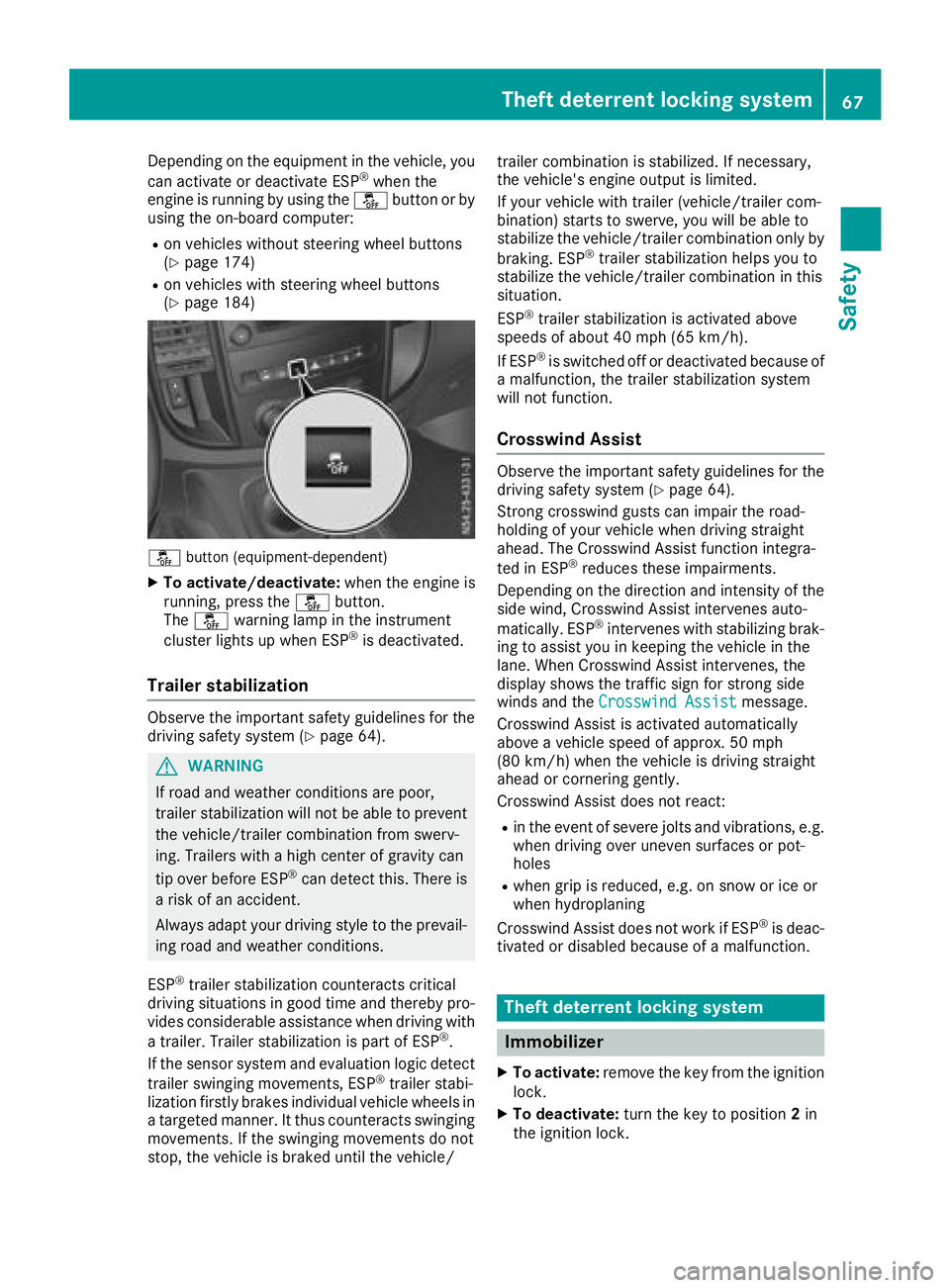
Depending on the equipment in the vehicle, you
can activate or deactivate ESP®when the
engine is running by using the åbutton or by
using the on-board computer:
Ron vehicles without steering wheel buttons
(Ypage 174)
Ron vehicles with steering wheel buttons
(Ypage 184)
å button (equipment-dependent)
XTo activate/deactivate: when the engine is
running, press the åbutton.
The å warning lamp in the instrument
cluster lights up when ESP
®is deactivated.
Trailer stabilization
Observe the important safety guidelines for the
driving safety system (Ypage 64).
GWARNING
If road and weather conditions are poor,
trailer stabilization will not be able to prevent
the vehicle/trailer combination from swerv-
ing. Trailers with a high center of gravity can
tip over before ESP
®can detect this. There is
a risk of an accident.
Always adapt your driving style to the prevail-
ing road and weather conditions.
ESP
®trailer stabilization counteracts critical
driving situations in good time and thereby pro- vides considerable assistance when driving with
a trailer. Trailer stabilization is part of ESP
®.
If the sensor system and evaluation logic detect
trailer swinging movements, ESP
®trailer stabi-
lization firstly brakes individual vehicle wheels in
a targeted manner. It thus counteracts swinging
movements. If the swinging movements do not
stop, the vehicle is braked until the vehicle/ trailer combination is stabilized. If necessary,
the vehicle's engine output is limited.
If your vehicle with trailer (vehicle/trailer com-
bination) starts to swerve, you will be able to
stabilize the vehicle/trailer combination only by
braking. ESP
®trailer stabilization helps you to
stabilize the vehicle/trailer combination in this
s
ituation.
ESP
®trailer stabilization is activated above
speeds of about 40 mph (65 km/h).
If ESP
®is switched off or deactivated because of
a malfunction, the trailer stabilization system
will not function.
Crosswind Assist
Observe the important safety guidelines for the
driving safety system (Ypage 64).
Strong crosswind gusts can impair the road-
holding of your vehicle when driving straight
ahead. The Crosswind Assist function integra-
ted in ESP
®reduces these impairments.
Depending on the direction and intensity of the
side wind, Crosswind Assist intervenes auto-
matically. ESP
®intervenes with stabilizing brak-
ing to assist you in keeping the vehicle in the
lane. When Crosswind Assist intervenes, the
display shows the traffic sign for strong side
winds and the Crosswind Assist
message.
Crosswind Assist is activated automatically
above a vehicle speed of approx. 50 mph
(80 km/h) when the vehicle is driving straight
ahead or cornering gently.
Crosswind Assist does not react:
Rin the event of severe jolts and vibrations, e.g.
when driving over uneven surfaces or pot-
holes
Rwhen grip is reduced, e.g. on snow or ice or
when hydroplaning
Crosswind Assist does not work if ESP
®is deac-
tivated or disabled because of a malfunction.
Theft deterrent locking system
Immobilizer
XTo activate: remove the key from the ignition
lock.
XTo deactivate: turn the key to position 2in
the ignition lock.
Theft deterrent locking system67
Safety
Z
Page 71 of 318
Useful information
This Operator's Manual describes all models as
well as standard and optional equipment of your
vehicle that were available at the time of going
to print. Country-specific variations are possi-
ble. Note that your vehicle may not be equipped
with all of the described functions. This also
applies to systems and functions relevant to
safety.
Read the information on qualified specialist
workshops (
Ypage 31).
Key
Important safety notes
GWARNING
If children are left unsupervised in the vehicle,
they could:
Ropen the doors, thus endangering other
people or road users.
Rget out and disrupt traffic.
Roperate the vehicle's equipment.
Additionally, children could set the vehicle in
motion if, for example, they:
Rrelease the parking brake.
Rshifting the automatic transmission out of
park position P
RStart the engine.
There is a risk of an accident and injury.
When leaving the vehicle, always take the
SmartKey with you and lock the vehicle. Never
leave children or animals unattended in the
vehicle. Always keep the SmartKey out of
reach of children.
GWARNING
If you attach heavy or large objects to the
SmartKey, the SmartKey could be uninten-
tionally turned in the ignition lock. This could
cause the engine to be switched off. There is a risk of an accident.
Do not attach any heavy or large objects to the
SmartKey. Remove any bulky key rings before
inserting the SmartKey into the ignition lock.
!Keep the SmartKey away from strong mag-
netic fields. Otherwise, the remote control
function could be affected.
Strong magnetic fields can occur in the vicin-
ity of powerful electrical installations.
Do not keep the key:
Rwith electronic devices, e.g. a mobile phone
or another key
Rwith metallic objects, e.g. coins or metal foil
Rin metallic objects, e.g. metal cases
This can affect the key's functionality.
Key functions
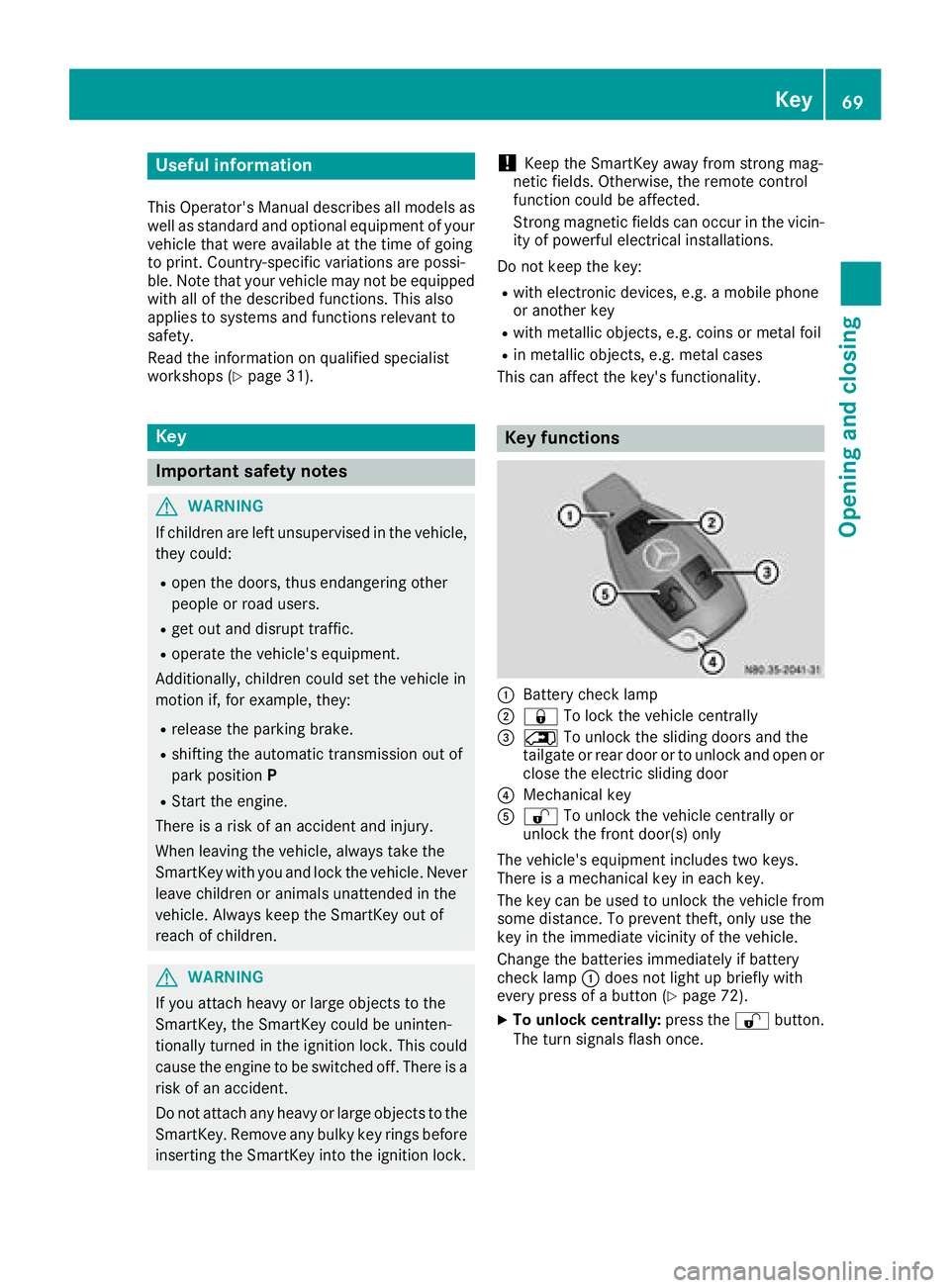
:Battery check lamp
;& To lock the vehicle centrally
=5To unlock the sliding doors and the
tailgate or rear door or to unlock and open or
close the electric sliding door
?Mechanical key
A% To unlock the vehicle centrally or
unlock the front door(s) only
The vehicle's equipment includes two keys.
There is a mechanical key in each key.
The key can be used to unlock the vehicle from
some distance. To prevent theft, only use the
key in the immediate vicinity of the vehicle.
Change the batteries immediately if battery
check lamp :does not light up briefly with
every press of a button (
Ypage 72).
XTo unlock centrally: press the%button.
The turn signals flash once.
Key69
Opening and closing
Z
Page 73 of 318
Removing the mechanical key
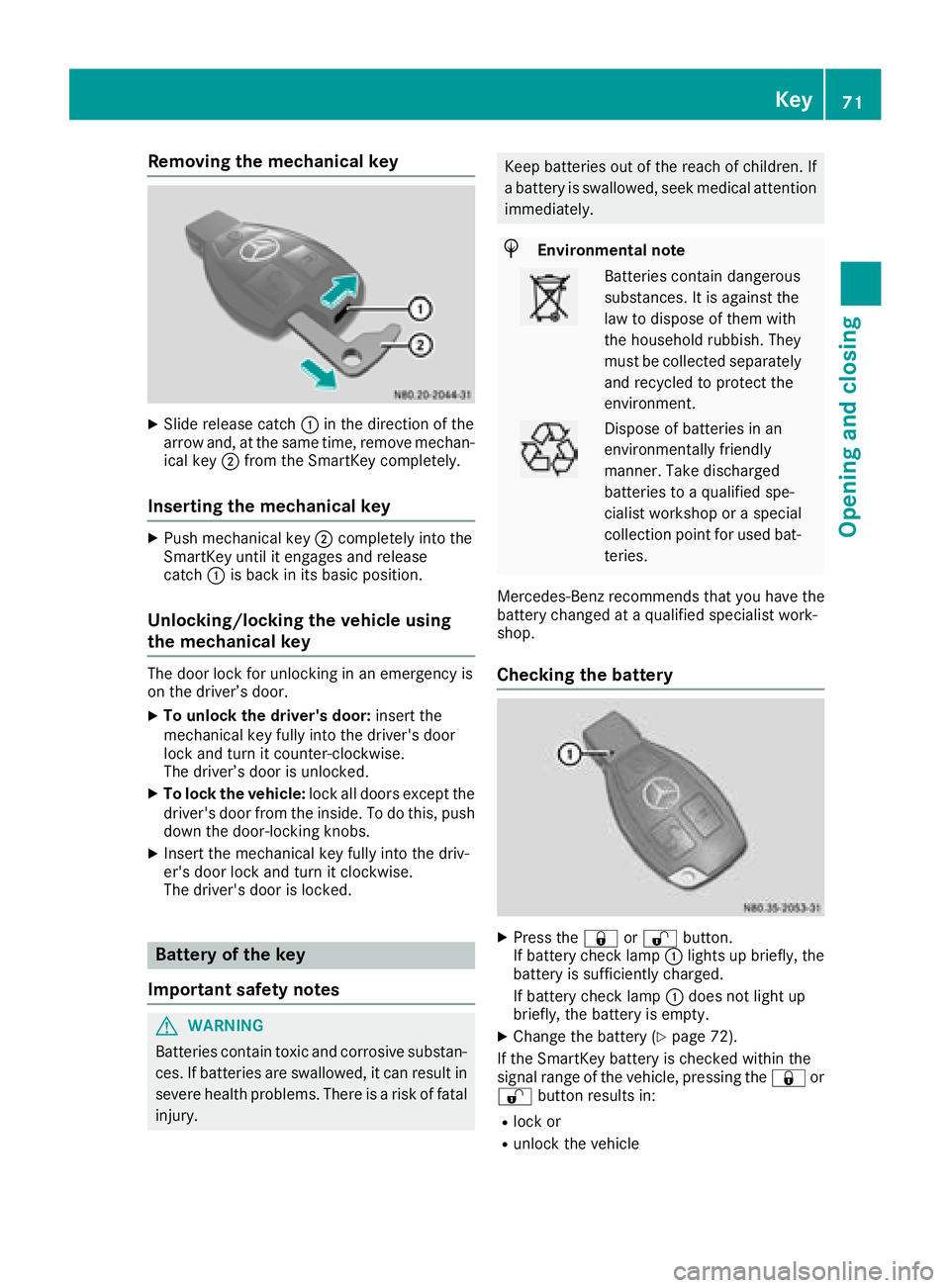
XSlide release catch:in the direction of the
arrow and, at the same time, remove mechan-
ical key ;from the SmartKey completely.
Inserting the mechanical key
XPush mechanical key ;completely into the
SmartKey until it engages and release
catch :is back in its basic position.
Unlocking/locking the vehicle using
the mechanical key
The door lock for unlocking in an emergency is
on the driver’s door.
XTo unlock the driver's door: insert the
mechanical key fully into the driver's door
lock and turn it counter-clockwise.
The driver’s door is unlocked.
XTo lock the vehicle: lock all doors except the
driver's door from the inside. To do this, push
down the door-locking knobs.
XInsert the mechanical key fully into the driv-
er's door lock and turn it clockwise.
The driver's door is locked.
Battery of the key
Important safety notes
GWARNING
Batteries contain toxic and corrosive substan- ces. If batteries are swallowed, it can result in
severe health problems. There is a risk of fatalinjury.
Keep batteries out of the reach of children. If
a battery is swallowed, seek medical attention
immediately.
HEnvironmental note
Batteries contain dangerous
substances. It is against the
law to dispose of them with
the household rubbish. They
must be collected separately and recycled to protect the
environment.
Dispose of batteries in an
environmentally friendly
manner. Take discharged
batteries to a qualified spe-
cialist workshop or a special
collection point for used bat-
teries.
Mercedes-Benz recommends that you have the
battery changed at a qualified specialist work-
shop.
Checking the battery
XPress the &or% button.
If battery check lamp :lights up briefly, the
battery is sufficiently charged.
If battery check lamp :does not light up
briefly, the battery is empty.
XChange the battery (Ypage 72).
If the SmartKey battery is checked within the
signal range of the vehicle, pressing the &or
% button results in:
Rlock or
Runlock the vehicle
Key71
Opening and closing
Z
Page 75 of 318
ProblemPossible causes/consequences andMSolutions
The SmartKey is faulty.
XLock the vehicle with the mechanical key (Ypage 71).
XHave the SmartKey checked at a qualified specialist workshop.
The engine cannot be
started using the Smart-
Key.The on-board voltage is too low.
XSwitch off all non-essential consumers, such as interior lighting, and
try to start the engine again.
If this does not work:
XCheck the starter battery and charge it if necessary (Ypage 262).
or
XJump-start the vehicle (Ypage 272).
or
XConsult a qualified specialist workshop.
You have lost a Smart-
Key.XHave the SmartKey deactivated at a qualified specialist workshop.
XReport the loss immediately to the vehicle insurers.
XIf necessary, have the mechanical locks replaced.
You have lost the
mechanical key.XReport the loss immediately to the vehicle insurers.
XIf necessary, have the mechanical locks replaced.
Central locking
Important safety notes
GWARNING
If children are left unsupervised in the vehicle,
they could:
Ropen the doors, thus endangering other
people or road users.
Rget out and disrupt traffic.
Roperate the vehicle's equipment.
Additionally, children could set the vehicle in
motion if, for example, they:
Rrelease the parking brake.
Rshifting the automatic transmission out of
park position P
RStart the engine.
There is a risk of an accident and injury.
When leaving the vehicle, always take the
SmartKey with you and lock the vehicle. Never
leave children or animals unattended in the
vehicle. Always keep the SmartKey out of
reach of children.
GWARNING
If persons, particularly children are subjected to prolonged exposure to extreme heat or
cold, there is a risk of injury, possibly even
fatal. Never leave children unattended in the
vehicle.
You can open a locked door from the inside at
any time. For the sliding doors, the child-proof
locks must be deactivated.
Centrally locking and unlocking the
vehicle from the inside
You can centrally lock and unlock the whole
vehicle from the inside using the central locking
buttons on the driver's door.
Central locking73
Opening and closing
Z
Page 78 of 318
You must reset the electric sliding door if there
has been a malfunction or an interruption in the
voltage supply (
Ypage 78).
iPlease note, if the child-proof locks have
been activated, you cannot open the sliding
door from the inside. You can only open a
sliding door from the inside if the child-proof
locks have not been activated. Further infor-
mation can be found under "Child-proof locks
for the sliding door" (
Ypage 63) and "Open-
ing/closing from the inside" (Ypage 77).
Obstacle detection with reversing
feature
The sliding door is equipped with automatic
obstacle detection with reversing feature. If a
solid object blocks or restricts the sliding door
during the automatic closing process, the slid-
ing door opens again automatically. If the sliding
door is obstructed during the opening proce-
dure, it moves back a few centimeters in the
opposite direction and stops.
Automatic obstacle detection with reversing
feature is only an aid. It is not a substitute for
your attentiveness when closing the electrical
sliding door.
If an obstacle is detected, the display shows the
Left-hand Electric Sliding Door
ObstructionDetectedmessage for example,
and five warning tones sound.
GWARNING
The reversing feature does not react:
Rto soft, light and thin objects, e.g. small fin-
gers
Rover the last 8 mm of the closing movement
This means that the reversing feature cannot
prevent someone being trapped in these sit-
uations. There is a risk of injury.
When closing, make sure that no-one has any
parts of the body within the closing area.
If someone is trapped:
Rpress the 5button on the SmartKey, or
Rpull the exterior door handle, or
Rpress the corresponding sliding door but-
ton in the center console, or
Rpress the button on the door frame, or
Rpull the rocker switch on door handle
Opening/closing from the outside
The sliding door is equipped with an active
retainer, which engages the door at the end stop
when opened.
If the vehicle is equipped with two electric slid-
ing doors; the 5button on the SmartKey can
only be used to open or close one of the two
sliding doors (
Ypage 78).
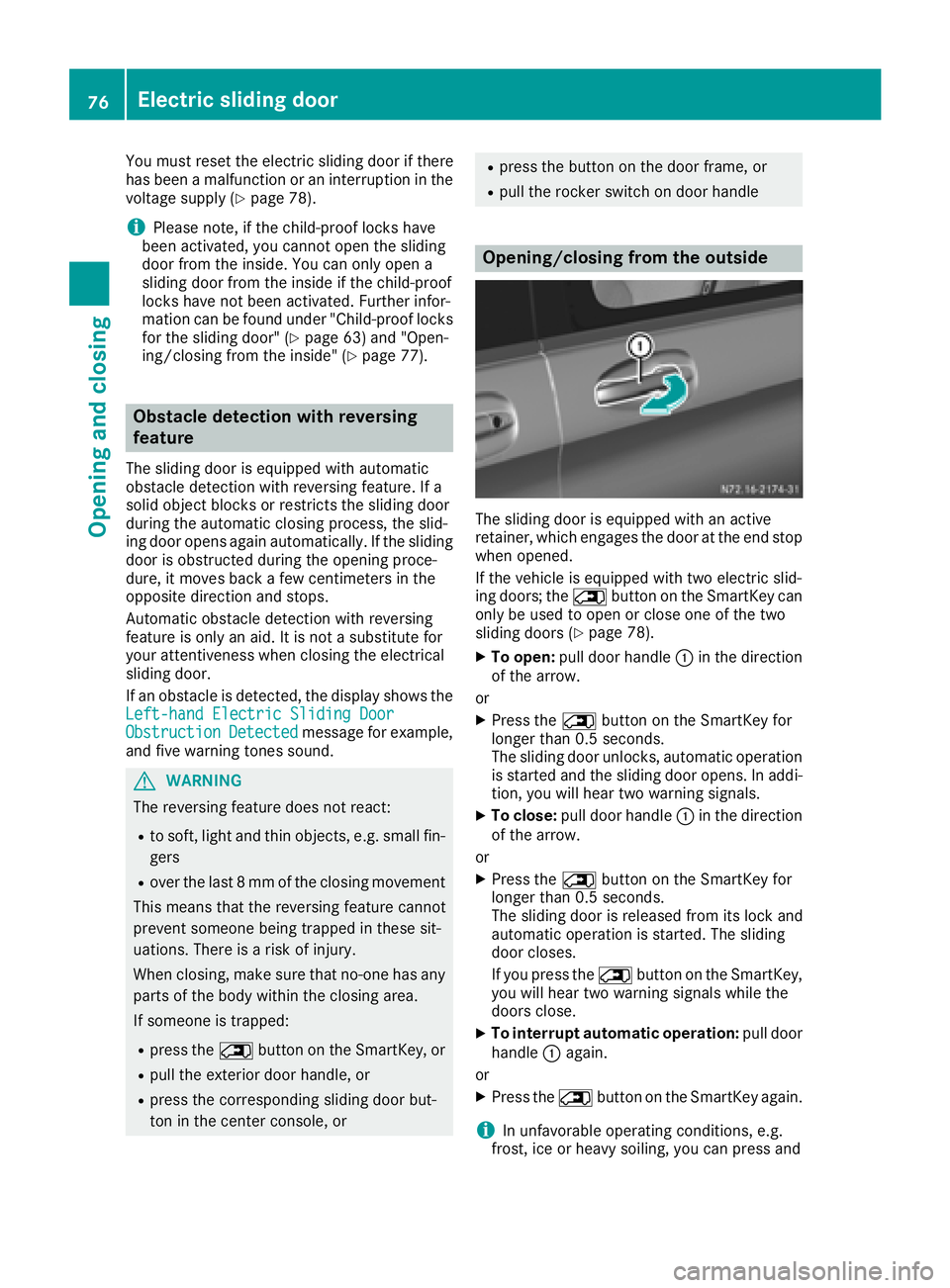
XTo open: pull door handle :in the direction
of the arrow.
or
XPress the 5button on the SmartKey for
longer than 0.5 seconds.
The sliding door unlocks, automatic operation
is started and the sliding door opens. In addi-
tion, you will hear two warning signals.
XTo close: pull door handle :in the direction
of the arrow.
or
XPress the 5button on the SmartKey for
longer than 0.5 seconds.
The sliding door is released from its lock and
automatic operation is started. The sliding
door closes.
If you press the 5button on the SmartKey,
you will hear two warning signals while the
doors close.
XTo interrupt automatic operation: pull door
handle :again.
or
XPress the 5button on the SmartKey again.
iIn unfavorable operating conditions, e.g.
frost, ice or heavy soiling, you can press and
76Electric sliding door
Opening and closing
Page 81 of 318
You will find details of the tailgate opening
dimensions under "Technical data"
(
Ypage 311).
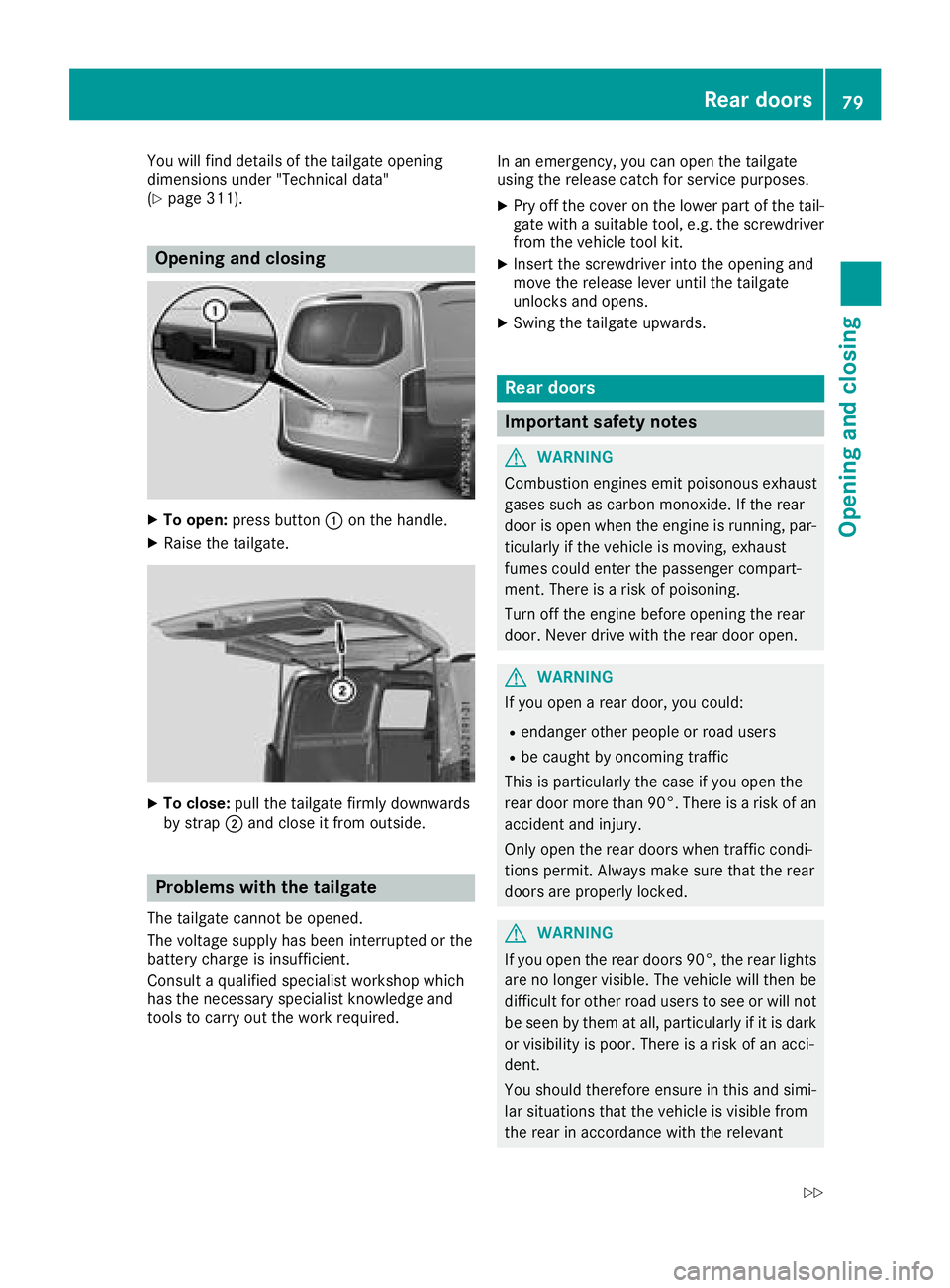
Opening and closing
XTo open:press button :on the handle.
XRaise the tailgate.
XTo close: pull the tailgate firmly downwards
by strap ;and close it from outside.
Problems with the tailgate
The tailgate cannot be opened.
The voltage supply has been interrupted or the
battery charge is insufficient.
Consult a qualified specialist workshop which
has the necessary specialist knowledge and
tools to carry out the work required. In an emergency, you can open the tailgate
using the release catch for service purposes.
XPry off the cover on the lower part of the tail-
gate with a suitable tool, e.g. the screwdriver from the vehicle tool kit.
XInsert the screwdriver into the opening and
move the release lever until the tailgate
unlocks and opens.
XSwing the tailgate upwards.
Rear doors
Important safety notes
GWARNING
Combustion engines emit poisonous exhaust
gases such as carbon monoxide. If the rear
door is open when the engine is running, par-
ticularly if the vehicle is moving, exhaust
fumes could enter the passenger compart-
ment. There is a risk of poisoning.
Turn off the engine before opening the rear
door. Never drive with the rear door open.
GWARNING
If you open a rear door, you could:
Rendanger other people or road users
Rbe caught by oncoming traffic
This is particularly the case if you open the
rear door more than 90°. There is a risk of an
accident and injury.
Only open the rear doors when traffic condi-
tions permit. Always make sure that the rear
doors are properly locked.
GWARNING
If you open the rear doors 90°, the rear lights are no longer visible. The vehicle will then be
difficult for other road users to see or will not
be seen by them at all, particularly if it is dark
or visibility is poor. There is a risk of an acci-
dent.
You should therefore ensure in this and simi-
lar situations that the vehicle is visible from
the rear in accordance with the relevant
Rear doors79
Opening and closing
Z
Page 84 of 318
Activate the override feature for the rear sidewindows. When leaving the vehicle, always
take the SmartKey with you and lock the vehi-
cle. Never leave children unsupervised in the
vehicle.
GWARNING
If persons, particularly children are subjected to prolonged exposure to extreme heat or
cold, there is a risk of injury, possibly even
fatal. Never leave children unattended in the
vehicle.
Side window reversing feature
The front side windows are equipped with an
automatic reversing feature. If a solid object
blocks or restricts a side window from moving
upwards during the automatic closing process,
the side window opens again automatically. Dur-
ing the manual closing process, the side window
only opens again automatically after the corre-
sponding switch is released. The automatic
reversing feature is only an aid and is no substi-
tute for your attention when closing a side win-
dow.
GWARNING
The reversing feature does not react:
Rto soft, light and thin objects, e.g. small fin-
gers
Rwhile resetting
This means that the reversing feature cannot
prevent someone being trapped in these sit-
uations. There is a risk of injury.
Make sure that no body parts are in close
proximity during the closing procedure. If
someone becomes trapped, press the switch
to open the side window again.
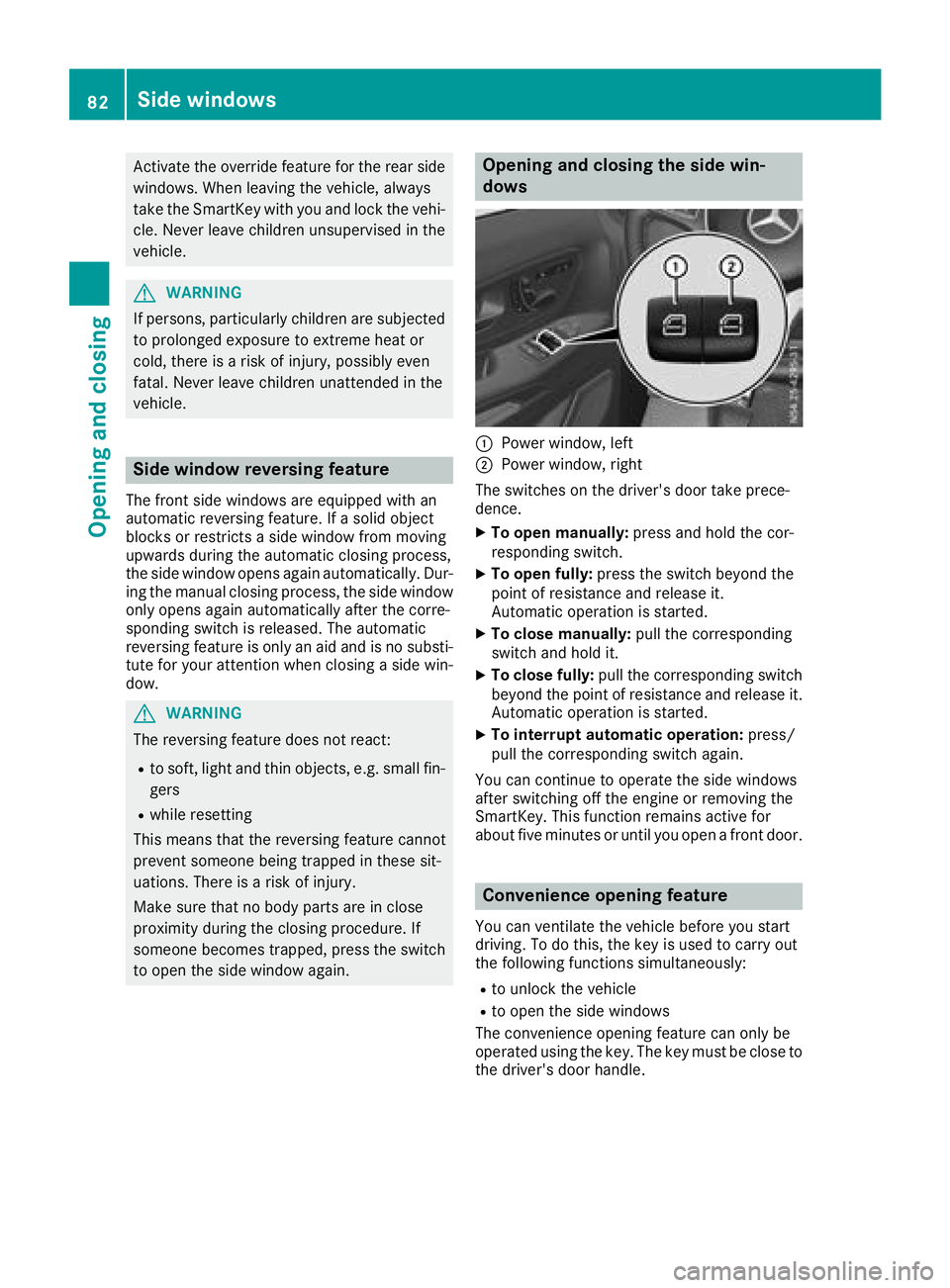
Opening and closing the side win-
dows
:Power window, left
;Power window, right
The switches on the driver's door take prece-
dence.
XTo open manually: press and hold the cor-
responding switch.
XTo open fully: press the switch beyond the
point of resistance and release it.
Automatic operation is started.
XTo close manually: pull the corresponding
switch and hold it.
XTo close fully: pull the corresponding switch
beyond the point of resistance and release it.
Automatic operation is started.
XTo interrupt automatic operation: press/
pull the corresponding switch again.
You can continue to operate the side windows
after switching off the engine or removing the
SmartKey. This function remains active for
about five minutes or until you open a front door.
Convenience opening feature
You can ventilate the vehicle before you start
driving. To do this, the key is used to carry out
the following functions simultaneously:
Rto unlock the vehicle
Rto open the side windows
The convenience opening feature can only be
operated using the key. The key must be close to
the driver's door handle.
82Side windows
Opening and closing