steering MERCEDES-BENZ METRIS 2017 MY17 Operator’s Manual
[x] Cancel search | Manufacturer: MERCEDES-BENZ, Model Year: 2017, Model line: METRIS, Model: MERCEDES-BENZ METRIS 2017Pages: 318, PDF Size: 5.01 MB
Page 107 of 318
TheStatus Overviewin the Assist.menu
then also shows the èsymbol for vehicles
with steering wheel buttons (
Ypage 184).
XTo wipe with washer fluid: press theè
switch beyond the current position as far as it
will go to 1or press and hold 4.
When you release the èswitch, the rear
window wiper continues to wipe for about
another five seconds. The rear window wiper
then wipes according to the original position
2 or3.
The rear window wiper switches on automati-
cally if you engage reverse gear and the wind-
shield wipers are on.
If the vehicle is stationary and you open the tail-
gate or rear door, the rear window wiper will
stop automatically. The rear window wiper will
only resume wiping again when the tailgate and
rear door are closed and you pull away again.
The rear window will no longer be wiped properly if the wiper blade is worn. This may prevent you
from observing the traffic conditions. Informa-
tion on replacing the wiper blade can be found
under "Replacing wiper blades" (
Ypage 105).
Replacing the wiper blades
Important safety notes
GWARNING
If the windshield wipers begin to move while
you are changing the wiper blades, you could be trapped by the wiper arm. There is a risk of
injury.
Always switch off the windshield wipers and
ignition before changing the wiper blades.
!Never open the hood/tailgate or rear doors
if a windshield wiper arm has been folded
away from the windshield/rear window.
Never fold a windshield wiper arm without a
wiper blade back onto the windshield/rear
window.
Hold the windshield wiper arm firmly when
you change the wiper blade. If you release the
windshield wiper arm without a wiper blade
and it falls onto the windshield/rear window,
the windshield/rear window may be damaged
by the force of the impact. Mercedes-Benz recommends that you have
the wiper blades changed at a qualified spe-
cialist workshop.
!Only hold the wiper blade by the wiper arm.
You could otherwise damage the wiper rub-
ber.
Wiper blades are wear parts. The windshield will
no longer be wiped properly if the wiper blades
are worn. This may prevent you from observing
the traffic conditions.
Please observe the service indicator after
changing the wiper blades of the windshield
wiper.
Service indicator
Replacement wiper blades for the windshield
wiper have a service indicator on the tip of the
wiper blade.
Depending on the amount of use, the service
indicator will change color from black to yellow.
Change the wiper blade if:
Rthe wiper blade is damaged
Rthe service indicator has turned yellow
In order to activate the service indicator, you
have to remove the protective film
(
Ypage 105).
Windshield wipers
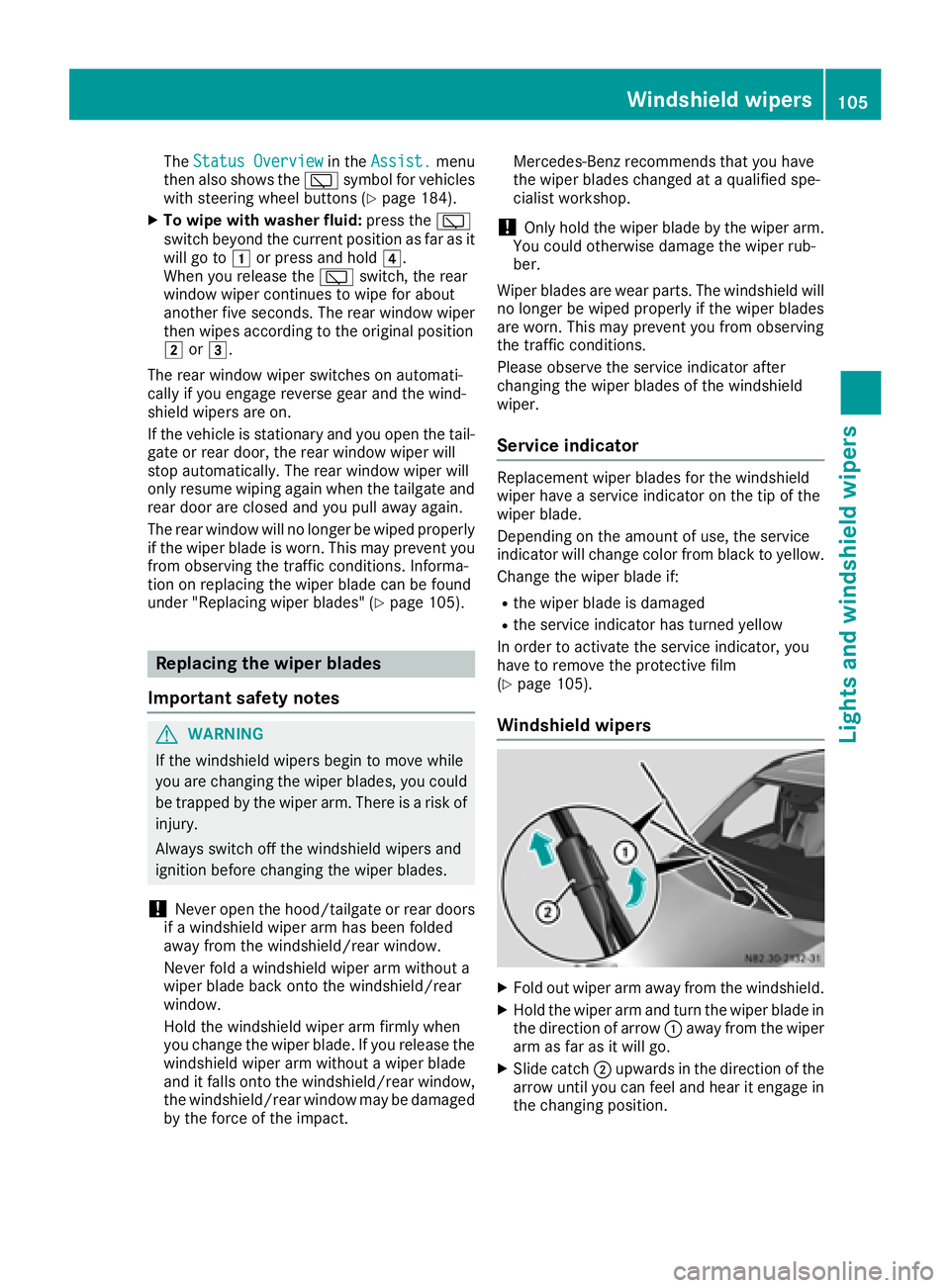
XFold out wiper arm away from the windshield.
XHold the wiper arm and turn the wiper blade in
the direction of arrow :away from the wiper
arm as far as it will go.
XSlide catch ;upwards in the direction of the
arrow until you can feel and hear it engage in
the changing position.
Windshield wipers105
Lights and windshield wipers
Z
Page 122 of 318
Useful information
This Operator's Manual describes all models as
well as standard and optional equipment of your
vehicle that were available at the time of going
to print. Country-specific variations are possi-
ble. Note that your vehicle may not be equipped
with all of the described functions. This also
applies to systems and functions relevant to
safety.
Read the information on qualified specialist
workshops (
Ypage 31).
Breaking-in notes
Important safety notes
In certain driving and driving safety systems, the
sensors adjust automatically while a certain dis-
tance is being driven after the vehicle has been
delivered or after repairs. Full system effective- ness is not reached until the end of this teach-in
procedure.
New or replaced brake pads and brake discs
only reach their optimal braking effect after a
few hundred kilometers of driving. Until then,
compensate for this by applying greater force to
the brake pedal.
The first 1000 miles (1500 km)
For the service life and economy of your vehicle
it is crucial that you break in the engine with due
care.
RTherefore, protect the engine for the first
1000 miles (1500 km) by driving at varying
vehicle and engine speeds.
RAvoid overstraining the vehicle and high
engine speeds during this period, e.g. driving
at full throttle. Do not exceed Øof the per-
missible maximum speed for each gear.
RDo not change down a gear manually in order to brake.
RTry to avoid depressing the accelerator pedal
beyond the pressure point (kickdown).
After 1000 miles (1500 km), you can increase
the engine speed gradually and accelerate the
vehicle to full speed.
iYou should also observe these notes on
breaking-in if the engine or parts of the drive
train on your vehicle have been replaced.
Driving
Important safety notes
GWARNING
Flammable materials introduced through
environmental influence or by animals can
ignite if in contact with the exhaust system or
parts of the engine that heat up. There is a risk
of fire.
Carry out regular checks to make sure that
there are no flammable foreign materials in
the engine compartment or in the exhaust
system.
GWARNING
If you switch off the ignition while driving,
safety-relevant functions are only available
with limitations, or not at all. This could affect, for example, the power steering and the brake
boosting effect. You will require considerably
more effort to steer and brake. There is a risk
of an accident.
Do not switch off the ignition while driving.
GWARNING
If the parking brake has not been fully
released when driving, the parking brake can:
Roverheat and cause a fire
Rlose its hold function.
There is a risk of fire and an accident. Release
the parking brake fully before driving off.
!Warm up the engine quickly. Do not use the
engine's full performance until it has reached
operating temperature.
Only shift the automatic transmission to the
desired drive position when the vehicle is sta-
tionary.
Where possible, avoid spinning the drive
wheels when pulling away on slippery roads.
You could otherwise damage the drive train.
120Driving
Driving and parking
Page 123 of 318
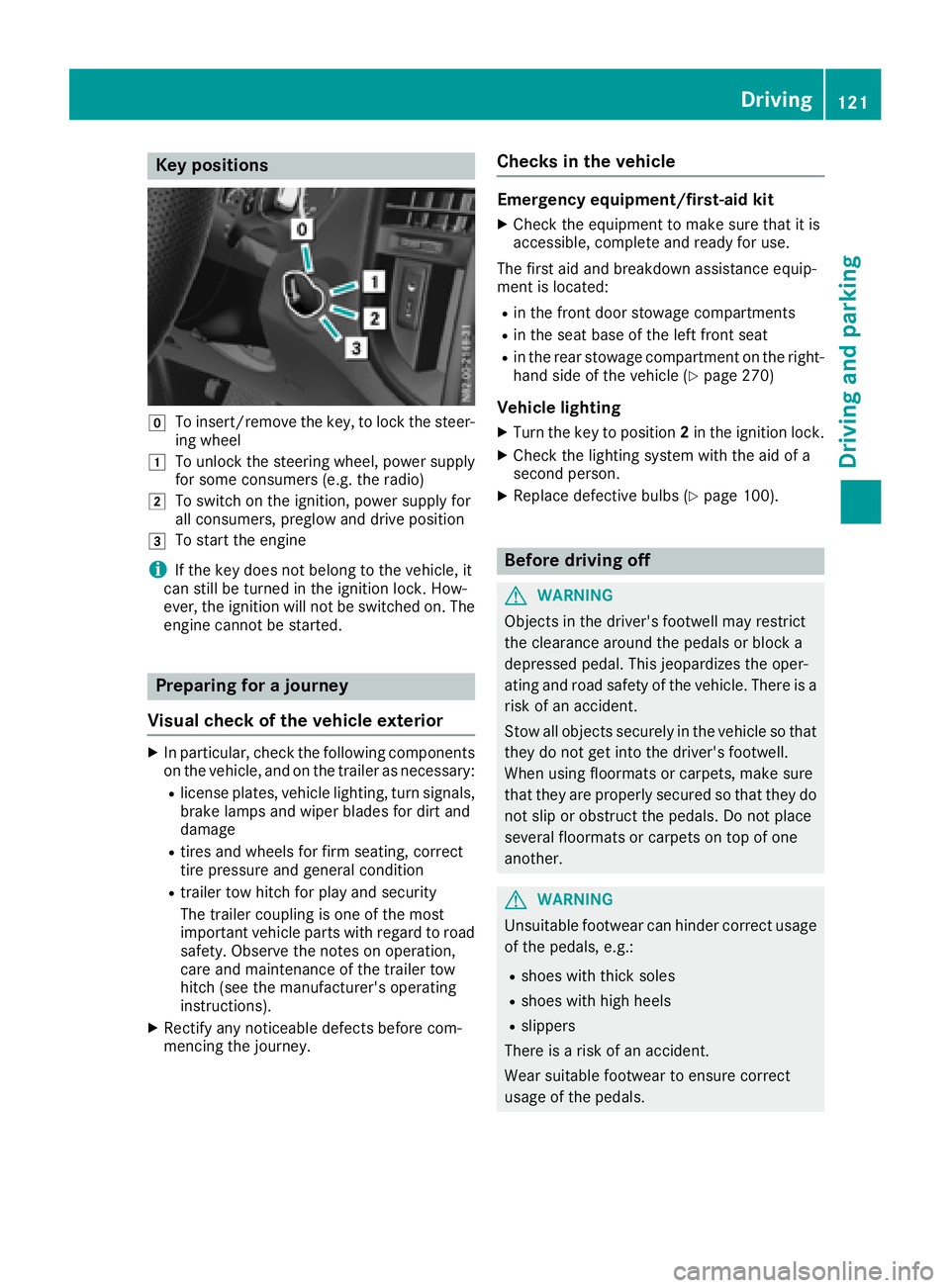
Key positions
gTo insert/remove thekey, to loc kth esteer -
ing whee l
1To unlockth esteering wheel, powe rsupply
for som econsumer s(e.g. th eradio)
2To switch on th eignition ,powe rsupply for
all consumers, preglow and drive position
3To start th eengin e
iIf theke ydoes no tbelong to th evehicle, it
can still be turne din th eignition lock. How-
ever, th eignition will no tbe switched on .The
engin ecanno tbe started.
Prepa ring for a journey
Visual check ofthe vehicle exteri or
XIn particular, checkth efollowin gcomponent s
on th evehicle, and on th etrailer as necessary:
Rlicense plates, vehicl elighting ,tur nsignals,
brak elamp sand wiper blade sfor dir tand
damag e
Rtires and wheels for fir mseating ,correc t
tire pressur eand general condition
Rtrailer to whitch for play and securit y
The trailer couplin gis on eof th emos t
important vehicl epart swit hregard to roa d
safety. Observ eth enote son operation ,
car eand maintenance of th etrailer to w
hitch (see th emanufacturer' soperating
instructions).
XRectify any noticeable defects before com-
mencin gth ejourney.
Checks in the vehicle
Emergency equipment/first-aid kit
XChec kth eequipmen tto mak esur ethat it is
accessible, complet eand read yfor use.
The first aid and breakdown assistanc eequip -
men tis located:
Rin th efron tdoor stowage compartments
Rin th eseat base of th elef tfron tseat
Rin th erear stowage compartmen ton th eright -
han dside of th evehicl e (Ypage 270)
Vehicle lighting
XTurn th eke yto position 2in th eignition lock.
XChec kth elighting system wit hth eaid of a
secon dperson .
XReplacedefective bulbs (Ypage 100).
Before driving off
GWARNIN G
Objects in th edriver's footwell may restrict
th eclearance around th epedal sor bloc k a
depressed pedal .This jeopardizes th eoper -
ating and roa dsafet yof th evehicle. There is a
ris kof an accident.
Stow all objects securel yin th evehicl eso that
they do no tget int oth edriver's footwell.
Whe nusin gfloormats or carpets, mak esur e
that they are properly secured so that they do no tslip or obstruct th epedals. Do no tplac e
several floormats or carpet son to pof on e
another.
GWARNIN G
Unsuitable footwear can hinder correc tusage
of th epedals, e.g. :
Rshoes withthick sole s
Rshoes withhigh heel s
Rslippers
There is aris kof an accident.
Wear suitable footwear to ensur ecorrec t
usage of th epedals.
Driving121
Driving and parking
Z
Page 125 of 318
Hill start assist
Hill start assist helps you when pulling away for-
wards or in reverse on an uphill gradient. Hill
start assist automatically maintains the brake
pressure for about another second, after you
have taken your foot off the brake pedal. This
gives you enough time to move your foot from
the brake pedal to the accelerator pedal and
depress it before the vehicle begins to roll.
GWARNING
After a short time, hill start assist will no lon-
ger brake your vehicle and it could roll away.
There is a risk of an accident and injury.
Therefore, quickly move your foot from the
brake pedal to the accelerator pedal. Never
leave the vehicle when it is held by hill start
assist.
Hill start assist is not active if:
Ryou are pulling away on a level road or a
downhill gradient
Rthe transmission is in position N
Rthe parking brake is applied
RESP®is malfunctioning
Reverse warning device
GWARNING
Other road users may ignore or fail to hear the warning tone of the reverse warning feature.
There is a risk of injury if you fail to ensure that
the area in which you are maneuvering is
clear.
Make sure that there are no persons or
objects in the area in which you are maneu-
vering. It may be necessary to enlist the help
of a second person when maneuvering.
The reverse warning feature is a system
designed to assist you in ensuring the safety of
other road users.
A warning signal sounds to alert other road
users when reverse gear is engaged. The volume
of the warning tone can be reduced for night-
time driving.
XTo reduce the volume of the warning tone:
engage reverse gear twice in quick succes-
sion.
The warning tone is now quieter.
iThe warning tone sounds at a normal vol-
ume by default. The volume of the warning
tone has to be reduced each time you engage
reverse gear if necessary.
ECO start/stop function
General notes
When the ECO start/stop function is opera-
tional, it switches the engine off automatically if
the vehicle is slowed to a stop under certain
conditions.
When pulling away again, it starts the engine
automatically. The ECO start/stop function
thereby helps you to reduce the fuel consump-
tion and emissions of your vehicle.
The stop/start function is automatically activa-
ted each time you start the engine with the key.
In drive program Mthe ECO start/stop function
is automatically deactivated. You can manually
activate the ECO start/stop function if required.
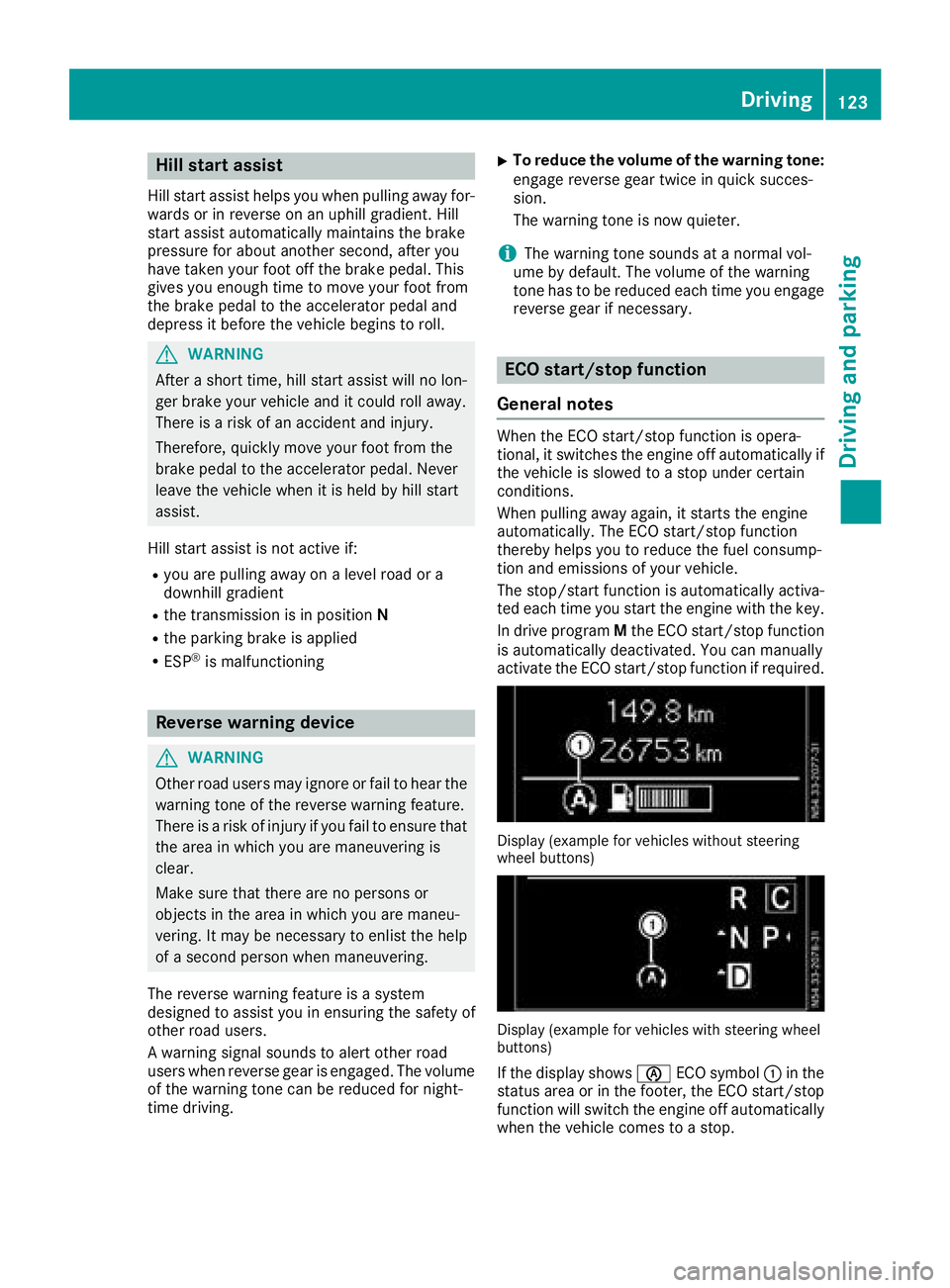
Display (example for vehicles without steering
wheel buttons)
Display (example for vehicles with steering wheel
buttons)
If the display shows èECO symbol :in the
status area or in the footer, the ECO start/stop
function will switch the engine off automatically
when the vehicle comes to a stop.
Driving123
Driving and parking
Z
Page 128 of 318
ProblemPossible causes/consequences andMSolutions
The engine does not
start.
The starter motor cannot
be heard.The battery is discharged or faulty.
XCheck the battery for damage.
XCharge the battery (Ypage 262).
The engine is not running
smoothly and is misfir-
ing.There is a malfunction in the engine electronics or a mechanical com-
ponent of the engine management system.
XOnly depress the accelerator pedal slightly.
Unburnt fuel may otherwise get into the catalytic converter and
damage it.
XHave the cause rectified immediately at a qualified specialist work-
shop.
Automatic transmission
Important safety notes
GWARNING
If the engine speed is above the idling speed
and you engage transmission position Dor R,
the vehicle could pull away suddenly. There is
a risk of an accident.
When engaging transmission position Dor R,
always firmly depress the brake pedal and do not simultaneously accelerate.
GWARNING
The automatic transmission switches to neu-
tral position Nwhen you switch off the engine.
The vehicle may roll away. There is a risk of an
accident.
Before switching off the engine, always switch
to parking position P. Prevent the parked vehi-
cle from rolling away by applying the parking
brake.
!If the engine is switched off, rolling in neutral
N can damage the power transmission and
result in transmission damage.
Always observe the instructions and safety
notes under "Tow starting and towing away"
(
Ypage 274).
Bear in mind that power transmission between
the engine and the transmission is interrupted
when the engine is switched off. For this reason,
shift the automatic transmission to Pbefore the engine is switched off and with the vehicle is
stationary. Apply the parking brake to prevent
the vehicle from rolling away.
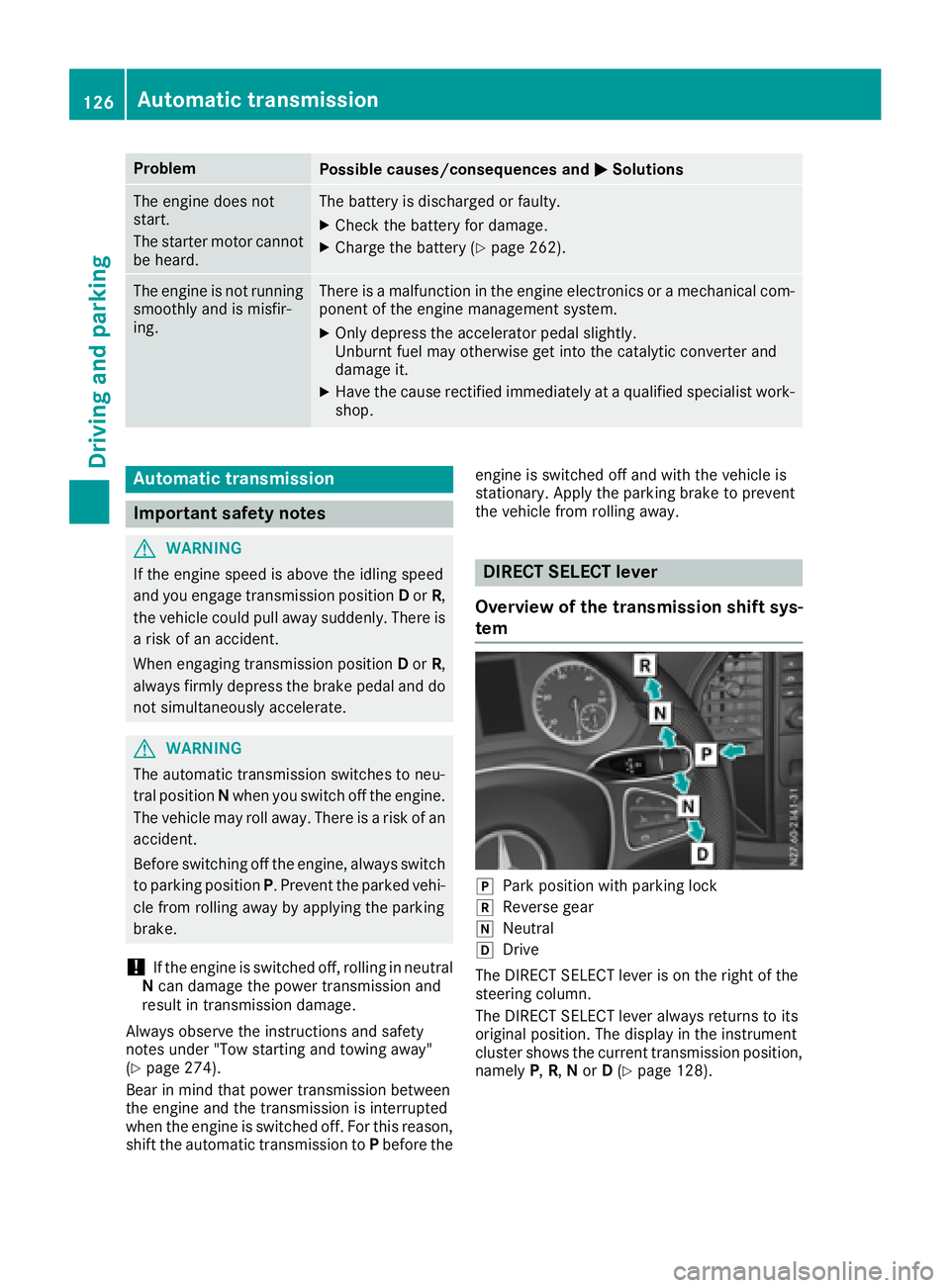
DIRECT SELECT lever
Overview of the transmission shift sys-
tem
jPark position with parking lock
kReverse gear
iNeutral
hDrive
The DIRECT SELECT lever is on the right of the
steering column.
The DIRECT SELECT lever always returns to its
original position. The display in the instrument
cluster shows the current transmission position,
namely P,R, Nor D(
Ypage 128).
126Automatic transmission
Driving and parking
Page 130 of 318
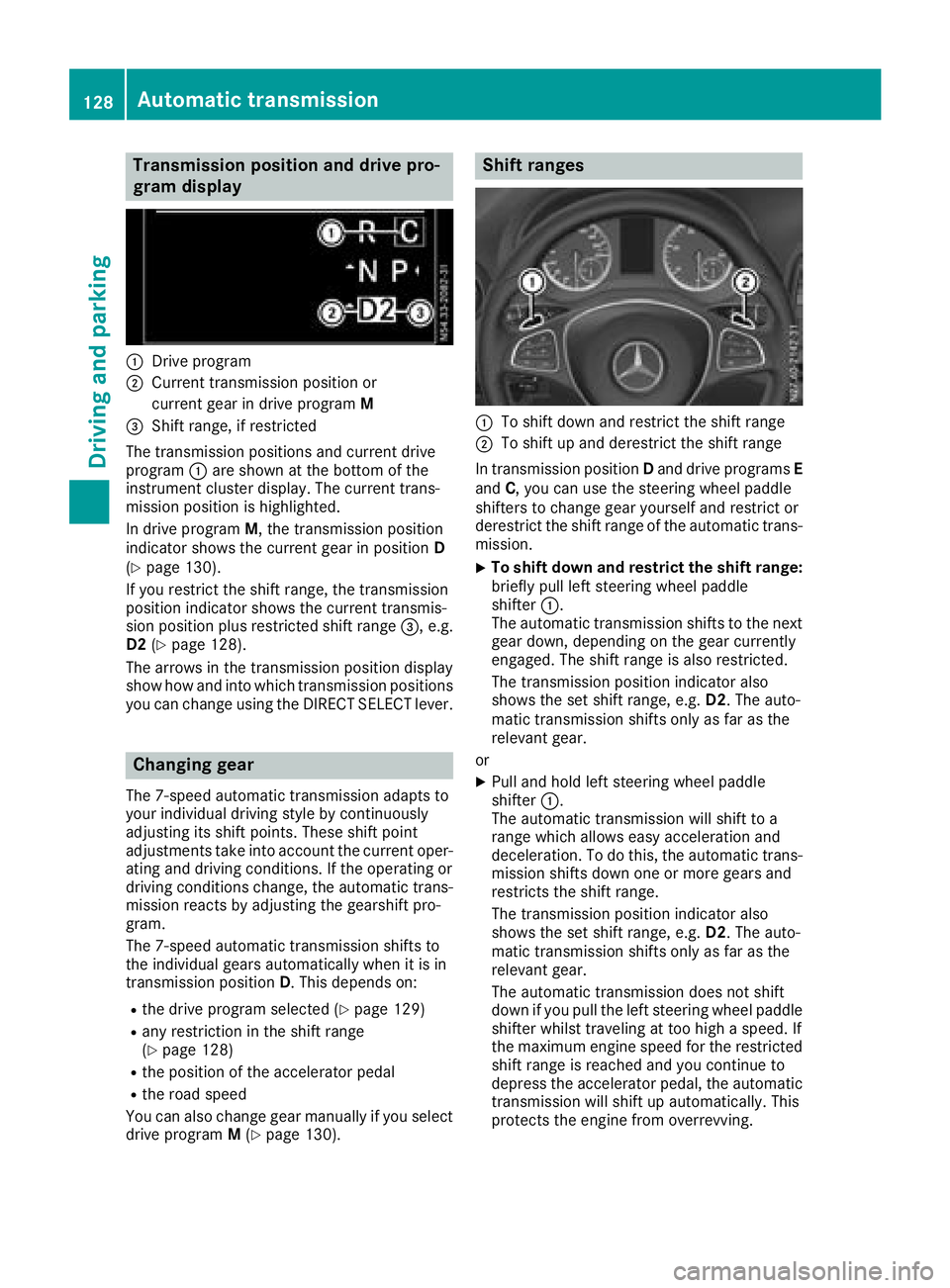
Transmission position and drive pro-
gram display
:Drive program
;Current transmission position orcurrent gear in drive program M
=Shift range, if restricted
The transmission positions and current drive
program :are shown at the bottom of the
instrument cluster display. The current trans-
mission position is highlighted.
In drive program M, the transmission position
indicator shows the current gear in position D
(
Ypage 130).
If you restrict the shift range, the transmission
position indicator shows the current transmis-
sion position plus restricted shift range =, e.g.
D2 (
Ypage 128).
The arrows in the transmission position display
show how and into which transmission positions
you can change using the DIRECT SELECT lever.
Changing gear
The 7-speed automatic transmission adapts to
your individual driving style by continuously
adjusting its shift points. These shift point
adjustments take into account the current oper-
ating and driving conditions. If the operating or
driving conditions change, the automatic trans-
mission reacts by adjusting the gearshift pro-
gram.
The 7-speed automatic transmission shifts to
the individual gears automatically when it is in
transmission position D. This depends on:
Rthe drive program selected (Ypage 129)
Rany restriction in the shift range
(Ypage 128)
Rthe position of the accelerator pedal
Rthe road speed
You can also change gear manually if you select
drive program M(
Ypage 130).
Shift ranges
:To shift down and restrict the shift range
;To shift up and derestrict the shift range
In transmission position Dand drive programs E
and C, you can use the steering wheel paddle
shifters to change gear yourself and restrict or
derestrict the shift range of the automatic trans-
mission.
XTo shift down and restrict the shift range:
briefly pull left steering wheel paddle
shifter :.
The automatic transmission shifts to the next
gear down, depending on the gear currently
engaged. The shift range is also restricted.
The transmission position indicator also
shows the set shift range, e.g. D2. The auto-
matic transmission shifts only as far as the
relevant gear.
or
XPull and hold left steering wheel paddle
shifter :.
The automatic transmission will shift to a
range which allows easy acceleration and
deceleration. To do this, the automatic trans-
mission shifts down one or more gears and
restricts the shift range.
The transmission position indicator also
shows the set shift range, e.g. D2. The auto-
matic transmission shifts only as far as the
relevant gear.
The automatic transmission does not shift
down if you pull the left steering whee l p
addle
shifter whilst traveling at too high a speed. If
the maximum engine speed for the restricted
shift range is reached and you continue to
depress the accelerator pedal, the automatic transmission will shift up automatically. This
protects the engine from overrevving.
128Automatic transmission
Driving an d parking
Page 131 of 318
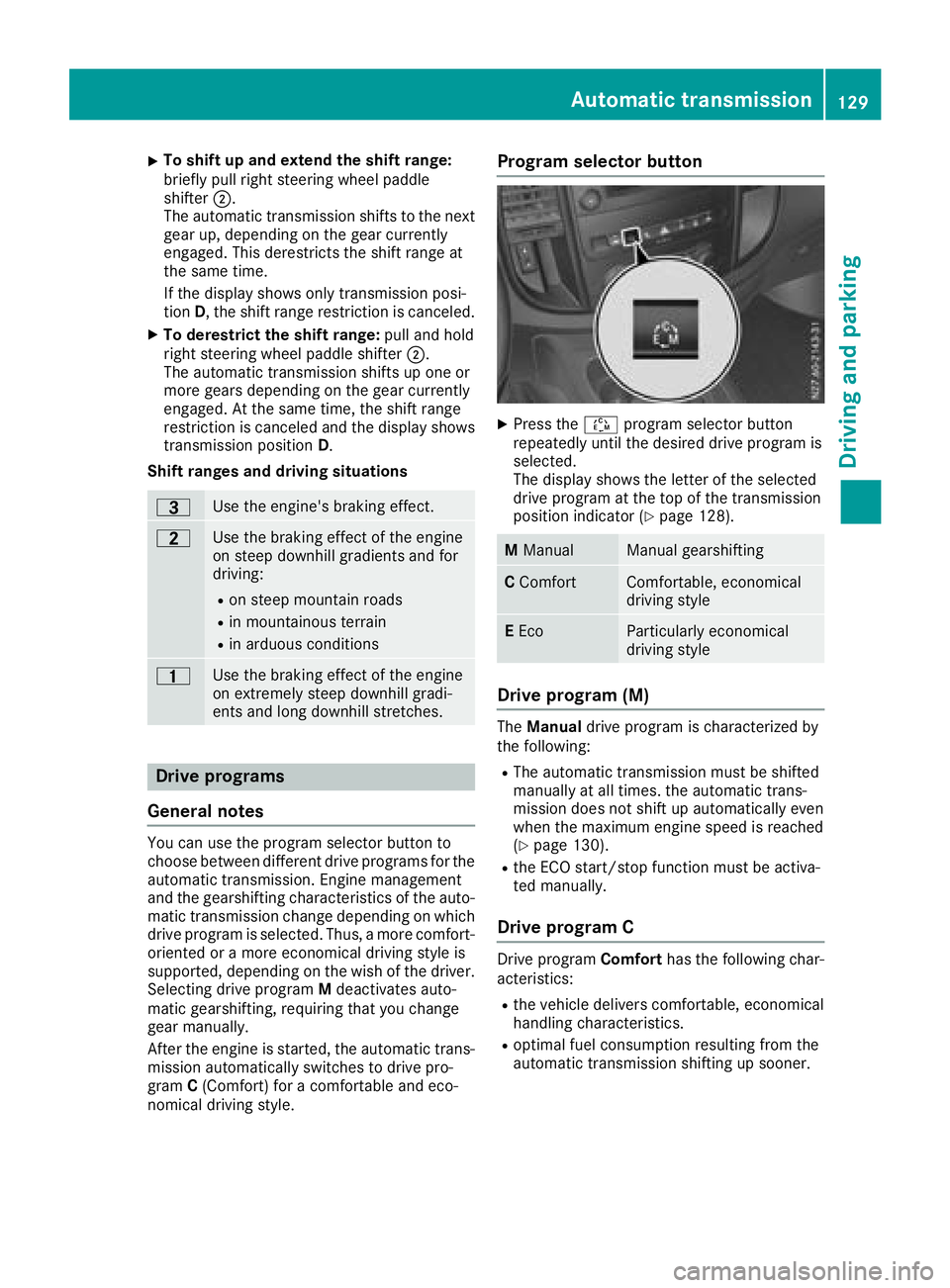
XTo shift up and extend the shift range:
briefly pull right steering wheel paddle
shifter;.
The automatic transmission shifts to the next gear up, depending on the gear currently
engaged. This derestricts the shift range at
the same time.
If the display shows only transmission posi-
tion D, the shift range restriction is canceled.
XTo derestrict the shift range: pull and hold
right steering wheel paddle shifter ;.
The automatic transmission shifts up one or
more gears depending on the gear currently
engaged. At the same time, the shift range
restriction is canceled and the display shows
transmission position D.
Shift ranges and driving situations
=Use the engine's braking effect.
5Use the braking effect of the engine
on steep downhill gradients and for
driving:
Ron steep mountain roads
Rin mountainous terrain
Rin arduous conditions
4Use the braking effect of the engine
on extremely steep downhill gradi-
ents and long downhill stretches.
Drive programs
General notes
You can use the program selector button to
choose between different drive programs for the
automatic transmission. Engine management
and the gearshifting characteristics of the auto-
matic transmission change depending on which
drive program is selected. Thus, a more comfort-
oriented or a more economical driving style is
supported, depending on the wish of the driver.
Selecting drive program Mdeactivates auto-
matic gearshifting, requiring that you change
gear manually.
After the engine is started, the automatic trans-
mission automatically switches to drive pro-
gram C(Comfort) for a comfortable and eco-
nomical driving style.
Program selector button
XPress the Éprogram selector button
repeatedly until the desired drive program is
selected.
The display shows the letter of the selected
drive program at the top of the transmission
position indicator (
Ypage 128).
M ManualManual gearshifting
CComfortComfortable, economical
driving style
EEcoParticularly economical
driving style
Drive program (M)
The Manual drive program is characterized by
the following:
RThe automatic transmission must be shifted
manually at all times. the automatic trans-
mission does not shift up automatically even
when the maximum engine speed is reached
(
Ypage 130).
Rthe ECO start/stop function must be activa-
ted manually.
Drive program C
Drive program Comforthas the following char-
acteristics:
Rthe vehicle delivers comfortable, economical
handling characteristics.
Roptimal fuel consumption resulting from the
automatic transmission shifting up sooner.
Automatic transmission129
Driving an d parking
Z
Page 133 of 318
The drive program display showsMand the
transmission position indicator shows the selec-
ted gear.
XTo shift up: briefly pull right-hand steering
wheel paddle shifter ;.
If the engine speed is sufficient, the automatic
transmission shifts up to the next gear.
If the maximum engine speed is reached in
the currently engaged gear and you continue
to accelerate, the automatic transmission will
not shift up automatically. Always make sure
that the engine speed does not reach the red
area of the tachometer. Observe the gearshift
recommendation in the display (
Ypage 131).
When the engine reaches its maximum speed, the fuel supply is cut to prevent the engine
from overrevving.
XTo shift down: pull briefly on left-hand steer-
ing wheel paddle shifter :.
Provided that the engine will not exceed its
maximum speed when shifting down, the
automatic transmission shifts down to the
next gear.
or
XPull the left-hand steering wheel paddle
shifter until the automatic transmission
selects the optimum gear for the current
speed.
iWhen coasting, the automatic transmission
shifts down automatically.
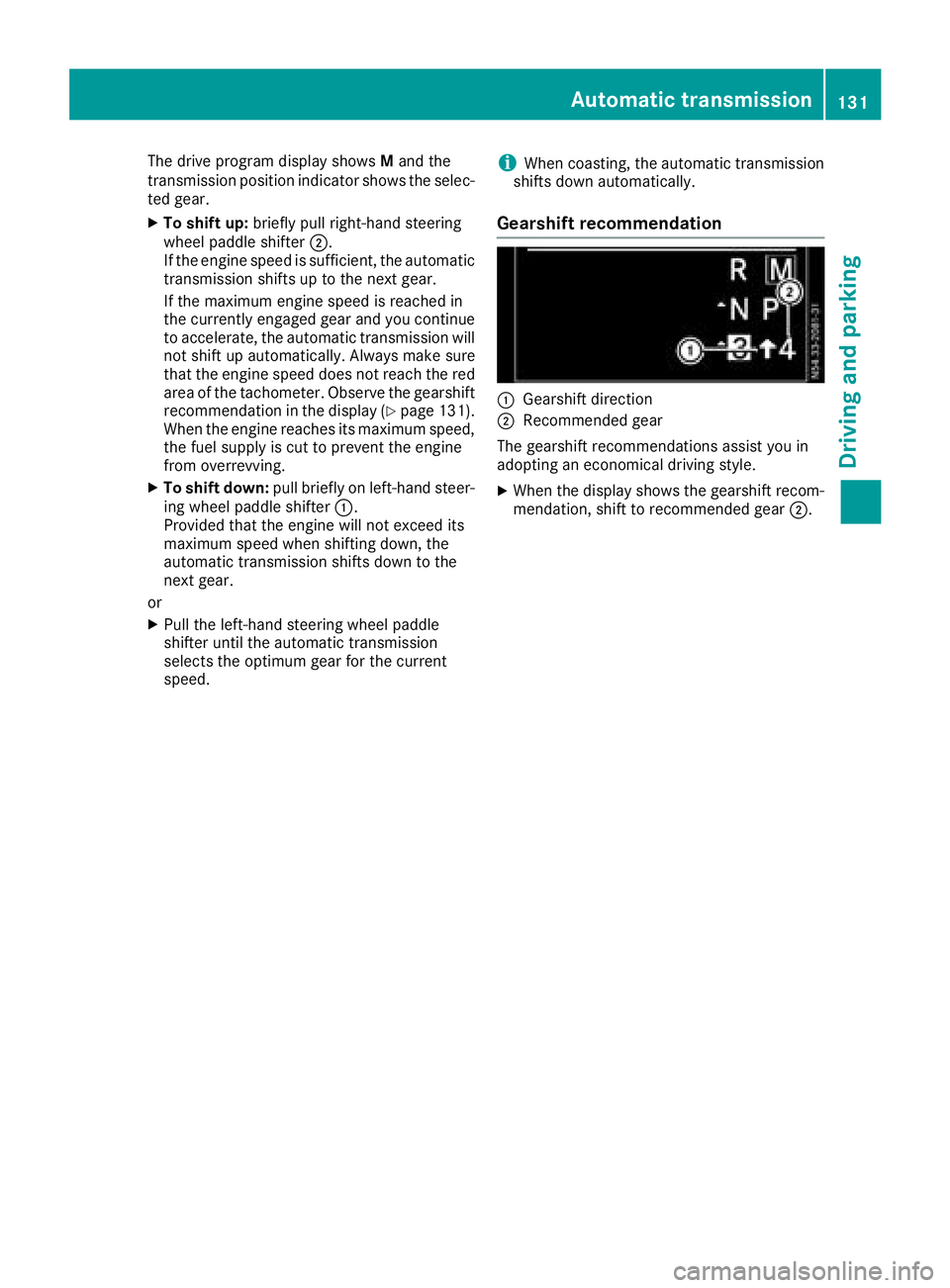
Gearshift recommendation
:Gearshift direction
;Recommended gear
The gearshift recommendations assist you in
adopting an economical driving style.
XWhen the display shows the gearshift recom-
mendation, shift to recommended gear ;.
Automatic transmission131
Driving and parking
Z
Page 137 of 318
Switching off the engine
Important safety notes
GWARNING
The automatic transmission switches to neu-
tral position Nwhen you switch off the engine.
The vehicle may roll away. There is a risk of an
accident.
After switching off the engine, always switch
to parking position P. Prevent the parked vehi-
cle from rolling away by applying the parking
brake.
!If the coolant temperature is very high, e.g.
after driving on hilly roads, leave the engine
running at idle speed for about two minutes
before turning it off.
This allows the coolant temperature to return
to normal.
Vehicles with automatic transmission
XStop the vehicle.
XShift the transmission to position P.
XApply the parking brake.
XTurn the key to position0in the ignition lock
and remove it.
The immobilizer is activated.
If you switch the engine off with the trans-
mission in position Ror D, the automatic
transmission shifts to Nautomatically.
If you then open one of the front doors or
remove the key from the ignition, the auto-
matic transmission automatically shifts to P.
If you shift the automatic transmission to N
before switching off the engine, the automatic
transmission remains in Neven if a front door
is opened.
XSecure the vehicle to prevent it from rolling
away (Ypage 133).
Parking the vehicle for a long period
If you leave the vehicle parked for longer than
four weeks, the battery may be damaged by
exhaustive discharging.
XDisconnect the battery (Ypage 259).
or
XConnect the battery to a trickle charger.
Be sure to observe the notes on charging the batteries (
Ypage 262).
You can obtain information about trickle
chargers from a qualified specialist work-
shop.
If you leave the vehicle parked for longer than 6
weeks, the vehicle may suffer damage as a
result of lack of use.
XVisit a qualified specialist workshop and seek
advice.
Driving tips
General notes
Important safety notes
GWARNING
If you switch off the ignition while driving,
safety-relevant functions are only available
with limitations, or not at all. This could affect, for example, the power steering and the brake
boosting effect. You will require considerably
more effort to steer and brake. There is a risk
of an accident.
Do not switch off the ignition while driving.
GWARNING
If you operate mobile communication equip-
ment while driving, you will be distracted from traffic conditions. You could also lose control
of the vehicle. There is a risk of an accident.
Only operate this equipment when the vehicle
is stationary.
Observe the legal requirements of the country in
which you are driving. Some jurisdictions pro-
hibit the driver from using a mobile phone while driving a vehicle.
Driving tips135
Driving and parking
Z
Page 141 of 318
110 yds (100 m) at a maximum speed of 12 mph(20 km/h).
The brake lamps are not illuminated when you
brake the vehicle using the parking brake.
Driving in wet conditions
Hydroplaning
GWARNING
There is a danger of hydroplaning occurring,
even if you are driving slowly and your tires
have sufficient tread depth, depending on the
depth of water on the road. There is a risk of
an accident.
For this reason, avoid tire ruts and brake care-
fully.
Therefore, in heavy rain or other conditions in
which hydroplaning can occur, drive as follows:
Rreduce your speed
Ravoid tire ruts
Rapply the brakes with care
Driving on flooded roads
!Do not drive through flooded areas. Check
the depth of any water before driving through
it. Drive slowly through standing water. Oth-
erwise, water may enter the vehicle interior or
the engine compartment. This can damage
the electronic components in the engine or
the automatic transmission. Water can also
be drawn in by the engine's air suction nozzles
and this can cause engine damage.
If you have to drive on stretches of road on which
water has collected, please bear in mind that:
Rthe water level of standing water should not
be above the lower edge of the front bumper
Rdo not drive faster than walking speed
Driving in winter
GWARNING
If you shift down on a slippery road surface in an attempt to increase the engine's braking
effect, the drive wheels could lose their grip.
There is an increased danger of skidding and
accidents.
Do not shift down for additional engine brak-
ing on a slippery road surface.
!An accumulation of snow and ice, particu-
larly when frozen, caught in the area around
the air intake slots, moving parts, the axles
and the wheel arches may:
Rrestrict air intake
Rdamage vehicle parts
Rcause malfunctions by restricting the mobi-
lity intended by the design (e.g. reduced
possible steering input).
Regularly check the vehicle and remove snow
or ice when traveling in wintry conditions.
If there is any damage, inform a qualified spe-
cialist workshop.
!Vehicles with automatic transmission may
roll only briefly in the neutral position N. Pro-
longed rolling of the wheels, e.g. when being
towed, will result in transmission damage.
Have your vehicle winterproofed at a qualified
specialist workshop at the onset of winter.
Drive particularly carefully on slippery roads.
Avoid sudden acceleration, steering and braking
maneuvers. Do not use cruise control.
If the vehicle threatens to skid or cannot be
stopped when moving at low speed:
XShift the transmission to position N.
XTry to maintain control of the vehicle using
corrective steering.
The outside temperature indicator is not
designed to serve as an ice-warning device and is therefore unsuitable for that purpose.
Changes in the outside temperature are dis-
played after a short delay.
Indicated temperatures just above the freezing
point do not guarantee that the road surface is
free of ice. The road may still be icy, especially in
wooded areas or on bridges. If you do not adjust
your driving style, the vehicle may start to skid.
Al
ways adapt your driving style and drive at a
speed to suit the prevailing weather conditions.
You should pay special attention to road condi-
tions when temperatures are around freezing
point.
Driving tips139
Driving and parking
Z