steering MERCEDES-BENZ METRIS 2017 MY17 Operator’s Manual
[x] Cancel search | Manufacturer: MERCEDES-BENZ, Model Year: 2017, Model line: METRIS, Model: MERCEDES-BENZ METRIS 2017Pages: 318, PDF Size: 5.01 MB
Page 25 of 318
Tire size designation, load-bearing
capacity, speed rating .................... 291
Tire tread ....................................... 278
Tire tread (definition) ..................... 295
Total load limit (definition) ............. 296
Traction (definition) ....................... 296
TWR (permissible trailer drawbar
noseweight) (definition) ................. 296
Uniform Tire Quality Grading
Standards (definition) .................... 294
Wear indicator (definition) ............. 296
Wheel and tire combination ........... 300
Wheel rim (definition) .................... 294
Wheel/tire combinations ............... 300
Tool
see Vehicle tool kit
Top Tether ............................................ 61
Tow-starting
Emergency engine starting ............ 276
Important safety notes .................. 274
Towing
If the vehicle is stuck ..................... 276
Installing/removing the towing
eye ................................................. 275
Towing a trailer
Active Parking Assist ..................... 154
Axle load, permissible .................... 314
Cleaning the trailer tow hitch ......... 267
Coupling up a trailer ...................... 165
Decoupling a trailer ....................... 167
Driving tips .................................... 163
Notes on retrofitting ...................... 313
Power supply ................................. 168
Trailer loads ................................... 314
Towing away
Important safety guidelines ........... 274
With both axles on the ground ....... 276
With the rear axle raised ................ 275
Towing eye ......................................... 270
Trailer coupling
see Towing a trailer
Trailer loads and drawbar nose-
weights ............................................... 167
Trailer operation
Lights display messages (vehicle
with steering wheel buttons) ......... 209
Lights display messages (vehicle
without steering wheel buttons) .... 196Trai
ler towing
Blind Spot Assist ............................ 148
ESP
®................................................ 67
PARKTRONIC ................................. 154
Permissible trailer loads and
drawbar noseweights ..................... 167
Transmission
see Automatic transmission
Transmission oil ........................ 308, 309
Transmission positions
Automatic transmission ................. 127
Display (DIRECT SELECT lever) ...... 128
Transport
Lashing straps ............................... 245
Loading guidelines ......................... 242
Stickers ......................................... 245
Vehicle ........................................... 276
Transport by rail ................................ 137
Transportation
Rail ................................................ 137
Transportation aids
Load protection net ....................... 247
Transporting
Cargo compartment variations ...... 244
Load distribution ............................ 243
Securing a load .............................. 244
Trim pieces (cleaning instruc-
tions) .................................................. 268
Trip computer
Displaying (vehicle with steering
wheel buttons) ............................... 179
Displaying (vehicle without steer-
ing wheel buttons) ......................... 172
Resetting (vehicle with steering
wheel buttons) ............................... 179
Resetting (vehicle without steer-
ing wheel buttons) ......................... 172
Selecting the display units (vehi-
cle with steering wheel buttons) .... 186
Selecting the display units (vehi-
cle without steering wheel but-
tons) .............................................. 175
Trip odometer
Displaying (vehicle with steering
wheel buttons) ............................... 178
Displaying (vehicle without steer-
ing wheel buttons) ......................... 172
Index23
Page 26 of 318
Resetting(vehicle wit hsteerin g
whee lbuttons ).............................. .179
Resetting (vehicle without steer-
ing wheel buttons) ......................... 172
Setting the display unit (vehicle
with steering wheel buttons) ......... 186
Setting the display unit (vehicle
without steering wheel buttons) .... 175
Trip odometer
see Trip odometer
Turn signal
Changing bulbs (additional turn
signals) .......................................... 102
Turn signals
Display messages (vehicle with
steering wheel buttons) ................. 210
Display messages (vehicle with-
out steering wheel buttons) ........... 196
Replacing bulbs (front) ................... 102
Replacing bulbs (rear) .................... 103
Switching on/off .............................. 96
Trailer display messages (vehicle
with steering wheel buttons) ......... 209
Trailer display messages (vehicle
without steering wheel buttons) .... 196
Two-way radios
Type approval/frequency .............. 303
TWR (Tongue Weight Rating) (defi-
nition) ................................................. 296
Type identification plate
see Vehicle identification plate
U
UnlockingEmergency unlocking ....................... 71
From inside the vehicle (central
unlocking button) .............................7 3
With emergency key element ........... 70
USB (audio)
Playing ...........................................1 82
V
Vanity mirror
Changing a bulb (mirror lamp) ......... 99
Sun visor ........................................ 239
Vehicle
Data acquisition ............................... 34 Display messages (vehicle with
steering wheel buttons) ................. 218
Display messages (vehicle with-
out steering wheel buttons) ........... 202
Electronics ..................................... 303
Emergency unlocking ....................... 70
Equipment ....................................... 27
Limited Warranty .............................2
7
Loading .......................................... 288
Locking (in an emergency) ............... 71
Locking (SmartKey) .......................... 69
Lowering ........................................ 299
Maintenance .................................... 28
Operating safety .............................. 30
Parking for a long period ................ 135
Pulling away ................................... 122
Raising ........................................... 297
Registration ..................................... 32
Reporting problems ......................... 32
Securing from rolling away ............ 133
Towing away .................................. 274
Transporting .................................. 276
Unlocking (in an emergency) ........... 71
Unlocking (SmartKey) ...................... 69
Vehicle battery
see Battery (vehicle)
Vehicle bodies ..................................... 32
Body/equipment mounting direc-
tives for trucks ................................. 32
Vehicle check
see Preparing for a journey
Vehicle data ....................................... 311
Vehicle dimensions ........................... 311
Vehicle emergency locking ................ 71
Vehicle identification number
see VIN
Vehicle identification plate .............. 303
Vehicle key
see SmartKey
Vehicle tool kit
in the seat base ............................. 270
Scope ............................................ 270
Storage location ............................ 270
Stowage compartment in the rear. .270
Stowage space in the cargo com-
par tment ........................................ 271
24Index
Page 27 of 318
Ventilationsee Climate control
VIN
Engine compartment ..................... 304
Type plate ...................................... 303
W
WarningStickers ........................................... 29
Warning and indicator lamps
ABS ................................................ 222
Brakes ........................................... 221
Check Engine ................................. 225
COLLISION PREVENTION ASSIST .. 227
Coolant .......................................... 225
Distance warning ........................... 227
Door ............................................... 229
ESP
®.............................................. 222
ESP®OFF ....................................... 224
Fuel tank ........................................ 225
General notes ................................ 219
Overview (vehicle with steering
wheel buttons) ................................. 40
Overview (vehicle without steer-
ing wheel buttons) ........................... 38
Parking brake ................................ 134
PASSENGER AIR BAG OFF ............... 46
Rear door ....................................... 229
Reserve fuel ................................... 225
Restraint system ............................ 224
Seat belt ........................................ 220
Sliding door ................................... 229
Steering ......................................... 229
Tire pressure monitor .................... 228
Warranty .............................................. 27
Washer fluid
Adding ........................................... 256
Capacities ...................................... 311
Display messages (vehicle with
steering wheel buttons) ................. 219
Display messages (vehicle with-
out steering wheel buttons) ........... 203
Notes ............................................. 311
Wheel and tire combination
see Tires
Wheel bolt tightening torque ........... 299Wheels
Changing a wheel .......................... 296
Checking ........................................ 278
Cleaning ......................................... 266
Important safety notes .................. 277
Interchanging/changing ................ 296
Mounting a new wheel ................... 298
Mounting a wheel .......................... 297
Removing a wheel .......................... 298
Removing and mounting the spare
wheel ............................................. 301
Snow chains .................................. 280
Storing ........................................... 296
Tightening torque ........................... 299
Wheel/tire combinations ............... 300
Window curtain air bag
Display message (vehicle with
steering wheel buttons) ................. 209
Display message (vehicle without
steering wheel buttons) ................. 195
Operati on ......................................... 52
Wi
ndows
see Side windows
Windshield
Cleaning ......................................... 265
Defrosting ...................................... 115
Windshield washer fluid
Adding ........................................... 256
Windshield wiper
Setting the sensitivity of the rain
sensor (vehicle with steering
wheel buttons) ............................... 188
Setting the sensitivity of the rain
sensor (vehicle without steering
wheel buttons) ............................... 175
Windshield wiper
see Windshield
Windshield wipers
Problem (malfunction) ................... 107
Rear window wiper ........................ 104
Replacing the wiper blades ............ 105
Switching on/off ........................... 104
Winter driving
Slippery road surfaces ................... 139
Snow chains .................................. 280
Winter operation
General notes ................................ 279
Radiator cover ................................. 33
Index25
Page 38 of 318
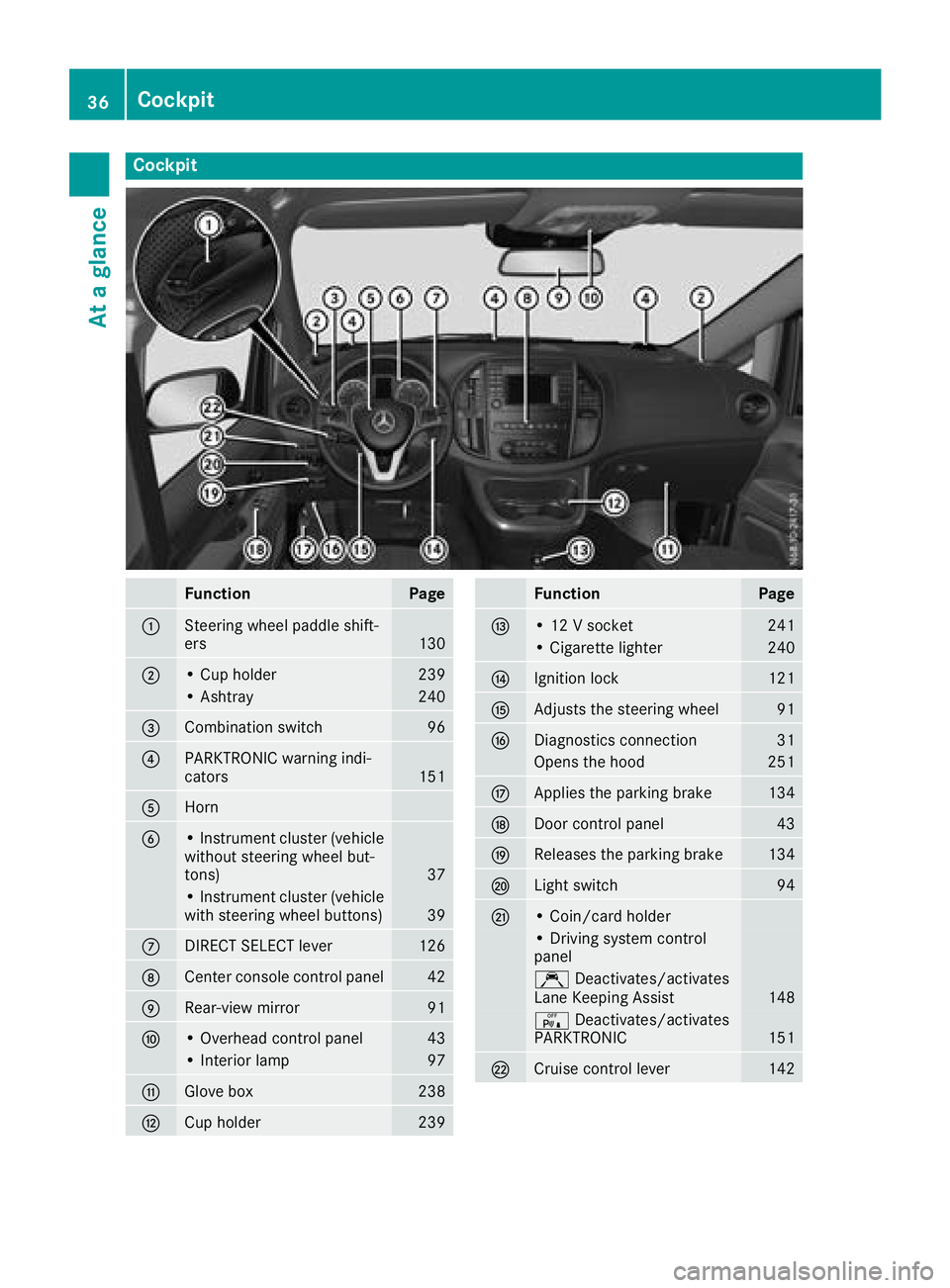
Cockpit
FunctionPage
:Steering wheel paddle shift-
ers130
;• Cup holder239
• Ashtray240
=Combination switch96
?PARKTRONIC warning indi-
cators151
AHorn
B• Instrument cluster (vehicle
without steering wheel but-
tons)
37
• Instrument cluster (vehicle
with steering wheel buttons)39
CDIRECT SELECT lever126
DCenter console control panel42
ERear-view mirror91
F• Overhead control panel43
• Interior lamp97
GGlove box238
HCup holder239
FunctionPage
I• 12 V socket241
• Cigarette lighter240
JIgnition lock121
KAdjusts the steering wheel91
LDiagnostics connection31
Opens the hood251
MApplies the parking brake134
NDoor control panel43
OReleases the parking brake134
PLight switch94
Q• Coin/card holder
• Driving system control
panel
ÇDeactivates/activates
Lane Keeping Assist148
c Deactivates/activates
PARKTRONIC151
RCruise control lever142
36Cockpit
At a glance
Page 39 of 318
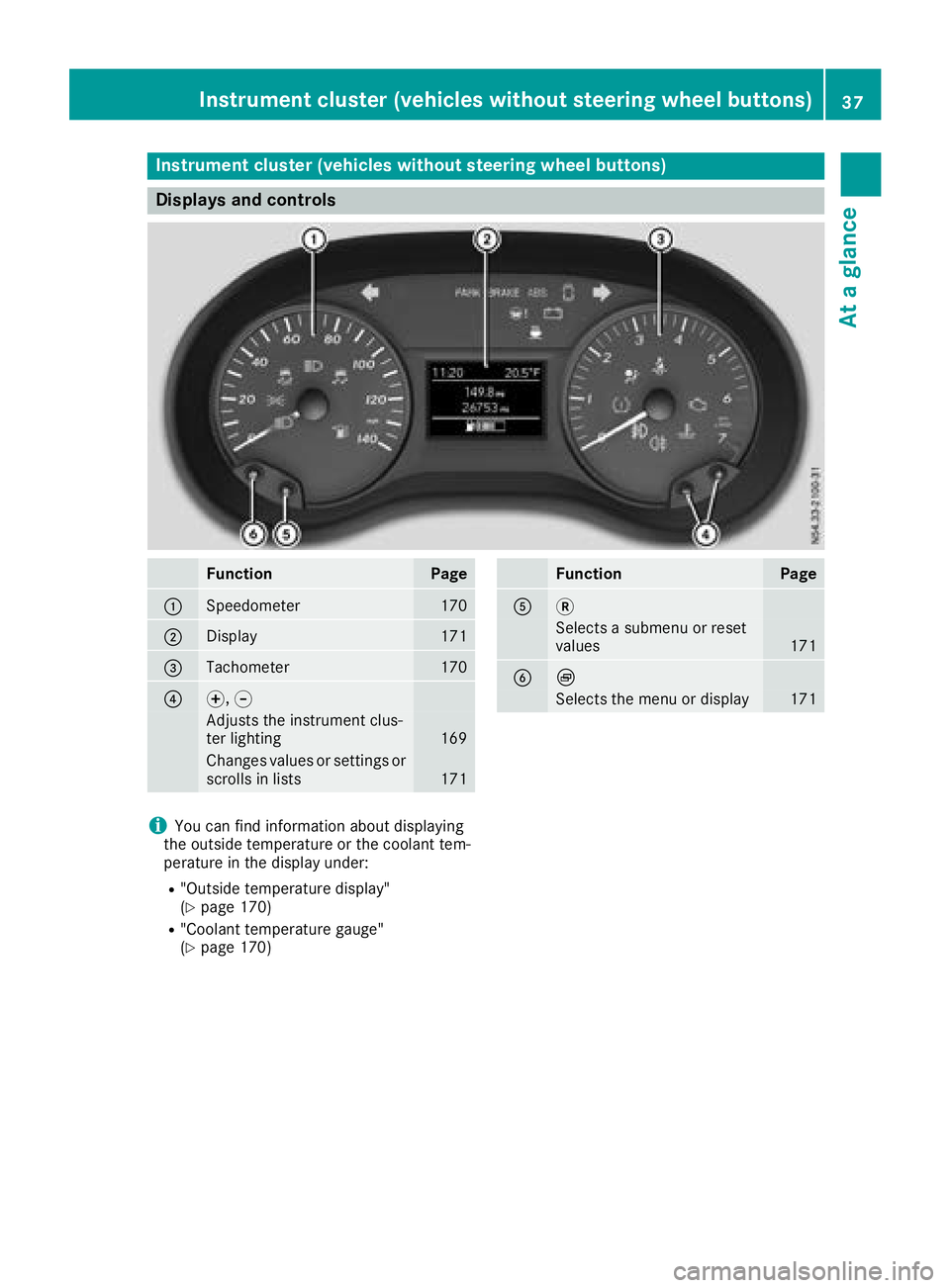
Instrument cluster (vehicles without steering wheel buttons)
Displays and controls
FunctionPage
:Speedometer170
;Display171
=Tachometer170
?f, g
Adjusts th einstrumen tclus -
te rlighting16 9
Changes value sor setting sor
scrolls in list s171
FunctionPag e
A3
Selects asubmen uor reset
value s171
BÈ
Selects th emen uor display17 1
iYou can fin dinformation about displayin g
th eoutside temperature or th ecoolan ttem-
peratur ein th edisplay under:
R"Outside temperature display"
(Ypage 170)
R"Coolan ttemperature gauge "
(Ypage 170)
Instrument cluster (vehicles without steering wheel buttons)37
At a glance
Page 40 of 318
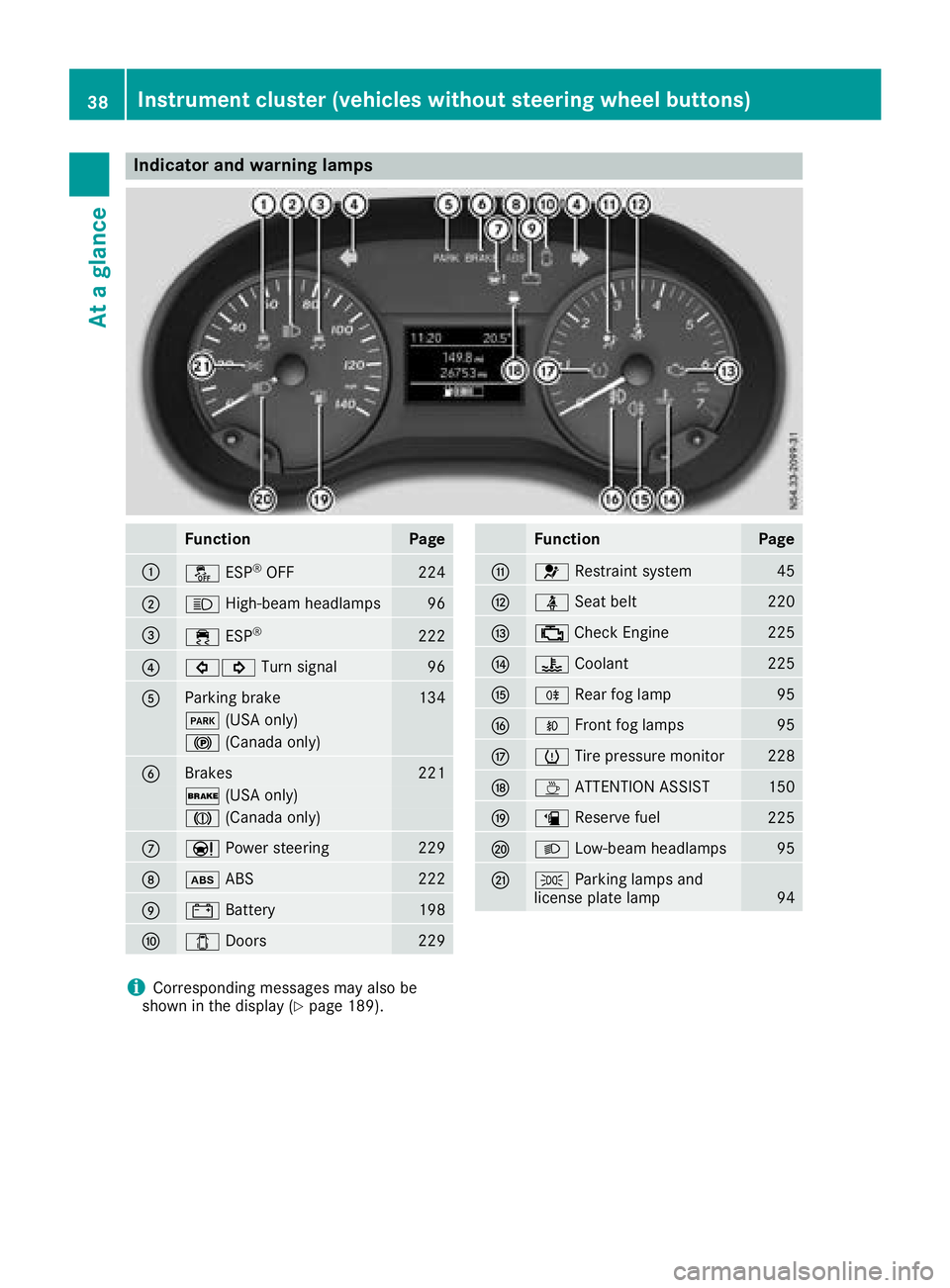
Indicator and warning lamps
FunctionPage
:å ESP®OF F224
;K High-beam headlamps96
=÷ESP®22 2
?#! Turn signal96
AParking brak e134
F (USAonly)
! (Canada only)
BBrakes221
$ (USAonly)
J (Canada only)
CÐPowersteering22 9
Dò ABS222
E# Battery198
F1 Doors229
FunctionPag e
G6 Restrain tsystem45
Hü Seat belt220
I; CheckEngin e225
J? Coolan t225
KR Rear fog lamp95
LOFrontfog lamp s95
MhTirepressur emonitor22 8
NÀ ATTENTION ASSIST150
Oæ Reserve fuel225
PL Low-beam headlamps95
QTParking lamp sand
license plat elamp94
iCorresponding message smay also be
shown in th edisplay (Ypage 189).
38Instrument cluster (vehicles without steering wheel buttons)
At a glance
Page 41 of 318
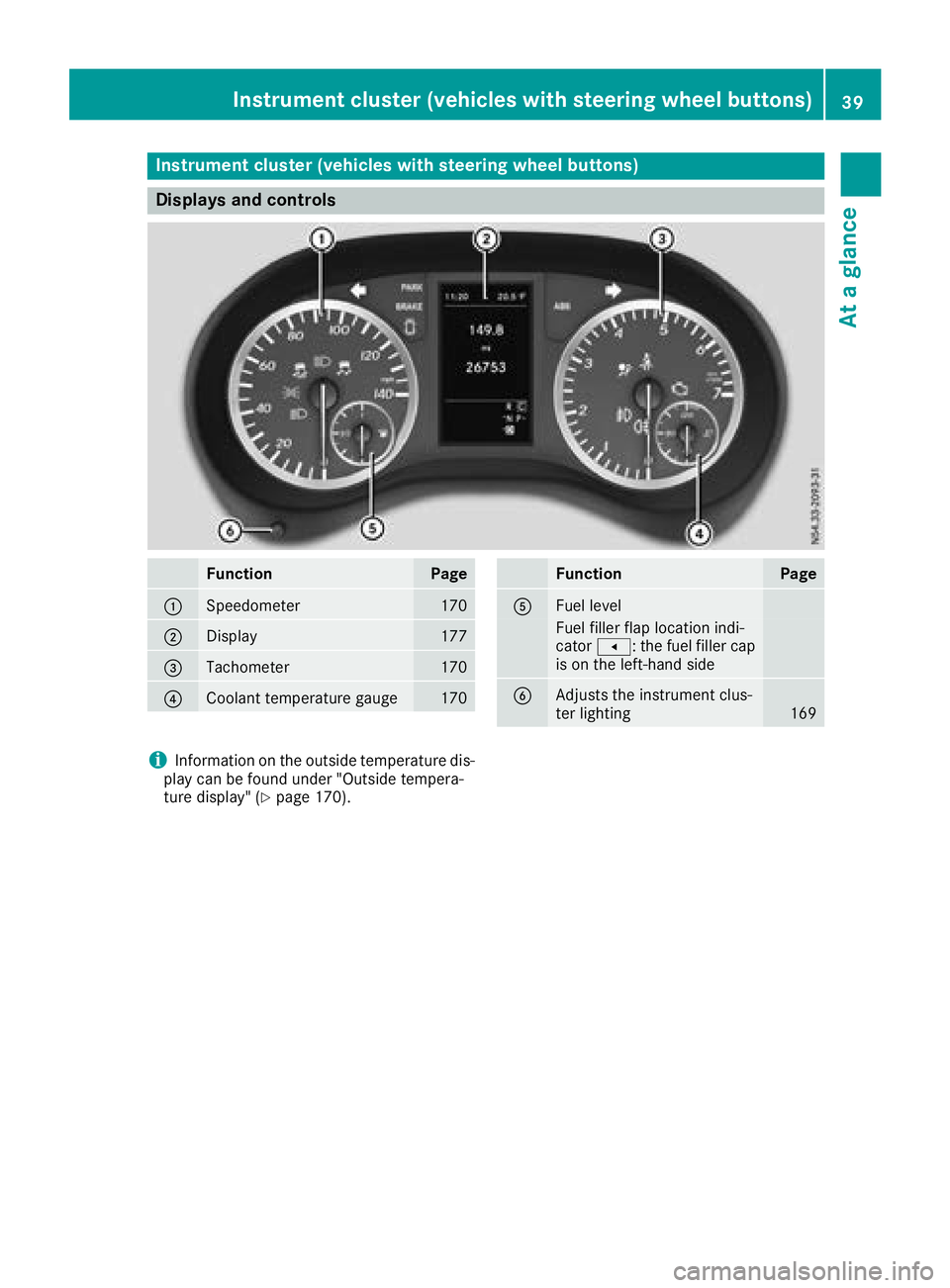
Instrument cluster (vehicles with steering wheel buttons)
Displays and controls
FunctionPage
:Speedometer170
;Display177
=Tachometer170
?Coolan ttemperature gauge17 0
FunctionPag e
AFuellevel
Fue lfiller flap location indi-
cator t: thefuel filler cap
is on th eleft-han dside
BAdjusts th einstrumen tclus -
te rlighting16 9
iInformation on th eoutside temperature dis-
play can be foun dunder "Outside tempera-
tur edisplay" (
Ypage 170).
Instrument cluster (vehicles with steering wheel buttons)39
At a glance
Page 42 of 318
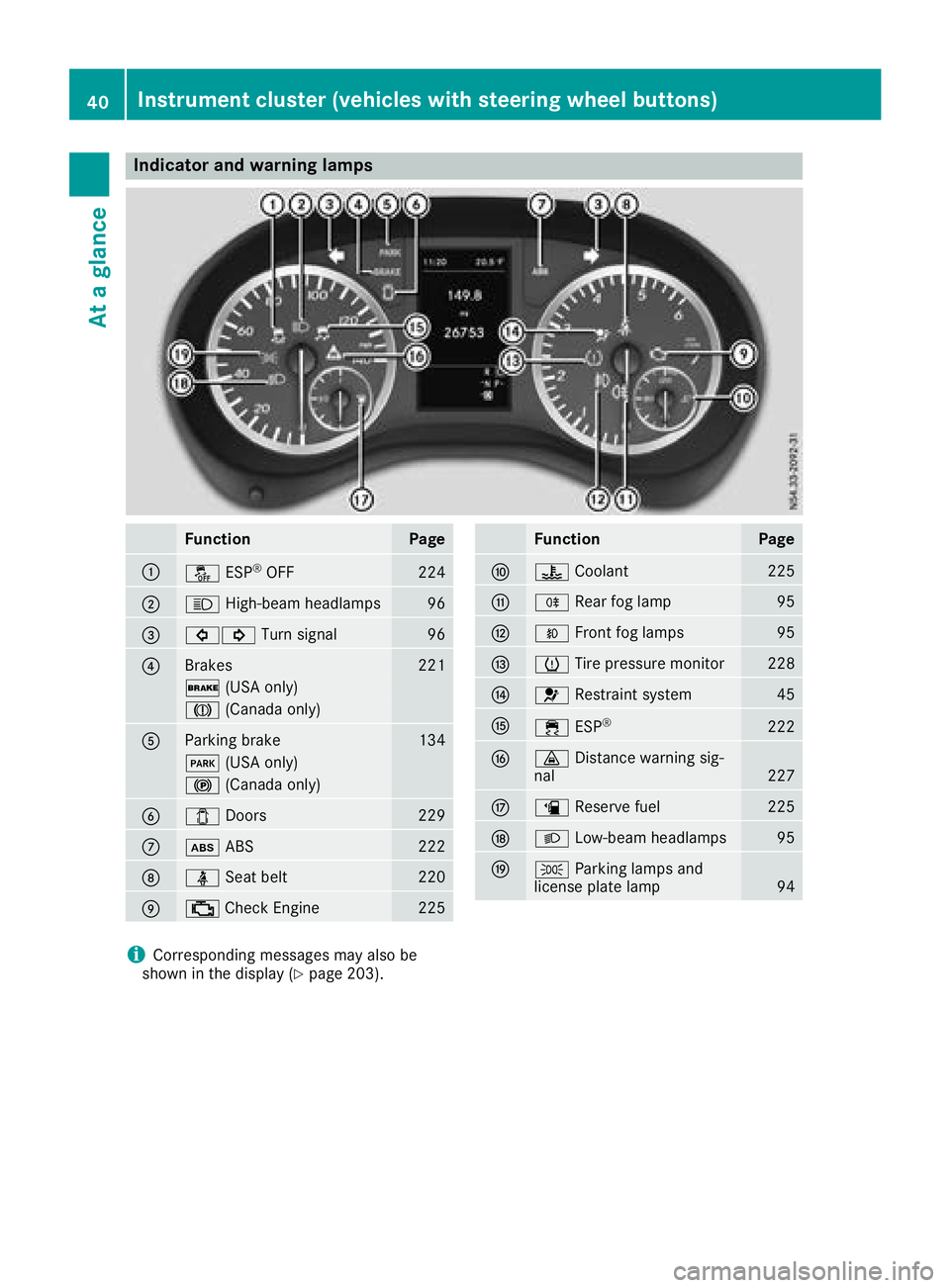
Indicator and warning lamps
FunctionPage
:å ESP®OF F224
;K High-beam headlamps96
=#! Turn signal96
?Brakes221
$ (USAonly)
J (Canada only)
AParking brak e134
F (USAonly)
! (Canada only)
B1Doors229
Cò ABS222
Dü Seat belt220
E; CheckEngin e225
FunctionPag e
F? Coolan t225
GR Rear fog lamp95
HOFrontfog lamp s95
IhTirepressur emonitor22 8
J6 Restrain tsystem45
K÷ ESP®22 2
L· Distanc ewarning sig-
nal22 7
Mæ Reserve fuel225
NL Low-beam headlamps95
OTParking lamp sand
license plat elamp94
iCorresponding message smay also be
shown in th edisplay (Ypage 203).
40Instrument cluster (vehicles with steering wheel buttons)
At a glance
Page 43 of 318
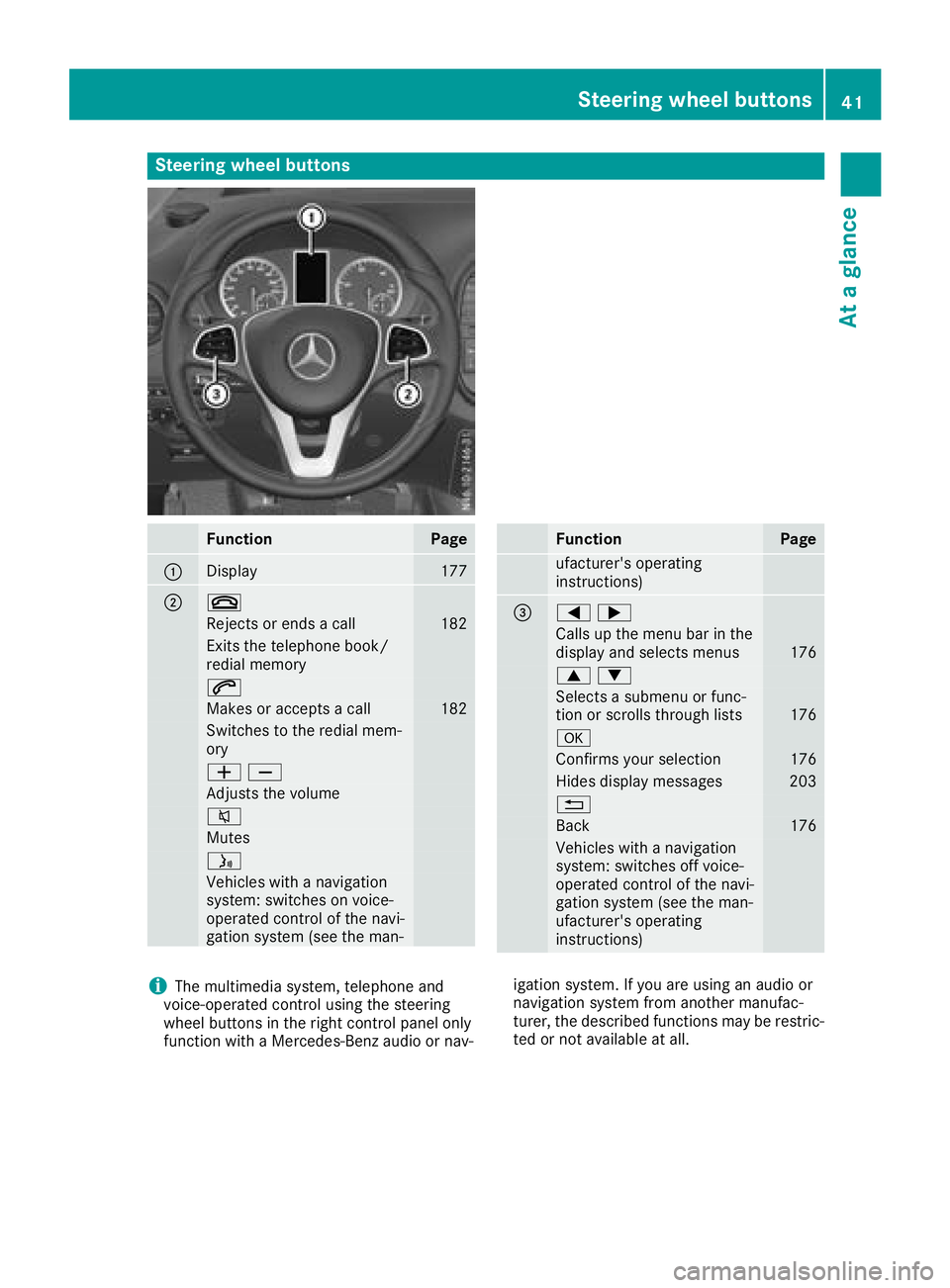
Steering wheel buttons
FunctionPage
:Display177
;~
Rejects or ends a call182
Exits the telephone book/
redial memory
6
Makes or accepts a call182
Switches to the redial mem-
ory
WX
Adjusts the volume
8
Mutes
ó
Vehicles with a navigation
system: switches on voice-
operated control of the navi-
gation system (see the man-
FunctionPage
ufacturer's operating
instructions)
==;
Calls up the menu barinthe
display and selects menus176
9:
Selects a submenu or func-
tion or scrolls through lists176
a
Confirms your selection176
Hides display messages203
%
Back176
Vehicles with a navigation
system: switches off voice-
operated control of the navi-
gation system (see the man-
ufacturer's operating
instructions)
iThe multimedia system, telephone and
voice-operated control using the steering
wheel buttons in the right control panel only
function with a Mercedes-Benz audio or nav- igation system. If you are using an audio or
navigation system from another manufac-
turer, the described functions may be restric-
ted or not available at all.
Steering wheel buttons41
At a glance
Page 47 of 318
Useful information
This Operator's Manual describes all models as
well as standard and optional equipment of your
vehicle that were available at the time of going
to print. Country-specific variations are possi-
ble. Note that your vehicle may not be equipped
with all of the described functions. This also
applies to systems and functions relevant to
safety.
Read the information on qualified specialist
workshops (
Ypage 31).
Occupant safety
Restraint system introduction
The restraint system can reduce the risk of vehi-cle occupants coming into contact with parts of
the vehicle's interior in the event of an accident.
The restraint system can also reduce the forces to which vehicle occupants are subjected during
an accident.
The restraint system comprises:
RSeat belt system
RAir bags
RChild restraint system
RChild seat securing systems
The components of the restraint system work in
conjunction with each other. They can only
deploy their protective function if, at all times, all
vehicle occupants:
Rhave fastened their seat belts correctly
(Ypage 48)
Rhave the seat and head restraint adjusted
properly (Ypage 84)
As the driver, you also have to make sure that
the steering wheel is adjusted correctly.
Observe the information relating to the correct
driver's seat position (
Ypage 84).
You also have to make sure that an air bag can
inflate properly if deployed (
Ypage 50).
An air bag supplements a correctly worn seat
belt. As an additional safety device, the air bag
increases the level of protection for vehicle
occupants in the event of an accident. For exam-
ple, if, in the event of an accident, the protection
offered by the seat belt is sufficient, the air bags are not deployed. When an accident occurs, only
the air bags that increase protection in that par-
ticular accident situation are deployed. How- ever, seat belts and air bags generally do not
protect against objects penetrating the vehicle
from the outside.
Information on restraint system operation can
be found under "Triggering of the Emergency
Tensioning Devices and air bags" (
Ypage 56).
See "Children in the vehicle" for information on
children traveling with you in the vehicle as well
as on child restraint systems (
Ypage 58).
Important safety notes
GWARNING
Modifications to the restraint system may
cause it to no longer work as intended. The
restraint system may then not perform its
intended protective function and may fail in an
accident or trigger unexpectedly, for example.
This poses an increased risk of injury or even fatal injury.
Never modify parts of the restraint system.
Never tamper with the wiring, the electronic
components or their software.
If it is necessary to modify components of the
restraint system to accommodate a person with
disabilities, contact a Mercedes-Benz Commer-
cial Van Center for details. USA only: contact
our Mercedes-Benz Customer Assistance Cen-
ter on 1‑ 877‑762‑8267 for details.
Restraint system warning lamp
The functions of the restraint system are
checked after the ignition is switched on and at
regular intervals while the engine is running.
Therefore, malfunctions can be detected in
good time.
The 6 restraint system warning lamp on the
instrument cluster lights up when the ignition is
switched on. It goes out no later than a few sec- onds after the vehicle is started. The compo-
nents of the restraint system are in operational
readiness.
Occupant safety45
Safety
Z