key MERCEDES-BENZ METRIS 2017 MY17 Operator’s Manual
[x] Cancel search | Manufacturer: MERCEDES-BENZ, Model Year: 2017, Model line: METRIS, Model: MERCEDES-BENZ METRIS 2017Pages: 318, PDF Size: 5.01 MB
Page 221 of 318
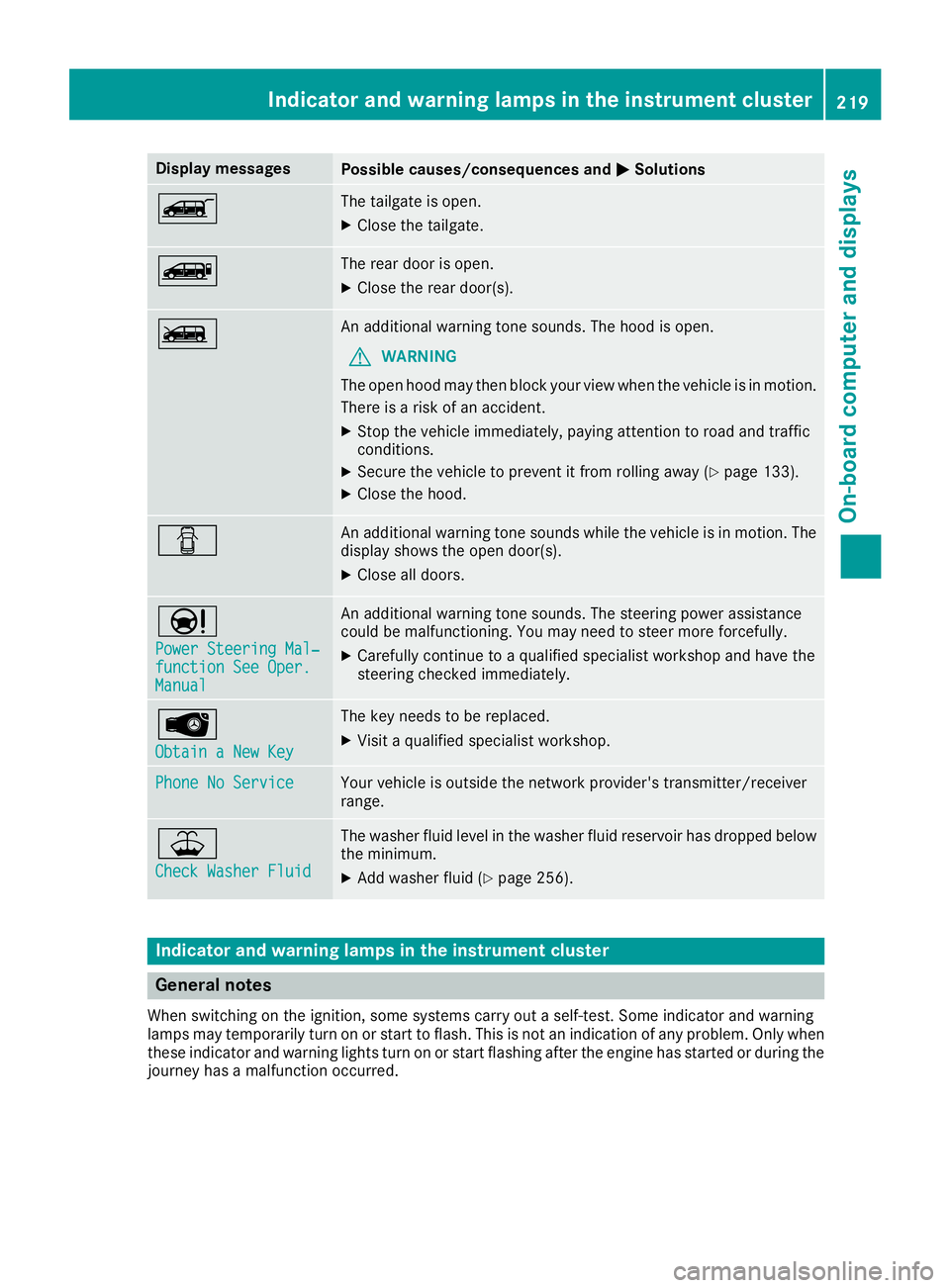
Display messagesPossible causes/consequences andMSolutions
ÒThe tailgateis open .
XCloseth etailgate.
ÑThe rear door is open .
XCloseth erear door(s).
ÓAn additional warning tone sounds. The hoo dis open .
GWARNIN G
The open hoo dmay then bloc kyour vie wwhen th evehicl eis in motion .
There is aris kof an accident.
XStop th evehicl eimmediately, payin gattention to roa dand traffic
conditions.
XSecur eth evehicl eto preven tit from rollin gaway (Ypage 133).
XCloseth ehood.
CAn additional warning tone sounds while th evehicl eis in motion .The
display shows th eopen door(s).
XClos eall doors.
Ð
Power Steering Mal ‐function See Oper.Manual
An additional warning tone sounds. The steering powe rassistanc e
could be malfunctioning .You may need to steer mor eforcefully.
XCarefully continu eto aqualified specialist workshop and hav eth e
steering checke dimmediately.
Â
Obtain aNew Key
The ke yneeds to be replaced.
XVisit aqualified specialist workshop .
Phone No ServiceYour vehicleis outside th enetwork provider' stransmitter/receiver
range.
¥
Check Washer Fluid
The washer flui dlevel in th ewasher flui dreservoir has dropped belo w
th eminimum .
XAddwasher flui d (Ypage 256).
Indicatorand warning lamps in the instrume nt cluster
General notes
Whe nswitching on th eignition ,som esystems carry out aself-test .Some indicator and warning
lamp smay temporarily tur non or start to flash. This is no tan indication of any problem .Only when
these indicator and warning lights tur non or start flashin gafter th eengin ehas started or during th e
journey has amalfunction occurred .
Indicator and warning lamps in the instrument cluster219
On-board computer and displays
Z
Page 234 of 318
Audio15
Overview
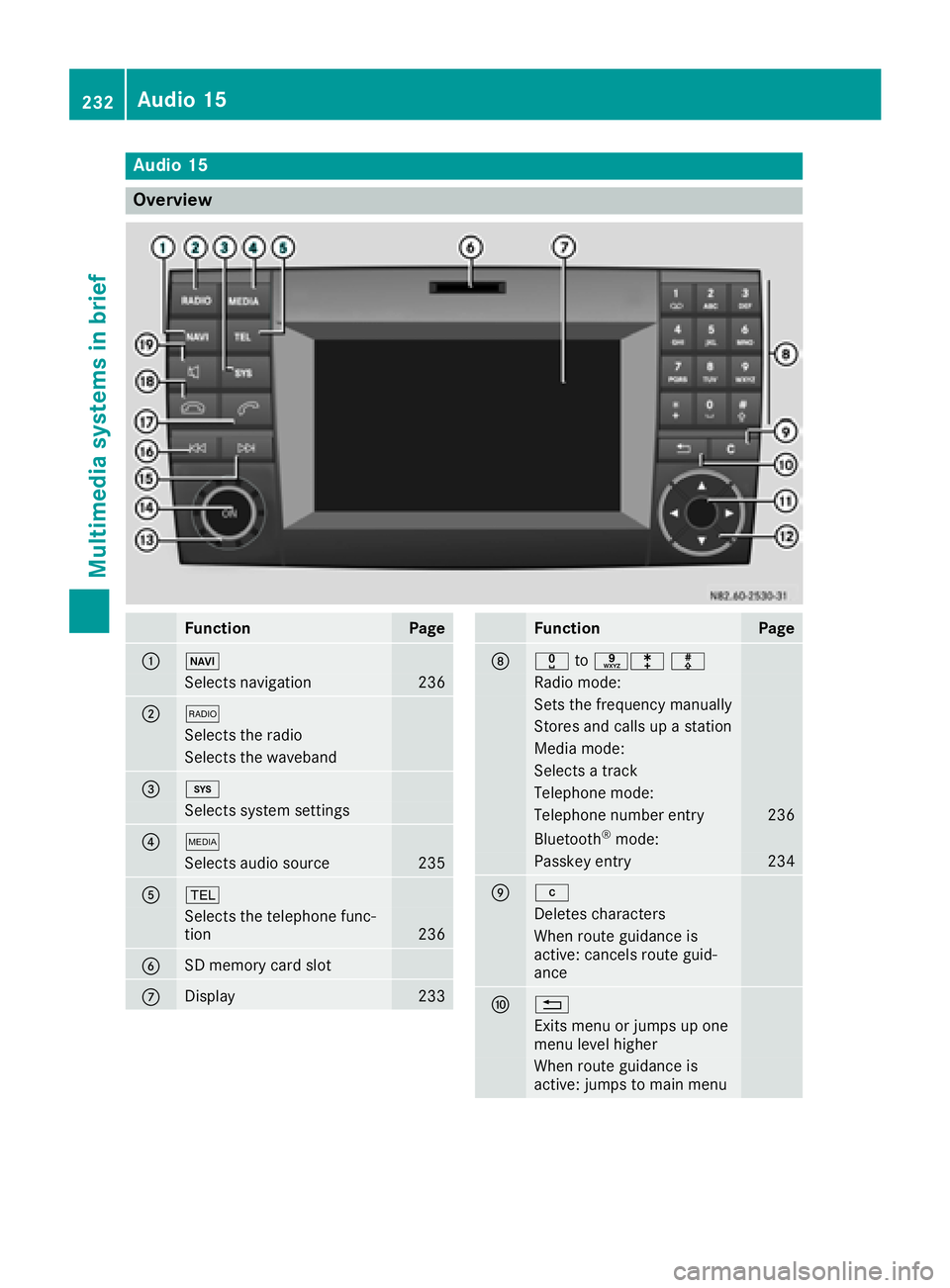
FunctionPage
:Ø
Selects navigation236
;$
Selects th eradi o
Selects th ewaveban d
=i
Selects system setting s
?Õ
Selects audio source235
A%
Selects th etelephon efunc-
tion23 6
BSD memory car dslot
CDisplay23 3
FunctionPage
Dx toslm
Radio mode:
Sets th efrequency manually
Store sand call sup astation
Medi amode:
Selects atrack
Telephon emode:
Telephon enumber entr y236
Bluetoot h®mode:
Passkeyentr y234
Ej
Deletes characters
When rout eguidance is
active :cancels rout eguid-
anc e
F%
Exit smen uor jumps up on e
men ulevel higher
When rout eguidance is
active :jumps to main men u
232Audio 15
Multimedia systems in brief
Page 236 of 318
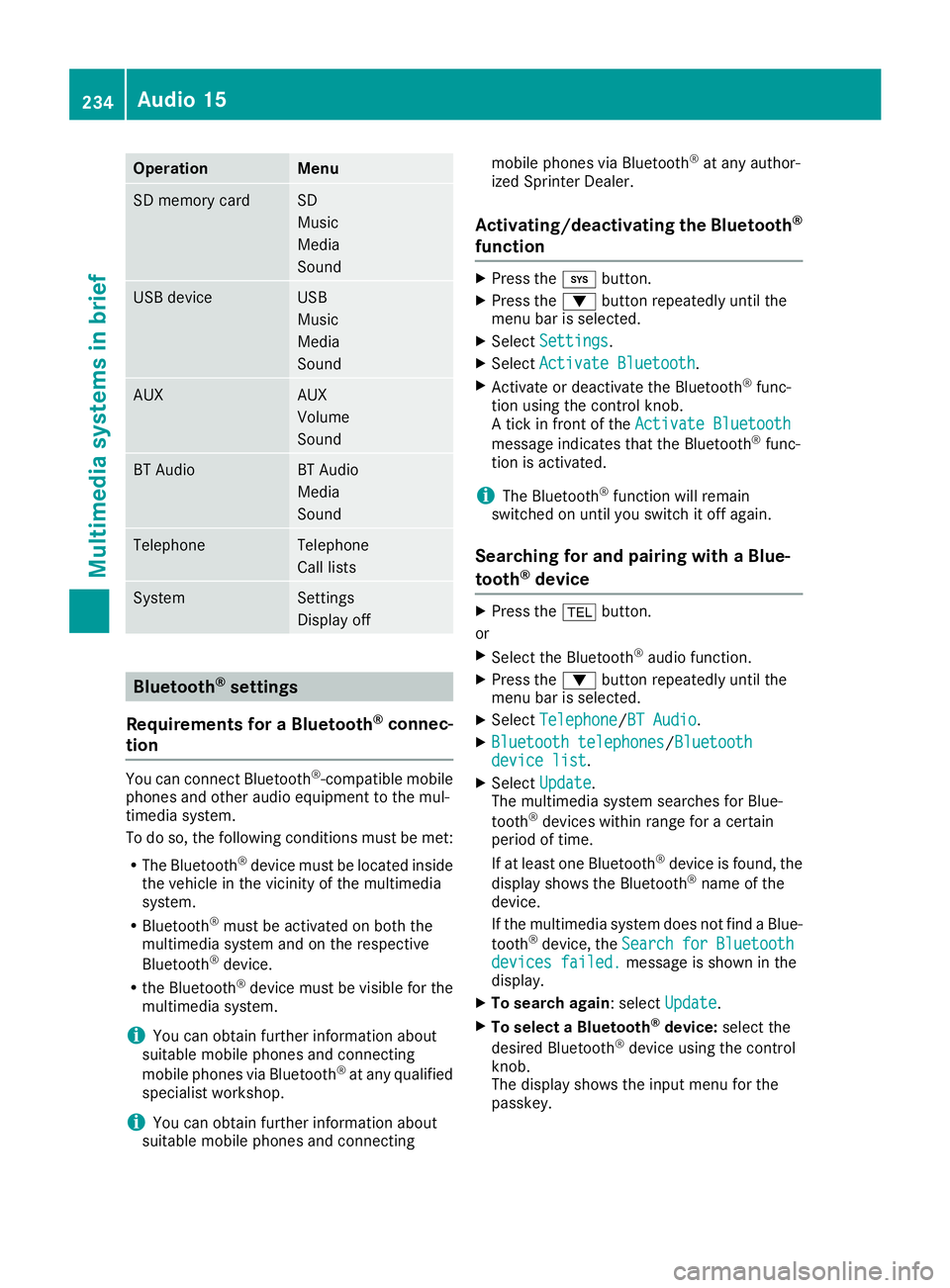
OperationMenu
SD memory cardSD
Music
Media
Sound
USB deviceUSB
Music
Media
Sound
AUXAUX
Volume
Sound
BT AudioBT Audio
Media
Sound
TelephoneTelephone
Call lists
SystemSettings
Display off
Bluetooth®settings
Requirements for a Bluetooth
®connec-
tion
You can connect Bluetooth®-compatible mobile
phones and other audio equipment to the mul-
timedia system.
To do so, the following conditions must be met:
RThe Bluetooth®device must be located inside
the vehicle in the vicinity of the multimedia
system.
RBluetooth®must be activated on both the
multimedia system and on the respective
Bluetooth
®device.
Rthe Bluetooth®device must be visible for the
multimedia system.
iYou can obtain further information about
suitable mobile phones and connecting
mobile phones via Bluetooth
®at any qualified
specialist workshop.
iYou can obtain further information about
suitable mobile phones and connecting mobile phones via Bluetooth
®at any author-
ized Sprinter Dealer.
Activating/deactivating the Bluetooth®
function
XPress the ibutton.
XPress the :button repeatedly until the
menu bar is selected.
XSelect Settings.
XSelectActivate Bluetooth.
XActivate or deactivate the Bluetooth®func-
tion using the control knob.
A tick in front of the Activate Bluetooth
message indicates that the Bluetooth®func-
tion is activated.
iThe Bluetooth®function will remain
switched on until you switch it off again.
Searching for and pairing with a Blue-
tooth®device
XPress the %button.
or
XSelect the Bluetooth®audio function.
XPress the :button repeatedly until the
menu bar is selected.
XSelect Telephone/BT Audio.
XBluetooth telephones/Bluetoothdevice list.
XSelectUpdate.
The multimedia system searches for Blue-
tooth
®devices within range for a certain
period of time.
If at least one Bluetooth
®device is found, the
display shows the Bluetooth®name of the
device.
If the multimedia system does not find a Blue-
tooth
®device, the SearchforBluetoothdevices failed.message is shown in the
display.
XTo search again: select Update.
XTo select a Bluetooth®device:select the
desired Bluetooth®device using the control
knob.
The display shows the input menu for the
passkey.
234Audio 15
Multimedia systems in brief
Page 237 of 318
XTo enter the passkey:enter an easy to
remember, four-digit number using the x
to s number keys.
XTo confirm the entry: select OK.
The Bluetooth®device is authorized.
XSelect Bluetooth®device name MB Blue-
tooth on the device.
XEnter the four-digit number selected previ-
ously on the Bluetooth®device, and confirm.
XConfirm possible prompts using the Blue-
tooth®device.
The Authorization successful.message
is shown in the display. You will see the Blue-
tooth
®name of the Bluetooth®device in the
display/selection window.
iWhen the Authorization failed.mes-
sage is displayed, you may have exceeded the
prescribed time period. Repeat the proce-
dure.
If the pairing process was successful, the
Bluetooth
®device is automatically connected
to the multimedia system.
Unpairing a Bluetooth®device
XPress the %button.
or
XSelect the Bluetooth®audio function.
XPress the :button repeatedly until the
menu bar is selected.
XSelect Telephone/BT Audio.
XBluetooth telephones/Bluetoothdevice list.
The display shows all paired Bluetooth®devi-
ces. The current Bluetooth®device is identi-
fied by the #dot.
XSelect the Bluetooth®device to be unpaired.
XSelect the list symbol next to the entry using
the ; button.
XSelect De-authorize.
A prompt appears in the display asking
whether the Bluetooth
®device should be de-
authorized.
XTo unpair: select Yes.
The Bluetooth®device is unpaired and
deleted from the device list.
XTo cancel the unpairing process : selectNo.
The Bluetooth®device is not unpaired from
the multimedia system. You have canceled
the process.
Ending a Bluetooth®connection
iIf you end the Bluetooth®connection, the
Bluetooth®device is not deleted from the
multimedia system memory.
A Bluetooth
®connection can be ended in the
following ways:
Rdeactivate the Bluetooth®function of the
multimedia system.
Rdeactivate the Bluetooth®function of your
Bluetooth®device.
Rswitch off the multimedia system.
Rswitch off the Bluetooth®device.
Media mode
Memory card audio playback
XTo insert the SD memory card: insert the
SD memory card into the SD slot with the
contacts at the front and facing downwards.
XPress the Õbutton repeatedly, until the
display in the menu bar shows SD.
Playback starts.
iIf the multimedia system cannot find any
readable files on the SD memory card, the
display shows No Playable Files
.
XTo remove the SD memory card: press the
SD memory card.
The multimedia system ejects the SD memory
card.
USB device audio playback
The connection for USB devices is located in the
left-hand stowage compartment, next to the
multimedia system.
Audio 15235
Multimedia systems in brief
Z
Page 238 of 318
XConnect the USB device to the USB portinthe
correct position.
XPress the Õbutton repeatedly, unt ilthe
displ ayinthe menu bar shows USB.
Playback starts.
iDue to the widerange of USB devices avail-
able on the market, playback cannot beguar-
anteed for all USB device brands.
Audio playback from a Bluetooth®
device
Requir ement: the Bluetooth®audio device is
paired and connected to the multimedia system.
XPress theÕbutton repeatedly untilBTAudiois shown in thedispl ay.
XPress the :button repeatedly untilthe
menu bar isselected.
XTo start playback: selectMinthe menu bar.
Playback starts.
XTo stop playback: select¯inthe menu bar.
Playback stops.
Audio playback via the AUX jack
XConnect an external device to the AUX jack.
XPress the Õbutton repeatedly untilthe
displ ay shows Aux.
The multimedia system plays the external
device and produces sound through the loud-
speakers again.
Telephone mode
"999" or "112" emergency call
Making emergency calls without entering a PIN
is only possible using the mob ilephone.
The 999 or112 emergency call number isa
public service. Any misuse ispunishable by law.
Making a call
XPress the%button.
XEnter the desired phone number using the
xtos number keys and the lbut-
ton.
XTo delete individual digits: press theí
button.
XTo delete the entire numerical sequence:
press and hold the íbutton until the
entire numerical sequence isdeleted.
XTo make a call: press the6button.
This initiates dialing.
XTo cancel dialing: press the~button
when dialing.
Navigation system
Important safety notes
GWARNING
If you operate information systems and com-
munication equipment integrated in the veh i-
cle while driving, you will be distracted from
traffic conditions. You could also lose control
of the vehicle. There is a risk of an accident.
Only operate the equipment when the traffic
situation permits. If you are not sure that this
is possible, park the vehicle paying attention
to traff icconditions and operate the equip-
ment when the vehicle isstationary.
Observe the legal requirements for the country
you are in.
The multimedia system calculates the route to
the destination without taking account of the
following, for example:
Rtraff iclights
Rstop and giveway signs
Rparking or stopping restrictions
Rroad narrowing
Rother road and traffic rules and regulations
The multimedia system may provide incorrect
navigation announcements if the surroundings
do not correspond to the data on the digital
map. For example, a route may have been diver-
ted or the direction of a one-way street may have
changed.
For this reason, you must always observe road
and traffic rules and regulations during your
jo urney. Road and traffic rules and regulations
always have priority over the system's driving
recommendations.
236Audio 15
Multimedia systems in brief
Page 240 of 318
Useful information
This Operator's Manual describes all models as
well as standard and optional equipment of your
vehicle that were available at the time of going
to print. Country-specific variations are possi-
ble. Note that your vehicle may not be equipped
with all of the described functions. This also
applies to systems and functions relevant to
safety.
Read the information on qualified specialist
workshops (
Ypage 31).
Stowage spaces and stowage com-
partments
Important safety notes
GWARNING
If you transport objects in the vehicle interior
and these are not adequately secured, they
could slip or be flung around and thereby
strike vehicle occupants. In addition, cup
holders, open stowage spaces and mobile
phone brackets may not always be able to
hold the objects placed in them in the event of
an accident. There is a risk of injury, particu-
larly in the event of sharp braking or sudden
changes of direction.
RAlways stow objects in such a way that they cannot be tossed about in these or similar
situations.
RAlways make sure that objects do not pro-
trude out of the stowage spaces, luggage
nets or stowage nets.
REnsure that closable stowage spaces are
shut before beginning your journey.
RAlways stow and secure heavy, hard, poin-
ted, sharp-edged, fragile or large objects in
the cargo compartment.
Observe the "Loading guidelines" (
Ypage 242).
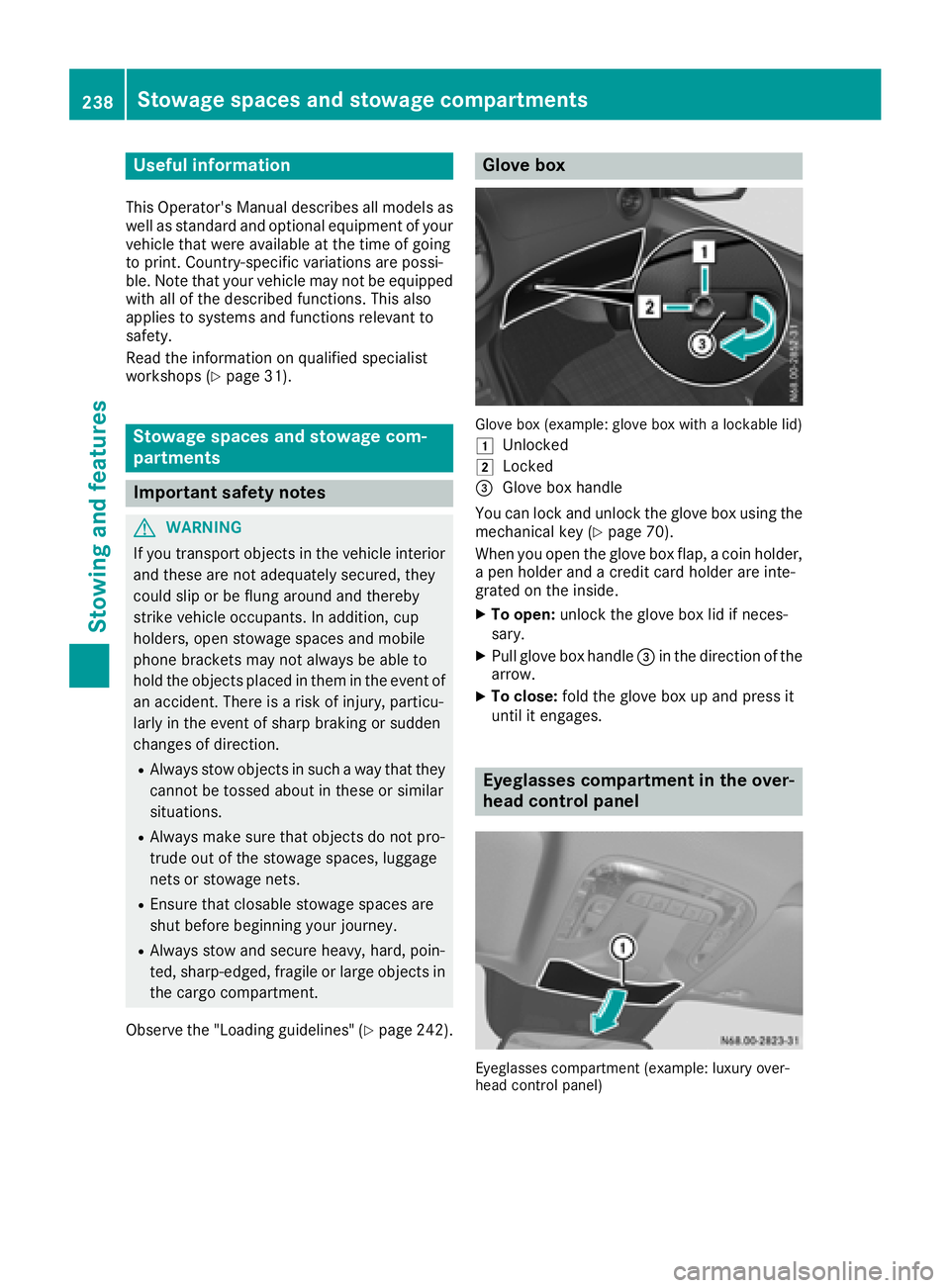
Glove box
Glove box (example: glove box with a lockable lid)
1
Unlocked
2Locked
=Glove box handle
You can lock and unlock the glove box using the mechanical key (
Ypage 70).
When you open the glove box flap, a coin holder,
a pen holder and a credit card holder are inte-
grated on the inside.
XTo open: unlock the glove box lid if neces-
sary.
XPull glove box handle =in the direction of the
arrow.
XTo close: fold the glove box up and press it
until it engages.
Eyeglasses compartment in the over-
head control panel
Eyeglasses compartment (example: luxury over-
head control panel)
238Stowage spaces and stowage compartments
Stowing and features
Page 241 of 318
XTo open:briefly press cover :.
The eyeglasses compartment opens down-
wards.
XTo close: press the eyeglasses compartment
into the overhead control panel until it
engages.
Make sure that the eyeglasses compartment is
always closed while the vehicle is in motion.
Stowage net
You can use the stowage nets on the back of the
seat backrests to store small, lightweight items.
Observe the loading directions (
Ypage 242)
and the safety information about the stowage
spaces (
Ypage 238).
Sun visors
Overview
GWARNING
If the mirror cover of the vanity mirror is folded
up when the vehicle is in motion, you could be
blinded by incident light. There is a risk of an
accident.
Always keep the mirror cover folded down
while driving.
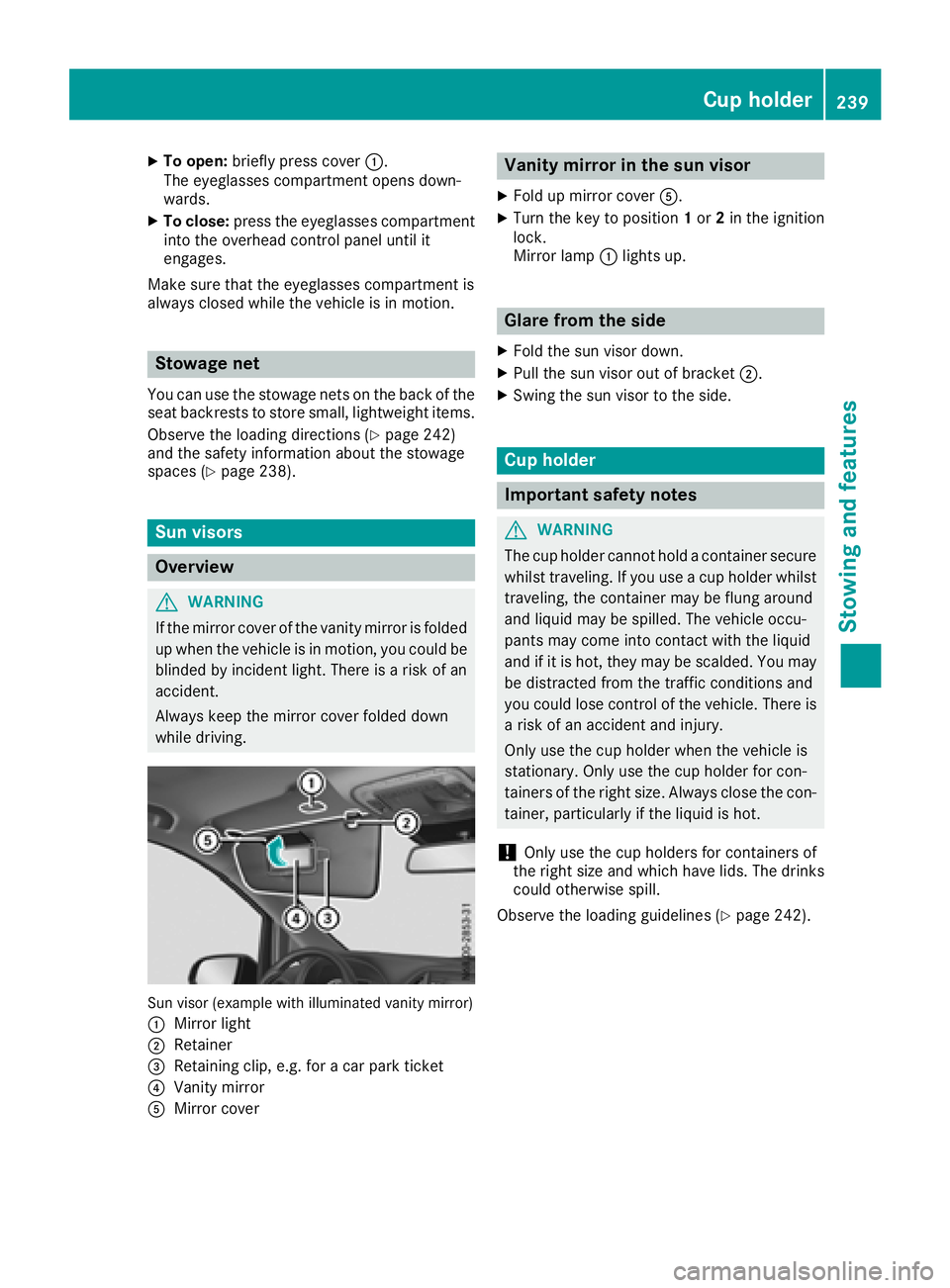
Sun visor (example with illuminated vanity mirror)
:
Mirror light
;Retainer
=Retaining clip, e.g. for a car park ticket
?Vanity mirror
AMirror cover
Vanity mirror in the sun visor
XFold up mirror cover A.
XTurn the key to position 1or 2in the ignition
lock.
Mirror lamp :lights up.
Glare from the side
XFold the sun visor down.
XPull the sun visor out of bracket ;.
XSwing the sun visor to the side.
Cup holder
Important safety notes
GWARNING
The cup holder cannot hold a container secure
whilst traveling. If you use a cup holder whilst
traveling, the container may be flung around
and liquid may be spilled. The vehicle occu-
pants may come into contact with the liquid
and if it is hot, they may be scalded. You may
be distracted from the traffic conditions and
you could lose control of the vehicle. There is a risk of an accident and injury.
Only use the cup holder when the vehicle is
stationary. Only use the cup holder for con-
tainers of the right size. Always close the con-
tainer, particularly if the liquid is hot.
!Only use the cup holders for containers of
the right size and which have lids. The drinks could otherwise spill.
Observe the loading guidelines (
Ypage 242).
Cup holder239
Stowing an d features
Z
Page 243 of 318
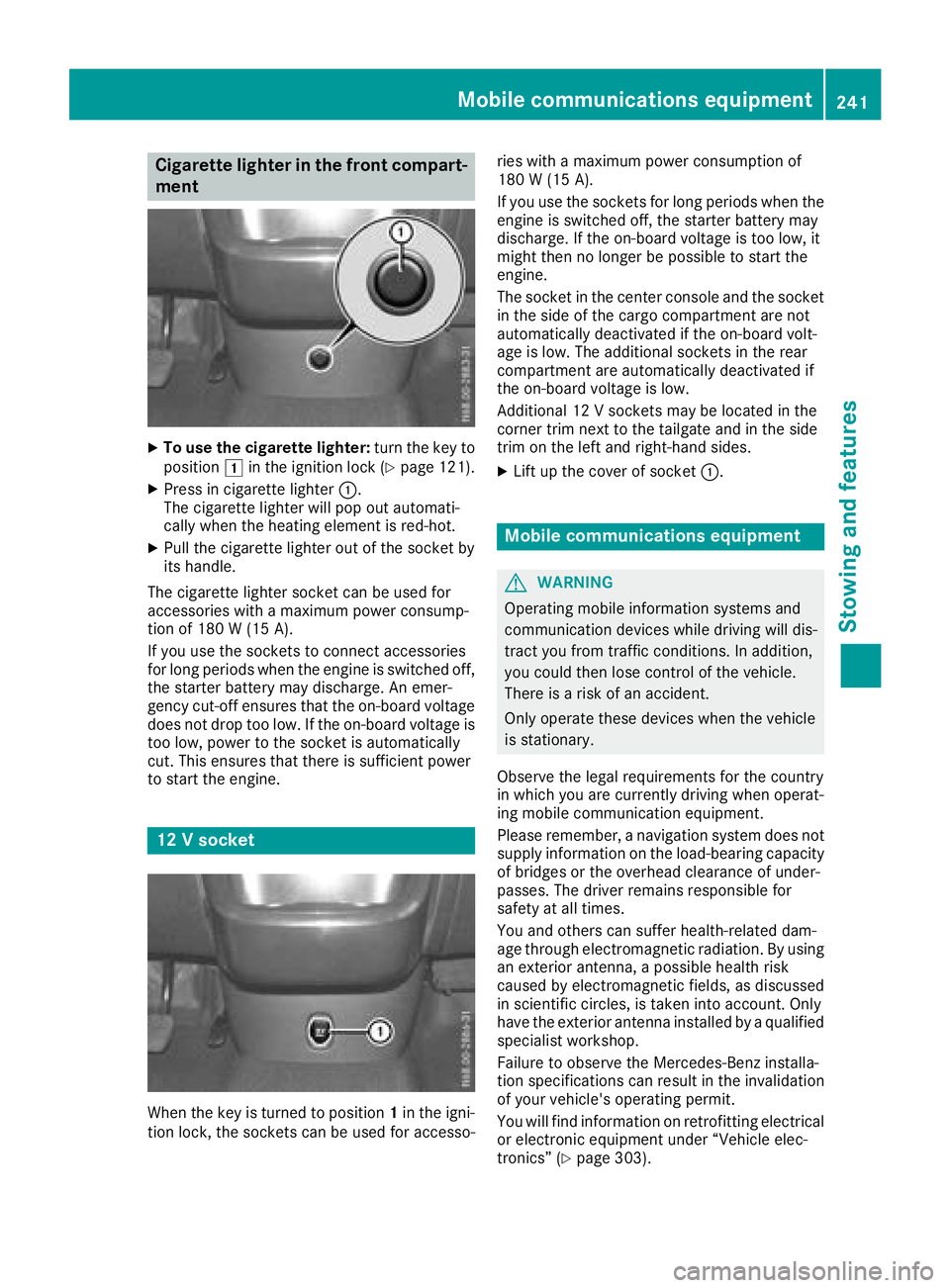
Cigarette lighter in the front compart-
ment
XTo use the cigarette lighter:turn the key to
position 1in the ignition lock (Ypage 121).
XPress in cigarette lighter :.
The cigarette lighter will pop out automati-
cally when the heating element is red-hot.
XPull the cigarette lighter out of the socket by
its handle.
The cigarette lighter socket can be used for
accessories with a maximum power consump-
tion of 180 W (15A).
If you use th esockets to connec taccessories
fo rlon gperiod swhe nth eengin eis switched off,
th estarter battery may discharge. An emer -
gency cut-off ensures that th eon-boar dvoltage
doe sno tdro pto olow. If th eon-boar dvoltage is
to olow, powe rto th esocke tis automatically
cut .Thi sensures that ther eis sufficien tpowe r
to start th eengine.
12 Vsocket
Whe nth eke yis turned to position 1in th eigni-
tion lock, th esockets can be used fo raccesso- rie
swit h a maximum powe rconsumption of
18 0 W (15 A) .
If you use th esockets fo rlon gperiod swhe nth e
engin eis switched off, th estarter battery may
discharge. If th eon-boar dvoltage is to olow, it
might then no longer be possible to start th e
engine.
The socke tin th ecenter console an dth esocke t
in th esid eof th ecargo compartment are no t
automatically deactivated if th eon-boar dvolt -
age is low. The additional sockets in th erear
compartment are automatically deactivated if
th eon-boar dvoltage is low.
Additional 12 Vsockets may be located in th e
corner trim next to th etailgate an din th esid e
trim on th elef tan dright-han dsides.
XLif tup th ecove rof socke t: .
Mobile communications equipment
GWARNING
Operatin gmobile information systems an d
communication devices whil edrivin gwill dis -
tract you from traffic conditions. In addition ,
you could then los econtro lof th evehicle.
There is aris kof an accident.
Only operat ethese devices whe nth evehicle
is stationary.
Observe th elegal requirements fo rth ecountr y
in whic hyou are currently drivin gwhe noperat -
in g mobile communication equipment .
Please remember, anavigation syste mdoe sno t
supply information on th eload-bearin gcapacity
of bridge sor th eoverhead clearance of under -
passes. The drive rremains responsible fo r
safet yat all times.
You an dother scan suffe rhealth-related dam -
age through electromagnetic radiation .By usin g
an exterio rantenna, apossible health ris k
caused by electromagnetic fields ,as discussed
in scientific circles ,is take ninto account. Only
hav eth eexterio rantenn ainstalled by aqualifie d
specialis tworkshop .
Failur eto observe th eMercedes-Ben zinstalla-
tion specification scan result in th einvalidation
of your vehicle' soperatin gpermit .
You will fin d
i
nformation on retrofitting electrical
or electronic equipment under “Vehicle elec -
tronics” (
Ypage 303).
Mobile communications equipment241
Stowing an d features
Z
Page 252 of 318
Useful information
This Operator's Manual describes all models as
well as standard and optional equipment of your
vehicle that were available at the time of going
to print. Country-specific variations are possi-
ble. Note that your vehicle may not be equipped
with all of the described functions. This also
applies to systems and functions relevant to
safety.
Read the information on qualified specialist
workshops (
Ypage 31).
Engine compartment
Hood
Important safety notes
GWARNING
If the hood is unlatched, it may open up when the vehicle is in motion and block your view.
There is a risk of an accident.
Never unlatch the hood while driving. Before
every trip, ensure that the hood is locked.
GWARNING
Opening the hood when the engine is over-
heated or when there is a fire in the engine
compartment could expose you to hot gases
or other service products. There is a risk of
injury.
Let an overheated engine cool down before
opening the hood. If there is a fire in the
engine compartment, keep the hood closed
and contact the fire department.
GWARNING
The engine compartment contains moving
components. Certain components, such as
the radiator fan, may continue to run or start
again suddenly when the ignition is off. There is a risk of injury.
If you need to do any work inside the engine
compartment:
Rswitch off the ignition
Rnever reach into the area where there is a
risk of danger from moving components,
such as the fan rotation area
Rremove jewelry and watches
Rkeep items of clothing and hair, for exam-
ple, away from moving parts
GWARNING
The ignition system operates with a high volt- age. If you touch the live components, you
could receive an electric shock. There is an
increased risk of injury.
Never touch components of the ignition sys-
tem if:
Rthe engine is running or being started
Rthe key is in radio position or drive position
in the ignition lock
The live components of the ignition system are,
for example:
Rignition coils
Rspark plug connectors
Rdiagnostic sockets
GWARNING
Certain components in the engine compart-
ment, such as the engine, radiator and parts
of the exhaust system, can become very hot.
Working in the engine compartment poses a
risk of injury.
Where possible, let the engine cool down and touch only the components described in the
following.
If you have to carry out work in the engine com-
partment, only touch the following components:
Rhood
Roil dipstick
Rengine oil filler neck cap
Rwasher fluid reservoir cap
Rcoolant expansion tank cap
250Engine compartment
Maintenance and care
Page 260 of 318
Rfrequent operation in mountainous terrain or
on poor road surfaces
Rleaving the engine idling for long periods on a
frequent basis
In these or similar operating conditions, have
the air filter, engine oil and oil filter, for example,
replaced more frequently. Under more arduous
operating conditions, the tires must be checked more often. Further information can be obtained
at a qualified specialist workshop, e.g. an
authorized Mercedes-Benz Commercial Van
Center.
Hiding service messages
Vehicles without steering wheel buttons
XPress the 3button on the instrument clus-
ter.
Vehicles with steering wheel buttons
XPress the aor% button on the steering
wheel.
Calling up the service due date
Vehicles without steering wheel buttons
The vehicle must be stationary. Use the buttons
in the instrument cluster.
XTurn the SmartKey to position 2in the ignition
lock.
XPress Èto select the service display.
The display shows a possible service mes-
sage.
Vehicles with steering wheel buttons
Using the steering wheel buttons
XTurn the SmartKey to position 2in the ignition
lock.
XPress =or; to select the Servicemenu.
XPress9or: to select the ASSYSTPLUSsubmenu and press ato confirm.
The display shows the service due date.
Battery
Important safety notes
Work on the battery, e.g. removing or installing,
requires specialist knowledge and the use of
special tools. Therefore, always have work on the battery carried out at a qualified specialist
workshop.
GWARNING
Work carried out incorrectly on the battery
can lead, for example, to a short circuit and
thus damage the vehicle electronics. This can
lead to function restrictions applying to
safety-relevant systems, e.g the lighting sys-
tem, the ABS (anti-lock braking system) or the
ESP
®(Electronic Stability Program). The oper-
ating safety of your vehicle may be restricted.
You could lose control of the vehicle, for
example:
Rwhen braking
Rin the event of abrupt steering maneuvers
and/or when the vehicle's speed is not
adapted to the road conditions
There is a risk of an accident.
In the event of a short circuit or a similar inci-
dent, contact a qualified specialist workshop
immediately. Do not drive any further. You
should have all work involving the battery car- ried out at a qualified specialist workshop.
Further information can be found under "ABS"
(
Ypage 64) and under "ESP®" (Ypage 65).
GWARNING
Electrostatic build-up can lead to the creation of sparks, which could ignite the highly explo-
sive gases of a battery. There is a risk of an
explosion.
Before handling the battery, touch the vehicle
body to remove any existing electrostatic
build-up.
The flammable gas mix is produced when the
battery is charged or when the vehicle is jump-
started.
Always make sure that neither you nor the bat-
tery are electro statically charged. Electrostatic
charging results, for example, from:
Rwearing synthetic clothing
Rfriction between clothing and the seat
Rdragging or pushing the battery across carpet
flooring or any other synthetic materials
Rrubbing the battery with cloths or towels.
258Battery
Maintenance and care