reset MERCEDES-BENZ METRIS 2018 MY18 Operator’s Manual
[x] Cancel search | Manufacturer: MERCEDES-BENZ, Model Year: 2018, Model line: METRIS, Model: MERCEDES-BENZ METRIS 2018Pages: 318, PDF Size: 5.07 MB
Page 192 of 318

Activating/deactivating interiorlighting
delayed switch-off
If you activat eth eInteriorLightingDelay:function ,th einterio rlightin gremains lit for a
further 20 seconds.
Usin gth esteering whee lbuttons
XUse th e= or; buttonto select th e
Settings.menu.
XUse : or9 to select Lights.
XPressato confirm .
XUse: or9 to select th eInteriorLighting Delayfunction .
The curren tstatus appears.
XTo switch on/of f:press aagain.
Vehicle submenu
Setting the sensitivity of thera in sensor
Usin gth esteering whee lbuttons
XPress =or; to select th eSettingsmenu.
XPress :or9 to select Vehicle.
XPressato confirm .
XPress:or9 to select th eRai nSen ‐sor Sensitivityfunction .
The display shows th ecurren tsetting.
XPress ato chang eth esetting.
XPress :or9 to select th eHig h,
Standardor Lowsetting. This settin gcontrol s
th erain sensor's sensitivit yto precipitation.
The windshield wiper then wipes mor eor less
frequently at th esame precipitatio nintensity.
XPress th ea buttonto store th eentry.
You can fin dfurther information under "Wind-
shield wiper " (
Ypage 106).
Switching the automatic locking featu re
on/off
Usin gth esteering whee lbuttons
XPress =or; to select th eSettingsmenu.
XPress :or9 to select Vehicle.
XPressato confirm .
XPress:or9 to select th eAutomaticDoo rLoc kfunction .
The curren tstatus is shown.
XTo act ivate/deact ivate:pressaagain.
If you activat eth eAutomatic
Doo rLockfunc-
tion, your vehicl ewill loc kautomatically from a
spee dof approximately 15 km/h.
You can fin dfurther information under "Auto-
matic door lock" (
Ypage 74).
Activating/deactivating the acoustic
locking confi rmation
Usin gth esteering whee lbuttons
XPress =or; to select th eSettingsmenu.
XPress :or9 to select Vehicle.
XPressato confirm .
XPress:or9 to select AcousticLockFeedback.
The curren tstatus is shown.
XTo act ivate/deact ivate:pressaagain.
If you activat eth eAcoustic Loc kFeedback
function ,an acoustic tone sounds when th e
vehicl eis locked.
Restoring the factory settings
Usin gth esteering whee lbuttons
XPress =or; to select th eSettingsmenu.
XPress :or9 to select FactorySet ‐ting.
XPress ato confirm .
The Reset All Settings?function is dis-
played.
XPress :or9 to select NoorYes.
XPress ato confirm th echoice.
If you select Yes,th edisplay shows aconfir-
mation message .
190On-board computer (vehicles with steering wheel buttons)
On-board computer and displays
Page 237 of 318
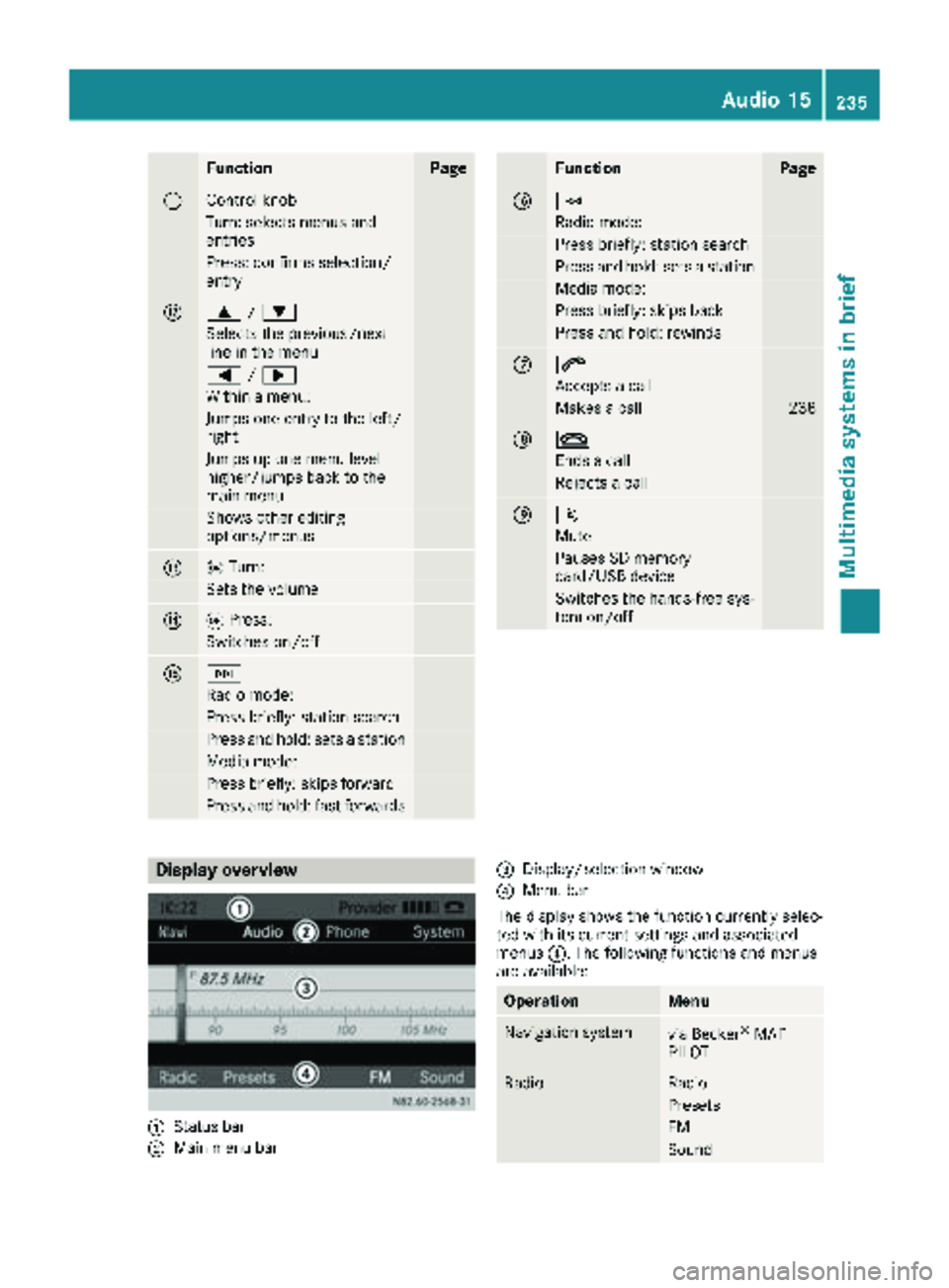
FunctionPage
GControl knob
Turn: selects menus and
entries
Press: confirms selection/
entry
H9/:
Selects the previous/next
line in the menu
= /;
Within a menu:
Jumps one entry to the left/
right
Jumps up one menu level
higher/jumps back to the
main menu
Shows other editing
options/menus
Io Turn:
Sets the volume
JqPress:
Switches on/off
KF
Radio mode:
Press briefly: station search
Press and hold: sets a station
Media mode:
Press briefly: skips forward
Press and hold: fast forwards
FunctionPage
LE
Radio mode:
Press briefly: station search
Press and hold: sets a station
Media mode:
Press briefly: skips back
Press and hold: rewinds
M6
Accepts a call
Makes a call238
N~
Ends a call
Rejects a call
O8
Mute
Pauses SD memory
card/USB device
Switches the hands-free sys-
tem on/off
Display overview
:Status bar
;Main menu bar
=Display/selection window
?Menu bar
The display shows the function currently selec-
ted with its current settings and associated
menus ?. The following functions and menus
are available:
OperationMenu
Navigation systemvia Becker®MAP
PILOT
RadioRadio
Presets
FM
Sound
Audio 15235
Multimedia systems in brief
Z
Page 261 of 318
Maintenance
General notes
HEnvironmental note
Observe measures to protect the environ-
ment when working on the vehicle. You must
observe the legal requirements when dispos-
ing of service products, e.g. engine oil. This
also includes all components, e.g. filters,
which have come into contact with service
products. Any qualified specialist workshop
can provide information about this.
Dispose of empty containers, cleaning cloths
and care products in an environmentally
responsible manner. Comply with the instruc-
tions for use of the care products.
Do not run the engine for longer than neces-
sary when the vehicle is stationary.
Before carrying out maintenance measures and
repairs, you must read the following documents
relating to maintenance measures and repairs:
Rrelevant sections of the technical documen-
tation such as the Operator's Manual and
workshop information
Rlegal stipulations such as work safety regula-
tions and accident prevention regulations
While working under the vehicle, you must
secure the vehicle on jack stands with sufficient load capacity.
Never use a vehicle jack instead of stands. The
jack is designed only to raise the vehicle for a
short time when changing a wheel. It is not
suited for performing maintenance work under
the vehicle.
Please also refer to the notes about qualified
specialist workshops (
Ypage 31).
The scope and regularity of the inspection and
maintenance work primarily depend on the
often diverse operating conditions. Specialist
knowledge beyond the scope of this Operator's
Manual is required when carrying out testing
and maintenance work. This work should only be
carried out by trained staff.
The vehicle Maintenance Booklet describes the scope and frequency of maintenance work and
contains additional notes on the Limited War-
ranty. You will find information about service
products approved by Mercede s-Benz a
ndcapacities under "Service products and capaci-
ties" (
Ypage 306)
Maintenance services must be carried out in
accordance with the provisions and recommen- dations in the Maintenance Booklet. Not doing
so could void the warranty claim and lead to
refusal of goodwill gestures after the manufac-
turer has submitted a damage report.
Observe the information under "Mercedes-Benz
genuine parts" (
Ypage 33).
Service interval display
General notes
The service interval display informs you of the
next service due date. Information on the type of
service and service intervals can be found in the
Maintenance Booklet.
iThe service interval display does not provide
information about the engine oil level. The
service interval display should therefore not
be confused with the engine oil level display.
For example, the display shows one of the fol-
lowing service messages for a few seconds:
RService A in .. days
RService A Dueor Service A Due
RServ. A Exceed. by .. Days
Then either the remaining time or distance until
the next service due date is displayed. If the
service due date has been exceeded, the
elapsed time or distance traveled after the over-
due service date is shown. The letter in the dis-
play message indicates which service is due. A
stands for a minor service andBfor a major ser-
vice.
A qualified specialist workshop, e.g. an author-
ized Mercedes-Benz Commercial Van Center,
will reset the service interval display after the
service work has been carried out. You can also
obtain further information on maintenance
work, for example.
The prescribed service interval is based on nor- mal vehicle use. Service work will need to be
performed more frequently than prescribed if
the vehicle is operated under more arduous con-
ditions or with higher loads. Such arduous con-
ditions include:
Rregular city driving with frequent intermediate
stops
Rdriving predominantly short distances
Maintenance259
Maintenance and care
Z
Page 266 of 318
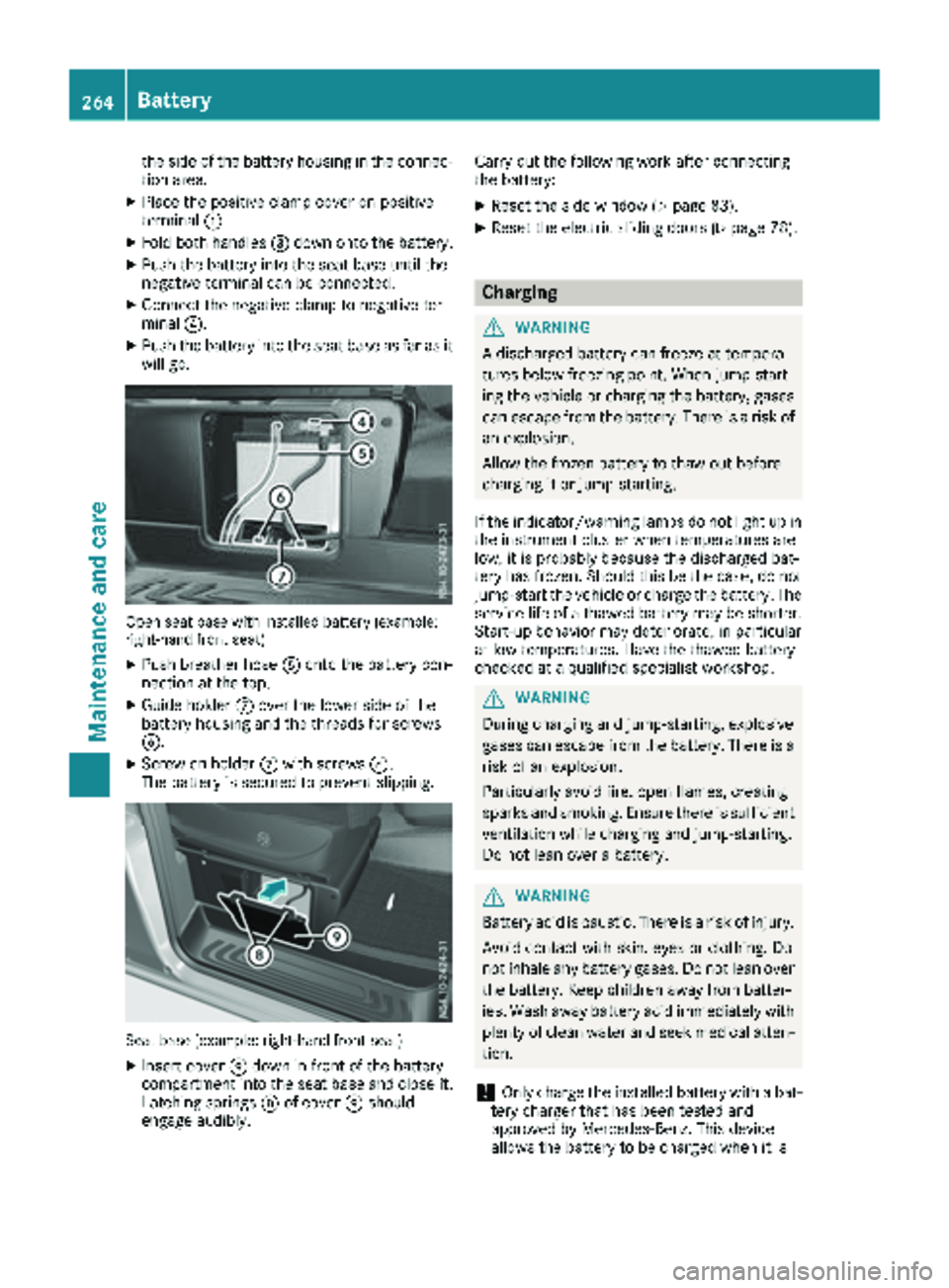
the side of the battery housing in the connec-
tion area.
XPlace the positive clamp cover on positive
terminal:.
XFold both handles =down onto the battery.
XPush the battery into the seat base until the
negative terminal can be connected.
XConnect the negative clamp to negative ter-
minal ?.
XPush the battery into the seat base as far as it
will go.
Open seat base with installed battery (example:
right-hand front seat)
XPush breather hose Aonto the battery con-
nection at the top.
XGuide holder Cover the lower side of the
battery housing and the threads for screws
B.
XScrew on holder Cwith screws B.
The battery is secured to prevent slipping.
Seat base (example: right-hand front seat)
XInsert cover Edown in front of the battery
compartment into the seat base and close it.
Latching springs Dof cover Eshould
engage audibly. Carry out the following work after connecting
the battery:
XReset the side window (Ypage 83).
XReset the electric sliding doors (Ypage 78).
Charging
GWARNING
A discharged battery can freeze at tempera-
tures below freezing point. When jump-start-
ing the vehicle or charging the battery, gases can escape from the battery. There is a risk of
an explosion.
Allow the frozen battery to thaw out before
charging it or jump-starting.
If the indicator/warning lamps do not light up in the instrument cluster when temperatures are
low, it is probably because the discharged bat-
tery has frozen. Should this be the case, do not
jump-start the vehicle or charge the battery. The
service life of a thawed battery may be shorter. Start-up behavior may deteriorate, in particular
at low temperatures. Have the thawed battery
checked at a qualified specialist workshop.
GWARNING
During charging and jump-starting, explosive
gases can escape from the battery. There is a risk of an explosion.
Particularly avoid fire, open flames, creating
sparks and smoking. Ensure there is sufficient
ventilation while charging and jump-starting.
Do not lean over a battery.
GWARNING
Battery acid is caustic. There is a risk of injury.
Avoid contact with skin, eyes or clothing. Do
not inhale any battery gases. Do not lean over
the battery. Keep children away from batter-
ies. Wash away battery acid immediately with
plenty of clean water and seek medical atten-
tion.
!Only charge the installed battery with a bat-
tery charger that has been tested and
approved by Mercedes-Benz. This device
allows the battery to be charged when it is
264Battery
Maintenance and care