service MERCEDES-BENZ METRIS 2018 MY18 Operator’s Manual
[x] Cancel search | Manufacturer: MERCEDES-BENZ, Model Year: 2018, Model line: METRIS, Model: MERCEDES-BENZ METRIS 2018Pages: 318, PDF Size: 5.07 MB
Page 124 of 318
Useful information
This Operator's Manual describes all models as
well as standard and optional equipment of your
vehicle that were available at the time of going
to print. Country-specific variations are possi-
ble. Note that your vehicle may not be equipped
with all of the described functions. This also
applies to systems and functions relevant to
safety.
Read the information on qualified specialist
workshops (
Ypage 31).
Breaking-in notes
Important safety notes
In certain driving and driving safety systems, the
sensors adjust automatically while a certain dis-
tance is being driven after the vehicle has been
delivered or after repairs. Full system effective- ness is not reached until the end of this teach-in
procedure.
New or replaced brake pads and brake discs
only reach their optimal braking effect after a
few hundred kilometers of driving. Until then,
compensate for this by applying greater force to
the brake pedal.
The first 1000 miles (1500 km)
For the service life and economy of your vehicle
it is crucial that you break in the engine with due
care.
RTherefore, protect the engine for the first
1000 miles (1500 km) by driving at varying
vehicle and engine speeds.
RAvoid overstraining the vehicle and high
engine speeds during this period, e.g. driving
at full throttle. Do not exceed Øof the per-
missible maximum speed for each gear.
RDo not change down a gear manually in order to brake.
RTry to avoid depressing the accelerator pedal
beyond the pressure point (kickdown).
After 1000 miles (1500 km), you can increase
the engine speed gradually and accelerate the
vehicle to full speed.
iYou should also observe these notes on
breaking-in if the engine or parts of the drive
train on your vehicle have been replaced.
Driving
Important safety notes
GWARNING
Flammable materials introduced through
environmental influence or by animals can
ignite if in contact with the exhaust system or
parts of the engine that heat up. There is a risk
of fire.
Carry out regular checks to make sure that
there are no flammable foreign materials in
the engine compartment or in the exhaust
system.
GWARNING
If you switch off the ignition while driving,
safety-relevant functions are only available
with limitations, or not at all. This could affect, for example, the power steering and the brake
boosting effect. You will require considerably
more effort to steer and brake. There is a risk
of an accident.
Do not switch off the ignition while driving.
GWARNING
If the parking brake has not been fully
released when driving, the parking brake can:
Roverheat and cause a fire
Rlose its hold function.
There is a risk of fire and an accident. Release
the parking brake fully before driving off.
!Warm up the engine quickly. Do not use the
engine's full performance until it has reached
operating temperature.
Only shift the automatic transmission to the
desired drive position when the vehicle is sta-
tionary.
Where possible, avoid spinning the drive
wheels when pulling away on slippery roads.
You could otherwise damage the drive train.
122Driving
Driving and parking
Page 137 of 318
Do not get into the vehicle again during the refu-
eling process. Otherwise, electrostatic charge
could build up again.
HEnvironmental note
If fuels are handled improperly, they pose a
danger to persons and the environment. Do
not allow fuels to run into the sewage system,
the surface waters, the ground water or into
the ground.
!Do not switch on the ignition if you acciden-
tally refuel with the wrong fuel. Otherwise, the
fuel will enter the fuel lines. Notify a qualified
specialist workshop and have the fuel tank
and fuel lines drained completely.
!Overfilling the fuel tank could damage the
fuel system.
!Take care not to spill any fuel on painted
surfaces. You could otherwise damage the
paintwork.
!Use a filter when adding fuel from a fuel can.
The fuel lines and/or the fuel injection system
could otherwise be blocked by particles from
the fuel can.
You will find further information about fuel and
fuel grades under "Service products and capaci-
ties" (
Ypage 307).
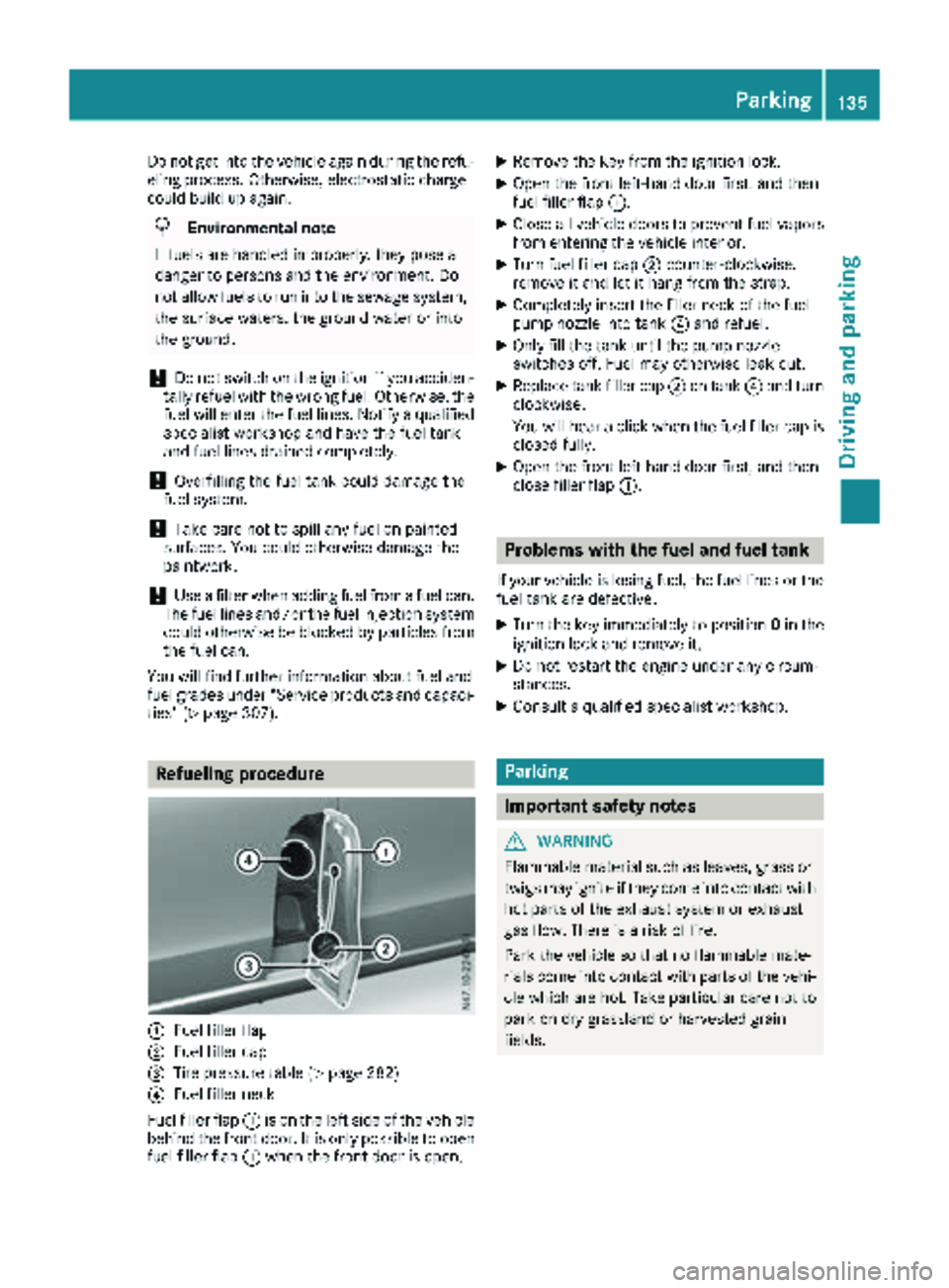
Refueling procedure
:Fuel filler flap
;Fuel filler cap
=Tire pressure table (Ypage 282)
?Fuel filler neck
Fuel filler flap :is on the left side of the vehicle
behind the front door. It is only possible to open fuel filler flap :when the front door is open.
XRemove the key from the ignition lock.
XOpen the front left-hand door first, and then
fuel filler flap :.
XClose all vehicle doors to prevent fuel vapors
from entering the vehicle interior.
XTurn fuel filler cap ;counter-clockwise,
remove it and let it hang from the strap.
XCompletely insert the filler neck of the fuel
pump nozzle into tank ?and refuel.
XOnly fill the tank until the pump nozzle
switches off. Fuel may otherwise leak out.
XReplace tank filler cap ;on tank ?and turn
clockwise.
You will hear a click when the fuel filler cap is
closed fully.
XOpen the front left-hand door first, and then
close filler flap :.
Problems with the fuel and fuel tank
If your vehicle is losing fuel, the fuel lines or the
fuel tank are defective.
XTurn the key immediately to position 0in the
ignition lock and remove it.
XDo not restart the engine under any circum-
stances.
XConsult a qualified specialist workshop.
Parking
Important safety notes
GWARNING
Flammable material such as leaves, grass or
twigs may ignite if they come into contact with
hot parts of the exhaust system or exhaust
gas flow. There is a risk of fire.
Park the vehicle so that no flammable mate-
rials come into contact with parts of the vehi-
cle which are hot. Take particular care not to
park on dry grassland or harvested grain
fields.
Parking135
Driving an d parking
Z
Page 138 of 318
GWARNING
If you leave children unsupervised in the vehi-
cle, they could set it in motion by, for example:
Rrelease the parking brake.
Rshift the automatic transmission out of the
parking position P.
Rstart the engine.
In addition, they may operate vehicle equip-
ment and become trapped. There is a risk of
an accident and injury.
When leaving the vehicle, always take the
SmartKey with you and lock the vehicle. Never
leave children unsupervised in the vehicle.
!Always secure the vehicle correctly against
rolling away. Otherwise, the vehicle or its driv-
etrain could be damaged.
!When the vehicle is parked, always remove
the key to prevent the battery from becoming
discharged.
Always park your vehicle safely and secure it
against rolling away. When parking, observe the
legal requirements of the country in which you
are currently driving.
To ensure that the vehicle is properly secured
against rolling away unintentionally:
Rthe parking brake must be firmly applied
Rthe transmission must be in position Pand the
key must be removed from the ignition lock
Ron steep uphill or downhill gradients, the front
wheels must be turned towards the curb
Parking brake
GWARNING
If you leave children unsupervised in the vehi-
cle, they could set it in motion by, for example:
Rrelease the parking brake.
Rshift the automatic transmission out of the
parking position P.
Rstart the engine.
In addition, they may operate vehicle equip-
ment and become trapped. There is a risk of
an accident and injury.
When leaving the vehicle, always take the
SmartKey with you and lock the vehicle. Never
leave children unsupervised in the vehicle.
GWARNING
If you must brake the vehicle with the parking brake, the braking distance is considerably
longer and the wheels could lock. There is an
increased danger of skidding and accidents.
Only use the parking brake to brake the vehi-
cle when the service brake is faulty. Do not
apply the parking brake too firmly. If the
wheels lock, release the parking brake until
the wheels begin turning again.
The brake lamps are not illuminated when you
brake the vehicle using the parking brake.
As a rule, you may only apply the parking brake
when the vehicle is stationary.
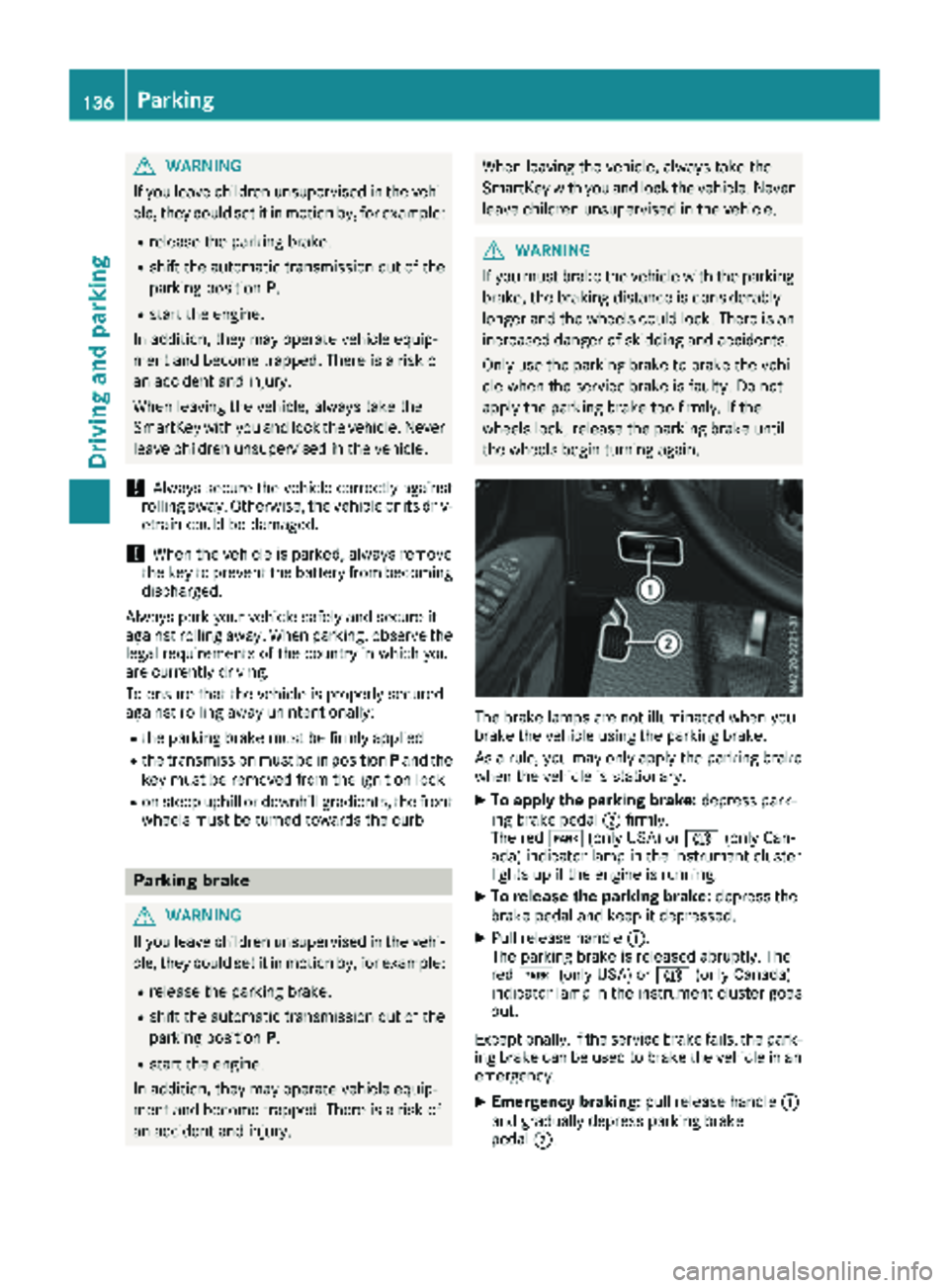
XTo apply the parking brake: depress park-
ing brake pedal ;firmly.
The red F(only USA) or J(only Can-
ada) indicator lamp in the instrument cluster
lights up if the engine is running.
XTo release the parking brake: depress the
brake pedal and keep it depressed.
XPull release handle :.
The parking brake is released abruptly. The
red F (only USA) or J(only Canada)
indicator lamp in the instrument cluster goes
out.
Exceptionally, if the service brake fails, the park-
ing brake can be used to brake the vehicle in an
emergency.
XEmergency braking: pull release handle:
and gradually depress parking brake
pedal ;.
136Parking
Driving and parking
Page 140 of 318
Always use the hands-free system for telephon-
ing while driving. Only use the telephone if road
traffic conditions permit. If this is not the case,
pull over to a safe location before using the tele-
phone.
Bear in mind that at a speed of just 30 mph
(approximately 50 km/h), your vehicle is cov-
ering a distance of 44 fee t(approximately 14 m)
every second.
Drive sensibly – save fuel
In order to save fuel, observe the following tips:
XThe tires should always be inflated to the rec-
ommended tire pressure.
XRemove unnecessary loads.
XRemove roof carriers when they are not nee-
ded.
XWarm up the engine at low engine speeds.
XAvoid frequent acceleration or braking.
XHave all maintenance work carried out as
indicated by the service intervals in the Main-
tenance Booklet or by the service interval dis-
play.
Fuel consumption also increases when driving in cold weather, in stop-start traffic and in moun-
tainous terrain.
Overrun cutoff
If you are in overrun mode and take your foot off
the accelerator pedal, the fuel supply is cut off
when the engine speed is out of the idle speed
control range.
Drinking and driving
GWARNING
Drinking and driving and/or taking drugs and driving are very dangerous combinations.
Even a small amount of alcohol or drugs can
affect your reflexes, perceptions and judg-
ment.
The possibility of a serious or even fatal acci-
dent is greatly increased when you drink or
take drugs and drive.
Do not drink or take drugs and drive or allow
anyone to drive who has been drinking or tak-
ing drugs.
Emission control
GWARNING
Combustion engines emit poisonous exhaust
gases such as carbon monoxide. Inhaling
these exhaust gases leads to poisoning. There
is a risk of fatal injury. Therefore never leave
the engine running in enclosed spaces with-
out sufficient ventilation.
Certain engine systems are designed to keep
the level of poisonous substances in exhaust
fumes within legal limits.
These systems only work optimally if they are
maintained exactly in accordance with the man-
ufacturer's specifications. Any work on the
engine should therefore be carried out by quali-
fied and authorized Mercedes-Benz technicians.
The engine settings must not be changed under
any circumstances. In addition, all specific
maintenance work must be carried out at regu-
lar intervals and in accordance with the service
requirements of the dealer listed here on the
inside title page. Details can be found in the
Maintenance Booklet.
Speed limiter
GWARNING
Exceeding the stated tire load-bearing capa-
city and the approved maximum speed could
lead to tire damage or the tire bursting. There is a risk of accident.
Therefore, only use tire types and sizes
approved for your vehicle model. Observe the
tire load rating and speed rating required for
your vehicle.
As the driver, you must be aware of the maxi-
mum design speed of the vehicle and the maxi- mum permissible speed based on the tires (tire
and tire pressure). In particular, also observe the tire approval regulations for each country.
You must not exceed the speed limit for the tires
indicated by the speed rating. The speed rating
is stated in the tire tables (
Ypage 302).
You can permanently limit the permissible max-
imum speed of your vehicle, e.g. for driving on
winter tires.
138Driving tips
Driving and parking
Page 141 of 318
Mercedes-Benz recommends that you have the
maximum permissible speed programed at a
Mercedes-Benz Commercial Van Center.
Before overtaking, take into consideration that
the engine speed limiter prevents the speed
increasing beyond the programmed permissible
maximum speed.
Driving abroad
Service
An extensive network of authorized Mercedes-
Benz Centers is also at your disposal when you
are traveling abroad. Nevertheless, please bear
in mind that service facilities or replacement
parts may not always be immediately available.
The relevant workshop directories are available
from any Mercedes-Benz Commercial Van Cen-
ter.
Fuel
In some countries, only fuels with a higher sulfur
content are available.
Unsuitable fuel can cause engine damage. You
will find information about fuel under "Service
products and capacities" (
Ypage 307).
Low-beam headlamps
General notes
When driving in countries in which traffic drives
on the opposite side of the road to the country
where the vehicle is registered, you must switch
the headlamps to symmetrical low beam. This
prevents oncoming traffic from being blinded.
Symmetrical low beam does not illuminate as
large an area of the edge of the road.
Vehicles with halogen headlamps
The headlamps do not need to be switched to
symmetrical low beam. The legal requirements
of countries in which traffic drives on the oppo-
site side of the road to the country where the
vehicle is registered are met without the need to
convert the headlamps.
Transport by rail
Transporting your vehicle by rail may be subject
to certain restrictions or require special meas- ures to be taken in some countries due to vary-
ing tunnel heights and loading standards.
You can obtain information on this from any
Mercedes-Benz Commercial Van Center.
Braking
Important safety notes
GWARNING
If you shift down on a slippery road surface in an attempt to increase the engine's braking
effect, the drive wheels could lose their grip.
There is an increased danger of skidding and
accidents.
Do not shift down for additional engine brak-
ing on a slippery road surface.
Downhill gradients
!Depressing the brake pedal constantly
results in excessive and premature wear to
the brake pads.
This also applies to automatic braking if you
have activated cruise control.
On long and steep downhill gradients, you
should change down to shift range 2or1 in
good time (
Ypage 130).
This should be observed in particular when driv-
ing with a laden vehicle and when towing a
trailer.
You thereby make use of the braking effect of
the engine and do not have to brake as often to
maintain the speed. This relieves the load on the
service brake and prevents the brakes from
overheating and wearing too quickly.
Heavy and light loads
GWARNING
If you rest your foot on the brake pedal while
driving, the braking system can overheat. This increases the stopping distance and can even
cause the braking system to fail. There is a
risk of an accident.
Never use the brake pedal as a footrest. Never
depress the brake pedal and the accelerator
pedal at the same time.
Driving tips139
Driving and parking
Z
Page 142 of 318
!Depressing the brake pedal constantly
results in excessive and premature wear to
the brake pads.
If the brakes have been subjected to a heavy
load, do not stop the vehicle immediately. Drive
on for a short while. The brakes are cooled down
more quickly in the airflow.
Wet road surfaces
If you have been driving for a long time in heavy
rain without braking, there may be a delayed
response when you first apply the brakes. This
may also occur after driving through a car wash
or deep water.
You must depress the brake pedal more firmly.
Maintain a longer distance to the vehicle in
front.
While paying attention to the traffic conditions,
you should brake the vehicle firmly after driving
on a wet road surface or through a car wash. This
heats the brake discs, so that they dry more
quickly, which protects them against corrosion.
Limited braking performance on salt-
treated roads
When driving on salted roads, salt may start to
build up on the brake disks and brake pads. This can increase braking distances considerably.
Maintain a greater distance to the vehicle in
front.
To remove any build-up of salt that may have
formed:
XApply the brakes at the start of the journey,
occasionally during journey and at the end of
the journey. Make sure that you do not endan-
ger other road users when doing so.
Checking the brake pad thickness
In addition to monitoring using the brake pad
wear sensor, regularly monitor and check all of
the brake pads by performing a visual inspection
to look for pad material wear.
If you are unable to check the brake wear on the
inside of the wheels, remove the wheels with the tools provided.
Make sure that the brake pad material thickness
never falls below 0.12 in (3 mm). Have the brake pads checked and replaced at a qualified spe-
cialist workshop, if necessary. Do not solely rely on the brake pad wear sensor.
It is strongly recommended that you have the
brake pads checked at a qualified specialist
workshop at every service displayed in the main-
tenance interval indicator, prior to long journeys
and whenever the wheels are removed.
New brake discs and brake pads/
linings
New brake pads and brake discs only reach their
optimal braking effect after about 60 miles
(100 kilometers). Until then, compensate for
this by applying greater force to the brake pedal.
For safety reasons, Mercedes-Benz recom-
mends only installing the following brake discs
and brake pads/linings:
Rbrake discs that have been approved by
Mercedes-Benz
Rbrake pads/linings that have been approved
by Mercedes-Benz or are of an equivalent
standard of quality
Other brake discs or brake pads/linings can
compromise the safety of your vehicle.
Always replace all brake discs or brake pads/
linings on an axle at the same time and only have
them replaced at a qualified specialist work-
shop. When replacing the brake discs, always
have the brake pads/linings replaced at the
same time.
Parking brake
GWARNING
If you must brake the vehicle with the parking brake, the braking distance is considerably
longer and the wheels could lock. There is an
increased danger of skidding and accidents.
Only use the parking brake to brake the vehi-
cle when the service brake is faulty. Do not
apply the parking brake too firmly. If the
wheels lock, release the parking brake until
the wheels begin turning again.
When driving on wet roads or dirt-covered sur-
faces, road salt and/or dirt may get into the
parking brake. This causes corrosion and a
reduction of braking force.
In order to prevent this, drive with the parking
brake lightly applied from time to time. When
doing so, drive for a distance of approximately
140Driving tips
Driving and parking
Page 145 of 318
drive over obstacles, have the front
passenger direct you.
iWe recommend that you additionally carry a
shovel and a recovery rope with shackle in the
vehicle.
REnsure that loads and items of luggage are
securely stowed or lashed down
(
Ypage 244).
RBefore driving off-road, stop the vehicle and
shift to a low gear.
RIf the surface requires, temporarily deactivate
ESP®when pulling away (Ypage 66).
ROnly drive off-road with the engine running
and a gear engaged.
RDrive slowly and smoothly. Walking pace is
necessary in many situations.
RAvoid spinning the drive wheels.
RMake sure that the wheels always remain in
contact with the ground.
RDrive with extreme care over unknown terrain
where you can only see for a short distance.
As a precaution, get out of the vehicle to take
a look at the route to be taken in advance.
RCheck the water depth before fording.
RWatch out for obstacles (e.g. rocks, holes,
tree stumps and ruts).
RAvoid edges where the surface could crumble
or break away.
Checklist after driving off-road
!If you detect damage to the vehicle after
driving off-road, have the vehicle checked
immediately at a qualified specialist work-
shop.
Off-road driving places a higher demand on your
vehicle than normal road operation. Check your
vehicle after driving on rough terrain. By doing
so you will notice any damage in good time and
reduce the risk of an accident for yourself and
other road users. Clean your vehicle thoroughly
before driving on public roads.
Observe the following points after driving off-
road, on construction sites and before driving on
public roads:
XActivate ESP®(Ypage 66).
XClean the headlamps and tail lamps and
check them for damage.
XClean the front and rear license plates.
XClean the windshield, windows and exterior
mirrors.
XClean the steps, door sills and grab handles.
This increases safety of footing.
XClean the wheels/tires, wheel housings and
the underbody of the vehicle with a water jet. This increases road grip, especially on wet
road surfaces.
XCheck the wheels/tires and wheel housings
for trapped foreign objects and remove them.
Trapped foreign objects can damage the
wheels/tires and may be flung out from the
vehicle when you continue driving.
XCheck the underbody for trapped branches or
other parts of plants and remove them.
Trapped branches or other parts of plants
increase the risk of fire and can cause dam-
age to fuel lines, brake hoses and the rubber
bellows of axle joints and drive shafts.
XClean the brake disks, brake pads and axle
joints, particularly after operation in sand,
mud, grit/gravel, water or similarly dirty con-
ditions.
XCheck the entire floor assembly, the tires,
wheels, bodywork structure, brakes, steering,
chassis and exhaust system for any damage.
XCheck the service brake for operating safety,
e.g. carry out a brake test.
XIf you notice strong vibrations after driving off-
road, check the wheels and drive train for for- eign objects again. Remove any foreign
objects which can lead to imbalances and
thus cause vibrations.
Driving in mountainous areas
When driving in mountainous areas, note that
the power output of the engine, and with it its
gradient climbing capability, decrease with
increasing altitude. Please take note of this par-
ticularly when driving with a trailer in mountain-ous areas.
The maximum permissible trailer loads are valid
for journeys at altitudes up to 1100 yds
(1000 m) above sea level with gradients up to
12%.
Information on maximum permissible trailer
loads can be found in your vehicle registration
papers and on the vehicle identification plate
(
Ypage 305) or under "Trailer loads"
(Ypage 316).
Driving tips143
Driving and parking
Z
Page 174 of 318
On vehicles with steering wheel buttons, the
light sensor in the instrument cluster automati-
cally controls the brightness of the display light-
ing.
While the lights are on, the brightness is depend-
ent upon the brightness of the ambient light.
You can also adjust the brightness of the instru-
ment lighting and the display lighting
Rby pressing thefand gbuttons on the
instrument cluster on vehicles without steer-
ing wheel buttons (not in the Settings
menu)
Rby turning brightness control knob :on vehi-
cles with steering wheel buttons
Speedometer
If you change the wheel size on your vehicle,
make sure it is assigned to the correct wheel
size category (
Ypage 279). If you change wheel
size category without recoding the control unit,
the speedometer indication will be inaccurate.
The current vehicle speed may then be higher
than the speed displayed in the speedometer.
The speed can also be shown in the display in
the form of a digital speedometer:
ROn vehicles without steering wheel buttons
(Ypage 175)
ROn vehicles with steering wheel buttons
(Ypage 181)
iIn some countries, a warning sounds and/or
the display shows a message when the vehi-
cle reaches the maximum legally permissible speed limit, e.g. at 75 mph (120 km/h).
Tachometer
!
Do not drive in the overrevving range, as this
could damage the engine.
HEnvironmental note
Avoid driving at high engine speeds. This
unnecessarily increases the fuel consumption
of your vehicle and harms the environment as
a result of increased emissions.
The red band in the tachometer indicates the
engine's overrevving range.
To protect the engine, the fuel supply is inter-
rupted when the red band is reached.
Outside temperature display
You should pay special attention to road condi-
tions when temperatures are around freezing
point.
Please bear in mind that the outside tempera-
ture display shows the air temperature meas-
ured and not the road temperature.
The display shows the outside temperature in
the header:
Ron vehicles without steering wheel buttons
(Ypage 173)
Ron vehicles with steering wheel buttons
(Ypage 179)
Changes in the outside temperature are dis-
played after a short delay.
Coolant temperature gauge
GWARNING
Opening the hood when the engine is over-
heated or when there is a fire in the engine
compartment could expose you to hot gases
or other service products. There is a risk of
injury.
Let an overheated engine cool down before
opening the hood. If there is a fire in the
engine compartment, keep the hood closed
and contact the fire department.
On vehicles without steering wheel buttons, you
can have the coolant temperature shown in the
display (
Ypage 175).
On vehicles with steering wheel buttons, an ana-
log coolant temperature gage is located in the
tachometer in the instrument cluster
(
Ypage 39).
Under normal operating conditions and with the
specified coolant level, the gauge may rise to
248 ‡ (120 †).
172Display and operation
On-board computer and displays
Page 176 of 318
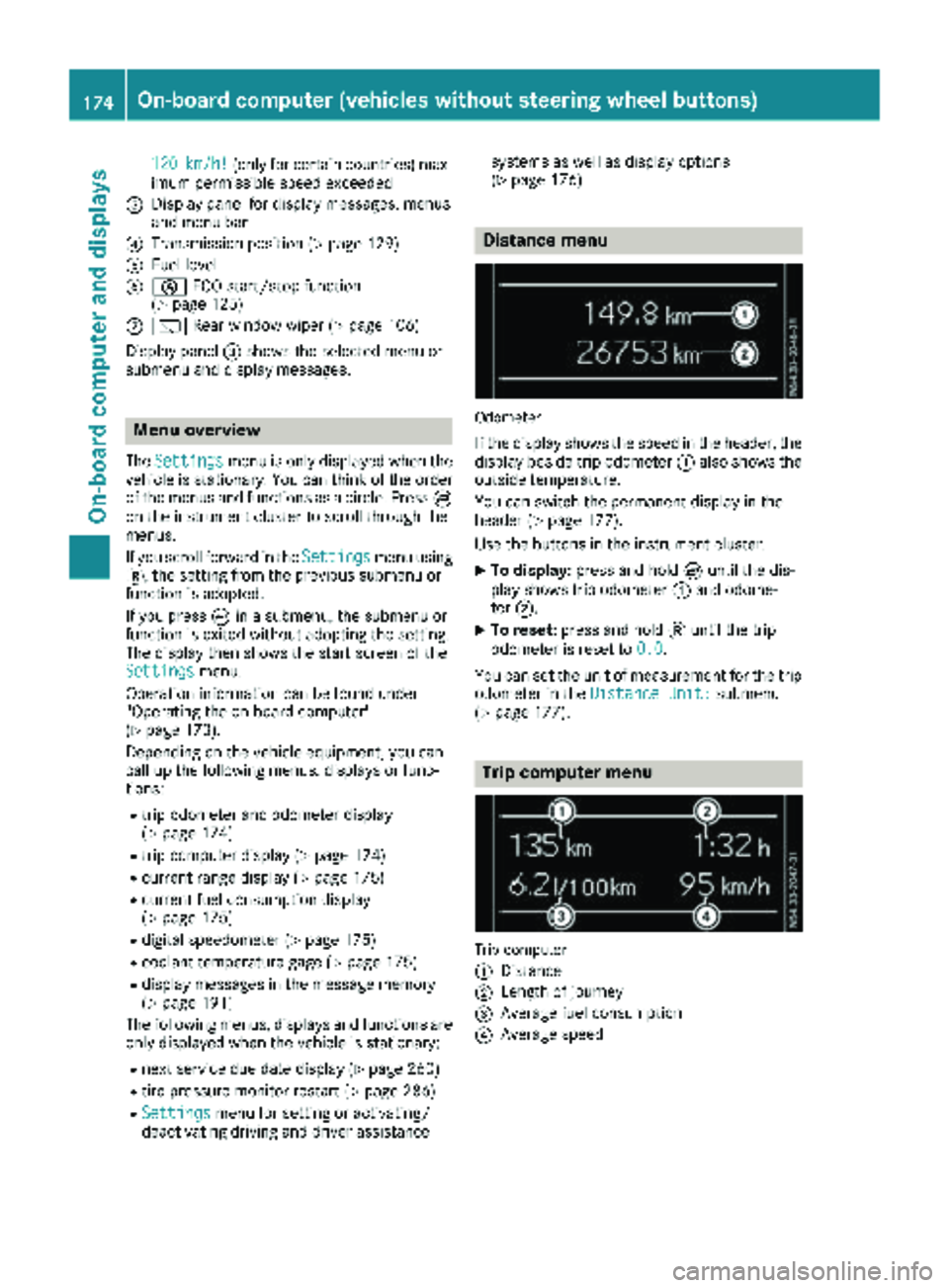
120km/h!(only for certain countries) max-
imum permissible speed exceeded
=Display panel for display messages, menus
and menu bar
?Transmission position (Ypage 129)
AFuel level
Bè ECO start/stop function
(Ypage 125)
Cè Rear window wiper (Ypage 106)
Display panel =shows the selected menu or
submenu and display messages.
Menu overview
The Settingsmenu is only displayed when the
vehicle is stationary. You can think of the order
of the menus and functions as a circle. Press È
on the instrument cluster to scroll through the
menus.
If you scroll forward in the Settings
menu using
3, the setting from the previous submenu or
function is adopted.
If you press Èin a submenu, the submenu or
function is exited without adopting the setting.
The display then shows the start screen of the
Settings
menu.
Operation information can be found under
"Operating the on-board computer"
(
Ypage 173).
Depending on the vehicle equipment, you can
call up the following menus, displays or func-
tions:
Rtrip odometer and odometer display
(Ypage 174)
Rtrip computer display (Ypage 174)
Rcurrent range display (Ypage 175)
Rcurrent fuel consumption display
(Ypage 175)
Rdigital speedometer (Ypage 175)
Rcoolant temperature gage (Ypage 175)
Rdisplay messages in the message memory
(Ypage 191)
The following menus, displays and functions are only displayed when the vehicle is stationary:
Rnext service due date display (Ypage 260)
Rtire pressure monitor restart (Ypage 286)
RSettingsmenu for setting or activating/
deactivating driving and driver assistance systems as well as display options
(
Ypage 176)
Distance menu
Odometer
If the display shows the speed in the header, the
display beside trip odometer
:also shows the
outside temperature.
You can switch the permanent display in the
header (
Ypage 177).
Use the buttons in the instrument cluster.
XTo display: press and hold Èuntil the dis-
play shows trip odometer :and odome-
ter ;.
XTo reset: press and hold 3until the trip
odometer is reset to 0.0
.
You can set the unit of measurement for the trip odometer in the Distance Unit:
submenu
(Ypage 177).
Trip computer menu
Trip computer
:
Distance
;Length of journey
=Average fuel consumption
?Average speed
174On-board computer (vehicles without steering wheel buttons)
On-board computer and displays
Page 177 of 318
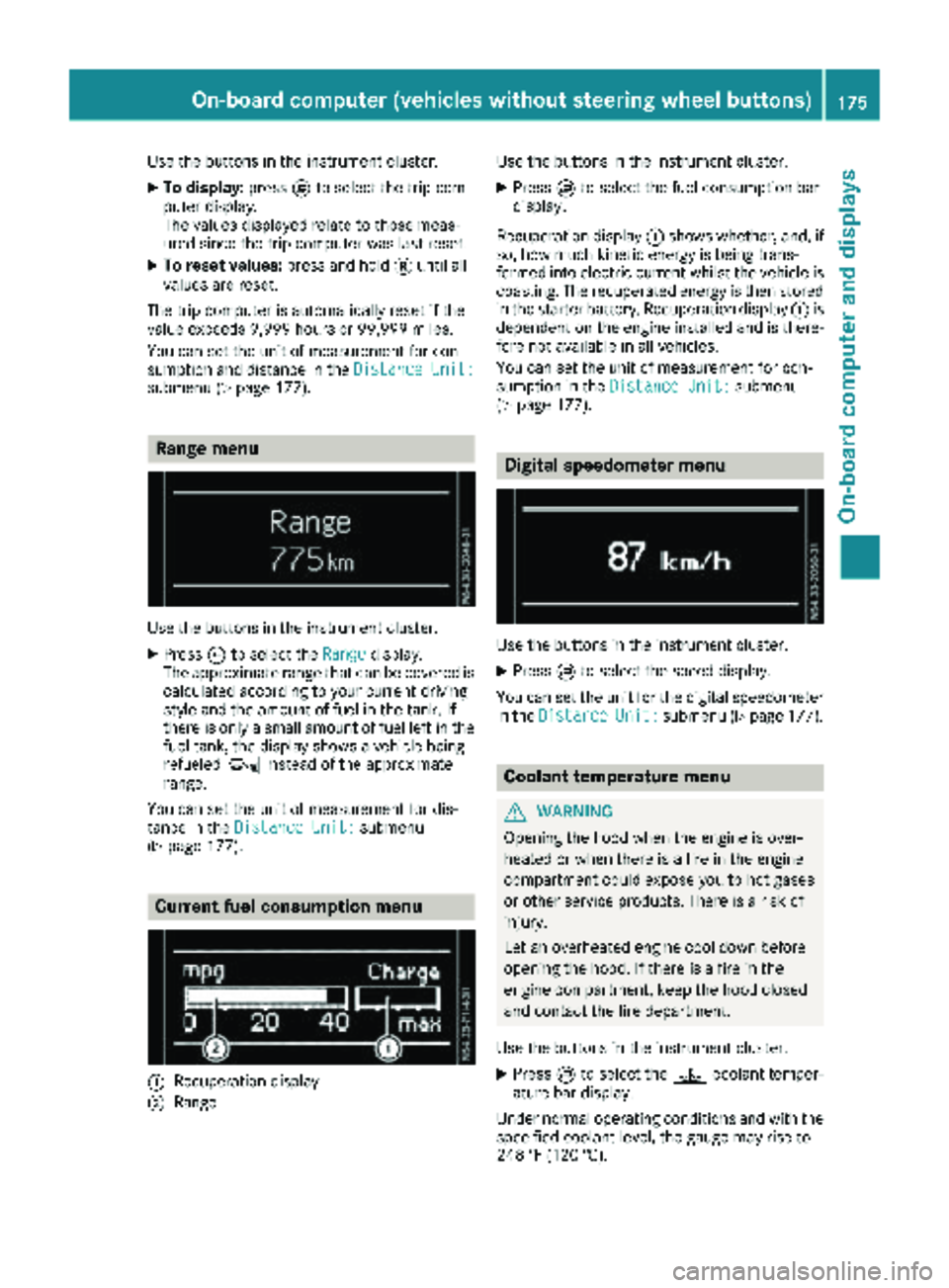
Use the buttons in the instrument cluster.
XTo display:pressÈto select the trip com-
puter display.
The values displayed relate to those meas-
ured since the trip computer was last reset.
XTo reset values: press and hold3until all
values are reset.
The trip computer is automatically reset if the
value exceeds 9,999 hours or 99,999 miles.
You can set the unit of measurement for con-
sumption and distance in the Distance Unit:
submenu (Ypage 177).
Range menu
Use the buttons in the instrument cluster.
XPressÈto select the Rangedisplay.
The approximate range that can be covered is calculated according to your current driving
style and the amount of fuel in the tank. If
there is only a small amount of fuel left in the
fuel tank, the display shows a vehicle being
refueled Ïinstead of the approximate
range.
You can set the unit of measurement for dis-
tance in the Distance Unit:
submenu
(Ypage 177).
Current fuel consumption menu
:Recuperation display
;Range Use the buttons in the instrument cluster.
XPress
Èto select the fuel consumption bar
display.
Recuperation display :shows whether, and, if
so, how much kinetic energy is being trans-
formed into electric current whilst the vehicle is
coasting. The recuperated energy is then stored in the starter battery. Recuperation display :is
dependent on the engine installed and is there-
fore not available in all vehicles.
You can set the unit of measurement for con-
sumption in the Distance Unit:
submenu
(Ypage 177).
Digital speedometer menu
Use the buttons in the instrument cluster.
XPress Èto select the speed display.
You can set the unit for the digital speedometer
in the Distance
Unit:submenu (Ypage 177).
Coolant temperature menu
GWARNING
Opening the hood when the engine is over-
heated or when there is a fire in the engine
compartment could expose you to hot gases
or other service products. There is a risk of
injury.
Let an overheated engine cool down before
opening the hood. If there is a fire in the
engine compartment, keep the hood closed
and contact the fire department.
Use the buttons in the instrument cluster.
XPress Èto select the ?coolant temper-
ature bar display.
Under normal operating conditions and with the
specified coolant level, the gauge may rise to
248 ‡ (120 †).
On-board computer (vehicles without steering wheel buttons)175
On-board computer and displays
Z