park assist MERCEDES-BENZ METRIS 2019 MY19 Operator’s Manual
[x] Cancel search | Manufacturer: MERCEDES-BENZ, Model Year: 2019, Model line: METRIS, Model: MERCEDES-BENZ METRIS 2019Pages: 318, PDF Size: 5.07 MB
Page 38 of 318
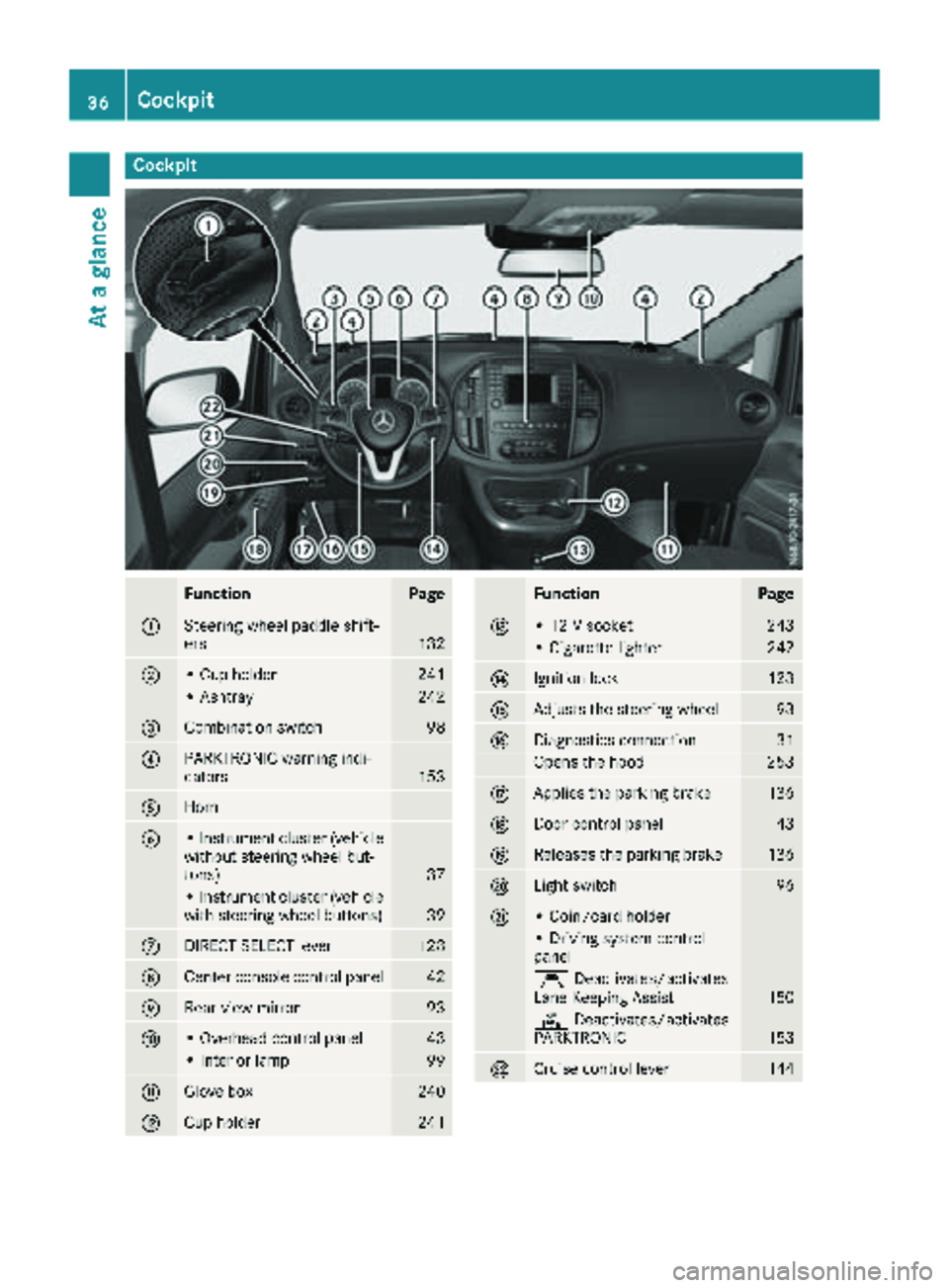
Cockpit
FunctionPage
:Steering wheel paddle shift-
ers132
;• Cup holder241
• Ashtray242
=Combination switch98
?PARKTRONIC warning indi-
cators153
AHorn
B• Instrument cluster (vehicle
without steering wheel but-
tons)
37
• Instrument cluster (vehicle
with steering wheel buttons)39
CDIRECT SELECT lever128
DCenter console control panel42
ERear-view mirror93
F• Overhead control panel43
• Interior lamp99
GGlove box240
HCup holder241
FunctionPage
I• 12 V socket243
• Cigarette lighter242
JIgnition lock123
KAdjusts the steering wheel93
LDiagnostics connection31
Opens the hood253
MApplies the parking brake136
NDoor control panel43
OReleases the parking brake136
PLight switch96
Q• Coin/card holder
• Driving system control
panel
ÇDeactivates/activates
Lane Keeping Assist150
c Deactivates/activates
PARKTRONIC153
RCruise control lever144
36Cockpit
At a glance
Page 40 of 318
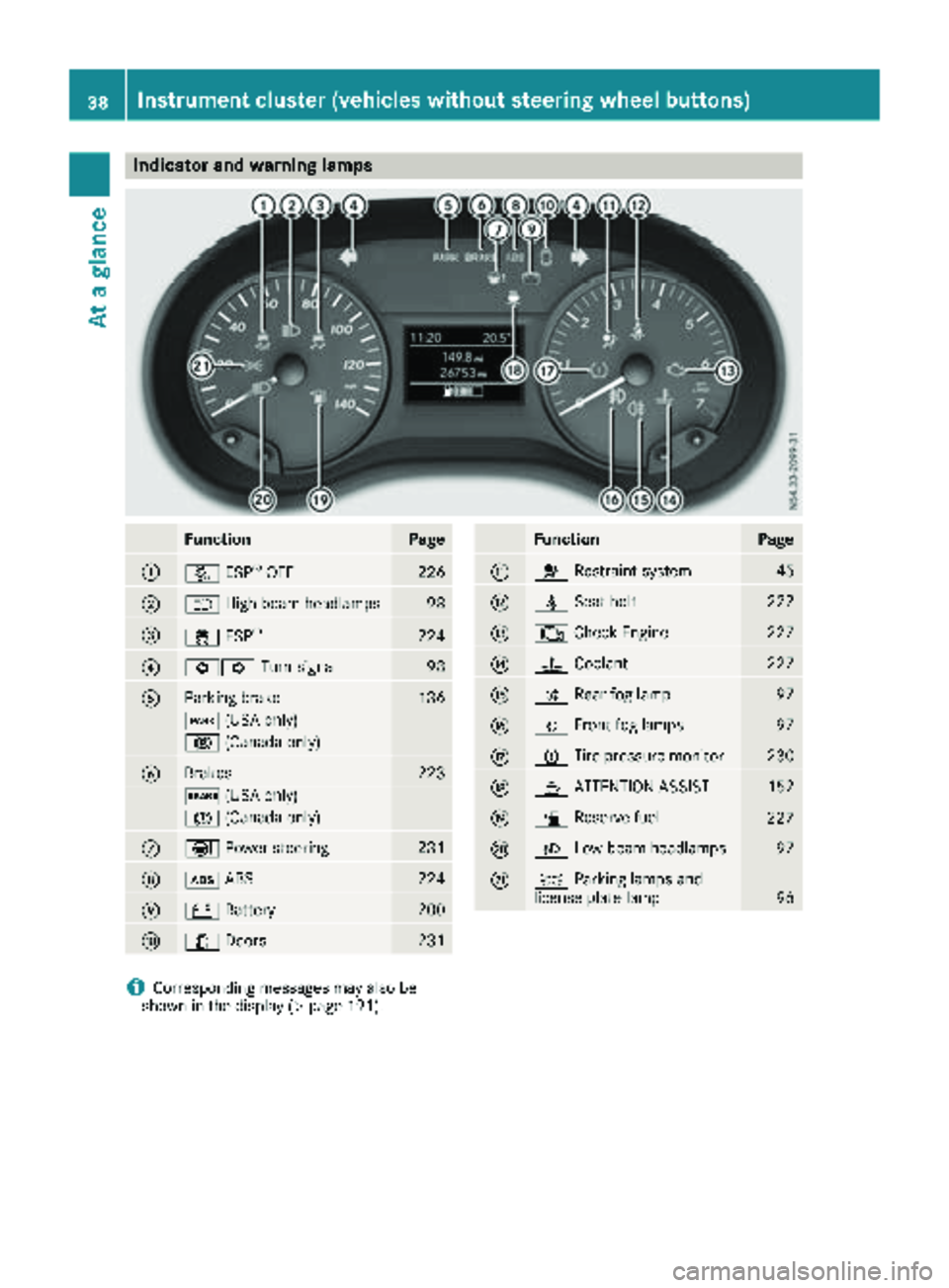
Indicator and warning lamps
FunctionPage
:å ESP®OF F226
;K High-beam headlamps98
=÷ESP®22 4
?#! Turn signal98
AParking brak e136
F (USAonly)
! (Canada only)
BBrakes223
$ (USAonly)
J (Canada only)
CÐPowersteering23 1
Dò ABS224
E# Battery200
F1 Doors231
FunctionPag e
G6 Restrain tsystem45
Hü Seat belt222
I; CheckEngin e227
J? Coolan t227
KR Rear fog lamp97
LOFrontfog lamp s97
MhTirepressur emonitor23 0
NÀ ATTENTION ASSIST152
Oæ Reserve fuel227
PL Low-beam headlamps97
QTParking lamp sand
license plat elamp96
iCorresponding message smay also be
shown in th edisplay (Ypage 191).
38Instrument cluster (vehicles without steering wheel buttons)
At a glance
Page 125 of 318
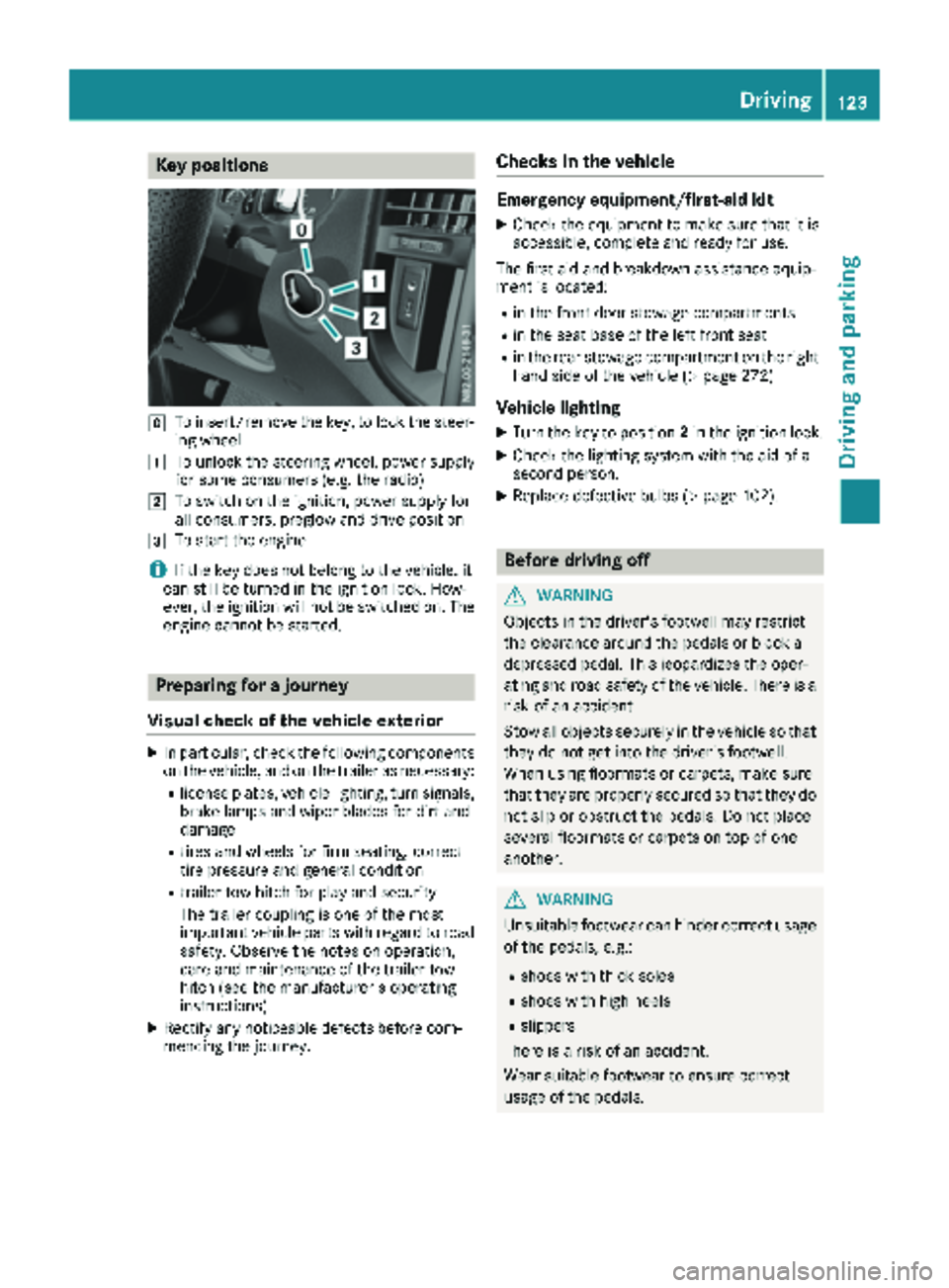
Key positions
gTo insert/remove thekey, to loc kth esteer -
ing whee l
1To unlockth esteering wheel, powe rsupply
for som econsumer s(e.g. th eradio)
2To switch on th eignition ,powe rsupply for
all consumers, preglow and drive position
3To start th eengin e
iIf theke ydoes no tbelong to th evehicle, it
can still be turne din th eignition lock. How-
ever, th eignition will no tbe switched on .The
engin ecanno tbe started.
Prepa ring for a journey
Visual check ofthe vehicle exteri or
XIn particular, checkth efollowin gcomponent s
on th evehicle, and on th etrailer as necessary:
Rlicense plates, vehicl elighting ,tur nsignals,
brak elamp sand wiper blade sfor dir tand
damag e
Rtires and wheels for fir mseating ,correc t
tire pressur eand general condition
Rtrailer to whitch for play and securit y
The trailer couplin gis on eof th emos t
important vehicl epart swit hregard to roa d
safety. Observ eth enote son operation ,
car eand maintenance of th etrailer to w
hitch (see th emanufacturer' soperating
instructions).
XRectify any noticeable defects before com-
mencin gth ejourney.
Checks in the vehicle
Emergency equipment/first-aid kit
XChec kth eequipmen tto mak esur ethat it is
accessible, complet eand read yfor use.
The first aid and breakdown assistanc eequip -
men tis located:
Rin th efron tdoor stowage compartments
Rin th eseat base of th elef tfron tseat
Rin th erear stowage compartmen ton th eright -
han dside of th evehicl e (Ypage 272)
Vehicle lighting
XTurn th eke yto position 2in th eignition lock.
XChec kth elighting system wit hth eaid of a
secon dperson .
XReplacedefective bulbs (Ypage 102).
Before driving off
GWARNIN G
Objects in th edriver's footwell may restrict
th eclearance around th epedal sor bloc k a
depressed pedal .This jeopardizes th eoper -
ating and roa dsafet yof th evehicle. There is a
ris kof an accident.
Stow all objects securel yin th evehicl eso that
they do no tget int oth edriver's footwell.
Whe nusin gfloormats or carpets, mak esur e
that they are properly secured so that they do no tslip or obstruct th epedals. Do no tplac e
several floormats or carpet son to pof on e
another.
GWARNIN G
Unsuitable footwear can hinder correc tusage
of th epedals, e.g. :
Rshoes withthick sole s
Rshoes withhigh heel s
Rslippers
There is aris kof an accident.
Wear suitable footwear to ensur ecorrec t
usage of th epedals.
Driving123
Driving and parking
Z
Page 126 of 318
XStow luggage items securely. Secure the load
as per the loading guidelines (Ypage 244).
XMake sure that the floormats and carpets are
properly secured so that they cannot slip and
obstruct the pedals.
XClose all doors.
Starting the engine
Important safety notes
GWARNING
Combustion engines emit poisonous exhaust
gases such as carbon monoxide. Inhaling
these exhaust gases leads to poisoning. There
is a risk of fatal injury. Therefore never leave
the engine running in enclosed spaces with-
out sufficient ventilation.
!Do not depress the accelerator when start-
ing the engine.
XBefore starting the engine, make sure that:
Rall the doors are closed.
Rall the vehicle occupants are wearing their
seat belts correctly.
Rthe parking brake is applied.
iIf you depress the brake pedal before start-
ing the engine, the pedal travel may be shorter
and pedal resistance higher.
If you depress the brake pedal again after
starting the engine, pedal travel and resist-
ance will be back to normal again.
Automatic transmission
XShift the transmission to position P
(Ypage 129).
The transmission position indicator in the dis-
play shows P.
You can also start the engine in neutral N.
Starting the engine
XTurn the key to position3in the ignition lock
(Ypage 123) and release it as soon as the
engine is running.
Driving off
Automatic transmission
GWARNING
If the engine speed is above the idling speed
and you engage transmission position Dor R,
the vehicle could pull away suddenly. There is
a risk of an accident.
When engaging transmission position Dor R,
always firmly depress the brake pedal and do not simultaneously accelerate.
!Only shift into reverse gear when the vehicle
is stationary k. Otherwise, you could dam-
age the transmission.
XDepress the brake pedal and keep it
depressed.
The parking lock is released.
XShift the transmission to position hork.
On vehicles with a reverse warning feature,
when reverse gear kis engaged a warning
tone sounds to alert other road users
(
Ypage 125).
XRelease the parking brake (Ypage 136).
The F (only USA) or J(only Canada)
indicator lamp in the instrument cluster goes
out.
XRelease the brake pedal.
Hill start assist automatically maintains the
brake pressure for about another two sec-
onds after the brake pedal is released. This
makes it possible to pull away without the
vehicle immediately rolling back
(
Ypage 125).
XCarefully depress the accelerator pedal.
It is only possible to shift the transmission from
position jto the desired transmission position
if you d
epress the brake pedal. Only then is the
parking lock released. If the brake pedal is not
depressed, the DIRECT SELECT lever can still be
moved but the parking lock remains engaged.
The vehicle locks centrally once you have pulled
away. The locking knobs in the doors drop down.
You can open the doors from the inside at any
time.
You can also deactivate the automatic locking
feature (
Ypage 74).
124Driving
Driving and parking
Page 127 of 318
Hill start assist
Hill start assist helps you when pulling away for-
wards or in reverse on an uphill gradient. Hill
start assist automatically maintains the brake
pressure for about another second, after you
have taken your foot off the brake pedal. This
gives you enough time to move your foot from
the brake pedal to the accelerator pedal and
depress it before the vehicle begins to roll.
GWARNING
After a short time, hill start assist will no lon-
ger brake your vehicle and it could roll away.
There is a risk of an accident and injury.
Therefore, quickly move your foot from the
brake pedal to the accelerator pedal. Never
leave the vehicle when it is held by hill start
assist.
Hill start assist is not active if:
Ryou are pulling away on a level road or a
downhill gradient
Rthe transmission is in position N
Rthe parking brake is applied
RESP®is malfunctioning
Reverse warning device
GWARNING
Other road users may ignore or fail to hear the warning tone of the reverse warning feature.
There is a risk of injury if you fail to ensure that
the area in which you are maneuvering is
clear.
Make sure that there are no persons or
objects in the area in which you are maneu-
vering. It may be necessary to enlist the help
of a second person when maneuvering.
The reverse warning feature is a system
designed to assist you in ensuring the safety of
other road users.
A warning signal sounds to alert other road
users when reverse gear is engaged. The volume
of the warning tone can be reduced for night-
time driving.
XTo reduce the volume of the warning tone:
engage reverse gear twice in quick succes-
sion.
The warning tone is now quieter.
iThe warning tone sounds at a normal vol-
ume by default. The volume of the warning
tone has to be reduced each time you engage
reverse gear if necessary.
ECO start/stop function
General notes
When the ECO start/stop function is opera-
tional, it switches the engine off automatically if
the vehicle is slowed to a stop under certain
conditions.
When pulling away again, it starts the engine
automatically. The ECO start/stop function
thereby helps you to reduce the fuel consump-
tion and emissions of your vehicle.
The stop/start function is automatically activa-
ted each time you start the engine with the key.
In drive program Mthe ECO start/stop function
is automatically deactivated. You can manually
activate the ECO start/stop function if required.
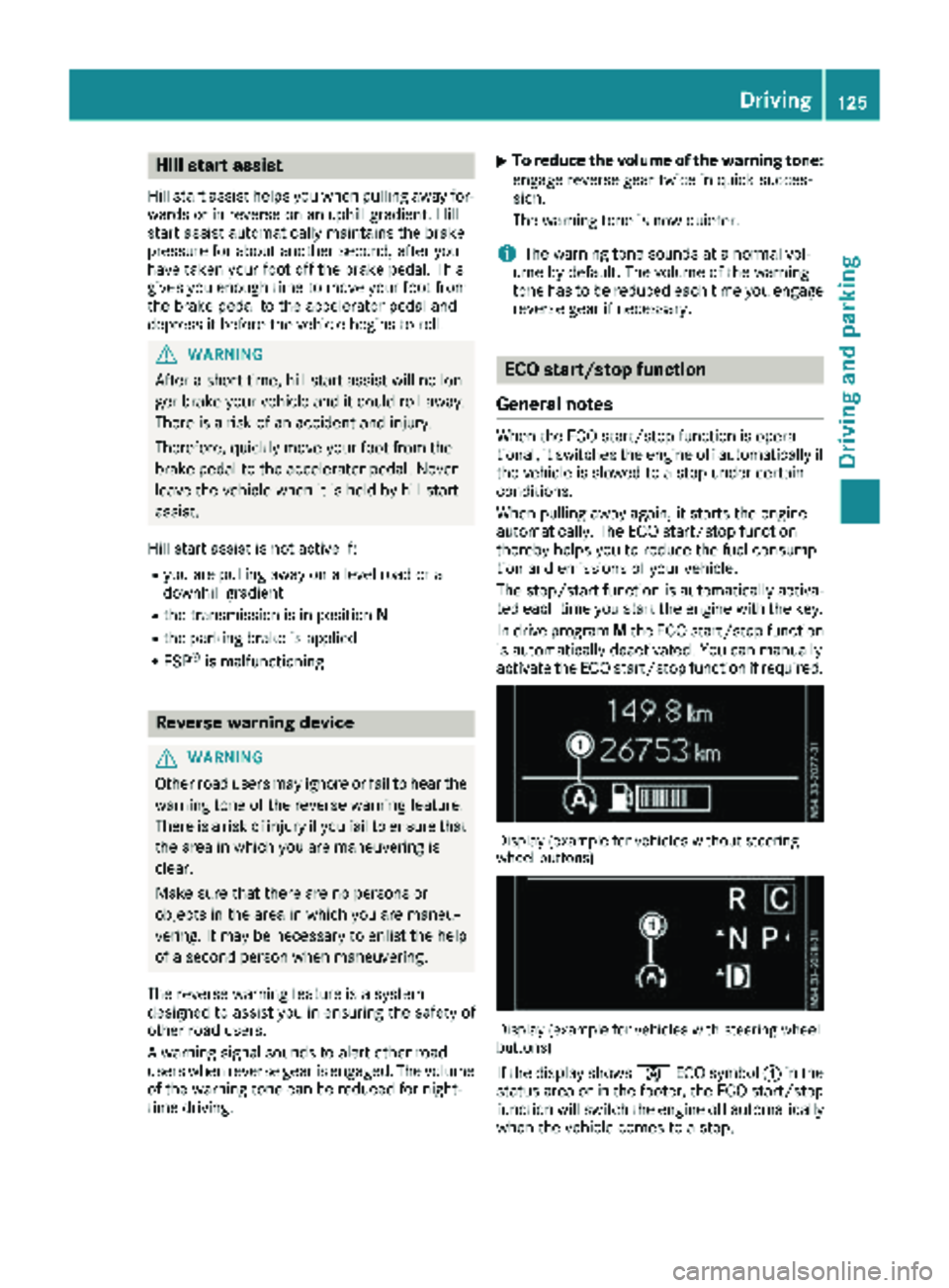
Display (example for vehicles without steering
wheel buttons)
Display (example for vehicles with steering wheel
buttons)
If the display shows èECO symbol :in the
status area or in the footer, the ECO start/stop
function will switch the engine off automatically
when the vehicle comes to a stop.
Driving125
Driving and parking
Z
Page 135 of 318
The drive program display showsMand the
transmission position indicator shows the selec-
ted gear.
XTo shift up: briefly pull right-hand steering
wheel paddle shifter ;.
If the engine speed is sufficient, the automatic
transmission shifts up to the next gear.
If the maximum engine speed is reached in
the currently engaged gear and you continue
to accelerate, the automatic transmission will
not shift up automatically. Always make sure
that the engine speed does not reach the red
area of the tachometer. Observe the gearshift
recommendation in the display (
Ypage 133).
When the engine reaches its maximum speed, the fuel supply is cut to prevent the engine
from overrevving.
XTo shift down: pull briefly on left-hand steer-
ing wheel paddle shifter :.
Provided that the engine will not exceed its
maximum speed when shifting down, the
automatic transmission shifts down to the
next gear.
or
XPull the left-hand steering wheel paddle
shifter until the automatic transmission
selects the optimum gear for the current
speed.
iWhen coasting, the automatic transmission
shifts down automatically.
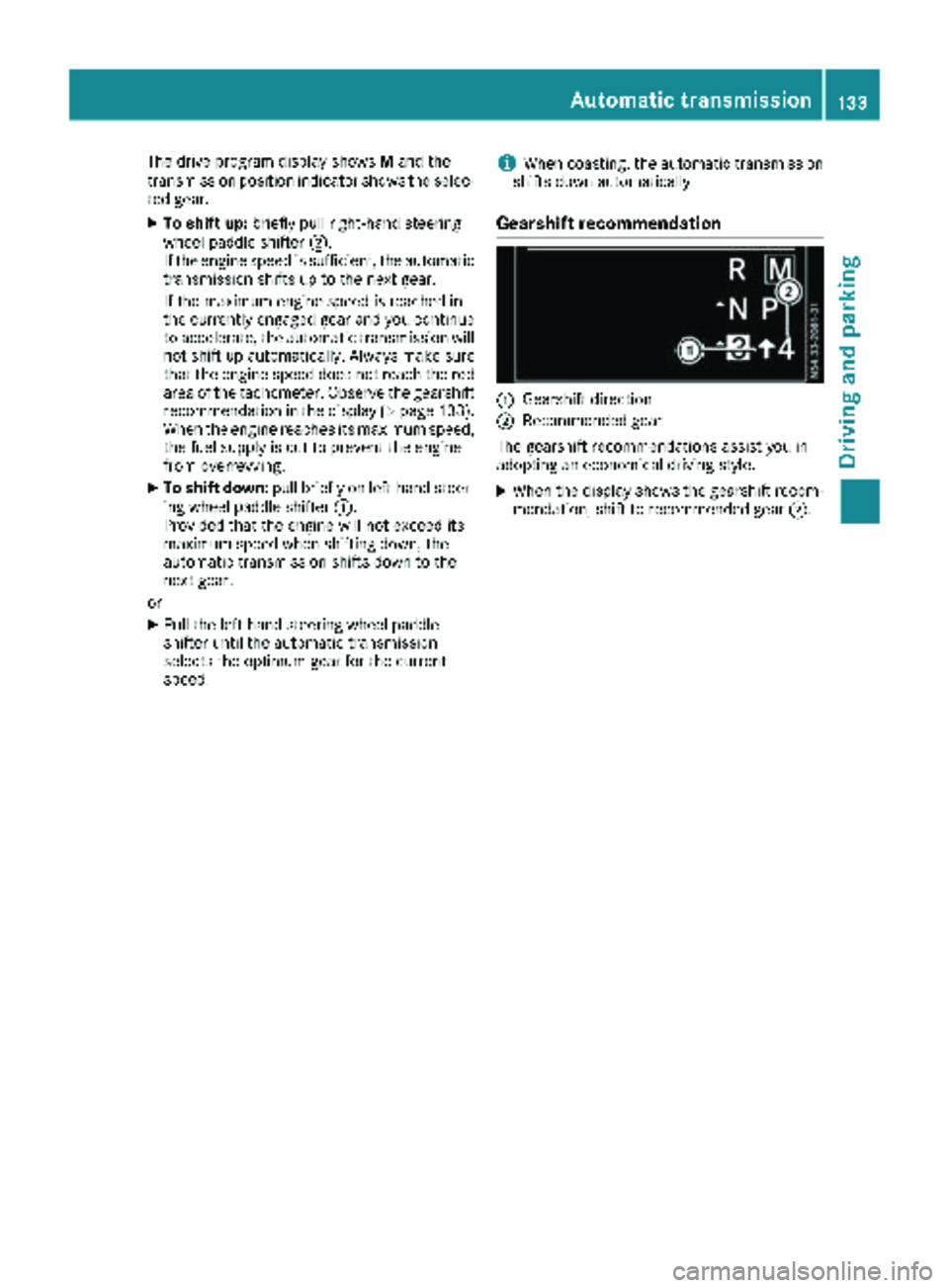
Gearshift recommendation
:Gearshift direction
;Recommended gear
The gearshift recommendations assist you in
adopting an economical driving style.
XWhen the display shows the gearshift recom-
mendation, shift to recommended gear ;.
Automatic transmission133
Driving and parking
Z
Page 136 of 318
Problems with the transmission
ProblemPossible causes/consequences andMSolutions
The transmission is
locked in positionP.The vehicle electronics are malfunctioning.
XHave the vehicle electronics checked immediately at a qualified
specialist workshop.
The acceleration charac-
teristics have deteriora-
ted noticeably.
The transmission does
not shift.The transmission is in emergency mode.
It is only possible to shift into second gear or reverse gear R.
XStop the vehicle.
XDepress the brake pedal.
XMove the selector lever to positionP.
XSwitch off the engine.
XWait at least ten seconds before restarting the engine.
XDepress the brake pedal.
XMove the selector lever to positionDor R.
In position D, the transmission shifts into second gear; in position R,
the transmission shifts into reverse gear.
XHave the transmission checked immediately at a qualified specialist
workshop.
Refueling
Important safety notes
GWARNING
Fuel is highly flammable. Improper handling of
fuel creates a risk of fire and explosion.
Avoid fire, open flames, smoking and creating
sparks under all circumstances. Switch off the
engine and, if applicable, the auxiliary heating
before refueling.
GWARNING
Fuel is poisonous and hazardous to health.
There is a risk of injury.
You must make sure that fuel does not come into contact with your skin, eyes or clothing
and that it is not swallowed. Do not inhale fuel
vapors. Keep fuel away from children.
If you or others come into contact with fuel,
observe the following:
RWash away fuel from skin immediately
using soap and water.
RIf fuel comes into contact with your eyes,
immediately rinse them thoroughly with
clean water. Seek medical assistance with-
out delay.
RIf fuel is swallowed, seek medical assis-
tance without delay. Do not induce vomit-
ing.
RImmediately change out of clothing which
has come into contact with fuel.
GWARNING
Electrostatic buildup can create sparks and
ignite fuel vapors. There is a risk of fire and
explosion.
Always touch the vehicle body before opening
the fuel filler flap or touching the fuel pump
nozzle. Any existing electrostatic buildup is
thereby discharged.
134Refueling
Driving and parking
Page 148 of 318
The last speed set remains stored. The last
speed stored is deleted when you switch off the
engine.
Cruise control is deactivated automatically
when:
Ryou apply the brakes
Ryou apply the parking brake and theF
(only USA) or J(only Canada) indicator
lamp in the instrument cluster lights up
Ryou are driving slower than 20 mph (30 km/h)
Ryou shift to neutral iwhile th evehicl eis in
motion
RES P®intervenes or you deactivat eES P®
Rthere is amalfunction in th eES P®or AB Ssys-
te m
If cruise control automatically deactivates, a
warnin gtone sounds and th eCruise
Contro lOffmessage appears briefl yin th edisplay.
The V symbol and th edisplay of th estore d
speed in th eheader or in th estatu sarea of th e
display are then no tshown.
Problems with cruise contro l
The speed cannotbe set when cruise control is
activated.
The display is showin g amessage of high priority
and canno ttherefor esho w a chang ein speed.
XProceed as instructe dby th emessage in th e
display.
COLLISION PREVENTION ASSIST
Gene ral notes
COLLISION PREVENTION ASSIST help syou:
Rto minimiz eth eris kof afront-en dcollision
wit h a detecte dobstacle in th epat hof your
vehicl e
Rto reduce th econsequence sof acollision
wit hth evehicl ein fron t
The system uses rada rsensor sto detec tvehi-
cle sin front.
COLLISION PREVENTION ASSIST consist sof th e
distanc ewarnin gfunction and Adaptive Brake
Assist.
If COLLISION PREVENTION ASSIST is malfunc -
tioning, th edisplay shows acorrespondin gmes -
sage (
Ypage 216).
Distance warning function
Important safety notes
GWARNIN G
The distanc ewarnin gfunction does no treact:
Rto people or animals
Rto oncomin gvehicles
Rto crossin gtraffic
Rwhen cornering
Thus ,th edistanc ewarnin gfunction canno t
provid e awarnin gin all critica lsituations.
There is aris kof an accident.
Always pay careful attention to th etraffic sit -
uation and be read yto brake.
GWARNIN G
The distanc ewarnin gfunction canno talways
clearly identify objects and complex traffic
situations.
In suc hcases, th edistanc ewarnin gfunction
may:
Rgiv ean unnecessary warnin g
Rnotgiv e a warnin g
There is aris kof an accident.
Always pay careful attention to th etraffic sit -
uation and do no trel ysolely on th edistanc e
warnin gfunction .
In particular, th edetection of obstacles can be
impaire din th ecas eof:
Rdir ton th esensor sor anythin gelse coverin g
th esensor s
Rsnow or heav yrain
Rinterferenc efrom other rada rsource s
Rstrongrada rreflections, for example, in park -
in g garages
Ranarrow vehicl etravelin gin front, e.g. a
motorbik e
Ravehicl etravelin gin fron ton adifferen tlin e
Due to th enature of th esystem, particularly
complicate dbut non-critica ldrivin gcondition s
may also caus eth esystem to display awarning.
If you fail to adapt your drivin gstyle, th edis-
tance warnin gfunction can neither reduce th e
ris kof an acciden tno roverride th elaws of phys -
ics .The distanc ewarnin gfunction canno ttak e
146Driving systems
Driving and parking
Page 149 of 318
into account road, weather or traffic conditions.
The distance warning function is only an aid. You
are responsible for the distance to the vehicle in
front, for vehicle speed, braking in good time
and for staying in your lane.
Following damage to the front end of the vehicle,
have the configuration and operation of the
radar sensor checked at a qualified specialist
workshop. This also applies to collisions at slow
speeds where there is no visible damage to the
front of the vehicle.
If you change wheel size, make sure they corre- spond to the correct wheel size category
(
Ypage 279). If the category is changed without
recoding the control units in the vehicle, the
functioning of the distance warning feature may
be impaired. COLLISION PREVENTION ASSIST
may then detect a malfunction and switch itself
off.
Operation
XTo activate/deactivate: activate or deacti-
vate the distance warning function in the on-
board computer (
Ypage 187).
If the distance warning function of COLLISION
PREVENTION ASSIST is activated, the display
shows the Äsymbol:
Rin the header
Rin the Status Overviewof the Assist.menu (Ypage 186)
At speeds up to approx 20 mph (30 km/h) the
display in vehicles with Active Parking Assist
first shows the ístatus indicator. Only up to
a speed of about 20 mph (30 km/h) does the display show the Äsymbol instead of the
í status indicator.
The distance warning function can help you to
minimize the risk of a front-end collision with a
vehicle ahead or reduce the effects of such a
collision. With the help of the radar sensor sys-
tem, the distance warning function can detect
obstacles that are in the path of your vehicle for
an extended period of time. If the distance warn-
ing function detects that there is a risk of a col-
lision, you will be warned visually and, where
necessary, acoustically. Without your interven-
tion, the distance warning function cannot pre-
vent a collision.
The distance warning function issues a warning
at speeds:
Rfrom about 4 mph (7 km/h) if you approach a
vehicle traveling in front or a stationary vehi-
cle too quickly. The ·warning lamp in the instrument cluster then lights up and an inter-
mittent warning tone also sounds.
At speeds up to about 45 mph (70 km/h), the
system also detects stationary obstacles, for
example stopped or parked vehicles.
XBrake immediately until the distance from the
obstacle increases and the risk of a front-end
collision passes.
or
XTake evasive action, provided it is safe to do
so.
Adaptive Brake Assist
General notes
Adaptive Brake Assist evaluates the traffic sit-
uation with the help of the radar sensor system and can detect obstacles which have been in
your vehicle's path for an extended period of
time. From speeds above 4 mph (7 km/h), Adap-
tive Brake Assist aids you in braking during haz-
ardous situations.
Up to a speed of approximately 125 mph
(200 km/h), Adaptive Brake Assist is capable of
reacting to moving obstacles that have already
been detected as such at least once over the
period of observation.
Important safety notes
GWARNING
Adaptive Brake Assist does not react:
Rto people or animals
Rto oncoming vehicles
Rto crossing traffic
Rto stationary obstacles
Rwhen cornering
As a result, the Adaptive Brake Assist may not
intervene in all critical conditions. There is a
risk of an accident.
Always pay careful attention to the traffic sit- uation and be ready to brake.
GWARNING
Adaptive Brake Assist cannot always clearly
identify objects and complex traffic situa-
tions.
Driving systems147
Driving and parking
Z
Page 150 of 318
In such cases, Adaptive Brake Assist can:
Rintervene unnecessarily
Rnot intervene
There is a risk of an accident.
Always pay careful attention to the traffic sit- uation and be ready to brake. Terminate the
intervention in a non-critical driving situation.
In particular, the detection of obstacles can be
impaired in the case of:
Rdirt on the sensors or anything else covering
the sensors
Rsnow or heavy rain
Rinterference from other radar sources
Rstrong radar reflections, for example, in park-
ing garages
Ra narrow vehicle traveling in front, e.g. a
motorbike
Ra vehicle traveling in front on a different line
Due to the nature of the system, particularly
complicated but non-critical driving conditions
may also cause Adaptive Brake Assist to inter-
vene.
If you fail to adapt your driving style, Adaptive
Brake Assist can neither reduce the risk of acci-
dent nor override the laws of physics. Adaptive
Brake Assist cannot take into account road,
weather or traffic conditions. Adaptive Brake
Assist is only an aid. You are responsible for the
distance to the vehicle in front, for vehicle
speed, braking in good time and for staying in
your lane.
Following damage to the front end of the vehicle,
have the configuration and operation of the
radar sensor checked at a qualified specialist
workshop. This also applies to collisions at slow
speeds where there is no visible damage to the
front of the vehicle.
If you change wheel size, make sure they corre- spond to the correct wheel size category
(
Ypage 279). If the category is changed without
recoding the control units in the vehicle, the
functioning of Adaptive Brake Assist may be
impaired. COLLISION PREVENTION ASSIST may
then detect a malfunction and switch itself off.
If Adaptive Brake Assist is not available due to a
malfunction in the radar sensor system, the
brake system remains available with full brake
boosting effect and BAS.
Operation
With the help of the radar sensor system, Adap-
tive Brake Assist can detect obstacles that have been in the path of your vehicle for an extended
period of time. Ada
ptive Brake Assist does not
react to stationary obstacles. If Adaptive Brake
Assist detects a risk of collision with a vehicle
traveling in front or with a stationary obstacle,
the system calculates the braking force neces-
sary to avoid this collision. If you apply the
brakes forcefully, Adaptive Brake Assist will
automatically increase the braking force to a
level suitable for the traffic conditions.
XBrake until the distance to the obstacle
increases and the risk of a collision passes.
ABS prevents the wheels from locking.
The brakes function as usual again if:
Ryou release the brake pedal
Rthere is no longer any danger of a collision
Rno obstacle is detected in front of your vehicle
Braking assistance is then ended.
Blind Spot Assist
General notes
Blind Spot Assist monitors the areas on either
side of the vehicle that are not visible to the
driver with two lateral, rear-facing radar sensors
in the bumper. It supports you from speeds of
approximately 20 mph (30 km/h). A warning
display in the exterior mirrors draws your atten-
tion to vehicles detected in the monitored area.
If you then switch on the corresponding turn
signal to change lane, you will also receive an
optical and audible collision warning.
Important safety notes
GWARNING
Blind Spot Assist does not react to:
Rvehicles overtaken too closely on the side,
placing them in the blind spot area
Rvehicles which approach with a large speed
differential and overtake your vehicle
As a result, Blind Spot Assist may not give
warnings in such situations. There is a risk of
an accident.
148Driving systems
Driving and parking