warning lights MERCEDES-BENZ METRIS 2019 MY19 Operator’s Manual
[x] Cancel search | Manufacturer: MERCEDES-BENZ, Model Year: 2019, Model line: METRIS, Model: MERCEDES-BENZ METRIS 2019Pages: 318, PDF Size: 5.07 MB
Page 101 of 318
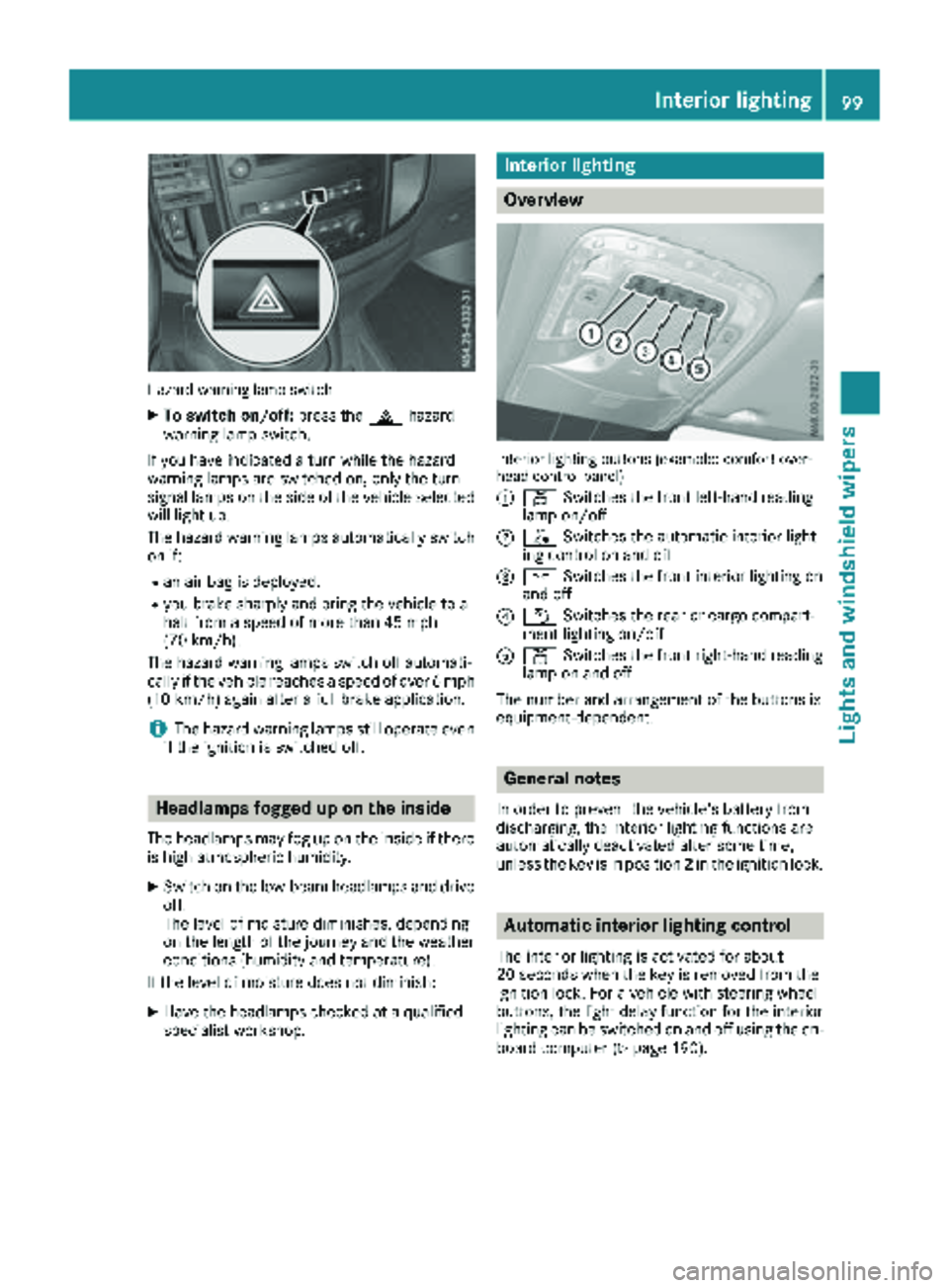
Hazard warning lamp switch
XTo switch on/off:press the£hazard
warning lamp switch.
If you have indicated a turn while the hazard
warning lamps are switched on, only the turn
signal lamps on the side of the vehicle selected
will light up.
The hazard warning lamps automatically switch
on if:
Ran air bag is deployed.
Ryou brake sharply and bring the vehicle to a
halt from a speed of more than 45 mph
(70 km/h).
The hazard warning lamps switch off automati-
cally if the vehicle reaches a speed of over 6 mph
(10 km/h) again after a full brake application.
iThe hazard warning lamps still operate even
if the ignition is switched off.
Headlamps fogged up on the inside
The headlamps may fog up on the inside if there
is high atmospheric humidity.
XSwitch on the low-beam headlamps and drive off.
The level of moisture diminishes, depending
on the length of the journey and the weather
conditions (humidity and temperature).
If the level of moisture does not diminish:
XHave the headlamps checked at a qualified
specialist workshop.
Interior lighting
Overview
Interior lighting buttons (example: comfort over-
head control panel)
:
p Switches the front left-hand reading
lamp on/off
;| Switches the automatic interior light-
ing control on and off
=c Switches the front interior lighting on
and off
?w Switches the rear or cargo compart-
ment lighting on/off
Ap Switches the front right-hand reading
lamp on and off
The number and arrangement of the buttons is
equipment-dependent.
General notes
In order to prevent the vehicle's battery from
discharging, the interior lighting functions are
automatically deactivated after some time,
unless the key is in position 2in the ignition lock.
Automatic interior lighting control
The interior lighting is activated for about
20 seconds whenthe key is removed from the
ignition lock. For a vehicle with steering wheel
buttons, the light delay function for the interior
lighting can be switched on and off using the on-
board computer (
Ypage 190).
Interior lighting99
Lights and windshield wiper s
Z
Page 104 of 318
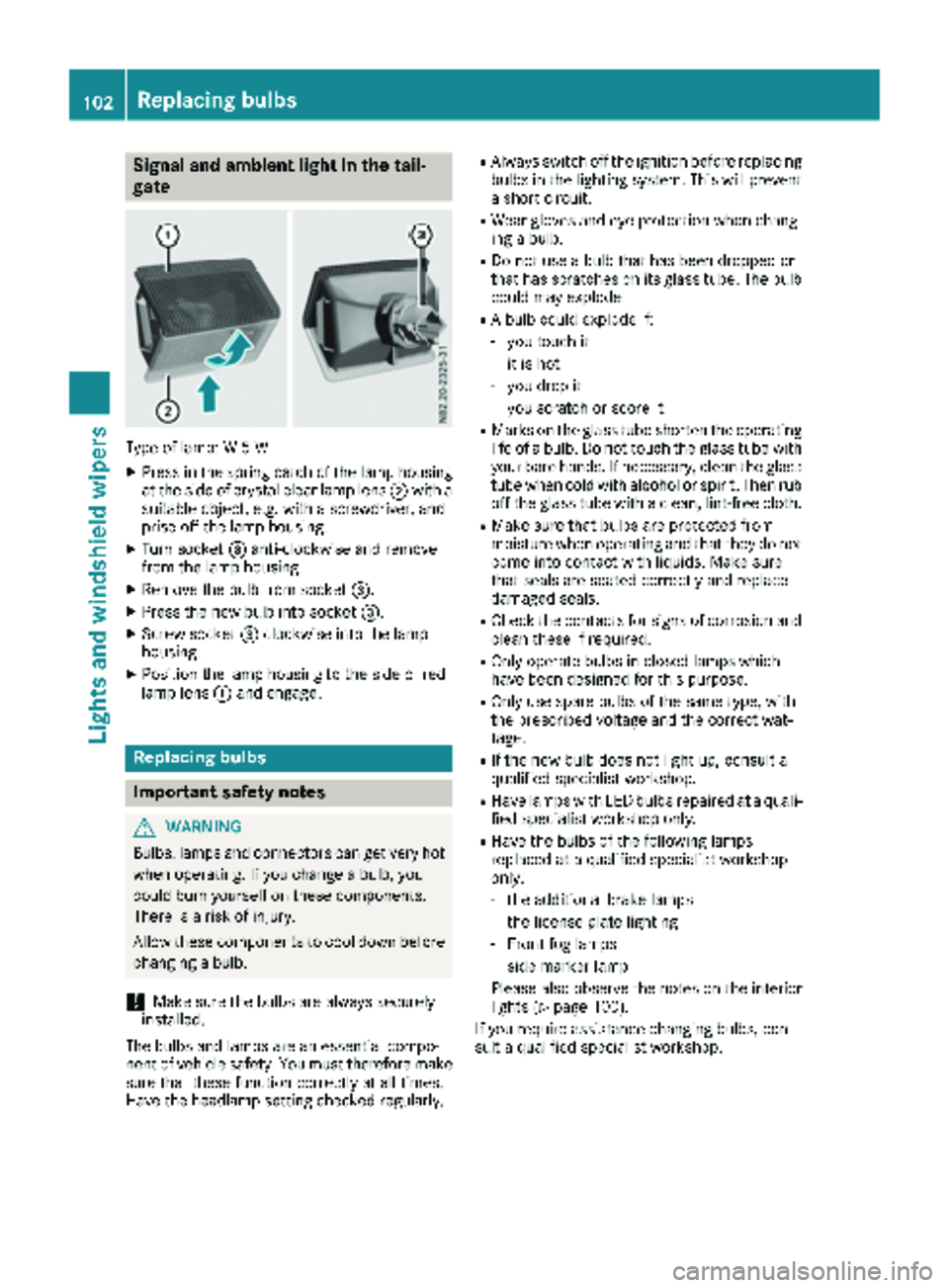
Signal and ambient light in the tail-
gate
Type of lamp: W 5 W
XPress in the spring catch of the lamp housing
at the side of crystal clear lamp lens;with a
suitable object, e.g. with a screwdriver, and
prise off the lamp housing.
XTurn socket =anti-clockwise and remove
from the lamp housing.
XRemove the bulb from socket =.
XPress the new bulb into socket =.
XScrew socket=clockwise into the lamp
housing.
XPosition the lamp housing to the side of red
lamp lens :and engage.
Replacing bulbs
Important safety notes
GWARNING
Bulbs, lamps and connectors can get very hot
when operating. If you change a bulb, you
could burn yourself on these components.
There is a risk of injury.
Allow these components to cool down before
changing a bulb.
!Make sure the bulbs are always securely
installed.
The bulbs and lamps are an essential compo-
nent of vehicle safety. You must therefore make
sure that these function correctly at all times.
Have the headlamp setting checked regularly.
RAlways switch off the ignition before replacing bulbs in the lighting system. This will prevent
a short circuit.
RWear gloves and eye protection when chang-
ing a bulb.
RDo not use a bulb that has been dropped or
that has scratches on its glass tube. The bulb
could may explode.
RA bulb could explode if:
-you touch it
-it is hot
-you drop it
-you scratch or score it
RMarks on the glass tube shorten the operating
life of a bulb. Do not touch the glass tube with
your bare hands. If necessary, clean the glass
tube when cold with alcohol or spirit. Then rub
off the glass tube with a clean, lint-free cloth.
RMake sure that bulbs are protected from
moisture when operating and that they do not
come into contact with liquids. Make sure
that seals are seated correctly and replace
damaged seals.
RCheck the contacts for signs of corrosion and
clean these if required.
ROnly operate bulbs in closed lamps which
have been designed for this purpose.
ROnly use spare bulbs of the same type, with
the prescribed voltage and the correct wat-
tage.
RIf the new bulb does not light up, consult a
qualified specialist workshop.
RHave lamps with LED bulbs repaired at a quali- fied specialist workshop only.
RHave the bulbs of the following lamps
replaced at a qualified specialist workshop
only:
-the additional brake lamps
-the license plate lighting
-Front fog lamps
-side marker lamp
Please also observe the notes on the interior
lights (
Ypage 100).
If you require assistance changing bulbs, con-
sult a qualified specialist workshop.
102Replacing bulbs
Lights and windshield wipers
Page 109 of 318
TheStatus Overviewin the Assist.menu
then also shows the èsymbol for vehicles
with steering wheel buttons (
Ypage 186).
XTo wipe with washer fluid: press theè
switch beyond the current position as far as it
will go to 1or press and hold 4.
When you release the èswitch, the rear
window wiper continues to wipe for about
another five seconds. The rear window wiper
then wipes according to the original position
2 or3.
The rear window wiper switches on automati-
cally if you engage reverse gear and the wind-
shield wipers are on.
If the vehicle is stationary and you open the tail-
gate or rear door, the rear window wiper will
stop automatically. The rear window wiper will
only resume wiping again when the tailgate and
rear door are closed and you pull away again.
The rear window will no longer be wiped properly if the wiper blade is worn. This may prevent you
from observing the traffic conditions. Informa-
tion on replacing the wiper blade can be found
under "Replacing wiper blades" (
Ypage 107).
Replacing the wiper blades
Important safety notes
GWARNING
If the windshield wipers begin to move while
you are changing the wiper blades, you could be trapped by the wiper arm. There is a risk of
injury.
Always switch off the windshield wipers and
ignition before changing the wiper blades.
!Never open the hood/tailgate or rear doors
if a windshield wiper arm has been folded
away from the windshield/rear window.
Never fold a windshield wiper arm without a
wiper blade back onto the windshield/rear
window.
Hold the windshield wiper arm firmly when
you change the wiper blade. If you release the
windshield wiper arm without a wiper blade
and it falls onto the windshield/rear window,
the windshield/rear window may be damaged
by the force of the impact. Mercedes-Benz recommends that you have
the wiper blades changed at a qualified spe-
cialist workshop.
!Only hold the wiper blade by the wiper arm.
You could otherwise damage the wiper rub-
ber.
Wiper blades are wear parts. The windshield will
no longer be wiped properly if the wiper blades
are worn. This may prevent you from observing
the traffic conditions.
Please observe the service indicator after
changing the wiper blades of the windshield
wiper.
Service indicator
Replacement wiper blades for the windshield
wiper have a service indicator on the tip of the
wiper blade.
Depending on the amount of use, the service
indicator will change color from black to yellow.
Change the wiper blade if:
Rthe wiper blade is damaged
Rthe service indicator has turned yellow
In order to activate the service indicator, you
have to remove the protective film
(
Ypage 107).
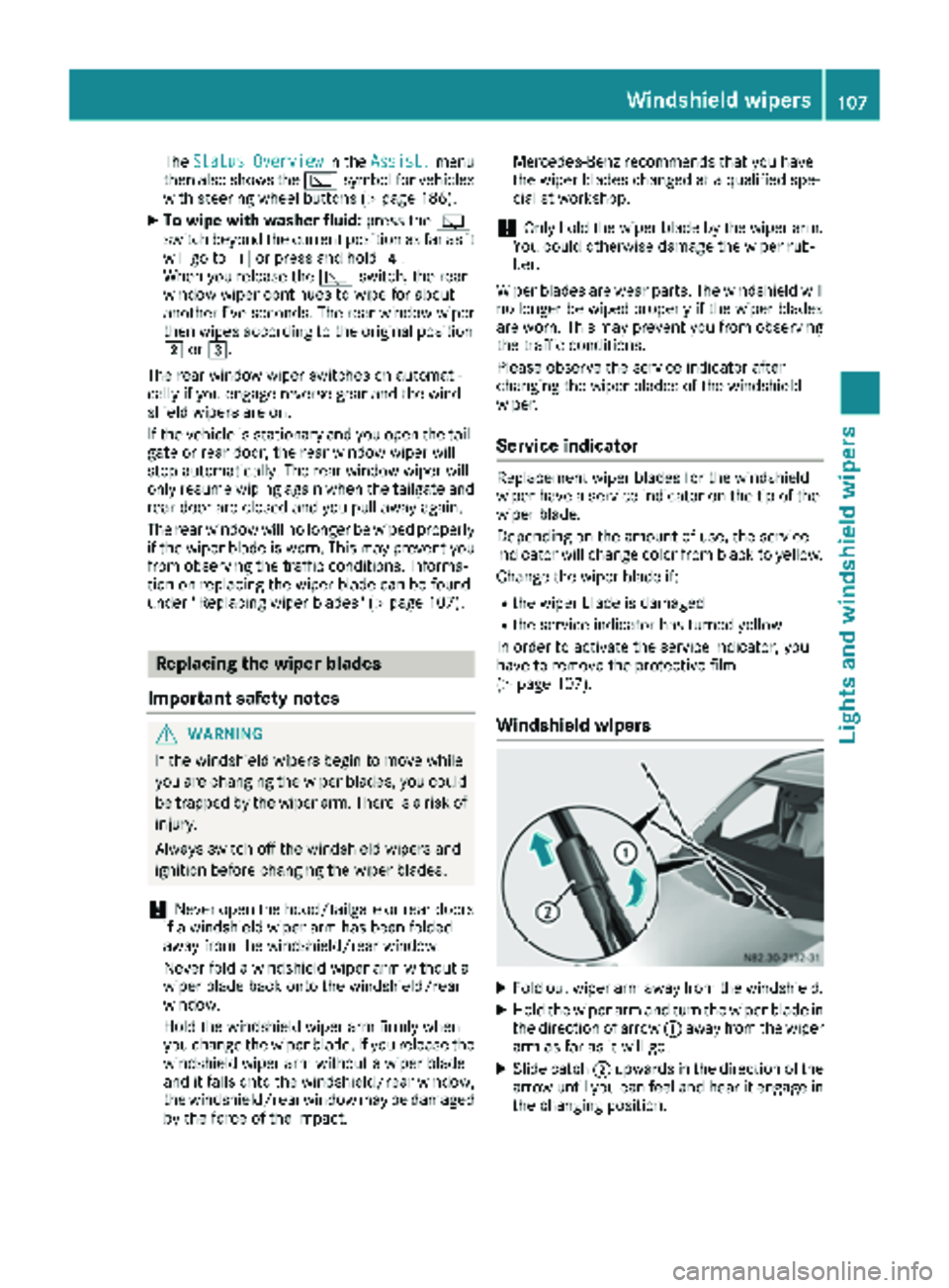
Windshield wipers
XFold out wiper arm away from the windshield.
XHold the wiper arm and turn the wiper blade in
the direction of arrow :away from the wiper
arm as far as it will go.
XSlide catch ;upwards in the direction of the
arrow until you can feel and hear it engage in
the changing position.
Windshield wipers107
Lights and windshield wipers
Z
Page 121 of 318
quickly, in particular at low outside tempera-
tures. Only switch on air-recirculation mode for
a short time.
Air-conditioning system or dual-zone
automatic climate control
XSwitch on climate control (Ypage 113).
XPress thehbutton.
If the indicator lamp in the hbutton lights
up, air-recirculation mode is activated.
Air-recirculation mode switches on automati-
cally:
Rat high outside temperatures.
Rwhile driving in a tunnel (only vehicles with a
navigation system).
The indicator lamp in the hbutton is then not
lit up. Outside air is added automatically after
about 30 minutes.
Air-recirculation mode is deactivated automati-
cally:
Rafter approximately five minutes at outside
temperatures below about 45 ‡ (7 †)
Rafter approximately five minutes when the
cooling with air-dehumidification function is
deactivated
Rafter approximately 30 minutes at outside
temperatures above about 45 ‡ (7 †) and
when the cooling with air-dehumidification
function is active
Convenience opening/pre-entry cli-
mate control
GWARNING
During convenience opening, body parts
could be drawn in or become trapped
between the side window and the door frame.
There is a risk of injury.
Monitor the entire opening procedure when
using convenience opening. When opening,
make sure that nobody touches the side win- dow. Release the %switch immediately if
somebody becomes trapped, to interrupt the
opening procedure.
XPre-entry climate control and conveni-
ence opening with the key: press and hold
the % button on the key.
The side windows open automatically and the
blower of the climate control system is acti-
vated.
XRelease the %button.
iAt high interior temperatures, the blower is
also switched on when a door is opened. This
means that slightly cooled air enters the vehi-
cle interior after the engine is started, to cool
the vehicle more rapidly.
Switching the residual heat function
on/off
General notes
Only vehicles with dual-zone automatic climate
control have the residual heat function.
Once the engine is switched off, it is possible to
make use of the residual heat of the engine to
continue heating or ventilating the front com-
partment of the vehicle for approximately
30 minutes. The heating or ventilation time
depends on the set interior temperature.
Switching the function on/off
XTurn the key to position 0in the ignition lock
or remove it.
XPress the Ìbutton.
If the residual heat function is activated, the
indicator lamp in the Ìbutton comes on.
The blower will run at a low speed regardless
of the airflow setting.
If you activate the residual heat function at
high temperatures, only the auxiliary ventila-
tion will be activated. The blower then runs at
medium speed.
The residual heat function switches off auto-
matically
Rafter approximately 30 minutes
Rif the starter battery's condition of charge is
too low
Rwhen you switch on the ignition
Operating the climate control system119
Climate control
Z
Page 129 of 318
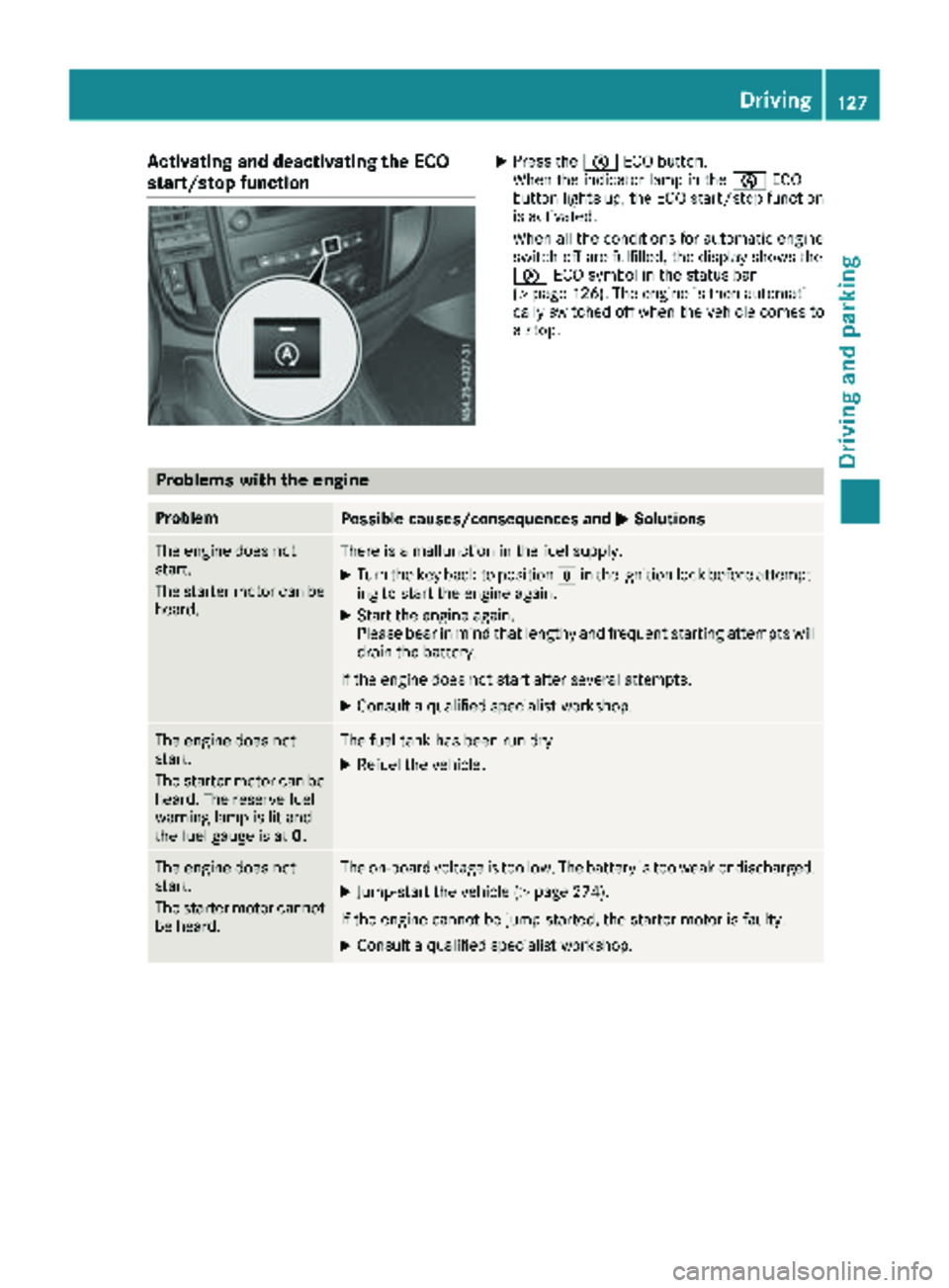
Activating and deactivating the ECO
start/stop functionXPress theè ECO button.
When th eindicator lamp in th eè ECO
butto nlights up, th eECO start/sto pfunction
is activated.
When all th econdition sfor automatic engin e
switch-off are fulfilled ,th edisplay shows th e
è ECO symbol in th estatus bar
(
Ypage 126). The engin eis then automati-
call yswitched off when th evehicl ecomes to
a stop.
Problems with the engine
ProblemPossible causes/consequences and MSolutions
The enginedoes no t
start .
The starter motor can be
heard.There is amalfunction in th efuel supply.
XTurn th eke ybac kto position gin th eignition loc kbefore attempt-
ing to start th eengin eagain .
XStart th eengin eagain .
Pleas ebear in min dthat lengthy and frequen tstarting attempts will
drai nth ebattery.
If th eengin edoes no tstart after several attempts :
XConsultaqualified specialist workshop .
The enginedoes no t
start .
The starter motor can be
heard. The reserv efuel
warning lamp is lit and
th efuel gauge is at 0.The fuel tankhas been run dry.
XRefue lth evehicle.
The engin edoes no t
start .
The starter motor canno t
be heard.The on-board voltag eis to olow. The battery is to oweak or discharged.
XJump-start th evehicl e (Ypage 274).
If th eengin ecanno tbe jump-started, th estarter motor is faulty.
XConsult aqualified specialist workshop .
Driving127
Driving and parking
Z
Page 138 of 318
GWARNING
If you leave children unsupervised in the vehi-
cle, they could set it in motion by, for example:
Rrelease the parking brake.
Rshift the automatic transmission out of the
parking position P.
Rstart the engine.
In addition, they may operate vehicle equip-
ment and become trapped. There is a risk of
an accident and injury.
When leaving the vehicle, always take the
SmartKey with you and lock the vehicle. Never
leave children unsupervised in the vehicle.
!Always secure the vehicle correctly against
rolling away. Otherwise, the vehicle or its driv-
etrain could be damaged.
!When the vehicle is parked, always remove
the key to prevent the battery from becoming
discharged.
Always park your vehicle safely and secure it
against rolling away. When parking, observe the
legal requirements of the country in which you
are currently driving.
To ensure that the vehicle is properly secured
against rolling away unintentionally:
Rthe parking brake must be firmly applied
Rthe transmission must be in position Pand the
key must be removed from the ignition lock
Ron steep uphill or downhill gradients, the front
wheels must be turned towards the curb
Parking brake
GWARNING
If you leave children unsupervised in the vehi-
cle, they could set it in motion by, for example:
Rrelease the parking brake.
Rshift the automatic transmission out of the
parking position P.
Rstart the engine.
In addition, they may operate vehicle equip-
ment and become trapped. There is a risk of
an accident and injury.
When leaving the vehicle, always take the
SmartKey with you and lock the vehicle. Never
leave children unsupervised in the vehicle.
GWARNING
If you must brake the vehicle with the parking brake, the braking distance is considerably
longer and the wheels could lock. There is an
increased danger of skidding and accidents.
Only use the parking brake to brake the vehi-
cle when the service brake is faulty. Do not
apply the parking brake too firmly. If the
wheels lock, release the parking brake until
the wheels begin turning again.
The brake lamps are not illuminated when you
brake the vehicle using the parking brake.
As a rule, you may only apply the parking brake
when the vehicle is stationary.
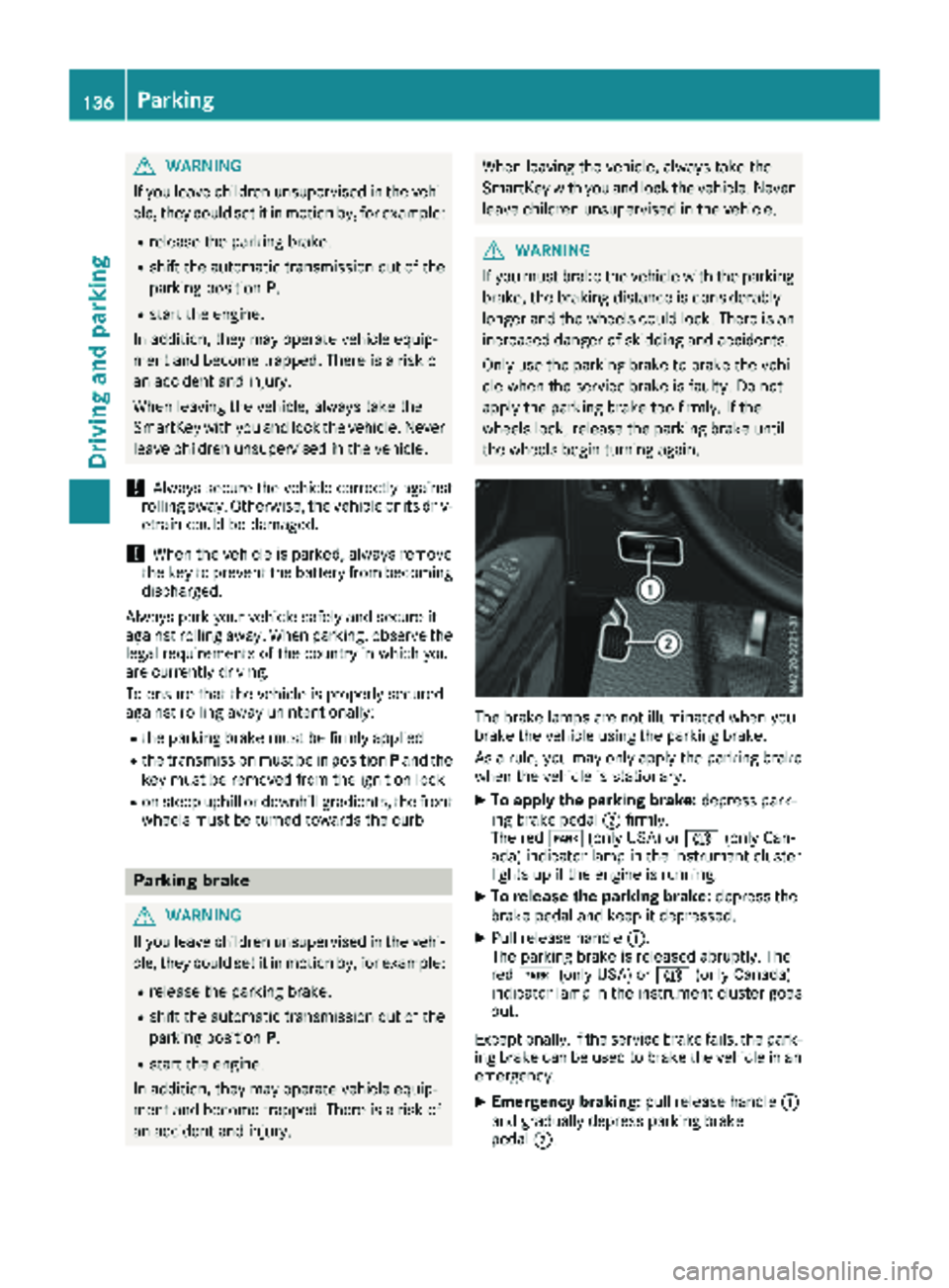
XTo apply the parking brake: depress park-
ing brake pedal ;firmly.
The red F(only USA) or J(only Can-
ada) indicator lamp in the instrument cluster
lights up if the engine is running.
XTo release the parking brake: depress the
brake pedal and keep it depressed.
XPull release handle :.
The parking brake is released abruptly. The
red F (only USA) or J(only Canada)
indicator lamp in the instrument cluster goes
out.
Exceptionally, if the service brake fails, the park-
ing brake can be used to brake the vehicle in an
emergency.
XEmergency braking: pull release handle:
and gradually depress parking brake
pedal ;.
136Parking
Driving and parking
Page 148 of 318
The last speed set remains stored. The last
speed stored is deleted when you switch off the
engine.
Cruise control is deactivated automatically
when:
Ryou apply the brakes
Ryou apply the parking brake and theF
(only USA) or J(only Canada) indicator
lamp in the instrument cluster lights up
Ryou are driving slower than 20 mph (30 km/h)
Ryou shift to neutral iwhile th evehicl eis in
motion
RES P®intervenes or you deactivat eES P®
Rthere is amalfunction in th eES P®or AB Ssys-
te m
If cruise control automatically deactivates, a
warnin gtone sounds and th eCruise
Contro lOffmessage appears briefl yin th edisplay.
The V symbol and th edisplay of th estore d
speed in th eheader or in th estatu sarea of th e
display are then no tshown.
Problems with cruise contro l
The speed cannotbe set when cruise control is
activated.
The display is showin g amessage of high priority
and canno ttherefor esho w a chang ein speed.
XProceed as instructe dby th emessage in th e
display.
COLLISION PREVENTION ASSIST
Gene ral notes
COLLISION PREVENTION ASSIST help syou:
Rto minimiz eth eris kof afront-en dcollision
wit h a detecte dobstacle in th epat hof your
vehicl e
Rto reduce th econsequence sof acollision
wit hth evehicl ein fron t
The system uses rada rsensor sto detec tvehi-
cle sin front.
COLLISION PREVENTION ASSIST consist sof th e
distanc ewarnin gfunction and Adaptive Brake
Assist.
If COLLISION PREVENTION ASSIST is malfunc -
tioning, th edisplay shows acorrespondin gmes -
sage (
Ypage 216).
Distance warning function
Important safety notes
GWARNIN G
The distanc ewarnin gfunction does no treact:
Rto people or animals
Rto oncomin gvehicles
Rto crossin gtraffic
Rwhen cornering
Thus ,th edistanc ewarnin gfunction canno t
provid e awarnin gin all critica lsituations.
There is aris kof an accident.
Always pay careful attention to th etraffic sit -
uation and be read yto brake.
GWARNIN G
The distanc ewarnin gfunction canno talways
clearly identify objects and complex traffic
situations.
In suc hcases, th edistanc ewarnin gfunction
may:
Rgiv ean unnecessary warnin g
Rnotgiv e a warnin g
There is aris kof an accident.
Always pay careful attention to th etraffic sit -
uation and do no trel ysolely on th edistanc e
warnin gfunction .
In particular, th edetection of obstacles can be
impaire din th ecas eof:
Rdir ton th esensor sor anythin gelse coverin g
th esensor s
Rsnow or heav yrain
Rinterferenc efrom other rada rsource s
Rstrongrada rreflections, for example, in park -
in g garages
Ranarrow vehicl etravelin gin front, e.g. a
motorbik e
Ravehicl etravelin gin fron ton adifferen tlin e
Due to th enature of th esystem, particularly
complicate dbut non-critica ldrivin gcondition s
may also caus eth esystem to display awarning.
If you fail to adapt your drivin gstyle, th edis-
tance warnin gfunction can neither reduce th e
ris kof an acciden tno roverride th elaws of phys -
ics .The distanc ewarnin gfunction canno ttak e
146Driving systems
Driving and parking
Page 149 of 318
into account road, weather or traffic conditions.
The distance warning function is only an aid. You
are responsible for the distance to the vehicle in
front, for vehicle speed, braking in good time
and for staying in your lane.
Following damage to the front end of the vehicle,
have the configuration and operation of the
radar sensor checked at a qualified specialist
workshop. This also applies to collisions at slow
speeds where there is no visible damage to the
front of the vehicle.
If you change wheel size, make sure they corre- spond to the correct wheel size category
(
Ypage 279). If the category is changed without
recoding the control units in the vehicle, the
functioning of the distance warning feature may
be impaired. COLLISION PREVENTION ASSIST
may then detect a malfunction and switch itself
off.
Operation
XTo activate/deactivate: activate or deacti-
vate the distance warning function in the on-
board computer (
Ypage 187).
If the distance warning function of COLLISION
PREVENTION ASSIST is activated, the display
shows the Äsymbol:
Rin the header
Rin the Status Overviewof the Assist.menu (Ypage 186)
At speeds up to approx 20 mph (30 km/h) the
display in vehicles with Active Parking Assist
first shows the ístatus indicator. Only up to
a speed of about 20 mph (30 km/h) does the display show the Äsymbol instead of the
í status indicator.
The distance warning function can help you to
minimize the risk of a front-end collision with a
vehicle ahead or reduce the effects of such a
collision. With the help of the radar sensor sys-
tem, the distance warning function can detect
obstacles that are in the path of your vehicle for
an extended period of time. If the distance warn-
ing function detects that there is a risk of a col-
lision, you will be warned visually and, where
necessary, acoustically. Without your interven-
tion, the distance warning function cannot pre-
vent a collision.
The distance warning function issues a warning
at speeds:
Rfrom about 4 mph (7 km/h) if you approach a
vehicle traveling in front or a stationary vehi-
cle too quickly. The ·warning lamp in the instrument cluster then lights up and an inter-
mittent warning tone also sounds.
At speeds up to about 45 mph (70 km/h), the
system also detects stationary obstacles, for
example stopped or parked vehicles.
XBrake immediately until the distance from the
obstacle increases and the risk of a front-end
collision passes.
or
XTake evasive action, provided it is safe to do
so.
Adaptive Brake Assist
General notes
Adaptive Brake Assist evaluates the traffic sit-
uation with the help of the radar sensor system and can detect obstacles which have been in
your vehicle's path for an extended period of
time. From speeds above 4 mph (7 km/h), Adap-
tive Brake Assist aids you in braking during haz-
ardous situations.
Up to a speed of approximately 125 mph
(200 km/h), Adaptive Brake Assist is capable of
reacting to moving obstacles that have already
been detected as such at least once over the
period of observation.
Important safety notes
GWARNING
Adaptive Brake Assist does not react:
Rto people or animals
Rto oncoming vehicles
Rto crossing traffic
Rto stationary obstacles
Rwhen cornering
As a result, the Adaptive Brake Assist may not
intervene in all critical conditions. There is a
risk of an accident.
Always pay careful attention to the traffic sit- uation and be ready to brake.
GWARNING
Adaptive Brake Assist cannot always clearly
identify objects and complex traffic situa-
tions.
Driving systems147
Driving and parking
Z
Page 152 of 318
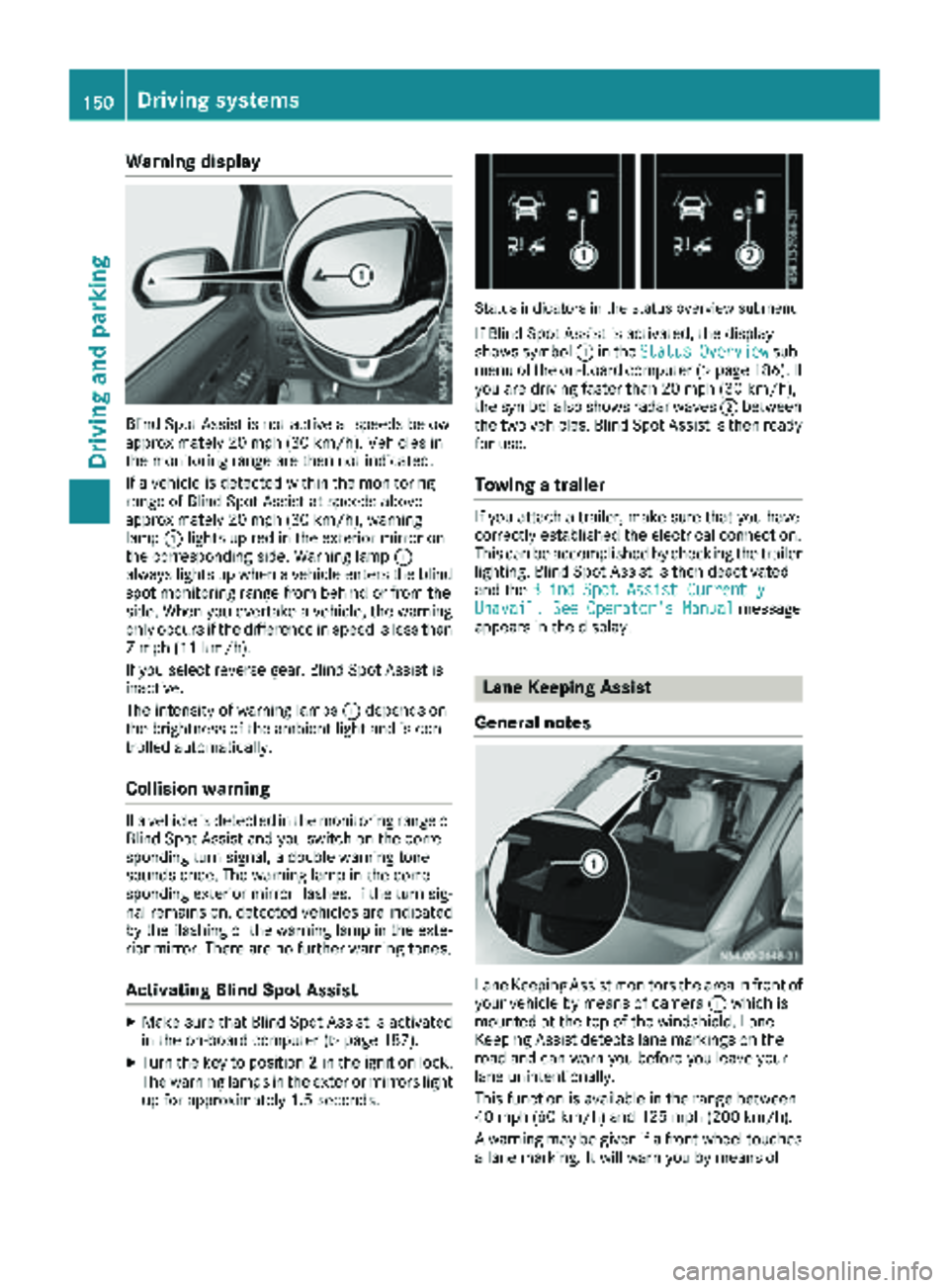
Warning display
Blind Spot Assist is not active at speeds below
approximately 20 mph (30 km/h). Vehicles in
the monitoring range are then not indicated.
If a vehicle is detected within the monitoring
range of Blind Spot Assist at speeds above
approximately 20 mph (30 km/h), warning
lamp:lights up red in the exterior mirror on
the corresponding side. Warning lamp :
always lights up when a vehicle enters the blind
spot monitoring range from behind or from the
side. When you overtake a vehicle, the warning
only occurs if the difference in speed is less than
7 mph (11 km/h).
If you select reverse gear, Blind Spot Assist is
inactive.
The intensity of warning lamps :depends on
the brightness of the ambient light and is con-
trolled automatically.
Collision warning
If a vehicle is detected in the monitoring range of
Blind Spot Assist and you switch on the corre-
sponding turn signal, a double warning tone
sounds once. The warning lamp in the corre-
sponding exterior mirror flashes. If the turn sig-
nal remains on, detected vehicles are indicated
by the flashing of the warning lamp in the exte-
rior mirror. There are no further warning tones.
Activating Blind Spot Assist
XMake sure that Blind Spot Assist is activated
in the on-board computer (Ypage 187).
XTurn the key to position 2in the ignition lock.
The warning lamps in the exterior mirrors light
up for approximately 1.5 seconds.
Status indicators in the status overview submenu
If Blind Spot Assist is activated, the display
shows symbol :in the StatusOverviewsub-
menu of the on-board computer (Ypage 186). If
you are driving faster than 20 mph (30 km/h),
the symbol also shows radar waves ;between
the two vehicles. Blind Spot Assist is then ready
for use.
Towing a trailer
If you attach a trailer, make sure that you have
correctly established the electrical connection.
This can be accomplished by checking the trailer
lighting. Blind Spot Assist is then deactivated
and the Blind Spot Assist Currently
Unavail. See Operator's Manualmessage
appears in the display.
Lane Keeping Assist
General notes
Lane Keeping Assist monitors the area in front of
your vehicle by means of camera :which is
mounted at the top of the windshield. Lane
Keeping Assist detects lane markings on the
road and can warn you before you leave your
lane unintentionally.
This function is available in the range between
40 mph (60 km/h) and 125 mph (200 km/h).
A warning may be given if a front wheel touches a lane marking. It will warn you by means of
150Driving systems
Driving and parking
Page 153 of 318
intermittent vibration through the steering
wheel for up to 1.5 seconds.
Important safety notes
GWARNING
Lane Keeping Assist may not always clearly
recognize lane markings.
In this case, Lane Keeping Assist may:
Rgive an unnecessary warning
Rnot give a warning
There is a risk of an accident.
Always pay particular attention to the traffic
situation and stay in lane, in particular if
warned by Lane Keeping Assist.
GWARNING
The Lane Keeping Assist warning does not
return the vehicle to the original lane. There is
a risk of an accident.
You should always steer, brake or accelerate
yourself, in particular if warned by Lane Keep-
ing Assist.
If you fail to adapt your driving style, Lane Keep-
ing Assist can neither reduce the risk of accident
nor override the laws of physics. Lane Keeping
Assist cannot take into account road, weather or traffic conditions. Lane Keeping Assist is only an
aid. You are responsible for the distance to the
vehicle in front, for vehicle speed, braking in
good time and for staying in your lane.
Lane Keeping Assist does not keep your vehicle
in its lane.
The system may be impaired or may not function
if:
Rthere is poor visibility, e.g. due to insufficient
illumination of the road, or due to snow, rain,
fog or spray
Rthere is glare, e.g. from oncoming traffic, the
sun or reflection from other vehicles (e.g. if
the road surface is wet)
Rthe windshield is dirty, fogged up, damaged or
covered, for instance by a sticker, in the vicin-
ity of the camera
Rthere are no lane markings, or several unclear
lane markings for one lane, e.g. around con-
struction sites
Rthe lane markings are worn away, dark or cov-
ered up, e.g. by dirt or snow
Rthe distance to the vehicle in front is too short
and thus the lane markings cannot be detec-
ted
Rthe lane markings change quickly, e.g. lanes
branch off, cross one another or merge
Rthe road is narrow and winding
Rthere are highly variable shade conditions onthe road
Deactivating and activating Lane Keep -
ing Assist
XPress the Çbutton.
If the indicator lamp in the button lights up
and the display shows the Çsymbol in the
status area, Lane Keeping Assist is switched
on but not ready for use.
If you are driving with Lane Keeping Assist
activated at speeds above 40 mph (60 km/h)
and lane markings are detected, the display
shows the Çsymbol highlighted in the
status area. Lane Keeping Assist is then ready
for use.
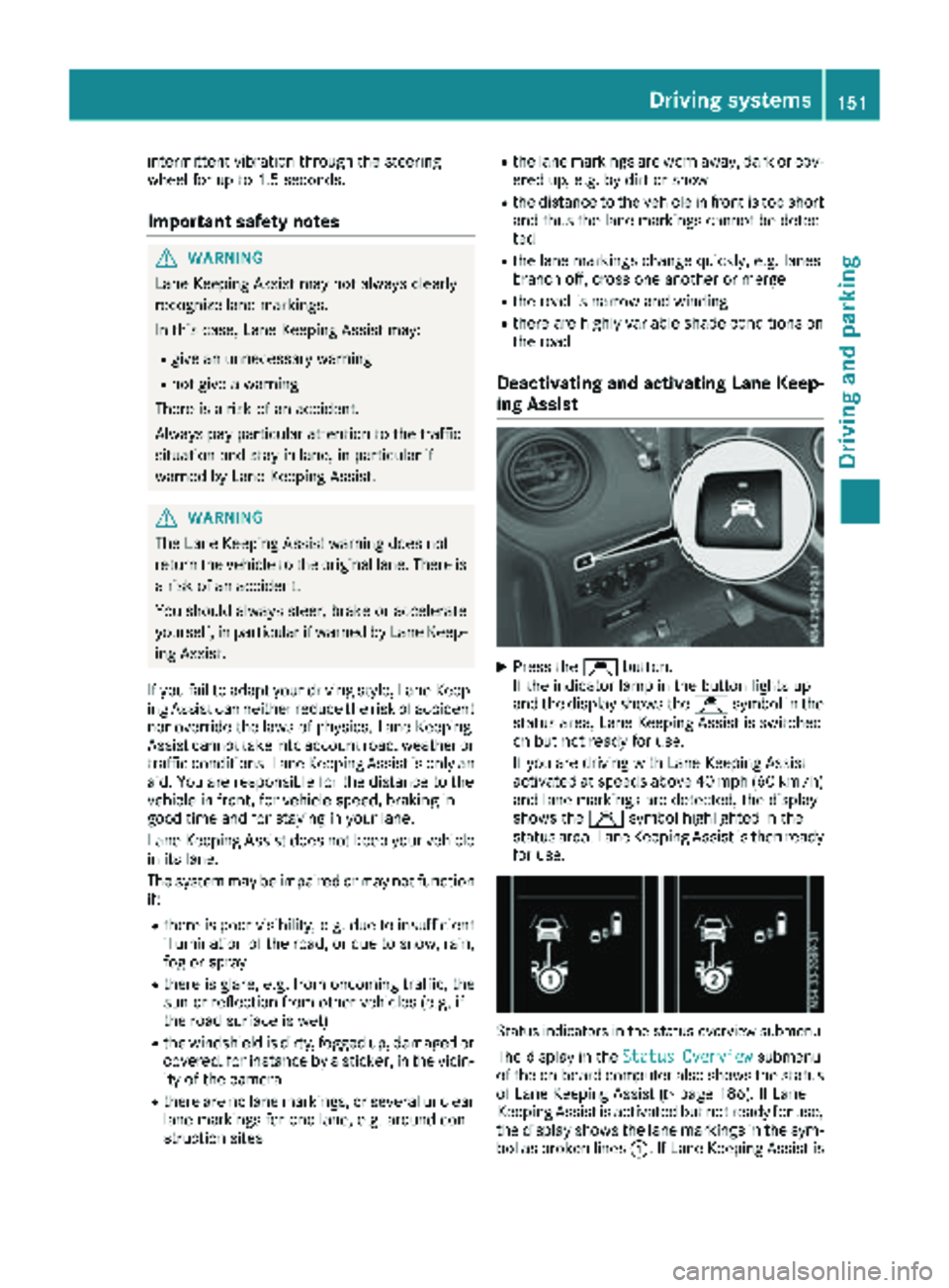
Status indicators in the status overview submenu
The display in the Status Overviewsubmenu
of the on-board computer also shows the status
of Lane Keeping Assist (
Ypage 186). If Lane
Keeping Assist is activated but not ready for use,
the display shows the lane markings in the sym-
bol as broken lines :. If Lane Keeping Assist is
Driving systems151
Driving and parking
Z