belt MERCEDES-BENZ METRIS 2019 MY19 Operator’s Manual
[x] Cancel search | Manufacturer: MERCEDES-BENZ, Model Year: 2019, Model line: METRIS, Model: MERCEDES-BENZ METRIS 2019Pages: 318, PDF Size: 5.07 MB
Page 92 of 318
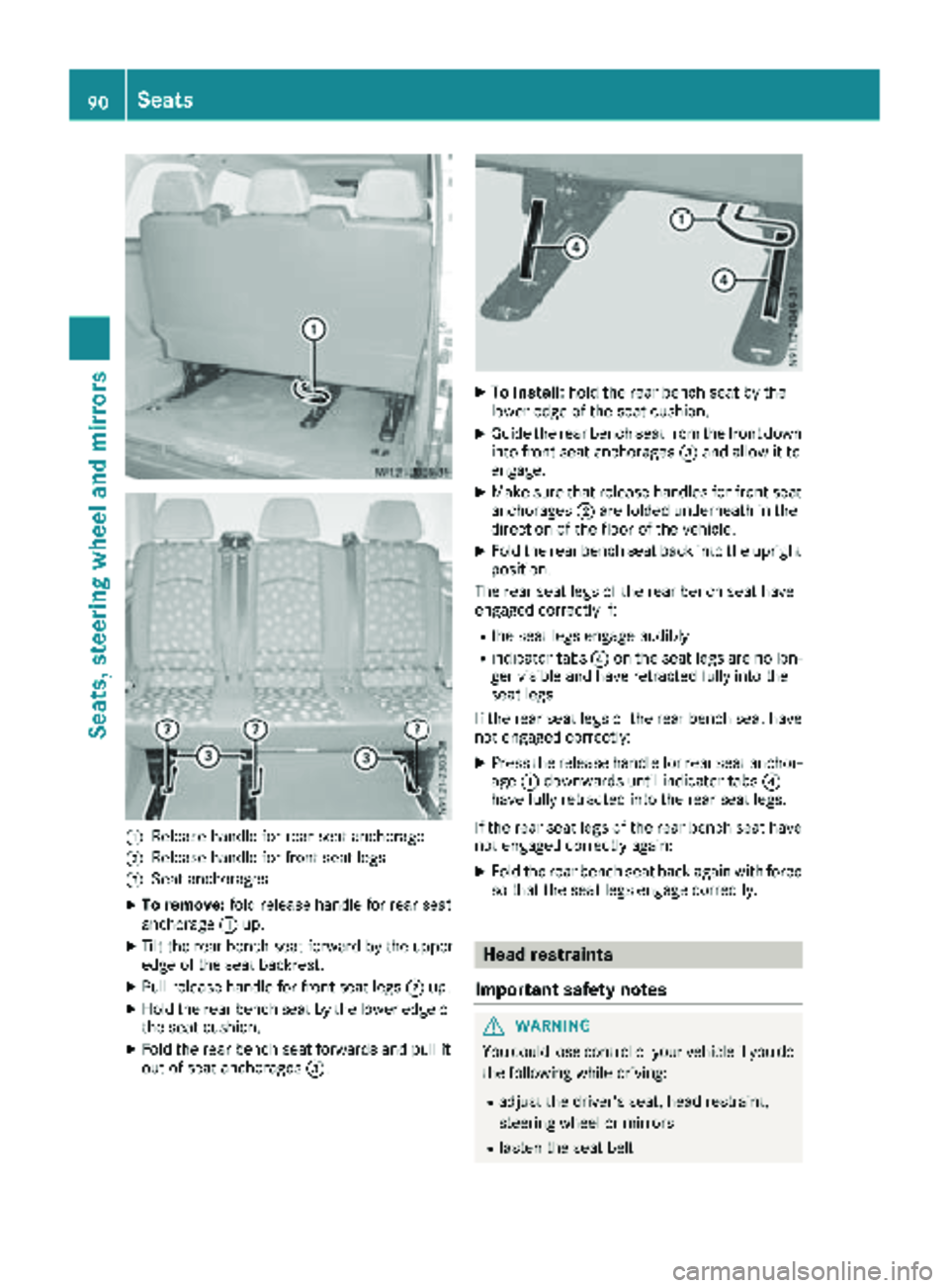
:Releasehandle for rear seat anchorage
;Releas ehandle for fron tseat legs
=Seat anchorages
XTo remove: foldrelease handle for rear seat
anchorage :up.
XTilt th erear bench seat forward by th eupper
edge of th eseat backrest .
XPull release handle for fron tseat legs ;up.
XHold th erear bench seat by th elower edge of
th eseat cushion .
XFold therear bench seat forwards and pull it
out of seat anchorages =.
XTo install:hold th erear bench seat by th e
lower edge of th eseat cushion .
XGuide therear bench seat from th efron tdown
int ofron tseat anchorages =and allow it to
engage .
XMakesur ethat release handles for fron tseat
anchorages ;are folded underneat hin th e
direction of th efloor of th evehicle.
XFold th erear bench seat bac kint oth eupright
position .
The rear seat legs of th erear bench seat hav e
engage dcorrectl yif:
Rth eseat legs engage audibly
Rindicator tab s? on th eseat legs are no lon -
ger visible and hav eretracte dfully int oth e
seat legs
If th erear seat legs of th erear bench seat hav e
no tengage dcorrectly:
XPress th erelease handle for rear seat anchor -
age :downwards until indicator tab s?
hav efully retracte dint oth erear seat legs .
If th erear seat legs of th erear bench seat hav e
no tengage dcorrectl yagain :
XFold th erear bench seat bac kagain wit hforce
so that th eseat legs engage correctly.
Head restraints
Important safety notes
GWARNIN G
You could lose control of your vehicl eif you do
th efollowin gwhile driving :
Radjust thedriver' sseat ,head restraint,
steering whee lor mirror s
Rfastenth eseat belt
90Seats
Seats, steering wheel and mirrors
Page 93 of 318
There is a risk of an accident.
Adjust the driver's seat, head restraint, steer-ing wheel and mirror and fasten your seat belt
before starting the engine.
GWARNING
If the head restraints are not installed or not
adjusted correctly, they cannot provide pro-
tection as intended. There is an increased risk
of injury in the head and neck area, e.g. in the event of an accident or when braking.
Always drive with the head restraints instal-
led. Before driving off, make sure for every
vehicle occupant that the center of the head
restraint supports the back of the head at
about eye level.
Adjust the head restraint so that:
Rthe center of the head restraint supports the
back of the head at eye level and the head
restraint is engaged
Rwhen your head is relaxed the back of your
head rests as close as possible to the head
restraint
Adjusting the head restraints
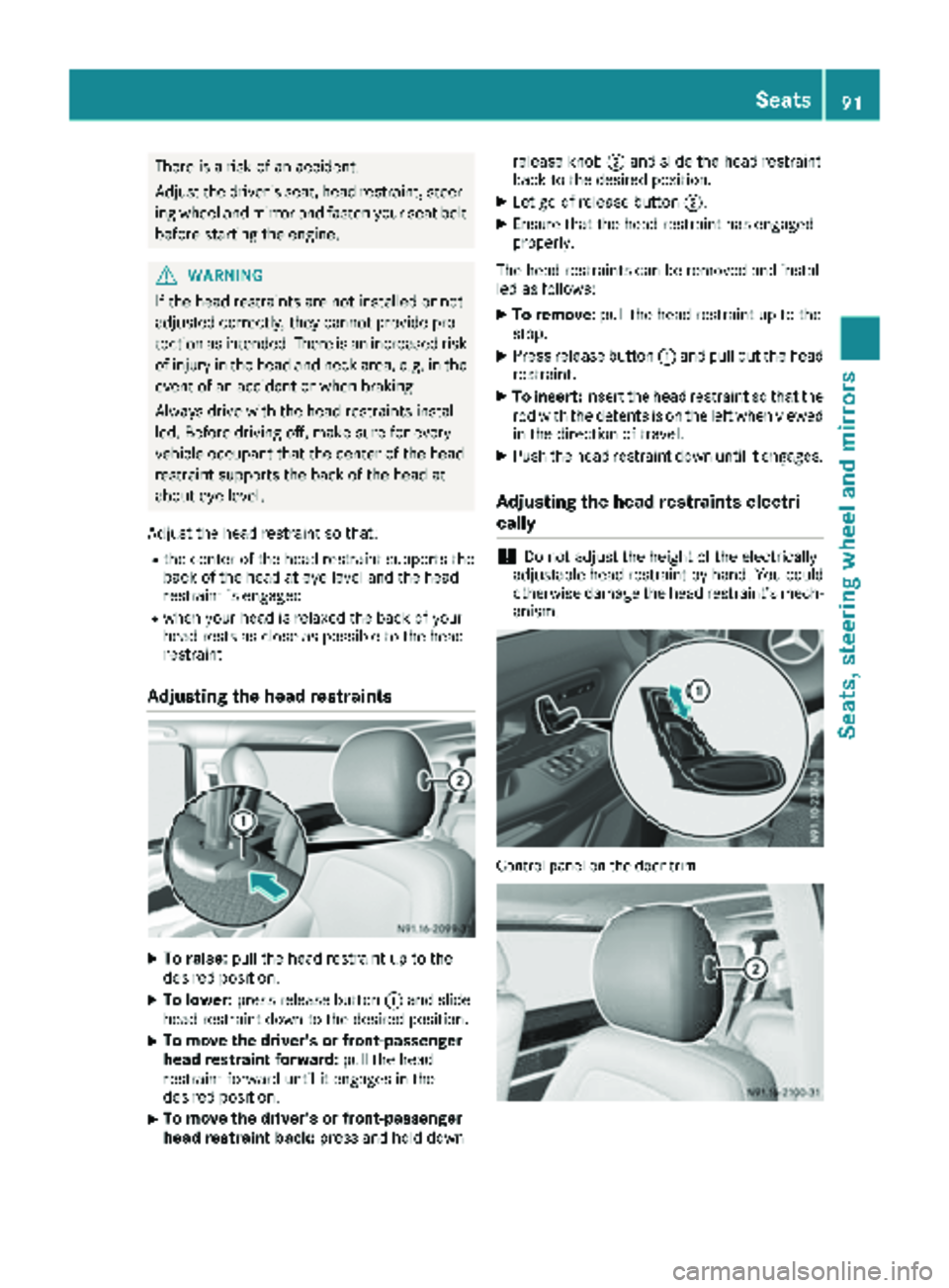
XTo raise: pull the head restraint up to the
desired position.
XTo lower: press release button :and slide
head restraint down to the desired position.
XTo move the driver's or front-passenger
head restraint forward: pull the head
restraint forward until it engages in the
desired position.
XTo move the driver's or front-passenger
head restraint back: press and hold down release knob
;and slide the head restraint
back to the desired position.
XLet go of release button ;.
XEnsure that the head restraint has engaged
properly.
The head restraints can be removed and instal-
led as follows:
XTo remove: pull the head restraint up to the
stop.
XPress release button :and pull out the head
restraint.
XTo insert: insert the head restraint so that the
rod with the detents is on the left when viewed in the direction of travel.
XPush the head restraint down until it engages.
Adjusting the head restraints electri-
cally
!Do not adjust the height of the electrically
adjustable head restraint by hand. You could
otherwise damage the head restraint’s mech- anism.
Control panel on the door trim
Seats91
Seats, steering wheel and mirrors
Z
Page 95 of 318
Steering wheel
GWARNING
You could lose control of your vehicle if you do the following while driving:
Radjust the driver's seat, head restraint,
steering wheel or mirrors
Rfasten the seat belt
There is a risk of an accident.
Adjust the driver's seat, head restraint, steer-
ing wheel and mirror and fasten your seat belt before starting the engine.
GWARNING
If the steering wheel is unlocked while the
vehicle is in motion, it could change position
unexpectedly. This could cause you to lose
control of the vehicle. There is a risk of an
accident.
Before starting off, make sure the steering
wheel is locked. Never unlock the steering
wheel while the vehicle is in motion.
GWARNING
Children could injure themselves if they
adjust the steering wheel. There is a risk of
injury.
When leaving the vehicle, always take the
SmartKey with you and lock the vehicle. Never
leave children unsupervised in the vehicle.
The steering wheel can still be adjusted if the
key has been removed.
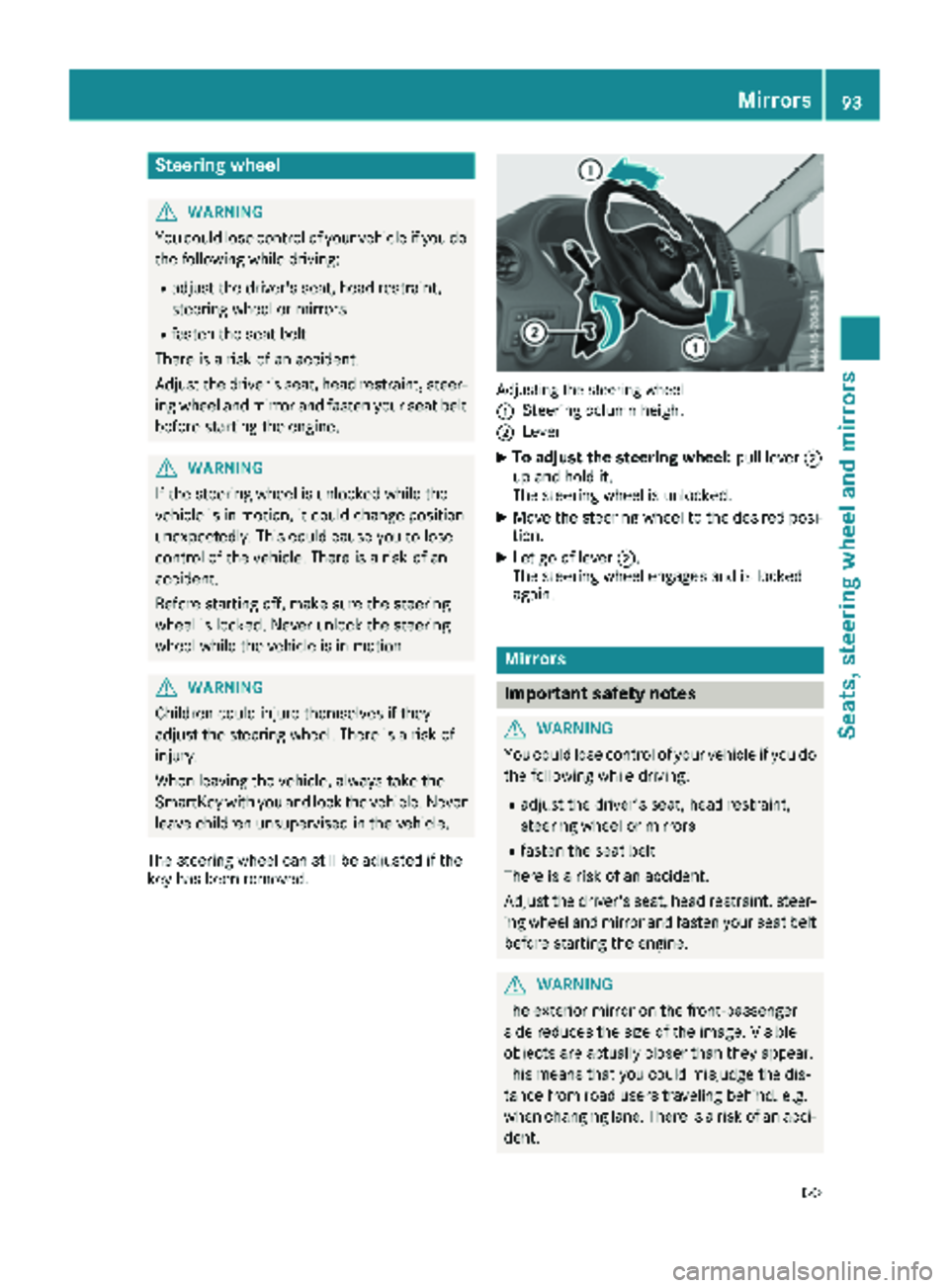
Adjusting the steering wheel
:
Steering column height
;Lever
XTo adjust the steering wheel: pull lever;
up and hold it.
The steering wheel is unlocked.
XMove the steering wheel to the desired posi-
tion.
XLet go of lever ;.
The steering wheel engages and is locked
again.
Mirrors
Important safety notes
GWARNING
You could lose control of your vehicle if you do the following while driving:
Radjust the driver's seat, head restraint,
steering wheel or mirrors
Rfasten the seat belt
There is a risk of an accident.
Adjust the driver's seat, head restraint, steer-
ing wheel and mirror and fasten your seat belt before starting the engine.
GWARNING
The exterior mirror on the front-passenger
side reduces the size of the image. Visible
objects are actually closer than they appear.
This means that you could misjudge the dis-
tance from road users traveling behind, e.g.
when changing lane. There is a risk of an acci-
dent.
Mirrors93
Seats, steering wheel and mirrors
Z
Page 126 of 318
XStow luggage items securely. Secure the load
as per the loading guidelines (Ypage 244).
XMake sure that the floormats and carpets are
properly secured so that they cannot slip and
obstruct the pedals.
XClose all doors.
Starting the engine
Important safety notes
GWARNING
Combustion engines emit poisonous exhaust
gases such as carbon monoxide. Inhaling
these exhaust gases leads to poisoning. There
is a risk of fatal injury. Therefore never leave
the engine running in enclosed spaces with-
out sufficient ventilation.
!Do not depress the accelerator when start-
ing the engine.
XBefore starting the engine, make sure that:
Rall the doors are closed.
Rall the vehicle occupants are wearing their
seat belts correctly.
Rthe parking brake is applied.
iIf you depress the brake pedal before start-
ing the engine, the pedal travel may be shorter
and pedal resistance higher.
If you depress the brake pedal again after
starting the engine, pedal travel and resist-
ance will be back to normal again.
Automatic transmission
XShift the transmission to position P
(Ypage 129).
The transmission position indicator in the dis-
play shows P.
You can also start the engine in neutral N.
Starting the engine
XTurn the key to position3in the ignition lock
(Ypage 123) and release it as soon as the
engine is running.
Driving off
Automatic transmission
GWARNING
If the engine speed is above the idling speed
and you engage transmission position Dor R,
the vehicle could pull away suddenly. There is
a risk of an accident.
When engaging transmission position Dor R,
always firmly depress the brake pedal and do not simultaneously accelerate.
!Only shift into reverse gear when the vehicle
is stationary k. Otherwise, you could dam-
age the transmission.
XDepress the brake pedal and keep it
depressed.
The parking lock is released.
XShift the transmission to position hork.
On vehicles with a reverse warning feature,
when reverse gear kis engaged a warning
tone sounds to alert other road users
(
Ypage 125).
XRelease the parking brake (Ypage 136).
The F (only USA) or J(only Canada)
indicator lamp in the instrument cluster goes
out.
XRelease the brake pedal.
Hill start assist automatically maintains the
brake pressure for about another two sec-
onds after the brake pedal is released. This
makes it possible to pull away without the
vehicle immediately rolling back
(
Ypage 125).
XCarefully depress the accelerator pedal.
It is only possible to shift the transmission from
position jto the desired transmission position
if you d
epress the brake pedal. Only then is the
parking lock released. If the brake pedal is not
depressed, the DIRECT SELECT lever can still be
moved but the parking lock remains engaged.
The vehicle locks centrally once you have pulled
away. The locking knobs in the doors drop down.
You can open the doors from the inside at any
time.
You can also deactivate the automatic locking
feature (
Ypage 74).
124Driving
Driving and parking
Page 128 of 318
Important safety notes
GWARNING
If th eengin eis switched off automatically and
you exit th evehicle, th eengin eis restarte d
automatically. The vehicl emay begi nmoving .
Ther eis aris kof acciden tand injury.
If you wish to exit th evehicle, always tur noff
th eignition and secure th evehicl eagainst
rollin gaway.
Automatic engine switch-off
Gene ral notes
The ECO start/sto pfunction is operational
when th eè ECO symbol is shown in th esta-
tus bar of th edisplay.
Fo rthis to happen, various conditions, includin g
th efollowing, must be met :
RtheECO start/sto pfunction is switched on .
The indicator lamp in th eè ECO butto nis
lit (
Ypage 127).
Rtheoutside temperature is abov e32 ‡(0 †).
Rthe engine has reached its operating temper-
ature.
Rthe set temperature for the vehicle interior
has been reached.
Rthe condition of charge of the starter battery
is sufficient.
Rthe system detects that the windshield is not
fogged up when the air-conditioning system
or automatic climate control is switched on.
Rthe hood is closed.
Rthe driver's seat belt is fastened.
Rthe driver's door is closed.
Rthere is no danger of immediately rolling
backwards, e.g. when stopped on a steep gra-dient.
If a trailer is attached and/or a rear carrier
system is installed and connected electri-
cally, this danger is detected on less steep
gradients.
Only if all the conditions for automatic engine
switch-off are fulfilled, does the display show
the è ECO symbol.
All of the vehicle's systems remain active when
the engine is switched off automatically.
The engine can be switched off automatically a
maximum of four times (initial stop, then three subsequent stops) in succession. After that, the
display hides the èECO symbol. Automatic
engine switch-off is not possible again until the
è ECO symbol is shown again.
If you open the hood after an a
utomatic engine
switch-off, the automatic engine start is deacti-
vated. Once the hood is closed, you have to start
the engine manually.
If the vehicle is stopped in transmission position
h ori, the ECO start/stop function switches
off the engine automatically once the vehicle is
stationary.
Automatic engine start
General notes
The engine is started automatically if:
Ryou switch off the ECO start/stop function by pressing the èECO button The indicator
lamp in the èECO button then goes out.
(
Ypage 127)
Ryou depress the accelerator pedal.
Ryou engage reverse gear k
Ryou unfasten your seat belt.
Ryou open the driver's door.
Rthe vehicle begins to roll away.
Rthe brake system requires this.
Rthe temperature in the vehicle interior
increasingly deviates from the set value.
Rthe system detects moisture on the wind-
shield when the air-conditioning system is
switched on.
Rthe battery's condition of charge is too low.
The engine is started automatically if you:
Rswitch to drive program M(Ypage 131)
Rrelease the brake pedal when in transmission
position hori
Rswitch to transmission position j
After shifting from transmission position kto
h, the ECO start/stop function is not available
until the èECO symbol is shown in the dis-
play.
126Driving
Driving and parking
Page 144 of 318
You can find further information under:
R"M+S tires" (Ypage 281)
R"Snow chains" (Ypage 282)
R"Driving with summer tires" (Ypage 281)
Also observe the notes under "Winter operation"
(
Ypage 281).
Driving off-road
Important safety notes
GWARNING
If you drive on a steep incline at an angle or
turn when driving on an incline, the vehicle
could slip sideways, tip and rollover. There is a risk of an accident.
Always drive on a steep incline in the line of
fall (straight up or down) and do not turn the
vehicle.
GWARNING
When driving off-road, your body is subject to
forces from all directions, due to the uneven
surface. You could be thrown from your seat,
for instance. There is a risk of injury.
Always wear a seat belt, even when driving off-
road.
GWARNING
If you drive over obstacles or in ruts, the steer-
ing wheel may jerk out of your grip, causing
injury to your hands.
Always hold the steering wheel firmly with
both hands. When driving over obstacles, you
must expect steering forces to increase
briefly and suddenly.
GWARNING
Flammable material such as leaves, grass or
twigs may ignite if they come into contact with
hot parts of the exhaust system. There is a risk of fire.
When driving off road or on unpaved roads,
check the vehicle's underside regularly. In
particular, remove parts of plants or other
flammable materials which have become
trapped. In the case of damage, contact a
qualified specialist workshop.
!When driving off-road or on unpaved surfa-
ces, check the underside of the vehicle and
the wheels and tires at regular intervals. In
particular, remove any trapped foreign
objects, e.g. stones and branches.
Such foreign objects may:
Rdamage the chassis, the fuel tank or the
brake system
Rcause imbalances and thus vibrations
Rbe flung out when you continue driving
If there is any damage, inform a qualified spe-
cialist workshop.
When driving off-road and on construction sites,
sand, mud and water mixed with oil, for exam-
ple, may get into the brakes. This may lead to a
reduction in braking performance or total brake
failure, also as a result of increased wear. The
braking characteristics will vary depending on
the material that has got into the system. Clean
the brakes after driving off-road. If you then
notice reduced braking performance or hear
scraping noises, have the brake system checked
at a qualified specialist workshop. Adjust your
driving style to the changed braking character-
istics.
Driving off-road or on construction sites increa-
ses the possibility of vehicle damage which may
in turn lead to the failure of certain assemblies
and systems. Adapt your driving style to the off- road driving conditions. Drive carefully. Have
any vehicle damage rectified at a qualified spe-
cialist workshop as soon as possible.
When loading your vehicle for driving off-road or
on a construction site, keep the vehicle's centerof gravity as low as possible.
Rules for driving off-road
!Always bear the vehicle's ground clearance
in mind and avoid obstacles, e.g. deep ruts.
Obstacles may damage the following parts of the vehicle:
Rthe chassis
Rthe drive train
Rthe fuel and supply tanks
For this reason, you should always drive
slowly when driving off-road. If you have to
142Driving tips
Driving and parking
Page 154 of 318
ready for use, the lane markings in the symbol
are shown as solid lines;.
Setting the sensitivity of Lane Keeping
Assist
XIn theAssist.menu on the on-board com-
puter, select the Lane Keeping Assist:
function (Ypage 187).
XSelectStandardorAdaptive.
In the setting Standard
, no warning vibration
occurs if:
Ryou operate the turn signal in the correspond-
ing direction. In this event, the warnings are
suppressed for a certain period of time.
Ra driving safety system, such as ABS, BAS or
ESP®, intervenes or performs a control
action.
When Adaptive
is selected, there is also no
warning vibration when:
Ryou accelerate hard, e.g. kickdown.
Rbrake sharply.
Ryou steer actively, e.g. swerve to avoid an
obstacle or change lanes quickly.
Ryou cut the corner on a sharp bend.
In order that you are warned only when neces-
sary and in good time if you cross the lane mark-
ing, the system differentiates between various
conditions and warns you accordingly.
The warning vibration occurs earlier if:
Ryou approach the outer lane marking on a
bend.
Rthe road has very wide lanes, such as a high-
way.
Rthe system detects solid lane markings.
The warning vibration occurs later if:
Rthe road has narrow lanes.
Ryou cut the corner on a bend.
Alertness Assistant ATTENTION
ASSIST
General notes
ATTENTION ASSIST helps you during long,
monotonous journeys such as on freeways and
interstate highways. It is active in the 40 mph
(60 km/h) to 125 mph (200 km/h) range. If
ATTENTION ASSIST detects typical indicators of fatigue or increasing lapses in concentration on
the part of the driver, it suggests taking a break.
Important safety notes
ATTENTION ASSIST is only an aid. The system
may not always detect fatigue or lapses in con-
centration until too late, or may not detect them
at all. ATTENTION ASSIST is not a substitute for
a well-rested and attentive driver.
The functionality of ATTENTION ASSIST is
restricted, and warnings may be delayed or not
occur at all:
Rif the length of the journey is less than approx-
imately 30 minutes
Rif the road condition is poor, e.g. if the surface
is uneven or if there are potholes
Rif there is a strong side wind
Rif you have adopted a sporty driving style with
high cornering speeds or high rates of accel-
eration
Rif you are predominantly driving at a speed
below 40 mph (60 km/h) or above 125 mph
(200 km/h)
Rif the time has been set incorrectly
Rin active driving situations, such as when you
change lanes or change your speed
ATTENTION ASSIST is reset and starts assessing
your attention again when you continue your
journey if:
Ryou switch off the engine
Ryou take off your seat belt and open the driv-
er's door, e.g. for a change of drivers or to
take a break
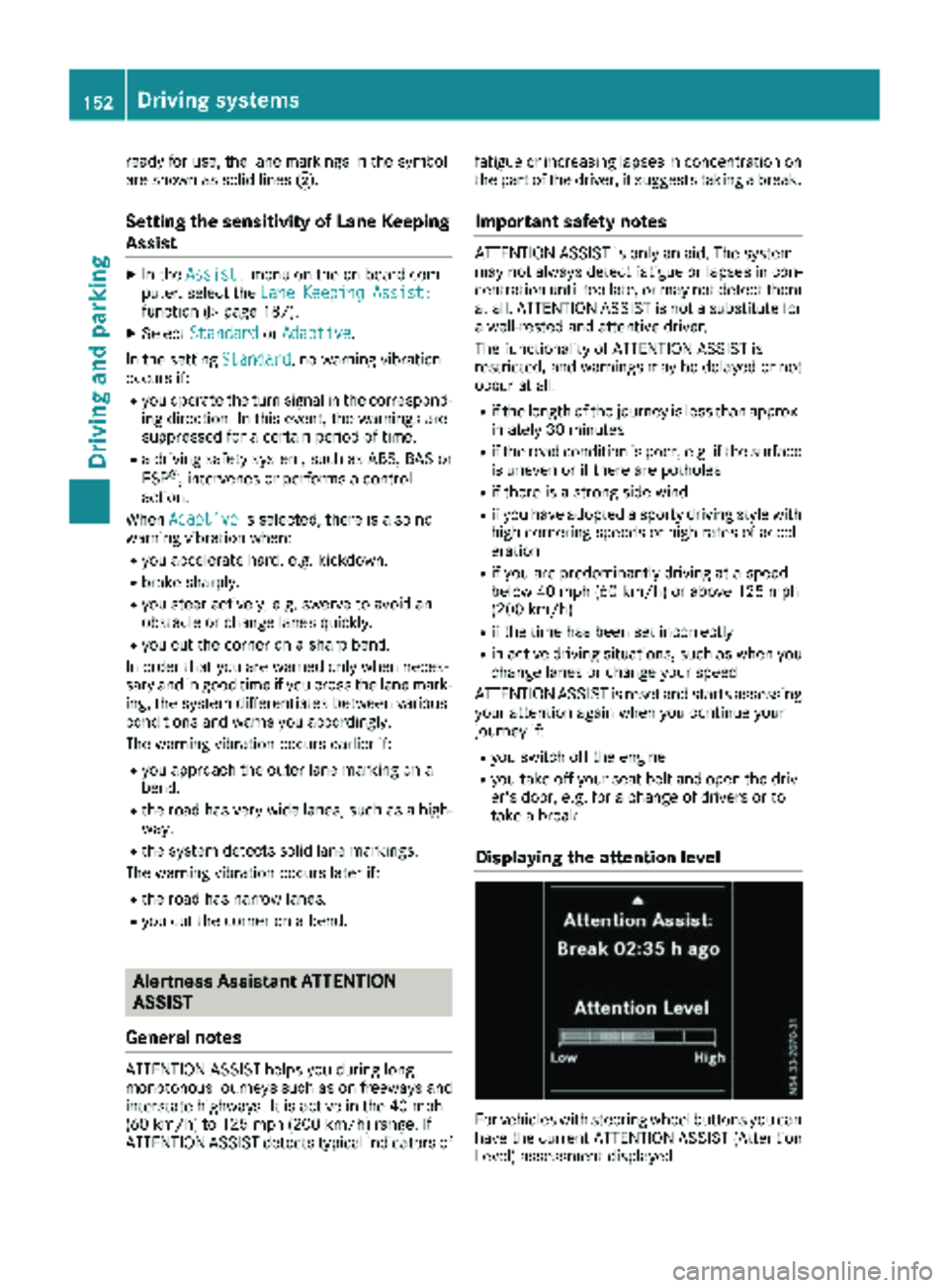
Displaying the attention level
For vehicles with steering wheel buttons you can
have the current ATTENTION ASSIST (Attention
Level) assessment displayed.
152Driving systems
Driving and parking
Page 160 of 318
Active Parking Assist does not assist you park-
ing in spaces at right angles to the direction of
travel if:
Rtwo parking spaces are located directly next
to one another
Rthe parking space is directly next to a low
obstacle such as a low curb
Ryou forward park
Active Parking Assist does not assist you park-
ing in spaces that are parallel or at right angles
to the direction of travel if:
Rthe parking space is on a curb
Rthe system reads the parking space as being
blocked, for example by foliage or grass pav-
ing blocks
Rthe area is too small for the vehicle to maneu-
ver into
Rthe parking space is bordered by an obstacle,
e.g. a tree, a post or a trailer
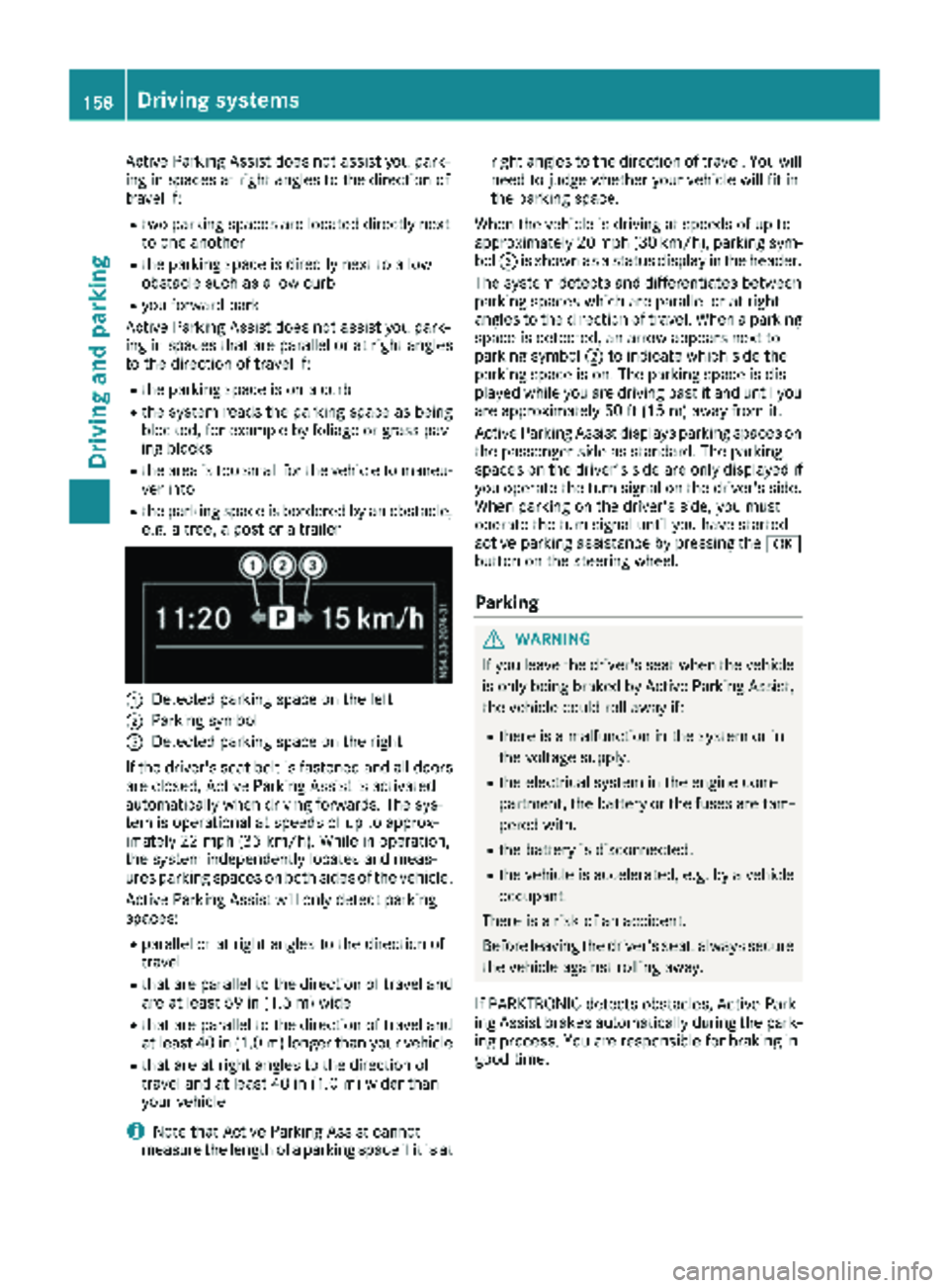
:Detected parking space on the left
;Parking symbol
=Detected parking space on the right
If the driver's seat belt is fastened and all doors
are closed, Active Parking Assist is activated
automatically when driving forwards. The sys-
tem is operational at speeds of up to approx-
imately 22 mph (35 km/h). While in operation,
the system independently locates and meas-
ures parking spaces on both sides of the vehicle.
Active Parking Assist will only detect parking
spaces:
Rparallel or at right angles to the direction of
travel
Rthat are parallel to the direction of travel and are at least 59 in (1.5 m) wide
Rthat are parallel to the direction of travel and
at least 40 in (1.0 m) longer than your vehicle
Rthat are at right angles to the direction of
travel and at least 40 in (1.0 m) widerthan
your vehicle
iNote that Active Parking Assist cannot
measure the length of a parking space if it is at right angles to the direction of travel. You will
need to judge whether your vehicle will fit in
the parking space.
When the vehicle is driving at speeds of up to
approximately 20 mph (30 km/h), parking sym-
bol ;is shown as a status display in the header.
The syste m d
etects and differentiates between
parking spaces which are parallel or at right
angles to the direction of travel. When a parking
space is detected, an arrow appears next to
parking symbol ;to indicate which side the
parking space is on. The parking space is dis-
played while you are driving past it and until you
are approximately 50 ft (15 m) away from it.
Active Parking Assist displays parking spaces on
the passenger side as standard. The parking
spaces on the driver's side are only displayed if
you operate the turn signal on the driver's side.
When parking on the driver's side, you must
operate the turn signal until you have started
active parking assistance by pressing the a
button on the steering wheel.
Parking
GWARNING
If you leave the driver's seat when the vehicle is only being braked by Active Parking Assist,
the vehicle could roll away if:
Rthere is a malfunction in the system or in
the voltage supply.
Rthe electrical system in the engine com-
partment, the battery or the fuses are tam-
pered with.
Rthe battery is disconnected.
Rthe vehicle is accelerated, e.g. by a vehicle
occupant.
There is a risk of an accident.
Before leaving the driver's seat, always secure the vehicle against rolling away.
If PARKTRONIC detects obstacles, Active Park-
ing Assist brakes automatically during the park- ing process. You are responsible for braking in
good time.
158Driving system s
Driving an d parking
Page 162 of 318
XTo cancel the process:press the%but-
ton on the steering wheel or drive off.
or
XTo exit the parking space using active
parking assistance: press theabutton
on the steering wheel.
The display shows the Park Assist
Active: Accelerate and BrakeObs.Surroundingsmessage.
XLet go of the steering wheel.
XPull away, being ready to brake at all times.
Exit the parking space slowly and do not drive
faster than 6 mph (10 km/h). Otherwise park-
ing assistance is canceled and Active Parking
Assist is stopped.
Active Parking Assist brakes the vehicle to a
standstill when the vehicle approaches a bor-
der of the parking space.
XWhile the vehicle is stationary, shift the trans-
mission to position hork as required or
according to the message.
Active Parking Assist immediately steers in
the other direction. The display shows the
Park Assist Active: Accelerate and
BrakeObs. Surroundingsmessage.
iYou will achieve the best results by waiting
for the steering procedure to complete before
pulling away.
If you back up after activation, the steering
wheel is moved to the straight-ahead posi-
tion.
XDrive forwards and reverse as prompted by
the PARKTRONIC warning displays, several
times if necessary.
Once you have exited the parking space com-
pletely:
RThe display shows the Park Assist Fin‐ishedmessage.
RA tone sounds.
RThe steering wheel is moved to the straight-
ahead position
The parking assistance function of Active Park-
ing Assist is stopped. You will then have to steer
and merge into traffic on your own.
PARKTRONIC is still available.
You can take over the steering before the vehi-
cle has exited the parking space completely.
This is useful, for example when you recognize
that it is already possible to pull out of the park-
ing space.
Canceling active parking assistance
XStop the movement of the steering wheel or
steer yourself.
or
XPress the fbutton and deactivate
PARKTRONIC (Ypage 155).
Parking assistance is canceled immediately
and Active Parking Assist is stopped. The dis-
play shows the Park
AssistCanceledmes-
sage.
Active parking assistance is canceled automat-
ically if:
Ryou apply the parking brake.
Rparking using Active Parking Assist is no lon-
ger possible.
Ryou are driving faster than 6 mph (10 km/h).
Ra wheel spins and ESP®intervenes or fails.
The ÷ warning lamp in the instrument
cluster then lights up.
Ryou unfasten your seat belt.
Ryou open a door or the tailgate/rear door.
Ryou shift the automatic transmission to posi-
tion P.
A warning tone sounds, the parking symbol in
the display goes out and the Park Assist
Canceledmessage appears.
Once active Parking Assist has been canceled,
you must steer and brake again yourself.
If a system malfunction occurs, vehicles are
automatically braked down to a standstill. To
continue driving, you must depress the acceler-
ator pedal again.
Rear view camera
General notes
On vehicles with a tailgate, the rear view camera
is next to the tailgate handle (Ypage 269).
On vehicles with rear doors, the rear view cam-
era is in the top of the license plate molding
(
Ypage 269).
The rear view camera is a visual parking aid. It
shows you the area behind the vehicle in the
audio display.
The area behind the vehicle is displayed in a
mirrored fashion, as in the rear-view mirror or
the exterior mirrors. The guide lines displayed
assist you in backing up.
160Driving systems
Driving an d parking
Page 202 of 318
Engine
Display messagesPossible causes/consequences andMSolutions
#An additional warning tone sounds. The battery is not being charged.
Possible causes:
Rfaulty alternator
Rtorn poly-V-belt
Ra malfunction in the electronics
XStop the vehicle immediately, paying attention to road and traffic
conditions, and switch off the engine.
!Do not continue driving. The engine could otherwise overheat.
XSecure the vehicle to prevent it from rolling away (Ypage 135).
XConsult a qualified specialist workshop.
?
Stop Vehicle TurnEng. Off
An additional warning tone sounds. The coolant is too hot.
GWARNING
Never drive with an overheated engine. Driving when the engine is
overheated can cause fluids which may have leaked into the engine
compartment to catch fire.
In addition, steam from an overheated engine can cause serious
burns, which can occur just by opening the hood.
There is a risk of injury.
XStop the vehicle immediately, paying attention to road and traffic
conditions, and switch off the engine.
XSecure the vehicle to prevent it from rolling away (Ypage 135).
XWait until the engine has cooled down.
XMake sure that the air supply to the radiator is not obstructed, by
frozen slush for example.
XDo not start the engine again until the display message goes out and
the coolant temperature is below the maximum value specified. The
engine could otherwise be damaged.
XPay attention to the coolant temperature gauge (Ypage 175).
XIf the temperature increases again, visit a qualified specialist work-
shop immediately.
Under normal operating conditions and with the specified coolant
level, the coolant temperature gauge may rise to 248 ‡ (120 †).
?The fan motor is faulty.
XCheck the coolant temperature (Ypage 175).
XIf the coolant temperature is below the maximum value specified
below, you can continue driving to the nearest qualified specialist
workshop.
Avoid heavy loads on the engine, e.g. driving in mountainous terrain,
and stop-and-go traffic.
Under normal operating conditions and with the specified coolant
level, the coolant temperature gauge may rise to 248 ‡ (120 †).
200Display messages (vehicles without steering wheel buttons)
On-board computer and displays