interior lights MERCEDES-BENZ METRIS 2020 MY20 Operator’s Manual
[x] Cancel search | Manufacturer: MERCEDES-BENZ, Model Year: 2020, Model line: METRIS, Model: MERCEDES-BENZ METRIS 2020Pages: 320, PDF Size: 26.38 MB
Page 106 of 320
If you require help when changing bulbs of
other interior lights, please visit a qualified
specialist workshop.
Rear compartment and cargo com-
partment lamps
You cannot change the following bulbs your-
self:
R in a Passenger Van, the bulbs in the trunk
lamp and those of the rear compartment
interior lights in the grab handles
R in a Cargo Van with an LED light strip in the
cargo compartment, the LED light strip
Have these bulbs or the LED light strip
changed in a qualified specialist workshop
only.
Information on changing the trunk lamp light
source in the side trim panel of vehicles with a
cargo compartment shelf can be found under
"Additional interior and surround lighting"
(Y page
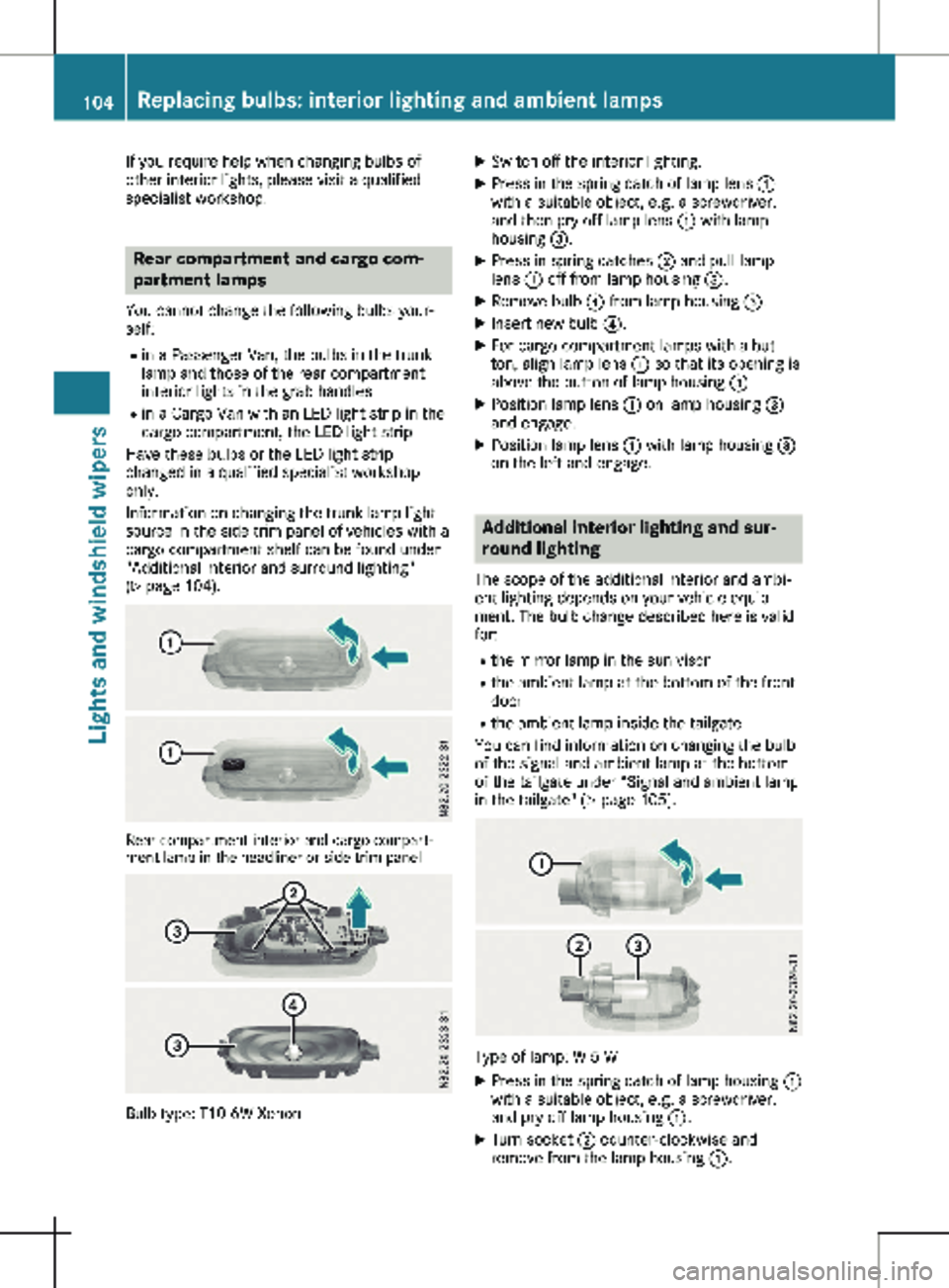
104). Rear compartment interior and cargo compart-
ment lamp in the headliner or side trim panel Bulb type: T10 6W Xenon X
Switch off the interior lighting.
X Press in the spring catch of lamp lens :
with a suitable object, e.g. a screwdriver,
and then pry off lamp lens : with lamp
housing =.
X Press in spring catches ; and pull lamp
lens : off from lamp housing =.
X Remove bulb ? from lamp housing =.
X Insert new bulb ?.
X For cargo compartment lamps with a but-
ton, align lamp lens : so that its opening is
above the button of lamp housing =.
X Position lamp lens : on lamp housing =
and engage.
X Position lamp lens : with lamp housing =
on the left and engage. Additional interior lighting and sur-
round lighting
The scope of the additional interior and ambi-
ent lighting depends on your vehicle equip-
ment. The bulb change described here is valid
for:
R the mirror lamp in the sun visor
R the ambient lamp at the bottom of the front
door
R the ambient lamp inside the tailgate
You can find information on changing the bulb
of the signal and ambient lamp at the bottom
of the tailgate under “Signal and ambient lamp
in the tailgate"
(Y page 105). Type of lamp: W 5 W
X Press in the spring catch of lamp housing :
with a suitable object, e.g. a screwdriver,
and pry off lamp housing :.
X Turn socket ; counter-clockwise and
remove from the lamp housing :. 104
Replacing bulbs: interior lighting and ambient lamps
Lights and windshield wipers
Page 124 of 320
When you deactivate the windshield defrosting
function, the previous automatic climate con-
trol settings are reactivated with the exception
of air-recirculation mode. Air-recirculation
mode remains deactivated. Clearing condensation from the win-
dows
Windows fogged up on the inside Air-conditioning system
You should only select this setting until the
windows are clear again.
X Switch on the rear window defroster if nec-
essary
(Y page 122).
X Switch on climate control (Y page
117).
X Switch off air-recirculation mode
(Y page
123).
X Turn temperature control : clockwise to a
higher temperature and air flow control A
to a blower speed between 3 and 6
( Y page
115).
X If possible, only select the ¯ setting of
the air distribution
(Y page 120).
Only the indicator lamp in the ¯ button
lights up.
X Switch on the cooling with air dehumidifica-
tion function
(Y page 118).
X If the windows still fog up, set the climate
control functions as described for defrosting
of the windshield
(Y page 121).
Dual-zone automatic climate control You should only select this setting until the
windows are clear again.
X Switch on the rear window defroster if nec-
essary
(Y page 122).
X Switch on climate control (Y page
117).
X Switch off air-recirculation mode
(Y page
123).
X Switch on the cooling with air dehumidifica-
tion function
(Y page 118).
X Switch on automatic mode ( Y page
119).
X If the windows continue to fog up, switch on
the windshield defrosting function
( Y page
121). Windows fogged up on the outside You should only select this setting until the
windshield is clear again.
X Switch on the windshield wipers
(Y page
109).
X Switch on climate control (Y page
117).
X In warm and damp weather, do not allow
cold air to flow onto the windows. Close the
side air vents if required
(Y page 124). Switching the rear window defroster
on/off
General notes The rear window defroster consumes a lot of
power. You should therefore switch off the
rear window defroster as soon as the rear win-
dow is clear.
X Turn the key to position 2 in the ignition
lock.
X Press the ¤ button on the control panel.
If the indicator lamp in the ¤ button
lights up, the rear window defroster is
switched on.
The rear window defroster switches off auto-
matically after a few minutes.
Problems with the rear window
defroster The rear window defroster has switched off
prematurely or cannot be activated.
The vehicle starter battery is not sufficiently
charged.
X Switch off any consumers that are not
required, e.g. reading lamps, interior lighting
or seat heating.
When the battery is sufficiently charged, the
rear window defroster can be activated
again.122
Operating the climate control system
Climate control
Page 125 of 320
Switching air-recirculation mode
on/off
Important safety notes You can deactivate the intake of fresh air if
unpleasant odors enter the vehicle from out-
side. The air inside the vehicle is then circula-
ted.
When you switch on air-recirculation mode,
the side windows and windows could fog up
more quickly, in particular at low outside tem-
peratures. Only switch on air-recirculation
mode for a short time.
Air-conditioning system or dual-zone
automatic climate control X
Switch on climate control ( Y page 117).
X Press the h button.
If the indicator lamp in the h button
lights up, air-recirculation mode is activated.
Air-recirculation mode switches on automati-
cally: R at high outside temperatures
R while driving in a tunnel (only vehicles with a
navigation system)
The indicator lamp in the h button is then
not lit up. Outside air is added automatically
after about
30 minutes.
Air-recirculation mode is deactivated automati-
cally:
R after approximately five minutes at outside
temperatures below about 45 ‡ (7 †)
R after approximately five minutes when the
cooling with air-dehumidification function is
deactivated
R after approximately 30 minutes at outside
temperatures above about 45 ‡ (7 †) and
when the cooling with air-dehumidification
function is active Convenience opening/pre-entry cli-
mate control
G
WARNING
During convenience opening, body parts
could be drawn in or become trapped
between the side window and the door
frame. There is a risk of injury. Monitor the entire opening procedure when
using convenience opening. When opening,
make sure that nobody touches the side
window. Release the % switch immedi-
ately if somebody becomes trapped, to
interrupt the opening procedure.
X Pre-entry climate control and conveni-
ence opening with the key:
press and hold
the % button on the key.
The side windows open automatically and
the blower of the climate control system is
activated.
X Release the % button.
i At high interior temperatures, the blower is
also switched on when a door is opened.
This means that slightly cooled air enters
the vehicle interior after the engine is star-
ted, to cool the vehicle more rapidly. Switching the residual heat function
on/off
General notes Only vehicles with dual-zone automatic climate
control have the residual heat function.
Once the engine is switched off, it is possible
to make use of the residual heat of the engine
to continue heating or ventilating the front
compartment of the vehicle for approximately
30 minutes. The heating or ventilation time
depends on the set interior temperature.
Switching the function on/off X
Turn the key to position 0 in the ignition
lock or remove it.
X Press the Ì button.
If the residual heat function is activated, the
indicator lamp in the Ì button comes on.
The blower will run at a low speed regard-
less of the airflow setting.
If you activate the residual heat function at
high temperatures, only the auxiliary ventila-
tion will be activated. The blower then runs
at medium speed. Operating the climate control system
123
Climate control Z
Page 193 of 320
X
Press a to confirm.
The current setting is displayed.
X To change the setting: press a again.
X Press : or 9 to set Deactivated,
Standard or Sensitive.
X Press a to confirm the choice.
If ATTENTION ASSIST is activated, the À
symbol is shown in the status area of the
display. The selection Standard
or Sensi‐
tive sets the sensitivity with which the sys-
tem determines the attention level.
Further information can be found under
"ATTENTION ASSIST"
(Y page 155).
Activating/deactivating Blind Spot
Assist Using the steering wheel buttons
X Press = or ; to select the Assist.
menu.
X Press : or 9 to select Blind Spot
Assist.
X Press a to confirm.
The current status is shown.
X To activate/deactivate: press the a
button again.
Further information can be found under "Blind
Spot Assist"
(Y page 151).
Setting Lane Keeping Assist Using the steering wheel buttons
X Press = or ; to select the Assist.
menu.
X Press : or 9 to select Lane Keep‐
ing Assist.
X Press a to confirm.
The current selection Standard or Adap‐
tive is displayed.
X To change the setting: press a again.
Further information can be found under "Lane
Keeping Assist" (Y page
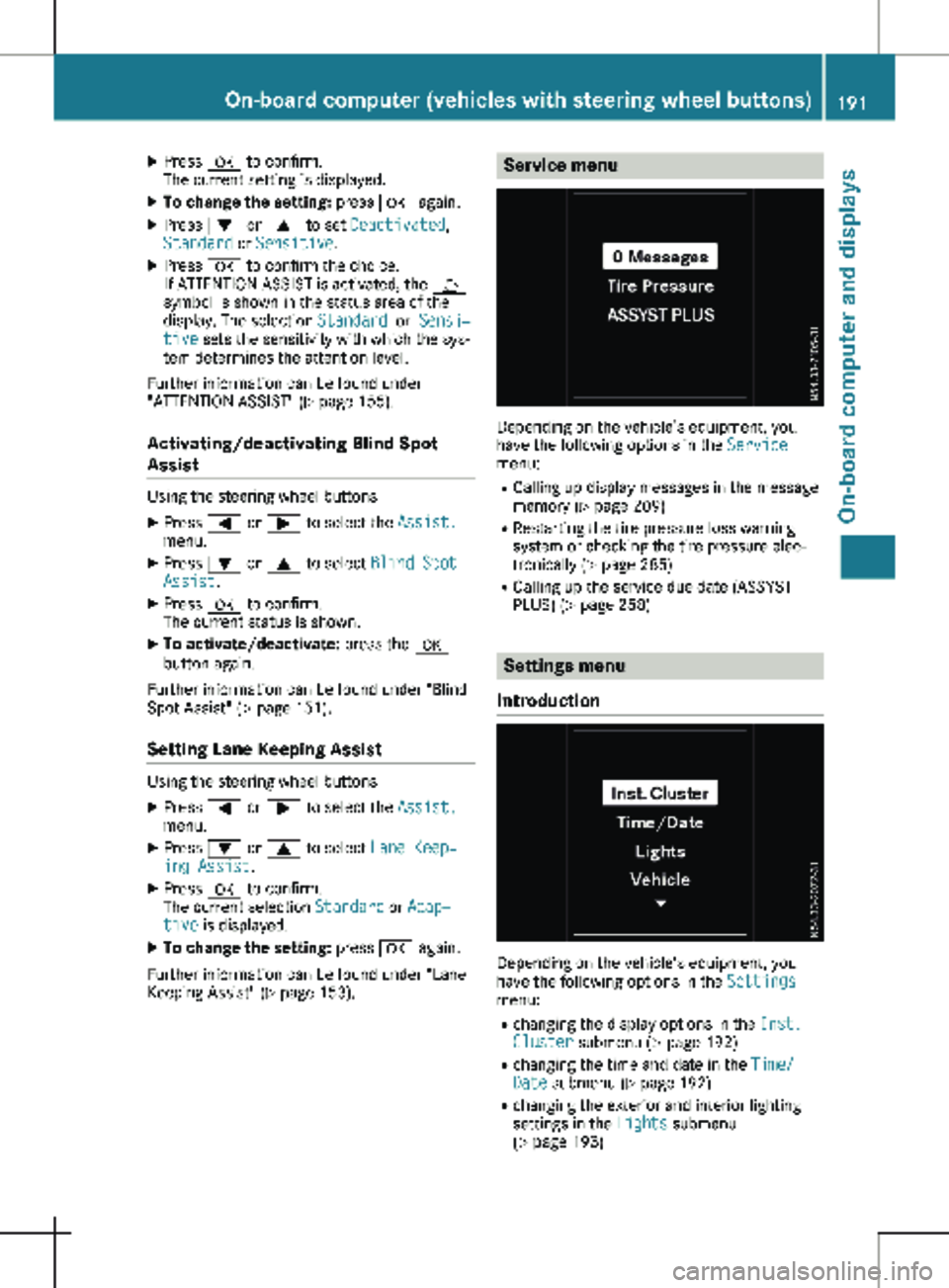
153). Service menu
Depending on the vehicle’s equipment, you
have the following options in the
Service
menu:
R Calling up display messages in the message
memory ( Y page
209)
R Restarting the tire pressure loss warning
system or checking the tire pressure elec-
tronically ( Y page 285)
R Calling up the service due date (ASSYST
PLUS) (Y page 258) Settings menu
Introduction Depending on the vehicle’s equipment, you
have the following options in the
Settings
menu:
R changing the display options in the Inst.
Cluster submenu
(Y page 192)
R changing the time and date in the Time/
Date submenu (Y page 192)
R changing the exterior and interior lighting
settings in the Lights submenu
(Y page 193) On-board computer (vehicles with steering wheel buttons)
191
On-board computer and displays Z
Page 195 of 320

X
Press : or 9 to select the Date:
function.
The display shows the current date.
X To set the date: press a again.
X Press = or ; to switch between day,
month and year.
X Press : or 9 to set the day, month or
year.
X Then press a to confirm.
The display shows the updated date.
Lights submenu Activating/deactivating the surround
lighting and exterior lighting delayed
switch-off
If you activate the Locator Lighting func-
tion and the light switch is turned to the Ã
position, the following functions are activated
when it is dark:
R surround lighting: the exterior lighting
remains on for
40 seconds after the doors
are unlocked. When you start the engine,
the surround lighting is deactivated and the
automatic headlamp feature is activated
(Y page 100).
R exterior lighting delayed switch-off: the
exterior lighting remains lit for 60 seconds
after the engine is switched off. When you
close all the doors and the tailgate/rear
doors, the exterior lighting switches off after
15 seconds.
Using the steering wheel buttons
X Use the = or ; button to select the
Settings. menu.
X Use : or 9 to select Lights.
X Press a to confirm.
X Use : or 9 to select the Locator
Lighting function.
The current status appears.
X To switch on/off: press a again.
If you change the setting, conversion does
not take place until the next time the vehicle
is stationary. Deactivating exterior lighting delayed switch-
off temporarily:
X Before leaving the vehicle, turn the key to
position g in the ignition lock.
X Turn the key to position 2 in the ignition
lock.
The exterior lighting delayed switch-off is
deactivated until the next time the engine is
started.
With surround lighting and exterior lighting
delayed switch-off, the following light up
depending on the vehicle's equipment:
R Parking lamps
R Fog lamps
R Low-beam headlamps
R Daytime running lamps
Activating/deactivating interior lighting
delayed switch-off If you activate the Interior Lighting
Delay: function, the interior lighting remains
lit for a further 20 seconds.
Using the steering wheel buttons
X Use the = or ; button to select the
Settings. menu.
X Use : or 9 to select Lights.
X Press a to confirm.
X Use : or 9 to select the Interior
Lighting Delay function.
The current status appears.
X To switch on/off: press a again.
Vehicle submenu Setting the sensitivity of the rain sensor
Using the steering wheel buttons
X Press = or ; to select the Settings
menu.
X Press : or 9 to select Vehicle.
X Press a to confirm.
X Press : or 9 to select the Rain
Sensor Sensitivity function.
The display shows the current setting.
X Press a to change the setting.
X Press : or 9 to select the High,
Standard or Low setting. This setting con-
trols the rain sensor's sensitivity to precipi-
tation. The windshield wiper then wipes On-board computer (vehicles with steering wheel buttons)
193
On-board computer and displays Z