service indicator MERCEDES-BENZ METRIS 2020 MY20 Operator’s Manual
[x] Cancel search | Manufacturer: MERCEDES-BENZ, Model Year: 2020, Model line: METRIS, Model: MERCEDES-BENZ METRIS 2020Pages: 320, PDF Size: 26.38 MB
Page 5 of 320
Display messages (vehicles with
steering wheel buttons) .......................
209
Indicator and warning lamps in the
instrument cluster ............................... 227 Stowing and features .......................
238
Useful information ...............................
238
Stowage spaces and stowage com-
partments ............................................ 238
Sun visors ............................................ 239
Cup holder ........................................... 239
Bottle holder ........................................ 240
Ashtray ................................................ 240
Cigarette lighter ................................... 240
12 V socket ......................................... 241
Mobile communications equipment ..... 241 Transporting loads
............................242
Useful information ...............................
242
Loading guidelines ............................... 242
Load distribution ................................. 243
Securing loads ..................................... 244
Lashing straps ..................................... 246
Securing loads ..................................... 248
Carrier systems ................................... 249 Maintenance and care
......................250
Useful information ...............................
250
Engine compartment ........................... 250
Maintenance ........................................ 257
Battery ................................................. 258
Care ..................................................... 263 Breakdown assistance
.....................270
Useful information ...............................
270
Where will I find...? .............................. 270
Flat tire ................................................ 272
Jump-starting ....................................... 272
Tow-starting and towing away ............. 274
Electrical fuses .................................... 277 Wheels and tires ...............................
278
Useful information ...............................
278
Important safety notes ........................ 278
Operation ............................................ 278 Operation in winter .............................. 280
Tire pressure
....................................... 282
Loading the vehicle .............................. 289
What you should know about wheels
and tires .............................................. 292
Changing wheels ................................. 297
Wheel and tire combinations ............... 301
Spare wheel ......................................... 302 Technical data ...................................
304
Useful information ...............................
304
Vehicle electronics .............................. 304
Identification plates ............................. 304
Service products and capacities .......... 305
Vehicle data ......................................... 312 Contents
3
Page 11 of 320
Display messages (vehicle with
steering wheel buttons) .................
223
Display messages (vehicle with-
out steering wheel buttons) ........... 206
Displaying the speed ..................... 147
Driving system ............................... 146
Function/notes ............................. 146
Important safety notes .................. 147
Problem (malfunction) ................... 149
Resuming the stored speed ........... 148
Setting a speed .............................. 148
Storing and maintaining current
speed ............................................. 148
Cup holder ......................................... 240
Important safety notes .................. 239
Customer Assistance Center
(CAC) ..................................................... 32
Customer Relations Department ....... 32D
Dashboard see Cockpit
Dashboard lighting
see Instrument cluster lighting
Data
see Technical data
Data collection
Processing and forwarding
.............. 35
Date
Setting (vehicle with steering
wheel buttons) ............................... 192
Setting (vehicle without steering
wheel buttons) ............................... 181
Daytime running lamps
Changing bulbs .............................. 107
Display messages (vehicle with
steering wheel buttons) ................. 218
Display messages (vehicle with-
out steering wheel buttons) ........... 203
Switching on/off (switch) .............. 100
Dealership
see Qualified specialist workshop
Declarations of conformity ................. 31
Delayed switch-off
Exterior lighting (on-board com-
puter) ............................................. 193
Interior lighting .............................. 193 Diagnostics connection
Operating safety and vehicle
approval
........................................... 31
Digital speedometer
Displaying (vehicle with steering
wheel buttons) ............................... 185
Displaying (vehicle without steer-
ing wheel buttons) ......................... 178
Dimensions ........................................ 313
DIRECT SELECT lever
Automatic transmission ................. 131
Display
Function/notes (vehicle with
steering wheel buttons) ................. 183
Function/notes (vehicle without
steering wheel buttons) ................. 176
Permanent display (vehicle with
steering wheel buttons) ................. 192
Permanent display (vehicle with-
out steering wheel buttons) ........... 180
see Warning and indicator lamps
Display message (vehicle with
steering wheel buttons)
Safety systems .............................. 210
Service interval display .................. 257
Display message (vehicle without
steering wheel buttons)
Safety systems .............................. 196
Service interval display .................. 257
Display messages (vehicle with
steering wheel buttons)
Calling up ....................................... 209
Driving systems ............................. 221
Engine ............................................ 219
Hiding ............................................ 209
Important safety notes .................. 209
Introduction ................................... 209
Key ................................................ 227
Lights ............................................. 216
Setting the language ...................... 192
Tires ............................................... 224
Vehicle ........................................... 225
Display messages (vehicle with-
out steering wheel buttons)
Calling up ....................................... 195
Driving systems ............................. 206
Engine ............................................ 204
Hiding ............................................ 194 Index
9
Page 12 of 320
Important safety notes .................. 194
Introduction
................................... 194
Key ................................................ 209
Lamps ............................................ 202
Setting the language ...................... 179
Tires ............................................... 207
Vehicle ........................................... 208
Distance recorder
Displaying (vehicle with steering
wheel buttons) ............................... 183
Displaying (vehicle without steer-
ing wheel buttons) ......................... 177
Setting the display unit (vehicle
without steering wheel buttons) .... 180
Distance recorder
see Trip odometer
Distance warning (warning lamp) .... 235
Distance warning function ............... 149
Door
Changing bulbs (ambient lamp) ..... 104
Display messages (vehicle with
steering wheel buttons) ................. 226
Display messages (vehicle with-
out steering wheel buttons) ........... 208
Indicator lamp ................................ 237
Doors
Central locking/unlocking
(SmartKey) ....................................... 71
Control panel ................................... 44
Emergency locking ........................... 73
Emergency unlocking ....................... 73
Downhill gradients ............................ 142
Drinking and driving ......................... 140
Drinks holder
see Bottle holder
Drinks holder
see Cup holder
Drive program
Automatic transmission ................. 133
Display (DIRECT SELECT lever) ...... 132
Driver's door and front-passenger
door ...................................................... 76
Driver's seat
see Seats
Driving abroad
Fuel ................................................ 141
Low-beam headlamps .................... 141 Mercedes-Benz Service ................. 141
Driving off-road
see Off-road driving
Driving on flooded roads ..................
144
Driving safety systems
ABS (Anti-lock Braking System) ....... 67
BAS (Brake Assist System) .............. 67
EBD (electronic brake force dis-
tribution) .......................................... 68
ESP ®
(Electronic Stability Pro-
gram) ............................................... 68
Important safety information ........... 66
Overview .......................................... 66
Driving system
COLLISION PREVENTION ASSIST .. 149
Display messages (vehicle with-
out steering wheel buttons) ........... 206
Driving systems
Active Parking Assist ..................... 159
ATTENTION ASSIST ........................ 155
Blind Spot Assist ............................ 151
Cruise control ................................ 146
Display messages (vehicle with
steering wheel buttons) ................. 221
Lane Keeping Assist ...................... 153
PARKTRONIC ................................. 156
Rear view camera .......................... 163
Driving tips
Automatic transmission ................. 134
Brakes ........................................... 142
Break-in period .............................. 126
Checking brake lining thickness .... 143
Downhill gradient ........................... 142
Drinking and driving ....................... 140
Driving abroad ............................... 141
Driving in mountainous areas ........ 146
Driving in winter ............................. 144
Driving on flooded roads ................ 144
Driving on wet roads ...................... 143
Exhaust check ............................... 141
Fuel ................................................ 140
General notes ................................ 140
Hydroplaning ................................. 143
Icy road surfaces ........................... 144
Important safety notes .................. 126
Limited braking efficiency on sal-
ted roads ....................................... 142
New brake disks ............................ 143 10
Index
Page 17 of 320
Load protection net ...........................
248
Loading guidelines ............................ 242
Loading rails
Maximum tensile strength ............. 314
Loads
Securing ........................................ 244
Transporting .................................. 242
Locking
see Central locking
Locking centrally
see Central locking
Low-beam headlamps
Display messages (vehicle with
steering wheel buttons) ................. 216
Display messages (vehicle with-
out steering wheel buttons) ........... 202
Driving abroad ............................... 141
Replacing bulbs ............................. 106
Switching on/off ........................... 100
Lumbar support ................................... 89M
M+S tires ............................................
280
Maintenance ...................................... 257
Maintenance points under the
hood .................................................... 252
Maximum permissible speed
Speed limitation (tires) .................. 141
Mechanical key
Function/notes ................................ 72
Inserting .......................................... 73
Locking vehicle ................................ 73
Removing ......................................... 72
Media Interface
Connections ..................................... 43
Memory card (audio) ......................... 187
Memory function
Seat ................................................. 97
Mercedes-Benz Commercial Van
Center
see Qualified specialist workshop
Mercedes-Benz Service24h .............. 272
Message memory
On-board computer (vehicle with
steering wheel buttons) ................. 209
On-board computer (vehicle with-
out steering wheel buttons) ........... 195 Messages
see Warning and indicator lamps
Mirrors
Exterior mirrors
................................ 97
Important safety notes .................... 96
Rear-view mirror .............................. 96
see Vanity mirror
Mobile phone
Type approval/frequency .............. 304
Mobile phone
see Telephone
Model series
see Vehicle identification plate
Modifying the programming
(SmartKey) ........................................... 72
Mounting wheels
Lowering the vehicle ...................... 300
Mounting a new wheel ................... 300
Preparing the vehicle ..................... 298
Raising the vehicle ......................... 298
Removing a wheel .......................... 299
Removing and mounting the
spare wheel ................................... 303
Securing the vehicle against roll-
ing away ........................................ 298
MP3
Operation ....................................... 187 N
Navigation Menu (on-board computer) ............
185
Notes on breaking-in a new vehi-
cle ....................................................... 126 O
Occupant Classification System
(OCS) Conditions .......................................
54
Faults ............................................... 57
Operation ......................................... 54
Self-test ........................................... 56
Occupant safety
Air bags ........................................... 51
Automatic measures after an
accident ........................................... 60
Belt warning ..................................... 50
Children in the vehicle ..................... 60 Index
15
Page 28 of 320

Windshield washer fluid
Adding ........................................... 256
Windshield wiper
Setting the sensitivity of the rain
sensor (vehicle with steering
wheel buttons) ............................... 193
Setting the sensitivity of the rain
sensor (vehicle without steering
wheel buttons) ............................... 180
Windshield wipers
Problem (malfunction) ................... 113
Rear window wiper ........................ 110
Replacing the wiper blades ............ 110
Switching on/off ........................... 109
Winter driving
Slippery road surfaces ................... 144
Snow chains .................................. 281
Winter operation
General notes ................................ 280
Radiator cover ................................. 34
Summer tires ................................. 280
Winter tires
M+S tires ....................................... 280
Setting a limit speed ...................... 141
Wiper blades
Cleaning ......................................... 266
Important safety notes .................. 110
Replacing (rear window) ................ 112
Replacing (windshield) ................... 111
Service indicator ............................ 110
Workshop
see Qualified specialist workshop26
Index
Page 112 of 320

Switching the rear window wiper
on/off
1
b To wipe with washer fluid
2 ° Intermittent wipe
3 $ Rear window wiper off
4 b To wipe with washer fluid
X Turn the key to position 1 or 2 in the igni-
tion lock.
X Move the è switch to the corresponding
position.
If the rear window wiper is activated, the
è symbol is shown in the status area of
the display.
The Status Overview in the Assist.
menu then also shows the è symbol for
vehicles with steering wheel buttons
(Y page
189).
X To wipe with washer fluid: press the è
switch beyond the current position as far as
it will go to 1 or press and hold 4.
When you release the è switch, the rear
window wiper continues to wipe for about
another five seconds. The rear window
wiper then wipes according to the original
position 2 or 3.
The rear window wiper switches on automati-
cally if you engage reverse gear and the wind-
shield wipers are on.
If the vehicle is stationary and you open the
tailgate or rear-end door, the rear window
wiper will stop automatically. The rear window
wiper will only resume wiping again when the
tailgate and rear-end door are closed and you
pull away again.
The rear window will no longer be wiped prop-
erly if the wiper blade is worn. This may pre-
vent you from observing the traffic conditions.
Information on replacing the wiper blade can be found under "Replacing wiper blades"
(
Y page
110). Replacing the wiper blades
Important safety notes G
WARNING
If the windshield wipers begin to move while
you are changing the wiper blades, you
could be trapped by the wiper arm. There is
a risk of injury.
Always switch off the windshield wipers and
ignition before changing the wiper blades.
! Never open the hood/tailgate or rear
doors if a windshield wiper arm has been
folded away from the windshield/rear win-
dow.
Never fold a windshield wiper arm without a
wiper blade back onto the windshield/rear
window.
Hold the windshield wiper arm firmly when
you change the wiper blade. If you release
the windshield wiper arm without a wiper
blade and it falls onto the windshield/rear
window, the windshield/rear window may
be damaged by the force of the impact.
Mercedes-Benz recommends that you have
the wiper blades changed at a qualified spe-
cialist workshop.
! Only hold the wiper blade by the wiper
arm. You could otherwise damage the wiper
rubber.
Wiper blades are wear parts. The windshield
will no longer be wiped properly if the wiper
blades are worn. This may prevent you from
observing the traffic conditions.
Please observe the service indicator after
changing the wiper blades of the windshield
wiper.
Service indicator Replacement wiper blades for the windshield
wiper have a service indicator on the tip of the
wiper blade.
Depending on the amount of use, the service
indicator will change color from black to yel-
low.110
Windshield wipers
Lights and windshield wipers
Page 113 of 320
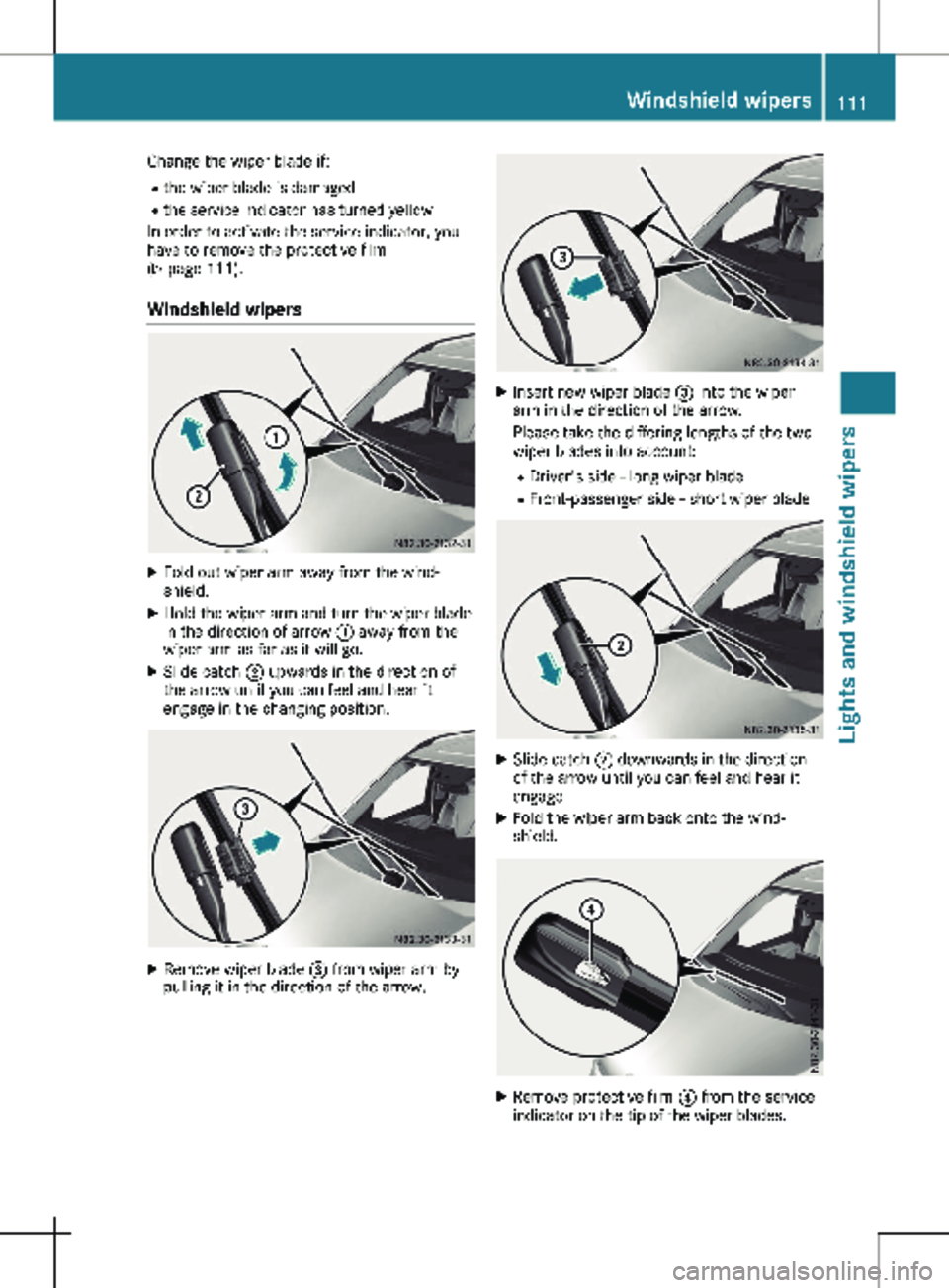
Change the wiper blade if:
R the wiper blade is damaged
R the service indicator has turned yellow
In order to activate the service indicator, you
have to remove the protective film
( Y page
111).
Windshield wipers X
Fold out wiper arm away from the wind-
shield.
X Hold the wiper arm and turn the wiper blade
in the direction of arrow : away from the
wiper arm as far as it will go.
X Slide catch ; upwards in the direction of
the arrow until you can feel and hear it
engage in the changing position. X
Remove wiper blade = from wiper arm by
pulling it in the direction of the arrow. X
Insert new wiper blade = into the wiper
arm in the direction of the arrow.
Please take the differing lengths of the two
wiper blades into account:
R Driver's side - long wiper blade
R Front-passenger side - short wiper blade X
Slide catch ; downwards in the direction
of the arrow until you can feel and hear it
engage.
X Fold the wiper arm back onto the wind-
shield. X
Remove protective film ? from the service
indicator on the tip of the wiper blades. Windshield wipers
111
Lights and windshield wipers Z
Page 141 of 320
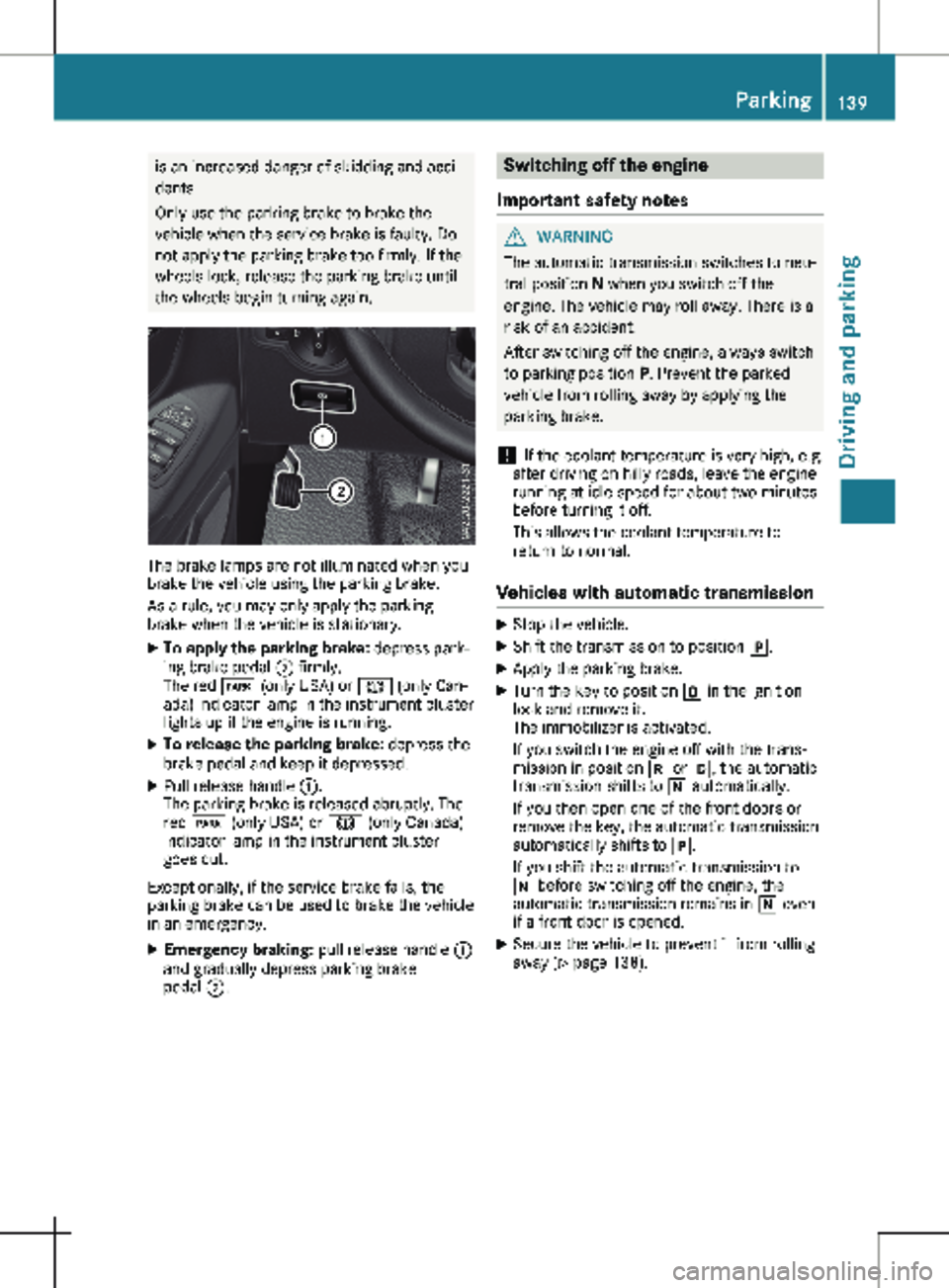
is an increased danger of skidding and acci-
dents.
Only use the parking brake to brake the
vehicle when the service brake is faulty. Do
not apply the parking brake too firmly. If the
wheels lock, release the parking brake until
the wheels begin turning again. The brake lamps are not illuminated when you
brake the vehicle using the parking brake.
As a rule, you may only apply the parking
brake when the vehicle is stationary.
X To apply the parking brake: depress park-
ing brake pedal ; firmly.
The red F (only USA) or J (only Can-
ada) indicator lamp in the instrument cluster
lights up if the engine is running.
X To release the parking brake: depress the
brake pedal and keep it depressed.
X Pull release handle :.
The parking brake is released abruptly. The
red F (only USA) or J (only Canada)
indicator lamp in the instrument cluster
goes out.
Exceptionally, if the service brake fails, the
parking brake can be used to brake the vehicle
in an emergency.
X Emergency braking: pull release handle :
and gradually depress parking brake
pedal ;. Switching off the engine
Important safety notes G
WARNING
The automatic transmission switches to neu-
tral position N when you switch off the
engine. The vehicle may roll away. There is a
risk of an accident.
After switching off the engine, always switch
to parking position P. Prevent the parked
vehicle from rolling away by applying the
parking brake.
! If the coolant temperature is very high, e.g.
after driving on hilly roads, leave the engine
running at idle speed for about
two minutes
before turning it off.
This allows the coolant temperature to
return to normal.
Vehicles with automatic transmission X
Stop the vehicle.
X Shift the transmission to position j.
X Apply the parking brake.
X Turn the key to position u in the ignition
lock and remove it.
The immobilizer is activated.
If you switch the engine off with the trans-
mission in position k or h, the automatic
transmission shifts to i automatically.
If you then open one of the front doors or
remove the key, the automatic transmission
automatically shifts to j.
If you shift the automatic transmission to
i before switching off the engine, the
automatic transmission remains in i even
if a front door is opened.
X Secure the vehicle to prevent it from rolling
away
(Y page 138). Parking
139
Driving and parking Z
Page 145 of 320
of the journey. Make sure that you do not
endanger other road users when doing so.
Checking the brake pad thickness In addition to monitoring using the brake pad
wear sensor, regularly monitor and check all of
the brake pads by performing a visual inspec-
tion to look for pad material wear.
If you are unable to check the brake wear on
the inside of the wheels, remove the wheels
with the tools provided.
Make sure that the brake pad material thick-
ness never falls below
0.12 in (3 mm). Have
the brake pads checked and replaced at a
qualified specialist workshop, if necessary.
Do not solely rely on the brake pad wear sen-
sor.
It is strongly recommended that you have the
brake pads checked at a qualified specialist
workshop at every service displayed in the
maintenance interval indicator, prior to long
journeys and whenever the wheels are
removed.
New brake discs and brake pads/
linings New brake pads and brake discs only reach
their optimal braking effect after about
60 miles
(100 kilometers). Until then, compen-
sate for this by applying greater force to the
brake pedal.
For safety reasons, Mercedes-Benz recom-
mends only installing the following brake discs
and brake pads/linings:
R brake discs that have been approved by
Mercedes-Benz
R brake pads/linings that have been approved
by Mercedes-Benz or are of an equivalent
standard of quality
Other brake discs or brake pads/linings can
compromise the safety of your vehicle.
Always replace all brake discs or brake pads/
linings on an axle at the same time and only
have them replaced at a qualified specialist
workshop. When replacing the brake discs,
always have the brake pads/linings replaced
at the same time. Parking brake G
WARNING
If you must brake the vehicle with the park-
ing brake, the braking distance is considera-
bly longer and the wheels could lock. There
is an increased danger of skidding and acci-
dents.
Only use the parking brake to brake the
vehicle when the service brake is faulty. Do
not apply the parking brake too firmly. If the
wheels lock, release the parking brake until
the wheels begin turning again.
When driving on wet roads or dirt-covered sur-
faces, road salt and/or dirt may get into the
parking brake. This causes corrosion and a
reduction of braking force.
In order to prevent this, drive with the parking
brake lightly applied from time to time. When
doing so, drive for a distance of approximately
110 yds (100 m) at a maximum speed of
12 mph (20 km/h
).
The brake lamps are not illuminated when you
brake the vehicle using the parking brake. Driving in wet conditions
Hydroplaning G
WARNING
There is a danger of hydroplaning occurring,
even if you are driving slowly and your tires
have sufficient tread depth, depending on
the depth of water on the road. There is a
risk of an accident.
For this reason, avoid tire ruts and brake
carefully.
Therefore, in heavy rain or other conditions in
which hydroplaning can occur, drive as fol-
lows:
R reduce your speed
R avoid tire ruts
R apply the brakes with care Driving tips
143
Driving and parking Z
Page 179 of 320
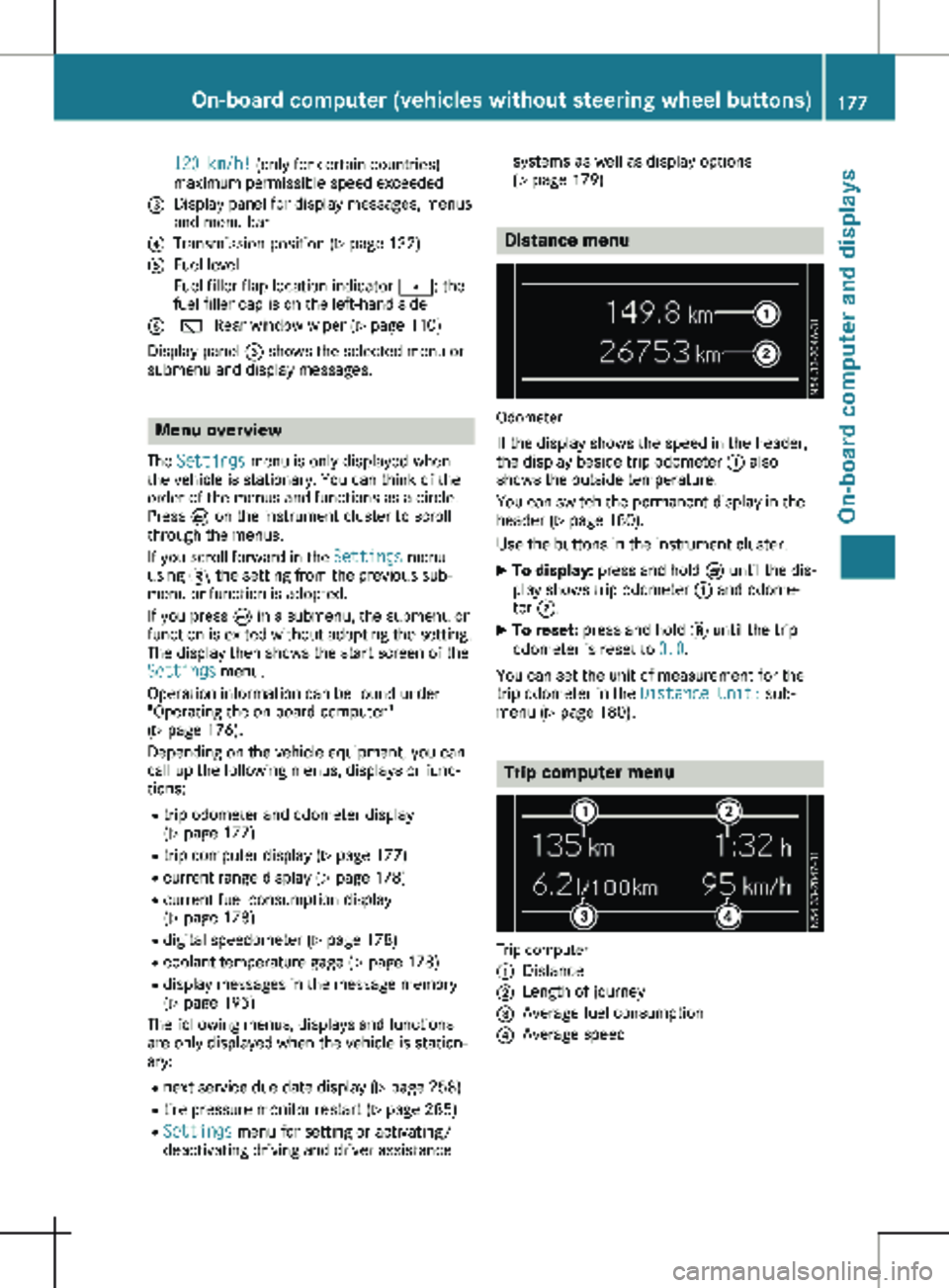
120 km/h! (only for certain countries)
maximum permissible speed exceeded
= Display panel for display messages, menus
and menu bar
? Transmission position (Y page 132)
A Fuel level
Fuel filler flap location indicator t: the
fuel filler cap is on the left-hand side
B è Rear window wiper
(Y page 110)
Display panel = shows the selected menu or
submenu and display messages. Menu overview
The Settings menu is only displayed when
the vehicle is stationary. You can think of the
order of the menus and functions as a circle.
Press È on the instrument cluster to scroll
through the menus.
If you scroll forward in the Settings menu
using 3, the setting from the previous sub-
menu or function is adopted.
If you press È in a submenu, the submenu or
function is exited without adopting the setting.
The display then shows the start screen of the
Settings menu.
Operation information can be found under
"Operating the on-board computer"
(Y page
176).
Depending on the vehicle equipment, you can
call up the following menus, displays or func-
tions:
R trip odometer and odometer display
(Y page 177)
R trip computer display (Y page 177)
R current range display (Y page 178)
R current fuel consumption display
(Y page 178)
R digital speedometer ( Y page 178)
R coolant temperature gage (Y page 178)
R display messages in the message memory
(Y page 195)
The following menus, displays and functions
are only displayed when the vehicle is station-
ary:
R next service due date display ( Y page 258)
R tire pressure monitor restart (Y page 285)
R Settings menu for setting or activating/
deactivating driving and driver assistance systems as well as display options
(Y page
179) Distance menu
Odometer
If the display shows the speed in the header,
the display beside trip odometer : also
shows the outside temperature.
You can switch the permanent display in the
header
(Y page 180).
Use the buttons in the instrument cluster.
X To display: press and hold È until the dis-
play shows trip odometer : and odome-
ter ;.
X To reset: press and hold 3 until the trip
odometer is reset to 0.0.
You can set the unit of measurement for the
trip odometer in the Distance Unit: sub-
menu (Y page
180). Trip computer menu
Trip computer
:
Distance
; Length of journey
= Average fuel consumption
? Average speed On-board computer (vehicles without steering wheel buttons)
177
On-board computer and displays Z