light MERCEDES-BENZ ML SUV 2008 Owners Manual
[x] Cancel search | Manufacturer: MERCEDES-BENZ, Model Year: 2008, Model line: ML SUV, Model: MERCEDES-BENZ ML SUV 2008Pages: 381, PDF Size: 7.18 MB
Page 134 of 381
On-board computer
131
X
Press the æorç button to switch
the Surround lighting function on or
off.
X Press the j,èorÿ button to
select a different display.
Activating or deactivating the exterior
lighting delayed switch-off Using the
Headlamp switch-off delay
function, you can set whether the exterior
lighting should remain on for 15 seconds after
the doors are closed when it is dark. If none
of the doors are opened after the engine is
switched off or if an open door is not closed,
the exterior lighting goes out after 60 sec-
onds.
When you have set a delayed switch-off time
and then switch off the engine, the following
remain lit:
R the side lamps
R the tail lamps
R the licence plate lighting
R the front foglamps X
Press èor· to select the Set-
tings menu.
X Press the jbutton to call up the selec-
tion of submenus.
X Press æorç to select the Light-
ing submenu.
X Press the jbutton to select Headlamps
delayed switch-off.
X Press the æorç button to activate
or deactivate the Headlamps delayed
switch-off function.
X Press the j,èorÿ button to
select a different display.
To temporarily deactivate the delayed switch-
off:
X Before leaving the vehicle, turn the key to
position 0in the ignition lock.
X Turn the key to position 2in the ignition
lock and back to position 0.
Delayed switch-off is deactivated.
Delayed switch-off is reactivated as soon as
you restart the engine.
Activating/deactivating the interior
lighting delayed switch-off Using the
Interior lighting delayed
switch-off function, you can set whether the interior lighting should remain on for 10
seconds after the key is removed from the
ignition lock when it is dark.
X Press èor· to select the Set-
tings menu.
X Press the jbutton to call up the selec-
tion of submenus.
X Press the æorç button to select the
Lighting submenu.
X Press the jbutton to select Interior
lighting delayed switch-off.
X Press the æorç button to activate
or deactivate Interior lighting
delayed switch-off.
X Press the j,èorÿ button to
select a different display.
Setting the display when the ignition is
switched off The
Display when ignition off function
allows you to set which display you see in the
multi-function display after the key is
removed from the ignition lock.
X Press èor· to select the Set-
tings menu.
X Press the jbutton to call up the selec-
tion of submenus. Controls
164_AKB; 5; 5, en-GB
wobuchh,
Version: 2.10.6 2008-05-11T11:55:12+02:00 - Seite 131 ZDateiname: 6515_4293_02_buchblock.pdf; preflight
Page 135 of 381
On-board computer
132
X
Press the æorç button to select the
Vehicle submenu.
X Press the jbutton to select Display
when ignition off.
X Press the æorç button to select
Interior motion sensor, Tow-away
protection orMiles/km.
X Press the j,èorÿ button to
select a different display.
Activating/deactivating the automatic
door locking feature The
Automatic door locking feature
allows you to set whether your vehicle will
lock centrally from a speed of about
15 km/h upwards.
i For more information on automatic lock-
ing, (Y page 74).
X Press èor· to select the Set-
tings menu.
X Press the jbutton to call up the selec-
tion of submenus.
X Press æorç to select the Vehicle
submenu.
X Press jto select Automatic door
locking . X
Press æorç to switch the Auto-
matic door locking feature on or off.
X Press the j,èorÿ button to
select a different display.
Selecting the switch-on time for the
auxiliary heating* This function is only available if the vehicle
has an auxiliary heating system.
The
Auxiliary heating function allows you
to select three switch-on times. You can set
the exact switch-on time using the other func-
tions in the Heatersubmenu.
You can switch off the auxiliary heating by
using the remote control or the auxiliary heat-
ing button on the centre console.
The auxiliary heating is switched off automat-
ically after 50 minutes. This time can be
changed. To do this, visit a qualified specialist
workshop, e.g. a Mercedes-Benz Service
Centre. G
Risk of poisoning
Exhaust fumes are produced when the aux-
iliary heating is in operation. Inhaling these
exhaust fumes can be poisonous. You
should therefore switch off the auxiliary heating in confined spaces without an
extraction system, e.g. a garage.
G
Risk of fire
When operating the auxiliary heating, parts
of the vehicle may become very hot, and
highly inflammable material such as fuels
could be ignited. Operating the auxiliary
heating is thus prohibited at filling stations
or when your vehicle is being refuelled. You
must therefore switch off the auxiliary heat-
ing at filling stations.
You can call up the Auxiliary heating.
function directly.
X Turn the key to position 1or 2in the ignition
lock.
X Press the button for the auxiliary heating on
the centre console (Y page 184).
or
X Press the èor· button to select the
Settings menu.
X Press the jbutton to call up the selec-
tion of submenus.
X Press the æorç button to select the
Heater submenu.
X Press the jbutton to select Auxiliary
heating . Controls
* optional
164_AKB; 5; 5, en-GB
wobuchh,
Version: 2.10.6 2008-05-11T11:55:12+02:00 - Seite 132Dateiname: 6515_4293_02_buchblock.pdf; preflight
Page 136 of 381
On-board computer
133
X
Press the æorç button to select
one of the three switch-on times or Timer
off (auxiliary heating switched off).
When a switch-on time is selected, the yel-
low indicator lamp lights up in the auxiliary
heating button.
X Press the j,èorÿ button to
select a different display.
Changing the switch-on time for the
auxiliary heating* This function is only displayed if you have
selected a switch-on time. Here you can enter
the time at which the auxiliary heating is to
be switched on.
X
Press èor· to select the Set-
tings menu.
X Press the jbutton to call up the selec-
tion of submenus.
X Press the æorç button to select the
Heater submenu.
X Press the jbutton to select Switch-on
time X Set hours.
X Press the æorç button to set the
hour.
X Press the jbutton to select Switch-on
time X Set minutes . X
Press the æorç button to set the
minutes.
After changing from one menu to another,
the new time setting is stored. The yellow
indicator lamp lights up on the button for
the auxiliary heating on the centre console.
X Press the j,èorÿ button to
select a different display.
Activating or deactivating the easy-
entry/exit feature* i
For more information on the easy-entry/
exit feature, (Y page 84). G
Risk of injury
When the easy-entry/exit feature is active,
the steering wheel moves. There is a risk of
occupants becoming trapped. Before acti-
vating the easy-entry/exit feature, make
sure that nobody can become trapped.
Do not leave children unsupervised in the
vehicle, even if they are secured in a child
restraint system. The children could open
the driver's door and thereby unintention-
ally activate the easy-entry/exit feature
and become trapped. X
Press èor· to select the Set-
tings menu.
X Press the jbutton to call up the selec-
tion of submenus.
X Press æorç to select the Conve-
nience submenu.
X Press the jbutton to select the EASY-
ENTRY system.
X Press the æorç button to activate
or deactivate the EASY-ENTRY system.
X Press the j,èorÿ button to
select a different display.
Activating/deactivating the Fold in mir-
rors when locking* function The
Fold in mirrors when locking func-
tion allows you to determine whether the
exterior mirrors should fold in when you lock
the vehicle. When you switch on the ignition,
the exterior mirrors fold out again.
If you have switched the function on and you
fold in the exterior mirrors using the button
on the door (Y page 86), they will not fold out
automatically. The exterior mirrors can then
only be folded out using the button on the
door. Controls
* optional
164_AKB; 5; 5, en-GB
wobuchh,
Version: 2.10.6 2008-05-11T11:55:12+02:00 - Seite 133 ZDateiname: 6515_4293_02_buchblock.pdf; preflight
Page 137 of 381
On-board computer
134
X
Press èor· to select the Set-
tings menu.
X Press the jbutton to call up the selec-
tion of submenus.
X Press æorç to select the Conve-
nience submenu.
X Press jto select Fold in mirrors
when locking .
X Press the æorç button to activate
or deactivate the Fold in mirrors when
locking feature.
X Press the j,èorÿ button to
select a different display. Additional functions menu
The following table shows the settings you
can make in the Additional functions menu.
You will find additional information on the
pages shown. The number of functions
depends on your vehicle's optional equip-
ment. Function
R
Activates/deactivates Park-
tronic* (Y page 134)
R Activates/deactivates the distance
warning system* (Y page 134)
R Setting DSR (Y page 134)
R Primes/deactivates tow-away protec-
tion* (Y page 135)
R Primes/deactivates the interior motion
sensor* (Y page 135) Use the buttons on the multi-function steer-
ing wheel.
Activating/deactivating Parktronic*
Only vehicles without a PTS switch on the
centre console (Y
page 166) feature this
function.
X Press the èor· button to select the
Additional functions menu.
X If the PARKTRONIC function is not dis-
played, press the jork button to
select PARKTRONIC. X
Press the æorç button to activate
or deactivate PARKTRONIC.
X Press the j,èor· button to
select a different display.
Activating/deactivating the distance
warning system* This function is only available with Dis-
tronic* (Y
page 148).
X Press the èor· button to select the
Additional functions menu.
X If the Distance warning function is not
displayed, press the jork button
to select the Distance warning system.
X Press the æorç button to activate
or deactivate the Distance warning sys-
tem.
When the distance warning system is acti-
vated, the :symbol will be shown in the
lower multi-function display.
X Press the j,èor· button to
select a different display.
Setting DSR The
DSR Speed function allows you to set the
threshold speed (vehicle speed for driving
downhill) of the DSR (Y page 139) to a valueControls
* optional
164_AKB; 5; 5, en-GB
wobuchh,
Version: 2.10.6 2008-05-11T11:55:12+02:00 - Seite 134Dateiname: 6515_4293_02_buchblock.pdf; preflight
Page 138 of 381
On-board computer
135
between 4 km/h and 18 km/h. The adjust-
ment is carried out in increments of 2 km/h.
X
Press the èor· button to select the
Additional functions menu.
X If the DSR Speed function is not displayed,
press the jork button to select the
DSR.
X Press the æorç button to set the
desired threshold speed.
X Press the j,èorÿ button to
select a different display.
Priming/deactivating tow-away protec-
tion* If you deactivate
Tow-away protection, it
will not be primed when you next lock the
vehicle.
X Press the èor· button to select the
Additional functions menu.
X IfTow-away protection is not displayed,
press the jork button to select
Tow-away protection.
X Press the æorç button to prime or
deactivate Tow-away protection.
X Press the j,èorÿ button to
select a different display. Priming/deactivating the interior
motion sensor* If you deactivate the
Interior motion sen-
sor, it will not be primed when you next lock
the vehicle.
X Press the èor· button to select the
Additional functions menu.
X If the Interior motion sensor function
is not displayed, press the jork
button to select the Interior motion
sensor.
X Press the æorç button to prime or
deactivate the Interior motion sen-
sor.
X Press the j,èorÿ button to
select a different display. Trip computer menu
You can use the Trip computermenu to call
up or reset statistical data for your vehicle.
i You can select kmormiles as the unit of
measurement for distance (Y page 128).
i Menu overview: (Y page 118).
Use the buttons on the multi-function steer-
ing wheel.
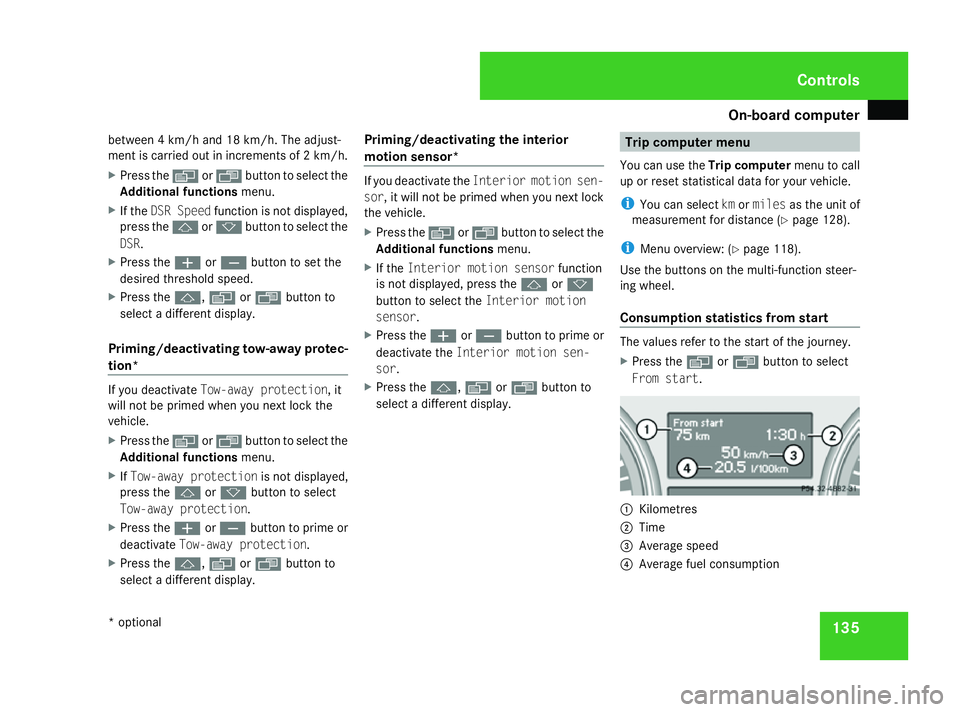
Consumption statistics from start The values refer to the start of the journey.
X
Press the èor· button to select
From start. 1
Kilometres
2 Time
3 Average speed
4 Average fuel consumption Controls
* optional
164_AKB; 5; 5, en-GB
wobuchh,
Version: 2.10.6 2008-05-11T11:55:12+02:00 - Seite 135 ZDateiname: 6515_4293_02_buchblock.pdf; preflight
Page 139 of 381
On-board computer
136
If the vehicle is parked for more than 4 hours,
the From start consumption statistics are
reset (key in position 0of the ignition lock or
removed).
The values will not be reset if you turn the key
to position 1or 2during this time.
Consumption statistics from the last
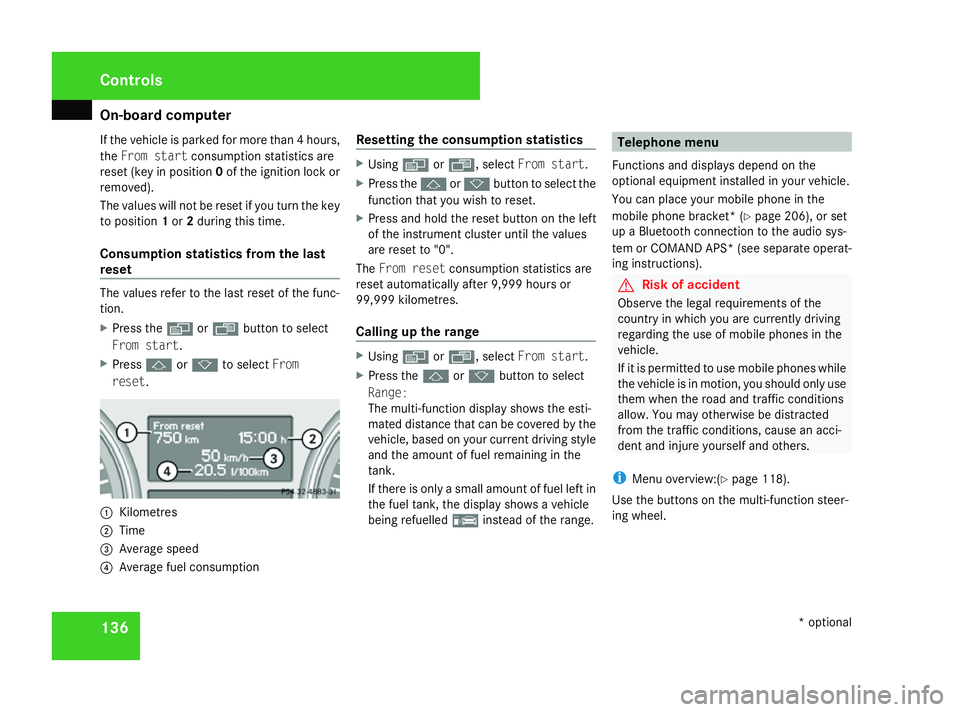
reset The values refer to the last reset of the func-
tion.
X Press the èor· button to select
From start.
X Press jork to select From
reset. 1
Kilometres
2 Time
3 Average speed
4 Average fuel consumption Resetting the consumption statistics X
Using èor·, select From start.
X Press the jork button to select the
function that you wish to reset.
X Press and hold the reset button on the left
of the instrument cluster until the values
are reset to "0".
The From reset consumption statistics are
reset automatically after 9,999 hours or
99,999 kilometres.
Calling up the range X
Using èor·, select From start.
X Press the jork button to select
Range:
The multi-function display shows the esti-
mated distance that can be covered by the
vehicle, based on your current driving style
and the amount of fuel remaining in the
tank.
If there is only a small amount of fuel left in
the fuel tank, the display shows a vehicle
being refuelled ¿instead of the range. Telephone menu
Functions and displays depend on the
optional equipment installed in your vehicle.
You can place your mobile phone in the
mobile phone bracket* (Y page 206), or set
up a Bluetooth connection to the audio sys-
tem or COMAND APS *(see separate operat-
ing instructions). G
Risk of accident
Observe the legal requirements of the
country in which you are currently driving
regarding the use of mobile phones in the
vehicle.
If it is permitted to use mobile phones while
the vehicle is in motion, you should only use
them when the road and traffic conditions
allow. You may otherwise be distracted
from the traffic conditions, cause an acci-
dent and injure yourself and others.
i Menu overview:(Y page 118).
Use the buttons on the multi-function steer-
ing wheel. Controls
* optional
164_AKB; 5; 5, en-GB
wobuchh,
Version: 2.10.6 2008-05-11T11:55:12+02:00 - Seite 136Dateiname: 6515_4293_02_buchblock.pdf; preflight
Page 140 of 381
On-board computer
137
X
Switch on the mobile phone and audio sys-
tem or COMAND APS*; see separate oper-
ating instructions.
X Press the èor· button to select the
Telephone menu.
Mobile phone on PIN code not yet entered
Once you have inserted the mobile phone into
the mobile phone cradle*, the multi-function
display shows the message
Please enter
PIN.
X Enter the PIN using the mobile phone, Lin-
guatronic*, the audio system or COMAND
APS*.
The mobile phone will search for a network.
Mobile phone operational
The multi-function display shows the mes-
sage Ready or the name of the GSM network
provider. If the operational readiness symbol
goes out, your vehicle is outside the trans-
mission and reception range. In this case, the
message No service appears in the multi-
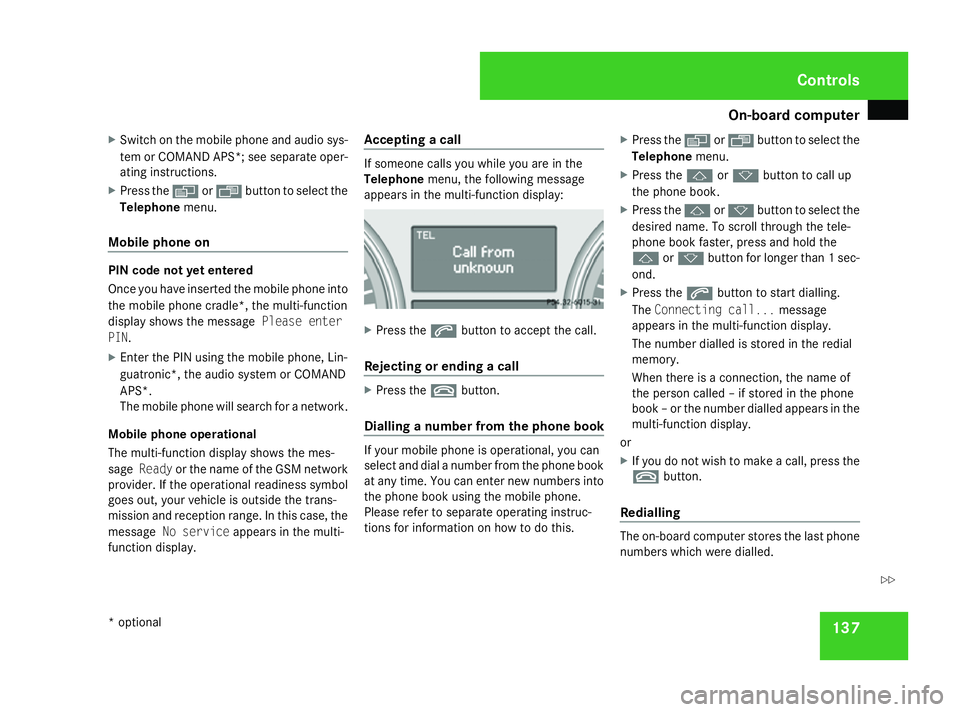
function display. Accepting a call If someone calls you while you are in the
Telephone
menu, the following message
appears in the multi-function display: X
Press the sbutton to accept the call.
Rejecting or ending a call X
Press the tbutton.
Dialling a number from the phone book If your mobile phone is operational, you can
select and dial a number from the phone book
at any time. You can enter new numbers into
the phone book using the mobile phone.
Please refer to separate operating instruc-
tions for information on how to do this. X
Press the èor· button to select the
Telephone menu.
X Press the jork button to call up
the phone book.
X Press the jork button to select the
desired name. To scroll through the tele-
phone book faster, press and hold the
j ork button for longer than 1 sec-
ond.
X Press the sbutton to start dialling.
The Connecting call... message
appears in the multi-function display.
The number dialled is stored in the redial
memory.
When there is a connection, the name of
the person called – if stored in the phone
book – or the number dialled appears in the
multi-function display.
or
X If you do not wish to make a call, press the
t button.
Redialling The on-board computer stores the last phone
numbers which were dialled. Controls
* optional
164_AKB; 5; 5, en-GB
wobuchh,
Version: 2.10.6 2008-05-11T11:55:12+02:00 - Seite 137 ZDateiname: 6515_4293_02_buchblock.pdf; preflight
Page 141 of 381
Off-road driving
138
X
Press the èor· button to select the
Telephone menu.
X Press the sbutton to call up the most
recently dialled number in the redial mem-
ory.
X Press the jork button to select the
desired name or number.
X Press the sbutton to start dialling. Off-road driving
Overview of off-road driving systems
The systems which are relevant for off-road
driving are explained on the following pages:
R 4MATIC (permanent four-wheel drive), for
optimum traction
R DSR (Downhill Speed Regulation), which
assists you when driving downhill
R Off-road drive program, which assists you
when driving off-road
R LOW RANGE* off-road gear for better trac-
tion off-road
R Differential locks for increased traction off-
road
You will find further information about driving
off-road in the "Operation" section
(Y page 235). 4MATIC (permanent four-wheel drive)
4MATIC ensures that all four wheels are per-
manently driven. Together with ESP ®
and
4ETS, it improves the traction of your vehicle
whenever a drive wheel spins due to insuffi-
cient grip. G
Risk of accident
4MATIC cannot reduce the risk of an acci-
dent if you drive too fast.
If a drive wheel spins due to insufficient
grip:
R Only depress the accelerator pedal as far
as necessary when pulling away.
R Accelerate less when driving.
R Adapt your driving style to suit road and
traffic conditions.
i In wintry driving conditions, the maximum
effect of 4MATIC can only be achieved if
you use winter tyres (M+S tyres), with snow
chains if necessary.
! When testing the parking brake, operate
the vehicle only briefly (for a maximum of
ten seconds) on a brake dynamometer.
When doing this, turn the key to position
0 or 1in the ignition. Failure to do this can Controls
* optional
164_AKB; 5; 5, en-GB
wobuchh,
Version: 2.10.6 2008-05-11T11:55:12+02:00 - Seite 138Dateiname: 6515_4293_02_buchblock.pdf; preflight
Page 142 of 381
Off-road driving
139
cause damage to the drive train or the
brake system.
! A function or performance test should
only be carried out on a twin-axle dyna-
mometer. If you wish to operate the vehicle
on such a dynamometer, please consult a
Mercedes-Benz Service Centre in advance.
You could otherwise damage the drive train
or the brake system. DSR (Downhill Speed Regulation)
You will find information about driving off-
road in the "Operation" section
(Y page 235).
DSR is an aid to assist you when driving down-
hill. It keeps the speed of travel at the speed
set on the on-board computer (Y page 134).
The steeper the downhill gradient, the greater
the DSR braking effect on the vehicle. When
driving on flat stretches of road or on an uphill
gradient, the DSR braking effect is minimal or
non-existent. G
Risk of accident
DSR is only an aid designed to assist you
when driving downhill. You are responsible
for keeping control of the vehicle and for assessing whether the downhill gradient
can be managed.
When activating DSR the vehicle may brake
suddenly due to DSR intervening. This is
dependent on the downhill gradient and the
difference between the current speed and
the speed set. DSR may not always be able
to keep to the set speed, depending on road
surface and tyre conditions. You could lose
control of the vehicle and cause an acci-
dent.
Select a set speed suitable for the prevail-
ing conditions and when necessary, apply
the brakes manually.
DSR controls the vehicle's speed when
DIRECT SELECT selector lever positions D,
R and Nare selected. You can drive at a
higher or a lower speed than that set on the
on-board computer at any time by braking or
accelerating. G
Risk of accident
If you depress the accelerator pedal with
DSR activated, then the set speed can be
exceeded. Drive downhill with special care
and always keep in mind that DSR brakes
the vehicle as soon as you remove your foot
from the accelerator pedal. The vehicle may
be heavily braked by DSR depending on the gradient and the difference between the
vehicle's road speed and the set speed. You
could lose control of the vehicle and cause
an accident.
The speed is set to 6 km/h at the factory.
Activating/deactivating DSR Activating
You can only activate DSR when driving at a
speeds below 30 km/h.
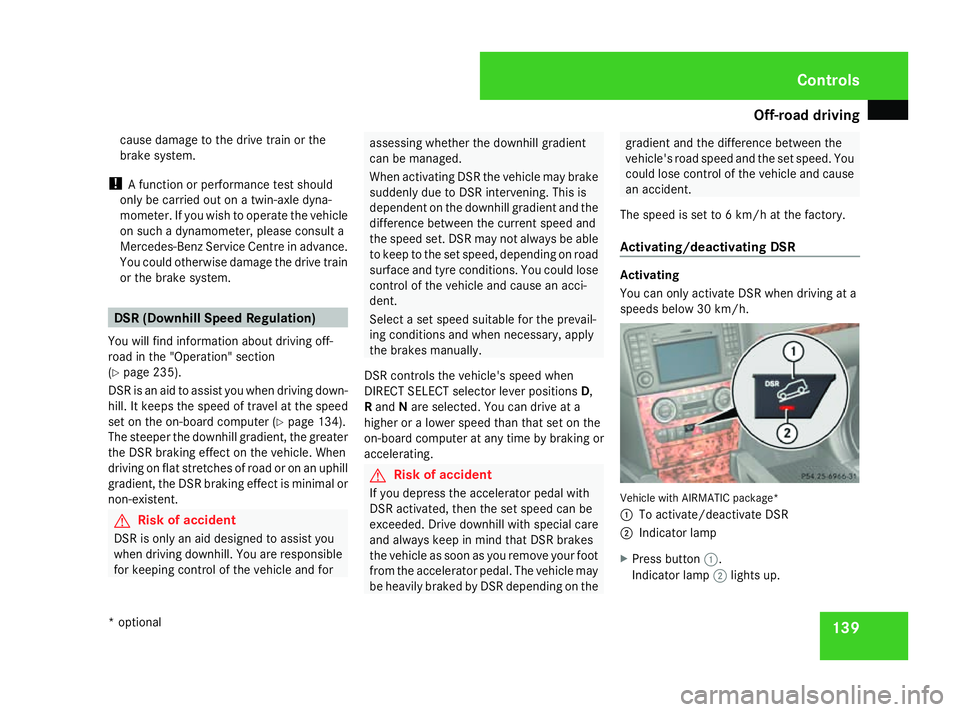
Vehicle with AIRMATIC package*
1
To activate/deactivate DSR
2 Indicator lamp
X Press button 1.
Indicator lamp 2lights up. Controls
* optional
164_AKB; 5; 5, en-GB
wobuchh,
Version: 2.10.6 2008-05-11T11:55:12+02:00 - Seite 139 ZDateiname: 6515_4293_02_buchblock.pdf; preflight
Page 143 of 381
Off-road driving
140
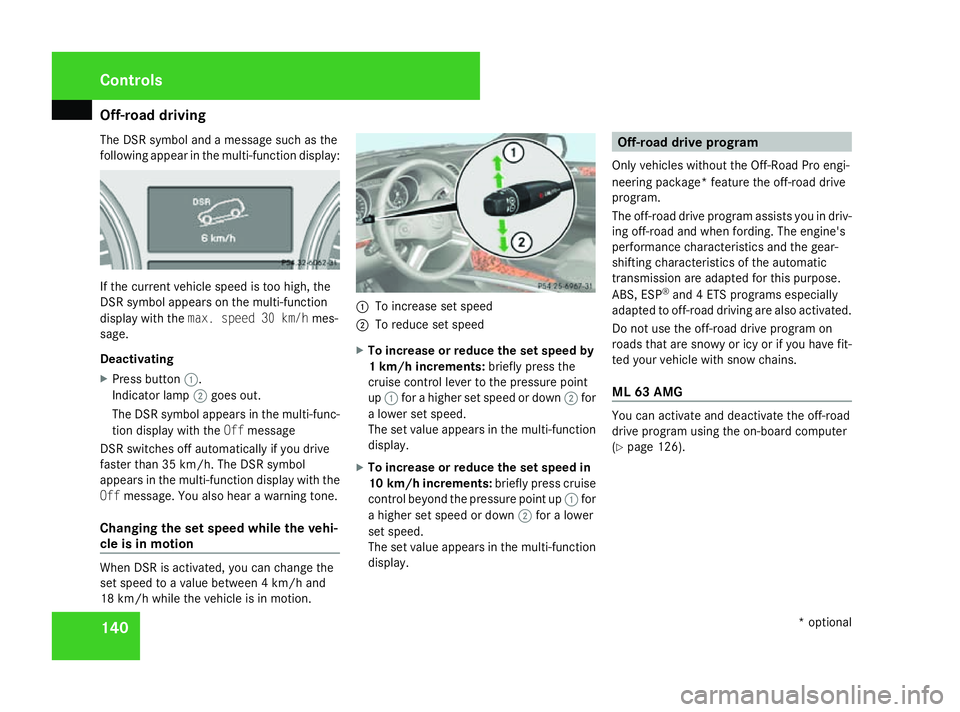
The DSR symbol and a message such as the
following appear in the multi-function display: If the current vehicle speed is too high, the
DSR symbol appears on the multi-function
display with the max. speed 30 km/h mes-
sage.
Deactivating
X Press button 1.
Indicator lamp 2goes out.
The DSR symbol appears in the multi-func-
tion display with the Offmessage
DSR switches off automatically if you drive
faster than 35 km/h. The DSR symbol
appears in the multi-function display with the
Off message. You also hear a warning tone.
Changing the set speed while the vehi-
cle is in motion When DSR is activated, you can change the
set speed to a value between 4 km/h and
18 km/h while the vehicle is in motion. 1
To increase set speed
2 To reduce set speed
X To increase or reduce the set speed by
1 km/h increments: briefly press the
cruise control lever to the pressure point
up 1 for a higher set speed or down 2for
a lower set speed.
The set value appears in the multi-function
display.
X To increase or reduce the set speed in
10 km/h increments: briefly press cruise
control beyond the pressure point up 1for
a higher set speed or down 2for a lower
set speed.
The set value appears in the multi-function
display. Off-road drive program
Only vehicles without the Off-Road Pro engi-
neering package* feature the off-road drive
program.
The off-road drive program assists you in driv-
ing off-road and when fording. The engine's
performance characteristics and the gear-
shifting characteristics of the automatic
transmission are adapted for this purpose.
ABS, ESP ®
and 4 ETS programs especially
adapted to off-road driving are also activated.
Do not use the off-road drive program on
roads that are snowy or icy or if you have fit-
ted your vehicle with snow chains.
ML 63 AMG You can activate and deactivate the off-road
drive program using the on-board computer
(Y
page 126). Controls
* optional
164_AKB; 5; 5, en-GB
wobuchh,
Version: 2.10.6 2008-05-11T11:55:12+02:00 - Seite 140Dateiname: 6515_4293_02_buchblock.pdf; preflight