ignition MERCEDES-BENZ ML SUV 2008 Owner's Manual
[x] Cancel search | Manufacturer: MERCEDES-BENZ, Model Year: 2008, Model line: ML SUV, Model: MERCEDES-BENZ ML SUV 2008Pages: 381, PDF Size: 7.18 MB
Page 85 of 381
Seats
82
X
Make sure that the key is in position 1or
2 in the ignition lock.
X To switch on: press button1repeatedly
until the required ventilation level is set.
i If you open the side windows and the slid-
ing/tilting sunroof* (Y page 101), the seat
ventilation of the driver's seat automati-
cally switches to the highest level.
X To switch off: press button1repeatedly
until all indicator lamps go out.
i If the battery voltage is too low, the seat
ventilation may switch off. Seat heating*
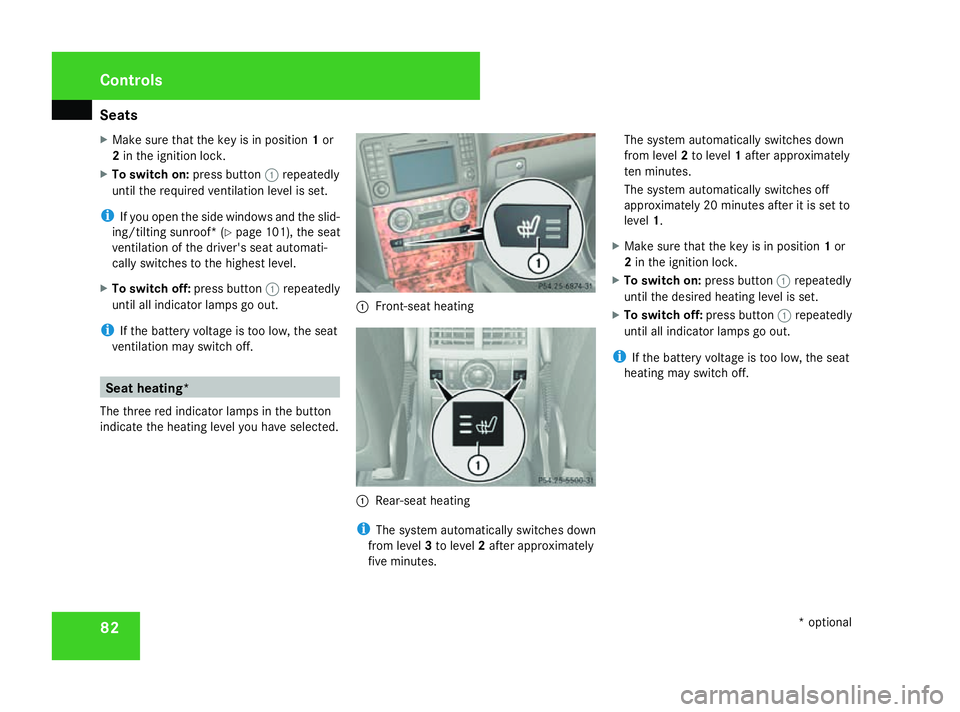
The three red indicator lamps in the button
indicate the heating level you have selected. 1
Front-seat heating 1
Rear-seat heating
i The system automatically switches down
from level 3to level 2after approximately
five minutes. The system automatically switches down
from level
2to level 1after approximately
ten minutes.
The system automatically switches off
approximately 20 minutes after it is set to
level 1.
X Make sure that the key is in position 1or
2 in the ignition lock.
X To switch on: press button1repeatedly
until the desired heating level is set.
X To switch off: press button1repeatedly
until all indicator lamps go out.
i If the battery voltage is too low, the seat
heating may switch off. Controls
* optional
164_AKB; 5; 5, en-GB
wobuchh,
Version: 2.10.6 2008-05-11T11:55:12+02:00 - Seite 82Dateiname: 6515_4293_02_buchblock.pdf; preflight
Page 87 of 381
Steering wheel
84 Steering wheel heating*
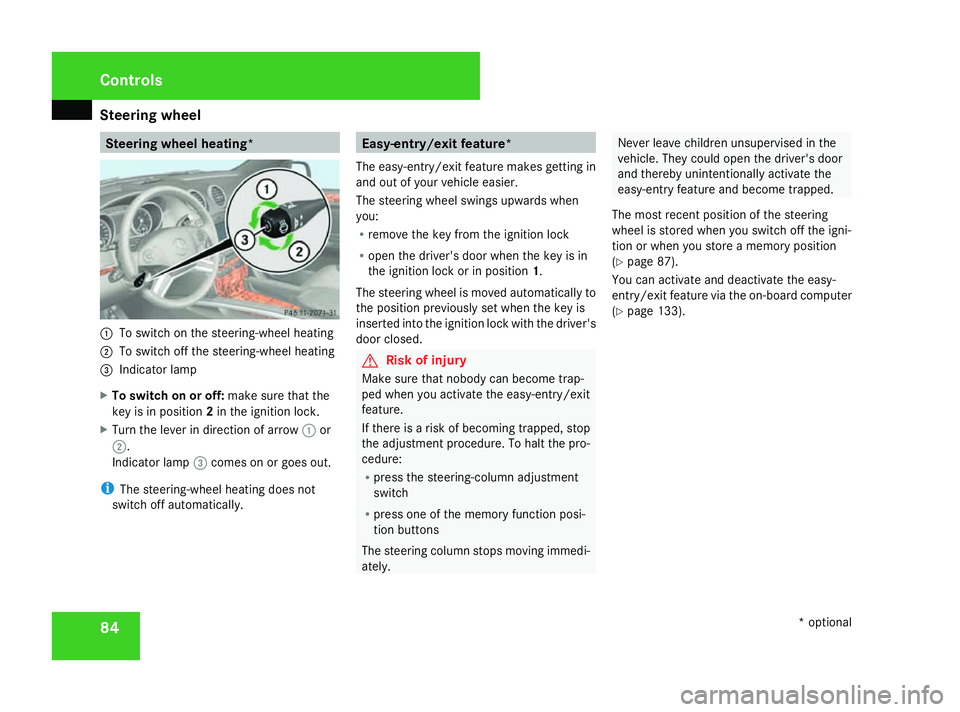
1
To switch on the steering-wheel heating
2 To switch off the steering-wheel heating
3 Indicator lamp
X To switch on or off: make sure that the
key is in position 2in the ignition lock.
X Turn the lever in direction of arrow 1or
2.
Indicator lamp 3comes on or goes out.
i The steering-wheel heating does not
switch off automatically. Easy-entry/exit feature*
The easy-entry/exit feature makes getting in
and out of your vehicle easier.
The steering wheel swings upwards when
you:
R remove the key from the ignition lock
R open the driver's door when the key is in
the ignition lock or in position 1.
The steering wheel is moved automatically to
the position previously set when the key is
inserted into the ignition lock with the driver's
door closed. G
Risk of injury
Make sure that nobody can become trap-
ped when you activate the easy-entry/exit
feature.
If there is a risk of becoming trapped, stop
the adjustment procedure. To halt the pro-
cedure:
R press the steering-column adjustment
switch
R press one of the memory function posi-
tion buttons
The steering column stops moving immedi-
ately. Never leave children unsupervised in the
vehicle. They could open the driver's door
and thereby unintentionally activate the
easy-entry feature and become trapped.
The most recent position of the steering
wheel is stored when you switch off the igni-
tion or when you store a memory position
(Y page 87).
You can activate and deactivate the easy-
entry/exit feature via the on-board computer
(Y page 133). Controls
* optional
164_AKB; 5; 5, en-GB
wobuchh,
Version: 2.10.6 2008-05-11T11:55:12+02:00 - Seite 84Dateiname: 6515_4293_02_buchblock.pdf; preflight
Page 88 of 381
Mirrors
85Mirrors
Rear-view mirror
X Adjust the rear-view mirror by hand so you
have a good overview of the traffic condi-
tions.
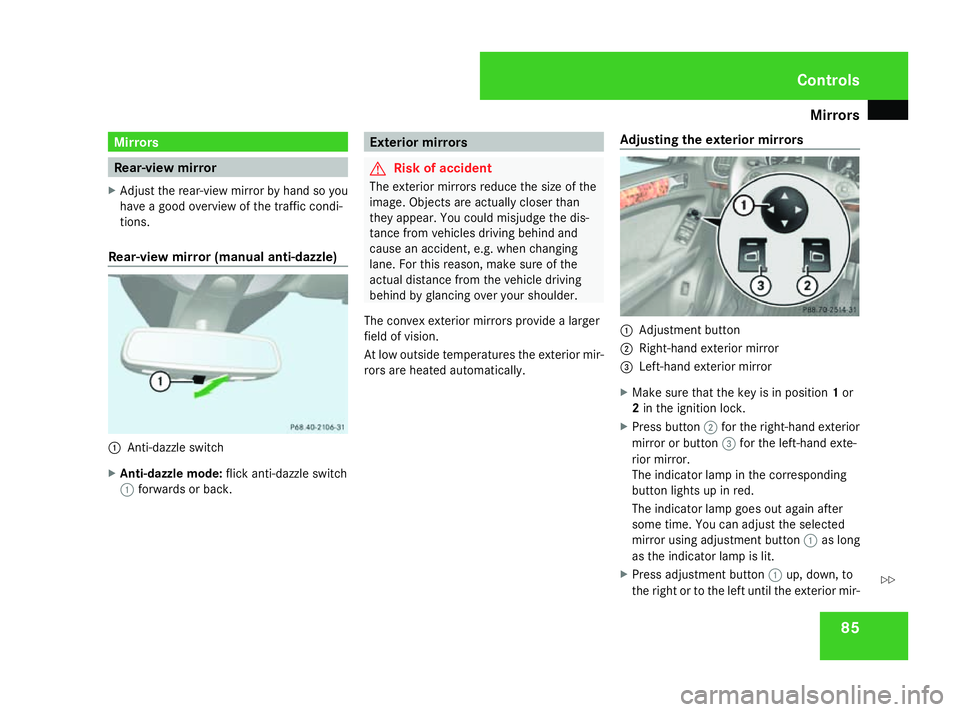
Rear-view mirror (manual anti-dazzle) 1
Anti-dazzle switch
X Anti-dazzle mode: flick anti-dazzle switch
1 forwards or back. Exterior mirrors
G
Risk of accident
The exterior mirrors reduce the size of the
image. Objects are actually closer than
they appear. You could misjudge the dis-
tance from vehicles driving behind and
cause an accident, e.g. when changing
lane. For this reason, make sure of the
actual distance from the vehicle driving
behind by glancing over your shoulder.
The convex exterior mirrors provide a larger
field of vision.
At low outside temperatures the exterior mir-
rors are heated automatically. Adjusting the exterior mirrors 1
Adjustment button
2 Right-hand exterior mirror
3 Left-hand exterior mirror
X Make sure that the key is in position 1or
2 in the ignition lock.
X Press button 2for the right-hand exterior
mirror or button 3for the left-hand exte-
rior mirror.
The indicator lamp in the corresponding
button lights up in red.
The indicator lamp goes out again after
some time. You can adjust the selected
mirror using adjustment button 1as long
as the indicator lamp is lit.
X Press adjustment button 1up, down, to
the right or to the left until the exterior mir- Controls
164_AKB; 5; 5, en-GB
wobuchh,
Version: 2.10.6 2008-05-11T11:55:12+02:00 - Seite 85 ZDateiname: 6515_4293_02_buchblock.pdf; preflight
Page 89 of 381
Mirrors
86ror is set to a position which provides you
with a good overview of traffic conditions.
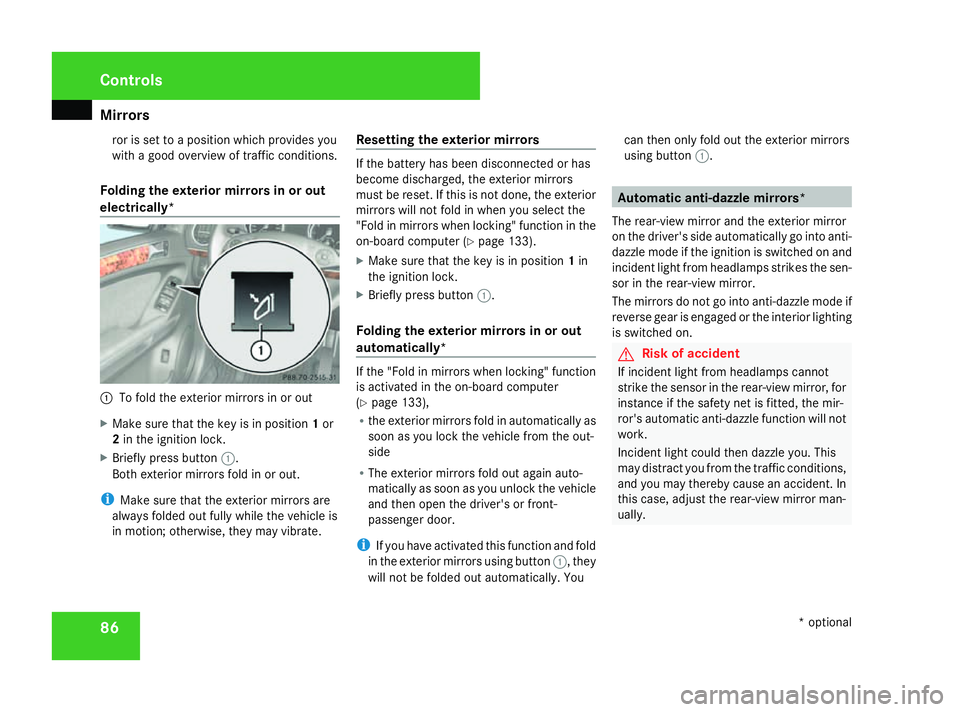
Folding the exterior mirrors in or out
electrically* 1
To fold the exterior mirrors in or out
X Make sure that the key is in position 1or
2 in the ignition lock.
X Briefly press button 1.
Both exterior mirrors fold in or out.
i Make sure that the exterior mirrors are
always folded out fully while the vehicle is
in motion; otherwise, they may vibrate. Resetting the exterior mirrors If the battery has been disconnected or has
become discharged, the exterior mirrors
must be reset. If this is not done, the exterior
mirrors will not fold in when you select the
"Fold in mirrors when locking" function in the
on-board computer (Y
page 133).
X Make sure that the key is in position 1in
the ignition lock.
X Briefly press button 1.
Folding the exterior mirrors in or out
automatically* If the "Fold in mirrors when locking" function
is activated in the on-board computer
(Y
page 133),
R the exterior mirrors fold in automatically as
soon as you lock the vehicle from the out-
side
R The exterior mirrors fold out again auto-
matically as soon as you unlock the vehicle
and then open the driver's or front-
passenger door.
i If you have activated this function and fold
in the exterior mirrors using button 1, they
will not be folded out automatically. You can then only fold out the exterior mirrors
using button
1. Automatic anti-dazzle mirrors*
The rear-view mirror and the exterior mirror
on the driver's side automatically go into anti-
dazzle mode if the ignition is switched on and
incident light from headlamps strikes the sen-
sor in the rear-view mirror.
The mirrors do not go into anti-dazzle mode if
reverse gear is engaged or the interior lighting
is switched on. G
Risk of accident
If incident light from headlamps cannot
strike the sensor in the rear-view mirror, for
instance if the safety net is fitted, the mir-
ror's automatic anti-dazzle function will not
work.
Incident light could then dazzle you. This
may distract you from the traffic conditions,
and you may thereby cause an accident. In
this case, adjust the rear-view mirror man-
ually. Controls
* optional
164_AKB; 5; 5, en-GB
wobuchh,
Version: 2.10.6 2008-05-11T11:55:12+02:00 - Seite 86Dateiname: 6515_4293_02_buchblock.pdf; preflight
Page 91 of 381
Memory functions*
88 Passenger side exterior mirror park-
ing position
To make it easier to park, you can set and
store the front-passenger side exterior mirror
position in such a way that you can see the
rear wheel on that side as soon as you engage
reverse gear.
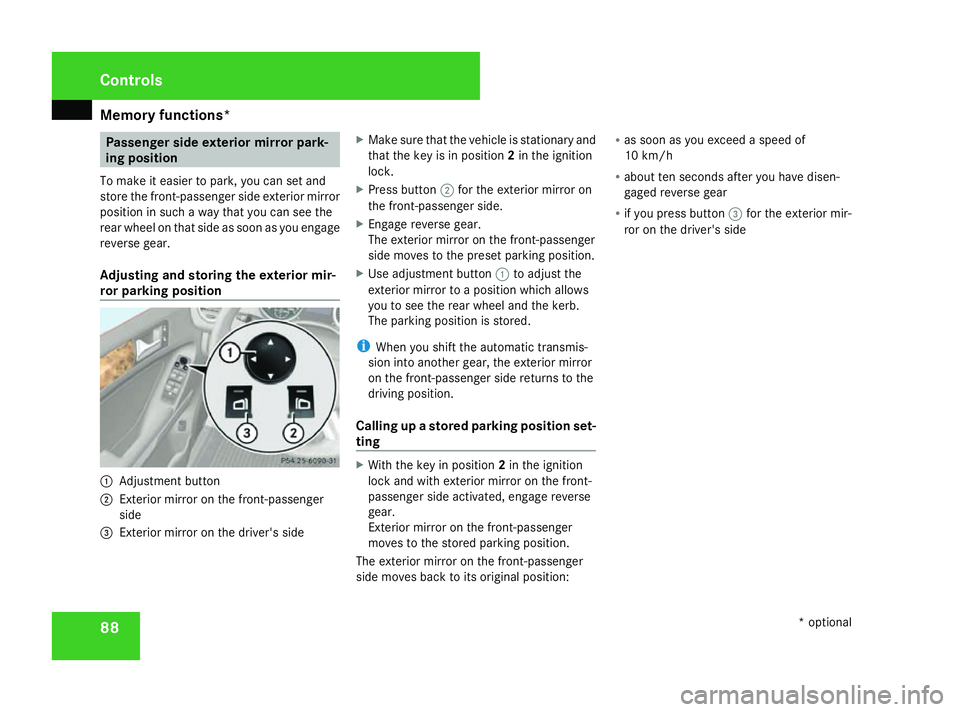
Adjusting and storing the exterior mir-
ror parking position 1
Adjustment button
2 Exterior mirror on the front-passenger
side
3 Exterior mirror on the driver's side X
Make sure that the vehicle is stationary and
that the key is in position 2in the ignition
lock.
X Press button 2for the exterior mirror on
the front-passenger side.
X Engage reverse gear.
The exterior mirror on the front-passenger
side moves to the preset parking position.
X Use adjustment button 1to adjust the
exterior mirror to a position which allows
you to see the rear wheel and the kerb.
The parking position is stored.
i When you shift the automatic transmis-
sion into another gear, the exterior mirror
on the front-passenger side returns to the
driving position.
Calling up a stored parking position set-
ting X
With the key in position 2in the ignition
lock and with exterior mirror on the front-
passenger side activated, engage reverse
gear.
Exterior mirror on the front-passenger
moves to the stored parking position.
The exterior mirror on the front-passenger
side moves back to its original position: R
as soon as you exceed a speed of
10 km/h
R about ten seconds after you have disen-
gaged reverse gear
R if you press button 3for the exterior mir-
ror on the driver's side Controls
* optional
164_AKB; 5; 5, en-GB
wobuchh,
Version: 2.10.6 2008-05-11T11:55:12+02:00 - Seite 88Dateiname: 6515_4293_02_buchblock.pdf; preflight
Page 96 of 381
Lights
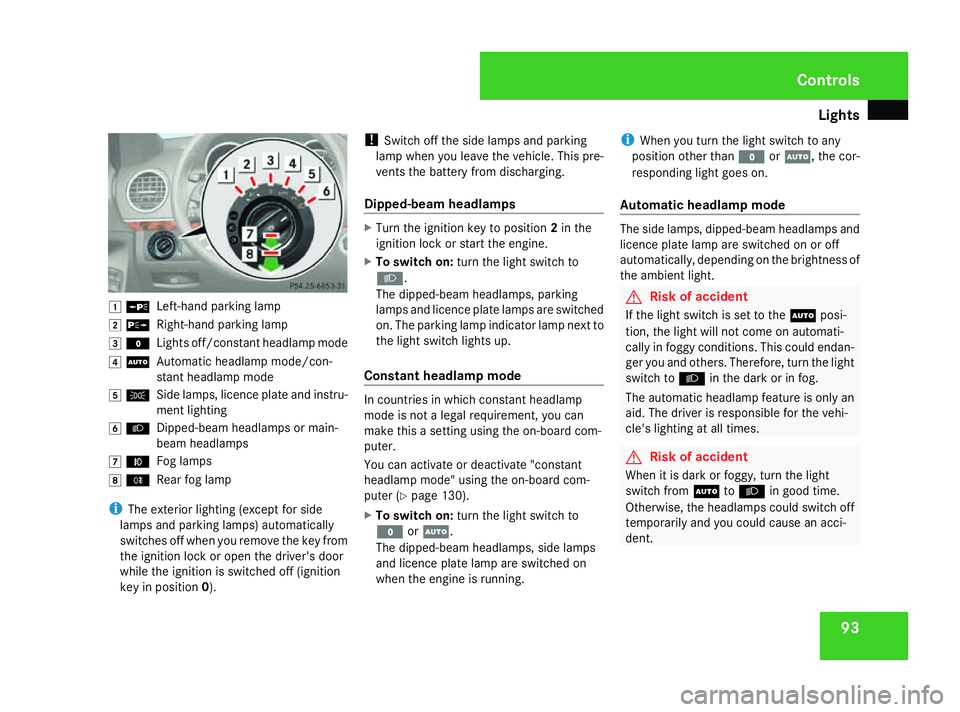
93$
a
Left-hand parking lamp
% g
Right-hand parking lamp
& M
Lights off/constant headlamp mode
( U
Automatic headlamp mode/con-
stant headlamp mode
) C
Side lamps, licence plate and instru-
ment lighting
* B
Dipped-beam headlamps or main-
beam headlamps
, ¥
Fog lamps
. †
Rear fog lamp
i The exterior lighting (except for side
lamps and parking lamps) automatically
switches off when you remove the key from
the ignition lock or open the driver's door
while the ignition is switched off (ignition
key in position 0). !
Switch off the side lamps and parking
lamp when you leave the vehicle. This pre-
vents the battery from discharging.
Dipped-beam headlamps X
Turn the ignition key to position 2in the
ignition lock or start the engine.
X To switch on: turn the light switch to
B.
The dipped-beam headlamps, parking
lamps and licence plate lamps are switched
on. The parking lamp indicator lamp next to
the light switch lights up.
Constant headlamp mode In countries in which constant headlamp
mode is not a legal requirement, you can
make this a setting using the on-board com-
puter.
You can activate or deactivate "constant
headlamp mode" using the on-board com-
puter (Y page 130).
X To switch on: turn the light switch to
M orU.
The dipped-beam headlamps, side lamps
and licence plate lamp are switched on
when the engine is running. i
When you turn the light switch to any
position other than MorU, the cor-
responding light goes on.
Automatic headlamp mode The side lamps, dipped-beam headlamps and
licence plate lamp are switched on or off
automatically, depending on the brightness of
the ambient light.
G
Risk of accident
If the light switch is set to the Uposi-
tion, the light will not come on automati-
cally in foggy conditions. This could endan-
ger you and others. Therefore, turn the light
switch to Bin the dark or in fog.
The automatic headlamp feature is only an
aid. The driver is responsible for the vehi-
cle's lighting at all times. G
Risk of accident
When it is dark or foggy, turn the light
switch from UtoB in good time.
Otherwise, the headlamps could switch off
temporarily and you could cause an acci-
dent. Controls
164_AKB; 5; 5, en-GB
wobuchh,
Version: 2.10.6 2008-05-11T11:55:12+02:00 - Seite 93 ZDateiname: 6515_4293_02_buchblock.pdf; preflight
Page 97 of 381
Lights
94
X
To switch on: turn the light switch to
U.
The side lamps are switched on and off
automatically when the key is in position
1 in the ignition lock.
The dipped-beam headlamps, side lamps
and licence plate lamp are switched on
automatically when the engine is running.
When the parking lamp or dipped-beam
headlamps are switched on, the indicator
lamp next to the light switch lights up.
Front fog lamps/Rear fog lamp G
Risk of accident
If you suspect that driving conditions will be
foggy, turn the light switch to Bbefore
you start your journey. Otherwise, your
vehicle may not be visible and you could
endanger yourself and others. G
Risk of accident
When it is dark or foggy, turn the light
switch from UtoB in good time.
Otherwise, the headlamps could switch off
temporarily and you could cause an acci-
dent.
When the light switch is set to Uyou can-
not switch on the front or rear fog lamps. X
Turn the key to position 2in the ignition
lock.
X To switch on the front fog lamps: turn
the light switch to the BorC posi-
tion.
X Pull the light switch out to the first stop.
The ¥ green indicator lamp next to the
light switch lights up.
X To switch on the rear fog lamp: turn the
light switch to BorC.
X Pull the light switch out to the second
detent.
The † yellow indicator lamp next to the
light switch lights up.
X To switch off the front foglamps/rear
foglamp: push in the light switch to the
stop.
The corresponding indicator lamp goes out. Combination switch (turn signals,
main-beam headlamps and headlamp
flasher)
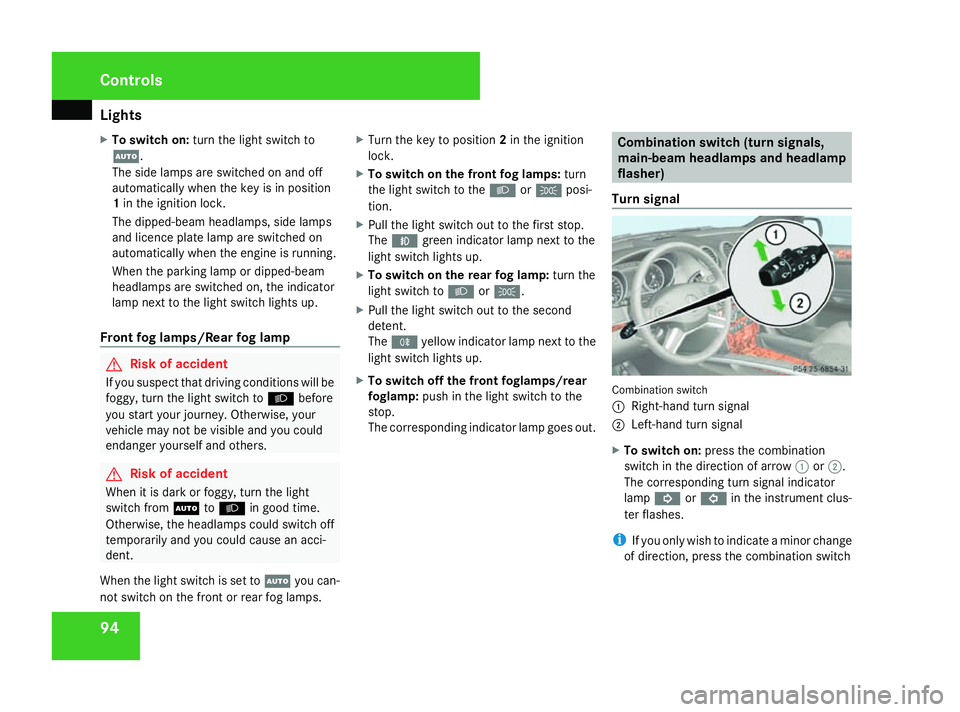
Turn signal Combination switch
1
Right-hand turn signal
2 Left-hand turn signal
X To switch on: press the combination
switch in the direction of arrow 1or2.
The corresponding turn signal indicator
lamp K orL in the instrument clus-
ter flashes.
i If you only wish to indicate a minor change
of direction, press the combination switch Controls
164_AKB; 5; 5, en-GB
wobuchh,
Version: 2.10.6 2008-05-11T11:55:12+02:00 - Seite 94Dateiname: 6515_4293_02_buchblock.pdf; preflight
Page 98 of 381
Lights
95
briefly in the appropriate direction. The cor-
responding turn signal flashes three times.
Main-beam headlamps/headlamp flas-
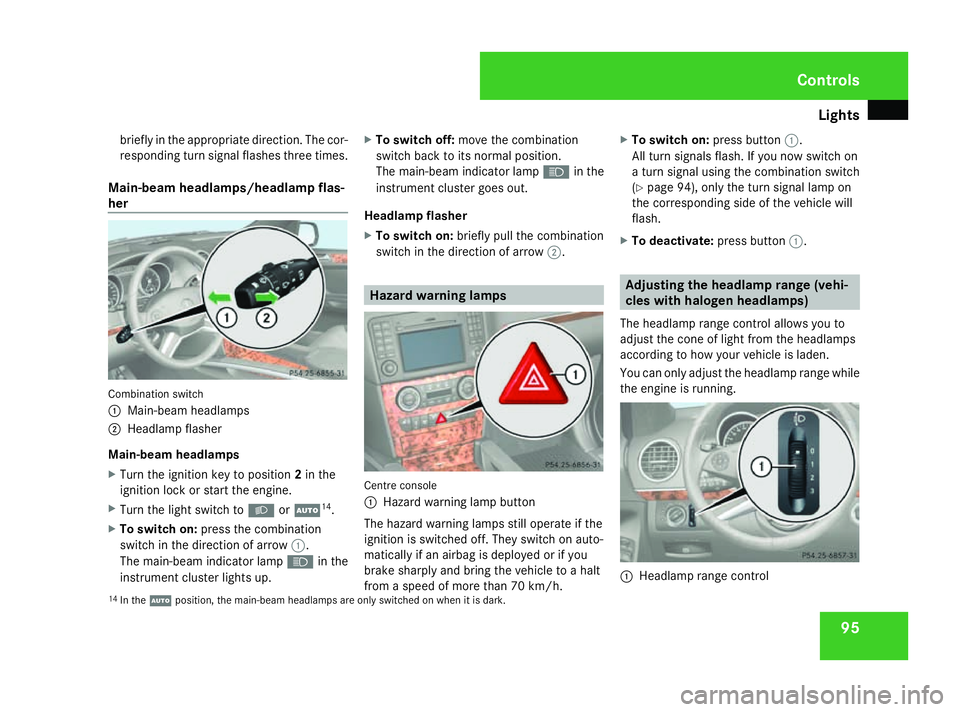
her Combination switch
1
Main-beam headlamps
2 Headlamp flasher
Main-beam headlamps
X Turn the ignition key to position 2in the
ignition lock or start the engine.
X Turn the light switch to BorU 14
.
X To switch on: press the combination
switch in the direction of arrow 1.
The main-beam indicator lamp Ain the
instrument cluster lights up. X
To switch off: move the combination
switch back to its normal position.
The main-beam indicator lamp Ain the
instrument cluster goes out.
Headlamp flasher
X To switch on: briefly pull the combination
switch in the direction of arrow 2. Hazard warning lamps
Centre console
1 Hazard warning lamp button
The hazard warning lamps still operate if the
ignition is switched off. They switch on auto-
matically if an airbag is deployed or if you
brake sharply and bring the vehicle to a halt
from a speed of more than 70 km/h. X
To switch on: press button1.
All turn signals flash. If you now switch on
a turn signal using the combination switch
(Y page 94), only the turn signal lamp on
the corresponding side of the vehicle will
flash.
X To deactivate: press button1. Adjusting the headlamp range (vehi-
cles with halogen headlamps)
The headlamp range control allows you to
adjust the cone of light from the headlamps
according to how your vehicle is laden.
You can only adjust the headlamp range while
the engine is running. 1
Headlamp range control
14 In the Uposition, the main-beam headlamps are only switched on when it is dark. Controls
164_AKB; 5; 5, en-GB
wobuchh,
Version: 2.10.6 2008-05-11T11:55:12+02:00 - Seite 95 ZDateiname: 6515_4293_02_buchblock.pdf; preflight
Page 99 of 381
Lights
96 Position Load
0 Front seats occupied
1 Front and rear seats occupied
2 All seats occupied and lug-
gage compartment loaded
with approximately 100 kg
3 All seats occupied and the
maximum permissible rear
axle load has been reached
due to trailer towing or load-
ing
X
Turn thumbwheel 1to the position which
corresponds to the load in your vehicle. Headlamp cleaning system*
The headlamps are cleaned automatically if
the "Wipe with windscreen washer fluid" func-
tion is operated five times while the lights are
on and the engine is running. When you
switch off the ignition, the automatic head-
lamp cleaning system is reset and counting is
resumed from 0. Cornering light function* (vehicles
with bi-xenon headlamps*)
Specially designed headlamps light up the
area into which you are driving when turning
corners.
If you are driving at speeds below 40 km/h,
the cornering light function is activated either
by the turn signals or when the steering wheel
is turned. If you are driving at speeds above
40 km/h the cornering light function is deac-
tivated.
Activating X
Start the engine.
X Switch on the dipped-beam headlamps. X
Switch off the foglamps.
X Switch on the turn signal.
The cornering lamp on the same side as the
turn signal comes on, even if you turn the
steering wheel in the opposite direction
after indicating.
or
X Turn the steering wheel in the desired
direction.
When in a forwards gear: the cornering
lamp on the inside of the bend comes on.
When in reverse gear: the cornering lamp
on the outside of the bend comes on.
Deactivating X
Turn the steering wheel back to the straight
ahead position.
The turn signal goes off. The cornering lamp
may remain lit for a short time.
or
X Switch off the turn signal.
The cornering lamp may remain lit for a
short time.
The cornering light will go out after a maxi-
mum of three minutes. Controls
* optional
164_AKB; 5; 5, en-GB
wobuchh,
Version: 2.10.6 2008-05-11T11:55:12+02:00 - Seite 96Dateiname: 6515_4293_02_buchblock.pdf; preflight
Page 100 of 381
Lights
97Interior lighting
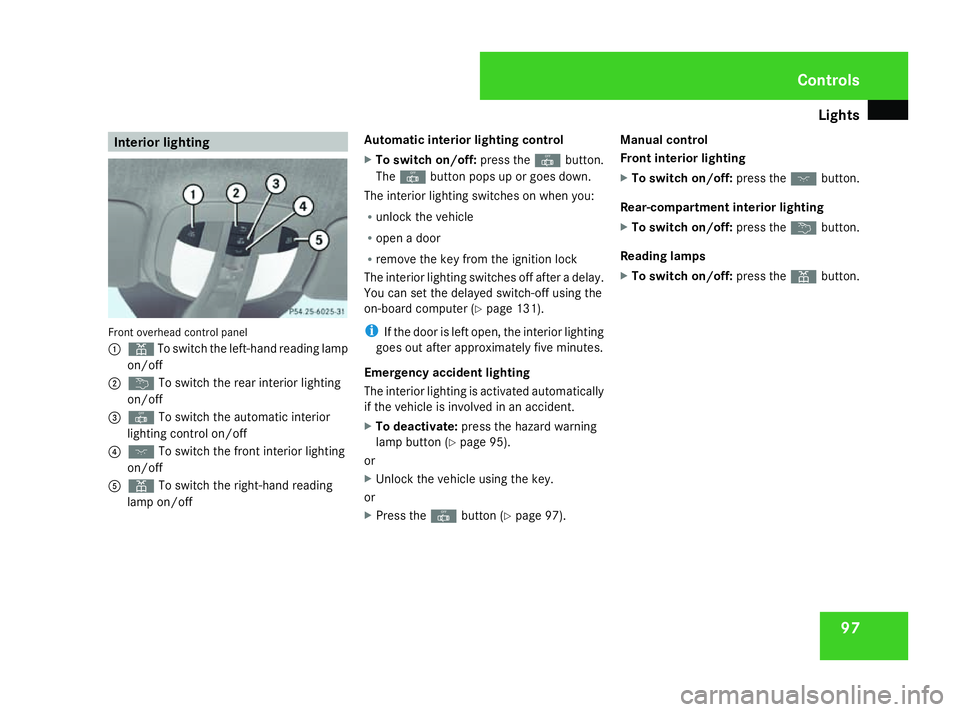
Front overhead control panel
1 X To switch the left-hand reading lamp
on/off
2 ¦ To switch the rear interior lighting
on/off
3 ¥ To switch the automatic interior
lighting control on/off
4 ð To switch the front interior lighting
on/off
5 X To switch the right-hand reading
lamp on/off Automatic interior lighting control
X
To switch on/off: press the¥button.
The ¥ button pops up or goes down.
The interior lighting switches on when you:
R unlock the vehicle
R open a door
R remove the key from the ignition lock
The interior lighting switches off after a delay.
You can set the delayed switch-off using the
on-board computer (Y page 131).
i If the door is left open, the interior lighting
goes out after approximately five minutes.
Emergency accident lighting
The interior lighting is activated automatically
if the vehicle is involved in an accident.
X To deactivate: press the hazard warning
lamp button (Y page 95).
or
X Unlock the vehicle using the key.
or
X Press the ¥button (Y page 97). Manual control
Front interior lighting
X
To switch on/off: press theðbutton.
Rear-compartment interior lighting
X To switch on/off: press the¦button.
Reading lamps
X To switch on/off: press theXbutton. Controls
164_AKB; 5; 5, en-GB
wobuchh,
Version: 2.10.6
2008-05-11T11:55:12+02:00 - Seite 97 ZDateiname: 6515_4293_02_buchblock.pdf; preflight