display MERCEDES-BENZ ML SUV 2008 Workshop Manual
[x] Cancel search | Manufacturer: MERCEDES-BENZ, Model Year: 2008, Model line: ML SUV, Model: MERCEDES-BENZ ML SUV 2008Pages: 381, PDF Size: 7.18 MB
Page 137 of 381
On-board computer
134
X
Press èor· to select the Set-
tings menu.
X Press the jbutton to call up the selec-
tion of submenus.
X Press æorç to select the Conve-
nience submenu.
X Press jto select Fold in mirrors
when locking .
X Press the æorç button to activate
or deactivate the Fold in mirrors when
locking feature.
X Press the j,èorÿ button to
select a different display. Additional functions menu
The following table shows the settings you
can make in the Additional functions menu.
You will find additional information on the
pages shown. The number of functions
depends on your vehicle's optional equip-
ment. Function
R
Activates/deactivates Park-
tronic* (Y page 134)
R Activates/deactivates the distance
warning system* (Y page 134)
R Setting DSR (Y page 134)
R Primes/deactivates tow-away protec-
tion* (Y page 135)
R Primes/deactivates the interior motion
sensor* (Y page 135) Use the buttons on the multi-function steer-
ing wheel.
Activating/deactivating Parktronic*
Only vehicles without a PTS switch on the
centre console (Y
page 166) feature this
function.
X Press the èor· button to select the
Additional functions menu.
X If the PARKTRONIC function is not dis-
played, press the jork button to
select PARKTRONIC. X
Press the æorç button to activate
or deactivate PARKTRONIC.
X Press the j,èor· button to
select a different display.
Activating/deactivating the distance
warning system* This function is only available with Dis-
tronic* (Y
page 148).
X Press the èor· button to select the
Additional functions menu.
X If the Distance warning function is not
displayed, press the jork button
to select the Distance warning system.
X Press the æorç button to activate
or deactivate the Distance warning sys-
tem.
When the distance warning system is acti-
vated, the :symbol will be shown in the
lower multi-function display.
X Press the j,èor· button to
select a different display.
Setting DSR The
DSR Speed function allows you to set the
threshold speed (vehicle speed for driving
downhill) of the DSR (Y page 139) to a valueControls
* optional
164_AKB; 5; 5, en-GB
wobuchh,
Version: 2.10.6 2008-05-11T11:55:12+02:00 - Seite 134Dateiname: 6515_4293_02_buchblock.pdf; preflight
Page 138 of 381
On-board computer
135
between 4 km/h and 18 km/h. The adjust-
ment is carried out in increments of 2 km/h.
X
Press the èor· button to select the
Additional functions menu.
X If the DSR Speed function is not displayed,
press the jork button to select the
DSR.
X Press the æorç button to set the
desired threshold speed.
X Press the j,èorÿ button to
select a different display.
Priming/deactivating tow-away protec-
tion* If you deactivate
Tow-away protection, it
will not be primed when you next lock the
vehicle.
X Press the èor· button to select the
Additional functions menu.
X IfTow-away protection is not displayed,
press the jork button to select
Tow-away protection.
X Press the æorç button to prime or
deactivate Tow-away protection.
X Press the j,èorÿ button to
select a different display. Priming/deactivating the interior
motion sensor* If you deactivate the
Interior motion sen-
sor, it will not be primed when you next lock
the vehicle.
X Press the èor· button to select the
Additional functions menu.
X If the Interior motion sensor function
is not displayed, press the jork
button to select the Interior motion
sensor.
X Press the æorç button to prime or
deactivate the Interior motion sen-
sor.
X Press the j,èorÿ button to
select a different display. Trip computer menu
You can use the Trip computermenu to call
up or reset statistical data for your vehicle.
i You can select kmormiles as the unit of
measurement for distance (Y page 128).
i Menu overview: (Y page 118).
Use the buttons on the multi-function steer-
ing wheel.
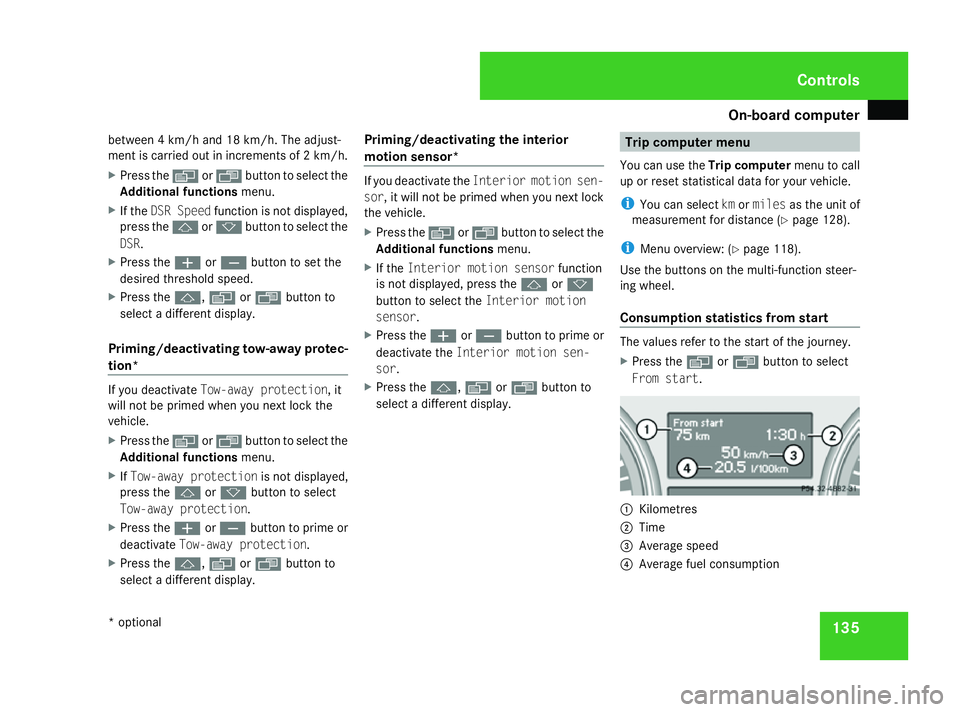
Consumption statistics from start The values refer to the start of the journey.
X
Press the èor· button to select
From start. 1
Kilometres
2 Time
3 Average speed
4 Average fuel consumption Controls
* optional
164_AKB; 5; 5, en-GB
wobuchh,
Version: 2.10.6 2008-05-11T11:55:12+02:00 - Seite 135 ZDateiname: 6515_4293_02_buchblock.pdf; preflight
Page 139 of 381
On-board computer
136
If the vehicle is parked for more than 4 hours,
the From start consumption statistics are
reset (key in position 0of the ignition lock or
removed).
The values will not be reset if you turn the key
to position 1or 2during this time.
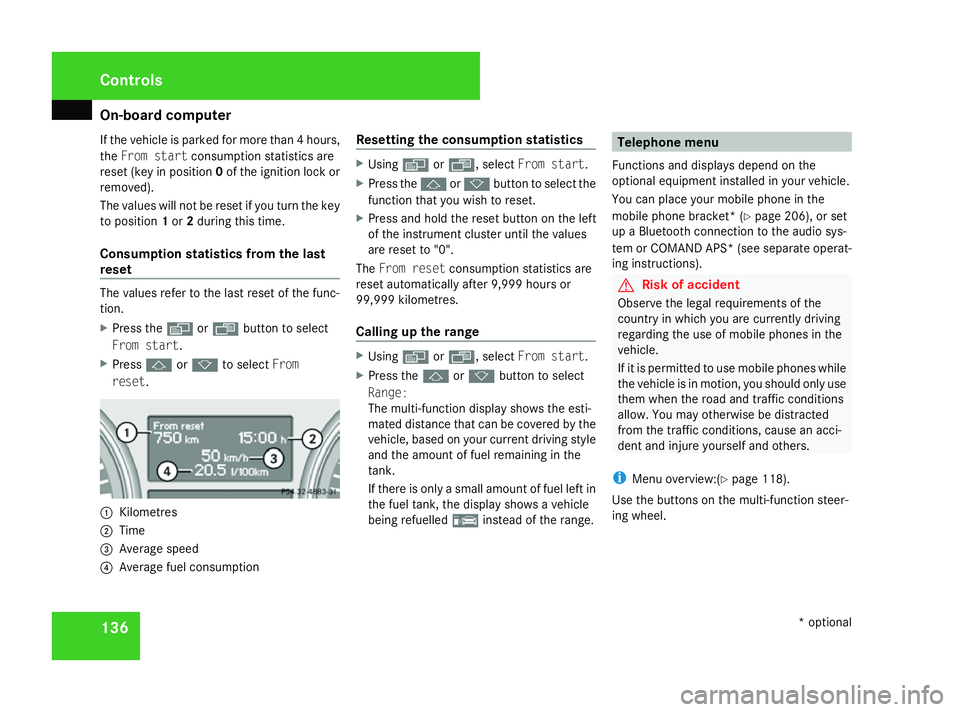
Consumption statistics from the last
reset The values refer to the last reset of the func-
tion.
X Press the èor· button to select
From start.
X Press jork to select From
reset. 1
Kilometres
2 Time
3 Average speed
4 Average fuel consumption Resetting the consumption statistics X
Using èor·, select From start.
X Press the jork button to select the
function that you wish to reset.
X Press and hold the reset button on the left
of the instrument cluster until the values
are reset to "0".
The From reset consumption statistics are
reset automatically after 9,999 hours or
99,999 kilometres.
Calling up the range X
Using èor·, select From start.
X Press the jork button to select
Range:
The multi-function display shows the esti-
mated distance that can be covered by the
vehicle, based on your current driving style
and the amount of fuel remaining in the
tank.
If there is only a small amount of fuel left in
the fuel tank, the display shows a vehicle
being refuelled ¿instead of the range. Telephone menu
Functions and displays depend on the
optional equipment installed in your vehicle.
You can place your mobile phone in the
mobile phone bracket* (Y page 206), or set
up a Bluetooth connection to the audio sys-
tem or COMAND APS *(see separate operat-
ing instructions). G
Risk of accident
Observe the legal requirements of the
country in which you are currently driving
regarding the use of mobile phones in the
vehicle.
If it is permitted to use mobile phones while
the vehicle is in motion, you should only use
them when the road and traffic conditions
allow. You may otherwise be distracted
from the traffic conditions, cause an acci-
dent and injure yourself and others.
i Menu overview:(Y page 118).
Use the buttons on the multi-function steer-
ing wheel. Controls
* optional
164_AKB; 5; 5, en-GB
wobuchh,
Version: 2.10.6 2008-05-11T11:55:12+02:00 - Seite 136Dateiname: 6515_4293_02_buchblock.pdf; preflight
Page 140 of 381
On-board computer
137
X
Switch on the mobile phone and audio sys-
tem or COMAND APS*; see separate oper-
ating instructions.
X Press the èor· button to select the
Telephone menu.
Mobile phone on PIN code not yet entered
Once you have inserted the mobile phone into
the mobile phone cradle*, the multi-function
display shows the message
Please enter
PIN.
X Enter the PIN using the mobile phone, Lin-
guatronic*, the audio system or COMAND
APS*.
The mobile phone will search for a network.
Mobile phone operational
The multi-function display shows the mes-
sage Ready or the name of the GSM network
provider. If the operational readiness symbol
goes out, your vehicle is outside the trans-
mission and reception range. In this case, the
message No service appears in the multi-
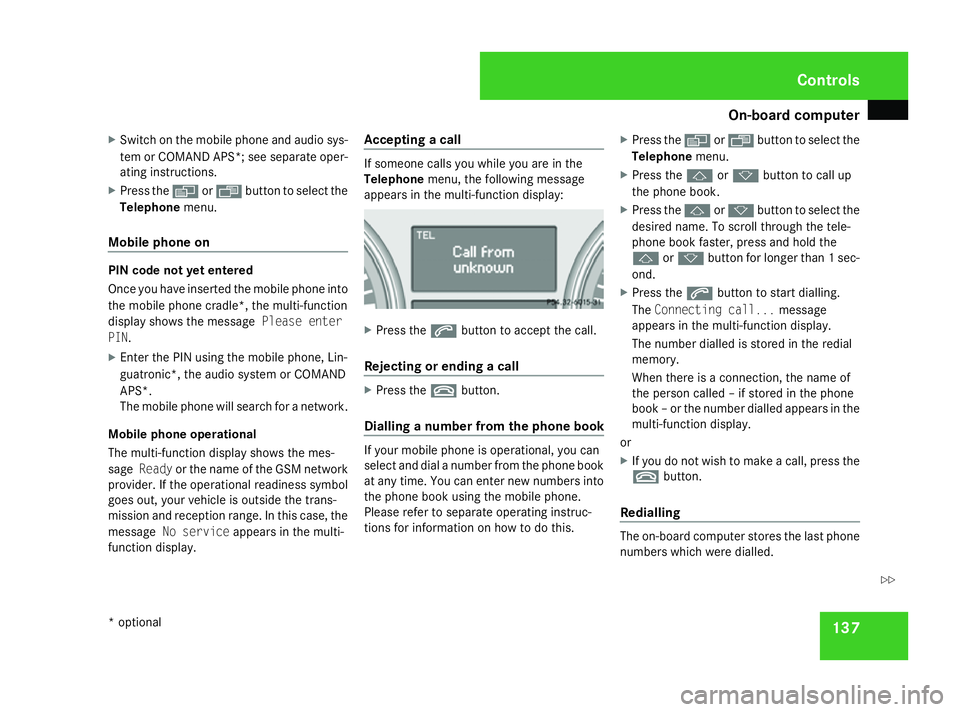
function display. Accepting a call If someone calls you while you are in the
Telephone
menu, the following message
appears in the multi-function display: X
Press the sbutton to accept the call.
Rejecting or ending a call X
Press the tbutton.
Dialling a number from the phone book If your mobile phone is operational, you can
select and dial a number from the phone book
at any time. You can enter new numbers into
the phone book using the mobile phone.
Please refer to separate operating instruc-
tions for information on how to do this. X
Press the èor· button to select the
Telephone menu.
X Press the jork button to call up
the phone book.
X Press the jork button to select the
desired name. To scroll through the tele-
phone book faster, press and hold the
j ork button for longer than 1 sec-
ond.
X Press the sbutton to start dialling.
The Connecting call... message
appears in the multi-function display.
The number dialled is stored in the redial
memory.
When there is a connection, the name of
the person called – if stored in the phone
book – or the number dialled appears in the
multi-function display.
or
X If you do not wish to make a call, press the
t button.
Redialling The on-board computer stores the last phone
numbers which were dialled. Controls
* optional
164_AKB; 5; 5, en-GB
wobuchh,
Version: 2.10.6 2008-05-11T11:55:12+02:00 - Seite 137 ZDateiname: 6515_4293_02_buchblock.pdf; preflight
Page 143 of 381
Off-road driving
140
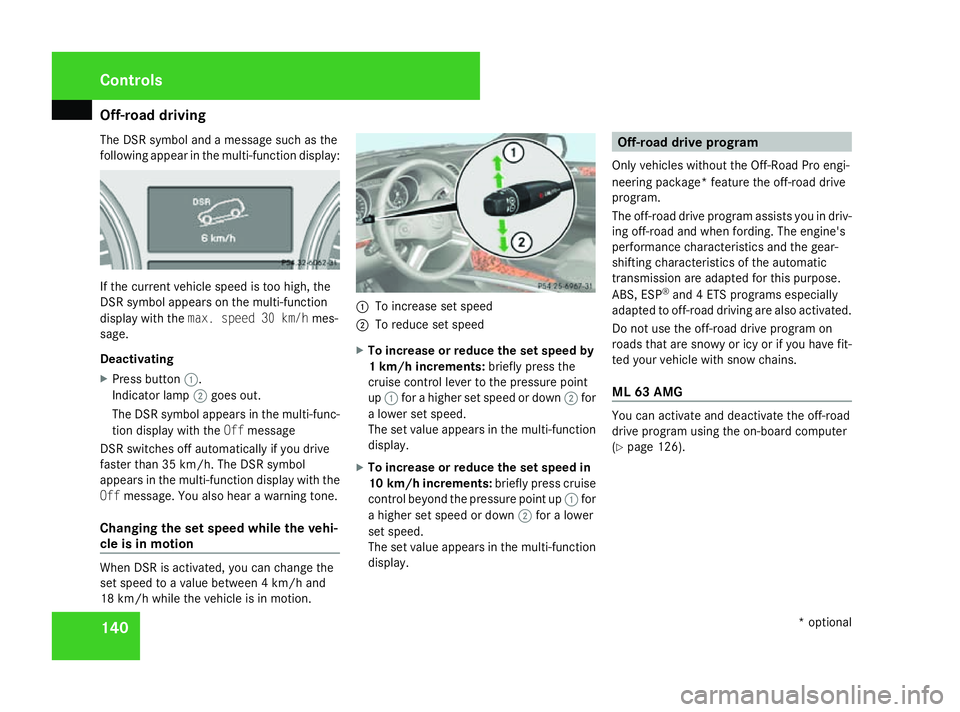
The DSR symbol and a message such as the
following appear in the multi-function display: If the current vehicle speed is too high, the
DSR symbol appears on the multi-function
display with the max. speed 30 km/h mes-
sage.
Deactivating
X Press button 1.
Indicator lamp 2goes out.
The DSR symbol appears in the multi-func-
tion display with the Offmessage
DSR switches off automatically if you drive
faster than 35 km/h. The DSR symbol
appears in the multi-function display with the
Off message. You also hear a warning tone.
Changing the set speed while the vehi-
cle is in motion When DSR is activated, you can change the
set speed to a value between 4 km/h and
18 km/h while the vehicle is in motion. 1
To increase set speed
2 To reduce set speed
X To increase or reduce the set speed by
1 km/h increments: briefly press the
cruise control lever to the pressure point
up 1 for a higher set speed or down 2for
a lower set speed.
The set value appears in the multi-function
display.
X To increase or reduce the set speed in
10 km/h increments: briefly press cruise
control beyond the pressure point up 1for
a higher set speed or down 2for a lower
set speed.
The set value appears in the multi-function
display. Off-road drive program
Only vehicles without the Off-Road Pro engi-
neering package* feature the off-road drive
program.
The off-road drive program assists you in driv-
ing off-road and when fording. The engine's
performance characteristics and the gear-
shifting characteristics of the automatic
transmission are adapted for this purpose.
ABS, ESP ®
and 4 ETS programs especially
adapted to off-road driving are also activated.
Do not use the off-road drive program on
roads that are snowy or icy or if you have fit-
ted your vehicle with snow chains.
ML 63 AMG You can activate and deactivate the off-road
drive program using the on-board computer
(Y
page 126). Controls
* optional
164_AKB; 5; 5, en-GB
wobuchh,
Version: 2.10.6 2008-05-11T11:55:12+02:00 - Seite 140Dateiname: 6515_4293_02_buchblock.pdf; preflight
Page 144 of 381
Off-road driving
141
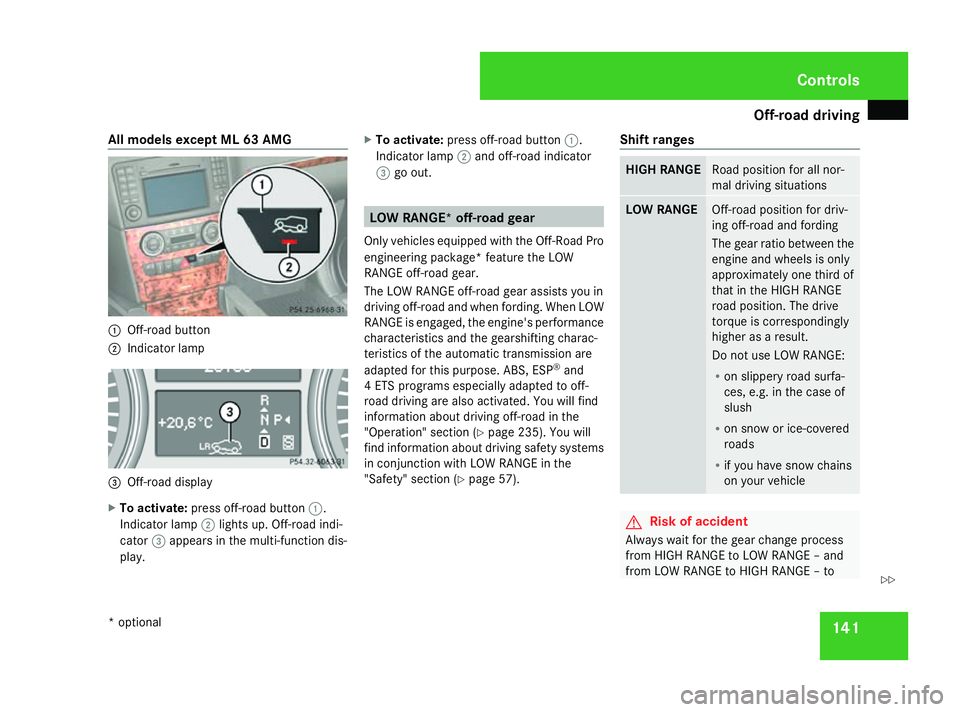
All models except ML 63 AMG
1
Off-road button
2 Indicator lamp 3
Off-road display
X To activate: press off-road button 1.
Indicator lamp 2lights up. Off-road indi-
cator 3appears in the multi-function dis-
play. X
To activate: press off-road button 1.
Indicator lamp 2and off-road indicator
3 go out. LOW RANGE* off-road gear
Only vehicles equipped with the Off-Road Pro
engineering package* feature the LOW
RANGE off-road gear.
The LOW RANGE off-road gear assists you in
driving off-road and when fording. When LOW
RANGE is engaged, the engine's performance
characteristics and the gearshifting charac-
teristics of the automatic transmission are
adapted for this purpose. ABS, ESP ®
and
4 ETS programs especially adapted to off-
road driving are also activated. You will find
information about driving off-road in the
"Operation" section (Y page 235). You will
find information about driving safety systems
in conjunction with LOW RANGE in the
"Safety" section (Y page 57). Shift ranges HIGH RANGE Road position for all nor-
mal driving situations
LOW RANGE Off-road position for driv-
ing off-road and fording
The gear ratio between the
engine and wheels is only
approximately one third of
that in the HIGH RANGE
road position. The drive
torque is correspondingly
higher as a result.
Do not use LOW RANGE:
R
on slippery road surfa-
ces, e.g. in the case of
slush
R on snow or ice-covered
roads
R if you have snow chains
on your vehicle G
Risk of accident
Always wait for the gear change process
from HIGH RANGE to LOW RANGE – and
from LOW RANGE to HIGH RANGE – to Controls
* optional
164_AKB; 5; 5, en-GB
wobuchh,
Version: 2.10.6 2008-05-11T11:55:12+02:00 - Seite 141 ZDateiname: 6515_4293_02_buchblock.pdf; preflight
Page 145 of 381
Off-road driving
142 complete. Do not turn off the engine while
changing gear and do not switch the auto-
matic transmission to another gear.
If you do not wait for the gear change proc-
ess to complete, it may not be correctly
implemented. The transfer case may then
be in neutral and the connection between
the engine and the drive axles may be dis-
engaged. The vehicle could then move
freely, even if a gear is engaged, and could
inadvertently start moving, particularly if it
is on a slope.
Observe the messages in the multi-function
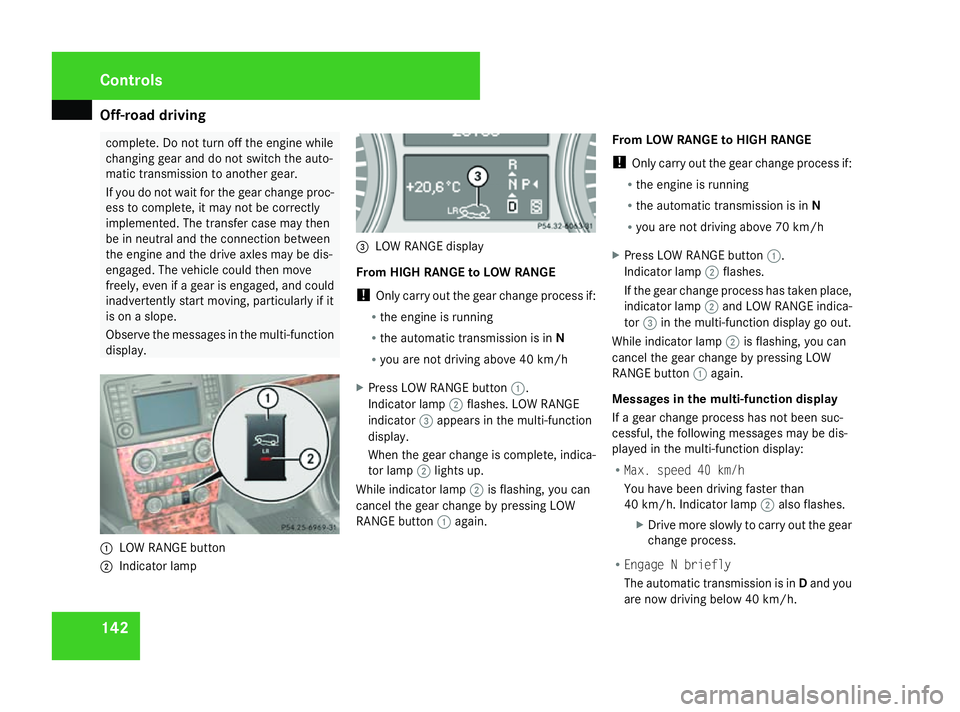
display. 1
LOW RANGE button
2 Indicator lamp 3
LOW RANGE display
From HIGH RANGE to LOW RANGE
! Only carry out the gear change process if:
R the engine is running
R the automatic transmission is in N
R you are not driving above 40 km/h
X Press LOW RANGE button 1.
Indicator lamp 2flashes. LOW RANGE
indicator 3appears in the multi-function
display.
When the gear change is complete, indica-
tor lamp 2lights up.
While indicator lamp 2is flashing, you can
cancel the gear change by pressing LOW
RANGE button 1again. From LOW RANGE to HIGH RANGE
!
Only carry out the gear change process if:
R the engine is running
R the automatic transmission is in N
R you are not driving above 70 km/h
X Press LOW RANGE button 1.
Indicator lamp 2flashes.
If the gear change process has taken place,
indicator lamp 2and LOW RANGE indica-
tor 3in the multi-function display go out.
While indicator lamp 2is flashing, you can
cancel the gear change by pressing LOW
RANGE button 1again.
Messages in the multi-function display
If a gear change process has not been suc-
cessful, the following messages may be dis-
played in the multi-function display:
R Max. speed 40 km/h
You have been driving faster than
40 km/h. Indicator lamp 2also flashes.
X Drive more slowly to carry out the gear
change process.
R Engage N briefly
The automatic transmission is in Dand you
are now driving below 40 km/h. Controls
164_AKB; 5; 5, en-GB
wobuchh,
Version: 2.10.6 2008-05-11T11:55:12+02:00 - Seite 142Dateiname: 6515_4293_02_buchblock.pdf; preflight
Page 147 of 381
Off-road driving
144
X
Start the engine.
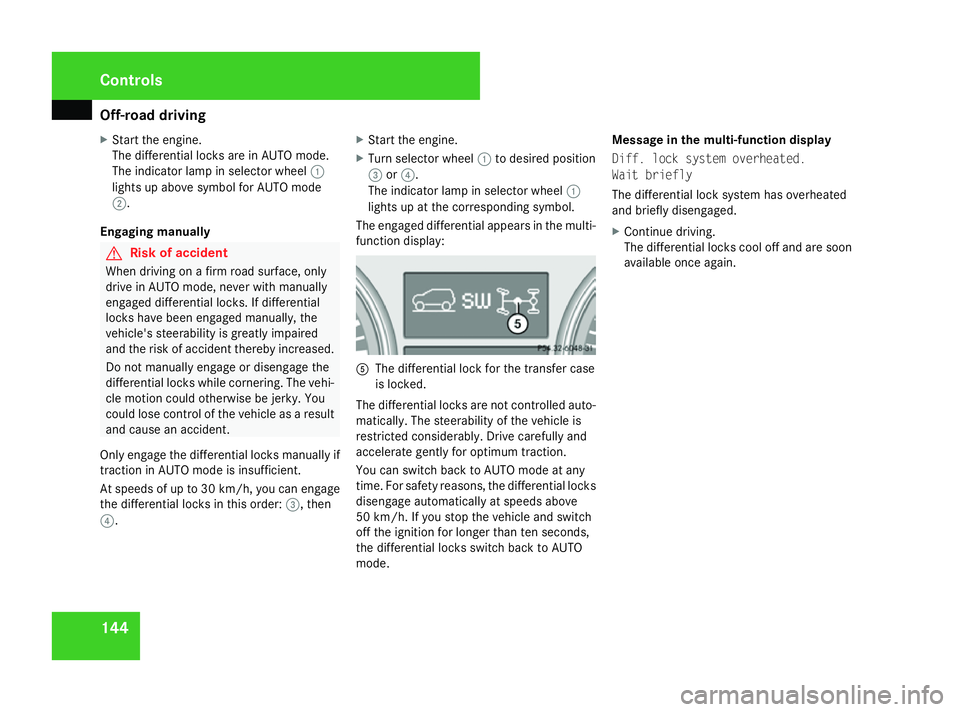
The differential locks are in AUTO mode.
The indicator lamp in selector wheel 1
lights up above symbol for AUTO mode
2.
Engaging manually G
Risk of accident
When driving on a firm road surface, only
drive in AUTO mode, never with manually
engaged differential locks. If differential
locks have been engaged manually, the
vehicle's steerability is greatly impaired
and the risk of accident thereby increased.
Do not manually engage or disengage the
differential locks while cornering. The vehi-
cle motion could otherwise be jerky. You
could lose control of the vehicle as a result
and cause an accident.
Only engage the differential locks manually if
traction in AUTO mode is insufficient.
At speeds of up to 30 km/ h,you can engage
the differential locks in this order: 3, then
4. X
Start the engine.
X Turn selector wheel 1to desired position
3 or4.
The indicator lamp in selector wheel 1
lights up at the corresponding symbol.
The engaged differential appears in the multi-
function display: 5
The differential lock for the transfer case
is locked.
The differential locks are not controlled auto-
matically. The steerability of the vehicle is
restricted considerably. Drive carefully and
accelerate gently for optimum traction.
You can switch back to AUTO mode at any
time. For safety reasons, the differential locks
disengage automatically at speeds above
50 km/h. If you stop the vehicle and switch
off the ignition for longer than ten seconds,
the differential locks switch back to AUTO
mode. Message in the multi-function display
Diff. lock system overheated.
Wait briefly
The differential lock system has overheated
and briefly disengaged.
X
Continue driving.
The differential locks cool off and are soon
available once again. Cont
rols
164_AKB; 5; 5, en-GB
wobuchh
,V ersion: 2.10.6
2008-05-11T11:55:12+02:00 - Seite 144 Dateiname: 6515_4293_02_buchblock.pdf; preflight
Page 149 of 381
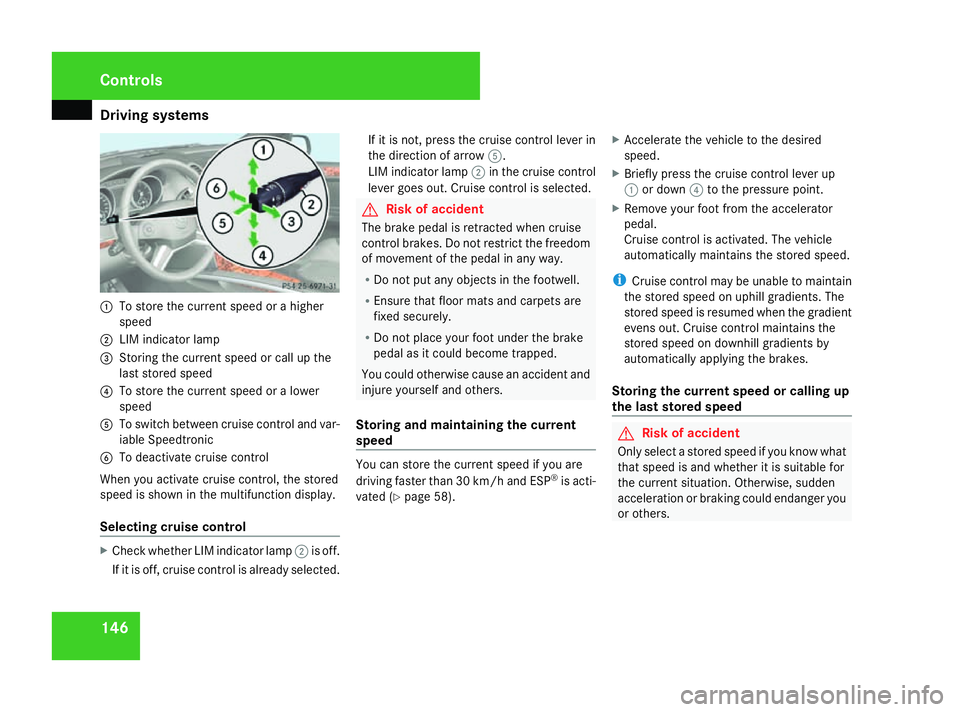
Driving sys
tems 1461
To store the current speed or a higher
speed
2 LIM indicator lamp
3 Storing the current speed or call up the
last stored speed
4 To store the current speed or a lower
speed
5 To switch between cruise control and var-
iable Speedtronic
6 To deactivate cruise control
When you activate cruise control, the stored
speed is shown in the multifunction display.
Selecting cruise control X
Check whether LIM indicator lamp 2is off.
If it is off, cruise control is already selected. If it is not, press the cruise control lever in
the direction of arrow
5.
LIM indicator lamp 2in the cruise control
lever goes out. Cruise control is selected. G
Risk of accident
The brake pedal is retracted when cruise
control brakes. Do not restrict the freedom
of movement of the pedal in any way.
R Do not put any objects in the footwell.
R Ensure that floor mats and carpets are
fixed securely.
R Do not place your foot under the brake
pedal as it could become trapped.
You could otherwise cause an accident and
injure yourself and others.
Storing and maintaining the current
speed You can store the current speed if you are
driving faster than 30 km/h and ESP
®
is acti-
vated (Y page 58). X
Accelerate the vehicle to the desired
speed.
X Briefly press the cruise control lever up
1 or down 4to the pressure point.
X Remove your foot from the accelerator
pedal.
Cruise control is activated. The vehicle
automatically maintains the stored speed.
i Cruise control may be unable to maintain
the stored speed on uphill gradients. The
stored speed is resumed when the gradient
evens out. Cruise control maintains the
stored speed on downhill gradients by
automatically applying the brakes.
Storing the current speed or calling up
the last stored speed G
Risk of accident
Only select a stored speed if you know what
that speed is and whether it is suitable for
the current situation. Otherwise, sudden
acceleration or braking could endanger you
or others. Controls
164_AKB; 5; 5, en-GB
wobuchh
,V ersion: 2.10.6
2008-05-11T11:55:12+02:00 - Seite 146 Dateiname: 6515_4293_02_buchblock.pdf; preflight
Page 152 of 381
Driving sys
tems 149under braking or acceleration. The vehi-
cle could start to skid.
R if the sensors are dirty or there is poor
visibility, e.g. due to snow, rain or fog.
Distance control may be impaired.
Always pay attention to traffic conditions
even when Distronic is activated. Other-
wise, you may fail to recognise danger in
time, could cause an accident and injure
yourself and others.
If there is no vehicle in front, Distronic oper-
ates in the same way as cruise control. Dis-
tronic functions in the 30 km/h to
180 km/h range. G
Risk of accident
Distronic brakes your vehicle at a maximum
of 2 m/s 2
, depending on its speed. This
corresponds to approximately 20% of your
vehicle's maximum braking power. You
must also apply the brakes yourself if this
braking power is not sufficient.
If Distronic detects a risk of collision with a
vehicle in front, an intermittent warning
tone sounds. In addition, the ldistance
warning lamp in the instrument cluster
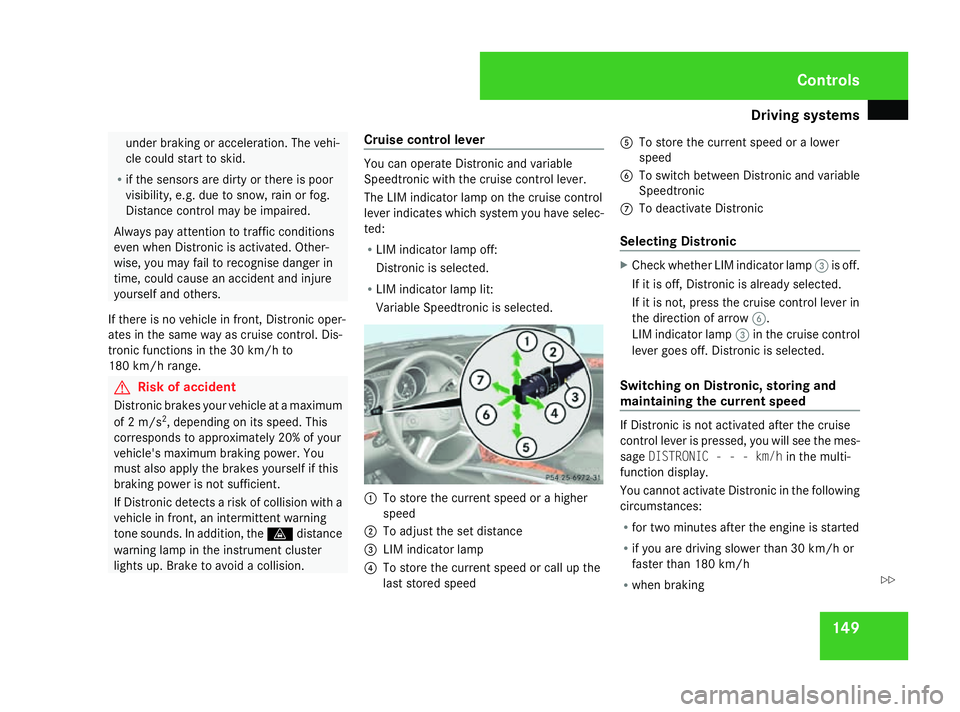
lights up. Brake to avoid a collision. Cruise control lever You can operate Distronic and variable
Speedtronic with the cruise control lever.
The LIM indicator lamp on the cruise control
lever indicates which system you have selec-
ted:
R LIM indicator lamp off:
Distronic is selected.
R LIM indicator lamp lit:
Variable Speedtronic is selected. 1
To store the current speed or a higher
speed
2 To adjust the set distance
3 LIM indicator lamp
4 To store the current speed or call up the
last stored speed 5
To store the current speed or a lower
speed
6 To switch between Distronic and variable
Speedtronic
7 To deactivate Distronic
Selecting Distronic X
Check whether LIM indicator lamp 3is off.
If it is off, Distronic is already selected.
If it is not, press the cruise control lever in
the direction of arrow 6.
LIM indicator lamp 3in the cruise control
lever goes off. Distronic is selected.
Switching on Distronic, storing and
maintaining the current speed If Distronic is not activated after the cruise
control lever is pressed, you will see the mes-
sage
DISTRONIC - - - km/h in the multi-
function display.
You cannot activate Distronic in the following
circumstances:
R for two minutes after the engine is started
R if you are driving slower than 30 km/h or
faster than 180 km/h
R when braking Controls
164_AKB; 5; 5, en-GB
wobuchh
,V ersion: 2.10.6
2008-05-11T11:55:12+02:00 - Seite 149 ZDateiname: 6515_4293_02_buchblock.pdf; preflight