display MERCEDES-BENZ ML SUV 2008 Owner's Manual
[x] Cancel search | Manufacturer: MERCEDES-BENZ, Model Year: 2008, Model line: ML SUV, Model: MERCEDES-BENZ ML SUV 2008Pages: 381, PDF Size: 7.18 MB
Page 71 of 381
Opening and closing
68
i
You can also use the KEYLESS GO key to
open and close the side windows and slid-
ing/tilting sunroof*. You can open them
using the summer opening feature
(Y page 101). You can close them using
the convenience closing feature
(Y page 102).
i If the vehicle has been parked for a long
time, you must pull the door handle to acti-
vate the KEYLESS GO functions.
Important notes R
If the KEYLESS GO key is removed from the
vehicle (e.g. in luggage or an article of
clothing), it will no longer be possible to
lock or start the vehicle.
R If the KEYLESS GO key is removed from the
vehicle while the engine is running, e.g. if
the front passenger leaves the vehicle with
the KEYLESS GO key, the following mes-
sage will appear in the multi-function dis-
play as you pull away: Key not detec-
ted.
R If the KEYLESS GO key is in the vehicle, the
vehicle can be started at any time. If you
have left the KEYLESS GO key in the vehi-
cle, the following message will appear in the multi-function display when you lock
the vehicle:
Key still in vehicle .
Factory settings X
To unlock centrally: pull the door handle.
The turn signals flash once. The locking
knobs in the doors pop up. The anti-theft
alarm system* is deactivated.
When it is dark, the surround lighting also
comes on if it is activated in the on-board
computer.
i If you do not open either a door or the
tailgate after you have unlocked the vehi-
cle, it will automatically relock after approx-
imately 40 seconds.
i There is a danger of the vehicle being
unlocked unintentionally. This could occur
if the KEYLESS GO key is within one metre
of the vehicle and the door handle is
splashed with water. This could also occur
when cleaning the door handle. 1
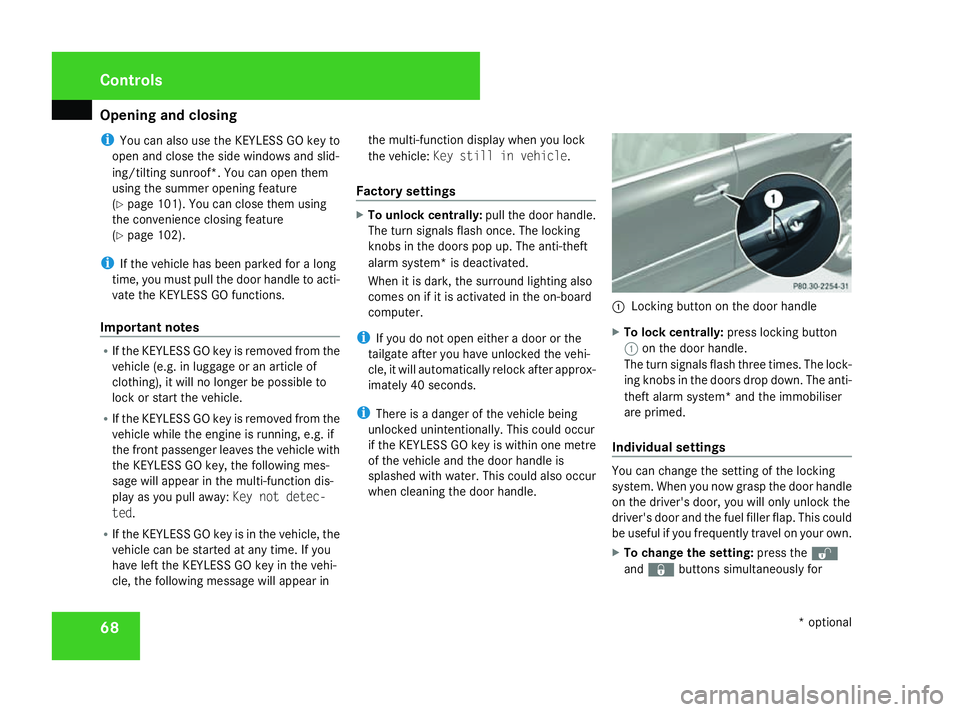
Locking button on the door handle
X To lock centrally: press locking button
1 on the door handle.
The turn signals flash three times. The lock-
ing knobs in the doors drop down. The anti-
theft alarm system* and the immobiliser
are primed.
Individual settings You can change the setting of the locking
system. When you now grasp the door handle
on the driver's door, you will only unlock the
driver's door and the fuel filler flap. This could
be useful if you frequently travel on your own.
X
To change the setting: press thek
and j buttons simultaneously for Controls
* optional
164_AKB; 5; 5, en-GB
wobuchh,
Version: 2.10.6 2008-05-11T11:55:12+02:00 - Seite 68Dateiname: 6515_4293_02_buchblock.pdf; preflight
Page 86 of 381
Steering wheel
83Steering wheel
Points to remember
Depending on the vehicle equipment, you can
adjust the steering wheel either manually or
electrically*. G
Risk of accident
Only adjust the steering wheel when the
vehicle is stationary and do not pull away
until the steering wheel adjustment mech-
anism is locked in position. You might oth-
erwise drive without the steering wheel
adjustment mechanism being locked in
position. As a result you could be distracted
from road and traffic conditions by an unex-
pected movement of the steering wheel
and thereby cause an accident.
The steerability of the vehicle is however
not affected.
When you adjust the steering wheel, make
sure that:
R the steering wheel can be reached with
your arms slightly bent
R you can move your legs freely
R you can see all the displays in the instru-
ment cluster clearly Adjusting the steering wheel man-
ually
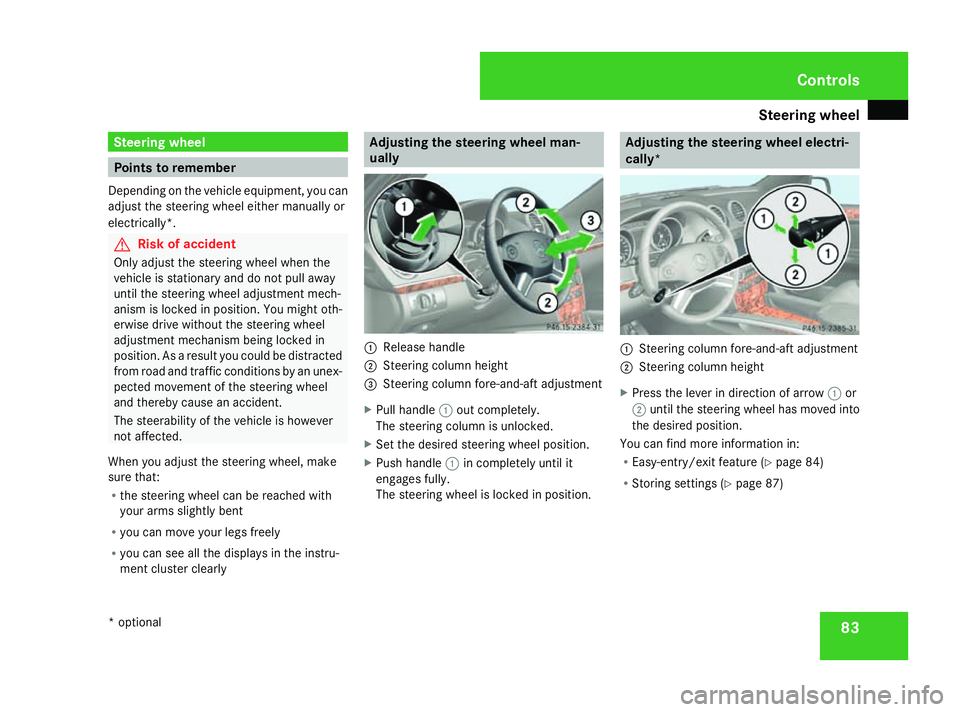
1
Release handle
2 Steering column height
3 Steering column fore-and-aft adjustment
X Pull handle 1out completely.
The steering column is unlocked.
X Set the desired steering wheel position.
X Push handle 1in completely until it
engages fully.
The steering wheel is locked in position. Adjusting the steering wheel electri-
cally*
1
Steering column fore-and-aft adjustment
2 Steering column height
X Press the lever in direction of arrow 1or
2 until the steering wheel has moved into
the desired position.
You can find more information in:
R Easy-entry/exit feature (Y page 84)
R Storing settings (Y page 87) Controls
* optional
164_AKB; 5; 5, en-GB
wobuchh,
Version: 2.10.6 2008-05-11T11:55:12+02:00 - Seite 83 ZDateiname: 6515_4293_02_buchblock.pdf; preflight
Page 95 of 381
Lights
92 a result of the seat moving. This could
cause an accident. G
Risk of accident
Only adjust the steering wheel when the
vehicle is stationary and do not pull away
until the steering wheel adjustment mech-
anism is locked in position. You might oth-
erwise drive without the steering wheel
adjustment mechanism being locked in
position. As a result you could be distracted
from road and traffic conditions by an unex-
pected movement of the steering wheel
and thereby cause an accident.
The steerability of the vehicle is however
not affected.
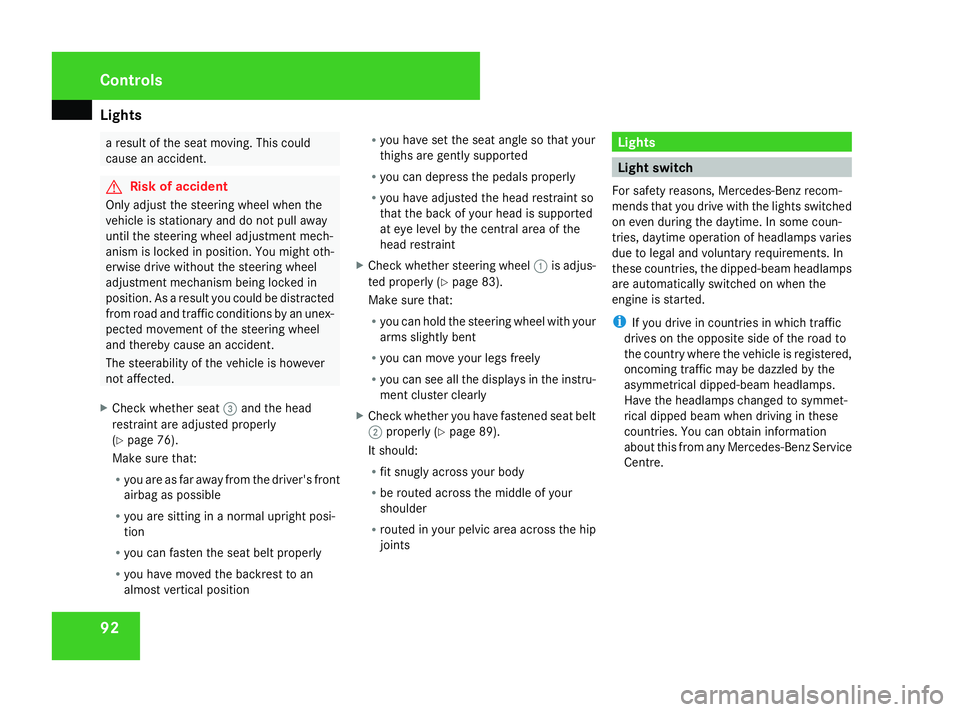
X Check whether seat 3and the head
restraint are adjusted properly
(Y page 76).
Make sure that:
R you are as far away from the driver's front
airbag as possible
R you are sitting in a normal upright posi-
tion
R you can fasten the seat belt properly
R you have moved the backrest to an
almost vertical position R
you have set the seat angle so that your
thighs are gently supported
R you can depress the pedals properly
R you have adjusted the head restraint so
that the back of your head is supported
at eye level by the central area of the
head restraint
X Check whether steering wheel 1is adjus-
ted properly (Y page 83).
Make sure that:
R you can hold the steering wheel with your
arms slightly bent
R you can move your legs freely
R you can see all the displays in the instru-
ment cluster clearly
X Check whether you have fastened seat belt
2 properly (Y page 89).
It should:
R fit snugly across your body
R be routed across the middle of your
shoulder
R routed in your pelvic area across the hip
joints Lights
Light switch
For safety reasons, Mercedes-Benz recom-
mends that you drive with the lights switched
on even during the daytime. In some coun-
tries, daytime operation of headlamps varies
due to legal and voluntary requirements. In
these countries, the dipped-beam headlamps
are automatically switched on when the
engine is started.
i If you drive in countries in which traffic
drives on the opposite side of the road to
the country where the vehicle is registered,
oncoming traffic may be dazzled by the
asymmetrical dipped-beam headlamps.
Have the headlamps changed to symmet-
rical dipped beam when driving in these
countries. You can obtain information
about this from any Mercedes-Benz Service
Centre. Controls
164_AKB; 5; 5, en-GB
wobuchh,
Version: 2.10.6 2008-05-11T11:55:12+02:00 - Seite 92Dateiname: 6515_4293_02_buchblock.pdf; preflight
Page 102 of 381
Side windows
99Rear window wiper
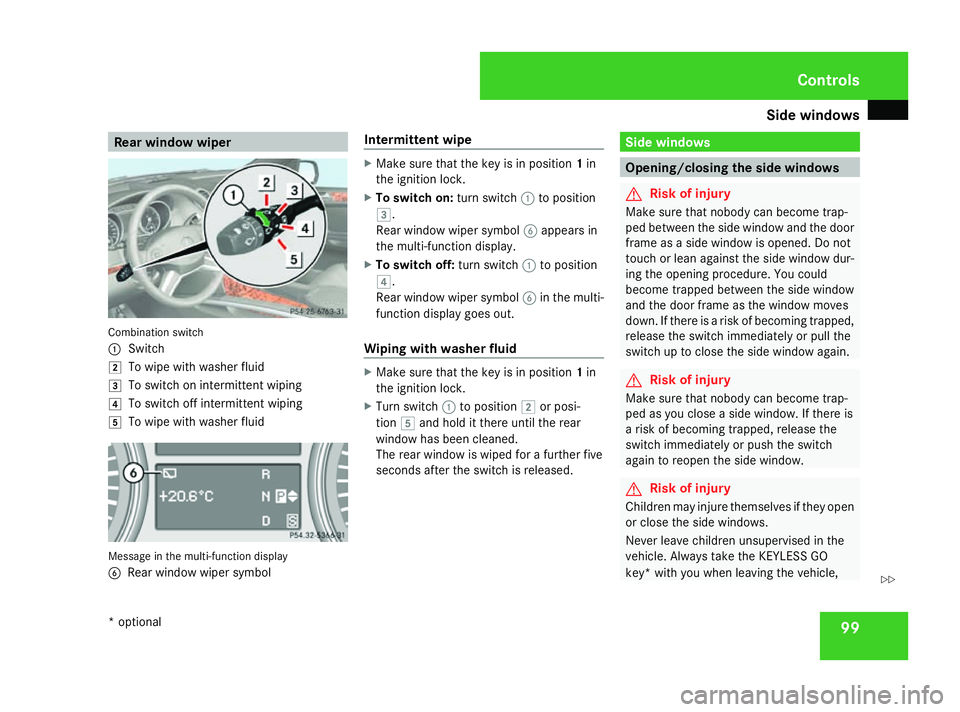
Combination switch
1
Switch
% To wipe with washer fluid
& To switch on intermittent wiping
( To switch off intermittent wiping
) To wipe with washer fluid Message in the multi-function display
6 Rear window wiper symbol Intermittent wipe X
Make sure that the key is in position 1in
the ignition lock.
X To switch on: turn switch1to position
&.
Rear window wiper symbol 6appears in
the multi-function display.
X To switch off: turn switch1to position
(.
Rear window wiper symbol 6in the multi-
function display goes out.
Wiping with washer fluid X
Make sure that the key is in position 1in
the ignition lock.
X Turn switch 1to position %or posi-
tion )and hold it there until the rear
window has been cleaned.
The rear window is wiped for a further five
seconds after the switch is released. Side windows
Opening/closing the side windows
G
Risk of injury
Make sure that nobody can become trap-
ped between the side window and the door
frame as a side window is opened. Do not
touch or lean against the side window dur-
ing the opening procedure. You could
become trapped between the side window
and the door frame as the window moves
down. If there is a risk of becoming trapped,
release the switch immediately or pull the
switch up to close the side window again. G
Risk of injury
Make sure that nobody can become trap-
ped as you close a side window. If there is
a risk of becoming trapped, release the
switch immediately or push the switch
again to reopen the side window. G
Risk of injury
Children may injure themselves if they open
or close the side windows.
Never leave children unsupervised in the
vehicle. Always take the KEYLESS GO
key* with you when leaving the vehicle, Controls
* optional
164_AKB; 5; 5, en-GB
wobuchh,
Version: 2.10.6 2008-05-11T11:55:12+02:00 - Seite 99 ZDateiname: 6515_4293_02_buchblock.pdf; preflight
Page 110 of 381
Transmission
107Automatic transmission
! Warm up the engine quickly. Do not use
the engine's full performance until it has
reached operating temperature.
Only shift the automatic transmission to R
or Pwhen the vehicle is stationary.
Where possible, avoid spinning the drive
wheels when pulling away on slippery
roads. You could otherwise damage the
drive train.
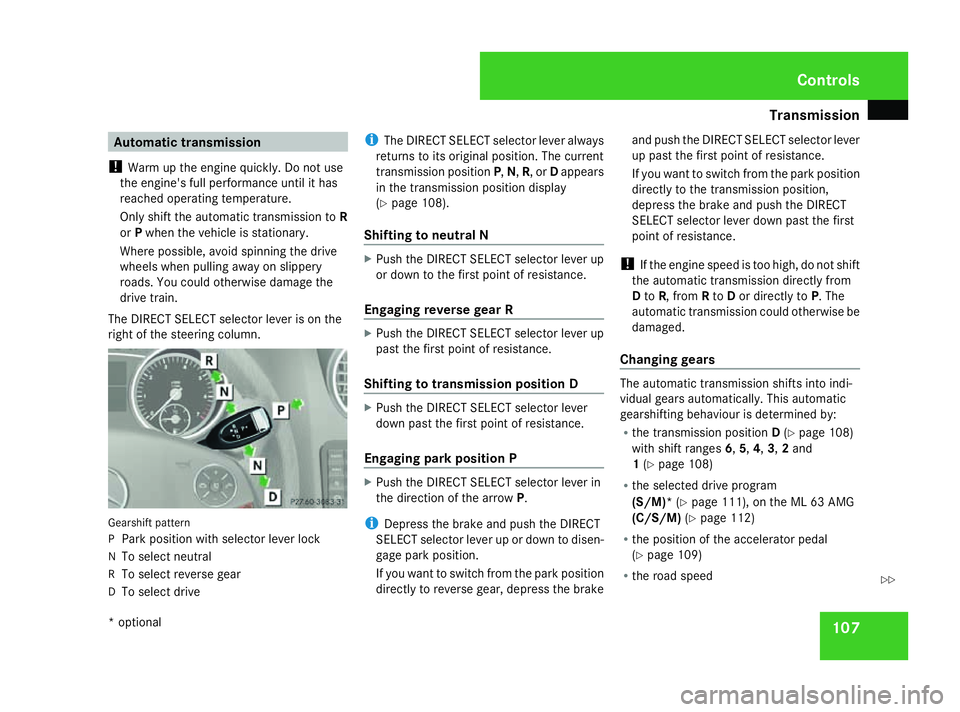
The DIRECT SELECT selector lever is on the
right of the steering column. Gearshift pattern
P
Park position with selector lever lock
N To select neutral
R To select reverse gear
D To select drive i
The DIRECT SELECT selector lever always
returns to its original position. The current
transmission position P,N, R, or Dappears
in the transmission position display
(Y page 108).
Shifting to neutral N X
Push the DIRECT SELECT selector lever up
or down to the first point of resistance.
Engaging reverse gear R X
Push the DIRECT SELECT selector lever up
past the first point of resistance.
Shifting to transmission position D X
Push the DIRECT SELECT selector lever
down past the first point of resistance.
Engaging park position P X
Push the DIRECT SELECT selector lever in
the direction of the arrow P.
i Depress the brake and push the DIRECT
SELECT selector lever up or down to disen-
gage park position.
If you want to switch from the park position
directly to reverse gear, depress the brake and push the DIRECT SELECT selector lever
up past the first point of resistance.
If you want to switch from the park position
directly to the transmission position,
depress the brake and push the DIRECT
SELECT selector lever down past the first
point of resistance.
! If the engine speed is too high, do not shift
the automatic transmission directly from
D to R, from Rto Dor directly to P. The
automatic transmission could otherwise be
damaged.
Changing gears The automatic transmission shifts into indi-
vidual gears automatically. This automatic
gearshifting behaviour is determined by:
R
the transmission position D(Y page 108)
with shift ranges 6,5,4,3,2and
1 (Y page 108)
R the selected drive program
(S/M)* (Ypage 111), on the ML 63 AMG
(C/S/M) (Ypage 112)
R the position of the accelerator pedal
(Y page 109)
R the road speed Controls
* optional
164_AKB; 5; 5, en-GB
wobuchh
,V ersion: 2.10.6
2008-05-11T11:55:12+02:00 - Seite 107 ZDateiname: 6515_4293_02_buchblock.pdf; preflight
Page 111 of 381
Transmission
108
In transmission position
D(Y page 109), you
can influence the gearshifts made by the
automatic transmission by using the DIRECT
SELECT steering wheel gearshift buttons to:
R restrict the shift range
R change gear yourself on vehicles with the
manual gearshift program (S/M)*
R change gear yourself on the ML 63 AMG
with the manual gearshift program
(S/C/M)*
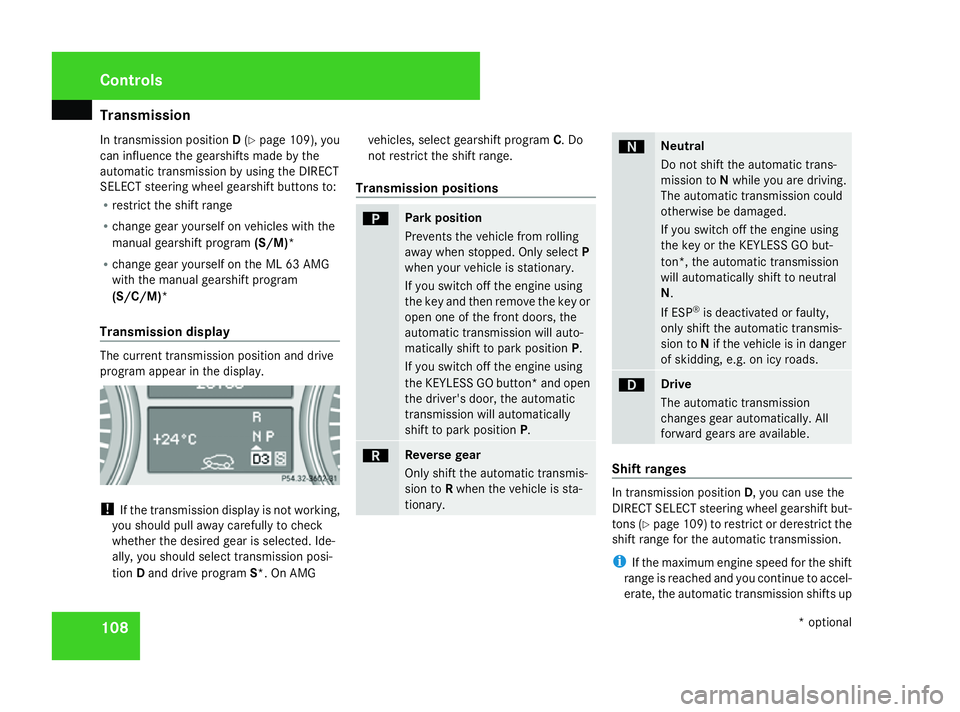
Transmission display The current transmission position and drive
program appear in the display. !
If the transmission display is not working,
you should pull away carefully to check
whether the desired gear is selected. Ide-
ally, you should select transmission posi-
tion Dand drive program S*. On AMG vehicles, select gearshift program
C. Do
not restrict the shift range.
Transmission positions ì Park position
Prevents the vehicle from rolling
away when stopped. Only select
P
when your vehicle is stationary.
If you switch off the engine using
the key and then remove the key or
open one of the front doors, the
automatic transmission will auto-
matically shift to park position P.
If you switch off the engine using
the KEYLESS GO button* and open
the driver's door, the automatic
transmission will automatically
shift to park position P. í Reverse gear
Only shift the automatic transmis-
sion to
Rwhen the vehicle is sta-
tionary. ë Neutral
Do not shift the automatic trans-
mission to
Nwhile you are driving.
The automatic transmission could
otherwise be damaged.
If you switch off the engine using
the key or the KEYLESS GO but-
ton*, the automatic transmission
will automatically shift to neutral
N.
If ESP ®
is deactivated or faulty,
only shift the automatic transmis-
sion to Nif the vehicle is in danger
of skidding, e.g. on icy roads. ê Drive
The automatic transmission
changes gear automatically. All
forward gears are available.
Shift ranges
In transmission position
D, you can use the
DIRECT SELECT steering wheel gearshift but-
tons (Y page 109) to restrict or derestrict the
shift range for the automatic transmission.
i If the maximum engine speed for the shift
range is reached and you continue to accel-
erate, the automatic transmission shifts up Controls
* optional
164_AKB; 5; 5, en-GB
wobuchh
,V ersion: 2.10.6
2008-05-11T11:55:12+02:00 - Seite 108 Dateiname: 6515_4293_02_buchblock.pdf; preflight
Page 112 of 381
Transmission
109
in order to prevent the engine from over-
revving, even if the shift range is restricted. Driving situation
è The braking effect of the engine can
be used in this position.
ç To use the braking effect of the
engine on downhill gradients and
for driving:
R
on steep mountain roads
R in mountainous terrain
R in arduous conditions æ To use the braking effect of the
engine on extremely steep downhill
gradients and long downhill
stretches
Restricting the shift range
X
Press the left-hand button on the steering
wheel (Y page 109).
The set shift range appears in the multi-
function display. Derestricting the shift range
X
Press the right-hand button on the steering
wheel (Y page 109).
The set shift range appears in the multi-
function display.
Driving tips Accelerator pedal position
Your style of driving influences how the auto-
matic transmission shifts gear:
R
little throttle: early upshifts
R more throttle: late upshifts
Kickdown
Use kickdown for maximum acceleration.
X Depress the accelerator pedal beyond the
pressure point.
The transmission shifts to a lower gear
depending on the engine speed.
X Ease off the accelerator pedal once the
desired speed is reached.
The automatic transmission shifts back up. Trailer towing
X
Drive in the middle of the engine speed
range on uphill gradients.
X Shift down to shift range 3or 2depending
on the incline of the uphill or downhill gra-
dient (Y page 108), even if cruise control is
activated. DIRECT SELECT steering wheel gear-
shift buttons
You can restrict or derestrict the shift range
using the DIRECT SELECT steering wheel
gearshift buttons. In the manual drive pro-
gram, you can use the DIRECT SELECT steer-
ing wheel gearshift buttons or DIRECT
SELECT steering wheel gearshift paddles to
change gears.
i You can only use all the functions of the
DIRECT SELECT steering wheel gearshift
buttons in drive program Monce the vehi-
cle has reached its operating temperature. Controls
164_AKB; 5; 5, en-GB
wobuchh
,V ersion: 2.10.6
2008-05-11T11:55:12+02:00 - Seite 109 ZDateiname: 6515_4293_02_buchblock.pdf; preflight
Page 113 of 381
Transmission
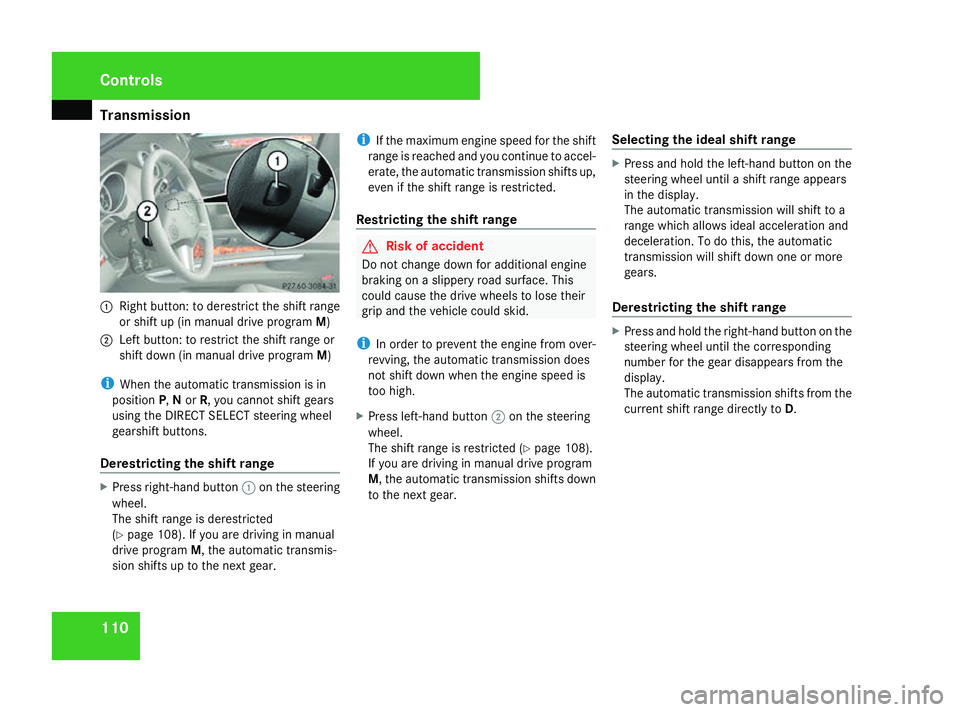
1101
Right button: to derestrict the shift range
or shift up (in manual drive program M)
2 Left button: to restrict the shift range or
shift down (in manual drive program M)
i When the automatic transmission is in
position P,Nor R, you cannot shift gears
using the DIRECT SELECT steering wheel
gearshift buttons.
Derestricting the shift range X
Press right-hand button 1on the steering
wheel.
The shift range is derestricted
(Y page 108). If you are driving in manual
drive program M, the automatic transmis-
sion shifts up to the next gear. i
If the maximum engine speed for the shift
range is reached and you continue to accel-
erate, the automatic transmission shifts up,
even if the shift range is restricted.
Restricting the shift range G
Risk of accident
Do not change down for additional engine
braking on a slippery road surface. This
could cause the drive wheels to lose their
grip and the vehicle could skid.
i In order to prevent the engine from over-
revving, the automatic transmission does
not shift down when the engine speed is
too high.
X Press left-hand button 2on the steering
wheel.
The shift range is restricted (Y page 108).
If you are driving in manual drive program
M, the automatic transmission shifts down
to the next gear. Selecting the ideal shift range X
Press and hold the left-hand button on the
steering wheel until a shift range appears
in the display.
The automatic transmission will shift to a
range which allows ideal acceleration and
deceleration. To do this, the automatic
transmission will shift down one or more
gears.
Derestricting the shift range X
Press and hold the right-hand button on the
steering wheel until the corresponding
number for the gear disappears from the
display.
The automatic transmission shifts from the
current shift range directly to D.Controls
164_AKB; 5; 5, en-GB
wobuchh
,V ersion: 2.10.6
2008-05-11T11:55:12+02:00 - Seite 110 Dateiname: 6515_4293_02_buchblock.pdf; preflight
Page 114 of 381
Transmission
111Gearshift program
i The description does not apply to the ML
63 AMG. For a description of the gearshift
program of the ML 63 AMG, see
(Y page 112).
You can select either gearshift program Sor
M on vehicles with the Off-Road Pro engi-
neering package*.
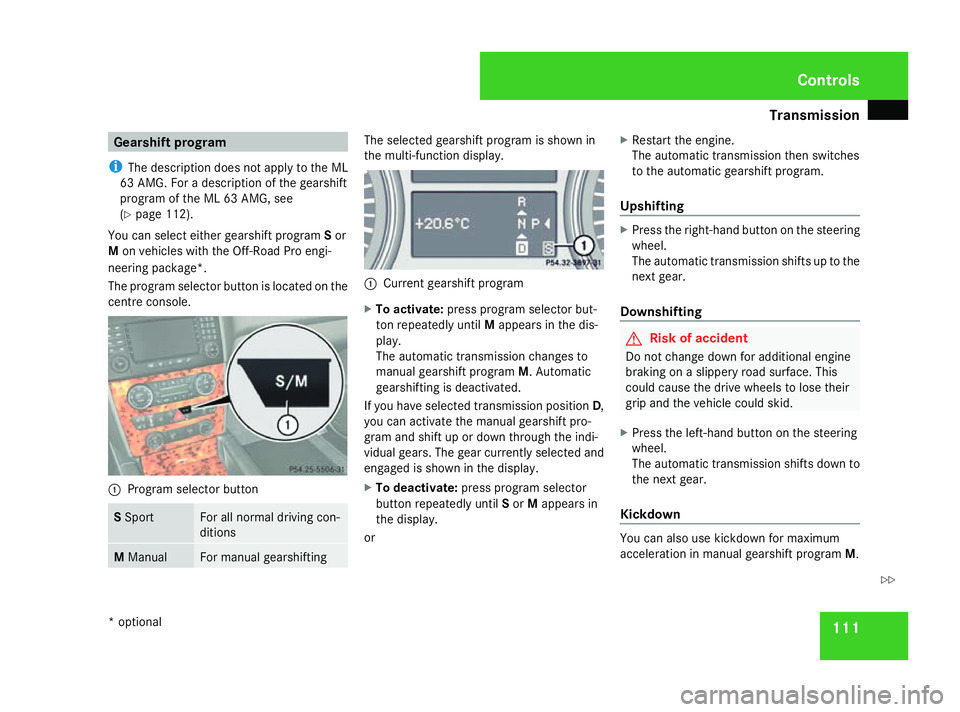
The program selector button is located on the
centre console. 1
Program selector button S
Sport For all normal driving con-
ditions
M
Manual For manual gearshifting The selected gearshift program is shown in
the multi-function display.
1
Current gearshift program
X To activate: press program selector but-
ton repeatedly until Mappears in the dis-
play.
The automatic transmission changes to
manual gearshift program M. Automatic
gearshifting is deactivated.
If you have selected transmission position D,
you can activate the manual gearshift pro-
gram and shift up or down through the indi-
vidual gears. The gear currently selected and
engaged is shown in the display.
X To deactivate: press program selector
button repeatedly until Sor Mappears in
the display.
or X
Restart the engine.
The automatic transmission then switches
to the automatic gearshift program.
Upshifting X
Press the right-hand button on the steering
wheel.
The automatic transmission shifts up to the
next gear.
Downshifting G
Risk of accident
Do not change down for additional engine
braking on a slippery road surface. This
could cause the drive wheels to lose their
grip and the vehicle could skid.
X Press the left-hand button on the steering
wheel.
The automatic transmission shifts down to
the next gear.
Kickdown You can also use kickdown for maximum
acceleration in manual gearshift program
M. Controls
* optional
164_AKB; 5; 5, en-GB
wobuchh
, Version: 2.10.6 2008-05-11T11:55:12+02:00 - Seite 111 ZDateiname: 6515_4293_02_buchblock.pdf; preflight
Page 115 of 381
Transmission
112
X
Depress the accelerator pedal beyond the
pressure point.
The transmission shifts to a lower gear
depending on the engine speed.
X Shift back up once the desired speed is
reached.
i If you apply full throttle, the automatic
transmission shifts up to the next gear
when the maximum engine speed is
reached. This prevents the engine from
overrevving.
i If you brake or bring the vehicle to a halt,
the automatic transmission shifts down to
a gear in which you can accelerate or pull
away most easily. Gearshift program (only ML 63 AMG)
You can choose between gearshift programs
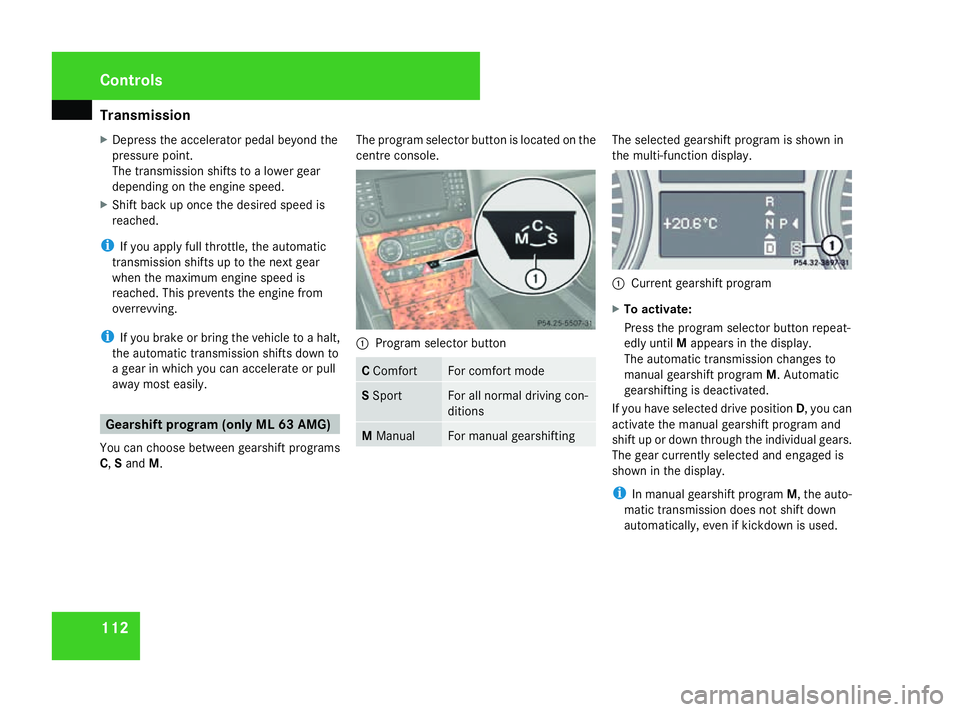
C, Sand M. The program selector button is located on the
centre console. 1
Program selector button C
Comfort For comfort mode
S
Sport For all normal driving con-
ditions
M
Manual For manual gearshifting The selected gearshift program is shown in
the multi-function display.
1
Current gearshift program
X To activate:
Press the program selector button repeat-
edly until Mappears in the display.
The automatic transmission changes to
manual gearshift program M. Automatic
gearshifting is deactivated.
If you have selected drive position D, you can
activate the manual gearshift program and
shift up or down through the individual gears.
The gear currently selected and engaged is
shown in the display.
i In manual gearshift program M, the auto-
matic transmission does not shift down
automatically, even if kickdown is used. Controls
164_AKB; 5; 5, en-GB
wobuchh
, Version: 2.10.6
2008-05-11T11:55:12+02:00 - Seite 112 Dateiname: 6515_4293_02_buchblock.pdf; preflight