battery MERCEDES-BENZ ML320 1997 Complete Repair Manual
[x] Cancel search | Manufacturer: MERCEDES-BENZ, Model Year: 1997, Model line: ML320, Model: MERCEDES-BENZ ML320 1997Pages: 4133, PDF Size: 88.89 MB
Page 3885 of 4133
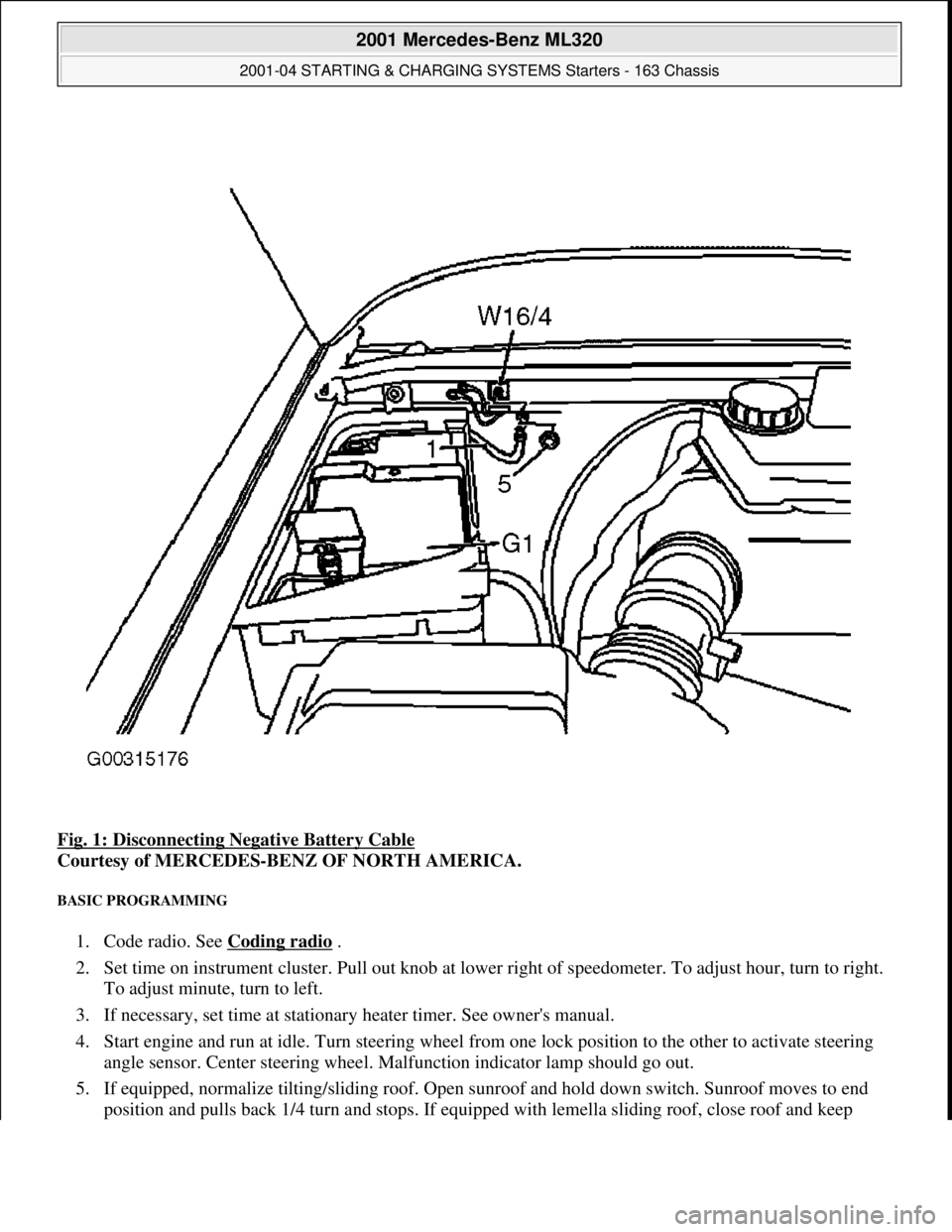
Fig. 1: Disconnecting Negative Battery Cable
Courtesy of MERCEDES-BENZ OF NORTH AMERICA.
BASIC PROGRAMMING
1. Code radio. See Coding radio .
2. Set time on instrument cluster. Pull out knob at lowe r right of speedometer. To adjust hour, turn to right.
To adjust minute, turn to left.
3. If necessary, set time at stationary heater timer. See owner's manual.
4. Start engine and run at idle. Turn steering wheel fr om one lock position to the other to activate steering
angle sensor. Center steering wheel. Ma lfunction indicator lamp should go out.
5. If equipped, normalize ti lting/sliding roof. Open sunroof and hold down switch. Sunroof moves to end
position and pulls back 1/4 turn and stops. If equipped with lemella slidin
g roof, close roof and keep
2001 Mercedes-Benz ML320
2001-04 STARTING & CHARGING SYSTEMS Starters - 163 Chassis
me
Saturday, October 02, 2010 3:19:47 PMPage 3 © 2006 Mitchell Repair Information Company, LLC.
Page 3887 of 4133
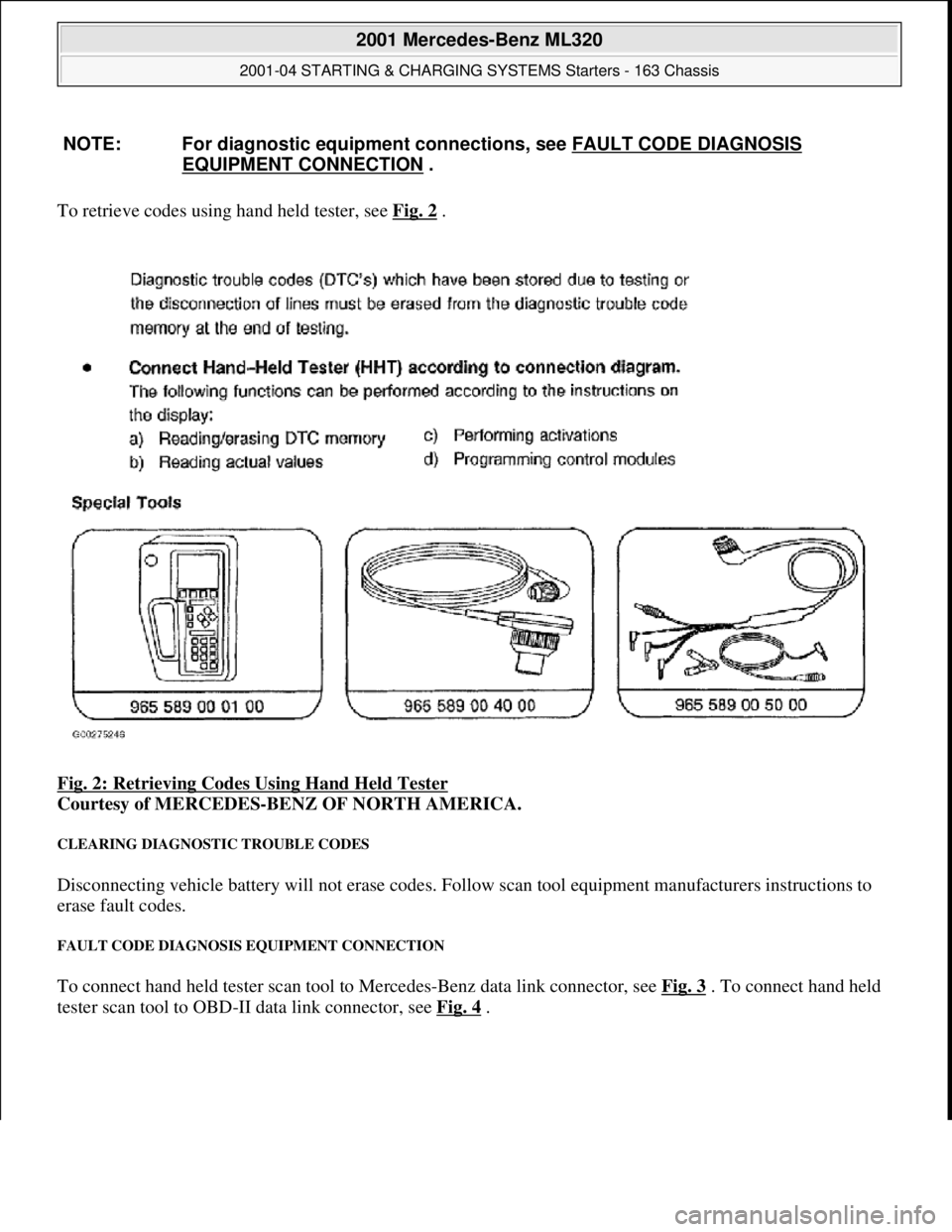
To retrieve codes using hand held tester, see Fig. 2 .
Fig. 2: Retrieving Codes Using Hand Held Tester
Courtesy of MERCEDES-BENZ OF NORTH AMERICA.
CLEARING DIAGNOSTIC TROUBLE CODES
Disconnecting vehicle battery will not erase codes. Follow scan tool equipment manufacturers instructions to
erase fault codes.
FAULT CODE DIAGNOSIS EQUIPMENT CONNECTION
To connect hand held tester scan tool to Mercedes-Benz data link connector, see Fig. 3 . To connect hand held
tester scan tool to OBD -II data link connector, see Fig. 4
.
NOTE: For diagnostic equipment conn
ections, see FAULT CODE DIAGNOSIS
EQUIPMENT CONNECTION .
2001 Mercedes-Benz ML320
2001-04 STARTING & CHARGING SYSTEMS Starters - 163 Chassis
me
Saturday, October 02, 2010 3:19:47 PMPage 5 © 2006 Mitchell Repair Information Company, LLC.
Page 3891 of 4133

Fig. 4: Connecting Hand Held Tester Scan Tool To OBD-II Data Link Connector
Courtesy of MERCEDES-BENZ OF NORTH AMERICA.
TESTING
Starter malfunctions may cause a Di agnostic Trouble Codes (DTCs) to be stored in Motor Electronics
Sequential Fuel Injection (ME-SFI) sy stem. After repairs are completed check for and erase any DTCs stored in
(ME-SFI) system. See appropriate SE LF-DIAGNOSTICS article in ENGINE PERFORMANCE. If cause of
starter malfunction is not engine pe rformance related, replace starter.
REMOVAL & INSTALLATION
STARTER
Removal & Installation
1. Disconnect and shield negative battery cable. See BATTERY DISCONNECT/CONNECT under
SERVICE PRECAUTIONS.
2. Remove nut (2) for inner fender. See Fig. 5
. Pull front and rear section of inner fender (1) downward.
Move inner fender away inward and downward. Pull toward outside over wheel. DO NOT damage fender
cutout or paint.
3. On vehicles with 112 engine, remove nut (6) at shield (5) of left engine mount and take out shield. See
Fig. 6
.
4. On all vehicles, disconnect circuit 30 (1) and circuit 50 (2) cables from starter. See Fig. 6
. Remove bolts
(3) for starter-to-crankcase. Take starter (M1) out to the side.
5. If replacing starter on vehicles with manual transmission, check ring gear at flywheel for wear and
damage. If replacing starter on vehicles with auto matic transmission, check ring gear on drive plate for
wear and damage. Repair or repl ace damaged parts as necessary.
6. To install, reverse removal proce dure. Replace bolts with locking splines, micro-encapsulated bolts and
self-locking nuts. Mating thread of mi cro-encapsulated bolts must be cleaned to remove all residue of old
bolt locking compound. Tighten fasteners to specification. See TORQUE SPECIFICATIONS
. Connect
battery. See BATTERY DISCONNECT/CONNECTunder SERVICE PRECAUTIONS.
NOTE: Numbers and letters in text refe
r to numbers and letters in figures.
2001 Mercedes-Benz ML320
2001-04 STARTING & CHARGING SYSTEMS Starters - 163 Chassis
me
Saturday, October 02, 2010 3:19:47 PMPage 9 © 2006 Mitchell Repair Information Company, LLC.
Page 3896 of 4133
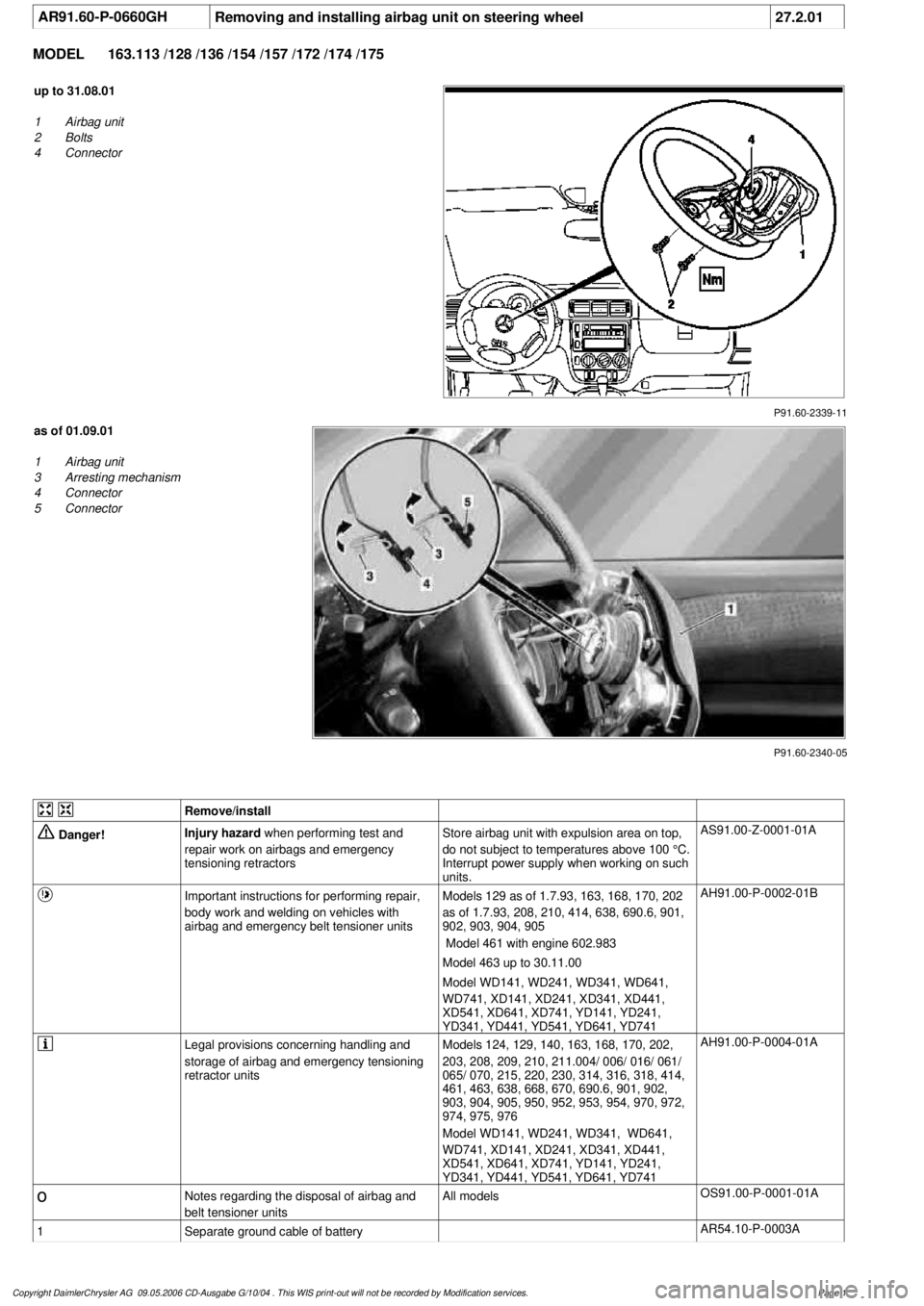
AR91.60-P-0660GH
Removing and installing airbag unit on steering wheel
27.2.01
MODEL
163.113 /128 /136 /154 /157 /172 /174 /175
P91.60-2339-11
up to 31.08.01
1
Airbag unit
2
Bolts
4
Connector
P91.60-2340-05
as of 01.09.01
1
Airbag unit
3
Arresting mechanism
4
Connector
5
Connector
Remove/install
Danger!
Injury hazard
when performing test and
repair work on airbags and emergency
tensioning retractorsStore airbag unit with expulsion area on top,
do not subject to temperatures above 100 °C.
Interrupt power supply when working on such
units.
AS91.00-Z-0001-01A
Important instructions for performing repair,
body work and welding on vehicles with
airbag and emergency belt tensioner units
Models 129 as of 1.7.93, 163, 168, 170, 202
as of 1.7.93, 208, 210, 414, 638, 690.6, 901,
902, 903, 904, 905
Model 461 with engine 602.983
Model 463 up to 30.11.00
Model WD141, WD241, WD341, WD641,
WD741, XD141, XD241, XD341, XD441,
XD541, XD641, XD741, YD141, YD241,
YD341, YD441, YD541, YD641, YD741
AH91.00-P-0002-01B
Legal provisions concerning handling and
storage of airbag and emergency tensioning
retractor units
Models 124, 129, 140, 163, 168, 170, 202,
203, 208, 209, 210, 211.004/ 006/ 016/ 061/
065/ 070, 215, 220, 230, 314, 316, 318, 414,
461, 463, 638, 668, 670, 690.6, 901, 902,
903, 904, 905, 950, 952, 953, 954, 970, 972,
974, 975, 976
Model WD141, WD241, WD341, WD641,
WD741, XD141, XD241, XD341, XD441,
XD541, XD641, XD741, YD141, YD241,
YD341, YD441, YD541, YD641, YD741
AH91.00-P-0004-01A
o
Notes regarding the disposal of airbag and
belt tensioner units
All models
OS91.00-P-0001-01A
1
Separate ground cable of battery
AR54.10-P-0003A
Copyright DaimlerChrysler AG 09.05.2006 CD-Ausgabe G/10/04 . This WIS print-out will not be recorde
d by Modification services.
Page 1
Page 3899 of 4133
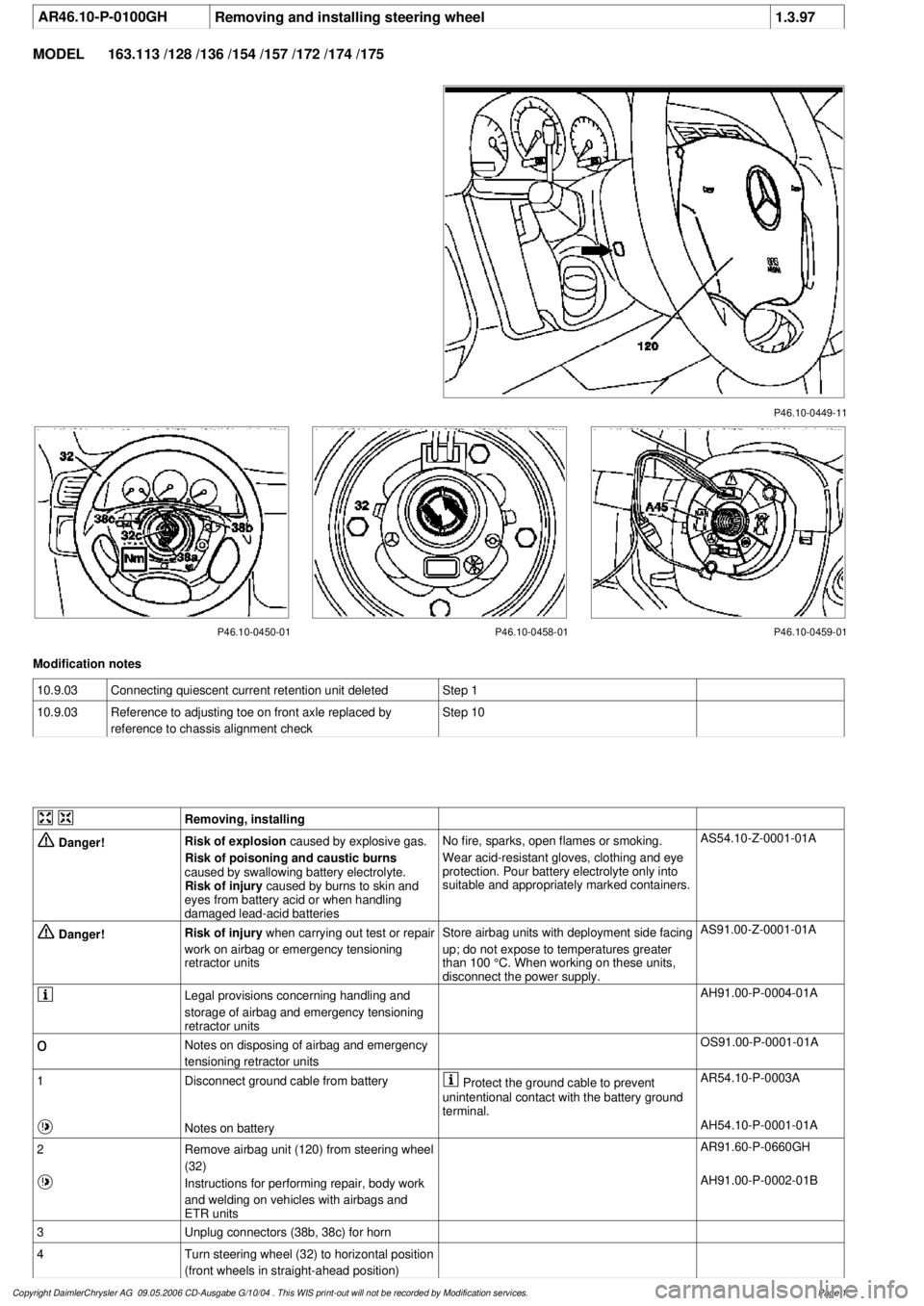
AR46.10-P-0100GHRemoving and installing steering wheel
1.3.97
MODEL
163.113 /128 /136 /154 /157 /172 /174 /175
P46.10-0449-11
P46.10-0450-01 P46.10-0458-01 P46.10-0459-01
Modification notes
10.9.03
Connecting quiescent current retention unit deleted
Step 1
10.9.03
Reference to adjusting toe on front axle replaced by
reference to chassis alignment check
Step 10
Removing, installing
Danger!
Risk of explosion
caused by explosive gas.
Risk of poisoning and caustic burns
caused by swallowing battery electrolyte.
Risk of injury
caused by burns to skin and
eyes from battery acid or when handling
damaged lead-acid batteries
No fire, sparks, open flames or smoking.
Wear acid-resistant gloves, clothing and eye
protection. Pour battery electrolyte only into
suitable and appropriately marked containers.
AS54.10-Z-0001-01A
Danger!
Risk of injury
when carrying out test or repair
work on airbag or emergency tensioning
retractor units
Store airbag units with deployment side facing
up; do not expose to temperatures greater
than 100 °C. When working on these units,
disconnect the power supply.
AS91.00-Z-0001-01A
Legal provisions concerning handling and
storage of airbag and emergency tensioning
retractor units
AH91.00-P-0004-01A
o
Notes on disposing of airbag and emergency
tensioning retractor units
OS91.00-P-0001-01A
1
Disconnect ground cable from battery
Protect the ground cable to prevent
unintentional contact with the battery ground
terminal.
AR54.10-P-0003A
Notes on battery
AH54.10-P-0001-01A
2
Remove airbag unit (120) from steering wheel
(32)
AR91.60-P-0660GH
Instructions for performing repair, body work
and welding on vehicles with airbags and
ETR units
AH91.00-P-0002-01B
3
Unplug connectors (38b, 38c) for horn
4
Turn steering wheel (32) to horizontal position
(front wheels in straight-ahead position)
Copyright DaimlerChrysler AG 09.05.2006 CD-Ausgabe G/10/04 . This WIS print-out will not be recorde
d by Modification services.
Page 1
Page 3967 of 4133

4
Refer to the user’s guide for your phone for information on the following:
• Installing and charging your phone’s battery
• Turning the phone on and off
• Placing, receiving, and ending calls
• Redialing numbers
• Reading your phone’s indicators
• Controlling phone volume
• Storing numbers in your phone’s built-in phonebook
• Other phone options and features
NN N N
oo o o
tt t t
ee e e
::: :
Your cellular carrier may not support some of the features of your new Mercedes-Benz Integrated System; to find out
what features are available, contact your cellular carrier.
Page 3968 of 4133

5
Vehicular Mode Operation
When you connect your phone to your Mercedes-Benz vehicle, the phone is ready to operate in Vehicular Mode.
In Vehicular Mode, your phone is connected to many integrated features of your vehicle and its audio system, offering
these advantages:
• You can use your phone in either Hands Free mode or in privacy mode.
• Your phone uses your vehicle’s speakers for better sound fidelity in Hands Free mode.
• Your vehicle charges your phone’s battery when the vehicle is running.
• When you place or receive a call, your vehicle’s radio, CD, and/or tape player volume is automatically muted so you
can hear the person on the other end.
Before you use your phone in Vehicular Mode, you should familiarize yourself with how this system operates.
Switching into Vehicular Mode
Switch your phone into Vehicular Mode by
docking
it.
To dock your phone:
Step
11 1 1
Angle the phone into the cradle so that the connector on the bottom of the phone engages the connector built into
the cradle.
22 2 2
Pivot the top end of the phone down to latch it into place.
NN N N
oo o o
tt t t
ee e e
::: :
If you are using the slim or high performance battery with your phone, you must ensure that the battery insert
is installed correctly. See “Installing the Special Battery Insert” on page 6.
33 3 3
To latch the cradle into the holder, close the phone’s flip, and angle the coilcord end of the cradle into the shrouded
end of the holder.
Page 3969 of 4133

6
Notes:
• Your phone plays a confirmation beep when docked. Wait for this beep before undocking.
• While in Vehicular Mode, the phone operates on the vehicle’s integrated cellular antenna.
CC C C
aa a a
uu u u
tt t t
iii i
oo o o
nn n n
::: :
Mercedes-Benz recommends keeping the phone docked in the cradle while operating the vehicle. If you
must use the handset for privacy operation, stop the vehicle prior to removing the phone from the cradle.
Installing the Special Battery Insert
The V60 cradle is supplied with a special insert to make it easier to align the phone with the cradle’s embedded connector
when you use certain batteries.
YY Y Y
oo o o
uu u u
ss s s
hh h h
oo o o
uu u u
lll l
dd d d
oo o o
nn n n
lll l
yy y y
iii i
nn n n
ss s s
tt t t
aa a a
lll l
lll l
tt t t
hh h h
iii i
ss s s
iii i
nn n n
ss s s
ee e e
rr r r
tt t t
iii i
ff f f
yy y y
oo o o
uu u u
aa a a
rr r r
ee e e
uu u u
ss s s
iii i
nn n n
gg g g
tt t t
hh h h
ee e e
ss s s
lll l
iii i
mm m m
oo o o
rr r r
hh h h
iii i
gg g g
hh h h
pp p p
ee e e
rr r r
ff f f
oo o o
rr r r
mm m m
aa a a
nn n n
cc c c
ee e e
bb b b
aa a a
tt t t
tt t t
ee e e
rr r r
yy y y
... .
The slim battery is supplied as a standard component in the CDMA V60 kit, while the high performance battery is standard
in the TDMA V60 kit. You should remove the insert when using the optional extra capacity battery.
To install the insert:
44 4 4
Pivot the cradle down to securely latch it.
NN N N
oo o o
tt t t
ee e e
::: :
The cradle should never be placed into the holder with the phone’s flip open.
CC C C
lll l
oo o o
ss s s
ee e e
tt t t
hh h h
ee e e
ff f f
lll l
iii i
pp p p
bb b b
ee e e
ff f f
oo o o
rr r r
ee e e
ss s s
ee e e
cc c c
uu u u
rr r r
iii i
nn n n
gg g g
tt t t
hh h h
ee e e
cc c c
rr r r
aa a a
dd d d
lll l
ee e e
iii i
nn n n
tt t t
hh h h
ee e e
hh h h
oo o o
lll l
dd d d
ee e e
rr r r
in order to prevent damage to the phone when the console cover is closed.
Step
11 1 1
Align the four tabs on the side of the insert with the corresponding slots in the cradle.
22 2 2
Gently push the insert into the slots until it snaps into place.
If you are using the slim battery, the side marked “FOR USE WITH SLIM BATTERY” should face up.
If you are using the high performance battery, the side marked “FOR USE WITH HIGH PERFORMANCE BATTERY” should face up.
33 3 3
If you plan to use the extra capacity battery with your phone, remove the insert by gently prying it out with a small
flat screwdriver, exercising care not to mar the side walls of the cradle.
Step
Page 3970 of 4133

7
When in Vehicular Mode
In Vehicular Mode, the phone turns on automatically each time you turn on the vehicle ignition if the head unit is turned
on.
To turn off the phone, open the flip, and press P
. If your ignition is on when you turn your phone off, a flashing battery
icon and
Pwr
will appear in the display. While in this mode, calls cannot be placed or received. The next time the ignition is
turned on, the phone will turn on. To turn the phone back on, press P
again.
If your phone is on for more than five minutes when your vehicle’s ignition is off, the phone automatically turns itself off to
conserve your vehicle’s battery.
Switching Out of Vehicular Mode
To disengage your phone from Vehicular Mode:
To remove the cradle from the holder, press the release button on the holder.
NN N N
oo o o
tt t t
ee e e
::: :
If you switch out of Vehicular Mode during a call, the party on the other end will hear a click.
Step
Remove the phone from the cradle by pressing the black tab on the top of the cradle.
You can remove the phone with the cradle in or out of the holder.
Page 3975 of 4133

12
Entering and Exiting Vehicular Mode During a Call
To Continue a Call While Leaving the Vehicle
You can now continue your conversation outside the vehicle.
NN N N
oo o o
tt t t
ee e e
::: :
The call will be disconnected if the phone and cradle are removed from the holder when the flip is closed.
To Continue a Call While Entering the Vehicle
NN N N
oo o o
tt t t
ee e e
::: :
Before attaching the phone and cradle to the holder, be sure the vehicle is ON.
When your phone is properly docked, your vehicle’s electrical system begins to recharge the phone’s battery. If the phone
is properly docked, the battery icon in the phone’s display will blink on and off.
Operation from the Radio
Features available through your vehicle’s radio controls include:
• Digit dialing (to dial any phone number)
• Memory scrolling (alpha or numeric)
Step
11 1 1
Open the flip.
22 2 2Remove the phone and cradle from the holder.
Step
11 1 1
Attach the phone and cradle to the holder.
22 2 2Ensure the vehicle is running before closing the flip.