engine MERCEDES-BENZ ML320 1997 Complete Repair Manual
[x] Cancel search | Manufacturer: MERCEDES-BENZ, Model Year: 1997, Model line: ML320, Model: MERCEDES-BENZ ML320 1997Pages: 4133, PDF Size: 88.89 MB
Page 1820 of 4133
Workshop equipment
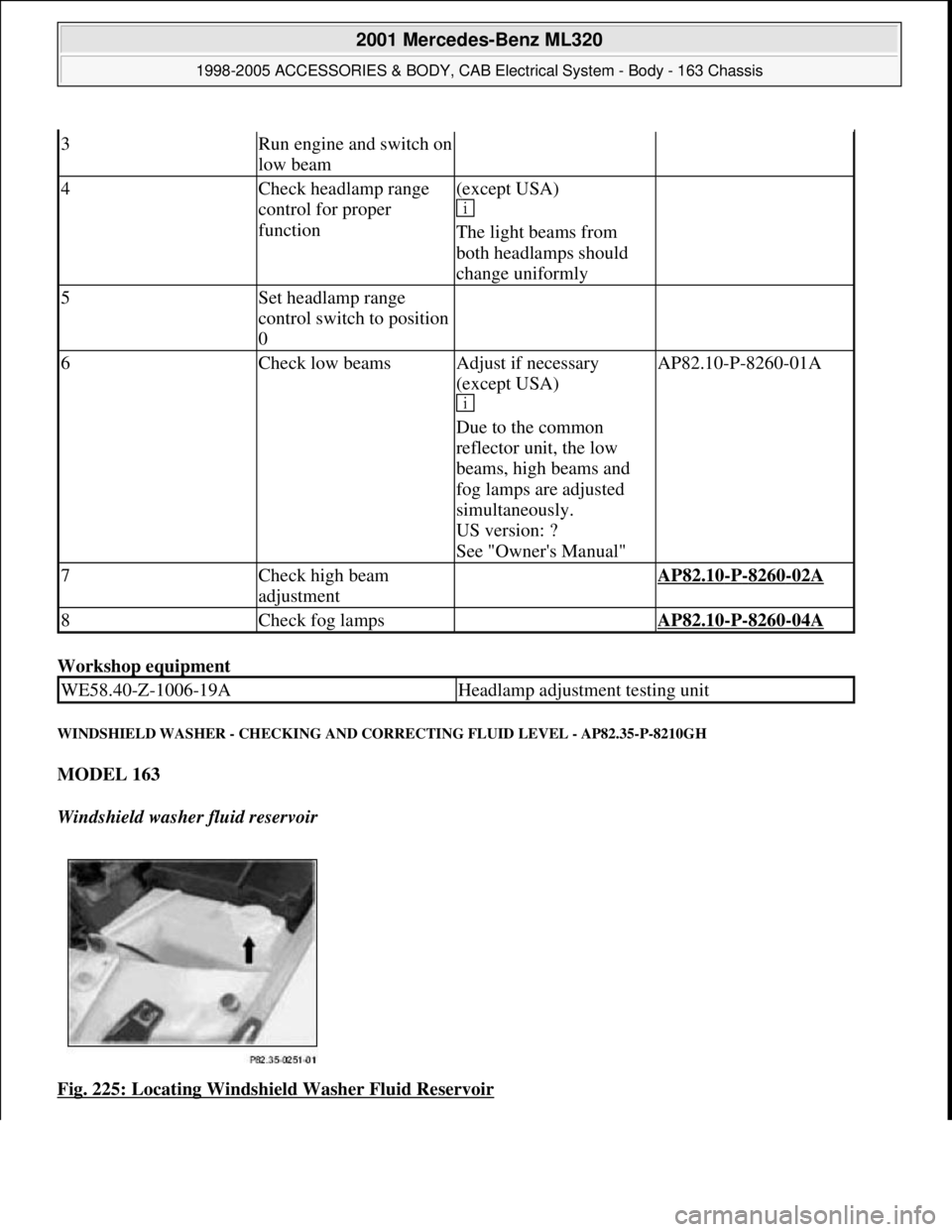
WINDSHIELD WASHER - CHECKING AND CORRECTING FLUID LEVEL - AP82.35-P-8210GH
MODEL 163
Windshield washer fluid reservoir
Fig. 225: Locating Windshield Washer Fluid Reservoir
3Run engine and switch on
low beam
4Check headlamp range
control for proper
function(except USA)
The light beams from
both headlamps should
change uniformly
5Set headlamp range
control switch to position
0
6Check low beamsAdjust if necessary
(except USA)
Due to the common
reflector unit, the low
beams, high beams and
fog lamps are adjusted
simultaneously.
US version: ?
See "Owner's Manual"AP82.10-P-8260-01A
7Check high beam
adjustment AP82.10-P-8260-02A
8Check fog lamps AP82.10-P-8260-04A
WE58.40-Z-1006-19AHeadlamp adjustment testing unit
2001 Mercedes-Benz ML320
1998-2005 ACCESSORIES & BODY, CAB Electrical System - Body - 163 Chassis
me
Saturday, October 02, 2010 3:30:10 PMPage 325 © 2006 Mitchell Repair Information Company, LLC.
Page 1828 of 4133
Commercially available tools
Parts ordering notes
system antenna (GPS) on
roof
7Install adapter wiring
harness for vehicles with
engine 111 or up to 06/99
Vehicles with automatic
transmissionAN82.61-P-0001-01H
Vehicles with manual
transmissionAN82.61-P-0001-01I
8Retrofit diagnostic line On vehicles up to
06/99AN82.61-P-0001-03A
9Reassemble vehicle 5 to 1
10Enable equipment code See operating
instructions
11Start up auto-pilot system On vehicles with
sound system active
sound system when
performing diagnosis.AN82.61-P-1002-07B
*WH58.30
-Z-1036-13A
NumberDesignation
WH58.30-Z-1036-13AHandheld tester (HHT)651 100 01 99
Part no.DescriptionQuantity
B6 782 25 51Audio 30 APS radio1
KG82 (see EPC)GPS and telephone antenna1
KG82 (see EPC)Antenna lead from splitter to radio1
KG82 (see EPC)Adapter wiring harness (without
sound system) (vehicles with
M111 or up to 06.99)1
KG82 (see EPC)CAN bus wiring harness (vehicles
with M 111 or up to 06.99)1
KG82 (see EPC)CAN bus adapter (vehicles with M
111 or up to 06.99)1
KG82 (see EPC)Adapter wiring harness (with
sound system) (vehicles with M
111 or up to 06.99)1
A011 545 80 26Contact spring (radio) (on vehicles
up to 06.99)2
commercially availablegreen 0.5 mm lead2 2M
commercially availablegreen 0.5 mm lead 2 (diagnostic
lead) (on vehicles up to 06.99)2M
A012 545 39 26Contact spring (diagnostic socket) 1
2001 Mercedes-Benz ML320
1998-2005 ACCESSORIES & BODY, CAB Electrical System - Body - 163 Chassis
me
Saturday, October 02, 2010 3:30:10 PMPage 333 © 2006 Mitchell Repair Information Company, LLC.
Page 1829 of 4133
CALIBRATION OF AUTO-PILOT SYSTEM - AN82.61-P-1002-07B
Models 129, 140, 163, 168, 170, 202, 208, 210,220
System description
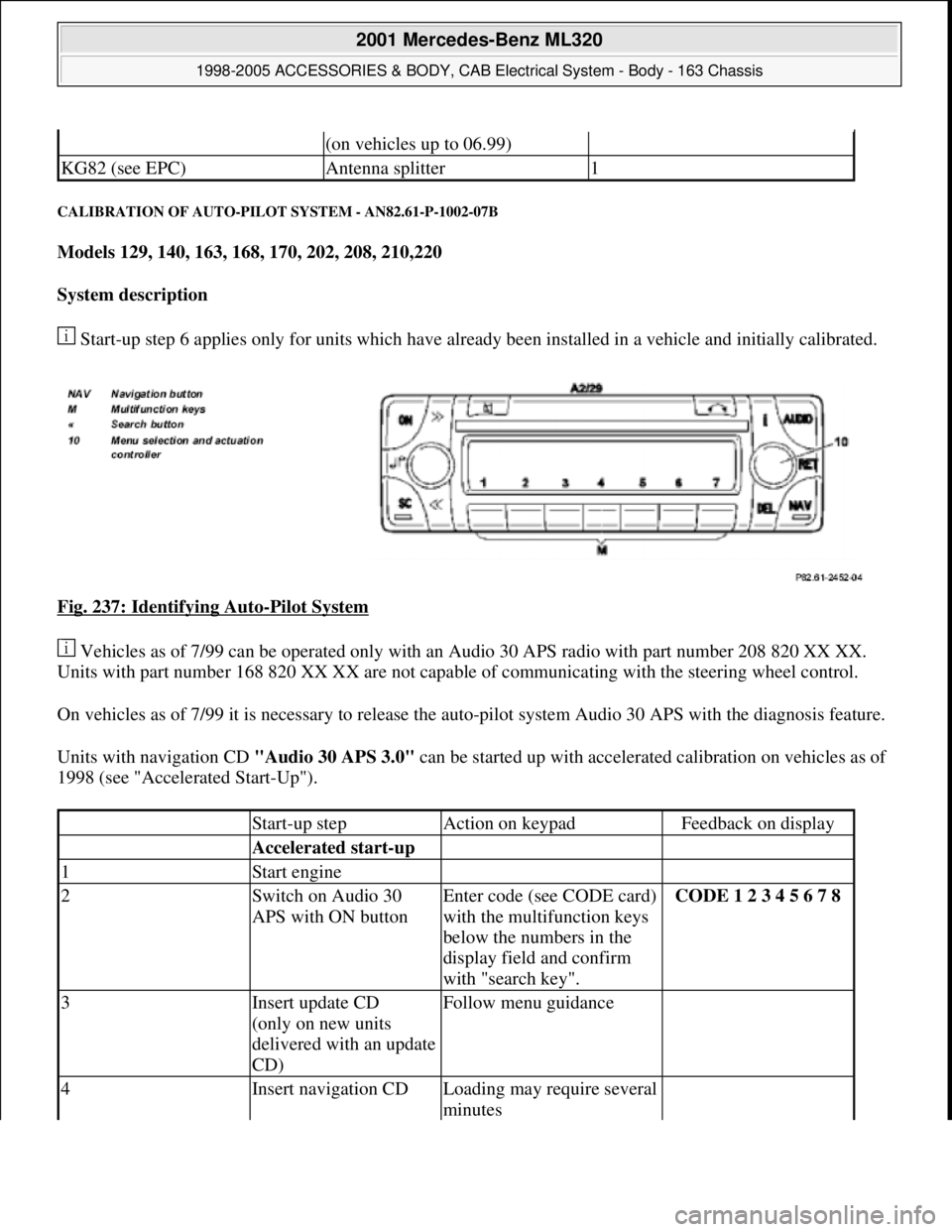
Start-up step 6 applies only for units which have already been installed in a vehicle and initially calibrated.
Fig. 237: Identifying Auto
-Pilot System
Vehicles as of 7/99 can be operated only with an Audio 30 APS radio with part number 208 820 XX XX.
Units with part number 168 820 XX XX are not capable of communicating with the steering wheel control.
On vehicles as of 7/99 it is necessary to release the auto-pilot system Audio 30 APS with the diagnosis feature.
Units with navigation CD "Audio 30 APS 3.0" can be started up with accelerated calibration on vehicles as of
1998 (see "Accelerated Start-Up").
(on vehicles up to 06.99)
KG82 (see EPC)Antenna splitter1
Start-up stepAction on keypadFeedback on display
Accelerated start-up
1Start engine
2Switch on Audio 30
APS with ON buttonEnter code (see CODE card)
with the multifunction keys
below the numbers in the
display field and confirm
with "search key".CODE 1 2 3 4 5 6 7 8
3Insert update CD
(only on new units
delivered with an update
CD)Follow menu guidance
4Insert navigation CDLoading may require several
minutes
2001 Mercedes-Benz ML320
1998-2005 ACCESSORIES & BODY, CAB Electrical System - Body - 163 Chassis
me
Saturday, October 02, 2010 3:30:11 PMPage 334 © 2006 Mitchell Repair Information Company, LLC.
Page 1901 of 4133
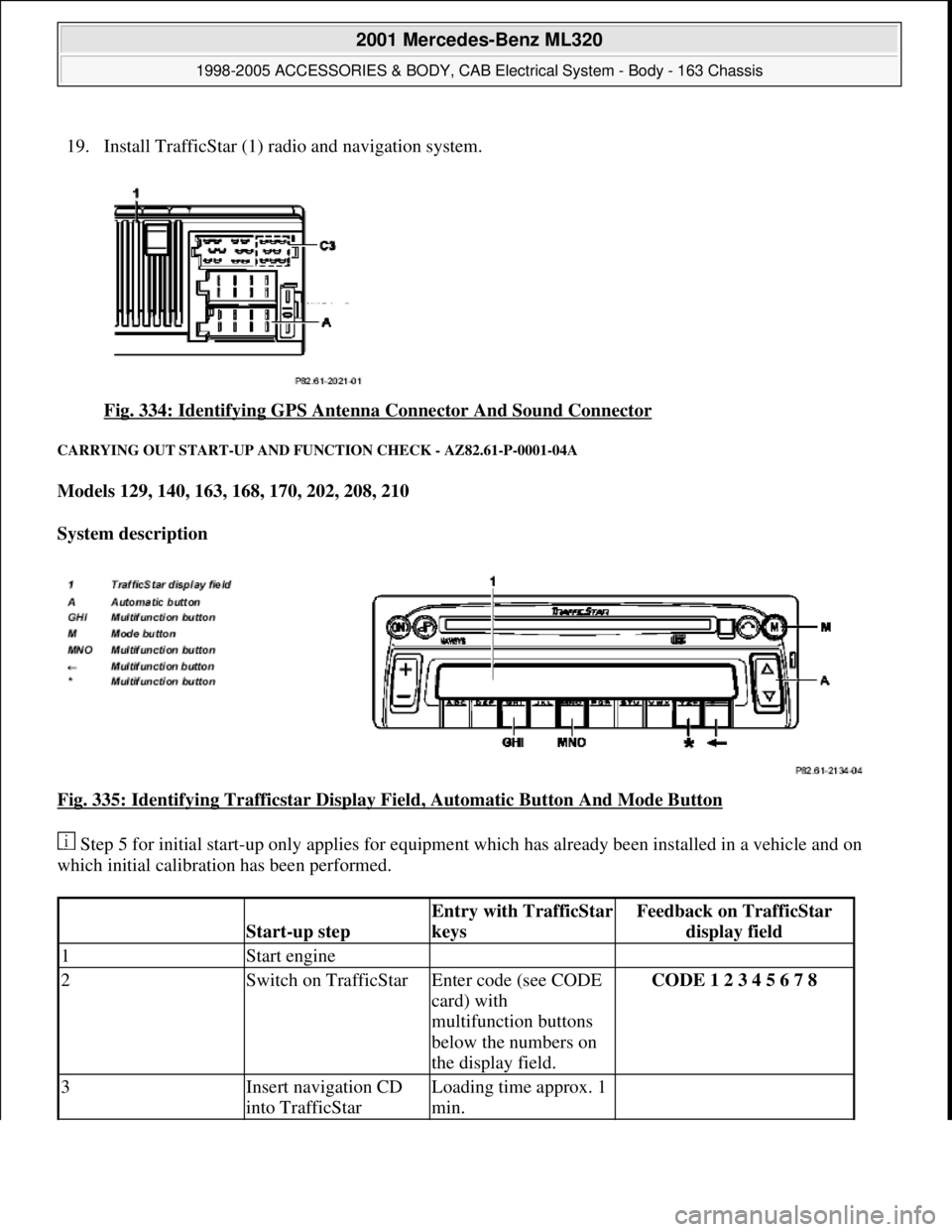
19. Install TrafficStar (1) ra dio and navigation system.
Fig. 334: Identifying GPS Antenna Connector And Sound Connector
CARRYING OUT START-UP AND FU NCTION CHECK - AZ82.61-P-0001-04A
Models 129, 140, 163, 168, 170, 202, 208, 210
System description
Fig. 335: Identifying Trafficstar Display Fi eld, Automatic Button And Mode Button
Step 5 for initial start-up only applies for equipment which has already been installed in a vehicle and on
which initial calibration has been performed.
Start-up step
Entry with TrafficStar
keysFeedback on TrafficStar display field
1Start engine
2Switch on TrafficStarEnter code (see CODE
card) with
multifunction buttons
below the numbers on
the display field.CODE 1 2 3 4 5 6 7 8
3Insert navigation CD
into TrafficStarLoading time approx. 1
min.
2001 Mercedes-Benz ML320
1998-2005 ACCESSORIES & BODY, CAB Electr ical System - Body - 163 Chassis
me
Saturday, October 02, 2010 3:30:12 PMPage 406 © 2006 Mitchell Repair Information Company, LLC.
Page 1904 of 4133
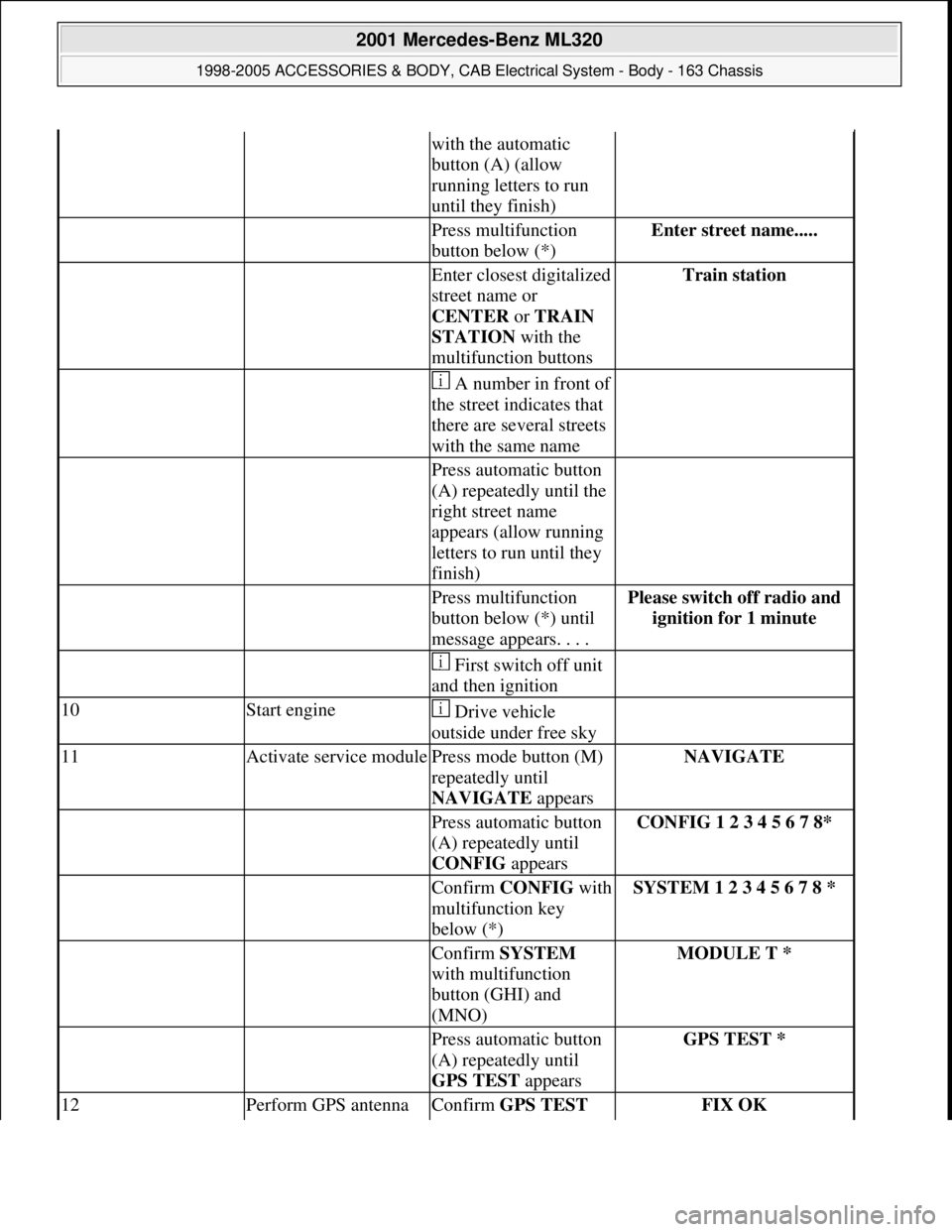
with the automatic
button (A) (allow
running letters to run
until they finish)
Press multifunction
button below (*)Enter street name.....
Enter closest digitalized
street name or
CENTER or TRAIN
STATION with the
multifunction buttonsTrain station
A number in front of
the street indicates that
there are several streets
with the same name
Press automatic button
(A) repeatedly until the
right street name
appears (allow running
letters to run until they
finish)
Press multifunction
button below (*) until
message appears. . . .Please switch off radio and
ignition for 1 minute
First switch off unit
and then ignition
10Start engine Drive vehicle
outside under free sky
11Activate service modulePress mode button (M)
repeatedly until
NAVIGATE appearsNAVIGATE
Press automatic button
(A) repeatedly until
CONFIG appearsCONFIG 1 2 3 4 5 6 7 8*
Confirm CONFIGwith
multifunction key
below (*)SYSTEM 1 2 3 4 5 6 7 8 *
Confirm SYSTEM
with multifunction
button (GHI) and
(MNO)MODULE T *
Press automatic button
(A) repeatedly until
GPS TEST appearsGPS TEST *
12Perform GPS antenna Confirm GPS TEST FIX OK
2001 Mercedes-Benz ML320
1998-2005 ACCESSORIES & BODY, CAB Electrical System - Body - 163 Chassis
me
Saturday, October 02, 2010 3:30:13 PMPage 409 © 2006 Mitchell Repair Information Company, LLC.
Page 1913 of 4133
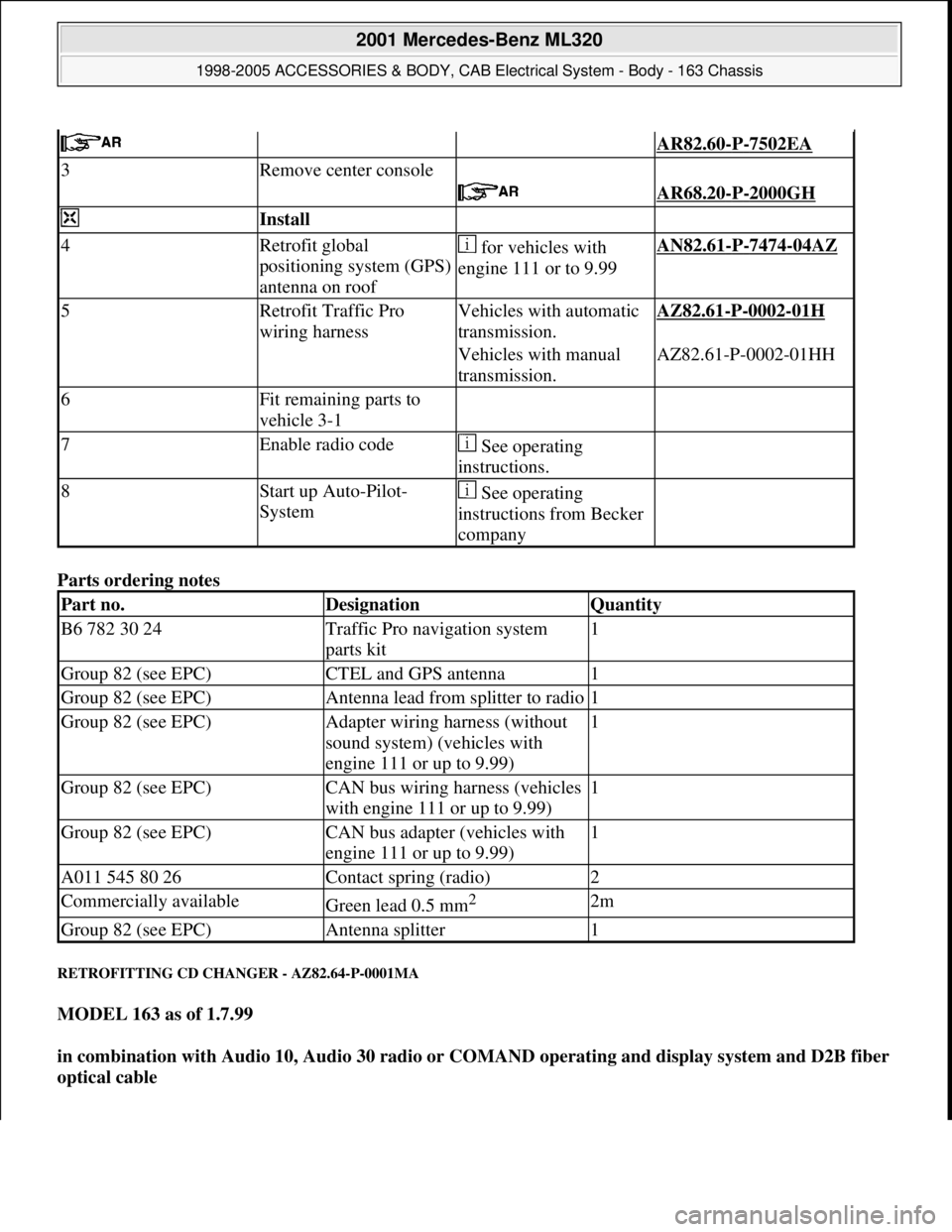
Parts ordering notes
RETROFITTING CD CHANGER - AZ82.64-P-0001MA
MODEL 163 as of 1.7.99
in combination with Audio 10, Audio 30 radio or COMAND operating and display system and D2B fiber
optical cable
AR82.60-P-7502EA
3Remove center console
AR68.20-P-2000GH
Install
4Retrofit global
positioning system (GPS)
antenna on roof for vehicles with
engine 111 or to 9.99AN82.61-P-7474-04AZ
5Retrofit Traffic Pro
wiring harnessVehicles with automatic
transmission.AZ82.61-P-0002-01H
Vehicles with manual
transmission.AZ82.61-P-0002-01HH
6Fit remaining parts to
vehicle 3-1
7Enable radio code See operating
instructions.
8Start up Auto-Pilot-
System See operating
instructions from Becker
company
Part no.DesignationQuantity
B6 782 30 24Traffic Pro navigation system
parts kit1
Group 82 (see EPC)CTEL and GPS antenna1
Group 82 (see EPC)Antenna lead from splitter to radio1
Group 82 (see EPC)Adapter wiring harness (without
sound system) (vehicles with
engine 111 or up to 9.99)1
Group 82 (see EPC)CAN bus wiring harness (vehicles
with engine 111 or up to 9.99)1
Group 82 (see EPC)CAN bus adapter (vehicles with
engine 111 or up to 9.99)1
A011 545 80 26Contact spring (radio)2
Commercially availableGreen lead 0.5 mm2 2m
Group 82 (see EPC)Antenna splitter1
2001 Mercedes-Benz ML320
1998-2005 ACCESSORIES & BODY, CAB Electrical System - Body - 163 Chassis
me
Saturday, October 02, 2010 3:30:13 PMPage 418 © 2006 Mitchell Repair Information Company, LLC.
Page 1964 of 4133
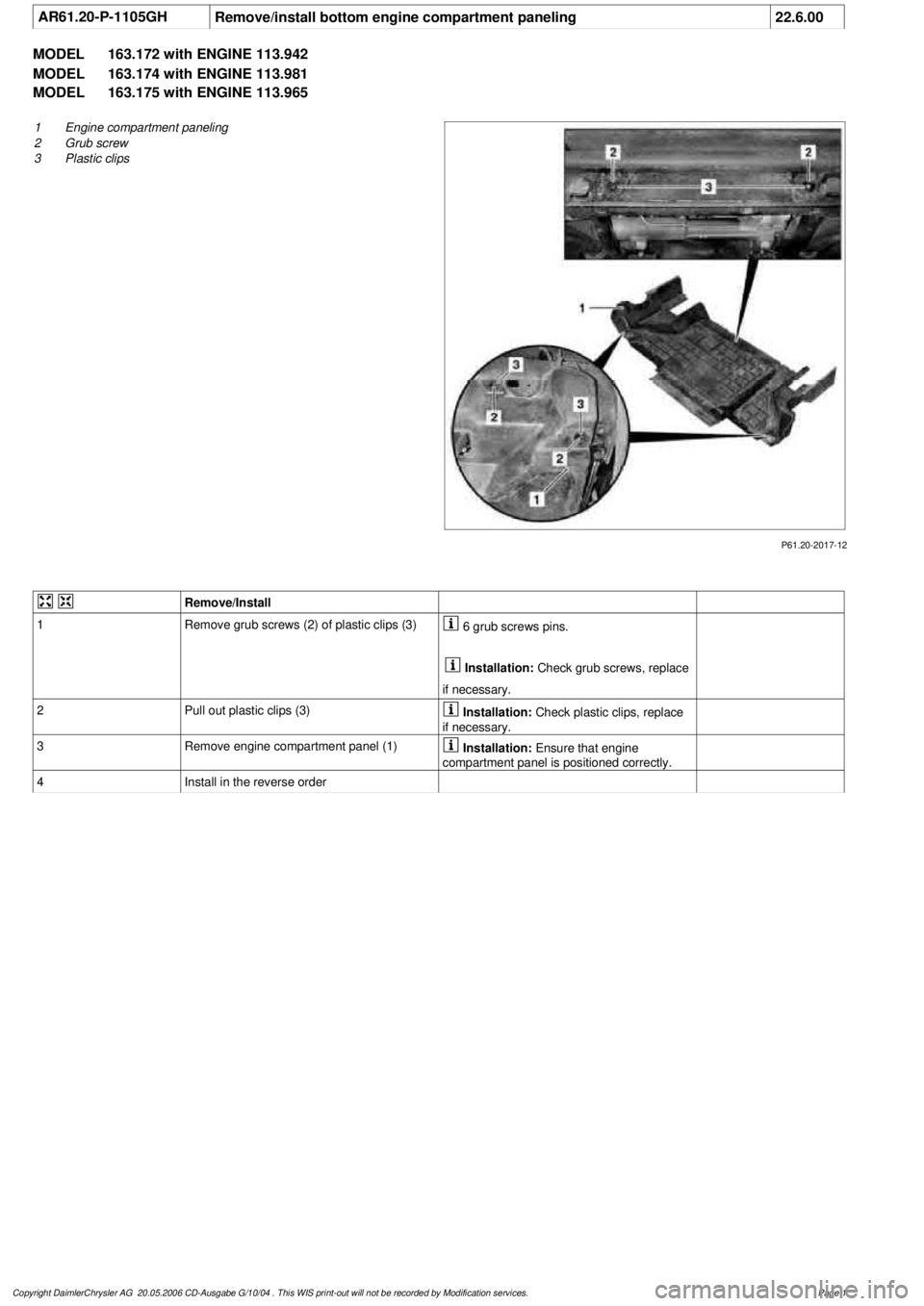
AR61.20-P-1105GH
Remove/install bottom engine compartment paneling
22.6.00
MODEL
163.172 with ENGINE 113.942
MODEL
163.174 with ENGINE 113.981
MODEL
163.175 with ENGINE 113.965
P61.20-2017-12
1
Engine compartment paneling
2
Grub screw
3
Plastic clips
Remove/Install
1
Remove grub screws (2) of plastic clips (3)
6 grub screws pins.
Installation:
Check grub screws, replace
if necessary.
2
Pull out plastic clips (3)
Installation:
Check plastic clips, replace
if necessary.
3
Remove engine compartment panel (1)
Installation:
Ensure that engine
compartment panel is positioned correctly.
4
Install in the reverse order
Copyright DaimlerChrysler AG 20.05.2006 CD-Ausgabe G/10/04 . This WIS print-out will not be recorde
d by Modification services.
Page 1
Page 1970 of 4133
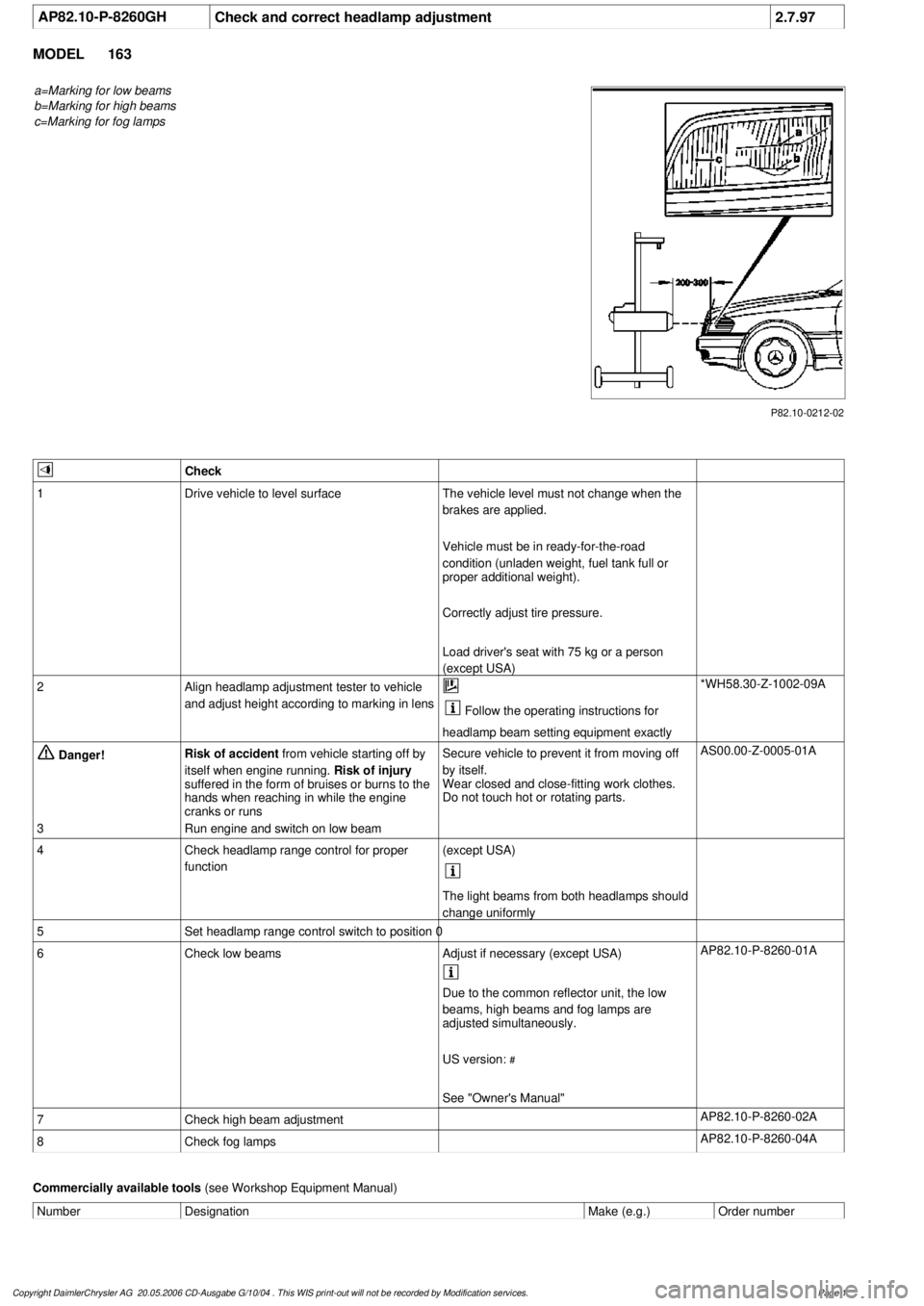
AP82.10-P-8260GH
Check and correct headlamp adjustment
2.7.97
MODEL
163
a=Marking for low beams
b=Marking for high beams
c=Marking for fog lamps
P82.10-0212-02
Check
1
Drive vehicle to level surface
The vehicle level must not change when the
brakes are applied.
Vehicle must be in ready-for-the-road
condition (unladen weight, fuel tank full or
proper additional weight).
Correctly adjust tire pressure.
Load driver's seat with 75 kg or a person
(except USA)
2
Align headlamp adjustment tester to vehicle
and adjust height according to marking in lens
Follow the operating instructions for
headlamp beam setting equipment exactly
*WH58.30-Z-1002-09A
Danger!
Risk of accident
from vehicle starting off by
itself when engine running.
Risk of injury
suffered in the form of bruises or burns to the
hands when reaching in while the engine
cranks or runs
Secure vehicle to prevent it from moving off
by itself.
Wear closed and close-fitting work clothes.
Do not touch hot or rotating parts.
AS00.00-Z-0005-01A
3
Run engine and switch on low beam
4
Check headlamp range control for proper
function
(except USA)
The light beams from both headlamps should
change uniformly
5
Set headlamp range control switch to position 0
6
Check low beams
Adjust if necessary (except USA)
AP82.10-P-8260-01A
Due to the common reflector unit, the low
beams, high beams and fog lamps are
adjusted simultaneously.
US version:
#
See "Owner's Manual"
7
Check high beam adjustment
AP82.10-P-8260-02A
8
Check fog lamps
AP82.10-P-8260-04A
Commercially available tools
(see Workshop Equipment Manual)
Number
Designation
Make (e.g.)
Order number
Copyright DaimlerChrysler AG 20.05.2006 CD-Ausgabe G/10/04 . This WIS print-out will not be recorde
d by Modification services.
Page 1
Page 2030 of 4133
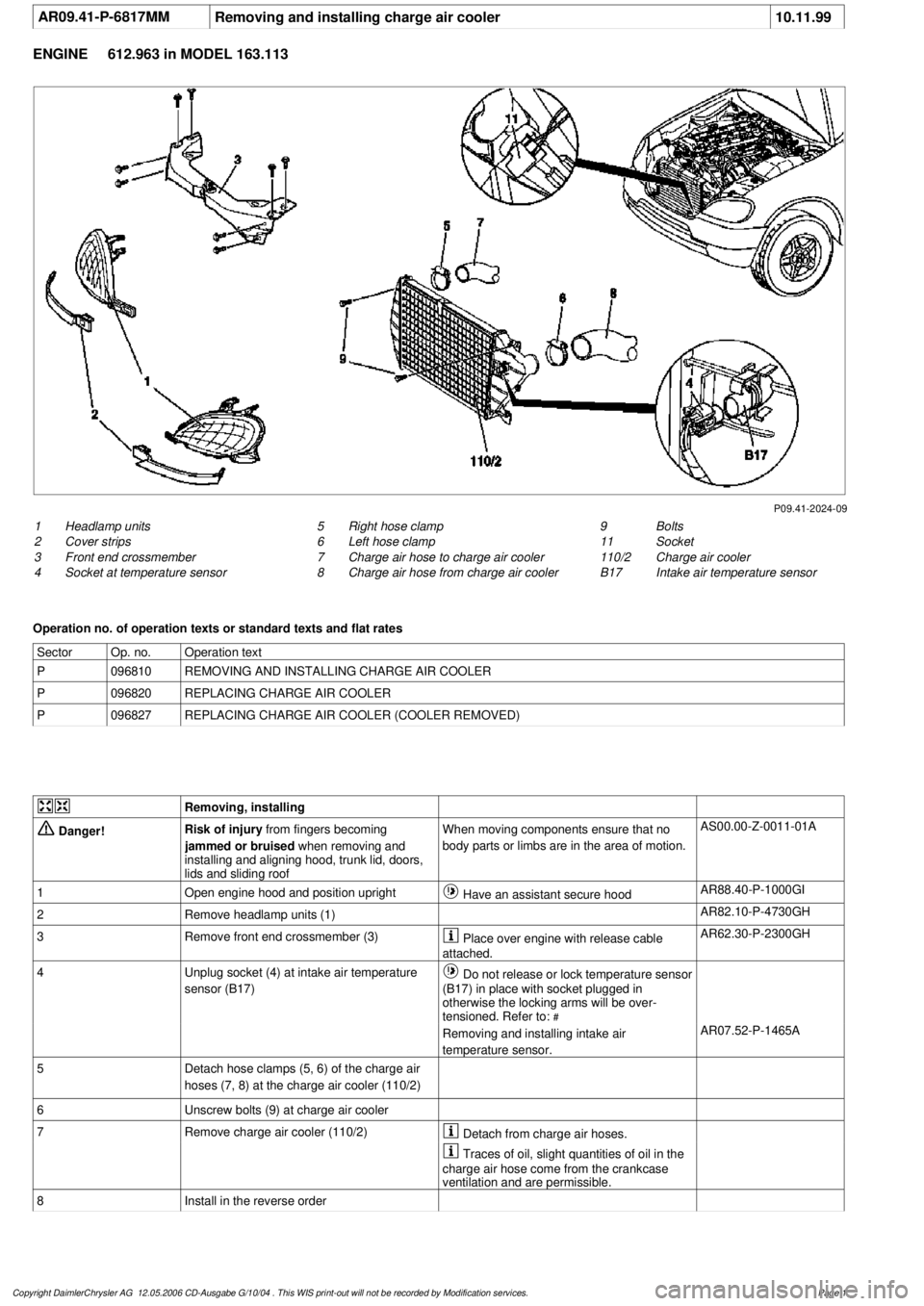
AR09.41-P-6817MM
Removing and installing charge air cooler
10.11.99
ENGINE
612.963 in MODEL 163.113
P09.41-2024-09
1
Headlamp units
2
Cover strips
3
Front end crossmember
4
Socket at temperature sensor
9
Bolts
11
Socket
110/2
Charge air cooler
B17
Intake air temperature sensor
5
Right hose clamp
6
Left hose clamp
7
Charge air hose to charge air cooler
8
Charge air hose from charge air cooler
Operation no. of operation texts or standard texts and flat rates
Sector
Op. no.
Operation text
P
096810
REMOVING AND INSTALLING CHARGE AIR COOLER
P
096820
REPLACING CHARGE AIR COOLER
P
096827
REPLACING CHARGE AIR COOLER (COOLER REMOVED)
Removing, installing
Danger!
Risk of injury
from fingers becoming
jammed or bruised
when removing and
installing and aligning hood, trunk lid, doors,
lids and sliding roof
When moving components ensure that no
body parts or limbs are in the area of motion.
AS00.00-Z-0011-01A
1
Open engine hood and position upright
Have an assistant secure hood
AR88.40-P-1000GI
2
Remove headlamp units (1)
AR82.10-P-4730GH
3
Remove front end crossmember (3)
Place over engine with release cable
attached.
AR62.30-P-2300GH
4
Unplug socket (4) at intake air temperature
sensor (B17)
Do not release or lock temperature sensor
(B17) in place with socket plugged in
otherwise the locking arms will be over-
tensioned. Refer to:
#
Removing and installing intake air
temperature sensor.
AR07.52-P-1465A
5
Detach hose clamps (5, 6) of the charge air
hoses (7, 8) at the charge air cooler (110/2)
6
Unscrew bolts (9) at charge air cooler
7
Remove charge air cooler (110/2)
Detach from charge air hoses.
Traces of oil, slight quantities of oil in the
charge air hose come from the crankcase
ventilation and are permissible.
8
Install in the reverse order
Copyright DaimlerChrysler AG 12.05.2006 CD-Ausgabe G/10/04 . This WIS print-out will not be recorde
d by Modification services.
Page 1
Page 2032 of 4133
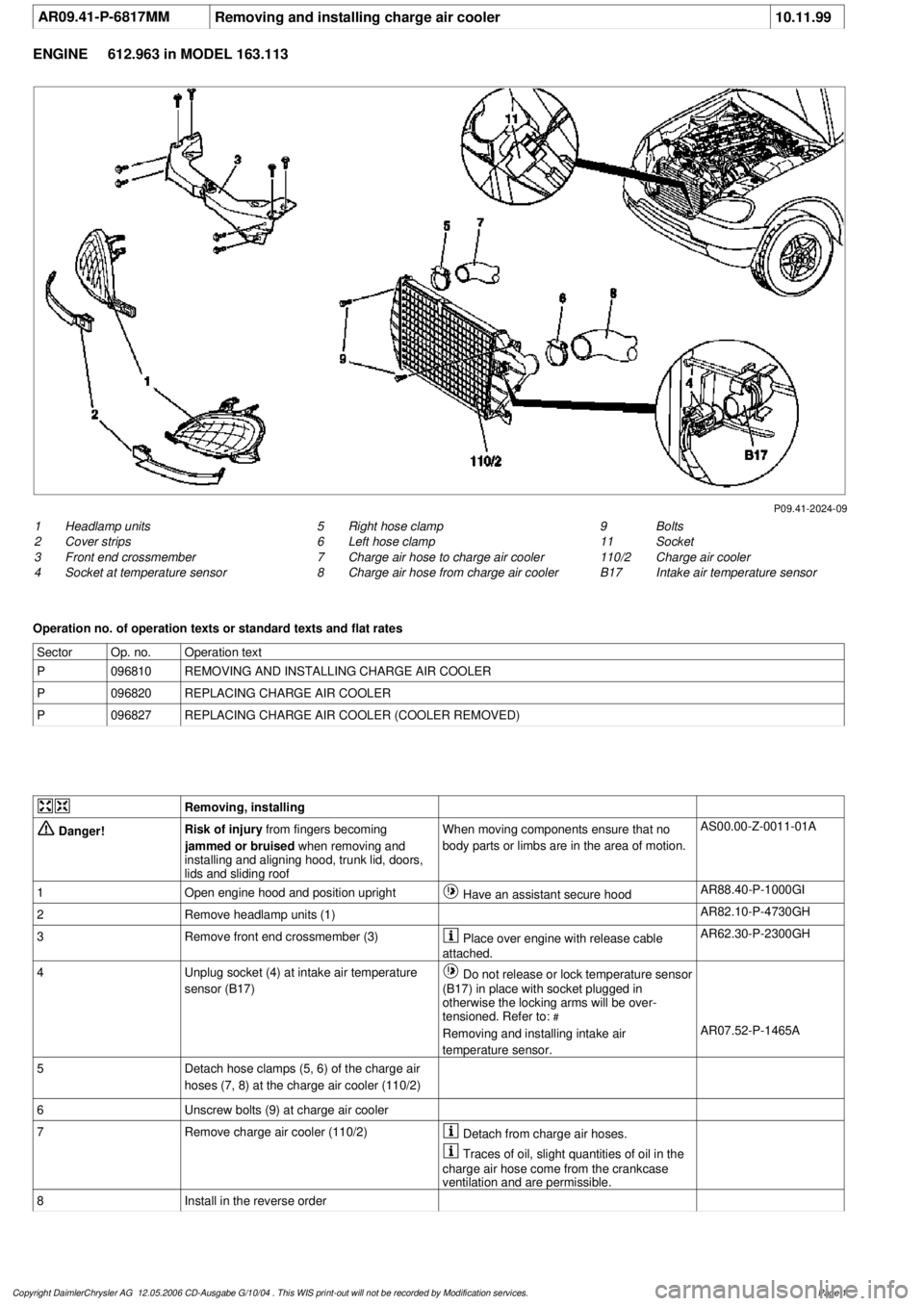
AR09.41-P-6817MM
Removing and installing charge air cooler
10.11.99
ENGINE
612.963 in MODEL 163.113
P09.41-2024-09
1
Headlamp units
2
Cover strips
3
Front end crossmember
4
Socket at temperature sensor
9
Bolts
11
Socket
110/2
Charge air cooler
B17
Intake air temperature sensor
5
Right hose clamp
6
Left hose clamp
7
Charge air hose to charge air cooler
8
Charge air hose from charge air cooler
Operation no. of operation texts or standard texts and flat rates
Sector
Op. no.
Operation text
P
096810
REMOVING AND INSTALLING CHARGE AIR COOLER
P
096820
REPLACING CHARGE AIR COOLER
P
096827
REPLACING CHARGE AIR COOLER (COOLER REMOVED)
Removing, installing
Danger!
Risk of injury
from fingers becoming
jammed or bruised
when removing and
installing and aligning hood, trunk lid, doors,
lids and sliding roof
When moving components ensure that no
body parts or limbs are in the area of motion.
AS00.00-Z-0011-01A
1
Open engine hood and position upright
Have an assistant secure hood
AR88.40-P-1000GI
2
Remove headlamp units (1)
AR82.10-P-4730GH
3
Remove front end crossmember (3)
Place over engine with release cable
attached.
AR62.30-P-2300GH
4
Unplug socket (4) at intake air temperature
sensor (B17)
Do not release or lock temperature sensor
(B17) in place with socket plugged in
otherwise the locking arms will be over-
tensioned. Refer to:
#
Removing and installing intake air
temperature sensor.
AR07.52-P-1465A
5
Detach hose clamps (5, 6) of the charge air
hoses (7, 8) at the charge air cooler (110/2)
6
Unscrew bolts (9) at charge air cooler
7
Remove charge air cooler (110/2)
Detach from charge air hoses.
Traces of oil, slight quantities of oil in the
charge air hose come from the crankcase
ventilation and are permissible.
8
Install in the reverse order
Copyright DaimlerChrysler AG 12.05.2006 CD-Ausgabe G/10/04 . This WIS print-out will not be recorde
d by Modification services.
Page 1