navigation system MERCEDES-BENZ ML430 1997 Complete Repair Manual
[x] Cancel search | Manufacturer: MERCEDES-BENZ, Model Year: 1997, Model line: ML430, Model: MERCEDES-BENZ ML430 1997Pages: 4133, PDF Size: 88.89 MB
Page 1815 of 4133
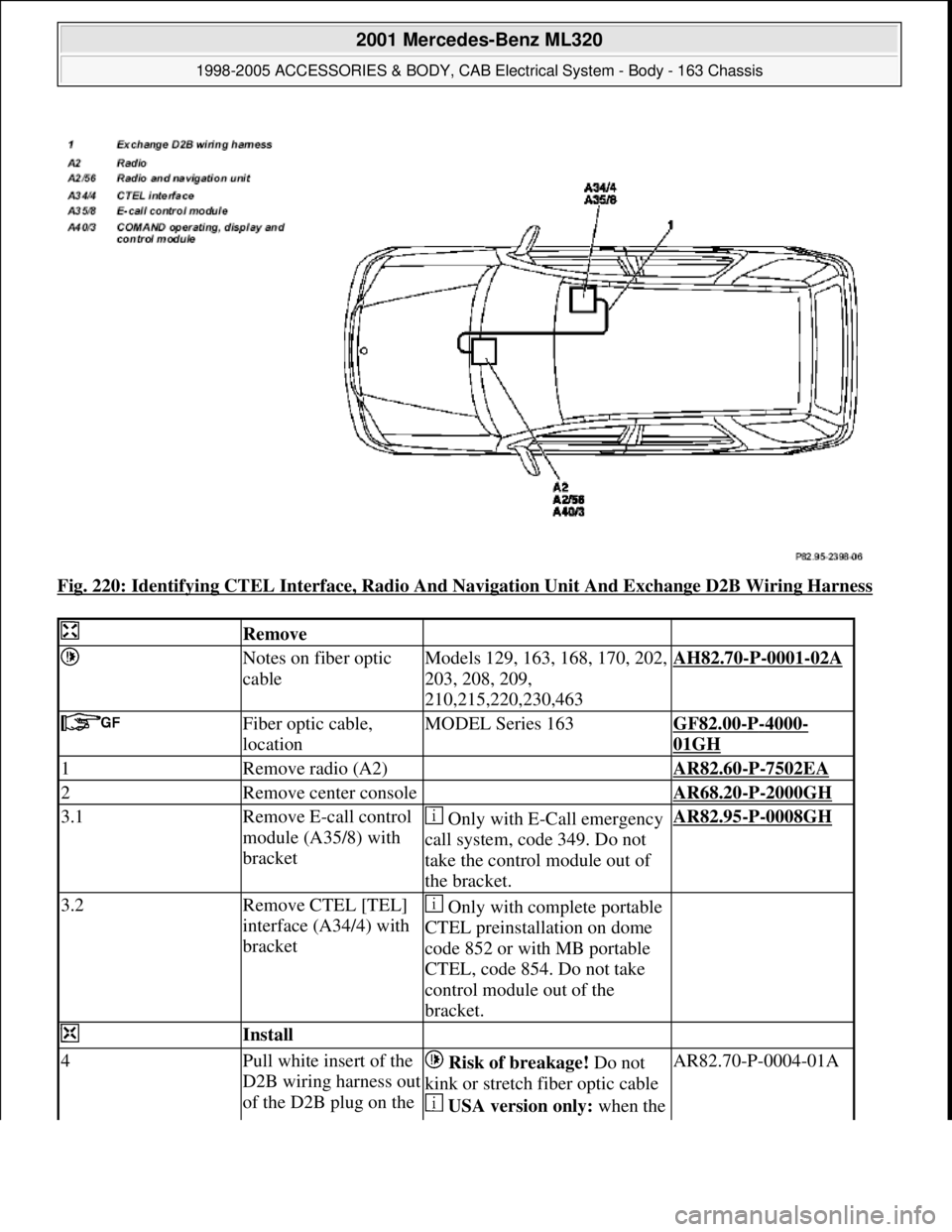
Fig. 220: Identifying CTEL Interface, Radio And Navigation Unit And Exchange D2B Wiring Harness
Remove
Notes on fiber optic
cableModels 129, 163, 168, 170, 202,
203, 208, 209,
210,215,220,230,463AH82.70-P-0001-02A
Fiber optic cable,
locationMODEL Series 163GF82.00-P-4000-
01GH
1Remove radio (A2) AR82.60-P-7502EA
2Remove center console AR68.20-P-2000GH
3.1Remove E-call control
module (A35/8) with
bracket Only with E-Call emergency
call system, code 349. Do not
take the control module out of
the bracket.AR82.95-P-0008GH
3.2Remove CTEL [TEL]
interface (A34/4) with
bracket Only with complete portable
CTEL preinstallation on dome
code 852 or with MB portable
CTEL, code 854. Do not take
control module out of the
bracket.
Install
4Pull white insert of the
D2B wiring harness out
of the D2B plug on the Risk of breakage! Do not
kink or stretch fiber optic cable
USA version only: when the AR82.70-P-0004-01A
2001 Mercedes-Benz ML320
1998-2005 ACCESSORIES & BODY, CAB Electrical System - Body - 163 Chassis
me
Saturday, October 02, 2010 3:30:10 PMPage 320 © 2006 Mitchell Repair Information Company, LLC.
Page 1823 of 4133
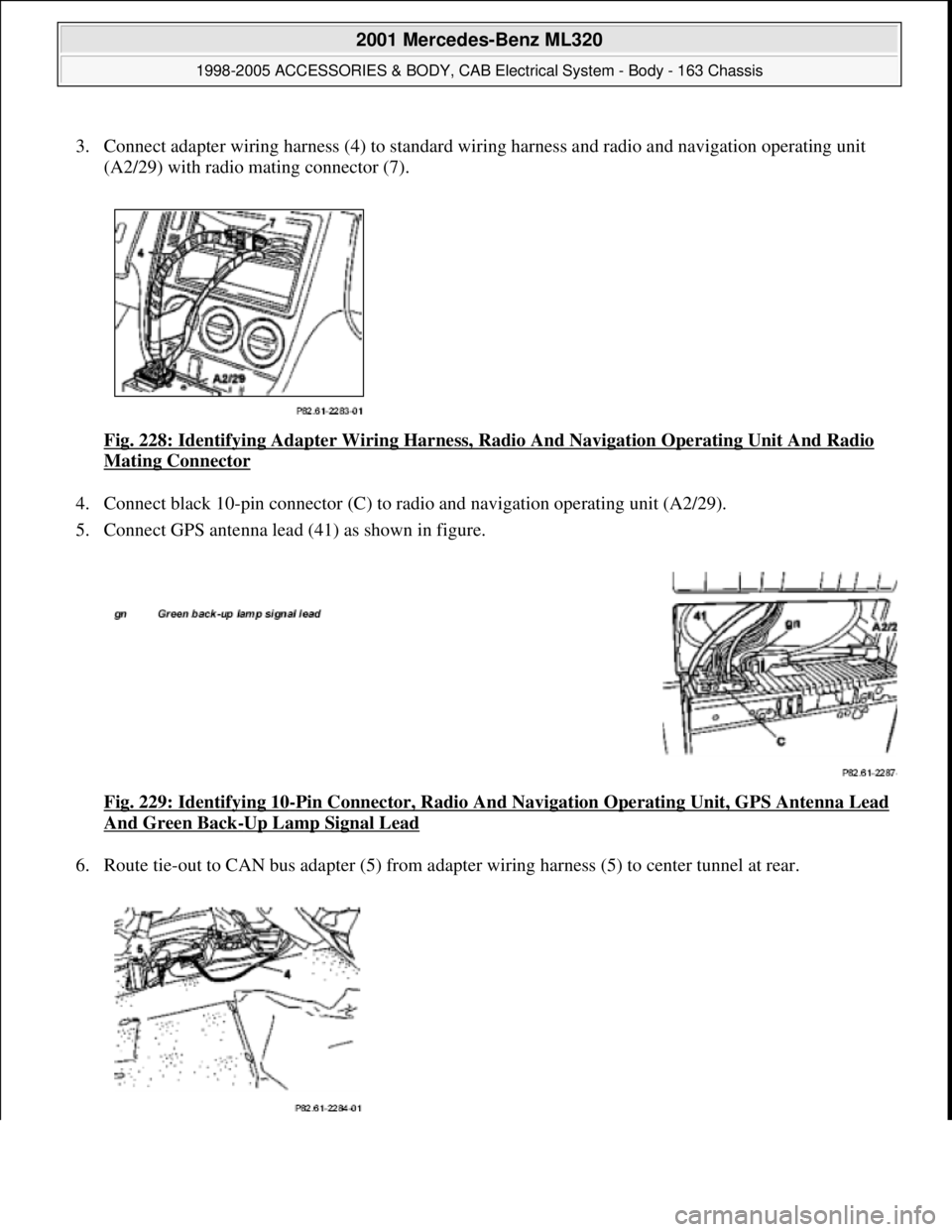
3. Connect adapter wiring harness (4) to standard wiring harness and radio and navigation operating unit
(A2/29) with radio mating connector (7).
Fig. 228: Identifying Adapter Wiring Harness, Radio And Navigation Operating Unit And Radio
Mating Connector
4. Connect black 10-pin connector (C) to radio and navigation operating unit (A2/29).
5. Connect GPS antenna lead (41) as shown in figure.
Fig. 229: Identifying 10
-Pin Connector, Radio And Navigation Operating Unit, GPS Antenna Lead
And Green Back-Up Lamp Signal Lead
6. Route tie-out to CAN bus adapter (5) from adapter wiring harness (5) to center tunnel at rear.
2001 Mercedes-Benz ML320
1998-2005 ACCESSORIES & BODY, CAB Electrical System - Body - 163 Chassis
me
Saturday, October 02, 2010 3:30:10 PMPage 328 © 2006 Mitchell Repair Information Company, LLC.
Page 1825 of 4133
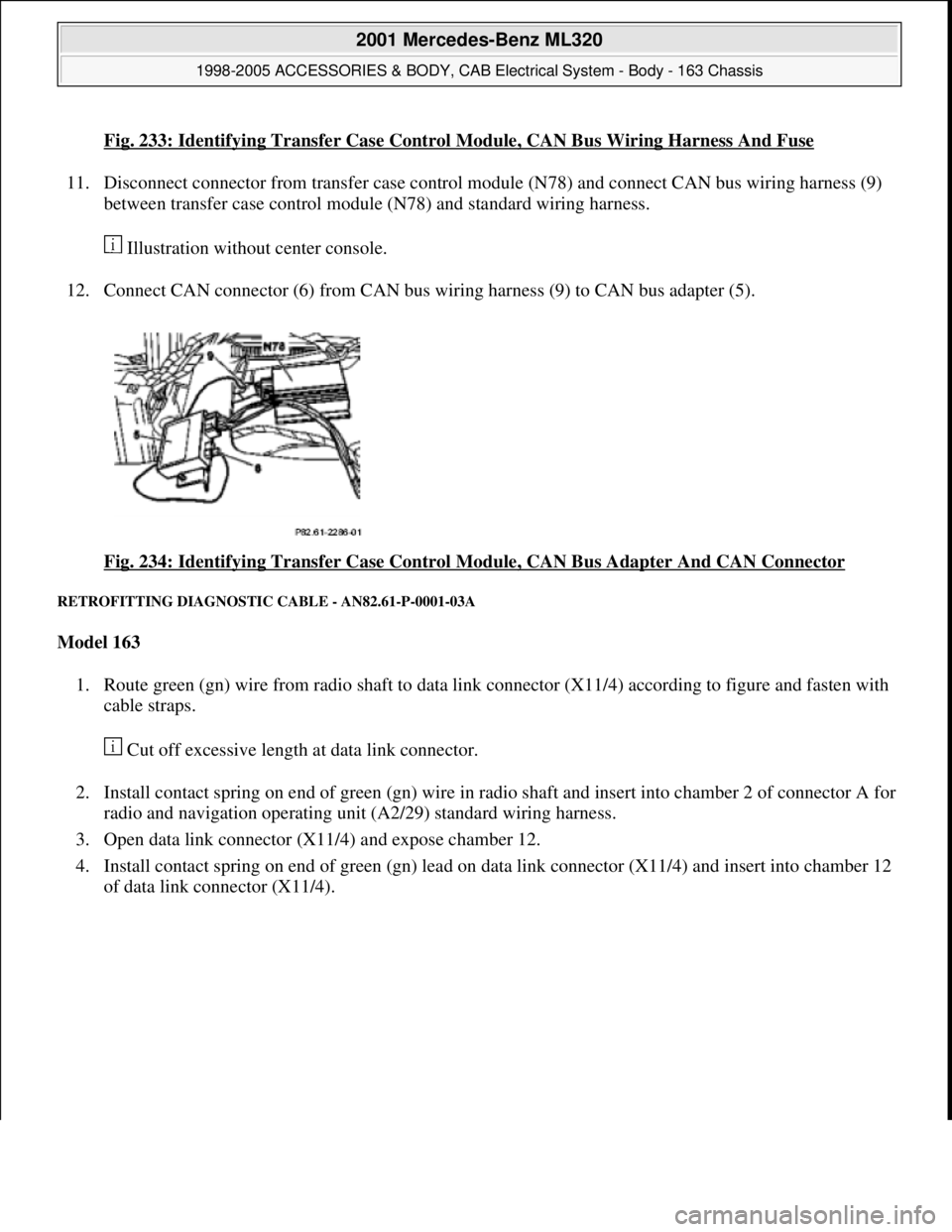
Fig. 233: Identifying Transfer Case Control Module, CAN Bus Wiring Harness And Fuse
11. Disconnect connector from transfer case control module (N78) and connect CAN bus wiring harness (9)
between transfer case control module (N78) and standard wiring harness.
Illustration without center console.
12. Connect CAN connector (6) from CAN bus wiring harness (9) to CAN bus adapter (5).
Fig. 234: Identifying Transfer Case Control Module, CAN Bus Adapter And CAN Connector
RETROFITTING DIAGNOSTIC CABLE - AN82.61-P-0001-03A
Model 163
1. Route green (gn) wire from radio shaft to data link connector (X11/4) according to figure and fasten with
cable straps.
Cut off excessive length at data link connector.
2. Install contact spring on end of green (gn) wire in radio shaft and insert into chamber 2 of connector A for
radio and navigation operating unit (A2/29) standard wiring harness.
3. Open data link connector (X11/4) and expose chamber 12.
4. Install contact spring on end of green (gn) lead on data link connector (X11/4) and insert into chamber 12
of data link connector (X11/4).
2001 Mercedes-Benz ML320
1998-2005 ACCESSORIES & BODY, CAB Electrical System - Body - 163 Chassis
me
Saturday, October 02, 2010 3:30:10 PMPage 330 © 2006 Mitchell Repair Information Company, LLC.
Page 1826 of 4133
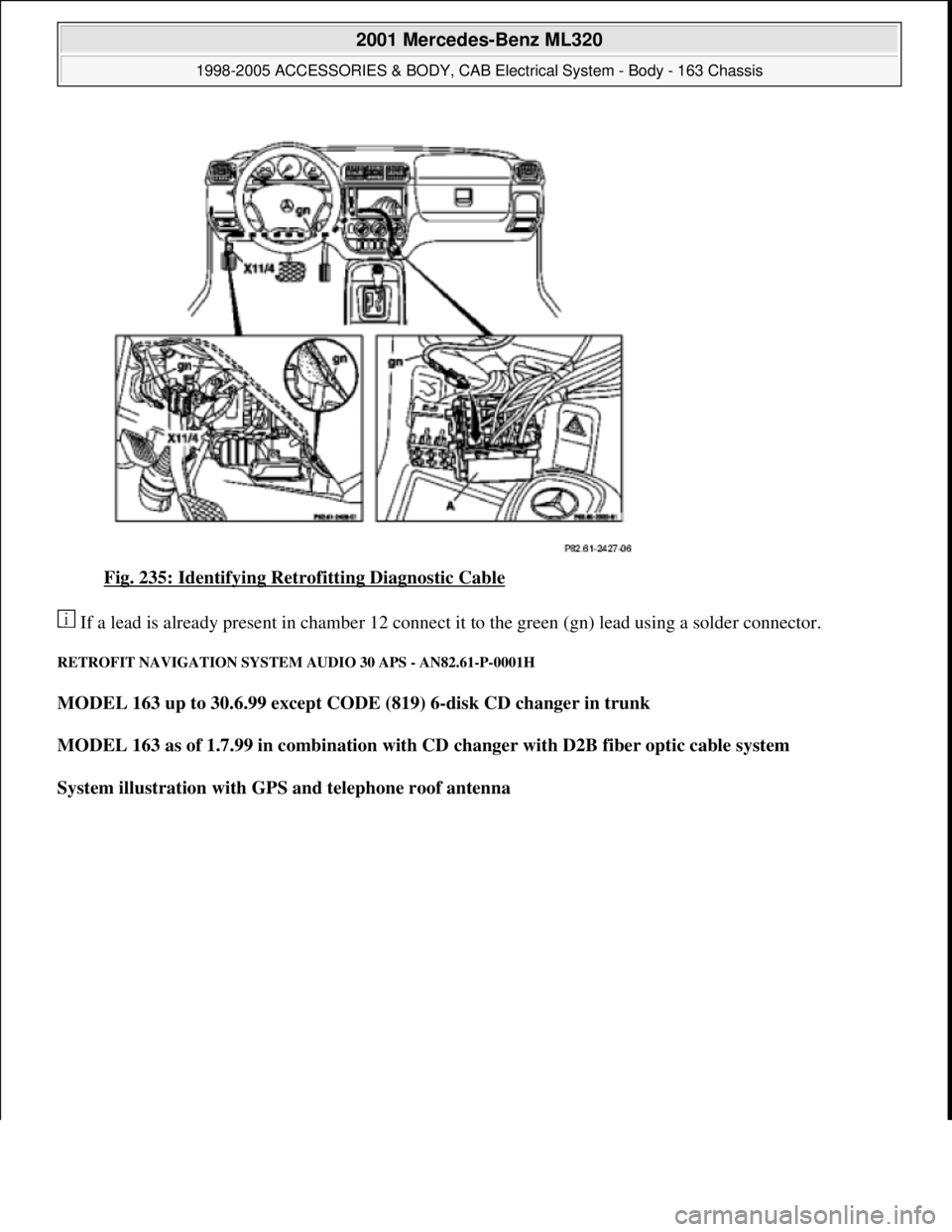
Fig. 235: Identifying Retrofitting Diagnostic Cable
If a lead is already present in chamber 12 connect it to the green (gn) lead using a solder connector.
RETROFIT NAVIGATION SYSTEM AUDIO 30 APS - AN82.61-P-0001H
MODEL 163 up to 30.6.99 except CODE (819) 6-disk CD changer in trunk
MODEL 163 as of 1.7.99 in combination with CD changer with D2B fiber optic cable system
System illustration with GPS and telephone roof antenna
2001 Mercedes-Benz ML320
1998-2005 ACCESSORIES & BODY, CAB Electrical System - Body - 163 Chassis
me
Saturday, October 02, 2010 3:30:10 PMPage 331 © 2006 Mitchell Repair Information Company, LLC.
Page 1827 of 4133
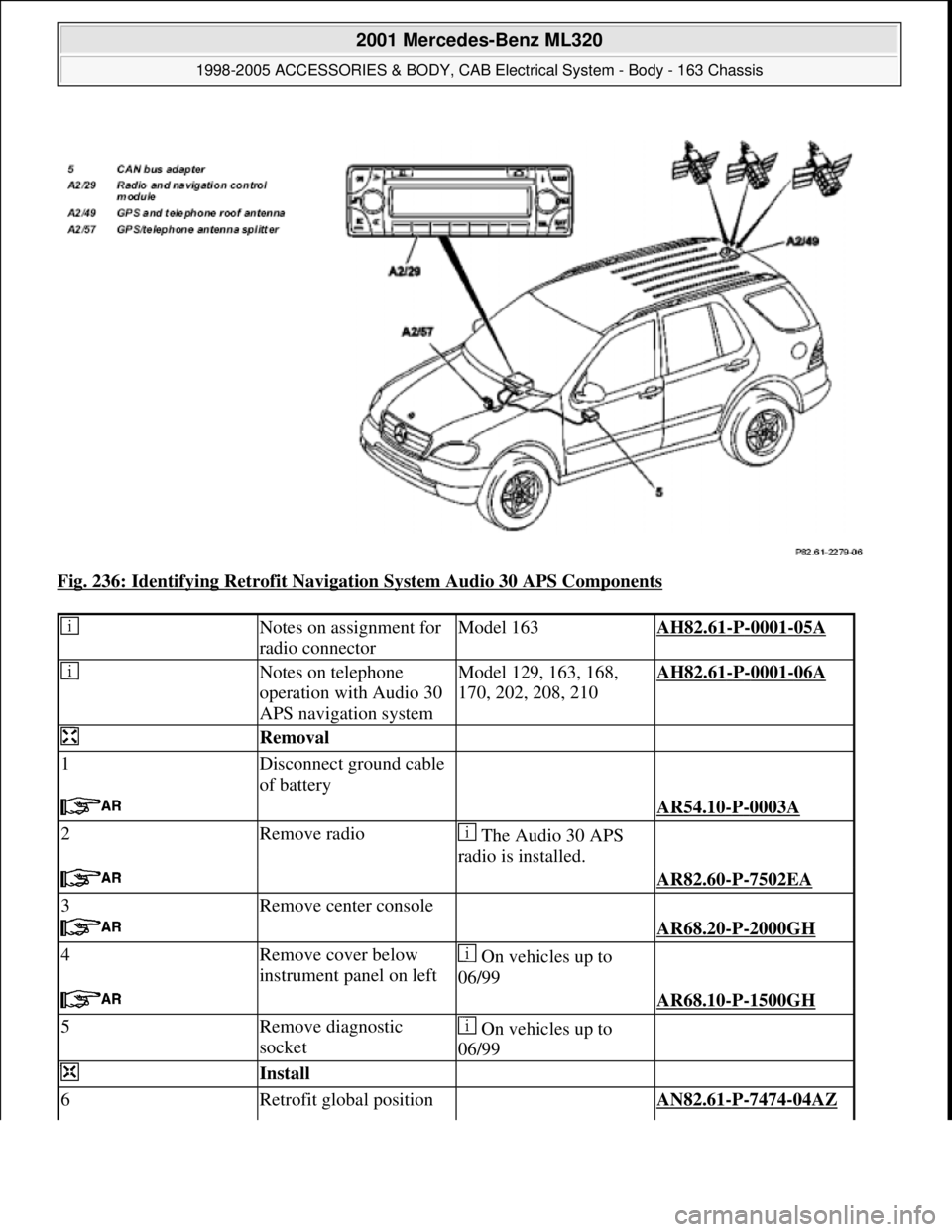
Fig. 236: Identifying Retrofit Navigation System Audio 30 APS Components
Notes on assignment for
radio connectorModel 163AH82.61-P-0001-05A
Notes on telephone
operation with Audio 30
APS navigation systemModel 129, 163, 168,
170, 202, 208, 210AH82.61-P-0001-06A
Removal
1Disconnect ground cable
of battery
AR54.10-P-0003A
2Remove radio The Audio 30 APS
radio is installed.
AR82.60-P-7502EA
3Remove center console
AR68.20-P-2000GH
4Remove cover below
instrument panel on left On vehicles up to
06/99
AR68.10-P-1500GH
5Remove diagnostic
socket On vehicles up to
06/99
Install
6Retrofit global position AN82.61-P-7474-04AZ
2001 Mercedes-Benz ML320
1998-2005 ACCESSORIES & BODY, CAB Electrical System - Body - 163 Chassis
me
Saturday, October 02, 2010 3:30:10 PMPage 332 © 2006 Mitchell Repair Information Company, LLC.
Page 1829 of 4133
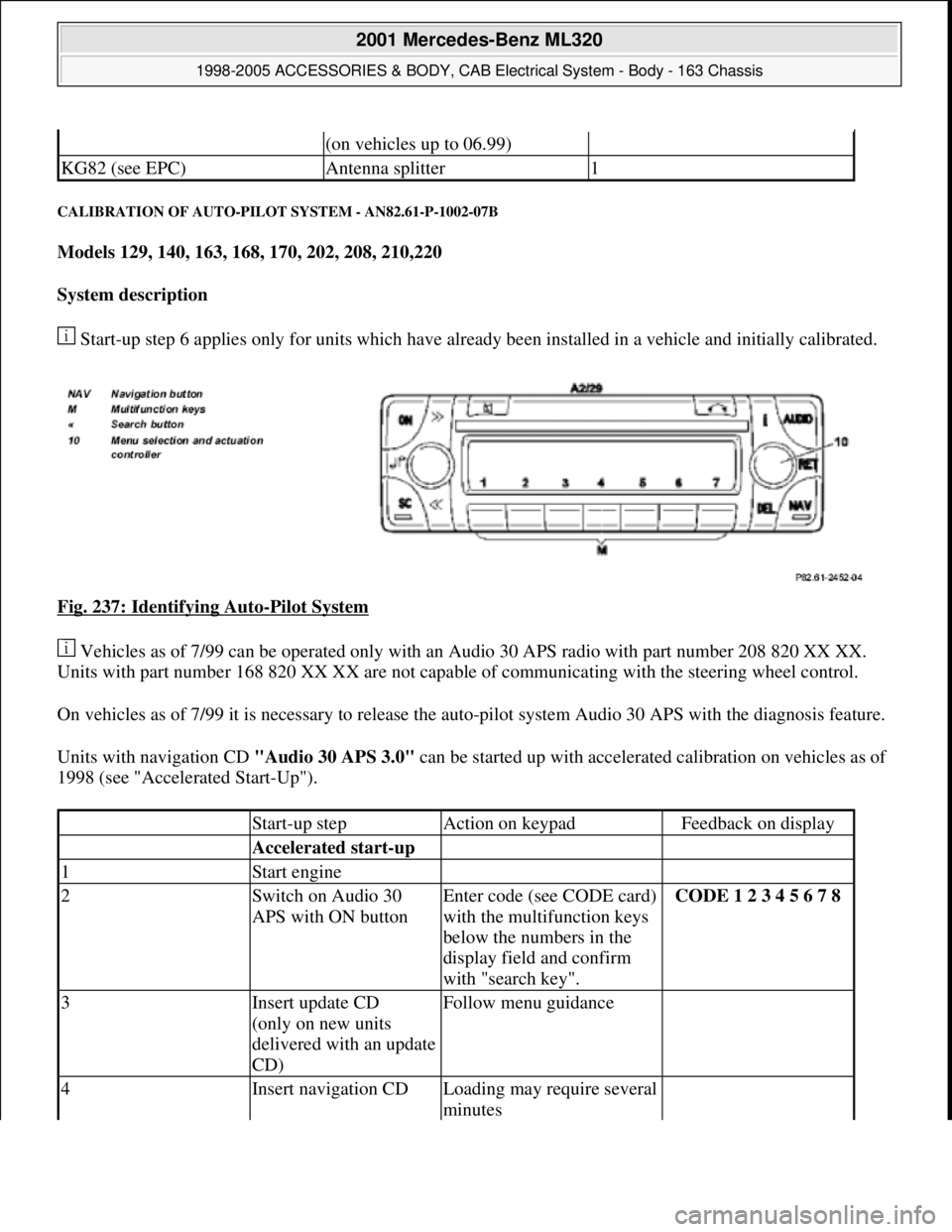
CALIBRATION OF AUTO-PILOT SYSTEM - AN82.61-P-1002-07B
Models 129, 140, 163, 168, 170, 202, 208, 210,220
System description
Start-up step 6 applies only for units which have already been installed in a vehicle and initially calibrated.
Fig. 237: Identifying Auto
-Pilot System
Vehicles as of 7/99 can be operated only with an Audio 30 APS radio with part number 208 820 XX XX.
Units with part number 168 820 XX XX are not capable of communicating with the steering wheel control.
On vehicles as of 7/99 it is necessary to release the auto-pilot system Audio 30 APS with the diagnosis feature.
Units with navigation CD "Audio 30 APS 3.0" can be started up with accelerated calibration on vehicles as of
1998 (see "Accelerated Start-Up").
(on vehicles up to 06.99)
KG82 (see EPC)Antenna splitter1
Start-up stepAction on keypadFeedback on display
Accelerated start-up
1Start engine
2Switch on Audio 30
APS with ON buttonEnter code (see CODE card)
with the multifunction keys
below the numbers in the
display field and confirm
with "search key".CODE 1 2 3 4 5 6 7 8
3Insert update CD
(only on new units
delivered with an update
CD)Follow menu guidance
4Insert navigation CDLoading may require several
minutes
2001 Mercedes-Benz ML320
1998-2005 ACCESSORIES & BODY, CAB Electrical System - Body - 163 Chassis
me
Saturday, October 02, 2010 3:30:11 PMPage 334 © 2006 Mitchell Repair Information Company, LLC.
Page 1830 of 4133
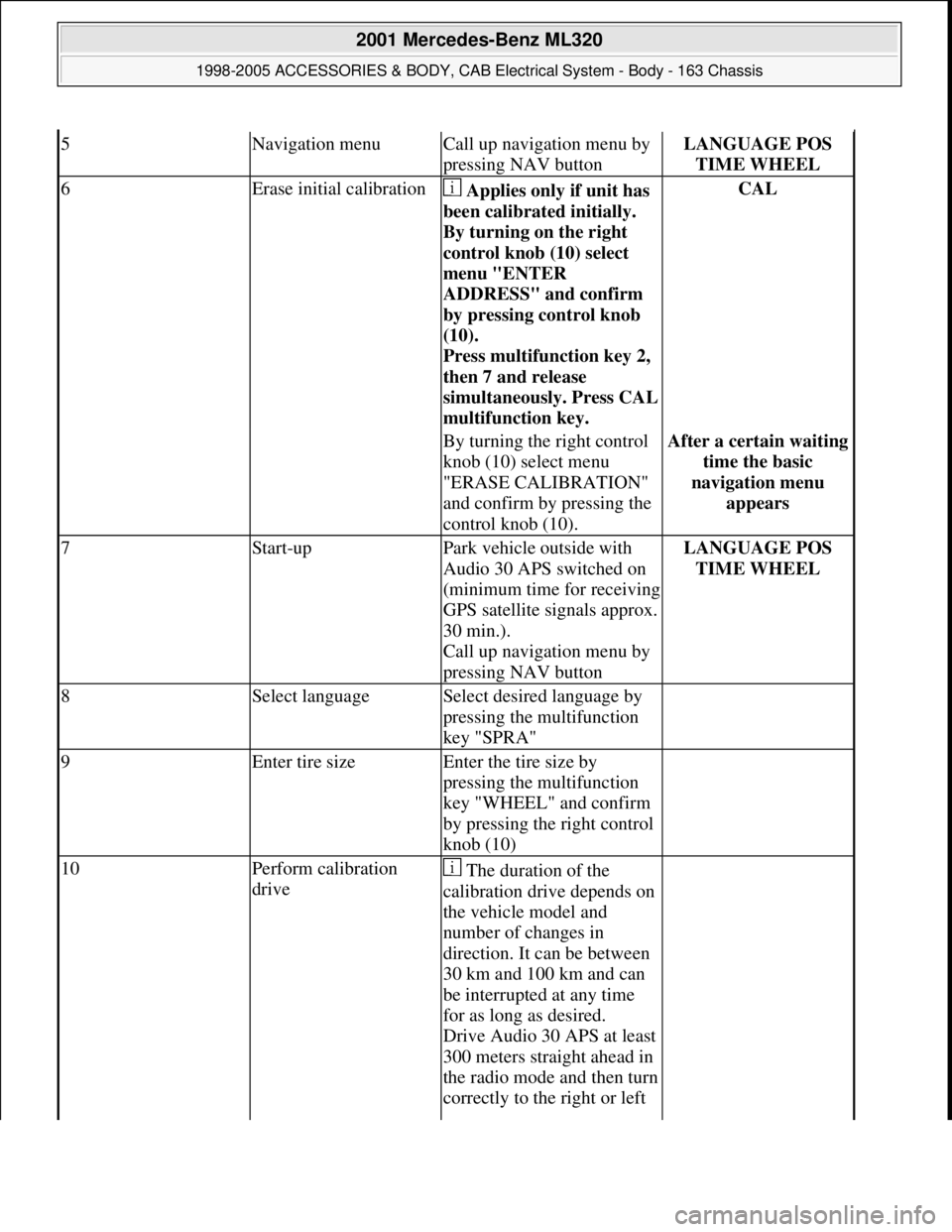
5Navigation menuCall up navigation menu by
pressing NAV buttonLANGUAGE POS
TIME WHEEL
6Erase initial calibration Applies only if unit has
been calibrated initially.
By turning on the right
control knob (10) select
menu "ENTER
ADDRESS" and confirm
by pressing control knob
(10).
Press multifunction key 2,
then 7 and release
simultaneousl
y. Press CAL
multifunction key.
CAL
By turning the right control
knob (10) select menu
"ERASE CALIBRATION"
and confirm by pressing the
control knob (10).After a certain waiting
time the basic
navigation menu
appears
7Start-upPark vehicle outside with
Audio 30 APS switched on
(minimum time for receiving
GPS satellite signals approx.
30 min.).
Call up navigation menu by
pressing NAV buttonLANGUAGE POS
TIME WHEEL
8Select languageSelect desired language by
pressing the multifunction
key "SPRA"
9Enter tire sizeEnter the tire size by
pressing the multifunction
key "WHEEL" and confirm
by pressing the right control
knob (10)
10Perform calibration
drive The duration of the
calibration drive depends on
the vehicle model and
number of changes in
direction. It can be between
30 km and 100 km and can
be interrupted at any time
for as long as desired.
Drive Audio 30 APS at least
300 meters straight ahead in
the radio mode and then turn
correctly to the right or left
2001 Mercedes-Benz ML320
1998-2005 ACCESSORIES & BODY, CAB Electrical System - Body - 163 Chassis
me
Saturday, October 02, 2010 3:30:11 PMPage 335 © 2006 Mitchell Repair Information Company, LLC.
Page 1831 of 4133
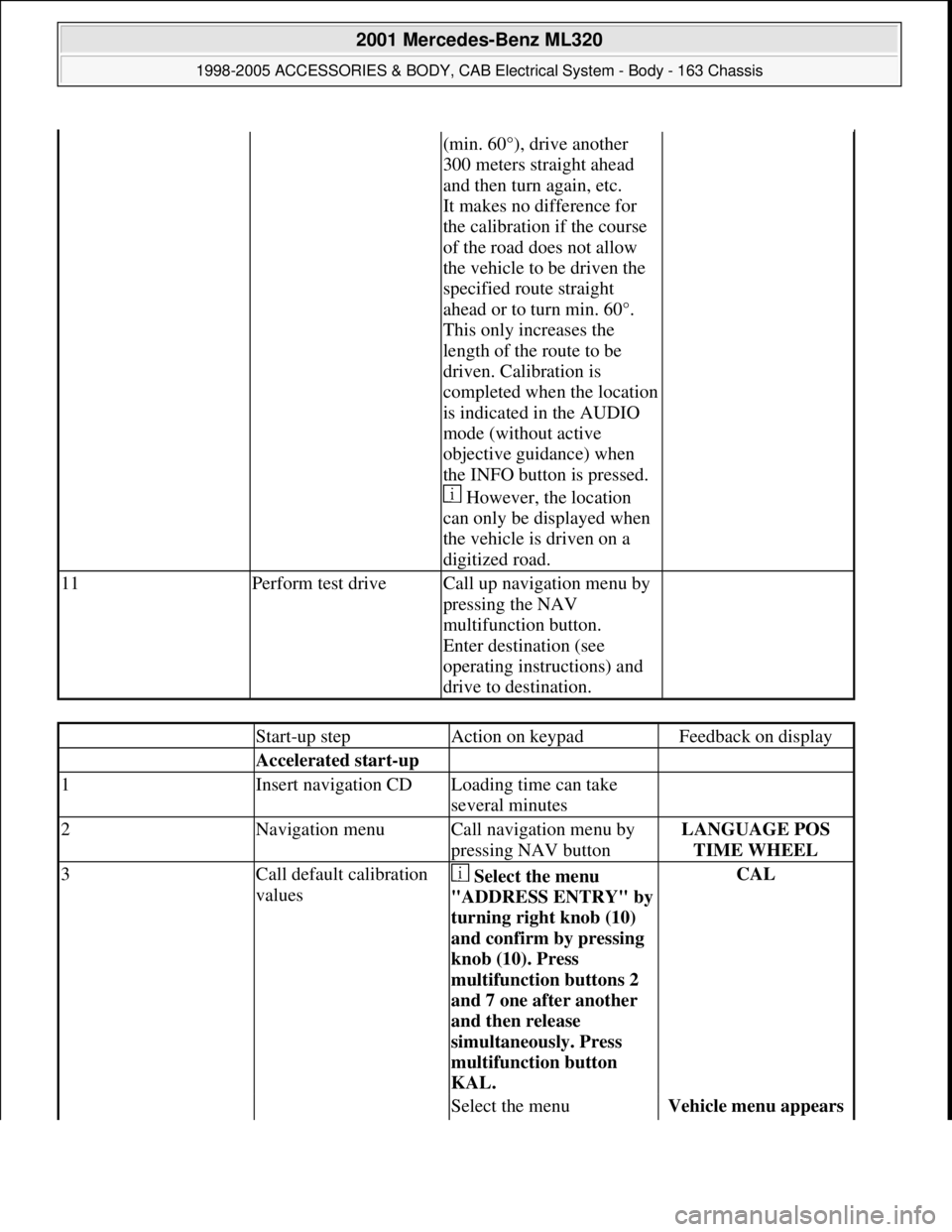
(min. 60°), drive another
300 meters straight ahead
and then turn again, etc.
It makes no difference for
the calibration if the course
of the road does not allow
the vehicle to be driven the
specified route straight
ahead or to turn min. 60°.
This only increases the
length of the route to be
driven. Calibration is
completed when the location
is indicated in the AUDIO
mode (without active
objective guidance) when
the INFO button is pressed.
However, the location
can only be displayed when
the vehicle is driven on a
digitized road.
11Perform test driveCall up navigation menu by
pressing the NAV
multifunction button.
Enter destination (see
operating instructions) and
drive to destination.
Start-up stepAction on keypadFeedback on display
Accelerated start-up
1Insert navigation CDLoading time can take
several minutes
2Navigation menuCall navigation menu by
pressing NAV buttonLANGUAGE POS
TIME WHEEL
3Call default calibration
values Select the menu
"ADDRESS ENTRY" b
y
turning right knob (10)
and confirm by pressing
knob (10). Press
multifunction buttons 2
and 7 one after another
and then release
simultaneously. Press
multifunction button
KAL.
CAL
Select the menu Vehicle menu appears
2001 Mercedes-Benz ML320
1998-2005 ACCESSORIES & BODY, CAB Electrical System - Body - 163 Chassis
me
Saturday, October 02, 2010 3:30:11 PMPage 336 © 2006 Mitchell Repair Information Company, LLC.
Page 1890 of 4133
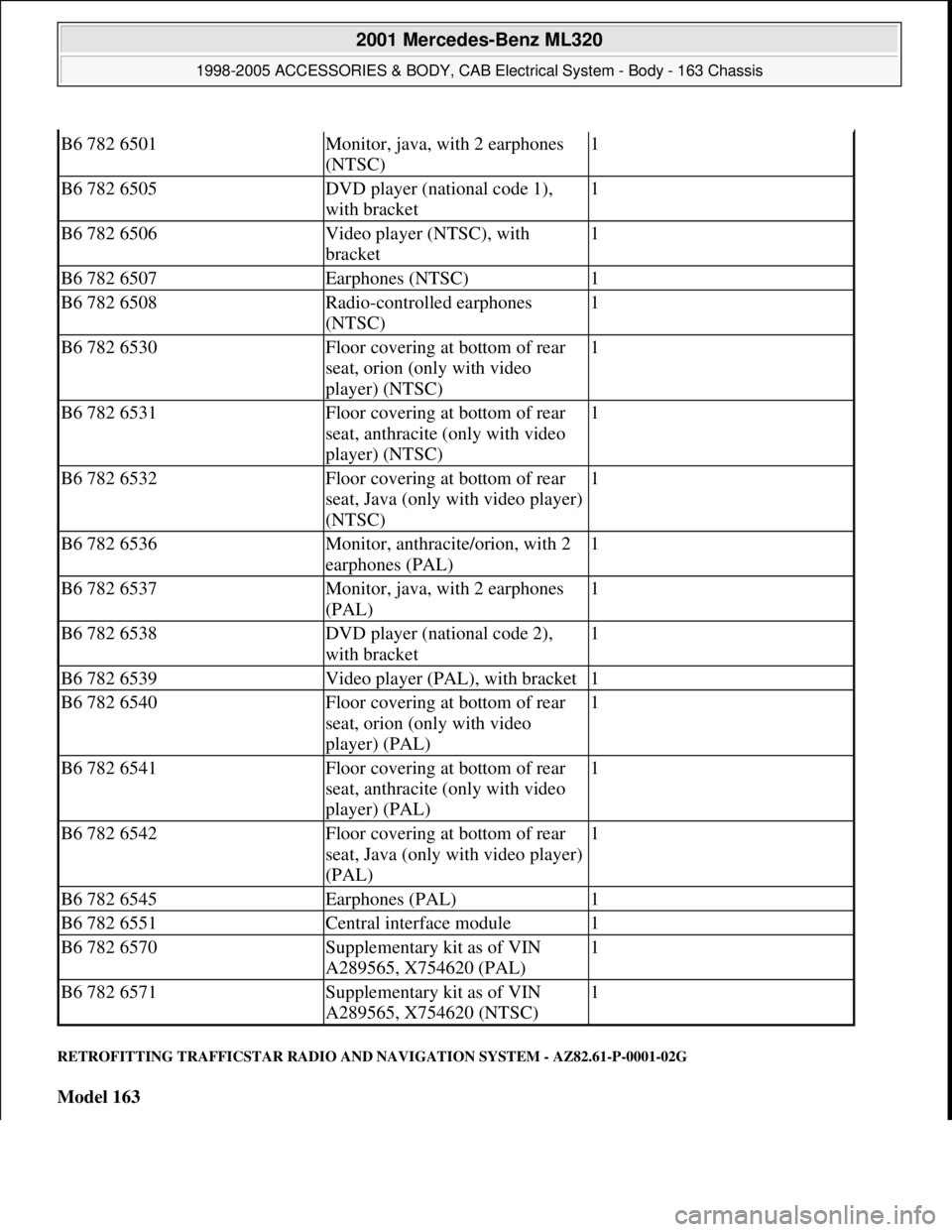
RETROFITTING TRAFFICSTAR RADIO AND NAVIGATION SYSTEM - AZ82.61-P-0001-02G
Model 163
B6 782 6501Monitor, java, with 2 earphones
(NTSC)1
B6 782 6505DVD player (national code 1),
with bracket1
B6 782 6506Video player (NTSC), with
bracket1
B6 782 6507Earphones (NTSC)1
B6 782 6508Radio-controlled earphones
(NTSC)1
B6 782 6530Floor covering at bottom of rear
seat, orion (only with video
player) (NTSC)1
B6 782 6531Floor covering at bottom of rear
seat, anthracite (only with video
player) (NTSC)1
B6 782 6532Floor covering at bottom of rear
seat, Java (only with video player)
(NTSC)1
B6 782 6536Monitor, anthracite/orion, with 2
earphones (PAL)1
B6 782 6537Monitor, java, with 2 earphones
(PAL)1
B6 782 6538DVD player (national code 2),
with bracket1
B6 782 6539Video player (PAL), with bracket1
B6 782 6540Floor covering at bottom of rear
seat, orion (only with video
player) (PAL)1
B6 782 6541Floor covering at bottom of rear
seat, anthracite (only with video
player) (PAL)1
B6 782 6542Floor covering at bottom of rear
seat, Java (only with video player)
(PAL)1
B6 782 6545Earphones (PAL)1
B6 782 6551Central interface module1
B6 782 6570Supplementary kit as of VIN
A289565, X754620 (PAL)1
B6 782 6571Supplementary kit as of VIN
A289565, X754620 (NTSC)1
2001 Mercedes-Benz ML320
1998-2005 ACCESSORIES & BODY, CAB Electrical System - Body - 163 Chassis
me
Saturday, October 02, 2010 3:30:12 PMPage 395 © 2006 Mitchell Repair Information Company, LLC.
Page 1891 of 4133
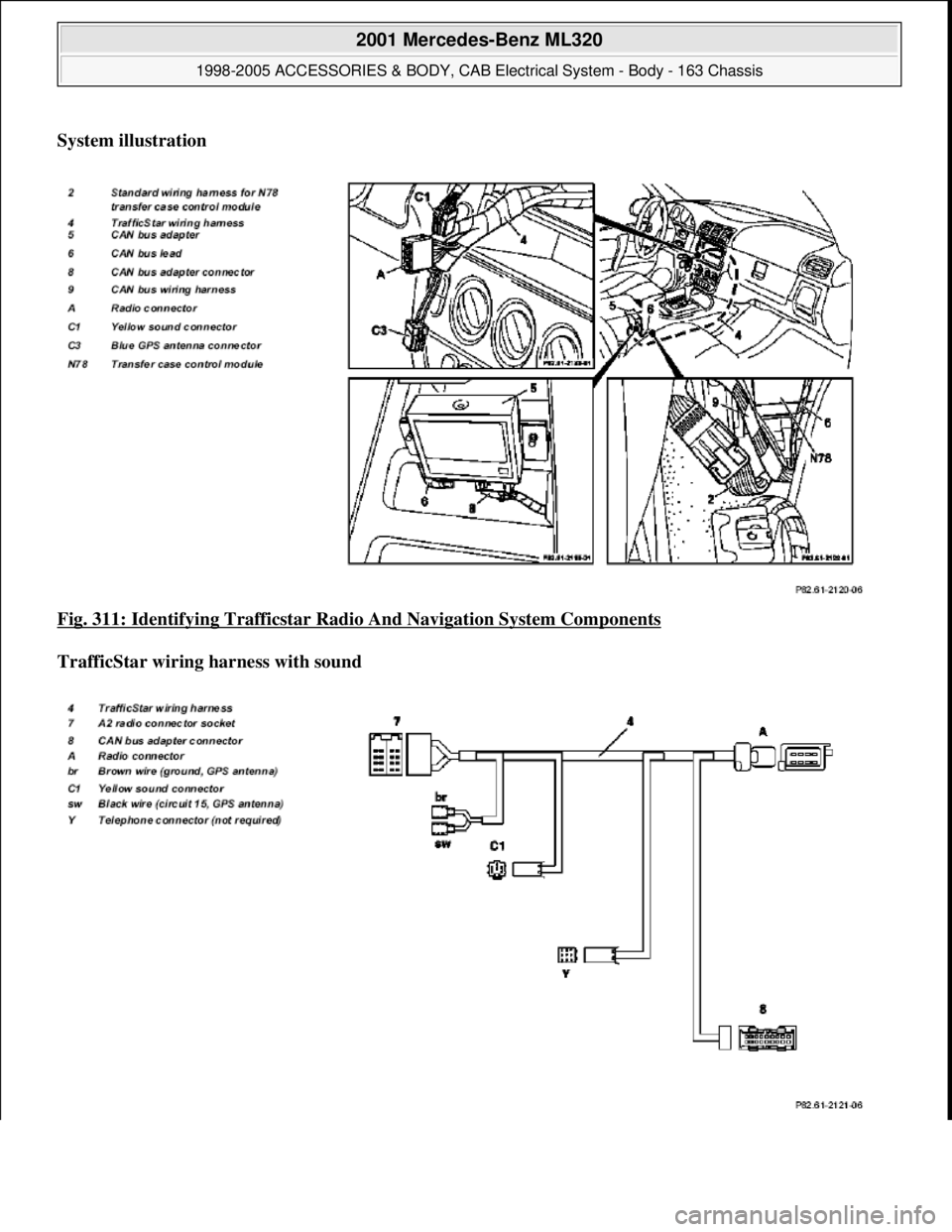
System illustration
Fig. 311: Identifying Trafficstar Radi o And Navigation System Components
TrafficStar wiring harness with sound
2001 Mercedes-Benz ML320
1998-2005 ACCESSORIES & BODY, CAB Electr ical System - Body - 163 Chassis
me
Saturday, October 02, 2010 3:30:12 PMPage 396 © 2006 Mitchell Repair Information Company, LLC.