fuse MERCEDES-BENZ ML500 1997 Complete Workshop Manual
[x] Cancel search | Manufacturer: MERCEDES-BENZ, Model Year: 1997, Model line: ML500, Model: MERCEDES-BENZ ML500 1997Pages: 4133, PDF Size: 88.89 MB
Page 1824 of 4133
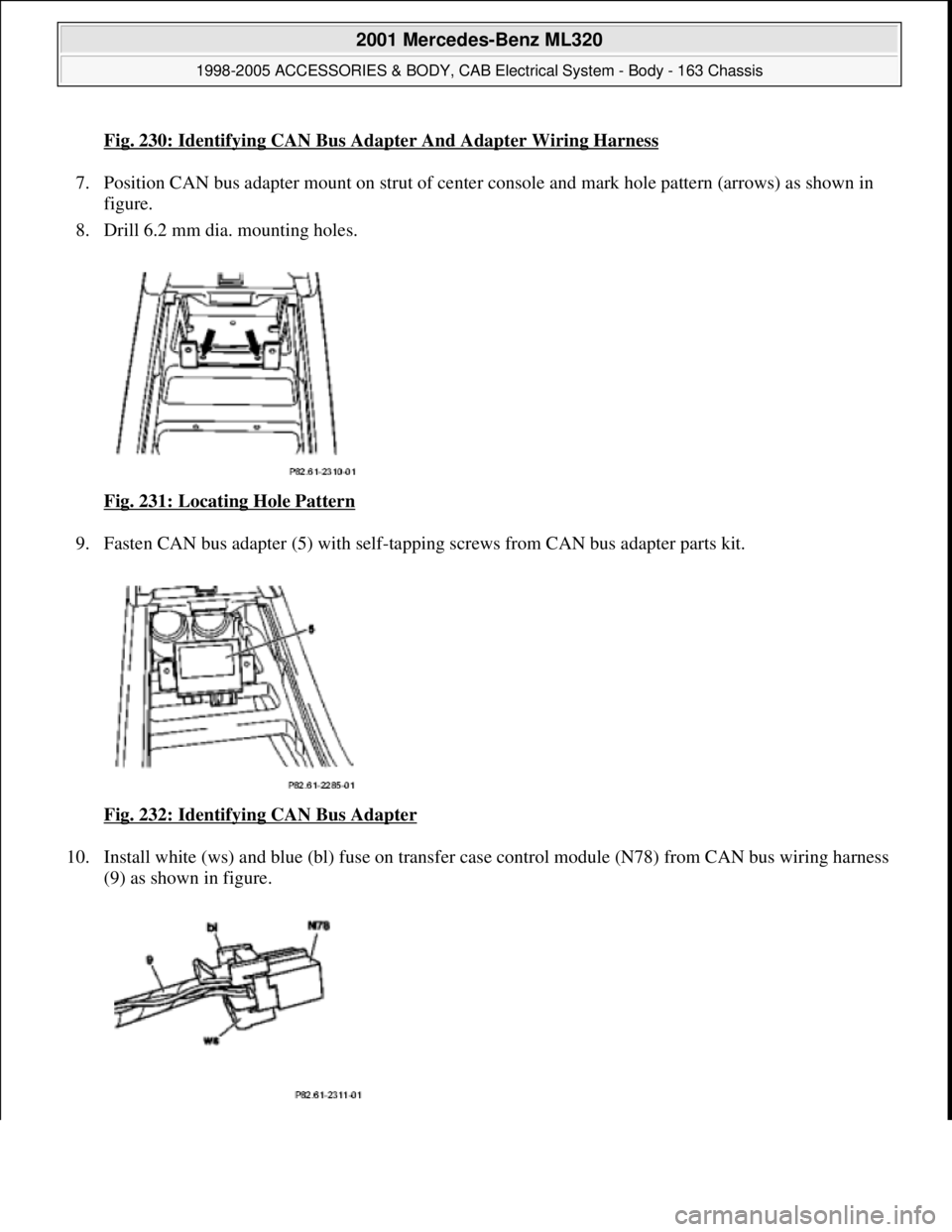
Fig. 230: Identifying CAN Bus Adapter And Adapter Wiring Harness
7. Position CAN bus adapter mount on st rut of center console and mark hole pattern (arrows) as shown in
figure.
8. Drill 6.2 mm dia. mounting holes.
Fig. 231: Locating Hole Pattern
9. Fasten CAN bus adapter (5) with self-tappi ng screws from CAN bus adapter parts kit.
Fig. 232: Identifying CAN Bus Adapter
10. Install white (ws) and blue (bl) fuse on transfer case control module (N78) from CAN bus wiring harness
(9) as shown in figure.
2001 Mercedes-Benz ML320
1998-2005 ACCESSORIES & BODY, CAB Electr ical System - Body - 163 Chassis
me
Saturday, October 02, 2010 3:30:10 PMPage 329 © 2006 Mitchell Repair Information Company, LLC.
Page 1825 of 4133
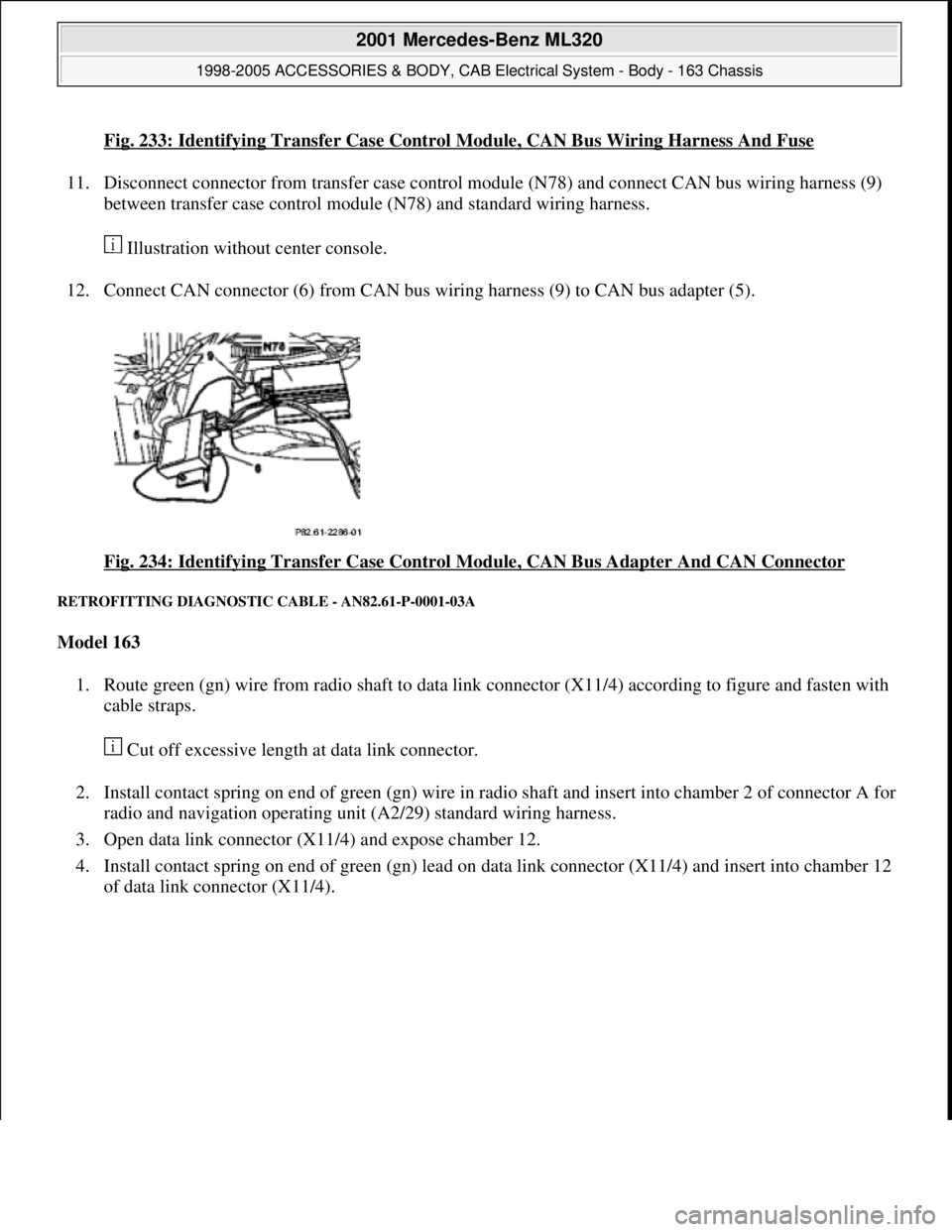
Fig. 233: Identifying Transfer Case Control Module, CAN Bus Wiring Harness And Fuse
11. Disconnect connector from transfer case control module (N78) and connect CAN bus wiring harness (9)
between transfer case control module (N78) and standard wiring harness.
Illustration without center console.
12. Connect CAN connector (6) from CAN bus wiring harness (9) to CAN bus adapter (5).
Fig. 234: Identifying Transfer Case Control Module, CAN Bus Adapter And CAN Connector
RETROFITTING DIAGNOSTIC CABLE - AN82.61-P-0001-03A
Model 163
1. Route green (gn) wire from radio shaft to data link connector (X11/4) according to figure and fasten with
cable straps.
Cut off excessive length at data link connector.
2. Install contact spring on end of green (gn) wire in radio shaft and insert into chamber 2 of connector A for
radio and navigation operating unit (A2/29) standard wiring harness.
3. Open data link connector (X11/4) and expose chamber 12.
4. Install contact spring on end of green (gn) lead on data link connector (X11/4) and insert into chamber 12
of data link connector (X11/4).
2001 Mercedes-Benz ML320
1998-2005 ACCESSORIES & BODY, CAB Electrical System - Body - 163 Chassis
me
Saturday, October 02, 2010 3:30:10 PMPage 330 © 2006 Mitchell Repair Information Company, LLC.
Page 1836 of 4133
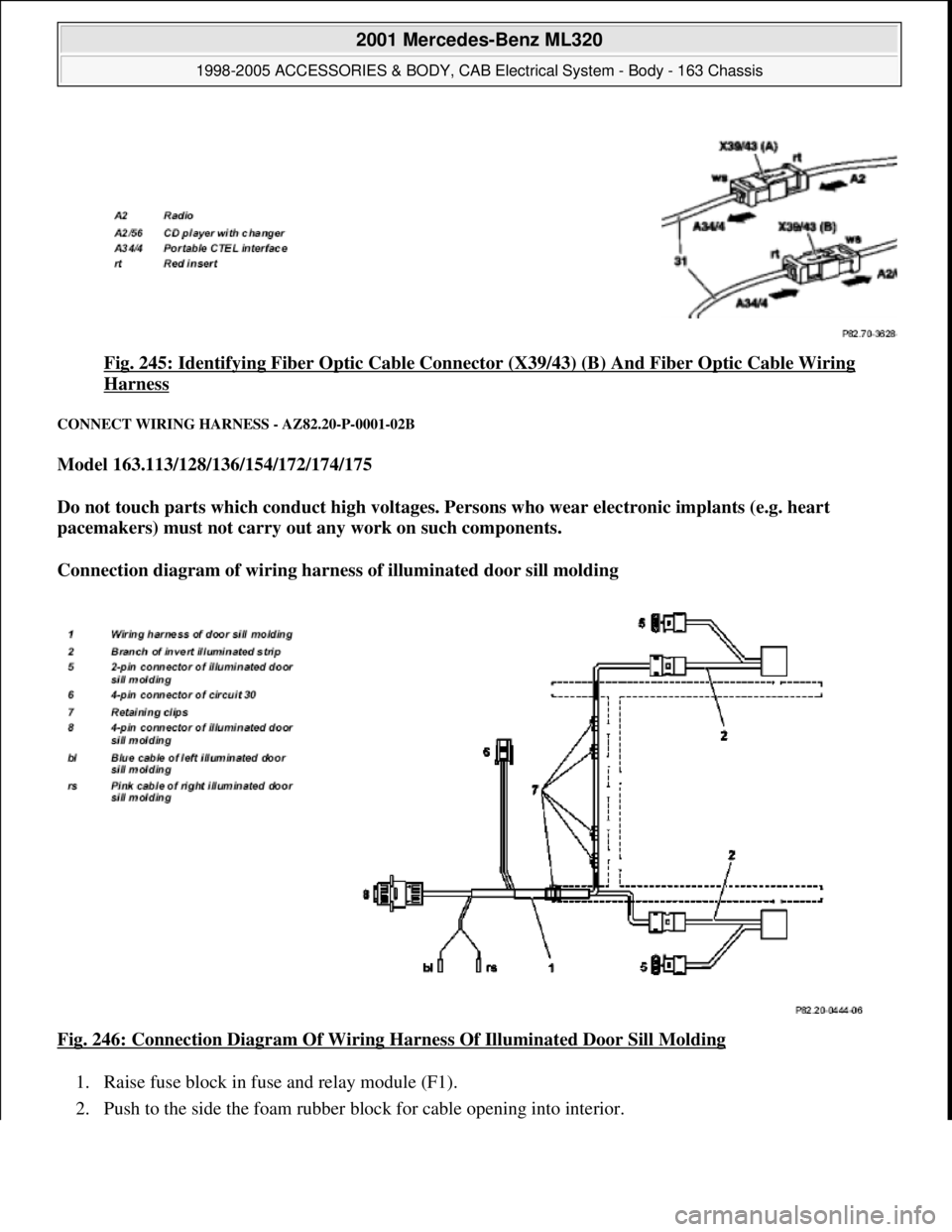
Fig. 245: Identifying Fiber Optic Cable Connector (X39/43) (B) And Fiber Optic Cable Wiring
Harness
CONNECT WIRING HARNESS - AZ82.20-P-0001-02B
Model 163.113/128/136/154/172/174/175
Do not touch parts which conduct high voltages. Persons who wear electronic implants (e.g. heart
pacemakers) must not carry out any work on such components.
Connection diagram of wiring harness of illuminated door sill molding
Fig. 246: Connection Diagram Of Wiring Harness Of Illuminated Door Sill Molding
1. Raise fuse block in fuse and relay module (F1).
2. Push to the side the foam rubber block for cable openin
g into interior.
2001 Mercedes-Benz ML320
1998-2005 ACCESSORIES & BODY, CAB Electrical System - Body - 163 Chassis
me
Saturday, October 02, 2010 3:30:11 PMPage 341 © 2006 Mitchell Repair Information Company, LLC.
Page 1837 of 4133
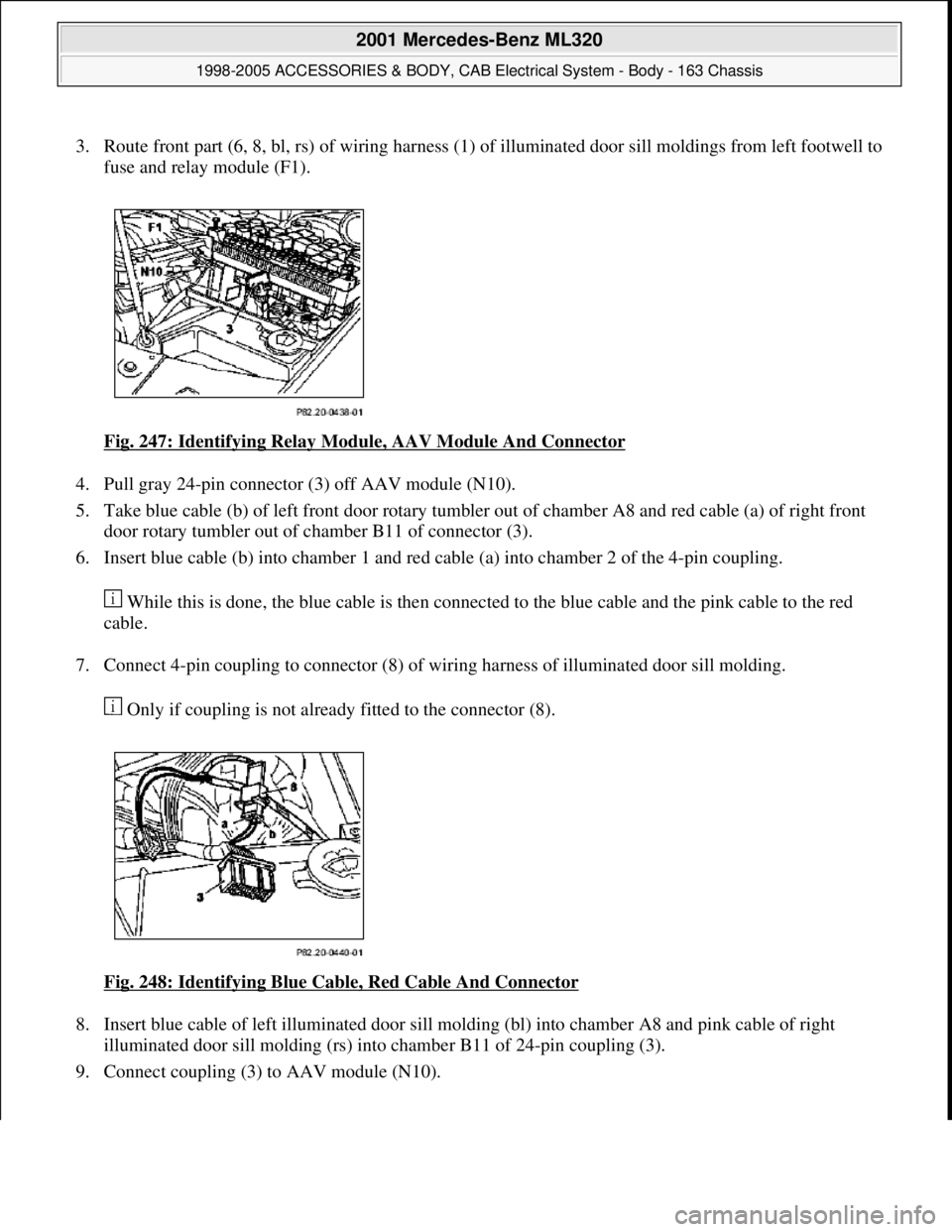
3. Route front part (6, 8, bl, rs) of wiring harness (1) of illuminated door sill moldings from left footwell to
fuse and relay module (F1).
Fig. 247: Identifying Relay Module, AAV Module And Connector
4. Pull gray 24-pin connector (3) off AAV module (N10).
5. Take blue cable (b) of left front door rotary tumbler out of chamber A8 and red cable (a) of right front
door rotary tumbler out of chamber B11 of connector (3).
6. Insert blue cable (b) into chamber 1 and red cable (a) into chamber 2 of the 4-pin coupling.
While this is done, the blue cable is then connected to the blue cable and the pink cable to the red
cable.
7. Connect 4-pin coupling to connector (8) of wiring harness of illuminated door sill molding.
Only if coupling is not already fitted to the connector (8).
Fig. 248: Identifying Blue Cable, Red Cable And Connector
8. Insert blue cable of left illuminated door sill molding (bl) into chamber A8 and pink cable of right
illuminated door sill molding (rs) into chamber B11 of 24-pin coupling (3).
9. Connect couplin
g (3) to AAV module (N10).
2001 Mercedes-Benz ML320
1998-2005 ACCESSORIES & BODY, CAB Electrical System - Body - 163 Chassis
me
Saturday, October 02, 2010 3:30:11 PMPage 342 © 2006 Mitchell Repair Information Company, LLC.
Page 1838 of 4133
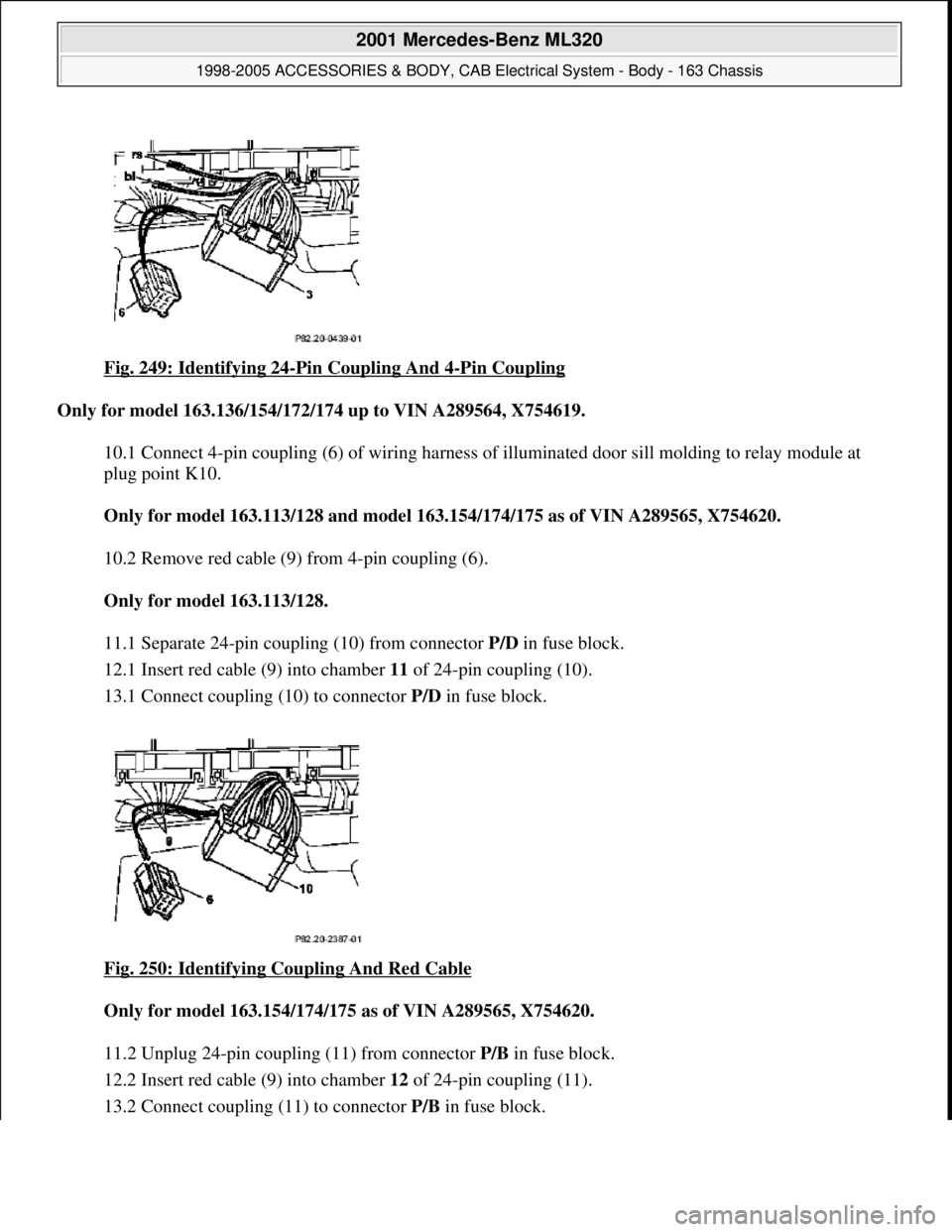
Fig. 249: Identifying 24-Pin Coupling And 4-Pin Coupling
Only for model 163.136/154/172/174 up to VIN A289564, X754619.
10.1 Connect 4-pin coupling (6) of wiring harness of illuminated door sill molding to relay module at
plug point K10.
Only for model 163.113/128 and mode l 163.154/174/175 as of VIN A289565, X754620.
10.2 Remove red cable (9) from 4-pin coupling (6).
Only for model 163.113/128.
11.1 Separate 24-pin coupli ng (10) from connector P/D in fuse block.
12.1 Insert red cable (9) into chamber 11 of 24-pin coupling (10).
13.1 Connect coupling (10) to connector P/D in fuse block.
Fig. 250: Identifying Coupling And Red Cable
Only for model 163.154/174/ 175 as of VIN A289565, X754620.
11.2 Unplug 24-pin coupling (11) from connector P/B in fuse block.
12.2 Insert red cable (9) into chamber 12 of 24-pin coupling (11).
13.2 Connect couplin
g (11) to connector P/Bin fuse block.
2001 Mercedes-Benz ML320
1998-2005 ACCESSORIES & BODY, CAB Electr ical System - Body - 163 Chassis
me
Saturday, October 02, 2010 3:30:11 PMPage 343 © 2006 Mitchell Repair Information Company, LLC.
Page 1839 of 4133
Only if fuse is not already present.
14 Insert enclosed 15 A fu se into plug position F40.
15 Fix wiring harness of illuminated door sill molding in fuse and relay module (F1).
16 Attach fuse block.
2 bolts.
17 Insert foam rubber block into rear of fuse and relay module.
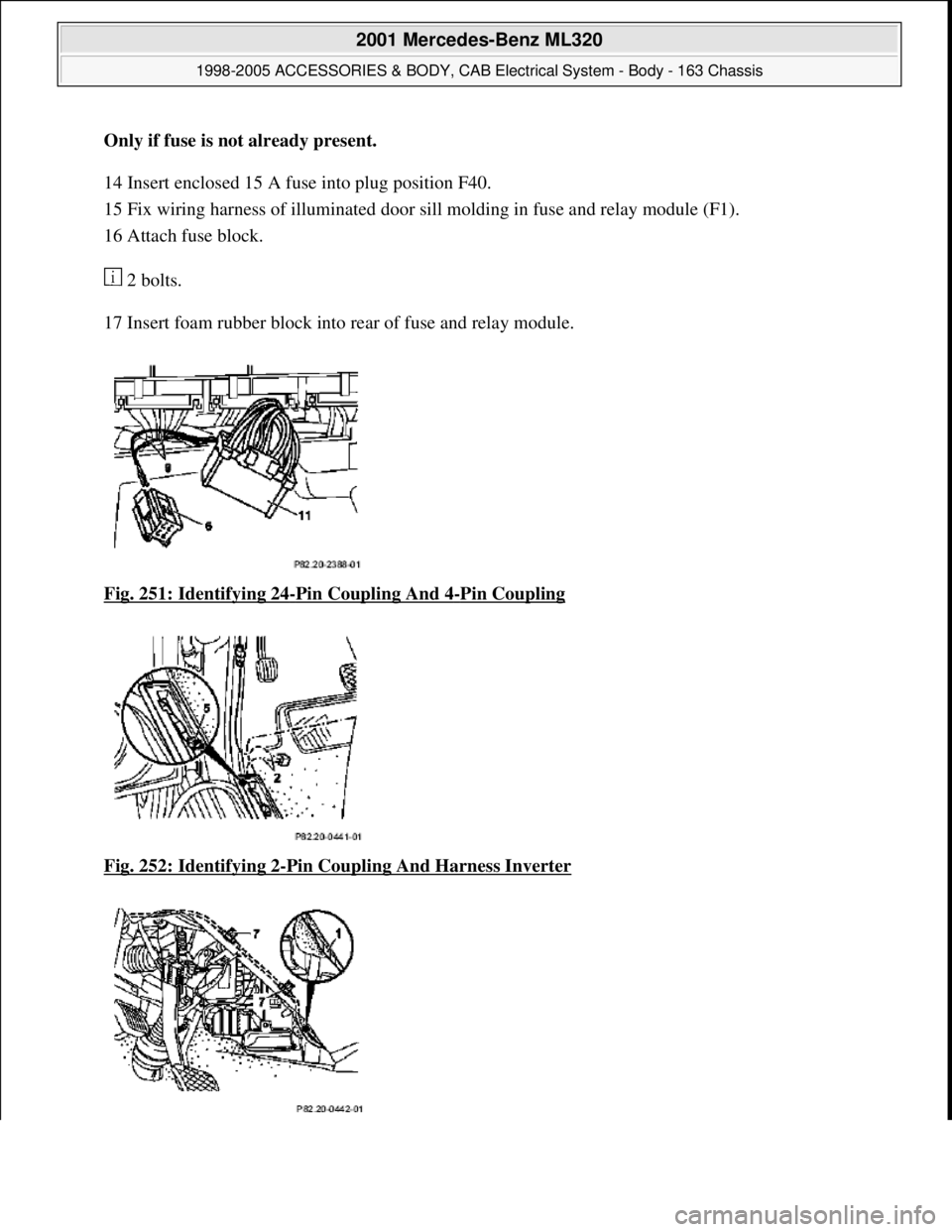
Fig. 251: Identifying 24
-Pin Coupling And 4-Pin Coupling
Fig. 252: Identifying 2
-Pin Coupling And Harness Inverter
2001 Mercedes-Benz ML320
1998-2005 ACCESSORIES & BODY, CAB Electr ical System - Body - 163 Chassis
me
Saturday, October 02, 2010 3:30:11 PMPage 344 © 2006 Mitchell Repair Information Company, LLC.
Page 1841 of 4133
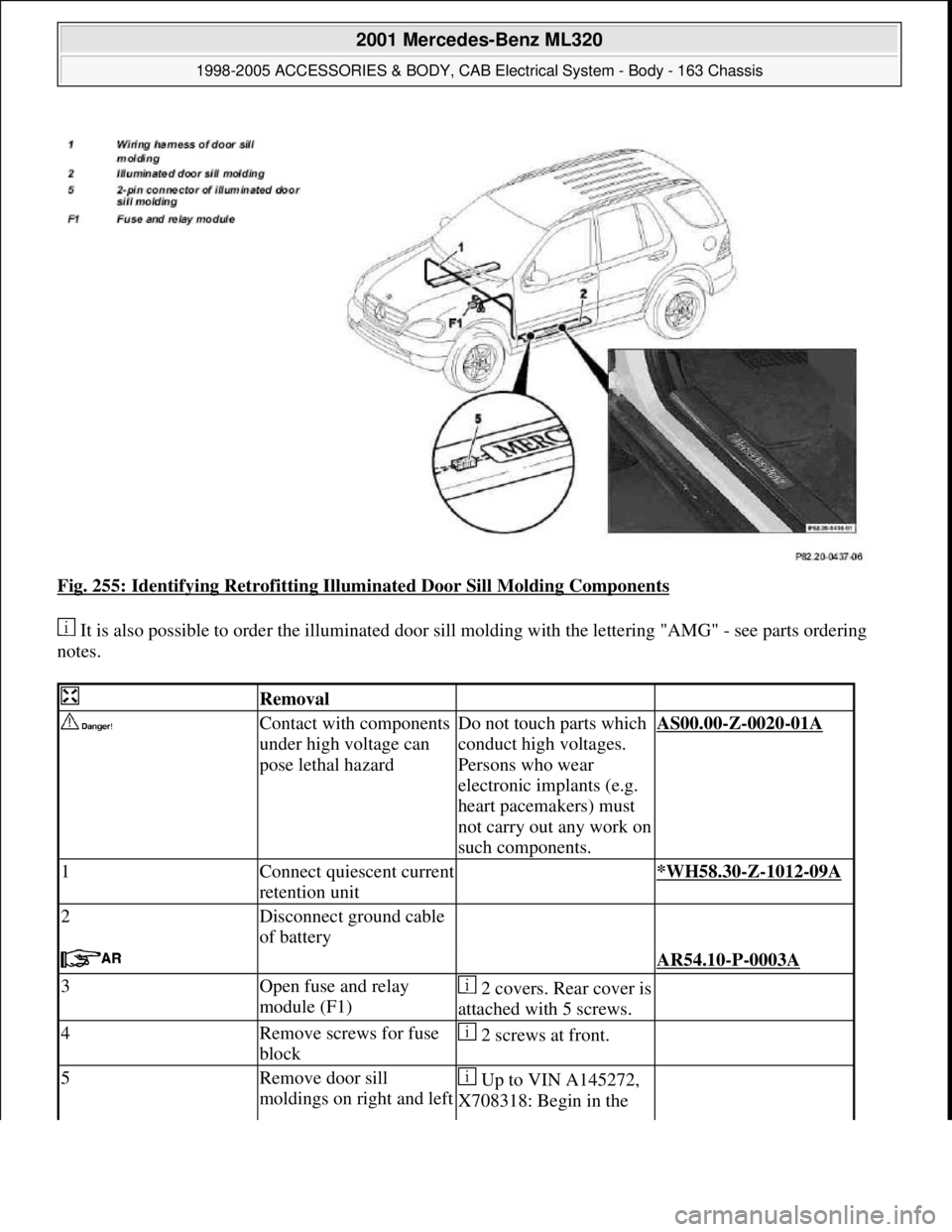
Fig. 255: Identifying Retrofitting Illuminated Door Sill Molding Components
It is also possible to order the illuminated door sill molding with the lettering "AMG" - see parts ordering
notes.
Removal
Contact with components
under high voltage can
pose lethal hazardDo not touch parts which
conduct high voltages.
Persons who wear
electronic implants (e.g.
heart pacemakers) must
not carry out any work on
such components.AS00.00-Z-0020-01A
1Connect quiescent current
retention unit *WH58.30-Z-1012-09A
2Disconnect ground cable
of battery
AR54.10-P-0003A
3Open fuse and relay
module (F1)2 covers. Rear cover is
attached with 5 screws.
4Remove screws for fuse
block 2 screws at front.
5Remove door sill
moldings on right and left Up to VIN A145272,
X708318: Begin in the
2001 Mercedes-Benz ML320
1998-2005 ACCESSORIES & BODY, CAB Electrical System - Body - 163 Chassis
me
Saturday, October 02, 2010 3:30:11 PMPage 346 © 2006 Mitchell Repair Information Company, LLC.
Page 1881 of 4133
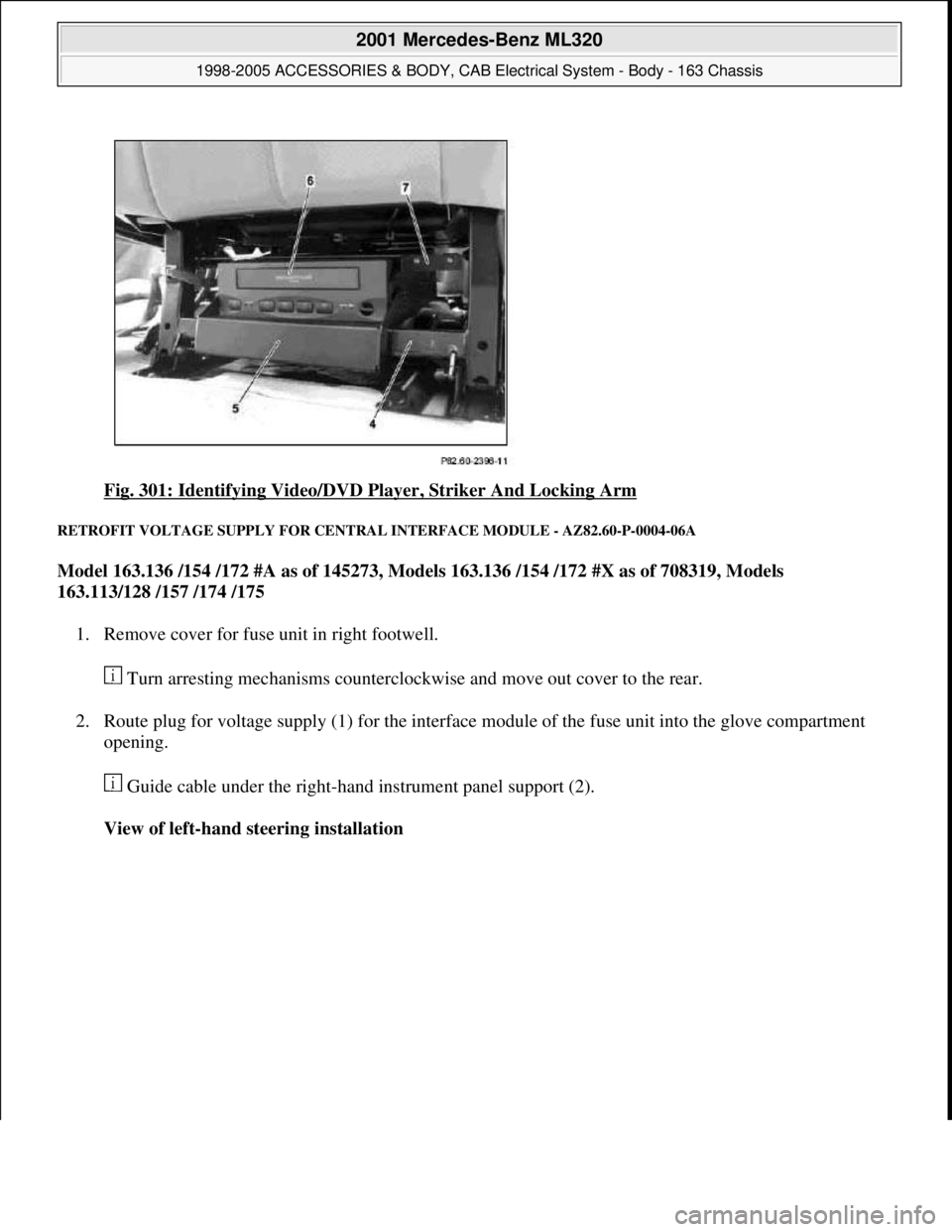
Fig. 301: Identifying Video/DVD Player, Striker And Locking Arm
RETROFIT VOLTAGE SUPPLY FOR CENTRAL INTERFACE MODULE - AZ82.60-P-0004-06A
Model 163.136 /154 /172 #A as of 145273, Models 163.136 /154 /172 #X as of 708319, Models
163.113/128 /157 /174 /175
1. Remove cover for fuse unit in right footwell.
Turn arresting mechanisms counterclockwise and move out cover to the rear.
2. Route plug for voltage supply (1) for the interface module of the fuse unit into the glove compartment
opening.
Guide cable under the right-hand instrument panel support (2).
View of left-hand steering installation
2001 Mercedes-Benz ML320
1998-2005 ACCESSORIES & BODY, CAB Electrical System - Body - 163 Chassis
me
Saturday, October 02, 2010 3:30:12 PMPage 386 © 2006 Mitchell Repair Information Company, LLC.
Page 1882 of 4133
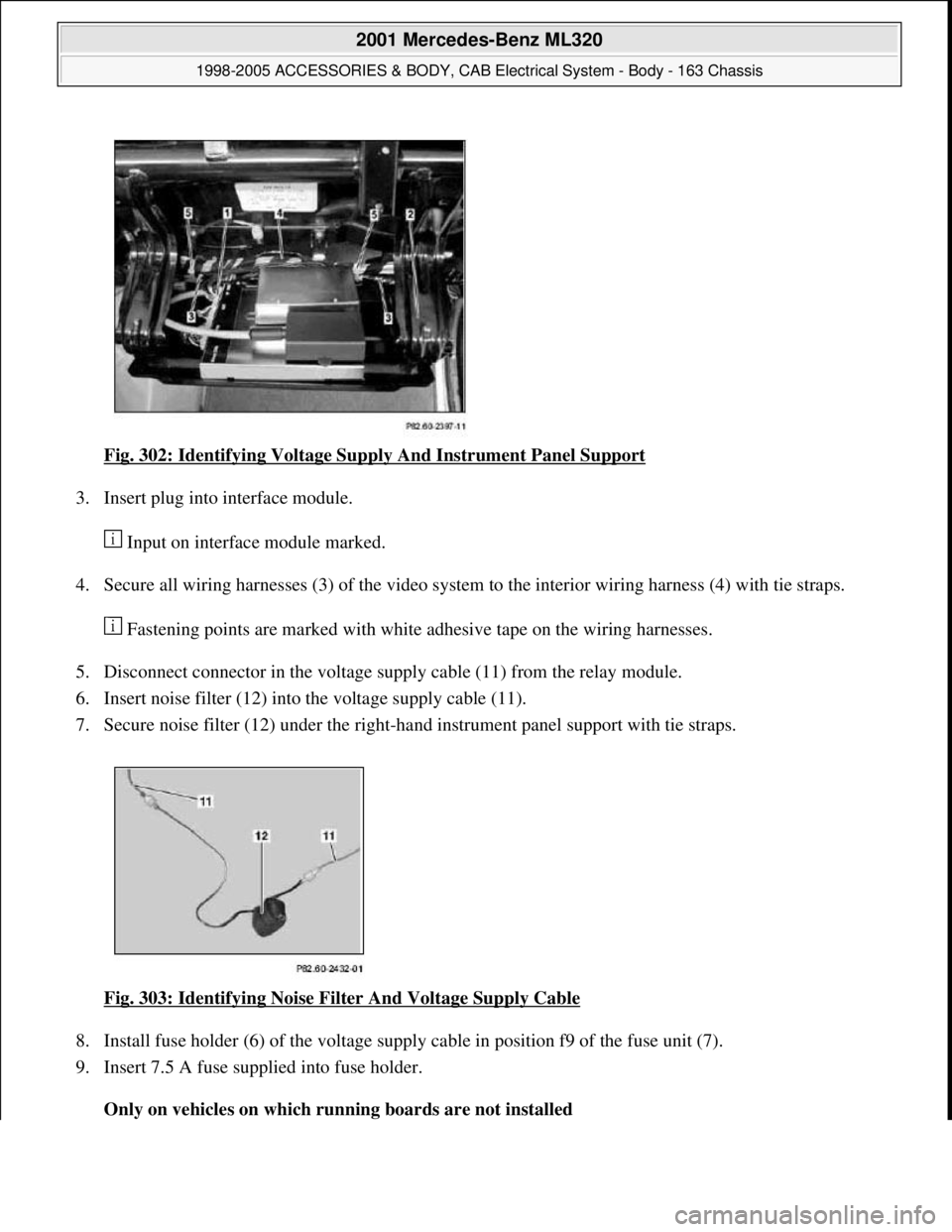
Fig. 302: Identifying Voltage Supply And Instrument Panel Support
3. Insert plug into interface module.
Input on interface module marked.
4. Secure all wiring harnesses (3) of the video system to the interior wiring harness (4) with tie straps.
Fastening points are marked with white adhesive tape on the wiring harnesses.
5. Disconnect connector in the voltage supply cable (11) from the relay module.
6. Insert noise filter (12) into the voltage supply cable (11).
7. Secure noise filter (12) under the right-hand instrument panel support with tie straps.
Fig. 303: Identifying Noise Filter And Voltage Supply Cable
8. Install fuse holder (6) of the voltage supply cable in position f9 of the fuse unit (7).
9. Insert 7.5 A fuse supplied into fuse holder.
Only on vehicles on which running boards are not installed
2001 Mercedes-Benz ML320
1998-2005 ACCESSORIES & BODY, CAB Electrical System - Body - 163 Chassis
me
Saturday, October 02, 2010 3:30:12 PMPage 387 © 2006 Mitchell Repair Information Company, LLC.
Page 1883 of 4133
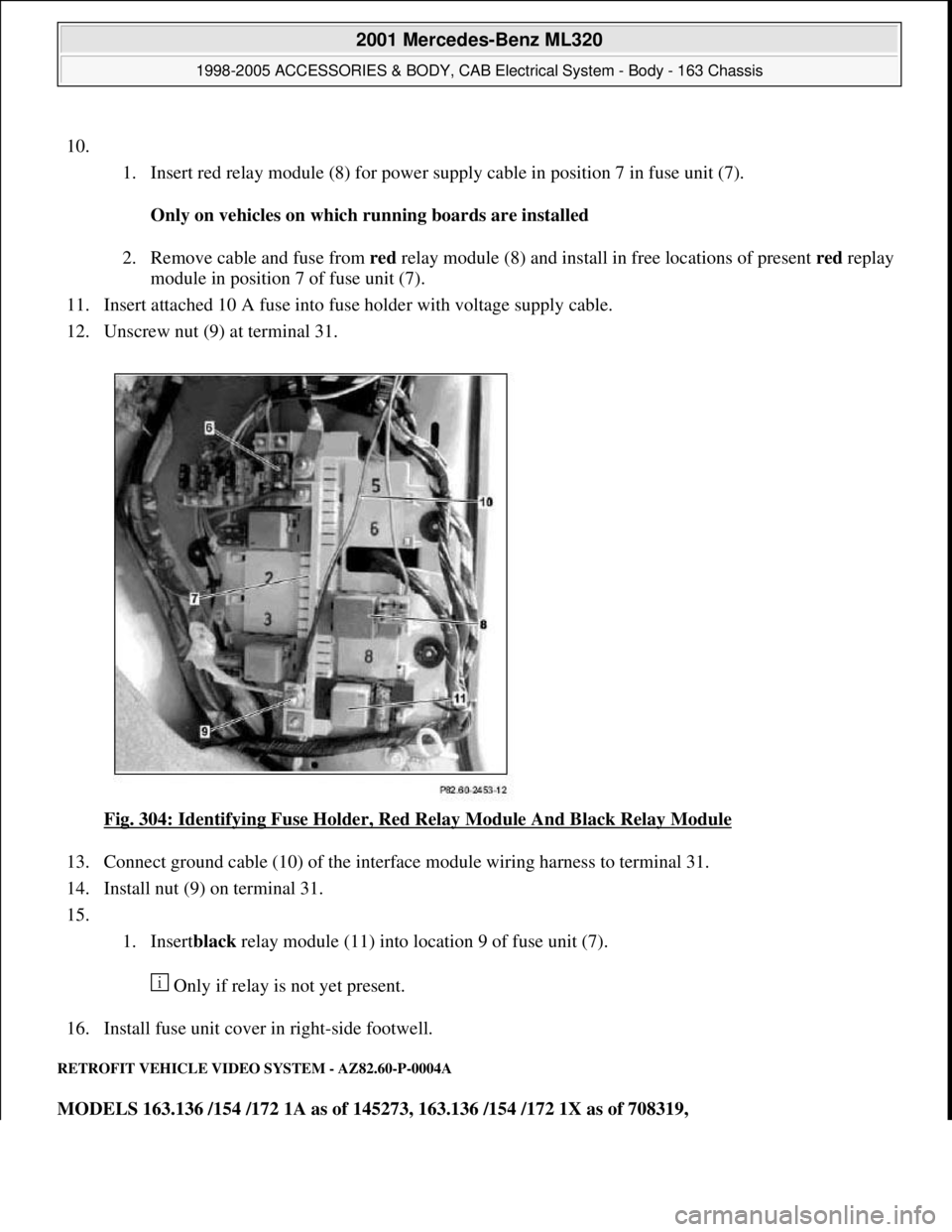
10.
1. Insert red relay module (8) for power supply cable in position 7 in fuse unit (7).
Only on vehicles on which running boards are installed
2. Remove cable and fuse from red relay module (8) and install in free locations of present redreplay
module in position 7 of fuse unit (7).
11. Insert attached 10 A fuse into fuse holder with voltage supply cable.
12. Unscrew nut (9) at terminal 31.
Fig. 304: Identifying Fuse Holder, Red Relay Module And Black Relay Module
13. Connect ground cable (10) of the interface module wiring harness to terminal 31.
14. Install nut (9) on terminal 31.
15.
1. Insertblack relay module (11) into location 9 of fuse unit (7).
Only if relay is not yet present.
16. Install fuse unit cover in right-side footwell.
RETROFIT VEHICLE VIDEO SYSTEM - AZ82.60-P-0004A
MODELS 163.136 /154 /172 1A as of 145273, 163.136 /154 /172 1X as of 708319,
2001 Mercedes-Benz ML320
1998-2005 ACCESSORIES & BODY, CAB Electrical System - Body - 163 Chassis
me
Saturday, October 02, 2010 3:30:12 PMPage 388 © 2006 Mitchell Repair Information Company, LLC.