ad blue MERCEDES-BENZ R-Class 2012 W251 Comand Manual
[x] Cancel search | Manufacturer: MERCEDES-BENZ, Model Year: 2012, Model line: R-Class, Model: MERCEDES-BENZ R-Class 2012 W251Pages: 210, PDF Size: 5.11 MB
Page 105 of 210
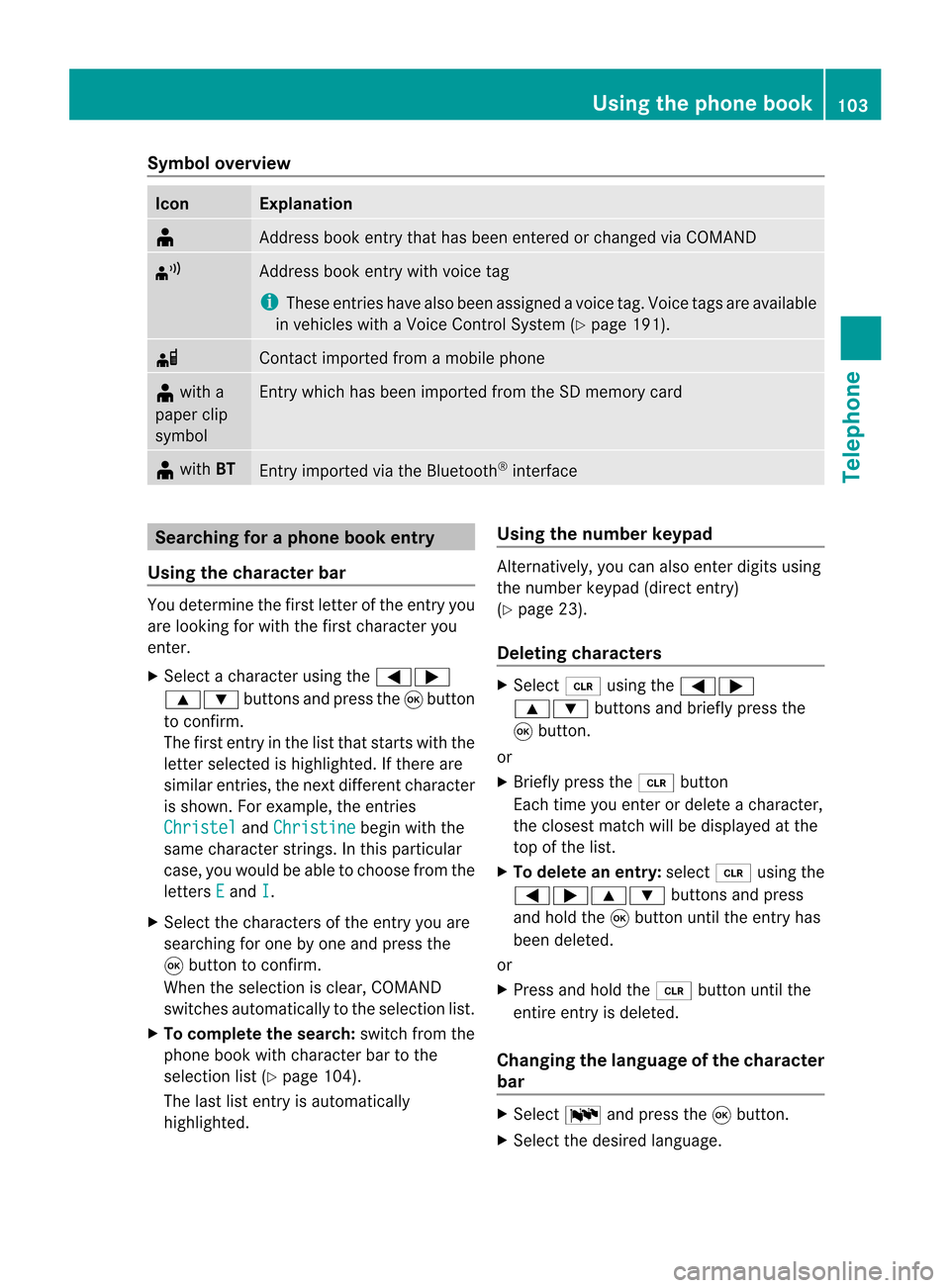
Symbol
overview Icon Explanation
¥
Address
bookentrythat hasbeen entered orchanged viaCOMAND ¦
Address
bookentrywith voice tag
i These entrieshave alsobeen assigned avoice tag.Voice tagsareavaila ble
in vehicles withaVoice Control System (Ypage 191). d
Contact
imported fromamobile phone ¥
with a
paper clip
symbol Ent
rywhich hasbeen imported fromtheSDmemory card ¥
with BT Ent
ryimported viathe Bluetooth ®
interf ace Searching
foraphone bookentry
Using thecharact erbar You
determine thefirst letter ofthe entr yyou
are looking forwith thefirst character you
enter.
X Select acharacter usingthe=;
9: buttonsandpress the9button
to conf irm.
The first entryin the listthat starts withthe
letter selected ishighlighted. Ifthere are
similar entries,thenext different character
is shown. Forexample, theentr ies
Christel and
Christine begin
withthe
same character strings.In this particular
case, youwould beable tochoose fromthe
letters E and
I .
X Select thecharacters ofthe entr yyou are
searching forone byone andpress the
9 button toconf irm.
When theselection isclear, COMAND
switches automatically tothe selection list.
X To complete thesearch: switchfromthe
phone bookwithcharacter bartothe
selection list(Ypage 104).
The lastlistentr yis automatically
highlighted. Using
thenumber keypad Altern
atively, youcan also enter digits using
the number keypad(directentry)
(Y page 23).
Dele ting charact ers X
Select 2using the=;
9: buttonsandbriefly pressthe
9 button.
or
X Briefly pressthe2 button
Each timeyouenter ordelete acharacter,
the closest matchwillbedisplay edatthe
top ofthe list.
X To delete anentry: select2using the
=;9: buttonsandpress
and hold the9button untiltheentr yhas
been deleted.
or
X Press andhold the2 button untilthe
entire entryis deleted.
Changing thelanguage ofthe charact er
bar X
Select Bandpress the9button.
X Select thedesired language. Using
thephone book
103Telephone Z
Page 108 of 210
X
Enter character sand save the entry .
Pro cee das descri bedund er"Ente ring
cha racter s"inthe "Ente ring cha racter sin
the addre ssand phone books "se ctio n
(Y page 22) . Us
ingca lllists In
trodu ction
For telepho ny via the Blueto oth ®
inte rface,
CO MAND showsalist of cal lsrec eived
(i nclu ding misse dcal ls)or alist of cal lsdialed .
i Theres pectiv emenu itemc anonlybe
selec tedifcalls have alread ybeen receive d
or dialed onCOMA ND.
Dis playin gmis sed calls intheC OMAND
displa yis not supported byallmobile
phones.
These listsremain inCOMAND, evenafter
another mobilephonehasbeen connected. Opening
thecall listand selecting an
entry
X Press the% function button.
X Select CallLists in
the telephone basic
menu usingthe:=; buttons
and press the9button toconfirm.
Am enu appears.
X Select Calls Receive d or
Calls Dialed using
the9: buttonsand
press the9button tocon firm.
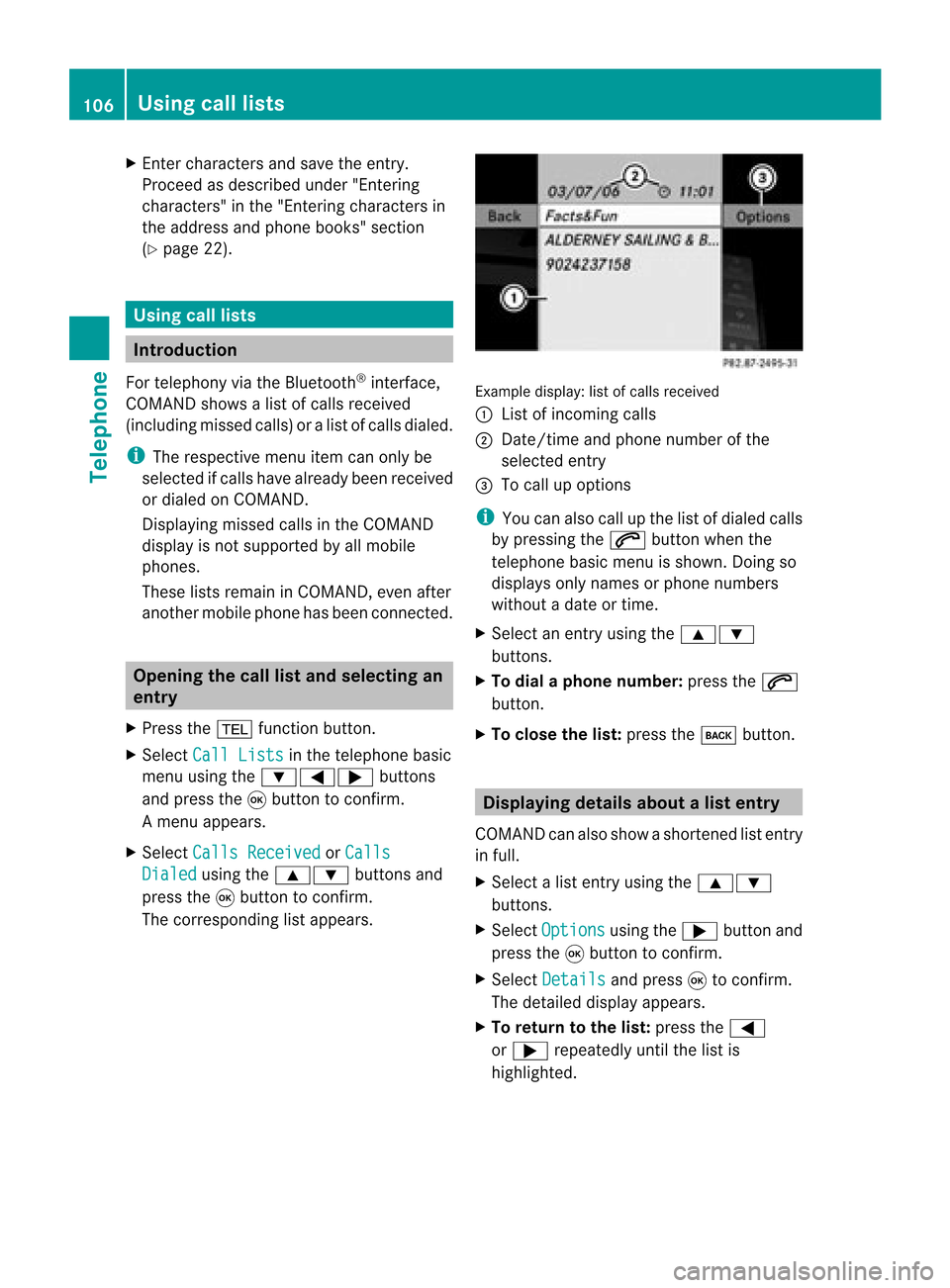
The correspondin glist appears. Ex
ample display: listofcalls received
: List ofincom ingcalls
; Date/ timeandphone number ofthe
select edent ry
= Tocall upoption s
i You canalso callupthe listofdialed calls
by pressing the6 button whenthe
telephon ebasic menu isshown. Doingso
displays onlynames orphone numbers
without adate ortime.
X Select anent ryusing the9:
button s.
X To dial aphone number :press the6
button .
X To close thelist: press thek button . Displaying
detailsabout alist entr y
COMAN Dcanalso showasho rten ed list entry
in full.
X Sel ect alist entry usin gth e9:
but tons .
X Sel ect Opt ions usin
gth e; buttona nd
pre ssthe 9button toconfi rm.
X Sel ect Details and
press9 toconfi rm.
The detai led displ ayappe ars.
X To return tothe list: pressthe =
or ; repeated lyunti lthe list is
hi ghl ighted . 10
6 Us
ingca lllistsTel epho ne
Page 113 of 210
Cha
nging anaddress book entry
Cha nging anent ry X
Opt ion1:sear chfor anaddre ssbook entry
and selec titf rom thelistu sing the
9: buttons(Ypage 109).
X Select Options using
the; button and
press the9button toconfirm.
X Select Change and
press the9button to
confirm.
X Option 2:call upthe detailed viewforan
address bookentry (Ypage 110).
X Select Options using
the; button and
press the9button toconfirm.
X Select Change Entry and
press the9
button toconfirm.
Irrespective ofthe option, theinput menu
cont aining datafields appea rs.
X Proceed asdescribed under"Enterin g
characters" inthe "Enterin gcharacters in
the address andphone books" section
(Y page 23).
Changing thecategory ofatelephone
number datafield X
Display thedetailed viewforanaddress
book entry (Ypage 110)andhighlig htthe
telephone numberdatafield.
X Select Options using
the; button and
press the9button toconfirm.
X Select Change Category and
press the
9 button toconfirm.
X Select anumber category, e.g.Home .
X Select atelephone category,e.g.Mobile Phone .
X Select Preferred if
desired andpress the
9 button toconfirm.
Depending onthe previous state,switch
the option onO oroff ª.T hephone
number isdispla yedasthe first number inthe
phone bookandcanbediale d
immediately.
X Select Save and
press 9toconfirm .
The new category isstored. Calling
anumber storedinan entry
Co nditio ns The
mobi lephone mustbeconnected viathe
Blue tooth ®
interface .
Option 1 X
Displ aydetai lsfor anadd ress book entry
(Y pag e110).
X Select thetelep hone numbe rdata field
usin gth e9: buttons and pres sth e
9 buttonto confirm .
The telepho nemak esthecall. Thedispl ay
swit ches totelepho nemod e.
Opt ion 2 X
Dis play details foranaddre ssbook entry.
X Sel ect thete lepho nenum berdatafiel d
usin gth e9: buttons .
X Sel ect Opt ions usin
gth e; buttona nd
pre ssthe 9button toconfi rm.
X Sel ect Call and
pressthe 9button to
confi rm.
The telephone makes thecall.
Opti on3 X
Sel ect anaddre ssbook entry inthe list
us ing the 9: buttons.
X Pre ssthe 6 button.
The telephone makes thecall. Us
ingthe addres sbo ok
111Tel epho ne Z
Page 115 of 210
Imp
orting cont acts
Cond itions You
canimpo rtco ntact stothe address book
from anexter nalBluetooth ®
device oran SD
memory card.
The Bluetooth ®
device needstobe inside the
vehicle andhastobe switched on,activated,
and authorized. Itmust beable totrans mit
cont acts and/or vCardsviaBluetooth ®
.
i Around 900entriescan bestored inthe
address book.When themaximum number
has been reached, youcan delete existing
entr ies(Ypage 110),and then import new
ones.
Import ingcontacts X
Start thedata exchan geon the exter nal
device (seetheexter naldevice's operating
instr uctions).
or
X Insert anSD memory card.
X Select Address Book in
the address book
using the:=; buttonsand
press the9button toconf irm.
X Select Download Contacts and
press the
9 button toconf irm.
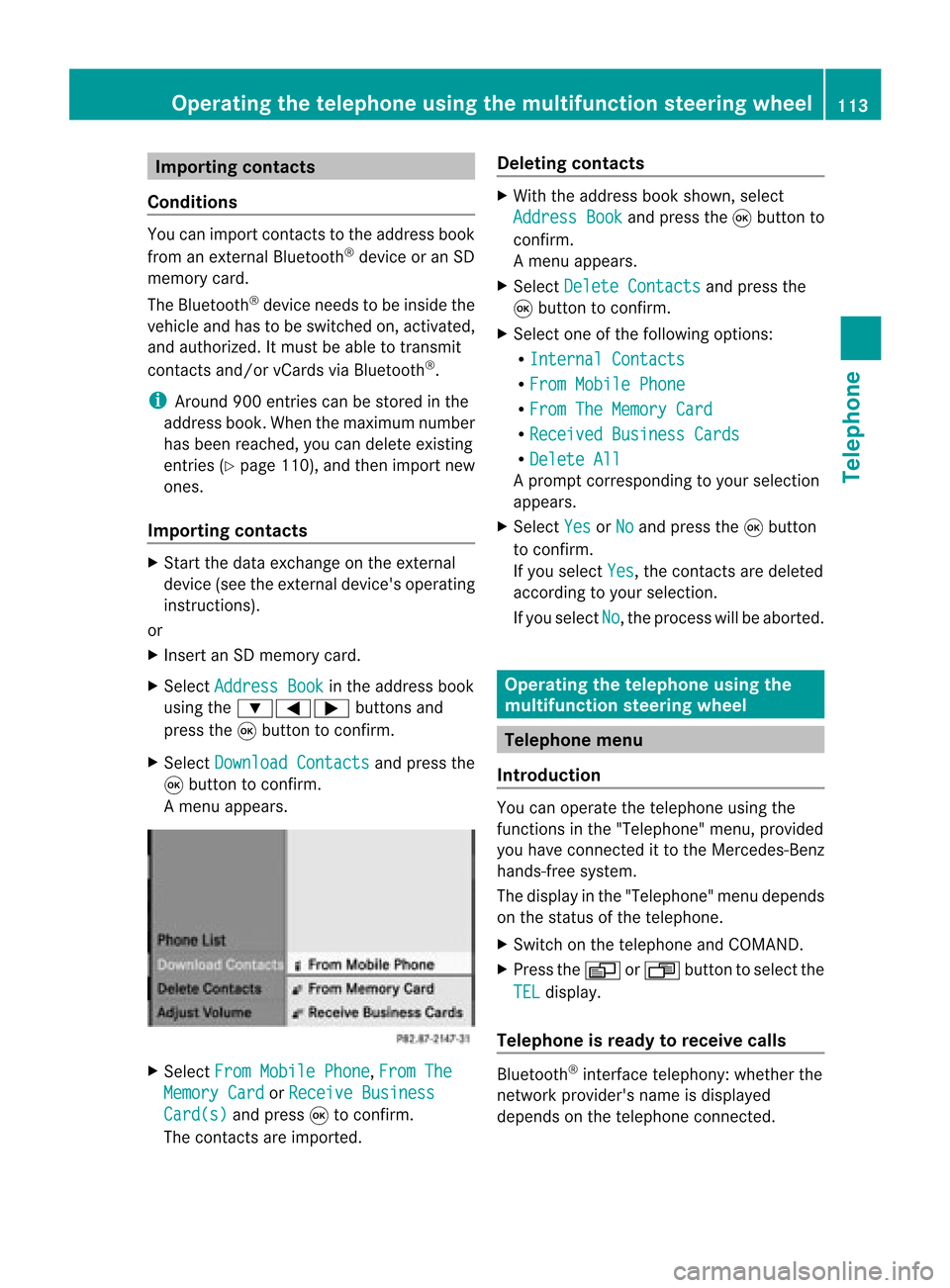
Am enu appears. X
Select FromMobile Phone ,
From The Memory
Card or
Receive Business Card(s) and
press 9tocon firm.
The contact sare import ed. Deleting
contacts X
With theaddress bookshown, select
Address Book and
press the9button to
con firm.
Am enu appears.
X Select Delete Contacts and
press the
9 button tocon firm.
X Select oneofthe following options:
R Interna lContact s R
From Mobile Phone R
From TheMemory Card R
Receive dBusines sCards R
Delete All Ap
rompt correspo ndingtoyou rselection
appears.
X Select Yes or
No and
press the9button
to con firm.
If you select Yes ,
the contact sare deleted
accor dingtoyour select ion.
If you select No ,
the process willbeaborted. Opera
tingthetelephone usingthe
mult ifunction steeringwheel Telephone
menu
Introd uction You
canoperate thetelephon eusing the
function sin the "Tele phone" menu,provided
you have connected itto the Mercedes-Benz
hands-free system.
The displa yin the "Tele phone" menudepends
on the status ofthe telephone.
X Switch onthe telephone andCOMAND.
X Press theV orU button toselect the
TEL displa
y.
Telephone isready toreceive calls Bluetooth
®
interface telephony: whetherthe
network provider's nameisdispla yed
depends onthe telephone connected. Operat
ingthe telephone usingthemult ifunction steeringwheel
113Telephone Z
Page 144 of 210
To
conn ectexter naldevices tothe Media
Int erface, yourequire device-spec ificadapter
cables whichareincluded inthe Media
Int erface scopeofdelivery.
i Stow the individual partsinasecure
location.
Use only genuine Mercedes- Benz
conn ectin gcables.
You canconn ectthe following datacarriers
to COMAND viathe Media Interface:
R iPod ®
R USB devices (USBsticks,USB hard drives)
i iPod ®
is aregistered trademark ofApple
Inc .,Cupertino, California,USA.
Supp orted iPod®
varia nts The
following areexamples ofsupported
iPod ®
variants:
R iPod ®
mini
R iPod ®
nano
R iPod ®
classic
R iPod ®
touch
Supp orted USBdevices The
following USBdevices aresupported:
R USB sticks(flash memory)
R USB hard drives requiring astart up/
permanen tcurren tof max. 800mA(itmay
be necess arytoconn ectaseparate power
supply)
R cert ainMP3 players
i The Media Interface supports USB
storage mediaof"USB Device Subclass 6".
Infor mation concernin gUSB Device
Subclass 6isavail able from theequip ment
manufacturer.
For further detailsandalist ofsupported
devices, pleasecontactanauthorized
Mercedes-Benz Centerorvisit http://
www .mercedes-be nz.com/conne ctand proceed
asdescribed under"Media
Interf ace". Conne
ctinganexternal device
i Donot leave extern aldevices inthe
vehicle, asatextreme temperatures (e.g.in
direct sunlight orextremely lowoutside
temperatures) theycannot beguara nteed
to function correctly(see theoperating
instruct ionsforthe respective device).
Mercedes-Benz doesnottake
responsibili tyfor any damage toextern al
devices.
Never connectmore thanonedevice ata
time. Youwillotherwise notbeable toplay
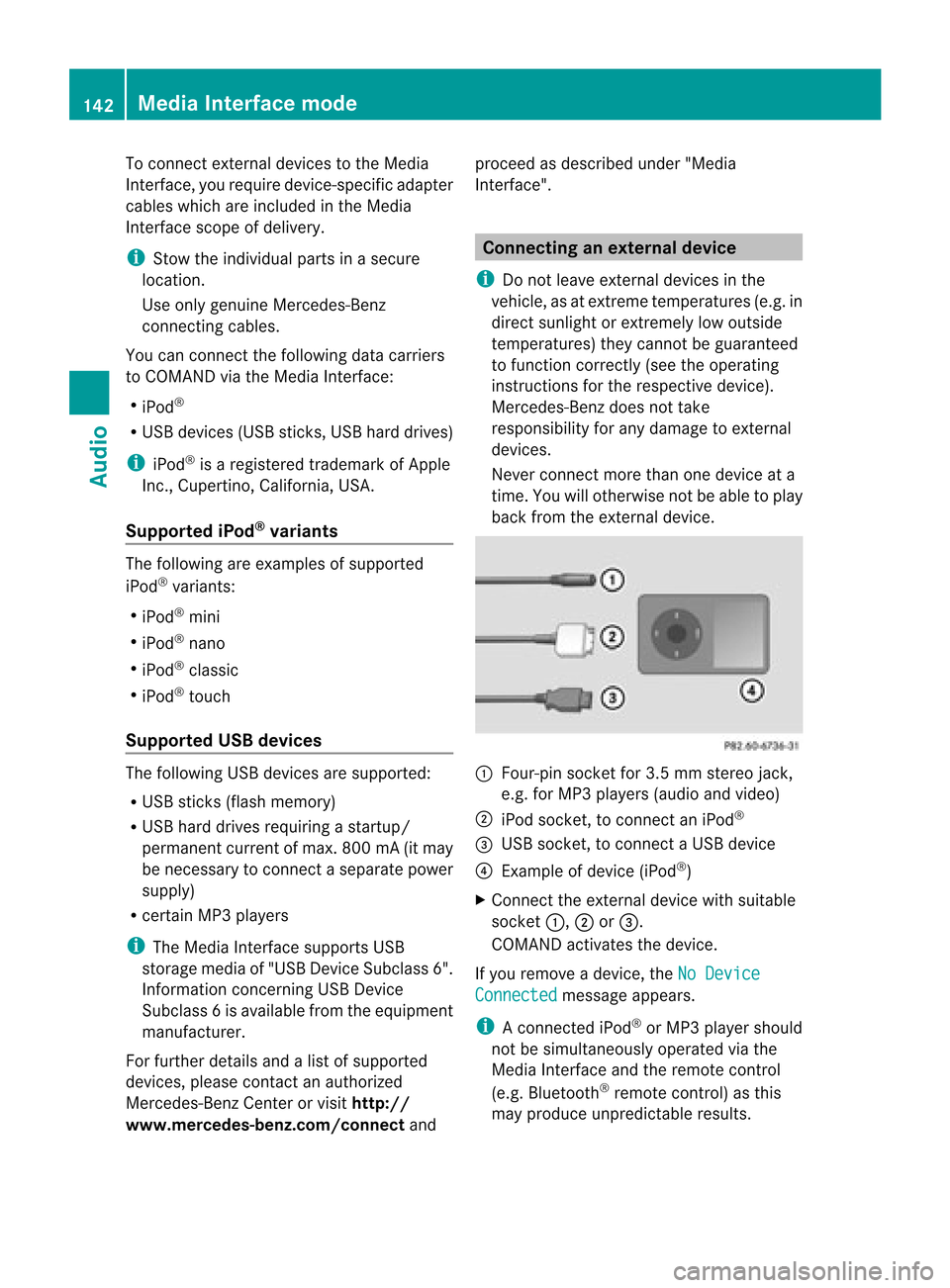
back fromtheextern aldevice. :
Four-pin socketfor3.5 mm stereo jack,
e.g. forMP3 players(audio and video)
; iPod socket ,to conn ectaniPod ®
= USB socket ,to conn ectaUSBdevice
? Examp leof device (iPod ®
)
X Co nnect theexter naldevice with suita ble
socke t:, ;or=.
CO MAND activate sthe device .
If yo uremo veade vice ,the No Device Connected message
appears.
i Aconn ected iPod®
or MP3 playershould
not besimultaneously operatedviathe
Media Interface andtheremote control
(e.g. Bluetooth ®
remote control)asthis
may produce unpredictable results.142
Media
Interface modeAudio
Page 183 of 210
i
Using individu alization, youcan fine-tune
voice controltoyour ownvoice andthus
improve voicerecognition. Theprocess of
individu alization isdescribed inchapter
“System Settings” (Ypage 38).
i Ifyou useindividu alization, itmay impai r
recognition ofother users. Switch off
individu alization ifit makes recognition of
other users worse. Phone
G
WARNING
Some jurisdictions prohibitthedriver from
using acellul artelephone whiledriving.
Whether ornot prohibited bylaw, forsafety
reasons, thedriver should notuse thecellul ar
telephone whilethevehicle isin motion. Stop
the vehicle inasafe location beforeplacing or
answering acall.
If you nonetheless choosetouse themobile
phone whiledriving, pleaseusethehandsfree
feature andbesure topay attent iontothe
traffic situation atall times. Usethemobile
phone onlywhen road,weather andtraffic
conditions permit.Otherwise, youmay notbe
able toobserve trafficconditions andcould
endanger yourselfand othe rs.
Bea rin mind thatat aspe edofjus t30 mph
(a pp roxi mately50 km/h) ,yo ur veh icleis
cove ringadi sta nce of44 feet(appro ximately
14 m)ever ysec ond. Oper
ation
You canusevoicecon trol to:
R place acall byusin gyour voiceto inp uta
phon enum ber
R store nam esand num bers intheaddre ss
book
R dial anum berfrom theaddre ssbook
R dial anum berfrom thecall list“Lat est
calls ”
R list en tothephon ebook R
ret riev eand man ageyour voicemail and
rec orde dann oun cem entservices
R redi al
Voic econ trol rec ogn izeswhet her:
R your phoneis swit ched on
R your phoneis con nectedvia Bluet ooth®
R thecar phon eis reg istered withthe
rele vantmobile phone network
R itis possible todial
If it is not possible todial, voice controlissues
a message tothis effect .
i You canstilloperate yourphone usingthe
keypad. Command
s
“Phone” Use
the“Phone” commandto select the
phone application. Usethiscomman difyou
wish thedigits enteredtobe shown onthe
display .
“Help Phone” Voice
controlhas anexten sivehelp funct ion.
Using the“Help Phone” comman d,you can
have allthe essent ialcomman dsfor the
phone readout.
“Dial number” You
canusethe“Dial number” commandto
dial aphone number.
The digits 0to9a nd the word“Pl us”ar e
pe rmi tted .
“Pl us”rep laces theinte rnational dialing cod e,
e.g .“00” .
Say thephone num berin the form ofa
conti nuousstri ngofind ividu aldigits or as
bl ocks ofdigits, e.g.three tofive digits.
Voice controlrepeats thedigits itrecogniz es
after each block ofdigits (withapause of
about halfasecond between eachblock of
digits) andwaits foryou tocont inue speaking. Phone
181VoiceControl Z