ad blue MERCEDES-BENZ R-Class 2012 W251 Comand Manual
[x] Cancel search | Manufacturer: MERCEDES-BENZ, Model Year: 2012, Model line: R-Class, Model: MERCEDES-BENZ R-Class 2012 W251Pages: 210, PDF Size: 5.11 MB
Page 70 of 210
Disp
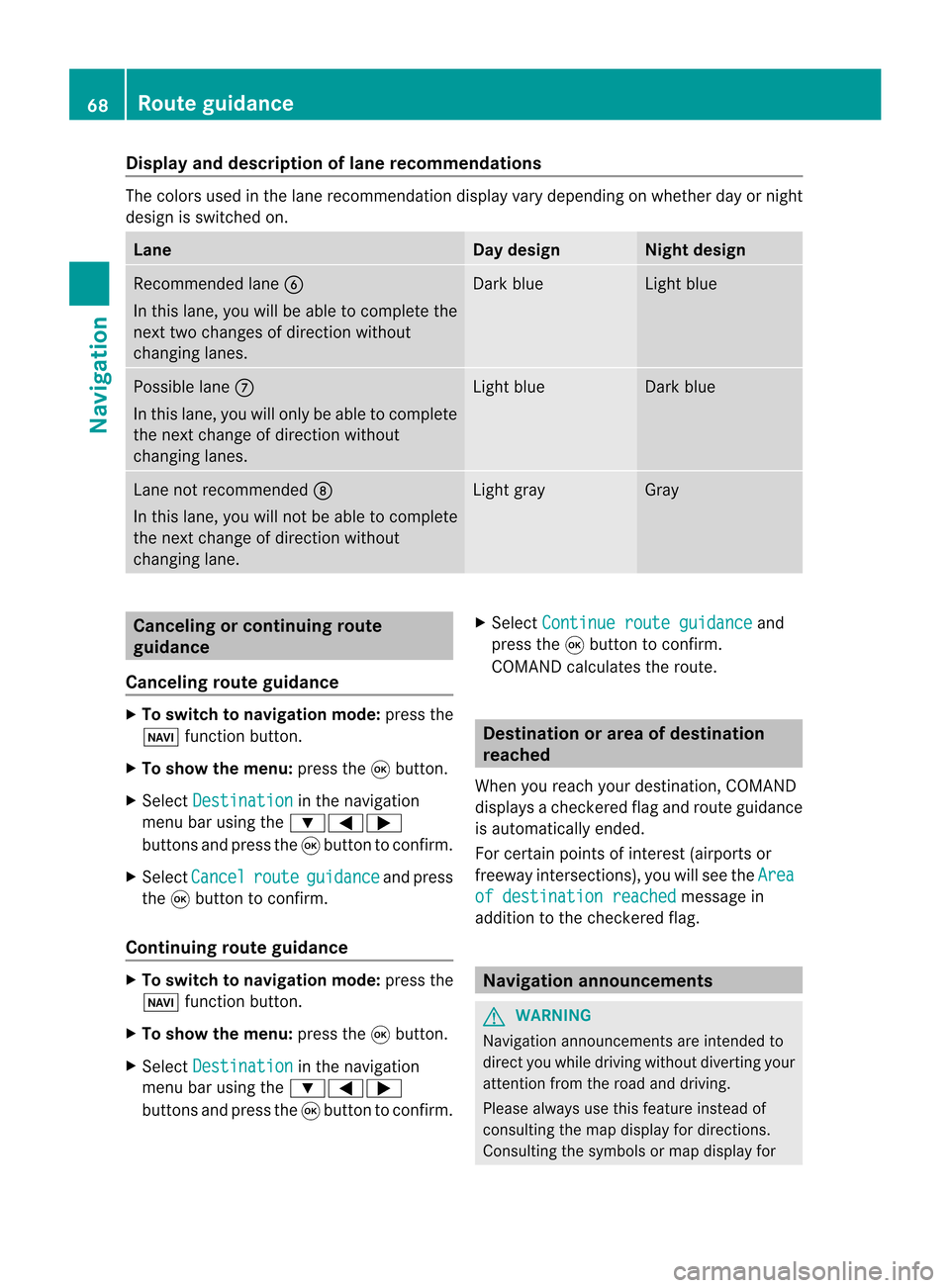
layandd escri ption oflane recom mendation s The
colo rsused inthelane recomm endatio ndisplay varydepen dingonwhet herday ornigh t
design isswitc hedon. Lane Day
design Nigh
tdesign Recom
mendedlane B
In this lane, youwillbeable tocom pleteth e
nex ttwo chan gesofdirec tionw itho ut
chan ginglanes. Dar
kblue Light
blue Possib
lelane C
In this lane, youwillonly beable tocom plete
the nextchange ofdirection without
changing lanes. Light
blue Dark
blue Lane
notrecommen dedD
In this lane, youwillnotbeable tocomplete
the next change ofdirection without
changing lane. Light
gray Gray
Cancel
ingorcontinuing route
guidance
Cancel ingroute guidance X
To switch tonavigation mode:pressthe
Ø functionbutton.
X To show themenu: pressthe9button.
X Select Destination in
the navigation
menu barusing the:=;
buttons andpress the9button toconfirm .
X Select Cancel route guidance and
press
the 9button toconfirm .
Continuing routeguidance X
To switch tonavigation mode:pressthe
Ø functionbutton.
X To show themenu: pressthe9button.
X Select Destination in
the navigation
menu barusing the:=;
buttons andpress the9button toconfirm .X
Select Continue routeguidance and
press the9button toconfirm .
COMAND calculates theroute. Destination
orarea ofdestination
reached
When youreach yourdestination, COMAND
displa ysacheck eredflagand route guidance
is automatically ended.
For certain pointsofinterest (airports or
freeway intersections),youwillsee theArea of
destination reached message
in
addition tothe check eredflag. Navigat
ionannouncements G
WARNING
Navigation announcemen tsare intended to
direct youwhile driving without diverting your
attent ionfrom theroad anddriving.
Please alwaysuse this feature instead of
consulting themap display fordirections.
Consulting thesymbols ormap display for 68
Route
guidanceNavigat ion
Page 72 of 210
When
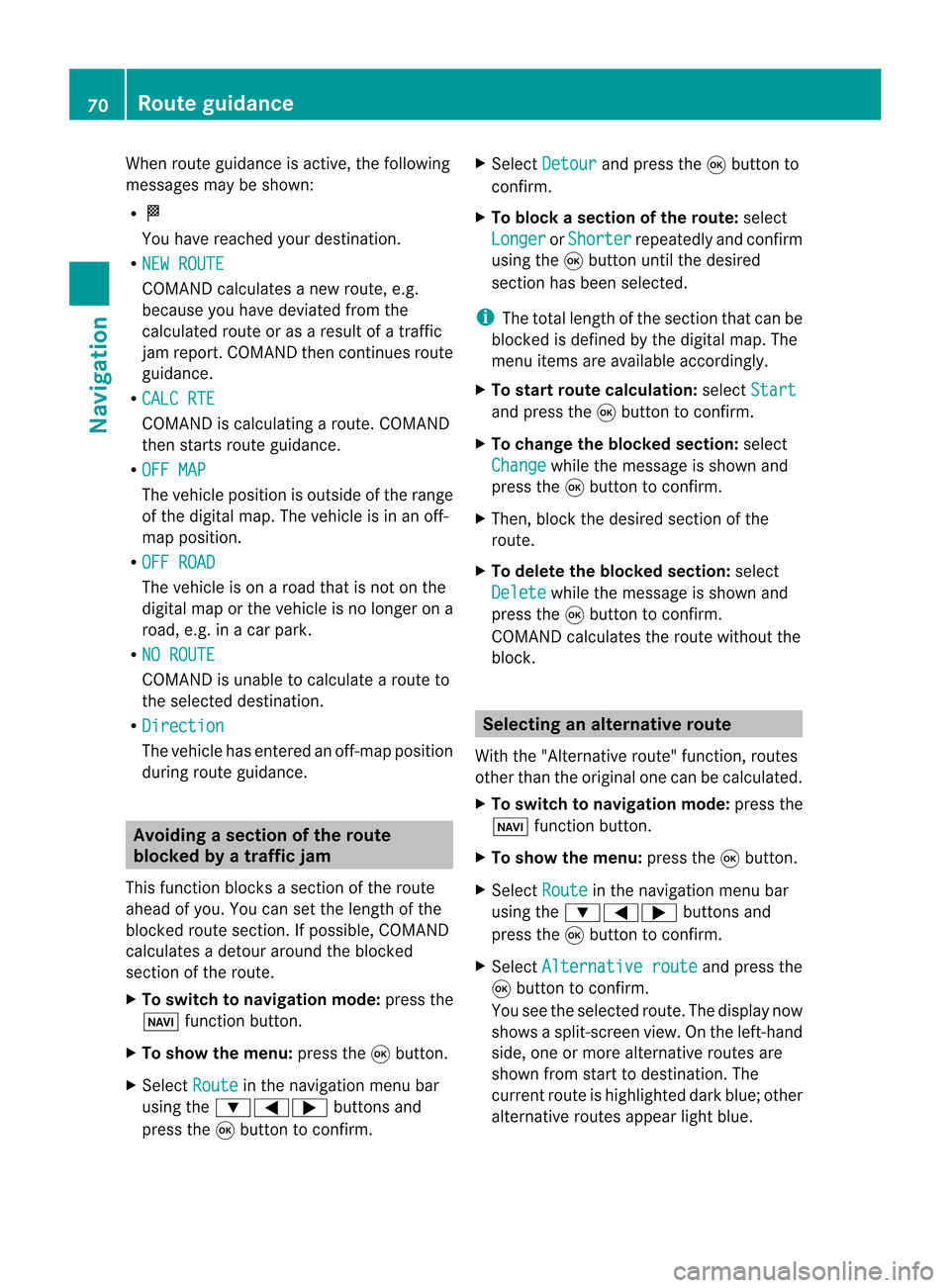
routeguidance isactive, thefollowing
messages maybeshown:
R O
You have reached yourdestin ation.
R NEW ROUTE COMAND
calculates anew route, e.g.
because youhave deviated fromthe
calculated routeoras aresult ofatraff ic
jam report .COMAND thencontinues route
guidance.
R CALC RTE COMAND
iscalculating aroute. COMAND
then startsroute guidance.
R OFF MAP The
vehicle position isoutside ofthe range
of the digital map.Thevehicle isin an off-
map position .
R OFF ROAD The
vehicle ison aroad thatisnot onthe
digital maporthe vehicle isno longer ona
road, e.g.inacar park.
R NO ROUTE COMAND
isunable tocalculate aroute to
the selected destination.
R Directio n The
vehicle hasentered anoff- map position
during routeguidance. Avoiding
asection oftherou te
blocked byatraf fic jam
This function bloc ksasec tiono fthe route
ahead ofyou. Youcansetthe length ofthe
blocked routesection. Ifpossible, COMAND
calculates adetour around theblocked
section ofthe route.
X To switch tonavigation mode:pressthe
Ø functionbutton.
X To show themenu: pressthe9button.
X Select Route in
the navigation menubar
using the:=; buttonsand
press the9button toconfirm . X
Select Detour and
press the9button to
confirm .
X To block asection ofthe route: select
Longer or
Shorter repeatedly
andconfirm
using the9button untilthedesired
section hasbeen selected.
i The total length ofthe section thatcanbe
blocked isdefined bythe digital map.The
menu itemsareavaila bleaccordingly.
X To star troute calculation: selectStart and
press the9button toconfirm .
X To change theblocke dsection: select
Cha nge while
themess ageisshown and
pres sth e9 butt ontocon firm.
X Then ,bloc kthe desired sectionofthe
route.
X To delete theblocke dsection: select
Del ete while
themess ageisshown and
pres sth e9 butt ontocon firm.
COMA NDcalc ulates therout ewitho utthe
block . Selecting
analterna tiveroute
With the"Alternativ erout e"fun ction, routes
oth erthan theorigin alone canbecalc ulated.
X To switch tonaviga tionmode:press the
Ø function butt on.
X To show themenu :press the9butt on.
X Selec tRout e in
the navig ation menubar
using the:=; buttons and
press the9butt ontocon firm .
X Selec tAlte rnativeroute and
press the
9 butt ontocon firm .
You seetheselec tedrout e.The display now
shows asplit -screen view. Onthe left-han d
side, oneormor ealter native rout esare
shown fromstart todest ination. The
curr entrout eis highligh teddark blue; other
alter native rout esappear lightblue. 70
Rou
teguid anceNavigat ion
Page 75 of 210
shows
thecompass headingtothe actual
destination.
The route ishighlig htedblue, starting from
the last recognized streetthevehicle wason
before itleft themap.
As soon asthe vehicle isback onaroad
known tothe system, routeguidance
cont inues inthe usua lway .
Route guidance fromanoff-map
location toad esti nation If
th eveh icle posit ionisouts idethearea
cov ered bythedigit almap, then theveh icle
is in an off-map locat ion.COMAND isalso
able toguide youtoadestination evenfrom
an off-map location.
At the start ofthe route guidance,youwillsee
the Off Mapped Road message,
anarrow
and thedistance tothe destination. Thearrow
shows thecompass headingtothe road left
last.
The route ishighli ghted bluestarting atthe
nearest roadknown tothe system.
As soon asthe vehicle isback onaroad
known tothe system, routeguidance
cont inues inthe usua lway .
Off-road duringrouteguidance Due
toroadworks, forexample, theremaybe
differences betweenthedata onthe digital
map andtheactual course ofthe road.
In such cases, thesystem willtemporarily be
unable tolocate thevehicle position onthe
digital mapandthus considers thevehicle to
be inan off-road position.
In the displa y,you willsee theOff Mapped Road message,
anarrow andthedistance to
the destination. Thearrow shows the
compass headingtothe last road youwere
driving on.
As soon asthe system canassign thevehicle
position tothe map again,route guidance
cont inues inthe usua lway . Tra
ffic report s Condition
s
i The satellite radioreception described
below requires optionally available satellite
radio equipment aswell asasubscription
to SIRIUS XMSatellite RadioTraffic
Message Service.Furtherdetailson
satellite radioareavail able inthe "Satellite
radio" chapter (Ypage 121).
COMAND canreceive trafficreports via
satellite radioandincorporate theminthe
navigation system.Trafficreports andmap
icons canthen beshown inthe COMAND
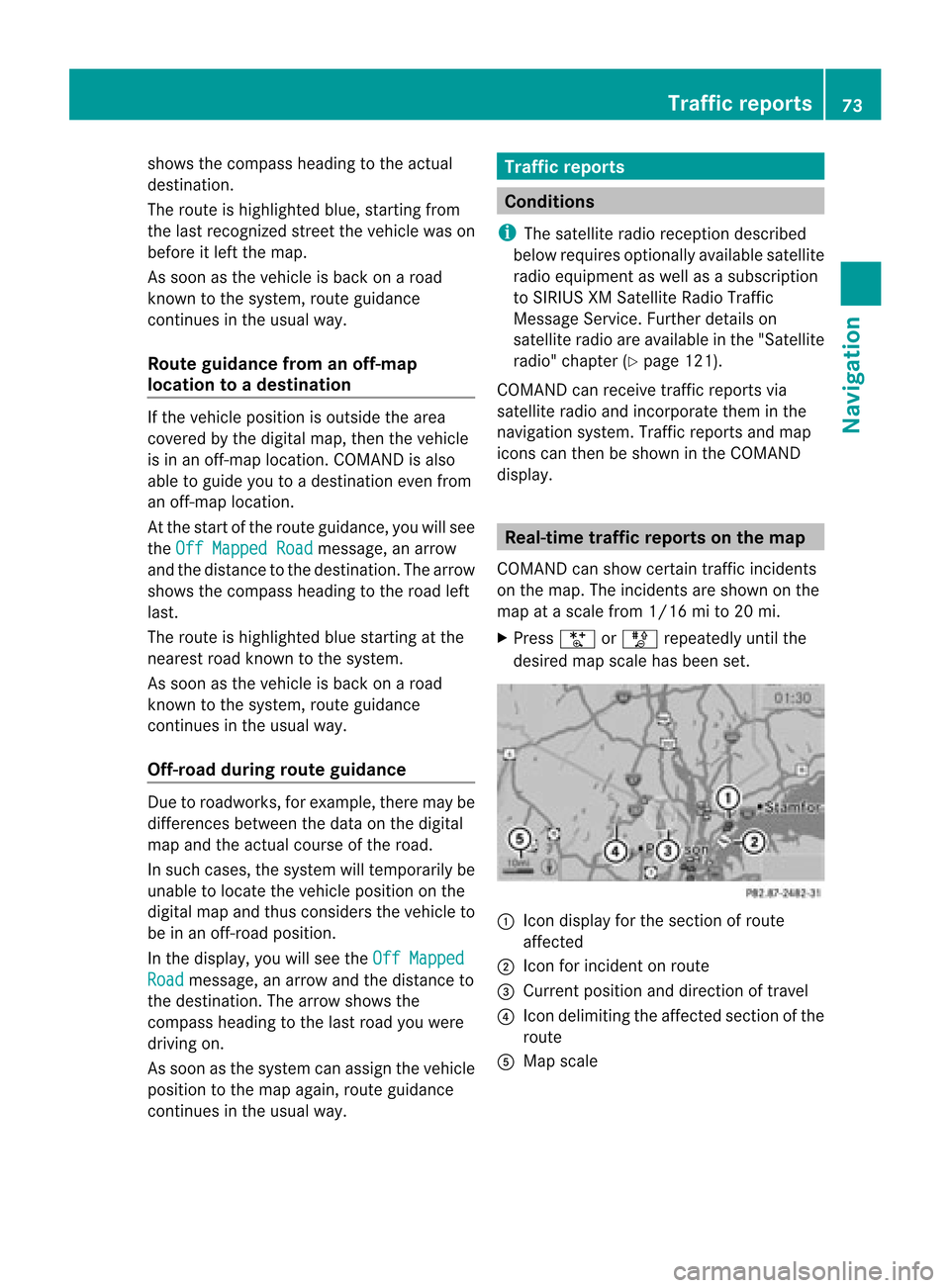
displa y. Real-time
traffic report son the map
COMAND canshow certain trafficincidents
on the map. Theincidents areshown onthe
map atascale from1/16 mito20 mi.
X Press UorT repeatedly untilthe
desired mapscale hasbeen set. 1
Icon displa yfor the section ofroute
affected
2 Icon forincident onroute
3 Current position anddirection oftravel
4 Icon delimi tingtheaffected sectionofthe
route
5 Map scale Tr
affic report s
73Navigat ion Z
Page 95 of 210
COMAN
Dfea tures <0023002300230023002300230023002300230023002300230023002300230023
002300230023002300230023002300230023002300230023002300230023> 94
General information<0023002300230023002300230023002300230023002300230023002300230023
002300230023002300230023002300230023002300230023> 94
Telephony viathe Bluet ooth®
inter-
face ........ .......... .................. .................. . 95
Reception andtransm ission volume .99
Telephone operation........ .......... ....... 100
Using thephone book<0023002300230023002300230023002300230023002300230023002300230023
002300230023002300230023> 102
Using calllists .................. ................. 106
Using theaddress book <0023002300230023002300230023002300230023002300230023002300230023
002300230023> 108
Opera tingthetelephone usingthe
mult ifunction steeringwheel.......... 113 93Telephone
Page 96 of 210
COMAN
Dfea tures
Thes eOper atingIn st ruc tions desc ribeall
st andar dand optionalequipm enta vail able
for you rCOMAND systematthe time of
purcha se.Cou ntry-specifi cdeviation sare
possible. Pleasenotethat your COMAND
system maynotbeequipped withallthe
features described. General
information Introd
uction
In the telephon efunc tion,telephon yvia
Bluetoot h®
int erface isavailable ifa
Bluetoot h®
-c apable mobile phoneis
con nected.
Using theBluetoot h®
int erface andasuitable
mobile phone, youcan useCOMAND ’shands-
free feature todownload electronicbusiness
cards (vCards).
More detailed information onsuitable mobile
phones andoncon nectingBluetoot h®
-
capable mobilephones toCOMAND canbe
found onthe Internet athtt p://
www.mbusa- mobile.com.Or call the
Mercedes- BenzCust ome rAssistance Center
under
1-80 0-FOR-ME RCedes(1-800- 367-6372)
(USA), orCustomer Relations under
1-80 0-387-01 00(Canad a). Importa
ntsafety notes G
WARNING
A driver's attentiontothe road must always
be his/her primary focuswhendriving. For
your safety andthesafety ofothers, we
recommend thatyoupull over toasafe
location andstop before placing ortaking a
telephone call.Ifyou choose touse themobile
phone whiledriving, pleaseusethehandsfree
device andonly usethemobile phonewhen
weather, road,andtraffic conditions permit. Some
jurisdictions prohibitthedriver from
using acellula rmobile phone whiledriving a
vehicle.
Bear inmind thatataspeed ofjust 30mph
(approximately 50km/ h),your vehicle is
coverin gadistance of44 feet (approximately
14 m)every second. G
WARNING
You andothers maydamage yourhealth due
to excessive electromagneticradiation. By
using anexter nalanten na,the possible health
risks ofelectrom agneticfields,whichare
under discussion amongthescient ific
communit y,should belargely prevent ed. Call
disconnec tionwhile thevehicle is
in motion
Ac allmay bedisc onnected if:
R there isins ufficie ntnetwo rkcover age in
cer tain areas .
R you mov efrom onetrans mitter/ rec eive r
area (cell)int oano ther and nochann elsare
fr ee.
R you useaSI M car dwhic his no tcompatible
with thenetwork available.
R you areusing amobile phonewith
"Twincard" andthemobile phonewiththe
second SIMcard isalready loggedintothe
network . Operat
ingoptions
You canoperate thetelephone by:
R the = and; button orthe 9button
on COMAND
R the 6 or~ button andthenumber
keypad onCOMAND
R pressing the6 or~ button onthe
multifunct ionsteerin gwheel
R by speaking usingtheVoice Control
System 94
General
informationTelephone
Page 97 of 210
Unless
statedotherwise, thedescriptions and
illu strations inthis section refertoCOMAND. Functio
nrestrictions
The telephone isnot ready foruse inthe
followi ngsituations:
R ifthe mobile phoneisnot logged intoa
mobile phonenetwork thetelephone
automaticall ytries tolog ontoanetwork.
If no network isavail able,you willnotbe
able tomake a"911" emergency call.Ifyou
attempt tomake anoutgoing call,theNo Service message
willappea rfor ashort
while. 911
emergency call G
WARNIN
G
The 911 emergenc ycall system isapublic
service. Usingitwithout duecause isa
criminal offense.
The following conditionsmust befulfilled in
order tomake a911 emergenc ycall:
R the mobile phonemustbeswitched on.
R anetwork mustbeavaila ble.
R avalid andoperational SIMcard must be
insert edinthe mobile phone.
R the mobile phonemustbeconn ected to
COMAND viathe Bluetooth ®
inter face.
If you cann otmake anemergenc ycall, you
must arrange rescuemeasures yourself.
X En ter numbers onCOMAND.
X Press the6 button .
The telephone makestheconn ection .
X Wait untiltheemergenc ycall cent er
answers anddescribe theemergenc y
situation. Telephony
viathe Bluetooth ®
interfa ce Conditions
Mobile phone For
telephony viaCOMAND' sBluetooth ®
interf ace,aBluetooth ®
-capable mobile
phone isrequired.
i Not allmobile phones availableonthe
market areequall ysuitable. Formore
informat iononsuitable mobilephones and
on conn ectin gBluetooth ®
-capable mobile
phones toCOMAND, visit
htt p://www.mbusa- mobile.comorcall
the Mercedes-B enzCustomer Assistance
Center under
1-8 00-FOR-ME RCedes(1-800- 367-6372 )
(US) orCustomer Relationsunder
1-8 00-387- 0100 (Canada) .
The battery ofthe mobile phoneshould be
kept sufficient lycharged inorder toprevent
malfunct ions.
In preparation fortelephoning viathe
Bluetooth ®
interf ace,youshould checkthe
following itemsonyour mobile phone(seethe
mobile phoneoperating instructions):
X Hands- FreeProfile
The mobile phonemustsupport Hands-
Free Profile 1.0orabove.
i Some display s(e.g. thesignal strength)
depend onthe supported versionofthe
Hands- FreeProfile.
X Bluetooth ®
visibility
On cert ainmobile phones, thedevice itself
must bemade "visible" forother devices,
as well asactivatin gthe Bluetooth ®
funct ion(see themobile phoneoperating
instr uctions).
X Bluetooth ®
device name
Every Bluetooth ®
device hasitsown
Bluetooth ®
device name.Thisdevice name
is freely definable, butcan beidentical for
all devices fromthesame manufacturer .It Telephony
viathe Bluetooth ®
interfa ce95Telephone Z
Page 98 of 210
is
the refore recomm endedthat youchan ge
this name sothat youcan easily recogn ize
your mobile phone(see themobile phone
operat inginst ruct ions ).
X Swit chon the mobile phone(see themobile
phone operating instructions).
X Act ivate Bluetooth ®
function sand, where
necessary, Bluetooth®
visibil ityon the
mobile phone(seethemobile phone
operating instructions).
COMAND X
Act ivate theBluetooth ®
function in
COMAND (Ypage 40). Conne
ctingamobile phone
Gener alinfor mation Bef
ore usin gyour mobilephon ewith
COMA NDforthefir st tim e,you willneedto
con nectit.
When youauth orizeanew mobi lephon e,itis
con nectedautom atically.
Conn ecting com prises:
R sear ching for aBluet ooth®
-c apable mobile
phon e
R auth orizing theBluet ooth®
-c apable mobile
phon e
You canconnectupto ten mobile phones.
Search ingforam obile phone X
Pres sth e% function butt onon
COMA ND.
X Sele ctPho ne in
thete lepho nebasic menu
usin gth e:=; buttonsand
pres sth e9 butt ontocon firm.
X Sele ctBlu etooth Phones and
pres sth e
9 butt ontocon firm. X
Sele ctUpd ate and
pres sth e9 butt onto
con firm.
COMA NDsear chesfor Bluet ooth®
te lepho neswith inran geand adds them to
th eBluet ooth®
telepho nelist.
The durat ionofthesear chdepen dson the
num berofBluet ooth®
telepho neswith in
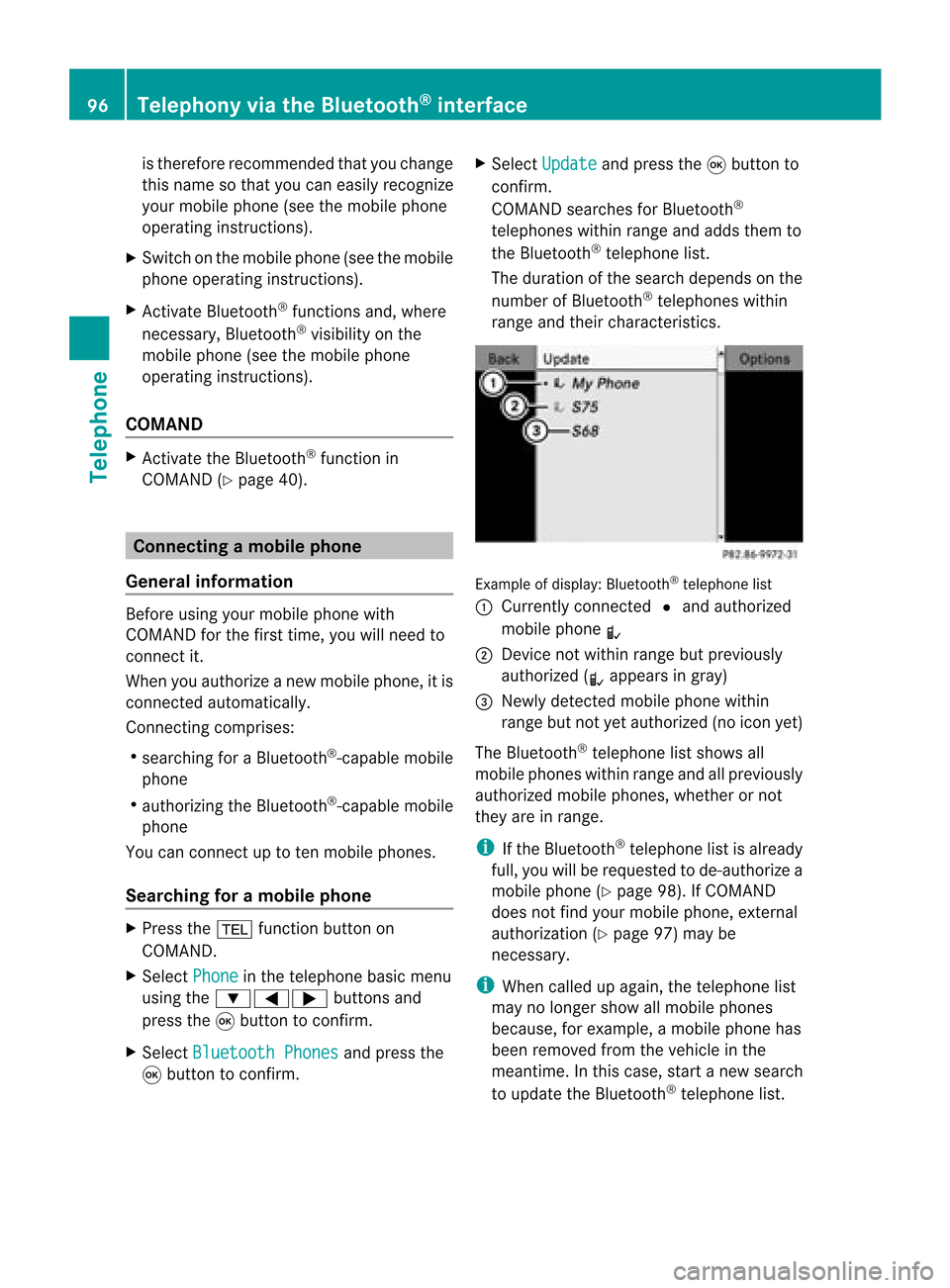
ran geand their char acteris tics. Ex
ample ofdisplay: Bluetooth®
tel epho nelist
: Curre ntly con nected# and auth orized
mobi lephon eL
; Dev icenotw ithin rangebut prev iously
author ized(Lappears ingray)
= Newly detected mobile phonewithin
rang ebut not yetauthor ized(noicon yet)
The Bluet ooth®
telep honelist shows all
mobile phoneswithin rangeand allprev iously
author izedmobile phones,whet herornot
the yare inrang e.
i Ifthe Bluet ooth®
telep honelist isalready
full, youwillberequest edtode-aut horizea
mobile phone(Y page 98).If COMA ND
does notfindyour mobile phone,ext ern al
author ization (Ypage 97)may be
nec essary.
i When called upagain, thetelep honelist
may nolong ershow allmobile phones
because, forexam ple,amobile phonehas
been removedfromthe vehic lein the
mean time.In this case, start anew searc h
to update theBluet ooth®
telep honelist . 96
Telep hony viatheBlu etoot h®
inter faceTelep hone
Page 99 of 210
Aut
horizing (regist ering) amobile
ph one X
Sele ctas yet unaut horizedmobi lephon e
= intheBluet ooth®
telepho nelist usin g
th e9: buttons.
X Sele ctOpt ions usin
gth e; buttonand
pres sth e9 butt ontocon firm.
X Sele ctAut horize and
pres sth e9 butt on
to con firm.
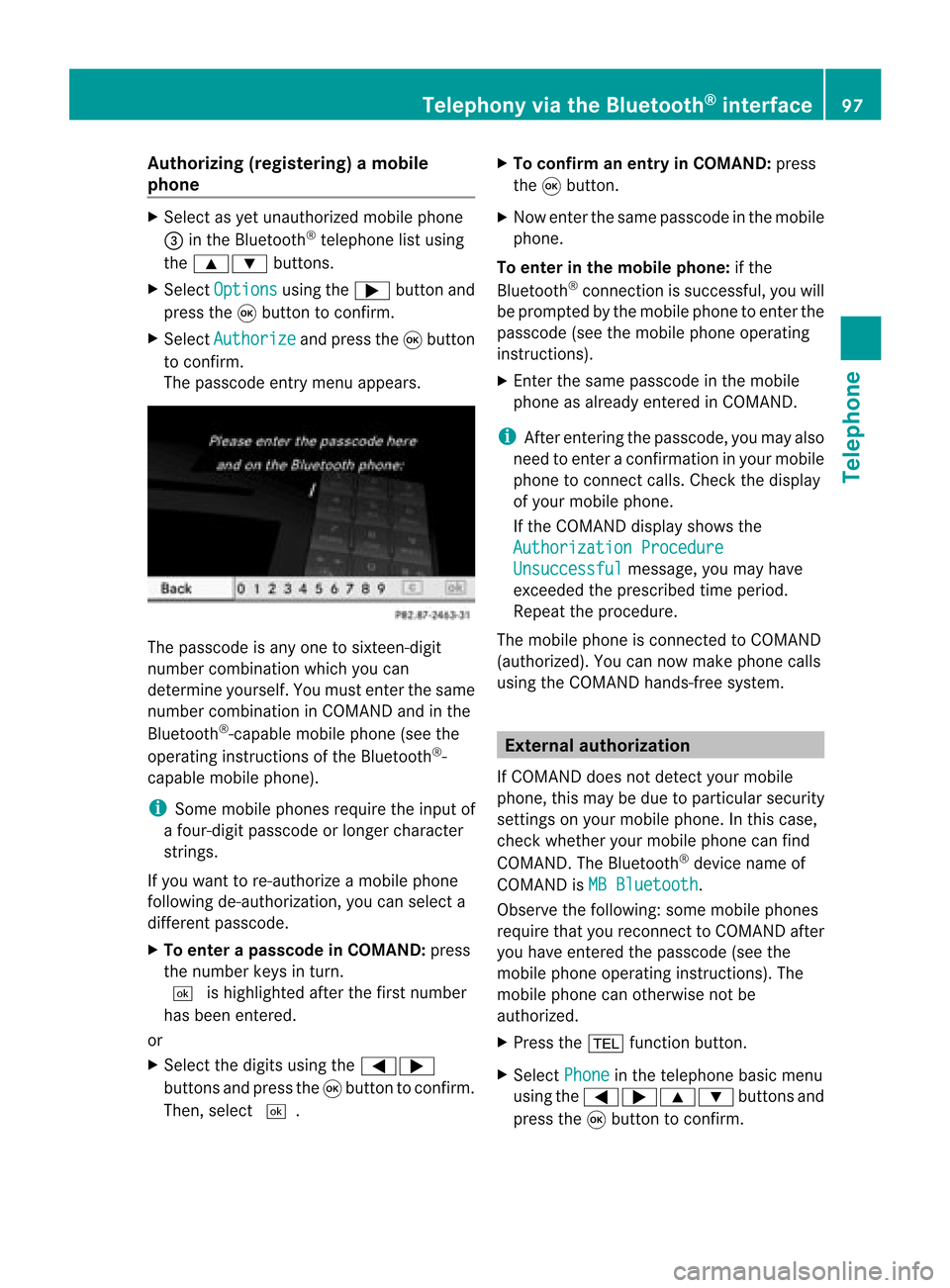
The passc odeentrymen uappears . The
passc odeisany oneto six teen- digit
num bercom binatio nwhich youcan
determine yourself.Youmust enter thesame
number combination inCOMAND andinthe
Bluetooth ®
-capable mobilephone(seethe
operating instructionsofthe Bluetooth ®
-
capable mobilephone).
i Some mobile phones requiretheinput of
a four-digit passcode orlonger character
strings.
If you want tore-authorize amobile phone
following <0004000500270001001500140008000F00120009001E000100140009000F000E
0035> youcan select a
different passcode.
X To enter apassc odeinCOMA ND:press
the numbe rkeys inturn.
¬ ishigh lighted after thefirst numbe r
has beenentere d.
or
X Sel ect the digits using the =;
bu ttons andpressthe 9button toconfi rm.
The n,sel ect ¬. X
To confi rm anentry inCO MA ND: press
the 9button.
X Now enterthe same passcode inthe mobile
phone.
To enter inthe mobile phone:ifthe
Bluetooth ®
conn ection issuccessful, youwill
be prompted bythe mobile phonetoenter the
passcode (seethemobile phoneoperating
instruct ions).
X Ent erthe same passcode inthe mobile
phone asalready entered inCOMAND.
i Afterenterin gthe passcode, youmay also
need toenter aconfirm ationinyour mobile
phone toconn ectcalls. Check thedispla y
of your mobile phone.
If the COMAND displayshows the
Authorization Procedure Unsuccessful message,
youmay have
exceeded theprescribed timeperiod.
Repea tthe procedure.
The mobile phoneisconn ected toCOMAND
(authorized). Youcannow make phone calls
using theCOMAND hands-free system. External
authorizat ion
If COMAND doesnotdetect yourmobile
phone, thismay bedue toparticular security
settin gson your mobile phone. Inthis case,
check whether yourmobile phonecanfind
COMAND. TheBluetooth ®
device nameof
COMAND isMB Bluetooth .
Observe thefollowing: somemobile phones
require thatyoureconn ecttoCOMAND after
you have entered thepasscode (seethe
mobile phoneoperating instructions).The
mobile phonecanotherwise notbe
authorized.
X Press the% functionbutton.
X Select Phone in
the telephone basicmenu
using the=;9: buttonsand
press the9button toconfirm . Telephony
viathe Bluetooth ®
interface 97Telephone Z
Page 100 of 210
X
Sel ect Bluetooth Phones and
pressthe
9 button toconfi rm.
X Sel ect Update and
pressthe 9button to
confi rm.
X Sel ect Opt ions us
ing the ; button and
pre ssthe 9button toconfi rm.
X Sel ect ExternalAuthorization and
pre ssthe 9button toconfi rm.
X Start theBluetoo th®
sea rch onthe mob ile
pho ne(seethe mob ile pho neope rating
instr uctions) .
X Sel ect COMAND (MB Bluetooth )
on the
mob ile pho ne.
X Enter thepassco deon the mob ile pho ne
wh en req uested toand then inputitin
CO MAND. Auto
matic reconnecti on
CO MAND alwa yssea rche sfor the last
connecte dmob ile pho ne.
If no connecti oncan bemad eto the mos t
rece ntlyconnecte dmob ilep hone, thesystem
searches forthe mobile phonewhichwas
conn ected before thatone. Conne
ctinganother mobilephone
If you have authorized severalmobilephones,
you can switch between theindividua l
phones.
i You canonly switch toanother authorized
mobile phoneifno phone callisactive.
X Select themobile phoneinthe Bluetooth ®
telephone listusing the9: buttons
and press the9button toconfirm .
The selected mobilephoneissearched for
and conn ected ifit is within Bluetooth ®
range andifBluetooth ®
is activated.
Only onemobile phonecanbeconn ected
at any one time. Thecurrent lyconn ected mobile
phoneisindicated bythe #dot in
the Bluetooth ®
telephone list(Ypage 96). To
display details
X Press the% functionbutton on
COMAND.
X Select thedesired mobilephoneinthe
Bluetooth ®
telephone listusing the
9: buttons.
X Select Options using
the; button and
press the9button toconfirm .
X Select Details and
press the9button to
confirm .
The following information concerning the
selected mobilephoneisshown:
R Bluetooth ®
name
R Bluetooth ®
address
R availa bility
R authorization status
X To close thedetailed display:pressthe
= or; button. Deregis
tering(de-aut horizing) a
mobile phone
Mercedes-Ben zrecomm endsde-
authoriz ationinCOMAND andonthe mobile
phone. Subsequent authorizationmay
other wisefail.
X Select thedesired mobilephoneinthe
Bluetoot h®
telephon elist using the
9: buttons. 98
Telephony viatheBluet ooth®
interf aceTelephone
Page 101 of 210
X
Sel ect Opt ions us
ing the ; button and
pre ssthe 9button toconfi rm.
X Sel ect De-Aut horize and
pressthe 9
bu tton toconfi rm.
Ap rompt appears asking whethe ryou
really wishtorevoke authorization forthis
mobile phone.
X Select Yes or
No .
If you select Yes ,
the mobile phonewillbe
deleted fromtheBluetooth ®
telephone list.
If you select No ,
the process willbe
canceled.
i Before re-authoriz ingthe mobile phone,
you should alsodelete thedevice nameMB Bluetooth from
yourmobile phone's
Bluetooth ®
list. Telephone
basicmenu (Bluetooth ®
interfa ce)
X Press the% functionbutton .
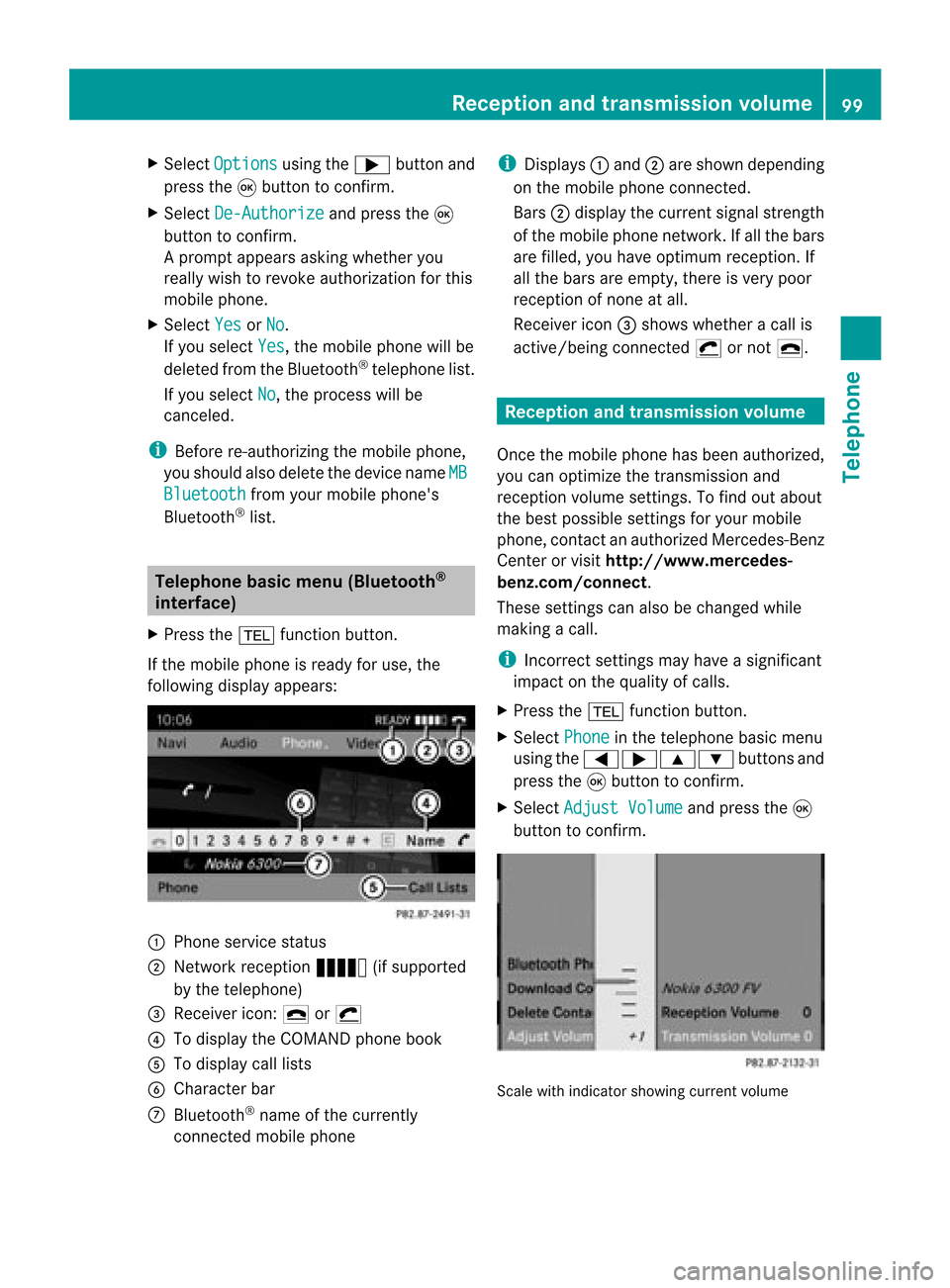
If the mobile phoneisready foruse, the
following displayappears: 1
Phone service status
2 Network reception Ä(ifsupported
by the telephone)
3 Receiver icon:¢or¡
4 Todisplay theCOMAND phonebook
5 Todisplay calllists
6 Character bar
7 Bluetooth ®
name ofthe current ly
conn ected mobile phone i
Displays :and ;are shown depending
on the mobile phoneconnected.
Bars ;display thecurrent signalstrength
of the mobile phonenetwork .Ifa llthe bars
are filled, youhave optimum receptio n.If
all the bars areempt y,the reisvery poor
rec eptio nofnone atall.
Receiver icon=shows whether acall is
active/ beingconnected ¡ornot ¢. Reception
andtransmission volume
Once themobile phonehasbeen authorized,
you can optimize thetrans mission and
reception volumesettings. Tofind outabout
the best possible settings foryour mobile
phone, contactanauthorized Mercedes-B enz
Center orvisit htt<0010002D002200220017001700170021000D0005001200030005000400050013
0025B
benz.com/connect .
These settings canalso bechanged while
making acall.
i Incorrect settings may have asignificant
impact onthe quali tyof calls.
X Press the% functionbutton .
X Select Phone in
the telephone basicmenu
using the=;9: buttonsand
press the9button toconf irm.
X Select Adjust Volume and
press the9
button toconf irm. Scale
withindicator showingcurrentvolume Reception
andtransmission volume
99Telephone Z