steering MERCEDES-BENZ R-CLASS MPV 2008 Owner's Manual
[x] Cancel search | Manufacturer: MERCEDES-BENZ, Model Year: 2008, Model line: R-CLASS MPV, Model: MERCEDES-BENZ R-CLASS MPV 2008Pages: 373, PDF Size: 6.75 MB
Page 119 of 373

Transmission
116in order to prevent the engine from over-
revving, even if the shift range is restricted. Driving situation
è The braking effect of the engine can
be used in this position.
ç To use the braking effect of the
engine on downhill gradients and
for driving:
R
on steep mountain roads
R in mountainous terrain
R in arduous conditions æ To use the braking effect of the
engine on extremely steep downhill
gradients and long downhill
stretches
Restricting the shift range
X
Press the left-hand button on the steering
wheel (Y page 117).
The set shift range appears in the multi-
function display. Derestricting the shift range
X
Press the right-hand button on the steering
wheel (Y page 117).
The set shift range appears in the multi-
function display.
Automatic gearshift program You can select either gearshift program
Cor
S.
The program selector button is located on the
centre console. 1
Program selector button C
Comfort For comfort mode
S
Sport For all normal driving con-
ditions !
Only press program selector button 1
when the selector lever is in position P,N
or D. 1
Current gearshift program
i If gearshift program Cor Sis selected, the
automatic transmission remains in the
selected gearshift program if you start the
engine again.
i All models with diesel engines:
To reduce the demand placed on the torque
converter, the vehicle pulls away in first
gear regardless of the gearshift program
selected.
X Press program selector button 1repeat-
edly until the letter (C/S)for the desired
gearshift program appears in the multi-
function display.
Comfort mode Cis characterised by the fol-
lowing: Controls
251_AKB; 5; 7, en-GB
wobuchh
,V ersion: 2.10.6
2008-05-11T14:51:51+02:00 - Seite 116 Dateiname: 6515_1825_02_buchblock.pdf; preflight
Page 120 of 373

Transmission
117
R
the vehicle pulling away more gently in
forward and reverse gears, unless the
accelerator pedal is depressed fully.
R an increase in traction. This improves the
driving stability of the vehicle on slippery
road surfaces, for example.
R the automatic transmission shifting up
sooner. The vehicle is driven at lower
engine speeds and the wheels are less
likely to spin.
Gearshift program Sis characterised by the
following:
R the vehicle pulling away in first gear.
R the automatic transmission shifting up
later.
Driving tips Accelerator pedal position
Your style of driving influences how the auto-
matic transmission shifts gear:
R little throttle: early upshifts
R more throttle: late upshifts
Kickdown
Use kickdown for maximum acceleration. X
Depress the accelerator pedal beyond the
pressure point.
The transmission shifts to a lower gear
depending on the engine speed.
X Ease off the accelerator pedal once the
desired speed is reached.
The automatic transmission shifts back up.
Trailer towing
X Drive in the middle of the engine speed
range on uphill gradients.
X Shift down to shift range 3or 2depending
on the incline of the uphill or downhill gra-
dient (Y page 115), even if cruise control is
activated. DIRECT SELECT steering wheel gear-
shift buttons
You can restrict or derestrict the shift range
using the DIRECT SELECT steering wheel
gearshift buttons. 1
Left-hand button: to restrict the shift
range
2 Right-hand button: to derestrict the shift
range
i When the automatic transmission is in
position P,Nor R, you cannot shift gears
using the DIRECT SELECT steering wheel
gearshift buttons.
Derestricting the shift range X
Press right-hand button 2on the steering
wheel.
The shift range is derestricted
(Y page 115). The automatic transmission
shifts up to the next gear.
i If the maximum engine speed for the shift
range is reached and you continue to accel- Controls
251_AKB; 5; 7, en-GB
wobuchh
,V ersion: 2.10.6
2008-05-11T14:51:51+02:00 - Seite 117 ZDateiname: 6515_1825_02_buchblock.pdf; preflight
Page 121 of 373

Instrument cluster
118erate, the automatic transmission shifts up,
even if the shift range is restricted.
Restricting the shift range G
Risk of accident
Do not change down for additional engine
braking on a slippery road surface. This
could cause the drive wheels to lose their
grip and the vehicle could skid.
i In order to prevent the engine from over-
revving, the automatic transmission does
not shift down when the engine speed is
too high.
X Press left-hand button 1on the steering
wheel.
The shift range is restricted (Y page 115).
The automatic transmission shifts down to
the next gear.
Selecting the ideal shift range X
Press and hold the left-hand button on the
steering wheel until a shift range appears
in the display.
The automatic transmission will shift to a
range which allows ideal acceleration and
deceleration. To do this, the automatic transmission will shift down one or more
gears.
Derestricting the shift range X
Press and hold the right-hand button on the
steering wheel until the corresponding
number for the gear disappears from the
display.
The automatic transmission shifts from the
current shift range directly to D. Instrument cluster
Points to remember
You will find an illustration of the instrument
cluster in the "At a glance" section
(Y page 26). G
Risk of accident
If the instrument cluster or the multi-func-
tion display fails, no messages can be dis-
played.
This means that you will not see information
about the driving situation, such as the
speed, outside temperature, warning/indi-
cator lamps, display messages or system
failures. The handling characteristics may
be affected. Adapt your driving style and
speed accordingly.
Immediately consult a qualified specialist
workshop which has the necessary special-
ist knowledge and tools to carry out the
work required. Mercedes-Benz recom-
mends that you use a Mercedes-Benz
Service Centre for this purpose. In particu-
lar, work relevant to safety or on safety-
related systems must be carried out at a
qualified specialist workshop. Cont
rols
251_AKB; 5; 7, en-GB
wobuchh
,V ersion: 2.10.6
2008-05-11T14:51:51+02:00 - Seite 118 Dateiname: 6515_1825_02_buchblock.pdf; preflight
Page 123 of 373
On-board computer
120 Outside temperature display
G
Risk of accident
The road surface may be icy, especially in
wooded areas or on bridges, even if tem-
peratures are just above freezing point. The
vehicle could skid if you fail to adapt your
driving style. You should therefore always
adapt your driving style and speed to suit
the weather conditions.
There is a short delay before a change in out-
side temperature is displayed. On-board computer
Points to remember
The on-board computer is activated as soon
as you turn the key to position 1in the ignition
lock. You can use the on-board computer to
call up information relating to your vehicle
and to make and adjust settings.
You can call up the next service due date,
select the display language for the instrument
cluster and set other functions. G
Risk of accident
Only use the on-board computer when road
and traffic conditions permit. You would
otherwise be distracted and unable to con-
centrate properly on driving, and could
cause an accident.
The on-board computer shows information in
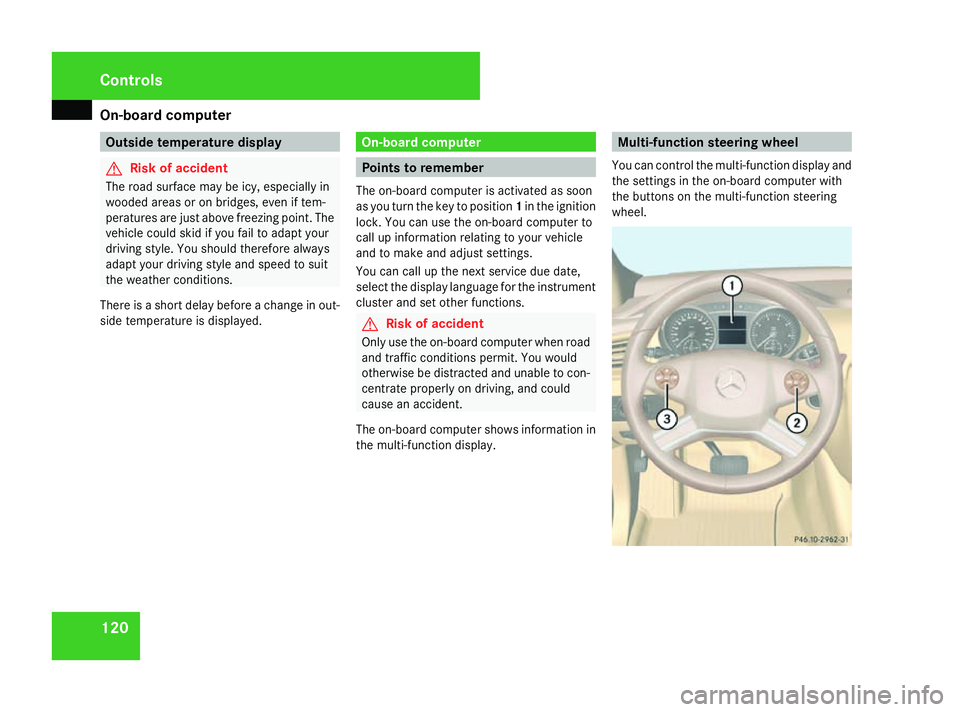
the multi-function display. Multi-function steering wheel
You can control the multi-function display and
the settings in the on-board computer with
the buttons on the multi-function steering
wheel. Controls
251_AKB; 5; 7, en-GB
wobuchh,
Version: 2.10.6 2008-05-11T14:51:51+02:00 - Seite 120Dateiname: 6515_1825_02_buchblock.pdf; preflight
Page 138 of 373

On-board computer
135
X
Press the æorç button to select
one of the three switch-on times or Timer
off (auxiliary heating switched off).
When a switch-on time is selected, the yel-
low indicator lamp lights up in the auxiliary
heating button.
X Press the j,èorÿ button to
select a different display.
Changing the switch-on time for the
auxiliary heating* This function is only displayed if you have
selected a switch-on time. Here you can enter
the time at which the auxiliary heating is to
be switched on.
X
Press èor· to select the Set-
tings menu.
X Press the jbutton to call up the selec-
tion of submenus.
X Press the æorç button to select the
Heater submenu.
X Press the jbutton to select Switch-on
time X Set hours.
X Press the æorç button to set the
hour.
X Press the jbutton to select Switch-on
time X Set minutes . X
Press the æorç button to set the
minutes.
After changing from one menu to another,
the new time setting is stored. The yellow
indicator lamp lights up on the button for
the auxiliary heating on the centre console.
X Press the j,èorÿ button to
select a different display.
Activating or deactivating the easy-
entry/exit feature* i
For more information on the easy-entry/
exit feature, (Y page 89). G
Risk of injury
When the easy-entry/exit feature is active,
the steering wheel moves. There is a risk of
occupants becoming trapped. Before acti-
vating the easy-entry/exit feature, make
sure that nobody can become trapped.
Do not leave children unsupervised in the
vehicle, even if they are secured in a child
restraint system. The children could open
the driver's door and thereby unintention-
ally activate the easy-entry/exit feature
and become trapped. X
Press èor· to select the Set-
tings menu.
X Press the jbutton to call up the selec-
tion of submenus.
X Press æorç to select the Conve-
nience submenu.
X Press the jbutton to select the EASY-
ENTRY system.
X Press the æorç button to activate
or deactivate the EASY-ENTRY system.
X Press the j,èorÿ button to
select a different display.
Activating/deactivating the Fold in mir-
rors when locking* function The
Fold in mirrors when locking func-
tion allows you to determine whether the
exterior mirrors should fold in when you lock
the vehicle. When you switch on the ignition,
the exterior mirrors fold out again.
If you have switched the function on and you
fold in the exterior mirrors using the button
on the door (Y page 91), they will not fold out
automatically. The exterior mirrors can then
only be folded out using the button on the
door. Controls
* optional
251_AKB; 5; 7, en-GB
wobuchh,
Version: 2.10.6 2008-05-11T14:51:51+02:00 - Seite 135 ZDateiname: 6515_1825_02_buchblock.pdf; preflight
Page 156 of 373

Driving sys
tems 153begin a level change. You could otherwise
trap yourself or others.
G
Risk of accident
Adjust your driving style to the altered han-
dling characteristics. ESP ®
cannot reduce
the risk of an accident if you drive too fast.
ESP ®
cannot override the laws of physics.
! When driving in very poor road conditions,
select a high vehicle level in good time.
Make sure there is always sufficient ground
clearance to prevent damage to the vehi-
cle.
Basic settings
Select the raised level for very poor road con-
ditions (Y page 153) or the highway level for
normal road conditions (Y page 154).
The vehicle is automatically lowered to high-
speed level when you:
R drive faster than 140 km/h
R drive at a speed between 120 km/h and
140 km/h for approximately 20 seconds The individual vehicle levels are:
R
Raised level: 50 mm above highway level
R Highway level: +/- 0 mm
R High-speed level: 20 mm below highway
level
Raised level
Only select the raised level when this is appro-
priate for the road conditions. Otherwise, fuel
consumption increases and handling per-
formance is affected.
If you select the raised level at a speed above
40 km/h, the Level selection not per-
mitted message appears in the multi-func-
tion display. 1
Button
2 Indicator lamp X
Start the engine.
Indicator lamp 2is not lit:
X Press button 1.
Indicator lamp 2flashes. The vehicle rises
to the raised level.
While the adjustment is taking place, a mes-
sage appears in the multi-function display,
e.g. : Example display for vehicles with the AIRMATIC
package* and compass*
If you press the è,·,korj
button on the multi-function steering wheel,
the message will disappear.
Once the vehicle has reached the raised level,
indicator lamp 2remains lit. A message Controls
* optional
251_AKB; 5; 7, en-GB
wobuchh
,V ersion: 2.10.6
2008-05-11T14:51:51+02:00 - Seite 153 ZDateiname: 6515_1825_02_buchblock.pdf; preflight
Page 157 of 373

Driving sys
tems 154
appears in the multi-function display for
approximately five seconds, e.g. : Example display for vehicles with the AIRMATIC
package* and compass*
The vehicle is automatically lowered to high-
way level if you drive faster than 40 km/h at
raised level.
Highway level 1
Button
2 Indicator lamp X
Make sure that the doors are closed.
X Start the engine.
If indicator lamp 2is lit:
X Press button 1.
Indicator lamp 2flashes. The vehicle is
lowered to highway level.
While the adjustment is taking place, a mes-
sage appears in the multi-function display,
e.g. : Example display for vehicles with the AIRMATIC
package* and compass*
If you press the
è,·,korj
button on the multi-function steering wheel,
the message will disappear.
Once highway level has been reached, indi-
cator lamp 2goes out. A message appears in the multi-function display for approxi-
mately five seconds, e.g. : Example display for vehicles with the AIRMATIC
package* and compass*
The vehicle is automatically lowered to high-
way level if you drive faster than 40 km/h at
raised level. It is automatically raised to high-
way level if you drive slower than 60 km/h at
high-speed level. 4MATIC* (permanent four-wheel
drive)
4MATIC ensures that all four wheels are per-
manently driven. Together with ESP ®
and
ETS, it improves the traction of your vehicle
whenever a drive wheel spins due to insuffi-
cient grip. G
Risk of accident
4MATIC cannot reduce the risk of an acci-
dent if you drive too fast. Controls
* optional
251_AKB; 5; 7, en-GB
wobuchh
,V ersion: 2.10.6
2008-05-11T14:51:51+02:00 - Seite 154 Dateiname: 6515_1825_02_buchblock.pdf; preflight
Page 212 of 373

Features
209Example illustration
1
To engage the mobile phone
2 Connector contact
3 Mobile phone bracket
X Slide the lower end of the mobile phone
into connector contact 2in mobile phone
bracket 3.
X Push the top part of the mobile phone in
the direction of arrow 1until it engages in
mobile phone bracket 3.
The mobile phone is connected to the
hands-free system and to the multi-func-
tion steering wheel.
The battery is charged depending on the
charge status and the position of the key in
the ignition lock. The charging process is
shown in the mobile phone display. i
The system reads the phone book stored
on the SIM card and in the mobile phone
memory. If the same entry is stored in both
of the phone books, both of these entries
will be shown in the multi-function display.
You can make a call using the sand
t buttons on the multi-function steering
wheel. You can control other mobile phone
functions via the on-board computer
(Y page 138).
i When you remove the key from the igni-
tion lock, the mobile phone remains
switched on for approximately ten minutes
(run-on time). If you make a call during this
time, the mobile phone will be switched off
approximately ten minutes after you have
ended the call.
Run-on time:
You can change the run-on time by making
an additional phone book entry on the SIM
card. For the name, enter "Idletime" and for
the number, enter a figure between "1" and
"30" (minutes). If you have not entered a
number or have entered a different num-
ber, the run-on time of ten minutes will still
apply. For information on how to create a phone
book entry, refer to the mobile phone oper-
ating instructions.
Own number sending:
The hands-free system does not recognise
whether own number sending is enabled or
disabled in the mobile phone. The phone
number is therefore always sent by default.
By creating an additional phone book entry
on the SIM card, you can switch the own
number sending function on and off. For
the name, enter "CALLID" and for the num-
ber, enter a "0" or a "1". Entering "0" will
prevent the telephone number from being
sent; entering "1" will allow it to be sent.
For information on how to create a phone
book entry, refer to the mobile phone oper-
ating instructions. Controls
251_AKB; 5; 7, en-GB
wobuchh,
Version: 2.10.6
2008-05-11T14:51:51+02:00 - Seite 209 ZDateiname: 6515_1825_02_buchblock.pdf; preflight
Page 218 of 373
Features
215
X
Use æ orç on the multi-function
steering wheel to select the Vehiclesub-
menu.
X Keep pressing jork until the Com-
pass setting Zone message appears.
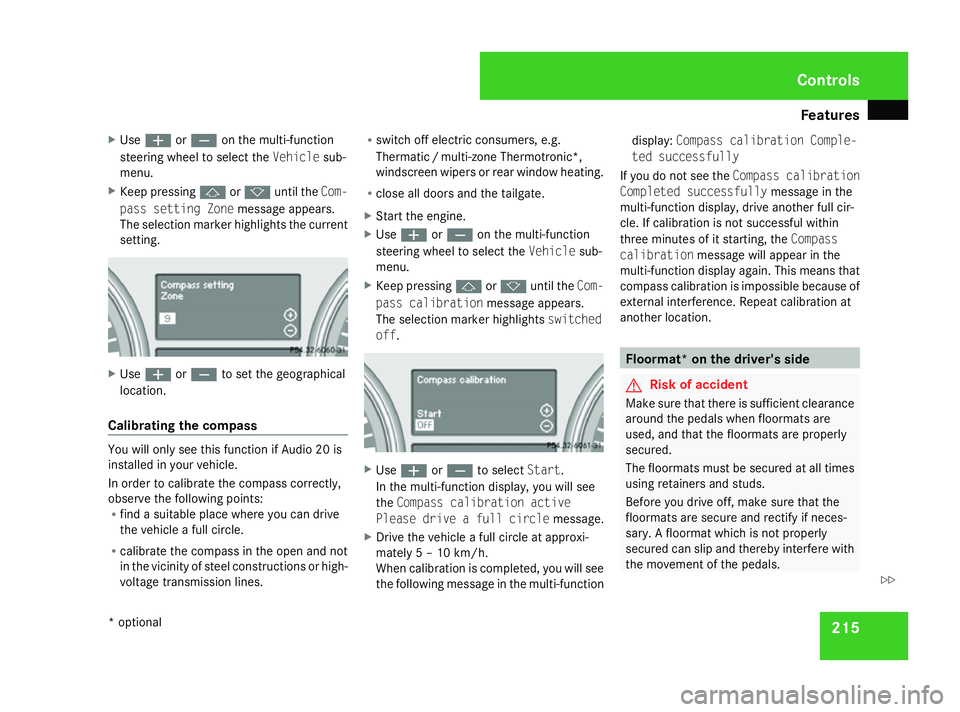
The selection marker highlights the current
setting. X
Use æ orç to set the geographical
location.
Calibrating the compass You will only see this function if Audio 20 is
installed in your vehicle.
In order to calibrate the compass correctly,
observe the following points:
R find a suitable place where you can drive
the vehicle a full circle.
R calibrate the compass in the open and not
in the vicinity of steel constructions or high-
voltage transmission lines. R
switch off electric consumers, e.g.
Thermati c/multi-zone Thermotronic*,
windscreen wipers or rear window heating.
R close all doors and the tailgate.
X Start the engine.
X Use æ orç on the multi-function
steering wheel to select the Vehiclesub-
menu.
X Keep pressing jork until the Com-
pass calibration message appears.
The selection marker highlights switched
off . X
Use æ orç to select Start.
In the multi-function display, you will see
the Compass calibration active
Please drive a full circle message.
X Drive the vehicle a full circle at approxi-
mately 5 – 10 km/h.
When calibration is completed, you will see
the following message in the multi-function display:
Compass calibration Comple-
ted successfully
If you do not see the Compass calibration
Completed successfully message in the
multi-function display, drive another full cir-
cle. If calibration is not successful within
three minutes of it starting, the Compass
calibration message will appear in the
multi-function display again. This means that
compass calibration is impossible because of
external interference. Repeat calibration at
another location. Floormat* on the driver's side
G
Risk of accident
Make sure that there is sufficient clearance
around the pedals when floormats are
used, and that the floormats are properly
secured.
The floormats must be secured at all times
using retainers and studs.
Before you drive off, make sure that the
floormats are secure and rectify if neces-
sary. A floormat which is not properly
secured can slip and thereby interfere with
the movement of the pedals. Controls
* optional
251_AKB; 5; 7, en-GB
wobuchh,
Version: 2.10.6 2008-05-11T14:51:51+02:00 - Seite 215 ZDateiname: 6515_1825_02_buchblock.pdf; preflight
Page 229 of 373

Tyres and wheels
226
i
An emergency spare wheel* may also be
fitted against the direction of rotation. MOExtended run-flat system*
The MOExtended run-flat system allows you
to continue driving the vehicle even when one
or more tyres lose all air pressure.
The MOExtended run-flat system may only be
used in conjunction with the tyre pressure
loss warning system or the tyre pressure
monitor* and on wheels specifically tested by
Mercedes-Benz.
i Vehicles with MOExtended run-flat sys-
tem are not equipped with the TIREFIT
kit* 27
.
It is therefore recommended to additionally
equip your vehicle with the TIREFIT kit*
when fitting tyres that do not feature run-
flat properties, e.g. winter tyres.
i A TIREFIT kit* is available from any quali-
fied specialist workshop, e.g. a Mercedes-
Benz Service Centre. You will find notes on driving with a flat tyre
in the "Practical advice" section
(Y
page 322). Tyre tread
G
Risk of accident
Bear in mind that:
R tyre grip decreases rapidly on wet roads
when the tread depth is less than 3 mm.
You should thus replace tyres that have
insufficient tread.
R winter tyres should be replaced when the
tread depth is 4 mm or less because oth-
erwise they no longer provide adequate
grip.
R the tread on a tyre may not wear evenly.
You should thus regularly check the tread
depth and the condition of the tread
across the entire width of all tyres. If nec-
essary, turn the steering wheel so that
you can see the tyre tread more easily.
You could otherwise lose control of the
vehicle and cause an accident due to the
reduced grip of the tyres on the road. Tyre pressures
i You will find a table of tyre pressures for
various operating conditions on the inside
of your vehicle's fuel filler flap
(Y page 218).
The valid value for the spare wheel* is sta-
ted on the spare wheel and in the technical
data section. G
Risk of accident
Tyre pressure that is either too high or too
low has a negative effect on the vehicle’s
driving safety, which could lead you to
cause an accident. You should therefore
regularly check the pressure of all your
tyres (including the spare tyre*), particu-
larly prior to long trips, and correct the
pressure as necessary.
To test tyre pressure, use a suitable pressure
gauge. The outer appearance of a tyre does
not permit any reliable conclusion about the
tyre pressure. On vehicles fitted with the elec-
tronic tyre pressure monitor*, the tyre pres-
sure can be checked in the on-board com-
puter.
27 Only for certain countries Operation
* optional
251_AKB; 5; 7, en-GB
wobuchh
,V ersion: 2.10.6
2008-05-11T14:51:51+02:00 - Seite 226 Dateiname: 6515_1825_02_buchblock.pdf; preflight