lock MERCEDES-BENZ R-CLASS MPV 2008 Manual Online
[x] Cancel search | Manufacturer: MERCEDES-BENZ, Model Year: 2008, Model line: R-CLASS MPV, Model: MERCEDES-BENZ R-CLASS MPV 2008Pages: 373, PDF Size: 6.75 MB
Page 84 of 373
Seats
81
i
When the door is unlocked, opened or the
key is in position 1in the ignition lock, the
setting of the lumbar support is automati-
cally checked and if necessary the individ-
ual setting is reset. Adjusting seats in the 2nd and 3rd
rows
G
Risk of injury
After adjusting the seats, make sure that
the outer seats in the 2nd row are locked,
and that the backrests in the 2nd and 3rd
rows of seats are locked and in the upright
position.
The outer seats in the 2nd row are only
locked if the lock verification indicator is
folded in and the indicator area is barely
visible (see the "Easy-entry/exit feature for
the 3rd row of seats" section).
If the backrests are not locked in position:
R Sharp braking
R A sudden change of direction
R An accident
could cause the backrests to fold forwards
and not provide the intended level of restraint, thereby resulting in additional
serious or even fatal injury.
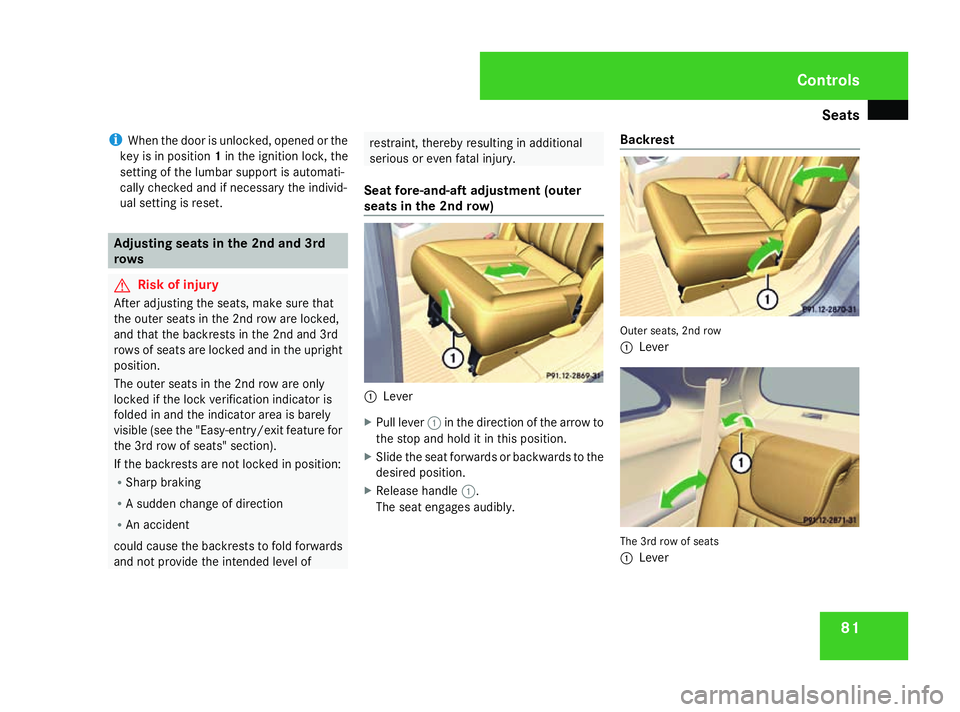
Seat fore-and-aft adjustment (outer
seats in the 2nd row) 1
Lever
X Pull lever 1in the direction of the arrow to
the stop and hold it in this position.
X Slide the seat forwards or backwards to the
desired position.
X Release handle 1.
The seat engages audibly. Backrest Outer seats, 2nd row
1
Lever The 3rd row of seats
1
Lever Controls
251_AKB; 5; 7, en-GB
wobuchh,
Version: 2.10.6 2008-05-11T14:51:51+02:00 - Seite 81 ZDateiname: 6515_1825_02_buchblock.pdf; preflight
Page 85 of 373

Seats
82
X
Pull lever 1in the direction of the arrow to
the pressure point and hold it in this posi-
tion.
X Press your back lightly against the backrest
to tilt it towards the rear.
or
X Relieve the pressure on the backrest to
allow it to fold forwards.
X Release lever 1once the backrest is in the
desired position.
X Press your back gently against the backrest
to check whether it is locked into place.
Adjusting the armrest (2nd row of
seats) 5-seat and 7-seat vehicles*
The backrest of the middle seat in the 2nd row
can be used as an armrest.
X To put the backrest into the armrest
position: move the head restraint of the middle seat to the lowest position
(Y
page 83). 1
Backrest release loop
2 Backrest
3 Seat cushion
X Pull release loop 1in the direction of the
arrow and hold it in this position.
X Fold backrest 2forwards until it is resting
on seat cushion 3in the armrest position. Armrest position
X
To move the backrest to its upright posi-
tion: pull release loop 1in the direction of
the arrow and hold it in this position.
X Fold backrest 2backwards until you hear
it engage.
6-seat vehicles*
You can fold the armrests in the 2nd row of
seats up, e.g. when loading the vehicle, and
adjust their height. Controls
* optional
251_AKB; 5; 7, en-GB
wobuchh,
Version: 2.10.6 2008-05-11T14:51:51+02:00 - Seite 82Dateiname: 6515_1825_02_buchblock.pdf; preflight
Page 86 of 373
Seats
83
X
To fold up: fold the armrest up until it
engages in the vertical position.
X To adjust the height: gently push the
engaged armrest backwards to release it.
X First fold the armrest all the way down to
its lowest position and then back up to the
desired position until it engages. Rear seat head restraints
G
Risk of injury
Occupants should only travel sitting on
seats which have the head restraints fitted.
On a seat which is occupied, pull the head
restraint up into the upright position. This
reduces the risk of injury to the passenger
in the event of an accident.
Adjusting the height of the head
restraint (2nd and 3rd rows of seats) G
Risk of injury
Make sure that the central area of the head
restraint supports the back of your head at
about eye level. You could seriously injure
your neck if your head is not correctly sup-
ported by the head restraint in the event of
an accident. Never travel without a cor-
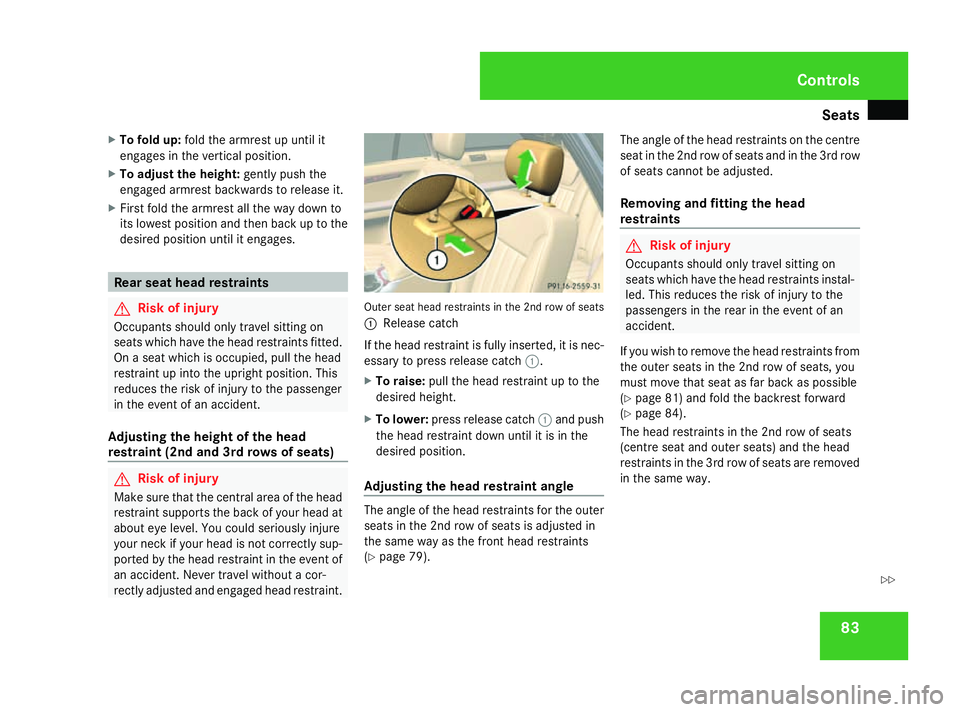
rectly adjusted and engaged head restraint. Outer seat head restraints in the 2nd row of seats
1
Release catch
If the head restraint is fully inserted, it is nec-
essary to press release catch 1.
X To raise: pull the head restraint up to the
desired height.
X To lower: press release catch 1and push
the head restraint down until it is in the
desired position.
Adjusting the head restraint angle The angle of the head restraints for the outer
seats in the 2nd row of seats is adjusted in
the same way as the front head restraints
(Y
page 79). The angle of the head restraints on the centre
seat in the 2nd row of seats and in the 3rd row
of seats cannot be adjusted.
Removing and fitting the head
restraints G
Risk of injury
Occupants should only travel sitting on
seats which have the head restraints instal-
led. This reduces the risk of injury to the
passengers in the rear in the event of an
accident.
If you wish to remove the head restraints from
the outer seats in the 2nd row of seats, you
must move that seat as far back as possible
(Y page 81) and fold the backrest forward
(Y page 84).
The head restraints in the 2nd row of seats
(centre seat and outer seats) and the head
restraints in the 3rd row of seats are removed
in the same way. Controls
251_AKB; 5; 7, en-GB
wobuchh,
Version: 2.10.6 2008-05-11T14:51:51+02:00 - Seite 83 ZDateiname: 6515_1825_02_buchblock.pdf; preflight
Page 87 of 373
Seats
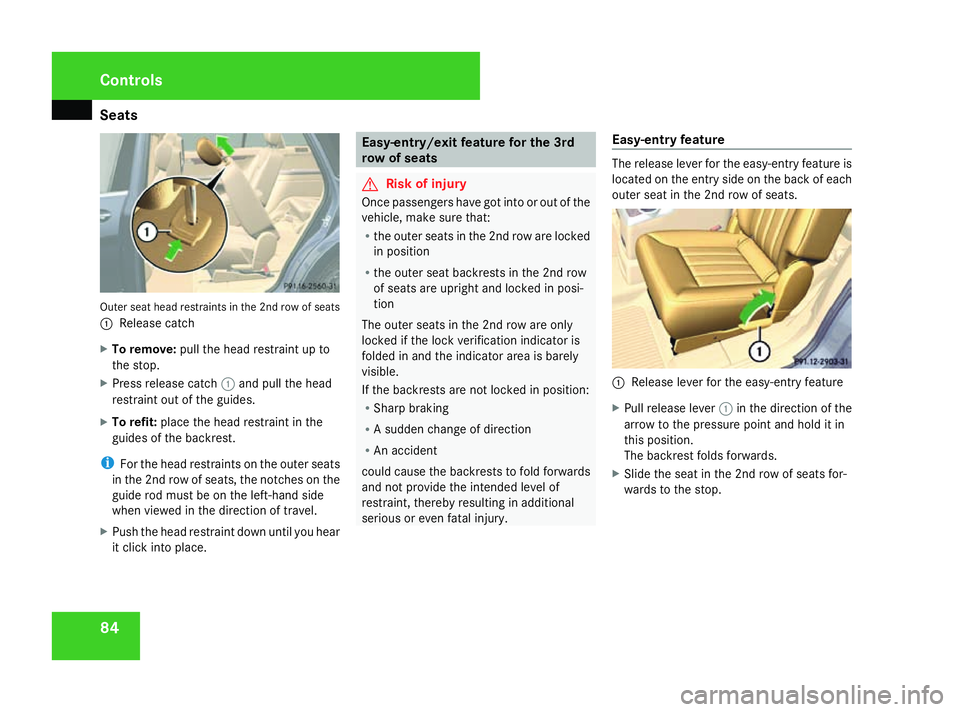
84Outer seat head restraints in the 2nd row of seats
1 Release catch
X To remove: pull the head restraint up to
the stop.
X Press release catch 1and pull the head
restraint out of the guides.
X To refit: place the head restraint in the
guides of the backrest.
i For the head restraints on the outer seats
in the 2nd row of seats, the notches on the
guide rod must be on the left-hand side
when viewed in the direction of travel.
X Push the head restraint down until you hear
it click into place. Easy-entry/exit feature for the 3rd
row of seats
G
Risk of injury
Once passengers have got into or out of the
vehicle, make sure that:
R the outer seats in the 2nd row are locked
in position
R the outer seat backrests in the 2nd row
of seats are upright and locked in posi-
tion
The outer seats in the 2nd row are only
locked if the lock verification indicator is
folded in and the indicator area is barely
visible.
If the backrests are not locked in position:
R Sharp braking
R A sudden change of direction
R An accident
could cause the backrests to fold forwards
and not provide the intended level of
restraint, thereby resulting in additional
serious or even fatal injury. Easy-entry feature The release lever for the easy-entry feature is
located on the entry side on the back of each
outer seat in the 2nd row of seats.
1
Release lever for the easy-entry feature
X Pull release lever 1in the direction of the
arrow to the pressure point and hold it in
this position.
The backrest folds forwards.
X Slide the seat in the 2nd row of seats for-
wards to the stop. Controls
251_AKB; 5; 7, en-GB
wobuchh,
Version: 2.10.6
2008-05-11T14:51:51+02:00 - Seite 84 Dateiname: 6515_1825_02_buchblock.pdf; preflight
Page 88 of 373
Seats
85Entry position
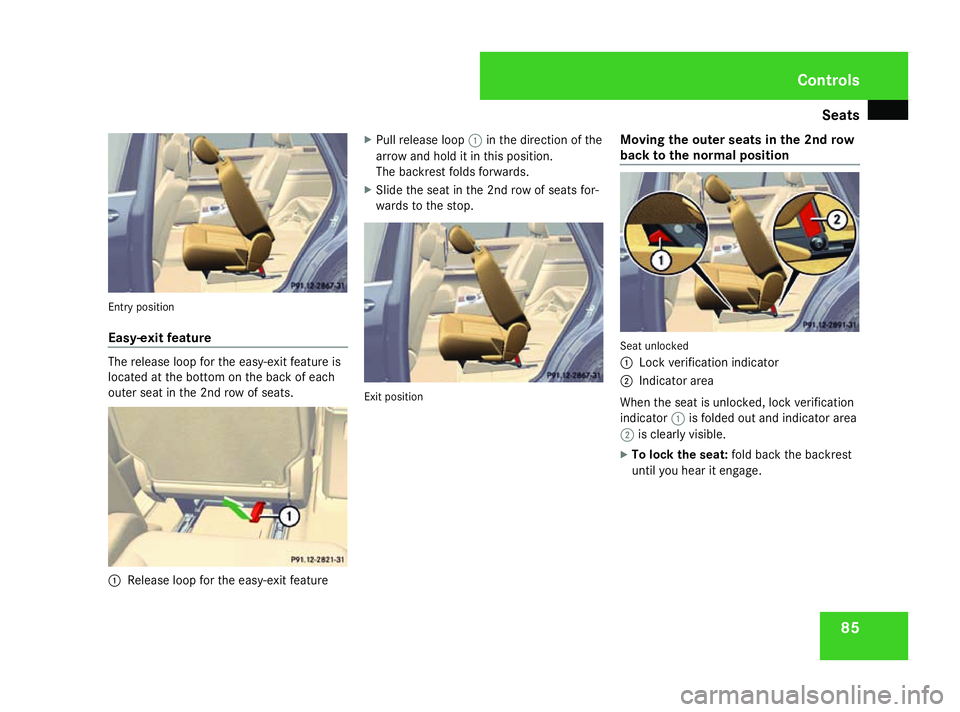
Easy-exit feature
The release loop for the easy-exit feature is
located at the bottom on the back of each
outer seat in the 2nd row of seats. 1
Release loop for the easy-exit feature X
Pull release loop 1in the direction of the
arrow and hold it in this position.
The backrest folds forwards.
X Slide the seat in the 2nd row of seats for-
wards to the stop. Exit position
Moving the outer seats in the 2nd row
back to the normal position Seat unlocked
1
Lock verification indicator
2 Indicator area
When the seat is unlocked, lock verification
indicator 1is folded out and indicator area
2 is clearly visible.
X To lock the seat: fold back the backrest
until you hear it engage. Controls
251_AKB; 5; 7, en-GB
wobuchh,
Version: 2.10.6
2008-05-11T14:51:51+02:00 - Seite 85 ZDateiname: 6515_1825_02_buchblock.pdf; preflight
Page 89 of 373
Seats
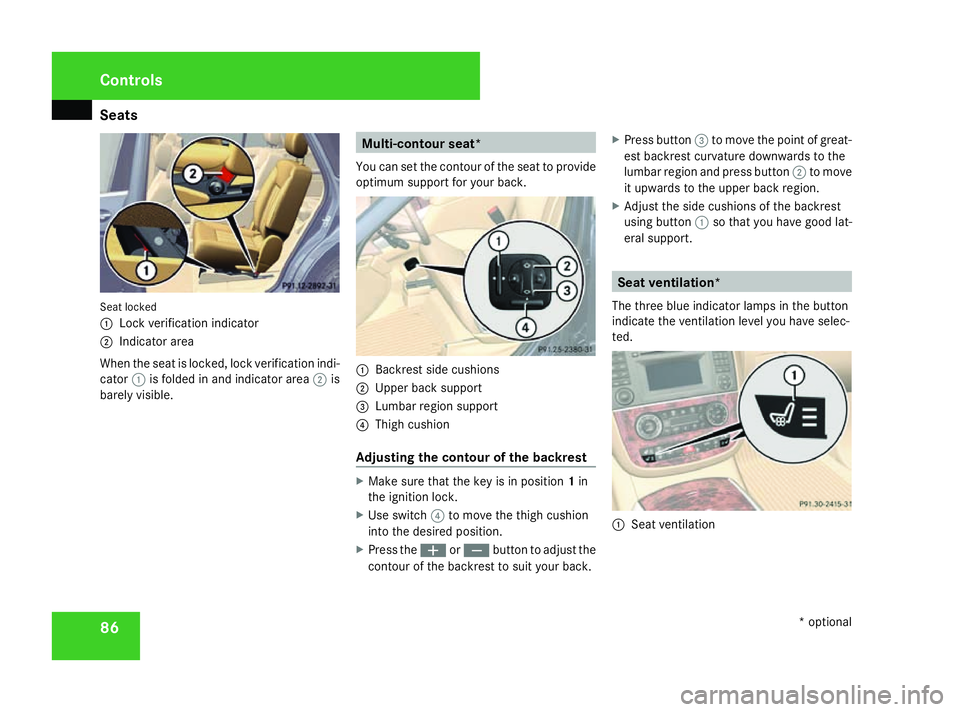
86Seat locked
1
Lock verification indicator
2 Indicator area
When the seat is locked, lock verification indi-
cator 1is folded in and indicator area 2is
barely visible. Multi-contour seat*
You can set the contour of the seat to provide
optimum support for your back. 1
Backrest side cushions
2 Upper back support
3 Lumbar region support
4 Thigh cushion
Adjusting the contour of the backrest X
Make sure that the key is in position 1in
the ignition lock.
X Use switch 4to move the thigh cushion
into the desired position.
X Press the æorç button to adjust the
contour of the backrest to suit your back. X
Press button 3to move the point of great-
est backrest curvature downwards to the
lumbar region and press button 2to move
it upwards to the upper back region.
X Adjust the side cushions of the backrest
using button 1so that you have good lat-
eral support. Seat ventilation*
The three blue indicator lamps in the button
indicate the ventilation level you have selec-
ted. 1
Seat ventilation Controls
* optional
251_AKB; 5; 7, en-GB
wobuchh,
Version: 2.10.6 2008-05-11T14:51:51+02:00 - Seite 86Dateiname: 6515_1825_02_buchblock.pdf; preflight
Page 90 of 373
Seats
87
X
Make sure that the key is in position 1or
2 in the ignition lock.
X To switch on: press button1repeatedly
until the required ventilation level is set.
i If you open the side windows and the slid-
ing/tilting sunroof* (Y page 108), the seat
ventilation of the driver's seat automati-
cally switches to the highest level.
X To switch off: press button1repeatedly
until all indicator lamps go out.
i If the battery voltage is too low, the seat
ventilation may switch off. Seat heating*
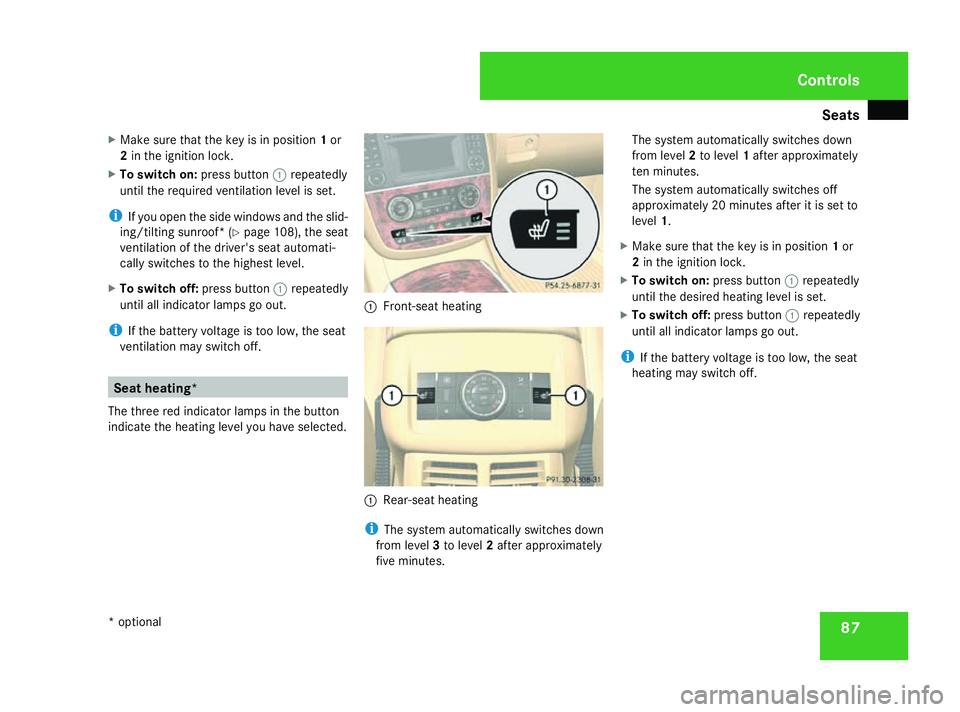
The three red indicator lamps in the button
indicate the heating level you have selected. 1
Front-seat heating 1
Rear-seat heating
i The system automatically switches down
from level 3to level 2after approximately
five minutes. The system automatically switches down
from level
2to level 1after approximately
ten minutes.
The system automatically switches off
approximately 20 minutes after it is set to
level 1.
X Make sure that the key is in position 1or
2 in the ignition lock.
X To switch on: press button1repeatedly
until the desired heating level is set.
X To switch off: press button1repeatedly
until all indicator lamps go out.
i If the battery voltage is too low, the seat
heating may switch off. Controls
* optional
251_AKB; 5; 7, en-GB
wobuchh,
Version: 2.10.6 2008-05-11T14:51:51+02:00 - Seite 87 ZDateiname: 6515_1825_02_buchblock.pdf; preflight
Page 91 of 373

Steering wheel
88 Steering wheel
Points to remember
Depending on the vehicle equipment, you can
adjust the steering wheel either manually or
electrically*. G
Risk of accident
Only adjust the steering wheel when the
vehicle is stationary and do not pull away
until the steering wheel adjustment mech-
anism is locked in position. You might oth-
erwise drive without the steering wheel
adjustment mechanism being locked in
position. As a result you could be distracted
from road and traffic conditions by an unex-
pected movement of the steering wheel
and thereby cause an accident.
The steerability of the vehicle is however
not affected.
When you adjust the steering wheel, make
sure that:
R the steering wheel can be reached with
your arms slightly bent
R you can move your legs freely
R you can see all the displays in the instru-
ment cluster clearly Adjusting the steering wheel man-
ually 1
Release handle
2 Steering column height
3 Steering column fore-and-aft adjustment
X Pull handle 1out completely.
The steering column is unlocked.
X Set the desired steering wheel position.
X Push handle 1in completely until it
engages fully.
The steering wheel is locked in position. Adjusting the steering wheel electri-
cally*
1
Steering column fore-and-aft adjustment
2 Steering column height
X Press the lever in direction of arrow 1or
2 until the steering wheel has moved into
the desired position.
You can find more information in:
R Easy-entry/exit feature (Y page 89)
R Storing settings (Y page 92)Controls
* optional
251_AKB; 5; 7, en-GB
wobuchh,
Version: 2.10.6 2008-05-11T14:51:51+02:00 - Seite 88Dateiname: 6515_1825_02_buchblock.pdf; preflight
Page 92 of 373

Steering wheel
89Steering wheel heating*
1
To switch on the steering-wheel heating
2 To switch off the steering-wheel heating
3 Indicator lamp
X To switch on or off: make sure that the
key is in position 2in the ignition lock.
X Turn the lever in direction of arrow 1or
2.
Indicator lamp 3comes on or goes out.
i The steering-wheel heating does not
switch off automatically. Easy-entry/exit feature*
The easy-entry/exit feature makes getting in
and out of your vehicle easier.
The steering wheel swings upwards when
you:
R remove the key from the ignition lock
R open the driver's door when the key is in
the ignition lock or in position 1.
The steering wheel is moved automatically to
the position previously set when the key is
inserted into the ignition lock with the driver's
door closed. G
Risk of injury
Make sure that nobody can become trap-
ped when you activate the easy-entry/exit
feature.
If there is a risk of becoming trapped, stop
the adjustment procedure. To halt the pro-
cedure:
R press the steering-column adjustment
switch
R press one of the memory function posi-
tion buttons
The steering column stops moving immedi-
ately. Never leave children unsupervised in the
vehicle. They could open the driver's door
and thereby unintentionally activate the
easy-entry feature and become trapped.
The most recent position of the steering
wheel is stored when you switch off the igni-
tion or when you store a memory position
(Y page 92).
You can activate and deactivate the easy-
entry/exit feature via the on-board computer
(Y page 135). Controls
* optional
251_AKB; 5; 7, en-GB
wobuchh,
Version: 2.10.6 2008-05-11T14:51:51+02:00 - Seite 89 ZDateiname: 6515_1825_02_buchblock.pdf; preflight
Page 93 of 373

Mirrors
90 Mirrors
Rear-view mirror
X Adjust the rear-view mirror by hand so you
have a good overview of the traffic condi-
tions.
Rear-view mirror (manual anti-dazzle) 1
Anti-dazzle switch
X Anti-dazzle mode: flick anti-dazzle switch
1 forwards or back. Exterior mirrors
G
Risk of accident
The exterior mirrors reduce the size of the
image. Objects are actually closer than
they appear. You could misjudge the dis-
tance from vehicles driving behind and
cause an accident, e.g. when changing
lane. For this reason, make sure of the
actual distance from the vehicle driving
behind by glancing over your shoulder.
The convex exterior mirrors give a larger field
of vision.
At low outside temperatures, the exterior mir-
rors are heated automatically. Adjusting the exterior mirrors 1
Adjustment button
2 Right-hand exterior mirror
3 Left-hand exterior mirror
X Make sure that the key is in position 1or
2 in the ignition lock.
X Press button 2for the right-hand exterior
mirror or button 3for the left-hand exte-
rior mirror.
The indicator lamp in the corresponding
button lights up in red.
The indicator lamp goes out again after
some time. You can only adjust the selec-
ted mirror using adjustment button 1as
long as the indicator lamp is lit.
X Press adjustment button 1up, down, to
the right or to the left until the exterior mir- Controls
251_AKB; 5; 7, en-GB
wobuchh,
Version: 2.10.6 2008-05-11T14:51:51+02:00 - Seite 90Dateiname: 6515_1825_02_buchblock.pdf; preflight