phone MERCEDES-BENZ S CLASS 2010 User Guide
[x] Cancel search | Manufacturer: MERCEDES-BENZ, Model Year: 2010, Model line: S CLASS, Model: MERCEDES-BENZ S CLASS 2010Pages: 548, PDF Size: 11.45 MB
Page 22 of 548
Radio ............................................. 252
Settings ........................................... 93
Telephone ...................................... 245
Troubleshooting ............................. 267
W
Warning sounds
DISTRONIC PLUS ........................... 333
Driver’s or passenger’s seat belt .....52
Electronic parking brake ................469
Parking Guidance ........................... 352
Parktronic system ..........................350
Seat belt telltale ............................ 493
Warranty coverage ............................ 524
Washer and headlamp cleaning
system ................................................ 544
Washer fluid
Mixing ratio .................................... 544
Refilling .......................................... 409
Washing the vehicle .......................... 440
Wear pattern (tires) .......................... 425
Weights (vehicle) see Vehicle specification
Wheel
Changing ....................................... 508
Removing ....................................... 511
Spare ............................................. 508
Tightening torque ........................... 512
Wheels, sizes ..................................... 532
Wheels, Tires and .............................. 410
Window curtain air bags ..................... 45
Windows see Power windows
Windows, cleaning ............................ 445
Windshield
Cleaning wiper blades .................... 445
Defogging ...................................... 371
Infrared reflecting ..........................399
Washer fluid ................................... 544
Wipers ........................................... 305
Windshield wipers
Replacing wiper blades ..................507
Winter driving
Instructions .................................... 433
Snow chains .................................. 433
Tires ............................................... 432
Winter tires ................................ 432, 532
Wood trims, cleaning ........................ 447
Z
ZAGAT ®
Rating Service ..................... 128
20Index221_AKB; 6; 20, en-USd2ugruen,Version: 2.11.8.12009-09-24T13:28:17+02:00 - Seite 20
Page 36 of 548
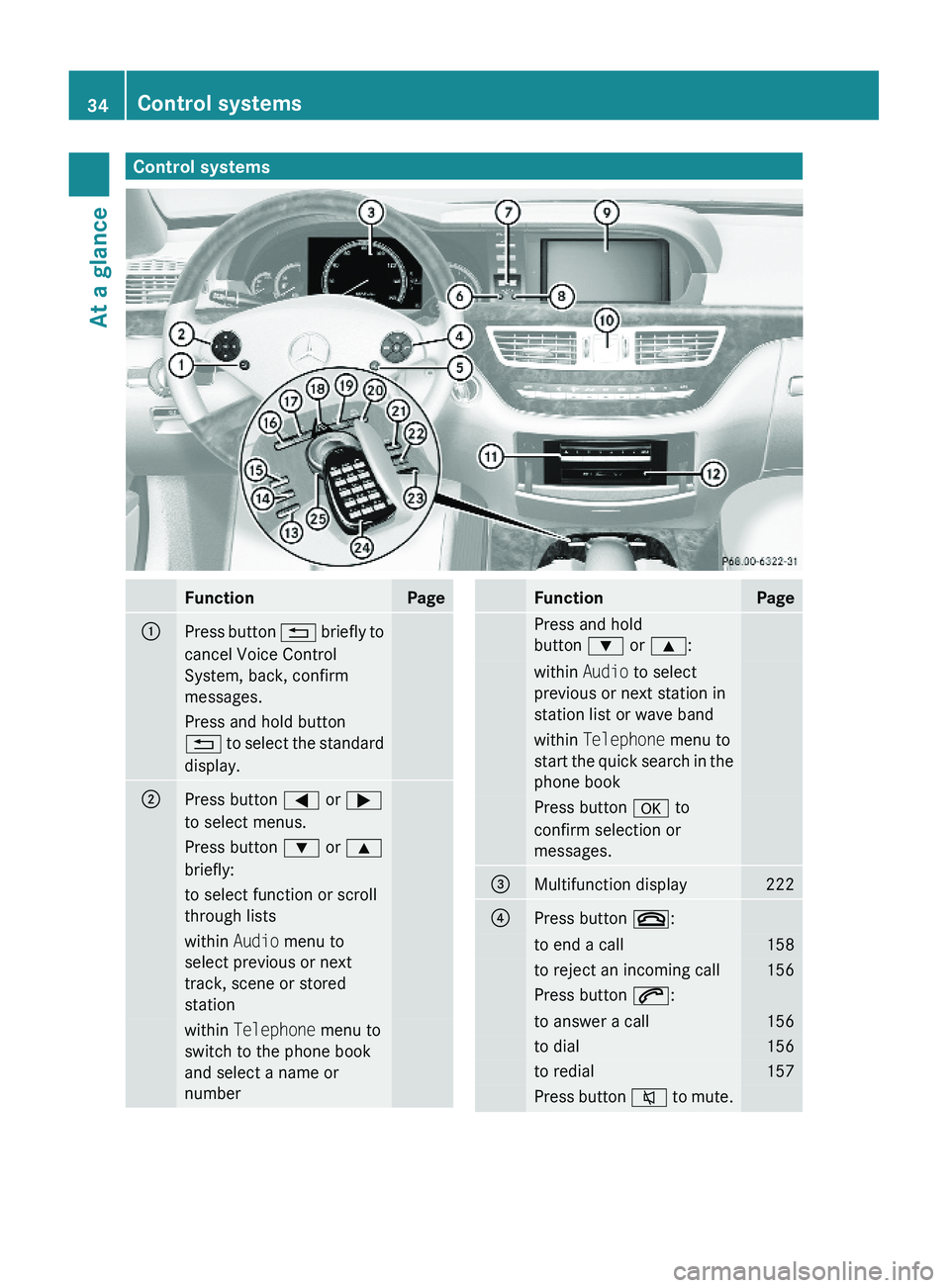
Control systemsFunctionPage\000FPress button \000A briefly to
cancel Voice Control
System, back, confirm
messages.
Press and hold button
\000A to select the standard
display.
\000GPress button \000@ or \000>
to select menus.
Press button \000= or \000<
briefly:
to select function or scroll
through lists
within Audio menu to
select previous or next
track, scene or stored
station
within Telephone menu to
switch to the phone book
and select a name or
number
FunctionPagePress and hold
button \000= or \000<:
within Audio to select
previous or next station in
station list or wave band
within Telephone menu to
start the quick search in the
phone book
Press button \000d to
confirm selection or
messages.
\000
Page 37 of 548
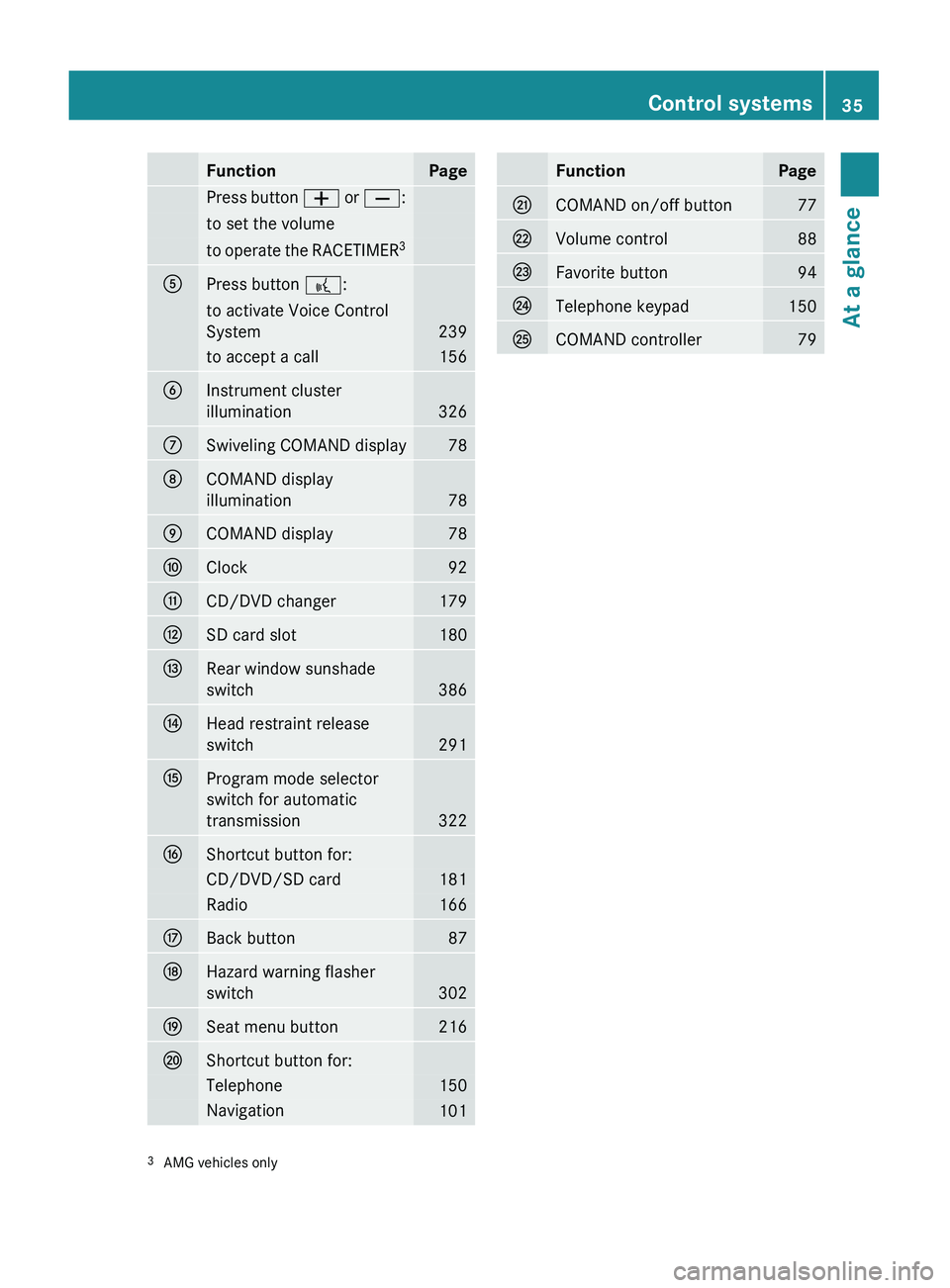
FunctionPagePress button 005A or 005B :to set the volumeto operate the RACETIMER 30086Press button
0062:to activate Voice Control
System
239
to accept a call1560087Instrument cluster
illumination
326
006ESwiveling COMAND display78006FCOMAND display
illumination
78
0070COMAND display780071Clock920072CD/DVD changer1790073SD card slot1800074Rear window sunshade
switch
386
0075Head restraint release
switch
291
0076Program mode selector
switch for automatic
transmission
322
0077Shortcut button for:CD/DVD/SD card181Radio1660078Back button870079Hazard warning flasher
switch
302
007ASeat menu button216007BShortcut button for:Telephone150Navigation101FunctionPage007CCOMAND on/off button77007DVolume control88007EFavorite button94007FTelephone keypad1500080COMAND controller793 AMG vehicles onlyControl systems35At a glance221_AKB; 6; 20, en-USd2ugruen,Version: 2.11.8.12009-09-24T13:28:17+02:00 - Seite 35Z
Page 74 of 548
ActivatingXWith SmartKey: Remove the SmartKey
from the starter switch.
XWith KEYLESS-GO: Turn off the engine and
open the driver’s door.
Deactivating
XSwitch on the ignition.
iStarting the engine will also deactivate
the immobilizer.
In the event that the engine cannot be
started (yet the vehicle’s battery is
charged), the system is not operational.
Contact an authorized Mercedes-Benz
Center or call 1-800-FOR-MERCedes (in the
USA) or 1-800-387-0100 (in Canada).
Anti-theft alarm system
Once the alarm system has been armed, a
visual and audible alarm is triggered when
someone opens
Ra door
Rthe trunk
Rthe hood
The alarm will stay on even if the activating
element, a door, for example, is closed
immediately.
The alarm system will also be triggered when
Rthe vehicle is opened with the mechanical
key
Ra door is opened from the inside
To cancel the alarm after it has been
triggered, see “Canceling the alarm”
(Y page 73).
iIf the alarm stays on for more than
30 seconds, the Tele Aid system initiates a
call to the Customer Assistance Center
automatically. The Tele Aid system will
initiate the call provided that
Ryou have subscribed to the Tele Aid
service
Rthe Tele Aid service has been activated
properly
Rthe necessary mobile phone, power
supply and GPS coverage are available
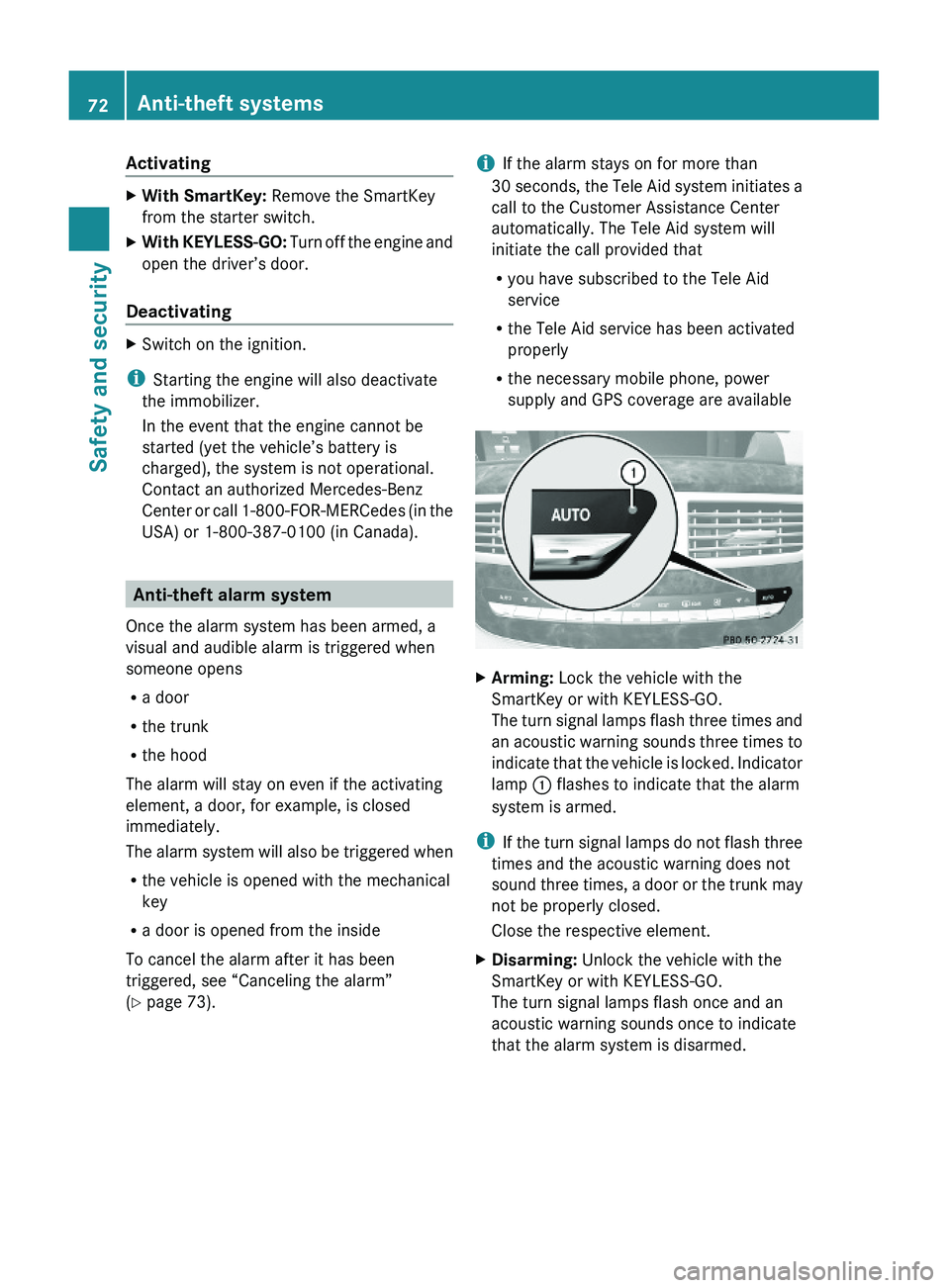
XArming: Lock the vehicle with the
SmartKey or with KEYLESS-GO.
The turn signal lamps flash three times and
an acoustic warning sounds three times to
indicate that the vehicle is locked. Indicator
lamp \000F flashes to indicate that the alarm
system is armed.
iIf the turn signal lamps do not flash three
times and the acoustic warning does not
sound three times, a door or the trunk may
not be properly closed.
Close the respective element.
XDisarming: Unlock the vehicle with the
SmartKey or with KEYLESS-GO.
The turn signal lamps flash once and an
acoustic warning sounds once to indicate
that the alarm system is disarmed.
72Anti-theft systemsSafety and security
221_AKB; 6; 20, en-USd2ugruen,Version: 2.11.8.12009-09-24T13:28:17+02:00 - Seite 72
Page 77 of 548
Vehicle equipment ..............................76
COMAND introduction ........................76
COMAND system settings .................91
COMAND navigation (introduction) ...95
COMAND navigation system
(entering a destination) ....................106
COMAND navigation system (Point
of interest entry) ...............................124
COMAND navigation system (route
guidance) ...........................................129
COMAND navigation system (dur-
ing route guidance) ...........................135
COMAND navigation system (real-
time traffic) .......................................138
COMAND navigation system (des-
tination memory) ..............................143
COMAND navigation system (last
destinations) .....................................147
COMAND telephone ..........................148
COMAND FM/AM radio ....................165
COMAND satellite radio ...................170
COMAND audio CD/audio DVD/
MP3 ....................................................176
Audio AUX and video AUX ................186
Rear Seat Entertainment System ....189
COMAND video DVD .........................191
Music Register ..................................196
Media Interface .................................200
COMAND vehicle menu ....................206
COMAND automatic climate control 211
COMAND seats ..................................216
Instrument cluster control system .220
Voice Control System introduction .237
Voice Control System navigation ....240
Voice Control System telephone .....245
Voice Control System address book 249
Voice Control System radio .............252
Voice Control System CD/DVD
changer/MP3 ....................................255
Voice Control System external
devices ...............................................257
Voice Control System command list 257
Voice Control System trouble-
shooting .............................................267
Voice Control System individuali-
zation .................................................271
75Control systems221_AKB; 6; 20, en-USd2ugruen,Version: 2.11.8.12009-09-24T13:28:17+02:00 - Seite 75
Page 78 of 548
Vehicle equipment
i This Operator’s Manual describes all
features, standard or optional, potentially
available for your vehicle at the time of
purchase. Please be aware that your
vehicle might not be equipped with all
features described in this manual.
COMAND introduction
COMAND operating safety
COMAND (
Cockpit Management and Data
System) is an information and operating
center for vehicle sound and communications
systems. It includes the radio and navigation
system, as well as other optional equipment
(satellite radio, telephone, etc.).
GWarning!
Any alteration of electronic components or
software can cause malfunctions.
Radio, satellite radio, amplifier, CD/DVD
changer, navigation module, telephone and
Voice Control Systems are interconnected.
Therefore, if one of the components is not
operational, or has not been removed/
replaced properly, the function of other
components could be impaired.
Such conditions might seriously impair the
operating safety of your vehicle.
We recommend to have any service work on
electronic components carried out by an
authorized Mercedes-Benz Center.
GWarning!
In order to avoid distraction which could lead
to an accident, the driver should enter system
settings while the vehicle is at a standstill, and
operate the system only when permitted by
road, weather and traffic conditions.
Bear in mind that at a speed of just 30 mph
(approximately 50 km/h), your vehicle is
covering a distance of 44 feet (approximately
14 m) every second.
COMAND supplies you with information to
help you select your route more easily and
guide you conveniently and safely to your
destination. For safety reasons, we
encourage the driver to stop the vehicle in a
safe place before answering or placing a call,
or consulting the COMAND screen to read
navigational maps, instructions, or
downloaded information.GWarning!
While the navigation system provides
directional assistance, the driver must remain
focused on safe driving behavior, especially
attention to traffic and street signs, and
should utilize the system’s audio cues while
driving.
The navigation system does not supply any
information on stop signs, yield signs, traffic
regulations or traffic safety rules. Their
observance always remains in the driver’s
personal responsibility. Maps do not cover all
areas nor all routes within an area.
GWarning!
HYBRID vehicles: It is imperative that you read
the HYBRID Supplemental Operating
Instructions included in your vehicle literature
portfolio. You may otherwise not receive all
necessary safety information and warning for
the operation of your vehicle.
Availability of functions while the
vehicle is in motion
For safety reasons, certain COMAND
functions are not available while the vehicle
is in motion or they are only available to a
limited extent. You will notice this, for
example, by the fact that certain menu items
cannot be selected or that the COMAND
display shows a corresponding message.
76COMAND introductionControl systems
221_AKB; 6; 20, en-USd2ugruen,Version: 2.11.8.12009-09-24T13:28:17+02:00 - Seite 76
Page 81 of 548
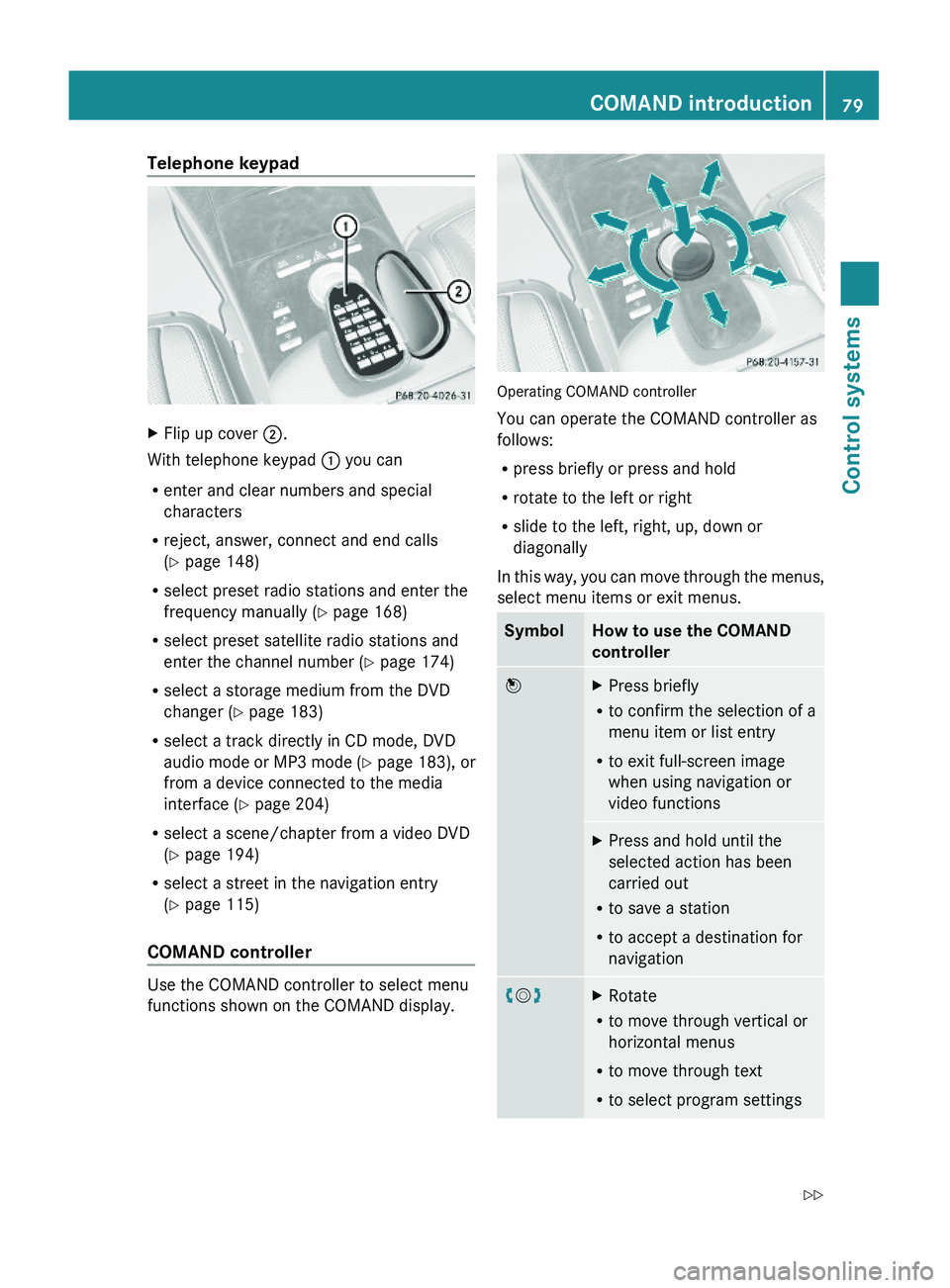
Telephone keypad XFlip up cover \000G.
With telephone keypad \000F you can
Renter and clear numbers and special
characters
Rreject, answer, connect and end calls
(Y page 148)
Rselect preset radio stations and enter the
frequency manually (Y page 168)
Rselect preset satellite radio stations and
enter the channel number (Y page 174)
Rselect a storage medium from the DVD
changer (Y page 183)
Rselect a track directly in CD mode, DVD
audio mode or MP3 mode (Y page 183), or
from a device connected to the media
interface (Y page 204)
Rselect a scene/chapter from a video DVD
(Y page 194)
Rselect a street in the navigation entry
(Y page 115)
COMAND controller
Use the COMAND controller to select menu
functions shown on the COMAND display.
Operating COMAND controller
You can operate the COMAND controller as
follows:
Rpress briefly or press and hold
Rrotate to the left or right
Rslide to the left, right, up, down or
diagonally
In this way, you can move through the menus,
select menu items or exit menus.
SymbolHow to use the COMAND
controller
\000
Page 84 of 548
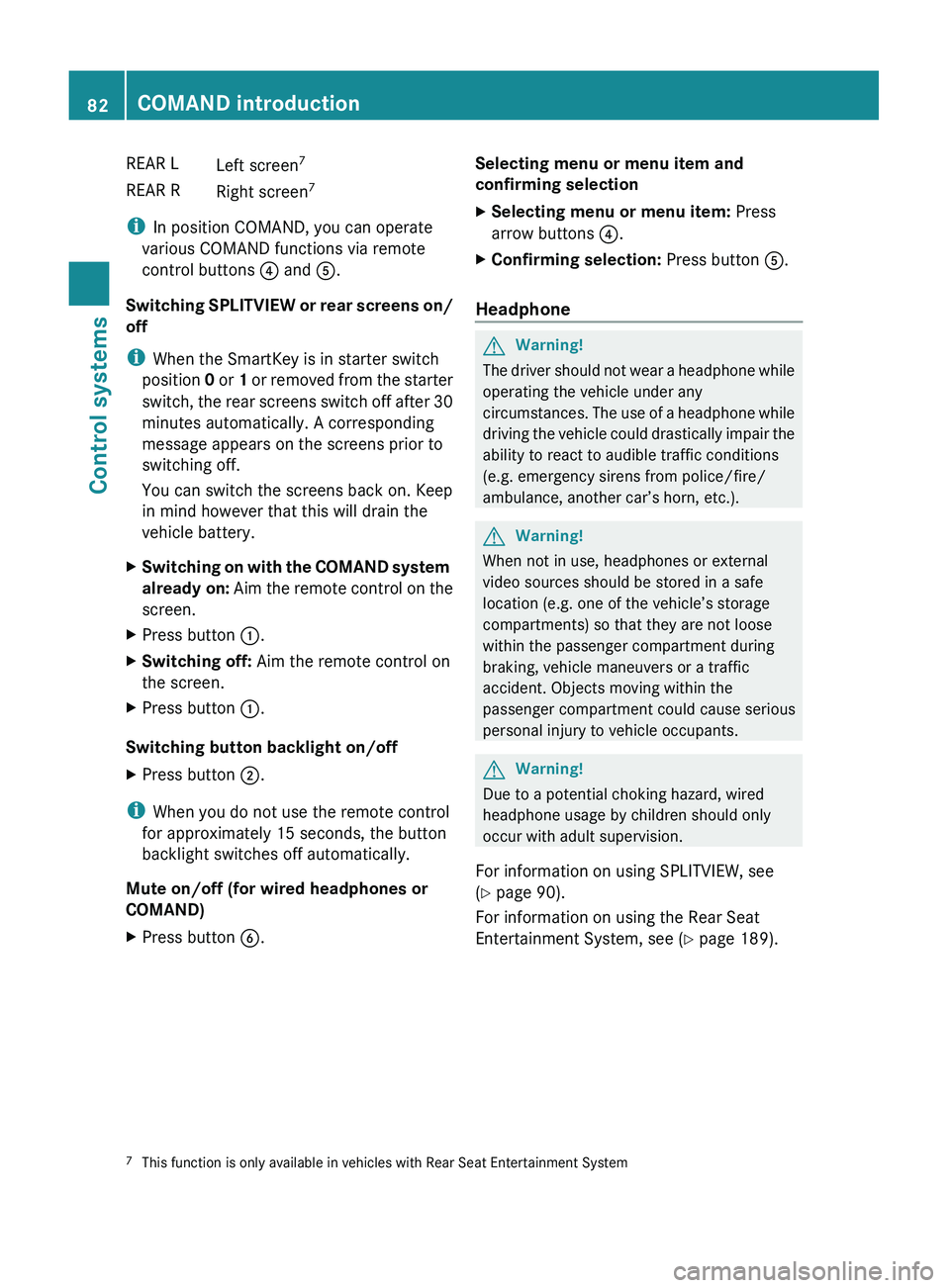
REAR LLeft screen7REAR RRight screen 7
i
In position COMAND, you can operate
various COMAND functions via remote
control buttons 0088 and 0086.
Switching SPLITVIEW or rear screens on/
off
i When the SmartKey is in starter switch
position 0 or 1 or removed from the starter
switch, the rear screens switch off after 30
minutes automatically. A corresponding
message appears on the screens prior to
switching off.
You can switch the screens back on. Keep
in mind however that this will drain the
vehicle battery.
XSwitching on with the COMAND system
already on: Aim the remote control on the
screen.XPress button 0046.XSwitching off: Aim the remote control on
the screen.XPress button 0046.
Switching button backlight on/off
XPress button 0047.
i
When you do not use the remote control
for approximately 15 seconds, the button
backlight switches off automatically.
Mute on/off (for wired headphones or
COMAND)
XPress button 0087.Selecting menu or menu item and
confirming selectionXSelecting menu or menu item: Press
arrow buttons 0088.XConfirming selection: Press button 0086.
Headphone
GWarning!
The driver should not wear a headphone while
operating the vehicle under any
circumstances. The use of a headphone while
driving the vehicle could drastically impair the
ability to react to audible traffic conditions
(e.g. emergency sirens from police/fire/
ambulance, another car’s horn, etc.).
GWarning!
When not in use, headphones or external
video sources should be stored in a safe
location (e.g. one of the vehicle’s storage
compartments) so that they are not loose
within the passenger compartment during
braking, vehicle maneuvers or a traffic
accident. Objects moving within the
passenger compartment could cause serious
personal injury to vehicle occupants.
GWarning!
Due to a potential choking hazard, wired
headphone usage by children should only
occur with adult supervision.
For information on using SPLITVIEW, see
( Y page 90).
For information on using the Rear Seat
Entertainment System, see ( Y page 189).
7
This function is only available in vehicles with Rear Seat Entertainment System82COMAND introductionControl systems
221_AKB; 6; 20, en-USd2ugruen,Version: 2.11.8.12009-09-24T13:28:17+02:00 - Seite 82
Page 85 of 548
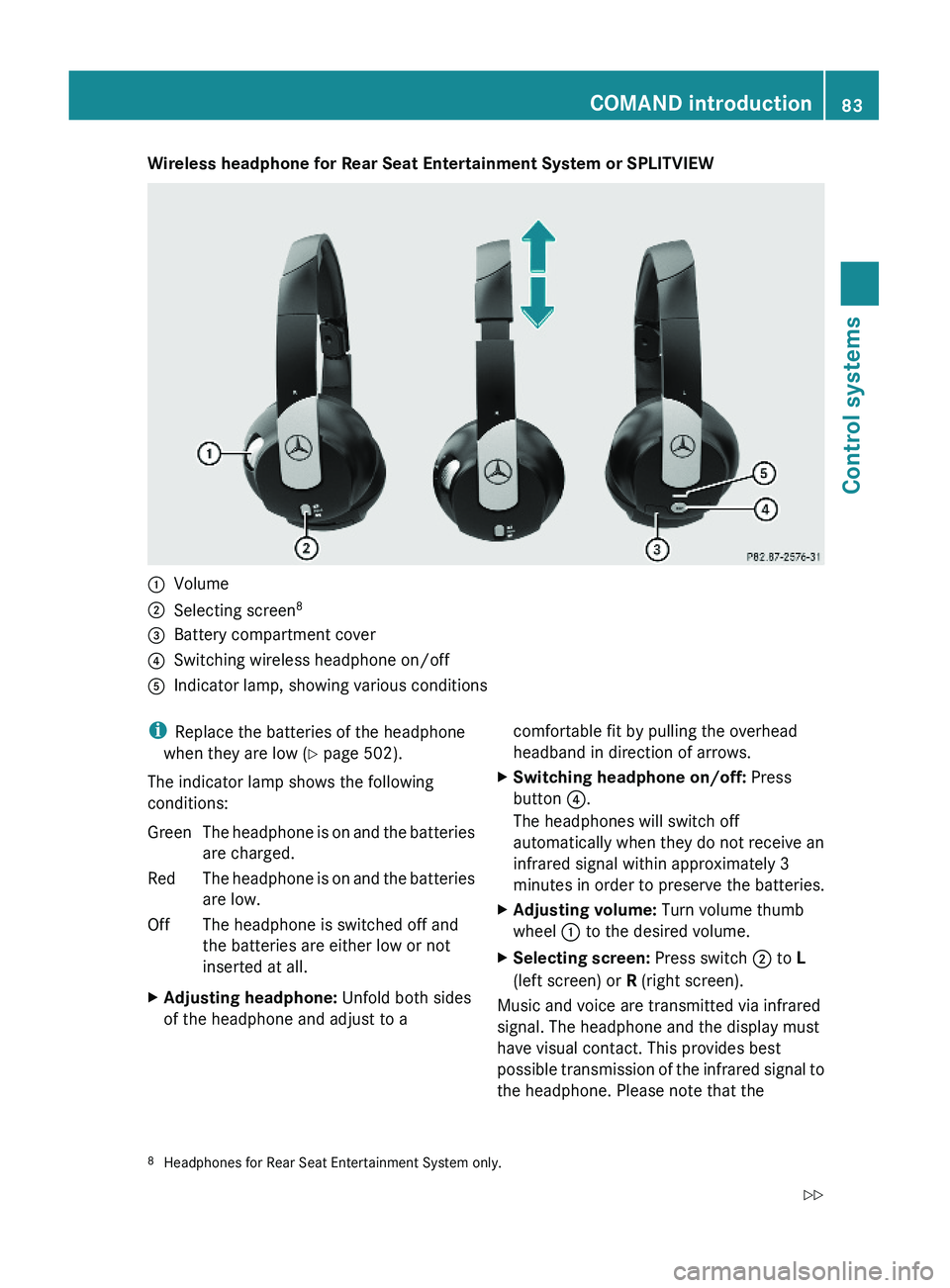
Wireless headphone for Rear Seat Entertainment System or SPLITVIEW\000FVolume\000GSelecting screen8\000
Page 86 of 548
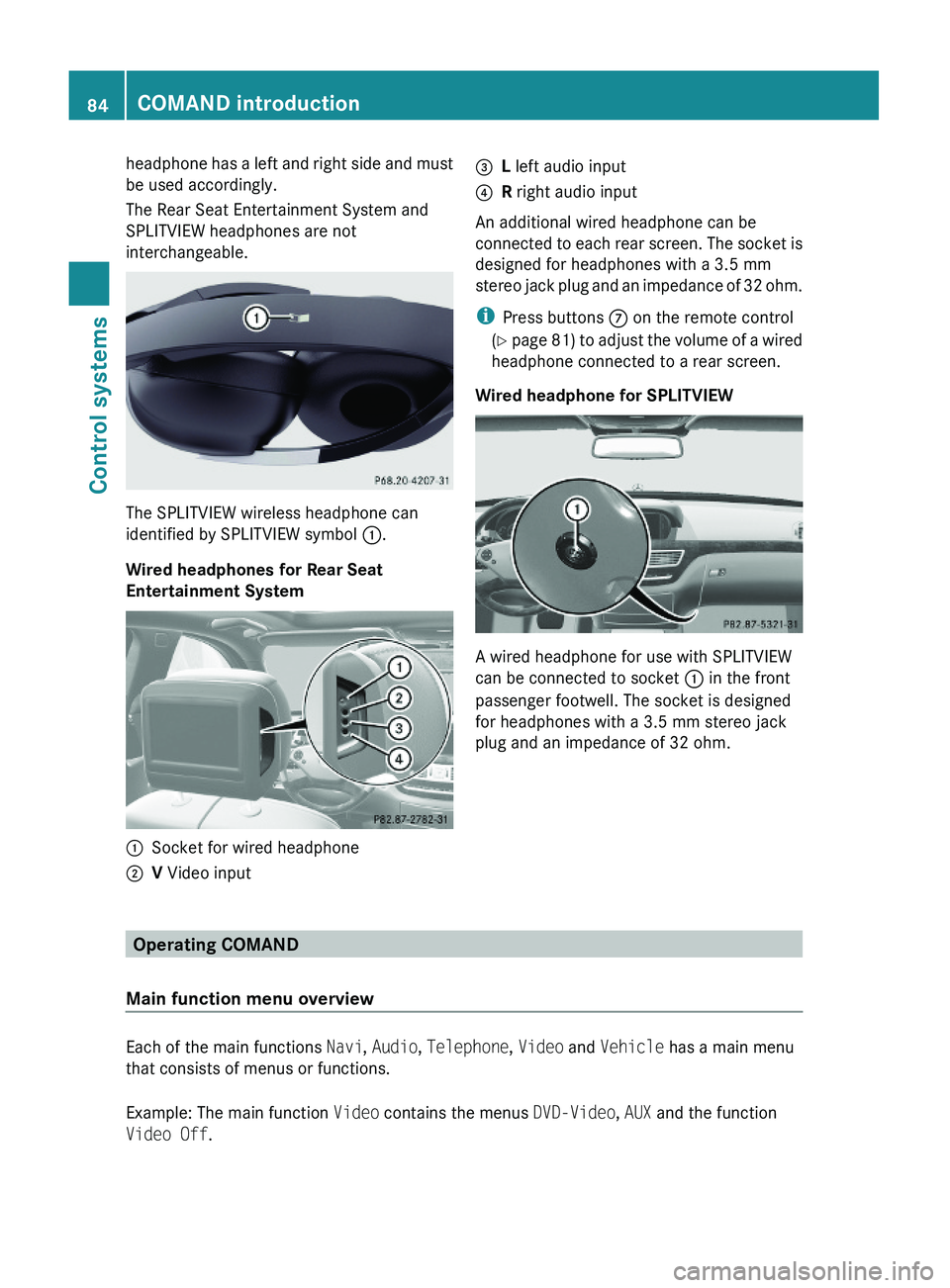
headphone has a left and right side and must
be used accordingly.
The Rear Seat Entertainment System and
SPLITVIEW headphones are not
interchangeable.
The SPLITVIEW wireless headphone can
identified by SPLITVIEW symbol \000F.
Wired headphones for Rear Seat
Entertainment System
\000FSocket for wired headphone\000GV Video input\000