phone MERCEDES-BENZ S CLASS 2010 Repair Manual
[x] Cancel search | Manufacturer: MERCEDES-BENZ, Model Year: 2010, Model line: S CLASS, Model: MERCEDES-BENZ S CLASS 2010Pages: 548, PDF Size: 11.45 MB
Page 252 of 548
accident in which you or others could be
injured.
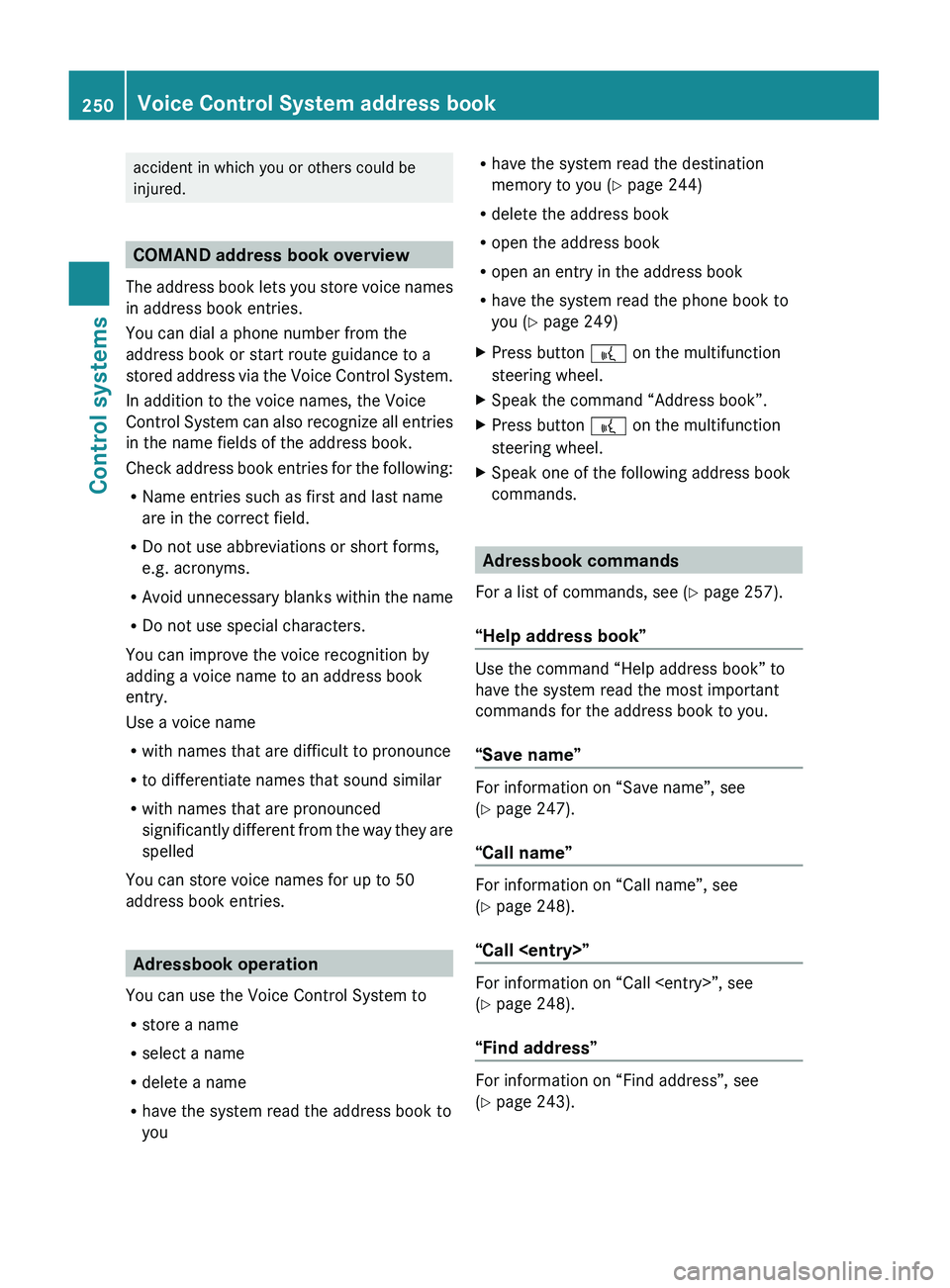
COMAND address book overview
The address book lets you store voice names
in address book entries.
You can dial a phone number from the
address book or start route guidance to a
stored address via the Voice Control System.
In addition to the voice names, the Voice
Control System can also recognize all entries
in the name fields of the address book.
Check address book entries for the following:
R Name entries such as first and last name
are in the correct field.
R Do not use abbreviations or short forms,
e.g. acronyms.
R Avoid unnecessary blanks within the name
R Do not use special characters.
You can improve the voice recognition by
adding a voice name to an address book
entry.
Use a voice name
R with names that are difficult to pronounce
R to differentiate names that sound similar
R with names that are pronounced
significantly different from the way they are
spelled
You can store voice names for up to 50
address book entries.
Adressbook operation
You can use the Voice Control System to
R store a name
R select a name
R delete a name
R have the system read the address book to
you
R have the system read the destination
memory to you ( Y page 244)
R delete the address book
R open the address book
R open an entry in the address book
R have the system read the phone book to
you ( Y page 249)XPress button 0062 on the multifunction
steering wheel.XSpeak the command “Address book”.XPress button 0062 on the multifunction
steering wheel.XSpeak one of the following address book
commands.
Adressbook commands
For a list of commands, see ( Y page 257).
“Help address book”
Use the command “Help address book” to
have the system read the most important
commands for the address book to you.
“Save name”
For information on “Save name”, see
( Y page 247).
“Call name”
For information on “Call name”, see
( Y page 248).
“Call
For information on “Call
( Y page 248).
“Find address”
For information on “Find address”, see
( Y page 243).
250Voice Control System address bookControl systems
221_AKB; 6; 20, en-USd2ugruen,Version: 2.11.8.12009-09-24T13:28:17+02:00 - Seite 250
Page 253 of 548
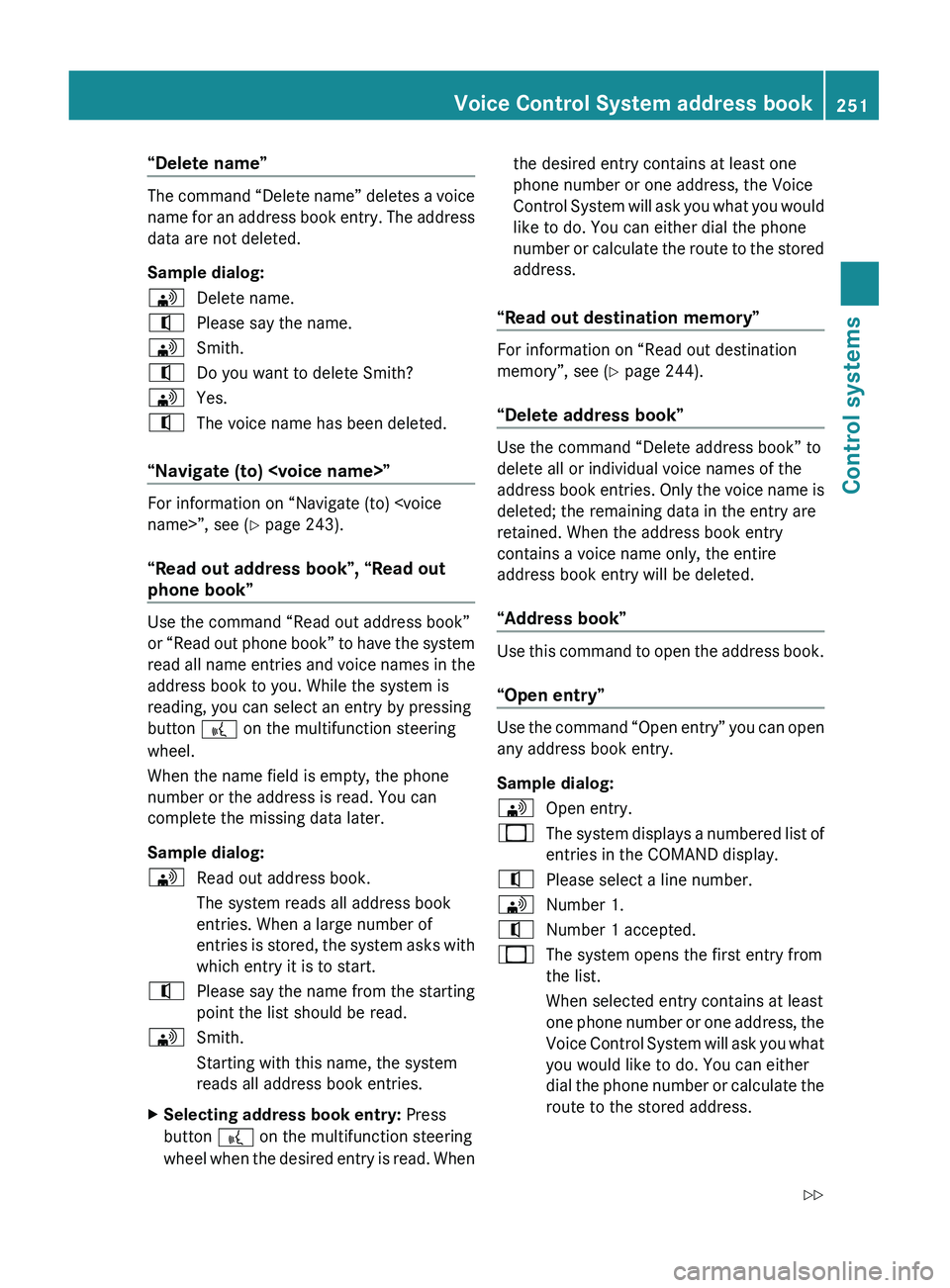
“Delete name”
The command “Delete name” deletes a voice
name for an address book entry. The address
data are not deleted.
Sample dialog:
009DDelete name.009CPlease say the name.009DSmith.009CDo you want to delete Smith?009DYes.009CThe voice name has been deleted.
“Navigate (to)
For information on “Navigate (to)
“Read out address book”, “Read out
phone book”
Use the command “Read out address book”
or “Read out phone book” to have the system
read all name entries and voice names in the
address book to you. While the system is
reading, you can select an entry by pressing
button 0062 on the multifunction steering
wheel.
When the name field is empty, the phone
number or the address is read. You can
complete the missing data later.
Sample dialog:
009DRead out address book.
The system reads all address book
entries. When a large number of
entries is stored, the system asks with
which entry it is to start.009CPlease say the name from the starting
point the list should be read.009DSmith.
Starting with this name, the system
reads all address book entries.XSelecting address book entry: Press
button 0062 on the multifunction steering
wheel when the desired entry is read. Whenthe desired entry contains at least one
phone number or one address, the Voice
Control System will ask you what you would
like to do. You can either dial the phone
number or calculate the route to the stored
address.
“Read out destination memory”
For information on “Read out destination
memory”, see ( Y page 244).
“Delete address book”
Use the command “Delete address book” to
delete all or individual voice names of the
address book entries. Only the voice name is
deleted; the remaining data in the entry are
retained. When the address book entry
contains a voice name only, the entire
address book entry will be deleted.
“Address book”
Use this command to open the address book.
“Open entry”
Use the command “Open entry” you can open
any address book entry.
Sample dialog:
009DOpen entry.009BThe system displays a numbered list of
entries in the COMAND display.009CPlease select a line number.009DNumber 1.009CNumber 1 accepted.009BThe system opens the first entry from
the list.
When selected entry contains at least
one phone number or one address, the
Voice Control System will ask you what
you would like to do. You can either
dial the phone number or calculate the
route to the stored address.Voice Control System address book251Control systems221_AKB; 6; 20, en-USd2ugruen,Version: 2.11.8.12009-09-24T13:28:17+02:00 - Seite 251Z
Page 260 of 548
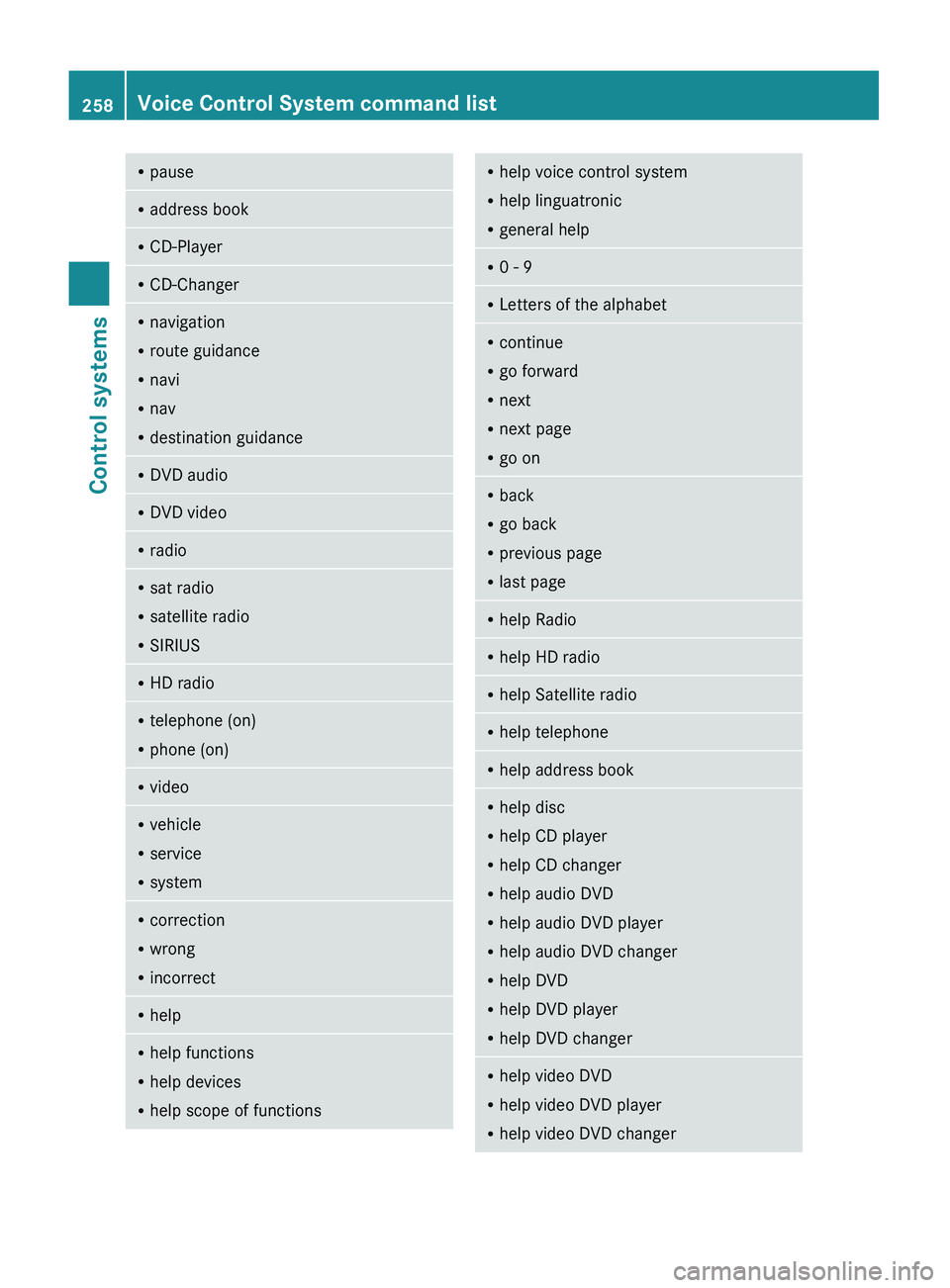
RpauseRaddress bookRCD-PlayerRCD-ChangerRnavigation
R route guidance
R navi
R nav
R destination guidanceR
DVD audioRDVD videoRradioRsat radio
R satellite radio
R SIRIUSRHD radioRtelephone (on)
R phone (on)RvideoRvehicle
R service
R systemRcorrection
R wrong
R incorrectRhelpRhelp functions
R help devices
R help scope of functionsRhelp voice control system
R help linguatronic
R general helpR0 - 9RLetters of the alphabetRcontinue
R go forward
R next
R next page
R go onR
back
R go back
R previous page
R last pageRhelp RadioRhelp HD radioRhelp Satellite radioRhelp telephoneRhelp address bookRhelp disc
R help CD player
R help CD changer
R help audio DVD
R help audio DVD player
R help audio DVD changer
R help DVD
R help DVD player
R help DVD changerRhelp video DVD
R help video DVD player
R help video DVD changer258Voice Control System command listControl systems
221_AKB; 6; 20, en-USd2ugruen,Version: 2.11.8.12009-09-24T13:28:17+02:00 - Seite 258
Page 261 of 548
Rhelp media
R help media player
R help media changerRhelp media interface
R help UCIRhelp USB interface
R help USBRhelp MP3
R help MP3 player
R help MP3 changerRhelp Music Register
R help hard diskRhelp memory card
R help SD cardRhelp navigation
R help navi
R help nav
R help routingRhelp route guidance
R help navigation guidance
R help destination guidanceRhelp map
R help map scaleRhelp points of interest
R help POI(s)
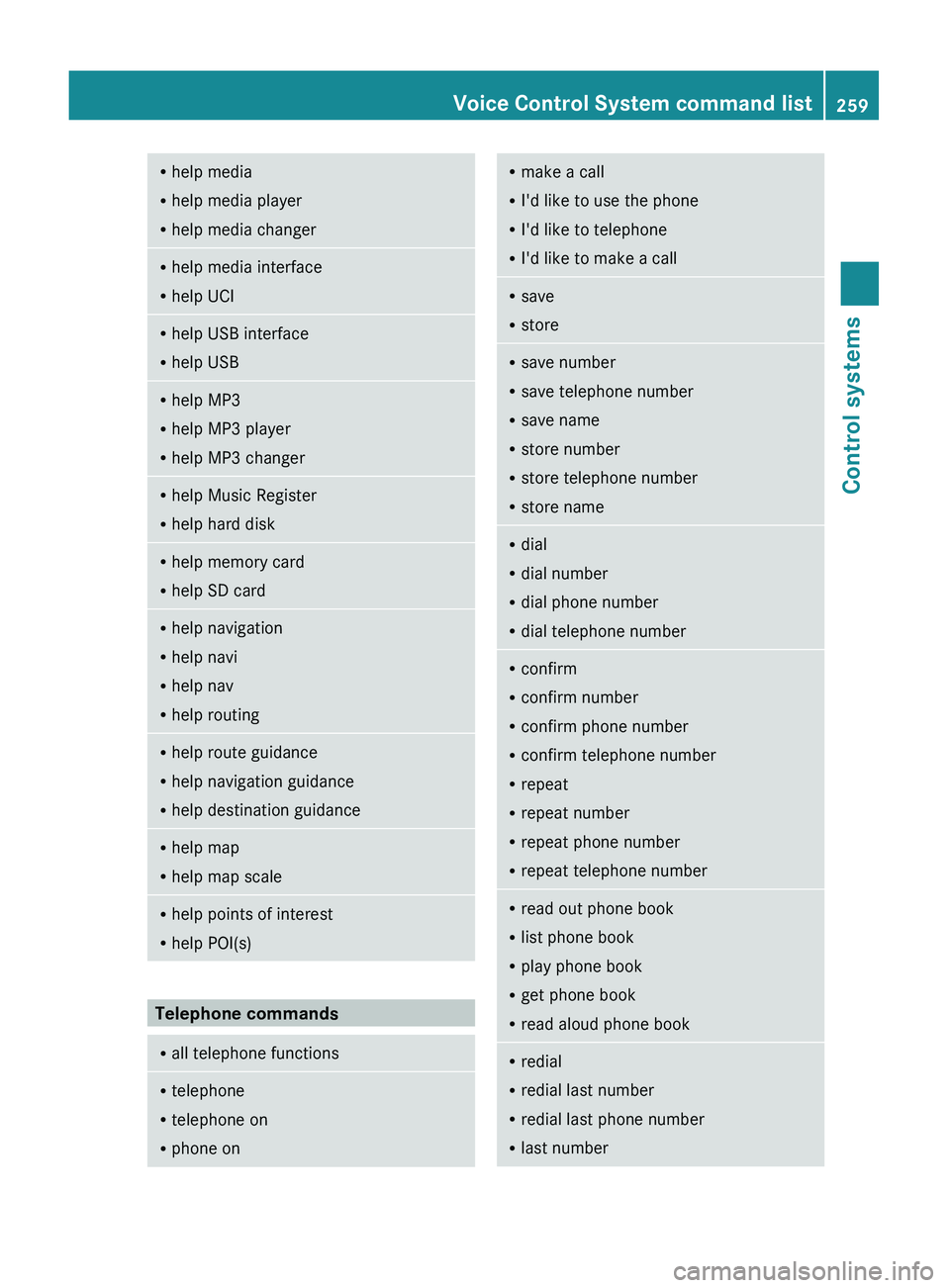
Telephone commands
R
all telephone functionsRtelephone
R telephone on
R phone onRmake a call
R I'd like to use the phone
R I'd like to telephone
R I'd like to make a callRsave
R storeRsave number
R save telephone number
R save name
R store number
R store telephone number
R store nameRdial
R dial number
R dial phone number
R dial telephone numberRconfirm
R confirm number
R confirm phone number
R confirm telephone number
R repeat
R repeat number
R repeat phone number
R repeat telephone numberRread out phone book
R list phone book
R play phone book
R get phone book
R read aloud phone bookR
redial
R redial last number
R redial last phone number
R last numberVoice Control System command list259Control systems221_AKB; 6; 20, en-USd2ugruen,Version: 2.11.8.12009-09-24T13:28:17+02:00 - Seite 259Z
Page 262 of 548
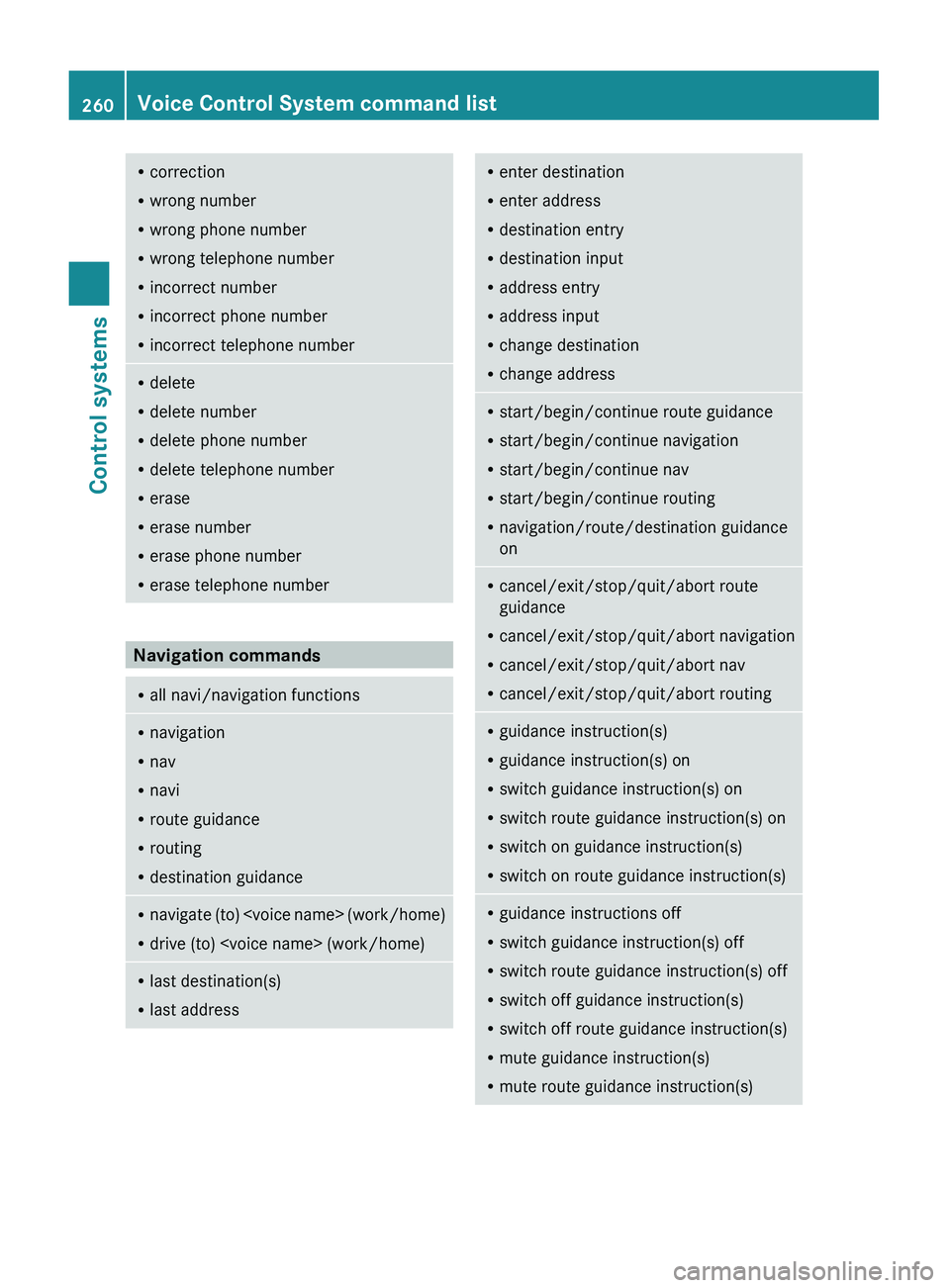
Rcorrection
R wrong number
R wrong phone number
R wrong telephone number
R incorrect number
R incorrect phone number
R incorrect telephone numberRdelete
R delete number
R delete phone number
R delete telephone number
R erase
R erase number
R erase phone number
R erase telephone number
Navigation commands
R
all navi/navigation functionsRnavigation
R nav
R navi
R route guidance
R routing
R destination guidanceRnavigate (to)
R drive (to)
R last addressRenter destination
R enter address
R destination entry
R destination input
R address entry
R address input
R change destination
R change addressRstart/begin/continue route guidance
R start/begin/continue navigation
R start/begin/continue nav
R start/begin/continue routing
R navigation/route/destination guidance
onR cancel/exit/stop/quit/abort route
guidance
R cancel/exit/stop/quit/abort navigation
R cancel/exit/stop/quit/abort nav
R cancel/exit/stop/quit/abort routingRguidance instruction(s)
R guidance instruction(s) on
R switch guidance instruction(s) on
R switch route guidance instruction(s) on
R switch on guidance instruction(s)
R switch on route guidance instruction(s)Rguidance instructions off
R switch guidance instruction(s) off
R switch route guidance instruction(s) off
R switch off guidance instruction(s)
R switch off route guidance instruction(s)
R mute guidance instruction(s)
R mute route guidance instruction(s)260Voice Control System command listControl systems
221_AKB; 6; 20, en-USd2ugruen,Version: 2.11.8.12009-09-24T13:28:17+02:00 - Seite 260
Page 265 of 548
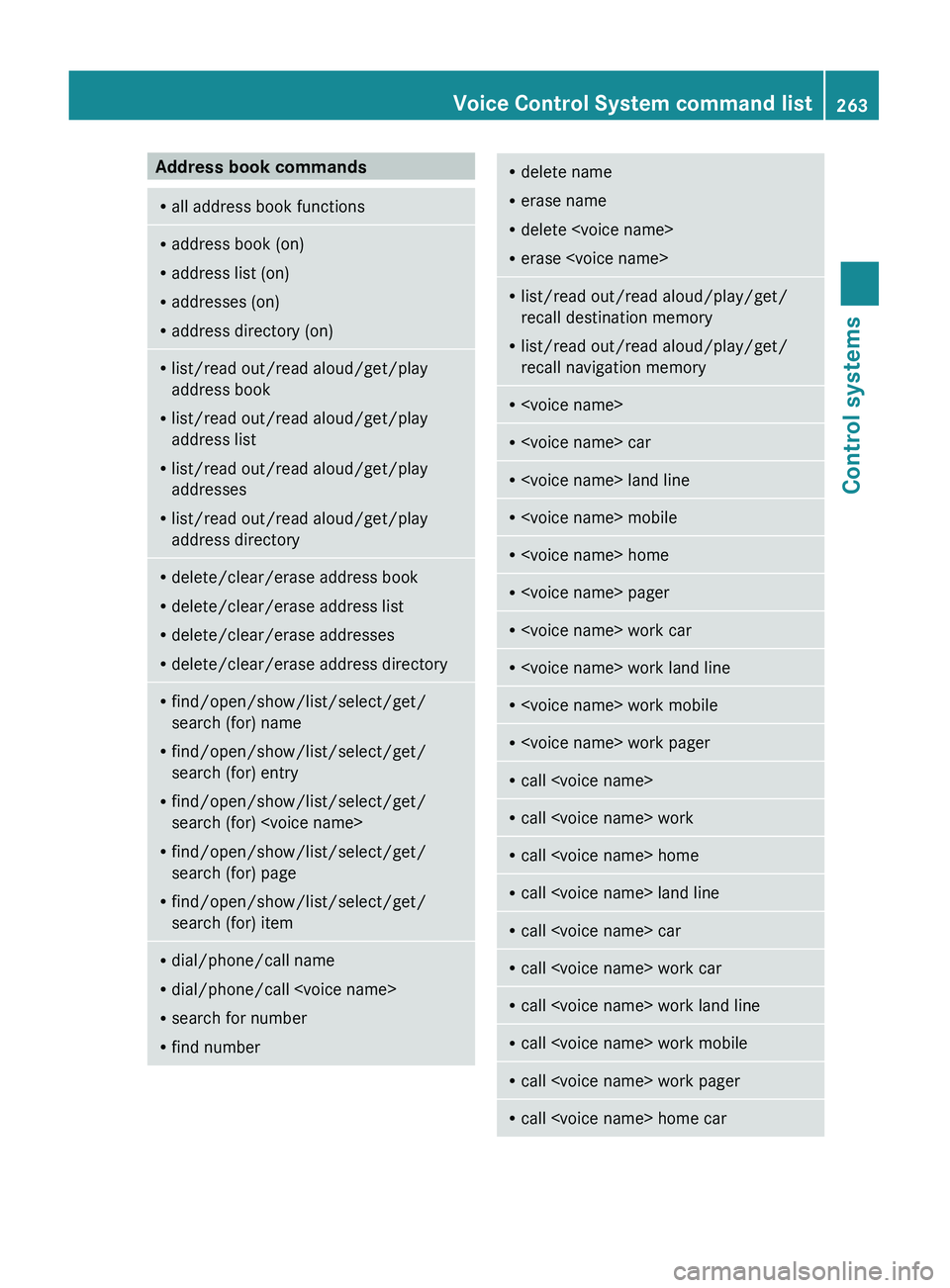
Address book commandsRall address book functionsRaddress book (on)
R address list (on)
R addresses (on)
R address directory (on)Rlist/read out/read aloud/get/play
address book
R list/read out/read aloud/get/play
address list
R list/read out/read aloud/get/play
addresses
R list/read out/read aloud/get/play
address directoryR delete/clear/erase address book
R delete/clear/erase address list
R delete/clear/erase addresses
R delete/clear/erase address directoryRfind/open/show/list/select/get/
search (for) name
R find/open/show/list/select/get/
search (for) entry
R find/open/show/list/select/get/
search (for)
R find/open/show/list/select/get/
search (for) page
R find/open/show/list/select/get/
search (for) itemR dial/phone/call name
R dial/phone/call
R search for number
R find numberRdelete name
R erase name
R delete
R erase
recall destination memory
R list/read out/read aloud/play/get/
recall navigation memoryR
Page 266 of 548
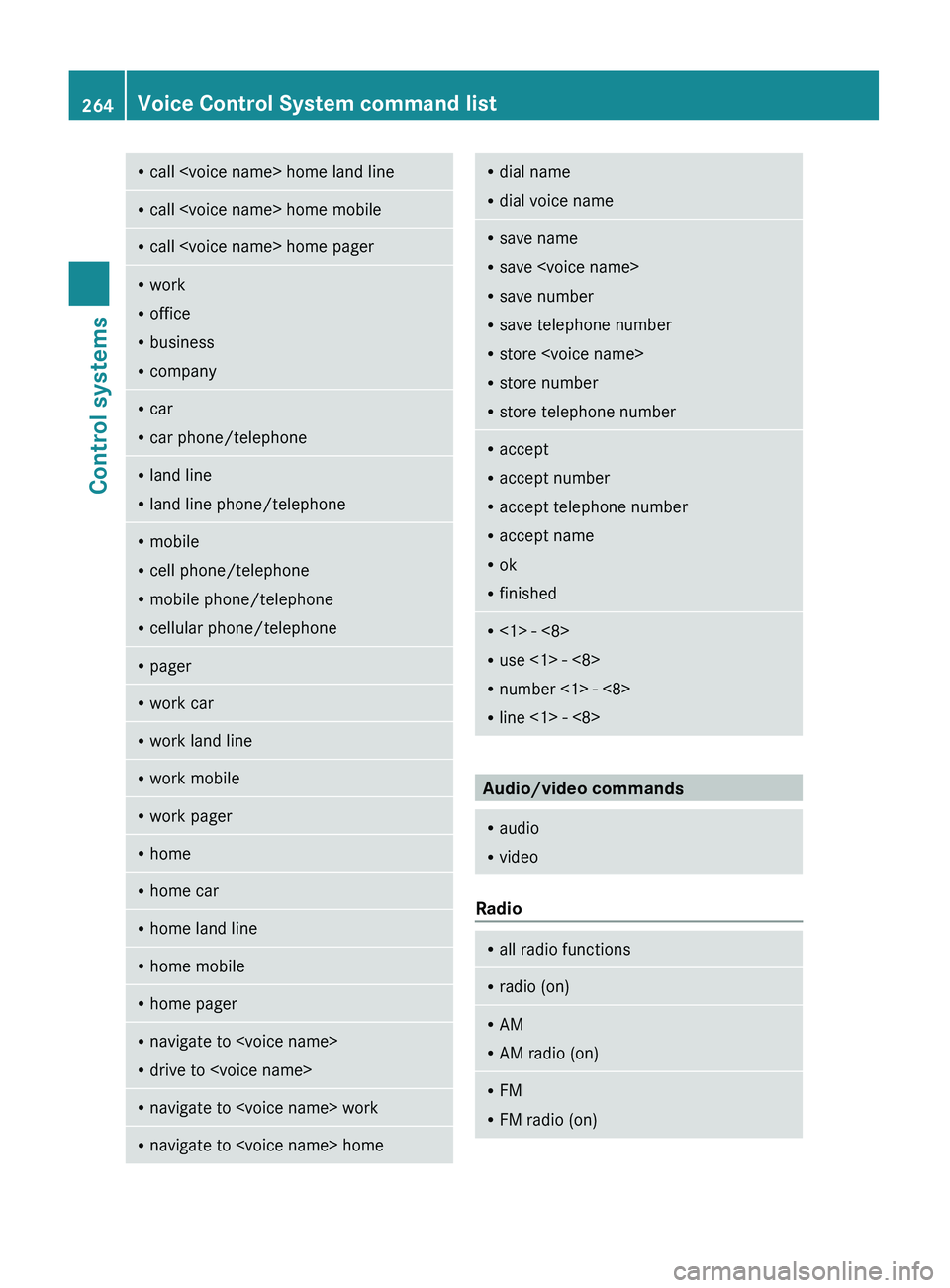
Rcall
R office
R business
R companyRcar
R car phone/telephoneRland line
R land line phone/telephoneRmobile
R cell phone/telephone
R mobile phone/telephone
R cellular phone/telephoneRpagerRwork carRwork land lineRwork mobileRwork pagerRhomeRhome carRhome land lineRhome mobileRhome pagerRnavigate to
R drive to
R dial voice nameRsave name
R save
R save number
R save telephone number
R store
R store number
R store telephone numberRaccept
R accept number
R accept telephone number
R accept name
R ok
R finishedR<1> - <8>
R use <1> - <8>
R number <1> - <8>
R line <1> - <8>
Audio/video commands
R
audio
R video
Radio
R
all radio functionsRradio (on)RAM
R AM radio (on)RFM
R FM radio (on)264Voice Control System command listControl systems
221_AKB; 6; 20, en-USd2ugruen,Version: 2.11.8.12009-09-24T13:28:17+02:00 - Seite 264
Page 269 of 548
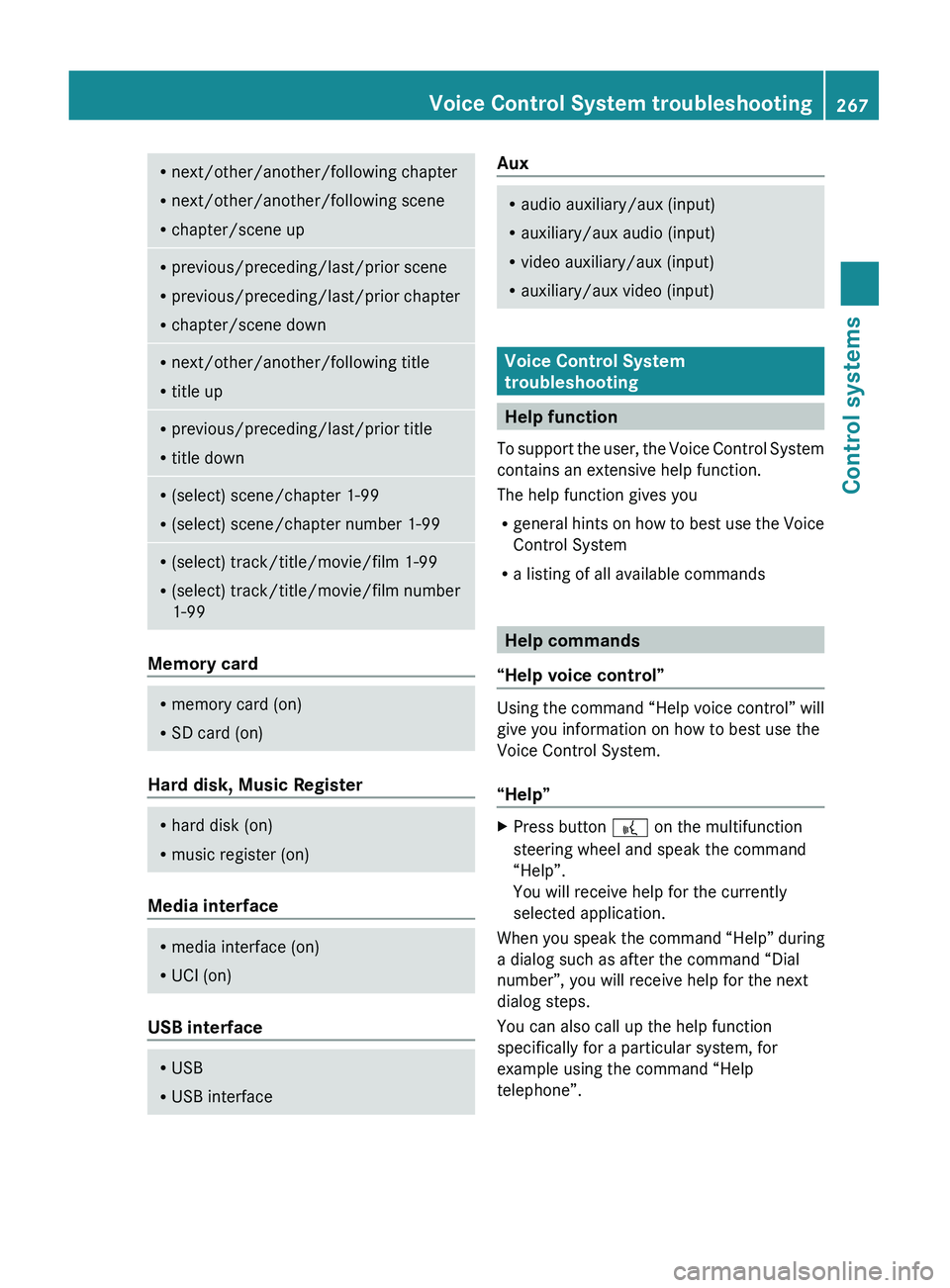
Rnext/other/another/following chapter
R next/other/another/following scene
R chapter/scene upRprevious/preceding/last/prior scene
R previous/preceding/last/prior chapter
R chapter/scene downRnext/other/another/following title
R title upRprevious/preceding/last/prior title
R title downR(select) scene/chapter 1-99
R (select) scene/chapter number 1-99R(select) track/title/movie/film 1-99
R (select) track/title/movie/film number
1-99
Memory card
R memory card (on)
R SD card (on)
Hard disk, Music Register
R
hard disk (on)
R music register (on)
Media interface
R
media interface (on)
R UCI (on)
USB interface
R
USB
R USB interfaceAuxRaudio auxiliary/aux (input)
R auxiliary/aux audio (input)
R video auxiliary/aux (input)
R auxiliary/aux video (input)
Voice Control System
troubleshooting
Help function
To support the user, the Voice Control System
contains an extensive help function.
The help function gives you
R general hints on how to best use the Voice
Control System
R a listing of all available commands
Help commands
“Help voice control”
Using the command “Help voice control” will
give you information on how to best use the
Voice Control System.
“Help”
XPress button 0062 on the multifunction
steering wheel and speak the command
“Help”.
You will receive help for the currently
selected application.
When you speak the command “Help” during
a dialog such as after the command “Dial
number”, you will receive help for the next
dialog steps.
You can also call up the help function
specifically for a particular system, for
example using the command “Help
telephone”.
Voice Control System troubleshooting267Control systems221_AKB; 6; 20, en-USd2ugruen,Version: 2.11.8.12009-09-24T13:28:17+02:00 - Seite 267Z
Page 270 of 548
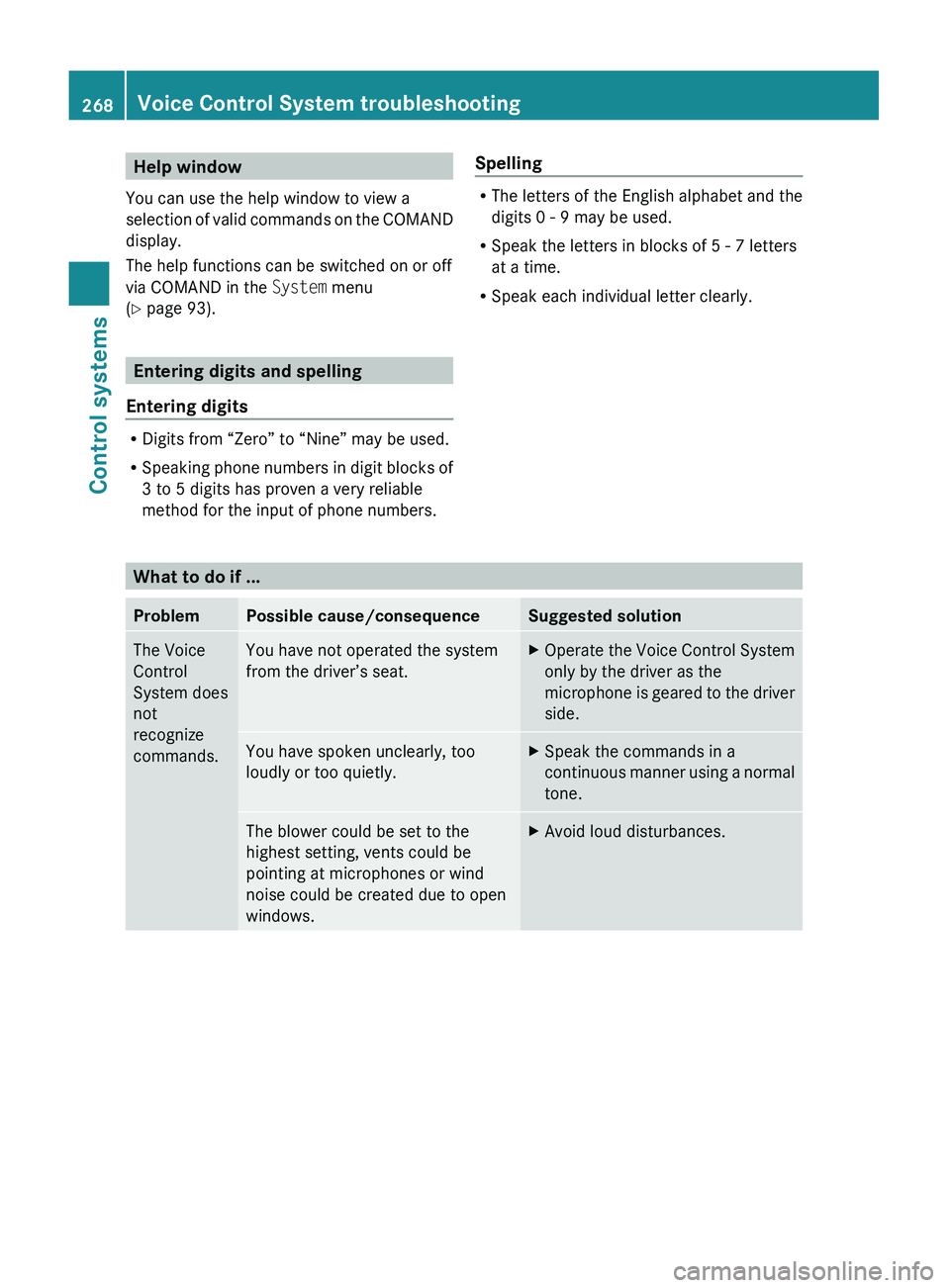
Help window
You can use the help window to view a
selection of valid commands on the COMAND
display.
The help functions can be switched on or off
via COMAND in the System menu
( Y page 93).
Entering digits and spelling
Entering digits
R Digits from “Zero” to “Nine” may be used.
R Speaking phone numbers in digit blocks of
3 to 5 digits has proven a very reliable
method for the input of phone numbers.
Spelling
R The letters of the English alphabet and the
digits 0 - 9 may be used.
R Speak the letters in blocks of 5 - 7 letters
at a time.
R Speak each individual letter clearly.What to do if ...
ProblemPossible cause/consequenceSuggested solutionThe Voice
Control
System does
not
recognize
commands.You have not operated the system
from the driver’s seat.XOperate the Voice Control System
only by the driver as the
microphone is geared to the driver
side.You have spoken unclearly, too
loudly or too quietly.XSpeak the commands in a
continuous manner using a normal
tone.The blower could be set to the
highest setting, vents could be
pointing at microphones or wind
noise could be created due to open
windows.XAvoid loud disturbances.268Voice Control System troubleshootingControl systems
221_AKB; 6; 20, en-USd2ugruen,Version: 2.11.8.12009-09-24T13:28:17+02:00 - Seite 268
Page 272 of 548
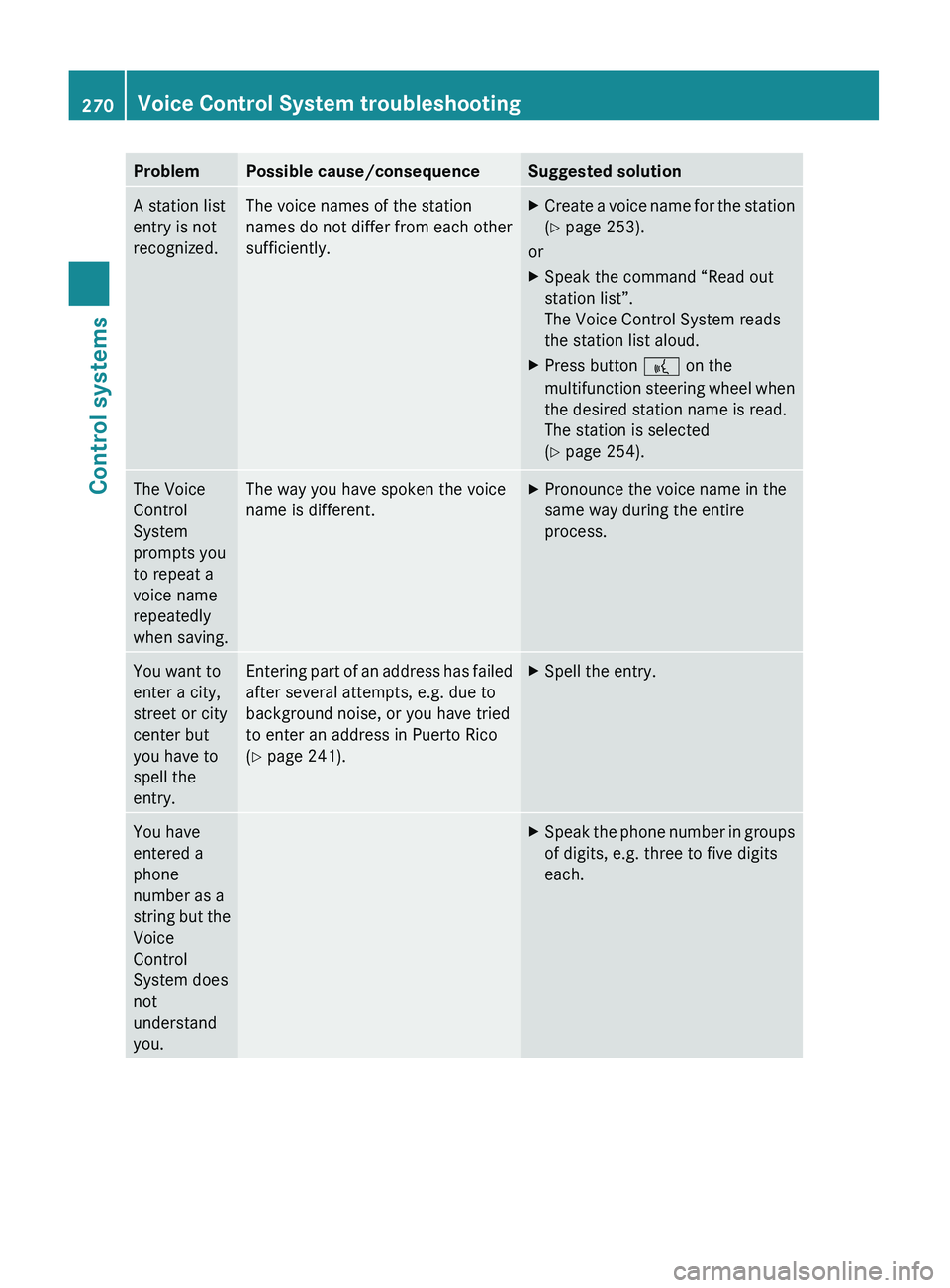
ProblemPossible cause/consequenceSuggested solutionA station list
entry is not
recognized.The voice names of the station
names do not differ from each other
sufficiently.XCreate a voice name for the station
( Y page 253).
or
XSpeak the command “Read out
station list”.
The Voice Control System reads
the station list aloud.XPress button 0062 on the
multifunction steering wheel when
the desired station name is read.
The station is selected
( Y page 254).The Voice
Control
System
prompts you
to repeat a
voice name
repeatedly
when saving.The way you have spoken the voice
name is different.XPronounce the voice name in the
same way during the entire
process.You want to
enter a city,
street or city
center but
you have to
spell the
entry.Entering part of an address has failed
after several attempts, e.g. due to
background noise, or you have tried
to enter an address in Puerto Rico
( Y page 241).XSpell the entry.You have
entered a
phone
number as a
string but the
Voice
Control
System does
not
understand
you.XSpeak the phone number in groups
of digits, e.g. three to five digits
each.270Voice Control System troubleshootingControl systems
221_AKB; 6; 20, en-USd2ugruen,Version: 2.11.8.12009-09-24T13:28:17+02:00 - Seite 270