Time MERCEDES-BENZ S-Class 2011 W221 Owner's Manual
[x] Cancel search | Manufacturer: MERCEDES-BENZ, Model Year: 2011, Model line: S-Class, Model: MERCEDES-BENZ S-Class 2011 W221Pages: 524, PDF Size: 22.53 MB
Page 384 of 524
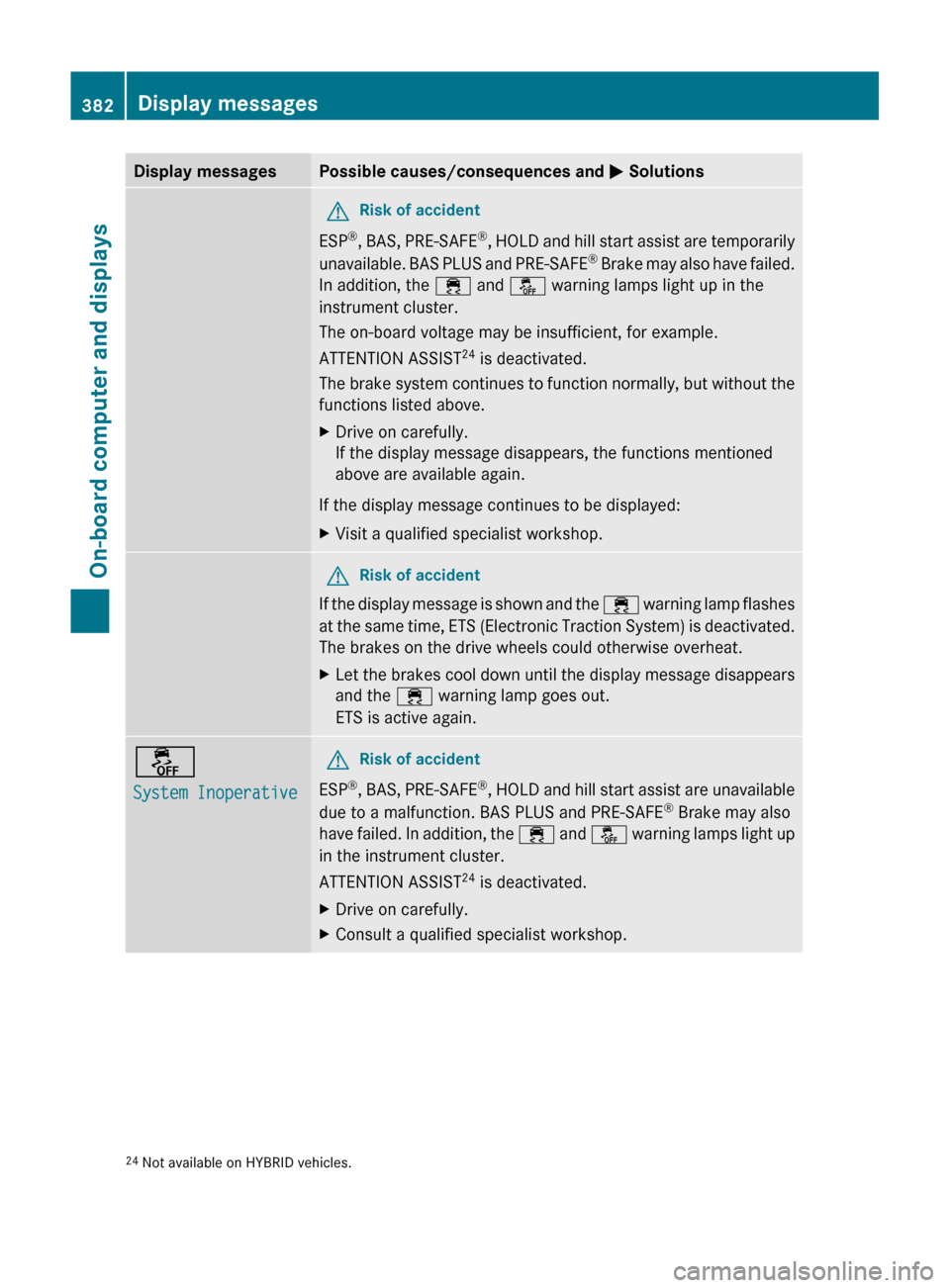
Display messagesPossible causes/consequences and M SolutionsGRisk of accident
ESP ®
, BAS, PRE-SAFE ®
, HOLD and hill start assist are temporarily
unavailable. BAS PLUS and PRE-SAFE ®
Brake may also have failed.
In addition, the ÷ and å warning lamps light up in the
instrument cluster.
The on-board voltage may be insufficient, for example.
ATTENTION ASSIST 24
is deactivated.
The brake system continues to function normally, but without the
functions listed above.
XDrive on carefully.
If the display message disappears, the functions mentioned
above are available again.
If the display message continues to be displayed:
XVisit a qualified specialist workshop.GRisk of accident
If the display message is shown and the ÷ warning lamp flashes
at the same time, ETS (Electronic Traction System) is deactivated.
The brakes on the drive wheels could otherwise overheat.
XLet the brakes cool down until the display message disappears
and the ÷ warning lamp goes out.
ETS is active again.å
System InoperativeGRisk of accident
ESP ®
, BAS, PRE-SAFE ®
, HOLD and hill start assist are unavailable
due to a malfunction. BAS PLUS and PRE-SAFE ®
Brake may also
have failed. In addition, the ÷ and å warning lamps light up
in the instrument cluster.
ATTENTION ASSIST 24
is deactivated.
XDrive on carefully.XConsult a qualified specialist workshop.24 Not available on HYBRID vehicles.382Display messagesOn-board computer and displays
Page 394 of 524
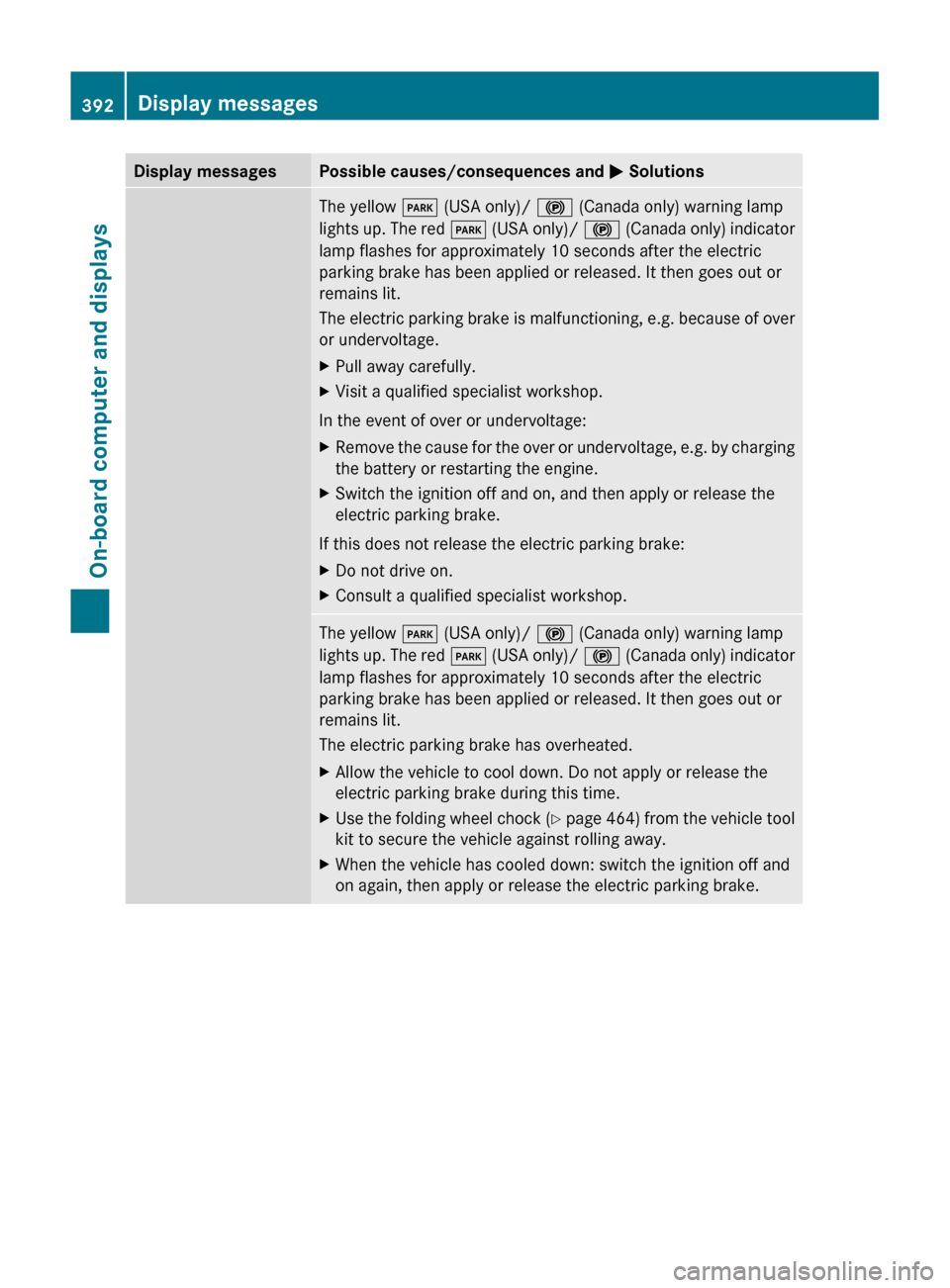
Display messagesPossible causes/consequences and M SolutionsThe yellow F (USA only)/ ! (Canada only) warning lamp
lights up. The red F (USA only)/ ! (Canada only) indicator
lamp flashes for approximately 10 seconds after the electric
parking brake has been applied or released. It then goes out or
remains lit.
The electric parking brake is malfunctioning, e.g. because of over
or undervoltage.XPull away carefully.XVisit a qualified specialist workshop.
In the event of over or undervoltage:
XRemove the cause for the over or undervoltage, e.g. by charging
the battery or restarting the engine.XSwitch the ignition off and on, and then apply or release the
electric parking brake.
If this does not release the electric parking brake:
XDo not drive on.XConsult a qualified specialist workshop.The yellow F (USA only)/ ! (Canada only) warning lamp
lights up. The red F (USA only)/ ! (Canada only) indicator
lamp flashes for approximately 10 seconds after the electric
parking brake has been applied or released. It then goes out or
remains lit.
The electric parking brake has overheated.XAllow the vehicle to cool down. Do not apply or release the
electric parking brake during this time.XUse the folding wheel chock (Y page 464) from the vehicle tool
kit to secure the vehicle against rolling away.XWhen the vehicle has cooled down: switch the ignition off and
on again, then apply or release the electric parking brake.392Display messagesOn-board computer and displays
Page 398 of 524
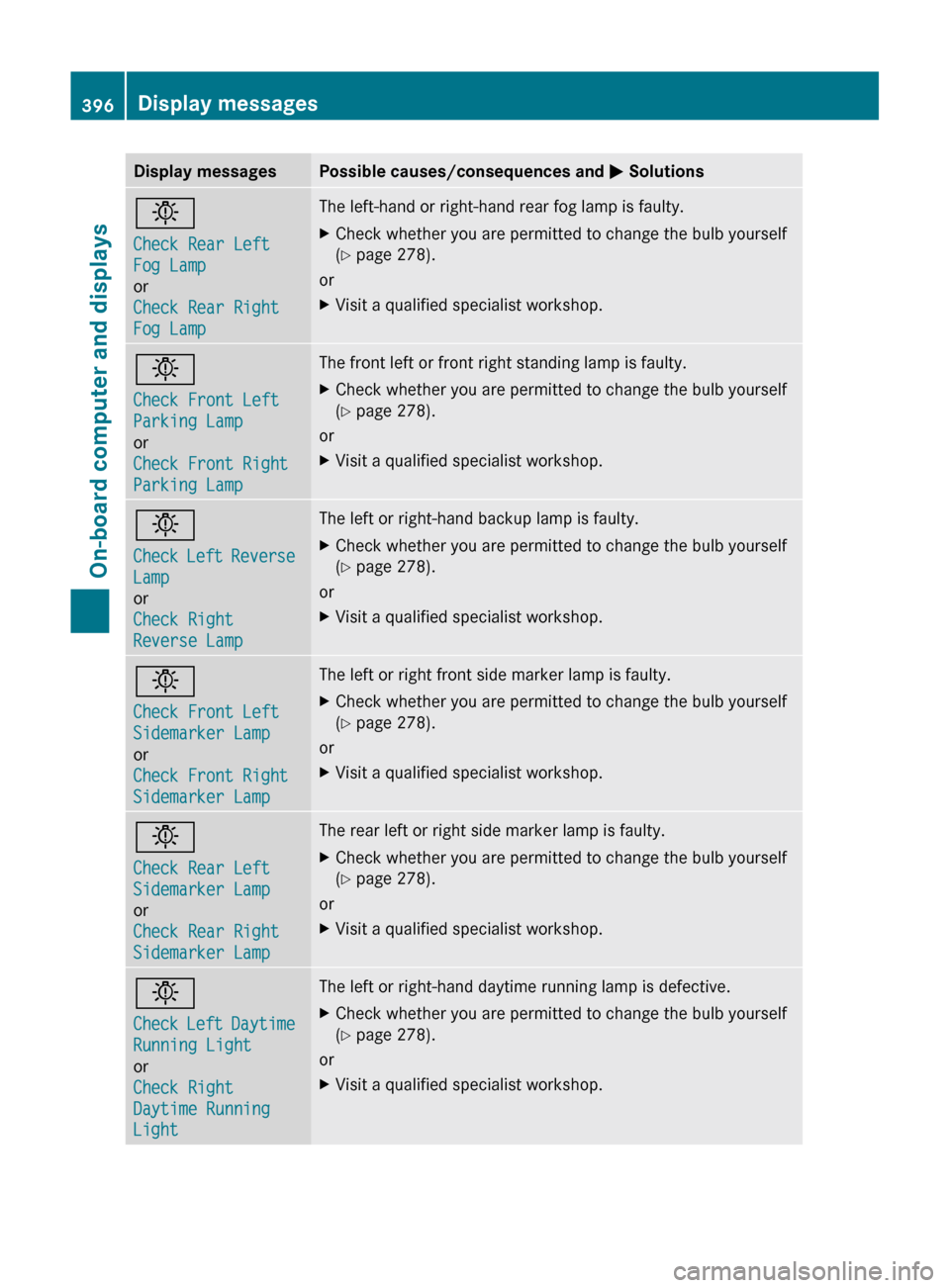
Display messagesPossible causes/consequences and M Solutionsb
Check Rear Left
Fog Lamp
or
Check Rear Right
Fog LampThe left-hand or right-hand rear fog lamp is faulty.XCheck whether you are permitted to change the bulb yourself
( Y page 278).
or
XVisit a qualified specialist workshop.b
Check Front Left
Parking Lamp
or
Check Front Right
Parking LampThe front left or front right standing lamp is faulty.XCheck whether you are permitted to change the bulb yourself
( Y page 278).
or
XVisit a qualified specialist workshop.b
Check Left Reverse
Lamp
or
Check Right
Reverse LampThe left or right-hand backup lamp is faulty.XCheck whether you are permitted to change the bulb yourself
( Y page 278).
or
XVisit a qualified specialist workshop.b
Check Front Left
Sidemarker Lamp
or
Check Front Right
Sidemarker LampThe left or right front side marker lamp is faulty.XCheck whether you are permitted to change the bulb yourself
( Y page 278).
or
XVisit a qualified specialist workshop.b
Check Rear Left
Sidemarker Lamp
or
Check Rear Right
Sidemarker LampThe rear left or right side marker lamp is faulty.XCheck whether you are permitted to change the bulb yourself
( Y page 278).
or
XVisit a qualified specialist workshop.b
Check Left Daytime
Running Light
or
Check Right
Daytime Running
LightThe left or right-hand daytime running lamp is defective.XCheck whether you are permitted to change the bulb yourself
( Y page 278).
or
XVisit a qualified specialist workshop.396Display messagesOn-board computer and displays
Page 399 of 524
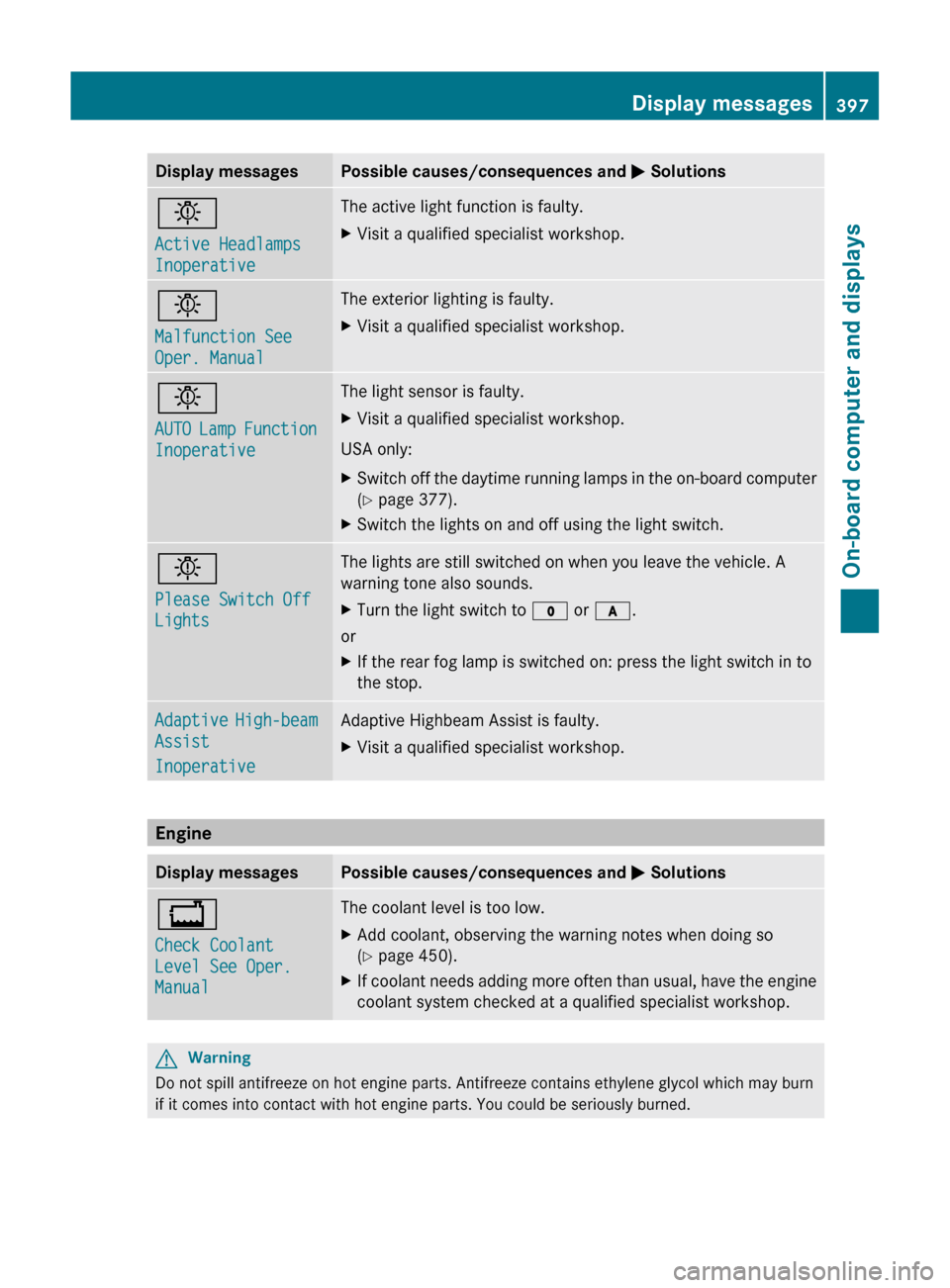
Display messagesPossible causes/consequences and M Solutionsb
Active Headlamps
InoperativeThe active light function is faulty.XVisit a qualified specialist workshop.b
Malfunction See
Oper. ManualThe exterior lighting is faulty.XVisit a qualified specialist workshop.b
AUTO Lamp Function
InoperativeThe light sensor is faulty.XVisit a qualified specialist workshop.
USA only:
XSwitch off the daytime running lamps in the on-board computer
( Y page 377).XSwitch the lights on and off using the light switch.b
Please Switch Off
LightsThe lights are still switched on when you leave the vehicle. A
warning tone also sounds.XTurn the light switch to $ or c .
or
XIf the rear fog lamp is switched on: press the light switch in to
the stop.Adaptive High-beam
Assist
InoperativeAdaptive Highbeam Assist is faulty.XVisit a qualified specialist workshop.
Engine
Display messagesPossible causes/consequences and M Solutions+
Check Coolant
Level See Oper.
ManualThe coolant level is too low.XAdd coolant, observing the warning notes when doing so
( Y page 450).XIf coolant needs adding more often than usual, have the engine
coolant system checked at a qualified specialist workshop.GWarning
Do not spill antifreeze on hot engine parts. Antifreeze contains ethylene glycol which may burn
if it comes into contact with hot engine parts. You could be seriously burned.
Display messages397On-board computer and displaysZ
Page 403 of 524
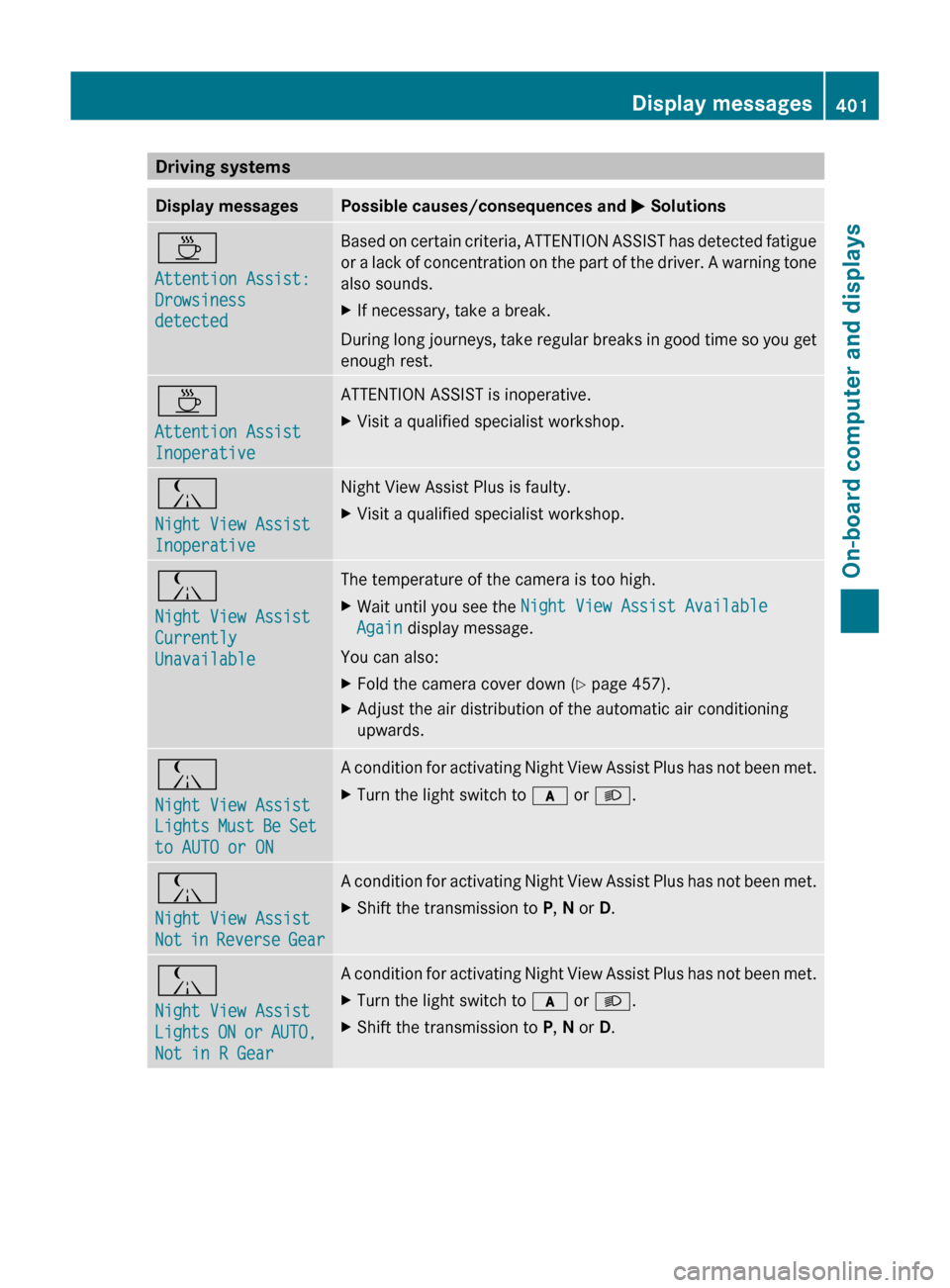
Driving systemsDisplay messagesPossible causes/consequences and M SolutionsÀ
Attention Assist:
Drowsiness
detectedBased on certain criteria, ATTENTION ASSIST has detected fatigue
or a lack of concentration on the part of the driver. A warning tone
also sounds.XIf necessary, take a break.
During long journeys, take regular breaks in good time so you get
enough rest.
À
Attention Assist
InoperativeATTENTION ASSIST is inoperative.XVisit a qualified specialist workshop.Á
Night View Assist
InoperativeNight View Assist Plus is faulty.XVisit a qualified specialist workshop.Á
Night View Assist
Currently
UnavailableThe temperature of the camera is too high.XWait until you see the Night View Assist Available
Again display message.
You can also:
XFold the camera cover down ( Y page 457).XAdjust the air distribution of the automatic air conditioning
upwards.Á
Night View Assist
Lights Must Be Set
to AUTO or ONA condition for activating Night View Assist Plus has not been met.XTurn the light switch to c or L .Á
Night View Assist
Not in Reverse GearA condition for activating Night View Assist Plus has not been met.XShift the transmission to P, N or D.Á
Night View Assist
Lights ON or AUTO,
Not in R GearA condition for activating Night View Assist Plus has not been met.XTurn the light switch to c or L .XShift the transmission to P, N or D.Display messages401On-board computer and displaysZ
Page 404 of 524
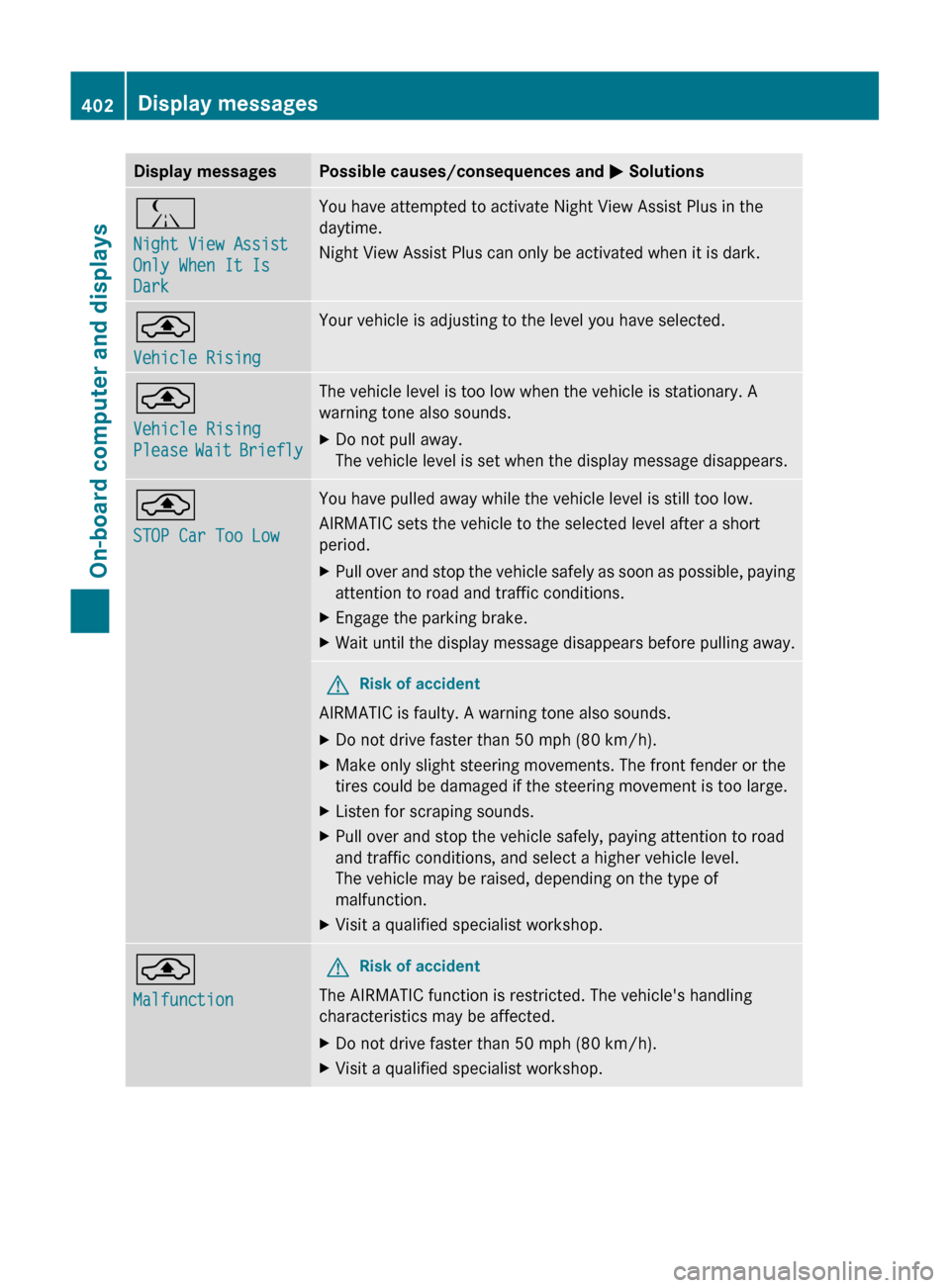
Display messagesPossible causes/consequences and M SolutionsÁ
Night View Assist
Only When It Is
DarkYou have attempted to activate Night View Assist Plus in the
daytime.
Night View Assist Plus can only be activated when it is dark.¨
Vehicle RisingYour vehicle is adjusting to the level you have selected.¨
Vehicle Rising
Please Wait BrieflyThe vehicle level is too low when the vehicle is stationary. A
warning tone also sounds.XDo not pull away.
The vehicle level is set when the display message disappears.¨
STOP Car Too LowYou have pulled away while the vehicle level is still too low.
AIRMATIC sets the vehicle to the selected level after a short
period.XPull over and stop the vehicle safely as soon as possible, paying
attention to road and traffic conditions.XEngage the parking brake.XWait until the display message disappears before pulling away.GRisk of accident
AIRMATIC is faulty. A warning tone also sounds.
XDo not drive faster than 50 mph (80 km/h).XMake only slight steering movements. The front fender or the
tires could be damaged if the steering movement is too large.XListen for scraping sounds.XPull over and stop the vehicle safely, paying attention to road
and traffic conditions, and select a higher vehicle level.
The vehicle may be raised, depending on the type of
malfunction.XVisit a qualified specialist workshop.¨
MalfunctionGRisk of accident
The AIRMATIC function is restricted. The vehicle's handling
characteristics may be affected.
XDo not drive faster than 50 mph (80 km/h).XVisit a qualified specialist workshop.402Display messagesOn-board computer and displays
Page 424 of 524
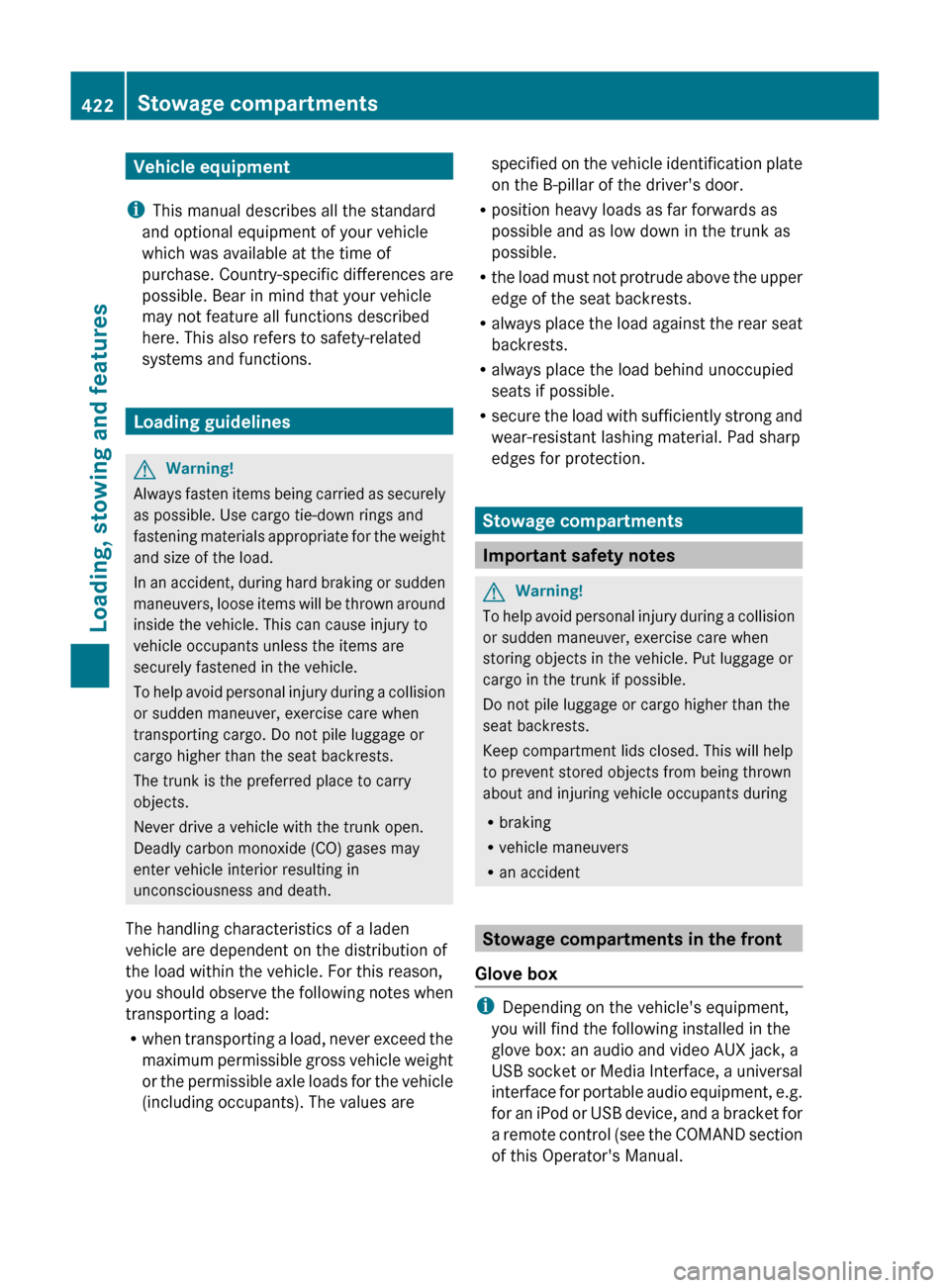
Vehicle equipment
i This manual describes all the standard
and optional equipment of your vehicle
which was available at the time of
purchase. Country-specific differences are
possible. Bear in mind that your vehicle
may not feature all functions described
here. This also refers to safety-related
systems and functions.
Loading guidelines
GWarning!
Always fasten items being carried as securely
as possible. Use cargo tie-down rings and
fastening materials appropriate for the weight
and size of the load.
In an accident, during hard braking or sudden
maneuvers, loose items will be thrown around
inside the vehicle. This can cause injury to
vehicle occupants unless the items are
securely fastened in the vehicle.
To help avoid personal injury during a collision
or sudden maneuver, exercise care when
transporting cargo. Do not pile luggage or
cargo higher than the seat backrests.
The trunk is the preferred place to carry
objects.
Never drive a vehicle with the trunk open.
Deadly carbon monoxide (CO) gases may
enter vehicle interior resulting in
unconsciousness and death.
The handling characteristics of a laden
vehicle are dependent on the distribution of
the load within the vehicle. For this reason,
you should observe the following notes when
transporting a load:
R when transporting a load, never exceed the
maximum permissible gross vehicle weight
or the permissible axle loads for the vehicle
(including occupants). The values are
specified on the vehicle identification plate
on the B-pillar of the driver's door.
R position heavy loads as far forwards as
possible and as low down in the trunk as
possible.
R the load must not protrude above the upper
edge of the seat backrests.
R always place the load against the rear seat
backrests.
R always place the load behind unoccupied
seats if possible.
R secure the load with sufficiently strong and
wear-resistant lashing material. Pad sharp
edges for protection.
Stowage compartments
Important safety notes
GWarning!
To help avoid personal injury during a collision
or sudden maneuver, exercise care when
storing objects in the vehicle. Put luggage or
cargo in the trunk if possible.
Do not pile luggage or cargo higher than the
seat backrests.
Keep compartment lids closed. This will help
to prevent stored objects from being thrown
about and injuring vehicle occupants during
R braking
R vehicle maneuvers
R an accident
Stowage compartments in the front
Glove box
i Depending on the vehicle's equipment,
you will find the following installed in the
glove box: an audio and video AUX jack, a
USB socket or Media Interface, a universal
interface for portable audio equipment, e.g.
for an iPod or USB device, and a bracket for
a remote control (see the COMAND section
of this Operator's Manual.
422Stowage compartmentsLoading, stowing and features
Page 440 of 524
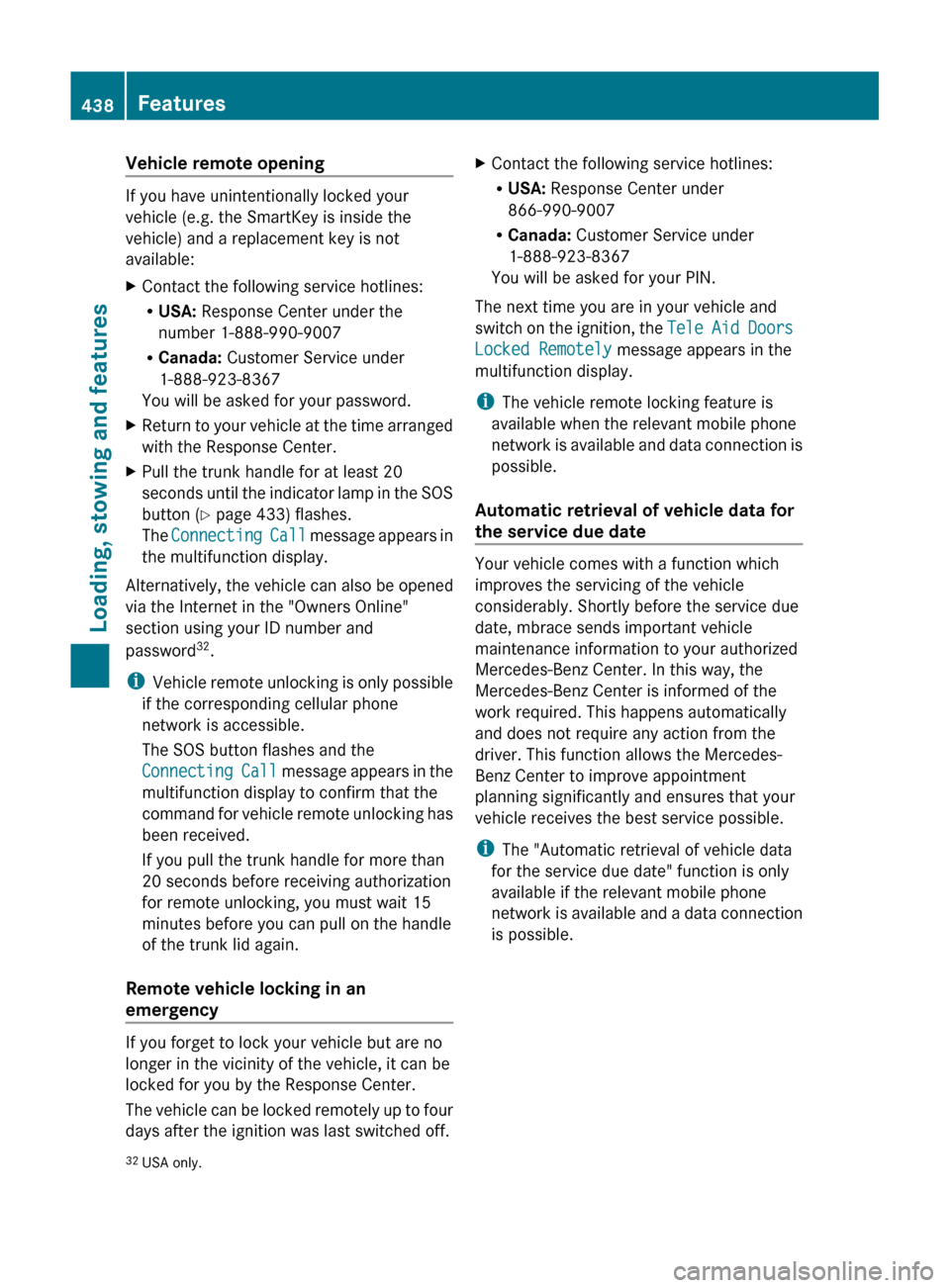
Vehicle remote opening
If you have unintentionally locked your
vehicle (e.g. the SmartKey is inside the
vehicle) and a replacement key is not
available:
XContact the following service hotlines:
R USA: Response Center under the
number 1-888-990-9007
R Canada: Customer Service under
1-888-923-8367
You will be asked for your password.XReturn to your vehicle at the time arranged
with the Response Center.XPull the trunk handle for at least 20
seconds until the indicator lamp in the SOS
button ( Y page 433) flashes.
The Connecting Call message appears in
the multifunction display.
Alternatively, the vehicle can also be opened
via the Internet in the "Owners Online"
section using your ID number and
password 32
.
i Vehicle remote unlocking is only possible
if the corresponding cellular phone
network is accessible.
The SOS button flashes and the
Connecting Call message appears in the
multifunction display to confirm that the
command for vehicle remote unlocking has
been received.
If you pull the trunk handle for more than
20 seconds before receiving authorization
for remote unlocking, you must wait 15
minutes before you can pull on the handle
of the trunk lid again.
Remote vehicle locking in an
emergency
If you forget to lock your vehicle but are no
longer in the vicinity of the vehicle, it can be
locked for you by the Response Center.
The vehicle can be locked remotely up to four
days after the ignition was last switched off.
XContact the following service hotlines:
R USA: Response Center under
866-990-9007
R Canada: Customer Service under
1-888-923-8367
You will be asked for your PIN.
The next time you are in your vehicle and
switch on the ignition, the Tele Aid Doors
Locked Remotely message appears in the
multifunction display.
i The vehicle remote locking feature is
available when the relevant mobile phone
network is available and data connection is
possible.
Automatic retrieval of vehicle data for
the service due date
Your vehicle comes with a function which
improves the servicing of the vehicle
considerably. Shortly before the service due
date, mbrace sends important vehicle
maintenance information to your authorized
Mercedes-Benz Center. In this way, the
Mercedes-Benz Center is informed of the
work required. This happens automatically
and does not require any action from the
driver. This function allows the Mercedes-
Benz Center to improve appointment
planning significantly and ensures that your
vehicle receives the best service possible.
i The "Automatic retrieval of vehicle data
for the service due date" function is only
available if the relevant mobile phone
network is available and a data connection
is possible.
32 USA only.438FeaturesLoading, stowing and features
Page 442 of 524
interference that may cause undesired
operation.
Unauthorized modification of this device
could void the user's authority to legally
operate the device.
Programming the remote control
Programming
GWarning!
Only press the transmitter button on the
integrated remote control if there are no
persons or objects present within the sweep
of the garage door. People could otherwise be
injured by the movement of the door.
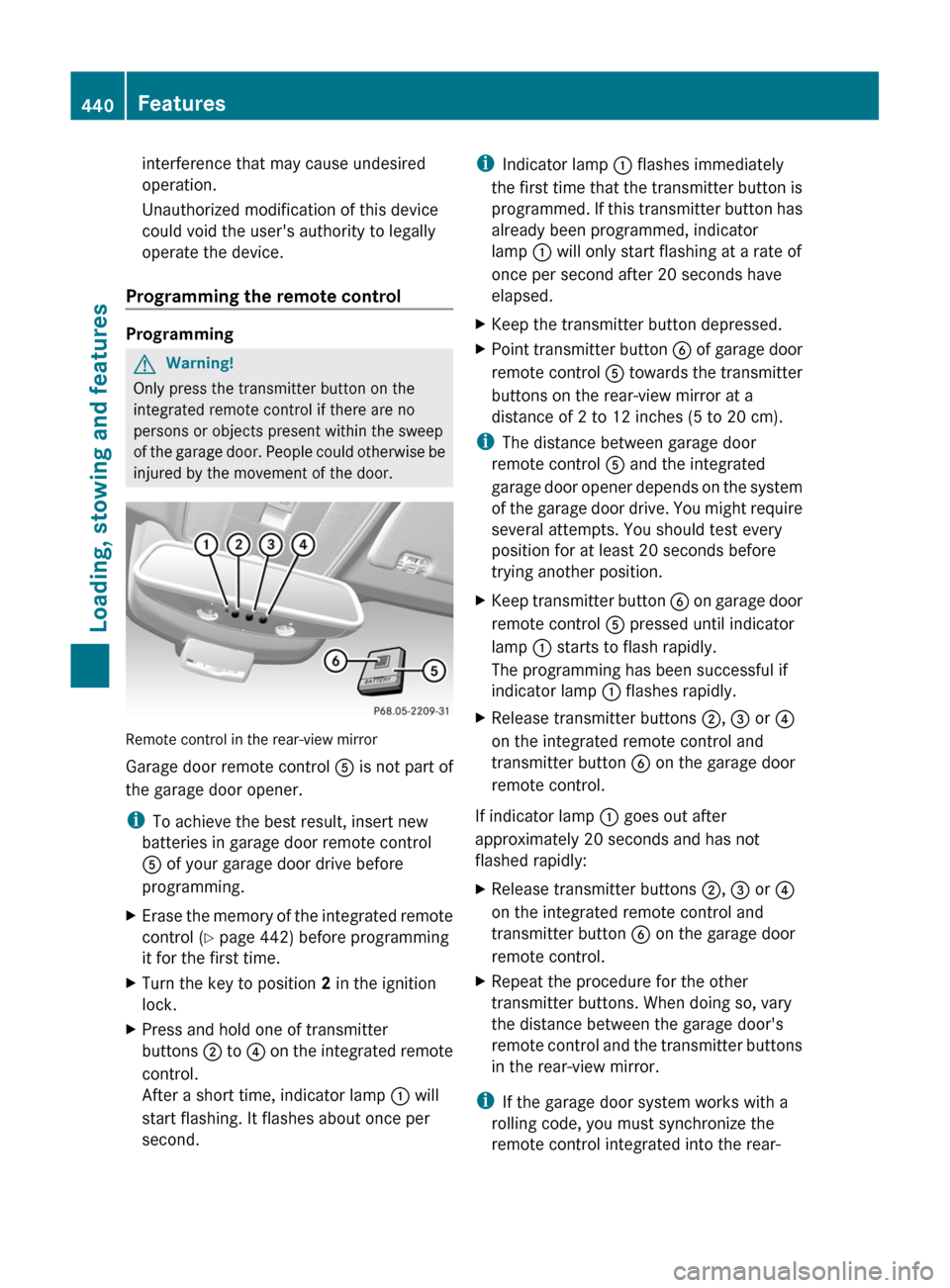
Remote control in the rear-view mirror
Garage door remote control A is not part of
the garage door opener.
iTo achieve the best result, insert new
batteries in garage door remote control
A of your garage door drive before
programming.
XErase the memory of the integrated remote
control (Y page 442) before programming
it for the first time.
XTurn the key to position 2 in the ignition
lock.
XPress and hold one of transmitter
buttons ; to ? on the integrated remote
control.
After a short time, indicator lamp : will
start flashing. It flashes about once per
second.
iIndicator lamp : flashes immediately
the first time that the transmitter button is
programmed. If this transmitter button has
already been programmed, indicator
lamp : will only start flashing at a rate of
once per second after 20 seconds have
elapsed.
XKeep the transmitter button depressed.XPoint transmitter button B of garage door
remote control A towards the transmitter
buttons on the rear-view mirror at a
distance of 2 to 12 inches (5 to 20 cm).
iThe distance between garage door
remote control A and the integrated
garage door opener depends on the system
of the garage door drive. You might require
several attempts. You should test every
position for at least 20 seconds before
trying another position.
XKeep transmitter button B on garage door
remote control A pressed until indicator
lamp : starts to flash rapidly.
The programming has been successful if
indicator lamp : flashes rapidly.
XRelease transmitter buttons ;, = or ?
on the integrated remote control and
transmitter button B on the garage door
remote control.
If indicator lamp : goes out after
approximately 20 seconds and has not
flashed rapidly:
XRelease transmitter buttons ;, = or ?
on the integrated remote control and
transmitter button B on the garage door
remote control.
XRepeat the procedure for the other
transmitter buttons. When doing so, vary
the distance between the garage door's
remote control and the transmitter buttons
in the rear-view mirror.
iIf the garage door system works with a
rolling code, you must synchronize the
remote control integrated into the rear-
440FeaturesLoading, stowing and features
Page 443 of 524
view mirror with the garage door system
receiver after programming.
You will find further information in the
garage door opening system's operating
instructions, e.g. the sections on
"Synchronizing the transmitter" or
"Registering a new transmitter". You can
also call the hotline mentioned above.
Notes on programming the remote
control
Canadian radio frequency laws require a
"break" (or interruption) of the transmission
signals a few seconds after broadcasting.
Therefore, these signals may not last long
enough for the integrated remote control to
recognize the signal during programming.
Comparable with Canadian law, some U.S.
garage door openers also have a built-in
"interruption".
If you live in Canada or have difficulties
programming the garage door opener
(regardless of where you live) when using the
programming steps (see above), proceed as
follows:XPress transmitter button ( ;, = or ?) and
hold it down during the following steps until
the setup has been completed
successfully.XAt the same time, press transmitter button
B of the garage door remote control for
two seconds, then release it for two
seconds, then press it again for two
seconds.XRepeat this sequence on transmitter
button B of the garage door remote
control until the frequency signal has been
saved.XIf the setup procedure is successful,
indicator lamp : flashes once slowly and
goes out after a few seconds.XContinue with the other programming
steps (see above).Problems when programming
If you have problems when programming the
integrated remote control, please note the
following:
R Check the transmitter frequency of garage
door remote control A (which can usually
be found on the rear of the remote control).
The integrated remote control is
compatible with devices that operate at
frequencies between 280 and 390 MHz.
R Replace the batteries in garage door
remote control A. This increases the
likelihood of garage door remote
control A sending a strong and precise
signal to the integrated remote control on
the rear-view mirror.
R When programming, hold garage door
remote control A at varying distances and
angles from the transmitter button which
you are programming. Try different angles
at a distance of 2 to 12 inches (5 to 30 cm)
or the same angle at different distances.
R If there is another garage door remote
control for the same device, perform the
programming steps again using the remote
control. Before performing these steps,
make sure that new batteries have been
installed in the garage door remote control.
R Align the antenna cable of the garage door
opener unit. This can improve signal
reception/transmission.
Opening or closing the garage door
Once programmed, the integrated remote
control will assume the function of the garage
door system's remote control. Please also
read the operating instructions for the garage
door system.
XTurn the SmartKey to position 2 in the
ignition lock.XPress transmitter button ;, = or ? in the
overhead control panel that you have
programmed to operate the garage door.
Garage door system with fixed code:
indicator lamp : lights up continuously.Features441Loading, stowing and featuresZ