phone MERCEDES-BENZ S-Class 2012 W221 User Guide
[x] Cancel search | Manufacturer: MERCEDES-BENZ, Model Year: 2012, Model line: S-Class, Model: MERCEDES-BENZ S-Class 2012 W221Pages: 536, PDF Size: 25.27 MB
Page 23 of 536
Servicesee ASSYST PLUS service interval
display
Service interval display
Displaying service messages .........462
Hiding service messages ...............462
Notes ............................................. 462
Service messages ..........................462
Service menu (on-board computer) . 385
Service products Brake fluid ..................................... 528
Capacities ...................................... 524
Coolant (engine) ............................ 529
DEF special additives .....................527
Engine oil ....................................... 527
Fuel ................................................ 525
Important safety notes ..................522
Refrigerant (air-conditioning
system) .......................................... 528
Washer fluid ................................... 529
Setting a station (radio)
Via manual frequency entry ...........212
Settings
Display ........................................... 143
Menu overview .............................. 121
On-board computer .......................385
Picture (COMAND) .........................240
Picture (Rear Seat Entertainment
System) ......................................... 249
Sound settings ............................... 135
System settings ............................. 143
Setting the language
COMAND ....................................... 149
Rear Seat Entertainment System ...258
Setting the night design ................... 143
Setting the text reader speed .......... 145
Setting the vehicle level ................... 345
Setting the volume Telephone calls .............................. 134
Video AUX ..................................... 246
Side impact air bag ............................. 48
Side marker lamp (display
message) ............................................ 403
Side windows Convenience closing feature ............94
Convenience opening feature ..........93
Important safety information ...........92
Opening/closing .............................. 93Problem (malfunction) .....................95
Resetting ......................................... 95
Sliding sunroof
Important safety notes ....................95
Opening/closing .............................. 96
Problem (malfunction) ...................100
Resetting ......................................... 97
see Panorama roof with power
tilt/sliding panel
SmartKey
Changing the battery .......................82
Changing the programming .............81
Checking the battery .......................82
Convenience closing feature ............94
Convenience opening feature ..........93
Display message ............................ 419
Door central locking/unlocking .......78
Important safety notes ....................78
Loss ................................................. 84
Mechanical key ................................ 81
Positions (ignition lock) .................303
Problem (malfunction) .....................84
Starting the engine ........................305
SMS message
see Text message
Snow chains ...................................... 493
Socket Glove box ....................................... 442
Sockets
Points to observe before use .........441
Rear compartment .........................442
Trunk ............................................. 442
Sound menu ....................................... 135
Sounds see Sound settings
Sound settings
Balance and fader ..........................135
Calling up the sound menu ............135
Rear Seat Entertainment System ...248
Surround sound ............................. 136
Treble and bass ............................. 135
Spare wheel
Storage location ............................ 472
see Emergency spare wheel
Specialist workshop ............................ 31
Speech control see Voice Control System Index21
Page 24 of 536
Speed, controllingsee Cruise control
Speed Limit Assist
see Speed Limit Assist
Speedometer
Activating/deactivating the
additional speedometer .................386
Digital ............................................ 376
In the Instrument cluster .................35
Selecting the unit of
measurement ................................ 386
see Instrument cluster
SPLITVIEW ......................................... 122
SRS (Supplemental Restraint
System) Display message ............................ 397
Introduction ..................................... 44
Warning lamp ................................. 426
Warning lamp (function) ................... 44
Standing lamps
Display message ............................ 402
Switching on/off ........................... 276
Starting (engine) ................................ 304
Station memory ................................. 213
Steering (display message) .............. 418
Steering wheel Adjusting (electrically) ...................110
Button overview ............................... 37
Buttons (on-board
computer) ...................................... 373
Important safety notes ..................109
Paddle shifters ............................... 314
Steering wheel heating ..................110
Storing settings (memory
function) ........................................ 113
Steering wheel (cleaning
instructions) ...................................... 468
Steering wheel heating Switching on/off ........................... 110
Steering wheel paddle shifters ........ 314
Stop function Audio DVD ..................................... 223
Rear Seat Entertainment System ...255
Video DVD ..................................... 243
Stopwatch (RACETIMER) ................... 380
Storing stations Manually ........................................ 213Storing stations (radio)
Automatically ................................. 213
Stowage compartments
Armrest (under) ............................. 433
Cup holders ................................... 437
Door ............................................... 433
Eyeglasses compartment ...............433
Glove box ....................................... 432
Important safety information .........432
Parcel net ...................................... 435
Rear ............................................... 434
Rear seat backrest ......................... 434
Rear seats (between) .....................434
Stowage well ..................................... 436
Stowage well beneath the trunk
floor .................................................... 436
Summer opening see Convenience opening feature
Summer tires ..................................... 492
Sun visor ............................................ 438
Supplemental Restraint System see SRS (Supplemental Restraint
System)
Surround sound
see 3D sound (Harman Kardon ®
surround sound system)
Surround sound (harman/
kardon ®
surround sound system)
Notes ............................................. 136
Switching on/off ........................... 136
Suspension tuning
Active Body Control .......................346
AIRMATIC ...................................... 344
Switching air-recirculation mode
on/off ................................................. 297
Switching between picture
formats (TV, video) ............................ 240
Switching between summer time
and standard time ............................. 144
Switching off the alarm (ATA) ............ 75
Switching the hands-free
microphone on/off ............................ 201
Switching wavebands (radio) ........... 212
System settings
Bluetooth ®
..................................... 147
Date ............................................... 144
Language ....................................... 14922Index
Page 25 of 536
Programmable button (COMAND) ..120
Text reader speed ..........................145
Time ............................................... 144
Time zone ...................................... 144
Voice Control System ....................145
T
Tachometer ........................................ 373
Tail lamps Display message ............................ 402
Tank
see Fuel tank
Tank content
Fuel gauge ....................................... 35
Technical data
Notes ............................................. 520
Tires/wheels ................................. 514
Vehicle data ................................... 530
TELEAID
Automatic retrieval of vehicle data
(service due date) ..........................449
Call priority .................................... 447
Display message ............................ 396
Downloading destinations
(COMAND) ..................................... 447
Emergency call .............................. 444
Important safety notes ..................443
Locating a stolen vehicle ...............450
MB info call button ........................446
Remote vehicle locking ..................449
Roadside Assistance button ..........445
Search & Send ............................... 448
Self-test ......................................... 444
System .......................................... 443
Vehicle remote unlocking ..............449
Telephone
Accepting/ending a call ................199
Accepting a call ............................. 382
Adjusting the volume for calls .......134
Basic menu (Bluetooth ®
interface) ....................................... 198
Calling (outgoing call) ....................200
Calling voicemail ............................ 201
Conference connection .................. 201
Connecting a mobile phone
(general information) .....................195
De-authorizing a mobile phone ......198
Ending an active call ......................201
Entering a number .........................200
External authorization
(Bluetooth ®
) ................................... 197
Function restrictions ......................194
General notes ................................ 193
Keypad ........................................... 120
Menu (on-board computer) ............382
Number from the phone book ........ 383
Operating options ..........................194
Overview of functions ....................201
Reception and transmission
volume ........................................... 199
Redialing ................................ 200, 383
Rejecting/ending a call .................382
Rejecting a call .............................. 199
Rejecting or accepting a waiting
call ................................................. 201
Safety notes .................................. 193
Sending DTMF tones ...................... 203
Switching hands-free microphone
on/off ............................................ 201
Toggling ......................................... 201
Using the telephone ....................... 199
see Bluetooth ®
see Call lists
Television
see TV
Temperature
Coolant .......................................... 372
Coolant (on-board computer) ......... 379
Engine oil (on-board computer) ...... 379
Outside temperature ...................... 373
Setting (climate control) ................294
Setting (COMAND) .........................265
Theft deterrent locking system
Immobilizer ...................................... 75
Tilt/sliding sunroof
see Sliding sunroof
Time
Setting summer/standard time .....144
Setting the format .........................144
Setting the time ............................. 144
Setting the time/date format ........144
Setting the time zone ..................... 144
Timing (RACETIMER) ......................... 380Index23
Page 28 of 536
Vehicle levelActive Body Control (ABC) .............345
AIRMATIC ...................................... 343
Display message ............................ 410
Vehicle level (display message) ....... 409
Vehicle tool kit .................................. 472
Video see Video DVD
Video AUX
Setting the picture .........................240
Video DVD
Automatic picture shutoff ..............240
DVD menu ..................................... 244
Fast forward/rewind ...................... 242
Function restrictions ......................241
Interactive content ........................245
Notes on discs ............................... 240
Operation ....................................... 240
Operation using the on-board
computer ....................................... 379
Pause function ............................... 243
Playing conditions .......................... 241
Rear Seat Entertainment System ...254
Safety notes .................................. 240
Selecting ........................................ 242
Selecting a film/title ...................... 243
Selecting a scene/chapter ............243
Setting the audio format ................245
Setting the language ......................245
Setting the picture .........................240
Showing/hiding the control menu . 241
Showing/hiding the menu .............242
Stop function ................................. 243
Subtitles ........................................ 245
Switching to ................................... 241
VIN ...................................................... 521
Voice Control System Settings ......................................... 145
Volume, adjusting
COMAND ....................................... 134
Headphones .................................. 142
Navigation messages .....................134
Using the remote control (Rear
Seat Entertainment System) ..........140W
Waiting call ........................................ 201
Warning and indicator lamps ABS ................................................ 423
Brakes ........................................... 422
Check Engine ................................. 427
Cruise control ................................ 331
Distance warning ........................... 428
DISTRONIC PLUS ........................... 428
ESP ®
.............................................. 424
ESP ®
OFF ....................................... 425
Fuel tank ........................................ 428
LIM (DISTRONIC PLUS) ..................335
Overview .......................................... 36
PASSENGER AIRBAG OFF
indicator lamp .................................. 50
Reserve fuel ................................... 428
Seat belt ........................................ 420
SRS ................................................ 426
Tire pressure monitor ....................429
Warranty ............................................ 521
Washer fluid Display message ............................ 418
see Windshield washer system
Weather Band
Searching for a channel .................214
Switching on .................................. 214
Wheel bolt tightening torque ........... 477
Wheel chock ...................................... 474
Wheels Changing a wheel .......................... 473
Checking ........................................ 491
Cleaning ......................................... 465
Important safety notes ..................490
Interchanging/changing ................513
Mounting a wheel .......................... 476
Removing a wheel ..........................476
Storing ........................................... 514
Tightening torque ........................... 477
Wheel size/tire size .......................514
Window curtain air bag
Display message ............................ 398
Operation ......................................... 49
Windows
Cleaning ......................................... 466
see Side windows 26Index
Page 39 of 536
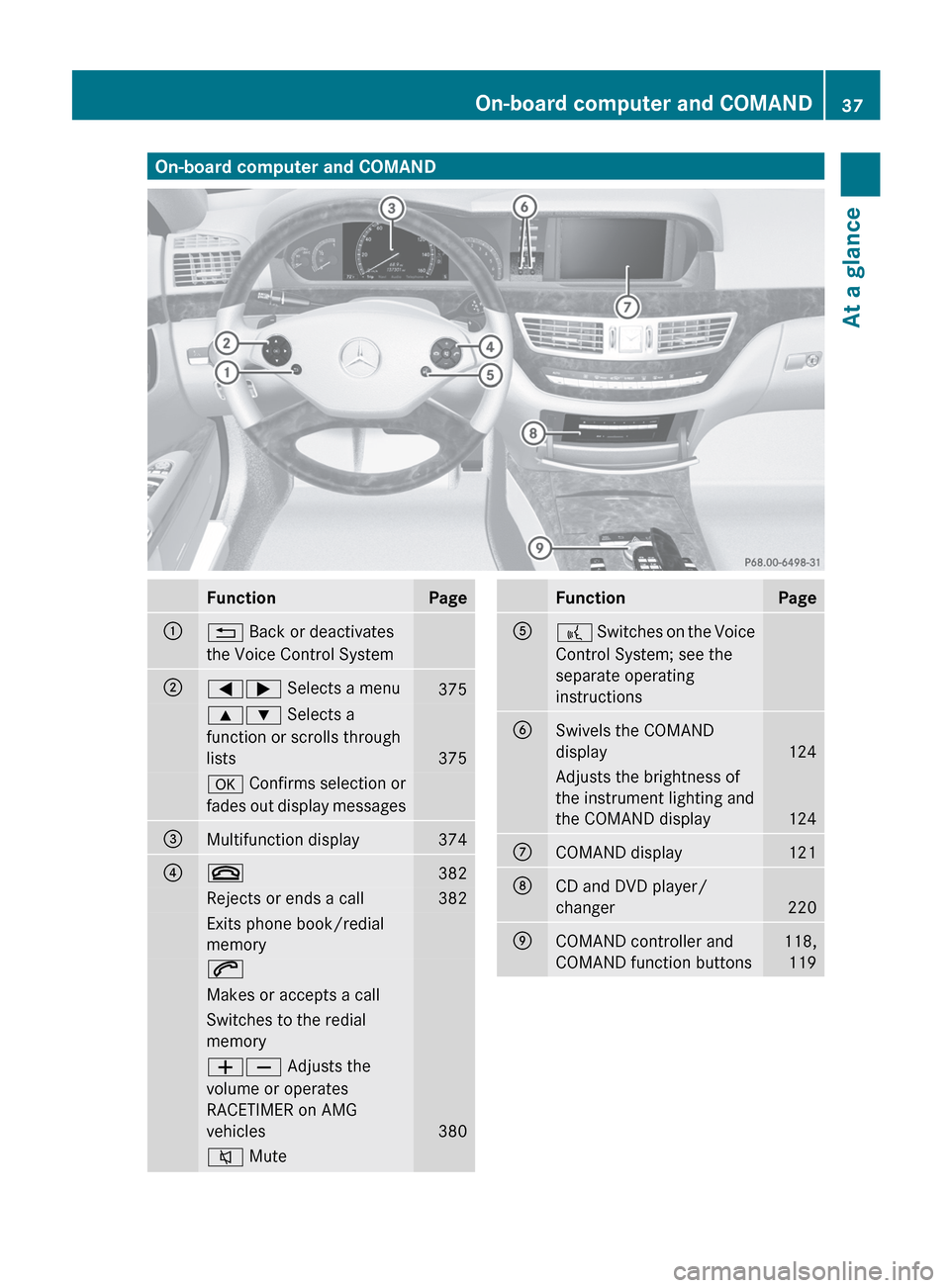
On-board computer and COMANDFunctionPage:% Back or deactivates
the Voice Control System;=; Selects a menu3759: Selects a
function or scrolls through
lists
375
a Confirms selection or
fades out display messages=Multifunction display374?~382Rejects or ends a call382Exits phone book/redial
memory6Makes or accepts a callSwitches to the redial
memoryWX Adjusts the
volume or operates
RACETIMER on AMG
vehicles
380
8 MuteFunctionPageA? Switches on the Voice
Control System; see the
separate operating
instructionsBSwivels the COMAND
display
124
Adjusts the brightness of
the instrument lighting and
the COMAND display
124
CCOMAND display121DCD and DVD player/
changer
220
ECOMAND controller and
COMAND function buttons118, 119On-board computer and COMAND37At a glance
Page 40 of 536
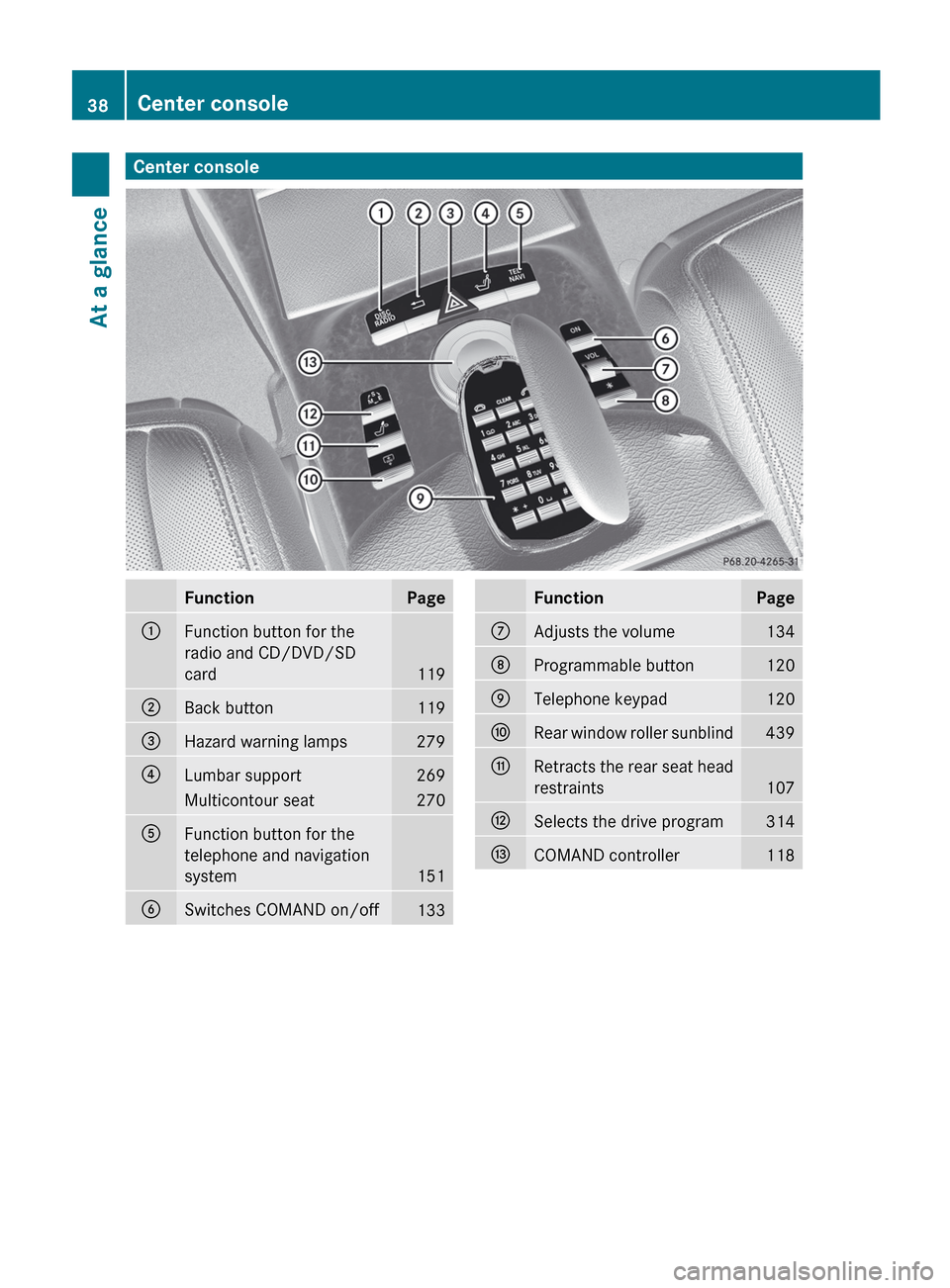
Center consoleFunctionPage:Function button for the
radio and CD/DVD/SD
card
119
;Back button119=Hazard warning lamps279?Lumbar support269Multicontour seat270AFunction button for the
telephone and navigation
system
151
BSwitches COMAND on/off133FunctionPageCAdjusts the volume134DProgrammable button120ETelephone keypad120FRear window roller sunblind439GRetracts the rear seat head
restraints
107
HSelects the drive program314ICOMAND controller11838Center consoleAt a glance
Page 41 of 536
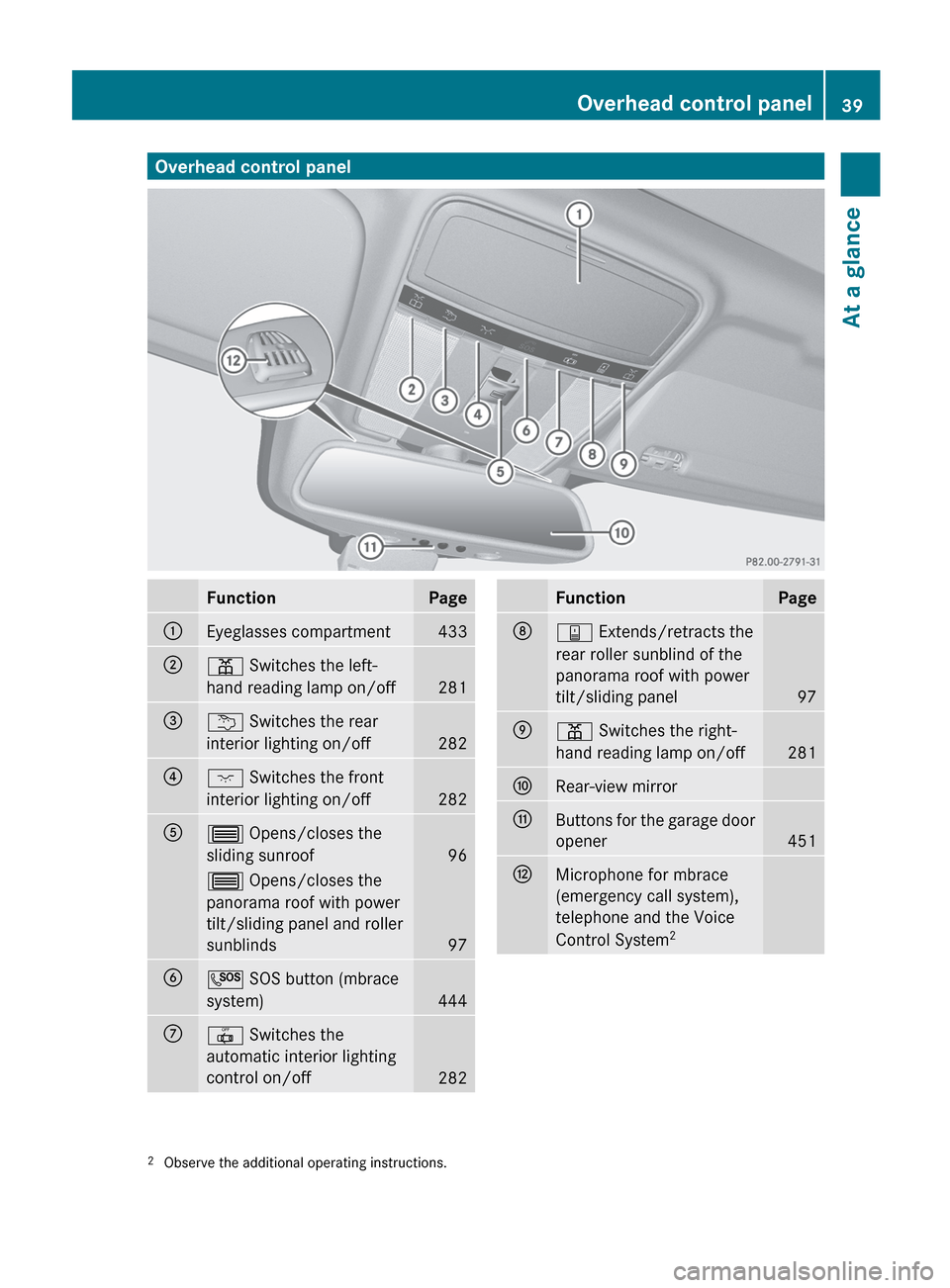
Overhead control panelFunctionPage:Eyeglasses compartment433;p Switches the left-
hand reading lamp on/off
281
=u Switches the rear
interior lighting on/off
282
?c Switches the front
interior lighting on/off
282
A3 Opens/closes the
sliding sunroof
96
3 Opens/closes the
panorama roof with power
tilt/sliding panel and roller
sunblinds
97
BG SOS button (mbrace
system)
444
C| Switches the
automatic interior lighting
control on/off
282
FunctionPageDy Extends/retracts the
rear roller sunblind of the
panorama roof with power
tilt/sliding panel
97
Ep Switches the right-
hand reading lamp on/off
281
FRear-view mirrorGButtons for the garage door
opener
451
HMicrophone for mbrace
(emergency call system),
telephone and the Voice
Control System 22
Observe the additional operating instructions.Overhead control panel39At a glance
Page 78 of 536
The alarm is not switched off, even if you
close the open door that has triggered it, for
example.
i If the alarm stays on for more than 30
seconds, the emergency call system
mbrace (USA only) or TELE AID (Canada
only) initiates a call to the Customer
Assistance Center automatically. The
emergency call system initiates the call
provided that:
R you have subscribed to the mbrace/
TELE AID service.
R the mbrace/TELE AID service has been
activated properly.
R the required mobile phone, power supply
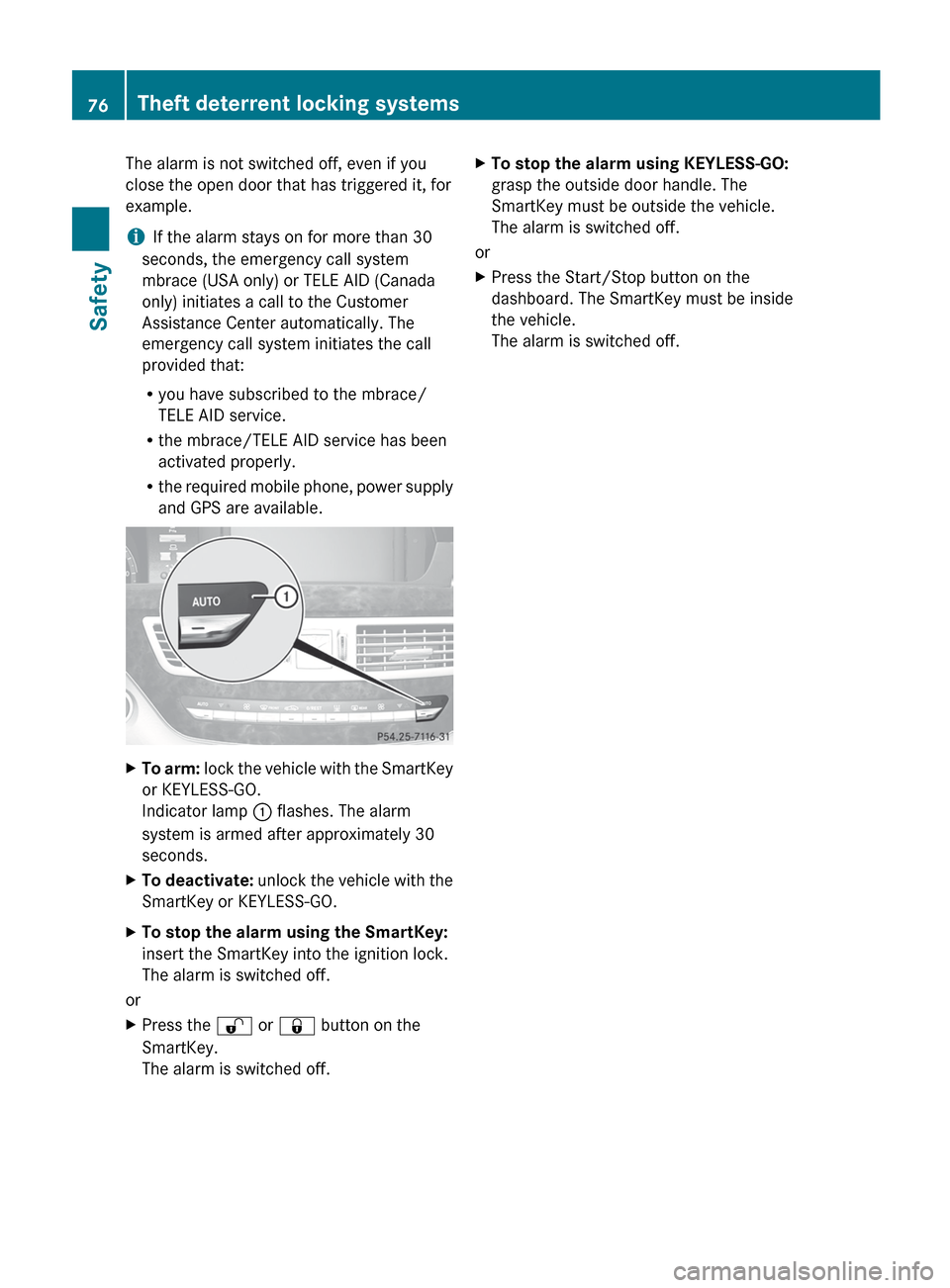
and GPS are available.XTo arm: lock the vehicle with the SmartKey
or KEYLESS-GO.
Indicator lamp : flashes. The alarm
system is armed after approximately 30
seconds.XTo deactivate: unlock the vehicle with the
SmartKey or KEYLESS-GO.XTo stop the alarm using the SmartKey:
insert the SmartKey into the ignition lock.
The alarm is switched off.
or
XPress the % or & button on the
SmartKey.
The alarm is switched off.XTo stop the alarm using KEYLESS-GO:
grasp the outside door handle. The
SmartKey must be outside the vehicle.
The alarm is switched off.
or
XPress the Start/Stop button on the
dashboard. The SmartKey must be inside
the vehicle.
The alarm is switched off.76Theft deterrent locking systemsSafety
Page 82 of 536
This device complies with RSS-210 of
Industry Canada. Operation is subject to
the following two conditions:
1. This device may not cause harmful
interference, and
2. this device must accept any interference
received, including interference that may
cause undesired operation.
Any unauthorized modification to this
device could void the user’s authority to
operate the equipment.
The Product label with FCC ID and IC
certification number can be found in the
battery case of the SmartKey.
Important notes on the use of KEYLESS-
GO
R The KEYLESS-GO key can be used like a
conventional key.
R You can combine KEYLESS-GO functions
with those of a conventional key, e.g.
unlock with KEYLESS-GO and lock with the
& button.
R Always carry your KEYLESS-GO key on your
person.
R Do not keep the KEYLESS-GO key together
with:
- electronic devices, e.g. a mobile phone
or another key
- metallic objects, e.g. coins or metal foil.
This can affect the functionality of
KEYLESS-GO.
R When locking and unlocking using
KEYLESS-GO, the distance between the
SmartKey and the corresponding door
handle must not exceed 3 ft (1 m).
R If the vehicle is parked for more than
72 hours, the KEYLESS-GO function is
deactivated. Pull the outer door handle and
switch on the ignition to reactivate the
KEYLESS-GO function.
R If the KEYLESS-GO key is removed from the
vehicle, it is possible that the system may
not recognize the SmartKey. The vehicle
can then not be locked or started using
KEYLESS-GO.
R If the KEYLESS-GO key has been removed
from the vehicle, e.g. if a passenger leaves
the vehicle with a KEYLESS-GO key:
- if the start/stop button is pressed or if
an attempt is made to lock the vehicle
with the locking button on the outer door
handle, the Key Not Detected message
appears in the multifunction display
- when the engine is running, the red Key
Not Detected message appears in the
multifunction display as you pull away.
Find the KEYLESS-GO key and change its
position in the vehicle. Carry the
KEYLESS-GO key in your shirt pocket, for
example.
R If you have started the engine with the
Start/Stop button, you can switch it off
again by:
- pressing the Start/Stop button again
- inserting the KEYLESS-GO key into the
ignition lock if the vehicle is stationary
and the automatic transmission is in park
position P.
R You could unlock the vehicle by mistake if
the distance between the KEYLESS-GO key
and the vehicle is less than 3 ft (1 m) and:
- an exterior door handle is hit by a water
jet
or
- you clean an exterior door handle.
R Bear in mind that the engine can be started
by any of the vehicle occupants if there is
a KEYLESS-GO key in the vehicle.80SmartKeyOpening/closing
Page 117 of 536
Useful information ............................116
Introduction ...................................... 116
At a glance ......................................... 118
System settings ................................ 143
Navigation ......................................... 150
Telephone .......................................... 193
Audio .................................................. 211
Video .................................................. 240
Rear Seat Entertainment System ....246
Vehicle ............................................... 260115COMAND