overhead MERCEDES-BENZ S-Class 2012 W221 Owner's Manual
[x] Cancel search | Manufacturer: MERCEDES-BENZ, Model Year: 2012, Model line: S-Class, Model: MERCEDES-BENZ S-Class 2012 W221Pages: 536, PDF Size: 25.27 MB
Page 19 of 536
Selecting your home address ........159
Setting route options (avoiding:
highways, toll roads, tunnels,
ferries) ........................................... 152
Setting the route type (short
route, fast route, dynamic route or
economic route) ............................ 152
Showing/hiding the menu .............152
Starting route calculation ..............156
Switching announcements on/off . 170
Switching to ................................... 151
Traffic report .................................. 174
Troubleshooting ............................. 192
NECK-PRO head restraints
Operation ......................................... 55
Resetting after being triggered ........56
NECK-PRO luxury head restraints
Operation ......................................... 55
Resetting after being triggered ........56
Night View Assist Plus
Activating/deactivating .................357
Cleaning ......................................... 467
Display message ............................ 408
Function/notes ............................. 357
Problem (malfunction) ...................360
North orientation (navigation) ......... 184
Notes on breaking-in a new
vehicle ................................................ 302
Number keypad ................................. 129
O
Occupant Classification System
(OCS) Faults ............................................... 54
Operation ......................................... 50
System self-test ............................... 53
Occupant safety
Children in the vehicle .....................62
System overview .............................. 44
Octane number (fuel) ........................ 525
Odometer ........................................... 376
see Trip odometer
Off-road .............................................. 173
Oil see Engine oil
On-board computer
AMG menu ..................................... 379
Assistance menu ........................... 383
Audio menu ................................... 378
Displaying a service message ........462
Display messages ..........................388
DISTRONIC PLUS ........................... 339
Important safety notes ..................372
Menu overview .............................. 375
Message memory .......................... 388
Navigation menu ............................ 377
Operating video DVD .....................379
Operation ....................................... 373
RACETIMER ................................... 380
Service menu ................................. 385
Settings menu ............................... 385
Standard display ............................ 376
Telephone menu ............................ 382
Trip menu ...................................... 376
Opening height restriction for
trunk lid .............................................. 265
Operating system see On-board computer
Outside lighting
Delayed switch-off (COMAND) .......263
Outside temperature display ........... 373
Overhead control panel ...................... 39
Override feature Rear side windows ...........................67
Own address (navigation)
see Home address
P
Paint code number ............................ 521
Paintwork (cleaning instructions) ... 465
Panic alarm .......................................... 68
Panorama roof with power tilt/
sliding panel Opening/closing .............................. 97
Problem (malfunction) ...................100
Resetting ......................................... 99
Panorama sliding sunroof
Important safety notes ....................95
Parcel net ........................................... 435
Parking ............................................... 323
Important safety notes ..................323
Index17
Page 35 of 536
Cockpit ................................................. 34
Instrument cluster ..............................35
On-board computer and COMAND .....37
Center console .................................... 38
Overhead control panel ......................39
Door control panel .............................. 40
Rear seats ............................................ 4233At a glance
Page 36 of 536
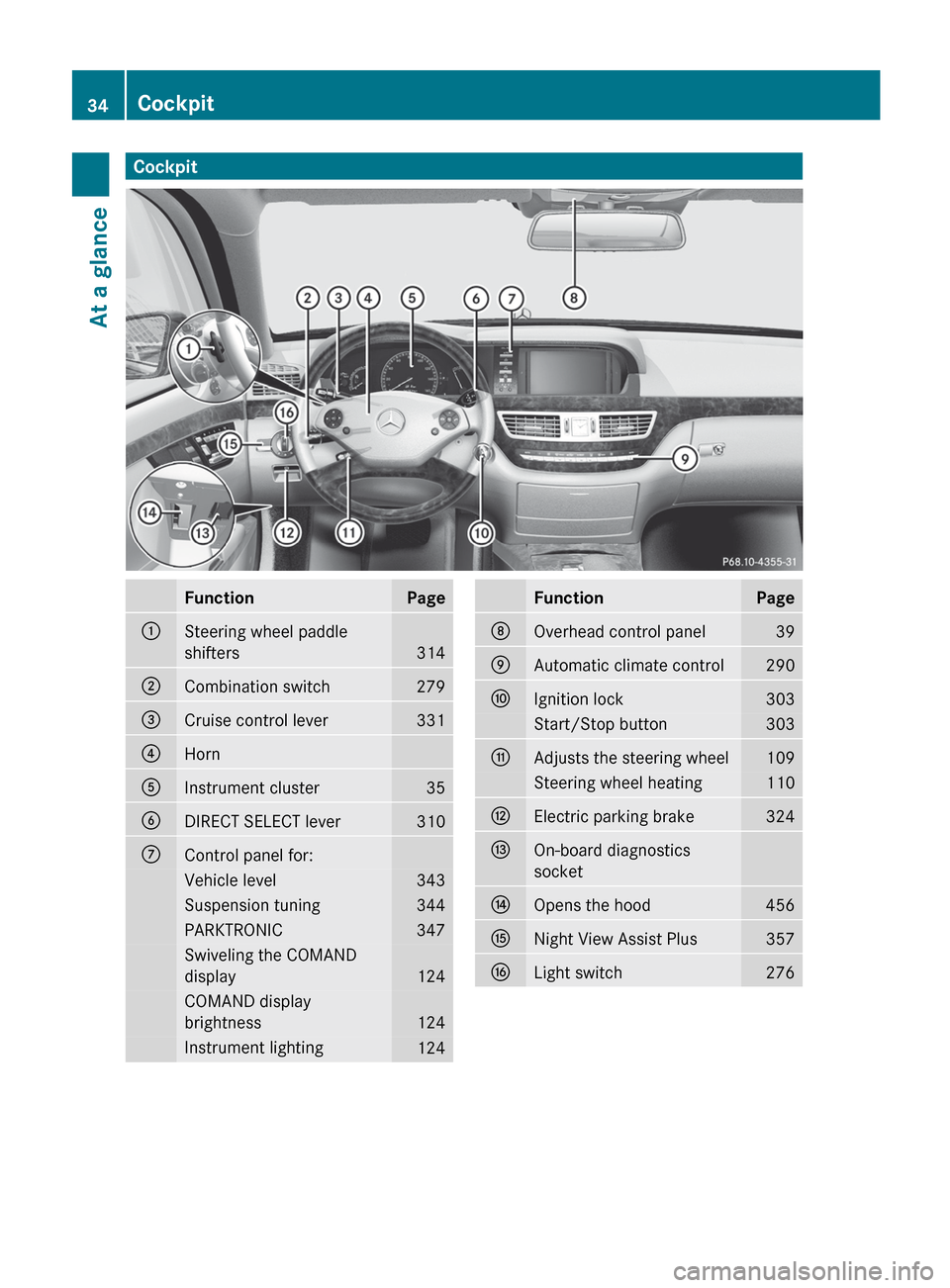
CockpitFunctionPage:Steering wheel paddle
shifters
314
;Combination switch279=Cruise control lever331?HornAInstrument cluster35BDIRECT SELECT lever310CControl panel for:Vehicle level343Suspension tuning344PARKTRONIC347Swiveling the COMAND
display
124
COMAND display
brightness
124
Instrument lighting124FunctionPageDOverhead control panel39EAutomatic climate control290FIgnition lock303Start/Stop button303GAdjusts the steering wheel109Steering wheel heating110HElectric parking brake324IOn-board diagnostics
socketJOpens the hood456KNight View Assist Plus357LLight switch27634CockpitAt a glance
Page 41 of 536
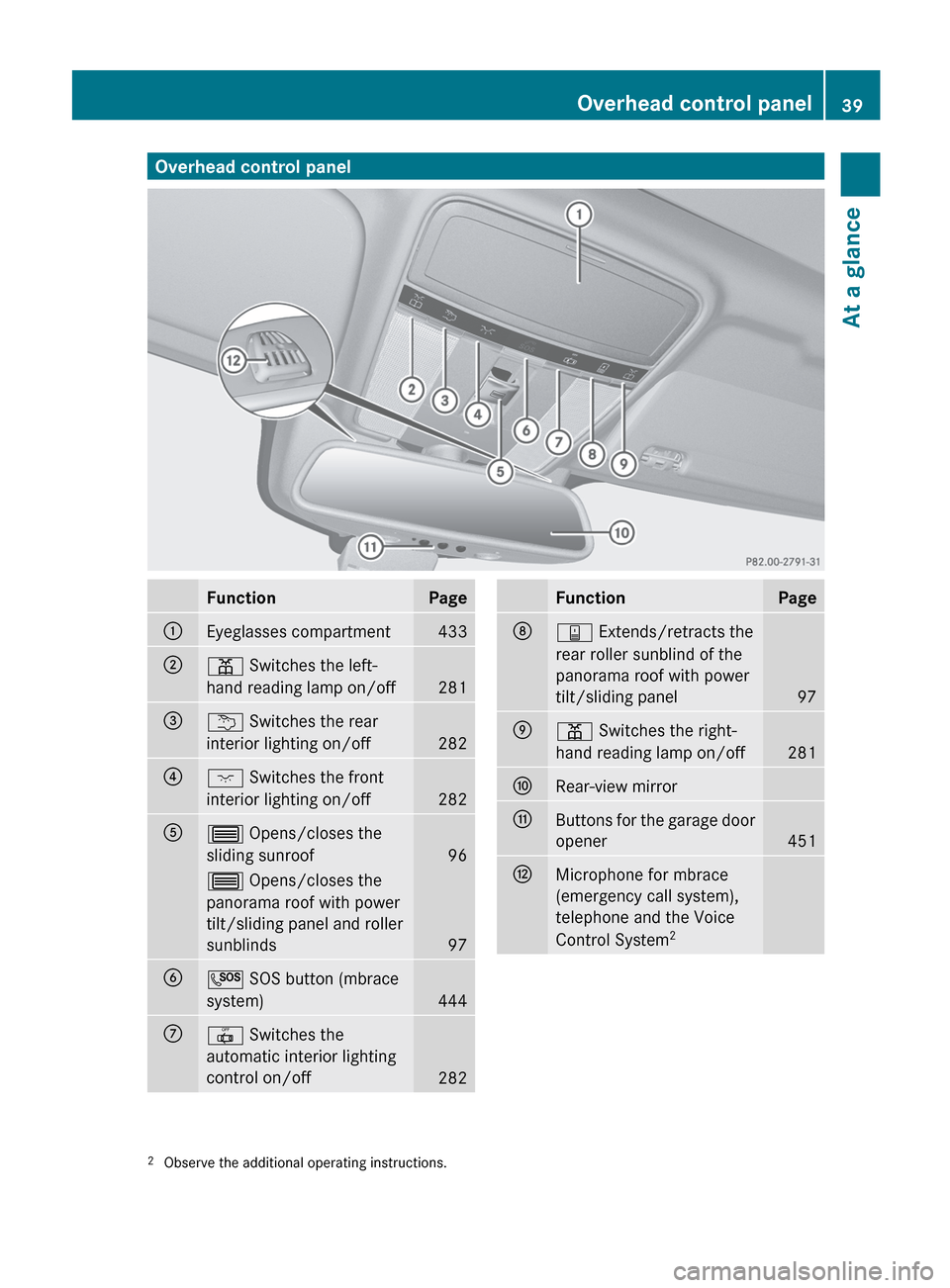
Overhead control panelFunctionPage:Eyeglasses compartment433;p Switches the left-
hand reading lamp on/off
281
=u Switches the rear
interior lighting on/off
282
?c Switches the front
interior lighting on/off
282
A3 Opens/closes the
sliding sunroof
96
3 Opens/closes the
panorama roof with power
tilt/sliding panel and roller
sunblinds
97
BG SOS button (mbrace
system)
444
C| Switches the
automatic interior lighting
control on/off
282
FunctionPageDy Extends/retracts the
rear roller sunblind of the
panorama roof with power
tilt/sliding panel
97
Ep Switches the right-
hand reading lamp on/off
281
FRear-view mirrorGButtons for the garage door
opener
451
HMicrophone for mbrace
(emergency call system),
telephone and the Voice
Control System 22
Observe the additional operating instructions.Overhead control panel39At a glance
Page 98 of 536
term "sliding sunroof" refers to both types of
sliding sunroof.GWARNING
When opening or closing the sliding sunroof,
make sure that there is no danger of anyone
being harmed by the opening/closing
procedure.
The sliding sunroof is equipped with
automatic operation and the anti-entrapment
feature. If the movement of the sliding sunroof
is blocked during the closing procedure, the
sliding sunroof will stop and open slightly.
The sliding sunroof operates differently when
the sliding sunroof switch is pressed and held.
See the "Problems with the sliding sunroof"
section for more details.
The opening/closing procedure of the sliding
sunroof can be immediately halted by
releasing the sliding sunroof switch or, if the
sliding sunroof switch was moved past the
resistance point and released, by moving the
sliding sunroof switch in any direction.
GWARNING
The sliding sunroof is made out of glass. In the
event of an accident, the glass may shatter.
This may result in an opening in the roof.
In a vehicle rollover, occupants not wearing
their seat belts or not wearing them properly
may be thrown out of the opening. Such an
opening also presents a potential for injury for
occupants wearing their seat belts properly,
as entire body parts or portions of them may
protrude from the passenger compartment.
! Only open the sliding sunroof if it is free
of snow and ice. Otherwise, malfunctions
may occur.
Do not allow anything to protrude from the
sliding sunroof. Otherwise, the seals could
be damaged.
! The weather can change abruptly. It could
start to rain or snow. Make sure that the
sliding sunroof is closed when you leave the
vehicle. The vehicle electronics can be
damaged if water enters the vehicle
interior.
i Resonance noises can occur in addition
to the usual airflow noises when the sliding
sunroof is open. They are caused by minor
pressure fluctuations in the vehicle interior.
Change the position of the sliding sunroof
or open a side window slightly to reduce or
eliminate these noises.
Operating the sliding sunroof
Opening and closing
i You can continue to operate the sliding
sunroof after switching off the engine or
removing the SmartKey from the ignition
lock. This function is available for up to five
minutes or until the driver's or front-
passenger door is opened.
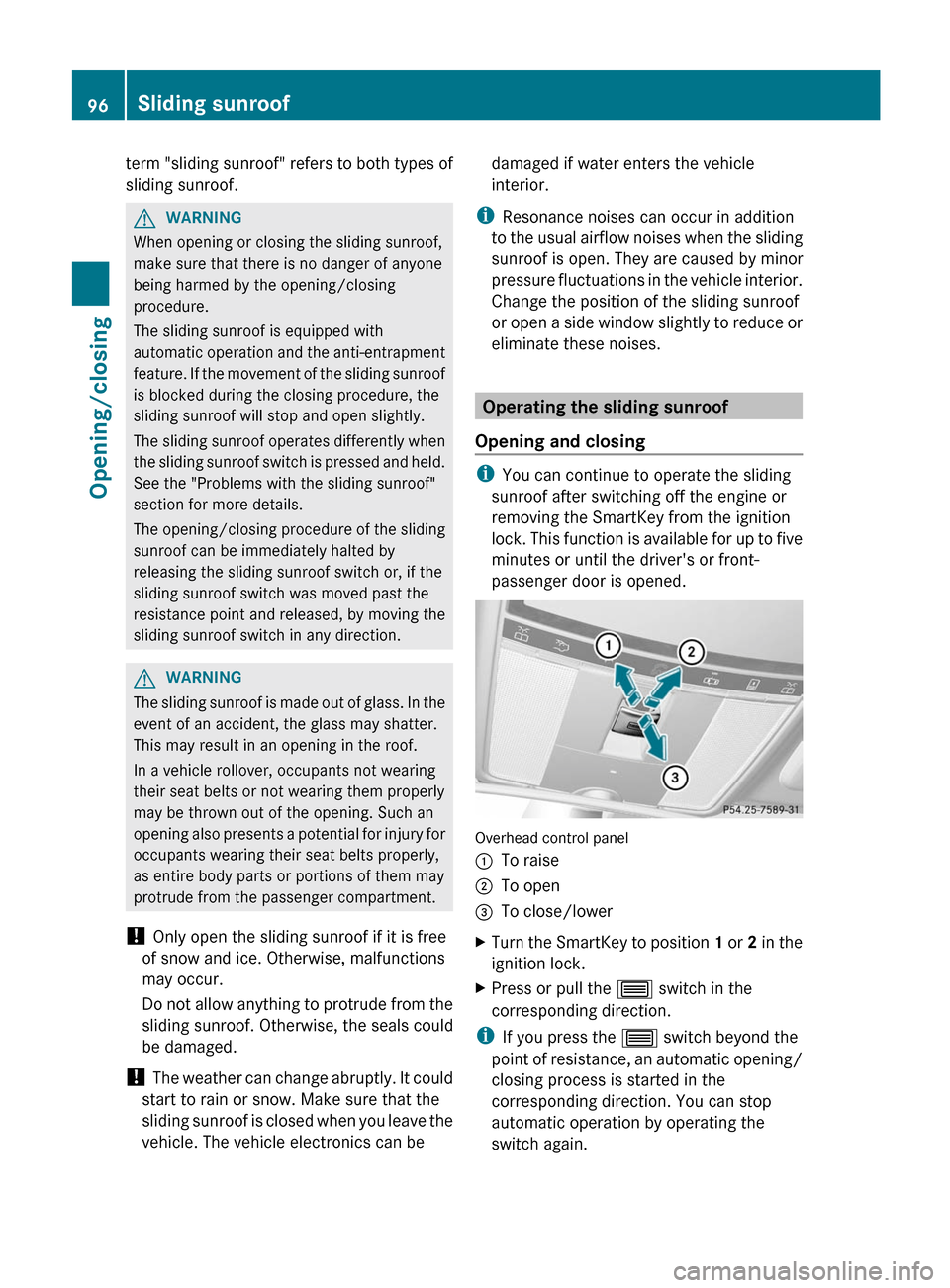
Overhead control panel
:To raise;To open=To close/lowerXTurn the SmartKey to position 1 or 2 in the
ignition lock.XPress or pull the 3 switch in the
corresponding direction.
i If you press the 3 switch beyond the
point of resistance, an automatic opening/
closing process is started in the
corresponding direction. You can stop
automatic operation by operating the
switch again.
96Sliding sunroofOpening/closing
Page 99 of 536

When raising the roof, automatic operation
is only available if the sliding sunroof is in
the closed position.
When opening the roof, automatic
operation is only available if the sliding
sunroof is not raised.
The sun protection cover automatically opens
along with the sliding sunroof. You can open
or close the sun protection cover manually
when the sliding sunroof is raised or closed.
Resetting
Reset the sliding sunroof if it does not move
smoothly.
XTurn the SmartKey to position 2 in the
ignition lock.XRaise the sliding sunroof fully at the rear
( Y page 96).XKeep the 3 switch pressed for another
second.XMake sure that the sliding sunroof can be
fully opened and closed again (Y page 96).XIf this is not the case, repeat the steps
above again.
! If the sliding sunroof still cannot be
opened or closed fully after resetting,
contact a qualified specialist workshop.
Operating the panorama roof with
power tilt/sliding panel
Opening and closing
Overhead control panel
:To raise;To open=To close/lower
The panorama roof with power tilt/sliding
panel can only be operated when the roller
sunblind is open.
i If the front roller sunblind is closed, it
opens first when the panorama roof with
power tilt/sliding panel is raised.
XTurn the SmartKey to position 1 or 2 in the
ignition lock.XPush or pull the 3 switch in the
corresponding direction.
i If you press the 3 switch beyond the
point of resistance, an automatic opening/
closing process is started in the
corresponding direction. You can stop
automatic operation by operating the
switch again.
Operating the sunblinds for the
panorama roof with power tilt/sliding
panel
General notes
The roller sunblinds shield the vehicle interior
from sunlight. The front roller sunblind can
only be opened and closed when the
Sliding sunroof97Opening/closingZ
Page 100 of 536

panorama roof with power tilt/sliding panel
is closed. The front and rear roller sunblinds
can be operated individually.
Operating the front roller sunblindGWARNING
When opening or closing the front roller
sunblind, make sure no one is in danger of
being injured by the opening or closing
procedure.
The front roller sunblind is equipped with
automatic operation and the anti-entrapment
feature. If the movement of the front roller
sunblind is blocked during the closing
procedure, the front roller sunblind will stop
and retract slightly.
The opening or closing of the front roller
sunblind can be immediately halted by
releasing the roof panel switch or, if the roof
panel switch was moved past the resistance
point and released, by moving the roof panel
switch in any direction.
Overhead control panel
:To open;To open=To closeXTurn the SmartKey to position 1 or 2 in the
ignition lock.XPress or pull the 3 switch in the
corresponding direction.
i If you press the 3 switch beyond the
point of resistance, an automatic opening/
closing process is started in the
corresponding direction. You can stop
automatic operation by operating the
switch again.
Operating the rear roller sunblind
Operating from the front
GWARNING
When opening or closing the rear roller
sunblind, make sure no one is in danger of
being injured by the opening or closing
procedure.
The rear roller sunblind is equipped with
automatic operation and the anti-entrapment
feature. If the movement of the rear roller
sunblind is blocked during the closing
procedure, the rear roller sunblind will stop
and retract slightly.
The opening and closing of the rear roller
sunblind can be immediately halted by
pressing the sunblind switch again.
Overhead control panel
XTo open or close: press button :.
The rear roller sunblind opens or closes
fully.XTo stop: press button : again.
i
You must first open or close the rear roller
sunblind fully before you can move it in the
other direction.
Operating from the rear compartment
GWARNING
When opening or closing the rear roller
sunblind, make sure no one is in danger of
98Sliding sunroofOpening/closing
Page 102 of 536
XMake sure that the rear roller sunblind can
be opened fully again ( Y page 98).XIf this is not the case, repeat the steps
above again.
Problems with the sliding sunroof
Your vehicle may be equipped with a sliding
sunroof or a panorama roof with power tilt/
sliding panel. In the following section, the
term "sliding sunroof" refers to both types of
sliding sunroof.
Problem: the sunroof cannot be closed
and you cannot see the cause.
GWARNING
You could be severely or even fatally injured
when closing the sliding sunroof with
increased closing force or if the anti-
entrapment feature is deactivated. Make sure
that nobody can become trapped when
closing the sliding sunroof.
If the sliding sunroof is obstructed during
closing and reopens again slightly:
XImmediately after the sliding sunroof
blocks, pull the 3 switch in the
overhead control panel down to the point
of resistance and hold it until the sliding
sunroof is closed.
The sliding sunroof is closed with increased
force.
If the sliding sunroof is obstructed again
during closing and reopens again slightly:
XImmediately after the sliding sunroof
blocks, pull the 3 switch in the
overhead control panel down to the point
of resistance and hold it until the sliding
sunroof is closed.
The sliding sunroof is closed without the
anti-entrapment feature.GWARNING
Pressing and holding the sliding sunroof
switch to close the sliding sunroof
immediately after it had been blocked two
times will cause the sliding sunroof to close
without the anti-entrapment feature for as
long as you hold the switch.
! If the sliding sunroof still cannot be
opened or closed as a result of a
malfunction, contact a qualified specialist
workshop.100Sliding sunroofOpening/closing
Page 282 of 536
Cornering light function
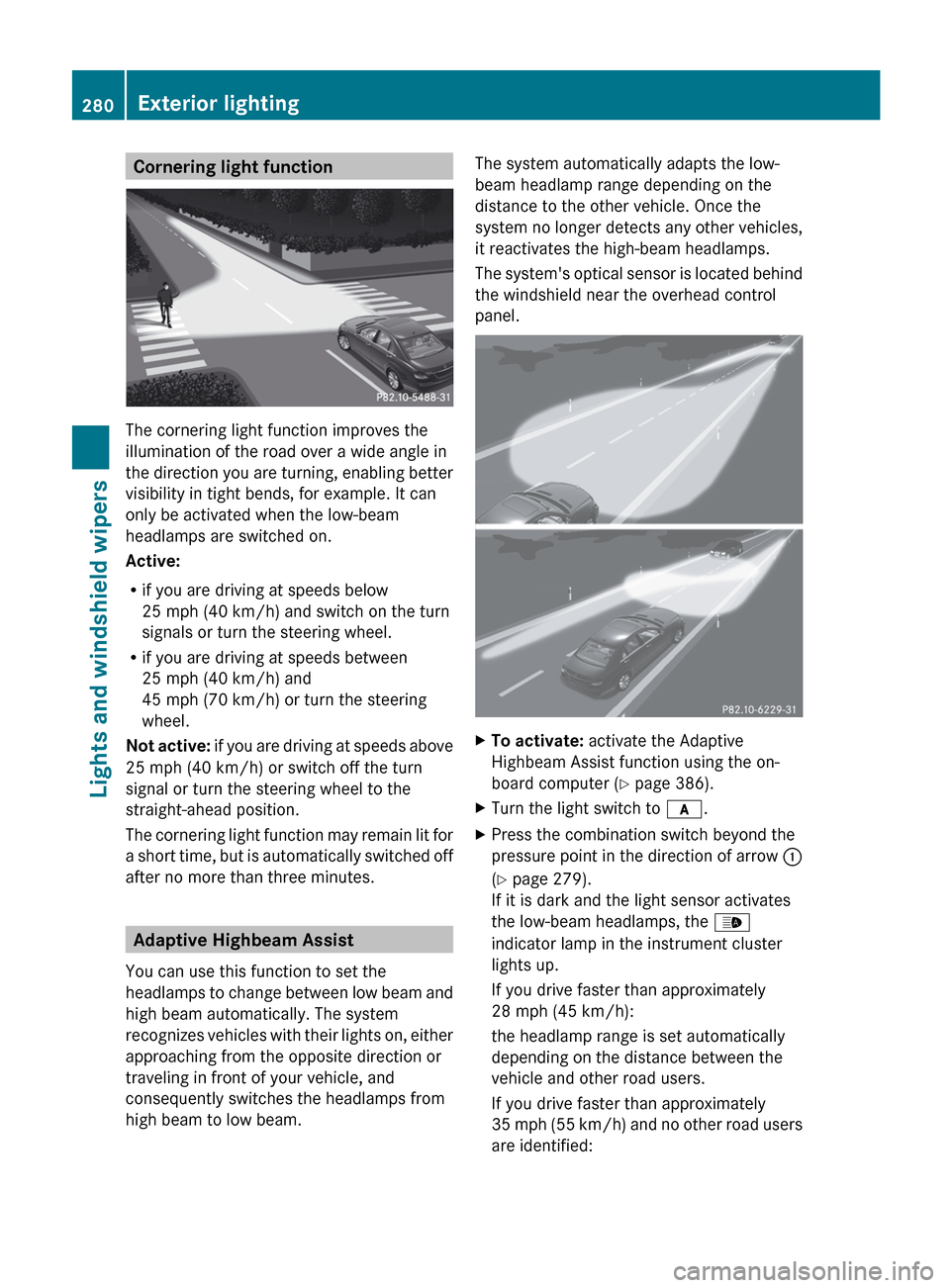
The cornering light function improves the
illumination of the road over a wide angle in
the direction you are turning, enabling better
visibility in tight bends, for example. It can
only be activated when the low-beam
headlamps are switched on.
Active:
R if you are driving at speeds below
25 mph (40 km/h) and switch on the turn
signals or turn the steering wheel.
R if you are driving at speeds between
25 mph (40 km/h) and
45 mph (70 km/h) or turn the steering
wheel.
Not active: if you are driving at speeds above
25 mph (40 km/h) or switch off the turn
signal or turn the steering wheel to the
straight-ahead position.
The cornering light function may remain lit for
a short time, but is automatically switched off
after no more than three minutes.
Adaptive Highbeam Assist
You can use this function to set the
headlamps to change between low beam and
high beam automatically. The system
recognizes vehicles with their lights on, either
approaching from the opposite direction or
traveling in front of your vehicle, and
consequently switches the headlamps from
high beam to low beam.
The system automatically adapts the low-
beam headlamp range depending on the
distance to the other vehicle. Once the
system no longer detects any other vehicles,
it reactivates the high-beam headlamps.
The system's optical sensor is located behind
the windshield near the overhead control
panel.XTo activate: activate the Adaptive
Highbeam Assist function using the on-
board computer ( Y page 386).XTurn the light switch to c.XPress the combination switch beyond the
pressure point in the direction of arrow :
( Y page 279).
If it is dark and the light sensor activates
the low-beam headlamps, the _
indicator lamp in the instrument cluster
lights up.
If you drive faster than approximately
28 mph (45 km/h):
the headlamp range is set automatically
depending on the distance between the
vehicle and other road users.
If you drive faster than approximately
35 mph (55 km/h) and no other road users
are identified:280Exterior lightingLights and windshield wipers
Page 283 of 536
the high-beam headlamps are switched on
automatically. The K indicator lamp in
the instrument cluster also lights up.
When you drive slower than approximately
30 mph (45 km/h) or if other road users
are identified or if the roads are sufficiently
illuminated:
the high-beam headlamps are switched off
automatically. The K indicator lamp in
the instrument cluster goes out. The _
indicator lamp in the instrument cluster
stays on.XTo deactivate: move the combination
switch back to its normal position.
The _ indicator lamp in the instrument
cluster goes out.GWARNING
The Adaptive Highbeam Assist is only an aid
intended to support you while driving. The
driver is and remains responsible for proper
vehicle lighting in accordance with the
prevailing light, sight and traffic conditions.
The system may be impaired or unavailable
when
R visibility is poor, e.g. due to snow, rain, fog,
or heavy spray
R the optical sensor area of the windshield is
dirty, fogged up, or covered by a sticker for
example
The system cannot recognize the following
road users:
R Road users without a lighting system of
their own, e.g. pedestrians
R Road users with dim lighting of their own,
e.g. cyclists
R Road users whose lighting is obstructed,
e.g. road users behind a guardrail
R In some seldom cases, even road users with
a lighting system of their own may be
recognized too late or not at all.
The automatic high-beam headlamps will then
not be deactivated or it will be activated in
spite of preceding or oncoming road users.
This could endanger you and/or others and
cause an accident. Always pay close attention
to the traffic situation and switch off the high
beam manually if necessary.
Headlamps fogged up on the inside
The headlamps may fog up on the inside if
there is high atmospheric humidity.
XDrive with the headlamps switched on.
The level of moisture diminishes,
depending on the length of the journey and
the weather conditions (humidity and
temperature).
If the level of moisture does not diminish:
XHave the headlamps checked at a qualified
specialist workshop.
Interior lighting
Overview of interior lighting
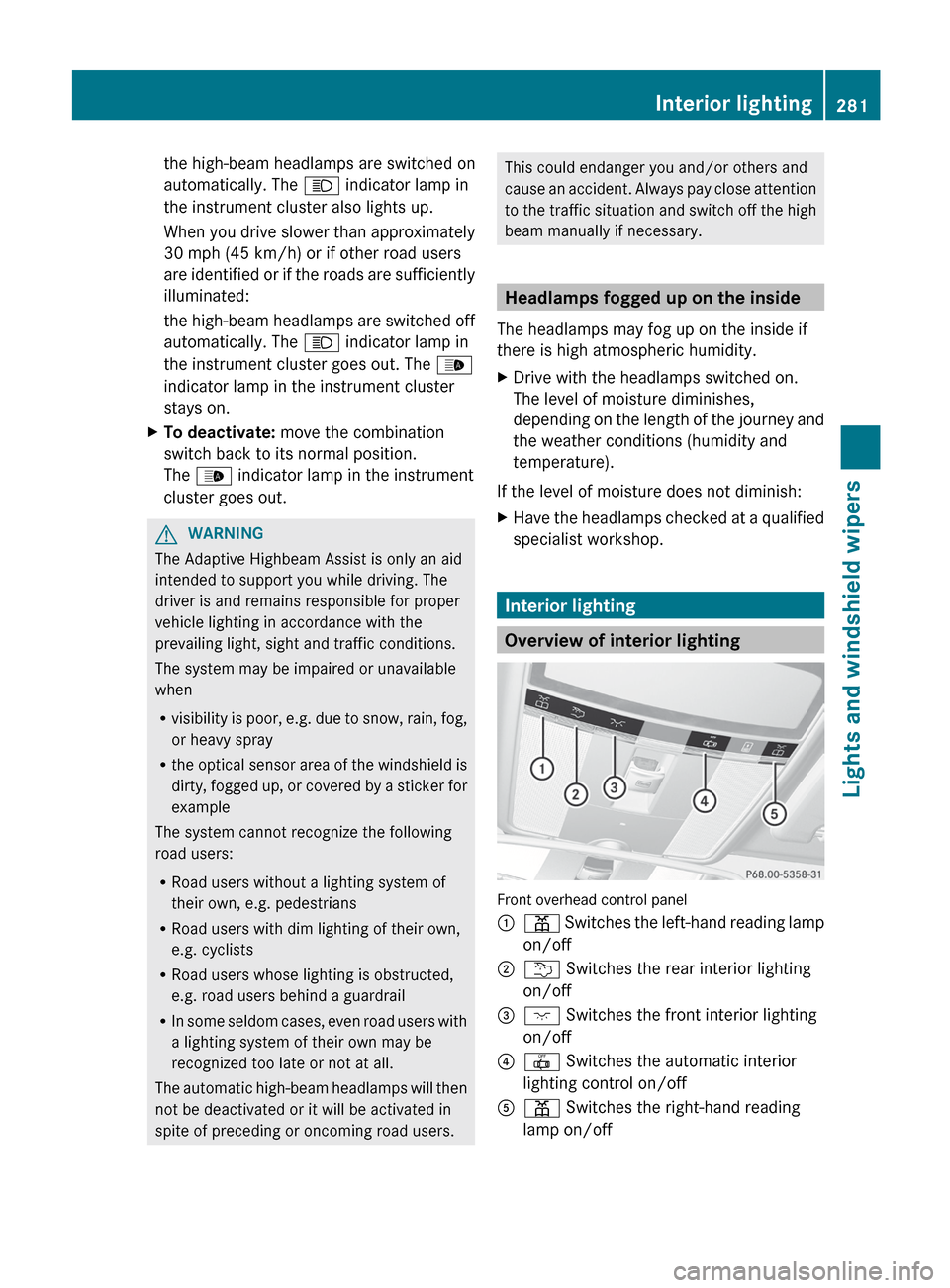
Front overhead control panel
:p Switches the left-hand reading lamp
on/off;u Switches the rear interior lighting
on/off=c Switches the front interior lighting
on/off?| Switches the automatic interior
lighting control on/offAp Switches the right-hand reading
lamp on/offInterior lighting281Lights and windshield wipersZ